Amazon ECS Deployment Lifecycle - Early Success Criteria, Deferred Cleanup, and Managed Daemon Rollouts
First Published:
Last Updated:
Early success criteria changes this. By setting
sourceServiceRevisionCleanup to DEFERRED, a deployment can now be declared successful even while tasks from the source revision are still running. Setting it to BLOCKING continues the previous behavior, declaring success only after cleanup is complete. There are only two available options.It's crucial not to misinterpret this feature as a way to make deployments faster. ECS hasn't become faster. Instead, the definition of "success" has been moved forward, and cleanup has been moved outside of the success determination process. Furthermore, the moment a deployment is declared successful, all supporting mechanisms are released. The ECS Developer Guide highlights this point twice on the page dedicated to early success criteria.
After Amazon ECS completes the deployment, the deployment circuit breaker and CloudWatch alarm rollback
no longer apply.
You can't stop a deployment after it completes.This article focuses on conveying these two points to operations teams. It introduces four success conditions, two enumeration values, a ceiling of two weeks, and a managed daemon replacement process that operates on a completely separate timeline from the success determination.
Regarding Scope. This article addresses the timeline for when a selected deployment is declared successful and when cleanup is initiated. Section 7 of the previously published Amazon ECS on Fargate Microservices Architecture Guide covers the choice between rolling deployments, native blue/green deployments, and CodeDeploy. This article does not discuss the selection of deployment methods. AWS History and Timeline regarding Amazon ECS carries the dates on which each ECS feature arrived. This article does not provide a historical timeline. Discussions about rolling back the cluster itself are covered in a separate article in this series: Rolling Back an Amazon EKS Cluster Version. While it concerns the same cluster, it operates on a different layer. This article focuses on the service deployment layer, whereas that article addresses the control plane layer. Rollbacks at the data layer are discussed in Replication Topologies on Amazon Aurora MySQL.
⛔ There are three instances where the same term refers to different things. They are pinned down here, before anything else.
The first is Managed Instances. The Amazon ECS Managed Instances discussed in this article are a distinct feature from the AWS Lambda Managed Instances handled in the previously published AWS Lambda Managed Instances. Both terms use the word "capacity provider," but they refer to different services.
The second is circuit breaker. The "deployment circuit breaker" in this article refers to ECS's failure detection mechanism, while the circuit breaker in the previously published LLM Inference Resilience Patterns on AWS is the one that sits on the calling side.
The third is daemon. While ECS has previously had a DAEMON scheduling strategy for EC2 launch types, the Managed Daemons discussed in this article represent a different mechanism. The developer guide itself notes this distinction.
Amazon ECS offers a DAEMON scheduling strategy for Amazon ECS services for the Amazon EC2 launch type.
Managed Daemons is a new capability built for Amazon ECS Managed Instances to simplify daemon deployments
and provide stronger daemon coverage guarantees.
Regarding terminology. This article uses the terms "success," "completion," and "stability" in the following way. "Success" refers to the service deployment reaching a state of
SUCCESSFUL. "Completion" means that ECS considers the deployment finished and reduces monitoring. These two terms refer to the same point in time. "Stability" refers to a state where the target revision's task count has reached the desired number, and all tasks are healthy. Enabling early success criteria undermines the assumption that success and stability occur at the same time.Regarding verification dates. All information in this article regarding supported states, limits, default values, enumerations, and field names was verified against AWS's primary documentation as of September 15, 2026. Values are subject to change. Limits and defaults may be revised. Whenever this article mentions specific numbers or enumerations, it will indicate the document from which the information was taken.
This article does not discuss pricing. It does not cover the costs associated with running both old and new revisions concurrently, nor does it cover the costs associated with the resources consumed by daemon tasks. This is not a disaster recovery guide. This article describes how the rollback range is defined.
Table of Contents
- 1. When a Deployment Is Over
- 2. The Four Things the Default Deployment Waits For
- 3. The Percentage That Moves the Definition of Success
- 4. Whether Cleanup Sits Inside or Outside the Success Test
- 5. What Can Take the Success Back, and When It Stops Applying
- 6. What the API Reports After the Deployment Ends
- 7. Daemon Rollouts Run on a Different Lifecycle
- 8. What This Lifecycle Does Not Cover
- 9. Failure Modes
- 10. Frequently Asked Questions
- 11. Summary
- 12. References
1. When a Deployment Is Over
1.1 Questions Addressed in This Article
When operations teams deploying services using ECS decide whether to mark a deployment as successful, they come back to three questions.First, what exactly is completed when a deployment is marked as successful? Are all new tasks running? Are the old tasks being terminated? If not, when will they be terminated?
Second, what happens if issues arise after a deployment is declared successful? Will the circuit breaker revert? Will CloudWatch alarms trigger? Can the deployment be manually stopped?
Third, what do you give up by declaring success earlier? If it is faster, you want it. But if something is being traded away for it, you want to know what that something is first.
This article will address these three questions in sequence. The answer to the third question is the scope of rollback monitoring. The earlier success is declared, the greater the portion of the deployment that proceeds without monitoring.
1.2 Three Settings Decide It
In an ECS rolling deployment, the only thing that moves the point at which success is declared isearlySuccessCriteria inside deploymentConfiguration. This object contains only three fields, as documented in the API reference for DeploymentEarlySuccessCriteria.| Field | Type | Required | Description |
|---|---|---|---|
enable | Boolean | Yes | Specifies whether to use early success criteria. The default value is false. |
healthyPercent | Integer | No | What percentage of the desired count has to be running and healthy on the target revision before the deployment is successful |
sourceServiceRevisionCleanup | String | No | Determines whether the cleanup of tasks from the source revision should occur before or after the success declaration. |
⚠ When
enable is set to true, both healthyPercent and sourceServiceRevisionCleanup become required fields. The API reference states this condition under enable.When set to true, Amazon ECS monitors the deployment to meet early success criteria. You must also specify
healthyPercent and sourceServiceRevisionCleanup.⚠ This feature is only supported for rolling deployments. The API reference notes this limitation at the top of
DeploymentEarlySuccessCriteria.You can use early success criteria only with rolling deployment strategy.As of September 15, 2026, the AWS announcement gives the coverage as all AWS Commercial Regions and the AWS GovCloud (US) Regions. There is no mention of this being a preview feature in either the developer guide, the API reference, or the announcement.
The
strategy within DeploymentConfiguration can take four values: ROLLING, BLUE_GREEN, LINEAR, and CANARY. Early success criteria applies only to the first of these, ROLLING. The previously published Amazon ECS on Fargate Microservices Architecture Guide covers the remaining three, which belong to the traffic shifting story.2. The Four Things the Default Deployment Waits For
2.1 Four Conditions
When you are not using early success criteria, the developer guide lists four conditions that must be met for ECS to complete the rolling deployment.Amazon ECS completes the deployment after all of the following are true:
The target service revision reaches 100 percent of the desired count, and all of its tasks are running
and healthy.
The deployment circuit breaker or a CloudWatch alarm does not trigger a rollback.
If you use alarm-based rollback, the bake time elapses.
The tasks on the source service revision are cleaned up.Summarize these four conditions and you break them. Round them down to healthy therefore successful, and the third and the fourth disappear. And the first and the fourth are exactly what early success criteria move.
2.2 Who Judges Each Condition
The four conditions can be categorized into three types.| Condition | Type | Who Determines? |
|---|---|---|
| The target revision has reached 100 percent of the desired count and all of its tasks are healthy | Counting tasks | Service scheduler |
| Neither the circuit breaker nor a CloudWatch alarm has triggered a rollback | Something not firing | Failure detection |
| If you use alarm-based rollback, the bake time has elapsed | Time passing | The clock |
| The tasks on the source revision have been cleaned up | Counting tasks | Service scheduler |
The first row and the fourth are the same kind of condition, and both come down to counting tasks. The first asks whether the new side has grown. The fourth asks whether the old side has gone. In rolling deployments, both processes proceed concurrently.
minimumHealthyPercent defines the lower limit for reducing the old side, while maximumPercent defines the overall upper limit for both new and old sides. Section 7.1 of the previously published Amazon ECS on Fargate Microservices Architecture Guide documents both parameters and their default values. This article will not reiterate that information. Instead, this article focuses on what remains after both processes have completed.Something not firing and time passing are a different kind of condition. These do not confirm that the deployment is progressing; rather, they confirm that the rollback mechanism has not been triggered. This will be discussed in Section 5.
2.3 What Has to Happen Before the Bake Time Starts
The bake time named in the third condition is a wait that appears only when you use alarm-based rollback. The developer guide describes two conditions that determine when this bake time begins.When you use the rollback option for your service deployments, Amazon ECS waits an additional amount of time
after the target service revision has been deployed before it sends a CloudWatch alarm. This is referred to as
the bake time. This time starts after:
All tasks for a target service revision are running and in a healthy state
Source service revisions are scaled down to 0%The default bake time is less than 5 minutes.⚠ Please pay close attention to the second starting condition. It states that the bake time begins after the source revision has been reduced to 0 percent. However, the page describing early success criteria places the bake time ahead of the cleanup of the source revision, regardless of whether it's processed in
BLOCKING or DEFERRED order. That is an order in which the bake time elapses before the source revision has been scaled down. These two descriptions refer to the same rolling deployment, and placing them side-by-side creates an inconsistency. Section 4 quotes both sequences verbatim. Based on the primary documentation, it is impossible to determine when the bake time begins when early success criteria is enabled.⚠ The same page also provides two different descriptions regarding whether the bake time can be configured. One of the listed considerations states:
The duration when both blue and green service revisions are running simultaneously after the production
traffic has shifted. Amazon ECS computes this time period based on the alarm configuration associated with
the deployment. You can't set this value.
The final section on the same page states:
You can configure the bake time for a rolling deployment. When you use CloudWatch alarms to detect failure,
if you change the bake time, and then decide you want the Amazon ECS default, you must manually set the
bake time.
⚠ The bake time can be a factor that makes the deployment appear to take longer. The developer guide explicitly states the reason why the status might remain in
IN_PROGRESS.You might notice that the deployment status remains IN_PROGRESS for a prolonged amount of time. The reason
for this is that Amazon ECS does not change the status until it has deleted the active deployment, and this
does not happen until after the bake time. Depending on your alarm configuration, the deployment might appear
to take several minutes longer than it does when you don't use alarms (even though the new primary task set
is scaled up and the old deployment is scaled down). If you use CloudFormation timeouts, consider increasing
the timeouts.This paragraph explains the context behind the introduction of early success criteria. The new tasks have finished coming up, and the old side has finished shrinking. Nevertheless, the status remains
IN_PROGRESS, and the pipeline waits. The pipeline isn't waiting for the deployment to progress; it's waiting for the conditions that trigger a declaration of success. It appears that early success criteria involves modifying these conditions.The
DeploymentConfiguration.bakeTimeInMinutes on the API side is described using terminology specific to blue/green deployments, and it is only required when using BLUE_GREEN. Whether you can manually configure the bake time for a rolling deployment is currently unclear based on the primary documentation as of September 15, 2026. This article does not attempt to draw a definitive conclusion. Check on your own service whether the setting is accepted. This article only asserts that the bake time is one of the four success conditions.2.4 Replacing an Unhealthy Task Never Crosses Revisions
During deployment, if a task becomes unhealthy, ECS replaces it. When replacing the task, ECS uses the revision that the task originally belonged to. The developer guide details this rule and its purpose.During a rolling deployment, when tasks become unhealthy, Amazon ECS replaces them to maintain your service's
minimumHealthyPercent and protect availability. Unhealthy tasks are replaced using the same service revision
they belong to. This ensures that unhealthy task replacement in the source revision is independent from task
failures in the target revision.A task on the source revision can fail without being counted as a failure of the target revision. A task on the source revision going unstable mid-deployment does not consume the circuit breaker threshold. Conversely, only failures on the target revision decide whether the deployment succeeds.
This independence becomes significant when combined with early success criteria. After a success is declared with
DEFERRED, even if tasks from the source revision are still running, any issues they encounter will not affect the deployment. This is because the deployment is already complete. At this point, the mechanism for replacing source revision tasks is no longer part of the deployment process.3. The Percentage That Moves the Definition of Success
3.1 What Percentage Does It Refer To?
healthyPercent represents, as a percentage of the service's desiredCount, the number of healthy tasks the deployment needs before it is considered successful. The API reference states:The percentage of healthy tasks that the target service revision must reach before Amazon ECS considers the
deployment successful. This percentage is relative to the service's desiredCount and must be an integer
between 0 and 100. This value must be greater than or equal to the minimumHealthyPercent value.The benchmark is
desiredCount. It is not the actual number of tasks currently running during deployment. If autoscaling adjusts desiredCount, the required number of healthy tasks will also adjust accordingly.The lower limit is
minimumHealthyPercent. The developer guide describes this same constraint using range-based language.The healthy percent must be between the service minimumHealthyPercent and 100.The default value for
minimumHealthyPercent in a replica service is 100 percent. Turn on early success criteria while minimumHealthyPercent still holds its default, and the only value healthyPercent accepts is 100. If you want to set a percentage below 100, you will need to lower minimumHealthyPercent in the same deploymentConfiguration. This setting was originally intended as a lower limit for availability during deployment, and is not meant to be a setting for determining success. It serves a dual purpose.⚠ However, even if
healthyPercent is set to 100, early success criteria is not rendered meaningless. sourceServiceRevisionCleanup functions independently of the percentage. If you set healthyPercent to 100 and specify DEFERRED, success is declared once the target revision reaches the desired count, and only the cleanup of the source revision moves outside the deployment. This allows you to detach only the cleanup process without changing the percentage.3.2 What Counts as Healthy in the Numerator
healthyPercent counts the number of healthy tasks. The page describing early success criteria only contains a single sentence regarding how to determine "healthy."A task is healthy when it passes the health checks that you configure for the service.⚠ The following section requires careful consideration of its scope. The rules for counting tasks as "healthy" are defined conditionally, but not on the early success criteria page. Instead, they are described in the explanation for
minimumHealthyPercent. The conditions listed there are written as the rules a rolling deployment uses to count tasks, and they do not say explicitly that the same rules apply to the numerator of healthyPercent. Nevertheless, the only health check configured for the service consists of this single set of conditions. Below is how that single set determines "healthy" for services that do not use a load balancer.A service is considered healthy if all essential containers within the tasks in the service pass their health
checks.
If a task has no essential containers with a health check defined, the service scheduler will wait for 40
seconds after a task reaches a RUNNING state before the task is counted towards the minimum healthy percent
total.
If a task has one or more essential containers with a health check defined, the service scheduler will wait
for the task to reach a healthy status before counting it towards the minimum healthy percent total. A task
is considered healthy when all essential containers within the task have passed their health checks. The
amount of time the service scheduler can wait for is determined by the container health check settings.For services that use a load balancer, a different process is used to determine health.
If a task has no essential containers with a health check defined, the service scheduler will wait for the
load balancer target group health check to return a healthy status before counting the task towards the
minimum healthy percent total.
If a task has an essential container with a health check defined, the service scheduler will wait for both
the task to reach a healthy status and the load balancer target group health check to return a healthy status
before counting the task towards the minimum healthy percent total.
⚠ For a service with neither a load balancer nor a container health check, what stands in for the health check is a 40-second wait. If a task has been in the
RUNNING state for 40 seconds, it is counted as healthy, regardless of whether it is responding to requests.⇒ Before declaring early success, there is one crucial thing to verify. Does the task definition include a health check for essential containers, or does the load balancer's target group health check actually monitor the service's responsiveness? Lower the percentage without checking this, and the declaration of success shrinks into a declaration of startup. This verification is meaningful regardless of whether the rules described above directly apply to
healthyPercent. If no health checks are defined, there is simply no basis for making a determination.3.3 Rounding Up
The developer guide settles the rounding in a single sentence.This value is rounded up.The same page also contains a table with calculation examples. Transcribed verbatim, it reads as follows:
| Desired Count | Healthy Percent | Required Healthy Tasks (Rounded Up) |
|---|---|---|
| 2 | 50 | 1 |
| 3 | 50 | 2 |
| 10 | 80 | 8 |
| 100 | 90 | 90 |
| 10 | 100 | 10 |
⚠ On a service with a small desired count, this rounding takes most of the meaning out of the percentage. Specify 50 percent against a desired count of 3 and the required number is 2. That is two out of three, not one out of three. With a desired count of 2 and 50 percent, the required number is 1, which is half. Even when specifying a percentage, only the rounded integer is applied. For services with a small number of tasks, it is advisable to create a table of required numbers rather than relying on a percentage specification.
3.4 What ECS Always Does Before It Evaluates the Percentage
There is one more condition that must be met before ECS can evaluate the percentage for early success criteria.Amazon ECS launches at least one task on the target service revision and waits for it to become healthy
before it evaluates the healthy percent.Even if you pass an extremely small value to
healthyPercent, the deployment is not declared successful until at least one task is running. The API's valid range is from 0 to 100. To use the lower bound of 0, minimumHealthyPercent must also be 0. However, even if you set it that low, ECS will always launch at least one task and wait for it to become healthy. This is one of the few explicitly defined lower limits, and it is the last guard against a misconfigured value.However, ECS only guarantees that at least one task will become healthy. For example, if you have a service with a desired count of 100 and set
healthyPercent to 0, ECS may declare success as soon as one task becomes healthy. The remaining 99 tasks come up outside the deployment.3.5 Where the Remaining Tasks Go
Once a certain percentage is reached, the target revision will continue to increase to 100 percent. What grows it is not the deployment.Amazon ECS launches any remaining tasks on the target service revision outside of the deployment, through
regular service scaling.The API reference says the same thing in different words.
Amazon ECS continues to scale the target service revision to 100 percent in the background.This one sentence sits closest to the core of this article. The remaining tasks do come up. They come up, but they come up outside the deployment. What sits outside the deployment is not covered by the mechanisms that protect the deployment. Section 5 follows that consequence.
4. Whether Cleanup Sits Inside or Outside the Success Test
4.1 Two Sequences
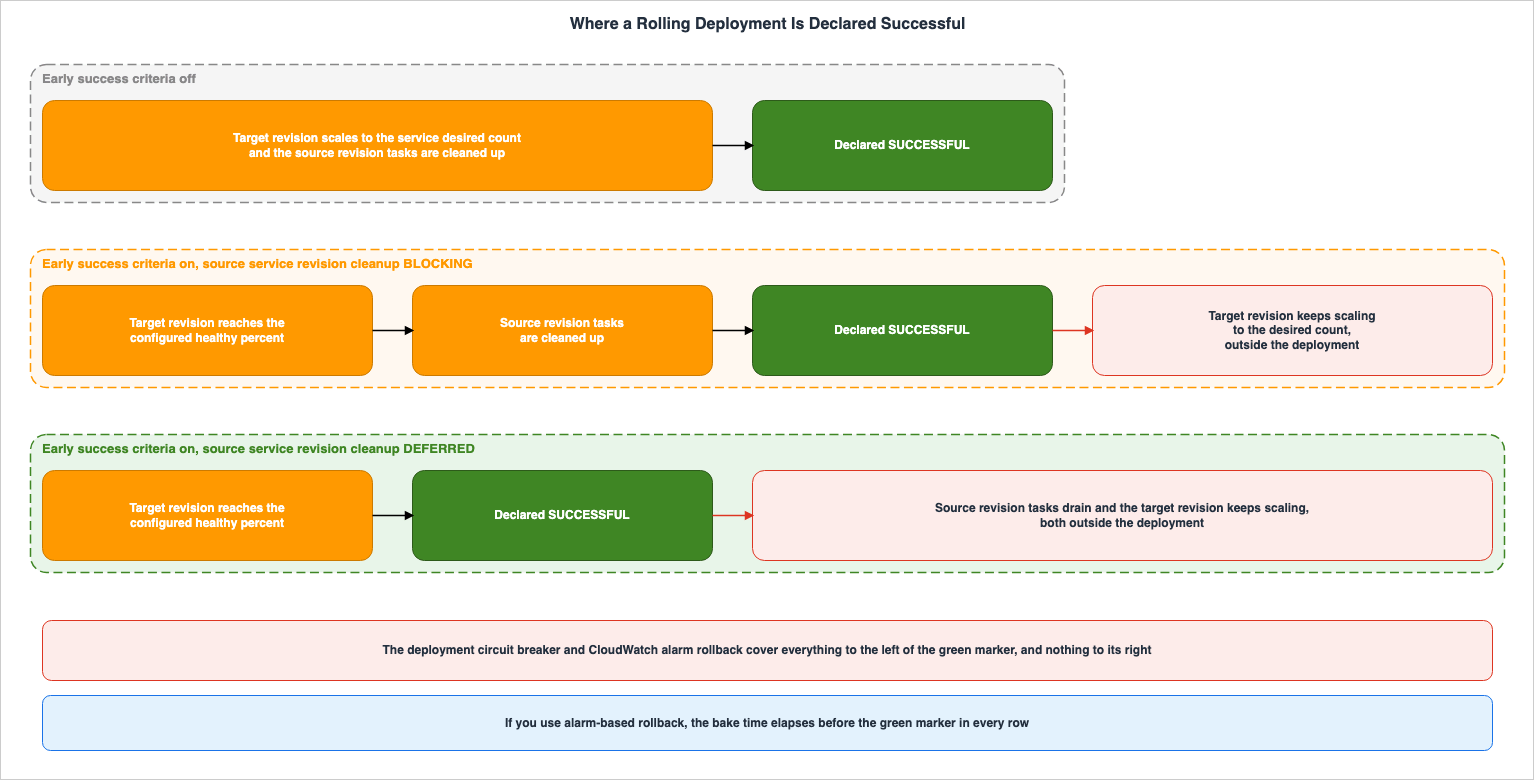
ThesourceServiceRevisionCleanup parameter can take two values. The API reference lists BLOCKING and DEFERRED as the valid options. The developer guide lists the order each one follows in four steps. First, BLOCKING.With BLOCKING, the deployment proceeds in the following order:
1. The healthy percent of tasks are running and healthy on the target service revision.
2. If you use alarm-based rollback, the bake time elapses.
3. Amazon ECS cleans up the tasks on the source service revision.
4. Amazon ECS completes the deployment.Then
DEFERRED.With DEFERRED, the deployment proceeds in the following order:
1. The healthy percent of tasks are running and healthy on the target service revision.
2. If you use alarm-based rollback, the bake time elapses.
3. Amazon ECS completes the deployment.
4. Amazon ECS cleans up the tasks on the source service revision, outside of the deployment.The only difference is the order of the third and fourth steps. What swaps is the order of two events, completion and cleanup.
4.2 What Stops Being True the Moment You Choose DEFERRED
When you selectDEFERRED, the tasks on the source revision are still running at the moment success is declared. The API reference describes this as follows:DEFERRED—Amazon ECS marks the deployment successful, and then removes the previous tasks in the background.At this point, the following conditions cannot simultaneously be true:
| What people assume is true at the moment of success | Under DEFERRED |
|---|---|
| The target revision has reached the desired count of tasks | Not true when the percentage is below 100. It has reached only what healthyPercent asked for |
| The tasks on the source revision are gone | Not true. They are draining in the background |
| Only one revision is running | Not true. Two revisions are taking production traffic at the same time |
| The deployment can be rolled back | Not true. Section 5 covers why |
⚠ The fourth row is particularly important. Because the source revision is still running, it may seem intuitively like a rollback is possible. In reality, this is not the case. The deployment is complete, so you cannot use any of the rollback paths ECS offers. The source tasks still being there and the deployment still being reversible are two different things.
4.3 The Background Cleanup Has a Ceiling
Cleanup underDEFERRED does not go on forever. The developer guide explicitly states limitations.With DEFERRED, Amazon ECS tries to clean up the tasks on the source service revision for up to two weeks.The considerations on the same page describe what happens when these limitations are exceeded.
With DEFERRED, Amazon ECS cleans up the tasks on the source service revision after it completes the
deployment. If the tasks on the source service revision are protected, by task scale-in protection or another
mechanism, for more than two weeks after the deployment, Amazon ECS can't clean them up. Use DescribeServices
to monitor the tasks on the source service revision.
Task scale-in protection and the cleanup under
DEFERRED pull on the same tasks in opposite directions. Protection keeps them from being stopped. The cleanup tries to stop them. For up to two weeks, ECS keeps trying to clean them up. Beyond that period, ECS will cease its efforts. Once ECS stops trying, the task stays behind with nothing left to clean it up. The developer guide recommends using DescribeServices for monitoring for this very reason.4.4 How to Choose Between the Two
The developer guide lists the conditions where it recommendsDEFERRED.Use DEFERRED for services with long-lived connections or task scale-in protection, where tasks from the
source service revision might need to keep running without holding the deployment open. This is useful when
draining the source service revision is a long-tail operation and your CI/CD tooling has time limits.The reasons listed there are of two kinds. One is about the workload: tasks holding long-lived connections cannot be dropped right away. The other is about the tooling: CI/CD pipelines have time limits.
The two reasons are not the same kind of thing. The first remains unresolved even when using
DEFERRED. The time it takes for a connection to close does not change. What changes is only where that time is spent, inside the deployment or outside it. The second one DEFERRED does resolve. DEFERRED takes the pipeline out of the wait.⇒ What
DEFERRED buys is the pipeline's elapsed time. It is not the speed at which tasks drain. Work out which of the two is hurting you before you decide.The decision comes down to the following:
| Situation | What you can do | Why |
|---|---|---|
| Tasks on the source revision finish draining in a few minutes | BLOCKING | No reason to decouple anything. A wider monitored interval is better |
| Source tasks hold long-lived connections and the pipeline times out | DEFERRED | Move where you wait to the outside of the deployment |
| Task scale-in protection is in use | Consider DEFERRED, and watch the two-week limit | Protected tasks hold the deployment open |
| You want rollback monitoring to continue after success is declared | Neither value buys this | There is no path back into a completed deployment |
⚠ The last row matters as much as the others.
BLOCKING expands the monitoring scope, but it does not provide monitoring after completion.5. What Can Take the Success Back, and When It Stops Applying
There are three mechanisms to prevent a deployment from succeeding. Two detect deployment failures, and one allows a person to explicitly stop the process. All three mechanisms assume the deployment is still in progress. There is one more failure path on top of these, and it appears only in the earliest stage of a deployment. Section 5.6 covers it.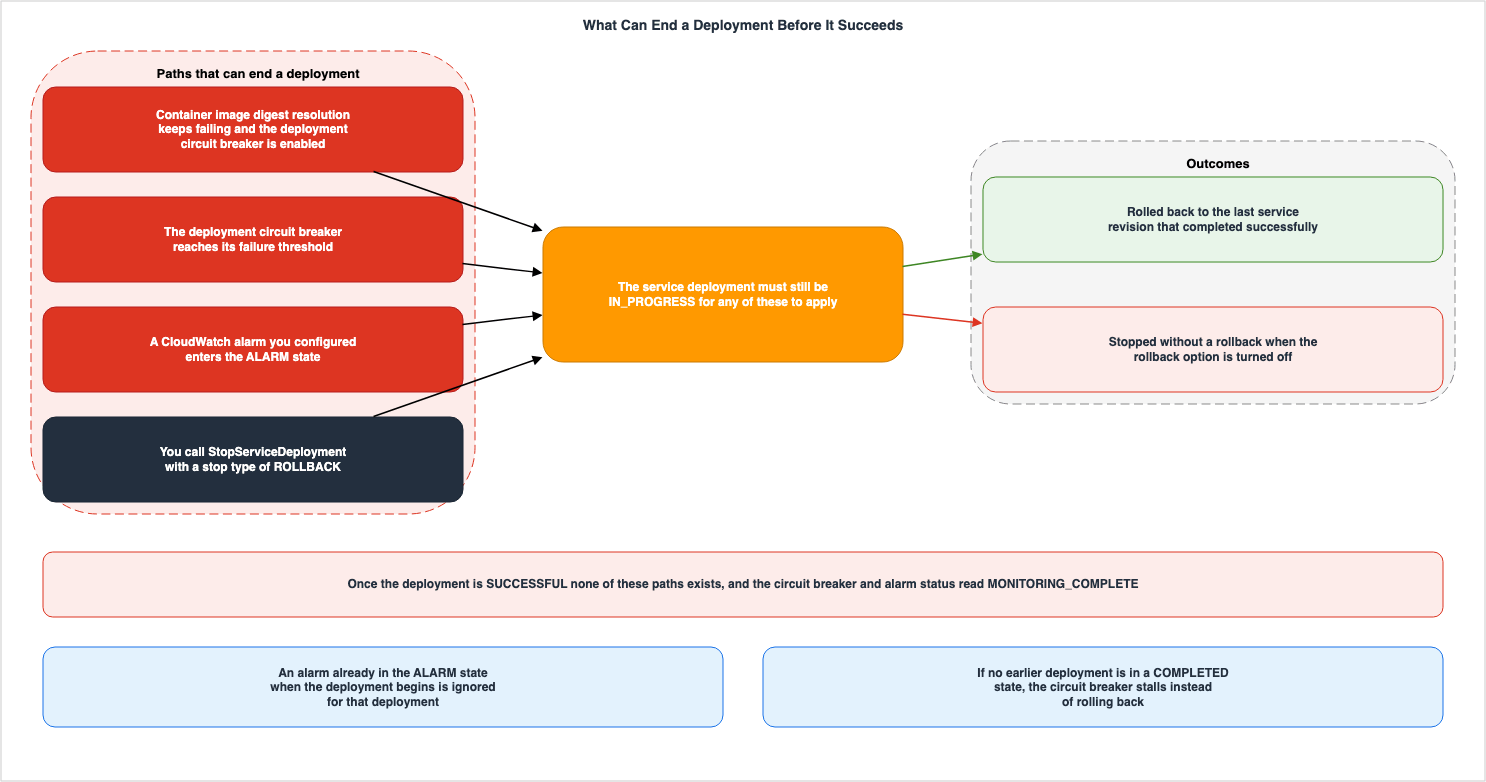
5.1 The Circuit Breaker Counts Failures in Two Stages
The deployment circuit breaker detects that tasks cannot reach a steady state and fails that deployment. If the rollback option is turned on, it reverts the service to the last deployment that completed successfully. This feature is only supported by the deployment controller for rolling deployments.The developer guide outlines two stages for counting failures. The first stage checks whether the task reaches the
RUNNING state. Deployments that pass the first stage proceed to the second stage, where the system monitors the health checks from Elastic Load Balancing, AWS Cloud Map, and the container itself. If failures reach a defined threshold in either stage, the deployment is marked as FAILED.Both the counting method and the threshold values are configurable. The
DeploymentCircuitBreaker API reference lists four fields:| Field | Required | Purpose |
|---|---|---|
enable | Yes | Determines whether to use the circuit breaker. |
rollback | Yes | Determines whether a failure rolls the service back to the last deployment that completed successfully |
resetOnHealthyTask | No | Determines whether to reset the failure count to zero each time a task reaches a healthy state. Default is true. |
thresholdConfiguration | No | Configures the method and value for calculating the failure threshold. |
While
resetOnHealthyTask is true, only consecutive failures count. The failure count resets to zero each time a task reaches a healthy state. If set to false, failures accumulate throughout the deployment process. Applications that experience sporadic failures at startup are best suited for the default true setting. If you want to treat any form of failure as a problem, setting it to false may provide faster detection.The
type field within thresholdConfiguration can take three different values. The API reference for ThresholdConfiguration states:Valid Values: COUNT | BOUNDED_PERCENT | UNBOUNDED_PERCENTBy default, the threshold configuration uses a type of BOUNDED_PERCENT with a value of 50.The differences between the three show up on services with a large desired count. The developer guide states that
BOUNDED_PERCENT, the default, clamps the result between a lower limit of 3 and an upper limit of 200. A verbatim excerpt from the calculation example on the same page follows:| Desired Task Count | Threshold | Reason |
|---|---|---|
| 1 | 3 | Calculation falls below the lower limit |
| 25 | 13 | Rounding up |
| 400 | 200 | Calculation exceeds the upper limit |
| 800 | 200 | Calculation exceeds the upper limit |
UNBOUNDED_PERCENT removes both the lower and upper limits from the calculation. If the desired task count is 800 and the value is 50, the threshold becomes 400. COUNT uses the value directly as the threshold, regardless of the desired task count.⚠ Rollbacks require a point to revert to. When the circuit breaker determines a deployment has failed, it selects the most recent
COMPLETED deployment as the point to revert to. The developer guide also describes what happens if it cannot find such a deployment.When the deployment circuit breaker determines that a deployment failed, it looks for the most recent
deployment that is in a COMPLETED state. This is the deployment that it uses as the roll-back deployment.
When the rollback starts, the deployment changes from a COMPLETED to IN_PROGRESS. This means that the
deployment is not eligible for another rollback until it reaches a COMPLETED state. When the deployment
circuit breaker does not find a deployment that is in a COMPLETED state, the circuit breaker does not launch
new tasks and the deployment is stalled.⇒ With no point to revert to, the circuit breaker launches no new tasks and the deployment stalls. This scenario occurs if the initial deployment after creating a service fails, or if a deployment during a rollback fails before the previous deployment has reverted to a
COMPLETED state. That stall is failure detection working, not failure detection broken.⚠ There is outdated information in the API reference documentation. The description of the
threshold property for the ServiceDeploymentCircuitBreaker (the observer type) currently states, as of September 15, 2026, that it has a fixed lower limit of 3 and an upper limit of 200, and only mentions the calculation 0.5 * desired task count. The ThresholdConfiguration (the configuration type) and the developer guide state that this is only one of three possible types, and is the default. To understand how the threshold is determined, refer to the documentation for the configuration type, not the observer type.5.2 An Alarm's State at the Start Decides Whether It Is Watched
The failure detection mechanism, triggered by CloudWatch alarms, identifies a deployment failure when the specified alarm enters theALARM state. Like the deployment circuit breaker, this mechanism works only with the rolling update deployment controller. You can use both at once, and the deployment fails as soon as either one of them fires.⚠ This mechanism has one potential pitfall that can lead to unexpected results. As the developer guide states:
If an alarm is in the ALARM state at the beginning of a deployment, Amazon ECS will not monitor alarms for
the duration of that deployment (Amazon ECS ignores the alarm configuration).
An alarm already in the
ALARM state when a deployment begins is ignored for the whole of that deployment. The behavior exists for the case where you start a new deployment to fix the failure of the previous one. Conversely, deploying to a service that already has an active alarm will proceed without the protection provided by the alarm. On a service that uses early success criteria to move the success declaration earlier, the two together stretch the interval that nobody is watching.Furthermore, the developer guide notes that alarm polling consumes CloudWatch service quotas. If an alarm triggers while other services are heavily calling
DescribeAlarms and experiencing throttling, ECS can miss the alarm, and the rollback does not happen. Alarm-based protection can therefore come off quietly, because of conditions outside the deployment.5.3 What You Specify When You Stop a Deployment by Hand
Ongoing deployments can be stopped usingStopServiceDeployment. If you pass ROLLBACK to the stopType parameter, ECS rolls the service deployment back to the previous service revision. This operation is available even for services that do not have a rollback option configured. The API reference explicitly states this.ROLLBACK - This option rolls back the service deployment to the previous service revision.
You can use this option even if you didn't configure the service deployment for the rollback option.⚠ The same page provides two different descriptions regarding the values that can be passed to the
stopType parameter. The main text lists only ROLLBACK as a valid value, while the Valid Values section for the parameter lists both ABORT and ROLLBACK. This information is current as of September 15, 2026. This article will only discuss the ROLLBACK option. The API reference gives no explanation of what ABORT does.From the perspective of the service deployment state transitions, this operation goes through the
ROLLBACK_REQUESTED state. The developer guide defines this state as the one you enter from the console, the API, or the CLI. Automatic rollbacks begin with the ROLLBACK_IN_PROGRESS state and do not go through this state.5.4 Once the Deployment Completes, All Three Step Down
All three of the mechanisms above stop applying once the deployment reachesSUCCESSFUL. The considerations outlined in the developer guide address this point with a qualification.The deployment circuit breaker and CloudWatch alarm rollback are failure-detection mechanisms for the
deployment. They can roll back the deployment while it is in progress. After Amazon ECS completes the
deployment, these mechanisms no longer roll back the service, including while Amazon ECS launches any
remaining tasks through regular service scaling. You can't stop a deployment after it completes. Set the
healthy percent to a percentage at which you are confident that the target service revision is healthy.The clause that begins with
including in that quote names the new interval early success criteria creates. The interval over which the target revision grows from the configured percentage up to the desired count is not part of the deployment, so it is not protected. If a new task breaks inside that interval, the circuit breaker does not count it. If an alarm fires, no rollback follows. There is no longer an in-progress deployment for StopServiceDeployment to target.⚠ This interval does not exist within a standard deployment. By default, the deployment runs until the target revision reaches 100 percent. Therefore, it is protected up to that point. Early success criteria moves the end of the protected interval to a percentage you choose.
The intervals line up as follows:
| Interval | Standard Deployment | Deployment Using Early Success Criteria |
|---|---|---|
| Until the first task becomes healthy | Protected | Protected |
| Until the target revision reaches the configured percentage | Does not apply, since no percentage is configured | Protected |
| The rest of the way to the desired count | Protected | Not protected |
| Cleanup of the source revision | Protected | Protected under BLOCKING, not protected under DEFERRED |
| After completion | Not protected | Not protected |
The third and fourth rows of this table represent what you hand over in return for using early success criteria.
5.5 You Can Observe That the Protection Has Ended
You do not need to speculate whether protection is in effect. Thestatus field on the ServiceDeploymentCircuitBreaker returned by DescribeServiceDeployments directly indicates the current state.Valid Values: TRIGGERED | MONITORING | MONITORING_COMPLETE | DISABLEDMONITORING means ECS is watching; MONITORING_COMPLETE means it has stopped watching; TRIGGERED means the circuit breaker fired; and DISABLED means you are not using the circuit breaker at all. The ServiceDeploymentAlarms on the alarm side also have these same four values. Read those two status fields rather than the configuration, and you know whether the deployment is being protected right now.5.6 One More Failure Path - Image Digest Resolution
In addition to the three failure paths described previously, there is another that appears only in the earliest stage of a deployment. By default, ECS resolves the container image tag specified in the task definition to a digest. This resolution occurs during the first task execution, and subsequent tasks then use that same digest. This mechanism ensures that every task in the service uses the same image.If three or more attempts at establishing the container image digests fail, the deployment continues without
image digest resolution. If the deployment circuit breaker is enabled, the deployment is additionally failed
and rolled back.⇒ The same event ends two different ways depending on whether you turned the circuit breaker on. With it off, the deployment carries on without resolving the digest. With it on, the deployment fails and rolls back. This divergence can occur even if no tasks become unhealthy.
⚠ This path runs before ECS has a percentage to evaluate. Digest resolution happens in the act of starting the first task, and the percentage is evaluated after that. As described in Section 3.4, ECS launches a single task, waits for it to become healthy, and then evaluates the percentage. ECS settles this branch as it starts that first task, before it has anything to evaluate the percentage against.
6. What the API Reports After the Deployment Ends
6.1 Numbers Transform into Snapshots
In deployments utilizing early success criteria, the meaning of the number of tasks returned byDescribeServiceDeployments after completion changes. The developer guide states:If a deployment uses early success criteria, DescribeServiceDeployments returns the configured early success
criteria, and the running task counts that it reports are a snapshot from when the deployment completed
rather than live counts.The early success criteria page adds that the same holds for both enumeration values.
While the deployment is in progress, the task counts are live. After the deployment completes, the task
counts are a snapshot from when the deployment completed. This applies to both BLOCKING and DEFERRED.
⇒ Read
DescribeServiceDeployments after completion and you can mistake the number for the current one, when it is the number as of the moment of declaration. The current number is in DescribeServices. Check which of the two your monitoring and your dashboards read.6.2 No New State Is Added
Early success criteria does not create a new deployment state.Deployment state-change events and AWS CloudTrail records show the standard IN_PROGRESS to SUCCESSFUL
lifecycle. Early success criteria does not add a new deployment status.Deployments that complete early are included when you filter ListServiceDeployments by a status of
SUCCESSFUL.⚠ This cuts both ways in operations. Existing event rules and pipelines continue to function without modification. However, based solely on events, it's impossible to distinguish between a deployment that was declared early and one that completed successfully at the very end. If you need to make that distinction, you'll need to read the early success criteria settings themselves, as returned by
DescribeServiceDeployments.6.3 How Many States There Are Depends on Where You Look
The API reference lists the possible states for a service deployment in thestatus field of ServiceDeployment.Valid Values: PENDING | SUCCESSFUL | STOPPED | STOP_REQUESTED | IN_PROGRESS | ROLLBACK_REQUESTED |
ROLLBACK_IN_PROGRESS | ROLLBACK_SUCCESSFUL | ROLLBACK_FAILEDThere are nine. The developer guide presents these nine states in a table, categorizing them into three stages: Pending, Ongoing, and Completed. ⚠ However, the console's help panel lists only eight, and it does not include
ROLLBACK_REQUESTED. This information is current as of September 15, 2026. When writing code that handles states programmatically, count the states using the Valid Values section in the API reference.The three-stage breakdown is as follows:
| Stage | Included States |
|---|---|
| Pending | PENDING |
| Ongoing | IN_PROGRESS / STOP_REQUESTED / ROLLBACK_REQUESTED / ROLLBACK_IN_PROGRESS |
| Completed | SUCCESSFUL / STOPPED / ROLLBACK_SUCCESSFUL / ROLLBACK_FAILED |
It's important to note that there are four states listed under "Completed." Only one represents a successful completion; the remaining three indicate that the deployment has finished, but not successfully. The developer guide says that any of the STOP or ROLLBACK states are worth investigating further.
⚠ There are limitations on the length of time historical data is available. The developer guide states that for deployments created on or after October 25, 2024, you can view the most recent 90 days of history. For a deployment older than that window, the API cannot tell you whether it succeeded outright or was declared early.
6.4 When a Deployment Record Is Created and When It Goes Away
ECS creates a deployment record automatically on any of the following three actions:Amazon ECS creates a new service deployment automatically when any of the following actions happen:
A user creates a service.
A user updates the service and uses the force new deployment option.
A user updates one or more service properties that require a deployment.The third action is most easily overlooked. A deployment starts as soon as you change an attribute that requires one, even without replacing the task definition. A setting you did not mean to change can replace the tasks running in production.
Only one thing deletes the records:
Amazon ECS deletes the service deployment when you delete a service.⇒ Delete a service and its deployment history goes with it. If you want to look back later and see which deployments were declared early, you have to pull that information while the service is still there.
7. Daemon Rollouts Run on a Different Lifecycle
7.1 Which Daemon This Section Means
⛔ The Amazon ECS Managed Instances that carry the Managed Daemons in this section are a different feature from the AWS Lambda Managed Instances covered in the previously published AWS Lambda Managed Instances. The names are similar because both use the terms "Managed Instances" and "capacity provider." However, they target different services. When this section says capacity provider, it means an Amazon ECS capacity provider. The design for Lambda is covered in the previously published material and will not be discussed here.⛔ Within ECS itself, there are also other entities with similar names. ECS has long offered a DAEMON scheduling strategy for services on the EC2 launch type, which places one task from a single service on each container instance in a cluster. The Managed Daemons discussed in this section operate using a different mechanism, with different targets and deployment processes. The developer guide notes the distinction between the two because people do confuse them.
7.2 Where a Managed Daemon Can Be Placed
Only one kind of capacity provider can carry Managed Daemons. Both the API reference and the AWS CLI reference carry the same note:ECS Managed Daemons is only supported for Amazon ECS Managed Instances Capacity Providers.The main text of the developer guide also repeats the same restriction in the body of its feature description.
After you register a daemon task definition, create a daemon and associate it with a cluster and one or more
Amazon ECS Managed Instances capacity providers. Amazon ECS then ensures that exactly one daemon task runs on
every Amazon EC2 instance provisioned through those capacity providers.
⇒ This feature is not available in clusters that only run Fargate services, or in clusters that only use an EC2 capacity provider you built yourself. If you want to run a logging or tracing agent as one task per instance, the first decision is a different one: whether to move to Managed Instances.
7.3 Daemons Come Up Before Applications
Managed Daemons guarantee more than the number of placements. They also guarantee the order in which things start.Daemons do not launch instances independently. When you run an application task on a Amazon ECS Managed
Instances capacity provider, Amazon ECS provisions an Amazon EC2 instance, starts the daemon task, and only
then transitions the application task to RUNNING. Amazon ECS uses this ordering for every daemon, regardless
of criticality, so that cross-cutting functions like logging, tracing, and metrics collection are operational
before your application begins processing requests.The phrase "regardless of criticality" is crucial. The critical and non-critical distinction, which the next section covers, changes only what happens when a daemon fails; it does not alter the startup order.
7.4 An Update Is a Cycle of Drain, Provision, and Replace
When updating a daemon's task definition to a new revision, ECS initiates a rolling deployment. However, it's not the tasks themselves that are replaced, but rather the container instances. The developer guide refers to this pattern with a single word.A daemon deployment follows a drain-provision-replace pattern. When you create a daemon on a capacity
provider with existing instances, or update a daemon to a new task definition revision, Amazon ECS drains a
batch of instances, provisions replacement instances with the updated daemon, and replaces application tasks
automatically. This process repeats until all instances run the new daemon revision.Application tasks get replaced even though nobody started a deployment for them. The AWS CLI reference flags this in a warning.
Updating a daemon triggers a rolling deployment that drains and replaces container instances. Plan updates
during maintenance windows to minimize impact on running services.
⇒ Raising the version of a log collection agent looks unrelated to the application, and it moves the tasks running in production. However carefully you design the success test for service deployments, this path does not pass through it.
⚠ The same operation can have drastically different effects depending on the circumstances. If you create a daemon on a capacity provider that has no instances, the creation completes immediately, because there is nowhere to place it. The developer guide documents this behavior.
Create the daemon. Amazon ECS completes the creation immediately even though no instances exist yet.Conversely, performing the same operation on a capacity provider that already has instances will initiate a rolling deployment. The same
create-daemon command can either complete immediately, or it can begin replacing production tasks, one by one. Which outcome occurs isn't determined by the command's arguments, but rather by the state of the cluster.7.5 A Daemon Deployment Has Three Settings
There are three settings for daemon deployment. ThedeploymentConfiguration on the daemon side is a different type than the DeploymentConfiguration on the service side, and it does not have an equivalent to earlySuccessCriteria.| Field | What it determines | Default |
|---|---|---|
drainPercent | The percentage of instances to drain concurrently. | 25.0 |
alarms | CloudWatch alarms to monitor during deployment. | None specified |
bakeTimeInMinutes | The number of minutes to wait after all instances have been updated before completing. | 0 |
The valid range for
bakeTimeInMinutes is 0 to 1440. Through that window ECS watches the CloudWatch alarms, and if one fires, it rolls the deployment back. The default is 0, so unless you set it, no monitoring window exists at all.⚠ Regarding the valid range for
drainPercent, two different statements exist in the documentation. The developer guide states a range of 1.0 to 100.0, while the API reference and the CloudFormation reference state a range of 0.0 to 100.0. This information is current as of September 15, 2026. To avoid conflicts, stay inside the narrower range. Furthermore, none of the three documents consulted for this article explain how the lower bound value is handled. Only the developer guide mentions the default value of 25.0; the API reference and CloudFormation reference do not address the default value.The handling of alarms follows the same logic as with the service side.
Amazon ECS evaluates the specified alarms during the deployment and automatically rolls back if any alarm
enters the ALARM state. Amazon ECS ignores alarms that are already in the ALARM state when the deployment
begins.
An alarm already in the
ALARM state when the deployment begins is ignored here too. This behavior is the same as that of the service side, as described in Section 5.2.7.6 Criticality Decides What Happens to the Instance
Daemons have a criticality setting. The default value for thecritical parameter is true. The CreateDaemon API reference includes conditional statements.If the critical parameter of a daemon is true, and the daemon task fails, stops, or becomes unhealthy,
Amazon ECS drains the container instance and stops the other tasks running on it. If the critical parameter
is false, the daemon task failure doesn't affect the other tasks on the instance. The default value is true.| Critical (Default) | Non-Critical | |
|---|---|---|
| The daemon fails to start | The instance never becomes active | The instance becomes active |
| The daemon stops or goes unhealthy later | ECS drains the instance and replaces it | The instance stays active |
| Application tasks on that instance | Go with it | Keep running |
| Application tasks starting before the daemon | Never. The daemon goes first | Never. The daemon goes first |
⚠ Setting a daemon to non-critical does not take it out of the deployment failure test. The API reference explicitly states this in the same section.
Daemon task launch failures during a deployment are still counted by the deployment circuit breaker. The
circuit breaker can roll back an unstable target revision.
⇒ The purpose of setting a daemon to non-critical is to protect existing instances and application tasks. If a new daemon revision is broken, the circuit breaker stops the deployment and rolls it back. Confuse the two and you cannot explain why a deployment failed after you set the daemon to non-critical.
⚠ The opening text of
CreateDaemon in the API reference still reads the way it did before criticality existed. Earlier on the same page, it states without any condition that if a daemon task stops, ECS drains and replaces that container instance. The conditions are described in the critical section of the same page. Do not judge the behavior of non-critical daemons based solely on the introductory text.7.7 A Stopped Daemon Deployment Leaves a Mixed State
The state transitions for a daemon deployment look like the ones for a service deployment without being the same. The developer guide describes the daemon deployment lifecycle in four states, and the description forSTOPPED differs from the others.STOPPED - Amazon ECS has stopped the deployment because it failed or was replaced by a new deployment. The
daemon may be in a mixed state where some instances run the old revision and others run the new revision.Even when a deployment is stopped, the instances do not revert to their original state. They remain in a mixed state, with both older and newer revisions running. For example, with a log collection agent, some instances might be running the newer version while others are still running the older version. The deployment's status does not indicate which instances are running which revision. The developer guide notes that the response from
describe-daemon-deployments includes totalRunningInstanceCount, indicating the number of instances running the target revision. This number represents a count, but does not specify which instances are running which revision.The number of states can also vary depending on where you look. While the developer guide lists four states as part of the lifecycle, the
status field in the API reference for DaemonDeployment can have eight different values.Valid Values: PENDING | SUCCESSFUL | STOPPED | STOP_REQUESTED | IN_PROGRESS | ROLLBACK_IN_PROGRESS |
ROLLBACK_SUCCESSFUL | ROLLBACK_FAILEDCompared to the nine possible values for service deployments,
ROLLBACK_REQUESTED is not included. Service deployments have a state where a user can manually request a rollback, but there is no equivalent state in the enumerated values for daemon deployments. To take a daemon back to an earlier revision, you update the daemon and name that earlier revision. This is a new deployment, and not a rollback.7.8 Losing the Agent Connection Is Caught on a Different Path
In addition to daemon monitoring, ECS also monitors the overall health of container instances. Thetype field in the API reference's InstanceHealthCheckResult has four possible values.Valid Values: CONTAINER_RUNTIME | ACCELERATED_COMPUTE | DAEMON | AGENT_CONNECTIVITYDAEMON represents the health of the daemon task, while AGENT_CONNECTIVITY indicates the connection between the container agent and the ECS control plane. ⚠ The developer guide lists five items, but the fifth item refers to a change in overall health, not a specific type of check. To count the check types, refer to the Valid Values section in the API reference.AGENT_CONNECTIVITY has the broadest scope among the four values. The developer guide lists the corresponding launch types for each check individually, and only AGENT_CONNECTIVITY mentions all three: Amazon ECS Managed Instances, AWS Fargate, and Amazon EC2. ⚠ However, what ECS does after detection varies depending on the launch type. The AWS announcement states that for Managed Instances and Fargate, ECS will drain tasks and replace them, then deregister the instance. For the EC2 launch type, you take that health change event and drive the replacement yourself.| Launch Type | Event Emitted? | Does ECS Automatically Replace? |
|---|---|---|
| Amazon ECS Managed Instances | Yes | Yes |
| AWS Fargate | Yes | Yes |
| Amazon EC2 | Yes | No |
⇒ On the EC2 launch type, unless you build something that receives this event and acts on it, the feature changes nothing. The
status field on the same data type takes OK, IMPAIRED, INSUFFICIENT_DATA, and INITIALIZING.8. What This Lifecycle Does Not Cover
This article has followed the point at which a service deployment is declared successful, and what gets decoupled from that moment. The following items borrow the same words, but a different place decides each one.| Not Covered | Location |
|---|---|
| Choosing between rolling, blue/green, and CodeDeploy | Previously published Amazon ECS on Fargate Microservices Architecture Guide §7 |
| Blue/green deployment lifecycle stages and traffic shifting | Same as above |
| When specific features were introduced in ECS | Previously published AWS History and Timeline regarding Amazon ECS |
| Design of AWS Lambda Managed Instances | Previously published AWS Lambda Managed Instances |
| Circuit breakers on the calling side | Previously published LLM Inference Resilience Patterns on AWS |
| Conditions under which a cluster's Kubernetes version can be rolled back | This series Rolling Back an Amazon EKS Cluster Version |
| Methods for reverting the data layer to a previous state | This series Replication Topologies on Amazon Aurora MySQL |
⚠ Regarding deployment lifecycle hooks, this article refrains from making a judgment. Lambda hooks and pause hooks provide mechanisms to stop or roll back deployments at specific stages, placing them in the same category as the three discussed in Section 5. However, the stages the developer guide lists consist only of blue/green-shaped ones, such as
TEST_TRAFFIC_SHIFT and PRODUCTION_TRAFFIC_SHIFT. Conversely, the Amazon ECS feature overview states that you can use lifecycle hooks with both blue/green and rolling deployments. It was not possible to determine, from the primary documentation as of September 15, 2026, at which stage a hook is triggered in a rolling deployment. This article makes no claims about how hooks function in rolling deployments.This article does not address pricing. The costs associated with running both the old and new revisions concurrently, as well as the costs of tasks remaining in the
DEFERRED state, are outside the scope of this article.9. Failure Modes
| # | Symptom | What is happening | What to check first |
|---|---|---|---|
| 1 | Shows "success" but returns responses from an older version. | DEFERRED is in use and tasks on the source revision are still taking production traffic | Read the number of tasks on the source revision with DescribeServices. The number in DescribeServiceDeployments is a snapshot at the time of declaration. |
| 2 | After a successful deployment, broken tasks keep appearing but no rollback happens | The interval from the configured percentage up to the desired count sits outside the deployment, so neither the circuit breaker nor the alarm covers it | Check if the status of ServiceDeploymentCircuitBreaker is MONITORING_COMPLETE. |
| 3 | Tasks on the source revision do not go away for days | They are held by task scale-in protection or something like it, so the background cleanup cannot reach them | Review the protection settings. Past two weeks, ECS stops trying to clean them up |
| 4 | Unable to enable early success criteria or reduce the percentage. | healthyPercent must be greater than or equal to minimumHealthyPercent, and the default for replica services is 100 percent. | Reduce minimumHealthyPercent in the same deploymentConfiguration. Reducing this will also affect the availability floor during deployment. |
| 5 | An alarm was configured, but no rollback occurred. | The alarm was already in the ALARM state at the time the deployment started. Alternatively, alarms may have been missed due to throttling in DescribeAlarms. | Review the alarm state at the start of the deployment. |
| 6 | Production tasks are being replaced without anyone initiating a deployment. | A daemon update triggered drain, provision, and replace operations. | Review the history of daemon deployments. Use describe-daemon-deployments. |
| 7 | After a daemon deployment stops, different versions are running on different instances. | STOPPED can leave instances in a mixed state. | Read totalRunningInstanceCount for the number of instances running the target revision |
| 8 | A deployment fails even though it was marked as non-critical. | Criticality only affects the fate of instances; it doesn't prevent a deployment from failing. | Review the circuit breaker failure count and threshold. |
| 9 | With EC2 launch type, instances with agents that have crashed are being left behind. | AGENT_CONNECTIVITY events are generated, but replacement doesn't happen automatically. | Check if there's a mechanism in place to trigger replacement based on these events. |
| 10 | The initial deployment of a new service fails, and nothing progresses. | The circuit breaker cannot find a previous COMPLETED deployment to roll back to, so it won't start new tasks. | Check if there were any previous successful deployments. If not, this is likely a stop, not a rollback. |
| 11 | A deployment rolls back even though no task has failed a health check | Container image digest resolution failed on three or more attempts while the deployment circuit breaker was enabled | Review the image tag and accessibility to the registry. If the circuit breaker is off, the deployment is running without digest resolution instead. |
| 12 | After reducing the percentage, unresponsive tasks are being counted. | With no health check defined, a task is counted 40 seconds after it reaches RUNNING | Review the health check configuration for essential containers or the health check configuration for the target group. |
10. Frequently Asked Questions
Does turning on early success criteria make a deployment faster?
No. The pipeline can spend less time waiting, but the speed at which ECS launches tasks does not change. The setting moves two things: the moment the deployment is declared successful, and whether the cleanup that follows sits inside or outside that test. The time it takes for the target revision to reach the desired count does not get shorter.Which is the default for cleanup, BLOCKING or DEFERRED?
Neither one is the default. The default value forearlySuccessCriteria.enable is false, in which case ECS will use the traditional completion criteria. If you set enable to true, you will need to explicitly specify sourceServiceRevisionCleanup.Does choosing DEFERRED for cleanup make rollbacks easier?
No. Tasks on the source revision may still be running, which makes a rollback look possible, but the deployment is already complete. Therefore, the ECS rollback mechanisms are not available. Neither the circuit breaker nor the alarm-based rollback will function, and no in-progress deployment remains forStopServiceDeployment to target. To revert, you would need to initiate a new deployment.If the healthyPercent is set to 100, does that make early success criteria pointless?
No. On the percentage side the behavior matches the default. However,sourceServiceRevisionCleanup functions independently. If you specify DEFERRED, success is declared once the target revision reaches the desired count, and only the cleanup of the source revision moves outside the deployment.Can you tell afterward which deployments were declared early?
No. You cannot tell them apart from the deployment status alone. Both events and CloudTrail show a standard transition fromIN_PROGRESS to SUCCESSFUL, and no new states are added. To differentiate them, you will need to examine the early success criteria settings returned by DescribeServiceDeployments. Please note that you can only access historical data for the most recent 90 days.Can Amazon ECS Managed Daemons be used on an EC2 launch type cluster?
No. Both the API reference and the developer guide state that ECS Managed Daemons are supported only for Amazon ECS Managed Instances capacity providers. Services using the EC2 launch type utilize a different mechanism called the DAEMON scheduling strategy, which is not the focus of this article.If you set a daemon to non-critical, do updates stop touching production?
No. Changing the criticality setting only determines whether an instance is drained when a daemon task fails. Regardless of the criticality setting, updating a daemon's revision will trigger drain, provision, and replace operations, which will replace application tasks.Can early success criteria and Managed Daemons be configured using the same settings?
No. ThedeploymentConfiguration for a service deployment and the one for a daemon deployment are different types, and they do not combine. Daemon configurations do not have a field equivalent to earlySuccessCriteria; instead, they have three fields: drainPercent, alarms, and bakeTimeInMinutes.When were the values in this article verified?
September 15, 2026. The enumerated values, default values, valid range, and availability status were all confirmed on this date using AWS's primary documentation. These values may change. Before a number here drives an operational decision, take it again from the primary source on that day.11. Summary
The indication that deployment is complete doesn't refer to a single point in time. With a standard rolling deployment, a deployment is considered successful only when the target revision reaches the desired count, the failure detection mechanisms stay silent, and if alarms are used, the bake time has elapsed, and cleanup of the source revision is complete. There are four conditions that must be met.Early success criteria moves two of those four conditions. The first is the reach condition, which uses a percentage determined by the user, rather than 100 percent. The second is the cleanup condition, allowing the user to choose whether to keep cleanup inside the success test or move it out. The options are
BLOCKING and DEFERRED.Something is handed over in exchange for that move. The deployment failure detection mechanism only functions while the deployment is in progress. The stretch after the configured percentage is reached, while the target revision keeps growing toward the desired count, falls outside the deployment and is not protected. If
DEFERRED is selected, the cleanup process is also excluded. What moved earlier is the moment of declaration. The speed at which tasks come up did not change.Daemon rollouts run on a clock of their own. Updates to Managed Daemons involve repeatedly performing drain, provision, and replace operations, automatically replacing application tasks. However carefully you design the success test for service deployments, this path does not pass through it. Even if the criticality is set to non-critical, this path remains unchanged.
Across the primary documentation, and even inside one page, there were instances where descriptions contradicted each other. This article has included both perspectives without definitively choosing one. These discrepancies include the valid values for
stopType, the valid range for drainPercent, whether you can set the rolling deployment bake time, when the bake time begins, how the threshold comes out, and how the number of states and of health check types changes depending on which page you read. All of these details are accurate as of September 15, 2026. Before using this information for operational decisions, please refer to the primary documentation from that specific date.One sentence has come back through this whole article, and it goes here at the end. How far back you can go is not decided by AWS. It is decided by which enumeration value you passed to
sourceServiceRevisionCleanup and what number you passed to healthyPercent. Those two factors are within your control.12. References
- Complete Amazon ECS rolling deployments early with early success criteria - Amazon Elastic Container Service Developer Guide
- DeploymentEarlySuccessCriteria - Amazon Elastic Container Service API Reference
- DeploymentConfiguration - Amazon Elastic Container Service API Reference
- Deploy Amazon ECS services by replacing tasks - Amazon Elastic Container Service Developer Guide
- How the Amazon ECS deployment circuit breaker detects failures - Amazon Elastic Container Service Developer Guide
- How CloudWatch alarms detect Amazon ECS deployment failures - Amazon Elastic Container Service Developer Guide
- DeploymentCircuitBreaker - Amazon Elastic Container Service API Reference
- ThresholdConfiguration - Amazon Elastic Container Service API Reference
- ServiceDeploymentCircuitBreaker - Amazon Elastic Container Service API Reference
- ServiceDeploymentAlarms - Amazon Elastic Container Service API Reference
- View service history using Amazon ECS service deployments - Amazon Elastic Container Service Developer Guide
- ServiceDeployment - Amazon Elastic Container Service API Reference
- StopServiceDeployment - Amazon Elastic Container Service API Reference
- Lifecycle hooks for Amazon ECS service deployments - Amazon Elastic Container Service Developer Guide
- Amazon ECS Managed Daemons - Amazon Elastic Container Service Developer Guide
- Daemon deployments - Amazon Elastic Container Service Developer Guide
- CreateDaemon - Amazon Elastic Container Service API Reference
- DaemonDeployment - Amazon Elastic Container Service API Reference
- DaemonDeploymentConfiguration - Amazon Elastic Container Service API Reference
- update-daemon - AWS CLI Command Reference
- Amazon ECS container instance health change events - Amazon Elastic Container Service Developer Guide
- InstanceHealthCheckResult - Amazon Elastic Container Service API Reference
- Amazon ECS introduces Early Success Criteria for service deployments - AWS What's New
- Amazon ECS announces Managed Daemons for ECS Managed Instances - AWS What's New
- Amazon ECS Managed Daemons now support non-critical daemons - AWS What's New
- Amazon ECS now automatically detects and repairs container instances with impaired agent connectivity - AWS What's New
- Amazon Elastic Container Service features - AWS
References:
Tech Blog with curated related content
Written by Hidekazu Konishi