Amazon ECS on Fargate Microservices Architecture Guide - Service Connect, Auto Scaling, Deployments, and Data-Tier Integration
First Published:
Last Updated:
This is the container-operations companion to my deep dive on the networking internals of the other orchestrator, Amazon EKS Networking Deep Dive. Where that article dissects the VPC CNI and pod networking, this one assembles a multi-service ECS application and follows a request through every hop.
1. Introduction
A microservices architecture trades the simplicity of a single deployable for the flexibility of independently shippable, independently scalable services. On AWS, Amazon Elastic Container Service (Amazon ECS) with the AWS Fargate serverless capacity model removes the undifferentiated heavy lifting of managing a control plane or patching EC2 instances, leaving you to focus on the application. But ECS on Fargate is a toolbox, not a finished system. Turning the toolbox into a reliable architecture is a sequence of design decisions: how services discover each other, how ingress reaches them, how they scale under load, how new versions roll out, how they hold state, and how you diagnose the system when it misbehaves.This article is deliberately not a service-selection guide. It does not argue ECS versus EKS versus Lambda (that comparison is compressed into one section near the end and delegated to existing articles), and it does not re-derive the networking internals already covered for EKS. Instead, it takes one concrete, named reference architecture — an order-processing storefront composed of three Fargate services — and implements it part by part, with copy-pasteable CLI and infrastructure-as-code fragments, the cross-service request flow, the failure modes and their blast radius, and the observability needed to operate it.
Everything that follows was verified against the Amazon ECS Developer Guide, the ECS Best Practices Guide, AWS Fargate documentation, and AWS What's New at the time of writing. AWS container features evolve quickly; before you depend on a specific limit or a newly announced capability, re-check it against the primary documentation linked in the References section.
1.1 What You Will Build
The reference architecture is a storefront backend with three services:- frontend — receives all external traffic from an Application Load Balancer (ALB) and drives the order path. It is both a server (to the ALB) and a client (of the orders service, which in turn calls payments).
- orders — owns the order lifecycle and persists to Amazon RDS (a relational store fits orders, line items, and their transactional integrity). It is a client-server service that also calls payments.
- payments — records payment intents and persists to Amazon DynamoDB (a key-value access pattern with predictable single-digit-millisecond reads). It is a server.
2. The Reference Architecture at a Glance
The architecture lives inside one VPC spanning at least two Availability Zones. The boundary between public and private is the load balancer: only the ALB sits in public subnets; every task runs in private subnets and is never directly reachable from the internet.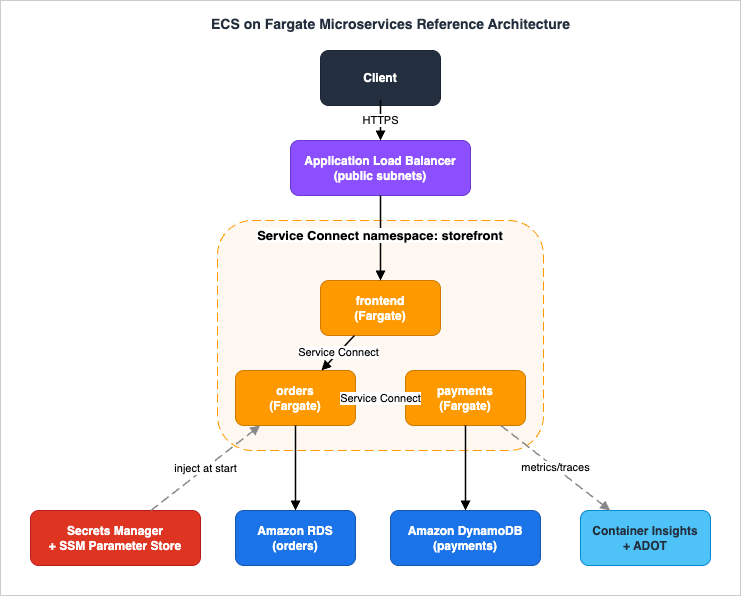
2.1 The Layers
- Edge / ingress: An internet-facing Application Load Balancer in public subnets terminates TLS and routes to the
frontendservice's target group. Deep ALB selection (ALB vs NLB vs Gateway Load Balancer) is delegated to the load balancing decision guide; here the ALB is a given. - Compute: Three ECS services run on Fargate in private subnets. Every task uses the
awsvpcnetwork mode, so each task receives its own elastic network interface (ENI) and a private IP — there is no port juggling on a shared host. - Service mesh-lite: ECS Service Connect provides logical service names, client-side load balancing, retries, and optional mutual TLS without a separate mesh control plane. The namespace is backed by AWS Cloud Map.
- Data tier:
ordersconnects to Amazon RDS;paymentsconnects to Amazon DynamoDB. Connection-pooling and RDS high-availability specifics are delegated to the dedicated articles. - Configuration and secrets: Database credentials live in Secrets Manager; non-secret configuration (feature flags, endpoints) lives in SSM Parameter Store. Both are injected into containers through the task definition.
- Egress: Private tasks reach AWS service APIs (Amazon ECR, Secrets Manager, CloudWatch Logs, DynamoDB) either through a NAT gateway or — preferably — through VPC interface and gateway endpoints, keeping traffic on the AWS network.
- Observability: Container Insights with enhanced observability publishes task- and container-level metrics; an ADOT sidecar exports traces and OpenTelemetry metrics.
2.2 Why Fargate for This Architecture
Fargate is a serverless, pay-as-you-go compute engine for containers: you declare CPU and memory at the task level, and AWS provisions, patches, and scales the underlying capacity. For a microservices fleet this matters because each service can be sized independently and isolated at the task level — there is no shared host whose IAM permissions or kernel every co-located task inherits. ECS also offers EC2 and the newer ECS Managed Instances capacity options, but this guide standardizes on Fargate so that the focus stays on the application architecture rather than on node management. (Capacity-option trade-offs are touched on in Section 11.)2.3 IAM Boundaries Up Front
A recurring source of confusion is that each task has two distinct IAM roles, and getting them right is a Level 400 prerequisite, not an afterthought:- The task execution role is assumed by the ECS/Fargate agent — not your application. It grants the platform permission to pull images from Amazon ECR, ship logs to CloudWatch Logs, and read the secrets you inject at startup. AWS provides the managed policy
AmazonECSTaskExecutionRolePolicyfor the common cases. - The task role is assumed by your application code inside the container. This is where least privilege for the business logic lives:
ordersgets RDS-related permissions,paymentsgets exactly the DynamoDB actions on its table, and neither gets the other's.
3. Task Definitions, Roles, and Secrets Injection
The task definition is the blueprint for a service's tasks: which containers run, how much CPU and memory the task gets, which IAM roles it assumes, how health is checked, and how secrets are injected. This section implements theorders task definition as the worked example.3.1 Task Size: Choosing CPU and Memory
On Fargate, CPU and memory are declared at the task level and must come from a supported matrix. The valid combinations (verified against the ECS Developer Guide) are:* You can sort the table by clicking on the column name.
| CPU (vCPU) | Memory range | Notes |
|---|---|---|
| 256 (0.25 vCPU) | 512 MiB, 1 GB, 2 GB | Linux |
| 512 (0.5 vCPU) | 1–4 GB (1 GB steps) | Linux |
| 1024 (1 vCPU) | 2–8 GB (1 GB steps) | Linux, Windows |
| 2048 (2 vCPU) | 4–16 GB (1 GB steps) | Linux, Windows |
| 4096 (4 vCPU) | 8–30 GB (1 GB steps) | Linux, Windows |
| 8192 (8 vCPU) | 16–60 GB (4 GB steps) | Linux; requires platform version 1.4.0 or later |
| 16384 (16 vCPU) | 32–120 GB (8 GB steps) | Linux; requires platform version 1.4.0 or later |
| 32768 (32 vCPU) | 60 GB, 120 GB, 244 GB | Linux; requires platform version 1.4.0 or later |
If you pass an unsupported pair,
RegisterTaskDefinition fails with an "Invalid 'cpu' setting for task" error (Terraform surfaces it as "No Fargate configuration exists for given values"). Two more knobs round out task sizing:- Ephemeral storage: every Fargate task includes 20 GiB of ephemeral storage by default and can be expanded up to 200 GiB on platform version 1.4.0 or later.
- CPU architecture: set
runtimePlatform.cpuArchitecturetoARM64to run on Graviton, orX86_64for Intel/AMD. Most general-purpose web services run well on ARM64; verify your base images and any native dependencies support it.
3.2 The Container Definitions
A task definition can hold several containers. Theorders task runs the application container plus an ADOT sidecar (covered in Section 10). The Service Connect proxy is not declared here — ECS injects it automatically when the service enables Service Connect (Section 4).{
"family": "orders",
"requiresCompatibilities": ["FARGATE"],
"networkMode": "awsvpc",
"cpu": "1024",
"memory": "2048",
"runtimePlatform": { "cpuArchitecture": "ARM64", "operatingSystemFamily": "LINUX" },
"executionRoleArn": "arn:aws:iam::111122223333:role/orders-execution-role",
"taskRoleArn": "arn:aws:iam::111122223333:role/orders-task-role",
"containerDefinitions": [
{
"name": "orders",
"image": "111122223333.dkr.ecr.ap-northeast-1.amazonaws.com/orders:2026.06.0",
"essential": true,
"portMappings": [
{ "name": "orders-api", "containerPort": 8080, "protocol": "tcp", "appProtocol": "http" }
],
"secrets": [
{ "name": "DB_PASSWORD", "valueFrom": "arn:aws:secretsmanager:ap-northeast-1:111122223333:secret:orders/db-Ab12Cd:password::" }
],
"environment": [
{ "name": "PAYMENTS_URL", "value": "http://payments.storefront:8080" }
],
"healthCheck": {
"command": ["CMD-SHELL", "curl -f http://localhost:8080/health || exit 1"],
"interval": 15, "timeout": 5, "retries": 3, "startPeriod": 30
},
"stopTimeout": 60,
"logConfiguration": {
"logDriver": "awslogs",
"options": {
"awslogs-group": "/ecs/orders",
"awslogs-region": "ap-northeast-1",
"awslogs-stream-prefix": "orders"
}
}
}
]
}
portMappings[].name(orders-api) is mandatory for Service Connect — it is the alias the mesh routes by.appProtocol: httpis optional but unlocks protocol-aware metrics (for example, HTTP 5xx counts) at the proxy.healthCheckdefines the container's own health probe.startPeriodgives a slow-starting app a grace window before failures count. Service Connect's initial health check (Section 4) keys off this.stopTimeoutgoverns graceful shutdown (Section 3.4).
3.3 Injecting Secrets and Parameters
Never bake credentials into an image or pass them as plaintext environment variables. ECS injects sensitive values at container start through thesecrets block, where each entry has a name (the environment variable the container sees) and a valueFrom (the full ARN of a Secrets Manager secret or an SSM Parameter Store parameter). For Secrets Manager you can address a single JSON key by appending it to the ARN, as in the …-Ab12Cd:password:: form above. For SSM parameters in the same Region you may use just the parameter name instead of the full ARN.Two consequences follow directly from how this works:
- The execution role — not the task role — needs read access. Because the agent fetches the secret before your code runs, the execution role must hold
secretsmanager:GetSecretValue(orssm:GetParameters), pluskms:Decryptwhen the secret or parameter is encrypted with a customer-managed key. - Secrets are resolved once, at task launch. A running container does not see rotated values automatically; you must start a new task (for example, by forcing a new deployment) to pick up a rotated secret. Design rotation and deployment cadence with that in mind.
{
  "Version": "2012-10-17",
  "Statement": [
    {
      "Effect": "Allow",
      "Action": ["secretsmanager:GetSecretValue"],
      "Resource": "arn:aws:secretsmanager:ap-northeast-1:111122223333:secret:orders/db-*"
    },
    {
      "Effect": "Allow",
      "Action": ["ssm:GetParameters"],
      "Resource": "arn:aws:ssm:ap-northeast-1:111122223333:parameter/orders/*"
    },
    {
      "Effect": "Allow",
      "Action": ["kms:Decrypt"],
      "Resource": "arn:aws:kms:ap-northeast-1:111122223333:key/<cmk-id>"
    }
  ]
}
3.4 Graceful Shutdown and stopTimeout
When ECS stops a task — during a deployment, a scale-in, or a Spot interruption — it sendsSIGTERM to each container's PID 1 process and then, after stopTimeout seconds, sends SIGKILL. On Fargate, stopTimeout accepts 2–120 seconds with a default of 30. Setting it to a generous value such as 60 buys the application time to stop accepting new connections, drain in-flight requests, flush buffers, and close database connections cleanly. Two practical pitfalls:- Signal propagation. If your container's entrypoint is a shell that does not forward signals, PID 1 never receives
SIGTERMand the app is hard-killed at the timeout. Use an init that forwards signals, orexecyour process so it becomes PID 1. - Drain alignment. The ALB stops sending new requests to a draining target after deregistration begins, but in-flight requests continue. Keep
stopTimeoutat least as long as the longest expected request so a deploy or scale-in does not chop active connections and surface as 5xx errors to clients.
3.5 Container Dependencies and Sidecar Ordering
When a task runs more than one container — here the application plus an ADOT sidecar — start-up order matters: the application should not emit spans before the collector is up, and the collector should not be torn down before the application stops. ECS expresses this with containerdependsOn, which takes a target container and a condition: START (the dependency has started), COMPLETE (it has exited), SUCCESS (it exited cleanly), or HEALTHY (it passed its container health check). Shutdown order is automatically the reverse of start-up order. On Fargate this requires platform version 1.3.0 or later."dependsOn": [
{ "containerName": "adot-collector", "condition": "START" }
]
HEALTHY when the dependent container must be fully ready before the app starts (for example, a local proxy or an init container that warms a cache) and START when merely being up is enough, as for a fire-and-forget telemetry sidecar. The Service Connect proxy is managed by ECS and ordered for you, so you only declare dependencies among your own containers.4. Service-to-Service Communication with Service Connect
Once there is more than one service, they need a way to find and call each other. ECS Service Connect is the native answer: it gives each service a logical name within a namespace, load-balances across healthy tasks, retries transient failures, and can encrypt traffic — all without changing application code and without standing up a separate service mesh.4.1 How Service Connect Is Wired
Service Connect spans three resources, and each plays a specific role:- Task definition (server side). Add a
nameto the port mapping you want to expose, as in theorders-apiexample above. Optionally setappProtocolfor richer metrics. Client-only services need no task-definition changes. - Cloud Map namespace. Service Connect uses an AWS Cloud Map namespace as the registry. A convenient pattern is to create a cluster whose default Service Connect namespace has the same name (for example,
storefront); ECS then creates an HTTP namespace for you. Importantly, Service Connect does not use or create Route 53 hosted zones — discovery happens through the proxy, not DNS hosted zones. - Service definition. Both clients and servers add a
serviceConnectConfiguration. A server service also declares the endpoint it exposes (the discovery name, the client alias DNS name, and the port). A client service just joins the namespace so it can resolve the servers it needs.
4.2 The Server Service Definition
Theorders service exposes itself as orders in the storefront namespace and reuses the orders-api port mapping:{
"cluster": "storefront",
"serviceName": "orders",
"taskDefinition": "orders",
"desiredCount": 3,
"launchType": "FARGATE",
"networkConfiguration": {
"awsvpcConfiguration": {
"subnets": ["subnet-private-a", "subnet-private-b"],
"securityGroups": ["sg-orders"],
"assignPublicIp": "DISABLED"
}
},
"serviceConnectConfiguration": {
"enabled": true,
"namespace": "storefront",
"services": [
{
"portName": "orders-api",
"discoveryName": "orders",
"clientAliases": [ { "dnsName": "orders.storefront", "port": 8080 } ]
}
]
}
}
storefront namespace can reach orders at http://orders.storefront:8080 — the PAYMENTS_URL environment variable in Section 3.2 used the same pattern for the payments endpoint. The application uses an ordinary HTTP client; the proxy does the rest.4.3 Initial Health Checks and Traffic Readiness
Service Connect will not route to a task until it is ready, and the readiness logic accounts for slow starts:- If the task is
HEALTHY(its essential container's health check passes), it is immediately eligible for traffic. - If health is
UNKNOWN, Service Connect waits, following the container health-check configuration to compute a timeout of up to 8 minutes, before making the task available even if it remains unknown. - If the task is
UNHEALTHY, ECS may launch replacements; if no healthy task is available, the deployment can roll back depending on the service configuration.
healthCheck (Section 3.2) matters: it is the signal both ECS and Service Connect use to gate traffic. For ongoing traffic, the proxy uses passive health checks (outlier detection) to route around tasks that start failing.4.4 Timeouts, Retries, and Encryption
The proxy exposes two timeouts worth tuning per service: an idle timeout (how long an idle upstream connection is kept) and a per-request timeout (the ceiling for a single request). Set the per-request timeout below the caller's own deadline so a slow downstream fails fast rather than holding the caller's worker.For encryption, Service Connect supports automatic TLS by integrating with AWS Private Certificate Authority (AWS Private CA). When enabled, the proxy uses TLS 1.3 exclusively, and AWS Private CA issues short-lived certificates — by default seven-day validity with rotation around day five — distributed and rotated through AWS Secrets Manager, with a KMS key for encryption. Turning it on requires a Service Connect TLS IAM role and an infrastructure role that lets the agent talk to AWS Private CA and Secrets Manager. The payoff is in-transit encryption of east-west traffic with no application changes and no certificate management of your own.
4.5 Service Connect Versus the Alternatives
Service Connect is not the only way to connect ECS services; the choice shapes the architecture:| Approach | What it gives you | When to prefer it |
|---|---|---|
| Service Connect | Logical names, client-side load balancing, retries, outlier detection, optional mTLS, traffic metrics — no extra infrastructure | Default for east-west traffic between ECS services in one or several clusters/VPCs |
| Internal ALB/NLB per service | A load balancer hop with its own listeners, health checks, and routing | When you need L7 routing features the proxy lacks, or non-ECS clients |
| Cloud Map DNS service discovery | DNS A/SRV records for tasks, no proxy | Clients that want plain DNS and will handle load balancing/retries themselves |
Because Service Connect manages the Cloud Map services it creates, you should not manually register, deregister, or delete those Cloud Map resources — doing so can disrupt traffic and subsequent deployments. Treat the namespace as owned by ECS.
5. Ingress with the Application Load Balancer
North-south traffic enters through an internet-facing ALB. Only thefrontend service is registered behind it; orders and payments are reachable only through Service Connect, never directly from the internet. This single fact — one public entry point, everything else private — is the backbone of the blast-radius story in Section 9.5.1 Target Group and Service Registration
Withawsvpc networking, ALB targets are task IPs, so the target group's target type is ip. The ECS service registers and deregisters task IPs with the target group automatically as tasks start, stop, scale, and deploy.aws elbv2 create-target-group \
--name frontend-tg \
--protocol HTTP --port 8080 \
--target-type ip \
--vpc-id vpc-0abc1234 \
--health-check-path /health \
--health-check-interval-seconds 15 \
--healthy-threshold-count 3 \
--unhealthy-threshold-count 3
# Deregistration delay is a target-group attribute, set it separately:
aws elbv2 modify-target-group-attributes \
--target-group-arn arn:aws:elasticloadbalancing:...:targetgroup/frontend-tg/... \
--attributes Key=deregistration_delay.timeout_seconds,Value=60 # align with stopTimeout / request length
loadBalancers block so ECS manages registration:{
"serviceName": "frontend",
"loadBalancers": [
{ "targetGroupArn": "arn:aws:elasticloadbalancing:...:targetgroup/frontend-tg/...",
"containerName": "frontend", "containerPort": 8080 }
],
"healthCheckGracePeriodSeconds": 60
}
healthCheckGracePeriodSeconds tells ECS to ignore ALB health-check failures for the first 60 seconds after a task starts, preventing a slow-booting task from being killed before it is ready.5.2 Routing and Health Checks
The ALB listener forwards to thefrontend target group; path- and host-based rules let one ALB front multiple entry points if needed (for example, /api/* to frontend, a future /admin/* elsewhere). The target-group deregistration delay (connection draining) defaults to 300 seconds; align it with your stopTimeout and longest request so draining tasks finish in-flight work and the ALB does not return 5xx during a deploy. Deeper ALB selection and operations — listener rules, NLB versus ALB, cross-zone behavior, TLS and mTLS at the edge — are covered in AWS Elastic Load Balancing Decision Guide; here the ALB simply fronts the frontend.6. Auto Scaling the Services
Each service scales independently. ECS service auto scaling is implemented by AWS Application Auto Scaling, which adjusts a service's desired task count between a minimum and maximum you set.6.1 Register the Scalable Target
Scaling is a two-step setup: register the service as a scalable target (defining the min/max envelope), then attach one or more policies.aws application-autoscaling register-scalable-target \
--service-namespace ecs \
--resource-id service/storefront/frontend \
--scalable-dimension ecs:service:DesiredCount \
--min-capacity 3 --max-capacity 30
6.2 Target Tracking on Requests per Target
For request-driven web services, the most useful predefined metric isALBRequestCountPerTarget: ECS keeps the average number of ALB requests per task near a target you choose, scaling out as traffic rises. The other two predefined metrics are ECSServiceAverageCPUUtilization and ECSServiceAverageMemoryUtilization.{
"TargetValue": 1000.0,
"PredefinedMetricSpecification": {
"PredefinedMetricType": "ALBRequestCountPerTarget",
"ResourceLabel": "app/frontend-alb/abc123/targetgroup/frontend-tg/def456"
},
"ScaleOutCooldown": 60,
"ScaleInCooldown": 180,
"DisableScaleIn": false
}
aws application-autoscaling put-scaling-policy \
  --service-namespace ecs \
  --resource-id service/storefront/frontend \
  --scalable-dimension ecs:service:DesiredCount \
  --policy-name frontend-rcpt \
  --policy-type TargetTrackingScaling \
  --target-tracking-scaling-policy-configuration file://policy.json
- Asymmetric cooldowns. Scale out quickly (short
ScaleOutCooldown) and scale in slowly (longerScaleInCooldown) so a brief dip does not prematurely remove capacity you are about to need again. - Scale-in protection. Setting
DisableScaleIn: trueturns a target-tracking policy into scale-out-only, useful when another mechanism handles scale-in, or to protect a service from shedding tasks during sensitive windows. - CPU/memory as guardrails. A common pattern is request-count tracking as the primary policy with a CPU target as a secondary safety net; Application Auto Scaling honors the policy that demands the most capacity.
6.3 Startup Latency and Quota Interaction
Scaling tasks is not instantaneous: a new Fargate task must be placed, its ENI attached, the image pulled, the container started, and health checks passed before it takes traffic. Three implications follow:- Provision headroom, not just a trigger. Target a request-per-target value that leaves room for the minute or so it takes new tasks to become healthy, rather than scaling exactly at saturation.
- Cap the maximum against quotas. Fargate enforces a per-Region quota on concurrently running tasks (adjustable via Service Quotas). If several services scale out at once, they share that ceiling — and they also lean on Cloud Map, Elastic Load Balancing, and ENI quotas. A max-capacity that ignores these can wedge a scale-out partway. Plan the sum of all services' maxima against the account's quotas.
- Downstream pressure. Scaling the frontend without scaling orders and payments — or without headroom in RDS connections — just moves the bottleneck. Auto scaling is a system property, not a per-service one.
7. Deployments: Rolling, Native Blue/Green, and CodeDeploy
Shipping a new version without dropping requests is where many container platforms show their seams. ECS offers three deployment models, and choosing among them — and configuring the safety rails — is a core Level 400 decision.7.1 Rolling Updates
The default deployment type replaces tasks in place, in batches, while keeping the service available. Two parameters bound the batch:minimumHealthyPercent— the floor on running tasks during the deployment, as a percent of desired count. Default 100% for replica services. At 100%, ECS must add new tasks before stopping old ones (no capacity dip); lowering it to 50% lets ECS stop some old tasks first, deploying faster with less temporary capacity.maximumPercent— the ceiling on running plus pending tasks, as a percent of desired count. Default 200%, which allows a full parallel set of new tasks before old ones drain.
minimumHealthyPercent: 50 / maximumPercent: 200 for services that tolerate a brief capacity reduction, to speed deploys.7.2 The Deployment Circuit Breaker
A naive rolling update can retry a broken deployment indefinitely, burning capacity on tasks that never become healthy. The deployment circuit breaker fixes this: it watches whether the service reaches steady state, and on repeated failures it fails the deployment and — whenrollback is enabled — automatically reverts to the last successful task set.{
"deploymentConfiguration": {
"minimumHealthyPercent": 100,
"maximumPercent": 200,
"deploymentCircuitBreaker": { "enable": true, "rollback": true }
}
}
enable and rollback for any service that has a real health check. It converts "a bad image silently consumes the cluster" into "a bad image rolls back on its own."7.3 Native Blue/Green Deployments
ECS now provides native blue/green deployments built into the ECS deployment controller — no AWS CodeDeploy application required. It runs two identical environments, blue (current) and green (new), validates green with test traffic, shifts production traffic, then keeps blue alive through a bake time so rollback is instant if a problem surfaces. It works with an Application Load Balancer, a Network Load Balancer, or Service Connect.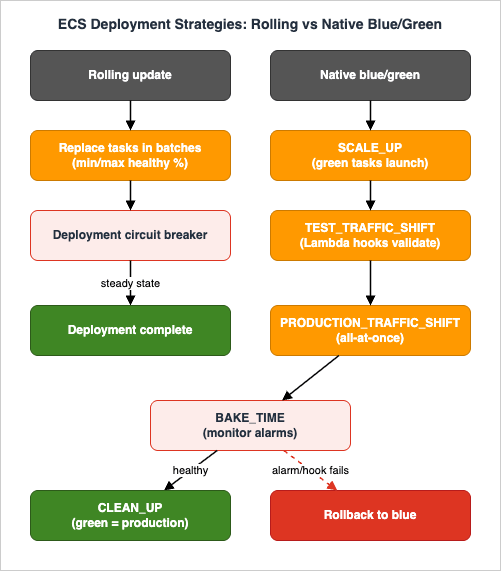
ContinueServiceDeployment):* You can sort the table by clicking on the column name.
| Order | Lifecycle stage | What is true at this point |
|---|---|---|
| 1 | RECONCILE_SERVICE | Runs only when more than one ACTIVE service revision exists. |
| 2 | PRE_SCALE_UP | Green has not started; blue serves 100% of production traffic. |
| 3 | SCALE_UP | Green tasks launch, but receive no traffic yet. |
| 4 | POST_SCALE_UP | Green has started; blue still serves 100%. |
| 5 | TEST_TRAFFIC_SHIFT | Green takes 0 to 100% of test traffic. |
| 6 | POST_TEST_TRAFFIC_SHIFT | Test traffic is fully on green. |
| 7 | PRE_PRODUCTION_TRAFFIC_SHIFT | Last gate before production traffic moves. |
| 8 | PRODUCTION_TRAFFIC_SHIFT | Production shifts from blue to green, all-at-once. |
| 9 | POST_PRODUCTION_TRAFFIC_SHIFT | Production traffic is fully on green. |
| 10 | BAKE_TIME | Blue and green run together while you watch alarms. |
| 11 | CLEAN_UP | Blue scales to zero; green is production. |
- Test traffic reaches green while production stays on blue. With an ALB, the same listener routes requests that match test rules (for example, a test header) to the green target group; with Service Connect,
testTrafficRuleson a client alias steers test traffic to green. - Production shift is all-at-once. ECS moves 100% of production traffic from blue to green by reweighting listener rules, rather than a gradual percentage ramp.
- Bake time is the window where both revisions run after the shift. If CloudWatch alarms fire or a hook fails during monitoring, ECS rolls back to blue automatically.
- Hook timing. A Lambda hook must finish its work or return
IN_PROGRESSwithin 15 minutes per invocation (usecallBackDelaySecondsto re-invoke for long checks). Each lifecycle stage can last up to 24 hours; pause hooks can wait far longer (configurable up to 14 days), with an overall deployment ceiling of 30 days, and CloudFormation-driven deployments add a 36-hour total limit. If you use a Network Load Balancer, ECS adds about 10 minutes to the test and production shift stages to be sure shifting is safe.
7.4 CodeDeploy Blue/Green — the Established Alternative
Before native blue/green, the canonical way to do blue/green on ECS was the AWS CodeDeploy controller (CODE_DEPLOY deployment controller). It remains fully supported and is the right choice when you need its specific traffic-shifting shapes — canary (shift a small percentage, wait, then the rest) and linear (shift equal increments on a fixed interval) — or when CodeDeploy is already the spine of your release tooling. The application defines blue and green target groups and a CodeDeploy AppSpec; ECS hands deployment control to CodeDeploy. For green-field services that want blue/green without adopting CodeDeploy, the native option is simpler; for teams standardized on CodeDeploy pipelines, the controller integration is the path of least resistance.7.5 Choosing a Deployment Strategy
| Strategy | Traffic shift | Rollback | Extra capacity | Use when |
|---|---|---|---|---|
| Rolling + circuit breaker | In-place, batched | Auto-revert to last good set | Bounded by maximumPercent | Default; lowest capacity overhead |
| Native blue/green | Test traffic, then all-at-once | Instant during bake time | ~2x during deploy | You want pre-production validation and fast rollback, no CodeDeploy |
| CodeDeploy blue/green | Canary / linear / all-at-once | CodeDeploy-managed | ~2x during deploy | You need canary/linear shifting or already use CodeDeploy |
All three rows assume the same definition of a finished deployment: the target revision has reached the desired count with its tasks running and healthy, the rollback guards have not fired, and the tasks on the source revision have been cleaned up. Early success criteria moves that line, and deferred cleanup takes the last item out of the test entirely. When a rolling deployment is declared successful, and what stops being protected after that moment, is covered by Amazon ECS Deployment Lifecycle - Early Success Criteria, Deferred Cleanup, and Managed Daemon Rollouts.
8. Connecting to the Data Tier
State is where microservices stop being stateless and start needing care. The reference architecture deliberately uses two stores so the patterns generalize:orders on Amazon RDS, payments on Amazon DynamoDB.8.1 Orders on Amazon RDS
orders connects to a relational database for transactional integrity across orders and line items. Two task-level concerns dominate:- Connection management. Each task holds its own connection pool, so the total connections to the database equal pool-size × task-count. When auto scaling can take
ordersfrom 3 to 30 tasks, the database can see a 10x jump in connections. Keep per-task pools small, cap the database'smax_connectionsheadroom against the service's maximum task count, and — for connection storms or many small tasks — consider Amazon RDS Proxy to pool and multiplex connections. The RDS Proxy decision and RDS/Aurora high-availability design (Multi-AZ, failover, read replicas) are delegated to Amazon RDS and Aurora High Availability Guide. - Credentials. The DB password is injected from Secrets Manager (Section 3.3) and the application authenticates with it. Network reachability is governed by security groups: the RDS security group allows inbound on the database port only from the
sg-orderssecurity group, not from a CIDR. - Passwordless option. Instead of a stored password, RDS supports IAM database authentication for MariaDB, MySQL, and PostgreSQL (and Aurora): the application requests a short-lived token (valid 15 minutes, signed with AWS Signature Version 4) using its task role and connects over SSL/TLS — no secret to inject or rotate. The RDS user guide used to recommend it for fewer than 200 new IAM database authentication connections per second; the current guide gives no such figure, and the What's New announcement of June 30, 2026 says "The number of new IAM authentication requests your instance can handle depends on available resources and workload characteristics." A small per-task pool still keeps the rate of new connections low, and the option shifts the credential from the execution role's secret fetch to the task role's IAM permission. What the 15-minute token lifetime does and does not mean for connections that are already open is covered in IAM Authentication to Databases, Caches, and Streams on AWS.
8.2 Payments on Amazon DynamoDB
payments uses DynamoDB for a simple, high-throughput key-value access pattern. There is no connection pool to manage — the SDK calls the regional DynamoDB endpoint over HTTPS — which makes DynamoDB especially friendly to elastic task counts. Access is granted through the task role with least privilege scoped to the one table:{
"Version": "2012-10-17",
"Statement": [
{
"Effect": "Allow",
"Action": ["dynamodb:GetItem", "dynamodb:PutItem", "dynamodb:Query", "dynamodb:UpdateItem"],
"Resource": "arn:aws:dynamodb:ap-northeast-1:111122223333:table/payments"
}
]
}
payments's task role can touch only the payments table, and orders's task role has no DynamoDB access at all. Least privilege is enforced per service, per role, not per cluster. Data-model details — single-table design, key choices, GSIs — are out of scope here and live in the dedicated DynamoDB articles; this section only wires the access path. To keep DynamoDB traffic off the public internet, attach a gateway VPC endpoint for DynamoDB so private tasks reach it without a NAT hop.8.3 Least Privilege Across the Mesh
Pulling the IAM threads together, the architecture's authorization graph is intentionally narrow:- Execution roles (per service): pull from that service's ECR repository, write to that service's log group, read that service's secrets.
- Task roles (per service):
orders→ RDS connectivity and its secret usage;payments→ its DynamoDB table;frontend→ neither database directly (it calls orders over Service Connect). - Security groups (per service): the ALB SG →
frontendSG on 8080;frontend/ordersSGs → downstream service SGs on 8080 via the proxy;ordersSG → RDS SG on the DB port. Every rule references a security group, never a wide CIDR.
9. Failure Modes, Blast Radius, and Diagnostics
A reliable architecture is defined less by its happy path than by how failures propagate and how quickly you can diagnose them. This section walks the most common failures of this exact system: symptom, root cause, isolation, and remedy.9.1 The End-to-End Request Path
Trace one checkout request to see where state lives and where it can break: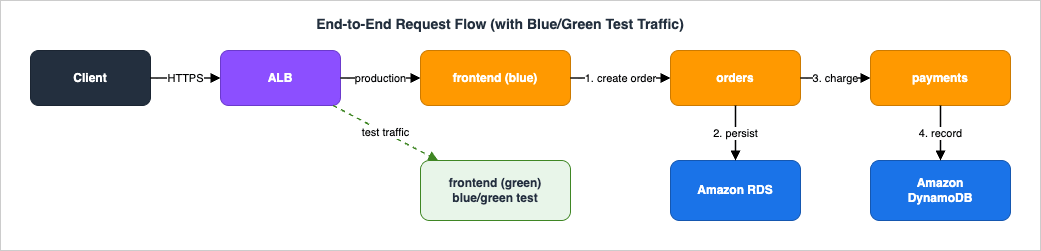
- The client hits the ALB, which forwards to a healthy
frontendtask IP in its target group. frontendcallshttp://orders.storefront:8080; the local Service Connect proxy load-balances to a healthyorderstask.orderswrites the order to RDS, then callshttp://payments.storefront:8080through its proxy.paymentswrites a payment record to DynamoDB and returns;ordersreturns;frontendresponds to the client.- Throughout, secrets were already resolved at task start, and each hop emits metrics and trace spans.
9.2 Task Fails Immediately After Launch
Symptom: new tasks cycle betweenPENDING and STOPPED; desired count is never met. Diagnosis: read the stop reason directly.aws ecs describe-tasks --cluster storefront \
--tasks $(aws ecs list-tasks --cluster storefront --service-name orders \
--desired-status STOPPED --query 'taskArns[0]' --output text) \
--query 'tasks[0].{stopped:stoppedReason,containers:containers[].reason}'
stoppedReason values and their fixes: ResourceInitializationError: unable to pull secrets → the execution role lacks secretsmanager:GetSecretValue/kms:Decrypt, or the task cannot reach the Secrets Manager endpoint (missing NAT/VPC endpoint). CannotPullContainerError → ECR permissions or no route to the ECR/ECR-API/S3 endpoints. Essential container ... exited → the app crashed on boot (bad config, wrong port); check the container's CloudWatch log stream. Because the circuit breaker is enabled, a deployment of a broken revision rolls back on its own rather than churning forever.9.3 Targets Are Unhealthy
Symptom: the ALB returns 503;UnHealthyHostCount is high. Diagnosis: the ALB health check is failing — wrong path, wrong port, the app is slow to boot, or the security group blocks the ALB. Check describe-target-health:aws elbv2 describe-target-health \
--target-group-arn arn:aws:elasticloadbalancing:...:targetgroup/frontend-tg/... \
--query 'TargetHealthDescriptions[].{ip:Target.Id,state:TargetHealth.State,reason:TargetHealth.Reason}'
healthCheckGracePeriodSeconds covers boot time, the health path returns 200, and sg-frontend allows the ALB SG on 8080. Blast radius: unhealthy frontend tasks are pulled from rotation automatically, so the impact is reduced capacity, not an outage — as long as the minimum healthy task count holds.9.4 5xx Spikes During Scaling or Deployment
Symptom: briefHTTPCode_Target_5XX_Count spikes when scaling in or deploying. Root cause: connections being cut on tasks that are stopping. Remedy: the trio of (a) stopTimeout long enough to drain, (b) target-group deregistration delay aligned to the longest request, and (c) the app handling SIGTERM by refusing new work while finishing in-flight requests. Get these three aligned and scale-in/deploy 5xx disappears.9.5 Service Connect Name Resolution Fails
Symptom:frontend logs connection refused or name-resolution errors calling orders.storefront. Diagnosis: confirm both services are in the same namespace, the server's port mapping name matches the portName in its serviceConnectConfiguration, and the client service has Service Connect enabled (it must join the namespace even though it exposes nothing). A frequent mistake is enabling Service Connect on the server but not the client. Blast radius: contained to the calling path; orders itself stays healthy, and the proxy's retries and outlier detection mask transient single-task failures.9.6 Secret Retrieval Fails
Symptom: tasks stop withResourceInitializationError: unable to pull secrets or registry auth. Root cause: execution-role permissions, a customer-managed KMS key the role cannot decrypt, or no network path to the Secrets Manager/SSM endpoints from a private subnet. Remedy: grant the execution role secretsmanager:GetSecretValue (and kms:Decrypt for CMK-encrypted secrets), and add interface VPC endpoints for Secrets Manager and SSM (or a NAT route). Because secrets resolve at launch, this fails fast and visibly rather than silently at runtime — which is the behavior you want.9.7 Reading the System's Health
For service-level events (deployment progress, placement failures, scaling activity),describe-services carries a rolling event log:aws ecs describe-services --cluster storefront --services orders \
--query 'services[0].{running:runningCount,desired:desiredCount,events:events[0:5].message}'
10. Observability
You cannot operate what you cannot see, and a microservices request that crosses three services plus two data stores needs correlation, not just per-service dashboards.10.1 Container Insights with Enhanced Observability
Amazon CloudWatch Container Insights with enhanced observability (released December 2, 2024) collects granular metrics at the cluster, service, task, and container levels and publishes them to theECS/ContainerInsights namespace, with curated dashboards and deployment tracking. AWS recommends the enhanced version over standard Container Insights for faster troubleshooting; the metrics it emits are billed as custom CloudWatch metrics, so enable it where the visibility pays for itself. It is turned on per cluster or account-wide:aws ecs update-cluster-settings --cluster storefront \
--settings name=containerInsights,value=enhanced
TargetResponseTime, HTTPCode_Target_5XX_Count, and UnHealthyHostCount for the edge.10.2 Distributed Tracing with ADOT
Metrics tell you that something is slow; traces tell you where. Add an AWS Distro for OpenTelemetry (ADOT) Collector as a sidecar container in each task definition; the application exports spans to the local collector, which forwards them to a tracing backend. Propagate a correlation/trace ID at the edge (frontend) and pass it on every Service Connect call so a single checkout can be reconstructed across frontend → orders → payments → DynamoDB. The Service Connect proxy also emits its own traffic metrics per service, complementing application spans.Building the full cross-service tracing, metrics, and logs pipeline — sampling, OpenTelemetry semantic conventions, Application Signals, and SLOs — is its own architecture, covered in AWS Observability Architecture Guide. This section's job is to ensure the ECS tasks are instrumented and correlated so that guide has something to aggregate.
11. Variations: ECS vs EKS vs Lambda, and When to Reshape
This guide implements one architecture; the point of Level 400 is to know when to keep it and when to reshape it. The selection itself is deliberately compressed here and delegated.- ECS on Fargate (this guide) is the sweet spot when you want containers without managing a Kubernetes control plane or nodes, and AWS-native primitives (Service Connect, Application Auto Scaling, native blue/green) are enough. It is the lowest operational overhead for "several services behind a load balancer."
- Amazon EKS is the move when you need the Kubernetes ecosystem — custom controllers, Helm, a portable API across clouds, or fine-grained pod networking and policy. The networking internals and their trade-offs are dissected in Amazon EKS Networking Deep Dive; this article is its ECS-operations counterpart, not a re-derivation.
- AWS Lambda fits event-driven and spiky request/response workloads where per-request billing and instant scale beat always-on tasks, and where the 15-minute execution ceiling and statelessness are acceptable. The serverless assembly pattern — API Gateway, Lambda, EventBridge, Step Functions, DynamoDB — is the subject of Event-Driven Serverless Architecture on AWS.
12. Frequently Asked Questions
How do services find each other without a load balancer per service?
ECS Service Connect gives each service a logical name in a Cloud Map namespace and injects a managed proxy into every task that load-balances, retries, and (optionally) encrypts traffic. Clients callhttp://<service>.<namespace>:<port> and the proxy routes to healthy tasks — no per-service internal load balancer required.Do I need AWS CodeDeploy for blue/green deployments?
No. ECS now has native blue/green built into its deployment controller, with test traffic, bake time, Lambda lifecycle hooks, and automatic rollback. CodeDeploy remains the right choice when you specifically need canary or linear traffic shifting, or when CodeDeploy already drives your pipeline.Which IAM role reads my secrets — the task role or the execution role?
The execution role, because the ECS/Fargate agent fetches injected secrets before your code runs. The task role is for the application's own AWS calls (for example, DynamoDB). Grantsecretsmanager:GetSecretValue (and kms:Decrypt for CMK-encrypted secrets) to the execution role, and keep business-logic permissions on the task role.Why does my service return 5xx during deployments or scale-in?
Almost always because stopping tasks are cutting connections. Align three settings: astopTimeout long enough to drain (Fargate allows 2–120 seconds, default 30), a target-group deregistration delay matched to your longest request, and an application that handles SIGTERM by finishing in-flight work before exiting.My tasks stop right after launching with a secrets error. What is wrong?
AResourceInitializationError: unable to pull secrets means the execution role lacks permission to read the secret or decrypt its KMS key, or the private subnet has no route to the Secrets Manager/SSM endpoint. Fix the execution-role policy and add VPC endpoints (or a NAT route) for those services.How do I scale on traffic rather than CPU?
Register the service as an Application Auto Scaling target and attach a target-tracking policy onALBRequestCountPerTarget, setting the desired average requests per task. Combine it with a CPU or memory target as a guardrail, and use asymmetric cooldowns (fast out, slow in).Can I encrypt traffic between services without changing my application?
Yes. Enable Service Connect TLS, which integrates with AWS Private CA to issue and rotate short-lived certificates (TLS 1.3) automatically; the proxy handles encryption transparently. It requires a TLS IAM role and an infrastructure role for the agent.13. Summary
This guide assembled a concrete ECS on Fargate microservices architecture and traced it end to end rather than touring services in isolation. The reference system — an ALB frontingfrontend, orders, and payments Fargate services, connected by Service Connect, scaled by Application Auto Scaling, deployed with rolling and native blue/green strategies, reading secrets from Secrets Manager and Parameter Store, and persisting to RDS and DynamoDB — is a template you can adapt directly.The Level 400 throughline is that the hard problems are cross-service: the two-role IAM split that bounds blast radius, the readiness and draining alignment that keeps deployments and scaling free of 5xx, the quota interactions that constrain how far several services can scale at once, and the correlation needed to diagnose a request across hops. Get those right and the individual services become almost incidental.
From here, three adjacent guides extend the picture: AWS Observability Architecture Guide for the full tracing/metrics/logs pipeline these tasks feed, Event-Driven Serverless Architecture on AWS for the serverless counterpart to this container architecture, and Secure Web Application Reference Architecture on AWS for the edge-to-data capstone that places this compute tier inside a full secure web stack. The networking counterpart on the other orchestrator remains Amazon EKS Networking Deep Dive.
For pricing, always consult the official AWS Fargate Pricing and Amazon ECS Pricing pages rather than any figure quoted in an article — costs change and are Region-specific.
14. References
- Amazon Elastic Container Service Developer Guide
- Amazon ECS Service Connect configuration overview
- Encrypt Amazon ECS Service Connect traffic (TLS)
- Amazon ECS blue/green deployments
- Amazon ECS blue/green service deployments workflow and lifecycle stages
- Best practices for Amazon ECS service parameters (minimumHealthyPercent / maximumPercent)
- Announcing Amazon ECS deployment circuit breaker
- Create a target tracking scaling policy for Amazon ECS service auto scaling
- Troubleshoot Amazon ECS task definition invalid CPU or memory errors (Fargate task sizes)
- Specifying sensitive data using Secrets Manager secrets in Amazon ECS
- Pass Systems Manager parameters through Amazon ECS environment variables
- Amazon ECS task execution IAM role
- Graceful shutdowns with Amazon ECS
- Monitor Amazon ECS containers using Container Insights with enhanced observability
- Handle Amazon ECS service quotas and API throttling limits
- Amazon RDS Enhances IAM Database Authentication with Connection Rate Scaling
- AWS Fargate Pricing
Related Articles
- Amazon EKS Networking Deep Dive
- AWS Elastic Load Balancing Decision Guide
- AWS VPC Connectivity Decision Guide
- AWS PrivateLink and VPC Endpoints Complete Guide
- AWS Secrets Manager and Parameter Store Guide
- Amazon RDS and Aurora High Availability Guide
- AWS History and Timeline of Amazon ECS
References:
Tech Blog with curated related content
Written by Hidekazu Konishi