AWS History and Timeline regarding Amazon ECS - Overview, Functions, Features, Summary of Updates, and Introduction
First Published:
Last Updated:
This time, I have created a historical timeline for Amazon Elastic Container Service (Amazon ECS), a fully managed container orchestration service announced in November 2014.
Amazon ECS turned ten years old in November 2024 since its announcement, and it has grown well beyond a simple Docker scheduler into a multi-launch-type orchestration platform that spans Amazon EC2, AWS Fargate, and on-premises hardware via Amazon ECS Anywhere.
Just like before, I am summarizing the main features while following the birth of Amazon ECS and tracking its feature additions and updates as a Current Overview, Functions, Features of Amazon ECS.
I hope these will provide clues as to what has remained the same and what has changed, in addition to the features and concepts of each AWS service.
Background and Method of Creating Amazon ECS Historical Timeline
The reason for creating a historical timeline of Amazon ECS this time is that container workloads on AWS have become a default deployment target for everything from web backends to batch jobs and machine learning inference, and many teams now have to choose between Amazon ECS, Amazon EKS, and AWS Lambda for their compute layer.Another reason is that since Amazon ECS was announced in November 2014, it has been integrated with various AWS services and steadily extended with new launch types, networking modes, and orchestration features. Therefore, I wanted to organize the information of Amazon ECS with the following approaches.
- Tracking the history of Amazon ECS and organizing the transition of updates
- Summarizing the feature list and characteristics of Amazon ECS
- What's New with AWS?
- AWS News Blog
- AWS Containers Blog
- What is Amazon Elastic Container Service? - Amazon ECS Developer Guide
The content posted is limited to major features related to the current Amazon ECS and necessary for the feature list and overview description.
In other words, please note that the items on this timeline are not all updates to Amazon ECS features, but are representative updates that I have picked out.
Amazon ECS Historical Timeline (Updates from November 13, 2014)
Now, here is a timeline related to the functions of Amazon ECS. As of the time of writing this article, the history of Amazon ECS spans more than eleven years since the announcement in November 2014.* The table can be sorted by clicking on the column names.
| Date | Summary |
|---|---|
| 2014-11-13 | Amazon EC2 Container Service (the original name for Amazon ECS) is announced at AWS re:Invent 2014. It provides cluster management and a task scheduler for running Docker containers across a fleet of customer-managed Amazon EC2 instances, eliminating the need to install and operate a separate cluster manager. |
| 2015-04-09 | Amazon ECS becomes Generally Available (GA). Customers can run production container workloads using task definitions, clusters, and services, with built-in integration with Amazon EC2, Elastic Load Balancing, Amazon CloudWatch, and AWS Identity and Access Management. |
| 2015-04-09 | The concept of an ECS Service is introduced, providing long-running task scheduling, desired count management, and Elastic Load Balancing integration so that container applications can be exposed as highly available services. |
| 2015-07-09 | Amazon CloudWatch metrics for Amazon ECS are released, including CPUUtilization and MemoryUtilization at the cluster and service level, enabling alarm-based operations and capacity planning. |
| 2015-09-21 | The Amazon ECS CLI (Command Line Interface) is released, providing a high-level wrapper that can build and run multi-container applications described in Docker Compose files on Amazon ECS clusters. |
| 2015-10-08 | Amazon EC2 Container Registry (Amazon ECR) is pre-announced at AWS re:Invent 2015 as a fully managed Docker container registry that integrates with Amazon ECS, IAM, and the Docker CLI, providing a private registry for storing container images used by ECS task definitions. |
| 2015-12-21 | Amazon ECR becomes Generally Available (GA), initially in US East (N. Virginia) and rolling out to additional Regions, removing the need to self-host a Docker Registry alongside Amazon ECS task definitions. |
| 2016-04-04 | Amazon ECS adds support for task placement strategies and constraints, allowing customers to specify how tasks are distributed across container instances using strategies such as spread, binpack, and random, in combination with attribute-based placement constraints. |
| 2016-07-13 | Amazon ECS adds support for Application Load Balancer, enabling content-based routing, path-based routing, and host-based routing for containerized services, in addition to existing Classic Load Balancer integration. |
| 2016-08-23 | Service Auto Scaling for Amazon ECS becomes available, allowing ECS services to scale the task count up and down automatically based on Amazon CloudWatch alarms such as CPU utilization or request count per target. |
| 2016-12-01 | Blox, an open source collection of container management software for Amazon ECS, is announced at AWS re:Invent 2016, providing reference implementations such as a custom scheduler and an ECS state monitor (later superseded by built-in ECS capabilities). |
| 2016-12-20 | Amazon ECS announces beta support for Windows containers, allowing Windows Server-based Docker containers to be scheduled and managed using ECS task definitions and cluster constructs. |
| 2017-11-14 | Amazon ECS introduces task networking with the awsvpc network mode, allowing each ECS task to receive its own Elastic Network Interface (ENI) and a primary private IP address in the customer's VPC, with per-task security groups and VPC Flow Logs. |
| 2017-11-29 | AWS Fargate is announced at AWS re:Invent 2017 as a serverless compute engine for containers that lets customers run Amazon ECS tasks without provisioning or managing the underlying EC2 instances. Customers specify CPU and memory at the task level, and AWS manages the underlying infrastructure. |
| 2017-11-29 | Amazon ECS adds support for GPU-based Amazon EC2 P2 and P3 instances as container instances, enabling machine learning and high-performance computing workloads with attached GPUs to be scheduled by ECS. |
| 2018-03-22 | Service Discovery for Amazon ECS is launched via integration with the Amazon Route 53 Auto Naming API (the Auto Naming API was later evolved into AWS Cloud Map, which was announced at AWS re:Invent 2018), automatically registering and deregistering ECS service endpoints in Route 53 private hosted zones so that microservices can find each other by friendly DNS names. |
| 2018-08-28 | Amazon ECS introduces the daemon scheduling strategy, which automatically deploys exactly one instance of a task on every active container instance that matches the placement constraints, simplifying the operation of node-local agents such as log shippers and monitoring agents. |
| 2018-11-27 | Amazon ECS adds support for the AWS Fargate platform version 1.3, including secrets injection via AWS Secrets Manager and AWS Systems Manager Parameter Store, and integration with Amazon ECS service discovery. |
| 2019-07-09 | Amazon CloudWatch Container Insights is introduced in preview for Amazon ECS and AWS Fargate, providing pre-built metrics, dashboards, and log aggregation for container workloads at the cluster, service, and task level. |
| 2019-08-19 | AWS Fargate pricing is significantly reduced across all supported regions, broadening the cost-effectiveness of running containers without managing EC2 capacity. |
| 2019-09-16 | Amazon CloudWatch Container Insights becomes Generally Available (GA) for Amazon ECS, AWS Fargate, Amazon EKS, and self-managed Kubernetes, extending coverage from new clusters to existing clusters and adding curated CloudWatch Logs Insights queries for container troubleshooting. |
| 2019-12-03 | Amazon ECS Capacity Providers and Cluster Auto Scaling become available following the AWS re:Invent 2019 announcement. Capacity Providers abstract the underlying infrastructure (Amazon EC2 Auto Scaling groups or AWS Fargate / Fargate Spot) so that ECS services can declare desired capacity behavior and let ECS automatically scale the EC2 Auto Scaling group based on task placement demand. |
| 2019-12-03 | AWS Fargate Spot is announced, allowing Amazon ECS tasks to run on spare AWS capacity at a significant discount compared to regular Fargate, with two-minute interruption notifications when the capacity is reclaimed. |
| 2020-04-08 | AWS Fargate platform version 1.4 launches, adding native support for Amazon Elastic File System (Amazon EFS) volumes, larger ephemeral storage (20 GB by default, expandable in later releases), and a new networking architecture that uses VPC endpoints for ECR, Secrets Manager, and AWS Systems Manager. |
| 2020-11-23 | AWS Copilot CLI v1.0 becomes Generally Available, providing an opinionated, end-to-end developer experience for building, releasing, and operating containerized applications on Amazon ECS and AWS Fargate, including blue/green deployments and CodePipeline integration. (The tool was first introduced in preview on July 9, 2020 as the successor to the earlier AWS CLI for ECS preview.) |
| 2020-12-01 | Amazon ECS Anywhere is announced at AWS re:Invent 2020, extending the Amazon ECS control plane to manage containers running on customer-managed infrastructure (on-premises servers, virtual machines, and edge devices) using the same APIs, task definitions, and operational model as cloud-based ECS clusters. |
| 2020-12-22 | Amazon ECS Deployment Circuit Breaker becomes Generally Available, automatically detecting failed deployments based on task failure thresholds and rolling back to the previous task definition, eliminating the need for custom CloudWatch alarm-based rollback automation. |
| 2021-03-15 | Amazon ECS Exec is launched, allowing customers to run interactive commands (such as a shell) inside a running container by using AWS Systems Manager Session Manager as the transport, without exposing SSH ports or running additional agents in the container. |
| 2021-05-27 | Amazon ECS Anywhere becomes Generally Available (GA), enabling customers to register external (non-EC2) instances as Amazon ECS container instances using AWS Systems Manager-based registration, run tasks on them with the EXTERNAL launch type, and centrally observe them from CloudWatch Container Insights. |
| 2021-10-28 | AWS Fargate adds Generally Available support for Windows containers on Amazon ECS, initially supporting Windows Server 2019 Full and Core LTSC container images, so that Windows workloads can run on Fargate without managing Windows EC2 instances. Support for Windows Server 2022 was added later. |
| 2021-11-23 | AWS Fargate adds support for AWS Graviton2 (ARM64) processors, allowing Amazon ECS tasks to run on ARM64-based Fargate at lower cost and higher performance per vCPU. The ECS Task Definition gains the runtimePlatform field so that customers can declare the operating system family and the CPU architecture (X86_64 or ARM64) explicitly. |
| 2022-11-10 | Amazon ECS introduces task scale-in protection, allowing tasks to declare themselves as protected from being terminated during scale-in events, which simplifies long-running batch and stateful workloads on ECS services. |
| 2022-11-29 | Amazon ECS Service Connect is announced at AWS re:Invent 2022. Service Connect provides built-in service-to-service communication for Amazon ECS, with client-side load balancing, automatic service discovery using friendly names, and connection-level metrics in CloudWatch — covering most of the same ground previously addressed by AWS App Mesh sidecars and ECS service discovery, but without requiring customers to manage the Envoy configuration themselves. |
| 2022-12-20 | Amazon ECS adds support for CloudWatch alarms during rolling deployments, allowing customers to attach Amazon CloudWatch alarms to ECS service deployments that automatically trigger rollback when an alarm enters the ALARM state during a rolling update. |
| 2023-11-26 | Amazon GuardDuty ECS Runtime Monitoring is announced at AWS re:Invent 2023, providing threat detection for container workloads running on Amazon ECS with AWS Fargate, by monitoring system calls and runtime behavior from a managed eBPF-based agent. |
| 2024-01-22 | Amazon ECS Service Connect adds support for configurable timeouts and automatic TLS encryption, allowing service-to-service traffic to be encrypted in transit using AWS Private Certificate Authority-managed certificates, and per-call timeouts to be set at the Service Connect proxy. |
| 2024-07-10 | Amazon ECS adds support for software version consistency, ensuring that all tasks in a service deployment use the same resolved container image digest even when the task definition references a mutable image tag, preventing accidental version drift across tasks. |
| 2024-11-21 | Predictive scaling for Amazon ECS services is announced, refining how Service Auto Scaling responds to anticipated load changes by forecasting demand and proactively scaling the desired task count before the load arrives, complementing target tracking and step scaling policies. |
| 2025-07-17 | Amazon ECS adds built-in blue/green deployments natively in the ECS API, allowing services to perform blue/green rollouts without requiring AWS CodeDeploy, with traffic shifting handled by ECS-managed load balancer or Service Connect integration and with optional deployment lifecycle hooks for pre- and post-traffic validation. |
| 2025-09-30 | Amazon ECS Managed Instances is announced, adding a fully managed compute option in which you declare task requirements such as vCPU count, memory size, and CPU architecture, and Amazon ECS provisions, configures, and operates the EC2 instances inside your own account under AWS-controlled access, with security patching initiated on a regular cycle. |
| 2025-10-30 | Amazon ECS adds built-in linear and canary deployment strategies, extending the native blue/green support with two progressive traffic-shifting modes. A linear rollout moves traffic to the new service revision in equal percentage steps with a step bake time between them, while a canary rollout sends a small percentage first, holds it for a canary bake time, and then shifts the remainder. Both end with a deployment bake time before the old revision is terminated, so a rollback stays available without downtime, and both were available at launch for services fronted by an Application Load Balancer or ECS Service Connect. |
| 2025-11-21 | Amazon ECS Express Mode is announced, reducing a containerized web application or API to three inputs — a container image, a task execution role, and an infrastructure role — and provisioning the cluster, task definition, AWS Fargate service, Application Load Balancer with an AWS Certificate Manager certificate and HTTPS listener, auto scaling policy, log group, and deployment alarms on the customer's behalf. Every service receives an AWS-provided domain name, up to 25 services share one load balancer through rule-based routing, and every resource stays in the customer's own account and can be modified directly afterward. |
| 2026-02-04 | Amazon ECS adds Network Load Balancer support for linear and canary deployments, extending the progressive strategies beyond the Application Load Balancer and ECS Service Connect to services that need TCP or UDP connections, low latency, long-lived connections, or static IP addresses. When a Network Load Balancer is configured, Amazon ECS adds a ten-minute delay to the test and production traffic-shift stages, which absorbs the mismatch that can otherwise appear between the configured traffic weights and the routing actually in effect in the data plane. |
| 2026-05-19 | Amazon ECS introduces pause and continue controls for service deployments, adding a PAUSE deployment lifecycle hook that halts deployment progression at a chosen stage and emits an Amazon EventBridge event, together with a ContinueServiceDeployment API that resumes or rolls back the paused deployment. A pause can be held for up to 14 days and can be set to continue or to roll back automatically when that timeout expires, and it applies to the rolling, blue/green, linear, and canary strategies. |
| 2026-07-01 | Amazon ECS makes the deployment circuit breaker configurable, letting the failure threshold be expressed either as a fixed task failure count or as a percentage of the service's desired count, and letting failures be counted either consecutively or cumulatively. A lower threshold suits development and test environments that should roll back quickly, while a higher tolerance suits applications that record expected startup failures before they stabilize. |
| 2026-07-21 | Amazon ECS introduces Action Logs for deployment and orchestration visibility, recording timestamped entries for the actions Amazon ECS performs on the customer's behalf during service deployments and Managed Daemon updates, at INFO, WARN, and ERROR severity with the event name, the related resource ARNs, and a status reason. Action Logs are opted into per cluster and are delivered through Amazon CloudWatch vended logs to Amazon CloudWatch Logs, Amazon S3, or Amazon Data Firehose. |
| 2026-08-06 | Amazon ECS adds fractional GPU scheduling on Amazon EC2 G6f instances, extending the GPU scheduling introduced for P2 and P3 instances in 2017 so that a container can reserve one-eighth, one-quarter, or one-half of an NVIDIA L4 GPU by setting a decimal GPU value in the task definition's resourceRequirements. Each fraction carries its own dedicated GPU memory, from 3 GB at one-eighth to 12 GB at one-half. |
| 2026-09-04 | Amazon ECS introduces early success criteria for service deployments, letting a rolling deployment be declared successful once a configured percentage of the desired count is running and healthy, instead of waiting for the full desired count and for the tasks on the source service revision to be cleaned up. Cleanup can be deferred so that it sits outside the success test, and the deployment circuit breaker and CloudWatch alarm rollback stop applying once the configured percentage is reached. What the default deployment waits for, and what stops being protected after that moment, are covered in Amazon ECS Deployment Lifecycle. |
Current Overview, Functions, Features of Amazon ECS
Following the timeline above, this section organizes the current overview, functions, and features of Amazon ECS in a way that complements the chronological view.Amazon ECS is a fully managed container orchestration service that schedules and operates Docker-compatible containers. It abstracts the cluster control plane (the API surface and the scheduler) away from the customer and offers multiple "launch types" that determine where and how the underlying compute is procured.
Amazon ECS Use Cases
Amazon ECS is used for a wide range of containerized workloads. Here are some of the main use cases for Amazon ECS.- Long-running web application backends
Run containerized HTTP services behind Application Load Balancer or Network Load Balancer, with rolling updates, health-check-driven replacement, and per-service auto scaling. - Microservices architectures
Operate many small services that communicate with each other through Amazon ECS Service Connect or AWS Cloud Map-based service discovery, with TLS, retries, and timeouts handled by the platform. - Batch and asynchronous workloads
Run finite tasks triggered by Amazon EventBridge, Amazon SQS, or AWS Step Functions, taking advantage of Capacity Providers, Fargate Spot, and ECS task scale-in protection. - Machine learning inference and high-performance computing
Use Amazon EC2 GPU-equipped instances as ECS container instances, or use AWS Fargate when GPU is not required, to host inference services close to data sources. - Edge and on-premises workloads
Use Amazon ECS Anywhere to manage containers on customer-owned hardware while keeping the same ECS API, task definitions, and operational model used in the AWS cloud. - Modernization of existing applications
Lift-and-shift legacy Linux and Windows applications into containers, then evolve them over time toward more cloud-native patterns without changing the orchestration layer.
Specific Examples of Use Cases
For instance, there are the following specific examples of use cases.- Internal API platform
A team operates dozens of microservices on a single Amazon ECS cluster using AWS Fargate as the launch type and Amazon ECS Service Connect for east-west traffic, with each team owning its own service and task definition revisions. - Multi-tenant data processing
Tenant-specific batch jobs are launched as Amazon ECS RunTask invocations on AWS Fargate, isolated by IAM task roles and per-tenant tags, with Capacity Providers spreading load between regular Fargate and Fargate Spot for cost optimization. - Hybrid web tier
A latency-sensitive web tier runs on Amazon EC2 launch-type container instances in an Auto Scaling group inside the customer's VPC, while burst capacity is provided by AWS Fargate via a Capacity Provider strategy that combines both. - Edge inference
A retailer registers store-level servers as Amazon ECS Anywhere external container instances and deploys the same inference container image to every store, monitored from a central CloudWatch dashboard.
Amazon ECS Conceptual Diagram
From here, I will explain the main features and characteristics of Amazon ECS, but before that, I will show the following conceptual diagram of Amazon ECS to make it easier to imagine the overall picture.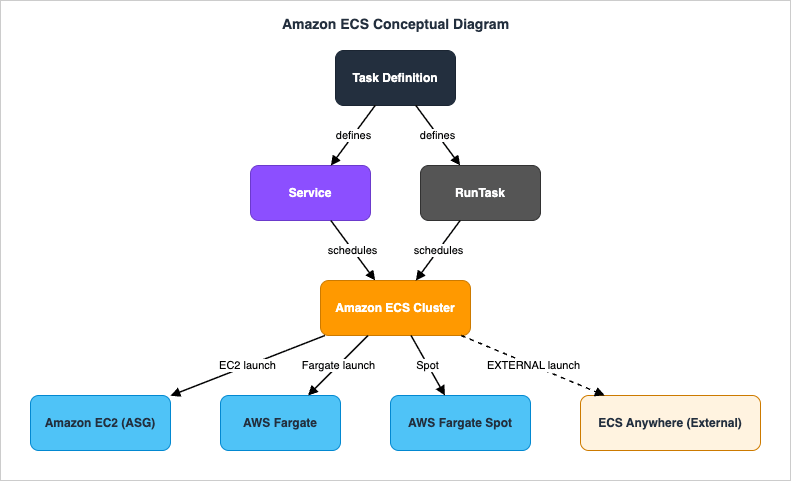
This diagram illustrates how Amazon ECS schedules tasks defined by Task Definitions onto a Cluster that is backed by one or more sources of compute. The Capacity Providers feature handles AWS Fargate, AWS Fargate Spot, and Amazon EC2 Auto Scaling groups running the ECS container agent. Amazon ECS Anywhere instead registers external on-premises and edge instances with the cluster and runs tasks on them with the EXTERNAL launch type, without going through a Capacity Provider.
A Task Definition is an immutable, versioned JSON document that specifies one or more container definitions, the amount of CPU and memory at the task level (and optionally at the container level), the networking mode, the IAM task role, the IAM task execution role, volumes, and the new
runtimePlatform block that describes the operating system family and CPU architecture.A Service maintains a desired count of long-running tasks, registers and deregisters them with Elastic Load Balancing, integrates with Service Connect or AWS Cloud Map service discovery, and supports rolling, blue/green, or external deployment controllers. Standalone tasks can also be launched directly with
RunTask, including from Amazon EventBridge rules and AWS Step Functions state machines.In the following sections, we will provide more details about these features and configurations of Amazon ECS.
Amazon ECS Launch Types
Amazon ECS offers multiple "launch types" that determine where and how tasks run. Customers can mix launch types within a single cluster by using Capacity Provider strategies.AWS Fargate Launch Type
AWS Fargate is the serverless launch type for Amazon ECS. Customers do not manage the underlying EC2 instances; instead, they specify CPU and memory at the task level (in supported combinations such as 0.25 vCPU / 0.5 GB, up to 16 vCPU / 120 GB for Linux, plus Windows-specific combinations), and AWS provisions and operates the compute under the hood.AWS Fargate supports both Linux and Windows operating system families and both X86_64 and ARM64 (AWS Graviton2-based) CPU architectures for Linux. The architecture and OS family are declared in the
runtimePlatform block of the task definition.AWS Fargate platform versions (1.4.0 is the current LATEST for Linux, with a separate set of platform versions for Windows) determine the available features, including EFS support, ephemeral storage size, and integration with VPC endpoints. New Fargate features are typically introduced on the LATEST platform version, so customers should consult the AWS documentation for the current set of supported features per platform version.
Amazon EC2 Launch Type
With the Amazon EC2 launch type, customers register Amazon EC2 instances running the Amazon ECS container agent as "container instances" in an ECS cluster. The customer is responsible for the EC2 Auto Scaling group, the AMI (Amazon ECS-optimized AMI is recommended), patching, and instance-level networking; in return, the customer gets fine-grained control over instance types, instance-level networking, custom AMIs, GPU support, and pricing models such as Reserved Instances and Savings Plans.The Amazon EC2 launch type also supports task placement strategies (spread, binpack, random) and constraints (such as instance attributes or memberOf expressions) that let operators control how tasks are distributed across container instances.
Amazon ECS Anywhere Launch Type (EXTERNAL)
Amazon ECS Anywhere extends the same Amazon ECS control plane to manage containers on customer-managed infrastructure outside of AWS, such as on-premises servers, virtual machines, and edge devices. External instances are registered using AWS Systems Manager-based activation and then become first-class container instances with the EXTERNAL launch type.ECS Anywhere is well suited for workloads that must run close to specific data, hardware, or end users (for example, factories, retail stores, telco edge sites), while still benefiting from the central Amazon ECS API, task definitions, IAM roles, and CloudWatch observability.
Amazon ECS Cluster, Service, and Task Concepts
The core abstractions in Amazon ECS are the Cluster, the Service, and the Task — each described by a Task Definition.- Cluster
A logical grouping of container instances and / or Fargate capacity onto which tasks can be scheduled. A cluster is typically scoped to one AWS account and one Region; ECS Anywhere external instances are also registered into a cluster. - Task Definition
An immutable, versioned JSON document that describes one or more containers, the task-level CPU and memory, the network mode, the IAM task role, IAM task execution role, volumes, log configuration, theruntimePlatform, and other settings. Each revision is a new version. - Task
A running instance of a particular task definition revision. Tasks can be run standalone viaRunTaskor launched and maintained by a Service. - Service
A long-running construct that maintains a desired number of tasks of a given task definition, registers and deregisters them with Elastic Load Balancing, integrates with Service Connect or service discovery, and applies deployment strategies (rolling, blue/green via CodeDeploy, external). - Container Instance
A compute target on which tasks can be placed. For the EC2 launch type it is an EC2 instance running the ECS container agent; for the EXTERNAL launch type it is a registered on-premises or edge instance; for Fargate the concept is abstracted away.
Amazon ECS Task Definitions and Container Definitions
The Task Definition is where the bulk of operational policy is encoded. Important fields include:Task-Level Resource Limits
Task-levelcpu and memory set the total resources reserved for a task. For AWS Fargate, only specific (vCPU, memory) combinations are valid; for Amazon EC2, customers can choose any combination supported by the host's available resources.Networking Mode
Amazon ECS supports four network modes:awsvpc (each task gets its own ENI and primary private IP), bridge (the default Docker bridge on Linux EC2 hosts), host (the task shares the host's network namespace), and none. AWS Fargate always uses awsvpc. The awsvpc mode enables per-task security groups, VPC Flow Logs at the task level, and finer-grained network segmentation.runtimePlatform for OS / CPU Architecture
The runtimePlatform block in the task definition is used to declare the operating system family (Linux, Windows Server 2019 Full, 2019 Core, 2022 Full, 2022 Core) and the CPU architecture (X86_64 or ARM64) of the task. This is required when running tasks on AWS Graviton2-based Fargate (ARM64) and when running Windows containers on Fargate.IAM Task Role and Task Execution Role
The Task Execution Role is an IAM role assumed by the ECS container agent (or Fargate agent) to perform AWS API calls on behalf of the customer at task startup — for example, pulling images from Amazon ECR, writing logs to Amazon CloudWatch Logs, and fetching secrets from AWS Secrets Manager or AWS Systems Manager Parameter Store.The Task Role is an IAM role that the application code inside the container can assume at runtime to call AWS APIs (for example, reading from Amazon S3 or writing to Amazon DynamoDB). The Task Role is the recommended way to grant AWS permissions to containerized application code; long-lived IAM access keys baked into images should be avoided.
Volumes
Amazon ECS supports several volume types: bind mounts and Docker volumes for the EC2 launch type, Amazon EFS volumes for both Fargate and EC2, Amazon FSx for Windows File Server and Amazon FSx for ONTAP for Windows and Linux workloads (on supported launch types), and a managed ephemeral storage volume on Fargate (default 20 GB, expandable on supported platform versions).Logging
Each container can declare a log driver.awslogs sends logs to Amazon CloudWatch Logs and is the most common choice; FireLens (using AWS for Fluent Bit or Fluentd) allows fanning logs out to Amazon Data Firehose (formerly Amazon Kinesis Data Firehose), Amazon S3, Amazon OpenSearch Service, or third-party SIEMs.Amazon ECS Capacity Providers
Capacity Providers abstract the infrastructure layer of Amazon ECS clusters. Each Capacity Provider corresponds either to AWS Fargate, AWS Fargate Spot, or to an Amazon EC2 Auto Scaling group managed by ECS Cluster Auto Scaling.A cluster has one or more Capacity Providers, and services and standalone tasks can specify a Capacity Provider Strategy that lists the providers, their weights, and an optional base value. ECS then distributes tasks across the providers according to the strategy and triggers EC2 Auto Scaling group scale-out (via a managed Capacity Provider with Managed Scaling) when there is insufficient capacity to place a task.
This is the recommended way to mix Fargate and EC2 capacity, or to mix on-demand and Spot capacity, within a single Amazon ECS service.
Amazon ECS Service Auto Scaling
Amazon ECS Service Auto Scaling adjusts the desired task count of a service based on CloudWatch metrics. It uses the Application Auto Scaling service (the same one used by Amazon DynamoDB, Aurora Serverless, and others) and supports three scaling policy types:- Target tracking scaling: Maintain a specific value of a metric (such as average CPU utilization or ALB request count per target). This is the recommended starting point.
- Step scaling: Apply differently sized scaling actions depending on the magnitude of the alarm breach.
- Scheduled scaling: Scale to a fixed desired count at a specific time (for example, scaling out before known business hours).
Amazon ECS Service Connect and Service Discovery
Amazon ECS provides two complementary mechanisms for service-to-service communication.- Amazon ECS Service Connect is the more modern of the two. It is configured directly in the ECS Service definition; ECS deploys a managed Envoy-based proxy as a sidecar to each task and registers logical service endpoints that other tasks can resolve by name. Service Connect provides automatic service discovery, client-side load balancing, retries and timeouts, per-call metrics published to CloudWatch, and TLS using AWS Private Certificate Authority-managed certificates. Service Connect addresses the use cases that previously required customers to configure AWS App Mesh sidecars manually.
- AWS Cloud Map-based service discovery is the older mechanism. ECS registers and deregisters task IP addresses into Cloud Map namespaces backed by Amazon Route 53 private hosted zones; consumer applications resolve service endpoints via DNS.
Amazon ECS Deployment Strategies
Amazon ECS supports three deployment controllers for services:- ECS deployment controller (default): In a rolling update, ECS replaces tasks of the old revision with tasks of the new revision in batches, respecting
minimumHealthyPercentandmaximumPercent. The same controller also performs blue/green, linear, and canary rollouts natively, with ECS-managed traffic shifting, bake time, and deployment lifecycle hooks, so these strategies no longer require an external deployment tool. The Deployment Circuit Breaker can automatically roll back failed deployments based on a task failure threshold or on Amazon CloudWatch alarms configured as deployment alarms; the threshold can be expressed as a fixed failure count or as a percentage of the desired count, counted either consecutively or cumulatively. - Blue/green via AWS CodeDeploy: ECS creates a parallel set of "green" tasks behind a separate ALB target group, and CodeDeploy shifts traffic in configurable increments, with optional pre-traffic and post-traffic Lambda hooks. This was the only way to run a blue/green rollout on Amazon ECS before the native strategies above, and it remains available for pipelines already built around CodeDeploy.
- External deployment controller: The customer (or a third-party tool) performs the deployment by calling the ECS APIs directly, while still benefiting from the ECS scheduling, load balancer integration, and observability primitives.
:latest — preventing the situation where some tasks pick up a newer image during scale-out.Amazon ECS Exec for Interactive Debugging
Amazon ECS Exec lets operators run interactive commands inside a running container without exposing SSH, without running additional daemons inside the container, and without packaging debugging tools into the image (other than the desired shell). It works for both EC2 and Fargate launch types and uses AWS Systems Manager Session Manager as the transport, so that all sessions are authenticated through IAM, can be logged to Amazon S3 or Amazon CloudWatch Logs, and respect IAM policies that restrict which clusters, services, and containers can be accessed.This replaces the older pattern of running an SSH daemon in containers or in the host EC2 instance, and is now the default way to debug a container running on Amazon ECS.
Amazon ECS Security Measures
Security is also a top priority when using Amazon ECS.AWS cloud security is designed to meet the requirements of the most security-conscious organizations.
Like other AWS services, Amazon ECS operates under the AWS shared responsibility model, where AWS is responsible for the security of the cloud infrastructure (including the entire control plane and, for Fargate, the data plane as well), and customers are responsible for the security configuration and management of the AWS services they use.
Identity and Access Management for Amazon ECS
Customers control access to the Amazon ECS API surface (CreateCluster, CreateService, RunTask, UpdateService, ExecuteCommand, etc.) using IAM policies. Resource-level permissions can be scoped to specific clusters, services, and task definitions, and tag-based access control (TBAC) is supported for both control-plane and data-plane actions.- Task Execution Role: Used by the ECS or Fargate agent to pull container images, fetch secrets, and write logs.
- Task Role: Used by the application code inside the task to call AWS APIs.
- ECS Exec IAM policy: Determines who can open interactive sessions into which tasks.
Network Isolation and Encryption in Transit
Theawsvpc network mode lets each task receive its own ENI, primary private IP address, and security group, enabling tight VPC-level segmentation. AWS PrivateLink VPC endpoints for Amazon ECR (api and dkr), Amazon ECS, AWS Secrets Manager, and AWS Systems Manager allow tasks (including Fargate tasks) to communicate with these services without traversing the public internet.For service-to-service traffic, Amazon ECS Service Connect can terminate and re-establish TLS at the managed sidecar using AWS Private CA-managed certificates.
Image Security and Secrets Management
Container images should be stored in Amazon ECR with the registry's vulnerability scanning enabled (basic or enhanced); enhanced scanning is powered by Amazon Inspector. Image tags can be made immutable at the repository level to prevent accidental overwrites. Secrets such as database passwords and API keys should be stored in AWS Secrets Manager or AWS Systems Manager Parameter Store and injected into containers as environment variables via the task definition'ssecrets field, rather than being baked into images.Runtime Threat Detection
Amazon GuardDuty ECS Runtime Monitoring detects suspicious runtime behavior in containers running on Amazon ECS with AWS Fargate (and, with the right agent, on EC2-backed clusters as well). It complements other AWS security signals such as AWS CloudTrail (for control plane), VPC Flow Logs, and Amazon Inspector findings for the underlying images.Amazon ECS Observability and Monitoring
Amazon ECS integrates with monitoring services such as Amazon CloudWatch to monitor and troubleshoot containerized workloads.ECS automatically emits metrics such as task count, service desired/running count, CPU and memory utilization, and (with CloudWatch Container Insights enabled) richer per-container and per-task metrics.
Amazon CloudWatch Container Insights
Container Insights gathers system-level metrics and structured event logs for ECS clusters, services, and tasks, and displays them on built-in dashboards. It also produces curated CloudWatch Logs Insights queries that operators can use during incident investigation.Amazon CloudWatch Logs
When theawslogs log driver is configured in a task definition, container stdout and stderr are streamed to Amazon CloudWatch Logs. From there, logs can be searched with CloudWatch Logs Insights, sent to subscribers via subscription filters, or archived to Amazon S3.AWS X-Ray and OpenTelemetry
Amazon ECS tasks can run AWS X-Ray daemons or AWS Distro for OpenTelemetry (ADOT) collectors as sidecars to emit distributed traces and metrics for application code. The traces can then be visualized in AWS X-Ray, Amazon Managed Grafana, or third-party APM tools.Service Connect Metrics
When Amazon ECS Service Connect is enabled, the managed Envoy-based proxy emits per-call metrics such as request count, latency, and HTTP/gRPC status codes to Amazon CloudWatch, giving operators a baseline of east-west traffic without instrumenting individual services.AWS Services That Integrate with Amazon ECS
Amazon ECS is rarely used in isolation. It plays a central role in container-based architectures on AWS, and a wide range of AWS services interact with Amazon ECS for capacity, networking, security, observability, and event-driven orchestration.| Service | Role with Amazon ECS | Description |
|---|---|---|
| Amazon EC2 | Compute | Provides container instances for the Amazon EC2 launch type via Auto Scaling groups and ECS-optimized AMIs. |
| AWS Fargate | Compute | Serverless container compute for Amazon ECS — customers specify CPU and memory at the task level and AWS manages the underlying infrastructure. |
| AWS Fargate Spot | Compute | Spare Fargate capacity at a significant discount, with two-minute interruption notifications, well suited to fault-tolerant and time-flexible workloads. |
| AWS Systems Manager | Anywhere registration / Session Manager | Activates external instances for Amazon ECS Anywhere and provides the secure transport for Amazon ECS Exec. |
| Amazon Elastic Container Registry (Amazon ECR) | Image registry | Stores container images referenced from ECS task definitions; integrates with image scanning (Inspector) and IAM-based registry access. |
| Elastic Load Balancing (ALB / NLB) | Traffic ingress | Application Load Balancer or Network Load Balancer routes incoming requests to ECS service tasks; ECS dynamically registers and deregisters task targets. |
| Amazon VPC | Networking | Provides the network in which container instances and Fargate tasks (in awsvpc mode) receive ENIs and security groups. |
| AWS Identity and Access Management (IAM) | Authorization | Controls who can call ECS APIs, which roles tasks can assume (Task Role / Task Execution Role), and tag-based access at the service and task definition level. |
| AWS Secrets Manager / AWS Systems Manager Parameter Store | Secrets injection | Provides secret values injected into containers via the task definition's secrets field at task startup. |
| Amazon CloudWatch | Monitoring & logs | Receives ECS metrics, Container Insights metrics, structured events, and container logs via the awslogs log driver. |
| AWS X-Ray / AWS Distro for OpenTelemetry | Distributed tracing | Collect traces and metrics from ECS tasks running X-Ray daemons or ADOT collectors as sidecars. |
| Amazon GuardDuty | Runtime threat detection | ECS Runtime Monitoring detects suspicious behavior inside containers running on ECS / Fargate. |
| AWS Cloud Map | Service discovery | Backs the older ECS service discovery integration using Route 53 private hosted zones. |
| AWS App Mesh | Service mesh (legacy pattern) | An Envoy-based service mesh that can be deployed alongside ECS tasks; many of its features for ECS are now covered natively by Amazon ECS Service Connect. |
| AWS CodeDeploy | Blue/green deployments | Performs blue/green traffic shifting for ECS services using ALB target group swaps and optional pre-/post-traffic Lambda hooks. |
| AWS CodePipeline / AWS CodeBuild / AWS CodeArtifact | CI/CD | Build container images, push them to ECR, and trigger ECS service updates as part of a pipeline. |
| AWS Copilot CLI | Developer experience | An opinionated CLI that scaffolds ECS / Fargate environments, services, and pipelines, including blue/green deployments and observability. |
| Amazon EventBridge | Event-driven task launches | Invokes ECS RunTask in response to events, including scheduled rules — the modern replacement for raw cron-style task triggers. |
| AWS Step Functions | Workflow orchestration | Calls ECS RunTask as a service-integration step in state machines, with automatic IAM, retries, and error catchers. |
| Amazon SQS / Amazon SNS | Asynchronous messaging | Used as upstream sources or downstream targets for batch and event-driven tasks managed by ECS. |
| Amazon Elastic File System (Amazon EFS) | Shared file storage | Mountable into ECS tasks (including AWS Fargate) for shared, persistent, POSIX-compatible storage across tasks. |
| Amazon FSx for Windows File Server / Amazon FSx for NetApp ONTAP | Shared file storage (Windows / multi-protocol) | Provides SMB and NFS file storage for ECS tasks on supported launch types. |
| AWS Compute Optimizer | Right-sizing recommendations | Analyzes ECS service utilization and recommends task-level CPU and memory changes to reduce over-provisioning. |
| AWS Batch | Batch scheduling | AWS Batch can use Amazon ECS (and EKS) as the underlying execution engine for managed batch jobs. |
| AWS App Runner / AWS Elastic Beanstalk | Higher-level abstractions | Other AWS services that build on top of containers for simpler developer experiences when full ECS control is not required. |
| Amazon Inspector | Image vulnerability scanning | Powers Amazon ECR enhanced scanning, surfacing CVEs in container images that ECS tasks will use. |
| AWS Resource Access Manager (AWS RAM) | Cross-account sharing | Allows sharing of resources such as Capacity Providers in multi-account setups. |
You can combine Amazon ECS with services in various domains, including compute, networking, security, observability, CI/CD, messaging, file storage, and event-driven orchestration.
This enables you to extend application functionality, automate operations, and build innovative solutions.
Amazon ECS Best Practices
Effectively leveraging best practices when using Amazon ECS optimizes security, performance, and cost.Below is an overview of key best practices to implement across major areas including task definitions, deployments, scalability, networking, and security.
Task Definitions
- Right-size CPU and memory at the task level: Begin with conservative defaults, then iterate based on Container Insights and Compute Optimizer recommendations.
- Pin image versions by digest: Reference images by SHA digest or use the Amazon ECS software version consistency feature so that all tasks in a deployment share the same image.
- Always set a Task Role: Grant AWS permissions to application code via IAM Task Roles rather than baking long-lived credentials into images.
- Use
runtimePlatformexplicitly: Set both the OS family and CPU architecture so that AWS Fargate scheduling, image platform selection, and Graviton2 placement work as intended.
Deployments
- Enable Deployment Circuit Breaker with rollback: Automatically roll back failed deployments before they take down the service.
- Attach Amazon CloudWatch deployment alarms: For business-critical services, attach alarms that the deployment controller monitors during rollouts.
- Choose blue/green for risky changes: Use AWS CodeDeploy-driven blue/green deployments for changes with significant compatibility risk (data layer changes, runtime upgrades).
Capacity and Cost
- Use Capacity Providers: Adopt Capacity Provider strategies that combine on-demand and Spot capacity to align cost with workload tolerance.
- Use AWS Fargate Spot for interruptible work: Batch jobs, asynchronous workers, and dev/test environments are often good candidates.
- Adopt Graviton2 where supported: For Linux workloads that have ARM64 builds, AWS Graviton2-based Fargate typically delivers better price-performance.
Networking
- Prefer
awsvpcmode: For new workloads, theawsvpcnetwork mode is the recommended default; it is the only mode on Fargate. - Use VPC endpoints: Reduce data transfer and remove dependencies on the public internet by configuring VPC endpoints for Amazon ECR, Amazon S3, AWS Secrets Manager, and other services that tasks need to reach.
- Use Service Connect for east-west traffic: New microservice deployments should generally start with Amazon ECS Service Connect rather than custom Envoy or ECS service discovery setups.
Observability
- Turn on Container Insights: It is the lowest-effort way to get cluster, service, and task-level metrics and dashboards.
- Centralize logs with the
awslogsdriver: Stream container logs to Amazon CloudWatch Logs, then build alarms and Logs Insights queries on top of them. - Instrument applications with OpenTelemetry: Send traces to AWS X-Ray or to a third-party APM via ADOT.
Security
- Enable image scanning: Use Amazon ECR enhanced scanning powered by Amazon Inspector for continuous vulnerability detection.
- Inject secrets, do not bake them: Reference Secrets Manager and Parameter Store entries via the task definition's
secretsfield. - Use Amazon ECS Exec instead of SSH: Restrict who can ExecuteCommand via IAM, and log every session to Amazon S3 or Amazon CloudWatch Logs.
- Enable Amazon GuardDuty ECS Runtime Monitoring: Detect suspicious runtime behavior in containerized workloads.
It's also important to regularly review your task definitions, service configurations, and Capacity Provider strategies to find opportunities for improvement.
Frequently Asked Questions about Amazon ECS History
This section summarizes the most common questions about the Amazon ECS history and timeline. The answers below are drawn from the timeline above and reflect publicly announced AWS milestones.When did Amazon ECS launch?
Amazon ECS (originally announced as the Amazon EC2 Container Service) was announced on November 13, 2014 at AWS re:Invent 2014, and it became Generally Available (GA) on April 9, 2015. The original launch supported only the Amazon EC2 launch type; AWS Fargate and Amazon ECS Anywhere were added later.When did AWS Fargate launch for Amazon ECS?
AWS Fargate was announced at AWS re:Invent 2017 (November 29, 2017) as a serverless compute engine for Amazon ECS. It became available in select Regions immediately after the announcement and progressively rolled out to additional Regions. AWS Fargate now supports Linux on both X86_64 and ARM64 (AWS Graviton2) and Windows containers on X86_64.When did Amazon ECS Anywhere launch?
Amazon ECS Anywhere was announced at AWS re:Invent 2020 on December 1, 2020, and it became Generally Available on May 27, 2021. Amazon ECS Anywhere lets customers manage containers on their own infrastructure (on-premises servers, virtual machines, edge devices) using the same Amazon ECS APIs, task definitions, and operational model as the cloud-based ECS clusters, registered with the EXTERNAL launch type.When did Amazon ECS Service Connect launch, and how does it relate to AWS App Mesh?
Amazon ECS Service Connect was announced at AWS re:Invent 2022 (November 29, 2022). Service Connect provides built-in service-to-service communication for Amazon ECS, including automatic service discovery, client-side load balancing, retries and timeouts, per-call metrics, and TLS termination at a managed Envoy-based sidecar. Many of these features previously required customers to configure AWS App Mesh sidecars manually; for ECS-only architectures, Service Connect is now the recommended default and covers most of the same patterns that App Mesh provided.When did Amazon ECS Exec launch?
Amazon ECS Exec was launched on March 15, 2021. It uses AWS Systems Manager Session Manager as the transport so that operators can run interactive commands (such as a shell) inside a running container without exposing SSH ports or running additional agents inside the container. ECS Exec works on both the Amazon EC2 launch type and AWS Fargate.When did AWS Fargate add support for AWS Graviton (ARM)?
AWS Fargate added support for AWS Graviton2 (ARM64) processors on November 23, 2021 for Linux workloads on Amazon ECS. The Task Definition'sruntimePlatform block was introduced at the same time so that customers can explicitly declare the CPU architecture (X86_64 or ARM64) along with the operating system family.When did Amazon ECS Capacity Providers launch?
Amazon ECS Capacity Providers and Cluster Auto Scaling were announced at AWS re:Invent 2019 and became available on December 3, 2019. Capacity Providers abstract the infrastructure layer of a cluster across Amazon EC2 Auto Scaling groups, AWS Fargate, and AWS Fargate Spot, and a Capacity Provider Strategy expresses how a service or standalone task should distribute its tasks across providers. AWS Fargate Spot was announced on the same day and is consumed via Capacity Providers. Amazon ECS Anywhere external instances are not modeled as Capacity Providers; they run tasks with the EXTERNAL launch type directly.When did Amazon ECS Task Definition support runtimePlatform for OS / CPU architecture?
The runtimePlatform block in Amazon ECS Task Definitions was introduced together with AWS Fargate's AWS Graviton2 (ARM64) support on November 23, 2021, and was later extended to declare Windows operating system families (Windows Server 2019 / 2022, Full and Core) for Windows containers on AWS Fargate. For tasks that do not declare runtimePlatform, Amazon ECS defaults to Linux / X86_64.Summary
In this article, I created a historical timeline of Amazon ECS and looked at the list of features and overview of Amazon ECS.Amazon ECS, a fully managed container orchestration service, was announced in November 2014 as the AWS-native container platform and became Generally Available (GA) in April 2015.
Across more than eleven years since then, Amazon ECS has steadily expanded from a single-launch-type EC2-only scheduler into a multi-launch-type orchestrator that spans Amazon EC2, AWS Fargate (including Fargate Spot, AWS Graviton2, and Windows containers), and Amazon ECS Anywhere for on-premises and edge workloads. Capacity Providers, Service Connect, ECS Exec, Deployment Circuit Breaker, and runtime threat detection have continued to remove differentiated heavy lifting from customers and shift it into the managed service.
I would like to continue monitoring the trends of what kind of features Amazon ECS will provide in the future, and how it will continue to coexist with Amazon EKS, AWS Lambda, and AWS App Runner across the AWS container portfolio.
The dates for AWS App Runner and AWS Elastic Beanstalk, the two higher-level abstractions listed above, are held by AWS History and Timeline regarding AWS Elastic Beanstalk.
In addition, there is also a historical timeline of all AWS services including services other than Amazon ECS, so please have a look if you are interested.
AWS History and Timeline - Almost All AWS Services List, Announcements, General Availability(GA)
References:
Tech Blog with curated related content
AWS Documentation(Amazon Elastic Container Service)
Amazon ECS Best Practices Guide
AWS Containers Blog
Written by Hidekazu Konishi