Secure Web Application Reference Architecture on AWS - Edge-to-Data Request Flow with CloudFront, WAF, ALB, Cognito, and RDS
First Published:
Last Updated:
This guide takes one named reference architecture — an Edge-to-Data Secure Web Application — and follows it from the browser to the database row and back. It is deliberately an integration article. Each layer already has a deep reference on this site or elsewhere in this series, and this guide hands off to those rather than repeating them. What it adds is the thing those layer-specific guides cannot: the request flow across all of them, the trust boundaries between them, and the failure modes that only appear when they are wired together.
It is also a security article, so two disciplines apply throughout. First, every service fact, header name, and behavior below was verified against AWS official documentation at the time of writing; quotas and defaults change per Region, so confirm them for your account before you build. Second, passing a configuration step is not the same as being secure — defense in depth means assuming any one control can fail, and this guide is organized around that assumption rather than around a checklist.
1. Introduction: The Problem Is the Integration, Not the Services
A secure web application is a pipeline of responsibilities, not a pile of features. The browser sends a request; something has to terminate TLS, decide whether the request is even allowed in, route it to the right backend without exposing that backend, prove who the user is, let the application act with the minimum privilege it needs, and finally read or write data that is encrypted and reachable only from inside a tight boundary. Every one of those responsibilities lives in a different AWS service, and the security of the whole is decided at the boundaries between them — not inside any single box.That is why "I configured CloudFront, WAF, the ALB, Cognito, and RDS" is not the same sentence as "I built a secure web application." The services can each be configured correctly and the system can still be wrong: TLS that silently drops to HTTP on one hop, an ALB that is reachable directly on the public internet so the edge can be bypassed, an application that trusts a header it never verified, a database whose security group is open to the whole VPC. The defects are relational. They appear in how the pieces connect.
This article is built around a single request. Section 2 lays out the reference architecture and names the trust boundaries. Sections 3 through 7 walk the layers in order — edge, transport, load balancing and application, authentication, and data — going just deep enough at each to make the boundary clear and handing the rest off to the layer's own guide. Section 8 then traces one authenticated request end to end through all of them. Section 9 steps back to the defense-in-depth view: which control protects what if the layer above it is bypassed. Section 10 covers diagnosing failures by layer, and Section 11 covers the variations that reshape the design.
A few deliberate scope hand-offs keep this guide focused on integration:
- The mechanics of CloudFront origins — Origin Access Control internals, Origin Shield, origin failover, and VPC origins in depth — belong to the Amazon CloudFront Origin Architecture Guide - Origin Access Control, Origin Shield, Failover, and VPC Origins. This guide uses those features; it does not re-explain them.
- Choosing and operating the load balancer — ALB versus NLB versus GWLB, target groups, health checks, TLS and mTLS termination — is the subject of the AWS Elastic Load Balancing Decision Guide - Choosing and Operating Application, Network, and Gateway Load Balancers.
- WAF rule design for application-layer threats, including the generative-AI angle, is covered in AWS WAF for Generative AI - Prompt Injection Defense Implementation Patterns.
- Identity federation and Cognito setup — social, OIDC, and SAML providers, user pool configuration — is the Amazon Cognito Federation Complete Implementation Guide - Google, Apple, Microsoft, OIDC, and SAML.
- S3 access control and encryption for the static delivery path is the Amazon S3 Security and Access Control Guide - Bucket Policies, IAM, Access Points, Block Public Access, and Encryption.
- The response security headers that harden the browser are cataloged in the HTTP Security Headers Complete Reference - CSP, HSTS, COOP, COEP, Permissions Policy.
- RDS high availability — Multi-AZ, read replicas, RDS Proxy, Global Database — is the Amazon RDS and Aurora High Availability Guide - Multi-AZ, Read Replicas, RDS Proxy, and Global Database Failover.
The application tier and the network segmentation around it have dedicated implementations elsewhere in this Level 400 series — the Amazon ECS on Fargate Microservices Architecture Guide for the container backend and the AWS Zero-Trust Network Architecture Guide for segmentation and identity-aware access.
This is an architecture and security guide, not a cost guide. Every layer here has cost characteristics that matter to a real design — edge requests, WAF capacity, load balancer hours, NAT data, database instances — but pricing changes often and is per-Region, so cost is out of scope and is mentioned only by pointing to the official pricing pages. Build the architecture on its security and operational merits; price it separately for your Region.
2. The Reference Architecture at a Glance
The reference architecture is a single front door with two paths behind it, an identity layer that gates the dynamic path, and a data tier sealed inside a private network. Naming it concretely makes the rest of the guide unambiguous.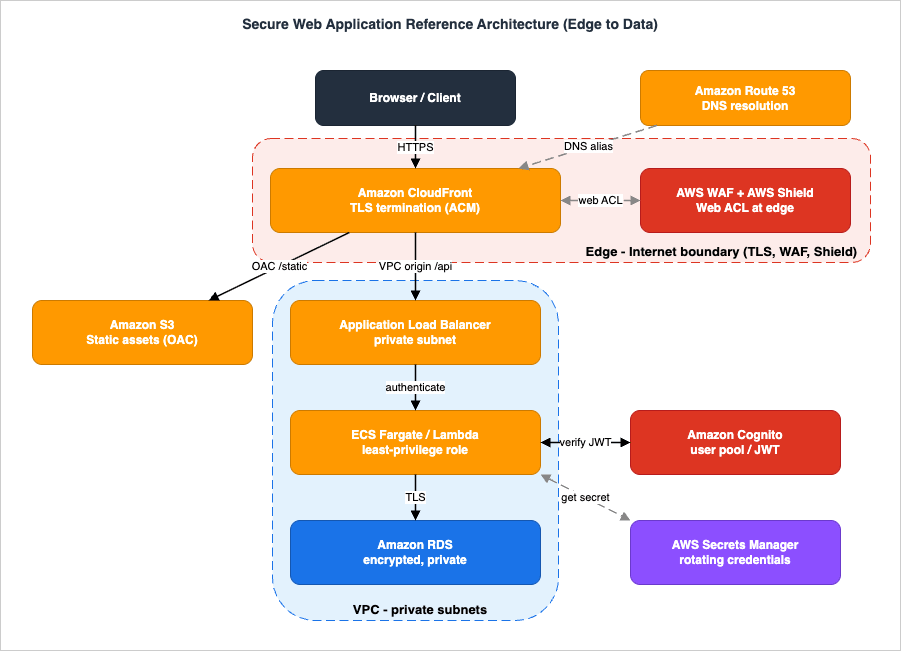
- Amazon Route 53 resolves your domain to the CloudFront distribution (an alias record), so the public internet only ever learns the edge.
- Amazon CloudFront is the single public entry point. It terminates TLS at the edge with an ACM certificate, evaluates the attached AWS WAF web ACL, and routes by path: static assets one way, dynamic API requests another.
- AWS WAF (a web ACL attached to the distribution) inspects every request at the edge with managed rule groups, rate-based rules, and geo rules, and allows or blocks before the request reaches any origin.
- AWS Shield protects the edge from DDoS. Shield Standard is always on for CloudFront; Shield Advanced adds application-layer automatic mitigations and response support.
- Amazon S3, reached through Origin Access Control (OAC), serves the static front end (the SPA bundle, images, assets). The bucket blocks all public access and only answers CloudFront's signed requests.
- An Application Load Balancer in private subnets, reached through a CloudFront VPC origin, fronts the dynamic tier. It is never exposed to the public internet.
- The application tier — ECS on Fargate tasks or Lambda functions — runs the business logic behind the ALB with a least-privilege task or execution role.
- Amazon Cognito is the identity provider. It issues and signs tokens, and either the ALB or the application verifies them.
- Amazon RDS holds the data in private subnets, encrypted at rest with AWS KMS and reachable only from the application's security group, over TLS.
- AWS Secrets Manager stores the database credentials and rotates them, so the application never holds a static password.
The five trust boundaries that organize everything below:
- Internet ↔ Edge — between the untrusted internet and CloudFront/WAF/Shield. Everything outward-facing lives here; this is where you assume hostile traffic and filter it.
- Edge ↔ VPC — between CloudFront and your origins. The job here is to make CloudFront the only way in, so the origins cannot be reached directly. OAC enforces this for S3; VPC origins enforce it for the ALB.
- Public ↔ Private subnets — inside the VPC, between anything internet-adjacent and the application/data subnets that have no inbound path from the internet.
- Application ↔ Identity — between an anonymous request and an authenticated one. This is where a request acquires a verified identity, and where the application decides what that identity may do.
- Application ↔ Data — between the compute tier and the database, gated by security groups, encryption, and short-lived credentials.
A request is only as secure as the weakest of these boundaries, which is exactly why the integration matters more than any single service.
3. The Edge: CloudFront, OAC, VPC Origins, WAF, and Shield
The edge has one architectural goal: make CloudFront the single point of entry, and make everything behind it unreachable except through CloudFront. Two distinct mechanisms achieve this for the two origin types, and conflating them is the most common edge mistake.3.1 Two origins, two protection mechanisms
The static path and the dynamic path are protected differently, and the difference is not cosmetic.For the S3 static origin, the mechanism is Origin Access Control (OAC). OAC lets CloudFront send authenticated (signed) requests to the bucket, so you can turn on Block Public Access and write a bucket policy that allows only your distribution. AWS recommends OAC over the legacy Origin Access Identity (OAI): OAC supports all S3 Regions, server-side encryption with AWS KMS (SSE-KMS), and dynamic requests such as
PUT and DELETE. The bucket must use S3 Object Ownership set to "Bucket owner enforced." The deep mechanics are in the Amazon CloudFront Origin Architecture Guide; the integration point is the bucket policy that ties the bucket to one distribution:{
"Version": "2012-10-17",
"Statement": [
{
"Sid": "AllowCloudFrontOACOnly",
"Effect": "Allow",
"Principal": { "Service": "cloudfront.amazonaws.com" },
"Action": "s3:GetObject",
"Resource": "arn:aws:s3:::my-secure-webapp-assets/*",
"Condition": {
"StringEquals": {
"AWS:SourceArn": "arn:aws:cloudfront::111122223333:distribution/EDFDVBD6EXAMPLE"
}
}
}
]
}
VPC origins come with prerequisites and constraints worth stating because they shape the network design:
- The VPC needs an internet gateway attached (it denotes that the VPC can receive internet traffic; it is not used to route traffic to the origin) and a private subnet with at least one available IPv4 address, because CloudFront creates a service-managed elastic network interface (ENI) into that subnet. IPv6-only subnets are not supported.
- CloudFront creates a service-managed security group named
CloudFront-VPCOrigins-Service-SGthat you do not edit. You update the origin's own security group to allow inbound traffic either from the CloudFront managed prefix list (com.amazonaws.global.cloudfront.origin-facing, which AWS keeps current) or, more tightly, from that service-managed security group (which restricts traffic to your distributions specifically). - Gateway Load Balancers cannot be VPC origins; dual-stack NLBs and NLBs with TLS listeners cannot; gRPC is not supported; Lambda@Edge origin-request and origin-response triggers are not supported; and subnet-level network ACLs are not evaluated for this traffic. VPC origins are available only in specific Regions, so confirm Region support before committing.
The security-group rule that admits CloudFront to a private ALB references the CloudFront origin-facing managed prefix list (look up its ID for your Region with
aws ec2 describe-managed-prefix-lists) rather than any CIDR you maintain by hand:aws ec2 authorize-security-group-ingress \
--group-id sg-0albprivate00000000 \
--ip-permissions 'IpProtocol=tcp,FromPort=443,ToPort=443,PrefixListIds=[{PrefixListId=pl-0123456789abcdef0,Description="com.amazonaws.global.cloudfront.origin-facing"}]'
The two paths are wired as CloudFront cache behaviors. A behavior matches requests by path pattern and binds them to an origin with its own caching and forwarding rules: an ordered behavior for
/static/* points at the S3 origin (cache aggressively, OAC-signed), while the default behavior — or an explicit /api/* behavior — points at the ALB VPC origin (no caching, forward everything authentication needs). Getting these behaviors right is what lets one distribution serve both a cacheable static front end and an uncacheable authenticated API without leaking one path's rules into the other.3.2 Filtering at the edge with AWS WAF
A web ACL attached to the CloudFront distribution inspects every request before it reaches any origin. Attaching it at CloudFront (rather than only at the ALB) means even the static path and the very first packet of an attack are filtered at the edge, closest to the source. A web ACL can be associated with CloudFront, Application Load Balancers, API Gateway, AppSync, Amazon Cognito user pools, and more; for this architecture the primary association is at CloudFront, optionally repeated at the ALB for defense in depth.Three rule categories carry most of the value:
- AWS Managed Rules — maintained rule groups for common categories such as the core rule set, known-bad inputs, and SQL injection. They are the baseline you start from rather than hand-writing signatures.
- Rate-based rules — these count requests from an aggregation key (by default, the source IP) over a sliding window and block when the count crosses a threshold. The default evaluation window is five minutes; the AWS WAF console exposes custom aggregation keys, alternative evaluation windows, and scope-down statements so you can apply a low threshold to a sensitive path like the login endpoint and a higher global threshold everywhere else.
- Geo and IP rules — allow or block by country or by IP set, useful when an application is only meant to serve certain markets, or to quickly shun a known-bad range.
A minimal web ACL that combines a managed group with a rate-based rule (scope
CLOUDFRONT, which must be created in the US East (N. Virginia) Region) looks like this:Resources:
EdgeWebACL:
Type: AWS::WAFv2::WebACL
Properties:
Name: secure-webapp-edge
Scope: CLOUDFRONT
DefaultAction:
Allow: {}
VisibilityConfig:
SampledRequestsEnabled: true
CloudWatchMetricsEnabled: true
MetricName: secure-webapp-edge
Rules:
- Name: AWSCommonRules
Priority: 0
OverrideAction:
None: {}
Statement:
ManagedRuleGroupStatement:
VendorName: AWS
Name: AWSManagedRulesCommonRuleSet
VisibilityConfig:
SampledRequestsEnabled: true
CloudWatchMetricsEnabled: true
MetricName: common-rules
- Name: LoginRateLimit
Priority: 1
Action:
Block: {}
Statement:
RateBasedStatement:
Limit: 1000
AggregateKeyType: IP
ScopeDownStatement:
ByteMatchStatement:
FieldToMatch: { UriPath: {} }
PositionalConstraint: STARTS_WITH
SearchString: /api/login
TextTransformations:
- Priority: 0
Type: NONE
VisibilityConfig:
SampledRequestsEnabled: true
CloudWatchMetricsEnabled: true
MetricName: login-rate-limit
Limit value above is illustrative; choose it from observed traffic, and confirm the allowed range and other quotas in the AWS WAF documentation and Service Quotas console for your account. Tuning WAF rules for specific threat classes — including prompt injection against AI features — is the job of the WAF guide; the integration point here is simply that the web ACL sits at the edge and runs before any origin is touched.3.3 Shield at the edge
AWS Shield Standard is automatically engaged for CloudFront and Route 53 and defends against common network and transport layer DDoS. Shield Advanced is the opt-in tier: it adds automatic application-layer DDoS mitigation rule groups (which Shield manages on your behalf — you do not add them to your web ACL by hand), enhanced visibility, and access to the Shield Response Team for higher-touch incidents. That automatic mitigation is being moved out of Shield Advanced. AWS is transitioning it to the AWS WAFAWSManagedRulesAntiDDoSRuleSet managed rule group, which does not require a Shield Advanced subscription; the transition runs in phases from July 27, 2026, and Shield Advanced's automatic application-layer mitigation is no longer available as of January 1, 2027. Check the official announcement for whether your own web ACL is in scope. Shield Advanced builds on WAF rather than replacing it; rate-based rules and managed groups remain your application-layer controls, and Shield Advanced raises the protection and response level around them. Treat Shield as a property of the edge boundary: it keeps the single front door standing under volumetric pressure so the layers behind it never see the flood. Shield is one of four layers that guard the same request from different places, and each of them has resource types it cannot be attached to; the layer-by-layer comparison is in the AWS Network and Application Protection Decision Guide.4. Transport Security and Security Headers
Security in transit is decided by where TLS terminates and what each hop is allowed to downgrade to. In this architecture there are two TLS segments, and both must be HTTPS for the chain to hold.The viewer-to-CloudFront segment terminates at the edge. CloudFront presents an ACM certificate for your domain; because a CloudFront distribution is global, that certificate must be requested or imported in the US East (N. Virginia) Region regardless of where your origins live. Set the viewer protocol policy to redirect HTTP to HTTPS (or to require HTTPS) so a client never completes a request in cleartext, and choose a modern security policy so weak protocol versions are not negotiated.
The CloudFront-to-origin segment is the second TLS hop, and it is easy to leave weaker than the first. For the S3 path, OAC requests should be signed and travel over HTTPS. For the ALB path over a VPC origin, configure the origin protocol policy to HTTPS so the connection from CloudFront to the ALB is also encrypted; the ALB then terminates that TLS with its own certificate. If you place CloudFront in front of an ALB that performs Cognito or OIDC authentication, there is a specific gotcha: HTTPS on port 443 must be used consistently across the entire path, because the OIDC redirect URLs are generated from the request's scheme and port, and a mismatch causes authentication to fail.
Caching interacts with authentication on this segment too. When CloudFront fronts an authenticating ALB, you must forward all request headers, all cookies, and all query strings to the load balancer so it can complete the IdP exchange — and forwarding all headers also means authenticated responses are not cached and served to the wrong user after a session expires. This is a place where a caching optimization and an authentication requirement pull against each other, and the authentication requirement wins.
Finally, the browser is hardened with response security headers — HSTS to lock in HTTPS, a Content-Security-Policy to constrain what the page can load, and the cross-origin isolation headers. CloudFront response headers policies let you attach these at the edge without changing application code. The full catalog and the trade-offs of each header are in the HTTP Security Headers Complete Reference; the integration point is that the edge is the natural place to set them once for every response, static and dynamic alike.
5. Load Balancing and the Application Tier
Behind the VPC origin sits an internal Application Load Balancer, and behind the ALB sits the compute that runs your code. This guide treats both at the boundary level and hands the depth off.The ALB is the L7 entry into the VPC. It listens on HTTPS, routes by path or host to target groups, runs health checks that decide which targets receive traffic, and — importantly for this architecture — can authenticate users before forwarding (Section 6). Choosing the load balancer type, designing target groups and health checks for zero-downtime deployments, and terminating TLS and mTLS are all covered in the Elastic Load Balancing Decision Guide. The integration facts that matter here are two: the ALB lives in private subnets and is reached only through the CloudFront VPC origin, and its security group should admit traffic only from CloudFront (the managed prefix list or the VPC-origins service security group), not from the open VPC.
The application tier is either ECS on Fargate tasks or Lambda functions, registered as ALB targets (Lambda can be an ALB target directly; Fargate tasks register as
ip targets). The container implementation — Service Connect, auto scaling, deployments, and data-tier integration — is the subject of the Amazon ECS on Fargate Microservices Architecture Guide. Two cross-cutting properties are non-negotiable regardless of which compute you choose:- Least-privilege role. The ECS task role or Lambda execution role should grant only the specific actions on the specific resources the code needs — read this one secret, write this one queue, call this one table — never a broad wildcard. The role is the application's identity inside AWS, and it is the blast-radius control if the application is compromised.
- Tight security group. The application's security group admits traffic only from the ALB's security group (reference it by ID, not by CIDR), and its egress is scoped to exactly what it must reach: the database security group, Secrets Manager, and any AWS service endpoints. This keeps the Public ↔ Private boundary meaningful.
A least-privilege task role is concrete, not aspirational. The policy below grants exactly one secret read and the one KMS decrypt that read needs — nothing wildcarded, nothing the application does not use:
{
  "Version": "2012-10-17",
  "Statement": [
    {
      "Sid": "ReadDbSecretOnly",
      "Effect": "Allow",
      "Action": "secretsmanager:GetSecretValue",
      "Resource": "arn:aws:secretsmanager:ap-northeast-1:111122223333:secret:prod/webapp/db-*"
    },
    {
      "Sid": "DecryptSecretKeyOnly",
      "Effect": "Allow",
      "Action": "kms:Decrypt",
      "Resource": "arn:aws:kms:ap-northeast-1:111122223333:key/EXAMPLE-KEY-ID",
      "Condition": {
        "StringEquals": { "kms:ViaService": "secretsmanager.ap-northeast-1.amazonaws.com" }
      }
    }
  ]
}
6. Authentication and Authorization with Cognito
This is the boundary where an anonymous request becomes an authenticated one. There are two valid places to enforce it, and the choice changes what your application code is responsible for.6.1 Authenticate at the ALB
The Application Load Balancer can authenticate users itself, offloading the IdP exchange so the application focuses on business logic. Theauthenticate-cognito and authenticate-oidc listener actions are supported only on HTTPS listeners. With authenticate-cognito, the ALB integrates a Cognito user pool (which can in turn federate to social or corporate IdPs via SAML, OIDC, or OAuth); with authenticate-oidc, it integrates any OIDC-compliant IdP directly. The Cognito app client must be configured to use the authorization code grant flow and to generate a client secret, and the callback URL https://{DNS}/oauth2/idpresponse must be allowed.When a user without a valid session arrives, the ALB redirects them through the IdP login, then sets a session cookie (always carrying the
Secure attribute, since authentication requires HTTPS; SameSite=None is added for CORS requests). On subsequent requests it validates the session and forwards the identity to the target in three headers, of which it signs only x-amzn-oidc-data:x-amzn-oidc-accesstoken— the access token from the token endpoint, in plain text.x-amzn-oidc-identity— thesub(subject) claim from the user-info endpoint, in plain text. Thesubis the stable way to identify a user.x-amzn-oidc-data— the user claims as a JSON Web Token.
Two facts about these headers are easy to get wrong and have security consequences. First, the ALB does not pass the ID token to the backend; it forwards an access token and claims only. Second, the
x-amzn-oidc-data JWT is signed by the ALB using ES256 (ECDSA with P-256 and SHA-256), not by Cognito — so the application must verify it against the ALB's regional public key endpoint, https://public-keys.auth.elb.{region}.amazonaws.com/{key-id} (the key-id comes from the JWT header), and must confirm the signer field in the JWT header equals the expected ALB ARN. Without that verification, a backend that simply trusts the header is trusting anything that can reach it. Which alg values AWS's own JWT receivers list, and how the ES256 that the ALB uses here compares with them, are lined up in JWT Signing Algorithms on AWS Endpoints.Concretely, a listener rule pairs an
authenticate-cognito action (which runs first) with a forward action to the target group. The action references the user pool, its app client, and the user pool domain:aws elbv2 create-rule \
--listener-arn arn:aws:elasticloadbalancing:ap-northeast-1:111122223333:listener/app/webapp-alb/50dc6c495c0c9188/f2f7dc8efc522ab2 \
--priority 10 \
--conditions Field=path-pattern,Values="/api/*" \
--actions file://actions.json
[
  {
    "Type": "authenticate-cognito",
    "Order": 1,
    "AuthenticateCognitoConfig": {
      "UserPoolArn": "arn:aws:cognito-idp:ap-northeast-1:111122223333:userpool/ap-northeast-1_EXAMPLE",
      "UserPoolClientId": "1example23clientid456",
      "UserPoolDomain": "my-webapp-auth",
      "OnUnauthenticatedRequest": "authenticate",
      "Scope": "openid",
      "SessionCookieName": "AWSELBAuthSessionCookie"
    }
  },
  {
    "Type": "forward",
    "Order": 2,
    "TargetGroupArn": "arn:aws:elasticloadbalancing:ap-northeast-1:111122223333:targetgroup/webapp-tg/73e2d6bc24d8a067"
  }
]
OnUnauthenticatedRequest field decides what happens to an unauthenticated request: authenticate (the default) redirects to the IdP login, allow forwards the request without claims so the app can show a public-or-personalized view, and deny returns HTTP 401 (useful for AJAX-heavy single-page apps).6.2 Session Lifetime, Timeouts, and Logout
When the ALB authenticates, it manages the session on the client's behalf, and a few timeouts govern the lifecycle. The session timeout sets how long an authenticated session lasts — 7 days by default, and configurable down to as little as 1 second; when it is longer than the access token's expiration and the IdP supports refresh tokens, the ALB refreshes the session each time the access token expires and only forces a fresh login after the session itself times out or a refresh fails. The client login timeout is fixed: a client must complete the login flow within 15 minutes or the ALB returns HTTP 401, and this limit cannot be changed.Logout is an application responsibility that the ALB cannot infer. To sign a user out, the application sets the expiry of every authentication session cookie to -1 and redirects the client to the IdP's logout endpoint (for Cognito, its hosted logout endpoint), which expires the tokens and returns the user to an unauthenticated landing page. That landing page must not sit behind a listener rule that requires authentication, or the logout would loop back into a login. Because a deleted cookie could otherwise be replayed, keep the access token's expiration as short as is practical.
6.3 Authenticate in the application
The alternative is to let the application verify Cognito tokens itself. Here the client obtains tokens from Cognito and presents them (typically as a bearer token), and the application validates each one on every request. Cognito issues JWTs signed with RS256; the token header carries akid identifying the signing key, and the public keys live at the user pool's JWKS endpoint:https://cognito-idp.{region}.amazonaws.com/{userPoolId}/.well-known/jwks.jsonkid matches, and then checks the claims: that the token is not expired (exp), that the issuer (iss) is your user pool, that the audience or client_id is your app client, and — for an access token — that it carries the required OAuth scopes. AWS recommends the aws-jwt-verify library for Node.js applications and Lambda authorizers, which encapsulates the JWKS fetch, caching, and claim checks. A Lambda authorizer using it is concise:const { CognitoJwtVerifier } = require("aws-jwt-verify");
const verifier = CognitoJwtVerifier.create({
userPoolId: process.env.USER_POOL_ID,
tokenUse: "access",
clientId: process.env.APP_CLIENT_ID,
});
exports.handler = async (event) => {
const token = (event.headers.authorization || "").replace(/^Bearer\s+/i, "");
try {
const claims = await verifier.verify(token); // signature, exp, iss, aud/client_id, kid
return { isAuthorized: true, context: { sub: claims.sub, scope: claims.scope } };
} catch (err) {
return { isAuthorized: false };
}
};
6.4 Which boundary owns authentication
Both approaches are legitimate, and they answer different needs:- ALB authentication is the lowest-code path: unauthenticated users never reach your application, and the app trusts a verified header. It suits server-rendered apps and any case where you want the front door to gate everything uniformly. The cost is that your app now depends on the ALB being in the path and on verifying the ALB's ES256 signature.
- Application authentication is the most flexible path: single-page apps and native clients that hold tokens, fine-grained per-route scope checks, and APIs called by non-browser clients all fit naturally. The cost is that every entry point must verify tokens correctly, every time.
A common hybrid uses ALB authentication for the browser-facing routes and application-side verification for token-bearing API clients. Whichever you choose, the inviolable rule is the same: the backend must verify the signature before it trusts any claim — the ALB's ES256 signature on the forwarded
x-amzn-oidc-data header, or Cognito's RS256 signature for tokens. A claim you did not verify is a claim an attacker can forge.7. The Data Tier: RDS and Secrets
The data tier is the innermost boundary, and its security is the product of three things working together: network isolation, encryption, and credentials that are never static.Network isolation. The RDS instance lives in private subnets with no route to the internet and no public accessibility. Its security group admits traffic only from the application's security group, referenced by security-group ID and scoped to the database port — not a CIDR, and never the whole VPC. This means the only thing that can open a connection to the database is the application tier; even another workload in the same VPC cannot reach it. The boundary is enforced by identity (the source security group) rather than by address, which is what makes it hold as the network changes.
Encryption. Enable encryption at rest with AWS KMS when you create the instance — RDS encryption at rest is set at creation time, so design it in rather than bolting it on later. Encryption in transit is enforced by requiring TLS for client connections (for example, with a parameter that rejects non-TLS connections) and by having the application connect using the RDS certificate bundle. The combination means a stolen snapshot is useless without the KMS key, and a sniffed connection is useless without breaking TLS.
Credentials that rotate. The application never holds a static database password. Credentials live in AWS Secrets Manager, and the application fetches them at runtime with its least-privilege role:
import boto3, json

def get_db_credentials(secret_id: str) -> dict:
    client = boto3.client("secretsmanager")
    response = client.get_secret_value(SecretId=secret_id)
    return json.loads(response["SecretString"])  # { "username": ..., "password": ..., "host": ... }
8. End-to-End Request Walkthrough
Now follow one authenticated request for a dynamic API call all the way through, naming what each layer verifies, adds, or terminates. This is the section that only an integration article can write, because no single layer's guide sees the whole path.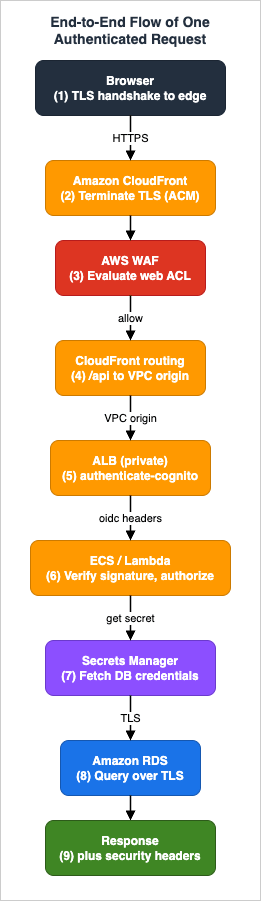
- DNS resolution. The browser resolves
app.example.comvia Route 53 to the CloudFront distribution. The public internet learns only the edge; the ALB and database have no public names. - TLS termination at the edge. The viewer completes a TLS handshake with CloudFront, which presents the ACM certificate (issued in us-east-1 for the global distribution). The viewer protocol policy has already redirected any HTTP attempt to HTTPS, so the request is encrypted from the first byte.
- WAF evaluation. Before any origin is contacted, the attached web ACL runs: managed rule groups inspect the request, the rate-based rule checks this source IP against its window, and geo/IP rules apply. If a rule blocks, CloudFront returns 403 here and the origins never see the request.
- Edge routing. CloudFront matches the path against cache behaviors.
/static/*would resolve to the S3 origin through OAC; this request is/api/orders, so it routes to the ALB behavior, which forwards all headers, cookies, and query strings needed for authentication and does not cache. - Edge-to-origin over the VPC origin. CloudFront connects to the private ALB through the VPC origin over its service-managed ENI, on HTTPS. The ALB's security group admits this because it allows the CloudFront origin-facing prefix list (or the VPC-origins service security group). There is no public route to the ALB; this private hop is the only way in.
- ALB authentication and identity forwarding. The HTTPS listener rule has an
authenticate-cognitoaction. If the session cookie is valid, the ALB attachesx-amzn-oidc-accesstoken,x-amzn-oidc-identity, and the ES256-signedx-amzn-oidc-dataJWT and forwards to the target group. If not, it redirects the user through the Cognito hosted login and only forwards once a session exists. (In an application-authentication design, this step is skipped and the request carries a bearer token instead.) - Application verification and authorization. The Fargate task or Lambda function verifies the signature before trusting anything — the ALB's ES256 signature for the forwarded JWT (checking
signerequals the ALB ARN against the regional public-key endpoint), or Cognito's RS256 signature against the JWKS endpoint for a bearer token. It then authorizes the action against the token's scopes and thesub, acting under its least-privilege task/execution role. - Fetching credentials and reaching the data tier. The application retrieves the database credentials from Secrets Manager (typically cached for the function/container lifetime to avoid a call per request), then opens a TLS connection to RDS. The database security group allows the connection only because it originates from the application's security group; the credentials are the current rotated value.
- Response and hardening. The query result flows back: application → ALB → CloudFront → viewer. CloudFront applies the response headers policy, adding HSTS, CSP, and the cross-origin headers, so the browser receives a hardened response over the same TLS session it opened in step 2.
Every arrow in that list crosses a trust boundary, and each boundary did one specific job: the edge filtered and terminated TLS, the VPC origin kept the ALB private, the ALB or app established a verified identity, and the data tier admitted only the application over an encrypted channel with a rotating credential. Remove any one and the chain has a gap; that is the whole point of the next section.
9. Defense in Depth and the Trust Boundaries
Defense in depth is the discipline of assuming any single control can fail and asking what still protects you. Walk the architecture as a series of "what if this layer is bypassed" questions, and the overlapping controls become visible.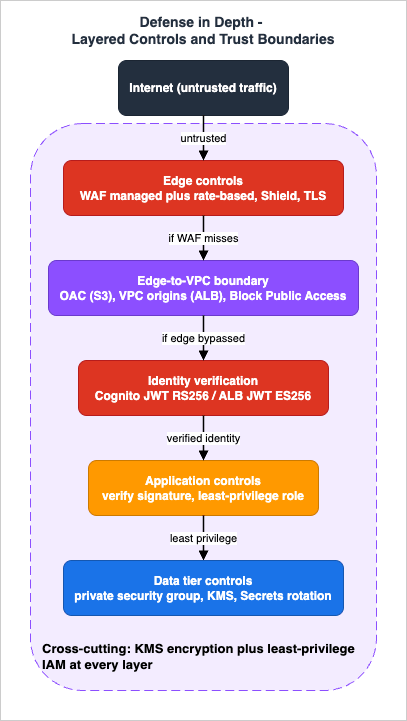
- If WAF misses a malicious request, it still reaches an application that authenticates and authorizes. The malicious request without a valid token gets no further than an unauthenticated 401/redirect; with a valid token, it is constrained to that user's scopes. WAF is the first filter, not the only one.
- If someone tries to bypass CloudFront, the Edge ↔ VPC boundary stops them: the S3 bucket answers only OAC-signed requests from your distribution (Block Public Access is on), and the ALB has no public route at all because it is a VPC origin behind a private security group. Skipping the edge is not an available move.
- If the application is compromised, its least-privilege role bounds the blast radius — it can touch only the specific resources its policy names — and the database security group still requires connections to originate from the application tier, so a foothold elsewhere cannot reach the data directly.
- If a database credential leaks, rotation shortens its useful life, the credential alone cannot reach the database from the internet (the instance is private and not publicly accessible), and encryption at rest means a stolen snapshot is inert without the KMS key.
- If TLS is misconfigured on one hop, the security headers and the redirect-to-HTTPS policy reduce exposure on the viewer side, and requiring TLS at the database rejects any plaintext connection attempt on the inner hop.
Two cross-cutting controls run through every layer. Encryption with KMS protects data at rest in S3 and RDS and is enforced in transit at every hop. Least-privilege IAM governs which principal can do what: OAC's bucket policy scopes S3 to one distribution, the application role scopes compute to named resources, and the rotation role scopes Secrets Manager to minimal database privileges. The boundaries are not a sequence you pass through once; they are layers that each keep working even when an outer one is bypassed.
A word of caution that the security framing demands: none of this licenses the conclusion "I attached WAF and Cognito, therefore the app is secure." A control that is present but misconfigured — a WAF in count mode, an unverified header, a database security group widened "temporarily" — is a control that is not protecting you. Defense in depth is valuable precisely because it does not depend on any one layer being perfect, but it still depends on each layer actually doing its job, which is why the next section is about telling when one of them is not.
10. Failure Modes and Diagnostics
When a secure web application breaks, the first diagnostic question is always which layer. The same symptom — a 403, a blank page, a timeout — can originate at the edge, the load balancer, the identity layer, or the database, and the observability point differs for each. Triage by layer.| Symptom | Likely layer | Where to look |
|---|---|---|
| HTTP 403 at the edge | WAF block, geo rule, or signed-request failure | CloudFront access logs, WAF sampled requests and CloudWatch metrics for the blocking rule |
| HTTP 502 / 503 from CloudFront | Origin unreachable: VPC origin ENI, security group, or unhealthy ALB targets | CloudFront error rate, ALB target health, the origin's security group rules |
| ALB returns 5xx | Targets unhealthy or failing | ALB HTTPCode_Target_5XX_Count, UnHealthyHostCount, target group health checks, application logs |
| Login redirect loop or 401 | Authentication misconfiguration | ALB listener rule config, Cognito app client (code grant, client secret, callback URL), consistent HTTPS/443 through CloudFront |
| Authenticated request rejected by the app | Token verification failure | Application logs: signature, exp, iss, aud/client_id, kid; ALB signer check |
| Database connection failures | Data-tier boundary | RDS connection/error metrics, the database security group source, Secrets Manager rotation status |
A few patterns are worth calling out because they are specific to this integrated design:
- 403 at the edge is usually WAF, not authentication. A WAF block returns 403 from CloudFront before the request ever reaches the ALB or Cognito, so it appears in WAF sampled requests, not in application logs. If you see 403 with no corresponding application or ALB log entry, look at the web ACL first.
- A 502/503 right after enabling a VPC origin points at the Edge ↔ VPC boundary: the origin security group may not yet allow the CloudFront prefix list or the service security group, the private subnet may have no available IPv4 for the ENI, or the ALB targets are unhealthy. Because subnet NACLs are not evaluated for VPC-origin traffic, the security group is the control to check.
- A login redirect loop almost always traces to the HTTPS/port-443 consistency rule. When CloudFront fronts an authenticating ALB, the OIDC redirect URLs are built from the request's scheme and port; any drop to HTTP or a port mismatch breaks the exchange. Confirm the viewer and origin are both HTTPS on 443 and that all headers, cookies, and query strings are forwarded.
- An authenticated request that the app rejects is a verification failure, and the fix is to log which check failed: an expired token, a wrong audience, a
kidnot found in the JWKS, or — for the ALB-signedx-amzn-oidc-dataheader — asignerthat does not match the expected ALB ARN. "It worked yesterday" with a sudden wave of failures often means a token-lifetime or key-rotation interaction. - Sudden database connection failures concurrent with a rotation suggest the application cached a credential past its rotation. The alternating-users strategy avoids the window where the single user's password changes mid-flight; caching the secret with a short refresh, rather than for the entire container lifetime, also helps.
The observability spine across all of this is consistent: CloudFront and WAF logs at the edge, ALB metrics and access logs at the load balancer, Cognito sign-in metrics at the identity layer, and RDS metrics plus Secrets Manager rotation events at the data tier. A practical correlation handle already exists in the request itself: CloudFront stamps each request with an
x-amz-cf-id, and the ALB adds an X-Amzn-Trace-Id that the application can log and join against the ALB access logs. Carrying a correlation identifier from the edge through the application makes a cross-layer incident tractable; the end-to-end tracing pattern is the subject of the observability guide in this series.11. Variations: Serverless Frontend, Container Backend, and When to Simplify
The reference architecture is a template, not a mandate. A few substitutions keep the boundaries intact while fitting different shapes of application.- Serverless backend. Replace the Fargate tier with Lambda functions, either behind the ALB (Lambda as an ALB target) or behind API Gateway instead of the ALB entirely. With API Gateway, a Cognito authorizer or a Lambda authorizer verifies tokens at the API layer, and the VPC-origin/ALB hop is replaced by API Gateway's own front door. The identity and data boundaries are unchanged; only the compute and its front door move.
- Container backend with service-to-service calls. When the application tier is several microservices rather than one, the ALB fronts the public-facing service and internal traffic flows over service discovery and an internal mesh. The detailed pattern — Service Connect, auto scaling, internal routing — is the Amazon ECS on Fargate Microservices Architecture Guide.
- Stronger network segmentation. For workloads that require identity-aware access, multi-account isolation, and inline inspection beyond what this single-VPC design shows, the segmentation belongs to the AWS Zero-Trust Network Architecture Guide.
- When to simplify. Not every application needs every layer. A purely static site needs only CloudFront, OAC, S3, and WAF — no ALB, Cognito, or RDS. An internal tool with a handful of users might authenticate at the ALB and skip a custom authorization layer. The discipline is to drop a layer deliberately, knowing which boundary you are removing, rather than to omit it by accident. Every layer you keep should correspond to a boundary you actually need to defend.
The deep "which option" decisions these variations imply — REST versus GraphQL, container versus function, single-account versus multi-account — live in the decision guides this article links to. The reference architecture's contribution is the shape they all share: a single secured edge, a private origin, a verified identity, and a sealed data tier.
12. Frequently Asked Questions
Where exactly does TLS terminate in this architecture?At two points. The viewer's TLS terminates at CloudFront (with an ACM certificate issued in us-east-1 for the global distribution). A second TLS hop runs from CloudFront to the origin — to S3 for the static path, and to the ALB (which terminates it with its own certificate) for the dynamic path. Both hops should be HTTPS; leaving the origin hop on HTTP is a common, silent weakening of the chain.
Is OAC enough to protect my ALB origin?
No. Origin Access Control signs requests to S3-style origins; it is the right tool for the S3 static path. To keep an ALB private and reachable only through CloudFront, use a CloudFront VPC origin, which places the ALB in a private subnet with no public route. Using OAC for an ALB, or leaving the ALB internet-facing, leaves the Edge ↔ VPC boundary open.
Should I authenticate at the ALB or in the application?
Both are valid. ALB authentication (
authenticate-cognito / authenticate-oidc, HTTPS listeners only) keeps unauthenticated users out of your code and forwards a signed identity header; it suits server-rendered apps. Application-side verification of Cognito JWTs suits single-page and native clients and fine-grained scope checks. Many designs use both. The non-negotiable part is that the backend verifies a signature before trusting any claim.How does my application trust the identity the ALB forwards?
The ALB forwards
x-amzn-oidc-accesstoken, x-amzn-oidc-identity (the sub), and x-amzn-oidc-data (a JWT it signs with ES256). The application must verify that JWT against the ALB's regional public-key endpoint and confirm the signer field matches the expected ALB ARN. Note the ALB forwards an access token and claims, not the Cognito ID token.A request returns 403 — is it WAF, CloudFront, or Cognito?
Most often WAF. A WAF block returns 403 from the edge before the request reaches the ALB or Cognito, and it shows up in WAF sampled requests and CloudWatch metrics, not in application logs. If there is no matching ALB or application log line, inspect the web ACL first; an authentication failure typically appears as a redirect or a 401 with a corresponding application log entry.
Do I still need security groups if CloudFront is the only entry point?
Yes. CloudFront being the front door does not remove the inner boundaries. The ALB's security group should admit only CloudFront (the origin-facing managed prefix list or the VPC-origins service security group), and the database's security group should admit only the application tier's security group. Defense in depth assumes the outer layer can be bypassed; the security groups are what hold if it is.
How do I rotate database credentials without downtime?
Store the credentials in Secrets Manager and use rotation. For RDS, Aurora, and other supported services, managed rotation handles it without a Lambda function. Choose the alternating-users strategy for the highest availability, since it keeps a valid credential available throughout the rotation, and have the application read the secret with a short cache rather than holding it for the entire process lifetime.
13. Summary
A secure web application on AWS is decided at its seams. The services — CloudFront, WAF, Shield, the ALB, Cognito, RDS, Secrets Manager — are each well understood, but the security of the whole comes from how a single request crosses the boundaries between them: the edge that terminates TLS and filters traffic, the Edge ↔ VPC boundary that keeps origins private (OAC for S3, VPC origins for the ALB), the identity boundary where a request becomes authenticated and a signature is verified before any claim is trusted, and the data boundary where the database admits only the application over an encrypted channel with a rotating credential.This guide deliberately stayed at the integration level — the request flow, the trust boundaries, and the failure modes that only appear when the layers are wired together — and handed the depth of each layer to its own reference. Read those for the mechanics: the CloudFront Origin Architecture Guide for OAC and VPC origins, the Elastic Load Balancing Decision Guide for the ALB, the WAF for Generative AI guide for rule design, the Cognito Federation Guide for identity, the S3 Security and Access Control Guide for the static path, the HTTP Security Headers Reference for the browser hardening, and the RDS and Aurora High Availability Guide for the data tier. For the container backend and the network segmentation, this series continues with the Amazon ECS on Fargate Microservices Architecture Guide and the AWS Zero-Trust Network Architecture Guide.
Build it as one architecture, verify every signature, keep every boundary doing its job, and treat any single control as fallible. That is what turns a list of services into a secure web application.
14. References
- AWS Well-Architected Framework - Security Pillar
- Amazon CloudFront Developer Guide - Restrict access to an Amazon S3 origin (Origin Access Control)
- Amazon CloudFront Developer Guide - Restrict access with VPC origins
- Amazon CloudFront Developer Guide - Understanding response headers policies
- AWS WAF Developer Guide - Rate-based rule statement
- AWS WAF Developer Guide - Protecting the application layer with rate-based rules and Shield Advanced
- AWS Shield Advanced Developer Guide
- Elastic Load Balancing - Authenticate users using an Application Load Balancer
- Amazon Cognito Developer Guide - Verifying a JSON Web Token
- aws-jwt-verify library (AWS Labs)
- AWS Secrets Manager User Guide - Managed rotation
- AWS Secrets Manager User Guide - Set up automatic rotation for database secrets
- Amazon RDS User Guide - Encrypting Amazon RDS resources
- Amazon RDS User Guide - Using SSL/TLS to encrypt a connection to a DB instance
- AWS Certificate Manager User Guide - Services integrated with AWS Certificate Manager
- Amazon CloudFront Origin Architecture Guide - Origin Access Control, Origin Shield, Failover, and VPC Origins
- AWS Elastic Load Balancing Decision Guide - Choosing and Operating Application, Network, and Gateway Load Balancers
- Amazon Cognito Federation Complete Implementation Guide - Google, Apple, Microsoft, OIDC, and SAML
References:
Tech Blog with curated related content
Written by Hidekazu Konishi