Rolling Back an Amazon EKS Cluster Version - What Decides Eligibility, What Rollback Readiness Insights Do Not Decide, and Where the Primary Sources Disagree
First Published:
Last Updated:
Amazon EKS began offering the ability to revert a cluster's Kubernetes version to a previous minor version on July 1, 2026. If issues arise after an upgrade, you can revert the control plane to a prior version. etcd data, running workloads, and persistent volumes will remain intact.
Three conditions determine the scope of what can be rolled back: how many days have passed since the upgrade completed, how many versions the upgrade covered, and how the cluster reached its current version. No one running the rollback can alter any of these. The only action users can take is to ensure these conditions are met before initiating the upgrade.
And the most important point this article aims to convey is this: rollback readiness insights do not constitute eligibility in and of themselves. The insights are a mechanism for inspecting the cluster and reporting potential issues, while an entirely different set of criteria settles whether a rollback is possible at all. There are clusters that may show all insights as
PASSING but are still ineligible for rollback. The user guide describes the nature of these insights in this way.Rollback readiness insights are point-in-time checks—they reflect the cluster state at the time of
evaluation, not continuously.This article will systematically address the conditions that determine eligibility, the items that rollback readiness insights inspect, the items that rollback readiness insights do not inspect, and which states prevent a rollback. It also lists six places where official AWS documentation says opposite things about the same point. Which side is correct is not settled here. Both are quoted and left standing.
Regarding Scope. This article addresses reverting a Kubernetes cluster's version to a previous minor version. The previously published Amazon EKS Control Plane Configuration document discusses two conditions that can prevent reverting from a Provisioned mode to a Standard mode. These are different topics. That document focuses on control plane configuration parameters and scaling tiers, while this article concerns Kubernetes minor versions. This article does not address rollbacks of control plane parameters. A separate article in this series, Amazon ECS Deployment Lifecycle, covers how service deployments roll back on the same cluster. These operate on different layers. That document addresses the layer of service deployments, while this article focuses on the layer of the cluster's version. Information regarding data layer rollbacks can be found in Replication Topologies on Amazon Aurora MySQL. AWS History and Timeline regarding Amazon EKS carries the dates on which each version arrived, and AWS End-of-Support and EOL Reference lists the end-of-support dates. This article does not include a timeline or a table of end-of-support dates.
The word rollback refers to five different things in this article. They are pinned down here, before anything else.
First, when this article uses the term "rollback" without any modifiers, it refers to reverting a Kubernetes cluster's minor version to a previous version. The remaining four instances refer to different topics that are not the subject of this article.
Second, there is the action of reverting a control plane's configuration parameters to previous values. The previously published Amazon EKS Control Plane Configuration document covers this. To differentiate, this article will use the term "parameter reversion."
Third, there is the action of reverting GitOps tools to a previous commit. This is independent of the cluster's version.
Fourth, there is the action of reverting a container service deployment to a previous revision. The Amazon ECS Deployment Lifecycle document in this series addresses this, and this article will refer to this as "deployment rollback."
Fifth, there is the rollback that occurs when an AWS CloudFormation stack update fails. This article will refer to this as "stack rollback." The user guide separates these two by name, so Section 2 of this article covers it.
Regarding verification dates. All information in this article concerning supported states, maximum values, default values, enumerated values, and field names, as well as any direct quotes, has been verified against AWS primary documentation as of September 16, 2026. Values are subject to change. When citing numerical values or enumerated options, always include the source document.
This article does not discuss pricing. It does not cover costs associated with extended support or with replacing nodes. It is also not a troubleshooting guide. This article explains how the range you can go back to is decided.
Table of Contents
- 1. Before You Put a Rollback Line in the Runbook
- 2. Which Rollback This Article Means
- 3. The Conditions That Decide Eligibility
- 4. What Rollback Readiness Insights Check
- 5. What the Insights Do Not Check
- 6. Which Statuses Block, and What the Force Flag Bypasses
- 7. Where the Primary Sources Disagree
- 8. The Data Plane Moves First
- 9. What EKS Auto Mode Changes
- 10. What to Settle Before You Upgrade
- 11. Failure Modes
- 12. Frequently Asked Questions
- 13. Summary
- 14. References
1. Before You Put a Rollback Line in the Runbook
1.1 Questions Addressed in This Article
Kubernetes releases three minor versions each year. If you operate an EKS cluster, upgrading becomes a regular annual task. The runbook settles at some version, and a rollback line gets added at the end. However, relatively few teams have verified the conditions under which that line actually holds.This article answers four key questions.
The first question is: after upgrading your existing cluster, is it actually possible to roll back? The answer depends on three conditions, and none of them moves at the moment a rollback is wanted.
The second question is: what does the inspection AWS provides actually look at? A set of checks called rollback readiness insights runs automatically after an upgrade.
The third question is: what does that inspection not look at? This is the area with the most significant potential impact. If the user does not check what falls outside that scope, nobody does.
The fourth question is: when official documentation contradicts itself, which information should you trust? This subject carries six such places, and one of them contradicts a prerequisite outright.
1.2 Eligibility and Insights Are Two Different Mechanisms
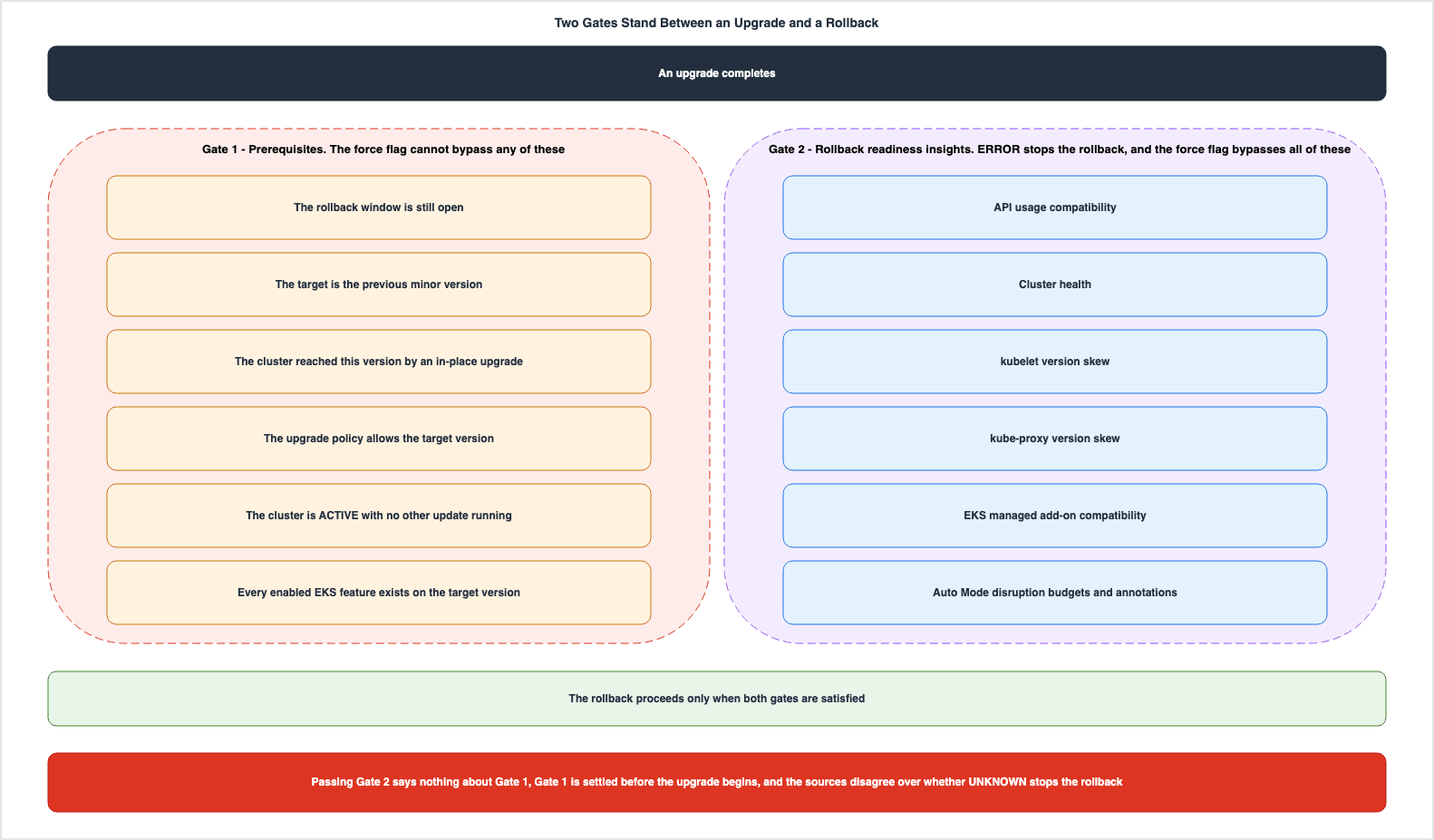
Start with the shape of it. Before a rollback request can proceed, it passes two gates of different kinds.The first gate is the set of prerequisites. Does the upgrade fall within the 7-day window? Is the rollback request limited to a single minor version? Was the cluster upgraded in-place to its current version? This gate cannot be bypassed with the
--force flag.The second gate is the insight checks. These verify API usage compatibility, cluster health, kubelet and kube-proxy version skew, and EKS managed add-on compatibility, then report a status. This gate can be bypassed with the
--force flag.The two gates are independent. Even if the insight checks return all
PASSING statuses, a cluster that does not meet the prerequisites cannot be rolled back. Conversely, even if the insight checks return an ERROR, the rollback can proceed using --force as long as the eligibility requirements are met.The primary sources do not say which gate is evaluated first. This article also does not claim a specific order. What can be stated is that the rollback only progresses when both gates are satisfied, and the
--force flag can only be applied to one of them.Misinterpreting this structure can lead to the inspection results being read as proof of eligibility. Because the console shows both together, this misinterpretation is easy to make.
1.3 Everything You Can Move Sits Before the Upgrade
None of the three conditions can be modified at the moment a rollback is wanted. The window does not extend. The distance does not reverse. How that cluster was built no longer changes.This is a crucial difference from other rollback mechanisms. With delayed replicas, users can define how far back they can revert. Similarly, with service deployments, users can choose the criteria for success and how to handle any necessary cleanup. In contrast, when rolling back a cluster version, the provider determines the range of reversibility, and users cannot expand that range.
Therefore, the only action available to users is to ensure they are in a state that can be rolled back before starting the upgrade. Section 10 covers what that involves.
2. Which Rollback This Article Means
2.1 What Goes Back and What Stays
The user guide lists what is rolled back and what is not, separating them into distinct sections. This division itself reflects the nature of the feature.There are four items that are rolled back:
| Rolled Back Item | Description |
|---|---|
| Kubernetes API Server Version | Reverts to the previous minor version. |
| Control Plane Components and Configuration | Same as above. |
| Platform Version | Reverts to the latest platform version from the previous Kubernetes version. |
| EKS Auto Mode Worker Nodes | In Auto Mode clusters, EKS automatically rolls back these nodes before the control plane. |
There are six items that are not rolled back:
| Not Rolled Back Item | Description |
|---|---|
| etcd Data | The cluster's state, resources, and configuration are all preserved. |
| Workloads | Pods, Deployments, and Services continue to operate. |
| EKS Add-ons | Add-on versions remain unchanged; they must be managed separately. |
| Persistent Volumes and Data | All persistent volumes and data are preserved. |
| Self-Managed Nodes and Hybrid Nodes | Rolling back these nodes is the user's responsibility. |
| Managed Node Groups | These must be rolled back separately using the UpdateNodegroupVersion API. |
These two tables demonstrate that the rollback process is limited to the control plane only. The rollback leaves out the data plane, except in Auto Mode, and it leaves out add-ons as well. Section 8 goes further.
The user guide also clearly defines the division of responsibilities.
Amazon EKS is responsible for safely reverting the control plane components.You are responsible for making sure that your applications, configurations, and dependencies are
compatible with the previous version.During the rollback process, the control plane continues to scale as needed. The AWS Containers blog states that while concurrent updates are not supported, the underlying infrastructure of the control plane will still scale as needed during an ongoing rollback.
This means that if your cluster experiences increased API server load during the rollback window, EKS
automatically scales the control plane infrastructure to meet demand. Your workloads are not impacted
while the version revert is being processed.
2.2 A Stack Rollback Does Not Revert the Cluster Version
When managing clusters using Infrastructure as Code, if an AWS CloudFormation stack update fails, the template will roll back to a previous version. However, as the user guide explicitly states, this rollback will not revert the cluster's version.If an AWS CloudFormation stack update fails and triggers a stack rollback, the revert to a previous
template version that specifies a lower Kubernetes version doesn't trigger a cluster version rollback.
Version rollback must be explicitly initiated through the UpdateClusterVersion API, CLI, or console.This can leave the cluster in a state where the template definition and the actual cluster configuration are inconsistent. To revert the cluster's version, you must explicitly request it.
2.3 Rollback Uses the Same API as an Upgrade
There is no dedicated API specifically for rollbacks. Instead, you use theUpdateClusterVersion API, specifying the previous version.aws eks update-cluster-version \
--name my-cluster \
--kubernetes-version 1.30 \
--region us-west-2Upon successful request, the API returns a record with the update type set to
VersionRollback. In the Update data type in the API reference, the valid values for the type field include VersionRollback. This is a different value from VersionUpdate, which is used during upgrades.You can track the progress using the
DescribeUpdate API. In the console, you can find it in the cluster's Update history tab.2.4 What This Article Does Not Cover
The following five items fall outside the scope of this article.- This article does not cover the procedures for performing the upgrade itself. It addresses whether a rollback is possible after an upgrade, not the upgrade process itself.
- It does not cover workload rollbacks. Reverting a deployment to a previous revision is a general Kubernetes topic, independent of the cluster's version.
- This article does not provide the release dates or support lifecycles for individual Kubernetes versions. The published timeline and the end-of-support reference carry that information.
- Pricing is not discussed in this article.
- This article does not provide step-by-step troubleshooting procedures. It aims to provide information to aid in decision-making, and is not a runbook.
3. The Conditions That Decide Eligibility
3.1 There Are Eight Prerequisites
The user guide outlines the conditions that must all be met before initiating a rollback, presented in the table below. As of September 16, 2026, there are eight conditions listed.| # | Condition | Description |
|---|---|---|
| 1 | 7-Day Window | The rollback must be initiated within 7 days of the upgrade completion. |
| 2 | Upgraded Cluster | The cluster must have been upgraded in-place to the current version. |
| 3 | Single Version Only | Rollback is only possible to one minor version prior (from N to N-1). |
| 4 | Supported Version | The rollback is only available for EKS versions currently under support. |
| 5 | Extended Support Policy | To roll back to a version under extended support, the cluster's upgrade policy must first be changed to EXTENDED. |
| 6 | Automatic Upgrade After Extended Support End | Clusters automatically upgraded upon the end of extended support cannot be rolled back. However, clusters automatically upgraded upon the end of standard support can be rolled back, but the upgrade policy must be changed first. |
| 7 | Cluster Status | The cluster must be in the ACTIVE state. Rollback cannot be initiated while another update is in progress. |
| 8 | EKS Feature Compatibility | If any EKS feature enabled on the cluster is not supported on the previous version, the rollback request fails. |
Of these, conditions 1 through 3 are the three conditions that this article will discuss in detail. Each follows in turn below.
3.2 The Window - Seven Days From the End of the Upgrade
The first condition is the window.You must initiate the rollback within 7 days of the upgrade completing. After 7 days, rollback is no
longer available.The starting point is the completion of the upgrade, not the point at which the issue is detected. For example, if the upgrade was performed on Friday and the problem surfaced late in the following week, the available window is very limited.
This 7-day period simultaneously closes two distinct possibilities: the eligibility for a rollback and the provision of rollback readiness insights. The user guide addresses considerations related to the insights as follows:
Rollback readiness insights are only available for clusters that have been upgraded within the last
7 days. After the 7-day rollback eligibility window expires, these insights are no longer generated
for the cluster.
Once the window closes, the rollback is no longer possible and the mechanism that inspects the cluster for rollback problems also disappears. The reason you won't find
ROLLBACK_READINESS insights on clusters that have exceeded this 7-day period is not that there is no issue.The user guide also clearly outlines the options available after the window has passed.
You can roll back the Kubernetes version of an Amazon EKS cluster to the previous minor version within
7 days of upgrading. For more information, see Roll back a cluster to a previous Kubernetes version.
After the 7-day window, you cannot downgrade. Instead, create a new cluster on a previous Amazon EKS
version and migrate the workloads.
Outside of the window, you will need to create a new cluster and migrate the workloads. This is a migration, not a rollback, and involves a completely different scope of work.
3.3 The Distance - One Minor Version Only
The second condition is the distance.You can only roll back by one minor version (N to N-1). If you upgraded from 1.31 to 1.32 and then to
1.33, you can only roll back to 1.32, not to 1.31.Note how this applies to clusters that have undergone consecutive upgrades. If a cluster has been upgraded by two minor versions within the 7-day window, it can only be rolled back one minor version. It cannot be rolled back to the version prior to that.
The AWS Containers blog gives an example of the error this limitation produces.
aws eks update-cluster-version --name my-cluster --kubernetes-version 1.29
# Error: The cluster cannot be rolled back to the Kubernetes version specified.
# You can only rollback by 1 version.
Furthermore, in a paragraph separate from the prerequisite table, the user guide states that clusters that have already been upgraded to a newer version cannot be rolled back, even when using the
--force option. Section 3.7 quotes that passage.The distance constraint directly impacts the upgrade process itself. Planning to upgrade multiple versions simultaneously will reduce the number of versions to which you can roll back after the upgrade is complete, limiting the rollback to just one previous version.
3.4 How the Cluster Arrived at Its Current Version
The third condition concerns the cluster's history.The cluster must have been upgraded to its current version through in-place upgrade. Clusters created
at their current version can't be rolled back.This condition differs from the other two. The window and the distance can be counted. However, understanding the cluster's history requires knowing the circumstances surrounding its creation.
The meaning is clear: A cluster created at version 1.33 cannot be rolled back to version 1.32. Since such a cluster has never run version 1.32, there is no state to which it can be rolled back. A rollback is an operation that returns the system to a previous state, not a means of moving it to an arbitrary version.
The AWS News blog explains this characteristic by contrasting it with emulation.
Where approaches like emulated versions keep a cluster in a transitional holding state, EKS version
rollback returns your cluster to a fully validated previous version that ran in production, not an
emulation of it.
When a fleet contains both newly created clusters and clusters that have been progressively upgraded, the same set of procedures will only be valid for one type of cluster. A runbook that carries a rollback line has to separate its clusters by history.
3.5 Support Policy and the Upgrade Policy Setting
Conditions 4, 5, and 6 relate to the support period for different Kubernetes versions.Rollback functionality is available for currently supported EKS versions. According to the AWS News blog, the scope is as follows:
Version rollbacks support clusters running Kubernetes versions available in EKS standard support and
extended support.
When transitioning from a standard support version to an extended support version, there are restrictions on the order of operations.
To roll back to a version that is in extended support, you must first change the cluster's upgrade
policy to EXTENDED.
The upgrade policy is a cluster setting that can take two values:
EXTENDED and STANDARD. According to the API reference for UpgradePolicyRequest, the default value is EXTENDED, but clusters created through the AWS Management Console default to STANDARD. The default setting varies depending on how the cluster is created, so be sure to review the configuration before making a decision.The handling of clusters upgraded through automatic upgrades depends on the stage at which the automatic upgrade occurred. Clusters upgraded due to the end of extended support cannot be rolled back. Clusters upgraded due to the end of standard support can be rolled back, but in that case, you will also need to change the upgrade policy first.
3.6 Cluster Status and Feature Compatibility
The seventh condition concerns the cluster's status. It must beACTIVE. Rollbacks cannot be initiated while another update is in progress. This constraint also works in reverse: while a node rollback is in progress in Auto Mode, other updates are blocked. Section 9 discusses this.The eighth condition is feature compatibility.
If an EKS feature enabled on your cluster is not supported on the previous version, the rollback
request fails. This check can't be bypassed with --force.
This single line is the only row of the prerequisite table that explicitly mentions the
--force option. While the other seven lines do not refer to --force, this line specifically states that it cannot be bypassed.3.7 What the Force Flag Cannot Bypass
Immediately following the table of prerequisites, a separate list details conditions that remain unmet even when using the--force flag.In addition to the preceding requirements, certain conditions make rollback impossible even with the
--force flag. These conditions include the following: the cluster was created at the current version,
more than 7 days have passed since the upgrade, the cluster has already been upgraded again to a newer
version, or a backward-incompatible EKS feature was enabled at the current version boundary.This list outlines four conditions: the cluster was created with the current version; it has been more than 7 days since the upgrade; it has already been upgraded to a newer version; and a backward-incompatible EKS feature was enabled at the current version boundary.
These four conditions represent the core of what this article refers to as eligibility. None of them are the result of checks; rather, they are inherent to the cluster's history and configuration.
Note that this section states
These conditions include the following. This is not an exhaustive list. The items listed are examples, and it is more faithful to the original text to understand that other conditions may also apply.4. What Rollback Readiness Insights Check
4.1 Insights Come in Three Categories
Cluster insights are a mechanism managed by EKS that periodically scans your cluster and returns potential issues and recommended solutions. The user guide lists three types of insights. Configuration insights identify misconfigurations in an EKS Hybrid Nodes setup. Upgrade insights identify potential problems that could impede an upgrade. Rollback readiness insights identify potential issues that could prevent a rollback to a previous version after an upgrade.The API reference lists three valid values for the
category field on the Insight data type.Valid Values: UPGRADE_READINESS | MISCONFIGURATION | ROLLBACK_READINESSIf you need to verify the number of categories, refer to this listing. Documentation describing features may simplify the categorization, and discrepancies can sometimes occur on this topic. Section 7.6 covers it.
To retrieve rollback readiness insights, filter by category.
aws eks list-insights \
  --cluster-name my-cluster \
  --region us-west-2 \
  --filter '{"categories": ["ROLLBACK_READINESS"]}'
DescribeInsight returns the detail for an individual insight.aws eks describe-insight \
--cluster-name my-cluster \
--region us-west-2 \
--id <insight-id>In the console, navigate to the Upgrade insights tab for your cluster. The same tab shows upgrade insights and rollback readiness insights.
4.2 What Gets Checked
Two pages in the user guide detail what gets inspected: one gives a detailed breakdown, the other a concise overview. Refer to the detailed list.Clusters are automatically scanned by Amazon EKS against a list of possible rollback-impacting issues,
including API usage compatibility (which covers incompatibility checks during API version graduation
where a previous API version is removed, new resources that do not exist in the desired version, and
new field or enum changes), cluster health, kubelet and kube-proxy version skew, EKS managed add-on
compatibility, and for Auto Mode clusters, disruption budget and annotation checks.The items break down as follows:
| Item to Inspect | What to Look For |
|---|---|
| API Usage Compatibility | API versions removed at graduation, resources that do not exist in the target version, and changes to fields or enumeration values. |
| Cluster Health | Health issues that could prevent rollback completion. |
| kubelet Version Skew | Whether the worker nodes comply with the Kubernetes version skew policy. |
| kube-proxy Version Skew | Same as above. |
| EKS Managed Add-on Compatibility | Whether the installed EKS add-ons are compatible with the target version being rolled back to. |
| Disruption Budgets and Annotations | Only for clusters in Auto Mode. Check the NodePool disruption budgets, the karpenter.sh/do-not-disrupt annotation, and PodDisruptionBudget configurations. |
The parenthesis inside API usage compatibility is easy to skim past, and its content is critical. It includes monitoring for changes to fields and enumeration values. If you are applying manifests that utilize fields added in a newer version, rolling back to a previous version will mean those fields no longer exist. That is the case these checks are looking for.
4.3 When the Checks Run
There are three triggers for an insight refresh.First, the scheduled refresh. EKS refreshes the cluster insights every 24 hours.
Second, the manual refresh. After resolving an issue, you can trigger a refresh using the Refresh button in the console or via the CLI.
aws eks start-insights-refresh \
  --cluster-name my-cluster \
  --region us-west-2
Third, the start of the rollback itself. On this one, the same page of the user guide presents it in two different ways.
Amazon EKS automatically refreshes insights when you initiate a rollback to make sure that checks are
run against the latest cluster state.
Amazon EKS runs an insight refresh before performing the rollback if insight data is stale.One describes an unconditional refresh, while the other specifies that the refresh should only occur once the data has gone stale. The Auto Mode section presents a different approach, listing prerequisite validation and the insight refresh as the initial step, and then checking the insights again after the nodes have finished rolling back. Section 7.7 covers this discrepancy.
In practical terms, regardless of which approach you follow, the implications are the same: do not rely solely on the 24-hour scheduled refresh. After resolving an issue, manually trigger a refresh and proceed based on the resulting information.
4.4 The Insights Appear Only Right After an Upgrade
Rollback readiness insights only appear on clusters that have undergone an upgrade.These insights appear after you perform an upgrade and remain available during the 7-day rollback
eligibility window.Therefore, searching for the
ROLLBACK_READINESS insight on a cluster operating normally will return no results. This is normal. These insights only appear immediately after an upgrade and disappear within 7 days.If your upgrade documentation includes a step to check for insights, it is essential to also state that the window for reviewing them is 7 days.
5. What the Insights Do Not Check
5.1 The Exclusions Are Stated Explicitly
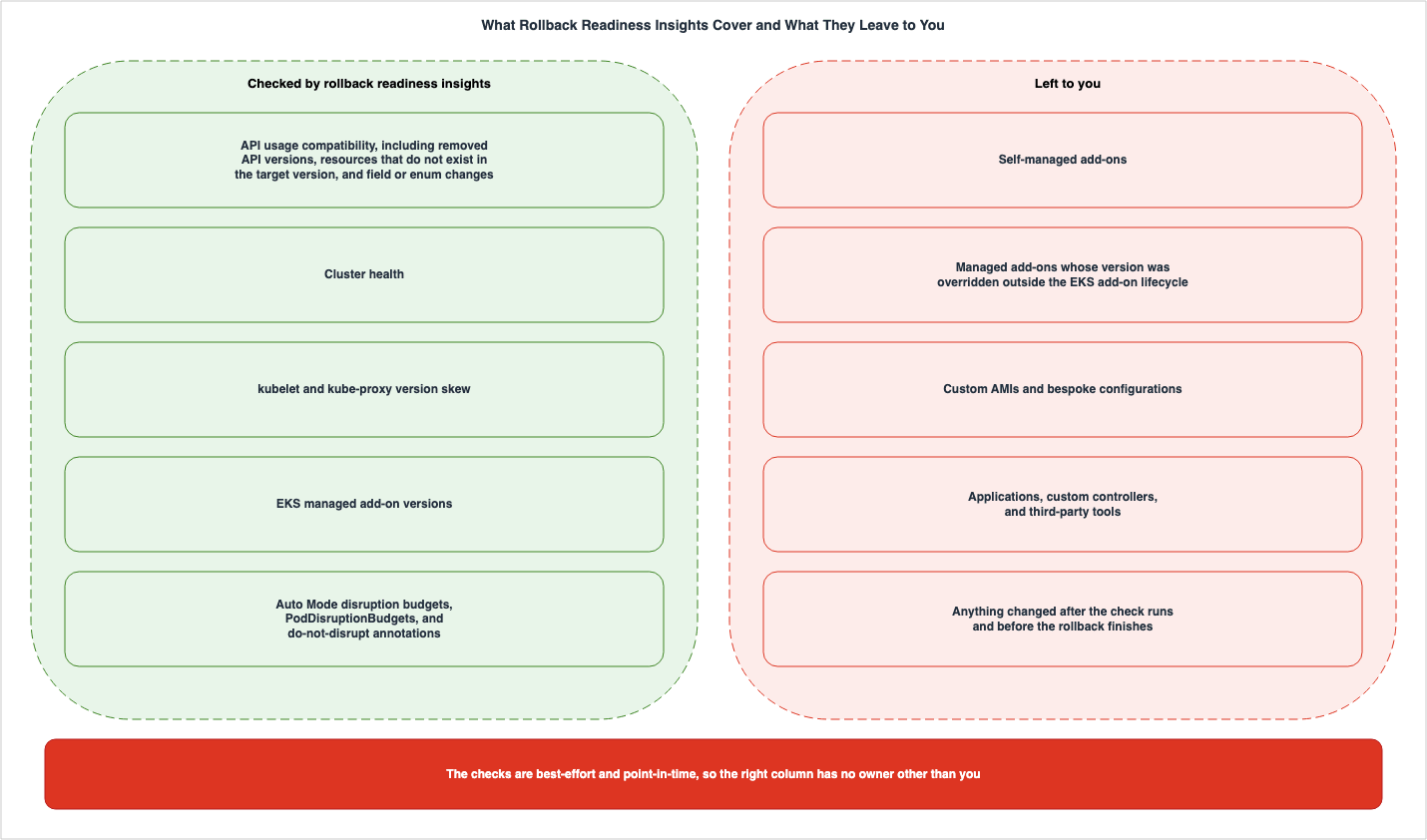
This section is likely the most practically relevant part of the article. The rollback readiness insights clearly define what is excluded. The cluster insights page of the user guide states this as aNote:Rollback readiness insights only check EKS-managed add-on versions. For self-managed add-ons, or if
you have overridden the version of a managed add-on outside of the EKS add-on lifecycle, insights do
not detect version incompatibilities. You are responsible for validating compatibility of those
add-ons with the target version before rolling back.The rollback page of the user guide carries a shorter version of the same
Note.Rollback readiness insights only check EKS-managed add-on versions. For self-managed add-ons, you are
responsible for validating compatibility with the target version before rolling back.The second exclusion is absent from that version. A reader who works only from the rollback page learns that self-managed add-ons are excluded, and does not learn that a managed add-on whose version was overridden outside the EKS add-on lifecycle is excluded as well. This is the same phenomenon that Section 7 catalogs, and it is placed here because this is the page a reader acts on. The wider version is the one quoted above.
There are two exclusions.
First, self-managed add-ons. Anything not installed as an EKS add-on falls under this category.
Second, managed add-ons whose version was overridden outside the EKS add-on lifecycle. Even if an add-on is installed as an EKS add-on, if its version has been modified directly using a manifest, the insights will not detect its compatibility. Readers often overlook this second exclusion. An add-on appearing on a list does not prove that the insights inspect it.
A team from Salesforce, who contributed to the AWS Containers blog, describes the same scope from an operations perspective.
Rollback Insights checks EKS managed add-ons (coredns, VPC CNI, kube-proxy). Self-managed add-ons like
cluster-autoscaler are not automatically checked.
The contribution continues by stating that validating self-managed add-ons against the rollback target version has to be maintained in-house. Note that cluster-autoscaler is specifically mentioned as an example. Wide use changes nothing: an add-on not installed as an EKS add-on falls outside the checks.
The considerations section of the same blog post also states that the exclusions are not limited to add-ons.
Any custom add-ons, custom-built AMIs, or bespoke configurations are the customer's responsibility to
validate before an upgrade.
Custom AMIs and bespoke configurations are excluded as well.
5.2 What Point-in-Time Means Here
Insights represent a snapshot of a cluster's state at a specific point in time. They do not reflect continuous monitoring. The user guide notes the following considerations:Cluster insights are evaluated at the time rollback is triggered. If you make changes to your cluster
after insights are checked but before the rollback completes (for example, creating resources using
new APIs), those changes are not captured by the initial insight check and might cause issues after
rollback completes.Any changes made to the cluster between the completion of an inspection and the completion of a rollback will not be included in the inspection results. For example, if you create a resource using a new API, that API may not exist in the version being rolled back to, but the insight will not report this.
This characteristic is particularly relevant in clusters operating in Auto Mode. The longer node replacement takes, the wider the gap between the inspection and the finish. Section 9 goes further.
5.3 The Checks Are Best-Effort
The user guide uses the term best-effort in the heading of its considerations section.Insights are best-effort and point-in-timeThe AWS Containers blog also limits the coverage to known checks.
It's important to note that EKS Upgrade Insights cover known compatibility checks for standard
Kubernetes and EKS components.
That coverage is the known checks for standard Kubernetes and EKS components. It does not check for unknown incompatibilities.
5.4 What Slips Past the Checks Stays in etcd
Bypass the insight checks with the--force flag and the incompatible resources do not leave the cluster.Amazon EKS preserves etcd data during rollback. Incompatible resources bypassed by using the --force
flag remain persisted and are not garbage collected.The user guide presents etcd data preservation as a benefit of this feature. However, this same characteristic can also result in persistent, bypassed incompatible resources. After reverting, the cluster may still contain resources that the reverted version does not understand.
5.5 How to Handle the Exclusions
Nothing reviews the excluded items automatically. The user has to maintain that list. Section 10 covers how to build it.6. Which Statuses Block, and What the Force Flag Bypasses
6.1 There Are Four Statuses
An insight status has four possible values. The API reference defines them on theInsightStatus data type.Valid Values: PASSING | WARNING | ERROR | UNKNOWNWhen counting the number of statuses, refer to this enumeration. Status names are enumeration values, so they keep their uppercase form.
The user guide provides a table outlining these four meanings and their impact on rollbacks.
| Status | Meaning | Impact on Rollback |
|---|---|---|
PASSING | No issues were found during this inspection. | Allowed. |
WARNING | A potential issue may exist, but it is not blocking. | Allowed (with advisory only). |
ERROR | A blocking issue was found. | Blocked until resolved. Can be bypassed with --force. |
UNKNOWN | The status cannot be determined. | Blocked until resolved. Can be bypassed with --force. |
The same information follows the table in paragraph form.
Insights with ERROR or UNKNOWN status block the rollback. Insights with PASSING or WARNING status
don't prevent you from rolling back.
The cluster insights page contains the same information.
Insights with ERROR or UNKNOWN status block the rollback until the issue is resolved. You can use the
--force flag to bypass insight checks if you choose to proceed at your own risk. Insights with WARNING
status are advisory and do not prevent rollback.
The user guide's two pages are consistent. However, the AWS Containers blog states the opposite regarding
UNKNOWN. Section 7.2 quotes both.6.2 What It Means Operationally That UNKNOWN Blocks
UNKNOWN represents a status where a determination could not be made. It does not indicate that a problem has been identified. Nevertheless, according to the user guide's rules, a rollback is blocked in this status.This is a sound approach from a conservative design perspective. Letting an undetermined item through would thin out the purpose of inspecting at all. However, from an operational standpoint, dealing with
ERROR and UNKNOWN requires completely different approaches. An ERROR usually has something to fix. An UNKNOWN may have nothing to fix. The reason the status could not be determined does not necessarily lie on the cluster's side.When encountering
UNKNOWN, there are two practical options. You can manually refresh the insights to see if the status changes, or you can proceed using the --force option. If you choose the latter, it is crucial to first understand that this represents a bypass undertaken at your own risk.6.3 What the Force Flag Bypasses
The--force flag bypasses the insight checks. The user guide provides this warning.Using --force bypasses all insight checks (ERROR, WARNING, UNKNOWN) and proceeds directly with the
rollback. Amazon EKS can't guarantee the safety of the rollback when insight checks are bypassed. You
accept full responsibility for any issues that arise.Three statuses sit inside those parentheses. The
--force flag doesn't simply pass through specific statuses; it bypasses the checks entirely.The API definition also indicates the same scope. This is the description of the
force field within UpdateClusterVersion.Set this value to true to override upgrade-blocking or rollback-blocking readiness checks when
updating a cluster.Whether performing an upgrade or a rollback, the same field serves the same purpose.
6.4 What the Force Flag Leaves in Place
What can be bypassed stops at the checks.The --force flag only bypasses insight checks. It doesn't bypass prerequisite validations such as the
7-day window, creation version check, or sequential rollback check. For Auto Mode clusters, --force
doesn't override disruption controls. NodePool disruption budgets, PDBs, and do-not-disrupt
annotations are still honored.This single paragraph encapsulates the structure of the entire article. The validation of prerequisites cannot be bypassed. The 7-day window, the creation version check, and the sequential rollback check all remain. On an Auto Mode cluster, the disruption controls also remain.
The Auto Mode page breaks the same point down further.
Even with --force:

* NodePool disruption budgets are still honored.
* PodDisruptionBudgets are still honored.
* Do-not-disrupt annotations are still respected.
* The 7-day node rollback timeout still applies.
--force is not a means to increase speed.The only way to speed up node rollback is to adjust the disruption controls themselves.6.5 The Two Gates, Once More
The evidence for the framework set out in Section 1 is now in place.| Gate | What decides it | Can be Bypassed with --force |
|---|---|---|
| Prerequisites | The window, the distance, how the cluster reached its current version, support policy, cluster status, feature compatibility | No |
| Insight checks | API compatibility, cluster health, version skew, EKS managed add-on compatibility, Auto Mode disruption settings | Yes |
The fact that the insights show
PASSING does not provide any information regarding the first gate. Furthermore, the state of the cluster before the upgrade begins settles the first gate.6.6 On the Neighboring Path, the Same Enforcement Was Withdrawn Once
What this section has covered is the mechanism by which rollback readiness insights block a rollback. It also saw a similar enforcement implemented, and then withdrawn, on the upgrade path. The user guide's cluster insights page, in the section on upgrade insights, includes the following note:Amazon EKS has temporarily rolled back a feature that would require you to use a --force flag to
upgrade your cluster when there were certain cluster insight issues.This note refers to the upgrade insights, not the rollback readiness insights. What gets blocked there is an upgrade, not a rollback. The scope is worth stating twice, so it has been.
However, this note is relevant to the subject of this article. There is a precedent, within AWS, where an insight was used to block an operation, and then that mechanism was later discontinued. The current enforcement that is effective for rollbacks may not continue in the same form in the future. The verification date is September 16, 2026.
When writing automation that relies on the state of an insight, you should assume that a specification change can break this dependency. This is a separate reason from the discrepancies mentioned in Section 7, but the outcome is the same. If you base a decision on a single line in a document, you need to periodically verify that that line is still valid.
7. Where the Primary Sources Disagree
7.1 How This Section Is Written
This section highlights instances where official AWS documentation presents differing perspectives on the same points. All information was verified as of September 16, 2026. This section does not definitively state which perspective is correct. Instead, it will present both viewpoints verbatim, clearly identifying which document each statement originates from. The purpose of this section is to enable readers to independently verify the information.The previously published Amazon EKS Control Plane Configuration does something similar in Section 7, regarding control plane configuration. This section follows that same approach. Section 7.5, described later, provides a second example of the type of listing that Section 7.1 of that article addresses. The same exercise carried out on dates rather than on behavior, and the order to work down when two official pages disagree about when something launched, is the subject of Where the AWS Primary Sources Disagree About Launch Dates.
Six instances follow, and their relative importance varies. The first two examples can influence operational decisions. The remaining four impact automated code and time estimates.
7.2 Does UNKNOWN Block the Rollback
The user guide states on the cluster insights page that bothERROR and UNKNOWN can block rollbacks.Insights with ERROR or UNKNOWN status block the rollback until the issue is resolved.The status table on the rollback page also states the same thing regarding
UNKNOWN.UNKNOWN | Unable to determine status | Rollback blocked until resolved, or use --force to bypassIn contrast, the AWS Containers blog states the opposite.
If Cluster Insights reports any errors (ERROR status), you must resolve those issues before proceeding
with the rollback. Insights with PASSING, WARNING, or UNKNOWN status will not block the rollback.
Furthermore, the rollback page itself, in its summary of procedures, only mentions
ERROR. This is within step 2 of the 7-step process discussed in Section 8.6.Resolve any blocking issues (ERROR status insights) or use --force to bypass insight checks.UNKNOWN does not appear in this summary. While the status table on the same page states that UNKNOWN can also block rollbacks, this summary is inconsistent with the status table.| Documentation | UNKNOWN Handling |
|---|---|
| EKS User Guide, Cluster Insights | Blocks |
| EKS User Guide, Cluster Rollback, Status Table and Subsequent Text | Blocks |
| EKS User Guide, Cluster Rollback, Summary of Procedures | Only mentions ERROR. Does not mention UNKNOWN. |
| AWS Containers Blog, Announcement of Availability | Does not block |
It is not just the blog that is out of sync. Even inside a single page of the user guide, the wording is inconsistent. The blocking side has more documents behind it, and this article does not settle the question by counting them.
The practical implication is not dependent on which is correct. You should not automate rollbacks while
UNKNOWN status remains. If it blocks, the request will fail. If it doesn't, you will proceed with unresolved items that could not be determined. In either case, a human should review the situation before proceeding.7.3 Can a Managed Node Group Go Back to an Earlier Version
This is the most significant issue of the six. The documentation contradicts the very prerequisites for a rollback.The user guide includes a dedicated section outlining the steps to roll back a managed node group.
If you need to roll back your cluster control plane to a previous Kubernetes version, you must first
roll back your managed node groups to ensure compliance with the Kubernetes version skew policy.
Worker nodes cannot run a version newer than the control plane.
It provides specific commands.
aws eks update-nodegroup-version \
  --cluster-name my-cluster \
  --nodegroup-name my-nodegroup \
  --kubernetes-version 1.30 \
  --region us-west-2
The cluster rollback page also assumes this process as part of its steps.
However, the description for the
UpdateNodegroupVersion API reference includes the following statement:You cannot roll back a node group to an earlier Kubernetes version or AMI version.| Documentation | Managed Node Group Rollback |
|---|---|
| EKS User Guide, Managed Node Group Update | Possible. It outlines the steps and commands. |
| EKS User Guide, Cluster Rollback | Possible. It assumes this as part of the process. |
EKS API Reference, UpdateNodegroupVersion | Not possible. |
This discrepancy is fundamentally different from the other five issues. The other issues relate to state values or default settings, but this one concerns whether the procedures themselves are viable. An engineer who only consults the API reference would conclude that the second step of the rollback procedure cannot be executed.
Currently, the only verifiable fact is that the documentation states this. There is no confirmation that the service actually behaves as described. What can be stated is narrower: the user guide describes the procedure on two pages, and the description in the API reference may not have been updated. If you are writing automation, it is essential to verify this on an actual cluster before implementing it.
7.4 The Default Timeout for Auto Mode Node Rollback
Auto Mode clusters carry a timeout on node replacement. The user guide states:Auto Mode node rollback has a configurable timeout controlled by the timeoutMinutes parameter in
rollbackConfig. The default timeout is 720 minutes (12 hours). You can set a value between 120 minutes
(2 hours) and 10080 minutes (7 days).The API reference for
RollbackConfig also specifies the same value.This value can be between 120 (2 hours) and 10080 (7 days). Default: 720 (12 hours) if not specified.The Amazon EKS FAQ also lists 12 hours. The EKS best practices guide, in the section dealing with Infrastructure as Code, also carries the same default.
The default rollback timeout is 720 minutes (12 hours).However, the AWS Containers blog states the default value is 7 days.
By default, EKS allows a rollback operation up to 7 days to finish before marking it as failed.Furthermore, the
--force section on the same page of the user guide phrases it a third way. It's the final line of the bullet point list in Section 6.4.* The 7-day node rollback timeout still applies.This single line does not distinguish between the default value and the maximum limit. It is possible that the 7 days refers to the configurable maximum. If read that way, it does not create a contradiction. However, on the same page, which states a default of 12 hours, if it then mentions a 7-day timeout without distinction, readers might assume the default is 7 days. The description in the blog post aligns with that interpretation.
| Document | Timeout Description |
|---|---|
| EKS User Guide, Auto Mode Rollback Timeout Section | Default 720 minutes (12 hours), range from 120 to 10080 minutes (7 days) |
EKS API Reference, RollbackConfig | Default 720 minutes (12 hours), range from 120 to 10080 |
| Amazon EKS FAQ | Default 12 hours, maximum 7 days |
| EKS Best Practices Guide, Cluster Version Rollback | Default 720 minutes (12 hours) |
EKS User Guide, Auto Mode --force Section | Mentions a 7-day node rollback timeout, without distinguishing between default and maximum. |
| AWS Containers Blog, Announcement of Availability | Default 7 days |
Four documents support the values of 12 hours (default) and 7 days (maximum). The difference is a factor of 14, which directly impacts estimations. For clusters with conservative disruption budgets, the operational design can change significantly depending on whether you assume a failure within 12 hours or wait up to 7 days.
Unlike the other five instances, this one has a workaround. By explicitly specifying
timeoutMinutes, you are unaffected by whichever default value is in effect. Not relying on the default value is the safest approach in this case.7.5 The Cancelling Status Value
The Auto Mode page describes the state transitions when a rollback is canceled, stating:Update transitions from Cancelling to Cancelled.Elsewhere on the same page, it also states that after a cancellation, the update transitions from
Cancelling to Cancelled.However, the API reference for the
Update data type only lists four possible values for the status field.Valid Values: InProgress | Failed | Cancelled | SuccessfulCancelling is not included. Similarly, the Cancellation data type's status field also only lists three values.Valid Values: InProgress | Failed | Successful| Documentation | Cancelling |
|---|---|
| EKS User Guide, Auto Mode Rollback | It states that this state appears during the transition. |
EKS API Reference, Update's status | Not listed. |
EKS API Reference, Cancellation's status | Not listed. |
Previously published Amazon EKS Control Plane Configuration documentation addresses a similar omission in the very same
Update.status enumeration. There, the user guide mentions a state called Updating, which is also absent from the same four-value enumeration. This Cancelling state is a second instance against the same enumeration.The appearance of this second instance is significant. While a single omission might be an isolated update oversight, the fact that it has occurred twice in the same field suggests that the field's enumeration may not accurately reflect the functionality described in the documentation.
The practical approach is the same as in the previously published documentation. If you are automating checks by comparing states using strings, it is safer to extract the values directly from the actual output of
describe-update rather than copying them from the documentation. What makes this type dangerous is that code handed a value outside the enumeration does not fail. It waits.7.6 The ListInsights Description Lists Only Two Categories
Thecategory field for the Insight data type has three valid values.Valid Values: UPGRADE_READINESS | MISCONFIGURATION | ROLLBACK_READINESSHowever, the description for
ListInsights, the operation that filters by category, only mentions two.The following lists the available categories:It lists only
UPGRADE_READINESS and MISCONFIGURATION, but not ROLLBACK_READINESS. The user guide's insights page lists all three categories.| Document | Number of Categories Listed |
|---|---|
EKS API Reference, Insight's category | 3 |
EKS API Reference, ListInsights description | 2 |
| EKS User Guide, Cluster Insights | 3 |
This appears to be an oversight rather than a contradiction, but it does present a potential issue. If users only consult the
ListInsights page to determine filtering values, they may not consider ROLLBACK_READINESS a valid option. The user guide's procedures use the same values with the --filter parameter, so they are actually accepted.When counting an enumeration, refer to
Valid Values, not to the description. This is a rule outlined in Section 4.1, and this issue is a clear example of that principle.7.7 What Triggers an Automatic Insight Refresh
The rollback page describes automatic updates at the start of a rollback in two ways. Here are the two sentences referenced in Section 4.3:Amazon EKS automatically refreshes insights when you initiate a rollback to make sure that checks are
run against the latest cluster state.Amazon EKS runs an insight refresh before performing the rollback if insight data is stale.The first is unconditional, while the second is conditional. These two instances are found on the same page. Furthermore, the Auto Mode page states that the initial step involves verifying prerequisites and updating insights, and then, after the node has fully returned, it checks the insights again.
Validates prerequisites and refreshes rollback readiness insights.After all nodes are within the Kubernetes version skew policy for the desired rollback version, EKS
re-checks insights and proceeds with the control plane rollback.All three descriptions mention that updates occur, but the conditions and frequency of those updates are not consistent. This is a relatively minor discrepancy, and not significant enough to warrant a change in judgment. However, the reason for highlighting it is that the design, which relies on automatic updates to eliminate the need for manual updates, is built upon this ambiguity.
7.8 General Rules Drawn From This Section
Some general principles fall out of this section.First, when the user guide and the API reference disagree, the discrepancies appear in the enumerated values and default values. Sections 7.5 and 7.6, as well as examples from previous publications, exhibited this pattern. Take enumerated values and default values from
Valid Values.Second, blog posts announcing launch dates cannot be relied upon as authoritative sources for specific values. Both sections 7.2 and 7.4 feature launch announcements that contribute to discrepancies. An announcement is fixed at the moment of writing and does not follow subsequent changes. However, blog posts don't always stand alone; in Section 7.2, a summary of the user guide's steps, and in Section 7.4, another section of the user guide, both used language that was consistent with the blog post. Avoid assuming that one source is isolated; look for alternative phrasing elsewhere in the same document. Furthermore, blog posts should be used to understand the design intent, not to obtain specific values.
Third, when the description and the procedure disagree, the impact is usually felt in the procedure. Section 7.3 illustrates this, as reading only the API reference's description leads to a situation where the procedure outlined in the user guide becomes infeasible.
Fourth, discrepancies can even occur inside a single page. In Section 7.2, the procedure summary and in Section 7.7, the trigger for updates, are not aligned within a single page. A single sentence doesn't provide complete verification.
The purpose of this section is not to critique the quality of AWS documentation. Rather, it is to help readers avoid the effort of verifying that a single line of documentation doesn't conflict with another document when making operational decisions. The verification date is September 16, 2026, and discrepancies of this kind are short-lived. Pull the same three families of sources again before using any of this to decide something.
8. The Data Plane Moves First
8.1 The Version Skew Policy Sets the Order
Before rolling back the control plane, it may be necessary to roll back the worker nodes first. This is due to Kubernetes' version skew policy.Before rolling back the control plane, make sure that your worker nodes are compatible with the target
version. The Kubernetes version skew policy requires that worker nodes can't run a version newer than
the control plane.The official Kubernetes documentation defines the relationship between kubelet and kube-apiserver as follows.
kubelet must not be newer than kube-apiserver.
kubelet may be up to three minor versions older than kube-apiserver (kubelet < 1.25 may only be up to
two minor versions older than kube-apiserver).
The EKS user guide also documents the same rules.
Starting from Kubernetes version 1.28, kubelet may be up to three minor versions older than
kube-apiserver.
The policy is asymmetrical, and that matters here. Nodes are permitted to be up to three minor versions behind the control plane, and may not be even one version ahead of it. If you roll back the control plane alone, the nodes become newer than the control plane. This is not allowed, so the nodes must be rolled back first.
During an upgrade this asymmetry pointed the same way as the usual order. It was possible to upgrade the control plane first and then bring the nodes up to date. During a rollback the direction reverses, and the same rule enforces the opposite order.
8.2 Managed Node Groups
Managed node groups are not subject to rollback. As the table in Section 2.1 shows, they sit on the side of elements that cannot be rolled back. Users revert these using theUpdateNodegroupVersion API.aws eks update-nodegroup-version \
--cluster-name my-cluster \
--nodegroup-name my-nodegroup \
--kubernetes-version 1.30 \
--region us-west-2Node group updates respect the configured update settings, including
maxUnavailable or maxUnavailablePercentage, as well as the chosen update strategy (Rolling or Force). The same settings that apply during upgrades apply here in the same way.The API reference contradicts the user guide on this operation. Section 7.3 covers it.
8.3 Self-Managed Nodes and Hybrid Nodes
These two are entirely the responsibility of the user.You are responsible for rolling back self-managed nodes and hybrid nodes. Update your node AMIs or
configurations to use the previous Kubernetes version before rolling back the control plane.Update the AMI or configuration to use a previous Kubernetes version. Perform this before reverting the control plane.
8.4 Fargate Cannot Be Rolled Back
AWS Fargate worker nodes do not offer a version rollback feature.Version rollback is not supported for Fargate worker nodes. You can roll back the control plane of a
cluster that uses Fargate, but Fargate pods running the same Kubernetes version as the control plane
trigger the kubelet version skew insight with ERROR status.The user guide documents the reason.
Amazon EKS can't automatically roll back Fargate pods to an older kubelet version.The AWS Containers blog provides further explanation. It states that the underlying infrastructure does not support downgrading the kubelet version independently of the API server.
There are two workarounds.
First, delete the affected Pods before attempting the rollback. The user guide states this.
If you have Fargate pods running the same Kubernetes version as the control plane, delete those pods
before initiating the rollback. Then roll back your control plane. Any remaining pods launch with the
rolled-back version when you redeploy them.
Second, use the
--force flag to bypass the checks. However, this method comes with a caveat.Alternatively, use --force to bypass the insight check. However, proceeding with a kubelet version
skew violation might result in unexpected behavior for your Fargate workloads until those pods are
replaced.In clusters using Fargate, it is necessary to delete the affected Pods before performing a rollback. This is a step that is not required for other node types, and users may only discover this requirement when following the procedure.
8.5 You Roll Back Add-Ons Yourself
Add-ons in EKS are also outside the scope of the rollback process.Amazon EKS doesn't automatically roll back add-on versions during a cluster version rollback. You must
manage add-on versions separately.The process involves three steps. First, verify add-on compatibility with the target version using the rollback readiness insights. If any add-ons are incompatible, downgrade them. After the control plane rollback is complete, confirm that all add-ons are functioning correctly.
The command to downgrade an add-on is the same as the command used to upgrade it.
aws eks update-addon \
  --cluster-name my-cluster \
  --addon-name vpc-cni \
  --addon-version v1.22.4-eksbuild.3 \
  --region us-west-2
This is where Section 5 becomes relevant. The compatibility checks only apply to EKS managed add-ons. Self-managed add-ons, and managed add-ons whose versions have been manually overridden outside of their lifecycle, will not be included in this initial compatibility check.
8.6 The Order End to End
The user guide outlines the complete rollback process as a seven-step procedure.Step 1 involves reviewing the rollback readiness insights. Step 2 focuses on resolving the identified issue, or bypassing it using the
--force flag. Step 3 requires verifying that the application, custom controllers, and third-party tools are compatible with the previous version. Step 4 rolls back the worker nodes, and applies when the nodes are running the same version as the control plane. Step 5 focuses on downgrading to compatible versions of add-ons. Step 6 involves rolling back the control plane, and Step 7 involves monitoring the progress.Out of these seven steps, EKS only performs Step 6. In clusters running in Auto Mode, EKS also performs Step 4. All other steps are the responsibility of the user.
9. What EKS Auto Mode Changes
9.1 Nodes First, Control Plane Second
In EKS Auto Mode clusters, EKS handles the rollback of worker nodes. You no longer need to manually manage the sequence, as seen in Section 8.The user guide details the process in three steps, outlining what happens after calling
UpdateClusterVersion with a previous version.1. Validates prerequisites and refreshes rollback readiness insights.
2. Drifts nodes towards the desired rollback version using a Karpenter-based system, honoring
configured disruption controls.
3. After all nodes are within the Kubernetes version skew policy for the desired rollback version,
EKS re-checks insights and proceeds with the control plane rollback.There is no dedicated API for rollbacks. Even on Auto Mode clusters, the same
UpdateClusterVersion API applies.You trigger the rollback using the same API and process described in Roll back a cluster to a previous
Kubernetes version. There is no separate API for Auto Mode node rollback.While the nodes are being rolled back, the control plane continues to operate with the new version.
The control plane remains on the current (newer) version and continues serving traffic normally while
nodes are rolling back. The Kubernetes version skew policy allows nodes to run up to three minor
versions older than the kube-apiserver, so this intermediate state is valid.
The asymmetry discussed in Section 8 earns its keep here. Nodes sitting older than the control plane are what the version skew policy allows, which is why the intermediate state is legitimate.
9.2 The Cluster Stays ACTIVE Through the First Phase
During an Auto Mode rollback, the cluster status may change depending on the stage.| Stage | Cluster Status | What Is Happening |
|---|---|---|
| Node Rollback in Progress | ACTIVE | Karpenter is replacing the node with a node using a previous AMI version. The control plane is responding normally with the current version. |
| Control Plane Rollback | UPDATING | The API server and control plane components are being rolled back to a previous version. |
| Complete | ACTIVE | The entire cluster has been rolled back to the previous version. |
While the node rollback is in progress, the cluster status remains
ACTIVE. If you are only monitoring the cluster status, you may not be able to determine that a rollback is in progress. The user guide instructs users to use ListUpdates or DescribeUpdate to determine if a rollback is ongoing.For clusters not in Auto Mode, the update status transitions are straightforward. The update will either move from
InProgress to Successful or from InProgress to Failed.9.3 Disruption Settings Decide How Long It Takes
The disruption controls you configure determine how long a node rollback takes.The node rollback phase (step 2) can take anywhere from minutes to 7 days depending on your disruption
controls.There are three controls, each with a different effect.
| Control | Effect | Insight Status |
|---|---|---|
| NodePool disruption budget | Setting nodes: 0 against drift will block rollback indefinitely. Setting a stricter value, such as nodes: 1, will slow down the process but will still allow it to proceed. | nodes: 0 reports ERROR. |
| PodDisruptionBudget | Setting maxUnavailable: 0 will slow down node disruption. While it won't block it permanently, it can significantly increase the time required. | maxUnavailable: 0 reports WARNING. |
karpenter.sh/do-not-disrupt annotation | If applied to a node, it will block disruption indefinitely. If applied to a Pod, it will delay termination until the TerminationGracePeriod expires. | On a node it reports ERROR. On a Pod it reports WARNING. |
Of the four behaviors in that table, the two that block indefinitely report
ERROR and the two that only delay report WARNING. The meaning of those statuses, as discussed in Section 6, applies here as well. ERROR indicates that the process will not proceed until resolved. WARNING indicates that the process can proceed, but it will take longer.To increase speed, you must relax these controls. This can be done by increasing the NodePool budget, removing the
do-not-disrupt annotation from nodes, or temporarily adjusting the PodDisruptionBudget. The user guide warns that these changes can impact the availability of your applications.9.4 The Only Cancellable Phase
The only scenario where an in-progress rollback can be canceled is during a node rollback within an Auto Mode cluster.A rollback is in a cancellable state only while nodes are rolling back.The API reference states the same limit and names the case it applies to.
Cancels an in-progress update to an Amazon EKS cluster on a best-effort basis. Cancellation is only
performed if the update can be cancelled. Currently, this is supported for VersionRollback update
types on EKS Auto Mode clusters when nodes are rolling back.
The AWS Containers blog explains the reason for this restriction. Node rollbacks can be lengthy processes, while rollbacks in non-Auto Mode clusters complete quickly, so they have no cancellable phase.
The cancellation command takes the following format:
aws eks cancel-update \
  --name my-cluster \
  --update-id <update-id> \
  --region us-west-2
Cancellation is a best-effort operation. A node in the middle of a process when the cancellation command arrives completes that process. If the cancellation is successful, the nodes drift back toward the current cluster version. The cluster status will remain
ACTIVE until the process is fully complete.There are also clearly defined situations where cancellation is not possible.
Cancel fails if node rollback is already complete and the control plane rollback has started, or if
the update has already completed with Successful or Failed status.
Once the control plane rollback has begun, it cannot be canceled. If you intend to incorporate cancellation into your operations, you must make that decision before this point.
After a cancellation, you can retry the rollback as long as you are still inside the 7-day eligibility window measured from the original upgrade. Alternatively, you can apply a different update, or simply leave the system as is.
9.5 Other Updates Are Blocked While a Rollback Runs
While a rollback runs, EKS blocks other control plane updates that users initiate.While a rollback is in progress, other customer-triggered control plane updates are blocked. To
perform a different update, cancel the rollback first using the CancelUpdate API.Given that a node rollback can take several days, this limitation is significant. If a high-priority update becomes necessary, cancel the rollback process first.
9.6 Timeouts and Infrastructure as Code
Node rollbacks have timeouts. As Section 7.4 showed, the documentation does not agree on the default value, so it is safer to specify it explicitly.aws eks update-cluster-version \
--name my-cluster \
--kubernetes-version 1.30 \
--rollback-config timeoutMinutes=1440 \
--region us-west-2The timeout acts as a minimum threshold. It will not occur earlier than the specified time, but it may occur slightly later.
The behavior when the timeout is reached is also documented. The rollback will time out. The nodes begin drifting back to the current cluster version. The control plane remains on its current version (as it is not being rolled back). The update status will be set to
Failed.Infrastructure as Code tools also have their own time limits. The user guide states that AWS CloudFormation allows up to 36 hours per resource, while Terraform Enterprise and Terraform Cloud allow approximately 24 hours. CloudFormation treats a timed-out operation as a no-op, which leaves the template out of step with the actual cluster version.
CloudFormation and Terraform do not directly support the CancelUpdate API. If you need to cancel a
rollback initiated through IaC, you must call the API directly.
If you have a strict disruption budget, the user guide itself recommends considering initiating rollbacks directly from the CLI or API, rather than from Infrastructure as Code.
10. What to Settle Before You Upgrade
10.1 Everything You Can Move Sits Before the Upgrade
Every condition that decides whether a rollback is possible is now on the table: the window, the distance, the cluster's history, the support policy, the cluster status, and feature compatibility. None of these can be modified at the moment a rollback is wanted.Therefore, this section will not cover the rollback procedure itself. Instead, it focuses on the work required to prepare a rollback state before initiating the upgrade.
10.2 Separate the Control Plane From the Data Plane
The most effective approach is to adjust the order of upgrades. The AWS Containers blog features a contribution from Salesforce, detailing the changes their team had to make to their pipeline.This order is not simply the contributor's innovation. The EKS best practices guide recommends the same order.
Separate control plane and data plane upgrades (non-Auto Mode clusters). For clusters that use Managed
Node Groups or self-managed nodes, consider upgrading the control plane first and allowing a bake period
before upgrading worker nodes. While nodes remain on N-1, the kubelet version skew insight stays in
PASSING status. This keeps the rollback path clear without needing to roll back nodes first.
The guide adds a reason the contribution does not give. One of the checks discussed in Section 4 is green from the start under this order. The kubelet version skew insight has nothing to report while the nodes sit a version behind.
The core issue in that contribution stemmed from a pipeline that upgraded both the control plane and data plane sequentially. When a node's kubelet was upgraded to a new version, reverting the control plane required rolling back the data plane as well. The constraints on upgrade order, as discussed in Section 8, directly translated into a significant workload.
The contribution recommends a three-stage configuration. In the first stage, managed add-ons are upgraded to a version compatible with three Kubernetes versions: N-1, N, and N+1. This ensures the add-ons don't impede either rollback or upgrade processes. In the second stage, the control plane is upgraded, followed by an observation period of approximately one week for each environment. Finally, in the third stage, the nodes are upgraded after that observation period has concluded.
The advantage of this configuration is that during the observation period, a rollback window remains open. When the control plane is new while the nodes are still running older versions, reverting only the control plane can easily restore the system to its previous state.
The contribution also notes a drawback: the time required to complete the upgrade across the entire fleet increases.
This configuration is only meaningful if it fits within the 7-day window. Allocating a one-week observation period effectively utilizes most of that window. The length of the observation period has to be designed against the length of the window.
10.3 Decide How Add-Ons Are Handled First
Three things about add-ons are worth settling before the upgrade.First, create a list separating the add-ons EKS manages from the ones it does not. The insights only check the former.
Second, verify that none of the managed add-ons have had their versions overridden outside of the EKS add-on lifecycle. If any have been overridden, those add-ons will appear as managed in the list, but will not be subject to inspection. The best practices guide names this as something to avoid.
Avoid self-managing a managed add-on (for example, overriding the version outside of the EKS add-on
lifecycle). During rollback, insights treat the managed add-on configuration as the source of truth and
will not detect version drift you introduced.
Third, ensure that the add-on versions are within a range compatible both with the version you are moving to and with the version you would return to.
10.4 Turn the Exclusions Into Your Own List
As Section 5 showed, the items that are not subject to inspection are clearly defined. For these items, you will need to perform the inspection yourself.| Item Not Subject to Inspection | Who is Responsible for Verification? |
|---|---|
| Self-managed add-ons | The user |
| Managed add-ons whose version was overridden outside the EKS add-on lifecycle | The user |
| Custom AMIs | The user |
| Bespoke configurations | The user |
| Applications, custom controllers, and third-party tools | The user. Named in step 3 of the user guide's procedure. |
| Changes made after the check runs and before the rollback finishes | The user |
This list varies for each cluster. It is not possible to include these details in a generic set of instructions. When planning an upgrade, you will need to create a specific list for that particular cluster.
10.5 State the Timeout Explicitly
On an Auto Mode cluster, specifytimeoutMinutes explicitly. This addresses both discrepancies in documentation regarding the default value and the specific timeout limitations imposed by Infrastructure as Code (IaC) tools.10.6 Three Facts to Add to the Runbook
If a runbook keeps its rollback line, these three facts belong beside it.First, verify whether the cluster has been upgraded to the current version through an in-place upgrade. This line will not apply to newly created clusters.
Second, note how many days have passed since the upgrade was completed. If more than 7 days have passed, that line does not hold.
Third, identify the node type. If it's in Auto Mode, EKS will revert it. For managed node groups, you will need to revert it manually. If it's a Fargate node, you will need to delete the affected Pods.
One more line belongs beside them, and the AWS Containers blog supplies it.
Additionally, version rollback is designed as a safety net for post-upgrade issues, not as a routine
upgrade workflow.
That framing is not the blog's alone. The EKS best practices guide gives it a section of its own, titled
Use rollback as a safety net, not a routine workflow. Section 7 sets out the rule against taking values from a blog. On the framing, the official guide says the same thing.11. Failure Modes
| Failure Scenario | What Happens | How to Avoid |
|---|---|---|
| Realizing the issue after 7 days | Rollback is no longer available. Rollback readiness insights will also no longer be generated. | Design the observation period to fit the window. Monitor the remaining portion of the window. |
| Upgrading two minor versions within the 7-day window | Only one version can be rolled back. The version before that is out of reach. | Avoid upgrading multiple versions within the window. |
| Applying the rollback line to a cluster created at its current version | The request fails, even with --force. | Separate the runbook by how the cluster reached its current version. |
Determining that a rollback is possible based on a PASSING insight. | The request is rejected due to preconditions. The insight does not consider preconditions. | First verify the preconditions, then review the insight. |
Proceeding with automation while ignoring UNKNOWN statuses. | Behavior is inconsistently described in the documentation. The process may be blocked, or it may proceed with unresolved items. | Have a human assess the situation when UNKNOWN statuses remain. |
| Failing to verify the compatibility of self-managed add-ons. | The insight will not detect the issue. You may discover that the add-on doesn't function after rolling back. | Maintain a list of incompatible items for each cluster. |
| Starting the rollback without deleting the Fargate pods first. | The insight for kubelet version skew will show an ERROR status. | Delete the affected pods, then start the rollback. |
| Making changes to the cluster after verifying the insight. | The changes will not be included in the inspection. Problems may arise after rolling back. | Avoid making changes between the verification and completion stages. |
| Building automation using status strings copied directly from documentation. | Automation handed a value outside the enumeration waits instead of failing. | Obtain values from the actual output of describe-update. |
| Initiating a rollback from Infrastructure as Code (IaC) and exceeding the tool's time limit. | In CloudFormation, this is treated as a no-op, causing discrepancies between the template and the actual resources. | Align the timeoutMinutes setting. Alternatively, initiate the rollback directly from the CLI or API. |
Assuming that using --force will increase speed. | Disruption control remains in effect. The overall time required will not change. | To improve speed, adjust the disruption control itself. |
12. Frequently Asked Questions
If every insight is PASSING, can I always roll back?
No. Insights do not determine eligibility for rollback. Eligibility is determined by factors including the time elapsed since the upgrade, the distance you are trying to go back, how the cluster reached its current version, the support policy, the cluster's status, and the compatibility of the EKS features currently enabled. Insights do not evaluate any of these factors.What are the options for a cluster more than seven days past its upgrade?
Create a new cluster on the previous version and migrate the workloads onto it. The user guide lists this as the option outside the window. It's a migration, not a rollback, and the process involves a different scope of work.If I upgraded two versions within seven days, can I roll back two?
No. You can only roll back by one minor version. A cluster upgraded from 1.31 to 1.32, and then to 1.33, can roll back to 1.32, but not to 1.31.Can a cluster created at its current version be rolled back to an earlier one?
No. A rollback reverts a cluster to a state it was previously in. A cluster created at its current version has no such state to revert to. This limitation cannot be bypassed, even with the--force option.Does the force flag allow a rollback after seven days?
No. The--force flag only bypasses the insight checks. The 7-day window, the creation version check, and the sequential rollback check all still apply. In clusters using Auto Mode, disruption control will also remain in effect.Do the insights check self-managed add-on compatibility?
No. Rollback readiness insights only check the versions of EKS managed add-ons. They do not cover self-managed add-ons, nor managed add-ons whose version was overridden outside the EKS add-on lifecycle.Can a cluster that uses AWS Fargate be rolled back?
The control plane can be rolled back. However, Fargate worker nodes cannot. A Fargate Pod running the same Kubernetes version as the control plane puts the kubelet version skew insight intoERROR. Delete those Pods before starting the rollback, or bypass the check using the --force flag.Can an in-progress rollback be canceled on a cluster that is not using EKS Auto Mode?
No. Rollbacks can only be canceled on clusters using Auto Mode, and only while the node rollback process is in progress. Rollbacks on clusters not using Auto Mode complete very quickly, so there is no point at which they can be canceled.Do workloads stop during a rollback?
No. etcd data, Pods, Deployments, Services, and Persistent Volumes will all be preserved. As quoted in Section 2.1, the AWS Containers blog states that the control plane will scale on demand even during the rollback process.When were the numbers and quotations in this article verified?
September 16, 2026. All data points, including the maximum values, default values, enumerated values, field names, and verbatim quotes, were cross-referenced with primary AWS documentation on that date. The discrepancies in Section 7 are short-lived by nature, so pull them again before using any of this for a decision.13. Summary
Rollback of an Amazon EKS cluster version is available for clusters that have undergone an in-place upgrade to the current version, within 7 days of the upgrade, and only to a previous minor version. None of the three moves at the moment a rollback is wanted.Rollback readiness insights are a separate mechanism from these three conditions. Insights check API usage compatibility, cluster health, kubelet and kube-proxy version skew, EKS managed add-on compatibility, and, on Auto Mode clusters, disruption budgets and annotations, returning a status. The results of these checks do not represent eligibility for rollback. Even if all insights show a status of
PASSING, a cluster that does not meet the prerequisites cannot be rolled back.Certain items are explicitly excluded from the insight checks. Self-managed add-ons are not inspected. Managed add-ons whose version was overridden outside the EKS add-on lifecycle are also excluded. Custom AMIs and bespoke configurations are also excluded. It is the user's responsibility to verify these exclusions; no one else will do so.
The
--force flag only bypasses the insight checks; it does not bypass prerequisite validation or Auto Mode disruption control. It is not a means of increasing speed.Six places were found where official documentation presented conflicting information on the same topics. These included questions regarding whether a status of
UNKNOWN prevents rollback, whether managed node groups can be rolled back to a previous version, the default timeout for Auto Mode node rollbacks, the existence of a Cancelling status, the number of categories listed by ListInsights, and the triggers for an automatic insight refresh. This article does not definitively state which information is correct. Instead, this article quotes both and leaves them standing, in a form a reader can verify. The verification date is September 16, 2026.The central point of this article, restated here at the end, is this: the provider defines the boundaries of what is possible. Users cannot expand those boundaries. The only action users can take is to ensure a rollback state exists before initiating an upgrade.
14. References
- Roll back a cluster to a previous Kubernetes version - Amazon EKS User Guide
- Rollback EKS Auto Mode clusters - Amazon EKS User Guide
- Prepare for Kubernetes version upgrades and troubleshoot misconfigurations with cluster insights - Amazon EKS User Guide
- Update existing cluster to new Kubernetes version - Amazon EKS User Guide
- Update a managed node group for your cluster - Amazon EKS User Guide
- Add flexibility to plan Kubernetes version upgrades by enabling EKS extended support - Amazon EKS User Guide
- Best Practices for Cluster Version Rollback - Amazon EKS Best Practices Guide
- UpdateClusterVersion - Amazon EKS API Reference
- RollbackConfig - Amazon EKS API Reference
- CancelUpdate - Amazon EKS API Reference
- Update - Amazon EKS API Reference
- Cancellation - Amazon EKS API Reference
- Insight - Amazon EKS API Reference
- InsightStatus - Amazon EKS API Reference
- ListInsights - Amazon EKS API Reference
- UpdateNodegroupVersion - Amazon EKS API Reference
- UpgradePolicyRequest - Amazon EKS API Reference
- Amazon EKS now supports Kubernetes version rollback - AWS What's New
- Announcing Amazon EKS Rollback for safe and reliable management of cluster upgrades - AWS Containers Blog
- Upgrade Amazon EKS clusters with confidence using Kubernetes version rollbacks - AWS News Blog
- Amazon EKS FAQs - AWS
- Version Skew Policy - Kubernetes
References:
Tech Blog with curated related content
Written by Hidekazu Konishi