Amazon EKS Control Plane Configuration - What You Can Set, What Blocks the Way Back, and How Far Each Setting Reaches
First Published:
Last Updated:
This changed on August 12, 2026. EKS now accepts parameters for the scheduler, controller manager, and API server as part of the cluster configuration. You pass them as arguments to the existing
CreateCluster and UpdateClusterConfig operations.This article treats the feature as a change management problem rather than a list of parameters. It addresses people who run EKS clusters of a few hundred to a few thousand Pods and who have absorbed scheduling bottlenecks and slow horizontal autoscaling on the data plane. People, in other words, who designed on the assumption that the control plane was not theirs to touch.
To state the core conclusion upfront: the decision that matters is not which values to set. It is how far a setting reaches, whether you can undo it, and whether leaving it alone is a position you can defend. One of the four parameters requires a Provisioned Control Plane, and a cluster that moves it off its default closes the way back to Standard mode until the parameter is restored. A second condition, from a different document, closes that way as well. Neither is undone by a reset operation, because none exists.
One more thing belongs up front. This feature changes the behavior of no existing cluster. Every cluster keeps running on default values until someone sets a parameter explicitly. So this article does not recommend adopting the feature. It lays out what you need in order to decide either way. Chapter 9 exists so that the conclusion to leave all of this alone has somewhere to land.
All specifications presented in this article have been verified against official AWS documentation, as of August 18, 2026. That verification turned up four discrepancies and one omission inside AWS's own documentation. Two of them sit where anyone writing automation or Infrastructure as Code will hit them first: an update type the user guide names that the API reference does not list, and a tier value that exists in the CloudFormation schema and nowhere else. Chapter 7 collects all five and gives the grounds for deciding which side to treat as correct.
How to read this, since it is long. Chapter 11 is a checklist whose every item names the section it came from, so it doubles as a summary. If you only need to decide whether to turn any of this on, start there and come back for the grounds. If you want the part you will not find in the documentation, go to Chapter 7.
This article covers the control plane configuration and nothing about how nodes get supplied. Self-Managed LLM Inference on Amazon EKS already carries the Karpenter configuration. Chapter 6 handles only the point where the scheduler's parameters meet the node supply layer and sends the design of that layer back to the existing article.
Table of Contents
- 1. The Control Plane Became a Configuration Target
- 2. What You Can Set, and How Far the Setting Reaches
- 3. Standard and Provisioned - Placing Capacity in Advance
- 4. Two Conditions That Block the Return Route
- 5. Reading the Defaults, and the Merge Semantics of an Update
- 6. Packing Pods, and the Node Supply Layer Beneath
- 7. Discrepancies Between Primary AWS Documentation
- 8. Making the Change - Validate, Observe, Roll Back
- 9. When Leaving It Alone Is the Right Answer
- 10. Failure Modes and Anti-Patterns
- 11. Design Checklist
- 12. Frequently Asked Questions
- 13. Conclusion
- 14. References
1. The Control Plane Became a Configuration Target
1.1 What's Changed
EKS runs a dedicated control plane for each cluster. The user guide describes a control plane that places at least two API server instances and three etcd instances across three Availability Zones inside one AWS Region. This configuration has not changed. What has changed is that some parameters of the components running inside it can now be specified as part of the cluster configuration.The user guide describes this feature as follows:
EKS runs these components with default upstream Kubernetes settings that work well for
the majority of workloads, and you don't need to change them for most clusters.
The caveat that most clusters need no change sits inside the sentence that introduces the feature, and it is worth carrying forward. The same page asks you to read the considerations for a parameter before you change it, and to test the change on a non-production cluster.
1.2 Where to Configure
AWS added no new API. The existingCreateCluster and UpdateClusterConfig operations simply take new component-specific arguments.| Component | Configuration field | AWS CLI flag |
|---|---|---|
| kube-scheduler | kubeSchedulerConfig | --kube-scheduler-config |
| kube-controller-manager | kubeControllerManagerConfig | --kube-controller-manager-config |
| kube-apiserver | kubeApiServerConfig | --kube-api-server-config |
Each flag accepts inline JSON. You name only the components you want to customize, and one call can carry several of them. EKS validates each configuration before applying it and logs configuration changes to AWS CloudTrail.
1.3 Availability and Prerequisites
| Item | Detail |
|---|---|
| Launched | August 12, 2026 |
| Kubernetes Version | 1.31 or later. Applies to both new and existing clusters. |
| Regions | All AWS commercial regions where Amazon EKS is available, the AWS GovCloud (US) region, and the AWS China regions. |
| Tooling | The user guide states that the console, eksctl, the AWS CLI, the Amazon EKS API, AWS CloudFormation, and the AWS CDK all work at launch, and that support for AWS Controllers for Kubernetes and Terraform is coming soon. This contradicts the Containers blog (Section 7.4). |
| Pricing | There are no additional charges for configuring control plane parameters. However, horizontalPodAutoscalerSyncPeriod requires a Provisioned Control Plane, which is billed at an hourly rate for the tier. |
The position of Kubernetes 1.31 is worth checking. According to the EKS Kubernetes release calendar (as of August 18, 2026), Kubernetes 1.31 has reached the end of its standard support, with extended support ending on November 26, 2026. The lowest version compatible with this feature is currently in the later stages of its extended support period. If you are considering using this feature on a Kubernetes 1.31 cluster, plan the version upgrade and this change together rather than separately.
1.4 Existing Clusters Remain Unchanged
One fact settles more of this decision than any other, and the user guide states it plainly.Existing clusters are unchanged - Amazon EKS doesn't change the behavior of existing
clusters. All clusters continue to run with default parameter values until you
explicitly set a parameter.Left alone, this feature does nothing. There is no migration deadline and no notice that a default is about to move. This is not a release that demands action just because a feature shipped. Chapter 9 treats leaving it alone as a full option because it is one.
2. What You Can Set, and How Far the Setting Reaches
2.1 Four Parameters
| Component | Parameter | Supported values | Default | Requires Provisioned Control Plane |
|---|---|---|---|---|
| kube-scheduler | nodeResourcesFit.scoringStrategy | LeastAllocated, MostAllocated | LeastAllocated. Weights are cpu: 1 and memory: 1. | Not Required |
| kube-controller-manager | horizontalPodAutoscalerControllerConfig.horizontalPodAutoscalerSyncPeriod | 10s to 15s | 15s | Required |
| kube-apiserver | eventTtl | 10m to 60m | 60m | Not Required |
| kube-apiserver | serviceNodePortRange | minPort and maxPort between 10260 and 32767 | minPort: 30000, maxPort: 32767 | Not Required |
The values in this table are specific to the Kubernetes versions available at the time of publication. These values may change with future versions. Do not burn these defaults into an article or an internal runbook. The official documentation asks you to read them from
DescribeClusterVersions instead. The method for obtaining this information will be covered in Chapter 5.Among the parameters that take a number, the default often sits at the edge of the supported range.
horizontalPodAutoscalerSyncPeriod defaults to 15s, the top of its range, so the only direction it moves is shorter. eventTtl defaults to 60m, also the top, and it too moves in one direction only. For serviceNodePortRange, the default value of 32767 for maxPort is at the upper limit, while minPort defaults to 30000, inside its range. Widening the range therefore comes down to one move, lowering minPort, and every other numeric parameter travels in the reducing direction only. That asymmetry feeds directly into the reversibility question in Chapter 4.2.2 The Scope Is the Whole Cluster, With No Way to Narrow It
One constraint is common to all four parameters. The user guide puts it this way.Advanced control plane parameters apply to the entire cluster and to all workloads
running on it. You can't scope them to individual namespaces or workloads.You cannot scope it to a namespace or to a workload. Each of the four parameter sections repeats it:
eventTtl applies to all events in all namespaces; horizontalPodAutoscalerSyncPeriod applies to every HorizontalPodAutoscaler object on the cluster; and serviceNodePortRange applies to the entire cluster.This constraint is most impactful in multi-tenant clusters. If you shorten
eventTtl because one team's batch processing is stressing etcd, you shorten the retention period for every team on that cluster, not just for theirs. Every one of those teams sees the same narrower window in kubectl get events.The Containers blog puts this next to the Kubernetes precedence rules.
Pod-level intent that Kubernetes already honors (for example, a pod's own resource
requests) still apply. The cluster configuration changes the control plane's defaults
and scoring behavior, not the Kubernetes precedence rules you rely on today.
The scheduler keeps honoring what a Pod declares for itself. Node affinities, taints and tolerations, and topology spread constraints will continue to function as before. What moves is the control plane's own defaults and scoring. The precedence rules do not.
2.3 What Remains Unconfigurable
To put it another way, only four settings can currently be configured. The user guide presents a closed list of supported parameters and never says that anything else on the control plane is yours to set. The Containers blog says AWS drew this list from customer requests at launch, and that requests for additional parameters can be submitted through the AWS Containers Roadmap. So the list is not frozen. It also leaves no room to guess at what is missing.One value is an exception. You cannot configure the HPA sync concurrency, yet it is set and it is in effect. The Provisioned Control Plane tier settles it, and no parameter exposes it. Details will be discussed in Section 3.4.
2.4 What the Node Port Range Hands Out, and Why Its Bounds Sit Where They Do
Of the four,serviceNodePortRange is the odd one out. It defines an allocation range rather than adjusting a behavior, so start with what it allocates.Kubernetes allocates a port from this range on every node for each service that needs
one. This includes services of type NodePort and, by default, services of type
LoadBalancer.NodePort Services are not the only claimants. By default, LoadBalancer Services draw from this range too. When you narrow the range, count both. Counting NodePort Services alone understates what the change touches.The reasons for the fixed boundaries of the range, at
10260 and 32767, are also officially documented.| Bound | Why it sits there |
|---|---|
Lower bound 10260 | To avoid ports already in use by Kubernetes system components on the node. The user guide provides examples such as the kubelet's health port (10248) and the kube-proxy's health check port (10256). |
Upper bound 32767 | To avoid the Linux ephemeral port range, which typically starts at 32768. If a NodePort lands inside the ephemeral range, the kernel might select that port for outbound connections from the node, potentially leading to conflicts with Services. |
minPort must be less than or equal to maxPort. EKS rejects an inverted range.Two things motivate a change to this range. One is aligning node port allocation with the network and firewall policies an organization already enforces. The other is migration. An application moving onto EKS, and the clients that call it, often expect fixed ports, and those ports can sit outside the default range. Expanding the range also increases the number of Services that a single cluster can support.
2.5 Reading the Current Configuration
describe-cluster always returns three configuration fields, and it includes the parameters you never customized along with their default values.aws eks describe-cluster --name "$CLUSTER" --query 'cluster.kubeSchedulerConfig'The user guide describes this behavior as follows:
The describe-cluster operation returns the complete configuration running on your
control plane, including parameters you haven't customized and their default values.
It does not return an empty value simply because a parameter is not configured. So the output of
describe-cluster alone will not tell you whether a cluster has been configured. To determine the configuration status, you need to compare the returned values with the default values for each version. The method for obtaining default values is covered in Chapter 5.3. Standard and Provisioned - Placing Capacity in Advance
3.1 Two Modes of Operation
The control plane offers two operating modes. Standard is the default and automatically scales to meet workload demands. Provisioned pre-allocates capacity, ensuring that the allocated resources are always available.The user guide describes Provisioned as follows:
Provisioned mode is an additional control plane operations mode alongside the default
Standard mode. The introduction of Provisioned mode does not change Standard mode
behavior.
And the recommendation lands clearly on Standard mode.
EKS Standard control plane mode offers the best price to performance ratio, and is the
recommended option for the vast majority of use cases.
Provisioned is positioned as an option for workloads that cannot tolerate performance variations associated with control plane scaling, or for workloads that require a very large control plane capacity. Existing clusters will not automatically move to a higher tier; explicit opt-in is required.
3.2 Four Tiers and Four Attributes
There are four tiers: XL, 2XL, 4XL, and 8XL. In the API, in CloudFormation, and in the CLI these are the stringstier-xl, tier-2xl, tier-4xl, and tier-8xl, with standard for Standard mode. Section 7.2 covers why that list is worth reading from one specific place. Each tier defines performance characteristics based on four attributes.| Attribute | What it measures |
|---|---|
| API request concurrency | The number of API requests (seats) that the API server can process concurrently. |
| Pod scheduling rate | The speed at which the default Kubernetes scheduler assigns Pods to nodes (pods/sec). |
| Cluster database size | The amount of storage allocated to etcd, which stores the cluster's state and metadata (GB). |
| SLA | The monthly uptime commitment for the cluster's Kubernetes endpoint. |
The limits for each tier vary depending on the Kubernetes version. The user guide contains two tables:
For EKS v1.30 through v1.33:
| Tier | API request concurrency | Pod scheduling rate | Cluster database size | SLA |
|---|---|---|---|---|
| XL | 1700 | 167 | 16 GB | 99.99% |
| 2XL | 3400 | 283 | 16 GB | 99.99% |
| 4XL | 6800 | 400 | 16 GB | 99.99% |
| 8XL | 13600 | 400 | 16 GB | 99.99% |
For EKS v1.34 and later:
| Tier | API request concurrency | Pod scheduling rate | Cluster database size | SLA |
|---|---|---|---|---|
| XL | 2000 | 167 | 16 GB | 99.99% |
| 2XL | 4000 | 283 | 16 GB | 99.99% |
| 4XL | 8000 | 400 | 16 GB | 99.99% |
| 8XL | 16000 | 400 | 16 GB | 99.99% |
Comparing the two tables, it becomes clear that only the API request concurrency has increased with the version update. The Pod scheduling rate remains capped at 400 for both 4XL and 8XL, and the cluster database size remains constant at 16 GB across all tiers. The fact that some values do not increase even when upgrading tiers is a factor to consider when selecting a tier. Choosing 8XL because the cluster database feels tight buys you nothing on that axis, because every tier carries the same 16 GB.
The SLA comes as two separate commitments. Standard mode commits to a monthly uptime of 99.95% measured in 5-minute intervals, and Provisioned mode commits to 99.99% measured in 1-minute intervals. The measurement interval differs as well, and that is the half people skip. Comparing the two target values alone does not settle the difference between the two commitments. The Amazon EKS Service Level Agreement page defines how monthly uptime is calculated, and that definition is where the comparison belongs.
3.3 A Tier Limit Is a Ceiling, Not a Promise That You Will Reach It
The user guide separates a tier's attributes from the performance you actually get.When you select a Provisioned Control Plane scaling tier, the tier attributes represent
the underlying configurations that Amazon EKS applies to your control plane. However,
the actual performance you achieve depends on your specific workload patterns,
configurations, and adherence to Kubernetes best practices.For example, the 4XL tier configures API Priority and Fairness with 6,800 concurrent request seats, but the actual throughput depends on the type of operations being performed.
Kubernetes penalizes list requests more than get, and hence the effective number of
list requests processed concurrently by control plane is lower than get requests.
The Pod scheduling rate behaves the same way. The default scheduler QPS is set to 400 for a 4XL tier, but the rate you actually get depends on conditions such as whether nodes are ready and healthy enough to take Pods.
So you cannot read the 4XL tier as a promise that 400 Pods will be scheduled every second. A tier is a configured ceiling, not a guaranteed result. Design your load tests with that distinction in hand.
3.4 The HPA Sync Concurrency That Comes With a Tier
Alongside the four tier attributes, a Provisioned Control Plane cluster gets an HPA sync concurrency setting. This determines the number ofHorizontalPodAutoscaler objects that the controller manager processes in parallel, and the default value in upstream Kubernetes is 5.| Tier | HPA sync concurrency |
|---|---|
| XL | 50 |
| 2XL | 100 |
| 4XL | 200 |
| 8XL | 200 |
An announcement dated July 28, 2026, stated that this value has been increased to a maximum of 40 times the upstream default. As the table shows, 40 times the default corresponds to the values for 4XL and 8XL, both at 200. XL has a value of 10 times, and 2XL has a value of 20 times. The 40x figure in the announcement belongs to the top two tiers. Not every tier reaches it.
This value is not a parameter you specify; choosing a tier settles it. You can still watch what it is doing.
workqueue_depth{name="horizontalpodautoscaler"}The user guide describes a depth that reaches zero within each reconciliation period as the state you want. If the value remains stable near zero, it indicates that the control plane is keeping pace with the cluster's HPA objects and that autoscaling decisions are not being delayed by a backlog.
However, increasing the concurrency does not always resolve the issue.
The actual autoscaling responsiveness you observe also depends on factors beyond the
control plane. Each HPA reconciliation fetches the metrics that drive its scaling
decision, typically from the Kubernetes Metrics Server for CPU and memory utilization,
or from a custom or external metrics adapter.
If the source of the metrics cannot handle the demand, increasing the concurrency will not prevent individual adjustments from being delayed. Therefore, a slow response from the HPA is not necessarily caused by the concurrency settings on the control plane. Check the Metrics Server replica count and the scope of your metric queries before you move to a larger tier.
3.5 Tiers Do Not Move on Their Own
Provisioned Control Plane does not scale between tiers automatically. Once you pick a tier, the control plane stays pinned to it. This is a design choice intended to maintain consistent and predictable performance.You can still automate it yourself by watching the tier utilization metrics and calling the API to change tiers when they cross a threshold you define. There is no restriction on how often you switch tiers. Although the switch process takes several minutes, EKS brings up the new API servers before it terminates the old ones, so the API server never goes down.
For choosing a tier, the user guide suggests provisioning the cluster on the highest tier (8XL), running a load test that simulates peak demand, and reading the utilization metrics at that peak to settle on a tier. For a tier larger than 8XL, the user guide directs you to your AWS account team. Section 7.2 covers the fact that neither the name nor the attribute values of any tier above 8XL are published.
4. Two Conditions That Block the Return Route
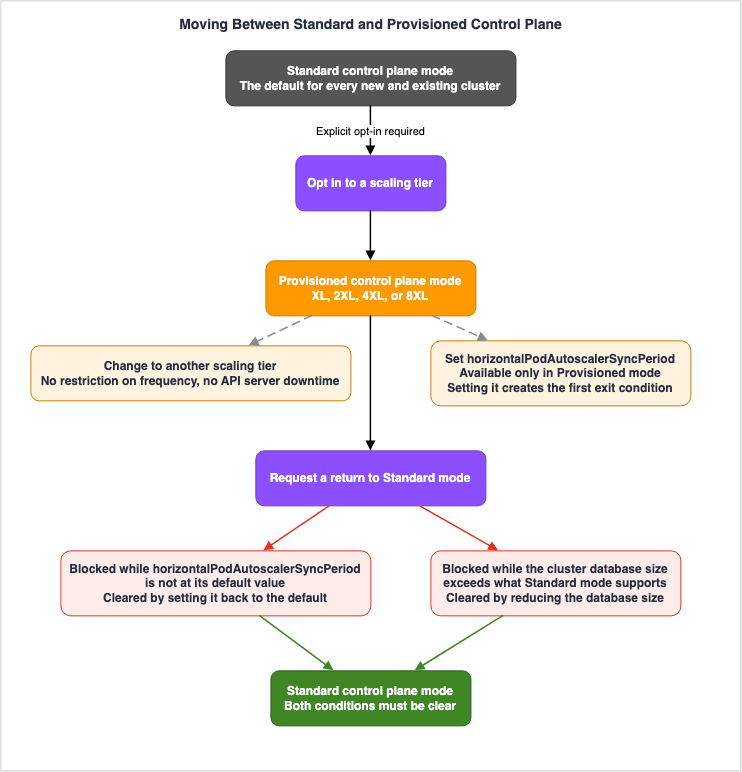
4.1 Start From the Fact That There Are Two
This article's core point is this: Two conditions block the way back from Provisioned mode to Standard mode, and each one lives in a different document. Read only one of them before you commit, and the other is what stops you.| # | Condition | Source |
|---|---|---|
| 1 | horizontalPodAutoscalerSyncPeriod sits at a value other than its default. | Advanced control plane configuration user guide |
| 2 | The cluster database (etcd) has grown past 8 GB. | Provisioned Control Plane user guide |
These two conditions are independent. Even if you resolve one, you will still be unable to revert if the other remains.
4.2 Condition 1 - The HPA Sync Period
The advanced control plane configuration user guide carries this consideration.Exit restriction for HPA sync period - If horizontalPodAutoscalerSyncPeriod is set to a
value other than the default, you can't move your cluster's control plane from
Provisioned mode back to Standard mode. To return to Standard mode, first set this
parameter back to the default of 15s, then change the control plane scaling tier to
standard.To clarify, the
horizontalPodAutoscalerSyncPeriod can only be configured for Provisioned clusters; attempting to set it on a Standard cluster will result in an error. And while it holds a value other than the default, the cluster cannot return to Standard mode. When these two factors are combined, a cluster that has once been given a shorter sync period cannot descend to Standard mode without passing through the default value first.This is not irreversible. The procedure has two steps and the order matters. First return
horizontalPodAutoscalerSyncPeriod to its default of 15s. Only then can you move the scaling tier to standard. The reverse order will not work.The distinction matters for how the article is written and for how the change is run. What this condition says is not that the move is irreversible. It says there is an operation to clear before the move. However, this step is not straightforward. As described in Chapter 5, reverting to the default value does not involve deleting the value; instead, it means naming the default value, and you retrieve that value from the API.
4.3 Condition 2 - The Cluster Database Size
The user guide for Provisioned Control Plane includes a separate condition to consider.Exit restriction - Standard control plane mode supports up to 8 GB of cluster database
(etcd) size. If your cluster's database size exceeds 8 GB while using Provisioned mode,
you cannot switch back to Standard mode until you reduce the database size to below
8 GB. For example, if you are using 14 GB of database storage in Provisioned mode, you
must first reduce your database utilization to less than 8GB before returning to
Standard mode.Recall from the tables in Section 3.2 that every Provisioned tier carries a cluster database size of 16 GB. Standard mode supports 8 GB, and every Provisioned tier carries double that. The move to Provisioned mode therefore opens room for the cluster database to grow past what Standard mode can hold.
This condition differs from the first in kind, because clearing it costs time and work. One API call returns a parameter to its default. Bringing etcd under 8 GB means removing objects from the cluster, and which objects and how many depends on what that cluster holds.
This is where
eventTtl becomes relevant. Events consume cluster database space, and a high-churn workload generates thousands of them in short order, so shortening eventTtl pushes back on exactly the quantity this condition measures. As Section 5.6 explains, though, the effect is not immediate.Events are not the only factor consuming etcd. Amazon EKS Capabilities points out that accepting an AWS-managed controller puts custom resource definitions on the cluster and that etcd holds them, and it asks you to count those definitions before you size etcd. The 8 GB in this section is the ceiling that count runs into. That article covers what fills the cluster database. This one covers where the total has to stop.
4.4 Unrestricted Directions
The one restricted direction is Provisioned mode back to Standard mode, and nothing else about moving between the two is limited.| Transition | Restriction |
|---|---|
| From Standard to any Provisioned tier | No restriction, although an explicit opt-in is required. |
| From one Provisioned tier to another | No restriction, and no limit on frequency. |
| From Provisioned to Standard | Only after resolving both of the conditions outlined above. |
Being able to move between tiers freely matters in practice. You can step up to a larger tier ahead of an event and step back down when it is over. The only step that is blocked is the one back down to Standard.
4.5 What to Decide Before You Start
Here are three key decisions to make before implementing Provisioned:First, determine whether to adjust the
horizontalPodAutoscalerSyncPeriod setting, independently from the decision on which tier to select. They are separate settings, but their reversibility is linked. Chapter 9 gives several reasons to leave this parameter where it is. Leave it alone and the first condition never arises.Second, if returning to Standard mode has to stay possible, treat 8 GB as an operating ceiling on the cluster database and put it under monitoring. Take your benchmark from what Standard mode supports, not from the 16 GB a Provisioned tier carries.
Third, since tier changes can be made without limitation, a phased implementation is feasible, where you initially adjust only the tier, leaving the parameters unchanged. Chapter 8 discusses this order of operations.
5. Reading the Defaults, and the Merge Semantics of an Update
5.1 An Update Merges, It Does Not Replace
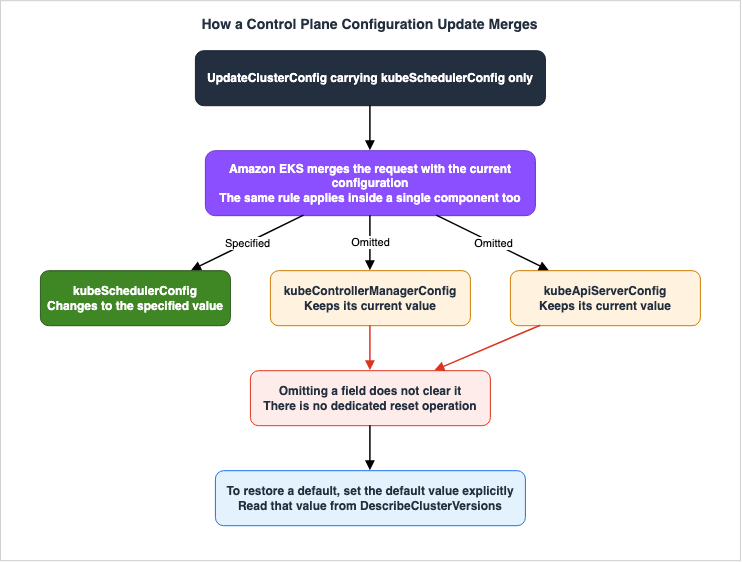
The user guide states the following consideration.Update semantics - Updates merge with your existing configuration. Only the fields you
specify change, and fields you omit keep their current values. This applies both across
components and within a single component.Regardless of whether the update applies to a single component or spans multiple components, the same semantics apply. Updates that only specify scheduler settings will not modify the controller manager or API server configurations.
This behavior itself is straightforward. The issue arises when combined with the next statement.
5.2 There Is No Reset Operation
Returning to default values - Amazon EKS doesn't provide a dedicated reset operation,
and omitting a field from an update leaves its current value in place rather than
clearing it. To return a parameter to its default, set it explicitly to the default
value.
An omitted field does not disappear. Returning to a default means naming the default value, and no dedicated reset operation exists.
This creates a dependency in the process. To explicitly set the default value, you need to know what that default value is. The default value depends on the Kubernetes version and may change as the version is updated. Therefore, the operation to revert to the default requires a prior operation to retrieve the default value.
The path back to Standard mode described in Section 4.2 rests on this structure. Returning
horizontalPodAutoscalerSyncPeriod to its default is not a matter of deleting the field. You look up the default for the Kubernetes version that cluster runs, and you write it. As of August 18, 2026 that value is 15s, which is exactly the kind of value not to hardcode.5.3 Reading the Values From DescribeClusterVersions
DescribeClusterVersions returns the default values and the supported values.aws eks describe-cluster-versions --cluster-versions 1.35 \
--query 'clusterVersions[0].controlPlaneComponentConfig'The response is organized by component, and each parameter carries a
defaultValue and a constraints object. The same call also returns controlPlaneScalingTiers, so the tier attributes come back with it.The user guide names this operation the authoritative source.
Read the values from this operation rather than hardcoding them, particularly if you
automate cluster configuration or manage clusters across several Kubernetes versions.
If you run clusters on several versions at once, that one sentence is the whole reason not to hardcode default values. The values differ by version, and there is an operation that returns them per version.
5.4 Defaults Can Also Vary by Tier
The user guide states that default values can change depending on the Kubernetes version. Read the API reference, though, and there is one more axis.Within the
DescribeClusterVersions response structure, each element of controlPlaneScalingTiers contains a field called controlPlaneComponentConfigOverrides. This field contains kubeApiServerConfig, kubeControllerManagerConfig, and kubeSchedulerConfig, each of which has a defaultValue and constraints field. This structure is the same as the top-level controlPlaneComponentConfig.So the response structure lets two axes settle a default and its constraints: the Kubernetes version, and the Provisioned tier the cluster sits on. The user guide does not describe this second axis, and it does not say which tier overrides which parameter.
This is a different kind of gap from the ones in Chapter 7. Not a contradiction, but a case where the API schema says more than the user guide does. The practical conclusion is this: when retrieving default values for a tiered cluster, do not stop at the top-level
controlPlaneComponentConfig. Read the controlPlaneComponentConfigOverrides for the tier that cluster sits on as well.5.5 A Change Does Not Take Effect Immediately
Changes aren't applied instantly - A configuration change isn't in effect when
UpdateClusterConfig returns. Amazon EKS applies the new configuration through a rolling
update of your control plane, so expect several minutes before the change takes full
effect.
Even after the
UpdateClusterConfig command returns, no changes have yet been applied. EKS applies the configuration as a rolling update to the control plane, and the cluster will return to the ACTIVE state once the update is complete.Either of the following two commands waits for it to finish.
aws eks wait cluster-active --name "$CLUSTER"
aws eks describe-update --name "$CLUSTER" --update-id <update-id>
The update type and status that
describe-update returns are the subject of a discrepancy between primary sources, covered in Section 7.1. Read that section first if you are writing automation.5.6 Changes to eventTtl Do Not Apply Retroactively
eventTtl carries a lag of its own, separate from the merge semantics.A change applies to new events only. Kubernetes sets an event's expiry when the event
is created. Events that already exist keep the retention period that was in effect at
their creation and expire on that schedule.An event expires on the retention period that was in effect when it was created. Shortening
eventTtl therefore does not shrink the cluster database right away. The database comes down gradually, as the existing events age out.There is a caution running the other way as well.
Events can persist slightly beyond the configured period. Under some conditions, an
event's expiry can be extended past the value you configured because of etcd lease
renewal that might happen during control plane leader election.
Deleted events cannot be recovered.
Deleted events can't be recovered. After Kubernetes removes an event, it's gone
permanently.
Reach for
eventTtl to clear the etcd condition in Section 4.3 and all three of these land at once. The effect arrives late, some events outlive the period you configured, and nothing brings back the ones you cut too far. Confirm that whatever you troubleshoot with already lives outside the cluster before you shorten it.6. Packing Pods, and the Node Supply Layer Beneath
6.1 The Scheduler Works in Two Phases
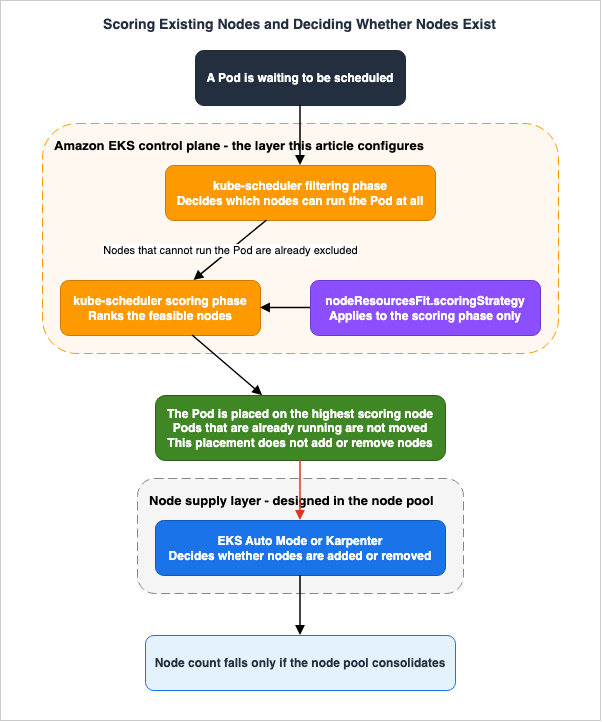
UnderstandingnodeResourcesFit means taking the scheduler's two phases apart. First, the scheduler narrows down the nodes that can run a Pod (the filtering phase). Then, it scores the remaining candidate nodes and places the Pod on the node with the highest score (the scoring phase). The nodeResourcesFit plugin checks whether a node has the resources required by the Pod and scores the nodes according to the configured scoring strategy.The
scoringStrategy only affects the scoring phase. The user guide explicitly states this.Filtering behavior doesn't change. The scoring strategy affects only the scoring phase,
in which the scheduler ranks nodes by preference. The filtering phase, which determines
whether a pod can run on a node at all, is unchanged. A pod that doesn't fit on a node
still isn't scheduled there under either strategy.So
MostAllocated never forces a Pod onto a node it does not fit on. Under either strategy, a Pod that does not fit is not scheduled there.6.2 Two Strategies
LeastAllocated favors nodes with lower resource allocation, spreading Pods across the cluster and leaving headroom on each node. This aligns with the default behavior of upstream Kubernetes and is suitable when you want to ensure that each node has sufficient capacity to accommodate the growth of existing Pods.MostAllocated favors nodes that already carry higher resource allocation, packing Pods onto fewer nodes. This reduces the total capacity consumed by the workload, potentially allowing you to run the same workload with fewer nodes. Over time this packing keeps new workloads off lightly used nodes, so node pools that support consolidation can remove them.The upstream Kubernetes
RequestedToCapacityRatio strategy is not supported. You only have two options to choose from.6.3 Where the Weights Are Easiest to Get Wrong
Theresources array allows you to specify the resources used for scoring and their relative weights. The resources that can be specified are cpu, memory, nvidia.com/gpu, aws.amazon.com/neuron, and aws.amazon.com/neuroncore, and the weights can range from 1 to 100.There are two key areas where misunderstandings can lead to configurations that behave differently than intended.
First, the weights are relative values, not absolute values. Even if you set
cpu: 100 and memory: 1, the scheduler will not ignore memory. In the scoring formula CPU weighs 100 times more than memory, and that is all it means. If all candidate nodes have the same amount of available CPU, the scheduler will be unable to differentiate based on CPU, and the scoring will effectively be based on memory.The second point is potentially more problematic.
Omitting a resource is different from giving it a low weight. When you specify a
resources array, only the resources you list are scored. A resource you leave out is
excluded from the calculation entirely.
Once you specify the
resources array, any resource not listed within it will be completely excluded from the scoring process. If you only specify cpu: 100 and omit memory, the available memory will no longer have any impact on the results. To reduce a resource's influence rather than remove it, list it with a lower weight instead of leaving it out.This distinction is often difficult to discern from the configuration itself.
{"resources": [{"name": "cpu", "weight": 100}]} can appear to be a configuration that either prioritizes CPU or disregards memory. In reality, it is the latter.6.4 Conditions for Accelerator Weights to Take Effect
When assigning weights to accelerator resources, three conditions must be met.First, the weights only affect Pods that have declared
resources.requests for that accelerator resource. Pods that do not request accelerators are not affected by the accelerator weights.Second, these three accelerator resources are Kubernetes extended resources and are only considered when the device plugin advertises them to the kubelet through the device plugin API.
Resources made available on a node by a device driver alone aren't visible to the
nodeResourcesFit plugin and aren't scored.
Resources provided solely through device drivers are not visible to this plugin.
Third, a different plugin schedules the resources that Dynamic Resource Allocation manages, so
nodeResourcesFit never scores them. Consequently, enabling DRA will not affect the behavior of this parameter. What that other plugin is, and which clusters can reach it at all, is the subject of Gang Scheduling and Dynamic Resource Allocation on Amazon EKS.6.5 Running Pods Are Not Moved
Running pods aren't moved. The Kubernetes scheduler never relocates a pod that is
already running. Changing the scoring strategy affects future scheduling decisions
only, and existing pod placement is permanent.
Changing the strategy leaves running Pods where they are. It moves only the decisions the scheduler has yet to make. To repack a running Pod, evict it or restart it.
This characteristic works in two directions. Seeing no effect right after you apply a change is normal, and conversely, even when you roll back, previously allocated placements will remain. The rollback plan in Chapter 8 has to be built on that asymmetry.
6.6 The Boundary Between the Two Layers
This is the line between this article and the existing ones, and it is also the point readers most often get wrong. Both the user guide and the Containers blog carry the same caution, and the user guide puts it this way.The scheduler and node management operate at different layers. The scoring strategy
influences where pods are placed among nodes that can already run them. It doesn't
change how EKS Auto Mode or Karpenter provisions or removes nodes.The scheduler's scoring process concerns the selection of a node from among those already capable of running Pods. Whether those nodes exist at all is a separate layer's decision.
| Layer | What it decides | Where you configure it |
|---|---|---|
| kube-scheduler | Which of the candidate nodes the Pod lands on | nodeResourcesFit.scoringStrategy, the subject of this article |
| EKS Auto Mode / Karpenter | Whether a node is provisioned at all, and whether it is removed | The node pool |
While these two layers can be configured independently, they do not operate in isolation.
MostAllocated keeps new Pods off lightly used nodes, which makes those nodes easier for a node pool that supports consolidation to remove. Whether any of it shows up as a smaller fleet depends on whether the layer below consolidates nodes. The official documentation repeatedly emphasizes the need to validate the combined behavior for each workload for this very reason.The design of the node pool itself sits outside this article. Self-Managed LLM Inference on Amazon EKS carries the Karpenter configuration, covering NodePool, EC2NodeClass, and disruption policy. Designing for Spot Interruptions on AWS covers the design of nodes that can be taken away.
6.7 What Packing Costs
MostAllocated concentrates blast radius. Packing workloads onto fewer nodes means more
pods are affected at once if a node becomes unhealthy, an instance is retired, or an
Availability Zone is disrupted. Under high pod churn, densely packed nodes also fill up
faster, which can leave pods in Pending state while new capacity is provisioned.
Packing widens what a single failure takes down with it. Under high Pod churn, a densely packed node fills up faster, which can leave Pods in
Pending while new capacity is provisioned.MostAllocated is a setting that lowers your node count and, in the same move, widens what a single unhealthy node takes down with it. Chapter 10 covers the anti-pattern of adopting it without carrying that second half.7. Discrepancies Between Primary AWS Documentation
This chapter lists instances where AWS's official documentation contradicts itself. All information was verified on August 18, 2026. There are four instances of contradiction and one instance of missing information. Both sides of every discrepancy are named so that you can check them yourself.7.1 The Tier Change Update Type and Status Are Absent From the API Reference
The Provisioned Control Plane user guide describes how to monitor a tier transition.Amazon EKS has introduced a new cluster update type called ScalingTierConfigUpdate,
which you can inspect to monitor the progress of the transition. After you execute a
tier change command, you can list the updates on the cluster to see a new update of
type ScalingTierConfigUpdate with status Updating.In contrast, the Amazon EKS API reference enumerates the valid values of the
type field on the Update data type. As of the verification date there are 21 of them, and the following two are relevant.| Value | The operation it belongs to |
|---|---|
ControlPlaneScalingConfigUpdate | Tier change |
ControlPlaneComponentConfigUpdate | Detailed parameter change |
The
ScalingTierConfigUpdate value is not included in this list. Furthermore, the valid values for the status field within Update are limited to InProgress, Failed, Cancelled, and Successful, and Updating is also missing.That puts two values from a single user guide sentence outside the API reference's enumeration.
There is further supporting evidence. The field that carries the tier in an
UpdateClusterConfig request is controlPlaneScalingConfig, and the name ControlPlaneScalingConfigUpdate corresponds to this field name. On the detailed parameter side, both the user guide's instructions and the walkthrough on the Containers blog include response examples with "type": "ControlPlaneComponentConfigUpdate" and "status": "InProgress", which aligns with the API reference's enumeration.| Document | Tier change update type | Status |
|---|---|---|
| Provisioned Control Plane user guide | ScalingTierConfigUpdate | Updating |
Amazon EKS API reference, Update | ControlPlaneScalingConfigUpdate | InProgress |
This article does not verify which of these strings are actually returned by the service. The sole claim of this article is that the API reference's enumeration does not include the two strings explicitly mentioned in the user guide.
Even so, the practical conclusion settles on one answer. If your automation keys on the update type or the status, do not copy the string from either document. Take it from the actual output of
list-updates and describe-update. Stake a match on a string copied out of one document and, when it does not match, the process does not fail. It waits.As a general rule, take the spelling of an identifier from the enumerated valid values in the API reference, not from the page that explains the feature. A value missing from the enumeration is still not proof that the service never returns it. What can be stated is narrower: the enumeration is the documented contract.
7.2 The List of Tier Values Differs Between Documents
The list of strings that name a scaling tier splits three ways across the documentation, and one of those splits sits inside a single page. Anyone who names a tier in Infrastructure as Code walks into this.| Document | List of values | Count |
|---|---|---|
Amazon EKS API reference, ControlPlaneScalingConfig, Valid Values | standard, tier-xl, tier-2xl, tier-4xl, tier-8xl | 5 |
CloudFormation template reference, AWS::EKS::Cluster ControlPlaneScalingConfig, Allowed values | The 5 above + tier-ultra | 6 |
| Prose text on the same CloudFormation page | standard, tier-xl, tier-2xl, tier-4xl, tier-8xl | 5 |
AWS CDK .NET API documentation, the Tier property description | standard, tier-xl, tier-2xl, tier-4xl | 4 |
| AWS CDK README for TypeScript and Python | STANDARD, TIER_XL, TIER_2XL, TIER_4XL, TIER_8XL | 5 |
Inside a single CloudFormation page, the prose lists five values and the
Allowed values field lists six. The difference is tier-ultra.As of the verification date,
tier-ultra does not appear in any other official documentation. It is absent from the tier tables in the user guide, from the valid values in the EKS API reference, and from every language version of the AWS CDK. The user guide only contains a single sentence that seems similar.Larger scaling tier - If you intend to run your cluster on scaling tier larger than
8XL, contact your Amazon Web Services account team for additional pricing information.Whether that sentence refers to
tier-ultra is not something this article can confirm. The user guide gives neither a name nor attribute values for anything above 8XL. It gives a contact route and nothing else.Therefore, the conclusion of this article is conservative.
tier-ultra only appears as a value within CloudFormation's Allowed values, and there is no documentation defining what can be achieved at that tier. Naming a tier whose attribute values are unpublished in an Infrastructure as Code template leaves you with a configuration you cannot explain. If you require capacity exceeding 8XL, do not guess the values; instead, contact your account team.The .NET documentation for CDK does the opposite and omits
tier-8xl. Even inside a single CDK, the TypeScript and Python README files list five tiers, including TIER_8XL, resulting in inconsistencies across different language versions.General principle. Take an enumerated value from the schema's constraints field, not from the prose that describes the feature. And as this section demonstrates, the same page's prose and constraint section may not always align.
7.3 The Minimum Version for Provisioned Control Plane Does Not Agree
| Document | Description |
|---|---|
| Provisioned Control Plane user guide | Provisioned Control Plane works on EKS v1.28 and higher. |
| Containers blog (November 2025) | running Kubernetes version 1.29 and above |
| The same user guide, tier limits tables | The table begins with EKS v1.30. Tier limits for v1.28 and v1.29 are not published. |
The two descriptions provide different minimum version requirements, and the third document does not support either of those minimums. Neither of the two stated floors comes with published tier limits for the versions it names.
Furthermore, the EKS Kubernetes release calendar (as of August 18, 2026) lists versions 1.31 through 1.36. Versions 1.28, 1.29, and 1.30 are not included in the calendar. The user guide states the support window directly: standard support runs for 14 months from the Amazon EKS release, and extended support adds another 12 months, for 26 months per version. Apply that window and the three versions missing from the calendar have all run out of support. The release calendar page itself lists
1.33, 1.32, and 1.31 as the versions currently in extended support.In practice, it is not necessary to resolve this discrepancy. In reality, tier limits are only published for versions 1.30 and higher, and the release calendar lists versions 1.31 and higher. Any cluster in a position to consider Provisioned Control Plane therefore already sits where the tier limits are published.
General principle. A stated minimum version means something only when the numbers you need for that version are published too. Where a document names a floor but the tier limits table never reaches it, that floor cannot carry a plan.
7.4 The Tooling Available at Launch Does Not Match Between Documents
| Document | Description |
|---|---|
| Advanced control plane configuration user guide | Advanced Kubernetes control plane configuration is available through the AWS Management Console, eksctl, AWS CLI, Amazon EKS API, AWS CloudFormation, and AWS CDK at launch. Support for AWS Controllers for Kubernetes (ACK), and Terraform is coming soon. |
| Containers blog | You can apply settings through the AWS Management Console, AWS CLI, or AWS CloudFormation, with support for eksctl, AWS Controllers for Kubernetes (ACK), and Terraform planned. |
The discrepancy lies in two areas. The user guide states that eksctl is available at launch, while the blog lists it as planned support. AWS CDK only appears in the user guide.
Where an overview and a dedicated page disagree, take the dedicated page. Here the user guide is the dedicated page.
The size of the impact is worth judging separately, though. This discrepancy only affects the initial planning phase; the actual configuration can be completed using the AWS CLI and CloudFormation. Both documents agree on those two, so the first step is the same whichever you believe. If your toolchain is standardized on eksctl, check your installed version before you start.
7.5 The Tier SLA Is Not Available From the API
This last one is not a contradiction but an omission. As Section 3.2 showed, the tier tables in the user guide carry an SLA column. However, each element of thecontrolPlaneScalingTiers array that DescribeClusterVersions returns consists of tierName, apiRequestConcurrency, podSchedulingRatePerSecond, clusterDatabaseSizeGb, and controlPlaneComponentConfigOverrides. There is no field corresponding to the SLA.As Section 5.3 noted, the official documentation asks you to read the values from the API when you automate tier selection. Automation that follows this recommendation can retrieve tier performance attributes, but not the SLA. The SLA information is only available in the documentation.
The practical conclusion is this: when writing automation for tier selection, carry the SLA as the difference between Standard mode and Provisioned mode. As the tables in Section 3.2 show, all four Provisioned tiers commit to the same 99.99% measured in 1-minute intervals, so it never separates one tier from another. The only variable is whether the cluster runs in Standard mode or Provisioned mode.
7.6 How to Read This Chapter
Those five do not carry equal weight.| # | What it is | What it costs |
|---|---|---|
| 7.1 | The update type and status strings | The heaviest. Automation can sit waiting and never fail. |
| 7.2 | The list of tier values | Bites directly when you name a tier in Infrastructure as Code. One value in it has no definition anywhere. |
| 7.3 | The minimum version | Harmless across the versions you can actually select. |
| 7.4 | The tooling at launch | Only during planning. |
| 7.5 | The missing SLA | Only when you automate tier selection. |
One general rule runs through all five. A sentence that explains a feature, a sentence that states a constraint, and a sentence that defines a contract are not equally accurate. The contract sentences, meaning the enumerated valid values and constraints in an API reference, are the most accurate, and the blog written to convey a feature is the loosest. Before you copy a number or an identifier into your own implementation, look at which of the three you are reading.
8. Making the Change - Validate, Observe, Roll Back
8.1 Separate the Operations, and Order Them
Section 4.5 sketched a phased adoption, and this is the same thing written out as a procedure. Separate the operation that moves the tier from the operations that set parameters, because their reversibility is not the same.| Step | Operation | Reversibility |
|---|---|---|
| 1 | Select a Provisioned scaling tier. | Movement between tiers is unrestricted. The way back to Standard mode is conditional on the cluster database staying under 8 GB. |
| 2 | Set the parameters that do not require Provisioned mode. | Reversible by specifying the default value explicitly. |
| 3 | Set horizontalPodAutoscalerSyncPeriod. | The cluster cannot move down to Standard mode until this parameter is back at its default. |
Step 3 is the only one that reaches back and constrains the others. Put Step 3 last, and take it only after the other steps have failed to reach the goal.
8.2 Validation in Non-Production Environments
The user guide asks repeatedly that you test a parameter change on a non-production cluster first. The part that needs care is this: the non-production cluster has to run the same Kubernetes version as production. Default values, supported values, and tier limits all depend on the version, so a test on a different version is not a test.The user guide lists consistency across environments among the reasons to use Provisioned Control Plane, and that is the use it has here. If staging and production sit on the same tier, what you observe in validation reflects production more closely. Put them on different tiers and the HPA sync concurrency differs too, which makes any comparison of autoscaling responsiveness meaningless.
8.3 Counting Before Applying
Each parameter has something to establish before you apply it.| Parameter | What to check before you apply |
|---|---|
horizontalPodAutoscalerSyncPeriod | The number of HorizontalPodAutoscaler objects in the cluster, and whether the shorter period still supports that number. |
eventTtl | Confirm that troubleshooting information is being retained outside the cluster. |
serviceNodePortRange | Ensure the new range is permitted by security groups and network ACLs. Confirm as well that the range does not collide with ports other software on the nodes already uses. |
nodeResourcesFit.scoringStrategy | Determine if the number of Pods that can fit on a single node, based on the scoring strategy, falls within an acceptable range in case of failures. |
The official documentation gives the command for counting the
HorizontalPodAutoscaler objects.kubectl get hpa --all-namespaces --no-headers | wc -lEKS does not validate this number. Even if the number is too high, the configuration change itself will still succeed. The counting is yours to do.
8.4 Applying the Change and Waiting for It
Apply the change withupdate-cluster-config, which takes several components in one call.aws eks update-cluster-config \
--name "$CLUSTER" \
--kube-scheduler-config '{"nodeResourcesFit":{"scoringStrategy":{"type":"MostAllocated"}}}' \
--kube-api-server-config '{"eventTtl":"30m"}'As described in Section 5.1, this call does not modify the controller manager configuration. Any components not specified will retain their current values.
Wait for it to finish with either of the following.
aws eks wait cluster-active --name "$CLUSTER"You can retrieve a list of updates and their individual statuses using
list-updates and describe-update. Read Section 7.1 first if your automation branches on the update type.8.5 What to Observe
What you observe varies depending on the parameter.| Parameter | What to watch |
|---|---|
nodeResourcesFit.scoringStrategy | The placement of newly scheduled Pods. Since existing Pods will not move until a replacement occurs, no difference will be apparent until then. |
horizontalPodAutoscalerSyncPeriod | Whether workqueue_depth{name="horizontalpodautoscaler"} reaches zero within each reconciliation period. Once it stops reaching zero, the control plane is no longer keeping up. |
eventTtl | How newly created events age out. The cluster database shrinks only later. |
serviceNodePortRange | Whether the port allocation for newly created Services is successful. |
If you change the tier of the Provisioned Control Plane, monitor the tier utilization metrics. These can be accessed from CloudWatch and the EKS console, and are also available from the cluster's Prometheus endpoint.
| Attribute | Prometheus metric |
|---|---|
| API request concurrency | apiserver_flowcontrol_current_executing_seats |
| Pod scheduling rate | scheduler_schedule_attempts_total |
| Cluster database size | apiserver_storage_size_bytes |
In CloudWatch, the metric name for cluster database size is
etcd_mvcc_db_total_size_in_use_in_bytes. The user guide notes that a Prometheus metric under that same name will be rolled out to all EKS clusters by the second half of 2026. If you hardcode metric names in your monitoring configuration, be sure to account for this migration.In the console, choose Monitor cluster from the cluster overview page, open the Control plane monitoring tab, and read the utilization under Control plane scaling.
8.6 Rollback Plan
How you roll a parameter back, and how far the rollback reaches, differ by parameter.| Parameter | Rollback action | What does not come back |
|---|---|---|
nodeResourcesFit.scoringStrategy | Set the default value explicitly | Placements that are already packed. Eviction or a restart is required. |
horizontalPodAutoscalerSyncPeriod | Set the default value explicitly. This is the prerequisite for moving down to Standard mode. | None |
eventTtl | Set the default value explicitly | Events that were already deleted. There is no way to restore them. |
serviceNodePortRange | Set the default value explicitly | The original port of an out-of-range Service that has since been recreated. |
Four rows say to set the default value explicitly, and as Section 5.2 explains, that is not the same as clearing a field. Retrieve the default for the cluster's Kubernetes version with
DescribeClusterVersions, then write it.Three rows carry something that does not come back, and that is worth reading before you commit to a change. A setting goes back. The state the cluster reached while that setting was live does not. Measure reversibility by whether the value returns and you will miss that gap entirely.
This section rolls back a parameter, not the cluster. Returning the cluster to its previous Kubernetes minor version is a separate operation with its own eligibility conditions, its own seven-day window, and its own readiness insights, and it is covered by Rolling Back an Amazon EKS Cluster Version - What Decides Eligibility, What Rollback Readiness Insights Do Not Decide, and Where the Primary Sources Disagree.
8.7 Auditing
Amazon EKS validates each configuration before applying it and records the change in AWS CloudTrail. That makes this feature easy to place inside change management, because who changed which parameter, and when, stays on the record.However, CloudTrail only records change operations; it does not reflect the impact of those changes. The silent degradation that Chapter 9 describes never shows up in CloudTrail.
9. When Leaving It Alone Is the Right Answer
9.1 Where This Chapter Sits
This chapter turns the question around. It assembles, out of what the official documentation says, the conditions under which leaving all of this alone is a conclusion you can defend.Section 1.4 established the premise: a cluster keeps running on defaults until someone sets a parameter. There is no migration deadline. Choosing not to act is therefore a position, not neglect.
9.2 Reasons Not to Touch horizontalPodAutoscalerSyncPeriod
Of the four parameters, this is the one to be most reluctant about, and four separate reasons stack up behind that.First, there is very little room to move. The supported range is
10s to 15s and the default is the ceiling at 15s, so the most you can gain is 5 seconds.Second, the cluster supports fewer HPA objects.
Shortening the sync period reduces the number of HorizontalPodAutoscaler objects your
control plane can reconcile on schedule, because the controller has less time to work
through the same queue. Reducing the period from 15s to 10s lowers the supported object
count by roughly one third.
The controller has less time to work through the same queue, so the number of HPA objects it keeps up with falls by roughly one third.
Third, Amazon EKS does not validate the setting.
EKS doesn't validate the sync period against your HPA object count. The configuration
change succeeds even if your cluster already has more HorizontalPodAutoscaler objects
than the shorter period supports. Verify the count yourself before making the change.
The change succeeds even on a cluster that already holds more
HorizontalPodAutoscaler objects than the shorter period can carry.Fourth, failures are silent.
Exceeding the supported count degrades autoscaling silently. If the controller can't
work through every object within the period, some objects aren't reconciled on
schedule. EKS doesn't emit an alarm or a Kubernetes event for this condition, and the
symptom is autoscaling that responds more slowly than expected - the opposite of the
intended effect.
No alarms or Kubernetes events are triggered. The symptom that appears is a slower autoscaling response, which is the opposite of the intended effect. The official documentation recommends reverting to the default
15s if a delay in scaling is observed after shortening the value.On top of those four sits the reversibility constraint from Section 4.2. While a value other than the default is in place, that cluster cannot move down to Standard mode.
Put the four together and the trade is easy to read. You gain at most 5 seconds. You give up roughly a third of the HPA objects the cluster can keep up with, the way back to Standard mode, and the guarantee that a failure will announce itself. When HPA response is the complaint, the metrics source is the first place to look, as Section 3.4 describes.
9.3 Reasons Not to Touch MostAllocated
Leaving this one alone is a conditional judgment. As Section 6.7 sets out, MostAllocated concentrates the blast radius, and where Pod churn is high a densely packed node fills up fast, leaving Pods in Pending while new capacity is provisioned.Section 6.6 adds the other half: whether the packing actually removes nodes depends on whether the layer below consolidates them. Turn
MostAllocated on above a node pool that does not consolidate and the only thing you gain is a concentrated blast radius.Leaving it alone holds up when any one of the following is true. The node pool does not consolidate. There is a ceiling on how many Pods may go down together with a single node. Or Pod churn is high enough that Pods sitting in
Pending feed straight into your service levels.9.4 Reasons Not to Touch eventTtl
Shortening eventTtl relieves pressure on the cluster database and speeds up API server responses to event-heavy queries. The official documentation names three conditions under which a shorter retention period is a good fit: batch, CI/CD, AI, or CronJob workloads generating a high volume of events; cluster database storage growing toward its limit; and an external system already capturing events durably, so that historical debugging does not depend on kubectl get events.Without the third condition, there is no reason to shorten it. As Section 5.6 describes, no one recovers a deleted event, and the benefit of a shorter retention period arrives late. Cut retention while nothing outside the cluster is capturing events and you lose the information before you see the benefit.
The scope constraint from Section 2.2 lands here as well. In a multi-tenant cluster, the teams with a reason to shorten retention and the teams without one share one setting. There is no per-namespace version of it.
9.5 Reasons Not to Touch serviceNodePortRange
As Section 2.4 showed, this one is a different kind of setting. While the other three options involve adjusting behavior, this one concerns a core requirement. If an application moving onto EKS expects a fixed port and that port sits outside the default range, you have three choices: change the range, change the application, or put a proxy in front of it. With no requirement in hand, there is no reason to touch it.Chapter 10 collects the constraints that apply once a requirement does exist. Narrowing the range on a cluster that already runs Services is the one to watch. Nothing breaks at the time. It breaks the moment one of those Services is recreated.
9.6 Reasons for Not Choosing Provisioned Control Plane
The same question applies to the mode, not only to the parameters. The official documentation recommends Standard mode outright and positions Provisioned mode for workloads that cannot tolerate performance variability or that need very large control plane capacity.Moving to Provisioned mode creates a condition that did not exist before: the 8 GB threshold from Section 4.3. Standard mode supports 8 GB, so on Standard mode there is no gap between what the cluster database can reach and what the mode can hold. Provisioned mode opens that gap, and with it the possibility of not being able to return.
9.7 What Remains After You Decide Against It
Even after deciding against the feature, one task remains. You should document the existence of this feature in the cluster's design documentation. Record that it was considered and set aside, and record why.What you should watch for next depends on why you set it aside. If there was simply no requirement, revisit it when one appears. If the reversibility constraints were what stopped you, reconsider whether the goal can be narrowed to something a tier change alone can reach.
10. Failure Modes and Anti-Patterns
10.1 Hardcoding Default Values
Symptom: When applying the same configuration to multiple Kubernetes clusters across different versions, validation errors occur in some clusters. Alternatively, the process to revert to default values may not function as expected in certain versions.Cause: The note that default and supported values depend on the Kubernetes version was skipped. As Section 5.4 describes, a tier can override them as well.
Resolution: Retrieve the values from
DescribeClusterVersions. The revert-to-default process should retrieve the values at runtime before writing them.10.2 Assuming That Omitting a Field Clears It
Symptom: After an update meant to clear a setting,describe-cluster still returns the previous value.Cause: The merge semantics described in Section 5.2. Omitting a field is an operation that preserves the current value; it does not delete it. There is no reset operation.
Resolution: Specify the default value explicitly. Omitting a field and naming a value are different operations.
10.3 Omitting Resources in the resources Array
Symptom: Despite configuring the system to prioritize CPU usage, the resulting configuration completely ignores available memory.Cause: Section 6.3. Once you specify a
resources array, scoring drops every resource you did not list. That is a different outcome from giving one a low weight.Resolution: To reduce a resource's influence rather than remove it, list it with a low weight instead of leaving it out.
10.4 Turning On MostAllocated Above a Node Pool That Does Not Consolidate
Symptom: The number of nodes does not decrease, but the impact radius during failures increases.Cause: As described in Section 6.6, the scheduler only adjusts node placement for existing nodes; a separate layer provisions and removes nodes. This issue, while not explicitly warned against by AWS, is a consequence of combining two observations: the provisioning layer remains unchanged even when nodes are packed together, and packing nodes concentrates the impact radius.
Resolution: Confirm first that the node pool consolidates. Self-Managed LLM Inference on Amazon EKS carries the node pool design.
10.5 Rolling Back Because Nothing Happened Right Away
Symptom: You turn onMostAllocated and placement does not change. You shorten eventTtl and etcd does not shrink.Cause: Sections 6.5 and 5.6. Running Pods will not be rescheduled, and existing events continue to retain their initial retention period. In both cases, changes only appear with new items.
Resolution: Extend the observation window to be longer than the cycle at which Pods and events are replaced.
10.6 Shortening the Sync Period Without Counting the HPA Objects
Symptom: You shorten the sync period and autoscaling gets slower. Nothing raises an alarm.Cause: Section 9.2. The supported object count falls by roughly one third, EKS validates nothing against your count, and it says nothing when you pass it.
Resolution: Count the number of objects before applying the change. After applying, monitor the
workqueue_depth{name="horizontalpodautoscaler"} metric. If delays show up, put the sync period back to 15s.10.7 Concluding the Narrowed Port Range Is Safe Because Nothing Broke
Symptom: Every Service works normally right after you narrow the range. Weeks later, one Service fails to be created during a deployment.Cause: Existing Services keep the ports they hold, and kube-proxy keeps routing to them. EKS does not reassign ports when the range changes. Delete and recreate one of those Services, though, and Kubernetes can no longer hand it a port outside the new range.
Recreating a service reallocates its port. If a service holding an out-of-range port is
deleted and recreated, that port can no longer be assigned.
Resolution: Before narrowing the range, list every Service that will fall outside it. As described in Section 2.4, both
NodePort and LoadBalancer types utilize this range by default, so be sure to count both. Check whether your deployment process updates an existing Service or recreates it. For a Service that names a nodePort outright, confirm that the value also sits inside the new range.10.8 Running etcd Against the 16 GB Figure After Moving to Provisioned Mode
Symptom: The attempt to return to Standard mode is refused, and getting back requires deleting objects inside the cluster first.Cause: Section 4.3. A Provisioned tier carries 16 GB of cluster database, while Standard mode supports 8 GB.
Resolution: If returning to Standard mode has to stay possible, put the monitoring threshold on the 8 GB side.
10.9 Copying the Update Type String Out of a Document and Waiting on It
Symptom: Automation processes that wait for the completion of tier changes are not proceeding, even after completion. No errors are being reported.Cause: Section 7.1. The
ScalingTierConfigUpdate and Updating strings that the user guide names are absent from the enumerated valid values in the API reference.Resolution: Verify the actual output of
list-updates and describe-update before defining the matching criteria. Implement a timeout mechanism in case the values do not match.10.10 Modifying Settings in a Multi-Tenant Cluster Due to a Single Tenant's Requirements
Symptom: AdjustingeventTtl to meet the requirements of one team results in troubleshooting issues for another team.Cause: Section 2.2. The setting cannot be scoped to a namespace or to a workload.
Resolution: Address this as a cluster-wide agreement. If tenant requirements vary, consider splitting the cluster rather than modifying settings.
11. Design Checklist
Each item corresponds to the relevant section of the main text. Return to the body only where you need the grounds.11.1 Before Starting
- Is the cluster's Kubernetes version 1.31 or later? (Section 1.3)
- Has the support status for that version been verified? Version 1.31 is nearing the end of its extended support period. (Section 1.3)
- Is the desired behavior truly modified by changing any of the four parameters? (Section 2.1)
- Is it acceptable to apply that setting to the entire cluster, or is it necessary to restrict it to a specific namespace? (Section 2.2)
- Is a non-production cluster running the same Kubernetes version as the production environment? (Section 8.2)
11.2 If You Are Considering Provisioned Control Plane
- Can you say why Standard mode's automatic scaling is not enough, in terms of either performance variability or capacity? (Section 3.1)
- Do you know what a larger tier does not increase, namely the cluster database size and, from 4XL upward, the pod scheduling rate? (Section 3.2)
- Do you read a tier's attribute values as ceilings rather than as results you will reach? (Section 3.3)
- If HPA response is slow, did you check the metrics source first? (Section 3.4)
- Do you know that tiers do not move on their own, and that automating it is your own code to write? (Section 3.5)
- If returning to Standard mode has to stay possible, is the etcd monitoring threshold set on the 8 GB side? (Section 4.3)
11.3 Configuring Parameters
- Did you read the default values from
DescribeClusterVersionsrather than copying them out of the documentation? (Section 5.3) - If the cluster sits on a scaling tier, have you also read
controlPlaneComponentConfigOverrides(Section 5.4)? - Do you know that an update merges, and that omitting a field does not clear it? (Sections 5.1 and 5.2)
- If you use the
resourcesarray, did you list the resources you want to weaken with a low weight instead of leaving them out? (Section 6.3) - Before modifying
horizontalPodAutoscalerSyncPeriod, have you counted the number of HPAs? (Section 8.3) - Before changing
serviceNodePortRange, have you checked the security groups and network ACLs? (Section 8.3) - If narrowing the range, have you counted both
NodePortandLoadBalancertypes of Services? (Section 2.4) - When naming a tier in Infrastructure as Code, did you take the value from the valid values in the API reference? Are you avoiding the use of undefined values? (Section 7.2)
- Before shortening
eventTtl, have you confirmed that events are being retained outside the cluster? (Section 9.4)
11.4 Applying and Observing
- Have you incorporated steps to account for the possibility that the application may not take effect immediately (Section 5.5)?
- Are you relying on string-based identifiers for update types? If so, have you verified the actual output (Sections 7.1 and 10.9)?
- Is the observation window longer than the cycle on which Pods and events turn over? (Section 10.5)
- Are you monitoring
workqueue_depth{name="horizontalpodautoscaler"}(Section 8.5)?
11.5 Rollback
- Do you know that a rollback means writing the default value explicitly, and that the value has to be retrieved at run time? (Section 8.6)
- Do you know what does not roll back, namely placements that are already packed, events that were deleted, and the ports of Services that have been recreated (Section 8.6)?
- If you modify
horizontalPodAutoscalerSyncPeriod, do you understand the correct order of steps to revert to the default configuration (Section 4.2)?
11.6 If You Decide Against It
- Have you documented the decision to reconsider and the reasons for that decision in the design documentation (Section 9.7)?
- Have you outlined the conditions under which the decision might be reevaluated (Section 9.7)?
12. Frequently Asked Questions
12.1 Is there a penalty for leaving this feature alone?
No. Existing clusters remain unchanged and will continue to operate with their default settings until you explicitly configure new parameters. There are no migration deadlines or advance warnings regarding changes to the default settings (see Section 1.4).12.2 Can a parameter be set per namespace?
No. All four parameters apply to the whole cluster, and you cannot scope them to a namespace or a workload. Where tenant requirements diverge, split the cluster rather than the setting (see Section 2.2 and Section 10.10).12.3 How do I clear a setting?
There is no delete operation. You write the default value explicitly instead. An update merges, so omitting a field leaves the current value in place, and Amazon EKS provides no dedicated reset operation (see Section 5.2).12.4 Where do I find the default values?
DescribeClusterVersions returns a defaultValue and a constraints object for each Kubernetes version. The values documented are those current at the time of publication and may change as versions are updated. If you manage clusters across several versions, or automate the configuration, read the values from the API (see Section 5.3).12.5 Can a cluster go back from Provisioned mode to Standard mode?
Yes, once two conditions are clear.horizontalPodAutoscalerSyncPeriod has to be back at its default, and the cluster database has to be under 8 GB. The two are independent, so clearing one still leaves the other in the way (see Chapter 4).12.6 Will using MostAllocated reduce the number of nodes?
Not necessarily. The scheduler only changes which of the nodes that can already run the Pod it lands on. Removing a node is a separate layer's job, EKS Auto Mode or Karpenter, and if that layer does not consolidate, the node count does not fall (see Section 6.6).12.7 Does setting it to MostAllocated also reschedule existing Pods?
No. The Kubernetes scheduler never relocates a Pod that is already running. Only future scheduling decisions will be affected. If you want to reallocate existing Pods, you will need to either evict them or restart them (see Section 6.5).12.8 Does using MostAllocated result in Pods being scheduled on nodes that do not have enough capacity?
No. The scoring strategy only affects the scoring phase, and the filtering phase, which determines whether a Pod can run on a particular node, remains unchanged. Regardless of the strategy used, Pods will not be scheduled on nodes that cannot accommodate them (see Section 6.1).12.9 Does a shorter HPA sync period make autoscaling faster?
Only under certain conditions. Shortening the period cuts the number ofHorizontalPodAutoscaler objects the control plane can reconcile on schedule by roughly one third, and once you exceed that number, some objects are no longer reconciled on schedule. In this state, Amazon EKS raises no alarm and emits no Kubernetes event, and the symptom is autoscaling that responds more slowly. Count the objects before you apply the change (see Section 9.2).12.10 Will shortening eventTtl reduce etcd usage right away?
No. Existing events will continue to adhere to the retention period set at their creation and will expire accordingly. The reduction in etcd usage will be gradual as existing events are progressively removed. An etcd lease renewal during control plane leader election can also let an event outlive the retention period you configured by a little (see Section 5.6).12.11 Does narrowing the port range break existing Services?
Not at the moment you narrow it. Services keep the ports they already hold, and kube-proxy keeps routing to them. However, if you delete and recreate a Service that uses ports outside of the new range, those ports will no longer be assigned. Check whether your deployment process updates a Service or recreates it (see Section 10.7).12.12 Does the API server go down when the tier changes?
No, it does not. Amazon EKS brings up the new API servers before it terminates the old ones. The transition takes several minutes, and there is no limit on how often you make it (see Section 3.5).12.13 Does this feature require EKS Auto Mode?
No. The user guide does not list Auto Mode as a prerequisite. The Containers blog walkthrough uses a cluster with Auto Mode, but this is due to the demo's configuration, not a functional requirement. However, whether the scheduler's scoring is reflected in the number of nodes depends on the design of the layer that provides those nodes (see Section 6.6).13. Conclusion
The Amazon EKS control plane became a configuration target on August 12, 2026. The four settings that can be configured are the scheduler scoring strategy, the HPA sync period, the event retention period, and the Service node port range.This article has repeatedly emphasized that the focus is not on choosing specific values, but rather on three key points:
First, how far a setting reaches. You cannot scope any of the four to a namespace or a workload. In a multi-tenant cluster that constraint decides whether you can use the setting at all.
Second, reversibility. Two conditions block the way back from Provisioned mode to Standard mode, and they live in different documents. These conditions are when
horizontalPodAutoscalerSyncPeriod is anything other than the default value, and when etcd usage exceeds 8 GB. While neither condition is irreversible, a prior action is required to revert. However, this action is not straightforward. There is no dedicated reset operation. Returning a parameter to its default means writing the default value explicitly, and that value depends on the Kubernetes version and on the tier, so it has to come from the API.Third, the option of not changing anything. Existing clusters will remain unchanged, and there is no migration deadline. In particular,
horizontalPodAutoscalerSyncPeriod buys you at most 5 seconds off the sync period, while the number of HPA objects the control plane supports falls by roughly one third. Exceed that count and EKS neither validates nor notifies, the symptom arrives as the opposite of what you intended, and the way back to Standard mode closes.Finally, regarding how to interpret the primary source materials, as listed in Chapter 7, AWS's own documentation contains discrepancies in four locations and is missing information in one. A common thread is that the accuracy differs between descriptions of features, statements of limitations, and definitions of contractual terms. When copying identifiers or valid values into your own implementation, carefully assess the type of information presented in the document you are reading before copying it. The most significant discrepancy involved a string representing the update type, which surfaces on the copying side as a wait that never ends rather than as a failure.
This article focuses solely on configuring the control plane. How nodes are provisioned and removed is a separate topic, and so is what runs on them. Disaggregated Prefill and Decode for LLM Serving on AWS covers the data plane side, where an inference endpoint splits prefill and decode across separate GPU pools and the scheduler here decides where those pods land. Self-Managed LLM Inference on Amazon EKS details Karpenter's configuration, while Designing for Spot Interruptions on AWS addresses the design considerations for components subject to interruptions. Amazon EKS Capabilities covers what changes when the controllers move to the AWS-managed side, Amazon EKS Networking Deep Dive covers Pod connectivity, and Amazon EKS Pod Identity and IRSA Decision Guide covers Pod credentials.
The specifications outlined in this article were verified on August 18, 2026. Default values and tier limits depend on the Kubernetes version, so treat the output of
DescribeClusterVersions as authoritative when you configure a cluster.14. References
- Advanced Kubernetes control plane configuration - Amazon EKS User Guide
- Configure advanced Kubernetes control plane parameters - Amazon EKS User Guide
- Amazon EKS Provisioned Control Plane - Amazon EKS User Guide
- Amazon EKS architecture - Amazon EKS User Guide
- Understand the Kubernetes version lifecycle on EKS - Amazon EKS User Guide
- Review release notes for Kubernetes versions on extended support - Amazon EKS User Guide
- DescribeClusterVersions - Amazon EKS API Reference
- UpdateClusterConfig - Amazon EKS API Reference
- Update - Amazon EKS API Reference
- ControlPlaneScalingConfig - Amazon EKS API Reference
- AWS::EKS::Cluster ControlPlaneScalingConfig - AWS CloudFormation Template Reference
- AWS::EKS::Cluster - AWS CloudFormation Template Reference
- CfnClusterPropsMixin.ControlPlaneScalingConfigProperty - AWS CDK API Reference
- aws-cdk-lib.aws_eks module - AWS CDK API Reference
- Kubernetes Control Plane - Amazon EKS Best Practices Guide
- Amazon EKS Service Level Agreement
- Amazon EKS now supports advanced Kubernetes control plane configuration parameters - AWS What's New
- Amazon EKS introduces Provisioned Control Plane - AWS What's New
- Amazon EKS Provisioned Control Plane now delivers faster pod autoscaling - AWS What's New
- Introducing advanced Kubernetes control plane configuration in Amazon EKS - AWS Containers Blog
- Amazon EKS introduces Provisioned Control Plane - AWS Containers Blog
- Scheduling Framework - Kubernetes Documentation
- Horizontal Pod Autoscaling - Kubernetes Documentation
References:
Tech Blog with curated related content
Written by Hidekazu Konishi