Amazon EKS Capabilities - Managed Argo CD, ACK, and kro, and What Changes When the Controllers Move Off Your Cluster
First Published:
Last Updated:
Amazon EKS Capabilities moves three of these tools to AWS management. The first is Argo CD for continuous deployment. The second is ACK for AWS resource management. The third is kro for resource composition.
This article is not a feature overview. Instead, it focuses solely on what disappears from your existing operations, what limitations are introduced, and what new constraints arise when these components are moved to AWS management. The three are not simply the same tools, now managed. The managed Argo CD has a clearly defined list of features that are no longer available, ACK carries a failure mode specific to controller promotion, and kro intentionally starts with a narrow set of permissions.
The intended audience for this article is platform teams already using GitOps and questioning the operational burden of maintaining it. The article does not cover Kubernetes fundamentals or node autoscaling. Pricing details are also omitted.
Every specification in this article traces to the official AWS documentation as of August 16, 2026, except for the statements updated on October 17, 2026 that Section 1.4 lists. EKS Capabilities became generally available on November 30, 2025, and AWS has kept adding features since. Check the current documentation before you commit to a design.
Table of Contents
- 1. What a Self-Managed Platform Carries
- 2. Where It Runs Determines the Design
- 3. Permissions Become Two-Tiered
- 4. Continuous Deployment - the Argo CD Capability
- 5. AWS Resource Management - the ACK Capability
- 6. Resource Composition - the kro Capability
- 7. Putting the Three on a Single Path
- 8. Multi-Cluster and Multi-Account Configurations
- 9. Operations - Logs, Migration, and Rollback
- 10. The Adoption Decision - When Staying Self-Managed Is Right
- 11. Design Checklist
- 12. Frequently Asked Questions
- 13. Summary
- 14. References
1. What a Self-Managed Platform Carries
1.1 The Work That Remains After Installation
Installing Argo CD on a cluster is not the hard part. What follows is. The AWS documentation lists the work a self-managed deployment leaves you:Self-managed solutions require you to monitor component health and logs, apply security
patches and version updates, configure high availability with multiple replicas and pod
disruption budgets, troubleshoot and remediate controller workload issues, and manage
releases and versions.Within this list, the most significant task is version and release management. Deciding to upgrade Argo CD is deciding to halt synchronization for every application on that cluster. And when managing multiple clusters, this decision must be made for each cluster individually.
There is a harder version of the same problem, and it is not hypothetical. When an upstream project stops releasing altogether, version management does not become easier — the next security advisory simply has no version to move to. Life After Ingress NGINX on Amazon EKS works through that case with the controller most clusters are still running at their entry point.
Extend the same setup across accounts and Regions and the work stops being about GitOps at all. The questions become Transit Gateway or VPC peering, how to lay down private hosted zones, and how far to open the security groups. It is not uncommon for teams to believe they are simply operating Argo CD, when in reality, they are managing the underlying network infrastructure.
1.2 Questions Addressed in This Article
This article answers the following three questions:- Which of these tasks disappear when you move to a capability?
- What becomes impossible after the move?
- What new constraints arrive in place of the work that went away?
This article will not cover the fundamentals of Kubernetes, how to use Argo CD, or the procurement of nodes. The third belongs to a published article, so the boundary is drawn in the table below.
1.3 The Boundary with the Published Articles
This site already carries several EKS articles, and this one sits at a different layer from every one of them.| Published Article | The Question It Answers | Relationship to This Article |
|---|---|---|
| Amazon EKS Networking Deep Dive | How to assign IP addresses to Pods. VPC CNI, prefix delegation, custom networking, and security groups for Pods. | This article focuses on the platform's delivery layer. The networking detail is left to the published article and not repeated here. However, as mentioned later, using capabilities can eliminate the need to design inter-cluster connections in certain scenarios. |
| Amazon EKS Pod Identity and IRSA Decision Guide | How to grant Pods AWS permissions. Selection between IRSA and Pod Identity, and cross-account delegation. | This article addresses the identity of controllers, not the identity of Pods. Capabilities are not used with either IRSA or Pod Identity. The published article owns that selection. |
| Self-Managed LLM Inference on Amazon EKS | Designing an inference platform, including how to provision nodes. It specifically addresses automated scaling with Karpenter on dedicated nodes. | This article does not delve into node scaling. Capabilities are not deployed on nodes, so there is no overlap. |
| Comparing Terraform, AWS CDK, AWS SAM, and CloudFormation | Which IaC tool to choose. It covers coexistence patterns and defining boundaries. | This article focuses on a different aspect: interacting with AWS resources through the Kubernetes API. It applies the coexistence principles from the published article to the Kubernetes side, and does not rank the IaC tools against each other. |
| Amazon EKS History and Timeline | What features EKS has added and when. | A timeline. This article focuses on design. |
| Amazon EKS Control Plane Configuration | Which control plane parameters you can set, and how far each one reaches. Standard and Provisioned modes, and the two conditions that block the way back. | This article treats the control plane as the place a capability runs. The published article treats it as the thing being configured. Those parameters are cluster-wide and are not repeated here. |
1.4 Why the Verification Date Is Stated
EKS Capabilities became generally available on November 30, 2025. AWS continues to add features even after general availability. An example of this is the controller log delivery feature, which was added on June 4, 2026. Do not base a design on what the service could not do at general availability.Everything in this article follows the official documentation as of August 16, 2026, except for the following. On October 17, 2026, this article updated the statements in Sections 4.2, 4.3, 4.6, 9.2, 9.3, and 10.2 and Chapters 11, 12, and 13 where the Amazon EKS documentation had changed after August 16, 2026. The changes are the Argo CD settings that the capability supports (What's New, August 21, 2026), turning off ACK services in the capability (Document history, August 28, 2026), and Argo CD
Application and ApplicationSet resources in additional namespaces (Document history, October 6, 2026). The updated statements follow the documentation as of October 17, 2026.2. Where It Runs Determines the Design
2.1 A Capability Is an AWS Resource, Not an Add-On
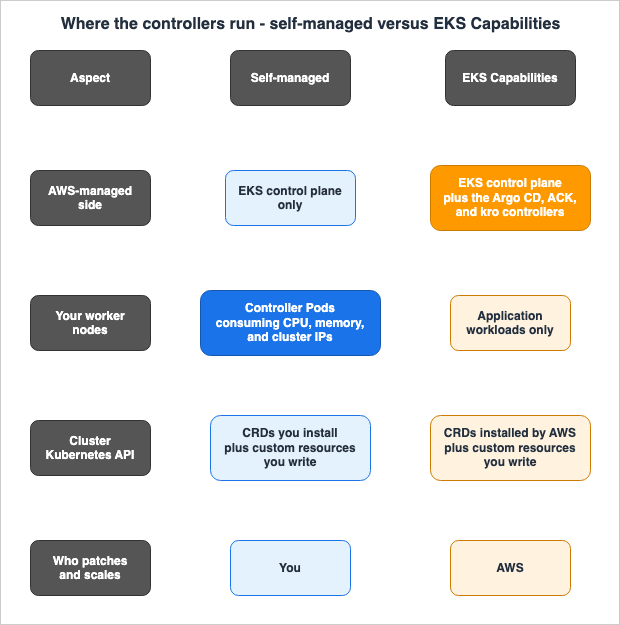
Get this wrong and everything downstream is off. While EKS add-ons are software that run on a cluster, with AWS managing their lifecycle, a capability is different.These capabilities run within EKS rather than in your clusters, eliminating the need to
install, maintain, and scale critical platform components on your worker nodes.The Argo CD page goes further and names the execution location outright.
With the EKS Capability for Argo CD, the Argo CD software runs in the AWS control plane,
not on your worker nodes. This means your worker nodes don’t need direct access to Git
repositories or Helm registries—the capability handles source access from the AWS account.
The CloudFormation resource type shows the same thing structurally. A capability is an AWS resource in its own right.
Type: AWS::EKS::Capability
Properties:
  CapabilityName: String
  ClusterName: String
  Configuration:
    CapabilityConfiguration
  DeletePropagationPolicy: String
  RoleArn: String
  Tags:
    - Tag
  Type: String
Type accepts only ARGOCD, ACK, and KRO. Changing CapabilityName, ClusterName, and Type results in a replacement. You cannot switch a capability's type after the fact. You rebuild it.And there is one crucial limitation.
You can create one capability resource of each type (Argo CD, ACK, and kro) for a given
cluster. You cannot create multiple capability resources of the same type on the same cluster.
It is not possible to design a system where you deploy two Argo CD capabilities within a single cluster and then divide them by team. To separate them you have two options: multi-tenancy through
AppProject resources, described later, or separate clusters.2.2 What Stays in the Cluster and What Does Not
Creating a capability also puts things in the cluster. Not everything moves to the AWS side.| Location | Components Present |
|---|---|
| AWS Side (Capability) | The controllers themselves. Argo CD is split into five components, as indicated by the log types: Application, ApplicationSet, Commit Server, Repo Server, and Server. ACK contributes one controller per service. kro is a single controller. |
| Cluster Side | The CRDs, the custom resources you write, Kubernetes RBAC, and the access entry for the capability role. |
When you create an Argo CD capability, the following occurs: as outlined in the official documentation, EKS creates the capability service in the AWS control plane, installs the CRDs in the cluster, creates an access entry for the IAM capability role, and Argo CD starts watching its own custom resources. The status transitions from
CREATING to ACTIVE, and you can access the Argo CD UI.Therefore, Argo CD does not disappear from the cluster. Only the Pods go. The API stays. You can continue to use
kubectl get applications as before.2.3 What does not consuming cluster resources actually mean?
This is a significant claim, so it is worth checking how the official documentation words it.EKS Capabilities run in EKS and off of your clusters, freeing up node resources and cluster
resources. Capabilities do not use cluster workload resources, do not consume CPU or memory
on your worker nodes, scale automatically, and have minimal impact on cluster capacity planning.That claim carries three practical consequences. First, the controllers behind all three capabilities drop out of capacity planning. The effect is largest for the components that demand more resources as the number of objects they handle grows. Second, the cluster IP addresses previously used by the controllers become available. The official documentation explicitly states that the self-managed solution directly consumes worker node resources, cluster IP addresses, and other cluster resources. This is a factor that cannot be ignored in clusters where the VPC CNI has made IP addresses scarce. Third, the controller's scaling design itself becomes unnecessary. Deciding replica counts and resource requests, and working out high availability, are no longer your problem.
However, this does not mean there is zero impact on the cluster. AWS installs the capability's CRDs on the cluster automatically, and etcd holds them alongside the custom resources you write. ACK provides over 200 CRDs for more than 50 AWS services. AWS does not document how many of those the capability installs, so count the CRDs on a test cluster before you size etcd.
2.4 Scope of Service and Activation Methods
| Item | Description |
|---|---|
| Region | Every AWS commercial Region where Amazon EKS is available. The GA announcement excludes AWS GovCloud (US) and the China Regions. |
| Kubernetes Version | All versions supported by EKS. This includes both standard and extended support. |
| Compute Type | All compute types supported by EKS. |
| Activation Methods | EKS API, AWS CLI, AWS Management Console, eksctl, and any Infrastructure as Code (IaC) tools. |
| Target Clusters | Both new and existing clusters are eligible. |
If you run clusters in AWS GovCloud (US) or the China Regions, this article's conclusion is already fixed: you stay self-managed.
3. Permissions Become Two-Tiered
A design that is common to all three capabilities sits here. Without it, none of the per-capability sections read correctly.3.1 Capability IAM Role
You supply an IAM role when you create a capability. This role has three requirements: it must live in the same AWS account as the cluster and the capability resource; it must trust the EKS capability service principal; and it must possess the necessary permissions appropriate for the type and purpose of the capability.The trust policy is standardized and takes the following form:
{
  "Version": "2012-10-17",
  "Statement": [
    {
      "Effect": "Allow",
      "Principal": {
        "Service": "capabilities.eks.amazonaws.com"
      },
      "Action": [
        "sts:AssumeRole",
        "sts:TagSession"
      ]
    }
  ]
}
The inclusion of
sts:TagSession is necessary because the capability calls AWS APIs with session tags. These tags matter again in the ACK section below.This is one of the key differences between this approach and self-managed. A self-managed controller gets its permissions through IRSA or EKS Pod Identity. A capability uses the capability role directly.
You can attach IAM policies directly to the Capability Role with no need to create or
annotate Kubernetes service accounts or configure OIDC providers.
If your existing permission design assumes IRSA, you rebuild that part.
3.2 EKS Creates the Access Entry Automatically
When you create a capability, EKS automatically creates an access entry on the cluster for that IAM role. The access policy EKS attaches depends on the capability type.| Capability | Access entry policy | Scope |
|---|---|---|
| kro | arn:aws:eks::aws:cluster-access-policy/AmazonEKSKROPolicy | Cluster-wide |
| ACK | arn:aws:eks::aws:cluster-access-policy/AmazonEKSACKPolicy | Cluster-wide |
| Argo CD | arn:aws:eks::aws:cluster-access-policy/AmazonEKSArgoCDClusterPolicy | Cluster-wide |
| Argo CD | arn:aws:eks::aws:cluster-access-policy/AmazonEKSArgoCDPolicy | Namespace (specified when creating the capability; default is argocd) |
What matters here is that the automatically created entry grants only the bare minimum.
The automatically created access entry does not grant permissions to deploy applications
to clusters. To deploy applications, you must configure additional Kubernetes RBAC
permissions for each target cluster.
A similar structure also exists for kro. The default
AmazonEKSKROPolicy only permits monitoring and management of the ResourceGraphDefinition, as well as the creation of instances of custom resources it defines. It does not grant permission to create Deployments or Services that kro assembles. To add these permissions, you can either add an access entry policy or define Kubernetes RBAC rules.apiVersion: rbac.authorization.k8s.io/v1
kind: ClusterRoleBinding
metadata:
name: kro-cluster-admin
subjects:
- kind: User
name: arn:aws:sts::111122223333:assumed-role/my-kro-role/KRO
apiGroup: rbac.authorization.k8s.io
roleRef:
kind: ClusterRole
name: cluster-admin
apiGroup: rbac.authorization.k8s.ioThe format of this username is fixed. It is
arn:aws:sts::ACCOUNT_ID:assumed-role/ROLE_NAME/KRO, and EKS automatically sets the trailing session name KRO in uppercase. Using lowercase here prevents the binding from taking effect, and that failure is not visible at apply time.3.3 IAM and RBAC Do Not Work in Isolation
The official documentation clearly states this relationship.In this way, IAM and Kubernetes RBAC are two halves of the end-to-end access control system
that governs permissions related to EKS Capabilities and resources.Specifically, if you want ACK to manage an S3 bucket, you need to grant the capability role the necessary S3 IAM permissions. This allows the capability to create buckets within AWS. Conversely, the cluster's RBAC determines who can create a
Bucket custom resource. IAM defines what the capability can do within AWS, while RBAC determines who can instruct the capability.This two-layered structure also results in two types of permission design failures. If IAM is too broad, everyone who can create a
Bucket in the cluster effectively holds that IAM permission. If RBAC is too broad, regardless of how tightly you restrict IAM, anyone can create virtually anything within that permitted scope.kro is an extreme example of this structure, as it requires no IAM permissions whatsoever.
No IAM permissions are required. You can create a capability role with no attached policies.
kro only requires Kubernetes RBAC permissions to create and manage Kubernetes resources.
You can simply create a role that carries nothing but the trust policy and hand that to the capability. A setup that looks like kro creating AWS resources is really kro creating an ACK custom resource, with ACK calling the AWS APIs. The IAM permissions belong to ACK.
3.4 When ACK Reads Kubernetes Secrets
Some ACK controllers read cluster secrets to pick up sensitive data, such as database passwords. These includeacm, acmpca, documentdb, memorydb, mq, rds, and secretsmanager.In these cases, associate
arn:aws:eks::aws:cluster-access-policy/AmazonEKSSecretReaderPolicy with the access entry. When associating, you can specify a namespace, allowing you to restrict access to specific namespaces rather than the entire cluster. Using RDS does not require access to every secret in the cluster.3.5 The Boundary with the Published Article, Restated
While the content discussed so far appears similar to what is covered in Amazon EKS Pod Identity and IRSA Decision Guide, the scope is different. The published article covers how a workload obtains AWS permissions, including cross-account delegation, where the Pod identity is carried in session tags. In this article, the capability role pertains to the identity of the controller, which exists outside of the Pod. You will run both in the same cluster, so design them independently.4. Continuous Deployment - the Argo CD Capability
4.1 What Disappears
The work that disappears when you move off a self-managed deployment, in order of impact:First, you stop designing cluster interconnection. This is the largest of the four. The official documentation states that you can deploy to a completely private EKS cluster without VPC peering or any special network configurations. The Containers blog provides even more specific details, stating that VPC peering, Transit Gateway, private hosted zones for DNS, and custom security group rules are all unnecessary. For organizations running Argo CD in a multi-account environment, this represents a substantial shift in operational requirements.
Second, patching, upgrades, and scaling leave your plate. AWS handles the security patches, the updates, and the operational management, and provides high availability and fault tolerance from the outset.
Third, you no longer build an authentication layer. The capability integrates with AWS Identity Center directly, so there is no OIDC configuration to write. Argo CD includes three built-in roles:
ADMIN, EDITOR, and VIEWER, and you can map Identity Center users and groups to these roles. Role names must be in uppercase.Fourth, credential management for AWS services disappears. The IAM permissions on the capability role let an
Application resource reference CodeCommit repositories, OCI-format Helm charts in ECR, and CodeConnections directly. There is no repository configuration to create.Running the
helm CLI yourself, for example to push those charts to Amazon ECR from a CI job, is a separate matter from the capability. Which lines of the AWS Helm instructions change when that CLI is Helm 4 is covered in Which Lines of the AWS Helm Instructions Change Under Helm 4 on this site. That article covers the CLI you run, not how the capability renders charts.4.2 What can you no longer do?
This section is central to this article. The official documentation explicitly lists the features that are not available. As of October 17, 2026, the list reads as follows.Unsupported features: The following features are not available in the managed capability:
* Config Management Plugins (CMPs) for custom manifest generation
* Notifications controller
* Custom SSO providers (only AWS Identity Center is supported, including third-party
federated identity through AWS Identity Center)
* UI extensions and custom banners
* Argo CD configuration ConfigMaps and keys other than the supported argocd-cm fields and the
hydrator.enabled, application.namespaces, and applicationsetcontroller.namespaces keys in
argocd-cmd-params-cm. See Configure Argo CD settings.
* Modifying the sync timeout (fixed at 120 seconds)Take the practical impact one at a time.
| Feature No Longer Available | Impact on Existing Operations |
|---|---|
| Config Management Plugins | Operations that generate manifests using custom template engines or scripts. Anything on jsonnet or a custom DSL behind a CMP has to move to Helm, Kustomize, or plain YAML. |
| Notifications Controller | Operations that push sync results to Slack or email from Argo CD itself. The notification path has to live somewhere else. |
| Custom SSO Provider | Authentication requirements that do not use, or cannot use, Identity Center. However, third-party federation through Identity Center is still possible, so if your existing identity provider federates through it, the impact is minimal. |
| UI Extensions and Custom Banners | Operations that distribute custom UI extensions. The list still names custom banners, while the What's New announcement of August 21, 2026 states that you can customize the Argo CD UI banner content, and the Configure Argo CD settings page uses a banner (ui.bannercontent) as its example of a supported setting. The sources disagree. |
| Direct Access to ConfigMap | Operations that extensively customize argocd-cm or argocd-cmd-params-cm. Only the supported argocd-cm fields and three keys in argocd-cmd-params-cm are applied. |
| Modifying the Sync Timeout | Workloads with a sync that takes longer than 120 seconds. This may affect initial synchronizations of large resources or those with heavy pre-sync hooks. |
The CLI has its own limits. Commands in the
argocd admin family are unusable as they require direct access to Pods. argocd login is also unavailable; pass an account token or a project token in an environment variable instead. argocd cluster add takes the EKS cluster ARN through the --aws-cluster-name flag.Tokens carry limits of their own. You can only create a maximum of five account tokens at a time. The user guide lists a maximum expiration of 12 hours as a best practice, while the Containers blog describes 12 hours as a hard expiration you cannot change. Either way, account tokens are not suitable for long-term, automated use from CI systems. The official recommendation for production environments is to use project-scoped roles and tokens, which can be configured with an expiration of up to 365 days. That aligns with the two-tiered permission structure discussed later.
On the other hand, the range of compatibility is quite broad.
Application and ApplicationSet function identically to their upstream counterparts, and no manifest changes are required. Sync policies carry over intact: automated sync, prune, and self-heal, plus sync waves and hooks. So do health assessment for standard resources, rollback, and multi-tenancy through projects. On the source side it keeps Git over HTTPS and SSH, Helm, Kustomize, plain YAML manifests, and GitHub App credentials. Resource exclusion and inclusion carry over as well.4.3 The Manifest Remains the Same, But the Destination Specification Changes
This is a pitfall people actually hit, so it is worth the detail. The structure of theApplication resource is the same as in the upstream.apiVersion: argoproj.io/v1alpha1
kind: Application
metadata:
name: guestbook
namespace: argocd
spec:
project: default
source:
repoURL: https://github.com/argoproj/argocd-example-apps.git
targetRevision: HEAD
path: guestbook
destination:
name: in-cluster
namespace: guestbook
syncPolicy:
automated:
prune: true
selfHeal: trueThe difference lies in how you specify the
destination. The official documentation states:The capability supports only Amazon EKS clusters as deployment targets using EKS cluster
ARNs (not Kubernetes API server URLs). The capability does not automatically add the local
cluster (kubernetes.default.svc) as a deployment target—to deploy to the same cluster where
the capability is created, explicitly register that cluster using its ARN.Two things differ from a self-managed deployment:
- The deployment target is exclusively an EKS cluster. It cannot be deployed to other Kubernetes clusters.
- Capabilities are not automatically registered for local clusters. Even when deploying to the cluster where the capability was created, you must explicitly register it using its ARN.
Simply importing an upstream example that uses
kubernetes.default.svc as the destination will not work. Register the cluster with a secret in the namespace instead, and put the EKS cluster ARN in the server field.apiVersion: v1
kind: Secret
metadata:
name: target-cluster
namespace: argocd
labels:
argocd.argoproj.io/secret-type: cluster
type: Opaque
stringData:
name: target-cluster
server: arn:aws:eks:us-west-2:111122223333:cluster/target-cluster
project: defaultAfter registering, specify this
name in the destination.name field. While you can also use the ARN in the destination.server field, the official documentation recommends using the name for better readability.There are two more subtle constraints to be aware of. First,
AppProject resources, the Argo CD configuration, and repository and cluster credentials stay in the primary namespace you name at capability creation. Since October 6, 2026, Application and ApplicationSet resources can also sit in additional namespaces that you configure through the argocd-cmd-params-cm ConfigMap. On August 16, 2026, all three resources had to sit in that single namespace. This constraint only applies to these custom resources themselves; the namespace for the deployed workloads is free to be chosen. Placing an Application in the argocd namespace and deploying it to the production namespace is fine. Second, for AppProject, you must explicitly define .spec.sourceNamespaces to specify which namespaces' Application resources it should monitor.When specifying applications in the CLI, be sure to prefix the name with the namespace. Annotations for resource tracking follow the format
namespace_appname:group/kind:namespace/name. Check any existing tooling that parses that string.4.4 Synchronization Timeframe and Limits
By default, Argo CD polls Git repositories every 6 minutes to detect changes.If you need to shorten this process, trigger a webhook from the Git side. The webhook URL is
${serverUrl}/api/webhook. However, the official documentation explicitly states the following:Webhooks complement polling—they do not replace it. Argo CD continues to poll repositories
as a fallback mechanism in case webhook notifications are missed.The capability carries hard numeric limits. These are the ones that bite at design time.
| Limit | Value |
|---|---|
Application Resource | 3,000 per Argo CD capability instance |
| Number of Registered Remote Clusters | 100 per Argo CD capability instance |
Number of Kubernetes Resources per Application | 150 |
| Number of IDs in AWS Identity Center | 1,000 per Argo CD capability (IDs can be either users or groups) |
The official recommendation for exceeding these limits is horizontal scaling.
These limits apply to the number of resources managed by each capability instance. If you
need higher limits, you can deploy capabilities across multiple clusters.
You cannot put two capabilities of the same type on one cluster. Therefore, the unit of scaling must be the cluster. If you were sharding a single Argo CD instance to carry 10,000 applications, you rebuild that design.
4.5 Remaining Decisions
Some decisions do not go away. You still decide whether to sync automatically or require manual approval, whether to activate pruning, how much self-healing to implement, and how to configure the synchronization window. The official documentation recommends manual synchronization for production environments and advises caution when using pruning. These remain your decisions after you move to the capability.Furthermore, there is another layer to the permissions model. The previously mentioned
ADMIN, EDITOR, and VIEWER roles are global-scope roles, which determine access to Argo CD itself (projects, clusters, repositories, and configurations). Application resources are project-scoped and therefore are not included in this layer.Global roles control access to Argo CD itself, not to project-scoped resources like
Applications. EDITOR and VIEWER users cannot see or manage Applications by default—they need
project roles to access project-scoped resources.Simply mapping Identity Center groups to the
EDITOR role does not grant those groups the ability to view or modify Application resources. Create project roles inside the AppProject, then map the Identity Center groups to those roles. If you finalize your Identity Center group design prematurely, you may need to redesign it once you realize this second layer of permissions. It is best to define the project first and then determine the appropriate mappings.One important prerequisite: To create Argo CD capabilities, you must have AWS Identity Center already configured. Local users are not supported. For an organization that does not use Identity Center, this is the first hurdle. AWS IAM Identity Center Setup Guide walks through that setup.
4.6 The Namespace Itself Becomes the Secret Boundary
This section provides the most straightforward answer to the third question: what new constraints arrive in place of the work that went away? As of October 17, 2026, the official documentation describes the scope of secrets accessible through a capability as follows:The namespace-scoped AmazonEKSArgoCDPolicy applies only to the primary Argo CD namespace,
which defaults to argocd. It grants the capability full access to Secrets and AppProjects,
and read access to ConfigMaps in that namespace.The same section also states,
The default policies don’t grant access to Secrets, ConfigMaps, or AppProjects in additional namespaces.Every secret you place in the primary namespace named at capability creation sits in the capability's view, whether it holds repository credentials or application data. The official documentation suggests using different namespaces as a solution: placing secrets related only to Argo CD within that specific namespace, while moving unrelated secrets to separate namespaces.
This is where it parts from self-managed operation. In a self-managed deployment, RBAC on the service account attached to the Argo CD Pod bounded what that Pod could read. A capability has no Pod and no service account in the cluster, so the unit of restriction becomes the namespace. If you are currently using the
argocd namespace in your existing cluster as a general-purpose storage location, be sure to inventory its contents before migrating.5. AWS Resource Management - the ACK Capability
5.1 Declaring AWS Resources with the Kubernetes API
ACK translates Kubernetes custom resource specifications into AWS API calls. For example, with an S3 bucket, it works like this:apiVersion: s3.services.k8s.aws/v1alpha1
kind: Bucket
metadata:
name: my-app-bucket
spec:
name: my-unique-bucket-name-12345
versioning:
status: Enabled
encryption:
rules:
- applyServerSideEncryptionByDefault:
sseAlgorithm: AES256When this is applied to the cluster, a bucket is created in your AWS account. Modifying the specification will cause the controller to reflect those changes in AWS. And if you delete it from the cluster, by default, the corresponding bucket in AWS will also be deleted.
The deletion policy offers two options. The default
delete setting will delete the AWS resource when the Kubernetes resource is deleted. The retain setting preserves the resource. Set retain explicitly on anything you cannot afford to lose, such as a production database.apiVersion: rds.services.k8s.aws/v1alpha1
kind: DBInstance
metadata:
name: production-db
annotations:
services.k8s.aws/deletion-policy: "retain"
spec:
dbInstanceIdentifier: prod-dbResources configured with
retain will remain in AWS until you manually delete them. Without proper tracking, such as using tags, you risk accumulating unmanaged resources. Tag design is the subject of AWS Tagging Strategy Complete Guide.5.2 The Reconciliation Timeline Is Asymmetric
The numbers here bear directly on design, so this section quotes the official documentation verbatim.ACK continuously reconciles the state of your AWS resources with the desired state defined
in your Kubernetes custom resources. If a resource drifts from its desired state, ACK detects
this and takes corrective action to bring it back into alignment. Changes to Kubernetes
resources are immediately reflected in AWS resource state, while passive drift detection and
remediation of upstream AWS resource changes can take as long as 10 hours (the resync period),
but will typically occur much sooner.The breakdown:
| Change Origin | Time to Reflect |
|---|---|
| Modified Kubernetes custom resources | Immediately reflected in AWS |
| Changes made directly through the AWS console or CLI | Detection and correction can take up to 10 hours. Typically, it is much faster. |
This asymmetry has operational implications. The expectation that putting a resource under ACK makes manual changes revert on their own is correct in itself. That reversion, however, can take up to 10 hours. If you need to make an urgent change directly in AWS and want to preserve that change, you must also update the Kubernetes manifest. Otherwise, the controller will eventually silently overwrite it. Conversely, if you require a mechanism to quickly and reliably revert unintended changes, do not rely on ACK's resync alone; combine it with detection in AWS Config.
5.3 Coexistence with Existing Infrastructure as Code
ACK can adopt existing resources without recreating them. An annotation is all it takes.apiVersion: s3.services.k8s.aws/v1alpha1
kind: Bucket
metadata:
name: existing-bucket
annotations:
services.k8s.aws/adoption-policy: "adopt-or-create"
spec:
name: my-existing-bucket-nameThis allows you to bring resources created by CloudFormation or Terraform under ACK's management. Furthermore, ACK can also handle read-only resources. By combining adoption and
retain, and by restricting IAM permissions to read-only access, you can create a state where resources are accessible via the Kubernetes API but cannot be modified. This can serve as a means for applications to discover resources owned by other teams, such as VPCs, IAM roles, and KMS keys.However, there is a fundamental risk involved. If two controllers manage the same AWS resource, it can lead to failures. If ACK adopts a bucket that Terraform already manages and the Terraform definition stays in place, the two overwrite each other in turn. This failure is not specific to ACK; it is a common issue when using multiple IaC tools concurrently.
The previously published Comparing Terraform, AWS CDK, AWS SAM, and CloudFormation outlines three conditions for successful coexistence when using multiple tools: clearly defined ownership boundaries, a shared contract layer between the tools, and a discipline against crossing those boundaries unnecessarily. Apply the same three conditions when you bring in ACK. The ability to create AWS resources through the Kubernetes API is not a justification for blurring those boundaries. Determine which tool will manage each resource type, and once that decision is made, avoid crossing those established boundaries.
5.4 What can you no longer do, and what becomes newly risky?
First, the capability handles only controllers that are GA upstream. Preview controllers are out of scope.And there is a capability-specific failure scenario.
The capability supports only controllers that are GA in upstream ACK. A controller that is
in preview today can be promoted to GA upstream later. When that happens, the capability
begins managing that controller automatically, without any action on your part.
What happens? Say you run a preview controller self-managed. Since it is the only instance of that controller, you have disabled leader election and are running it in a single-replica configuration. The moment upstream promotes that controller to GA, the capability starts managing it. Consequently, two reconcilers act on the same resources at once with no shared lease between them. Both controllers call competing AWS APIs and write conflicting updates to the status of custom resources.
There are two mitigation strategies, both of which require proactive measures. If you run a preview controller self-managed, enable leader election and point its lease at
kube-system. Track the upstream GA status of every preview controller you depend on.Second, the authentication mechanism will change. As mentioned previously, it will transition from IRSA or Pod Identity to capability roles. During the transition, if you lack sufficient permissions, the capability adopts the resource but then fails to reconcile it, logging
AccessDenied repeatedly. Adoption succeeds and only reconciliation fails, which leaves the resource stranded. Ensure you have equivalent permissions in place before initiating the transition.Third, the tags will change. The default tags the capability puts on AWS resources differ from the self-managed ones.
| Tag Key | Description |
|---|---|
eks:controller-version | ACK controller version |
eks:kubernetes-namespace | Kubernetes namespace for ACK resources |
eks:kubernetes-resource-name | Name of the Kubernetes resource |
eks:kubernetes-api-group | Kubernetes API group |
eks:eks-capability-arn | ARN for the EKS ACK capability |
Self-managed ACK uses
services.k8s.aws/controller-version and services.k8s.aws/namespace. The moment the capability adopts a resource during migration, it replaces those tags with its own defaults. Consequently, the tagging API is called once against every adopted resource, and cost allocation and policies based on services.k8s.aws/ will no longer function. Put that update in the migration plan.Fourth, session tags are applied. The capability sets
eks:eks-capability-arn, eks:kubernetes-namespace, and eks:kubernetes-api-group as session tags on every AWS API request. Self-managed ACK does not apply these by default. This is an advantage, not a constraint. IAM policy condition keys can now scope access per namespace, and CloudTrail shows which namespace an operation came from.5.5 Granularity of Permissions with IAMRoleSelector
Attaching IAM policies directly to capability roles works in development environments or for small teams, but it is not the recommended approach for production.IAMRoleSelector is a cluster-scoped custom resource that associates IAM roles with namespaces.apiVersion: services.k8s.aws/v1alpha1
kind: IAMRoleSelector
metadata:
name: workload-cluster1-namespace-config
spec:
arn: arn:aws:iam::444455556666:role/ack
namespaceSelector:
names:
- workload-cluster1When ACK handles resources, it makes decisions as follows: If an
IAMRoleSelector that matches the resource's namespace exists, it assumes that IAM role; otherwise, it uses the capability role.With this approach, the capability role itself does not need to have permissions for AWS services. It only needs
sts:AssumeRole and sts:TagSession on the target role. This is a place where the official documentation is split. The example on the capability IAM role page lists only sts:AssumeRole, while the ACK permissions page and the troubleshooting page both state that both permissions are required. Granting both is the safer reading.{
"Version": "2012-10-17",
"Statement": [
{
"Effect": "Allow",
"Action": ["sts:AssumeRole", "sts:TagSession"],
"Resource": [
"arn:aws:iam::111122223333:role/ACK-S3-Role",
"arn:aws:iam::111122223333:role/ACK-RDS-Role",
"arn:aws:iam::444455556666:role/ACKCrossAccountRole"
]
}
]
}This approach is essential for managing resources across accounts. In the target account, the role's trust policy must permit assumption from the capability role. That trust policy lists both
sts:AssumeRole and sts:TagSession as allowed actions. AWS Multi-Account Operational Patterns covers multi-account operations end to end.6. Resource Composition - the kro Capability
6.1 ResourceGraphDefinition Is an API That Defines APIs
The only custom resource introduced by kro is theResourceGraphDefinition, abbreviated as RGD.When an RGD is created, kro registers a new CRD (Custom Resource Definition) in the cluster based on its definition and begins managing the new custom resource. In other words, an RGD is a Kubernetes API used to create Kubernetes APIs.
apiVersion: kro.run/v1alpha1
kind: ResourceGraphDefinition
metadata:
  name: web-application
spec:
  schema:
    apiVersion: v1alpha1
    kind: WebApplication
    spec:
      name: string
      replicas: integer | default=3
  resources:
    - id: deployment
      template:
        apiVersion: apps/v1
        kind: Deployment
        metadata:
          name: ${schema.spec.name}
        spec:
          replicas: ${schema.spec.replicas}
    - id: service
      template:
        apiVersion: v1
        kind: Service
        metadata:
          name: ${schema.spec.name}
An RGD consists of two parts:
schema, which defines the API's interface for users, and resources, which lists the templates for the resources kro creates. In the example above, the application team only needs to define the following.apiVersion: v1alpha1
kind: WebApplication
metadata:
name: my-web-app
namespace: default
spec:
name: my-web-app
replicas: 3Applying this causes kro to create a Deployment and a Service, and kro then manages their lifecycle.
However, the
apiVersion of the instance is written two different ways in the official documentation. The Capability Kubernetes resources page lists apiVersion: v1alpha1, while the kro concepts page specifies group: kro.run in the RGD's schema and lists the instance as follows.apiVersion: kro.run/v1alpha1
kind: WebApplication
metadata:
name: my-app
spec:
name: my-app
replicas: 5Applying an RGD makes kro register the CRD in the cluster. Therefore, instead of copying the
apiVersion from a sample, you should verify and match it with the actual value registered by kubectl get crd. This is a similar discrepancy to the destination format used with Argo CD, so it is safest to read the reference pages' samples with the understanding that they may be outdated.6.2 Dependencies Resolve Through a Directed Acyclic Graph
Common Expression Language passes values between resources. You can reference fields from other resources, such as${dbinstance.status.endpoint.address}.This referencing mechanism serves two purposes simultaneously: passing values and determining the order of creation. kro constructs a directed acyclic graph based on these dependencies, and uses it to determine the order in which resources are created, updated, and deleted. Resources with no dependencies can be created in parallel, and deletion is performed in reverse topological order. Graph validation rejects any cycle.
The timing of this validation directly impacts the operations performed by the platform team.
kro validates ResourceGraphDefinitions at creation time, not at runtime. When you create an
RGD, kro validates CEL syntax, type-checks expressions against actual Kubernetes schemas,
verifies field existence, and detects circular dependencies. This means errors are caught
immediately when you create the RGD, before any instances are deployed.
The system performs type checking not only on the CEL syntax, but also verifies that the fields referenced within an expression actually exist in the underlying Kubernetes schema. A broken RGD therefore stops at the platform team, before any instance exists. Passing RGD validation does not guarantee that the composed resources work, however. Runtime failures surface on the instance instead.
Conditional inclusion is also possible.
resources:
- id: s3bucket
  includeWhen:
  - ${schema.spec.s3bucket.enabled}
  template:
    # S3 bucket definition goes here
This resource is only created when the user specifies
s3bucket.enabled: true. This eliminates the need to split RGDs for different purposes, reducing the number of definitions that the platform team needs to maintain. However, includeWhen can only reference fields within schema.spec. It is not possible to determine whether to include a resource based on the state of other resources.RGDs also nest. One RGD referencing an instance of another gives you a hierarchy of abstraction. The Containers blog provides an example of an RGD that creates an entire EKS cluster, where IAM roles, VPCs, and the cluster itself are bundled into a single unit.
6.3 Conditions That Serve as Guardrails
The goal of kro is to separate the platform team and the user teams. The official documentation clearly outlines the responsibilities of each team.| Role | What they do | Required Permissions |
|---|---|---|
| Platform Team | Create and maintain ResourceGraphDefinition resources (RGDs) | Creating, updating, and deleting RGDs. Managing the resource types being composed. Access to every namespace where RGDs are used. |
| Application Team | Create instances of custom resources defined in RGDs | Creation, modification, and deletion of instances. Read access to their own namespace. No access to the RGD itself is required. |
The difference in scope also influences the design. RGDs have a cluster scope, while instances have a namespace scope. A namespace selector in the RGD controls where instances may be created.
The condition for maintaining separation is that the application teams must not directly interact with the resources assembled by kro. The moment they do, the abstraction stops meaning anything. That is the line to hold when you write the RBAC.
6.4 What can you no longer do, and what should you watch for?
kro is declarative, not imperative. The official documentation lists three scenarios where kro should not be used, and this is one of them.You need dynamic runtime logic (kro is declarative, not imperative)CEL can be used for passing conditions and values, but you cannot write arbitrary procedures. The other two scenarios are when dealing with simple, independent resources (the official documentation recommends using ACK or native Kubernetes resources directly) and when resources do not have dependencies or shared configurations. If there is nothing to abstract, the abstraction layer just adds cost.
There is a ceiling. The number of Kubernetes resources within a
ResourceGraphDefinition is capped at 64. Designing a system that attempts to cram an entire organization's standard configuration into a single RGD will likely run into this limit.Breaking changes have no built-in versioning mechanism. The official recommendation is to separate versions by name. Compatible changes can be made by updating the RGD in place, while breaking changes should create a new RGD with a different name (e.g.,
webapp-v2). Existing instances will not automatically migrate, so you will need to recreate them using the new RGD, validate the new instances, and then remove the old ones.kro is not an AWS-only project. The origin is worth getting right. In November 2024, AWS released kro as an experimental open-source project. On January 30, 2025, it became a joint project between AWS, Microsoft Azure, and Google Cloud. The AWS open-source blog states:
Today, energized by this momentum, we’re taking a significant step forward for the project
and announcing that kro is now an open collaboration between AWS, Microsoft Azure, and
Google Cloud.
The current project website positions it as follows:
kro is a subproject of Kubernetes SIG Cloud Provider.What is significant for the design is that RGDs are not tied to a specific cloud provider. kro itself can handle any Kubernetes resource, and interacting with AWS resources is done through ACK's custom resources. The AWS dependency lies within ACK, not within kro itself. The EKS Capability for kro uses the same controllers as the upstream project, and both the RGD and CEL expressions function identically.
7. Putting the Three on a Single Path
7.1 Sequence of Steps
Combining these elements creates a single, integrated process, from Git commits to the creation of AWS resources. The sequence is as follows:- Developers commit changes to Git.
- Argo CD detects these changes and synchronizes them to the target cluster.
- Instances of custom resources, as defined by kro's RGD, appear in the cluster.
- kro expands the constituent resources according to the RGD. These include both Kubernetes resources and ACK custom resources.
- ACK calls the AWS API.
- AWS resources are created.
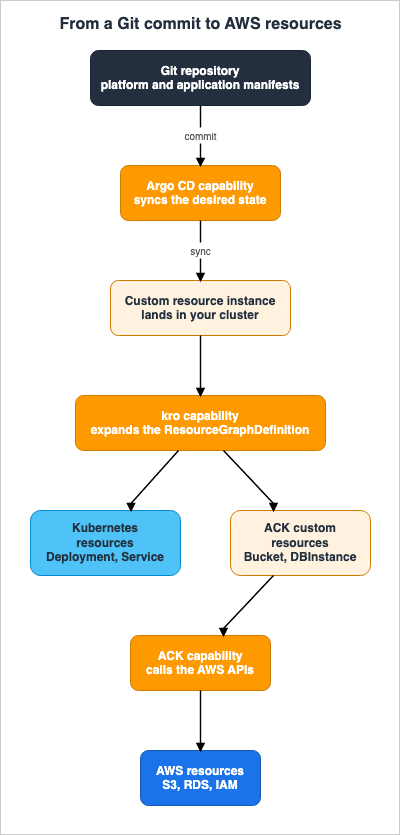
ACK extends the benefits of GitOps when paired with Argo CD, but ACK does not require
integration with git.
7.2 The Constraints Imposed by Sequence
RGDs must exist before instances, and Argo CD's sync waves establish that order. The official documentation outlines three types of repositories. These are a platform repository for RGDs, an application repository for instances, and a shared repository that accommodates both, intended for smaller organizations. The choice is therefore between a split and a shared layout. Separately, the documentation recommends separate Argo CD projects for the platform team and the application team.Repository access control effectively defines the boundaries of abstraction. The platform team has write access to the RGD repository, while the application team has read-only access. This duplicates the RBAC separation described earlier, and only both together close the bypass.
7.3 The Single Source of Truth Is Really Two
The strength of this architecture lies in the ability to store both applications and infrastructure in Git. However, there are two ways to correct drift, and they operate on different timelines.| Drift Type | Who Corrects It | Timeline |
|---|---|---|
| Cluster state differs from Git | Argo CD's self-healing | Detection defaults to polling every 6 minutes, but can be shortened using webhooks. |
| AWS resources differ from the custom resource specifications | ACK's reconciliation loop | Resync cycle of up to 10 hours. Typically, it is much faster. |
Reverting Git does not revert everything. Reverting Git restores the cluster, and restoring the cluster eventually restores AWS, but the second hop is not immediate. When documenting incident response procedures, be sure to account for this second-stage delay.
7.4 ECR Is the Distribution Point Here
kro's resources, being standard Kubernetes manifests, travel across the organization when you push them to an OCI-compatible registry, in addition to storing them in Git. The official documentation provides Amazon ECR as an example. Argo CD can also treat Git repositories, Helm registries (HTTP and OCI), and OCI images as sources.In this configuration, then, ECR is a distribution point for manifests. That role is not the same as ECR holding container images, or ECR being the thing you sign. Since the same service name (ECR) appears in different contexts, it is advisable to clearly differentiate its roles in the design documentation.
Signing, attestation, and admission control - that is, whether the delivered artifact can be trusted - are covered in Software Supply Chain Security on AWS. This article focuses on how the manifests are delivered, while the published article addresses how what arrives is verified. ECR appears in both scenarios, but its role differs.
8. Multi-Cluster and Multi-Account Configurations
8.1 Three Configuration Patterns
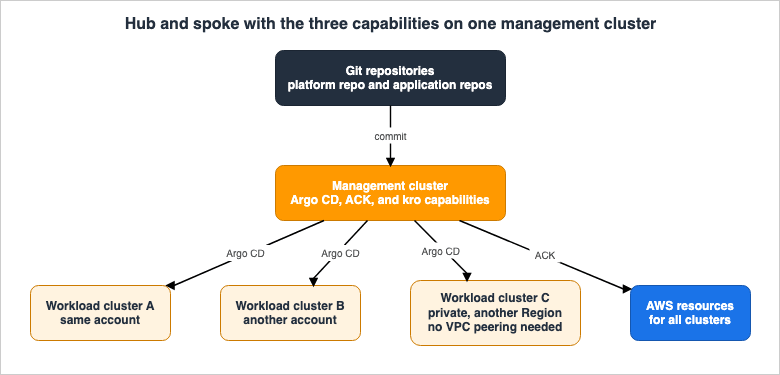
The official documentation outlines three patterns for deploying capabilities across multiple clusters.Hub and Spoke (Centralized Management). This pattern places all three capabilities within a management cluster, from which multiple workload clusters are managed. The management cluster's Argo CD deploys applications to clusters in other Regions and accounts. The management cluster's ACK provisions AWS resources for all clusters, and the management cluster's kro creates abstractions usable across all clusters.
Decentralized GitOps. This pattern puts the capabilities on the workload clusters themselves. Each team manages its own platform services within its own cluster.
Hub and Spoke (ACK Hybrid). This pattern centralizes application deployment while distributing AWS resource management. ACK on the hub cluster owns admin-scoped resources such as production databases, IAM roles, and VPCs, while ACK on the workload clusters owns workload-scoped resources such as S3 buckets, ElastiCache, and SQS queues.
8.2 Selection Criteria
The official documentation lists six factors to weigh.| Perspective | Centralized Conditions | Decentralized Conditions |
|---|---|---|
| Organizational Structure | Platform teams are centralized. | Teams are decentralized. |
| Resource Scope | Admin-scoped resources (databases, IAM). | Workload-scoped resources (buckets, queues). |
| Self-Service | A central team wants to distribute prescriptive custom resources so that teams can self-serve safely. | Each team wants to decide for itself. |
| Cluster Management | You want a customer-owned control plane for managing the cluster fleet. | Per-cluster optimization is acceptable. |
| Compliance | Centralized management is required for auditing and governance. | No requirements. |
| Operational Complexity | You want fewer capability instances to operate. | You need to avoid a central bottleneck. |
Patterns can be changed later. Capabilities are independent, so it is acceptable to configure them differently for each cluster. There is no need to define the final configuration from the beginning.
8.3 Actual Connections
There are three requirements for connecting to a remote cluster:- Create a cluster secret in the Argo CD namespace using the ARN of the target cluster.
- On the target cluster side, create an access entry for the Argo CD capability role.
- Ensure network accessibility from the Argo CD capability to the target cluster.
For the third requirement, if the target is an EKS cluster, AWS handles it. It is possible to reach private clusters without VPC peering.
Cross-account configurations follow the same procedure. Create an access entry on the target account's cluster and specify the ARN of the source account's capability role. The official documentation states:
No additional IAM role creation or trust policy configuration is required—EKS Access Entries
handle cross-account access.
In the example of creating an access entry, the Kubernetes group
system:masters is specified. However, a note is added in the same location.For production use, consider using more restrictive Kubernetes groups instead of
system:masters.Do not directly bring samples into production environments.
If you want to restrict the path to the Argo CD API, associate a VPC endpoint with the hosted Argo CD endpoint. This path will apply to both the UI and the API (including CLI access). However, there are limitations.
VPC endpoints connected to hosted Argo CD API endpoints (using
eks-capabilities.region.amazonaws.com) do not support VPC endpoint policies.
If you are operating with fine-grained conditions defined in endpoint policies, this will not apply. Build the authorization out of Argo CD's RBAC and Identity Center instead.
8.4 The Limits Determine the Topology
To rephrase in the context of multi-cluster environments, a single Argo CD capability can manage up to 100 remote clusters, and up to 3,000Application resources. If you need to manage more than 100 clusters, you will need to design the system using multiple hubs from the outset.kro has its own ceiling. A single RGD (Resource Graph Definition) can accommodate up to 64 Kubernetes resources, so designing the system to include an entire cluster within a single RGD will ultimately prove problematic. Instead, you should create a hierarchy by nesting RGDs.
9. Operations - Logs, Migration, and Rollback
9.1 Controller Logs Are Not Visible from the Cluster
Because the controllers run on the AWS side,kubectl logs cannot retrieve their logs. The remedy did not ship at general availability. AWS added delivery through CloudWatch Vended Logs on June 4, 2026. Designing based solely on the information available at GA could lead to overlooking this.The types of logs vary depending on the capability.
| Capability | Log Type |
|---|---|
| ACK | EKS_CAPABILITY_ACK_LOGS |
| kro | EKS_CAPABILITY_KRO_LOGS |
| Argo CD | EKS_CAPABILITY_ARGOCD_APPLICATION_LOGS |
| Argo CD | EKS_CAPABILITY_ARGOCD_APPLICATIONSET_LOGS |
| Argo CD | EKS_CAPABILITY_ARGOCD_COMMITSERVER_LOGS |
| Argo CD | EKS_CAPABILITY_ARGOCD_REPOSERVER_LOGS |
| Argo CD | EKS_CAPABILITY_ARGOCD_SERVER_LOGS |
Argo CD has five log types so that you can enable each component separately and route them to different destinations. For example, if you are investigating synchronization failures, you would examine the Application logs; if you suspect issues with repository access, you would check the Repo Server logs.
ACK, conversely, groups all service controllers under a single log type. You can determine which service controller generated a particular log using the
controllerGroup field. This field contains values such as API group names like s3.services.k8s.aws.You can choose from CloudWatch Logs, Amazon S3, and Amazon Data Firehose as destinations. Configuration is done either through the Amazon EKS console, in the Capabilities tab for your cluster under Log delivery, or via the CloudWatch Logs API. When using the API, the process involves creating the source, creating the destination, and then connecting the two. It is possible to send logs from a single capability to multiple destinations, or to send logs from multiple capabilities to the same destination.
CloudTrail, meanwhile, records the API operations performed on the capabilities themselves. You can use it to track who created a capability, when they modified its configuration, and which capability roles are being used. AWS Observability Architecture Guide takes on the logging infrastructure itself.
9.2 Migration Runs on Turned-Off Services or on Leader Election
When you migrate from a self-managed controller to the capability, both sides reconciling the same resource at once will break it. As of October 17, 2026, the official migration path for ACK gives two approaches and calls the first one recommended. The first creates the capability with the services you self-manage turned off (disabledServices) and migrates one service at a time: for each service, scale the self-managed controller down to zero replicas, remove the service from disabledServices, confirm that resources report a Synced condition of True with no AccessDenied errors, and then uninstall the self-managed controller. The second is a handover through Kubernetes leader election. The self-managed controller and the capability contend for the same lease, and only the holder reconciles.The capability does not attempt to take the lease from a running self-managed controller. Therefore, the operations team can determine the exact moment of the switch. The lease-based ACK procedure is as follows:
- Enable leader election on the self-managed controller and transfer the lease to
kube-system. - Create the capability. The capability simply waits for the lease; the self-managed controller keeps reconciling.
- Once ready, reduce the self-managed controller to replica 0. That releases the lease, and the capability takes over.
- Verify that the resource reports a
Syncedcondition asTrueand that noAccessDeniederrors are occurring. - Delete the self-managed controller.
There is a silent failure trap in step 1, as officially documented.
You must set both values. In the ACK Helm charts, the --leader-election-namespace flag is
only applied when leaderElection.enabled is true, and leader election is disabled by default.
Setting leaderElection.namespace alone has no effect.
If only
leaderElection.namespace is configured, the controller will continue to operate without a lease, and both sides will reconcile the same resource the moment the capability is created. The setting is accepted, Helm completes successfully, and nothing reports an error.However, in the lease-based handover, this parallel operation is not a permanent configuration.
With this approach, running a controller self-managed alongside the capability is intended as a
temporary state during migration, not as a long-term configuration.
The reason for this is that while both systems are running, an interruption (such as a capability deployment or an upgrade on the self-managed side) can release the lease. The other side then acquires it, and responsibility for reconciliation switches unexpectedly. The same note continues,
To keep a service self-managed for the long term, turn it off in the capability instead, as described in Coexist with self-managed controllers (recommended).The migration to kro is simpler, but it has one prerequisite: Before migrating, bring your self-managed kro up to the same version as the capability. You can check the capability version in the console or using
aws eks describe-capability.The migration order for Argo CD runs the other way. ACK and kro create the capability first and then scale the self-managed controller down, whereas Argo CD requires you to scale the self-managed controller to zero replicas before you create the capability. After that, export the
Application, ApplicationSet, and AppProject resources, then migrate the repository credentials, cluster secrets, and repository credentials templates. If you have any GPG keys, TLS certificates, or SSH known hosts, migrate those as well. Finally, update the destination to either the cluster name in destination.name or the EKS cluster ARN in destination.server, and apply the changes.9.3 Can it be rolled back?
This is the question to ask before a migration, and the answer differs by capability.ACK can be rolled back, but with the lease-based handover the procedure is asymmetric. With the recommended approach, the documentation states,
To roll a service back, add it to disabledServices again and scale your self-managed controller back up. With the lease-based handover, scaling the self-managed controller back up to one or more replicas does not return reconciliation to it. This is because the capability continues to hold and renew its lease. To roll back, bring the self-managed controller back up and then delete the capability. Only then does the self-managed side reacquire the lease.Deleting the capability leaves its managed resources in place. The CloudFormation resource definition reflects this structure.
DeletePropagationPolicy: The delete propagation policy for the capability. Currently, the
only supported value is RETAIN, which keeps all resources managed by the capability when the
capability is deleted.
The only option available is
RETAIN. This is a safety-focused design. Deleting the capability does not delete the production RDS instance. But it also means that resources will remain that nobody is managing. When planning for migration or withdrawal, write down who takes ownership of the resources left behind.Another aspect of rollback concerns the declarations that remain on the cluster side. While the controller has moved to AWS,
Application, ApplicationSet, AppProject, cluster secrets, and repository credentials still live in the cluster namespace. Move to a capability and the Argo CD Pods drop out of the backup picture, leaving only the cluster-side declarations. AWS Backup supports EKS clusters and can create composite recovery points that include the Kubernetes cluster state, as well as storage connected via persistent volume claims (EBS volumes, EFS file systems, and S3 buckets). To use this, the cluster's authorization mode must be API or API_AND_CONFIG_MAP.10. The Adoption Decision - When Staying Self-Managed Is Right
10.1 Official Position
The official recommendation comes first.EKS Capabilities are ideal for most production use cases and are the recommended approach
for new deployments.The same documentation sets out the reasons for choosing self-managed.
Consider this choice when you require specific Kubernetes resource API versions, custom
controller builds, have existing automation and tooling built around self-managed
deployments, or need deep customization of controller runtime configurations.
10.2 Scenarios Where Staying Self-Managed Is Necessary
If any of the following applies, the move to a capability either does not work at all or costs real effort.| Condition | Reason |
|---|---|
| Running clusters in AWS GovCloud (US) or the China Regions | The capability is not offered there. |
| Deploying to Kubernetes clusters other than EKS | The Argo CD capability deploys only to EKS clusters, and you name the destination with the EKS cluster ARN. |
| Generating manifests with Config Management Plugins | Not supported. Move the generation step outside, or fold it into Helm or Kustomize. |
| Depending on the Notifications controller | Not supported. Build the notification path somewhere else. |
| Authentication requirements that do not allow the use of AWS Identity Center | This is a prerequisite for the Argo CD capability, and local users are not supported. |
Heavily customizing argocd-cm and argocd-cmd-params-cm | Only the supported argocd-cm fields and three keys in argocd-cmd-params-cm are applied. |
| Workloads with a sync that takes longer than 120 seconds | The sync timeout is fixed and cannot be changed. |
| Dependent on a preview-stage ACK controller | The capability handles only GA controllers, and promotion out of preview risks a double-reconciliation conflict. |
| Managing over 3,000 applications within a single Argo CD instance | This is the instance limit. A design change to split the cluster may be necessary. |
| Requires custom-built controllers or specific API versions | This is a stated reason for choosing self-managed. |
| Existing automation and tooling is built around a self-managed deployment | Same as above. Migration costs may outweigh the benefits in some cases. |
Three of the conditions in this table are not the kind of constraint you can work around: the supported Regions, a deployment target that is not EKS, and being unable to use AWS Identity Center. Put those first in the design decision. The rest are migration costs, and they belong in an estimate.
10.3 What Is Actually Being Compared
Specific figures are out of scope, but the basis for comparison changes and that is worth stating. A self-managed controller carries no direct AWS charge of its own. You pay for the cluster compute it consumes. Additionally, there are operational costs associated with maintenance and incident response. The capability resource itself, and the Kubernetes resources it manages, are billed by the hour.Therefore, a comparison that assumes self-managed is free is not valid. Node resource consumption and operational effort are what that AWS charge replaces. The Amazon EKS pricing page carries the actual numbers. Furthermore, you can apply tags to capabilities, allowing you to track costs on a capability-by-capability basis.
10.4 Do you have to adopt everything at once?
The three capabilities are independent and fully opt-in. You can enable just one, two, or all three. They also coexist with a self-managed deployment on the same cluster, which is what makes a phased migration possible.A practical approach is to start with areas where the impact is minimal and the benefits are easily demonstrable. kro needs no IAM permissions and changes nothing about existing resource management, which makes it the cheapest of the three to try first. Argo CD is most effective, and requires the most careful consideration, for organizations managing network configurations across multiple accounts and clusters. ACK requires the most upfront preparation, as it needs careful design to integrate with existing Infrastructure as Code (IaC).
One thing this decision does not settle is who may use the abstraction once it exists, and under whose permissions it runs. The layer in front of these controllers — where a catalog narrows the menu and something else decides the credentials — is covered in Internal Developer Platforms on AWS. That article treats ACK and kro as components it hands back here rather than explaining them again.
11. Design Checklist
The items to check while the decision is still open.| # | Item to Verify | Location to Check |
|---|---|---|
| 1 | Confirm the capability is available in the target Region. | AWS GovCloud (US) and the China Regions are excluded. |
| 2 | Confirm the Argo CD features you use are not on the unsupported list. | CMP, Notifications controller, custom SSO, UI extensions, direct ConfigMap editing, sync timeout. |
| 3 | Confirm you can use AWS Identity Center. | A prerequisite for the Argo CD capability. |
| 4 | Confirm that all deployment targets are EKS clusters. | Deployments to anything other than EKS are not supported. |
| 5 | Check that the application and remote cluster counts stay under the limits. | Limits are 3,000 and 100, respectively. If exceeded, consider cluster segmentation. |
| 6 | Verify that the trust policy for the capability role is correct. | Must include capabilities.eks.amazonaws.com, sts:AssumeRole, and sts:TagSession. |
| 7 | Determine whether the automatically created access entry is sufficient. | Argo CD needs a separate entry on each target cluster. kro needs separate permissions for the resources it composes. |
| 8 | Decide the permission model for ACK. | Use IAMRoleSelector in production. It is required for cross-account resources. |
| 9 | Limit the scope of secrets that ACK can read. | Use AmazonEKSSecretReaderPolicy and restrict it to specific namespaces. |
| 10 | Define ownership boundaries for existing Infrastructure as Code (IaC). | Avoid having the same resources managed by two different controllers. |
| 11 | Decide the deletion policy for the resources you adopt. | The default is delete. Use retain for anything you need to keep. |
| 12 | Update tag prerequisites. | Transition from services.k8s.aws/ to eks:. |
| 13 | Ensure that no preview ACK controller is running concurrently. | Double reconciliation can occur on promotion. Put the leader election lease in kube-system. |
| 14 | For a lease-based migration, confirm both leader election settings. | You set leaderElection.enabled and leaderElection.namespace together. |
| 15 | Verify that the RGD resource limit of 64 is not exceeded. | If exceeded, consider nesting. |
| 16 | Define a policy for disruptive changes to the RGD. | Version resources by name and provide a process for migrating instances. |
| 17 | Separate the platform and application teams in RBAC. | Composed resources that teams can touch directly bypass the abstraction. |
| 18 | Configure log delivery for the controller. | Logs are not visible using kubectl logs. Use CloudWatch Vended Logs. |
| 19 | Reflect the time drift takes to correct in your runbook. | Argo CD defaults to a 6-minute interval; ACK can take up to 10 hours. |
| 20 | Decide who takes ownership of the resources left behind on withdrawal. | DeletePropagationPolicy supports only RETAIN. |
| 21 | Inventory the primary Argo CD namespace. | The capability reads every secret in it. |
| 22 | Design a backup for the cluster state. | The declarations stay in the cluster. AWS Backup supports Amazon EKS. |
| 23 | Verify the apiVersion of the kro instance. | The official samples show two different forms. Confirm with kubectl get crd. |
| 24 | Design both global and project roles for Argo CD. | EDITOR and VIEWER roles require a project role to manage Application resources. |
12. Frequently Asked Questions
Does enabling a capability automatically stop the controllers already in my cluster?
No. A capability coexists with an existing self-managed solution on the same cluster. Do nothing and both keep running. For ACK, you either turn off in the capability the services you manage yourself (disabledServices, the recommended approach) or let the leader election lease decide which side reconciles. For kro, the lease decides. For Argo CD, you scale the self-managed side to zero replicas first. Running a self-managed controller alongside the capability under a shared lease is a temporary state during the transition period. To keep an ACK service self-managed for the long term, the documentation says to turn it off in the capability instead.Does kubectl get applications still work?
Yes. Because the capability installs its CRDs in the cluster, the Kubernetes API remains in place. The way you use kubectl has not changed. What has changed is the location of the controller's underlying components, and as a result, you will no longer be able to view the controller's logs using kubectl logs. You receive them through CloudWatch Vended Logs instead.Do all three capabilities have to live on the same cluster?
No. The three are independent and fully opt-in. You can enable just one of them. Alternatively, in a hub-and-spoke configuration, you could place all three on the management cluster and leave the workload clusters empty. Conversely, the official documentation also outlines a pattern where Argo CD is consolidated on the management cluster while ACK and kro are placed on both sides. In that pattern the management cluster handles admin-scoped resources, such as production databases and IAM roles, and the workload clusters handle workload-scoped resources, such as buckets and queues.Can I split teams by placing two Argo CD capabilities in the same cluster?
No. Only one capability of each type can exist on a single cluster. To split teams, use multi-tenancy throughAppProject resources, or separate the clusters themselves. An AppProject defines which repositories, clusters, and namespaces an Application may use, which is what turns it into a tenant boundary.If I delete a capability, are the AWS resources it created deleted too?
No.DeletePropagationPolicy currently supports only RETAIN, so the capability leaves every resource it managed in place. What the deletion does remove is the thing that was reconciling them, so a withdrawal plan has to name who picks them up.Does moving to ACK eliminate the need for Terraform and CloudFormation?
Not in itself. ACK supports adopting existing resources, so a phased migration is possible. However, what can be created from the Kubernetes API and what should be created are two different things. If two tools own the same resource, it breaks. The principles of defining ownership boundaries, establishing an abstraction layer, and maintaining discipline to avoid crossing those boundaries remain the same, regardless of the tools used. Comparing Terraform, AWS CDK, AWS SAM, and CloudFormation works through where to put those boundaries.How much capacity will become available on the worker nodes?
Since the official documentation does not provide general figures, it is best to measure this in your own environment. Environments where a large number of applications are running, and where the Argo CD Application Controller consumes a significant amount of memory, as well as environments experiencing IP address exhaustion due to the VPC CNI, tend to see the most significant impact. IP address design belongs to Amazon EKS Networking Deep Dive.Are node autoscaling capabilities within scope?
No. EKS Capabilities covers continuous deployment, AWS resource management, and resource composition. Node provisioning falls outside it. Self-Managed LLM Inference on Amazon EKS gives node autoscaling a section of its own.13. Summary
Evaluating EKS Capabilities does not start from a feature-list comparison. It starts from the consequences of where the controllers run. Moving controllers to AWS eliminates the design for patching, upgrades, scaling, and high availability. It also removes the multi-account, multi-cluster network configuration, and it takes the controllers behind all three capabilities out of worker node capacity planning.Instead, specific limitations emerge. Argo CD publishes an explicit list of unsupported features, it deploys only to EKS clusters, the sync timeout cannot be changed, and the capability can read every secret in its primary namespace. ACK handles only generally available controllers, promotion out of preview can create a double-reconciliation incident, and the tag prerequisites change. kro starts with deliberately narrow permissions and caps the number of resources per RGD. All three require you to design Kubernetes RBAC alongside the capability role, though kro's role needs no IAM permissions at all. Argo CD stacks one more layer on top of that: global roles and project roles.
There are real reasons to stay self-managed, however. Three of them are not the kind of constraint you work around: the unsupported Regions, a deployment target that is not EKS, and authentication requirements that rule out Identity Center. Config Management Plugins and the Notifications controller you can work around, but the work simply moves somewhere else.
If you decide to proceed with the migration, remember, for a lease-based migration, to configure both leader election settings and, crucially, decide who takes over the resources that
RETAIN leaves behind when you withdraw. The first fails silently. The second simply gets forgotten.14. References
- EKS Capabilities - Amazon EKS User Guide
- EKS Capabilities considerations - Amazon EKS User Guide
- Security considerations for EKS Capabilities - Amazon EKS User Guide
- Amazon EKS capability IAM role - Amazon EKS User Guide
- Capability Kubernetes resources - Amazon EKS User Guide
- Access EKS Capabilities controller logs - Amazon EKS User Guide
- Continuous Deployment with Argo CD - Amazon EKS User Guide
- Comparing EKS Capability for Argo CD to self-managed Argo CD - Amazon EKS User Guide
- Argo CD considerations - Amazon EKS User Guide
- Create an Argo CD capability - Amazon EKS User Guide
- Configure Argo CD permissions - Amazon EKS User Guide
- Deploy AWS resources from Kubernetes with AWS Controllers for Kubernetes (ACK) - Amazon EKS User Guide
- Comparing EKS Capability for ACK to self-managed ACK - Amazon EKS User Guide
- ACK considerations for EKS - Amazon EKS User Guide
- Configure ACK permissions - Amazon EKS User Guide
- Troubleshoot issues with ACK capabilities - Amazon EKS User Guide
- Resource Composition with kro (Kube Resource Orchestrator) - Amazon EKS User Guide
- kro concepts - Amazon EKS User Guide
- Comparing EKS Capability for kro to self-managed kro - Amazon EKS User Guide
- kro considerations for EKS - Amazon EKS User Guide
- Back up your EKS Clusters with AWS Backup - Amazon EKS User Guide
- AWS::EKS::Capability - AWS CloudFormation Template Reference
- Announcing Amazon EKS Capabilities - AWS What's New
- Amazon EKS Capabilities now supports Amazon CloudWatch Vended Logs - AWS What's New
- Amazon EKS FAQs
- Deep dive: Streamlining GitOps with Amazon EKS capability for Argo CD - AWS Containers Blog
- Deep dive: Simplifying resource orchestration with Amazon EKS Capabilities - AWS Containers Blog
- Simplify Kubernetes cluster management using ACK, kro and Amazon EKS - AWS Containers Blog
- Kube Resource Orchestrator, From Experiment to Community Project - AWS Open Source Blog
- Introducing kro: Kube Resource Orchestrator - AWS Open Source Blog
- What is kro - kro documentation
- Amazon EKS Networking Deep Dive
- Amazon EKS Pod Identity and IRSA Decision Guide
- Amazon EKS History and Timeline
- Self-Managed LLM Inference on Amazon EKS
- Comparing Terraform, AWS CDK, AWS SAM, and CloudFormation - A Practitioner's Guide to Mental Models, State Management, and Migration
- Software Supply Chain Security on AWS
- AWS Multi-Account Operational Patterns
- AWS IAM Identity Center Setup Guide
- AWS Tagging Strategy Complete Guide
- AWS Observability Architecture Guide
- Amazon ECS on Fargate Microservices Architecture Guide
References:
Tech Blog with curated related content
Written by Hidekazu Konishi