Comparing Terraform, AWS CDK, AWS SAM, and CloudFormation - A Practitioner's Guide to Mental Models, State Management, and Migration
First Published:
Last Updated:
This article is a single, decision-grade reference for picking among these four tools and for moving between them. It walks through the mental model that each tool wants you to hold, where each tool keeps the canonical state of your infrastructure, what abstraction layers each tool exposes for code reuse, the same three resources (S3 bucket, Lambda function, VPC) written four times so the differences are concrete, the migration patterns that actually work in production, a decision framework for picking one when starting fresh, the anti-patterns that quietly defeat every other good choice, and the coexistence strategies that let two tools live next to each other without stepping on each other's state.
Cost numbers are intentionally out of scope. The IaC tools themselves are mostly free, and the resource-level cost of what they deploy belongs in your AWS billing console rather than in a static article. Version-specific behavior in this article is anchored to the major-version baselines that were current at the time of writing — Terraform 1.13.x with the AWS provider 5.x / 6.x family, aws-cdk-lib v2 (CDK CLI v2.x), AWS SAM CLI 1.x, and the CloudFormation service as it stands after the StackSets, IaC Generator, and Stack Refactoring releases — because IaC tooling moves quickly enough that a year-old article written authoritatively about a specific patch version is more harmful than helpful. Where a feature has been changing fast, I link the official documentation rather than freezing the behavior in prose.
The audience is cloud architects and platform engineers selecting an IaC tool for a new platform, or evaluating a migration from one tool to another. Familiarity with at least one of the four is assumed.
For background on related CloudFormation patterns referenced throughout, see Deploy AWS CFn Stack with Lambda Custom Resources, Summary of AWS CloudFormation StackSets, and AWS CFn ACM Lambda@Edge WAF S3 CloudFront.
Table of Contents:
- Why Compare These Four (And Why Not Pulumi / Bicep)
- Mental Model Differences — Declarative DSL vs Imperative-Generates-Declarative
- State Management — Terraform State, CFn Stack, CDK Synth Output
- Abstraction Layers — L1 / L2 / L3 in CDK, Modules in Terraform
- Side-by-Side: Same Resource, Four Tools
- Migration Patterns — terraform import, cdk migrate, and the Bridges Between
- Decision Framework by Team Profile
- Anti-Patterns
- Coexistence Strategy — Multi-Tool Setups That Work
- Summary
- References
1. Why Compare These Four (And Why Not Pulumi / Bicep)
The four tools in this comparison cover the realistic IaC choices for an AWS-centric workload in roughly 95% of cases. They are also the four whose interop story matters most: every CDK app eventually emits CloudFormation, every SAM template is a CloudFormation transform, and Terraform via the AWS provider talks the same AWS API surface as CloudFormation under the hood. Understanding how the four interact is half of understanding how to migrate among them.Excluded from the main comparison are three tools that occasionally come up but address different audiences:
- Pulumi. Imperative, multi-language, multi-cloud. Closest competitor to AWS CDK. If your organization's primary axis is multi-cloud and you want one IaC tool across AWS, Azure, and GCP, Pulumi is the strongest candidate. CDK is AWS-first; CDK for Terraform (CDKTF) reaches Pulumi-adjacent multi-cloud territory but still feels secondary in the HashiCorp ecosystem. The mental model section below applies to Pulumi as well; substitute "Pulumi" for "CDK" wherever I describe the imperative-generates-declarative pattern.
- Bicep. Microsoft's domain-specific language for Azure ARM templates. Conceptually closest to CloudFormation in its DSL-first design, but Azure-only. If you are an Azure shop, Bicep is the equivalent decision.
- AWS Copilot CLI. A workflow tool for ECS/Fargate, not strictly an IaC tool. It generates CloudFormation under the hood. Worth knowing if your team is heavily ECS-focused, but not in the same league of expressiveness as the four covered here.
OpenTofu deserves a note of its own. It is a fork of Terraform, created after HashiCorp announced in August 2023 that Terraform would move from MPL 2.0 to the Business Source License 1.1 for future releases, and the Linux Foundation announced its launch in September 2023. This comparison does not treat it as a fifth tool, because the axes compared here — mental model, state, abstraction, and migration cost — are the ones Terraform and OpenTofu still share. The license clause that produced the split, and what each side has shipped since, are in Terraform and OpenTofu History and Timeline.
What the four tools have in common:
- They all express the desired state of AWS resources in text.
- They all reconcile that desired state with reality through some controller (CloudFormation engine, Terraform binary, or a chain that ends at CloudFormation).
- They all support drift detection at some level, although the maturity varies.
- They all have a story for modules / reusable units.
2. Mental Model Differences — Declarative DSL vs Imperative-Generates-Declarative
The single most important difference among the four tools is whether you write your infrastructure in a declarative DSL or in imperative code that generates a declarative artifact. Get this distinction right and the rest of the comparison falls into place.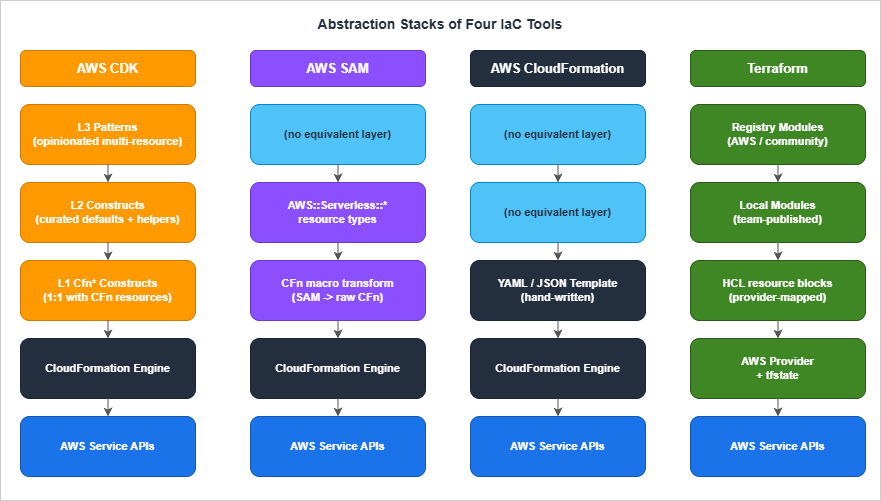
2.1 Declarative DSL: CloudFormation and Terraform
CloudFormation templates are YAML or JSON documents that describe the final shape of the infrastructure. There is no execution. There is noif. There is Conditions:, which is a declarative branch evaluated at template-processing time, not a runtime statement. There is no loop, although Fn::ForEach (introduced more recently) provides limited template-time iteration. The mental model is "describe the result, hand the document to the engine, let the engine figure out the order of operations."Terraform's HCL (HashiCorp Configuration Language) is also declarative, with one important addition: it has rich expression syntax (functions, conditionals,
for expressions, dynamic blocks) that runs at plan time. The HCL you write is not Turing-complete at the language level, but the expression language is expressive enough to do a lot of CloudFormation Conditions: work in cleaner syntax.Both engines work the same way at the controller level: parse the document, build a resource graph, compute a diff against the current state, and execute the diff in dependency order.
What makes CloudFormation and Terraform feel different in practice is not the engine but the language. HCL has variables, locals, modules, expressions, and a clean syntax for referencing other resources. CloudFormation has parameters, mappings, conditions, intrinsic functions (
Fn::Sub, Fn::Join, Fn::GetAtt), and a syntax that gets dense quickly because YAML strings cannot natively interpolate.2.2 Imperative-Generates-Declarative: AWS CDK and AWS SAM
AWS CDK lets you write infrastructure in TypeScript, Python, Java, C#, or Go. Your code constructs an in-memory tree ofConstruct objects. When you run cdk synth, the CDK CLI walks that tree and emits a CloudFormation template. Then cdk deploy hands the template to the CloudFormation service.The user-facing experience is imperative: you instantiate classes, pass them to other classes, write loops to create N similar resources, share helper functions across stacks. The artifact that CloudFormation actually executes is still declarative.
AWS SAM is a slightly different beast. SAM templates are CloudFormation templates with a
Transform: AWS::Serverless-2016-10-31 directive at the top. The CloudFormation service expands SAM-specific resource types (AWS::Serverless::Function, AWS::Serverless::Api, AWS::Serverless::SimpleTable) into raw CloudFormation resources at change-set creation time. SAM is, in effect, a CloudFormation macro that ships with AWS.The declarative DSL you write in a SAM template is denser and more developer-friendly than raw CloudFormation, because a five-line
AWS::Serverless::Function expands into a Lambda function, an execution role with appropriate policies, sometimes an API Gateway integration, optionally a CloudWatch log group, and a few permissions. SAM is "specialized CloudFormation that is smarter about Lambda."2.3 Why This Distinction Matters
Three consequences flow directly from the declarative-vs-imperative split:Cognitive load on the writer. Imperative code can use loops, conditionals, helper functions, and shared types. Declarative DSLs cannot, or can only with awkward template-time constructs. If you have 30 nearly identical Lambda functions, writing them in CDK is a five-line loop; writing them in raw CloudFormation is 30 nearly identical resource blocks (or one
Fn::ForEach loop, with restrictions).Cognitive load on the reviewer. Declarative DSLs make code review easier, because the reviewer sees what the infrastructure will be without running anything. Imperative code requires the reviewer to either run
cdk synth and review the output, or trust the writer's mental model of what the code generates.Refactoring vs migrating. Imperative tools let you refactor your IaC code without changing the deployed infrastructure (the same template comes out). Declarative tools have less code-level abstraction to refactor; you mostly change what gets deployed. This sounds like an advantage for imperative, but the price is paid at the migration boundary: an imperative tool's logical IDs are derived from your code structure, so refactoring the code can change logical IDs and silently force CloudFormation to replace resources. CDK has explicit overrides (
overrideLogicalId, addDependency) for this, but they are escape hatches, not first-class concepts.The right model to hold for the rest of this article: CloudFormation and Terraform are peers (declarative DSLs talking to two different engines); CDK and SAM are CloudFormation generators (imperative or declarative, both ultimately produce a CloudFormation template). Migration patterns and state management make the most sense once you see the four tools in those two pairs.
3. State Management — Terraform State, CFn Stack, CDK Synth Output
State management is the second axis on which the four tools diverge meaningfully. "State" here means: the system's record of which resources have been deployed, what their attributes are, and which logical ID maps to which physical AWS resource. Without state, no tool can compute a diff.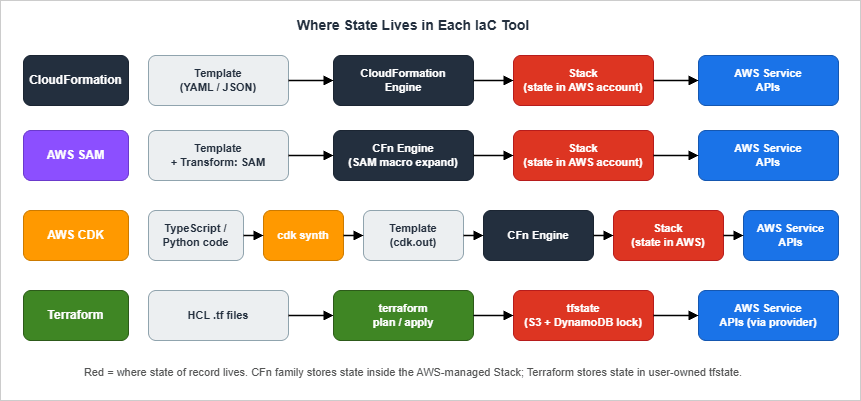
3.1 CloudFormation: State Lives in the Stack
CloudFormation keeps state inside the stack, which is a managed resource in your AWS account. The stack stores the template, the current parameter values, the mapping from logical IDs (the names you wrote in the template) to physical IDs (the actual ARN or name AWS assigned), and the deployment status.You never see a state file. The CloudFormation service stores it for you. When you ask CloudFormation to update the stack, it computes the diff between the new template and the old one, presents you with a change set if you ask for one, and executes the diff.
Consequences:
- No state file to lose. This is the single largest operational simplification CloudFormation offers over Terraform. There is no S3 bucket to back up, no DynamoDB lock table to maintain, no "who has the lock?" debugging session.
- Drift detection is a first-class operation.
aws cloudformation detect-stack-driftqueries every resource in the stack and tells you which ones have been changed outside of CloudFormation. Free, no setup, runs against the live infrastructure. - State is account-and-region-scoped. A stack lives in exactly one region of one account. Multi-region or multi-account work requires StackSets (Summary of AWS CloudFormation StackSets) or coordination at a higher layer.
- Logical IDs are sticky. Once a stack records that logical ID
MyBucketmaps to physical IDmystack-mybucket-abcdef, changingMyBuckettoMyDataBucketin the template historically caused CloudFormation to delete the old bucket and create a new one. The current escape hatches are Stack Refactoring (rename a logical ID, or move a resource from one stack to another, without replacement) and resource import (re-adopt an existing physical resource under a new logical ID). Neither is fully transparent — both require an explicit operator-driven workflow rather than a single template edit — but together they remove the previous "rename = replace" footgun for the resource types they cover.
3.2 Terraform: State Lives in a State File (Hopefully Remote)
Terraform stores state in a JSON file. The default backend writes it to disk; thes3 backend (with optional DynamoDB locking) puts it in S3; alternative backends include Terraform Cloud, GCS, Azure Blob, HCP, and Consul.The state file contains the same logical-to-physical mapping that CloudFormation keeps inside its stack, plus a snapshot of every resource's attributes at the last successful apply. Terraform uses that snapshot to compute drift on the next plan: it compares the snapshot to a fresh
terraform refresh of the live AWS resource, then to your .tf files.Consequences (some good, some bad):
- You own the storage. This is a security-and-operational responsibility. State files contain sensitive resource attributes (secrets passed via
sensitive = trueare still in the state in plaintext, just elided from CLI output). The S3 bucket holding state must be encrypted, versioned, access-restricted, and ideally backed up across accounts. - You own concurrency control. Running two
terraform applyagainst the same state file simultaneously corrupts state. Remote backends with locking (S3 + DynamoDB, Terraform Cloud, HCP) prevent this; local backends do not. - Drift detection runs every plan.
terraform planalways refreshes state from the live resources before computing the diff. There is no separate "drift detection" command — drift shows up as "this resource has changed outside of Terraform" in the plan output. terraform importis mature. Resources created outside of Terraform can be imported into state by their physical ID. This makes Terraform the strongest of the four for "absorb existing infrastructure into IaC" work.- State file surgery is a thing.
terraform state mv,terraform state rm,terraform state replace-providergive you fine-grained control. They are also dangerous; the wrongstate rmcan orphan resources. Alwaysterraform state pull > backup.tfstatebefore surgery.
3.3 AWS CDK: State Is CloudFormation, Plus a Synth Cache
CDK does not introduce new state. Eachcdk deploy synthesizes a CloudFormation template and deploys it to a CloudFormation stack. The CloudFormation stack is the state, exactly as in §3.1.What CDK adds locally is a
cdk.out directory: the synth output (CloudFormation templates, asset manifests, packaged file assets such as Lambda zip bundles, and the build context for any Docker image assets that cdk deploy will then build and push to the bootstrap-stack ECR repository). The actual container image lives in ECR after deploy, not inside cdk.out. cdk.out is not state; it is a build artifact, regenerated on every synth. Do not commit it. CDK also writes a small cdk.context.json that caches AWS account lookups (for example, the AZs in a region, or the AMI ID for an Amazon Linux 2 instance) so that synth is deterministic between team members. That file you should commit, because if you do not, two engineers on different machines may synth different templates.Consequences:
- No new state plumbing. This is a real operational advantage of CDK over Terraform: you inherit CloudFormation's "no state file to lose" property.
- Asset bootstrapping is required. CDK uploads assets (Lambda code, Docker images) to a per-account-per-region "bootstrap" stack with an S3 bucket and ECR repository.
cdk bootstrapcreates this scaffolding. Forgetting to bootstrap is the most common first-deploy failure. - Logical IDs are derived from the construct tree. This is the trickiest CDK behavior. The logical ID of a resource is computed from the path of the resource in the construct tree, hashed if it would otherwise be too long. Refactoring your CDK code so that a resource moves to a different parent construct changes its logical ID, which causes CloudFormation to replace the resource.
overrideLogicalIdis the escape hatch.
3.4 AWS SAM: SAM Is CloudFormation
SAM stores no separate state. A SAM deployment is a CloudFormation stack deployment with a transform applied.sam deploy produces a packaged template (with Lambda code uploaded to S3) and hands it to CloudFormation.The only operational artifact SAM adds is
samconfig.toml, which records deployment defaults (stack name, region, capabilities, parameter overrides, S3/ECR upload locations) so that subsequent sam deploy invocations are not interactive and so that every team member deploys with the same options. It is configuration, not state, and the recommended practice is to commit it to the repository alongside template.yaml so that the deployment contract is versioned with the code. Per-developer overrides go in a separate [dev.deploy.parameters] environment within the same file rather than in an uncommitted local copy.3.5 Practical State Decision
Pick CloudFormation/CDK/SAM if you want to outsource state-file operational responsibility to AWS. Pick Terraform if you want explicit control over state, the ability to do state surgery, or multi-cloud capability. The decision is mostly about whether your team has bandwidth to operate Terraform's state plumbing well; if not, the CloudFormation family is a less-rope-to-hang-yourself choice.For organizations that have legitimately hit CloudFormation's limits (for example, the resource-count limit per stack, nested stack pain, or multi-region orchestration), Terraform's flexibility starts paying for the operational cost. For teams under that scale, the CloudFormation family is usually the more boring and therefore better choice. See also Deploy AWS CFn Stack with Lambda Custom Resources for the pattern that lets you extend CloudFormation past its native resource type list when you do hit a wall.
4. Abstraction Layers — L1 / L2 / L3 in CDK, Modules in Terraform
The third axis is how each tool packages reusable units. Terraform calls them modules. CDK calls them constructs and exposes three levels (L1, L2, L3). CloudFormation has nested stacks. SAM has its own nested-application concept (Serverless Application Repository, SAR). The same conceptual question — "how do I share infrastructure code across teams?" — gets four different answers.4.1 CDK Construct Levels
CDK constructs come in three flavors, each a layer of abstraction over the previous:L1 (Cfn-prefixed constructs). A direct, one-to-one mapping of CloudFormation resources to TypeScript classes.
CfnBucket corresponds exactly to AWS::S3::Bucket. Properties match CloudFormation property names. There is no defaults logic, no "do the right thing" behavior — these are CloudFormation in TypeScript clothing.L2 (curated constructs). Hand-written, AWS-blessed convenience classes that wrap L1 with sensible defaults, helper methods, and integration logic.
Bucket (the L2 wrapper for S3) defaults to encryption with S3-managed keys, blocks all public access by default, and exposes methods like grantRead(role) that synthesize the corresponding IAM policy. L2 is the construct level you write most of the time.L3 (patterns). Multi-resource constructs that encapsulate a complete pattern.
aws-ecs-patterns.ApplicationLoadBalancedFargateService provisions a Fargate service, a load balancer, target groups, security groups, log groups, and IAM roles. L3 is the most opinionated layer; you use it when the pattern matches your needs and you want the convenience.The trade-off: L1 is verbose but explicit; L3 is concise but locks you into the pattern's choices. L2 is the right default. Reaching for L3 too aggressively is one of the most common CDK anti-patterns (see §8).
4.2 Terraform Modules
Terraform modules are directories containing.tf files, with variables.tf defining inputs and outputs.tf defining outputs. A module is consumed with a module block:module "vpc" {
source = "terraform-aws-modules/vpc/aws"
version = "~> 5.0"
name = "production"
cidr = "10.0.0.0/16"
}- Terraform AWS Modules (terraform-aws-modules) is the de-facto-standard library of opinionated modules (VPC, RDS, EKS, IAM, etc.) maintained by community members and well-respected. Most production Terraform shops depend on these modules in some form.
- Cloud Posse modules are a more opinionated, naming-convention-heavy alternative.
- Internal platform modules are typical: a platform team publishes modules to a private Terraform registry (Terraform Cloud, Artifactory, or just a Git repository) for the rest of the organization.
type = object({...})) and the registry's documentation.4.3 CloudFormation Nested Stacks
CloudFormation's reuse story is nested stacks. A nested stack is a CloudFormation stack created inside another stack. The parent stack references the nested stack by S3 URL of the template. Updates to the nested stack are pushed through the parent.Nested stacks are the lowest-abstraction reuse mechanism among the four tools. There is no input/output type system beyond CloudFormation parameters (typed loosely as
String, Number, List<String>, etc.) and outputs (always strings). There is no semantic versioning. Nested stack templates live in S3, which means you have to package and upload them somewhere.Because of these limitations, raw CloudFormation reuse via nested stacks is the weakest of the four. It works, but it is the bare minimum. Most large CloudFormation shops end up using either:
- A CFN-Lint + custom macro pipeline (write your own DSL on top of CloudFormation, expand to raw CFN).
- CDK as a nested stack generator (write CDK code that synthesizes nested stacks, deploy via CFN).
4.4 SAM Nested Applications and SAR
SAM has its own reuse mechanism: a SAM application can be published to the Serverless Application Repository (SAR). Other applications consume it viaAWS::Serverless::Application with a SAR ApplicationId. Privately-published SAR applications can be shared across accounts within an organization.In practice, SAR is rarely the answer for internal sharing because it is account-wide rather than path-scoped, version updates require explicit publishing, and the developer experience is worse than CDK constructs. SAM teams that need internal libraries usually drop into raw CloudFormation nested stacks or wrap the relevant resources in a CDK app.
4.5 Comparison Table
* You can sort the table by clicking on the column name.| Tool | Reuse unit | Type system | Versioning | Discoverability |
|---|---|---|---|---|
| CloudFormation | Nested stack | CFN parameter types (loose) | None native; manual S3 path versioning | Weak |
| AWS SAM | Nested app + SAR | CFN parameter types | SAR semantic versioning | Medium (SAR catalog) |
| AWS CDK | Construct (L1/L2/L3) | Strong (TypeScript / Python typing) | npm/PyPI/Maven semver | High |
| Terraform | Module | HCL type constraints | Git tag / Registry semver | High (Terraform Registry) |
4.6 Practical Recommendation
For green-field work where reuse matters, choose CDK or Terraform on this axis. CDK gives you a stronger type system; Terraform gives you a larger pre-built module library. CloudFormation and SAM both work but their reuse stories are weaker than the other two.Where this matters most is at the platform team boundary. If you are building a platform team that publishes infrastructure modules for application teams to consume, the publishing tool's expressiveness shapes the API surface application teams see. A platform team using CDK constructs can publish a typed library; a platform team using nested stacks publishes templates and parameters. The application teams consuming the library inherit the abstraction. What that boundary does not settle is under whose permissions the consuming team actually launches what it picked; the catalog and the launch constraint that sit in front of these modules are covered in Internal Developer Platforms on AWS.
5. Side-by-Side: Same Resource, Four Tools
Concrete examples beat any amount of comparison prose. Below are three resources written four ways each:- An S3 bucket with versioning enabled.
- A Lambda function (Python 3.12) with an inline IAM role.
- A two-AZ VPC with public and private subnets and a NAT gateway.
5.1 S3 Bucket With Versioning
The simplest of the three. All four tools handle it cleanly.CloudFormation (YAML)
AWSTemplateFormatVersion: "2010-09-09"
Description: S3 bucket with versioning enabled

Resources:
  DataBucket:
    Type: AWS::S3::Bucket
    Properties:
      BucketName: !Sub "${AWS::StackName}-data-${AWS::AccountId}"
      VersioningConfiguration:
        Status: Enabled
      BucketEncryption:
        ServerSideEncryptionConfiguration:
          - ServerSideEncryptionByDefault:
              SSEAlgorithm: AES256
      PublicAccessBlockConfiguration:
        BlockPublicAcls: true
        BlockPublicPolicy: true
        IgnorePublicAcls: true
        RestrictPublicBuckets: true

Outputs:
  BucketName:
    Value: !Ref DataBucket
  BucketArn:
Value: !GetAtt DataBucket.Arnresource "aws_s3_bucket" "data" {
bucket = "${var.stack_name}-data-${data.aws_caller_identity.current.account_id}"
}
resource "aws_s3_bucket_versioning" "data" {
bucket = aws_s3_bucket.data.id
versioning_configuration {
status = "Enabled"
}
}
resource "aws_s3_bucket_server_side_encryption_configuration" "data" {
bucket = aws_s3_bucket.data.id
rule {
apply_server_side_encryption_by_default {
sse_algorithm = "AES256"
}
}
}
resource "aws_s3_bucket_public_access_block" "data" {
bucket = aws_s3_bucket.data.id
block_public_acls = true
block_public_policy = true
ignore_public_acls = true
restrict_public_buckets = true
}
data "aws_caller_identity" "current" {}
output "bucket_name" {
value = aws_s3_bucket.data.id
}
output "bucket_arn" {
value = aws_s3_bucket.data.arn
}import * as cdk from "aws-cdk-lib";
import { Bucket, BucketEncryption, BlockPublicAccess } from "aws-cdk-lib/aws-s3";
export class DataStack extends cdk.Stack {
public readonly bucket: Bucket;
constructor(scope: cdk.App, id: string, props?: cdk.StackProps) {
super(scope, id, props);
this.bucket = new Bucket(this, "DataBucket", {
versioned: true,
encryption: BucketEncryption.S3_MANAGED,
blockPublicAccess: BlockPublicAccess.BLOCK_ALL,
});
new cdk.CfnOutput(this, "BucketName", { value: this.bucket.bucketName });
new cdk.CfnOutput(this, "BucketArn", { value: this.bucket.bucketArn });
}
}AWSTemplateFormatVersion: "2010-09-09"
Transform: AWS::Serverless-2016-10-31
Description: SAM stack with a versioned S3 bucket
Resources:
DataBucket:
Type: AWS::S3::Bucket
Properties:
BucketName: !Sub "${AWS::StackName}-data-${AWS::AccountId}"
VersioningConfiguration:
Status: Enabled
BucketEncryption:
ServerSideEncryptionConfiguration:
- ServerSideEncryptionByDefault:
SSEAlgorithm: AES256
PublicAccessBlockConfiguration:
BlockPublicAcls: true
BlockPublicPolicy: true
IgnorePublicAcls: true
RestrictPublicBuckets: true
Outputs:
BucketName:
Value: !Ref DataBucket- CDK is dramatically shorter. Eight property lines do the work of about thirty in CloudFormation. The
BlockPublicAccess.BLOCK_ALLenum and theversioned: trueshortcut hide a multi-line CloudFormation block. - Terraform separates concerns by resource type. Versioning, encryption, and public access blocks are separate resources rather than properties of the bucket. This is a deliberate Terraform design decision: the AWS provider models AWS API calls one-to-one, and AWS broke S3 bucket configuration into separate APIs years ago.
- SAM and CloudFormation are identical for this resource. SAM only adds value where Lambda is involved (see §5.2).
- CDK's L2 defaults are opinionated.
Bucketblocks public access by default; you would need an L1CfnBucketto leave it open. This is a feature for most teams and a hindrance for the few who genuinely need public buckets.
5.2 Lambda Function With IAM Role
This is where SAM's specialization pays off and where CloudFormation pays the most for being verbose.CloudFormation (YAML)
AWSTemplateFormatVersion: "2010-09-09"
Description: Lambda function reading from a DynamoDB table

Parameters:
  TableArn:
    Type: String

Resources:
  HandlerRole:
    Type: AWS::IAM::Role
    Properties:
      AssumeRolePolicyDocument:
        Version: "2012-10-17"
        Statement:
          - Effect: Allow
            Principal: { Service: lambda.amazonaws.com }
            Action: sts:AssumeRole
      ManagedPolicyArns:
        - arn:aws:iam::aws:policy/service-role/AWSLambdaBasicExecutionRole
      Policies:
        - PolicyName: ReadTable
          PolicyDocument:
            Version: "2012-10-17"
            Statement:
              - Effect: Allow
                Action:
                  - dynamodb:GetItem
                  - dynamodb:Query
                Resource: !Ref TableArn

  HandlerFunction:
    Type: AWS::Lambda::Function
    Properties:
      FunctionName: !Sub "${AWS::StackName}-handler"
      Runtime: python3.12
      Handler: index.handler
      Role: !GetAtt HandlerRole.Arn
      Architectures: [arm64]
      MemorySize: 256
      Timeout: 10
      Code:
        ZipFile: |
          def handler(event, context):
              return {"ok": True}
      Environment:
        Variables:
          TABLE_ARN: !Ref TableArn

  HandlerLogGroup:
    Type: AWS::Logs::LogGroup
    Properties:
      LogGroupName: !Sub "/aws/lambda/${HandlerFunction}"
RetentionInDays: 14data "aws_iam_policy_document" "assume_role" {
statement {
effect = "Allow"
actions = ["sts:AssumeRole"]
principals {
type = "Service"
identifiers = ["lambda.amazonaws.com"]
}
}
}
data "aws_iam_policy_document" "read_table" {
statement {
effect = "Allow"
actions = ["dynamodb:GetItem", "dynamodb:Query"]
resources = [var.table_arn]
}
}
resource "aws_iam_role" "handler" {
name = "${var.stack_name}-handler"
assume_role_policy = data.aws_iam_policy_document.assume_role.json
}
resource "aws_iam_role_policy_attachment" "handler_basic_execution" {
role = aws_iam_role.handler.name
policy_arn = "arn:aws:iam::aws:policy/service-role/AWSLambdaBasicExecutionRole"
}
resource "aws_iam_role_policy" "handler_read_table" {
name = "read-table"
role = aws_iam_role.handler.id
policy = data.aws_iam_policy_document.read_table.json
}
data "archive_file" "handler" {
type = "zip"
output_path = "${path.module}/handler.zip"
source {
filename = "index.py"
content = "def handler(event, context):\n return {'ok': True}\n"
}
}
resource "aws_lambda_function" "handler" {
function_name = "${var.stack_name}-handler"
role = aws_iam_role.handler.arn
runtime = "python3.12"
handler = "index.handler"
architectures = ["arm64"]
memory_size = 256
timeout = 10
filename = data.archive_file.handler.output_path
source_code_hash = data.archive_file.handler.output_base64sha256
environment {
variables = {
TABLE_ARN = var.table_arn
}
}
}
resource "aws_cloudwatch_log_group" "handler" {
name = "/aws/lambda/${aws_lambda_function.handler.function_name}"
retention_in_days = 14
}import * as cdk from "aws-cdk-lib";
import { Function, Runtime, Architecture, Code } from "aws-cdk-lib/aws-lambda";
import { Table } from "aws-cdk-lib/aws-dynamodb";
import { LogGroup, RetentionDays } from "aws-cdk-lib/aws-logs";
export interface HandlerStackProps extends cdk.StackProps {
table: Table;
}
export class HandlerStack extends cdk.Stack {
constructor(scope: cdk.App, id: string, props: HandlerStackProps) {
super(scope, id, props);
const handlerLogGroup = new LogGroup(this, "HandlerLogGroup", {
retention: RetentionDays.TWO_WEEKS,
removalPolicy: cdk.RemovalPolicy.DESTROY,
});
const fn = new Function(this, "Handler", {
runtime: Runtime.PYTHON_3_12,
architecture: Architecture.ARM_64,
handler: "index.handler",
code: Code.fromInline("def handler(event, context):\n return {'ok': True}\n"),
memorySize: 256,
timeout: cdk.Duration.seconds(10),
environment: { TABLE_ARN: props.table.tableArn },
logGroup: handlerLogGroup,
});
props.table.grantReadData(fn);
}
}logRetention property on Function is deprecated because it provisions a custom resource to set the retention. Pass an explicit LogGroup via the logGroup property instead.AWS SAM (YAML)
AWSTemplateFormatVersion: "2010-09-09"
Transform: AWS::Serverless-2016-10-31
Description: Lambda function reading from a DynamoDB table

Parameters:
  TableArn:
    Type: String
  TableName:
    Type: String

Globals:
  Function:
    Runtime: python3.12
    Architectures: [arm64]
    MemorySize: 256
    Timeout: 10

Resources:
  HandlerFunction:
    Type: AWS::Serverless::Function
    Properties:
      FunctionName: !Sub "${AWS::StackName}-handler"
      Handler: index.handler
      InlineCode: |
        def handler(event, context):
            return {"ok": True}
      Environment:
        Variables:
          TABLE_ARN: !Ref TableArn
      Policies:
        - DynamoDBReadPolicy:
            TableName: !Ref TableName

  HandlerLogGroup:
    Type: AWS::Logs::LogGroup
    Properties:
      LogGroupName: !Sub "/aws/lambda/${HandlerFunction}"
RetentionInDays: 14- CDK's
grantReadDatais a meaningful expressiveness win. One method call generates the IAM policy and attaches it to the function's role. The same operation in CloudFormation requires hand-writing the IAM document. - SAM's
DynamoDBReadPolicypolicy template is a similar shortcut, but works only for a curated list of SAM policy templates. Outside that list you fall back to writing aPolicydocument. - Terraform requires more ceremony for inline code (the
archive_filedata source) and splits IAM intoaws_iam_role+aws_iam_role_policy_attachment+aws_iam_role_policyrather than collapsing them into a single resource — themanaged_policy_arnsargument and theinline_policyblock onaws_iam_roleare deprecated in AWS provider 5.x and removed in 6.x in favor of the standalone resources used above. In exchange Terraform treats Lambda exactly like every other AWS resource — no special syntax, no transform. - SAM's
Globals:section is genuinely useful for fleets of functions sharing common settings; CDK achieves the same with a TypeScript helper function or a custom construct.
5.3 VPC With Two AZs, Public/Private Subnets, NAT Gateway
This is where the abstraction differences are largest. The "minimum production VPC" easily breaks 200 lines in raw CloudFormation; in CDK L2 it is about ten lines.CloudFormation (YAML)
A full template would run several hundred lines. The skeleton:
AWSTemplateFormatVersion: "2010-09-09"
Description: Two-AZ VPC with public and private subnets

Resources:
  Vpc:
    Type: AWS::EC2::VPC
    Properties:
      CidrBlock: 10.0.0.0/16
      EnableDnsHostnames: true
      EnableDnsSupport: true

  InternetGateway:
    Type: AWS::EC2::InternetGateway

  IgwAttachment:
    Type: AWS::EC2::VPCGatewayAttachment
    Properties:
      VpcId: !Ref Vpc
      InternetGatewayId: !Ref InternetGateway

  PublicSubnetA:
    Type: AWS::EC2::Subnet
    Properties:
      VpcId: !Ref Vpc
      CidrBlock: 10.0.0.0/20
      AvailabilityZone: !Select [0, !GetAZs ""]
      MapPublicIpOnLaunch: true

  PublicSubnetB:
    Type: AWS::EC2::Subnet
    Properties:
      VpcId: !Ref Vpc
      CidrBlock: 10.0.16.0/20
      AvailabilityZone: !Select [1, !GetAZs ""]
      MapPublicIpOnLaunch: true

  PrivateSubnetA:
    Type: AWS::EC2::Subnet
    Properties:
      VpcId: !Ref Vpc
      CidrBlock: 10.0.128.0/20
      AvailabilityZone: !Select [0, !GetAZs ""]

  PrivateSubnetB:
    Type: AWS::EC2::Subnet
    Properties:
      VpcId: !Ref Vpc
      CidrBlock: 10.0.144.0/20
      AvailabilityZone: !Select [1, !GetAZs ""]

  # ... + EIP, NAT Gateway, public route table, private route table,
# associations, and routes (about 80 more lines)Terraform (HCL) — Using the Standard VPC Module
module "vpc" {
  source  = "terraform-aws-modules/vpc/aws"
  version = "~> 5.0"

  name = "${var.stack_name}-vpc"
  cidr = "10.0.0.0/16"

  azs             = slice(data.aws_availability_zones.available.names, 0, 2)
  public_subnets  = ["10.0.0.0/20", "10.0.16.0/20"]
  private_subnets = ["10.0.128.0/20", "10.0.144.0/20"]

  enable_nat_gateway = true
  single_nat_gateway = true  # set to false for HA across AZs
  enable_dns_hostnames = true
}

data "aws_availability_zones" "available" {
  state = "available"
}aws_vpc, aws_subnet, aws_internet_gateway, etc. resources, would be ~150 lines of HCL.AWS CDK (TypeScript)
import * as cdk from "aws-cdk-lib";
import { Vpc, SubnetType, IpAddresses } from "aws-cdk-lib/aws-ec2";

export class NetworkStack extends cdk.Stack {
  public readonly vpc: Vpc;

  constructor(scope: cdk.App, id: string, props?: cdk.StackProps) {
    super(scope, id, props);

    this.vpc = new Vpc(this, "Vpc", {
      ipAddresses: IpAddresses.cidr("10.0.0.0/16"),
      maxAzs: 2,
      natGateways: 1,
      subnetConfiguration: [
        { name: "public", subnetType: SubnetType.PUBLIC, cidrMask: 20 },
        { name: "private", subnetType: SubnetType.PRIVATE_WITH_EGRESS, cidrMask: 20 },
      ],
    });
  }
}Vpc L2 construct is the canonical example of L2 doing meaningful work: it provisions the VPC, internet gateway, NAT gateway, both route tables, all subnet associations, and outputs. You can drop to L1 (CfnVPC etc.) when you need fine-grained control, but for 80% of cases the L2 default is what you want.AWS SAM (YAML)
SAM does not have a Lambda-style abstraction for VPCs. A SAM-built VPC is just CloudFormation; the SAM transform adds nothing. In practice, SAM apps that need a VPC either:
- Reference a pre-existing VPC via
VpcConfigparameter passed to the function. - Call out to a separate CloudFormation stack (or CDK app, or Terraform module) that owns the VPC.
5.4 Side-by-Side Summary
* You can sort the table by clicking on the column name.| Resource | CloudFormation lines | Terraform lines (with AWS module) | CDK L2 lines | SAM lines |
|---|---|---|---|---|
| S3 bucket (versioned, encrypted, locked) | ~20 | ~30 | ~6 | ~20 |
| Lambda function + IAM role + log group | ~45 | ~60 | ~12 | ~25 |
| Two-AZ VPC with NAT | ~200 | ~12 | ~10 | ~200 |
Lines are not the only metric. Reviewability, refactoring cost, and migration cost matter more in the long run. But the line-count column is a useful proxy for cognitive load: a VPC that is 10 lines is a VPC you can review at a glance, and a VPC that is 200 lines is one you lazily skip during code review.
For a real-world example of a non-trivial CloudFormation template that is worth reading end-to-end, see AWS CFn ACM Lambda@Edge WAF S3 CloudFront, which provisions a complete static-site stack including ACM certificate, Lambda@Edge basic-auth function, WAF, S3, and CloudFront in raw CloudFormation. It is several hundred lines, and that is the realistic CloudFormation reality at production scale.
6. Migration Patterns — terraform import, cdk migrate, and the Bridges Between
The hardest IaC question is rarely "which tool to start with" — it is "what do we do with the infrastructure we already have?" There are four migration directions worth knowing, plus one bridging pattern (CDKTF) that is sometimes the right answer.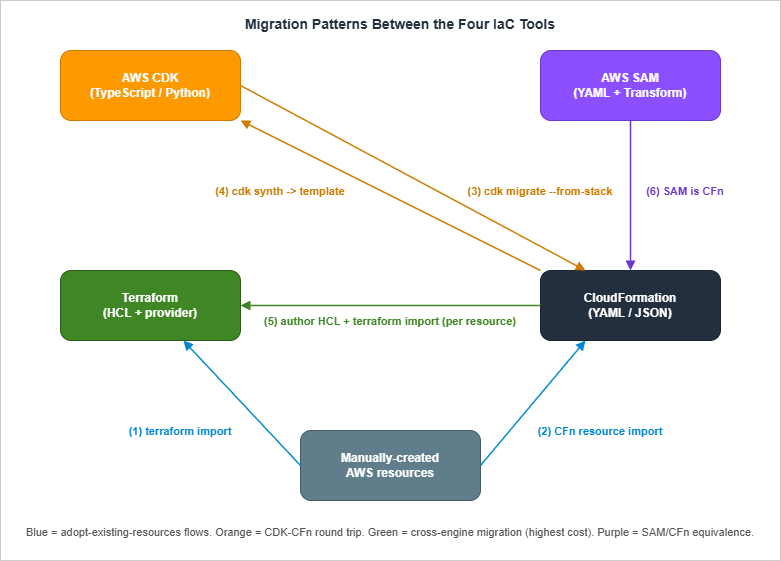
6.1 Adopting Existing AWS Resources Into Terraform — terraform import
The most common migration scenario: you have AWS resources that were created manually (via console or scripts) and you want to manage them with Terraform going forward.The procedure:
- Write the Terraform resource block for the existing resource, with the same attributes (best effort).
- Run
terraform import <resource_address> <physical_id>. For example:terraform import aws_s3_bucket.data my-existing-bucket. - Run
terraform plan. The plan shows the diff between your.tffile and reality. - Iterate on the
.tffile untilterraform planshows no changes. - Commit.
terraform >= 1.5) supports the import block in HCL itself, which makes import declarative rather than a one-off CLI invocation:import {
to = aws_s3_bucket.data
id = "my-existing-bucket"
}
resource "aws_s3_bucket" "data" {
bucket = "my-existing-bucket"
}terraform plan -generate-config-out=generated.tf, Terraform produces a starter resource block that you can refine. This is a meaningful upgrade over the old CLI-only flow because the entire batch of imports lives in version-controlled HCL alongside the resources themselves, and the generated configuration stub eliminates the most error-prone step of import — transcribing the live attributes by hand. The HashiCorp team has continued to extend the import block since its 1.5 introduction; refer to the official import documentation for the current set of supported features and provider-side requirements.Caveats:
- One resource at a time. Each AWS resource maps to one Terraform
resourceblock, and historically each had to be imported individually. The HCLimportblock lets you batch them in a file but not in arbitrary scopes. - Some resources have multiple Terraform representations. As shown in §5.1, a single S3 bucket maps to one
aws_s3_bucketplus several adjunct resources (aws_s3_bucket_versioning,aws_s3_bucket_server_side_encryption_configuration,aws_s3_bucket_public_access_block). Each must be imported separately. - Tags drift easily. Terraform tracks all tags. If an organization has automation that adds tags outside of Terraform, your plan will perpetually want to remove them. Use
lifecycle { ignore_changes = [tags["BillingTag"]] }on a per-tag basis.
6.2 Adopting Existing AWS Resources Into CloudFormation — Resource Import
CloudFormation introduced resource import several years ago for exactly the same use case. The procedure:- Author a CloudFormation template that includes the existing resource in its
Resources:section. - Identify the resource's "import identifier" (the property CloudFormation uses to look up the resource — for S3 buckets it is
BucketName; for IAM roles it isRoleName; the supported types list is canonical). - Run
aws cloudformation create-change-set --change-set-type IMPORT --resources-to-import file://imports.json .... - Execute the change set after reviewing.
Caveats:
- Drift detection runs after import. Once imported, run
aws cloudformation detect-stack-driftand fix any properties that disagree. - Dependent resources still must exist or be created. If you import a security group that references a VPC, CloudFormation needs the VPC also under management or referenced.
6.3 Adopting Existing AWS Resources Into CDK — cdk import and cdk migrate
CDK has two commands relevant to migration:cdk import is the CDK wrapper around CloudFormation resource import. You add the resource to your CDK code, run cdk import, and CDK runs the underlying CloudFormation import flow. Functionally equivalent to §6.2.cdk migrate is more recent and more interesting. It generates a CDK app from one of three sources. The --stack-name flag is required in every form because it sets both the resulting stack name and the directory name of the generated app, and --language selects the target language (typescript, python, java, csharp, or go):- An existing CloudFormation stack (
cdk migrate --stack-name <name> --language typescript --from-stack) — pulls the live template, generates equivalent CDK code. - A CloudFormation template file (
cdk migrate --stack-name <name> --language typescript --from-path ./template.yaml) — converts a static template to CDK. - An AWS account scan (
cdk migrate --stack-name <name> --language typescript --from-scan, optionally with--filter) — uses CloudFormation's IaC Generator to scan an account for resources matching tag/type filters and emit CDK code.
cdk migrate is the most interesting CDK tool for green-field-after-the-fact teams: organizations that have CloudFormation templates accumulated over years and want to start managing them in CDK without rewriting from scratch. The generated CDK code is L1-heavy (because L2 mappings are not always derivable from CloudFormation), but it is a valid starting point for refactoring upward to L2.Caveats:
- Generated code is L1-only by default. You will need to manually rewrite to L2 wrapper constructs to get the CDK ergonomics most teams want.
- The IaC Generator scan has resource limits. A scan covers a single AWS account and region, has a per-account scan-frequency cap, and can produce a template that contains up to several hundred resources from the supported resource-type list. The exact ceilings and the supported-type catalog evolve regularly; consult the CloudFormation IaC Generator documentation before relying on it for a large account.
6.4 Migrating From CDK Back to CloudFormation
Less common but occasionally the right answer: a team adopted CDK, decided the team's TypeScript skills are not the right fit, and wants to "freeze" the current state as a CloudFormation template that the next team can maintain.The procedure is straightforward:
cdk synth outputs the CloudFormation template. Save the file, commit it as template.yaml, and from then on use aws cloudformation deploy directly. The deployed stack is identical; only the source code changed.Caveats:
- Asset references break. CDK's asset upload to the bootstrap S3 bucket is part of
cdk deploy. A CloudFormation-only follow-up needs the assets staged manually (typically viaaws cloudformation package). - Cross-stack references via CDK methods become CloudFormation
ImportValuecalls. Watch the generated template carefully; CDK does the right thing in 95% of cases but the 5% needs hand-fixing. - Logical IDs are baked in. The CDK-generated logical IDs (the long auto-hashed ones) are now permanent. Renaming them post-migration triggers replacement.
6.5 Migrating From CloudFormation to Terraform
The migration with the largest "blast radius" because it crosses the engine boundary.The basic procedure:
- Inventory. List every resource in the source CloudFormation stack(s).
- Plan around statefulness. Stateful resources (RDS, S3 with data, DynamoDB tables) must be imported into Terraform without recreation. Stateless resources (Lambda, IAM, security groups) can in theory be re-created, but rarely is that the right call in production — you would still want to import to preserve any external references.
- Disable CloudFormation's ability to act on the stack. Either set the stack's TerminationProtection and never deploy again, or use the stack-level
RetainResources: truedeletion strategy and delete the stack while retaining everything (this is risky; test on a non-production stack first). - Author equivalent Terraform. This is the long part. For each resource, write the Terraform block with matching attributes.
- Import.
terraform import(or HCLimportblocks) for each resource. - Plan-until-clean. Iterate on the
.tffiles untilterraform planshows zero diffs. - Cut over. Delete the (now-empty) CloudFormation stack with
RetainResources: truefor safety.
When does this migration make sense?
- The team has standardized on Terraform for non-AWS or multi-cloud reasons.
- CloudFormation has hit a hard limit (resource count, deployment time) that is restructured more cleanly in Terraform.
- The organization's IaC tooling investment is in HCP Terraform / Terraform Cloud and CloudFormation is a holdout.
- "We don't like CloudFormation's syntax." Migrate to CDK first; you keep state simplicity and gain code expressiveness. Far less risk.
6.6 CDKTF — A Bridge When You Want CDK Ergonomics on Terraform State
CDK for Terraform (CDKTF) lets you write CDK-style imperative code that synthesizes Terraform JSON instead of CloudFormation. The runtime is Terraform; the developer experience is CDK.When CDKTF is the right answer:
- Multi-cloud with code reuse. Write a single TypeScript code base that emits Terraform for AWS, Azure, GCP. CDK proper is AWS-only; CDKTF spans every Terraform provider.
- Already on Terraform, want CDK ergonomics. Teams that have years of Terraform state and don't want to migrate, but want to upgrade the developer experience, can adopt CDKTF as a layer on top.
- Pure-AWS green-field. CDK is more mature, has better AWS L2/L3 constructs, and integrates with AWS's own tooling. Use CDK proper.
- Team is unfamiliar with both. Adding two layers of abstraction (CDK + Terraform) is a heavier learning curve than picking one. Pick CDK or pick Terraform; do not pick CDKTF as your first IaC tool.
6.7 Migration Step Guide Summary
The compact "what do I run?" sequence for the five common migrations:Manual AWS resources -> Terraform:
Write resource block -> terraform import (or HCL import block) -> plan-until-clean
Manual AWS resources -> CloudFormation:
Write template -> create-change-set --change-set-type IMPORT -> execute
Existing CFn stack -> CDK:
cdk migrate --stack-name <stack-name> --language typescript --from-stack
(then refactor L1 -> L2 manually)
Existing CDK app -> CloudFormation:
cdk synth > template.yaml
(then deploy via aws cloudformation deploy)
Existing CFn stack -> Terraform:
Inventory resources -> stop CFn updates -> author equivalent HCL ->
terraform import each -> plan-until-clean -> CFn delete with RetainResources7. Decision Framework by Team Profile
If you are starting fresh and need to pick one tool, the choice is largely shaped by your team's existing skills, the surrounding infrastructure landscape, and the workload type. The matrix below captures the recommendations I make in practice, with the caveat that there are no absolute right answers — only good defaults.* You can sort the table by clicking on the column name.
| Team profile | Workload | Recommended primary | Why |
|---|---|---|---|
| Small team, AWS-only, application-focused | Serverless API + DynamoDB + S3 | AWS SAM | Fastest path from idea to deployed Lambda; SAM CLI's local-invoke is unmatched for serverless dev loops |
| Small-to-medium team, AWS-only, mixed serverless + containers + data | Web app, microservices, batch | AWS CDK | One language across all infra; L2 constructs cover 80% of needs; no state file to operate |
| Medium-to-large team, AWS-heavy, infra-as-code platform team in place | Multi-team platform | AWS CDK + custom L3 constructs | Platform team publishes typed constructs; application teams consume via npm/PyPI |
| Multi-cloud (AWS + GCP / Azure / OCI / on-prem) | Anything | Terraform | Only mature option that spans all providers with one tool |
| Existing investment in Terraform (state, modules, CI) | Anything on AWS | Terraform | Sunk-cost-aware: do not migrate to CDK without a forcing function |
| Strong Java/Kotlin shop, container-heavy | Microservices on EKS or ECS | AWS CDK (Java) | CDK has first-class Java support; the team's existing skill transfers |
| Heavy compliance / federal customers requiring fully-public IaC | Anything | CloudFormation | Templates are reviewable as plain documents; no opaque code generation step |
| Already-large org with multiple ecosystems, no consensus | Anything | Both Terraform AND CDK with a clear boundary | See §9 for coexistence patterns |
A few of the rows deserve elaboration:
"Small team, AWS-only, serverless-first → SAM." SAM remains the right answer for genuinely serverless workloads (Lambda + API Gateway + DynamoDB + S3 + Step Functions). The local-invoke story (
sam local invoke, sam local start-api) is meaningfully better than CDK's equivalent, and the developer loop for "edit handler, redeploy" is faster.The moment your workload extends beyond serverless (you need a VPC, ECS, RDS, EKS, Redshift, EMR), SAM stops adding value. Migrate that part to CloudFormation or CDK. A common pattern: SAM owns the Lambda fleet, a separate CDK or CloudFormation stack owns the network and data layers.
"Multi-cloud → Terraform." This is the most defensible recommendation in the matrix. Pulumi is also a defensible answer if the team prefers imperative code, but Terraform's ecosystem (modules, providers, registry) is broader. CDKTF is rarely the right answer here unless the team specifically wants CDK ergonomics.
"Heavy compliance → CloudFormation." This row is the least obvious and the most context-dependent. The argument: CloudFormation templates are static YAML/JSON that any auditor can read without tooling. CDK's generated templates are also reviewable, but the source of truth is TypeScript code, which adds an audit step. Some compliance regimes are friendly to either; if your auditor is not comfortable reviewing TypeScript, the path of least resistance is hand-written CloudFormation.
"No consensus → both, with a boundary." Larger organizations frequently end up here. The successful pattern is: networking, foundational accounts, and IAM in Terraform (for multi-account, multi-region operations); workload stacks (one per app team) in CDK or SAM (for developer ergonomics). The boundary is enforced at the AWS Organizations level: Terraform owns shared accounts, CDK/SAM own application accounts. See §9.
7.1 Decision Pitfalls
The most common decision mistakes I see:- "We picked Terraform because we might go multi-cloud someday." Most teams that say this never go multi-cloud, and they pay the operational cost of state-file ownership for years. If multi-cloud is realistic in 12 months, Terraform is right; if it is "someday," CDK or SAM is the lower-overhead choice.
- "We picked CDK because TypeScript is cool." TypeScript expressiveness is real, but it cuts both ways: the same expressiveness lets junior team members write subtly wrong infrastructure (forgotten
await, mutated shared objects, surprising logical-ID changes from refactoring). Make sure the team has the discipline to review CDK code as carefully as application code. - "We picked CloudFormation because it has no state file." True, but you are also choosing the most verbose DSL of the four, the weakest reuse mechanism, and the slowest deployment cycle. CFN's no-state-file property is most valuable to small teams; large teams often outgrow it before they outgrow Terraform.
8. Anti-Patterns
Each tool has a characteristic way it fails. Recognizing the anti-pattern early saves a refactor later.8.1 CDK Anti-Patterns
Over-aggressive L3. Reaching foraws-ecs-patterns or aws-apigateway-patterns at the start of every project, then needing to override 10 different properties to get the actual desired behavior. By the third override the L3 is hurting more than helping. Default to L2; promote to L3 only when the pattern fits your needs unchanged.Refactoring across construct boundaries without
overrideLogicalId. Moving a Bucket from one parent construct to another changes its logical ID, which in CloudFormation terms means delete-and-recreate. For data resources (S3 with content, RDS, DynamoDB tables) this is catastrophic. Use overrideLogicalId to lock in the original ID before refactoring.Treating CDK as if it were imperative all the way down. CDK code is imperative at synth time, declarative at deploy time. Code that does
if (Math.random() > 0.5) produces a different template each synth, which will not deploy reliably. Keep your CDK code deterministic given the same inputs.Hand-editing the synth output.
cdk.out is a build artifact. Editing it and deploying directly with aws cloudformation deploy produces a stack that does not match your code, leaving your CDK source as dead code. If you genuinely need to escape CDK's abstractions, use addPropertyOverride() in the CDK source instead.8.2 Terraform Anti-Patterns
Hand-editingterraform.tfstate. The state file is a JSON document; editing it directly is technically possible and operationally radioactive. If a state surgery is genuinely required, use the supported commands (terraform state mv, terraform state rm, terraform import) and always terraform state pull > backup.tfstate first.Committing
terraform.tfstate to Git. State files contain sensitive resource attributes and are rewritten on every apply. Committing them to Git invites merge conflicts, secret exposure, and audit-trail confusion. Use a remote backend (S3 + DynamoDB lock, or Terraform Cloud) from day one.Mega-modules. A single Terraform module that provisions an entire stack — VPC, RDS, ECS, IAM, monitoring — quickly becomes unmaintainable because every input is a hundred-property
object(). Break by AWS service (or by team boundary). A 200-line module is healthier than a 2,000-line one.Pinning to a too-narrow provider version. Terraform's AWS provider receives critical bug-fixes and new resource types frequently. Pinning to
version = "= 5.X.Y" (exact) without a patch policy means you ride a stale provider for years. Use version = "~> 5.0" (compatible 5.x) or pin major.minor and update minor versions regularly.8.3 CloudFormation Anti-Patterns
Manual changes to stack-managed resources. Changing a CloudFormation-managed resource via the console is the fastest way to break a future deployment. Drift detection helps catch this if you run it; many teams discover the drift only when CloudFormation refuses to update because of a property conflict. Lock down via SCP for production accounts: denyiam:CreateRole, s3:PutBucketPolicy, etc., outside the role used by your CI pipeline.Mega-stacks past the resource limit. CloudFormation's per-stack resource limit (500 resources by default since the 2020 service quota update; nested stacks each count as one resource against the parent) is one of the most common reasons teams hit a wall. Plan multi-stack architecture from the start; cross-stack references via
Export / ImportValue (or, better, SSM Parameter Store as a soft contract layer) keep stacks composable.Lambda Custom Resources as a band-aid. Custom resources are essential for resources CloudFormation cannot natively manage, but they are also a common place to hide bugs (missing
cfn-response on error, infinite loops, security issues). When a custom resource is essential, follow the patterns in Deploy AWS CFn Stack with Lambda Custom Resources. When it is not essential — most of the time — find another way.8.4 SAM Anti-Patterns
Using SAM for non-serverless workloads. As covered in §5.3, SAM does not add value for VPCs, ECS, RDS, or anything that is not Lambda / API Gateway / DynamoDB / Step Functions / EventBridge. Forcing SAM to own those resources gives you neither SAM's ergonomics nor CloudFormation's flexibility.Mixing SAM transforms with hand-written CloudFormation in the same template. Technically works; in practice creates two mental models inside one file ("am I writing SAM syntax or CloudFormation syntax?"). Either go all-SAM with
Globals: and AWS::Serverless::*, or split into two stacks.Skipping
sam build. Running sam deploy without sam build deploys whatever is in .aws-sam/build from the previous run, which is a recipe for "I fixed the bug locally but production still has the old code." Wire sam build && sam deploy into your CI pipeline.9. Coexistence Strategy — Multi-Tool Setups That Work
Most non-trivial organizations end up running two of the four tools. The successful patterns share three properties: clear ownership boundaries, a shared "soft contract" layer between tools, and discipline about not crossing boundaries casually.9.1 Pattern: Terraform for Foundation, CDK or SAM for Application
The most common multi-tool setup at organizations of moderate size:- Terraform owns: AWS Organizations, IAM Identity Center, networking (TGW, VPCs at the foundational level), shared S3 buckets, KMS keys, central log destinations, Route 53 zones.
- CDK or SAM owns: Per-application stacks. Each application team has its own AWS account; the app's infrastructure (Lambda, ECS, RDS, application-level S3) is in CDK or SAM, deployed to that account.
This pattern works because the boundary is enforced at the AWS account level: SCPs in the foundational accounts deny CDK/SAM-style resource creation; SCPs in the application accounts deny Terraform-style cross-account roles. Each tool stays in its lane.
9.2 Pattern: CloudFormation for Audit-Heavy, CDK Elsewhere
For organizations with a mix of audit-sensitive and developer-velocity workloads:- CloudFormation owns: KMS key creation and rotation, IAM role/policy templates, AWS Config rules, Security Hub baselines. Anything where an auditor needs to read "the actual policy" rather than "the code that generates the policy."
- CDK owns: Application infrastructure where developer velocity matters more than template readability.
9.3 Pattern: Migration Period
A coexistence pattern that is intentionally temporary: when an organization is mid-migration from Tool A to Tool B. The right approach is to define an explicit cutover boundary (one stack at a time, or one service at a time) and migrate piecemeal rather than parallel-deploying.The pitfall here: "we'll let teams choose which tool to use." Without a forcing function, every team picks differently and the org ends up with four tools instead of one. Either complete the migration or commit to coexistence with an enforced boundary; do not stay in the middle indefinitely.
9.4 Boundary Enforcement Mechanisms
Three mechanisms keep the coexistence boundary clean:- AWS Organizations and SCPs. The strongest boundary. Different OUs allow different IaC patterns; SCPs deny what does not match.
- Pipeline ownership. The CI pipeline that runs
terraform applyis owned by the platform team; the CI pipeline that runscdk deployis owned by application teams. The pipelines do not share IAM roles, do not deploy to each other's accounts, and do not read each other's state. - Shared contracts via SSM / Secrets Manager. Documented inputs and outputs in a known parameter path. Both tools agree on the path; neither tool reaches into the other tool's state.
10. Summary
Pick the tool that matches your team's skills, the surrounding infrastructure landscape, and the workload type — not the one that scored highest on a feature comparison. Tools differ along four axes: mental model (declarative DSL vs imperative-generates-declarative), state management (where the source of truth lives), abstraction layers (how reuse is packaged), and migration cost (what it takes to leave). For most AWS-only green-field work, AWS CDK is the strongest default, with SAM as the right answer for purely-serverless workloads and CloudFormation as the right answer for audit-heavy contexts. Terraform is the right answer for multi-cloud or for organizations with existing Terraform investment. Migrations are always more expensive than they look; budget realistically and migrate one stack at a time. When you end up running two tools side by side, enforce a boundary at the account level and use SSM / Secrets Manager as the soft contract layer between them.The four tools are not in opposition. They share more than they differ — every CDK app is a CloudFormation generator, every SAM template is a CloudFormation transform, and Terraform talks to the same AWS APIs that CloudFormation does. The interesting decisions are about ergonomics and boundaries, not about which tool "wins."
11. References
- AWS CloudFormation User Guide
- AWS CloudFormation quotas (resource limits, stack limits)
- AWS CloudFormation Resource Import
- AWS CloudFormation Stack Refactoring
- AWS CloudFormation IaC Generator
- AWS CDK Developer Guide (v2)
- AWS CDK Migrate Reference
- AWS SAM Developer Guide
- AWS SAM Policy Templates
- HashiCorp Terraform Documentation
- Terraform AWS Provider
- Terraform
importBlock Reference - Terraform AWS Modules organization
- CDK for Terraform (CDKTF)
Related Articles
- Deploy AWS CFn Stack with Lambda Custom Resources
Walks through the Lambda-backed custom-resource pattern referenced in §3.5 and §8.3 for extending CloudFormation past its native resource type list. - Summary of AWS CloudFormation StackSets
Background on the multi-account / multi-region orchestration mechanism mentioned alongside CloudFormation's account-and-region-scoped state in §3.1. - AWS CFn ACM Lambda@Edge WAF S3 CloudFront
A non-trivial real-world CloudFormation template (ACM + Lambda@Edge + WAF + S3 + CloudFront) used as the production-scale reference example in §5.4.
References:
Tech Blog with curated related content
Written by Hidekazu Konishi