Amazon EKS Pod Identity and IRSA Decision Guide - Workload Identity Design, Trade-offs, and Migration Paths
First Published:
Last Updated:
This guide is a decision guide first and an operations manual second. Section 5 puts the two mechanisms side by side, Section 6 turns that into an ordered decision, and — because the loudest advice in circulation is "just use Pod Identity" — Section 6 also states plainly where IRSA is still the correct answer, using the conditions AWS itself lists in the EKS Best Practices Guide. The rest of the article goes where a feature comparison stops: how each credential path actually works, how to design roles so a compromised Pod cannot borrow another Pod's permissions, how cross-account and multi-cluster patterns differ between the two, how to migrate with a rollback at every step, and what each mechanism looks like in CloudTrail when you are trying to find out which Pod made a call.
This is a moving target, so dates matter. Every behavior, quota, requirement, and availability statement below was checked against the Amazon EKS User Guide, the Amazon EKS Best Practices Guide, the Amazon EKS API Reference, and AWS What's New announcements on 2026-07-31, and the relevant announcement dates are stated inline. Capability boundaries in this area have moved several times — cross-account target roles in June 2025, session policies in March 2026, AWS PrivateLink for the cluster OIDC endpoint in July 2026 — so re-check the linked pages before you act on anything here. This guide contains no pricing figures, and it describes configuration rather than reporting measurements: the manifests and policies below follow the documented specifications and are not presented as the output of a test cluster.
Table of Contents
- 1. Introduction: Why Pod Credentials Became a Design Decision
- 2. The Problem: Giving AWS Permissions to Pods
- 3. How IRSA Works
- 4. How EKS Pod Identity Works
- 5. Side-by-Side Comparison
- 6. Choosing Between Them
- 7. Least-Privilege Role Design
- 8. Multi-Cluster and Multi-Account Patterns
- 9. Migration Path
- 10. Observability and Auditing
- 11. Failure Modes and Anti-Patterns
- 12. Frequently Asked Questions
- 13. Summary
- 14. References
1. Introduction: Why Pod Credentials Became a Design Decision
For the first years of managed Kubernetes on AWS, the answer to "how does this Pod call Amazon S3?" was "it uses the node's role." That answer is operationally simple and architecturally wrong: every Pod scheduled onto a node inherits the union of every permission any Pod on that node needs. A batch job that reads one bucket ends up sharing an instance profile with an ingress controller that can create load balancers. IRSA was introduced in 2019 precisely to break that coupling, and the AWS announcement framed it exactly that way — before it, "every pod that ran on the node inherited the same IAM role," which "made it hard to run pods with different access control requirements on the same set of nodes."Four years later, EKS Pod Identity was introduced to address a second-order problem that only appears at scale: IRSA's per-cluster OIDC provider and per-role trust policy make the administration of workload identity grow with the number of clusters. Add a cluster and you touch every role that workload uses. Reach a hundred clusters in an account and you reach an IAM limit. Pod Identity moves the cluster-to-role mapping out of IAM trust policies and into an EKS API, so a role can serve any number of clusters without being edited.
Neither mechanism replaced the other. AWS's own guidance is layered: the User Guide comparison page says AWS "recommends using EKS Pod Identities to grant access to AWS resources to your pods whenever possible," while the Best Practices Guide says "EKS Pod Identities are recommended for new applications running on supported node types and IRSA is a good fit where you already have OIDC and IRSA in place or run on platforms that EKS Pod Identities do not support." Read together, those are a recommendation with a documented exception list — and the exception list is the reason this article exists.
The audience is the platform engineer or SRE who has an IRSA estate that works, is being asked whether to move, and needs to answer with something better than a preference. The scope is deliberately the identity mechanism itself:
- Pod networking, the Amazon VPC CNI, IP address management, and security groups for Pods are covered in the sibling article, the Amazon EKS Networking Deep Dive. This guide only touches networking where it blocks a credential path.
- The order in which identity policies, resource policies, SCPs, RCPs, permission boundaries, and session policies combine is covered in IAM Policy Evaluation Logic Step-by-Step. This guide writes policies; it does not re-derive the evaluation order.
- The launch history of Amazon EKS belongs to the AWS History and Timeline regarding Amazon EKS. Dates appear here only as constraints on what you can rely on.
- Cluster access — how a human or a CI role authenticates to the Kubernetes API through access entries or the
aws-authConfigMap — is a different axis entirely and is only distinguished from workload identity, not explained. Kubernetes RBAC is likewise treated at overview level. - No pricing. The trade-offs below are expressed in quotas, throttling behavior, blast radius, and operational steps.
2. The Problem: Giving AWS Permissions to Pods
2.1 What the node role actually grants
A worker node is an Amazon EC2 instance with an instance profile. Anything running on that instance that can reach the Instance Metadata Service (IMDS) can retrieve credentials for the node IAM role. On a default Amazon EKS node that role carries permissions the data plane needs — pulling images from Amazon ECR, and, in secondary IP mode, attaching network interfaces and assigning addresses throughAmazonEKS_CNI_Policy. The EKS Best Practices Guide is blunt about the consequence: those policies "effectively allow all pods running on a node to attach/detach ENIs, assign/unassign IP addresses, or pull images from ECR."Before 2019, the workarounds were third-party proxies such as
kiam and kube2iam, which intercepted IMDS traffic and vended per-Pod credentials. Both IRSA and Pod Identity are documented as eliminating the need for those, and both list the same three benefits: least privilege scoped to a service account, credential isolation when IMDS access is restricted, and auditability through AWS CloudTrail.2.2 The isolation you do not get for free
Two caveats in the official documentation deserve to be read before any design work, because both mechanisms carry them identically.The first is that enabling IRSA or Pod Identity does not remove the node role from the Pod. Both mechanisms insert themselves earlier in the AWS SDK credential provider chain than the instance profile, so the Pod uses the workload role by default — but the instance profile is still reachable. The Best Practices Guide states it directly: the Pod "can still inherit the rights of the instance profile assigned to the worker node." Blocking that requires restricting IMDS, typically by requiring IMDSv2 and setting the PUT response hop limit to 1 so a container cannot reach metadata through the node's network namespace. That change has a real side effect, which the same page flags as a warning: it "will prevent pods that do not use IRSA or EKS Pod Identities from inheriting the role assigned to the worker node." If any DaemonSet or sidecar in your cluster still depends on the node role, restrict IMDS in a canary node group first. The guide also warns not to disable instance metadata outright, because node components such as the termination handler depend on it. The order in which the SDKs search that chain, and where the instance profile and the container credential provider sit within it, is the subject of The AWS Credential Provider Chain Across SDKs and the CLI. How the IMDS and the EKS Pod Identity Agent each check the caller, and what the sources say about closing each, is compared across EC2, ECS, EKS, and Lambda in Metadata Endpoints Across AWS Compute.
A related detail catches people during migration: Pods configured with
hostNetwork: true always have IMDS access, and both User Guide pages say so explicitly. They will still use IRSA or Pod Identity credentials when those are configured, but the hop-limit control does not isolate them.The second caveat is the one to quote in design reviews. Both the IRSA page and the Pod Identity page carry the same "Important" note: "Containers are not a security boundary," and using either mechanism "does not change this." Pods on the same node share a kernel; node-level components such as the kubelet,
kube-proxy, and CSI drivers hold permissions beyond any individual workload. Per-Pod IAM roles reduce blast radius; they do not create a trust boundary where the container runtime does not provide one. Where you need that boundary, it comes from separate nodes, separate clusters, or separate accounts — which is why Section 8 exists.3. How IRSA Works
3.1 The token exchange
IRSA is built on a Kubernetes primitive: service account token volume projection, added in Kubernetes 1.12. Instead of the legacy, non-expiring service account secret, the kubelet projects a short-lived OIDC JSON Web Token into the Pod with a configurable audience. Amazon EKS hosts a public OIDC discovery endpoint for every cluster that serves the signing keys for those tokens, so an external system — IAM — can validate them.The sequence for a Pod is:
- The service account carries the annotation
eks.amazonaws.com/role-arn. - A mutating webhook that runs as part of the Amazon EKS control plane watches for Pods using such a service account and injects two environment variables and a projected token volume:
AWS_ROLE_ARNandAWS_WEB_IDENTITY_TOKEN_FILE=/var/run/secrets/eks.amazonaws.com/serviceaccount/token. - The AWS SDK finds those variables in its default credential provider chain and calls AWS STS
AssumeRoleWithWebIdentity, presenting the projected token. - IAM validates the token's signature against the cluster's OIDC provider, evaluates the role's trust policy, and returns temporary credentials.
Two rotation facts matter operationally. The kubelet refreshes the projected token when it is older than 80 percent of its total time to live, or after 24 hours, and the AWS SDKs are responsible for reloading it. Separately, the cluster's OIDC signing private key rotates every 7 days, and Amazon EKS retains the public keys until they expire — which only matters if you have external OIDC clients validating cluster tokens yourself, in which case you must refresh the keys you have cached before they expire.
A decoded IRSA token makes the identity model concrete. Its
aud is sts.amazonaws.com, its iss is the cluster's OIDC issuer URL, and its sub is system:serviceaccount:<namespace>:<service-account>. Those three claims are the only thing the trust policy has to work with. The same AssumeRoleWithWebIdentity exchange carries workloads that are not Pods — CI runners, on-premises servers, and other clouds — and how those paths converge on the same trust policy condition is covered in AWS IAM Inbound Workload Federation - IAM Roles Anywhere, OIDC, and SPIFFE Converging on One Trust Policy Condition.3.2 The trust policy is the access control
Because IAM performs the authorization, an IRSA role's trust policy is the control. The documented shape is a federated principal plus conditions on the two claims:{
"Version": "2012-10-17",
"Statement": [
{
"Effect": "Allow",
"Principal": {
"Federated": "arn:aws:iam::111122223333:oidc-provider/oidc.eks.us-east-1.amazonaws.com/id/EXAMPLED539D4633E53DE1B71EXAMPLE"
},
"Action": "sts:AssumeRoleWithWebIdentity",
"Condition": {
"StringEquals": {
"oidc.eks.us-east-1.amazonaws.com/id/EXAMPLED539D4633E53DE1B71EXAMPLE:aud": "sts.amazonaws.com",
"oidc.eks.us-east-1.amazonaws.com/id/EXAMPLED539D4633E53DE1B71EXAMPLE:sub": "system:serviceaccount:default:my-service-account"
}
}
}
]
}
sub condition, any service account in the cluster can assume the role. A separate Amazon EKS page repeats it as a warning and adds the specific anti-pattern to avoid — never use wildcards in the subject condition such as system:serviceaccount:*:*, because that "would allow any ServiceAccount in any namespace to assume the role." The documented way to widen scope deliberately is to switch the operator to StringLike and wildcard only the service account segment, and the Best Practices Guide still recommends naming the service account explicitly so that other Pods in the same namespace cannot assume the role.3.3 Prerequisites, and the private-cluster wrinkle
IRSA has one setup step per cluster and one per role:- Per cluster: create an IAM OIDC identity provider for the cluster's issuer URL.
eksctl utils associate-iam-oidc-providerdoes this in one command. - Per role: write the trust policy above, attach permission policies, and annotate the service account with the role ARN.
The wrinkle appears in VPCs without internet egress. Creating the OIDC provider requires resolving and reaching the cluster OIDC issuer hostname, and the User Guide documents the failure verbatim —
server cant find oidc.eks.region.amazonaws.com: NXDOMAIN. On 2026-07-27 AWS announced AWS PrivateLink support for the cluster OIDC discovery and JWKS endpoint, so the supported fix is now an interface VPC endpoint for com.amazonaws.<region-code>.oidc-eks with private DNS enabled. That announcement calls out the two use cases directly: in-VPC tooling such as eksctl or Terraform creating the IAM OIDC provider, and custom token validators running inside the VPC. It also notes the endpoint's access-control behavior differs from the Amazon EKS API endpoints, so read the endpoint page rather than assuming it behaves like com.amazonaws.<region-code>.eks.Two more prerequisites are easy to miss. Pods must reach an AWS STS endpoint, so a private cluster needs the AWS STS interface endpoint as well, and the User Guide recommends configuring a Regional AWS STS endpoint for a service account rather than the global one: "This reduces latency, provides built-in redundancy, and increases session token validity." And the SDK has to be new enough to understand the web identity token file at all.
* You can sort the table by clicking on the column name.
| Language or tool | Minimum version for IRSA |
|---|---|
| Java (Version 2) | 2.10.11 |
| Java (Version 1) | 1.12.782 |
| AWS SDK for Go v1 | 1.23.13 |
| AWS SDK for Go v2 | All versions support |
| Python (Boto3) | 1.9.220 |
| Python (botocore) | 1.12.200 |
| AWS CLI | 1.16.232 |
| Node (JavaScript) | 2.525.0 and 3.27.0 |
| Ruby | 3.58.0 |
| C++ | 1.7.174 |
| .NET | 3.3.659.1 (must also include AWSSDK.SecurityToken) |
| PHP | 3.110.7 |
Java carries one extra requirement the documentation calls out separately: the
sts module must be on the classpath.4. How EKS Pod Identity Works
4.1 The association and the EKS Auth API
Pod Identity replaces the OIDC federation with an EKS-native exchange. The unit of configuration is an association: a record that maps one IAM role to one Kubernetes service account in one namespace in one cluster. The User Guide is explicit that this record lives entirely in Amazon EKS — "there isn't any data or metadata about the associations inside the cluster in any Kubernetes objects and you don't add any annotations to the service accounts."When a Pod uses a service account that has an association, Amazon EKS mutates the Pod manifest to add a projected token with audience
pods.eks.amazonaws.com and an expiration of 86400 seconds, plus two environment variables:env:
- name: AWS_CONTAINER_AUTHORIZATION_TOKEN_FILE
value: "/var/run/secrets/pods.eks.amazonaws.com/serviceaccount/eks-pod-identity-token"
- name: AWS_CONTAINER_CREDENTIALS_FULL_URI
value: "http://169.254.170.23/v1/credentials"
volumeMounts:
- mountPath: "/var/run/secrets/pods.eks.amazonaws.com/serviceaccount/"
name: eks-pod-identity-token
volumes:
- name: eks-pod-identity-token
projected:
defaultMode: 420
sources:
- serviceAccountToken:
audience: pods.eks.amazonaws.com
expirationSeconds: 86400 # 24 hours
path: eks-pod-identity-token
eks-auth:AssumeRoleForPodIdentity against the EKS Auth API with the Pod's token. The API response returns the resolved subject (namespace and service account), an audience that "is always pods.eks.amazonaws.com", the podIdentityAssociation that matched, the assumedRoleUser, and the credentials.The architectural difference is worth stating precisely because it is the origin of several downstream properties. With IRSA, every SDK in every Pod performs its own
AssumeRoleWithWebIdentity call against AWS STS. With Pod Identity, the EKS Auth service performs the role assumption and the agent hands the result to the SDKs, so, as the User Guide puts it, "the load is reduced to once for each node and isn't duplicated in each pod." That is why the comparison table can say Pod Identity does not consume your account's AWS STS quota.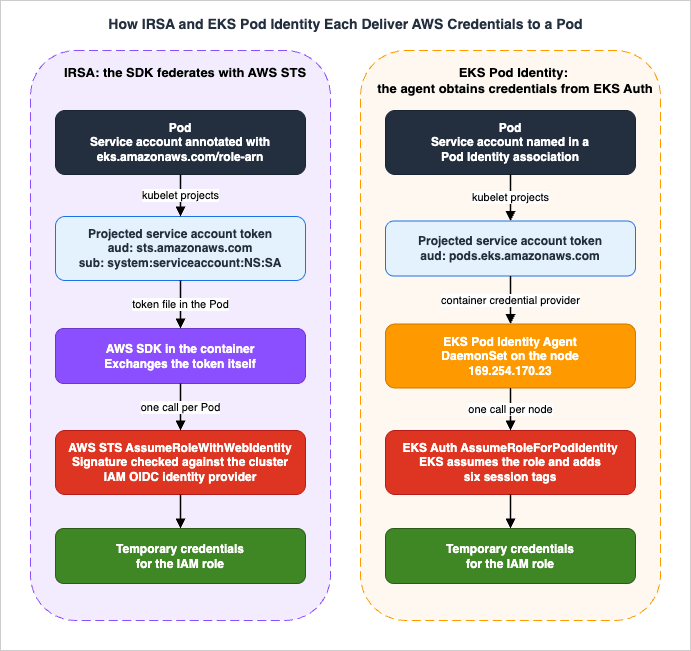
4.2 The trust policy is a single service principal
Because Amazon EKS performs the exchange, the role's trust policy no longer names the cluster. It names one service principal and permits two actions:{
"Version": "2012-10-17",
"Statement": [
{
"Sid": "AllowEksAuthToAssumeRoleForPodIdentity",
"Effect": "Allow",
"Principal": {
"Service": "pods.eks.amazonaws.com"
},
"Action": [
"sts:AssumeRole",
"sts:TagSession"
]
}
]
}
sts:AssumeRole is the assumption itself; sts:TagSession is required because Pod Identity attaches session tags to the request (Section 7.3). The console only lists roles that carry this trust policy when you create an association, which is a useful sanity check.That policy as written trusts the Amazon EKS service to assume the role on behalf of any cluster in any account that Amazon EKS will pass it — the association API and its
iam:PassRole check are what actually bind it to your cluster. The Best Practices Guide therefore recommends a confused-deputy condition, and gives the organization-scoped form:"Condition": {
"StringEquals": {
"aws:SourceOrgId": "${aws:ResourceOrgId}"
}
}
aws:SourceOrgId equal to the AWS Organizations organization ID of the account, so this restricts use of the role to clusters inside your organization. The launch blog shows the narrower variant using aws:SourceAccount and aws:SourceArn pinned to a specific cluster ARN, which is the right choice for a role that should serve exactly one cluster. Be aware of the interaction noted in the Best Practices Guide: if you pin sourceArn to a cluster and later do a blue/green cluster upgrade, you must update the trust policy for the new cluster — which gives back some of the "never edit the trust policy again" benefit, so pin deliberately.4.3 Prerequisites
- The agent. Install the
eks-pod-identity-agentAmazon EKS add-on once per cluster. Amazon EKS Auto Mode clusters do not need it — the capability is built in, and the User Guide repeats that note on every relevant page. - Node role permission. The node IAM role must allow
eks-auth:AssumeRoleForPodIdentity. The AWS managedAmazonEKSWorkerNodePolicyincludes it. On Amazon EKS Auto Mode, the managedAmazonEKSWorkerNodeMinimalPolicyexists largely for this: the EKS Auto Mode security whitepaper states thateks-auth:AssumeRoleForPodIdentity"is the only permission on the managed AmazonEKSWorkerNodeMinimalPolicy policy." Note that the add-on itself does not take a service-account role; it borrows the node role. - Reachability. The nodes must reach the EKS Auth API. The setup page marks this "Important": for nodes in private subnets, create an AWS PrivateLink interface endpoint,
com.amazonaws.<region-code>.eks-auth. If a proxy is in play, add169.254.170.23and[fd00:ec2::23]tono_proxyandNO_PROXY, or credential requests to the agent will fail. - Cluster version. The cluster's platform version must be at or later than the documented minimum. The only Kubernetes version currently carrying a floor is
1.28, which requires platform versioneks.4; all other listed versions are supported on all platform versions. - Ports and addresses. The agent uses the node's
hostNetworkand occupies ports80and2703on the link-local addresses169.254.170.23(IPv4) and[fd00:ec2::23](IPv6). If IPv6 is disabled on your nodes the agent cannot start, and you must explicitly disable IPv6 in the agent configuration. - Interaction with security groups for Pods. If you use security groups for Pods with the Amazon VPC CNI, set
ENABLE_POD_ENItotrueandPOD_SECURITY_GROUP_ENFORCING_MODEtostandard. The mechanics of trunk and branch interfaces are covered in the Amazon EKS Networking Deep Dive. - Permission to create associations. The IAM principal creating an association must have
iam:PassRolefor the role being associated. This is a genuine difference from IRSA, where noPassRolecheck occurs.
Two limits and one behavior belong here as well. A cluster supports up to 5,000 Pod Identity associations. Each service account can be associated with one IAM role, though the same role may be associated with many service accounts. And associations are eventually consistent — the API reference warns they "may take several seconds to be effective after the initial API call returns successfully" and recommends against putting association create and update calls "in the critical, high-availability code paths of your application." Create them in a setup routine, not in a startup probe.
Finally, the SDK floor is considerably newer than IRSA's, because Pod Identity needed the container credential provider to be wired into every SDK.
* You can sort the table by clicking on the column name.
| Language or tool | Minimum version for EKS Pod Identity |
|---|---|
| Java (Version 2) | 2.21.30 |
| Java (Version 1) | 1.12.746 |
| AWS SDK for Go v1 | v1.47.11 |
| AWS SDK for Go v2 | release-2023-11-14 |
| Python (Boto3) | 1.34.41 |
| Python (botocore) | 1.34.41 |
| AWS CLI | 1.30.0 (v1) and 2.15.0 (v2) |
| JavaScript v2 | 2.1550.0 |
| JavaScript v3 | v3.458.0 |
| Kotlin | v1.0.1 |
| Ruby | 3.188.0 |
| Rust | release-2024-03-13 |
| C++ | 1.11.263 |
| .NET | 3.7.734.0 |
| PowerShell | 4.1.502 |
| PHP | 3.289.0 |
5. Side-by-Side Comparison
* You can sort the table by clicking on the column name.| Attribute | EKS Pod Identity | IRSA |
|---|---|---|
| Credential path | Agent on the node calls EKS Auth AssumeRoleForPodIdentity | SDK in the Pod calls AWS STS AssumeRoleWithWebIdentity |
| Where the mapping lives | Amazon EKS API only; nothing in the cluster | Service account annotation plus the role's trust policy |
| Trust policy principal | Service principal pods.eks.amazonaws.com | The cluster's IAM OIDC provider (federated) |
| Per-cluster setup | Install the Pod Identity Agent add-on (built in on EKS Auto Mode) | Create an IAM OIDC identity provider |
| Scope of a role across clusters | One-time trust policy; reuse in any cluster unchanged | Trust policy must be edited for each new cluster's issuer |
| Association limit | 5,000 associations per cluster | Not applicable |
| Account-level ceiling | Not applicable | IAM default of 100 OIDC providers per account |
| Trust policy size pressure | None (the mapping is not in the policy) | Default 2,048-character trust policy, roughly 4 relationships, typically 8 at most |
| Session tags and ABAC | Six tags attached automatically | Not supported |
| Session policies | Supported, with session tags disabled | Not supported |
| Cross-account access | Target IAM role with automatic role chaining | Direct, via AssumeRoleWithWebIdentity or manual role chaining |
| AWS STS quota consumption | None from your account | Yes; SDK behavior can cause throttling |
iam:PassRole required | Yes, for the principal creating the association | No |
| Agent required on nodes | Yes (built in on EKS Auto Mode) | No |
| Minimum SDK versions | Newer floor (from late 2023) | Long-standing, widely satisfied |
| Environments supported | Amazon EKS only | Amazon EKS, Amazon EKS Anywhere, Red Hat OpenShift Service on AWS, self-managed Kubernetes on Amazon EC2 |
Compute support is the part most likely to decide the question outright, so it gets its own table.
* You can sort the table by clicking on the column name.
| Compute type | EKS Pod Identity | IRSA |
|---|---|---|
| Linux Amazon EC2 nodes (managed or self-managed) | Supported | Supported |
| Amazon EKS Auto Mode | Supported; the agent is built in | Supported |
| Amazon EKS Hybrid Nodes | Supported with the optional hybrid DaemonSet and a node-side credentials file | Supported |
| AWS Fargate (Linux or Windows Pods) | Not supported | Supported |
| Windows Amazon EC2 nodes | Not supported | Supported |
| Amazon EKS on AWS Outposts | Not supported | Not supported on local clusters |
| Amazon EKS Anywhere | Not supported | Supported |
| Self-managed Kubernetes on Amazon EC2 | Not supported | Supported |
Two notes on that table, both worth carrying into a design review.
Hybrid nodes are supported, but you would not learn that from the Pod Identity page. EKS Pod Identity has been an Amazon EKS Hybrid Nodes feature since hybrid nodes reached general availability on 2024-12-01 — that announcement lists "EKS Pod Identity" among the features you can use with them, and the EKS Hybrid Nodes overview page repeats it in two places. The "Configure add-ons for hybrid nodes" page documents the mechanism: because IMDS is not available on hybrid nodes, starting with agent version
v1.3.3-eksbuild.1 the add-on can optionally deploy a DaemonSet that mounts credentials from a node-side file, and starting with v1.3.7-eksbuild.2 there is a separate DaemonSet for Bottlerocket hybrid nodes, which additionally require Bottlerocket v1.39.0 or later. On Ubuntu, RHEL, and AL2023 you set enableCredentialsFile: true in the nodeadm configuration, re-run nodeadm init on each node, and install the add-on with {"daemonsets":{"hybrid":{"create": true}}}; on Bottlerocket you pass --enable-credentials-file=true to the bootstrap container command and install with {"daemonsets":{"hybrid-bottlerocket":{"create": true}}} instead. The hybrid nodes IAM role page correspondingly lists eks-auth:AssumeRoleForPodIdentity as an optional permission "for the Amazon EKS Pod Identity Agent." The catch is that the Pod Identity page's own restrictions list still frames availability as "Linux Amazon EC2 instances" and never mentions hybrid nodes, so a reader who checks only that page will conclude, incorrectly, that they are excluded. All of these pages were consulted on 2026-07-31.AWS Fargate and Windows are the clean, unambiguous exclusions. The Pod Identity page states that "Linux and Windows pods that run on AWS Fargate (Fargate) aren't supported" and "Pods that run on Windows Amazon EC2 instances aren't supported," and the Best Practices Guide names both as reasons to choose IRSA. If any part of the workload lands there, IRSA is not legacy — it is the mechanism.
Finally, availability by Region has moved. At launch in November 2023, Pod Identity was available in all Amazon EKS Regions except the AWS GovCloud (US) Regions and the China Regions. Checking the Amazon EKS API's Regional availability on 2026-07-31 shows
CreatePodIdentityAssociation available in commercial Regions and in AWS GovCloud (US-West), and not found in China (Beijing); the February 2026 announcement of Amazon EKS add-on integration with Pod Identity in the AWS GovCloud (US) Regions is consistent with that. Confirm for your own Regions rather than trusting any snapshot, including this one.6. Choosing Between Them
The decision is short if you take the questions in order. The first two are hard constraints; the rest are preferences with real weight.6.1 The decision sequence
- Where do the Pods run? If any of them run on AWS Fargate, on Windows Amazon EC2 nodes, on Amazon EKS Anywhere, on Red Hat OpenShift Service on AWS, or on self-managed Kubernetes on Amazon EC2 — IRSA. Pod Identity does not reach those. Note this can be a per-workload answer, not a per-cluster one.
- Can you move the SDK? Pod Identity requires a version from late 2023 or later in every container that needs credentials, including vendored controllers and operators you do not build. If a workload is pinned to an older SDK — IRSA, until it moves.
- How does cross-account access have to work? If your security model requires the Pod's identity to federate directly into a role in the workload account, or your existing controls are built around per-account OIDC providers — IRSA. Pod Identity reaches other accounts by role chaining through a role in the cluster account (Section 8.2), which is a different trust shape even though the outcome is similar.
- Are you already running IRSA at rest? If you have a working, standardized pattern for OIDC providers and role trust policies, and you are not hitting the OIDC-provider limit, the trust-policy size limit, or AWS STS throttling — there is no forcing function. The Best Practices Guide lists "you already use IRSA successfully and have a standard pattern" as a reason to stay. Migration has a cost and should buy something.
- Otherwise, prefer Pod Identity, and prefer it strongly if any of these describe you: you run many clusters per account, or expect to; you do blue/green cluster upgrades and are tired of rewriting trust policies; you want ABAC so a smaller number of roles can serve many service accounts; you want cluster administrators to manage service-account-to-role mapping while IAM administrators own the permissions; or your AWS STS call volume from Pods is causing throttling.
- Expect to run both. Both the User Guide and the Best Practices Guide describe a mixed model as supported and normal: legacy workloads on IRSA, new workloads on Pod Identity, on the same cluster. This is not a transitional embarrassment; for clusters that also run AWS Fargate Pods it is the permanent steady state.
6.2 When IRSA is the right answer, stated plainly
Because the general advice runs the other way, it is worth collecting the cases in one place. The EKS Best Practices Guide's own list is: you already use IRSA successfully and have a standard pattern for OIDC providers and IAM roles; your workloads run where Pod Identity is not supported, "such as AWS Fargate, Windows nodes, or applications using un-supported AWS SDKs"; and you require "a direct OIDC-based federation model to roles in your workload accounts" with security controls already built around OIDC providers.To that documented list, three practical situations follow from facts elsewhere in this guide:
- You need workload identity outside Amazon EKS too. If the same application also runs on Amazon EKS Anywhere, on Red Hat OpenShift Service on AWS, or on self-managed Kubernetes, IRSA gives you one mechanism everywhere. Pod Identity would give you two.
- You cannot grant
iam:PassRoleto whoever manages the cluster. Pod Identity requires it for association creation; IRSA does not. In organizations wherePassRoleis tightly held, that is a governance conversation, not a checkbox. - The workload cannot tolerate the credential cache window. Pod Identity credentials are cached by the agent for 6 hours without a target role and 59 minutes with one, and changing an association does not reset the cache (Section 10.3). If your operational model depends on a role change taking effect promptly without restarting Pods, understand that behavior before you move.
None of that argues against Pod Identity as the default for new work on supported node types. It argues against treating "migrate everything" as a goal in itself.
7. Least-Privilege Role Design
The mechanism decides how a Pod gets credentials. Role design decides what those credentials are worth if the Pod is compromised — and the guidance is mostly shared between the two.7.1 Role granularity
The Best Practices Guide's default is one IAM role per application, with both mechanisms, for isolation and least privilege, and a dedicated service account per application rather than reusing the namespace default. There is one documented reason to deviate: "when using ABAC with EKS Pod Identity, you may use a common IAM role across multiple service accounts and rely on their session attributes for access control," which "is especially useful when operating at scale, as ABAC allows you to operate with fewer IAM roles." So the trade is roles versus policy complexity, and only Pod Identity offers the second option.While you are there, turn off what you are not using: if an application does not call the Kubernetes API, set
automountServiceAccountToken: false so the Kubernetes API token is not mounted at all.7.2 Scoping the trust policy
For IRSA, scope with thesub and aud conditions in Section 3.2 — always naming the service account, never a full wildcard. For Pod Identity, the equivalent scoping happens in two places: the association (which is itself the cluster, namespace, and service account binding) and the confused-deputy condition in Section 4.2. Adding aws:SourceOrgId is the low-friction default; adding aws:SourceArn pinned to a cluster is stricter but costs you a trust policy edit on cluster replacement.Both mechanisms benefit from a permissions boundary on workload roles. The Best Practices Guide recommends it for both, framed as ensuring "the roles used by IRSA or Pod Identities can not exceed a maximum level of permissions" — a useful control when role creation is delegated to application teams.
7.3 Session tags and ABAC
This is Pod Identity's most consequential exclusive feature. When EKS Auth assumes the role it attaches six session tags:| Session tag | Value |
|---|---|
eks-cluster-arn | The ARN of the Amazon EKS cluster |
eks-cluster-name | The name of the Amazon EKS cluster |
kubernetes-namespace | The namespace the Pod runs in |
kubernetes-service-account | The service account name |
kubernetes-pod-name | The Pod name |
kubernetes-pod-uid | The Pod UID |
They are referenced in policies as
${aws:PrincipalTag/<key>} — for example, a bucket policy that only grants access when the caller's kubernetes-service-account, kubernetes-namespace, and eks-cluster-arn all match expected values.The uniqueness caveat is the part people get wrong. The Best Practices Guide spells it out: Kubernetes service accounts are only unique within a namespace, and Kubernetes namespaces are only unique within a cluster — and cluster names can repeat across accounts. A policy that conditions on
kubernetes-service-account alone is not an access control; it is a naming convention. Condition on eks-cluster-arn plus kubernetes-namespace plus kubernetes-service-account together. The guide also notes that a cluster deleted and recreated with the same name in the same Region and account will have the same ARN, which matters if you rely on ARN uniqueness across a rebuild.Three more documented behaviors:
- All Pod Identity session tags are transitive — they are passed to any subsequent
AssumeRoleyour workload performs, so you can condition on them in another account (Section 8). - You cannot add custom tags to the assumption. Tags applied to the IAM role itself remain available through the same
${aws:PrincipalTag/...}syntax. - On conflict, the tag Amazon EKS adds wins over a same-named tag on the role.
Session tags can be disabled per association, and the documented reason is specific: AWS packs inline session policies, managed policy ARNs, and session tags into a binary format with its own size limit, so if you hit
PackedPolicyTooLarge, dropping the tags is a way to reduce it. As of September 29, 2026, the EKS documentation still gives that reason, but it describes AWS STS before September 15, 2026: STS now enforces a single size limit on the assembled session token, and an overflow is still reported as PackedPolicyTooLarge. What counts toward that limit, and how to measure and test it, is covered in What Fills an AWS STS Session Token.Because ABAC turns tags into permissions, who can set those tags becomes a privilege escalation question. The Best Practices Guide says it directly: someone able to set
kubernetes- or eks- tags "may be able to set tags identical to what would be passed during EKS Pod Identity role chaining and may be able to escalate their privileges," and recommends restricting that with an IAM policy or a Service Control Policy. If you are building the guardrail, the SCP and RCP design patterns are in AWS Organization Guardrails.7.4 Session policies
Announced on 2026-03-24, session policies let a Pod Identity association carry an inline IAM policy that narrows the role's permissions for that association only. The constraints are tight and all of them matter:- The effective permissions are the intersection of the role's identity-based policies and the session policy. A session policy can only reduce, never add.
- It requires
disableSessionTagsto betrue. Session tags and session policies cannot be combined; the announcement attributes this to the AWS STS packed-policy size quota, and the EKS API still requires the setting as of September 29, 2026, although STS removed that separate quota on September 15, 2026. That is an either/or design decision, not a configuration detail. - The plaintext policy cannot exceed 2,048 characters.
- If the association also specifies a
targetRoleArn, the session policy applies to the target role's permissions, not to the role used to assume it.
The use case is a shared role serving several applications where you want per-application narrowing without minting a role each time — the same problem ABAC solves, with the opposite trade-off, and you must pick one.
7.5 The controls this guide does not re-derive
Workload roles sit inside the same evaluation machinery as everything else: SCPs and RCPs above them, resource policies beside them, permission boundaries around them. Where a Pod's call is denied and the role's policy clearly allows it, the answer is in that machinery — see IAM Policy Evaluation Logic Step-by-Step for the order, the AWS IAM Glossary for the vocabulary, and IAM Anti-Patterns for the failure catalog. To review a candidate policy before you attach it, the IAM Policy Least Privilege Analyzer runs entirely in the browser.8. Multi-Cluster and Multi-Account Patterns
8.1 One role, many clusters
This is Pod Identity's headline benefit and it is precisely bounded. Because the cluster is not named in the trust policy, "you can make identical associations in each cluster without modifying the trust policy of the role." With IRSA, every new cluster means a new OIDC issuer and therefore an edit to every role that workload uses in that cluster — and each edit consumes part of a trust policy that defaults to 2,048 characters, which the comparison documentation translates to roughly four relationships, typically eight at most even after a limit increase.The same asymmetry shows up during blue/green cluster upgrades, where you stand up a new cluster beside the old one and shift traffic. The Best Practices Guide notes that with IRSA "you will need to update the trust policy of each of the IRSA IAM roles with the OIDC endpoint of the new cluster," whereas with Pod Identity "you would create pod identity associations between the IAM roles and service accounts in the new cluster" — and only update the trust policy "if you have a
sourceArn condition." That last clause is the cost of the stricter confused-deputy condition from Section 4.2, and it is a fair trade to make consciously.8.2 Cross-account with Pod Identity target roles
Announced on 2025-06-12, target IAM roles let an association name two roles and have Amazon EKS perform the chaining. The mechanics, from the User Guide:- You supply a Pod Identity role in the cluster's account and a target IAM role that can be in the same or a different account. The Pod Identity role must be in the cluster's account "due to IAM PassRole requirements."
- When a Pod requests credentials, Pod Identity assumes the first role, then uses those credentials to assume the target role, and injects the target role's credentials into the Pod.
- The Pod Identity role needs a permission policy allowing
sts:AssumeRoleandsts:TagSessionon the target role ARN. - The target role's trust policy authorizes the Pod Identity role and — this is the useful part — can condition on the transitive session tags with
aws:RequestTag/eks-cluster-arn,aws:RequestTag/kubernetes-namespace, andaws:RequestTag/kubernetes-service-account, plusArnEqualsonaws:PrincipalARN. That lets the resource-owning account authorize a specific service account in a specific namespace in a specific cluster, without trusting the whole cluster account.
{
"Version": "2012-10-17",
"Statement": [
{
"Effect": "Allow",
"Principal": { "AWS": "arn:aws:iam::111122223333:root" },
"Action": [ "sts:AssumeRole", "sts:TagSession" ],
"Condition": {
"StringEquals": {
"aws:RequestTag/eks-cluster-arn": "arn:aws:eks:us-east-1:111122223333:cluster/example-cluster",
"aws:RequestTag/kubernetes-namespace": "ExampleNameSpace",
"aws:RequestTag/kubernetes-service-account": "ExampleServiceAccountName"
},
"ArnEquals": {
"aws:PrincipalARN": "arn:aws:iam::111122223333:role/eks-pod-identity-primary-role"
}
}
}
]
}
sts:ExternalId to a value encoding the cluster, namespace, and service account in the form region/account/cluster-name/namespace/service-account-name, which you condition on instead. Both variants are documented; the tag form composes better with ABAC, and the external-ID form is what you use alongside session policies.The caching behavior changes when a target role is present, and it is the single most surprising operational fact in this area: the agent caches credentials for 6 hours for an association with no target role, and 59 minutes when a target role is set. Modifying an existing association — changing the role ARN, adding a target role, updating the session policy — does not reset the cache. To make a change take effect sooner you recreate the Pods; otherwise you wait for expiry.
8.3 Cross-account with IRSA
IRSA offers two documented shapes, and the User Guide states the trade-off up front: option 1 "is simpler but requires Account B to create and manage an OIDC identity provider for Account A's cluster," while option 2 "keeps OIDC management in Account A but requires role chaining through twoAssumeRole calls."- Identity provider in the resource account. Account B creates an IAM OIDC provider for Account A's cluster issuer and a role trusting it; Account A annotates the service account with Account B's role ARN. The Pod then federates directly into the workload account — which is exactly the "direct OIDC-based federation model" that Section 6 lists as a reason to keep IRSA.
- Chained
AssumeRole. Account A keeps the OIDC provider and an IRSA role; Account B's role trusts Account A; the Pod chains with two AWS CLI profiles, one usingweb_identity_token_fileand the other using it assource_profile. The documentation attaches an "Important" note here too: replace the account-root principal in Account B's trust policy with the specific Account A role ARN, because using the root "allows any IAM principal in Account A to assume this role."
Note the shape difference this creates for governance. With IRSA option 1, the resource account owns an identity provider that names a specific cluster — coupling that must be maintained when the cluster is replaced. With Pod Identity target roles, the resource account owns only a role that trusts a role, with tag conditions describing the workload — no cluster-specific IAM object to maintain, but an extra hop and the shorter cache window.
8.4 Where the clusters and the resources live
Both mechanisms support centralized clusters (one cluster account, resources in workload accounts) and decentralized clusters (a cluster in each workload account, no cross-account access at all), and the EKS Best Practices Guide compares those two topologies directly on cluster management, resilience, isolation, quotas, networking, and access management. The decentralized model removes the cross-account question entirely, which is worth weighing before engineering around it. For the surrounding account structure — organizational units, guardrails, and the operational patterns that go with them — see AWS Multi-Account Operational Patterns.9. Migration Path
Migration from IRSA to Pod Identity is incremental and reversible up to the last step, provided you sequence it correctly. The property that makes it safe is the credential provider chain: "if your workloads currently use credentials that are earlier in the chain of credentials, those credentials will continue to be used even if you configure an EKS Pod Identity association for the same workload." In other words, you can put the new configuration in place before you remove the old one.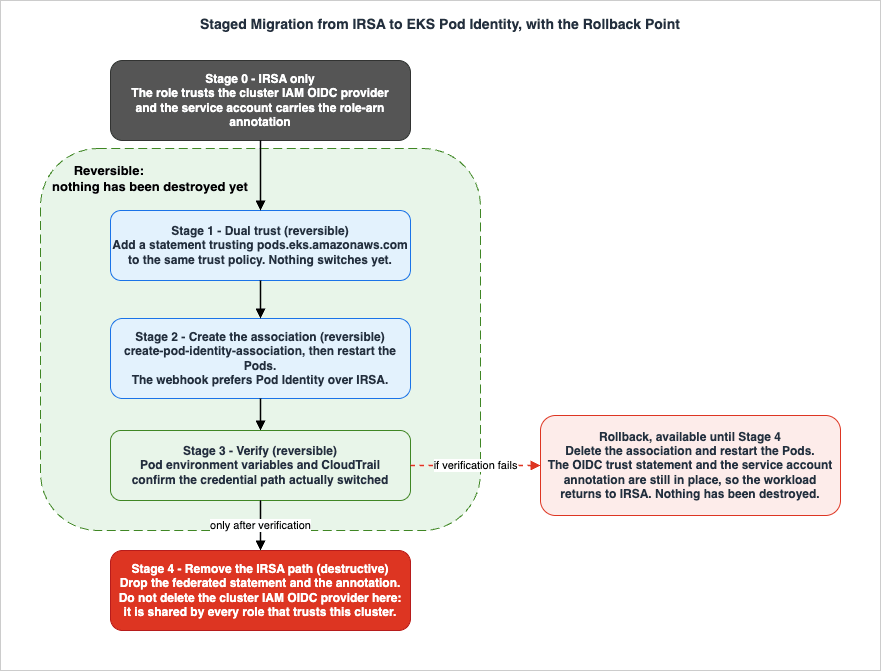
9.1 Preconditions
Before touching anything, confirm all of the following, per workload rather than per cluster:- The Pods run on a supported compute type (Section 5). Anything on AWS Fargate or Windows nodes stops here and stays on IRSA.
- Every container that needs credentials uses an SDK at or above the Pod Identity floor (Section 4.3). This includes third-party controllers and operators.
- The cluster meets the platform version requirement, and the Pod Identity Agent add-on is installed (or the cluster is Amazon EKS Auto Mode).
- The node role allows
eks-auth:AssumeRoleForPodIdentity, and nodes in private subnets can reach the EKS Auth endpoint. - The principal that will create associations has
iam:PassRolefor the target roles.
9.2 The staged sequence
Stage 1 — Add the second trust relationship (reversible). Edit the role's trust policy to trust both the existing OIDC provider andpods.eks.amazonaws.com. Nothing changes yet; the role simply accepts two ways in. The launch blog describes this as the way "to ensure a seamless migration."{
"Version": "2012-10-17",
"Statement": [
{
"Sid": "ExistingIrsaTrust",
"Effect": "Allow",
"Principal": {
"Federated": "arn:aws:iam::111122223333:oidc-provider/oidc.eks.us-east-1.amazonaws.com/id/EXAMPLED539D4633E53DE1B71EXAMPLE"
},
"Action": "sts:AssumeRoleWithWebIdentity",
"Condition": {
"StringEquals": {
"oidc.eks.us-east-1.amazonaws.com/id/EXAMPLED539D4633E53DE1B71EXAMPLE:aud": "sts.amazonaws.com",
"oidc.eks.us-east-1.amazonaws.com/id/EXAMPLED539D4633E53DE1B71EXAMPLE:sub": "system:serviceaccount:default:my-service-account"
}
}
},
{
"Sid": "AllowEksAuthToAssumeRoleForPodIdentity",
"Effect": "Allow",
"Principal": { "Service": "pods.eks.amazonaws.com" },
"Action": [ "sts:AssumeRole", "sts:TagSession" ],
"Condition": {
  "StringEquals": {
    "aws:SourceOrgId": "${aws:ResourceOrgId}"
  }
}
}
]
}
aws iam get-role --role-name my-role --query Role.AssumeRolePolicyDocument, keep a copy, and add the statement to it — do not write the new statement over the old document. A role whose OIDC statement is dropped by accident stops working for every Pod already using it, in every cluster that trusts it.Stage 2 — Create the association and restart the Pods (reversible).
aws eks create-pod-identity-association \
  --cluster-name my-cluster \
  --role-arn arn:aws:iam::111122223333:role/my-role \
  --namespace default \
  --service-account my-service-account
kubectl rollout restart deployment/my-deployment — so the mutating webhook injects the Pod Identity environment variables. The launch blog notes that when a role is set up for both, "the EKS Pod Identity webhook gives preference to EKS Pod Identity over IRSA."Stage 3 — Verify before removing anything (reversible). Confirm the Pod actually switched, using both the Pod spec and CloudTrail (Section 10). The Pod spec check is immediate:
# Should now show the container credentials URI
kubectl exec deploy/my-deployment -- env | grep AWS_CONTAINER_CREDENTIALS_FULL_URI

# Should show the assumed role identity in use
kubectl exec deploy/my-deployment -- aws sts get-caller-identity
aws eks delete-pod-identity-association --cluster-name my-cluster --association-id a-abcdefghijklmnop1 and restart the workload. Because the OIDC trust statement and the service account annotation are still in place, the Pod returns to IRSA. Nothing has been destroyed.Stage 4 — Remove the IRSA path (the destructive step). Only after verification, remove the federated statement from the trust policy and drop the
eks.amazonaws.com/role-arn annotation from the service account. Treat this as a separate change with its own approval, and observe two hard warnings:- Do not delete the cluster's IAM OIDC identity provider as part of a per-workload migration. The provider is an account-level object shared by every role that trusts that cluster. Deleting it breaks all of them at once, including workloads you have not migrated and any external token validators. Retire it only when nothing in the account references that issuer, and treat it as a change with a cluster-wide blast radius.
- Removing the annotation and the trust statement are independently reversible, but only if you kept the values. Record the issuer URL and the exact
subcondition before you delete them; reconstructing an issuer ID from memory is not possible.
9.3 Doing it with eksctl
eksctl automates the sequence. The documented behavior is that eksctl utils migrate-to-pod-identity installs the agent add-on if absent, identifies roles associated with iamserviceaccounts and with add-ons that support Pod Identity, updates those roles' trust policies to add the Amazon EKS service principal (optionally removing the OIDC relationship), creates the associations, and updates add-ons to use Pod Identity.# Plan only. Without --approve, eksctl prints the task list and changes nothing.
eksctl utils migrate-to-pod-identity --cluster my-cluster
# Apply. Add --remove-oidc-provider-trust-relationship only after verification.
eksctl utils migrate-to-pod-identity --cluster my-cluster --approve
--remove-oidc-provider-trust-relationship collapses Stage 1 and Stage 4 into one command, which removes the rollback point described above; use it only on roles you have already verified.9.4 Add-ons are a separate track
Cluster add-ons that call AWS need roles too, and here Pod Identity has a dedicated path. On 2024-11-18 AWS announced direct integration between Amazon EKS add-ons and Pod Identity, so add-on operations through the console, CLI, API,eksctl, and AWS CloudFormation can manage the associations themselves rather than requiring separate Pod Identity API calls; the same integration reached the AWS GovCloud (US) Regions in February 2026. Before installing an add-on you can ask the API what it needs:# Does this add-on require IAM permissions?
aws eks describe-addon-versions \
--addon-name aws-ebs-csi-driver \
--kubernetes-version 1.30
# What service account and managed policy does it recommend?
aws eks describe-addon-configuration \
--query podIdentityConfiguration \
--addon-name aws-ebs-csi-driver \
--addon-version v1.31.0-eksbuild.1
v1.26.0-eksbuild.1, Amazon VPC CNI from v1.15.5-eksbuild.1, Amazon EFS CSI Driver from v2.0.5-eksbuild.1, AWS Distro for OpenTelemetry from v0.94.1-eksbuild.1, Amazon CloudWatch Observability agent from v3.1.0-eksbuild.1, with Mountpoint for Amazon S3 CSI Driver listed as not supported. That table carries the line "This table was last updated on October 28, 2024," so treat it as a floor and confirm with describe-addon-versions for your add-on and cluster version rather than as a current inventory. For the Amazon VPC CNI specifically, the Best Practices Guide notes the aws-node DaemonSet supports Pod Identity in versions v1.15.5 and later, and separately recommends moving aws-node off the node role entirely — one of the highest-value single changes available, since the node role's CNI permissions are otherwise shared by every Pod on the node.Controllers that create AWS resources from Kubernetes manifests are the sharpest version of this question, because the role they hold is a role over your account rather than over a single workload's data. Amazon EKS Capabilities covers how that permission path is arranged for ACK when the controller no longer runs on your cluster at all.
The add-on integration above also covers certificates: installing the AWS Private CA Connector for Kubernetes creates the Pod Identity association rather than leaving it to a separate call. What the connector then does with those credentials is followed in Certificate Distribution in Kubernetes with AWS Private CA.
10. Observability and Auditing
10.1 What each mechanism looks like in CloudTrail
The two mechanisms produce structurally different audit trails, and knowing which to search for is half the diagnosis.IRSA produces AWS STS
AssumeRoleWithWebIdentity events. The response identifies the federation directly: the Provider is the cluster's OIDC provider ARN, the Audience is sts.amazonaws.com, and SubjectFromWebIdentityToken carries system:serviceaccount:<namespace>:<service-account>. That subject is the direct link from an AWS API call back to a Kubernetes identity — but note what it does not contain: the cluster. If two clusters share an OIDC-federated role, the subject alone will not tell them apart; the provider ARN will.Pod Identity produces
AssumeRole events with pods.eks.amazonaws.com as the principal, carrying the six session tags. Those tags are strictly more informative than the IRSA subject: they include the cluster ARN, the namespace, the service account, and both the Pod name and Pod UID. Where IRSA tells you "some Pod using this service account," Pod Identity tells you which Pod instance, in which cluster. Separately, the agent's own calls appear as eks-auth:AssumeRoleForPodIdentity, which is documented as being "only used by the EKS Pod Identity Agent" — if you see it from anywhere else, investigate.If you are building the account-wide collection and query layer for this, the design is in Centralized Logging and Audit Architecture on AWS, and the metrics and tracing side in the AWS Observability Architecture Guide.
10.2 Auditing the mapping itself
Beyond the credential events, audit the configuration. With Pod Identity the entire mapping is in the Amazon EKS API, soaws eks list-pod-identity-associations and describe-pod-identity-association give you an authoritative inventory of which service account may assume which role — something IRSA cannot offer, because its equivalent is spread across every service account annotation in every cluster plus every role trust policy in IAM. That inventory property is a genuine and underrated operational advantage of Pod Identity, and it is worth capturing on a schedule.Note also who can change it. Association creation requires
iam:PassRole, so the CloudTrail events for association APIs, combined with the PassRole grants in your account, define the set of principals who can hand an IAM role to a workload. On the IRSA side the equivalent power is "who can edit role trust policies" plus "who can annotate service accounts in the cluster" — two different systems, which is exactly the separation-of-duties argument the User Guide makes for Pod Identity: "all configuration of EKS Pod Identity associations is done in Amazon EKS and all configuration of the IAM permissions is done in IAM."10.3 The cache window explains most "my change did not apply"
Repeating the fact from Section 8.2 because it lands here operationally: the Pod Identity Agent caches credentials for 6 hours without a target role and 59 minutes with one, and modifying an association does not reset the cache. If you change the role on an association and the Pod's permissions do not change, that is expected behavior, not a bug. Recreate the Pods to pick it up immediately, or wait for expiry.10.4 Diagnosing a broken credential path
The failure signatures are documented and distinctive:AccessDeniedExceptiononeks-auth:AssumeRoleForPodIdentityin the agent logs means the node role lacks the permission, or an SCP blocks the action. Check the node role first — this is not about the workload role.- A read timeout on
http://169.254.170.23/v1/credentials, or "unable to fetch credentials from EKS Auth," points at reachability: the EKS Auth interface endpoint in a private cluster, a firewall, or a proxy configuration that does not exclude the link-local address. InvalidIdentityToken: No OpenIDConnect provider found in your account for https://oidc.eks.<region>.amazonaws.com/id/...is the IRSA equivalent: the cluster's IAM OIDC provider does not exist, or its URL does not match the cluster's issuer.- "Unable to locate credentials" from an SDK usually means the SDK version does not support the mechanism you configured, or the Pod is not actually using the service account you think it is.
Useful checks in order: read the agent logs with
kubectl logs -n kube-system -l app.kubernetes.io/name=eks-pod-identity-agent, then kubectl exec ... -- env | grep AWS_ to see which mechanism the webhook actually wired up, then aws sts get-caller-identity from inside the Pod to see the identity that results. If get-caller-identity returns the node role, the Pod is falling through the credential chain to the instance profile, which is the single most common silent failure — and the reason Section 2.2 recommends restricting IMDS so that it fails loudly instead.11. Failure Modes and Anti-Patterns
- A wildcard in the IRSA
subcondition.system:serviceaccount:*:*lets any service account in the cluster assume the role. The documentation calls this out with a warning; treat any trust policy without an explicit service account as a finding. - Omitting the
subcondition entirely. Same outcome, less obvious. An IRSA trust policy that conditions only onaudis cluster-wide. - Assuming per-Pod roles removed the node role. They did not. Without IMDS restriction the Pod still reaches the instance profile, and a credential failure will silently fall through to it rather than erroring.
- Restricting IMDS without checking what depends on it. Setting the hop limit to 1 breaks any Pod that has not been migrated to IRSA or Pod Identity, and Pods with
hostNetwork: truekeep IMDS access regardless. Disabling instance metadata entirely breaks node components. - ABAC conditions on the service account name alone. Service accounts are unique only within a namespace and namespaces only within a cluster. Always combine
eks-cluster-arn,kubernetes-namespace, andkubernetes-service-account. - Letting anyone set
kubernetes-oreks-tags. With ABAC in place, tag-setting permission is permission-granting permission. Constrain it with an IAM policy or an SCP. - Expecting session policies and session tags to coexist. They cannot; session policies require session tags to be disabled. Choosing session policies means giving up the ABAC conditions in the same association.
- Migrating a workload whose SDK is too old. The association will exist, the environment variables will be injected, and the SDK will ignore them — falling through the chain, often to the node role, which looks like it works until the permissions differ.
- Forgetting the node role permission or the private endpoint.
eks-auth:AssumeRoleForPodIdentityon the node role and theeks-authinterface endpoint in private subnets are prerequisites, not optimizations. - Forgetting
no_proxy. A cluster-wide proxy that does not exclude169.254.170.23and[fd00:ec2::23]sends credential requests to the proxy. - Putting association creation in a startup path. Associations are eventually consistent by several seconds; the API reference explicitly recommends keeping create and update calls out of high-availability code paths.
- Deleting the IAM OIDC provider during a partial migration. It is an account-level object shared by every role trusting that cluster. Removing it is not a per-workload cleanup step.
- Assuming a role change takes effect immediately. The 6-hour and 59-minute cache windows, and the fact that association updates do not reset the cache, catch teams during incident response.
- Sharing one service account across applications. The mechanism is only as granular as the service account. A shared service account means a shared role, whichever mechanism you use.
- Treating "Pod Identity everywhere" as the goal. AWS Fargate and Windows Pods cannot use it, and a working IRSA estate is not a defect. Migrate where it buys something.
12. Frequently Asked Questions
Q. Should every Amazon EKS cluster move to Pod Identity?A. No. AWS recommends Pod Identity "whenever possible" for supported node types, and the Best Practices Guide recommends it "for new applications running on supported node types" — but the same guide lists concrete cases for IRSA: an existing working IRSA pattern, workloads on AWS Fargate or Windows nodes or with unsupported SDKs, and a requirement for direct OIDC-based federation into workload accounts. Decide per workload, not per cluster, and expect a mixed model.
Q. Can both mechanisms run in the same cluster?
A. Yes, and that is the documented migration model. If a role trusts both the OIDC provider and
pods.eks.amazonaws.com and an association exists, the EKS Pod Identity webhook gives preference to Pod Identity. Because Pod Identity sits ahead of the old credentials in the SDK chain, you can configure the new path before removing the old one.Q. Does Pod Identity work on AWS Fargate?
A. No. The User Guide states that Linux and Windows Pods running on AWS Fargate are not supported, as are Pods on Windows Amazon EC2 instances. Use IRSA for those. For Fargate-based container workloads more broadly, the Amazon ECS-side patterns are in the Amazon ECS on Fargate Microservices Architecture Guide.
Q. What about Amazon EKS Hybrid Nodes?
A. Supported — EKS Pod Identity has been listed as an Amazon EKS Hybrid Nodes feature since their general availability on 2024-12-01 — but it needs extra setup, because IMDS is unavailable on hybrid nodes. The Pod Identity Agent add-on deploys an optional DaemonSet that reads credentials from a node-side file: from agent
v1.3.3-eksbuild.1 for Ubuntu, RHEL, and AL2023 (set enableCredentialsFile: true in the nodeadm configuration and install with {"daemonsets":{"hybrid":{"create": true}}}), and from v1.3.7-eksbuild.2 for Bottlerocket, which also requires Bottlerocket v1.39.0 or later and instead uses the bootstrap container flag --enable-credentials-file=true with {"daemonsets":{"hybrid-bottlerocket":{"create": true}}}. Note that the restrictions list on the Pod Identity page still describes availability in terms of Linux Amazon EC2 instances and does not mention hybrid nodes, so do not read that list as a denial.Q. How does cross-account access differ between the two?
A. IRSA federates directly: the Pod's token can be exchanged for a role in another account, either by creating an OIDC provider in that account or by chaining
AssumeRole. Pod Identity chains natively: you set a target IAM role on the association, Amazon EKS assumes the cluster-account role and then the target role, and the target account can authorize on the transitive session tags or on sts:ExternalId. The Pod Identity role must live in the cluster's account because of the iam:PassRole requirement, and the credential cache shortens to 59 minutes when a target role is set.Q. Why did my permission change not take effect?
A. Almost certainly the credential cache. The Pod Identity Agent caches for 6 hours without a target role and 59 minutes with one, and updating an association does not reset it. Recreate the Pods to apply a change immediately.
Q. Do I still need the IAM OIDC provider after migrating?
A. Only if something still uses it. It is an account-level object shared by every role that trusts that cluster's issuer, plus any external token validators you run. Remove the federated statement from individual role trust policies first, verify, and retire the provider itself as a separate, cluster-wide change.
Q. Is Pod Identity available in every Region?
A. Not identically, and this has changed. At launch in November 2023 it was excluded from the AWS GovCloud (US) Regions and the China Regions. Checking the Amazon EKS API's Regional availability on 2026-07-31 shows
CreatePodIdentityAssociation present in commercial Regions and in AWS GovCloud (US-West) and not found in China (Beijing), consistent with the February 2026 announcement of add-on integration in the AWS GovCloud (US) Regions. Verify for the Regions you actually use.13. Summary
Amazon EKS gives you two ways to hand a Pod its own AWS credentials, and they differ in where the cluster-to-role mapping lives. IRSA puts it in IAM: a per-cluster OIDC provider, a federated trust policy per role, and an SDK that exchanges a projected token with AWS STS. EKS Pod Identity puts it in Amazon EKS: an association record, a single service principal in the trust policy, and an agent that obtains credentials from the EKS Auth API on the node's behalf. Everything else follows from that one difference — why Pod Identity roles survive cluster replacement unedited, why it can attach session tags and support ABAC, why it needsiam:PassRole and an agent, why it does not consume your AWS STS quota, and why it cannot reach AWS Fargate or Windows Pods.The decision is therefore short. Compute type and SDK version are hard constraints; if a workload runs on AWS Fargate, on Windows nodes, or outside Amazon EKS, IRSA is not legacy, it is the answer. If your controls are built on direct OIDC federation into workload accounts, IRSA is the answer. If you already run IRSA well and are not hitting the 100-provider limit, the 2,048-character trust policy, or AWS STS throttling, staying is a legitimate decision. Everywhere else — and especially with many clusters, blue/green cluster upgrades, ABAC ambitions, or a desire to separate cluster administration from IAM administration — Pod Identity is the better default, and a mixed cluster is a supported steady state rather than an unfinished migration.
Whichever you choose, the design work is the same: one role per application, one service account per application, trust policies that name the service account rather than wildcarding it, ABAC conditions that combine the cluster ARN with the namespace and service account rather than trusting a name to be unique, permissions boundaries on delegated roles, and IMDS restricted so a credential failure surfaces instead of silently falling back to the node role. Migrate in stages with the dual-trust window in place, keep the association-deletion rollback available until CloudTrail confirms the switch, and treat removing the OIDC provider as a cluster-wide change rather than a cleanup task. Because this area is still moving — cross-account target roles in June 2025, session policies in March 2026, AWS PrivateLink for the cluster OIDC endpoint in July 2026 — re-check the linked documentation before you act; everything here was verified on 2026-07-31 and dated accordingly.
For the layers around this one: Pod networking and security groups for Pods are in the Amazon EKS Networking Deep Dive, the service's launch history is in the AWS History and Timeline regarding Amazon EKS, policy evaluation order is in IAM Policy Evaluation Logic Step-by-Step, the organization-level guardrails are in AWS Organization Guardrails, and a worked example of a demanding Amazon EKS workload that needs both is in Self-Managed LLM Inference on Amazon EKS.
14. References
- Amazon EKS User Guide - Grant Kubernetes workloads access to AWS using Kubernetes Service Accounts
- Amazon EKS User Guide - Learn how EKS Pod Identity grants pods access to AWS services
- Amazon EKS User Guide - Understand how EKS Pod Identity works
- Amazon EKS User Guide - Set up the Amazon EKS Pod Identity Agent
- Amazon EKS User Guide - Assign an IAM role to a Kubernetes service account
- Amazon EKS User Guide - Grant Pods access to AWS resources based on tags
- Amazon EKS User Guide - Access AWS Resources using EKS Pod Identity Target IAM Roles
- Amazon EKS User Guide - Use pod identity with the AWS SDK
- Amazon EKS User Guide - Configure Pods to access AWS services with service accounts
- Amazon EKS User Guide - IAM roles for service accounts
- Amazon EKS User Guide - Create an IAM OIDC provider for your cluster
- Amazon EKS User Guide - Assign IAM roles to Kubernetes service accounts
- Amazon EKS User Guide - Configure Pods to use a Kubernetes service account
- Amazon EKS User Guide - Use IRSA with the AWS SDK
- Amazon EKS User Guide - Authenticate to another account with IRSA
- Amazon EKS User Guide - Retrieve IAM information about an Amazon EKS add-on (Pod Identity support reference)
- Amazon EKS User Guide - Amazon EKS Hybrid Nodes overview
- Amazon EKS User Guide - Configure add-ons for hybrid nodes
- Amazon EKS User Guide - Prepare credentials for hybrid nodes
- Amazon EKS User Guide - Learn how access control works in Amazon EKS
- Amazon EKS User Guide - AWS add-ons
- Amazon EKS User Guide - Access Amazon EKS using AWS PrivateLink
- Amazon EKS User Guide - Disable IPv6 in the EKS Pod Identity Agent
- Amazon EKS User Guide - AWS managed policies for Amazon EKS
- Amazon EKS API Reference - CreatePodIdentityAssociation
- Amazon EKS API Reference - UpdatePodIdentityAssociation
- Amazon EKS API Reference - AssumeRoleForPodIdentity
- Amazon EKS Best Practices Guide - Identity and Access Management
- Amazon EKS Best Practices Guide - Multi Account Strategy
- eksctl documentation - EKS Pod Identity Associations
- Security Overview of Amazon EKS Auto Mode - Workloads
- AWS SDKs and Tools Reference Guide - Credential provider chain
- IAM User Guide - Pass session tags in AWS STS
- IAM User Guide - Permissions boundaries for IAM entities
- IAM User Guide - The confused deputy problem
- AWS What's New (2019-09-04) - Amazon EKS adds support to assign IAM permissions to Kubernetes service accounts
- AWS What's New (2023-11-26) - Amazon EKS introduces EKS Pod Identity
- AWS What's New (2024-11-18) - Amazon EKS simplifies providing IAM permissions to EKS add-ons
- AWS What's New (2024-12-01) - Announcing Amazon EKS Hybrid Nodes
- AWS What's New (2025-06-12) - Amazon EKS Pod Identity simplifies the experience for cross-account access
- AWS What's New (2026-02) - Amazon EKS simplifies providing IAM permissions to EKS add-ons in AWS GovCloud (US) Regions
- AWS What's New (2026-07-27) - Amazon EKS now supports AWS PrivateLink for the cluster OIDC endpoint
- AWS Containers Blog - Amazon EKS Pod Identity: a new way for applications on EKS to obtain IAM credentials
- AWS Containers Blog - Amazon EKS Pod Identity streamlines cross account access
- AWS Containers Blog (2026-03-24) - Session policies for Amazon EKS Pod Identity
Related Articles
- Amazon EKS Networking Deep Dive - VPC CNI, IP Address Management, Security Groups for Pods, and Pod Connectivity
The sibling article, and the delegation target for everything about Pod networking. - AWS History and Timeline regarding Amazon EKS
When each Amazon EKS capability shipped. - IAM Policy Evaluation Logic Step-by-Step
The order in which the policies written here are evaluated. - IAM Anti-Patterns - Real-World Mistakes and Their Root Causes
The broader failure catalog around IAM design. - AWS IAM Glossary
Definitions for every IAM term used in this guide. - AWS Organization Guardrails - Service Control Policies, Resource Control Policies, and Data Perimeter Design
Where the tag-setting and action guardrails live. - AWS Multi-Account Operational Patterns
The account structure around the cross-account patterns in Section 8. - Centralized Logging and Audit Architecture on AWS
Collecting and querying the CloudTrail events described in Section 10. - AWS Observability Architecture Guide
The metrics and tracing side of the same estate. - Self-Managed LLM Inference on Amazon EKS
A demanding Amazon EKS workload where workload identity design matters. - Amazon ECS on Fargate Microservices Architecture Guide
The Amazon ECS task role model, for comparison. - AWS Elastic Load Balancing Decision Guide
The ingress layer in front of these workloads. - IAM Policy Least Privilege Analyzer
Review a candidate policy in the browser before attaching it.
References:
Tech Blog with curated related content
Written by Hidekazu Konishi