Centralized Logging and Audit Architecture on AWS - Multi-Account Log Aggregation, Detection, and Query with CloudTrail, Config, Security Hub, and OpenSearch
First Published:
Last Updated:
This guide is the detection-and-audit counterpart to a preventive zero-trust design. Prevention decides who is allowed to act; audit and detection decide how you know what happened and how you prove it later. Those are different architectures, and conflating them is a common reason centralized logging projects stall.
The core idea is that a centralized logging and audit platform is one connected system with four responsibilities, not a pile of independent services:
- Aggregate — collect API activity (CloudTrail) and configuration state (AWS Config) from every member account and every Region into one organization-owned destination.
- Make immutable — land those logs in a dedicated, isolated account where write-once-read-many (WORM) controls and encryption make after-the-fact tampering detectable and, where required, impossible.
- Detect — correlate the raw material into prioritized findings with AWS Security Hub, Security Hub CSPM, and Amazon GuardDuty, aggregated to one administrator view.
- Query — let an investigator slice the archive with Amazon Athena, search it in near real time with Amazon OpenSearch Service, and drive automated response from Amazon EventBridge.
This article walks one named reference architecture end to end. It shows the implementation of each layer, traces a single API event through the whole pipeline, and then spends real time on the failure modes — because a logging platform that silently stops aggregating is worse than no platform at all, since it produces false confidence.
This is an implementation walkthrough, not a service-selection guide. Where a decision deserves its own deep treatment — how to structure a multi-account organization, how IAM policy evaluation actually resolves, how to design a tagging strategy — this article delegates to existing references rather than rehashing them. Throughout, retention and ingest volume are discussed in terms of time and compliance requirements, never in monetary terms; for pricing, always consult the official AWS pricing pages.
A note on scope and honesty, because this is a security topic: configuring the controls below does not by itself make an environment "secure." These controls make activity observable and tamper-evident; they are necessary, not sufficient. This guide avoids real secret values and does not describe how to evade or defeat the controls it builds.
1. Introduction
The four responsibilities above — aggregate, make immutable, detect, query — are the spine of this guide. The sections that follow implement each one across multiple AWS services tied together by AWS Organizations, then trace one event through all of them and dwell on how the pipeline fails. The deep "which service should I choose" questions are delegated to existing references so this article can stay an implementation walkthrough.For the account foundation the whole design rests on — organizational units, account vending, and guardrails — see AWS Multi-Account Operational Patterns.
2. The Reference Architecture at a Glance
The architecture has a single backbone defined by the AWS Security Reference Architecture (AWS SRA): a dedicated Log Archive account that lives in a Security organizational unit (OU) and serves as the centralized, immutable repository for all security-relevant logs across the organization.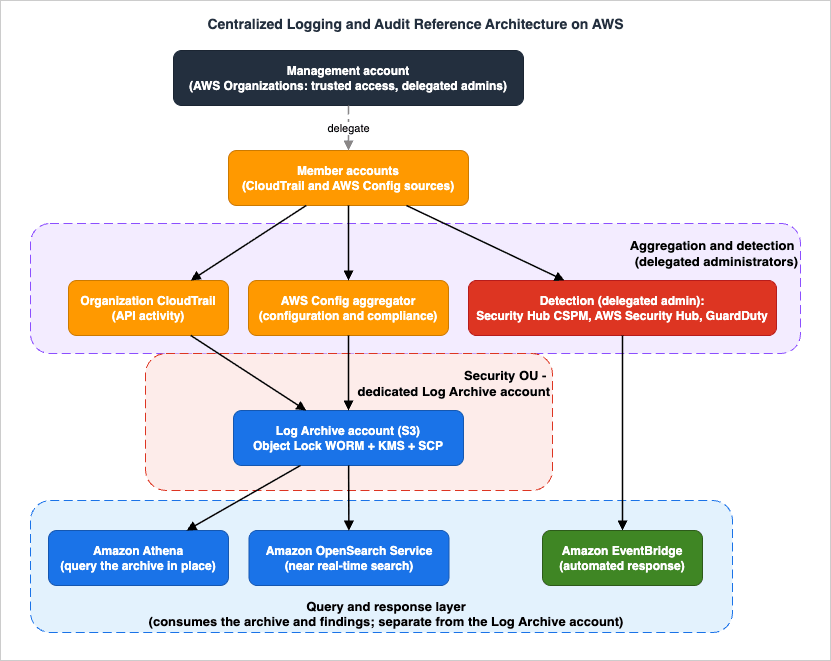
- AWS Organizations provides the management account and the concept of delegated administrators. Almost nothing in this architecture runs in the management account at steady state; instead, security services are delegated to purpose-built accounts so that the blast radius of a compromised management account is reduced and day-to-day operation does not require its credentials.
- Aggregation layer: an organization CloudTrail trail records API activity from every member account; an AWS Config aggregator collects configuration items and compliance state; both are centralized rather than configured account-by-account.
- Detection layer: Security Hub CSPM runs posture checks (security standards and controls) with central configuration; the new AWS Security Hub correlates signals into prioritized exposure and threat findings; Amazon GuardDuty performs threat detection. All three use the delegated-administrator + organization model so a single security account sees the whole estate.
- Immutable archive: the Log Archive account's S3 buckets receive the aggregated CloudTrail/Config data, protected by S3 Object Lock (WORM), AWS KMS encryption, bucket policies, and service control policies (SCPs) that even account administrators cannot override.
- Query and response: Amazon Athena queries the archive in place; Amazon OpenSearch Service provides near-real-time search and dashboards; Amazon EventBridge turns findings into automated response.
The AWS SRA explicitly calls for the Log Archive account to centralize CloudTrail organization trails, VPC flow logs, Amazon CloudFront and AWS WAF access logs, and Amazon Route 53 DNS logs, with immutability and durability enforced through least-privilege roles, KMS encryption, S3 Object Lock, versioning, and detective controls such as AWS Config watching for unexpected permission changes.
One organizing principle ties the layers together: minimize what runs in the management account. The management account is the most powerful account in the organization, so the design deliberately pushes operational responsibility out of it into purpose-built accounts — a security-tooling account for the delegated administrators of CloudTrail, Config, Security Hub, and GuardDuty, and a separate Log Archive account for the immutable storage. The management account's job shrinks to enabling trusted access and designating delegated administrators; it is not where you log in to read findings or run queries day to day. This is what bounds the blast radius: compromising any single member account — even the security-tooling account — does not hand over both the detection plane and the immutable archive, because they live in different accounts under different controls.
Each component below is presented as a reproducible implementation. The CLI and CloudFormation snippets are minimal-but-runnable skeletons; parameter meanings, defaults, and the quotas that interact across services are called out as they appear. For the broader question of how to lay out the accounts themselves — OUs, guardrails, account vending — this guide delegates to AWS Multi-Account Operational Patterns.
3. Aggregating Audit Logs: Organization CloudTrail and AWS Config
The aggregation layer answers two distinct questions. CloudTrail answers "who did what, when, and from where" (API activity). AWS Config answers "what did the configuration look like at a point in time, and was it compliant" (resource state). You need both: CloudTrail tells you an action occurred; Config tells you the resulting state and whether it drifted from policy.3.1 The organization trail
An organization trail is a CloudTrail trail created in the management account (or by a delegated administrator) that automatically logs events for all accounts in the organization — including accounts that join later — into a single destination. This is the key difference from per-account trails: you configure once, and coverage follows the organization.Several properties matter for an audit design:
- Trails created in the CloudTrail console are multi-Region by default, which is what you want for audit: a single-Region trail leaves activity in other Regions unrecorded. (Single-Region trails are possible only via the CLI/API.)
- Member accounts can see the organization trail but cannot modify or delete it, and by default they have no access to the log files in the destination S3 bucket. This is what makes the trail an organization-wide control rather than a per-account convenience.
- Enabling the integration creates the service-linked role
AWSServiceRoleForCloudTrailand turns on trusted access for thecloudtrail.amazonaws.comservice principal in AWS Organizations.
You should not run the organization trail from the management account's own identity day-to-day. CloudTrail lets you designate up to three member accounts as delegated administrators, which can manage organization trails and event data stores on behalf of the organization while the management account retains ownership of the resources. Register a delegated administrator (typically a security-tooling account) like this:
# Run as the AWS Organizations management account.
aws cloudtrail register-organization-delegated-admin \
--member-account-id 111122223333# Run as the CloudTrail delegated administrator account.
aws cloudtrail create-trail \
--name org-audit-trail \
--s3-bucket-name org-log-archive-cloudtrail \
--is-organization-trail \
--is-multi-region-trail \
--kms-key-id arn:aws:kms:us-east-1:444455556666:key/EXAMPLE-KEY-ID \
--enable-log-file-validation
aws cloudtrail start-logging --name org-audit-trail--enable-log-file-validation makes CloudTrail deliver a signed digest file alongside the logs so you can later prove the log files were not altered or deleted after delivery — a foundational audit control that costs you only the act of turning it on. --kms-key-id encrypts the delivered objects with a customer managed key whose policy you control from the Log Archive account, which is what lets you restrict decryption separately from object access.For organization trails, member accounts must have opted into an opt-in Region for the trail to deliver copies there; this is a frequent reason a Region appears "missing" from the archive (see Section 9).
One more design choice shapes what the trail captures. CloudTrail distinguishes management events (control-plane operations such as
RunInstances or CreateUser) from data events (high-volume, resource-level operations such as S3 object-level GetObject/PutObject or Lambda Invoke). Management events are the backbone of an audit trail and are logged by default; data events are off by default because they are voluminous, and you opt into them selectively using advanced event selectors. A common audit posture is: management events organization-wide, plus data events for a deliberately chosen set of sensitive resources (the Log Archive bucket itself, KMS keys, secrets). Selecting data events for everything tends to drown the signal — choose by sensitivity, not reflex. Whatever you select, log file validation continues to protect the delivered objects' integrity.Which sources emit at all, and which of them are already on before you configure anything, is the question that comes before aggregation. Where the Logs Come From on AWS - Identity and the Control Plane, What Is On by Default, and What Is Not Recorded at All inventories those sources, including the ones that are not CloudTrail at all, and states for each what it structurally does not record. This article takes the sources as given and builds the pipeline that collects them.
3.2 The AWS Config aggregator
AWS Config records configuration items for resources and evaluates them against Config rules. On its own, that data is per-account and per-Region. An aggregator collects AWS Config configuration and compliance data from multiple source accounts and Regions into a single account so a central team can see organization-wide compliance from one place.When the aggregation source is the whole organization (rather than an explicit account list), the call must be made by the management account or a registered delegated administrator with all organization features enabled, and the integration relies on the service-linked role
AWSServiceRoleForConfig. Creating an organization aggregator looks like this:# Run as the AWS Config delegated administrator (or management account).
aws configservice put-configuration-aggregator \
--configuration-aggregator-name org-config-aggregator \
--organization-aggregation-source \
'RoleArn=arn:aws:iam::444455556666:role/aws-config-aggregator-org-role,AllAwsRegions=true'RoleArn must reference an IAM role that lets AWS Config read your organization — attach the AWS managed policy AWSConfigRoleForOrganizations, which grants the Organizations DescribeOrganization, ListAWSServiceAccessForOrganization, and ListAccounts calls (this is the aggregator's org-read role, distinct from the recording service-linked role). AllAwsRegions=true means the aggregator follows every Region rather than a fixed list, so newly used Regions are not silently excluded. Note that the aggregator collects data for a central view; it does not itself enable AWS Config in the member accounts. AWS Config must be turned on in each account/Region (typically via the organization's account-factory or a CloudFormation StackSet) for there to be anything to aggregate — a distinction that trips up first-time deployments.Two AWS Config features amplify the aggregator. Organization Config rules let the delegated administrator deploy a managed or custom rule to every account at once, so a compliance check (for example, "S3 buckets must block public access" or "CloudTrail must be enabled") is evaluated uniformly rather than per-account. Conformance packs bundle a set of Config rules and remediation actions into a single deployable unit mapped to a framework, and can be deployed organization-wide. The aggregator then gives the security team a single compliance dashboard spanning every account and Region. The boundary worth respecting: keep these rules focused on the audit/compliance posture of the logging platform and its guardrails; the deeper question of which rules express which control belongs to a governance design, not to this implementation.
A practical division of labor emerges: CloudTrail's organization trail is the immutable record of actions that lands in the Log Archive account, while the Config aggregator is the queryable view of state and compliance that the security team reads from its tooling account. Both are organization-scoped, both use delegated administration, and both depend on AWS Organizations trusted access being enabled first.
For how these audit logs relate to the broader history and evolution of the service, see AWS History and Timeline of AWS CloudTrail.
3.3 Other log sources that belong in the archive
CloudTrail and Config are the audit backbone, but the AWS SRA's Log Archive account is the destination for several other security-relevant log types, and consolidating them into the same account is what makes cross-source investigation possible:- Amazon VPC flow logs — network-level records of accepted/rejected traffic, essential for tracing lateral movement and exfiltration.
- Amazon Route 53 Resolver query logs — DNS resolution activity, often the earliest signal of command-and-control or data-exfiltration attempts.
- AWS WAF and Amazon CloudFront access logs — edge request logs that show what reached (or was blocked at) the perimeter.
- Application and service logs consolidated where governance requires a single retention boundary.
Each is delivered to the Log Archive account's S3 (directly, or via Amazon Data Firehose / CloudWatch Logs delivery), and each inherits the same immutability, encryption, and access controls described in Section 5. The architectural point is consistency: one account, one set of WORM and KMS controls, one place an investigator looks — rather than a different bucket, policy, and retention rule per log type scattered across member accounts.
What each of these network sources puts in a single record, what has to be switched on before it emits anything, where it can deliver, and which traffic none of them records is inventoried in Where the Logs Come From on AWS - The Network, What Each Source Actually Records, and Which Traffic Never Appears in Any of Them.
3.4 End-to-End: Tracing One API Call Through the Platform
It helps to follow a single event through every layer before diving into the detection and archive tiers. Suppose a principal in a workload account callsPutBucketPolicy to make a bucket public.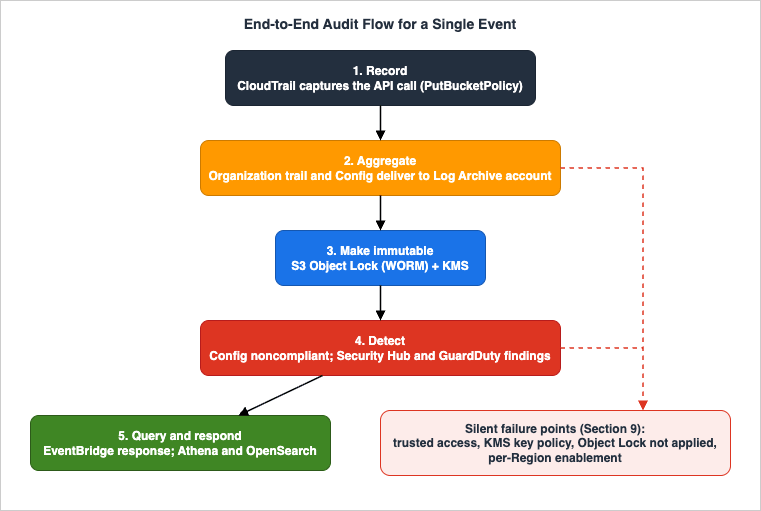
- Record. CloudTrail in the workload account captures the
PutBucketPolicymanagement event — principal ARN, source IP, timestamp, request parameters, and whether it succeeded. - Aggregate. Because this is an organization trail, a copy of that event is delivered to the Log Archive account's S3 bucket (not to a bucket the workload account controls), and AWS Config records the resulting configuration item for the bucket and evaluates it against the "no public buckets" organization rule.
- Make immutable. The delivered CloudTrail object lands under S3 Object Lock, so from that moment the record of the action cannot be altered or deleted for its retention period — even by someone who later compromises the workload account.
- Detect. AWS Config marks the bucket noncompliant; Security Hub CSPM's corresponding control fails; the new AWS Security Hub correlates that control failure with any related signals into an exposure finding with an attack path; GuardDuty may independently flag anomalous access if the change enables exfiltration.
- Query / respond. The finding is emitted to EventBridge, which triggers an automated response (revert the policy, notify, open a ticket). An investigator can pull the full story from OpenSearch (recent, fast) or Athena (full history over the immutable archive), correlating the CloudTrail event, the Config change, and the finding.
Notice where state lives at each hop and where it could fail: delivery depends on trusted access and KMS key policy (step 2); immutability depends on Object Lock being applied, not merely enabled (step 3); detection depends on per-Region enablement and aggregation Regions (step 4). Section 9 returns to each of these failure points.
4. Centralizing Detection: Security Hub and GuardDuty
Aggregation gives you raw material. Detection turns it into prioritized, organization-wide findings. This layer changed substantially in 2025, and getting the current model right is the single most important freshness issue in this article: "Security Hub" now refers to two related but distinct services.4.1 Two services named Security Hub
- AWS Security Hub CSPM (Cloud Security Posture Management) is the renamed original Security Hub. It runs security standards (such as AWS Foundational Security Best Practices and CIS benchmarks) and security controls against your resources and produces posture findings. Its multi-account story is central configuration.
- AWS Security Hub (the new, unified service) became generally available in December 2025 with near-real-time risk analytics. It is no longer a preview. It correlates and enriches signals from posture management (Security Hub CSPM), vulnerability management (Amazon Inspector), sensitive data (Amazon Macie), and threat detection (Amazon GuardDuty) into prioritized exposure findings, an attack path graph, and automated response workflows.
If you remember Security Hub as "the place that aggregates findings in ASFF," that description now maps mostly to Security Hub CSPM. The new Security Hub sits a layer above it, consuming CSPM's control checks as one of several inputs. Writing as though there is a single "Security Hub" is the mistake to avoid.
4.2 Security Hub CSPM central configuration
Central configuration is the feature that lets a delegated Security Hub CSPM administrator set up and manage Security Hub CSPM across many accounts, OUs, and Regions from a single home Region. The mechanics worth pinning down:- The delegated administrator designates accounts and OUs as either centrally managed (only the delegated administrator configures them) or self-managed (the member configures itself). This is what prevents configuration drift: a centrally managed account cannot have its standards quietly disabled by a local admin.
- Configuration is expressed as configuration policies that specify whether Security Hub CSPM is enabled, and which standards and controls are on or off, optionally customizing control parameters.
- Configuration policies take effect in the home Region and all linked Regions. Crucially, the home Region also serves as the aggregation Region, receiving findings, insights, and other data from linked Regions. An opt-in Region cannot be the home Region (it can be a linked Region) — a constraint that shapes which Region you nominate as home.
Conceptually:
Delegated Security Hub CSPM administrator (home Region)
  policy --> applies to centrally managed accounts / OUs
            across home Region + linked Regions
Home Region == aggregation Region --> receives findings from linked RegionsSetting up the model starts in the management account, which designates the Security Hub CSPM delegated administrator; that account then drives everything else:
# In the AWS Organizations management account, in the home Region.
aws securityhub enable-organization-admin-account \
--admin-account-id 1111222233334.3 The new AWS Security Hub and exposure findings
The new Security Hub is enabled for individual accounts or for the whole organization with centralized management. What it adds on top of CSPM:- Exposure findings correlate Security Hub CSPM control checks, Amazon Inspector findings, and other signals to detect resources that are actively exposed — surfacing risk that no single source would flag on its own. It generates findings in near real time, one per resource, only when a resource accumulates a meaningful combination of "exposure traits."
- An attack path graph visualizes how a potential attacker could reach and take control of an exposed resource.
- Unused access analysis automatically identifies IAM roles, users, access keys, and permissions unused within a 90-day lookback. When you enable Security Hub it creates a service-linked IAM Access Analyzer in each account; for unused-permission findings it can generate scoped-down least-privilege policy recommendations.
- Findings are formatted in the Open Cybersecurity Schema Framework (OCSF), and Security Hub receives findings from Security Hub CSPM, Amazon GuardDuty, Amazon Inspector, Amazon Macie, and IAM Access Analyzer. Third-party integrations (for example Jira Cloud or ServiceNow ITSM) let you raise tickets from findings.
The least-privilege angle connects directly to access-control design; for how those permissions are actually evaluated, see IAM Policy Evaluation Logic, Step by Step and the AWS IAM Glossary.
4.4 GuardDuty across the organization
Amazon GuardDuty is the threat-detection engine. Its multi-account model mirrors the others: you associate accounts through AWS Organizations (the recommended path) and designate a delegated GuardDuty administrator that manages configuration and optional protection plans (delivered as detector features, such as S3 Protection, EKS Protection, Malware Protection, RDS Protection, and Lambda Protection) across member accounts, per Region.The control that matters operationally is auto-enable, which the delegated administrator sets per Region to one of:
- ALL — enable GuardDuty (and the chosen protection plans) for all existing and future member accounts;
- NEW — enable only for accounts that join going forward;
- NONE — no automatic enablement; manage accounts individually.
# Run as the GuardDuty delegated administrator, in each Region you operate.
aws guardduty update-organization-configuration \
  --detector-id 12abc34d567e8fa901bc2d34e56789f0 \
--auto-enable-organization-members ALLThe net result of Section 4 is a single security account from which a delegated administrator sees posture (CSPM), prioritized exposures and threats (Security Hub), and threat detections (GuardDuty) for the entire organization — without logging into each member account.
All three of those are managed detectors, which means what they look for was decided by someone else. Writing a detection of your own starts one step earlier, at the requirements a log has to satisfy before it can be queried at all. Detection Engineering on AWS takes that step.
5. The Log Archive Account: Immutability and Retention
Aggregation and detection are worthless at audit time if the underlying logs could have been altered or deleted by whoever caused the incident. The Log Archive account exists to make that impossible-or-at-least-evident. It is a dedicated account in the Security OU whose entire job is to hold logs, with as few human principals as possible able to touch them.5.1 Why a separate account
Account isolation is the strongest boundary AWS offers. By landing CloudTrail, Config, and other logs in an account that no application team operates and that no day-to-day role can write arbitrary objects into, you ensure that compromising a workload account does not grant the ability to rewrite that account's own history — because the history does not live there. The AWS SRA places this account in the Security OU precisely so that organization-level guardrails (SCPs) can protect it uniformly.5.2 S3 Object Lock (WORM)
Amazon S3 Object Lock stores objects using a write-once-read-many (WORM) model so that object versions cannot be overwritten or deleted for a period you define. It is the mechanism that turns "a bucket of logs" into "an immutable archive." Key properties:- Object Lock requires S3 Versioning, and once Object Lock is enabled on a bucket it cannot be disabled and versioning cannot be suspended. This is intentional: an archive you could quietly turn off is not an archive.
- It offers two complementary retention mechanisms: a retention period (lock a version until a retain-until date, either given when the lock is applied or, with an event hold, fixed only when the hold is released) and a legal hold (lock a version indefinitely until the hold is explicitly removed, independent of any retention period).
- Retention has two modes:
- Governance mode — protected, but users with a specific IAM permission (
s3:BypassGovernanceRetention) can override or shorten the lock. Use this when you want strong protection plus a controlled escape hatch. - Compliance mode — the protection cannot be shortened or removed by anyone, including the AWS account root user, until the retention period expires. This is what regulatory regimes such as SEC 17a-4, FINRA, and CFTC contemplate.
- Governance mode — protected, but users with a specific IAM permission (
Choosing the mode is a genuine design decision, not a default to accept blindly: Compliance mode is unforgiving by design, so the retention period you set is a commitment you cannot walk back. Enable Object Lock at bucket creation and apply a default retention:
# In the Log Archive account.
aws s3api create-bucket \
  --bucket org-log-archive-cloudtrail \
  --object-lock-enabled-for-bucket \
  --region us-east-1

aws s3api put-object-lock-configuration \
  --bucket org-log-archive-cloudtrail \
  --object-lock-configuration \
'ObjectLockEnabled=Enabled,Rule={DefaultRetention={Mode=COMPLIANCE,Days=2555}}'Days value here expresses a retention duration, not a cost choice — set it from your records-retention and compliance obligations. This article deliberately does not attach monetary figures to retention; storage and request pricing belong on the official Amazon S3 pricing page, and the right retention is the one your compliance scope requires.Who can shorten each Object Lock protection, how the event hold added in September 2026 starts the retention clock only when the hold is released, and what Object Lock still leaves uncovered — from delete markers to the closure of the account itself — are worked through in Object Lock, Legal Holds, and Event Holds in Amazon S3.
5.3 Encryption, bucket policy, and SCP protection
Immutability is one axis; confidentiality and access are the other. The archive should be encrypted with an AWS KMS customer managed key whose key policy is controlled from the Log Archive account, so that the ability to read logs is governed separately from the ability to list or write objects. The bucket policy should:- allow the CloudTrail and Config service principals to deliver objects (with the
aws:SourceArn/aws:SourceAccountconditions that scope delivery to your organization's trail and accounts); - deny any principal the ability to delete objects or disable versioning;
- deny non-TLS access (
aws:SecureTransport).
The "deny deletion and require TLS" portion of that policy makes the intent concrete:
{
  "Version": "2012-10-17",
  "Statement": [
    {
      "Sid": "DenyObjectDeletionAndVersioningChange",
      "Effect": "Deny",
      "Principal": "*",
      "Action": [
        "s3:DeleteObject",
        "s3:DeleteObjectVersion",
        "s3:PutBucketVersioning",
        "s3:PutObjectLegalHold",
        "s3:PutObjectRetention"
      ],
      "Resource": "arn:aws:s3:::org-log-archive-cloudtrail/*"
    },
    {
      "Sid": "DenyInsecureTransport",
      "Effect": "Deny",
      "Principal": "*",
      "Action": "s3:*",
      "Resource": [
        "arn:aws:s3:::org-log-archive-cloudtrail",
        "arn:aws:s3:::org-log-archive-cloudtrail/*"
      ],
      "Condition": { "Bool": { "aws:SecureTransport": "false" } }
    }
  ]
}Deny always wins over any Allow, so this statement neutralizes a future over-permissive grant — the archive stays append-only even if someone later attaches a broad policy. (Retention and legal-hold changes are denied here so that the Object Lock posture cannot be weakened object-by-object.)The KMS key that encrypts the archive carries the complementary control. Its key policy grants the CloudTrail/Config service principals only
kms:GenerateDataKey* (to encrypt on delivery), grants kms:Decrypt to a narrow set of audited reader roles, and — importantly — does not grant kms:ScheduleKeyDeletion or kms:DisableKey to any operational principal:{
"Sid": "AllowCloudTrailToEncrypt",
"Effect": "Allow",
"Principal": { "Service": "cloudtrail.amazonaws.com" },
"Action": "kms:GenerateDataKey*",
"Resource": "*",
"Condition": {
"StringLike": { "kms:EncryptionContext:aws:cloudtrail:arn": "arn:aws:cloudtrail:*:444455556666:trail/org-audit-trail" }
}
}kms:Decrypt rather than by object permissions alone, a principal that can ListBucket but lacks decrypt rights sees only ciphertext — separating "can enumerate" from "can read."Above the bucket, service control policies applied to the Security OU provide an organization-level backstop: an SCP can deny
s3:PutBucketObjectLockConfiguration changes, deny disabling of the organization trail, and deny removal of the KMS key — so that even an administrator inside the Log Archive account cannot dismantle the controls. SCPs are guardrails, not grants; for the broader pattern of using them in a multi-account estate, see AWS Multi-Account Operational Patterns.A detective control closes the loop: AWS Config rules in the Log Archive account watch for unexpected changes to the bucket policy, Object Lock configuration, or KMS key policy, and raise a finding if the archive's protections are weakened. The principle is defense in depth — preventive (SCP, Object Lock), plus detective (Config) — so a single misconfiguration does not silently open the archive.
5.4 Tagging and lifecycle
Consistent tagging of the archive's buckets and KMS keys (owner, data classification, retention class) makes least-privilege policies and lifecycle rules expressible as tag conditions rather than hard-coded ARNs. For a complete approach, see the AWS Tagging Strategy Complete Guide. Lifecycle rules can transition older log objects to colder storage classes for long-term retention — again chosen by retention requirement, with the cost trade-offs read from the official pricing pages, not asserted here.6. Querying: Athena, OpenSearch, and CloudTrail Lake
An immutable archive nobody can query is a compliance checkbox, not an audit capability. Three query approaches cover the realistic needs, and they are complementary rather than competing.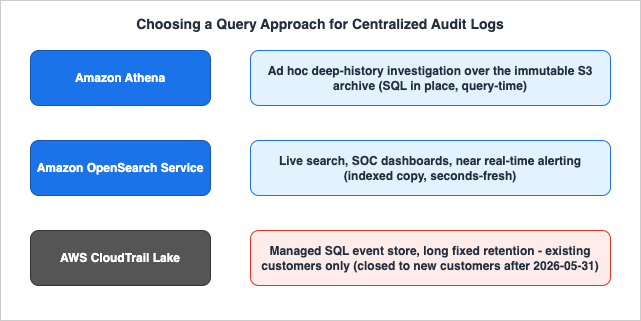
6.1 Amazon Athena — query the archive in place
Amazon Athena runs SQL directly against the CloudTrail and Config data already sitting in the Log Archive account's S3 buckets, with no separate ingestion step and no servers to run. It is the natural fit for ad hoc, point-in-time investigation over long history: "show everyConsoleLogin without MFA in this account last quarter," or "who called DeleteTrail anywhere in the org." You define a table over the CloudTrail S3 prefix and use partition projection so Athena derives partitions from the key layout without a separate metadata load:-- One account/Region shown; template the account ID, Region, and (for an
-- organization trail) the o-<org-id> segment to widen scope.
-- Layout: s3://<bucket>/AWSLogs/<account-id>/CloudTrail/<region>/YYYY/MM/DD/...
CREATE EXTERNAL TABLE org_cloudtrail_logs (
eventversion STRING,
useridentity STRUCT<type:STRING, principalid:STRING, arn:STRING>,
eventtime STRING,
eventsource STRING,
eventname STRING,
awsregion STRING,
sourceipaddress STRING,
recipientaccountid STRING,
additionaleventdata STRING
)
PARTITIONED BY (`dt` STRING)
ROW FORMAT SERDE 'org.apache.hive.hcatalog.data.JsonSerDe'
STORED AS INPUTFORMAT 'com.amazon.emr.cloudtrail.CloudTrailInputFormat'
OUTPUTFORMAT 'org.apache.hadoop.hive.ql.io.HiveIgnoreKeyTextOutputFormat'
LOCATION 's3://org-log-archive-cloudtrail/AWSLogs/444455556666/CloudTrail/us-east-1'
TBLPROPERTIES (
'projection.enabled' = 'true',
'projection.dt.type' = 'date',
'projection.dt.format' = 'yyyy/MM/dd',
'projection.dt.interval' = '1',
'projection.dt.interval.unit' = 'DAYS',
'projection.dt.range' = '2025/01/01,NOW',
'storage.location.template' = 's3://org-log-archive-cloudtrail/AWSLogs/444455556666/CloudTrail/us-east-1/${dt}'
);storage.location.template is what makes projection work over CloudTrail's date-based prefix: Athena derives each partition's S3 path from the dt value without an ALTER TABLE ADD PARTITION or a Glue crawler. With the table in place, an investigative query stays bounded to the dates it needs:-- Find all non-MFA console logins in the trail.
SELECT eventtime, useridentity.arn AS principal, sourceipaddress, recipientaccountid
FROM org_cloudtrail_logs
WHERE eventname = 'ConsoleLogin'
AND json_extract_scalar(additionaleventdata, '$.MFAUsed') = 'No'
AND dt >= '2026/06/01'
ORDER BY eventtime DESC;6.2 Amazon OpenSearch Service — near-real-time search and dashboards
Amazon OpenSearch Service is for the opposite need: live search, dashboards, and operational monitoring. Logs are streamed in (commonly CloudTrail/Config/VPC flow logs forwarded via a delivery pipeline) and become searchable within seconds, powering security dashboards and saved searches a SOC watches continuously. The trade-off is that OpenSearch is an indexed copy of the data with its own retention window, sitting alongside — not replacing — the immutable S3 archive that remains the system of record.A common and sound pattern is to use both: OpenSearch for the recent, hot window where speed matters, and Athena over the full S3 archive for deep history. For reusable investigative queries against CloudWatch-resident logs, the adjacent CloudWatch Logs Insights Query Collection is a useful companion.
6.3 CloudTrail Lake — and an important freshness note
AWS CloudTrail Lake is a managed alternative that converts events into Apache ORC columnar format inside immutable event data stores you query with SQL, with retention periods configurable from 7 up to 3,653 days (roughly ten years) and federation with the AWS Glue Data Catalog and Athena. It can collect CloudTrail management and data events, AWS Config configuration items, and cross-account organization events.The freshness note you must not miss: CloudTrail Lake is closed to new customers after May 31, 2026. Existing customers can continue to use it, but new accounts can no longer onboard. For a new centralized logging build in 2026 and beyond, the practical query layer is therefore Athena over the S3 archive plus OpenSearch for real-time, with CloudTrail Lake relevant only if your organization already uses it. This is a meaningful change from guidance written even a year earlier, and it is exactly the kind of moving detail that a logging architecture must track against the official documentation rather than from memory.
* You can sort the table by clicking on the column name.
| Need | Best fit | Why |
|---|---|---|
| Ad hoc deep-history investigation over the immutable archive | Amazon Athena | SQL in place over S3; no copy; query-time |
| Live search, SOC dashboards, near-real-time alerting | Amazon OpenSearch Service | Indexed copy, seconds-fresh, visualizations |
| Managed SQL event store with long fixed retention (existing customers) | CloudTrail Lake | ORC event data stores; closed to new customers after 2026-05-31 |
7. Automated Response
Detection without response just produces a faster backlog. The connective tissue is Amazon EventBridge: Security Hub, Security Hub CSPM, and GuardDuty emit findings as events, and EventBridge rules match those events and invoke targets — an AWS Lambda function to remediate, an Amazon SNS topic to notify, or an AWS Step Functions workflow for a multi-step playbook.A minimal rule that reacts to high-severity GuardDuty findings:
{
  "source": ["aws.guardduty"],
  "detail-type": ["GuardDuty Finding"],
  "detail": {
    "severity": [{ "numeric": [">=", 7] }]
  }
}
aws events put-rule \
--name high-severity-guardduty \
--event-pattern file://pattern.json
aws events put-targets \
--rule high-severity-guardduty \
--targets 'Id=1,Arn=arn:aws:lambda:us-east-1:444455556666:function:quarantine-and-notify'For anything beyond a single remediation step — quarantine a resource, snapshot it for forensics, wait for human approval, then notify — an AWS Step Functions state machine is the right target instead of a lone Lambda. A finding starts an execution; the state machine sequences the steps with explicit retries, catch handlers, and a
waitForTaskToken pause for human approval on destructive actions. Encoding a runbook as a state machine makes the response itself auditable: every transition is recorded, so "what did the automation do, and when" is answerable from the same audit discipline applied to humans.The response logic itself belongs to event-driven design — idempotent handlers, dead-letter queues, retries, and correlation IDs so one finding does not trigger a storm of duplicated actions. Rather than rebuild that here, this section connects to the dedicated treatment in the event-driven serverless architecture guide. The new AWS Security Hub also ships automated response workflows and ticketing integrations natively, so for many findings the orchestration is configuration rather than custom code.
Two cautions specific to audit. First, the response pipeline must be least-privilege: the remediation Lambda's role should be scoped to exactly the actions it performs, because an over-permissioned auto-responder is itself an attack surface. Second, every automated action should itself be logged — your response system is part of the audited estate, not above it.
The preventive counterpart, AWS Zero-Trust Network Architecture Guide, pairs with this article: prevention narrows what can happen; this guide detects and responds to what does.
8. Cross-Cutting: Least Privilege and Account Isolation
Two concerns thread through every layer above and deserve to be named explicitly, because they are where centralized logging projects most often quietly fail.Who can read the logs? Centralizing logs concentrates sensitive data — CloudTrail records can contain principal identifiers and request parameters, and the AWS SRA notes that log files may contain personal data, with cross-border and data-residency implications when logs are aggregated across Regions and accounts. The access model should therefore be deliberately narrow: read access to the Log Archive account's buckets and KMS keys is granted to a small set of audited roles (incident responders, auditors), not to broad groups, and certainly not to application teams. The KMS key policy is the real enforcement point, since without decrypt permission, object access alone yields ciphertext.
The residency dimension deserves explicit thought. Because centralization can move logs across Regions, and those logs may contain personal data, the AWS SRA suggests concrete options when sovereignty rules apply: aggregate in the most restrictive Region, redact personal data before any cross-Region transfer, or maintain separate per-Region landing zones so logs never leave their jurisdiction. The right choice is a compliance determination, not a technical default — the architecture supports all three, and the decision belongs to whoever owns the organization's data-residency obligations.
Account isolation as the primary boundary. The Log Archive account's value comes from being separate and minimally operated. Every additional human principal with write or delete capability in that account erodes the immutability guarantee that Object Lock and SCPs are meant to provide. The discipline is to treat the archive account as append-only infrastructure: services deliver to it, a few roles read from it, and essentially nobody mutates it interactively.
These boundaries are an access-control problem, and the deep mechanics of how a request is allowed or denied — identity policies, resource policies, SCPs, permission boundaries, and their evaluation order — are covered in IAM Policy Evaluation Logic, Step by Step. The point here is architectural: least privilege and account isolation are not add-ons to the logging platform, they are what make its other guarantees real.
9. Failure Modes and Diagnostics
A logging platform's worst failure is the silent one: it appears healthy while no longer capturing or aggregating, producing false confidence precisely when you most need the data. This section catalogs the high-probability failures, their symptoms, and how to diagnose them.9.1 Logs are not arriving in the archive
Symptom: an account or Region has no recent objects in the Log Archive bucket.Likely causes and checks:
- Trusted access / delegated administration not enabled. If AWS Organizations trusted access for
cloudtrail.amazonaws.com(orconfig.amazonaws.com) was never enabled, organization-wide delivery never starts. Verify withaws organizations list-aws-service-access-for-organization. - Region not opted in. For organization trails, member accounts must have opted into an opt-in Region for the trail to deliver copies there. An un-opted Region looks like a gap in coverage but is a Region-enablement issue.
- KMS key policy too restrictive. If the destination bucket's KMS key policy does not allow the CloudTrail/Config service principals (scoped by
aws:SourceArn) to generate data keys, delivery fails even though the bucket policy is correct. This shows up as delivery errors rather than access-denied on read. - Bucket policy missing the source conditions. A bucket policy that omits the service principal or the
aws:SourceAccountcondition rejects delivery.
Diagnose delivery health from CloudTrail's own status (
aws cloudtrail get-trail-status reports LatestDeliveryError) and from AWS Config's delivery channel status. Treat any nonempty delivery-error field as an incident, not a warning.If you enabled log file validation (Section 3.1), you can also prove the archived logs were not altered or removed after delivery, using the signed digest files:
aws cloudtrail validate-logs \
  --trail-arn arn:aws:cloudtrail:us-east-1:444455556666:trail/org-audit-trail \
--start-time 2026-06-01T00:00:00Z9.2 Findings are not aggregated to the administrator
Symptom: the delegated administrator sees its own findings but not those of member accounts or other Regions.- Security Hub CSPM home/linked Regions misconfigured. Findings aggregate to the home Region; if a Region is not a linked Region, its findings stay local. Confirm the home Region and linked-Region list in central configuration.
- An account is self-managed when it should be centrally managed. A self-managed account configures itself and can drift out of the central policy. Re-designate it as centrally managed.
- GuardDuty auto-enable not set in that Region. Because auto-enable is per Region, a Region left at NONE has no coverage. Re-check each Region, and remember the up-to-24-hour propagation delay before concluding a setting "did not work."
9.3 Object Lock misconfiguration
Symptom: objects can still be deleted, or — the opposite — required deletions are impossible.- Object Lock enabled but no default retention or per-object retention applied. Enabling Object Lock on the bucket does not retroactively lock existing objects; without a retention period or legal hold, a version is not actually protected. Apply a default retention configuration and verify with
aws s3api get-object-retention. - Compliance mode set with an unintended duration. Because Compliance mode cannot be shortened by anyone, an over-long or mistakenly applied retention is genuinely irreversible for that object version. This is why the mode and duration choice (Section 5.2) must be deliberate; test the configuration in a non-production bucket first.
9.4 Queries are slow or expensive to scan
Symptom: Athena queries take a long time or scan far more data than expected.- Unpartitioned data. Querying CloudTrail logs without partitioning by account/Region/date forces full-prefix scans. Define partitions (or partition projection) so a date-bounded query reads only the relevant prefixes.
- Wrong tool for the question. Continuous monitoring driven by repeated Athena scans is the wrong shape; that workload belongs in OpenSearch (Section 6.2). Use Athena for investigation, OpenSearch for live monitoring.
9.5 Observability of the logging platform itself
The platform must monitor itself. Watch CloudTrail and Config delivery status, Security Hub/GuardDuty administrator association health, and the freshness of the newest object in each account/Region prefix (a stale prefix is the earliest sign of a silent aggregation failure). Surfacing those as alarms means you learn that logging stopped from a dashboard, not from a failed audit months later.10. Variations: Native vs SIEM, and Scope of Retention
Two variation axes are worth a brief, deliberate treatment rather than a deep comparison.Native AWS vs external SIEM. The architecture above is entirely native: Security Hub/GuardDuty for detection, Athena/OpenSearch for query. Many organizations also forward the centralized logs to a third-party SIEM (Splunk, for example) for cross-cloud correlation, existing analyst workflows, or specific compliance tooling. The sound pattern is not either/or: keep the immutable S3 archive in the Log Archive account as the system of record and the native detection running, and treat the SIEM as an additional consumer fed from the same centralized source. That way the SIEM choice does not become a single point of failure for your audit trail, and you avoid coupling your record-of-truth to a product decision. This guide intentionally does not go deeper into SIEM-product selection.
Scope and duration of retention. Retention is a requirements question, not a knob to maximize. Different log classes justify different durations — security audit logs (CloudTrail) often carry the longest, compliance-driven retention; high-volume operational logs may warrant shorter windows or tiered storage. Express each as a retention class tied to a compliance obligation, apply Object Lock durations and S3 lifecycle transitions accordingly, and read the cost trade-offs from official pricing rather than encoding them as assumptions. The architecture does not change with retention scope; only the durations and storage classes do.
For where this platform sits relative to operational observability (application traces, metrics, and logs, as opposed to security/audit logs), see the AWS Observability Architecture Guide.
11. Frequently Asked Questions
Is "Security Hub" one service or two?As of late 2025 there are two: AWS Security Hub CSPM (the renamed original, for posture standards/controls and central configuration) and the new AWS Security Hub (generally available since December 2025), which correlates signals — including CSPM control checks, Inspector, Macie, and GuardDuty — into prioritized exposure findings, an attack path graph, and automated response. Design for both, with CSPM as an input to the new Security Hub.
Where should the aggregated logs actually land?
In a dedicated Log Archive account in the Security OU, per the AWS Security Reference Architecture, with S3 Object Lock, KMS encryption, and SCP protection — separate from any account that application teams operate.
Governance or Compliance mode for Object Lock?
Governance mode protects objects but allows a specifically permissioned principal to override; Compliance mode cannot be shortened or removed by anyone, including the root user, until the retention period expires. Choose Compliance mode when a regulation requires true WORM and you can commit to the duration; choose Governance mode when you need strong protection plus a controlled escape hatch.
Should I build new logging on CloudTrail Lake?
For a brand-new build, generally no: CloudTrail Lake is closed to new customers after May 31, 2026. Lead with Athena over the S3 archive and OpenSearch for real-time; CloudTrail Lake remains relevant for organizations that already use it.
Why isn't one Region showing up in my findings or logs?
The two usual causes are an opt-in Region the member account has not enabled (so the organization trail cannot deliver there) and per-Region settings not applied — Security Hub CSPM linked Regions and GuardDuty auto-enable are both configured per Region, and GuardDuty changes can take up to 24 hours to propagate.
How do I keep an account administrator from deleting the logs?
Don't store the logs where they operate. Centralize into the Log Archive account, enforce S3 Object Lock and versioning, deny deletion and Object-Lock-config changes via bucket policy, and backstop with SCPs on the Security OU so the controls can't be dismantled even from inside that account.
How do I trace a single suspicious action end to end?
Start in OpenSearch or Athena to find the CloudTrail event (principal, source IP, time), correlate the resulting configuration change in the Config aggregator, check whether GuardDuty or Security Hub raised a correlated finding, and confirm the immutable copy exists in the Log Archive bucket. Section 9.5's freshness monitoring tells you the pipeline was healthy at the time.
12. Summary
Centralized logging and audit on AWS is not a single service you switch on; it is a connected system with four jobs — aggregate, make immutable, detect, query — each implemented across multiple services and tied together by AWS Organizations delegated administration.The reference architecture: an organization CloudTrail trail and an AWS Config aggregator collect API activity and configuration state from every account and Region; the data lands in a dedicated Log Archive account where S3 Object Lock (WORM), KMS, bucket policies, and SCPs make it tamper-evident or tamper-proof; Security Hub CSPM, the new AWS Security Hub, and Amazon GuardDuty centralize detection to one delegated administrator; Athena, OpenSearch, and (for existing customers) CloudTrail Lake answer questions against it; and EventBridge drives automated response.
Two current facts anchor a correct 2026 design and are easy to get wrong from memory: "Security Hub" is now two services (CSPM plus the GA'd new Security Hub), and CloudTrail Lake is closed to new customers after May 31, 2026, so new builds lead with Athena and OpenSearch.
This audit-and-detection platform is the natural pair to a preventive design and a sibling to operational observability. For the preventive side, see the AWS Zero-Trust Network Architecture Guide; for operational telemetry, the AWS Observability Architecture Guide; and for the account foundation underneath it all, AWS Multi-Account Operational Patterns.
13. References
Official AWS documentation- Creating a trail for an organization - AWS CloudTrail
- Organization delegated administrator - AWS CloudTrail
- Working with AWS CloudTrail Lake
- Creating aggregators - AWS Config
- AWS Config and AWS Organizations
- Introduction to AWS Security Hub (new)
- Understanding central configuration in Security Hub CSPM
- Exposure findings in Security Hub
- Managing GuardDuty accounts with AWS Organizations
- Setting organization auto-enable preferences - Amazon GuardDuty
- Using S3 Object Lock
- Configuring S3 Object Lock
- Security OU - Log Archive account (AWS Security Reference Architecture)
- Querying AWS CloudTrail logs - Amazon Athena
- What is Amazon OpenSearch Service?
AWS What's New
- AWS Security Hub is now generally available with near real-time risk analytics
- AWS Security Hub now uncovers identity risks from unused access
Related Articles on This Site
- AWS Multi-Account Operational Patterns
The account-structure foundation — OUs, guardrails, and delegated administration this architecture builds on. - AWS History and Timeline of AWS CloudTrail
How CloudTrail and its audit capabilities evolved over time. - AWS History and Timeline regarding Amazon Athena
How the query engine used in Section 6 evolved, from Presto to Athena engine version 3 on Trino, and when federated query arrived. - CloudWatch Logs Insights Query Collection
Reusable queries for log investigation, adjacent to the Athena/OpenSearch patterns here. - AWS Tagging Strategy Complete Guide
Tagging that makes archive access policies and lifecycle rules expressible by tag. - IAM Policy Evaluation Logic, Step by Step
How identity, resource, SCP, and boundary policies resolve — the access control under least privilege. - AWS IAM Glossary
Reference for the IAM terms used throughout the access-control sections.
References:
Tech Blog with curated related content
Written by Hidekazu Konishi