Life After Ingress NGINX on Amazon EKS - Where the Upstream and AWS Disagree About the Order of Migration, and What GatewayClass Actually Decides
First Published:
Last Updated:
ingress-nginx on a production Amazon EKS cluster, what has stalled is the decision, not the procedure. The Helm chart is still available, and the container images can still be retrieved. The cluster itself is still operational. However, it's difficult to determine what to choose next.There are three primary reasons for this uncertainty. First, it's unclear who will take over the annotations piled up in the cluster. Second, a decision hasn't been made on whether to transition from Kubernetes
Ingress to the Gateway API in one step, or to move to an alternative Ingress implementation first before making a second transition. Third, nobody has defined the condition under which the cutover can be called finished.This article addresses these three points. It will not provide a step-by-step migration process. How to drive
ingress2gateway is covered by the upstream documentation, and restating it here would not move a single decision forward.This article directly addresses the fact that upstream Kubernetes SIG Network and AWS offer different recommended migration sequences for the same problem. Furthermore, within AWS itself, there isn't a single, unified recommendation. The Amazon EKS User Guide, AWS blogs, and AWS Prescriptive Guidance all point to different end states. None of these are necessarily incorrect; they simply operate under different assumptions. The purpose of this article is to present those differing assumptions to the reader.
Three conclusions, stated up front.
First, what was archived was the maintenance, not the operation. Existing deployments continue to operate, and both the Helm chart and container images remain available. What changed is that no further release is coming, so nothing ships to fix a bug or a vulnerability from here on. Therefore, the migration deadline shouldn't be dictated externally, but rather determined by your cluster's own risk tolerance. However, upstream sources use very strong language regarding this decision, and Section 2 quotes it.
Second, the moment you specify a
gatewayClassName, AWS's data plane is determined. Whether you're using an Application Load Balancer or creating a service with Amazon VPC Lattice, the Gateway and HTTPRoute CRDs are the same. The only difference lies in this single field. However, from the perspective of the person writing the routes, this branching point is not visible. Section 5 forms the core of this article.Third, the rate limiter on the migration is the annotation inventory. What the upstream conversion tool can handle mechanically covers only part of the annotations
ingress-nginx documents. Furthermore, the configurations presented by AWS as migration examples involve types that the tool explicitly cannot convert. Section 8 puts both originals side by side.All specifications, figures, and identifiers mentioned in this article have been verified against primary sources. The verification date is August 26, 2026. The sources used for verification vary depending on the type of information. The retirement of
ingress-nginx and the recommended migration targets come from the kubernetes/ingress-nginx README and Kubernetes blog announcements. The specifications and roles of Gateway API are based on gateway-api.sigs.k8s.io, and the coverage of the conversion tool comes from the kubernetes-sigs/ingress2gateway repository. The behavior on AWS has been verified using the Amazon EKS User Guide, the AWS official blogs, and AWS Prescriptive Guidance.Table of Contents
- 1. What This Article Decides, and the Three Words Spelled the Same Way
- 2. What Actually Ended
- 3. Three Paths, and What Each One Does Not Take Off Your Hands
- 4. What Gateway API Changed About the Abstraction
- 5. GatewayClass Decides Which AWS Data Plane You Get
- 6. The Three AWS-Side Receivers
- 7. Where the Upstream and AWS Disagree About the Order
- 8. The Rate Limiter Is Your Annotation Inventory
- 9. Running Both, and Defining What Finished Means
- 10. Failure Modes and Anti-Patterns
- 11. Frequently Asked Questions
- 12. Summary
- 13. References
1. What This Article Decides, and the Three Words Spelled the Same Way
1.1 Intended Audience
This document is intended for infrastructure engineers who are currently runningingress-nginx on their production Amazon EKS clusters and need to determine the timeline and order for migrating to a new solution. It assumes a reader who writes Kubernetes Ingress daily but has not touched the role split that Gateway API introduces.Therefore, this article will not focus on explaining what
Ingress is. It spends the space instead on what Gateway API pulled apart, and on where that split lands in the division of work inside an organization.1.2 Three Names That Are Not the Same Thing
Three sets of terms in this article share a spelling and mean different things. They are separated here, before anything else.Ingress and ingress. Ingress, capitalized, refers to a Kubernetes API resource. Lowercase "ingress" is a general term referring to the inbound direction of network traffic. This article writes the resource as Ingress in a code span every time. For the direction it uses inbound, and for the layer that receives that traffic it uses entry point.Gateway API, AWS Gateway API Controller, and Amazon API Gateway. Gateway API is a standard Kubernetes API. AWS Gateway API Controller is the name of an AWS controller that implements this standard on Amazon VPC Lattice. Amazon API Gateway is a separate service unrelated to Kubernetes. All three appear in this article, so all three are written out in full every time, including after first mention.
ingress-nginx and NGINX Ingress. These are two distinct products. A migration article on the Kubernetes blog explicitly states this.Also, note that Ingress-NGINX and NGINX Ingress are two separate Ingress controllers.
Ingress-NGINX is an Ingress controller maintained and governed by the Kubernetes community
that is retiring March 2026.
NGINX Ingress is an Ingress controller by F5.
Both use NGINX as the dataplane, but are otherwise unrelated.This article only covers the former. While the repository name is
ingress-nginx and the documentation refers to it as Ingress NGINX Controller, both terms refer to the same product. Direct quotes keep whatever spelling the source used. Everywhere else, this article writes ingress-nginx.1.3 What This Article Leaves to Other Articles
This article does not cover IP address allocation for Pods, nor does it address reachability control between Pods. Information on VPC CNI, prefix delegation, custom networking, Security Groups for Pods, and Kubernetes Network Policies can be found in Amazon EKS Networking Deep Dive.It also does not detail the specific steps for exposing inference endpoints using an Application Load Balancer. Information on annotation configuration and health check path setup is available in Section 6 of Self-Managed LLM Inference on Amazon EKS. That article includes the following entry in its table of supported features for AWS Load Balancer Controller.
A Kubernetes Gateway → an ALB — supported in recent controller versions for teams
standardizing on the Gateway API.
This article picks up where that entry leaves off. While that article addresses the topic in a single line, this article expands upon it in dedicated sections.
This article does not cover the design or authorization policies for internal networks and service networks within Amazon VPC Lattice. AWS VPC Lattice Complete Guide provides that information. This article treats VPC Lattice solely as an alternative option for selection as a
GatewayClass.The general principles of self-managing controllers are covered in Amazon EKS Capabilities. This article will not reiterate that information, but will instead focus specifically on the practical consequences of continuing to use controllers that are known to be unsupported.
This article will not create a table listing the end-of-support dates for different Kubernetes versions within Amazon EKS. AWS End-of-Support and EOL Reference provides a comprehensive overview. This article makes a single retirement, that of
ingress-nginx, its subject.This article is the first in a series of three. What it covers is the entry point, meaning L7 routing and the choice of AWS data plane. The second article, Gang Scheduling and Dynamic Resource Allocation on Amazon EKS, covers the scheduler layer, meaning the group as a unit of placement and the device allocation paths. The third article, eBPF on Amazon EKS, opens the kernel layer, following the enforcement side and the observation side separately. What all three articles have in common is that the decisions are made outside of what the reader defines in their YAML files. In this article, the AWS data plane is settled the moment
gatewayClassName is written, and that branching point is not visible from the route definition side. In the second article, the node supply model decides whether a ResourceClaim can be used at all. In the third, the enforcement point itself sits in the kernel, and even the moment it starts enforcing is decided there.Pricing will not be discussed. No monetary figures appear anywhere in it. Unpatched vulnerabilities appear only as material for the defensive side. No reproduction or exploitation steps appear at all.
2. What Actually Ended
2.1 The Retirement Notice, in the Project's Own Words
The README forkubernetes/ingress-nginx features a section titled "Ingress NGINX Retirement," listing what the retirement means in bullet points. The original text reads:* Best-effort maintenance will continue until March 2026.
* Afterward, there will be no further releases, no bugfixes, and no updates to resolve any
security vulnerabilities that may be discovered.
* Existing deployments of Ingress NGINX will not be broken.
* Existing project artifacts such as Helm charts and container images will remain available.The same README also addresses potential users considering adoption, stating:
If you are not already using ingress-nginx, you should not be deploying it as it is not
being developed. Instead you should identify a Gateway API implementation and use it.
The Kubernetes blog announcement on November 11, 2025, provides the same information, but with slightly more detail. Regarding the GitHub repository, it states:
The GitHub repositories will be made read-only and left available for reference.
Existing deployments of Ingress NGINX will not be broken.
Existing project artifacts such as Helm charts and container images will remain available.
What stopped is the maintenance. The operation has not stopped. Neither has the image distribution. What changed is that no further release comes to address a bug or a security vulnerability.
This distinction is not merely a matter of wording. It significantly alters the approach to migration planning. When a system is scheduled for shutdown, the deadline is externally imposed. However, when only maintenance is discontinued, the deadline becomes a decision for each user to make. That deadline follows from conditions particular to each cluster: how far it is exposed, whether it is multi-tenant, and what kind of traffic the entry point takes.
The same announcement also mentions a project that was previously considered as a potential successor, with a single sentence dedicated to it.
(InGate development never progressed far enough to create a mature replacement; it will
also be retired.)
The community already tried building a replacement, and that attempt did not get there. The possibility of avoiding the migration process is, at this point, no longer viable.
2.2 How Strongly the Upstream Put It
The wording in the previous section reads as measured. The temperature upstream runs a good deal hotter than that. On January 29, 2026, the Kubernetes Steering Committee and the Security Response Committee jointly issued a statement.To be abundantly clear: choosing to remain with Ingress NGINX after its retirement leaves
you and your users vulnerable to attack. None of the available alternatives are direct
drop-in replacements. This will require planning and engineering time.The same statement also addresses the structural implications of inaction.
Existing deployments will continue to work, so unless you proactively check, you may not
know you are affected until you are compromised.
By placing these two points side-by-side, the upstream's position becomes clear. While acknowledging that systems continue to operate, what it treats as dangerous is that the very fact of continuing to work is what keeps you from noticing. The announcement from November 2025, regarding the timing for initiating migration, also states this.
SIG Network and the Security Response Committee recommend that all Ingress NGINX users begin
migration to Gateway API or another Ingress controller immediately.
This article passes that temperature through to the reader unchanged. At the same time, it maintains the position that the specific deadline is determined by the reader's own cluster environment. These two points are not contradictory. The upstream can only express a general sense of urgency, while the reader must determine the priorities within their own cluster.
The Amazon EKS User Guide also treats this retirement as an "Action required" in the Kubernetes 1.35 release notes, and says much the same thing.
Existing deployments will continue to work, but remaining with Ingress NGINX after
retirement leaves your environment vulnerable to security risks, as none of the available
alternatives are direct drop-in replacements and will require planning and engineering time.
The temperature on the AWS side points the same way. The fact that deployments keep working, and the judgment that migration is still required, appear in the same order as they do upstream.
2.3 The Deadline You Did Not Set Yourself
Up to this point, the deadline has been yours to set. However, there's another type of deadline to consider: the Kubernetes version.The README for
ingress-nginx includes a "Supported Versions" table, with the top row stating:| Ingress-NGINX version | k8s supported version |
|---|---|
v1.15.1 | 1.35, 1.34, 1.33, 1.32, 1.31 |
The introduction to the table reads:
Supported versions for the ingress-nginx project mean that we have completed E2E tests, and
they are passing for the versions listed. Ingress-Nginx versions may work on older versions,
but the project does not make that guarantee.
v1.15.1 was released on March 19, 2026, and was the final release. On the same day, v1.14.5 and v1.13.9, along with Helm charts 4.15.1, 4.14.5, and 4.13.9, were also released. The repository is currently archived and read-only (as of August 26, 2026).In contrast, here's the status of Kubernetes versions provided by Amazon EKS:
| Kubernetes version | upstream release | Amazon EKS release | Standard support end | Extended support end |
|---|---|---|---|---|
| 1.36 | April 22, 2026 | June 2, 2026 | August 2, 2027 | August 2, 2028 |
| 1.35 | December 17, 2025 | January 27, 2026 | March 27, 2027 | March 27, 2028 |
| 1.34 | August 27, 2025 | October 2, 2025 | December 2, 2026 | December 2, 2027 |
When you compare the two, the nature of the deadline changes.
ingress-nginx declares support for Kubernetes versions up to 1.35, as the final release has passed end-to-end testing. Amazon EKS, on the other hand, began offering version 1.36 on June 2, 2026. And no further releases are planned to extend the table.This doesn't mean that things will stop working. The project uses the term "may work" regarding older versions, and makes no claims about newer versions. What can be said is that the moment you move the cluster to 1.36, the entry-point controller alone steps outside the project's declared validation. When something breaks, there is nobody to ask.
Therefore, the migration schedule carries two deadlines. One is the date you set from your own risk assessment, and the other is dictated by the plan to upgrade the Kubernetes version.
The second of those is dragged along by the end of standard support in Amazon EKS. If your cluster is running version 1.34 as of the verification date, standard support will end on December 2, 2026. Going only as far as 1.35 keeps you inside the validated range of
ingress-nginx. Going to 1.36 puts you outside it. Draw the entry-point migration schedule on the same sheet of paper as the Kubernetes upgrade schedule.2.4 Finding Out Whether You Are Affected
The upstream announcement and the AWS migration guide give the same way to check.kubectl get pods --all-namespaces --selector app.kubernetes.io/name=ingress-nginxThis command should be executed with cluster administrator privileges. If a result is returned, that cluster is affected.
However, this command identifies running controllers; it does not identify dependencies. In a real migration, the issue isn't where the Pods are located, but rather how many annotations are associated with the
Ingress resources. Section 8 takes up the inventory.3. Three Paths, and What Each One Does Not Take Off Your Hands
Count them finely and there are as many migration targets as there are products. When the decision is made on Amazon EKS, though, it comes down to three directions.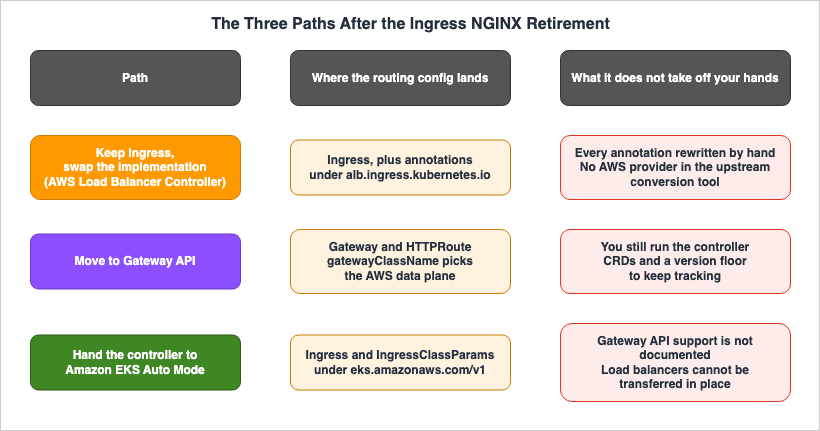
Ingress resource while only replacing the implementation that processes it. Within Amazon EKS, this corresponds to using the AWS Load Balancer Controller. You would change the ingressClassName from nginx to alb, and update the annotation prefixes from nginx.ingress.kubernetes.io/ to alb.ingress.kubernetes.io/. Since the core structure of the manifest remains unchanged, estimating the scope of changes is relatively straightforward.Path 2 involves migrating to the Gateway API. This involves remapping
Ingress resources to Gateway and HTTPRoute resources. This approach is the one recommended by the upstream project. Within Amazon EKS, both the AWS Load Balancer Controller and the AWS Gateway API Controller for Amazon VPC Lattice implement this standard.Path 3 involves handing over the operation of the controller itself to Amazon EKS Auto Mode. It means running no load balancer controller in the cluster, and letting the built-in capability of EKS Auto Mode handle
Ingress and Service instead. This approach results in the smallest overall operational footprint.The key difference between these three paths is the extent to which you relinquish control. And every one of them leaves something behind that it will not take off your hands.
| Path | Where the routing configuration lands | What it does not take off your hands |
|---|---|---|
1. Replace implementation while retaining Ingress. | Ingress, plus annotations that begin with alb.ingress.kubernetes.io/. | Rewriting the annotations is hand work, all of it. Those annotations are outside the reach of the upstream conversion tool. |
| 2. Migrate to Gateway API. | Gateway and HTTPRoute. gatewayClassName determines the data plane. | The controller still has to be operated. CRDs have to be installed and their versions tracked. |
| 3. Transition to EKS Auto Mode. | Ingress and IngressClassParams. API group is eks.amazonaws.com/v1. | It is not documented that this option supports Gateway API. Existing load balancers cannot be directly migrated. |
The third column of this table is the material for the decision. Whichever path you take, the annotation inventory is the one job you do yourself. Path 2 lets you mechanize part of that inventory, but the controller still has to be operated. Path 3 reduces operations the most, and narrows what you are able to express.
Section 6 takes the three receivers one at a time. They do not line up one to one with the three paths: the AWS Load Balancer Controller serves both the first and the second, and the second can land on either that controller or Amazon VPC Lattice. Section 7 then turns to the order in which to take them.
4. What Gateway API Changed About the Abstraction
4.1 One Resource Split Into Two
The official Gateway API documentation, on the page for users ofingress-nginx, summarizes the key changes in just two sentences.Where Ingress combines the concepts of a load balancer and routing rules into a single
resource, Gateway API splits them apart:
Gateway: Defines where and how traffic enters the cluster, a task for a cluster operator.
HTTPRoute: Defines how traffic is routed to services, a task for an application developer.Previously,
Ingress combined the definition of a load balancer and routing rules into a single resource. Gateway API separates this into Gateway and HTTPRoute.The official migration guide explains this from the perspective of the entry point. With
Ingress, every resource implicitly had two entry points for HTTP and HTTPS. In Gateway API, entry points are explicitly defined as listener objects within a Gateway. If you need to receive HTTP traffic on port 80, you need to define a listener for that purpose.Here is what that looks like. First, the
Ingress as it stood before the migration.apiVersion: networking.k8s.io/v1
kind: Ingress
metadata:
name: shop
spec:
ingressClassName: nginx
tls:
- hosts:
- shop.example.com
secretName: shop-tls
rules:
- host: shop.example.com
http:
paths:
- path: /
pathType: Prefix
backend:
service:
name: shop
port:
number: 80When migrated to Gateway API, this is split into two resources. The resource that defines the entry point is the
Gateway.apiVersion: gateway.networking.k8s.io/v1
kind: Gateway
metadata:
name: shop-gateway
spec:
gatewayClassName: aws-alb-gateway-class
listeners:
- name: https
protocol: HTTPS
port: 443
hostname: shop.example.comThe resource that defines the routing path is the
HTTPRoute. It uses parentRefs to specify which Gateway it belongs to.apiVersion: gateway.networking.k8s.io/v1
kind: HTTPRoute
metadata:
name: shop-route
spec:
parentRefs:
- name: shop-gateway
hostnames:
- shop.example.com
rules:
- matches:
- path:
type: PathPrefix
value: /
backendRefs:
- name: shop
port: 80It's important to note how
hostnames are handled. The official migration guide states that with Ingress, routing rules were separated for each hostname, whereas with HTTPRoute, the rules apply to all hostnames. The hostnames in an HTTPRoute also have to match the hostname on the Gateway listener, and for any hostname that does not match, that listener ignores the rules. If you have an Ingress that handles multiple hostnames, and you map it to a single HTTPRoute, you will see a change in behavior due to these two points.Another point is that
Ingress does not have a direct equivalent for its default backend. The official migration guide recommends creating an explicit rule that targets the path prefix / as a replacement.4.2 Whose Job Moves Where
The split is not a matter of form. Gateway API calls this role-oriented design, and it names the owner of each resource.According to the official migration guide, the original
Ingress API initially contained only one type of resource, Ingress, so it had a single persona. That one owner decided everything. The same person wrote the TLS termination settings, the load balancer provisioning, and the route definitions. Gateway API calls that arrangement the self-service model. The addition of IngressClass later introduced distinct personas for infrastructure providers and cluster operators.Gateway API splits the work across four personas: application developer, application admin, cluster operator, and infrastructure provider. Ownership falls out like this:
| Resource | Scope | Owner |
|---|---|---|
GatewayClass | Cluster-wide | infrastructure provider |
Gateway | Namespace | cluster operator and application admin |
Routes such as HTTPRoute | Namespace | application developer |
A key practical aspect of this separation is that TLS termination has become a property of the
listener within a Gateway resource. The Gateway API documentation states that because the listener is part of the Gateway resource, ownership of TLS termination falls to the cluster operator and the application admin. With Ingress, whoever wrote the route also named the certificate, inside the same resource. Gateway API pulls those two apart into separate resources, and a different RBAC Role governs each.This is where migration causes the most friction. The practice of application teams independently managing and replacing certificates will not directly translate. This isn't a defect; it's an intentional design choice.
The split is not mandatory, though. The Gateway API documentation says so outright.
At the same time, it is not mandatory to give up the self-service model - it is still
possible to configure a single RBAC Role that will fulfill the application developer,
application admin, and cluster operator responsibilities.
Therefore, during the initial phase of migration, it's possible to maintain the existing model, with a single role encompassing all responsibilities, and implement role separation later. There's an option to avoid simultaneous migration and organizational changes.
4.3 Annotations Are Not an Extension Point Anymore
Ingress had only two extension points: annotation and the resource backend, which allowed specifying backends other than Service. The official migration guide categorizes the annotation-based extension as having two consequences. The first is a reduction in portability. Changing the implementation requires rewriting the annotations, and there's no guarantee that the target system will offer the same functionality. The second is a less user-friendly API. Annotations are simple key-value strings, lacking the structure found in specifications, and are typically presented as a block at the beginning of a resource definition.Gateway API has three extension points: external references, custom implementations, and Policy attachment. Annotation is not included among them. The official migration guide states:
The extension points do not include annotations on Gateway API resources. This approach is
strongly discouraged for implementations of the API.
This point directly impacts migration estimates. There is no straightforward path to mechanically port
Ingress annotations to Gateway API annotations. To achieve the same functionality in the target system, you will need to utilize the CRD provided by the implementation. For the AWS Load Balancer Controller, Section 6.1 covers what those CRDs are.5. GatewayClass Decides Which AWS Data Plane You Get
5.1 The Same CRDs on Both Sides of the Branch
The AWS Networking & Content Delivery blog illustrates a configuration where both the AWS Load Balancer Controller and the AWS Gateway API Controller for Amazon VPC Lattice run side by side in one cluster, and summarizes the key point in a single sentence.The Gateway and HTTPRoute resources use the same CRDs regardless of which controller you
are using. The only difference between the two is the gatewayClassName field, which
determines whether you configure an ALB or a VPC Lattice service.Even if you define the same
Gateway and the same HTTPRoute, what gets created on the AWS side differs according to the value of gatewayClassName. One will become an Application Load Balancer, while the other will become a service within Amazon VPC Lattice.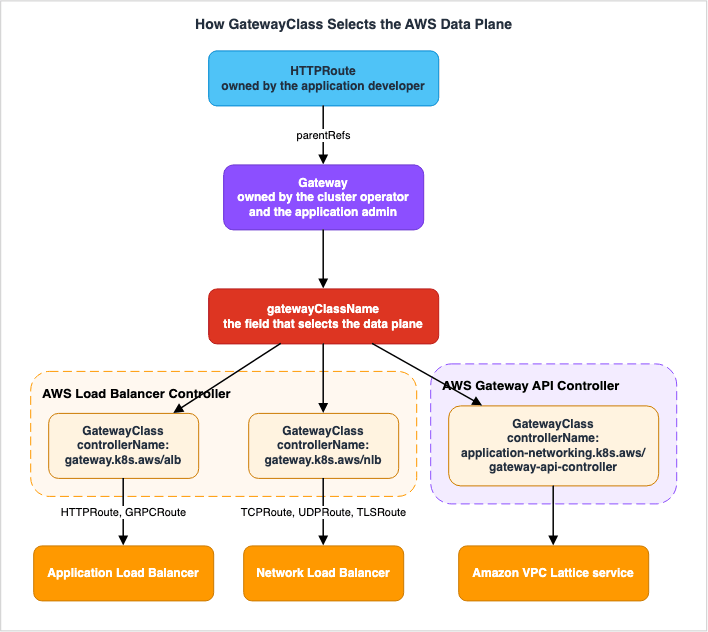
controllerName on the GatewayClass. As of the verification date, Amazon EKS gives you three of them. Each one below is copied from that implementation's own documentation or from the manifest it ships.For creating an Application Load Balancer.
apiVersion: gateway.networking.k8s.io/v1beta1
kind: GatewayClass
metadata:
  name: aws-alb-gateway-class
spec:
  controllerName: gateway.k8s.aws/alb
For creating a Network Load Balancer.
apiVersion: gateway.networking.k8s.io/v1beta1
kind: GatewayClass
metadata:
  name: aws-nlb-gateway-class
spec:
  controllerName: gateway.k8s.aws/nlb
For creating a service within Amazon VPC Lattice.
apiVersion: gateway.networking.k8s.io/v1beta1
kind: GatewayClass
metadata:
  name: amazon-vpc-lattice
spec:
  controllerName: application-networking.k8s.aws/gateway-api-controller
The AWS Load Balancer Controller handles the first two. The AWS Gateway API Controller for Amazon VPC Lattice handles the third. The
controllerName decides which controller handles it, and according to the Gateway API specification, only one controller can manage a single GatewayClass.Of these three options, only the
controllerName is fixed. The metadata.name is determined by the party creating the GatewayClass. The official Gateway API reference itself uses internet and private as examples of an infrastructure provider naming classes after their intended use. Therefore, the meaning of gatewayClassName within a Gateway is dependent on the naming conventions used within that particular cluster.On
apiVersion, the upstream and AWS do not write it the same way. The official Gateway API reference marks GatewayClass as generally available and says it has been in the standard channel since v0.5.0. However, both the examples in the AWS Load Balancer Controller documentation and the manifests distributed by the AWS Gateway API Controller for Amazon VPC Lattice use gateway.networking.k8s.io/v1beta1. The latter is what is quoted above. Check which version the Gateway API CRDs installed in your cluster serve, and match it.Both controllers can run in the same cluster. The AWS blog on running both controllers puts it this way.
Each controller watches only for Gateways that reference its GatewayClass, so they operate
independently without conflict.
The same post also recommends splitting the two controllers by role: the AWS Load Balancer Controller takes inbound traffic from the internet, and the AWS Gateway API Controller for Amazon VPC Lattice takes service-to-service traffic across clusters, VPCs, and accounts.
5.2 What the Route Author Cannot See
Up to this point the view has been the designer's. When moving to operations, this particular branching point reveals another facet.Those writing
HTTPRoute definitions cannot determine, based solely on the manifest, whether their traffic will pass through an Application Load Balancer or Amazon VPC Lattice. All that an HTTPRoute possesses are parentRefs. You must open the Gateway that the parentRefs point to, examine its gatewayClassName, and then look at the controllerName of that GatewayClass before you can determine the routing path.This is by design in Gateway API. The goal of role-oriented design is for application developers to only define routes, without needing to know the specifics of the underlying infrastructure. The official documentation, following the earlier examples of
internet and private, continues with this point.The user of the classes will not need to know how internet and private are implemented.
Instead, the user will only need to understand the resulting properties of the class that
the Gateway was created with.However, during migration, this lack of visibility can lead to incidents. Changing the
parentRefs to point to a different Gateway appears as a minimal change in the manifest. In reality, it completely replaces the underlying AWS resources that handle the traffic. The location where TLS is terminated, the associated security groups, and even the destination for access logs can all change.Therefore, the naming of
GatewayClass is directly linked to the quality of migration work. Since the controllerName is not visible, the name becomes the sole means of identification. It's crucial to use naming conventions that clearly indicate the data plane, such as aws-alb-gateway-class and amazon-vpc-lattice. The official Gateway API documentation recommends the same thing from the permissions side, stating that creating a Gateway should be treated as a privileged operation. Allowing unrestricted access can lead to increased costs and unintended infrastructure changes. Furthermore, in clusters with multiple GatewayClass instances serving different purposes, the documentation recommends defining validation policies to prevent unauthorized users from creating Gateway instances with inappropriate configurations.6. The Three AWS-Side Receivers
6.1 AWS Load Balancer Controller
The AWS Load Balancer Controller monitors three types of Kubernetes resources and provisions corresponding Elastic Load Balancing resources. The Amazon EKS User Guide sets it out this way:| Kubernetes resource | What gets provisioned |
|---|---|
Ingress | Application Load Balancer |
Service with type: LoadBalancer | Network Load Balancer |
Gateway | Application Load Balancer |
Examining the Gateway API in more detail, the routing type determines the load balancer used. According to the controller documentation, Network Load Balancers serve the L4 routes, meaning
TCPRoute, UDPRoute, and TLSRoute. Application Load Balancers serve the L7 routes, meaning HTTPRoute and GRPCRoute.L4 and L7 routes cannot be mixed on one
Gateway. The controller documentation states it outright.Mixing protocol layers, e.g. TCPRoute and HTTPRoute on the same Gateway, is not supported.Requirements regarding supported versions are inconsistent across AWS documentation. The controller documentation states prerequisites of
LBC >= v2.13.0, L4 routes require >=v2.13.3, and L7 routes require >= 2.14.0. The Amazon EKS User Guide states that Application Load Balancers are created from Gateway resources starting with version 2.14.0. In contrast, the AWS migration guide describes general availability for Gateway API as as of v3.0. This article prioritizes the implementation details and recommends using version 2.14.0 or later for L7 routes and version 2.13.3 or later for L4 routes. The v3.0 in the blog reads as the version when general availability was announced, rather than the version when the feature was initially included. The blog announcing general availability was published on March 6, 2026, while version v3.0.0 was released on January 23, 2026. As of the verification date, the latest release is v3.5.0, published on August 3, 2026.How the feature gets enabled is also written up differently across the AWS material. The blog post announcing the general availability states that you should enable the feature flag after ensuring that the prerequisites are met. The controller's own documentation states that the controller detects the presence of the Gateway API CRDs and, if found, enables the corresponding controllers. The feature gate is intended for explicitly disabling the feature. From the perspective of someone implementing this, the key isn't finding the enable switch, but rather ensuring the correct CRDs are in place.
And those CRDs have associated requirements. The controller documentation states that to enable the L7 controller, you need to include not only
Gateway, GatewayClass, HTTPRoute, and GRPCRoute, but also three CRDs provided by AWS: TargetGroupConfiguration, LoadBalancerConfiguration, and ListenerRuleConfiguration. The same applies to the L4 side; the only difference is the route type, which changes to TCPRoute, UDPRoute, and TLSRoute, while the three AWS-provided CRDs remain the same. Before troubleshooting why it's not working with just the standard CRDs, check if these three are present.As Section 4.3 showed, annotations are not the extension point in Gateway API. Instead, the AWS Load Balancer Controller provides these three CRDs. Summarizing the explanation in the AWS blog post:
| CRD | What it configures |
|---|---|
TargetGroupConfiguration | Attributes of the target group, such as health checks, deregistration delay, and stickiness. |
LoadBalancerConfiguration | Attributes of the load balancer and listener, such as subnet placement, security groups, and access logs. |
ListenerRuleConfiguration | Adds AWS-specific routing behavior to HTTPRoute and GRPCRoute, such as authentication using Amazon Cognito or OIDC providers. |
All of these have an
apiVersion of gateway.k8s.aws/v1beta1. The AWS blog explains what the move buys, in terms of the limits of annotations. Embedding a complex data structure into an annotation string leaves you without validation and without editor completion. By using CRDs, configuration errors become apparent at the time of application.Seen as a migration estimate, this is the fork in the two-step path. If you choose path 1, you will need to add annotations that begin with
alb.ingress.kubernetes.io/, while if you choose path 2, you will need to distribute the same configuration across three CRDs. If you opt for a two-stage approach, this modification will need to be performed twice.Furthermore, the Gateway API offers features not available in
Ingress, specifically automatic certificate discovery. According to the AWS blog, the controller queries AWS Certificate Manager based on the hostname of the Gateway listener or route, and associates matching certificates. It also monitors ACM for updates and reflects those changes. The controller documentation does state one limitation, though. Specifically, TLS certificates cannot be set through the certificateRefs field on a Gateway listener.6.2 The Load Balancing Capability of EKS Auto Mode
In Amazon EKS Auto Mode, no load balancer controller runs in the cluster. A built-in capability handlesIngress and Service.At that point, the API group and the identifiers you reference change. The Migration Reference in the Amazon EKS User Guide provides a table outlining these correspondences.
| Capability | Resource | Field | Self-managed | EKS Auto Mode |
|---|---|---|---|---|
| Load balancing | Service | loadBalancerClass | service.k8s.aws/nlb | eks.amazonaws.com/nlb |
| Load balancing | IngressClass | controller | ingress.k8s.aws/alb | eks.amazonaws.com/alb |
| Load balancing | IngressClassParams | apiversion | elbv2.k8s.aws/v1beta1 | eks.amazonaws.com/v1 |
| Load balancing | TargetGroupBinding | apiversion | elbv2.k8s.aws/v1beta1 | eks.amazonaws.com/v1 |
This table is what shows that path 3 is not a variant of path 1. While the resource name
Ingress remains the same, the identifiers used to process it are entirely different. Although the differences in the manifests may appear minor, the underlying CRDs are distinct.In practice, this looks like the following. Drawing only the key points from the examples in the Amazon EKS User Guide,
IngressClassParams would be written as follows:apiVersion: eks.amazonaws.com/v1
kind: IngressClassParams
metadata:
name: alb
spec:
scheme: internet-facingIt references the
IngressClass.apiVersion: networking.k8s.io/v1
kind: IngressClass
metadata:
name: alb
spec:
controller: eks.amazonaws.com/alb
parameters:
apiGroup: eks.amazonaws.com
kind: IngressClassParams
name: albWhat you are able to configure is also narrower. The Amazon EKS User Guide spells out the differences from the self-managed controller. On the
IngressClassParams side, spec.certificateArn changes to spec.certificateARNs, spec.subnets.tags changes to spec.subnets.matchTags, and spec.listeners.listenerAttributes is not supported. On the Ingress annotation side, alb.ingress.kubernetes.io/group.name is not supported, and group specification can only be performed on the IngressClass side. alb.ingress.kubernetes.io/auth-type: oidc is also not supported. The same table also withholds the WAF annotations: alb.ingress.kubernetes.io/waf-acl-id and alb.ingress.kubernetes.io/web-acl-id are not supported and the guide points to WAF v2 instead, while alb.ingress.kubernetes.io/wafv2-acl-name is listed as not supported yet. On the TargetGroupBinding side, spec.targetType becomes a required field.And the load balancers you already have cannot be moved across as they are. The Amazon EKS User Guide states it plainly.
AWS does not support migrating load balancers from the self managed AWS load balancer
controller to management by EKS Auto Mode.
Instead, the User Guide recommends a blue/green deployment, suggesting a method that utilizes DNS to shift traffic. The process involves keeping the old configuration running while creating a new load balancer within EKS Auto Mode, then gradually shifting traffic using Amazon Route 53. Once that is verified, the old side comes down.
On whether Gateway API is handled, AWS does not say. As of the verification date, the Amazon EKS User Guide pages that cover networking and load balancing for Auto Mode carry no mention of Gateway API,
GatewayClass, or HTTPRoute. The descriptions of built-in features consistently use the terms IngressClass and Service. So this article does not claim that Gateway API is supported, and does not claim that it is not.That does not close the door on using Gateway API inside an Amazon EKS Auto Mode cluster. The same User Guide spells out how the two coexist.
You can install the AWS Load Balancer Controller on an Amazon EKS Auto Mode cluster. Use the
IngressClass or loadBalancerClass options to associate Service and Ingress resources with
either the Load Balancer Controller or EKS Auto Mode.
Ownership can be split per resource. Some resources go to the built-in capability of EKS Auto Mode, the rest to an AWS Load Balancer Controller you install yourself. What you do not get back, for the part that uses Gateway API, is the benefit that made path 3 attractive: not operating a controller.
Regarding the specific steps for transitioning from
ingress-nginx to EKS Auto Mode, AWS Prescriptive Guidance provides published patterns. That pattern is the third of the recommendations the next section takes up.6.3 AWS Gateway API Controller for Amazon VPC Lattice
The third receiver is the controller that drives Amazon VPC Lattice from Gateway API. ItsGatewayClass name is amazon-vpc-lattice, and its controllerName is application-networking.k8s.aws/gateway-api-controller.Its purpose is service-to-service communication across clusters. The AWS blog lists the conditions for choosing this controller as communication between multiple Amazon EKS clusters, communication spanning multiple VPCs, access across accounts, authentication and authorization between services, and connections from heterogeneous compute environments, including AWS Lambda and Amazon ECS.
This article stops here on that subject. The design of service networks, authorization policies, and target group configuration are detailed in the AWS VPC Lattice Complete Guide.
In the context of choosing the entry point, there is exactly one thing to hold on to. It shouldn't be the first option to consider as a replacement for
ingress-nginx. ingress-nginx handled HTTP and HTTPS inbound traffic, and the Application Load Balancer is responsible for its L7 routing. While Amazon VPC Lattice might seem like a candidate due to its ability to be written using the same Gateway API, it addresses a different problem.It is listed here as the third receiver anyway, because one word,
gatewayClassName, changes where traffic goes. The same HTTPRoute can be directed to a different data plane depending on the Gateway it's associated with. The invisibility described in Section 5.2 bites hardest in clusters where these two live side by side.7. Where the Upstream and AWS Disagree About the Order
7.1 What the Upstream Says
The README forkubernetes/ingress-nginx gives a one-step answer.Instead you should identify a Gateway API implementation and use it.The retirement announcement on the Kubernetes blog points the same way, and leaves a little more room.
We recommend migrating to one of the many alternatives. Consider migrating to Gateway API,
the modern replacement for Ingress. If you must continue using Ingress, many alternative
Ingress controllers are listed in the Kubernetes documentation.
The option to continue using
Ingress is included under the condition "if you must continue using Ingress." The default is Gateway API.The upstream tools are also being built with this same assumption.
ingress2gateway is a tool that converts Ingress to Gateway API; it is not a tool for converting Ingress to another Ingress implementation.7.2 What AWS Says, in Three Places
AWS does not speak with one recommendation. As of the verification date, three separate documents point at three different destinations.The first is the Amazon EKS User Guide. The release notes for Kubernetes 1.35 treat this retirement as an "Action required," and put the migration targets this way:
EKS customers should evaluate whether they rely on Ingress NGINX and begin planning
migration to alternatives such as Gateway API or third-party Ingress controllers, as there
will be no further releases for bug fixes, security patches, or updates after retirement.
Gateway API comes first here, which is close to how the upstream puts it.
The second is the AWS Networking and Content Delivery blog. The migration guide from March 27, 2026, explicitly recommends a two-stage approach.
The recommended migration path is to first migrate from Ingress NGINX to AWS Load Balancer
Controller using Ingress resources as demonstrated in this guide, then transition from
Ingress to Gateway API resources when your organization is ready, and we will follow up with
a comprehensive Ingress-to-Gateway migration guide to help you complete this journey.
The "Recommendations" section of the same article begins:
If you're currently running Ingress NGINX, migrate to AWS Load Balancer Controller to
eliminate the security and compliance risks associated with running an unmaintained
controller.
Regarding Gateway API, the recommendation is to plan for adoption in preparation for the future.
To ensure your architecture remains future-proof, plan to adopt Kubernetes Gateway API -
the CNCF's next-generation standard for traffic management.
The third is a pattern in AWS Prescriptive Guidance. The
migrate-nginx-ingress-controller-eks-auto-mode pattern addresses how to handle the NGINX Ingress Controller when enabling Amazon EKS Auto Mode, and its destination is different again. The pattern moves to neither Gateway API nor the Ingress resources of the AWS Load Balancer Controller. Instead, it involves rebuilding the NGINX Ingress Controller on top of Amazon EKS Auto Mode, using a blue/green deployment strategy.The pattern's steps involve creating a new namespace, assigning different values to the
--controller-class and --ingress-class parameters, and adding loadBalancerClass: eks.amazonaws.com/nlb to the Service to create a new Network Load Balancer. This results in two IngressClass resources, nginx and nginx-v2, running in parallel.Do not round these three into a single AWS recommendation. While all originate from AWS, they address different problems.
7.3 Why the Order Comes Out Different
The four recommendations differ over what they want to reduce first.| Whose position | What it wants to reduce first | What gets deferred as a result |
|---|---|---|
| Upstream | Implementation dependency. Eliminating the annotation extension system itself all at once. | The burden of operating the controller on the cluster remains. |
| AWS migration guide | The unmaintained data plane. Removing the in-cluster proxy first. | The move to the standard remains, as a second rewrite. |
| AWS Prescriptive Guidance | The number of changes. Finishing the move to Auto Mode first, with entry-point behavior left as it is. | You keep carrying an unmaintained controller. |
| Amazon EKS User Guide | Same as upstream; implementation dependency. | The burden of operating the controller on the cluster remains. |
The upstream position puts its value on finishing the annotation rewrite in one pass. Rewriting the
ingress-nginx annotations to those starting with alb.ingress.kubernetes.io/, and then subsequently rewriting the same configuration to the Gateway API CRD, would result in touching the same configuration twice. Moving to the standard in one step allows it to be done only once.The AWS migration guide position puts its value on shortening the time an unmaintained controller sits in the cluster as the front door.
ingress-nginx runs as a Pod in the cluster, acting as a reverse proxy, and all traffic passes through it. As the AWS migration guide points out, that structure can bottleneck on the Pod's CPU and memory, on connection counts, and on network throughput. Moving to the AWS Load Balancer Controller shifts the routing to Elastic Load Balancing. At this point, the Ingress resources that remain in the cluster will still exist in their current form. This makes it easier to estimate the migration effort and allows for quicker progress.The AWS Prescriptive Guidance position puts its value on changing one thing at a time. Enabling Amazon EKS Auto Mode is a significant operation in itself. Change the entry-point implementation at the same time and, when something breaks, you cannot tell which of the two caused it. So the entry point is left alone.
The Amazon EKS User Guide position sits where the upstream does. Given its nature as a release notes document, it focuses on describing changes within Kubernetes itself, rather than providing step-by-step instructions for a specific migration path. The final destination aligns with the upstream approach, a consequence of its position and purpose.
The question of which one is right does not arise. The question that does is: what is the thing you are most afraid of in your own cluster?
7.4 The Hidden Cost of the Two-Step Path
Estimates of the two-step path leave out one item more often than any other. During the second transformation, upstream tools are unavailable.ingress2gateway is composed of two components: a provider and an emitter. According to the repository's README, the provider reads Ingress resources and implementation-specific CRDs, converting them into an intermediate representation. The emitter then takes this intermediate representation and generates Gateway API manifests.As of the verification date, nine providers are implemented:
apisix, cilium, ingress-nginx, istio, gce, kong, nginx, openapi, and traefik. Six emitters are available: standard, agentgateway, airlock-microgateway, envoy-gateway, gce, and kgateway.There are no options available for AWS within either the provider or the emitter.
This leads to two consequences. First, there is no provider capable of reading annotations that begin with
alb.ingress.kubernetes.io/. Once path 1 has moved you onto the Ingress resources of the AWS Load Balancer Controller, the second conversion into Gateway API gets no help from the machine. Second, there is no emitter capable of producing AWS-specific configurations. The standard emitter only generates core Gateway API resources, meaning you would need to manually create the three CRDs specific to AWS Load Balancer Controller.Going in two steps therefore means that the second step is hand work. It does not simply mean doing the job twice. The impact of this becomes more significant as the number of
Ingress resources and the variety of annotations increase.Going in one step carries its own cost. The decision to choose a specific Gateway API implementation will come first. The upstream documentation highlights several factors to consider when making this selection: reviewing conformance reports, choosing a proxy your team is familiar with, and determining whether your cloud provider or CNI already offers an integrated implementation. Furthermore, you'll need to install the Gateway API CRD in your cluster and maintain compatibility with its versions, and the AWS Load Balancer Controller has the minimum versions seen in Section 6.1.
7.5 How to Choose
There are five key factors to consider.First, identify what is currently the most concerning aspect. If you are worried about an unmaintained controller facing the internet, prioritize removing it. The cost of a second rewrite can be addressed later. If you don't have the resources to rewrite annotations twice, consider migrating to the standard in a single step.
Second, consider the number of
Ingress resources and the types of annotations used. If the number is small, the difference between options is minimal. If it is large, the hand work in the second rewrite weighs much more. Section 8 covers how to take that inventory.Third, consider your plan to upgrade your Kubernetes version. As seen in Section 2.3, the validated range of
ingress-nginx stops at 1.35. If an upgrade to 1.36 is already on the calendar, the entry-point migration has to be finished before that date. In this case, it may be a reasonable decision to complete the first stage of the rewrite first.Fourth, consider your team's structure. If your infrastructure and application teams are separate, and you want to separate certificate and load balancer configurations, adopting Gateway API role separation can be a goal in itself. If they are not separate, the split can wait, as Section 4.2 showed.
Fifth, whether you are going to use Amazon EKS Auto Mode. This is a separate decision from the entry-point migration, but it bears on the order. As seen in Section 6.2, the load balancers cannot be moved, so a blue/green cutover is needed either way. If both the entry-point migration and the move to Auto Mode are on the plan, decide up front whether that means two blue/green cutovers or one.
Deciding on the third factor first will make things easier in the long run. Kubernetes version upgrades often depend on the schedules of other teams, and if the schedule is moved forward, you may need to re-evaluate your routing choices.
8. The Rate Limiter Is Your Annotation Inventory
8.1 What Your Ingresses Do That You Did Not Write Down
What disrupts migration estimates isn't the number of annotations. It is the side effects those annotations carry that nobody remembers writing.The Kubernetes blog published an article on February 27, 2026, detailing five surprising behaviors within
ingress-nginx. It was written as a list of things to know before migrating, and it lands the same way here. Three of those five are worth pulling out here.First, regular expression matching is prefix-based and case-insensitive. When you use
nginx.ingress.kubernetes.io/use-regex: "true" and define a pattern like /[A-Z]{3}, you might expect it to match only paths that begin with three uppercase letters. In reality, it matches any path that begins with three characters. The same article states first that RegularExpression matching is implementation-specific, and then that the major Envoy-based implementations do a full, case-sensitive match. Copy the pattern across unchanged and requests that used to get through start returning 404.Second,
use-regex takes effect per host, and it reaches every Ingress that carries that host. The original article stated:all paths with the regex-match.example.com host are treated as regular expressions across
all (Ingress-NGINX) Ingresses.Third, adding
nginx.ingress.kubernetes.io/rewrite-target switches on use-regex implicitly.the nginx.ingress.kubernetes.io/rewrite-target silently adds the
nginx.ingress.kubernetes.io/use-regex: "true" annotation, along with all the side effects
discussed above.So one team adding
rewrite-target to its own Ingress has changed the path interpretation for another team's Ingress resource that uses the same hostname. That second team's Ingress resource had no annotations defined. If you limit your inventory to only Ingress resources with annotations, you risk overlooking this cascading effect.The remaining two are behavior that is in effect even when no annotation has been written at all. These are the redirection of requests without a trailing slash using a 301 status code, and the normalization of URLs before applying the rules.
These two go opposite ways after migration. Regarding redirects with trailing slashes, the documentation states that a compliant Gateway API implementation will not silently configure redirects. If necessary, you will need to explicitly define them using the
RequestRedirect filter. Conversely, regarding URL normalization, the documentation states that many Gateway API implementations perform some form of normalization by default. However, this behavior varies depending on the implementation and cannot be configured through the standard Gateway API. The warning regarding transformation tools in Section 8.2 also states the same thing.Therefore, the unit for inventory should be the hostname, not the
Ingress. Gather all Ingress resources that share the same hostname, and then check if any of those groups have at least one annotation applied.8.2 What ingress2gateway Converts, and What It Hands Back
ingress2gateway is the conversion tool SIG Network provides. A Kubernetes blog announcing version 1.0 describes its role as follows:Migration is not a "one-click" affair. Surfacing subtleties and untranslatable behavior is
as important as translating supported configuration.The same announcement lists three purposes for the tool: to migrate supported configurations and behaviors, to identify unsupported configurations and suggest alternatives, and to review and potentially remove undesirable configurations.
The provider README in the repository lists its coverage. As of the verification date, the count is as follows. The denominator is the number of rows in the list table found in the
ingress-nginx annotations reference, a table itself referenced as "as described in the table below." The numerator is the number of annotation items listed in the provider's README file.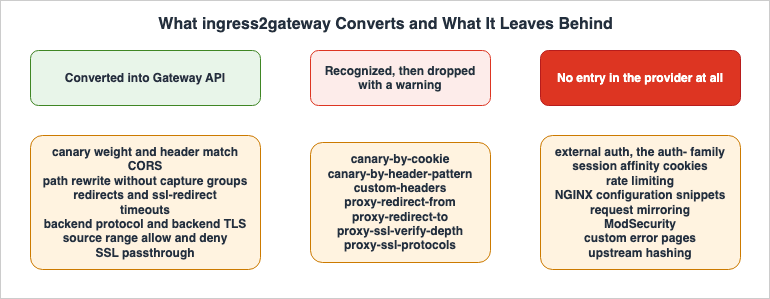
| Category | Count |
|---|---|
Annotations listed in the ingress-nginx annotations reference table | 117 |
| Of those, the ones with an entry in the provider README | 43 |
| Of those, the ones it converts | 36 |
| Of those, items explicitly marked as "Recognized but not converted" | 7 |
| The ones with no entry in the provider README at all | 74 |
The number 36 aligns with the version 1.0 announcement article, which states "over 30 common annotations." Before 1.0 the tool supported only three of them, so this release widens the coverage a great deal.
The 7 items marked as "Recognized but not converted" will generate warnings. These are:
canary-by-header-pattern, canary-by-cookie, proxy-redirect-from, proxy-redirect-to, custom-headers, proxy-ssl-verify-depth, and proxy-ssl-protocols. The tool recognizes these items but informs the user that it cannot transform them.For the 74 items with no entry at all, the README promises nothing. Functionally, these include those starting with
auth- for external authentication, affinity and those starting with session-cookie- for session affinity, limit- for rate limiting, those involving direct writing of NGINX configurations using snippet, those starting with mirror- for mirroring, those related to ModSecurity, custom-http-errors for custom error pages, and upstream-hash-by for upstream hashing. These items do not have a core equivalent in Gateway API and will need to be addressed as implementation-specific extensions.However, the absence of an entry and the absence of any notification are two different things. As demonstrated by the following example,
configuration-snippet generates a warning indicating an "Unsupported annotation" at runtime, even though it lacks an entry in the provider's README. Instead of using the README as a comprehensive checklist, the correct approach is to actually run your cluster's manifests through the tool and count the resulting warnings.The
snippet family deserves separate treatment. The retirement announcement states that this very feature was part of the reason for the retirement. The original text reads:What were once considered helpful options have sometimes come to be considered serious
security flaws, such as the ability to add arbitrary NGINX configuration directives via the
"snippets" annotations.Even in the example provided in the 1.0 announcement,
configuration-snippet generates the following warning:Unsupported annotation nginx.ingress.kubernetes.io/configuration-snippetThe behavior defined within a
snippet will not translate directly to the same form in the migration destination. You will need to re-examine what was written, understand its intent, and re-implement that functionality using the features available in the migration destination. This is a design task, not a conversion task, and will likely consume the most time.There is one more kind: settings the provider can read that never reach the output. Because
ingress2gateway is split into a provider and an emitter, a setting the provider has taken into the intermediate representation is still dropped when the emitter has nowhere to put it. In the example provided in the 1.0 announcement, a warning is generated regarding proxy-body-size.Failed to apply
my-ns.my-ingress.metadata.annotations."nginx.ingress.kubernetes.io/proxy-body-size" from
my-ns/my-ingress: Most Gateway API implementations have reasonable body size and buffering
defaultsThe same announcement notes that, depending on the emitter (e.g.,
agentgateway, envoy-gateway, kgateway), it may be possible to pick up this setting. And these emitters are not intended for use with AWS, as seen in Section 7.4.The handling of timeouts is similarly incomplete. The same example generates the following warning:
ingress-nginx only supports TCP-level timeouts; i2gw has made a best-effort translation to
Gateway API timeouts.request. Please verify that this meets your needs.
Furthermore, a warning is generated indicating that there is no way to configure URL normalization within Gateway API.
Gateway API does not support configuring URL normalization (RFC 3986, Section 6). Please
check if this matters for your use case and consult implementation-specific details.
These three warnings mean that the converted result may not behave the same way. They do not mean the conversion failed. While validation based solely on the output YAML may appear complete, these differences will become apparent in a production environment.
8.3 The Rewrite Example Both Sides Use
The upstream and AWS have, as it happens, picked the same feature to illustrate migration: path rewriting. And the two documents collide head-on.The AWS migration guide shows the following
Ingress as its before-migration example.apiVersion: networking.k8s.io/v1
kind: Ingress
metadata:
name: rewrite
namespace: default
annotations:
nginx.ingress.kubernetes.io/use-regex: "true"
nginx.ingress.kubernetes.io/rewrite-target: /$2
spec:
ingressClassName: nginx
rules:
- host: rewrite.bar.com
http:
paths:
- path: /something(/|$)(.*)
pathType: ImplementationSpecific
backend:
service:
name: http-svc
port:
number: 80The regular expression written in the
path field captures two groups, and the rewrite-target field, /$2, rewrites the second capture group. AWS demonstrates this by migrating it to a JSON annotation with the service name appended: alb.ingress.kubernetes.io/transforms.http-svc. Nothing goes wrong on that path, because it swaps the implementation while staying on Ingress.The problem arises when attempting to migrate the same configuration to Gateway API. The README for the
ingress2gateway provider, specifically for the ingress-nginx provider, describes the mapping for rewrite-target as follows:nginx.ingress.kubernetes.io/rewrite-target: Converts to a Gateway API URLRewrite filter with
ReplaceFullPath. Note: path rewrites with capture group references (e.g. $1) are not
supported and will be flagged.The configuration that AWS has chosen as an example is, in fact, a type that the upstream tool explicitly states it cannot convert.
This isn't a contradiction. The two documents describe different paths. The AWS blog covers path 1, while
ingress2gateway addresses path 2. However, for the user, it represents the same configuration. Therefore, if the plan is to migrate in two steps, the first step is easy and the second is done by hand.Rewriting using capture groups is a typical use case for
ingress-nginx. Therefore, during inventory, it is worth counting separately how many rewrite-target values contain a $. This count can roughly indicate the amount of manual work required for the second step of the migration.ingress2gateway also highlights differences in the meaning of regular expressions. In the execution example from the 1.0 announcement, the generated HTTPRoute path is (?i)/users/(\d+).*, accompanied by the following information:Using case-insensitive regex path matches. You may want to change this.The tool is effectively replicating the behavior of
ingress-nginx that was discussed in Section 8.1. The same announcement notes that most organizations will want to change that behavior, recommending removing the leading (?i) and trailing .* to create an exact match, case-sensitive configuration. The decision of which approach to use is a migration decision, and not one that the tool should dictate.9. Running Both, and Defining What Finished Means
9.1 Two Controllers, Two Addresses
The first step in transitioning isn't a switch, but a parallel run. The page for users ofingress-nginx in the official Gateway API documentation asks whether Gateway API can be tried without removing Ingress-NGINX, and answers it this way.Yes, and it's highly recommended. You can run a Gateway API controller alongside your
existing Ingress-NGINX controller. They will each get a different external IP address,
allowing you to test and validate your new configuration in isolation without affecting
production traffic.The key is to have a separate address. This allows you to validate the new side in a real cluster while existing traffic continues to flow through the old system.
AWS also offers a similar structure. The AWS blog states that the AWS Load Balancer Controller can handle both
Ingress and Gateway API simultaneously.The AWS Load Balancer Controller supports both the Ingress API and Gateway API
simultaneously in the same cluster.The same article further explains that existing
Ingress resources will continue to function as normal, and you can begin using Gateway API for new services. Existing services can then be migrated one by one. Furthermore, it notes that you don't need to migrate everything at once, and it's perfectly acceptable to use both APIs concurrently for an extended period.Therefore, the unit of migration is not the cluster, but the service. For each service, you should have both the old
Ingress and the new Gateway and HTTPRoute resources running in parallel, compare their behavior, and then migrate as appropriate.9.2 Shifting Traffic
Details on how to drive traffic are outlined in the announcement article foringress2gateway 1.0.After validating behavior in a development cluster, deploy your Gateway API configuration
alongside your existing Ingress. We strongly suggest that you then gradually shift traffic
using weighted DNS, your cloud load balancer, or traffic-splitting features of your
platform.On Amazon EKS, weighted DNS is generally the most straightforward approach. Since the load balancers for the old and new environments are separate, DNS becomes the point of transition. You can adjust the traffic distribution using Amazon Route 53's weighted routing feature.
AWS Prescriptive Guidance also utilizes this same method in a different context: migrating to Amazon EKS Auto Mode. Two
IngressClass resources, nginx and nginx-v2, run side by side, and the switch is made by updating an Amazon Route 53 record. The Amazon EKS User Guide also recommends DNS-based traffic shifting, immediately after stating that the load balancers cannot be moved.The scope of a rollback is also determined by this choice. If you're directing traffic via DNS, reverting the change also involves DNS. There's no need to remove
HTTPRoute resources. Conversely, if you delete the Ingress resources for the old environment first, you'll lose the fallback point.9.3 What Removal Actually Requires
Migration is finished when nothing points at the old controller any more. It is not finished when the new controller starts running.The announcement article for
ingress2gateway 1.0 describes the final step in this way.Finally, when you have shifted all your traffic to your Gateway API controller, delete your
Ingress resources and uninstall your Ingress controller.The AWS migration guide also places the removal of the NGINX Ingress Controller at the top of its post-migration checklist, followed immediately by the cleanup of any Kubernetes Secrets that were used as certificates.
In reality, the items to verify aren't limited to the controller's Pods alone. The migration leaves things behind, and so does whatever the old side depended on. The following four categories should serve as the starting point for your verification:
First, identify any
Ingress resources that still reference an old IngressClass. Check for any resources where the spec.ingressClassName field still contains the value from the old system. Furthermore, if an IngressClass had the annotation ingressclass.kubernetes.io/is-default-class: "true", every Ingress that omits ingressClassName is using it implicitly. This implicit reference won't be found by simply searching for ingressClassName.Second, examine admission webhooks.
ingress-nginx registers webhooks to validate Ingress resources. An example output from kubectl get all -n ingress-nginx, as shown in the AWS Prescriptive Guidance patterns, lists Jobs like ingress-nginx-admission-create and ingress-nginx-admission-patch, as well as a Service named ingress-nginx-controller-admission. Furthermore, the Helm chart values.yaml sets the failurePolicy for these webhooks to Fail. Even if you delete the controller's Pods, creating or updating an Ingress stops there while the webhook registrations remain.Third, the Kubernetes Secrets that were serving as certificates. As Section 6.1 showed, with the AWS Load Balancer Controller, the certificate is transferred to AWS Certificate Manager. The Secret in the cluster stops being used, and it does not disappear.
Fourth, the DNS records and security group references that still point at the old load balancer. Even after the migration is complete, the load balancer from the old system will remain.
Check those four, and then delete the Helm release. If you reverse the order, only remnants of webhooks and
IngressClass will remain in the cluster, leading to failures that are difficult to diagnose.10. Failure Modes and Anti-Patterns
10.1 Turning the Archive Into a Deadline That Is Not There
The explanation that archiving makes it stop working is contrary to fact. As Section 2.1 showed, existing deployments continue to operate, and both Helm charts and container images remain. Build a schedule on that explanation and the premise collapses at the first check, taking the plan with it.The failure in the other direction grows from the same root. The assumption that because something is running, there is no need to rush can be detrimental. As seen in Section 2.2, this is the exact judgment the upstream names as dangerous. The crucial point is that, despite being archived, operations do not stop, and even if vulnerabilities are discovered, they will not be addressed.
10.2 Scheduling the Migration Before Taking the Annotation Inventory
A migration estimate does not follow from the number ofIngress resources. As seen in Section 8.1, the behavior of an Ingress instance with no annotations is being affected by the annotations of another Ingress instance. If the inventory unit is not based on hostnames, this ripple effect will not be accounted for in the estimate.10.3 Copying rewrite-target Straight Into a URLRewrite Filter
This failure mode is the one from Section 8.3. Rewrites using capture groups do not move straight into the ReplaceFullPath field of the Gateway API URLRewrite filter. ingress2gateway reports this as flagged, but nothing warns you when you are copying rewrite-target across by hand.10.4 Carrying the Implicit Regex Semantics Across Without Deciding To
The regular expressions iningress-nginx are prefix matches, and they ignore case. Whether to reproduce this behavior or switch to an exact match is a decision to be made during the migration process. Accept the output of ingress2gateway without deciding, and you default to reproducing the old behavior. As seen in Section 8.3, the tool presents a pattern that combines (?i) and .*, and encourages you to consider modifications.10.5 Losing the Trailing-Slash Redirect
ingress-nginx was returning a 301 for a path that differed only by a trailing slash. Gateway API compliant implementations do not perform this behavior by default. If clients or downstream services rely on this redirect, they may receive 404 errors after migration. If necessary, explicitly define this behavior using the RequestRedirect filter.10.6 Expecting to Transfer Load Balancers Into EKS Auto Mode
As seen in Section 6.2, AWS states plainly that the migration is not supported. Plan the move to Auto Mode and the entry-point migration for the same window, and this single point forces the plan to be rebuilt. The schedule should be planned with the assumption that a blue/green deployment is necessary.10.7 Treating gatewayClassName as a Cosmetic Field
As seen in Section 5, this one word decides the data plane on the AWS side. While changing parentRefs might appear as a minor modification in the manifest, in reality, it results in the replacement of AWS resources that handle traffic. A common oversight during reviews is that the changes are often subtle, due to the brevity of the lines being modified.10.8 Reaching for Annotations on Gateway API Resources
As seen in Section 4.3, Gateway API does not make annotations an extension point. The Gateway API documentation calls the approach strongly discouraged. Use the CRDs that the implementation provides. In the case of the AWS Load Balancer Controller, this refers to the three described in Section 6.1.10.9 Mixing L4 and L7 Routes on One Gateway
The AWS Load Balancer Controller does not support configuring a single Gateway to combine TCPRoute and HTTPRoute resources. The reason is that the kind of load balancer provisioned differs between L4 and L7. Therefore, it is necessary to separate the Gateway resources.10.10 Leaving the Kubernetes Version Ceiling Out of the Plan
As seen in Section 2.3, the final release ofingress-nginx declares validation only as far as Kubernetes 1.35. When one team plans the entry-point migration and another plans the Kubernetes upgrade, the upgrade side runs ahead and the entry point alone ends up outside the validated range.10.11 Reaching for Service externalIPs as a Shortcut
Kubernetes 1.36 deprecated the .spec.externalIPs field on Service. The field is scheduled for complete removal in version 1.43. The Kubernetes 1.36 release notes state that this field has historically presented security concerns, and suggest migrating to LoadBalancer services, NodePort, and the Gateway API as alternatives. Papering over a stalled entry-point migration with this field adds one more migration to the list.11. Frequently Asked Questions
11.1 Will our Ingress NGINX deployment stop working?
No. Both the README and the retirement announcement state that existing deployments will continue to operate, and that the Helm chart and container images will also remain available. What has stopped is maintenance. No update or fix ships for any vulnerability found from here on.11.2 Should we go to Gateway API in one step or two?
It depends on the conditions. The five factors in Section 7.5 settle it. If the variety of annotations is large, one step is the better bet, because the second rewrite on the two-step path falls to hand work. If the thing that frightens you most is an unmaintained controller facing the internet, finishing the first step of the two-step path gets you further, sooner.11.3 Do we have to replace the Ingress resources at all?
Not necessarily. The AWS Load Balancer Controller will continue to processIngress resources. Since the same controller can also handle the Gateway API, you can choose to keep your existing Ingress resources while implementing new services using the Gateway API. The upstream, however, keeps the option of staying on Ingress inside the conditional clause "if you must continue using Ingress."11.4 Can EKS Auto Mode take over the load balancers we already have?
No. The Amazon EKS User Guide states plainly that migrating load balancers from the self-managed AWS Load Balancer Controller to EKS Auto Mode is not supported. Instead, create a new load balancer using a blue/green deployment and direct traffic via DNS.11.5 Can EKS Auto Mode serve Gateway API resources?
AWS does not say. As of the verification date, the User Guide pages that cover networking and load balancing for EKS Auto Mode are written entirely in terms ofIngressClass and Service, with no mention of Gateway API. The same User Guide, however, states plainly that you can install the AWS Load Balancer Controller in an EKS Auto Mode cluster, and that you can assign ownership on a resource-by-resource basis using IngressClass and loadBalancerClass.11.6 Does ingress2gateway understand our ALB annotations?
No. As of the verification date, ingress2gateway has no AWS provider and no AWS emitter. What it can read is whatever the nine providers cover, ingress-nginx among them.11.7 Can one cluster run more than one Gateway API implementation?
Yes. An AWS blog shows the AWS Load Balancer Controller and the AWS Gateway API Controller for Amazon VPC Lattice running side by side in one cluster. Each controller only managesGateway resources that reference its own GatewayClass, so they do not interfere with one another.11.8 Which controller version do we actually need?
If you are using L7 routes, specificallyHTTPRoute and GRPCRoute, you need version 2.14.0 or later of the AWS Load Balancer Controller. For L4 routes, you need version 2.13.3 or later. The AWS migration guide describes Gateway API support as as of v3.0, while the controller's own documentation and the Amazon EKS User Guide point at lower versions. Aligning with the implementation's numbers is the safer choice.11.9 How do we know the migration is finished?
The test is that nothing points at the old controller any more. Before deleting the Helm release, check the four items from Section 9.3:Ingress resources still naming the old IngressClass, the admission webhook registration, the Kubernetes Secrets that held the certificates, and the DNS records and security group references that still point at the old load balancer.11.10 Does staying on Ingress NGINX block our Kubernetes upgrades?
No, the upgrade still runs. What you lose is the backing of the project's validation. The highest Kubernetes version for whichingress-nginx declares its end-to-end tests passing is 1.35. Amazon EKS began offering version 1.36 on June 2, 2026. The project states that older versions "may work," but makes no statements regarding newer versions.12. Summary
Choosing the entry-point controller again is a decision about where to put the entry-point abstraction. It is not a product comparison.Section 2 established that what was archived is the maintenance, not the operation. Conditions inside your own cluster set the migration deadline. There is a second deadline as well: the final release of
ingress-nginx declares validation only as far as Kubernetes 1.35, and Amazon EKS already offers 1.36.Section 4 showed how Gateway API splits the single
Ingress resource into a Gateway and an HTTPRoute. What was split is more than the form: ownership of TLS termination moves. The role split itself, though, can be introduced later.Section 5 showed that
gatewayClassName decides the data plane on the AWS side. The Gateway and HTTPRoute CRDs are the same whether you are provisioning an Application Load Balancer or creating a service in Amazon VPC Lattice. The only difference is that one field. And the branch it opens is invisible to whoever writes the HTTPRoute.Section 6 went through the three receivers on the AWS side. Moving to Amazon EKS Auto Mode changes the API group, and the load balancers you already have cannot be moved across. On whether Gateway API is handled, AWS does not say.
Section 7 set out where the recommended order of migration disagrees. The upstream says move to the standard in one step. The AWS migration guide says move to the
Ingress resources of the AWS Load Balancer Controller first. AWS Prescriptive Guidance says rebuild on top of Amazon EKS Auto Mode, and the Amazon EKS User Guide says something close to what the upstream says. The question of which one is right does not arise. They divide over what each wants to reduce first.Section 8 showed that the rate limiter is the annotation inventory. Of the 117 annotations in the
ingress-nginx annotations reference table, the upstream tool converts 36. And the rewrite AWS picked as its migration example is the very kind the upstream tool states it cannot convert.Section 9 showed that running both sides in parallel is what the upstream recommends, that the shifting happens at DNS, and that finished is defined as the absence of anything pointing at the old controller.
What you decide first is what you want to reduce first. Not the product. Once that is settled, which of the four recommendations applies to your cluster settles with it.
13. References
Kubernetes / SIG Network- Ingress NGINX Retirement: What You Need to Know - Kubernetes Blog, November 11, 2025
- Ingress NGINX: Statement from the Kubernetes Steering and Security Response Committees - Kubernetes Blog, January 29, 2026
- Before You Migrate: Five Surprising Ingress-NGINX Behaviors You Need to Know - Kubernetes Blog, February 27, 2026
- Announcing Ingress2Gateway 1.0: Your Path to Gateway API - Kubernetes Blog, March 20, 2026
- Kubernetes v1.36: Haru - Kubernetes Blog, April 22, 2026
- kubernetes/ingress-nginx - GitHub
- Annotations - Ingress-Nginx Controller
- kubernetes-sigs/ingress2gateway - GitHub
Gateway API
- Migrating from Ingress - Gateway API
- A Welcome Guide for Ingress-NGINX Users - Gateway API
- Roles and Personas - Gateway API
- GatewayClass - Gateway API
AWS
- Navigating the NGINX Ingress retirement: A practical guide to migration on AWS - AWS Networking and Content Delivery Blog, March 27, 2026
- AWS Load Balancer Controller adds general availability support for Kubernetes Gateway API - AWS Networking and Content Delivery Blog, March 6, 2026
- Streamline your Amazon EKS deployments with Gateway API support for AWS Load Balancer Controller and Amazon VPC Lattice - AWS Networking and Content Delivery Blog, March 31, 2026
- Route internet traffic with AWS Load Balancer Controller - Amazon EKS User Guide
- Enable EKS Auto Mode on existing EKS clusters - Amazon EKS User Guide
- Create an IngressClass to configure an Application Load Balancer - Amazon EKS User Guide
- Learn about VPC Networking and Load Balancing in EKS Auto Mode - Amazon EKS User Guide
- Review release notes for Kubernetes versions on standard support - Amazon EKS User Guide
- Understand the Kubernetes version lifecycle on EKS - Amazon EKS User Guide
- Migrate NGINX Ingress Controllers when enabling Amazon EKS Auto Mode - AWS Prescriptive Guidance
- Gateway API - AWS Load Balancer Controller
- Introducing AWS Gateway API controller for Amazon VPC Lattice - AWS Containers Blog
Related Articles on This Site
- Amazon EKS Networking Deep Dive - VPC CNI, IP Address Management, Security Groups for Pods, and Pod Connectivity
- Self-Managed LLM Inference on Amazon EKS - Serving Open-Weight Models with vLLM, Neuron/GPU, and Karpenter
- AWS VPC Lattice Complete Guide - Service-to-Service Networking Across VPCs and Accounts
- Amazon EKS Capabilities - Managed Argo CD, ACK, and kro, and What Changes When the Controllers Move Off Your Cluster
- Amazon EKS Control Plane Configuration - What You Can Set, What Blocks the Way Back, and How Far Each Setting Reaches
- AWS End-of-Support and EOL Reference - Lambda, EKS, RDS and Aurora, ElastiCache, and OpenSearch Service
- AWS Elastic Load Balancing Decision Guide - Choosing and Operating Application, Network, and Gateway Load Balancers
- AWS History and Timeline regarding Amazon EKS - Overview, Functions, Features, Summary of Updates, and Introduction
- Gang Scheduling and Dynamic Resource Allocation on Amazon EKS - Why One Half of the Vocabulary Is Still Alpha, and What Decides Which Device Allocation Path You Get
- eBPF on Amazon EKS - What Loads Into Your Nodes, When a Network Policy Starts Enforcing, and Where the Coverage Stops
References:
Tech Blog with curated related content
Written by Hidekazu Konishi