AWS Lambda Managed Instances - Capacity Providers and the Multi-Concurrency Trap
First Published:
Last Updated:
/tmp. Keep a database connection warm across invocations. None of that needed a lock, because there was never a second request inside the same environment to race against.Lambda Managed Instances removes that guarantee. AWS describes the change plainly: one execution environment can handle multiple invocations at the same time, and as a direct consequence, thread safety, state management, and context isolation must be handled differently depending on the runtime. That single inversion is what this article is about. It is also the thing most likely to be skipped, because the feature is usually introduced as a compute and billing story rather than as a change to the concurrency contract your code was written against.
This article is a design guide for the decision an engineer actually faces: you have a Lambda function that works, and you have to decide whether it can be moved onto Managed Instances without breaking, what has to change first, and what would make you say no. It treats the multi-concurrency requirement as the primary gate, and it treats capacity providers, scaling behavior, and event source compatibility as the constraints that decide whether the answer holds in production.
Every fact below was verified against AWS official documentation on 2026-08-09, with the page linked at the point of use. Nothing here was measured or executed. No capacity provider was created, no function was attached, no version was published, and no configuration was changed, because every one of those actions provisions billable infrastructure in an account or alters a running function. The code examples show the shape of a correct and an incorrect implementation and are not claimed to be tested. Where two AWS pages state the same parameter differently, both are shown and the one to build automation against is named. No pricing figures appear in this article. The adoption argument below is made entirely in terms of the execution model, thread safety, scaling behavior, latency profile, quotas, and event source support.
Table of Contents
- 1. Introduction: Can You Put This Function on Managed Instances?
- 2. What Breaks the One-Request-Per-Environment Assumption
- 3. Capacity Providers as the Unit of Design
- 4. Attachment, Activation, and the Published Version
- 5. The Two Knobs on the Execution Environment
- 6. The Multi-Concurrency Trap
- 7. Making Existing Code Safe
- 8. Scaling Behavior and Latency Profile
- 9. Event Source and Feature Compatibility
- 10. Choosing Between Execution Models
- 11. When Not to Use It
- 12. Observability for Multi-Concurrency
- 13. Failure Modes
- 14. Frequently Asked Questions
- 15. Summary
- 16. References
1. Introduction: Can You Put This Function on Managed Instances?
AWS Lambda Managed Instances runs Lambda functions on current-generation Amazon EC2 instances in your own account, while Lambda continues to manage instance lifecycle, operating system and language runtime patching, routing, load balancing, and scaling. AWS announced it on 2025-11-30 in five Regions, and on 2026-06-08 announced availability in all commercial AWS Regions except Israel (Tel Aviv), Middle East (Bahrain), Middle East (UAE), and Asia Pacific (Auckland).Read that description and the natural conclusion is that this is a deployment target change. It is not. It is an execution model change wearing a deployment target as a disguise, and the disguise is effective because the programming model is genuinely unchanged: same handler signature, same event shapes, same SDKs, same console. You can attach an existing function to a capacity provider without editing a line of code. Whether that function then behaves correctly is a completely separate question, and it is the question this article exists to answer.
1.1 The decision this article supports
The concrete decision is a three-way branch, and each branch has a different owner.- Leave the function on the Lambda default compute type. Correct whenever traffic is bursty, the workload benefits from scaling to zero, or the code cannot be made concurrency-safe at acceptable cost.
- Move it to Managed Instances as-is. Only defensible after you have established that the runtime's concurrency model does not expose the code's shared state, which for one of the five supported runtimes is true almost automatically and for the other four is not.
- Change the code first, then move it. The common case for Java, Node.js, .NET, and Rust functions of any age.
Choosing between these is not a compute sizing exercise. It is a code audit, and Sections 6 and 7 are the audit.
1.2 Scope
In scope: what exactly changes when one execution environment serves many invocations; the capacity provider as the unit of infrastructure, trust, and blast radius; what happens at attachment and at version publication; the two configuration values that shape each execution environment; the classes of shared resource that break under multi-concurrency, organized by resource type rather than by language; how to make existing code safe in each supported runtime; the asynchronous scaling loop and the latency profile it produces; event source support and feature exclusions; the criteria for choosing between execution models; when not to use this at all; what to observe when several requests share an environment; and the failure modes.Out of scope, with delegation:
- How execution environments work in general. The Init, Invoke, and Shutdown phases, Firecracker isolation, environment reuse, and the anatomy of a cold start are established in How AWS Lambda Execution Environments Work. This article assumes that material and only describes where Managed Instances departs from it.
- Concurrency and scaling in the default model. Account concurrency, reserved concurrency, provisioned concurrency, the concurrency scaling rate, throttling paths, and event source scaling are covered in the AWS Lambda Concurrency and Scaling Guide. Section 8 here describes only the differences.
- Cold start mitigation. Provisioned concurrency, SnapStart, language profiles, and initialization tuning belong to the AWS Lambda Cold Start Mitigation Guide. Section 8 links there rather than restating it.
- Long-running and multi-step workflows. Managed Instances is not the answer to a function that needs to wait. That is what AWS Lambda Durable Functions solves, and it solves a different problem entirely.
- Container image packaging details. Out of scope here.
- Pricing. Managed Instances uses a different charging structure from the default compute type, and that structure is described conceptually where it affects design. No figures, rates, comparisons, or estimates appear anywhere in this article.
The full set of Lambda material on this site is indexed in the AWS Lambda Master Index, and the feature's place in the service history is recorded in the AWS Lambda History and Timeline.
1.3 A note on reading the official documentation
Lambda Managed Instances is young, and its documentation set is spread across a Developer Guide chapter group, an API reference, several What's New posts, and two AWS Compute Blog articles. They do not all use the same words for the same thing. Three specific divergences are called out at the point where they matter, in Sections 5 and 9, because each one is capable of producing automation that silently does the wrong thing. Treat that as a general instruction for this feature rather than as a criticism: when a capability is this new, read the API reference and the Developer Guide against each other before you write infrastructure code.2. What Breaks the One-Request-Per-Environment Assumption
2.1 The guarantee you were relying on
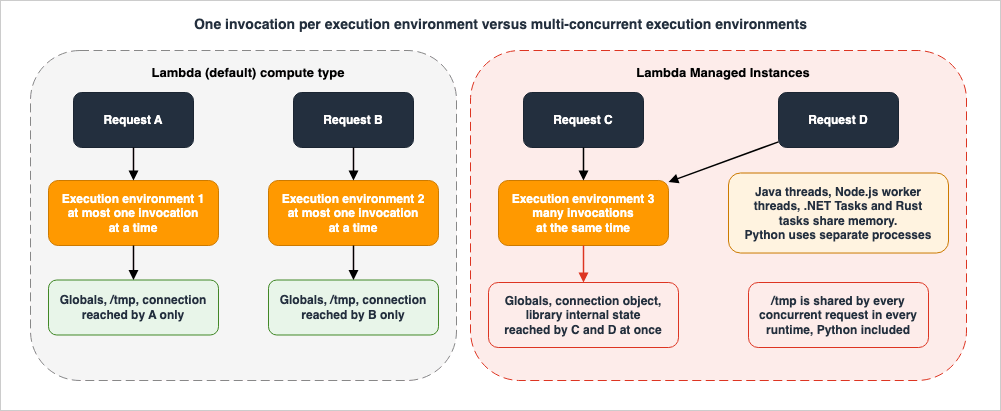
In the Lambda default compute type, an execution environment processes a maximum of one invocation at a time. AWS states this explicitly in the Managed Instances overview when contrasting the two models, describing the default as a single concurrency model where one execution environment can run a maximum of one invoke at a time.That property is the reason a decade of Lambda advice is safe. A module-level variable is effectively request-scoped, because only one request exists in that module's process at any moment. A file written to
/tmp cannot be overwritten mid-read by a sibling request, because there is no sibling. A single database connection held open across invocations is never used by two callers at once. None of these are properties of your code. They are properties of the platform, and they were free.2.2 What Managed Instances substitutes
AWS describes Managed Instances as supporting multi-concurrent invocations, where one execution environment can handle multiple invocations at the same time, and says the benefit is better utilization of the underlying EC2 instances, particularly for IO-heavy applications such as web services and batch jobs. The same paragraph states the consequence in one sentence: this change in execution model means that thread safety, state management, and context isolation must be handled differently depending on the runtime.The word depending is doing a great deal of work in that sentence, and Section 6 unpacks it. The short version is that AWS did not implement multi-concurrency the same way five times. Java uses operating system threads inside one process. Node.js uses worker threads plus asynchronous execution within each thread. .NET uses Tasks in a single process. Rust uses async tasks on Tokio in a single process. Python uses multiple operating system processes. Four of those five share memory between concurrent requests. One does not.
2.3 The isolation substrate also changes
The default compute type is multi-tenant and uses Firecracker microVM technology to isolate execution environments running on shared Lambda fleets. Managed Instances runs in your account and uses containers on EC2 Nitro instances for isolation rather than Firecracker, with the capacity provider serving as the security boundary and functions executing in containers within instances.AWS is unusually direct about the security implication, and it deserves to be quoted rather than paraphrased. The capacity provider documentation states that containers do not provide strong security isolation between functions, unlike Firecracker MicroVMs, and lists container isolation as a key security concept with the note that containers are NOT a security provider and should not be relied on for security between untrusted workloads. The security page repeats it: all functions assigned to the same capacity provider must be mutually trusted.
This is the second inversion, and it is easy to miss because it is not a code concern. In the default model, tenancy isolation between two of your own functions was a platform property you never configured. On Managed Instances it becomes a placement decision you make, and the unit of that decision is the capacity provider.
2.4 The three consequences, in the order they bite
The rest of this article follows from Sections 2.2 and 2.3 in a specific order, and it is worth naming that order because teams tend to encounter it in reverse.- Correctness. Shared mutable state inside an execution environment now has more than one accessor. This is the gate. Nothing else matters if the function returns another request's data.
- Capacity shape. Total concurrency is now execution environments multiplied by concurrency per environment, and the floor is not zero. Downstream systems sized against the old model, especially databases, see a different load shape.
- Placement and trust. Functions colocate on instances you own, inside a boundary you define, with isolation properties you are responsible for reasoning about.
The default compute type let you ignore all three. Managed Instances lets you ignore none of them.
3. Capacity Providers as the Unit of Design
A capacity provider is described by AWS as the foundation for running Lambda Managed Instances, acting as the security boundary for your functions and defining the compute resources that Lambda provisions and manages on your behalf. It is simultaneously an infrastructure definition, a trust boundary, and a scaling domain, and those three roles do not always want the same number of capacity providers. Resolving that tension is the main design decision in this section.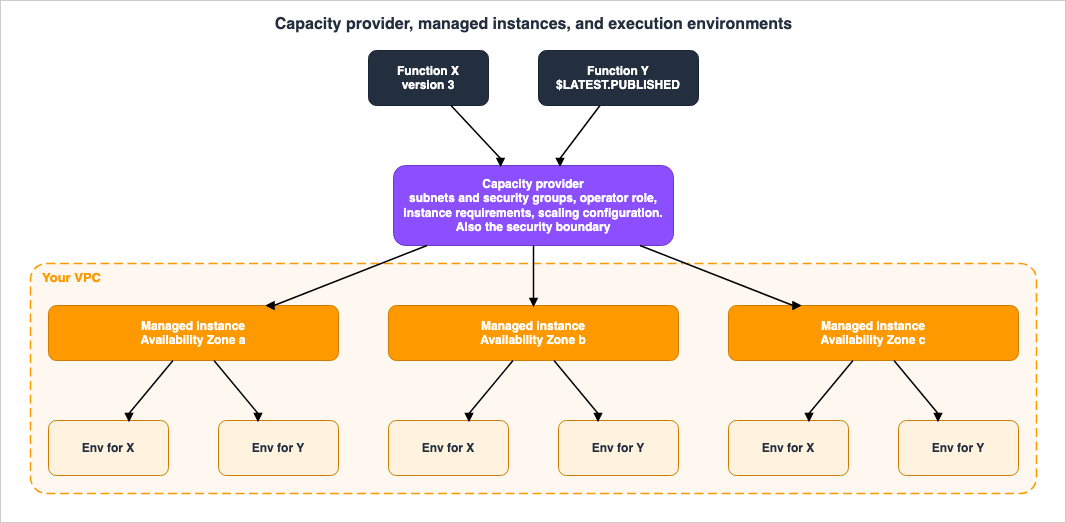
3.1 What you declare
The required parameters are a name unique within the account, a VPC configuration, and a permissions configuration.| Parameter | Requirement | What AWS documents |
|---|---|---|
CapacityProviderName | Required | Unique within your AWS account |
VpcConfig.SubnetIds | Required | At least one subnet, maximum of 16. AWS recommends subnets across multiple Availability Zones for resiliency |
VpcConfig.SecurityGroupIds | Optional | Defaults to the VPC default security group if not specified |
PermissionsConfig.CapacityProviderOperatorRoleArn | Required | IAM role that allows Lambda to manage EC2 resources in the capacity provider |
InstanceRequirements.Architectures | Optional | x86_64 or arm64. Default is x86_64 |
InstanceRequirements.AllowedInstanceTypes | Optional | Explicit allow list. Mutually exclusive with the exclude list |
InstanceRequirements.ExcludedInstanceTypes | Optional | Exclusion list using wildcards. You can specify only one of the two |
CapacityProviderScalingConfig.ScalingMode | Optional | Auto or Manual. Default is Auto |
CapacityProviderScalingConfig.MaxVCpuCount | Optional | Maximum vCPUs for the capacity provider. Default is 400 |
CapacityProviderScalingConfig.ScalingPolicies | Optional | Target tracking policies for CPU and memory utilization |
KmsKeyArn | Optional | KMS key for EBS encryption. Defaults to an AWS managed key |
Tags and PropagateTags | Optional | Tag propagation applies tags to managed EC2 instances, EBS volumes, and ENIs |
On instance selection, AWS gives an unambiguous recommendation and a reason: let Lambda choose instance types for you, because restricting the number of possible instance types might result in lower availability. The AWS Compute Blog post Build high-performance apps with AWS Lambda Managed Instances adds that Lambda currently supports three EC2 instance families of size large and up, namely C for compute optimized, M for general purpose, and R for memory optimized, and that omitting instance types lets Lambda default to instances appropriate for your function's memory and CPU configuration.
3.2 The two roles Lambda needs
Managed Instances requires two IAM roles that did not exist in your default-compute mental model, plus a service-linked role.The capacity provider operator role is assumed by Lambda to manage EC2 resources, and AWS documents it as analogous to the way Lambda assumes an execution role when your function runs. The operator role page publishes the current contents of the
AWSLambdaManagedEC2ResourceOperator managed policy, and reading it is worth five minutes because it shows exactly how narrow the grant is. The ec2:RunInstances, ec2:CreateTags, and ec2:AttachNetworkInterface actions on instances, network interfaces, and volumes are conditioned on ec2:ManagedResourceOperator equal to scaler.lambda.amazonaws.com, and ec2:RunInstances on images is conditioned on ec2:Owner equal to amazon. In other words, the role cannot be used to launch arbitrary instances from arbitrary images.The function execution role is unchanged in concept and is what your code uses to reach other AWS services.
The service-linked role
AWSServiceRoleForLambda gives Lambda persistent permission to terminate managed instances, specifically ec2:TerminateInstances and ec2:DescribeInstances. AWS states it is created automatically the first time you create a capacity provider, that the principal creating that first capacity provider needs iam:CreateServiceLinkedRole for lambda.amazonaws.com, and that the role can only be deleted after all Managed Instances capacity providers in the account are deleted. The first-capacity-provider-in-the-account case is a common and confusing failure in restricted environments, because the missing permission is on a role nobody remembers requesting.3.3 The placement gate
Access to a capacity provider is controlled by a dedicated IAM action. AWS documents that users needlambda:PassCapacityProvider to assign functions to capacity providers, that this permission acts as a security gate ensuring only authorized users can place functions in specific capacity providers, and that it is required when creating functions that use Managed Instances, when updating function configurations to use a capacity provider, and when deploying functions using infrastructure as code.The published example policy scopes the action to an ARN pattern rather than to a wildcard, which is the right default.
{
  "Version": "2012-10-17",
  "Statement": [
    {
      "Effect": "Allow",
      "Action": "lambda:PassCapacityProvider",
      "Resource": "arn:aws:lambda:*:*:capacity-provider:trusted-workloads-*"
    }
  ]
}
Naming matters more than usual here, because the ARN pattern is the enforcement surface. AWS recommends naming capacity providers to clearly indicate their intended use and trust level, giving
production-trusted and dev-sandbox as examples. A naming scheme chosen for human readability alone will not scope cleanly.3.4 Trust boundary versus efficiency, and how to resolve it
Two AWS statements pull in opposite directions, and both are correct.Pulling toward more capacity providers: functions in one capacity provider must be mutually trusted, containers are not a security boundary, and you should separate workloads that are not mutually trusted by using different capacity providers.
Pulling toward fewer: each managed instance can run execution environments for multiple functions mapped to the same capacity provider, and if you attach a function to an existing capacity provider that already runs other functions, Lambda might not spin up new instances when the available instances already have capacity to accommodate the new function's execution environments. Sharing therefore avoids paying the three-instance startup cost again per function.
The resolution is to treat the capacity provider the way a cell-based architecture treats a cell: as a blast radius you choose deliberately, not one you inherit. The reasoning is developed at length in Cell-Based Architecture and Shuffle Sharding on AWS, and it transfers directly. Group by trust level first and by efficiency second, because the trust decision is the one you cannot undo cheaply, and because there is a second, harder limit waiting inside a shared provider.
3.5 Quotas that shape the design
The quotas page lists limits that are separate from Lambda default quotas, and two of them constrain architecture rather than throughput.| Resource | Quota |
|---|---|
| Capacity providers per account | 1,000 |
| Function versions per capacity provider | 100. Cannot be increased |
| vCPUs per capacity provider | 15,000 |
| Combined rate for all capacity provider read APIs | 15 requests per second. Cannot be increased |
| Combined rate for all capacity provider write APIs | 1 request per second. Cannot be increased |
The one to design against is 100 function versions per capacity provider, which cannot be increased. If your deployment pipeline publishes a version on every commit and leaves old versions attached, a shared capacity provider hosting several actively developed functions will reach that ceiling faster than intuition suggests. Version cleanup becomes an operational requirement rather than housekeeping.
The write API rate of one request per second is worth noting for infrastructure-as-code pipelines that create or update many capacity providers in one deployment. AWS also notes that Managed Instances remain subject to your EC2 service quotas, calling out EC2 instance type vCPU limits, EBS volume limits, and available IP addresses in your VPC subnets as the ones that commonly affect customers.
3.6 Network egress is a correctness requirement, not an optimization
This is the item most likely to produce a confusing first deployment. Function invoke requests do not flow through your VPC, but egress does. The Compute Blog states that egress traffic from functions, including CloudWatch Logs, transits through the EC2 instance's network interface in your VPC, and that you need internet access through a NAT gateway or VPC endpoints with AWS PrivateLink for CloudWatch as functions send logs and metrics.The troubleshooting page lists the resulting symptom under its own heading: the function executes successfully but you cannot find logs in CloudWatch Logs, because Managed Instances run in your VPC and require network connectivity to reach the CloudWatch Logs endpoint. A function that works and produces no telemetry is a bad state to debug from, and it is entirely preventable at design time.
The networking page documents four options: a public subnet with an internet gateway using IPv4 or IPv6, an IPv6 egress-only internet gateway providing outbound-only connectivity, VPC endpoints, and a private subnet with a NAT gateway. AWS characterizes VPC endpoints as the highest security option with traffic staying within the AWS network and recommends them for production environments with strict security requirements, while noting they require an endpoint in each Availability Zone for high availability. For the NAT gateway option AWS recommends deploying one NAT gateway per Availability Zone with per-AZ route tables. The trade-offs among these are the same ones analyzed in the AWS VPC Connectivity Decision Guide, and the guidance there applies unchanged.
Note also that the capacity provider configures VPC connectivity once, at the provider level, rather than per function. The Compute Blog highlights this as a management simplification and adds the boundary condition: default-compute Lambda functions continue to use their own VPC configurations, and the capacity provider VPC configuration applies only to Managed Instances functions.
3.7 The instances are yours, but not really
AWS documents that Managed Instances functions run on EC2 managed instances in your account with restricted permissions compared to standard EC2 instances, identifiable by the presence of theOperator field in EC2 DescribeInstances output and by the aws:lambda:capacity-provider tag on the instance. You cannot perform standard EC2 operations on them directly, including terminating them manually. To destroy managed instances, you delete the associated capacity provider and Lambda terminates the instances as part of that process.Two operational details follow. First, managed instances are hidden from EC2 console views and API list operations by default, adjustable through the managed resource visibility setting, and AWS notes they remain fully operational and billable in your account regardless of visibility. An inventory or compliance process that enumerates EC2 instances through the default view will not see them. Second, you cannot delete a capacity provider that has function versions attached to it, and the documented remedy is to enumerate attached versions with
ListFunctionVersionsByCapacityProvider, remove or update them, and retry.4. Attachment, Activation, and the Published Version
4.1 Nothing runs until a version is published
AWS documents the sequence as three steps: create a capacity provider, create your function as usual and attach it to a capacity provider, and publish a function version, at which point function versions become active on capacity provider instances.The third step is not a formality. It is the step that provisions infrastructure. AWS states that when you publish a function version with a capacity provider, Lambda launches Managed Instances in your account, launching three instances by default for Availability Zone resiliency and starting three execution environments before marking your function version ACTIVE.
The Compute Blog is blunter about the operational consequence: publish a function version before invoking a Managed Instances function, because publishing triggers Lambda to provision EC2 instances and initialize execution environments so the configured baseline capacity is ready before invocations start, and expect a brief delay before your code goes live. The troubleshooting page confirms the same thing from the other direction, listing a function version that remains pending after publishing and answering that Lambda is launching instances and starting environments, which typically takes several minutes.
A team accustomed to
update-function-code followed immediately by an invoke will find that a Managed Instances deployment has an activation phase in the middle of it, and continuous deployment pipelines have to account for that.4.2 The default of three, and what it means for the floor
The number three appears in three different documents, and it is the same three. AWS states that Lambda launches three instances by default for AZ resiliency, that the default minimum is 3 execution environments across Availability Zones with no default maximum, and in the best practices page that specifying subnets across multiple Availability Zones matters because Lambda launches three instances by default for AZ resiliency.The scaling page also states the consequence of lowering it: values below 3 reduce Availability Zone redundancy. This is the practical definition of not scaling to zero. AWS puts it in the comparison table as scaling to the minimum execution environments configured without traffic, in contrast to the default compute type which scales to zero without traffic.
There is one documented way to reach zero, and it is explicit rather than automatic. Setting both
MinExecutionEnvironments and MaxExecutionEnvironments to 0 deactivates a function version without deleting it, and AWS states that a deactivated function does not automatically scale back up with traffic and must be explicitly reactivated with non-zero values. Section 8.4 returns to this.4.3 The $LATEST.PUBLISHED version type
Managed Instances functions support the same numbered versioning workflow as the default compute type, and AWS also introduced a new version type for teams that prefer not to maintain numbered versions. The version publishing page documents $LATEST.PUBLISHED, which you can create or republish with updated code or configuration.aws lambda publish-version --function-name my-function --publish-to LATEST_PUBLISHEDThe behavior worth memorizing is the invocation rule, which AWS flags as the key difference from
$LATEST: when you invoke a Managed Instances function using an unqualified ARN, Lambda implicitly invokes the $LATEST.PUBLISHED version rather than the unpublished $LATEST version. Anyone whose mental model of an unqualified ARN was formed on the default compute type, where it resolves to $LATEST, is holding a model that is wrong here. AWS also notes that CloudFormation and the Lambda console create the $LATEST.PUBLISHED version automatically for Managed Instances functions.The general versioning semantics that still apply, including what becomes immutable at publication, are documented in Manage Lambda function versions.
4.4 Attaching to an existing provider behaves differently
Attaching the first function to a fresh capacity provider provisions three instances. Attaching the fifth function to a busy provider may provision nothing, because AWS states that Lambda might not spin up new instances if the available instances already have capacity to accommodate the new function's execution environments.That is efficient and it is also a change in what a deployment means. On a shared capacity provider, publishing a version can place new execution environments onto instances that are already serving other functions, and a function that scales aggressively can crowd its neighbors. AWS names this directly in the scaling guidance, recommending that you set the maximum number of execution environments to cap scale-out and prevent noisy neighbor issues when multiple functions share a capacity provider. On a shared provider,
MaxExecutionEnvironments is not a cost control. It is an isolation control.5. The Two Knobs on the Execution Environment
Beyond the function's memory size, two values inLambdaManagedInstancesCapacityProviderConfig determine the shape of every execution environment. They are the highest-leverage settings in the feature, and both are optional, which means most first deployments run on defaults that were chosen for a generic workload rather than for yours.5.1 Memory per vCPU
ExecutionEnvironmentMemoryGiBPerVCpu sets the amount of memory in GiB allocated per vCPU for execution environments. The API reference gives it as type Double with a valid range from 2.0 to 8.0.The supported ratios and their intent come from the 2026-03-27 What's New announcement, which states that Lambda supports up to 32 GB of memory and 16 vCPUs for Managed Instances functions and that the memory-to-vCPU ratio can be configured as 2:1, 4:1, or 8:1. It gives a worked example: at 32 GB of memory you can configure 16 vCPUs at 2:1, 8 vCPUs at 4:1, or 4 vCPUs at 8:1. The same post records that function execution environments were previously limited to 10 GB of memory and approximately 6 vCPUs with no option to customize the ratio.
The Compute Blog maps ratios to workload types: 2:1 corresponds to compute optimized instances for CPU-intensive tasks such as video encoding, 4:1 to general purpose for balanced workloads, and 8:1 to memory optimized for large in-memory datasets or caching. It also states that memory must be set in multiples of the ratio.
On the default value, be careful. The API reference does not document a default for this parameter. The Compute Blog states that the default ratio is 2:1. The scaling documentation explains the 2 GB floor by saying you cannot choose less than 2 GB because this matches the 2 to 1 memory to vCPU ratio of c instances, which have the lowest ratio. Because the authoritative API reference is silent and the surrounding prose is consistent with, but does not confirm, a 2:1 default, set this value explicitly rather than relying on an inferred default.
Two floors are documented and both are absolute. The smallest supported function size is 2 GB and 1 vCPU. AWS gives the reason for each: you cannot configure a function with less than 1 vCPU because functions running on Managed Instances should support multi-concurrent workloads, and you cannot choose less than 2 GB because of the ratio constraint above. A 512 MB function does not have a Managed Instances equivalent.
5.2 Concurrency per execution environment
PerExecutionEnvironmentMaxConcurrency is the parameter that governs how many invocations share one environment. The API reference gives it as type Integer with a valid range from 1 to 1600.The defaults are per runtime and are expressed per vCPU. Every runtime page states them in the same form, and the Compute Blog collects four of the five in a table.
| Runtime | Default maximum concurrency | Source |
|---|---|---|
| Node.js | 64 per vCPU | Node.js runtime page |
| Java | 32 per vCPU | Java runtime page |
| .NET | 32 per vCPU | .NET runtime page |
| Python | 16 per vCPU | Python runtime page |
| Rust | 8 per vCPU | Rust support page |
In every runtime the value does more than cap requests. For Java it also determines the number of threads used by the Java runtime. For Python it determines the number of processes. For Rust it determines the number of Tokio tasks spawned by the runtime and is static for the lifetime of the execution environment, with each worker handling exactly one in-flight request at a time and no multiplexing per worker. AWS states in each case that Lambda automatically adjusts the number of concurrent requests up to the configured maximum based on the capacity of each execution environment to absorb them.
The tuning guidance is symmetric and short. Increase concurrency, up to a maximum of 64 per vCPU, if your function invocations use very little CPU. Decrease it if your application consumes a large amount of memory and very little CPU. AWS adds a warning that runs against intuition: because Managed Instances are meant for multi-concurrent applications, execution environments with very low concurrency might experience throttles when scaling, and when invocations arrive at an execution environment that has reached its concurrency limit, Lambda routes them elsewhere and scales out new execution environments to handle the load.
5.3 Three naming divergences worth knowing before you automate
These are small, they are all in official AWS documentation, and each one can produce automation that is quietly wrong.First, the definition of
PerExecutionEnvironmentMaxConcurrency differs between pages. The API reference describes it as the maximum number of concurrent execution environments that can run on each compute instance. All five runtime pages describe it as the maximum number of concurrent requests which Lambda sends to each execution environment. The runtime pages agree with each other, agree with the parameter name, and agree with the troubleshooting and scaling guidance, which discuss it in terms of requests per environment. Build against the runtime pages' definition.Second, the same setting appears under two names. The CloudWatch metrics page advises raising
ExecutionEnvironmentMaxConcurrency in response to concurrency throttles, while the API parameter is PerExecutionEnvironmentMaxConcurrency. They refer to the same control. Use the API name in code.Third, two upper bounds apply at once. The API reference allows values up to 1600. The scaling and best practices pages cap the value at 64 per vCPU. At the documented maximum of 16 vCPUs, 64 per vCPU yields 1024, which is below the API ceiling. Both constraints are stated by AWS and neither supersedes the other in the documentation, so treat 1600 as the API validation limit and 64 per vCPU as the operational limit, and do not assume a value between the two will be honored.
5.4 Sizing the two knobs together
The workload characteristic that decides both values is the ratio of waiting to computing, and AWS states the rule in both directions.For IO-heavy applications such as web services and batch jobs, multi-concurrency provides the most benefit, because invocations waiting on database queries or API calls yield the vCPU to other invocations during idle periods. For CPU-intensive operations or functions that perform little IO, choose more than one vCPU, and the Compute Blog is more pointed: CPU-bound workloads get no benefit from concurrency greater than one per vCPU, and the correct response is to configure more vCPUs per function for true parallelism.
Python earns a specific recommendation because of its process model. AWS advises choosing a higher ratio of memory to vCPUs, such as 4 to 1 or 8 to 1, because of the way Python handles multi-concurrency. Section 6.5 explains why that is arithmetic rather than preference.
6. The Multi-Concurrency Trap
This is the section the rest of the article exists for. The organizing principle is deliberately not by language, because organizing by language produces the sentence "make your code thread-safe," which is simultaneously true for four runtimes, false for one, and actionable for none. Organizing by the type of resource that gets shared produces a checklist you can run against a real codebase.6.1 The five concurrency implementations
AWS documents that the multi-concurrency implementation varies between runtimes and describes each one on the runtimes page.| Runtime | Supported versions | Implementation | Is memory shared between concurrent requests? |
|---|---|---|---|
| Java | Java 21 and later | Single process, OS threads. Handler object loaded once per environment, then multiple threads execute in parallel and share the same handler object and any static fields | Yes |
| Node.js | Node.js 22 and later | Worker threads with async and await execution. Parallelism across vCPUs from worker threads, concurrency within each thread from asynchronous execution. Initialization occurs once per worker thread | Yes, within a worker thread |
| .NET | .NET 8 and later | Single .NET process per environment, concurrent requests processed with .NET Tasks. Handler object shared across all Tasks | Yes |
| Rust | OS-only runtime provided.al2023 and later | Single process with async tasks on Tokio. Handler must be Clone and Send | Yes |
| Python | Python 3.13 and later | Multiple Python processes, each concurrent request in a separate process with its own memory space and initialization, each process handling one request at a time synchronously | No |
The Python row is the one that overturns the popular summary of this feature. AWS states it without hedging: processes do not share memory directly, so global variables, module-level caches, and singleton objects are isolated between concurrent requests, and due to the process-based multi-concurrency model, Managed Instances functions using Python runtimes do not access in-memory resources concurrently from multiple invokes, so you do not need to apply coding practices for in-memory concurrency safety.
That does not make Python free of migration work. It moves the work from thread safety to two other places, covered in 6.4 and 6.5.
6.2 Shared resource type 1: module-level and static mutable state
This is the canonical failure. In Java, every thread shares the same handler object and any static fields. In Node.js, each concurrent request handled by the same worker thread shares the same handler object and global state. In .NET, the handler object is shared across all Tasks, so any mutable state including collections, database connections, and static objects modified during request processing must be thread safe. In Rust, the handler object is shared across all worker threads with the same requirement.The Node.js documentation gives the clearest illustration of why an
async handler makes this worse rather than better, because the interleaving point is invisible in the source.let state = {
currentUser: null,
requestData: null
};
export const handler = async (event, context) => {
state.currentUser = event.userId;
state.requestData = event.data;
await processData(state.requestData);
// state.currentUser might now belong to a different request
return { user: state.currentUser };
};The comment is AWS's own. The
await yields control, another invocation on the same worker thread overwrites state.currentUser, and the function returns one user's identity attached to another user's request. There is no exception, no log line, and no metric. It is a correctness failure that looks like a successful invocation, which is precisely why it has to be found by code review rather than by monitoring.On the Java side the same category shows up in collections, and AWS gives the before and after.
public class Handler implements RequestHandler<Object, String> {
    private static List<String> items = new ArrayList<>();
    private static Map<String, Object> cache = new HashMap<>();

    @Override
    public String handleRequest(Object input, Context context) {
        items.add("list item");  // Not thread-safe
        cache.put("key", input); // Not thread-safe
        return "Success";
    }
}
A subtle member of this category is any module-level object that carries hidden mutable state even though your code never assigns to it. A pseudorandom number generator held at module scope, a mutable formatter, a memoization table inside a helper, or a client object that buffers between calls are all in scope. This particular observation is a derivation from the model AWS documents rather than a list AWS publishes, so treat it as a review heuristic: if it lives at module or static scope and it is not provably immutable, it is shared, and in the four memory-sharing runtimes it needs to be made safe or moved inside the handler.
6.3 Shared resource type 2: connections and connection pools
AWS treats this as important enough to give it a worked example in Java, Node.js, and .NET, and the shape of the mistake is identical in all three: a single connection object created at initialization and reused by every request.For Java, AWS shows a static
Connection with the comment that a single connection shared across all threads is NOT SAFE, and notes that depending on the connection library used, this might not be thread safe. For Node.js, a single pg Client connected during cold start draws the comment that multiple parallel invocations share this single connection, which is bad, and that queries will collide with multi-concurrent Lambda. For .NET, AWS states plainly that the SqlConnection object is not thread safe.The fix in all three is a pool, and the reason a pool works is worth stating precisely because it is the same reason in each language: the pool hands each concurrent request its own connection for the duration of that request, so the connection object is never shared even though the pool is.
The migration risk here is not correctness. It is sizing, and it is the item most likely to take down something other than your function. Under the default compute type, one environment held at most one in-flight query, so the number of database connections your function could demand was bounded by concurrency. Under Managed Instances, the ceiling is environments multiplied by the pool size, and each environment can genuinely use its whole pool at once. A pool size copied unchanged from a default-compute function, multiplied by a fleet that scales on CPU utilization, is a credible way to exhaust a database's connection limit. The general shape of that failure, and how to reason about it, is developed in the pitfalls section of the AWS Lambda Concurrency and Scaling Guide.
There is a second ceiling on the same axis, inside the environment rather than at the database. Every pooled connection is an open socket, and sockets are file descriptors. AWS raised the Lambda file descriptor limit from 1,024 to 4,096 for functions on Managed Instances, and gave multi-concurrency as the reason: LMI's ability to process multiple requests concurrently necessitates a higher number of file descriptors. The number is generous, and it is not unlimited. A pool sized per environment, multiplied by the concurrency that environment actually reaches, plus open files in
/tmp and any sockets your dependencies hold, is the quantity that has to stay under it. This is the one quota on this page that a default-compute function had no reason to think about, because one in-flight request per environment kept the count far away from the limit.AWS also gives one piece of good news that removes a whole class of anxiety: AWS SDK clients are thread safe and do not require special handling, stated on the Java, Node.js, and .NET pages, with the Rust page saying all AWS SDK for Rust clients are concurrency-safe and require no special handling. The long-standing advice to create SDK clients outside the handler remains correct.
6.4 Shared resource type 3: the /tmp directory
This is the only category that applies to every supported runtime, Python included, and it is therefore the one item on this checklist that nobody gets to skip.All five runtime pages carry the same paragraph: the
/tmp directory is shared across all concurrent requests in the execution environment, concurrent writes to the same file can cause data corruption, for example if another process overwrites the file, and the remedy is either file locking for shared files or unique file names per request, plus cleaning up unneeded files to avoid exhausting the available space.The reason Python is not exempt is that process isolation covers memory, not the filesystem. Two Python processes in one execution environment have separate heaps and the same
/tmp. The troubleshooting page lists this as its own Python symptom, that the function reads incorrect data from files in /tmp because multiple processes share the directory, and recommends unique file names with request IDs in the form /tmp/request_{context.request_id}.txt, file locking with fcntl.flock(), and cleanup with os.remove() after use.Any code that hardcodes a path such as
/tmp/output.json, /tmp/download.zip, or a fixed working directory is a defect on Managed Instances regardless of language. Ephemeral storage sizing also becomes a shared budget rather than a per-request one, and the configurable range and behavior of /tmp are documented under ephemeral storage.6.5 Shared resource type 4: memory, and why Python is different
Python trades thread safety for memory arithmetic, and AWS spells the trade out. Because process-based concurrency means each runtime worker process performs its own initialization, total memory usage equals the per-process memory multiplied by the number of concurrent processes, so if you are loading large libraries or data sets and have high concurrency, you have a large memory footprint. AWS recommends tuning the CPU-to-memory ratio or using a lower concurrency setting to avoid exceeding available memory, and tracking theMemoryUtilization metric in CloudWatch.This is where the 4:1 and 8:1 ratio recommendation for Python comes from. A Python function that loads a model or a large reference dataset at initialization was, under the default compute type, paying that cost once per environment. Under Managed Instances it pays it once per concurrent process in the environment, and the default of 16 concurrent requests per vCPU makes the multiplier large. The AWS Compute Blog post Building Memory-Intensive Apps with AWS Lambda Managed Instances is built around exactly this class of workload and reports an application whose initialization consumes about 14 GB of the allocated memory, which is above what the default compute type allows.
Node.js has a smaller version of the same property, since initialization occurs once per worker thread rather than once per environment, and AWS notes you might see repeat log entries if your function emits logs during initialization.
6.6 Shared resource type 5: ambient request context
This category is the sneakiest, because the code that breaks is usually not your code.AWS states on the Java, Node.js, .NET, and Rust pages that Lambda does not support the
_X_AMZN_TRACE_ID environment variable with Lambda Managed Instances, and that the X-Ray trace ID must be read from the context object instead, using context.getXrayTraceId() in Java, context.xRayTraceId in Node.js, context.TraceId in .NET, and event.context.xray_trace_id in Rust. Python is the exception here as well: with Python runtimes you can use the _X_AMZN_TRACE_ID environment variable to access the X-Ray trace ID with Managed Instances.The reason is structural rather than arbitrary. An environment variable is process-global, and a process now hosts many requests, so a per-request value cannot live there. Any library, layer, middleware, or in-house tracing helper that reads that variable will either fail or, worse, attribute spans to the wrong request. AWS's own remediation list for Node.js in the troubleshooting page names it directly, recommending
InvokeStore.getXRayTraceId() instead of environment variables.A second member of this category, specific to Node.js, is process-level signal handling. AWS states that default-compute functions with extensions can subscribe to the SIGTERM signal using
process.on(), but that this is not supported for Managed Instances functions since process.on() cannot be used with worker threads. Java, Python, .NET, and Rust pages all describe subscribing to SIGTERM as available, and the Rust page mentions a spawn_graceful_shutdown_handler() helper. If your Node.js function flushes buffers or closes connections on SIGTERM, that hook is gone.6.7 Shared resource type 6: the log stream
Log interleaving, meaning log entries from different requests appearing interleaved, is normal in multi-concurrent systems, and AWS says so on all five runtime pages. What changes is that correlation stops being optional.AWS documents that functions using Managed Instances always use the structured JSON log format introduced with advanced logging controls, and that this format includes the
requestId, allowing entries to be correlated to a single request. The word always matters: this is not a setting you elect. Each runtime page names the logging path that carries the request ID automatically, being the LambdaLogger from context.getLogger() in Java, the console logger in Node.js, the standard library logging module in Python, and context.Logger in .NET, with the Node.js page noting that popular third-party libraries such as Winston typically support using console for output.Any log line emitted through a path that bypasses those, or any downstream parser that assumes plain-text Lambda logs, needs revisiting before migration.
6.8 The audit checklist
Run this against the function you are considering moving. The four memory-sharing runtimes are Java, Node.js, .NET, and Rust.| # | Question | Applies to |
|---|---|---|
| 1 | Does any module-level or static variable get assigned after initialization? | Java, Node.js, .NET, Rust |
| 2 | Are any non-thread-safe collections held at module or static scope? | Java, Node.js, .NET, Rust |
| 3 | Is there a single long-lived database or cache connection rather than a pool? | Java, Node.js, .NET, Rust |
| 4 | Is the pool size still sized for one in-flight request per environment? | All five |
| 5 | Does any code path write to a fixed path under /tmp? | All five |
| 6 | Does initialization load a large model or dataset? | All five, critically Python |
| 7 | Does anything read _X_AMZN_TRACE_ID, including a layer or library? | Java, Node.js, .NET, Rust |
| 8 | Does the function register a process.on() handler? | Node.js |
| 9 | Does the handler use the callback signature rather than async? | Node.js |
| 10 | Do log parsers assume a non-JSON format? | All five |
| 11 | Are dependency versions at or above the documented minimums? | All five |
Item 11 is not optional and is easy to overlook. AWS publishes minimum package versions per runtime, and Section 9.4 collects them.
7. Making Existing Code Safe
The remediation patterns follow the categories above. AWS summarizes the thread safety essentials as avoiding mutation of shared objects or global variables, using thread-local storage for request-specific data, initializing shared clients such as AWS SDK and database connections outside the function handler while verifying that configurations remain immutable during invocations, and writing to/tmp using request-specific file names to prevent concurrent writes.The code in this section is illustrative and was not executed or tested. It reproduces the shape of the patterns AWS documents on the runtime pages.
7.1 Java: thread-safe collections and a real pool
The best practices page summarizes the Java guidance as using thread-safe collections,AtomicInteger, and ThreadLocal for request-specific state. The troubleshooting page expands it into a concrete list: use AtomicInteger or AtomicLong for counters instead of primitive types, replace HashMap with ConcurrentHashMap, use Collections.synchronizedList() to wrap ArrayList, use ThreadLocal for request-specific state, and access trace IDs from the Lambda Context object rather than environment variables.public class Handler implements RequestHandler<Object, String> {
private static final List<String> items =
Collections.synchronizedList(new ArrayList<>());
private static final ConcurrentHashMap<String, Object> cache =
new ConcurrentHashMap<>();
@Override
public String handleRequest(Object input, Context context) {
items.add("list item"); // Thread-safe
cache.put("key", input); // Thread-safe
return "Success";
}
}For connections, AWS shows a pool created once per container and a connection acquired per request, with try-with-resources returning it to the pool rather than closing the physical connection.
public class DBQueryHandler implements RequestHandler<Object, String> {

    private static HikariDataSource dataSource;

    public DBQueryHandler() {
        HikariConfig config = new HikariConfig();
        config.setJdbcUrl("jdbc:mysql://localhost:3306/your_database");
        dataSource = new HikariDataSource(config); // Create pool once per Lambda container
    }

    @Override
    public String handleRequest(Object input, Context context) {
        String query = "SELECT column_name FROM your_table LIMIT 10";
        StringBuilder result = new StringBuilder("Data:\n");

        // try-with-resources automatically calls close() on the connection,
        // which returns it to the HikariCP pool (does NOT close the physical DB connection)
        try (Connection connection = dataSource.getConnection();
             PreparedStatement stmt = connection.prepareStatement(query);
             ResultSet rs = stmt.executeQuery()) {

            while (rs.next()) {
                result.append(rs.getString("column_name")).append("\n");
            }

        } catch (Exception e) {
            context.getLogger().log("Error: " + e.getMessage());
            return "Error";
        }

        return result.toString();
    }
}
One Java-specific caution that is easy to miss: AWS notes that if you use virtual threads in your program or create threads during initialization, you need to pass any required request context to those threads. The
Context object is bound to the request thread, and context.getAwsRequestId() provides thread-safe access to the current request's ID, but a thread you spawned does not inherit it.7.2 Node.js: move state into the request, or into a store
The simplest correct fix is also the one AWS shows first, which is to stop having module-level state at all.export const handler = async (event, context) => {
let state = {
currentUser: event.userId,
requestData: event.data
};
await processData(state.requestData);
return { user: state.currentUser };
};When state genuinely has to cross function boundaries within a request, for example between middleware and a route handler, AWS's guidance is to avoid using global state or to use
AsyncLocalStorage, and the best practices page is more specific, saying to use InvokeStore for all request-specific state and avoid global variables. The troubleshooting page names the package: install and use @aws/lambda-invoke-store for all request-specific state, replacing global variables with InvokeStore.set() and InvokeStore.get().For connections, the fix is the
pg Pool rather than the Client, with AWS's comment that the pool gives each parallel invocation its own connection.const { Pool } = require('pg');
// Connection pool created at init time
const pool = new Pool({
host: process.env.DB_HOST,
database: process.env.DB_NAME,
user: process.env.DB_USER,
password: process.env.DB_PASSWORD,
max: 20, // Max connections in pool
idleTimeoutMillis: 30000,
connectionTimeoutMillis: 2000
});
exports.handler = async (event) => {
// Pool gives each parallel invocation its own connection
const result = await pool.query('SELECT * FROM users WHERE id = $1', [event.userId]);
return {
statusCode: 200,
body: JSON.stringify(result.rows[0])
};
};Two Node.js constraints are hard gates rather than recommendations. AWS states that when using Node.js 22 you cannot use a callback-based function handler with Managed Instances, that callback-based handlers are only supported for default-compute functions, and that for Node.js 24 and later they are deprecated for both. AWS also recommends async function handlers because they allow processing multiple requests per worker thread, noting that a synchronous handler means each worker thread can only process a single request at a time, which discards most of the benefit. The number of worker threads is determined by the number of vCPUs available by default and can be set with the
AWS_LAMBDA_NODEJS_WORKER_COUNT environment variable.7.3 Python: files and memory, not locks
Python's remediation list is short and does not mention thread safety at all. The best practices page reduces it to using unique file names in/tmp with request IDs and considering process-based memory isolation.import os
def handler(event, context):
path = f"/tmp/request_{context.aws_request_id}.json"
try:
with open(path, "w") as f:
f.write(build_payload(event))
return process(path)
finally:
if os.path.exists(path):
os.remove(path)The second half of the Python work is capacity rather than code: lower
PerExecutionEnvironmentMaxConcurrency, raise the memory-to-vCPU ratio, or both, and watch MemoryUtilization. AWS's troubleshooting guidance for high memory utilization adds one code-level lever that is genuinely useful here, which is to optimize memory usage by loading data on demand instead of during initialization, precisely because initialization now runs per process.7.4 .NET and Rust
For .NET, AWS's guidance mirrors Java: apply the same concurrency safety practices you would in any other multi-concurrent environment, because the handler object is shared across all Tasks and any mutable state including collections, database connections, and static objects must be thread safe. The concrete substitutions areConcurrentBag and ConcurrentDictionary from System.Collections.Concurrent in place of List and Dictionary, and creating a connection per request rather than holding one static SqlConnection, since AWS notes that ADO.NET providers such as Microsoft.Data.SqlClient automatically support connection pooling when the connection object is opened.There is one compatibility gate for .NET that has no workaround in the documentation: AWS states that Powertools for AWS Lambda (.NET) and AWS Distro for OpenTelemetry Instrumentation for DotNet currently do not support Lambda Managed Instances. If either is in your dependency graph, this is a blocking issue rather than a tuning issue.
For Rust, concurrency is opt-in at the API level, which makes it the one runtime where the compiler participates in the migration. AWS documents that you must use
run_concurrent instead of run with the concurrency-tokio feature enabled, that the handler must be Clone and Send, and that if those bounds are not met your code will not compile.[dependencies]
lambda_runtime = { version = "1", features = ["concurrency-tokio"] }Shared state in Rust is wrapped in
Arc and cloned into each invocation, and AWS notes that SDK clients can be cloned directly without Arc because the clone is cheap. The minimum supported Rust version is documented as 1.84.0.7.5 Testing is part of the migration, not after it
AWS states the requirement twice, in best practices as thoroughly testing your functions for thread safety issues, race conditions, and proper state isolation under concurrent load before deploying to production, and in the Compute Blog as validating your code under concurrent execution and testing with multiple simultaneous invocations to detect race conditions and shared state issues before production deployment.The Compute Blog also flags the case that catches teams by surprise, which is reuse rather than new development: if you are reusing existing Lambda function code, layers, or packaged dependencies on Managed Instances, test for thread safety and compatibility with the multi-concurrent execution model before production deployment. A layer authored years ago against a single-concurrency guarantee has never been exercised the way it is about to be.
8. Scaling Behavior and Latency Profile
8.1 Scaling no longer reacts to invocations
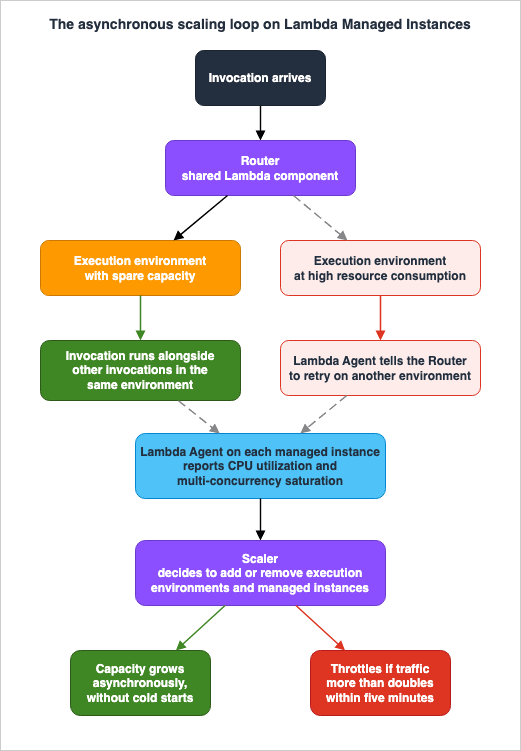
The scaling page opens with the change stated as directly as possible: Lambda Managed Instances does not scale when invocations arrive and does not support cold starts, and instead scales asynchronously using resource consumption signals, currently CPU resource utilization and multi-concurrency saturation.Set that against the default model, where Lambda scales when there is no free execution environment to handle an incoming invocation, which is the event we call a cold start. The two models are not faster and slower versions of each other. They are driven by different signals, and the signal change is what produces the different failure mode.
8.2 The scaling loop
AWS documents three components and a five-step lifecycle. The components are Managed Instances running in your account in the subnets you provide, a Router and Scaler that are shared Lambda components responsible for routing invocations and managing scaling, and a Lambda Agent running on each Managed Instance to manage execution environment lifecycle and monitor resource consumption.The lifecycle, in AWS's own sequence, is that publishing a function version launches Managed Instances and starts three execution environments before the version is marked ACTIVE; each Managed Instance can run execution environments for multiple functions mapped to the same capacity provider; as traffic flows in, execution environments consume resources and the Lambda Agent notifies the Scaler, which decides whether to scale new execution environments or new Managed Instances; if the Router attempts to send an invocation to an execution environment with high resource consumption, the Lambda Agent on that instance notifies it to retry on another; and as traffic decreases the Agent notifies the Scaler, which decides to scale down execution environments and scale in Managed Instances.
Step four is the one to internalize. Saturation is handled by re-routing, not by queueing, and re-routing has a limit. When there is nowhere left to route, the invocation is throttled.
8.3 The latency profile, and the number that replaces cold start
The trade is explicit. You lose cold starts, and in exchange you inherit a bounded rate of capacity growth.AWS states the bound three times in three documents, always the same way. If your traffic more than doubles within 5 minutes, you might see throttles as Lambda scales up instances and execution environments to meet demand. The default target resource utilization is described from the other side: Lambda maintains enough headroom for your traffic to double within 5 minutes without throttles.
So the latency profile of a Managed Instances function is flat for published versions under steady traffic, because environments are pre-warmed and remain invoke-ready, and it degrades into throttling rather than into slow first invocations when traffic outruns the scaler. For a design that has an error budget for latency but not for availability, that is a worse trade than it first appears, and it should be evaluated deliberately rather than accepted as a free win. Everything about reducing initialization latency in the default model, including provisioned concurrency and SnapStart, is covered in the AWS Lambda Cold Start Mitigation Guide, and the comparison worth making is between that toolkit and this one, not between cold starts and zero.
Scale-down is deliberately unhurried. AWS lists slow scale-down as expected behavior in the troubleshooting page, explaining that Lambda scales down instances conservatively to maintain availability and avoid rapid capacity changes that could impact performance.
8.4 The five controls
AWS presents five controls across two levels, and it is useful to hold them as a single table because they are usually described in separate places.| Level | Control | What it does |
|---|---|---|
| Function | Memory and vCPU | Minimum 2 GB and 1 vCPU. Choose a setting that supports multi-concurrent execution |
| Function | Maximum concurrency per environment | PerExecutionEnvironmentMaxConcurrency, up to 64 per vCPU |
| Function | Minimum and maximum execution environments | MinExecutionEnvironments and MaxExecutionEnvironments, default minimum 3, no default maximum |
| Capacity provider | Target resource utilization | Higher target for steady workloads, lower target to hold burst headroom |
| Capacity provider | Instance type selection | Allow or exclude instance types. Restricting reduces availability |
The execution environment bounds are set with
PutFunctionScalingConfig, and their semantics contain three traps documented on the scaling page.aws lambda put-function-scaling-config \
--function-name my-lmi-function \
--qualifier '$LATEST.PUBLISHED' \
--function-scaling-config MinExecutionEnvironments=5,MaxExecutionEnvironments=20 \
--region us-east-1Trap one is qualifier scope. AWS states that these configurations apply at the function level for each qualified ARN, that when set on
$LATEST.PUBLISHED the configuration propagates to future $LATEST.PUBLISHED versions, and that when set on a specific version, newly published versions revert to the default values. A pipeline that publishes numbered versions and sets scaling on the version it just published will silently reset to defaults on the next deployment.Trap two is paired configuration. You must set both the minimum and the maximum together, and any unspecified setting reverts to its default value. A partial update is a full update with defaults filled in.
Trap three is the zero rule. The FunctionScalingConfig API reference gives both values a valid range of 0 to 15000, and the scaling page adds that a minimum of 0 is only valid when the maximum is also 0. There is no way to allow scaling to zero while permitting scale-out.
8.5 Scheduled scaling for predictable peaks
Because capacity growth is bounded, the documented answer for a known spike is to move the floor before the spike arrives rather than to react to it. AWS documents using Amazon EventBridge Scheduler to adjust minimum and maximum execution environments on a recurring or one-time schedule, targetingPutFunctionScalingConfig as a universal target with an execution role permitted to call lambda:PutFunctionScalingConfig.The caveats AWS attaches are the useful part. Scheduled scaling adjusts the provisioned floor and ceiling, but actual scaling between minimum and maximum still responds to CPU utilization and concurrency saturation. If traffic more than doubles within 5 minutes of a scheduled scale-up, you might still experience throttles as capacity is provisioned. And when scaling to zero to deactivate a function, reactivation requires an explicit call with non-zero values.
That last point makes the deactivate-and-reactivate pattern a paired obligation. A schedule that deactivates a function without a matching schedule that reactivates it leaves the function down until someone notices.
9. Event Source and Feature Compatibility
9.1 What the two sources say
The What's New announcements for both the launch and the Region expansion state that Managed Instances integrates seamlessly with all Lambda event sources and with tools like Amazon CloudWatch, AWS X-Ray, and AWS Config. The quotas page is more specific and enumerates: event source mappings on Lambda Managed Instances support Amazon SQS, DynamoDB Streams, Amazon Kinesis Data Streams, Amazon MSK, and self-managed Apache Kafka as event sources.Those two statements are not in conflict for the sources named, but the enumerated list is shorter than the set of event source mappings the default compute type supports. Amazon MQ and Amazon DocumentDB change streams are event source mapping sources for Lambda generally, per How Lambda processes records from stream and queue-based event sources, and they do not appear in the Managed Instances quota table. The honest reading is that the quota page enumerates the sources for which Managed Instances-specific throughput limits are published, and that it does not state anything about the others in either direction. If your design depends on Amazon MQ or DocumentDB change streams, confirm support before committing, rather than inferring it from the word all in a launch announcement.
9.2 Throughput limits that are separate from the default model
These are Managed Instances-specific and several cannot be increased, which makes them design inputs rather than operational knobs.| Resource | Quota | Increasable |
|---|---|---|
| Standard SQS event source mapping throughput | 5 MB per second | No |
| Standard Kafka event source mapping throughput | 1 MB per second | No |
| Standard Kafka event source mappings | 100 event source mappings | No |
| Kinesis event source mapping throughput | 25 MB per second | Yes |
| DynamoDB event source mapping throughput | 10 MB per second | Yes |
| Invoke request throughput for asynchronous invocations | 5 MB per second | Yes |
The Kafka figure deserves a second look for high-volume streaming designs, since 1 MB per second per event source mapping cannot be increased and the number of standard Kafka event source mappings is itself capped at 100. Those two fixed numbers together define a ceiling that no support request will move, and a design that needs more throughput than they permit needs a different shape rather than a larger quota. Event source scaling in the default model, including SQS maximum concurrency and provisioned mode for Kafka, is covered in the AWS Lambda Concurrency and Scaling Guide.
For synchronous and service-integration invocation paths, the Compute Blog states that after publishing, the function works with standard invocation methods including direct invokes, event source mappings, and service integrations with Amazon API Gateway, Amazon S3, Amazon DynamoDB Streams, and Amazon EventBridge. The full inventory of services that can invoke Lambda is maintained in Invoking Lambda with events from other AWS services.
9.3 Runtime and language gates
| Runtime | Minimum supported version on Managed Instances |
|---|---|
| Java | Java 21 and later |
| Python | Python 3.13 and later |
| Node.js | Node.js 22 and later |
| .NET | .NET 8 and later |
| Rust | OS-only runtime provided.al2023 and later |
Notably absent from the supported list are Go and Ruby. A function in either language cannot be moved, and that is a hard stop rather than a migration task.
9.4 Minimum dependency versions
AWS publishes minimum package versions per runtime, and a function that meets every other requirement can still fail on these.| Runtime | Package | Minimum version |
|---|---|---|
| Java | AWS SDK for Java 2.0 | 2.34.0 |
| Java | AWS X-Ray SDK for Java | 2.20.0 |
| Java | ADOT Instrumentation for Java | 2.20.0 |
| Java | Powertools for AWS Lambda (Java) | 2.8.0 |
| Node.js | AWS SDK for JavaScript v3 | 3.933.0 |
| Node.js | AWS X-Ray SDK for Node.js | 3.12.0 |
| Node.js | ADOT Instrumentation for JavaScript | 0.8.0 |
| Node.js | Powertools for AWS Lambda (TypeScript) | 2.29.0 |
| Python | Powertools for AWS Lambda (Python) | 3.23.0 |
| .NET | Amazon.Lambda.Core | 2.7.1 |
| .NET | Amazon.Lambda.RuntimeSupport | 1.14.1 |
| .NET | OpenTelemetry.Instrumentation.AWSLambda | 1.14.0 |
| .NET | AWSXRayRecorder.Core | 2.16.0 |
| .NET | AWSSDK.Core | 4.0.0.32 |
| Rust | lambda_runtime | 1.1.1, with concurrency-tokio enabled |
9.5 The exclusions, collected
Scattered across the runtime pages are several capabilities that do not carry over. Collecting them is worth doing once.| Capability | Status on Managed Instances |
|---|---|
_X_AMZN_TRACE_ID environment variable | Not supported in Java, Node.js, .NET, or Rust. Supported in Python |
process.on() for SIGTERM | Not supported in Node.js because it cannot be used with worker threads |
| Callback-based function handlers | Not supported with Node.js 22 on Managed Instances. Deprecated for both compute types from Node.js 24 |
| Powertools for AWS Lambda (.NET) | Currently does not support Managed Instances |
| ADOT Instrumentation for DotNet | Currently does not support Managed Instances |
| Plain-text log format | Not applicable. Structured JSON is always used |
Where a capability is not mentioned at all in the Managed Instances documentation, this article does not guess. The interaction between Managed Instances and default-model features such as SnapStart, provisioned concurrency, and reserved concurrency is not documented in the pages surveyed here, so confirm each one against current documentation for your Region and runtime before designing around it.
10. Choosing Between Execution Models
10.1 The comparison AWS publishes
AWS gives a five-row comparison table on the Managed Instances overview, and it is a fair summary of the mechanism.| Dimension | Lambda (default) | Lambda Managed Instances |
|---|---|---|
| Concurrency model | One execution environment supports a maximum of one invocation at a time | Multiple invocations per execution environment simultaneously, increasing throughput especially for IO-heavy applications |
| Tenancy and isolation | Multi-tenant, Firecracker MicroVM isolation on shared Lambda fleets | Runs in your account, EC2 Nitro isolation, capacity provider as the security boundary, functions in containers within instances |
| Scaling behavior | Scales when there is no free execution environment for an incoming invocation, which is a cold start. Scales to zero without traffic | Scales asynchronously on CPU resource utilization only, without cold starts. Scales to the minimum execution environments configured without traffic |
| Best suited for | Bursty traffic that can tolerate some cold-start time, or applications without sustained load that benefit from scaling to zero | High volume predictable traffic when you want the flexibility and hardware options of EC2 |
The pricing row of that table is omitted here by policy. What can be said structurally, because it changes design rather than budget, is that the default compute type charges per request and per duration while Managed Instances is instance-based, and AWS notes on the pricing page that Managed Instances functions do not pay separately for the execution duration of each request. The design consequence, not the financial one, is that idle capacity is a real thing that exists and is billable, which is the same statement as the floor discussed in Section 4.2.
10.2 The gates, in the order to apply them
Working from the comparison to a decision, the following order puts the disqualifying questions first.- Is the runtime supported at a supported version? Go and Ruby stop here. So does Node.js 20, Python 3.12, Java 17, and .NET 6.
- Can the function run at 2 GB and 1 vCPU or more? A 256 MB function has no equivalent configuration.
- Is the Region supported? Israel (Tel Aviv), Middle East (Bahrain), Middle East (UAE), and Asia Pacific (Auckland) were excluded as of the 2026-06-08 announcement.
- Can the code be made concurrency-safe? For Python this is mostly
/tmpand memory. For the other four it is a real code audit, per Section 6.8. - Can the traffic profile live inside the scaling bound? If traffic can more than double within five minutes and throttles are unacceptable, this is the gate that fails.
- Do the event sources and their throughput limits fit? Particularly Kafka, per Section 9.2.
- Is there a trust boundary story? Functions sharing a capacity provider must be mutually trusted.
- Only then, is the workload shape a fit? Steady, predictable, IO-heavy, or in need of specific hardware or large memory.
Gates one through three are facts about your function. Gates four through seven are engineering work with a real cost. Gate eight is where most published discussion starts, which is why so many migrations discover gate four late.
10.3 What Managed Instances is not an answer to
Two adjacent problems get mistakenly routed here.Long waits. A function that spends most of its time waiting for a human, an approval, or a slow external system does not want a bigger instance. It wants checkpointing and the ability to pause without consuming compute, which is what Lambda durable functions provide and what is covered in the AWS Lambda Durable Functions Practical Guide.
Cold start pain on bursty traffic. Managed Instances removes cold starts by keeping capacity warm, but it does so with a floor that does not go to zero and a scaling bound that punishes bursts. For a spiky workload, the toolkit in the AWS Lambda Cold Start Mitigation Guide is the better match.
11. When Not to Use It
A design guide that only explains how to adopt something is an advertisement. The following are the cases where the correct answer is to stay on the default compute type, and several of them are common.Traffic that can more than double within five minutes. This is the single most important disqualifier because it is a property of your users rather than of your code, and it cannot be engineered away inside the function. AWS states the bound plainly and repeats it in the troubleshooting guidance. A flash-sale endpoint, a webhook receiver behind someone else's retry storm, or a batch trigger that fires all at once will meet it.
Workloads that genuinely benefit from scaling to zero. The floor is three execution environments for Availability Zone resiliency, and going below three reduces that resiliency. A development environment, an internal tool used a few times a day, or a seasonal workload is being asked to hold capacity it does not use.
Code you cannot afford to audit and test under concurrency. For Java, Node.js, .NET, and Rust, moving without the audit in Section 6.8 risks a correctness failure that returns wrong data with a 200 status and no error metric. If the team cannot fund the audit and the concurrent load testing AWS calls for, the honest answer is not yet.
Functions that must be isolated from each other. Containers are not a security boundary here, and functions in a capacity provider must be mutually trusted. If two workloads must not share a host, they need separate capacity providers, and if that multiplies your provider count past what you want to operate, the default compute type's per-environment Firecracker isolation is doing work for you for free.
Functions below 2 GB or needing less than 1 vCPU. There is no configuration for them.
Unsupported runtimes and versions. Go and Ruby have no path. Older versions of the supported languages must be upgraded first, which turns a compute migration into a runtime migration.
Dependencies on the excluded capabilities. A Node.js function that flushes on SIGTERM through
process.on(), any non-Python function or layer that reads _X_AMZN_TRACE_ID, a Node.js 22 callback handler, or a .NET function built on Powertools for .NET or ADOT for DotNet is blocked until that dependency changes.Latency SLOs with no room for throttle-and-retry. The failure mode moves from a slow invocation to a rejected one. If your error budget tolerates a slow p99 but not a non-zero throttle rate, you are trading in the wrong direction.
Regions where it is unavailable. As of the 2026-06-08 announcement this is Israel (Tel Aviv), Middle East (Bahrain), Middle East (UAE), and Asia Pacific (Auckland). A multi-Region design that requires uniform behavior cannot use it partially without accepting divergent execution models across Regions, which is exactly the kind of asymmetry that makes incidents hard to reason about.
Because you read that it is cheaper. This article does not evaluate cost, and it does not need to. Every gate above is technical and binds first. A migration justified on a financial model but failing gate four does not save anything, because the outcome is incorrect responses in production. Do the audit, satisfy the technical gates, and evaluate the economics separately with your own numbers.
12. Observability for Multi-Concurrency
12.1 Two levels of metrics, and the dimensions that select them
The CloudWatch metrics page documents metrics at two levels, with different dimensions.| Level | Dimensions | Metrics |
|---|---|---|
| Capacity provider | CapacityProviderName, InstanceType | CPUUtilization, MemoryUtilization, vCPUAvailable, MemoryAvailable, vCPUAllocated, MemoryAllocated |
| Execution environment | CapacityProviderName, FunctionName, Resource | ExecutionEnvironmentConcurrency, ExecutionEnvironmentConcurrencyLimit, ExecutionEnvironmentCPUUtilization, ExecutionEnvironmentMemoryUtilization |
AWS notes that for Managed Instances the
Resource dimension supports function versions only, in the format FunctionName followed by a colon and the function version, and that ExecutionEnvironmentConcurrency is the maximum concurrency over a 5-minute sample period. The Compute Blog gives the headline pairing: track ExecutionEnvironmentConcurrency against ExecutionEnvironmentConcurrencyLimit to catch throttling before it affects users, and monitor CPUUtilization to understand scaling headroom and right-size MaxVCpuCount.12.2 The throttle taxonomy is the genuinely new instrument
This is the most useful addition to the Lambda observability toolkit that this feature brings, and it exists precisely because throttling now has several distinct causes.AWS documents that Managed Instances emits granular throttle reason metrics identifying the resource constraint that caused a throttle, and that for each throttle exactly one of the following is emitted with a value of 1 while the remaining three are emitted with a value of 0.
| Metric | Meaning | Documented response |
|---|---|---|
ConcurrencyThrottles | The execution environment reached its maximum concurrency limit | Raise the per-environment maximum concurrency, or scale execution environments more aggressively |
CPUThrottles | The execution environment exhausted its allocated CPU | Increase the function's vCPU allocation, or reduce per-environment maximum concurrency |
MemoryThrottles | The execution environment exhausted its allocated memory | Increase the function's memory allocation, or reduce per-environment maximum concurrency |
DiskThrottles | The execution environment exhausted its allocated disk space | Increase ephemeral storage, or reduce per-environment maximum concurrency |
AWS states that the standard
Throttles metric is always emitted alongside these. The exactly-one-of-four property is what makes them usable in a dashboard, because summing each sub-metric over a window gives a clean breakdown of why capacity ran out rather than merely that it did. On the default compute type, a throttle had essentially one meaning. Here it has four, and they point at four different remediations, two of which are opposites of each other.DiskThrottles deserves particular attention on a first migration, because ephemeral storage is now shared by every concurrent request in an environment and a function that never came close to the limit under one-request-per-environment can reach it under sixteen or sixty-four.12.3 The five-minute interval changes alarm design
AWS states that Managed Instances metrics are published at 5-minute intervals and retained for 15 months, and the troubleshooting page repeats the interval when explaining missing metrics, advising a wait of at least 5 to 10 minutes after publishing a version before expecting metrics to appear.A five-minute publication interval is a hard constraint on how fast an alarm can possibly fire, and it interacts badly with alarm configurations copied from default-compute Lambda functions where metrics arrive at one-minute resolution. Evaluation periods, datapoints-to-alarm, and treat-missing-data settings all need re-deriving rather than reusing. The reasoning framework for that is in the Amazon CloudWatch Alarm Design Guide, and the alarms AWS itself suggests are high CPU or memory utilization, low available capacity, and approaching concurrency limits.
12.4 Logs, tracing, and capacity provider telemetry
Three things change on the telemetry side beyond metrics.Correlation replaces ordering. Log interleaving is expected, the structured JSON format is always on, and
requestId is the join key. Any dashboard or runbook that reads a log stream top to bottom expecting one request at a time needs rewriting.Trace context comes from the context object. As covered in Section 6.6, the environment variable path is gone for four of five runtimes, and AWS notes that the X-Ray trace ID is propagated automatically when using the AWS SDK. Instrumentation that predates this needs checking, and the minimum X-Ray and ADOT versions in Section 9.4 are part of that check. Broader instrumentation strategy across an AWS estate is covered in the AWS Observability Architecture Guide, and OpenTelemetry-native ingestion on AWS is the subject of a companion article, OpenTelemetry-Native Observability on AWS.
Capacity provider logs are a separate stream. On 2026-07-24 AWS announced that Lambda publishes logs for Managed Instances capacity providers to CloudWatch Logs, giving visibility into scaling activity and instance lifecycle operations. The announcement states that Lambda publishes structured JSON logs capturing instance lifecycle events such as launches, terminations, and health checks, that the logs are enabled by default for all capacity providers, and that they are available in all AWS commercial Regions where Managed Instances is available. This is the stream to read when a capacity provider misbehaves, as distinct from the function log group, and it did not exist at launch.
13. Failure Modes
Each of these is derived from documented behavior, and each has a design-time countermeasure.1. Porting a Java, Node.js, .NET, or Rust function without the audit. The result is cross-request data, and it presents as a successful invocation. Countermeasure: run Section 6.8 before attaching, and load test concurrently.
2. A fixed filename under
/tmp. Applies to every runtime including Python. Countermeasure: request-scoped filenames or file locking, plus cleanup.3. A connection pool sized for the old model. Total demand is environments multiplied by pool size, and every environment can now use its whole pool at once. Countermeasure: size the pool against the multiplied ceiling, and check it against the database's connection limit before migrating.
4. Python memory multiplied by concurrency. Per-process initialization times sixteen concurrent requests per vCPU is a large footprint. Countermeasure: raise the memory-to-vCPU ratio, lower per-environment concurrency, load large data on demand, and watch
MemoryUtilization.5. An SLO written without the doubling bound. Countermeasure: state the bound in the design record, and if the traffic profile can exceed it, either pre-warm on a schedule or do not migrate.
6. Treating the floor as zero. The default minimum is three environments for AZ resiliency, and only an explicit minimum and maximum of zero deactivates a function, which does not reactivate on its own. Countermeasure: decide the floor deliberately, and pair every deactivation schedule with a reactivation schedule.
7. Forgetting to publish a version. Nothing provisions and nothing runs. Countermeasure: make version publication an explicit pipeline stage with an ACTIVE check, and allow several minutes for it.
8. No VPC egress path. The function runs and produces no logs. Countermeasure: provision the CloudWatch Logs path, whether an interface endpoint, NAT gateway, or internet gateway, as part of the capacity provider, and verify logs before the first real traffic.
9. Mixing trust levels in one capacity provider. Containers are not a boundary. Countermeasure: partition by trust first, name providers so
lambda:PassCapacityProvider can be scoped by ARN pattern, and monitor assignments with CloudTrail as AWS recommends.10. Reading the trace ID from the environment. Silent mis-attribution rather than a crash. Countermeasure: grep the codebase and every layer for
_X_AMZN_TRACE_ID, and upgrade instrumentation to the documented minimum versions.11. Automating scaling config against the wrong qualifier. Setting scaling on a numbered version means newly published versions revert to defaults, and partial updates reset unspecified fields. Countermeasure: set both bounds together, and prefer
$LATEST.PUBLISHED when you want the setting to persist across publications.12. Reaching 100 function versions on a capacity provider. The limit cannot be increased. Countermeasure: treat version retirement as a pipeline responsibility, and account for the limit when deciding how many functions share a provider.
13. Trying to delete a capacity provider that still has versions attached. Countermeasure: enumerate with
ListFunctionVersionsByCapacityProvider first, and remember that deleting the provider is also the only supported way to terminate the instances.A related discipline is worth borrowing from instance-backed compute generally: assume the fleet underneath you changes without asking. The habits of designing for capacity that is replaced rather than permanent are developed in Designing for Spot Interruptions on AWS, and the operational side of AWS-initiated maintenance events is the subject of a companion article, Surviving Forced Maintenance on AWS.
14. Frequently Asked Questions
Does moving to Managed Instances require code changes?
It depends on the runtime, and the answer for Python is different from the answer for everything else. AWS documents that Python uses multiple processes with isolated memory and states that you do not need to apply coding practices for in-memory concurrency safety. For Java, Node.js, .NET, and Rust, memory is shared between concurrent requests and mutable shared state must be made safe. Every runtime, including Python, needs/tmp reviewed.Do cold starts really disappear?
AWS states that Managed Instances does not support cold starts and that execution environments pre-warm after publishing and remain invoke-ready for published versions. What replaces the cold start is a bounded rate of capacity growth: if traffic more than doubles within five minutes you might see throttles while Lambda scales. The latency risk moves from a slow first invocation to a rejected invocation.Can I run it without a VPC?
No. A capacity provider requires a VPC configuration with at least one subnet, up to a maximum of 16, and AWS recommends subnets across multiple Availability Zones. Egress for CloudWatch Logs and X-Ray flows through the instance's network interface in your VPC, so a working outbound path is a functional requirement rather than an optimization.What is the smallest function I can run?
2 GB of memory and 1 vCPU. AWS gives a reason for each floor: less than 1 vCPU is not allowed because functions on Managed Instances should support multi-concurrent workloads, and less than 2 GB is not allowed because it matches the 2 to 1 memory to vCPU ratio of c instances, which have the lowest ratio.How many requests share one execution environment?
It is set byPerExecutionEnvironmentMaxConcurrency, with runtime-specific defaults expressed per vCPU: 64 for Node.js, 32 for Java and .NET, 16 for Python, and 8 for Rust. The API reference gives a valid range of 1 to 1600, while the scaling and best practices pages cap the setting at 64 per vCPU. Treat 1600 as the API validation limit and 64 per vCPU as the operational limit.Why would low concurrency cause throttling?
Because the platform is designed around multi-concurrency. AWS states that execution environments with very low concurrency might experience throttles when scaling, and that when invocations arrive at an environment that has reached its concurrency limit, Lambda routes them elsewhere and scales out new environments. A setting of 1 per environment recreates the default model's concurrency shape without the default model's scaling behavior.Which event sources work?
The quotas page enumerates Amazon SQS, DynamoDB Streams, Amazon Kinesis Data Streams, Amazon MSK, and self-managed Apache Kafka for event source mappings, with Managed Instances-specific throughput limits. The launch announcement says all Lambda event sources integrate. Amazon MQ and DocumentDB change streams are not named on the quotas page, so confirm those specifically before designing around them.What happens if I do nothing after attaching a function?
Nothing runs. Function versions become active on capacity provider instances only when published, and publishing is what causes Lambda to launch instances, start three execution environments, and mark the version ACTIVE. This typically takes several minutes.How do I stop paying for a function I am not using?
The documented mechanism is to set bothMinExecutionEnvironments and MaxExecutionEnvironments to 0, which deactivates the function version without deleting it. AWS notes that a deactivated function does not automatically scale back up with traffic and must be reactivated with an explicit call using non-zero values, and that instance charges continue until termination completes, typically within a few minutes.Are the EC2 instances mine to manage?
They are in your account and they are billable to you, but they are managed by Lambda and you have restricted permissions on them. You cannot terminate them manually. They are identifiable by theOperator field in DescribeInstances output and the aws:lambda:capacity-provider tag, and they are hidden from EC2 console views and API list operations by default. Deleting the capacity provider is how you destroy them.Can two teams share one capacity provider?
Only if their workloads are mutually trusted. AWS states that containers do not provide strong security isolation between functions, unlike Firecracker MicroVMs, and that workloads which are not mutually trusted should be separated using different capacity providers. Sharing is an efficiency decision made inside a trust decision, not instead of one.Is this the same thing as provisioned concurrency?
No, and the mechanisms differ in kind. Provisioned concurrency keeps initialized environments ready in the default compute type, which still processes one invocation per environment. Managed Instances changes the concurrency model itself and runs on EC2 instances in your account. The interaction between the two is not documented in the Managed Instances pages surveyed for this article, so verify it against current documentation before relying on either assumption.15. Summary
Lambda Managed Instances is presented as a compute option and behaves as a concurrency model change. Everything difficult about adopting it follows from one sentence in the AWS documentation, that one execution environment can handle multiple invocations at the same time, and the derived requirement that thread safety, state management, and context isolation must be handled differently depending on the runtime.The practical consequences, in the order they should be worked:
- Correctness first. Four of the five supported runtimes share memory between concurrent requests. Java uses OS threads, Node.js uses worker threads with async execution, .NET uses Tasks, and Rust uses Tokio tasks. Python uses separate processes and therefore does not require in-memory concurrency safety. Every runtime shares
/tmp. - Audit by resource type, not by language. Module-level mutable state, connections and pools,
/tmp, memory, ambient request context including_X_AMZN_TRACE_ID, and the log stream. Section 6.8 is the checklist. - The capacity provider is a trust boundary before it is an infrastructure definition. Containers are not a security boundary here, and
lambda:PassCapacityProviderscoped by ARN pattern is the enforcement surface. The 100-versions-per-provider limit cannot be increased. - Publication provisions. Nothing runs until a version is published, three instances and three execution environments come up by default for AZ resiliency, and the floor is not zero unless you explicitly deactivate.
- Scaling is asynchronous and bounded. Cold starts are replaced by a documented headroom of doubling within five minutes, beyond which invocations throttle. Saturated environments are handled by re-routing until there is nowhere left to route.
- Two knobs shape everything.
ExecutionEnvironmentMemoryGiBPerVCpubetween 2.0 and 8.0, andPerExecutionEnvironmentMaxConcurrencywith per-runtime defaults. Set both explicitly, and read the API reference and the runtime pages against each other because they define the second one differently. - Observe the throttle taxonomy. Exactly one of
ConcurrencyThrottles,CPUThrottles,MemoryThrottles, andDiskThrottlesis emitted per throttle, and they point at different remediations. Metrics arrive at five-minute intervals, which invalidates alarm settings copied from default-compute functions. - Know when to decline. Bursty traffic, workloads that want to scale to zero, code you cannot audit, functions that must not share a host, runtimes and versions outside the supported set, dependencies on the excluded capabilities, and unsupported Regions are all legitimate reasons to stay where you are.
The honest summary of the trade is this. Managed Instances gives you a warm, EC2-shaped execution substrate with hardware choice and no cold starts, and asks in exchange that your code survive being run in parallel with itself. That is not a large ask for a stateless handler that was already written carefully. It is a very large ask for the accumulated conveniences that a decade of single-concurrency Lambda made safe, and the difference between those two cases is discoverable only by looking.
16. References
- Lambda Managed Instances - AWS Lambda Developer Guide
- Core concepts - AWS Lambda Developer Guide
- Capacity providers - AWS Lambda Developer Guide
- Getting started with Lambda Managed Instances - AWS Lambda Developer Guide
- Scaling Lambda Managed Instances - AWS Lambda Developer Guide
- Lambda Managed Instances runtimes - AWS Lambda Developer Guide
- Java runtime for Lambda Managed Instances - AWS Lambda Developer Guide
- Node.js runtime for Lambda Managed Instances - AWS Lambda Developer Guide
- Python runtime for Lambda Managed Instances - AWS Lambda Developer Guide
- .NET runtime for Lambda Managed Instances - AWS Lambda Developer Guide
- Rust support for Lambda Managed Instances - AWS Lambda Developer Guide
- Best practices for Lambda Managed Instances - AWS Lambda Developer Guide
- Networking for Lambda Managed Instances - AWS Lambda Developer Guide
- Security and permissions - AWS Lambda Developer Guide
- Lambda operator role for Lambda Managed Instances - AWS Lambda Developer Guide
- Lambda Managed Instances quotas - AWS Lambda Developer Guide
- Troubleshooting Lambda Managed Instances - AWS Lambda Developer Guide
- CloudWatch metrics for Lambda Managed Instances - AWS Lambda Developer Guide
- $LATEST.PUBLISHED version in Lambda Managed Instances - AWS Lambda Developer Guide
- LambdaManagedInstancesCapacityProviderConfig - AWS Lambda API Reference
- FunctionScalingConfig - AWS Lambda API Reference
- PutFunctionScalingConfig - AWS Lambda API Reference
- CapacityProviderConfig - AWS Lambda API Reference
- Types of metrics for Lambda functions - AWS Lambda Developer Guide
- Manage Lambda function versions - AWS Lambda Developer Guide
- How Lambda processes records from stream and queue-based event sources - AWS Lambda Developer Guide
- Invoking Lambda with events from other AWS services - AWS Lambda Developer Guide
- Configure ephemeral storage for Lambda functions - AWS Lambda Developer Guide
- Announcing AWS Lambda Managed Instances, a capability to run functions on your Amazon EC2 instances - AWS What's New, 2025-11-30
- AWS Lambda supports up to 32 GB of memory and 16 vCPUs for Lambda Managed Instances - AWS What's New, 2026-03-27
- AWS Lambda increases the file descriptor limit to 4,096 for functions running on Lambda Managed Instances - AWS What's New, 2026-03-26
- AWS Lambda Managed Instances now supports Rust - AWS What's New
- AWS Lambda Managed Instances expands to additional AWS Regions - AWS What's New, 2026-06-08
- AWS Lambda now publishes logs for Lambda Managed Instances capacity providers - AWS What's New, 2026-07-24
- Build high-performance apps with AWS Lambda Managed Instances - AWS Compute Blog, 2026-03-30
- Building Memory-Intensive Apps with AWS Lambda Managed Instances - AWS Compute Blog, 2026-04-10
Related Articles on This Site
- How AWS Lambda Execution Environments Work
- AWS Lambda Concurrency and Scaling Guide
- AWS Lambda Cold Start Mitigation Guide
- AWS Lambda Durable Functions Practical Guide
- AWS Lambda Master Index
- AWS Lambda History and Timeline
- Cell-Based Architecture and Shuffle Sharding on AWS
- AWS VPC Connectivity Decision Guide
- AWS Observability Architecture Guide
- Amazon CloudWatch Alarm Design Guide
- Designing for Spot Interruptions on AWS
References:
Tech Blog with curated related content
Written by Hidekazu Konishi