AWS Lambda Master Index - A Hub for Lambda Articles
First Published:
Last Updated:
This article is a curated hub. Instead of restating what each linked article already covers in depth, it gives you the shape of the platform in 2026, a six-axis decision framework I call the L.A.M.B.D.A. Fit Test for deciding when Lambda is the right compute choice, and pointers to the in-depth articles and the interactive cost-estimation tool published on this site:
- Platform evolution: AWS History and Timeline of Amazon Lambda
- Cold-start mitigation: AWS Lambda Cold Start Mitigation Guide
- AI / agent workloads on Lambda: MCP Server on AWS Lambda Complete Guide
- Interactive tool: AWS Lambda Cost Estimator
Use this page as your jumping-off point.
Table of Contents:
1. Introduction — Why You Need a Lambda Hub in 2026
Lambda design reviews in 2026 are still dominated by the same handful of questions: "Will the cold start blow my latency budget?", "Is Lambda actually cheaper than Fargate at my traffic?", "Can I host an MCP server here?", "Is SnapStart safe for my code?", "Do I need Provisioned Concurrency?". The answers depend on workload shape, runtime choice, package size, and a small number of platform features that interact in surprising ways.The most efficient way to navigate that decision space is not another sprawling 12,000-word article, but a hub that gives you the right mental model up front, hands you a six-axis decision framework, and then ships you to the deep dive that actually answers your question. This is that hub.
This article is short on purpose. Sections 2 and 3 give you the platform vocabulary you need to think clearly. Section 4 introduces the L.A.M.B.D.A. Fit Test, a six-axis decision framework for choosing Lambda over Fargate, EC2, or App Runner. Sections 5 and 6 are the curated catalog of deep dives and the interactive cost tool. Section 7 anchors Lambda inside the broader AWS compute, event-source, edge, and AI-agent ecosystem. Section 8 answers the most common queries verbatim, so that AI-assisted search engines and RAG pipelines can quote them directly.
2. What is AWS Lambda?
AWS Lambda is the Function-as-a-Service (FaaS) implementation in Amazon Web Services. You upload a piece of code, declare its runtime, memory, and timeout, and AWS runs that code on demand inside a managed execution environment — a Firecracker microVM that the platform creates and destroys for you. You pay for compute time consumed at millisecond granularity rather than for reserved capacity. There are no servers to patch, no instances to right-size, and no auto-scaling group to configure.Lambda is event-driven by design. Functions are invoked synchronously by request brokers like Amazon API Gateway, AWS AppSync, and Application Load Balancer, or asynchronously by event sources like Amazon S3, Amazon DynamoDB Streams, Amazon SNS, Amazon SQS, Amazon EventBridge, Amazon Kinesis Data Streams, AWS IoT, and Amazon CloudWatch Logs subscriptions. The function code receives a structured event, performs work, and returns a result; everything around the function — request routing, scaling, retries, dead-letter handling, observability — is the platform's responsibility.
The four words to remember are FaaS, event-driven, managed runtime, and microVM. Every other feature in section 3 is a refinement of one of these.
3. Lambda Architecture Overview
The mental model below is the smallest one that lets you reason about every Lambda feature. The diagram below shows the execution environment lifecycle the model is built around.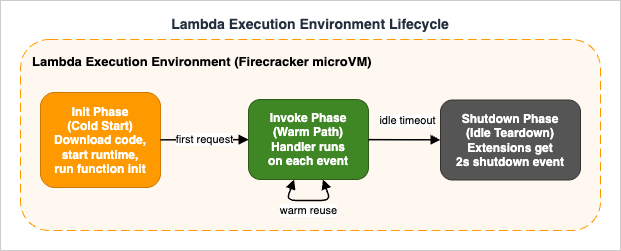
3.1 Function — Code and Configuration Unit
A function is the unit of deployment and configuration. It bundles a deployment artifact (a ZIP archive or an OCI container image up to 10 GB), a runtime (managed runtimes likepython3.13, nodejs22.x, java21, dotnet8, provided.al2023 for custom runtimes, or your own container base image), a handler entry point, a memory size between 128 MB and 10,240 MB (CPU scales linearly with memory), a timeout up to 15 minutes, an execution role (IAM), an architecture (x86_64 or arm64 on Graviton2), and optional VPC, layer, and extension settings.Every version of a function is immutable; you publish new versions, and aliases (named pointers to versions) let you do blue/green or canary rollouts without rewriting the consumer's invocation URL.
3.2 Execution Environment — Firecracker microVM
A function is what you configure; an execution environment is what actually runs your code. Each environment is a Firecracker microVM with a slice of CPU, your function code on a read-only file system at/var/task, a writable /tmp, the runtime, and any extensions. Environments are owned by the Lambda service; you cannot SSH into them, snapshot them yourself, or share them across functions. Lambda creates environments on demand to satisfy concurrency and tears them down after a period of inactivity.3.3 Lifecycle — Init / Invoke / Shutdown
The execution environment moves through three phases. The Init phase runs once: it downloads your deployment package, starts the runtime, runs all registered extensions' init code, and finally runs your function-init code (top-level imports, global state, SDK clients). The optimized Init phase has a 10-second window; longer initialization rolls into extended init, where the remaining work happens inline on the first invocation. The Invoke phase runs the handler with each event payload; the same environment can serve thousands of warm invocations. The Shutdown phase is triggered when the platform decides to retire the environment; extensions receive a 2-second shutdown event, the handler does not.SnapStart-enabled functions follow a different timeline: Init runs once at version publish time, and each fresh environment pays a Restore cost (load snapshot, run post-restore hooks) instead of a full Init. The full mechanics, including the "uniqueness problem" that affects randomness, network connections, and cached credentials, are analyzed in AWS Lambda Cold Start Mitigation Guide §5.
3.4 Concurrency — Unreserved / Reserved / Provisioned
Concurrency in Lambda means "how many copies of this function can run at the same time." Each region has an account-level concurrency limit (default 1,000, raisable on request). Unreserved concurrency is the shared pool: any function that has not been reserved or provisioned consumes from it. Reserved concurrency carves out a fixed share for a specific function (both a ceiling and a floor against starvation). Provisioned concurrency pre-warms environments so that invocations skip the Init phase entirely; it integrates with Application Auto Scaling for scheduled scaling and target tracking. When provisioned concurrency is exhausted, requests spill over to on-demand environments that pay full Init time.3.5 Layers — Shared Runtime Dependencies
A Lambda layer is a separately versioned ZIP archive that is extracted into/opt of every execution environment that references it. Layers carry shared dependencies (boto3 pins, PyTorch, numpy + pandas, AWS SDK extensions, internal common code) so that the deployment artifact stays small. A function can attach up to five layers; the combined size of the function package and all layers must fit within Lambda's 250 MB unzipped quota (this constraint does not apply to container-image deployments).3.6 Extensions — Observability and Secrets Sidecars
A Lambda extension is a long-lived process that runs alongside your function inside the same execution environment. Extensions register forINVOKE and SHUTDOWN events through the Lambda Extensions API and can read logs, telemetry, and Parameter Store / Secrets Manager values without the function itself making a network call. The canonical examples are AWS Lambda Powertools, the AWS Parameters and Secrets Lambda Extension, the AWS Distro for OpenTelemetry (ADOT) collector, Datadog, New Relic, and Dynatrace. Extensions consume part of the 10-second Init budget, so their performance is part of your cold-start calculus.4. The L.A.M.B.D.A. Fit Test — When to Use Lambda
Most "should I use Lambda?" debates boil down to six independent axes. I score each one on a Yes / Maybe / No basis. If five or six axes are Yes, Lambda is almost certainly the right call. If three or more are No, look at AWS Fargate, Amazon EC2, or AWS App Runner instead. The acronym L.A.M.B.D.A. is a deliberate mnemonic so the framework survives intact across teams and design reviews.The six axes are: Latency tolerance, Arrival pattern, Memory and duration profile, Burst concurrency, Dependency footprint, and Architectural fit.
4.1 L — Latency Tolerance
Can your workload absorb a cold start on a fresh execution environment? On modern runtimes (Python, Node.js, Go) the cold-start tax is typically 100–600 ms for a small function; SnapStart (Java, Python, .NET) and Provisioned Concurrency can push the user-visible delay close to zero, but they add operational complexity. If your p99 latency SLO is tighter than your worst-case cold start and you cannot afford Provisioned Concurrency or use SnapStart, the L axis is No. For mitigation patterns, see the AWS Lambda Cold Start Mitigation Guide.4.2 A — Arrival Pattern
Is traffic bursty, intermittent, or strongly diurnal, or is it steady around the clock? Lambda's billing model rewards spikes and idle gaps: you pay only for invocation time. Workloads with steady, high-utilization traffic (a constantly busy API serving thousands of requests per second per region for hours on end) usually find Fargate or EC2 more economical at a given throughput once the Lambda free tier is exhausted. Use the AWS Lambda Cost Estimator to model the break-even point.4.3 M — Memory and Duration Profile
Lambda has hard ceilings: 10,240 MB of memory and 15 minutes per invocation. Anything that needs more memory (in-memory analytics on multi-gigabyte datasets, heavy ML inference) or runs longer than 15 minutes (large ETL jobs, video transcoding, long-running training) must be split across invocations, redesigned to be event-driven, or migrated to AWS Fargate, AWS Batch, AWS Step Functions, or Amazon EC2. The M axis flips to No quickly for compute-heavy and long-running batch work.4.4 B — Burst Concurrency
Lambda will scale to thousands of concurrent executions in seconds, subject to your account-level concurrency limit and the per-region burst capacity. If you anticipate sudden 10x or 100x traffic spikes that you do not want to capacity-plan for, Lambda is excellent. If your workload requires more than 1,000 concurrent invocations sustained, file a service quota increase early; if you are already at 10,000+ concurrent invocations and steady, the cost/benefit shifts toward containers on Fargate or EC2 again.4.5 D — Dependency Footprint
How heavy is your runtime closure? A small Python or Node.js function with a handful of imports starts cold quickly. A function that depends on PyTorch, large native libraries, headless Chromium, or a fat JVM framework can push the Init phase into multiple seconds. Lambda's 250 MB unzipped quota (or 10 GB for container images) is generous, but every megabyte you ship costs you cold-start time. If your dependency footprint cannot be slimmed, your D axis trends toward No or Maybe and you should plan for SnapStart, Provisioned Concurrency, or a containerized always-on alternative.4.6 A — Architectural Fit
Is your workload naturally event-driven, request-response, or long-running stateful? Event-driven workloads — file uploads, queue messages, schedule triggers, webhooks, change-data-capture from databases — are Lambda's sweet spot. Synchronous APIs that fit in 15 minutes are also a great fit. Stateful workloads (WebSockets, long-running GraphQL subscriptions, gRPC streams, distributed simulations) are awkward to model in Lambda even though API Gateway WebSocket and Lambda response streaming exist. If your code is most naturally a long-lived process holding open connections, Fargate or App Runner is usually cleaner.4.7 Lambda vs Fargate vs EC2 vs App Runner
Sections 4.1–4.6 leave you with a six-character scorecard. The diagram below maps the typical exit ramps when one or more axes fail.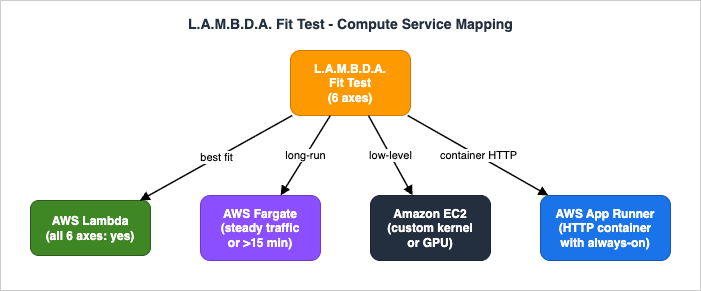
| Service | Best for | Cold-start tax | Long-running | Pricing model |
|---|---|---|---|---|
| AWS Lambda | event-driven, bursty, request-response under 15 min | Yes (mitigable with SnapStart / Provisioned Concurrency) | No (15 min cap) | per-ms compute, no idle cost |
| AWS Fargate (ECS / EKS) | always-on containers, steady traffic, long-running services | No | Yes | per-second vCPU/RAM, billed while task runs |
| Amazon EC2 | custom kernels, GPUs, exotic networking, predictable steady load | No | Yes | per-second instance, reserved/savings plans available |
| AWS App Runner | HTTP container services with auto-scaling and built-in CI/CD | Small | Yes (with min-instances) | per-second vCPU/RAM, min-instance baseline |
Translation: Lambda owns the bursty event-driven layer, Fargate owns the always-on container layer, EC2 owns the "I need the kernel" layer, and App Runner is the simplest path to an HTTP-only container with built-in pipelines. The L.A.M.B.D.A. Fit Test tells you which side of those boundaries your workload sits on.
5. Deep Dive Articles
Each section below is a one-paragraph orientation for the corresponding deep-dive article on this site. Click through when you need the full mechanics.5.1 History and Timeline of AWS Lambda
AWS History and Timeline of Amazon Lambda is the long-form timeline of the service from its November 2014 launch through the current platform. It documents the major feature waves — VPC support, custom runtimes via the Runtime API, Provisioned Concurrency, Lambda Extensions, container image deployments, Graviton2 (arm64) support, SnapStart for Java then Python and .NET, response streaming, successive raises to the default account concurrency limit and per-region burst capacity, and the standardization of Init-phase billing.Read this article when you need to understand why the platform has a particular feature, when it became available, and which constraints have since been relaxed. It is also the canonical "what can invoke Lambda?" reference, listing every AWS service integration in one place. Pair it with section 3 of this hub when onboarding a new engineer to the platform.
5.2 Cold Start Mitigation Guide
AWS Lambda Cold Start Mitigation Guide is the design-review companion for any function whose p99 latency matters. It opens with the Init-phase anatomy, then breaks down the cold-start signature of each major runtime (Python, Node.js, Java, Go, .NET). The middle of the guide is a decision-grade tour of the two platform-level mitigations — Provisioned Concurrency (with Application Auto Scaling integration) and SnapStart (mechanics, runtime coverage, the "uniqueness problem") — including how to detect which mitigation is in play at runtime.It then covers code-level patterns (lazy imports, top-level initialization, connection pooling, bundling, JVM and .NET-specific knobs) and how to choose between ZIP and container packaging. The closing sections cover measurement (CloudWatch Logs Insights, AWS X-Ray, AWS Lambda Powertools, CloudWatch Lambda Insights) and the anti-patterns that silently defeat every other optimization. Pair it with section 4.1 of this hub when the L axis of your L.A.M.B.D.A. Fit Test is No or Maybe.
5.3 MCP Server on AWS Lambda
MCP Server on AWS Lambda Complete Guide is the end-to-end build of a Model Context Protocol server hosted on Lambda, using Streamable HTTP transport, OAuth 2.1 with Amazon Cognito, and the AWS Lambda Web Adapter to deliver streaming responses. It walks through the project layout (AWS SAM template, Pythonmcp SDK), the implementation of Tools, Resources, and Prompts, tool annotations, MCP protocol mechanics (progress, pagination, cancellation, error semantics), advanced capabilities like Sampling, Roots, and Elicitation, OAuth 2.1 authorization flows, local testing with mcp dev, connecting from Claude Desktop and from Amazon Bedrock AgentCore Runtime, and CloudWatch + X-Ray observability.If you are building agentic workloads where every tool call hits a fresh execution environment, this guide is the worked example to study, and section 4.1 (Latency) of this hub is the first place to revisit when you start cutting cold-start time.
6. Tool — Lambda Cost Estimator
Lambda pricing is small per invocation but composed of three independent components: per-request charges, GB-seconds of compute time, and (optionally) Provisioned Concurrency hours. Estimating monthly cost by hand is error-prone, and the AWS Pricing Calculator's per-service view does not always make the architectural trade-offs (x86_64 vs arm64, Provisioned Concurrency utilization, free tier consumption) easy to compare.The site's interactive AWS Lambda Cost Estimator runs entirely in the browser. Pick a workload preset, set memory and average duration, optionally enable Provisioned Concurrency, and the tool shows a side-by-side breakdown for
x86_64 and arm64 (Graviton2) with the free tier deducted, plus a cost-vs-invocations curve so you can see where the break-even points are. The numerical values in the tool are sourced from the public Lambda pricing page; this article does not duplicate them, on purpose, because the prices change and stale numbers are misleading. Use the tool whenever you would otherwise estimate cost from memory.7. Related AWS Services
A Lambda function rarely lives alone. The services below show up in nearly every production deployment.7.1 Compute Family — EC2 / Fargate / App Runner / Batch
Lambda is the FaaS layer of a broader compute family. Amazon EC2 is the raw-instance layer (full kernel, GPUs, custom AMIs). AWS Fargate is the serverless container layer for Amazon ECS and Amazon EKS — long-running containers without managing nodes. AWS App Runner is the simplest path to a containerized HTTP service. AWS Batch is the batch-job orchestrator for workloads that need to fan out across many compute instances on demand. The L.A.M.B.D.A. Fit Test in section 4 helps you choose between them.7.2 Event Sources — API Gateway / EventBridge / SQS / SNS / DynamoDB Streams / S3
The most common invokers, in rough order of how often they show up in production: Amazon API Gateway (HTTP and REST APIs), Amazon EventBridge (cron schedules and bus-routed events), Amazon SQS (asynchronous queue processing with reserved concurrency for backpressure), Amazon SNS (fan-out pub/sub), Amazon DynamoDB Streams (change-data-capture from a table), Amazon Kinesis Data Streams (ordered partition-keyed streams), Amazon S3 (object-event notifications), AWS AppSync (GraphQL resolvers), and Application Load Balancer (Lambda-target HTTP). The Lambda Timeline contains the complete list with each integration's launch date.7.3 Edge Compute — Lambda@Edge / CloudFront Functions
Lambda@Edge runs Node.js and Python code in the AWS Region closest to the viewer, triggered by Amazon CloudFront viewer / origin request and response events. CloudFront Functions is a lighter-weight, JavaScript-only sibling that executes inside CloudFront edge locations (Points of Presence) for ultra-low-latency header manipulation and URL rewrites. Both are subject to a stricter set of runtime, package size, and concurrency constraints than the main Lambda service, and neither supports Provisioned Concurrency or SnapStart. The article Add CloudFront, WAF, Lambda@Edge, and ACM to a Custom Origin like AWS Amplify Hosting shows a complete CloudFormation deployment that uses Lambda@Edge for HTTP Basic authentication in front of an S3-backed static site.7.4 AI / Agent Layer — Bedrock AgentCore Runtime
Lambda increasingly sits inside AI/agent stacks: as the tool implementation behind an Amazon Bedrock Agent action group, as the MCP server fronting a Claude Desktop session or an Amazon Bedrock AgentCore Runtime agent (see section 5.3), and as the backend that individual tool calls invoke from an agent running in AgentCore Runtime. For agent workloads, the cold-start chapters and the Provisioned Concurrency / SnapStart trade-offs in section 5.2 are the single most important reading.8. Frequently Asked Questions
These questions repeat in design reviews, AWS forums, and search queries; they are answered here so that AI-assisted search engines and human readers can both find them. The same content is also expressed asFAQPage Schema.org markup in the page head.Q1. What is the difference between AWS Lambda and AWS Fargate?
Lambda is event-driven and bills per millisecond of code execution; Fargate runs long-lived containers and bills per second while the task is alive, whether or not it is serving traffic. Lambda has a 15-minute timeout and a 10 GB memory ceiling; Fargate has no such per-invocation cap. Use Lambda for spiky event-driven workloads and short-lived APIs; use Fargate for always-on services and workloads that need more than 15 minutes or full container control.Q2. When does SnapStart work and when does it not?
SnapStart snapshots the execution environment after Init and restores it on each fresh invocation, eliminating most cold-start time. It is generally available for Java, Python, and .NET managed runtimes. It does not work for Node.js, Go, custom runtimes, or container-image deployments. Code that relies on freshly generated randomness, ephemeral network connections, or cached credentials must use post-restore hooks to refresh that state; otherwise different invocations will share the same "uniqueness." See §5 of the Cold Start Mitigation Guide for the failure modes.Q3. How do I estimate Lambda cost before deployment?
Use the interactive AWS Lambda Cost Estimator on this site. Pick a workload preset, configure memory and average duration, optionally enable Provisioned Concurrency, and compare x86_64 vs arm64. The tool deducts the Lambda free tier automatically and plots a cost-vs-invocations curve so you can see the break-even point.Q4. Can Lambda host a Model Context Protocol (MCP) server?
Yes. With the AWS Lambda Web Adapter and Streamable HTTP transport, a single Lambda function can serve as an MCP server, including OAuth 2.1 authorization through Amazon Cognito and streaming responses. The full walk-through, including SAM template, Tools / Resources / Prompts implementation, observability, and connection from Claude Desktop and Amazon Bedrock AgentCore Runtime, is in the MCP Server on AWS Lambda Complete Guide.Q5. What is the maximum execution time for AWS Lambda?
15 minutes per invocation. Workloads that need longer execution must be split across invocations, restructured into an AWS Step Functions state machine, or moved to AWS Fargate, AWS Batch, or Amazon EC2.Q6. Should I choose x86_64 or arm64 for my Lambda function?
arm64 (Graviton2) is typically 20% cheaper per GB-second and often delivers comparable or better performance for runtimes that have a native arm64 build (Python, Node.js, Java, Go, modern .NET). x86_64 is the safe default when you depend on native libraries that are not published for arm64. Model both with the Lambda Cost Estimator before deciding.Q7. How do I avoid the 6 MB request payload limit?
Synchronous Lambda invocations have a 6 MB request and response payload limit. For larger inbound payloads, upload to Amazon S3 first and pass the object key as the event. For larger outbound responses, enable Lambda response streaming (response payloads up to 200 MB since July 2025; the first 6 MB ship at line rate and the remainder is capped at 2 MBps) or write the result to S3 and return a pre-signed URL.Q8. Does AWS Lambda support streaming responses?
Yes. Lambda response streaming is available on Node.js managed runtimes and via custom runtimes that implement the streaming Runtime API. With the AWS Lambda Web Adapter, any HTTP server (FastAPI, Express, Spring Boot) can serve streaming responses inside Lambda. Streaming is useful for time-to-first-byte-sensitive workloads, including LLM token streaming for AI applications.The decision between streaming and the default buffered mode is best made on three axes: time-to-first-byte (TTFB), maximum response size, and invocation surface. The table below summarizes the differences for the same Lambda function invoked over a Function URL or an Application Load Balancer target.
* You can sort the table by clicking on the column name.
| Dimension | Buffered response (default) | Response streaming |
|---|---|---|
| Time to first byte (TTFB) | Full response is assembled in memory, then returned to the invoker. TTFB equals total compute time. | First byte ships as soon as the handler calls responseStream.write(). TTFB is effectively the Init + first compute step latency. |
| Maximum response size | 6 MB (synchronous invocation hard limit). | 200 MB (raised from 20 MB in July 2025). First 6 MB ships at line rate; the remainder is throttled to 2 MBps. |
| Runtime support | All managed runtimes and custom runtimes. | Node.js managed runtimes natively; other languages via the streaming Runtime API or the AWS Lambda Web Adapter. |
| Invocation surface | API Gateway (REST and HTTP), Function URLs (BUFFERED), ALB, SDK Invoke. | Function URLs (RESPONSE_STREAM mode), ALB (Lambda target with streaming enabled), and direct InvokeWithResponseStream API. |
| Billing | Billed for total invoke duration only. | Billed for total invoke duration; no per-byte streaming surcharge. |
| Best for | Sub-second JSON APIs, headless validation, queue consumers. | LLM token streaming, server-sent events to a browser, long-running progress updates, large file generation that exceeds 6 MB. |
Two common pitfalls. First, response streaming is incompatible with Amazon API Gateway REST and HTTP APIs — the API Gateway integration buffers the response back to the default 6 MB limit before forwarding. To use streaming end-to-end, expose the Lambda through a Function URL or an ALB target, not through API Gateway. Second, when the response exceeds 6 MB the post-6 MB segment is capped at 2 MBps; for a 200 MB response that is roughly 97 seconds of streaming alone, which must fit inside the 15-minute Lambda timeout and the invoker's connection idle timeout (ALB defaults to 60 seconds, Function URLs to 15 minutes — raise the ALB idle timeout explicitly for streaming targets).
9. Summary
The L.A.M.B.D.A. Fit Test gives you a six-axis vocabulary — Latency tolerance, Arrival pattern, Memory and duration profile, Burst concurrency, Dependency footprint, Architectural fit — for deciding when AWS Lambda is the right compute service. The mental model in section 3 (Function vs Execution Environment vs Lifecycle vs Concurrency vs Layer vs Extension) is the smallest one that lets you reason about every Lambda feature. The deep-dive articles linked here cover the platform's evolution, the practical cold-start playbook, and an end-to-end build of an MCP server on Lambda; the interactive cost estimator turns price-list literacy into a five-minute exercise.Use this page as your hub. When AWS ships the next platform feature and one of the six axes needs to be re-evaluated, this is also where the update will land first.
10. References
Official AWS documentation- AWS Lambda Developer Guide
- Understanding the Lambda execution environment lifecycle
- AWS Lambda runtimes
- Configuring provisioned concurrency for a function
- Improving startup performance with Lambda SnapStart
- Lambda Extensions API
- Configuring a Lambda function to stream responses
- Lambda quotas
- Understanding Lambda function scaling
- AWS Lambda Pricing
AWS Compute Blog and What's New
- New — Provisioned Concurrency for Lambda Functions
- AWS Lambda SnapStart for Python and .NET functions is now generally available
- AWS Lambda standardizes billing for INIT phase
- Using response streaming with AWS Lambda Web Adapter to optimize performance
- AWS Lambda response streaming now supports response payloads up to 200 MB — What's New 2025-07
- AWS Compute Blog
Related Articles on This Site
- AWS History and Timeline of Amazon Lambda
The long-form platform timeline. Use it for the "when was X added?" and "what can invoke Lambda?" questions. - AWS Lambda Cold Start Mitigation Guide
The deep dive on the L axis of the L.A.M.B.D.A. Fit Test — per-language profiles, Provisioned Concurrency, SnapStart, code-level mitigation, measurement, and anti-patterns. - MCP Server on AWS Lambda Complete Guide
The worked example for AI/agent workloads on Lambda, including Streamable HTTP, OAuth 2.1, Lambda Web Adapter, and integration with Claude Desktop and Amazon Bedrock AgentCore Runtime. - AWS Lambda Cost Estimator
Interactive tool used throughout this hub for the A (Arrival pattern) axis of the L.A.M.B.D.A. Fit Test. - Add CloudFront, WAF, Lambda@Edge, and ACM to a Custom Origin like AWS Amplify Hosting
Lambda@Edge in production — the edge-compute counterpart referenced in section 7.3.
References:
Tech Blog with curated related content
Written by Hidekazu Konishi