Data Pipeline Orchestration on AWS - What Carries Over, What the Runtime Makes You Rebuild, and Who Owns the Airflow Version
First Published:
Last Updated:
However, a DAG file does not function in isolation. Its operation depends on the Airflow version, the provider packages containing the operator implementations, and the constraints file that fixes the combination of these components. While managing your own Airflow, your team could update these three elements at any time. Once you transition to a managed service, the Airflow version comes under the version support policy of Amazon MWAA, and maintaining the remaining two elements – the provider packages and constraints file – will become an ongoing task.
This article is not a comparison of different orchestration tools. Instead, it explores what ongoing maintenance is required after selecting a tool, based solely on official AWS and Apache Airflow sources. We will also illustrate the inverse relationship – that the more you relinquish control of the execution environment, the more extensive the necessary modifications to the DAG definitions themselves – using the specific example of Amazon MWAA Serverless. All information presented in this article was verified as of September 4, 2026.
Table of Contents
- 1. Introduction - The Decisions This Article Supports
- 2. The Starting Point - A DAG File Is Not Self-Contained
- 3. What Carries Over
- 4. Who Owns the Airflow Version
- 5. The Upgrade Path Is Not One Step
- 6. Dependencies - The Requirements File and the Constraints File
- 7. Operators - Where the Task Code Comes From
- 8. Three Ways a Pipeline Starts
- 9. Choosing Where the Orchestration Lives
- 10. Giving Up the Version Calendar - Amazon MWAA Serverless
- 11. Keeping the Lineage
- 12. Failure Modes and Anti-Patterns
- 13. Frequently Asked Questions
- 14. Summary
- 15. References
1. Introduction - The Decisions This Article Supports
The phrase "bringing data pipelines to AWS" can refer to at least two distinct tasks.One involves modifying the core logic of the jobs themselves. If you migrate an Apache Spark job to a different execution platform, the necessary changes will primarily affect the job's code. The other task involves moving only the orchestration – that is, defining the order in which jobs run and the conditions under which they are triggered – without altering the jobs' core logic. This article focuses solely on the latter.
When choosing this approach, a key consideration is whether your existing workflow definitions can be migrated. However, answering this question does not mark the end of the process. Simply stating that a definition can be migrated does not mean it inherits the environment in which it will be executed. In your own Airflow environment, your team decided when to move the version and which combination of provider packages to run. Once you move to a managed service, the service decides when a version arrives and when it ends, and you will likely need to regularly update dependencies to align with those policies.
The intended audience for this article includes data infrastructure professionals who are currently using Apache Airflow on Amazon Elastic Compute Cloud (Amazon EC2) or Kubernetes. We assume that while they can write DAGs, they have not yet fully assessed the ongoing tasks that will arise after migrating to a managed service. This article also targets readers who are currently using AWS Data Pipeline and are exploring options for migration.
1.1 What This Article Leaves to Other Articles
This article does not provide a comprehensive list of AWS data service features. The following topics are already covered in existing documentation and will not be addressed here:- The specifics of job execution, including what is rewritten when running jobs on EMR Serverless, EMR on EKS, and AWS Glue, is detailed in Running Apache Spark on AWS. This article covers only the side that starts those jobs.
- Methods for avoiding the need to build pipelines are discussed in Zero-ETL Integrations on AWS. Before designing an architecture, it is worth considering whether a pipeline can be avoided altogether.
- The internal workings of AWS Step Functions, including large-scale parallelism, state definition syntax, generative AI orchestration patterns, and checkpointing and retry mechanisms, are covered in AWS Step Functions Distributed Map, AWS Step Functions JSONata and Variables Practical Guide, AWS Step Functions Orchestration Patterns for Generative AI, and AWS Lambda Durable Functions Practical Guide. This article only addresses the factors to consider when choosing to use Step Functions, and does not delve into the specifics of state definition.
- Determining where to validate pipeline outputs is discussed in Data Quality and Data Contracts on AWS.
- Architectural considerations for the data storage layer are detailed in AWS Data Lakehouse Architecture Guide.
- The historical development of AWS Glue features is documented in AWS History and Timeline regarding AWS Glue.
- Database migration, including continuous data ingestion, is covered in Heterogeneous Database Migration on AWS.
- The layer that moves changes rather than schedules jobs, meaning where the capture point sits, what a replication slot obliges the source database to keep, and what guarantee each capture point gives, is covered in Change Data Capture on AWS Beyond Zero-ETL - Logical Decoding, Streaming Connectors, and the Guarantees Each Capture Point Gives You. This article covers what starts and sequences the work, not what carries the changes.
Two other articles take up the same subject of carrying workloads over, at different layers. Running VMware Workloads on AWS with Amazon EVS covers carrying over a whole platform, and Running Windows Server Workloads on AWS covers carrying over a server. This article covers the job layer.
1.2 Where the Official Documentation Disagrees With Itself
This article has a preliminary note regarding its writing style.Regarding the subject matter of this article, there are several instances within AWS's official documentation where different pages contradict each other on the same topic. This applies to various areas, including what a version upgrade can do, what a dependency specification must carry, and what the ceilings on lineage capture are. These discrepancies are not simply a matter of one page being outdated; instead, they arise between pages that provide an overview and those that focus on specific features, or between two user guides that are undergoing namespace changes.
This article will not arbitrarily declare one side as correct and ignore the other. Instead, it will present both perspectives and clearly indicate which page contains each description. While it may offer a general principle, such as suggesting that users should consult the pages dedicated to specific features when making design decisions, it will avoid removing any information that could help readers verify the content within their own environments.
2. The Starting Point - A DAG File Is Not Self-Contained
DAG files are written in Python. They contain both the structure defining the order in which tasks are executed, and the specifications for what each task performs. The former is a structure written using Airflow's terminology, while the latter consists of calls to operators.These two components have different portability requirements.
The structure itself is based on Airflow's core concepts and therefore retains its meaning as long as Airflow is running. However, the operator calls only function correctly if the provider package that provides those operators is present in the environment, using the same name and arguments. Provider packages evolve independently of the core Airflow package. Moving the Airflow version therefore moves the combination of provider packages with it. The constraints file describes which combinations are known to work together. The Amazon MWAA user guide describes the role of the constraints file as follows:
Apache Airflow constraints files specify the provider versions available at the time of a
Apache Airflow release.
The constraints file therefore points at the set of provider versions that existed at one release of Airflow. Upgrading Airflow means replacing that entire set of provider packages.
Up to this point, this applies whether you are self-managing your environment or using a managed service. The key difference lies in who decides when to perform the upgrade. With a self-managed environment, you have the ongoing option of not upgrading at all. With a managed service, the service provider has its own schedule for providing and ending support for different versions, so even the option of not upgrading eventually has a deadline.
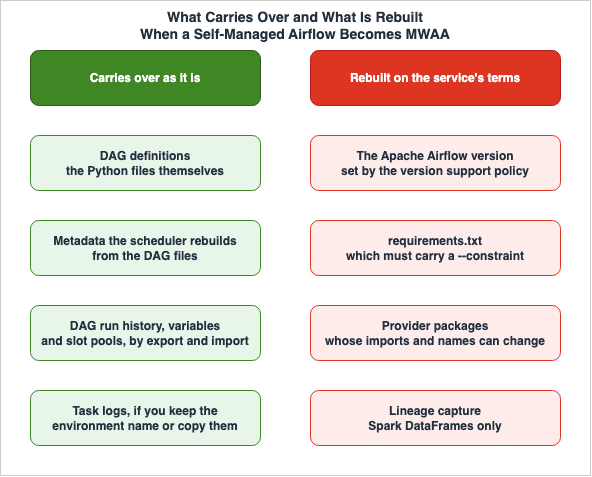
The asymmetry that this article addresses stems from this single point. You can bring your DAG definitions with you. However, the environment required for those definitions to function has to be rebuilt to match the policy of the service, rather than being brought along with the DAG itself.
3. What Carries Over
3.1 The Three Destinations AWS Itself Names
The question of how to differentiate between AWS Glue, Step Functions, and Amazon MWAA is frequently raised in articles and study sessions. Interestingly, this categorization of three services is actually a classification defined by AWS itself. The origin of this classification can be found in the documentation regarding the migration from AWS Data Pipeline. The AWS Data Pipeline Developer Guide states:Now, there are other services that offer customers a better experience. For example, you can
use AWS Glue to to run and orchestrate Apache Spark applications, AWS Step Functions to help
orchestrate AWS service components, or Amazon Managed Workflows for Apache Airflow (Amazon MWAA)
to help manage workflow orchestration for Apache Airflow.Each of the three roles is pinned down in a single clause. AWS Glue is for executing and orchestrating Apache Spark applications, Step Functions is for orchestrating AWS service components, and Amazon MWAA is for managing Apache Airflow workflows. Therefore, the distinction is not based on the quantity of features, but rather on what is considered the unit of orchestration.
AWS Data Pipeline itself is no longer offered to new customers. A banner appears on each page of the Developer Guide:
AWS Data Pipeline is no longer available to new customers. Existing customers of AWS Data
Pipeline can continue to use the service as normal.
A related post on the AWS Big Data Blog gives the date on which new customer access was closed as July 25, 2024. This article references AWS Data Pipeline solely to indicate the origin of this three-way classification. It does not recommend AWS Data Pipeline as a migration destination. The vocabulary for the lifecycle states of AWS services is covered in AWS Service Lifecycle States.
3.2 What the Migration Guide Actually Moves
The Amazon MWAA migration guide covers both scenarios: migrating from a self-managed Apache Airflow deployment, and migrating from an existing Amazon MWAA environment to a new one. Specifically, it identifies DAG files and a portion of the metadata database as the items to be migrated.Regarding metadata, the guide clarifies which items need to be migrated and which do not. It states:
Apache Airflow metadata tables such as dag, dag_tag, and dag_code automatically populate when
you copy the updated DAG files to your environment's Amazon S3 bucket and the scheduler parses
them. Permission related tables also populate automatically based on your IAM execution role
permission. You do not need to migrate them.
Any metadata that can be reconstructed from the DAG itself will automatically populate when the DAG files are placed in the new environment. However, information such as execution history, variables, and slot pools – representing actual past executions – will not be automatically migrated and must be explicitly transferred. Since existing Amazon MWAA environments do not provide direct access to the metadata database, the migration guide outlines a process: running an export DAG to output data to Amazon Simple Storage Service (Amazon S3), then running a separate DAG in the new environment to import the data. During the export and the import, all other DAGs are paused.
Logs are handled differently. Since logs are stored in CloudWatch Logs log groups, if you want to view historical execution logs in the new environment, you have two options: either assign the same environment name to the new environment, or manually copy the logs.
That is the extent of what carries over as it is: the DAG definitions, the history of what has run, and the room to choose where the logs live. The following sections will address items that fall outside of this scope.
4. Who Owns the Airflow Version
4.1 Version Support Commitments
Amazon MWAA explicitly states three commitments regarding supported versions of Apache Airflow. The user guide describes these as follows:We are committed to supporting at least three minor versions of Apache Airflow at any given
time. We will announce the end-of-support date at least 180 days in advance. This applies to
each Apache Airflow minor version.
We are committed to supporting an Apache Airflow version for at least 12 months after it first
becomes available.Amazon MWAA will maintain at least three minor versions at any one time, announce the end of support (EOS) at least 180 days in advance, and support a version for at least 12 months after it first becomes available. Those are the three commitments.
To clarify, these commitments serve as both guarantees to users and also define the cycles of work required from their side. While the 12-month timeframe represents a lower limit for how long a version will be supported, it is not an upper limit. However, the commitment to announce EOS 180 days in advance also implies that users have at least six months to plan their migration. This period allows them to plan environment updates, validate dependencies, and ensure DAG compatibility, questions that will be newly relevant when migrating to a managed environment.
The process for receiving notifications is also defined. When an environment running on a version nearing its end of support is present within an account, the EOS date will be notified through the AWS Health Dashboard. Deciding who receives that notice and who reads it therefore becomes part of the operational design after the migration.
4.2 What End of Support Removes, and What It Leaves
After the End of Support (EOS) date, it is often summarized that the version is simply no longer usable. This summary is inaccurate. The user guide clearly distinguishes between what will no longer be possible and what will continue to function, in the same list.On the end of support date:
* You can no longer use a deprecated version to create new Amazon MWAA environments.
* You can no longer upgrade or downgrade existing environments to deprecated versions.
* You can still use your existing environments on deprecated versions and perform in-place
updates.
* You can no longer receive technical support for environments running on deprecated versions.Of the four items, three will no longer be possible: creating new environments with that version, upgrading or downgrading existing environments to or from that version, and receiving technical support. The remaining item describes what will continue to function. Existing environments will continue to operate, and in-place upgrades will still be possible.
Collapsing that distinction leads the design decision wrong in either of two directions. Focusing solely on what will no longer be possible might lead to unnecessary and urgent migration plans. Conversely, focusing only on what will continue to function risks overlooking the implications of operating without support. The same user guide states the following regarding the use of versions past their EOS date:
You can continue to access your existing Amazon MWAA environments that run the associated,
deprecated version of Apache Airflow at your own risk.
Furthermore, it states that versions past their EOS date are considered "legacy versions," and that access may be restricted at any time if security or liability risks are identified. In other words, the statement that things will continue to function does not represent a perpetual guarantee.
The vocabulary of version end-of-support itself, and how planned end-of-life dates are handled for other services, are covered in AWS End-of-Support and EOL Reference.
4.3 Upstream Release Order Is Not Availability Order
The three commitments in the version support policy do not specify when new versions will become available. Examining actual release history reveals that the order in which upstream Apache Airflow releases are made and the order in which they become available on Amazon MWAA do not align.Two rows from the supported versions table in the user guide are enough to show it:
| Apache Airflow version | Apache Airflow release date | Amazon MWAA availability date |
|---|---|---|
| v3.0.6 | August 29, 2025 | October 1, 2025 |
| v2.11.0 | May 20, 2025 | January 7, 2026 |
Upstream, v2.11.0 was released more than three months before v3.0.6. On Amazon MWAA, however, v3.0.6 became available more than three months before v2.11.0. The interval between an upstream release and its availability on Amazon MWAA also varies, from about a month at one end to more than seven months at the other.
This has practical implications. Assuming that a version will eventually become available simply because it has been released upstream can lead to inaccurate migration timelines. If you are planning to wait for a specific version, it is safer to base your planning on when the end of support (EOS) could be announced for the version you are on now rather than assuming when the desired version will become available.
The complete list of supported versions is not reproduced in this article. Such tables are subject to rapid change, and the definitive source is the Apache Airflow versions page in the Amazon MWAA user guide. The two rows cited above are examples used to illustrate this asymmetry and do not represent a complete list of supported versions. The versions and dates mentioned were verified on September 4, 2026.
5. The Upgrade Path Is Not One Step
On the subject of upgrading a version, the Amazon MWAA user guide contains two statements that contradict each other head-on.The "Apache Airflow versions" page states:
Amazon MWAA supports minor version upgrades. This means you can upgrade your environment from
version x.1.z to x.2.z, but not to a new major version, for example, from 1.y.z to 2.y.z.
Meanwhile, the "Changing the Apache Airflow version" page, which focuses specifically on version changes, states the following at the beginning:
Amazon MWAA supports minor and major version upgrades and downgrades.The first statement claims that major version upgrades are not possible, while the second claims that they are. If you are making decisions based on design considerations, you should refer to the latter page, as it provides more specific details.
To perform a major version upgrade, for example from version 2.y.z to 3.y.z, you must first
perform a minor upgrade to the latest Airflow 2.11.x version followed by upgrade to 3.x.
Alternatively, to perform a major upgrade from Airflow 2.10.3 and below, you need to create a
new environment and migrate your resources.
Therefore, a major version upgrade is not a one-step process. To upgrade from Airflow 2 to Airflow 3, you must first upgrade to the latest version of the 2.11.x series before upgrading to version 3.x. If you are currently running version 2.10.3 or earlier, you will not be able to perform an in-place upgrade; instead, you will need to create a new environment and migrate your resources. Downgrading from version 3.x to version 2.11.x is also supported.
It is worth setting this against what upstream requires. The official Apache Airflow migration guide for Airflow 3 requires that you be running Airflow 2.7 or later. Amazon MWAA, however, requires the latest version of the 2.11.x series, making its requirements more stringent. Relying solely on the upstream documentation and assuming that Airflow 2.7 or later is sufficient will not work with Amazon MWAA.
The same page also describes what happens during the upgrade.
During the upgrade or downgrade process, Amazon MWAA captures a snapshot of your environment
metadata, upgrades or downgrades the workers, schedulers, the web server to the new Apache
Airflow version, and finally restores the metadata database using the snapshot.
This process comes with a cost in terms of time.
When you perform an upgrade or downgrade, all tasks currently running on the environment are
terminated during the procedure. The update procedure can take up to two hours, during which
time your environment will be unavailable.
Currently running tasks will be terminated, and the environment will be unavailable for up to two hours. This means you should not initiate an upgrade during a time when daily batch jobs are running. Deciding where to put that downtime inside the six months of notice is itself part of the plan.
Before upgrading, certain preparatory steps are also outlined. You must verify that your DAGs and dependencies are compatible with the new version. If you are using a requirements file, you must also ensure that all dependencies specified within that file are compatible with the new version. A warning is provided regarding the consequences of attempting an upgrade with incompatible requirements.
Specifying requirements that are incompatible with your target Apache Airflow version during
an upgrade or downgrade might result in a lengthy rollback process to the previous version of
Apache Airflow with the previous requirements version.
To verify DAG compatibility, upstream Apache Airflow provides tools for this purpose. The migration guide for Airflow 3 details how to inspect DAGs using Ruff's AIR rules, where AIR301 and AIR302 mark breaking changes that have to be fixed, and AIR311 and AIR312 mark recommended updates. The upstream guide also lists what you will be changing. These include the removal of a group of context variables, including
execution_date, changes to the import path for airflow.sdk, and the removal of SubDAGs.The kind of change that needs the most care is the one where behavior shifts without any edit to the DAG at all. The upstream documentation states that the default value of
catchup_by_default has changed to False. This means that even with the same DAG file, the automatic execution of past runs may now behave differently. Passing the compatibility check therefore does not by itself mean you are safe.6. Dependencies - The Requirements File and the Constraints File
In Amazon MWAA, additional Python packages are installed by placing arequirements.txt file in an Amazon S3 bucket and specifying the version of that file in the console. The user guide describes the process as follows:Amazon MWAA runs pip3 install -r requirements.txt to install the Python dependencies on the
Apache Airflow scheduler and each of the workers.While it appears to function similarly to a self-managed Airflow environment, there are two key differences.
First, certain versions require the specification of a constraints file. The user guide explains:
Beginning with Apache Airflow v2.7.2, your requirements file must include a --constraint
statement. If you do not provide a constraint, Amazon MWAA will specify one for you to ensure
the packages listed in your requirements are compatible with the version of Apache Airflow you
are using.
In practice, the latter sentence is more relevant. If you do not specify one, the installation does not fail. Amazon MWAA specifies a constraint for you instead. This means that even if you have not explicitly defined anything, the combination of package versions will be predetermined. When a
requirements.txt configuration that worked locally produces different results in the environment, failing to recognize this implicit constraint selection can make it difficult to identify the root cause.The format for specifying these constraints is as follows, and you will need to update the version number within this URL each time you upgrade a version.
--constraint "https://raw.githubusercontent.com/apache/airflow/constraints-{Airflow-version}/constraints-{Python-version}.txt"The same principle applies to the steps for changing versions.
Whenever you're changing Apache Airflow versions, ensure that you reference the correct
--constraint URL in your requirements.txt.
Therefore, if you manage dependencies using
requirements.txt, any version updates, as seen in Section 4, will invariably require editing that file. A version update and a dependency update are not separate pieces of work; doing one means doing the other. The page on changing versions also attaches the condition of using a requirements file, and asks you to confirm that the dependencies you specify there are compatible with the new version.One note on spelling. The user guide consistently uses the singular
--constraint, while several posts on the AWS Big Data Blog use the plural. This article will adhere to the spelling used in the user guide.The second difference lies in how failures manifest, impacting the environment's state. The user guide states that if the constraints file is deemed incompatible,
pip3 install will fail, which is the intended behavior. However, there are other potential failure scenarios.Although Amazon MWAA doesn't limit the size of installed libraries explicitly, if dependencies
can't be installed within ten minutes, the Fargate service will time-out and attempt to
rollback the environment to a stable state.If the dependencies cannot be installed within ten minutes, the service times out and tries to roll the environment back to a stable state. The user guide recommends keeping the total size of the libraries you reference below 1 GB. In a self-managed Airflow environment, even if the installation takes a long time, you could simply wait for it to complete. With a managed service, time itself becomes a constraint.
Handling packages without specifying a version remains a critical consideration. The user guide states that if you do not specify a version, PyPi.org will install the latest version, which can conflict with other packages. It is too early to conclude that having a constraints file makes you safe. The constraints file fixes only the set of provider versions that existed at the time of that Airflow release; it does not cover every library you listed in
requirements.txt.The user guide also mentions that, starting with Apache Airflow v2.2.2, it is possible to directly install requirements, provider packages, and custom plugins to the Airflow webserver. However, this version already reached its end of support on June 27, 2024, so this condition is met by any currently supported version. There is no need to read it as a distinction. What matters in practice is the prerequisite. If you are configuring your environment to pull packages from a public repository via the webserver, you will need to ensure that the webserver has access to the public network.
7. Operators - Where the Task Code Comes From
Operators likeGlueJobOperator, which you write in a DAG, are not part of the core Airflow framework but are instead included in provider packages. Therefore, whether an operator's calls will function depends on whether that provider package is installed with the same name.The contents of provider packages can change as new versions are released. An article on the AWS Big Data Blog, announcing Amazon MWAA's support for Apache Airflow v2.4.3, highlights the need for caution when upgrading, stating:
With Apache Airflow v2.4.3, the list of provider packages Amazon MWAA installs by default for
your environment has changed. Note that some imports and operator names have changed in the
new provider package in order to standardize the naming convention across the provider package.
The post says that the set of provider packages installed by default has changed, and that some imports and operator names changed with it, to make the naming consistent across the provider package. While you can bring your DAG files, the import statements and operator names within them may be subject to modification depending on the version combination.
This kind of change is not a thing of the past. The current documentation for the Apache Airflow Amazon provider includes the following deprecation notice:
GlueCrawlerOperator is deprecated. Existing Dags can continue using it during the deprecation
period, but new Dags should use the operation-specific operators above.
Existing DAGs can continue to be used during the deprecation period, but new DAGs should utilize purpose-specific operators. The wording matters: the DAGs do not stop working, they keep running and will be replaced at some point. This has the same shape as the end-of-support wording in Section 4 – a time-limited grace period, not indefinite compatibility.
One difference in temperature between AWS documents is worth noting here. On the Amazon MWAA FAQ page, when comparing it to Step Functions, it states:
Amazon MWAA supports existing Airflow workflows and integrations without changes to code,
migration is easy, and the environment is familiar.
The FAQ says that existing Airflow workflows and integrations are supported without changes to code. The user guide, however, asks you to verify DAG compatibility before an upgrade, and requires a
--constraint statement in the requirements file. The Big Data Blog article mentioned earlier also notes that some import statements and operator names have changed.The closest reading is that the two are describing different points in time. Immediately after a migration, the FAQ's statement holds true: if you are migrating to the same version of Airflow with the same provider package configuration, your DAGs will likely run without modification. Discrepancies arise when you upgrade to a different version. This article focuses on what needs to be periodically updated after you have brought your DAGs in, a factor that is not immediately apparent during the initial migration.
Understanding where operators reside will also provide clarity when designing dependencies. If you have written your own operators or hooks, they sit outside the provider packages, so the constraints file guarantees nothing about them. They are a place that can break when the Airflow version and the provider versions move, and verifying them is your own work.
8. Three Ways a Pipeline Starts
In designing a pipeline, the initial decision is not about defining dependencies, but rather about what triggers the pipeline to begin. AWS Glue workflows categorize these starting triggers into three types, as outlined in the AWS Glue Developer Guide. The initial description details these as follows:There are three types of start triggers:
* Schedule - The workflow is started according to a schedule that you define.
* On demand - The workflow is started manually from the AWS Glue console, API, or AWS CLI.
* EventBridge event - The workflow is started upon the occurrence of a single Amazon EventBridge
event or a batch of Amazon EventBridge events.The pipeline can be started by a specific time, by a person, or by an event. Here, "workflows" refers to the feature name within AWS Glue, and not a generic term for "workflow."
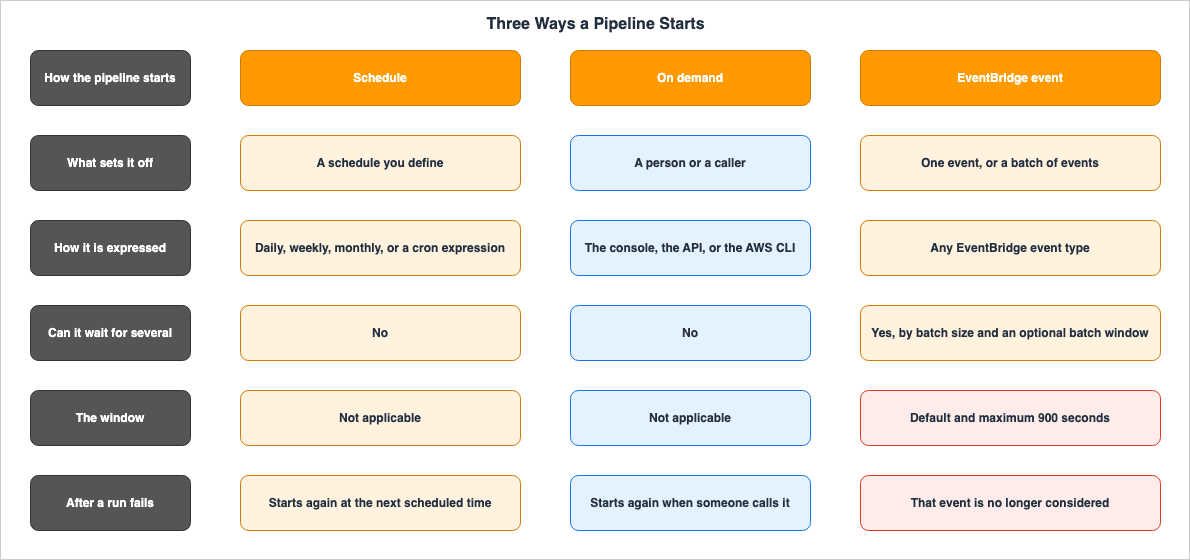
If you specify batch conditions, you must specify the batch size (number of events), and can
optionally specify a batch window (number of seconds). The default and maximum batch window is
900 seconds (15 minutes). The batch condition that is met first starts the workflow. The batch
window starts when the first event arrives. If you don't specify batch conditions when creating
a trigger, the batch size defaults to 1.
There are three key points to consider regarding batch conditions. First, the batch window has both a default and maximum value of 900 seconds. This means you can only shorten the window, not extend it. Second, the pipeline starts when either condition is met; it does not require both, and the first condition met takes precedence. Finally, the arrival of the first event starts the window, not a scheduled time.
If you do not specify a batch condition, the batch size defaults to 1. This results in the pipeline starting with each incoming event.
How a failure is handled also needs to be understood.
If an event or batch of events starts a workflow run that eventually fails, that event or batch
of events is no longer considered for starting a workflow run. A new workflow run is started
only when the next event or batch of events arrives.
Events that caused a failed execution will not be used to trigger a subsequent run. No new execution will start until the next event arrives. The same applies when exceeding the maximum concurrency limit; even if the event conditions are met, the execution will not start, and the Developer Guide explicitly states that AWS Glue does not retry executions that failed due to exceeding the concurrency limit. Simply using an event-driven approach does not guarantee that you will eliminate missed events.
There are also limits to the configuration's scale. The Developer Guide recommends limiting the total number of jobs, crawlers, and triggers within a single workflow to 100. Exceeding this limit may result in errors when attempting to resume or stop the execution.
Triggers can also be used independently, outside of workflows. However, the Developer Guide provides guidance on how to best utilize them:
You can accomplish the same thing by defining workflows. Workflows are preferred for creating
complex multi-job ETL operations.
The Developer Guide says that workflows are preferred for complex, multi-job ETL work. It does not say that you must not use a standalone trigger. The difference becomes apparent when you need to share state between jobs. Workflows offer runtime properties that can be accessed and modified by every job in the workflow, allowing subsequent jobs to use this information. Standalone triggers, connected in a chain, lack this capability.
The values given above were verified on September 4, 2026.
9. Choosing Where the Orchestration Lives
Section 3.1 discussed the three categories, establishing the criteria for selection based on what is considered the unit of orchestration. There are materials that provide a more concrete description of these criteria in the form of recommended migration conditions. The AWS Data Pipeline Developer Guide, for example, recommends Step Functions, citing factors such as:* You're looking for a serverless, highly available workflow orchestration service.
* Your workloads are orchestrating tasks for multiple other AWS services, such as Amazon EMR,
Lambda, AWS Glue, or DynamoDB.
* You're looking for a low-code solution that comes with a drag-and-drop visual designer for
workflow creation and does not require learning new programming concepts.
* You're looking for a service that provides integrations with over 250 other AWS services
covering over 11,000 actions out-of-the-box, as well as allowing integrations with custom
non-AWS services and activities.The axes here are orchestrating tasks that span several AWS services, and doing so without learning new programming concepts. The same page also notes that AWS Data Pipeline and Step Functions both define workflows in JSON, and that because the Amazon States Language of Step Functions is entirely based on JSON, you can move between the textual and the visual representation of a workflow.
Conversely, the criteria for recommending Amazon MWAA are succinctly stated on the Amazon MWAA FAQ page:
You should use Amazon MWAA if you prioritize open source and portability.If you prioritize open-source solutions and portability, then Amazon MWAA is the choice. At this point, the decision-making framework becomes clear. The primary reason to choose Amazon MWAA is its use of Airflow. The price of it being Airflow is the version and dependency management covered in Sections 4 through 7. By choosing portability, you are accepting the responsibility of keeping up with versions.
Therefore, the order of decision-making should not be to create a feature comparison table. Instead, you should first identify what aspects of your current assets can only be expressed using Airflow. If the contents of your DAGs simply involve calling AWS services sequentially, then that portability is not being utilized. Conversely, if you depend on the breadth of Airflow's operators or on community provider packages, then rewriting them in a different notation would not be a migration, but rather a complete re-implementation.
This article will not delve into what can be achieved by choosing Step Functions. Large-scale parallel processing, workflow definition syntax, orchestration patterns including generative AI, and deterministic retries are all addressed in the previously published works mentioned in Section 1.1.
AWS Glue workflows sit at a different place from those two. As we saw in Section 8, they provide a sufficient mechanism for expressing launch conditions, but their focus is on AWS Glue jobs and crawlers. The section in the AWS Data Pipeline Developer Guide that describes AWS Glue's role also centered on the execution and orchestration of Apache Spark applications. Therefore, if the objects you want to orchestrate are already within AWS Glue, there is no need to add an orchestration layer outside it.
10. Giving Up the Version Calendar - Amazon MWAA Serverless
The sections from 4 to 7 previously discussed scenarios that assumed maintaining an Airflow environment. Amazon MWAA Serverless is the option that drops that assumption. What it costs to drop it shows the asymmetry of this article running the other way.First, the work of managing a version disappears. A note in the Amazon MWAA Serverless user guide states it in one line.
Amazon MWAA Serverless uses Apache Airflow v3 with Python 3.12.The version is fixed. Consequently, the actions triggered by EOS announcements, as discussed in Section 4, and the planning of the two-stage upgrade process described in Section 5, are no longer necessary. Because there is no option to select a version, the work associated with tracking versions also ceases to exist.
In exchange, the DAG definitions themselves stop carrying over. The user guide presents a comparison table setting out the differences between the two options. The row for workflow definitions reads as follows.
| Category | Amazon MWAA Serverless | Traditional Amazon MWAA |
|---|---|---|
| Workflow definition | YAML workflows definitions using the DAG factory format, supporting AWS operators, with option to convert Python definitions | Python DAG support with AWS and custom operators |
The workflow definitions for Amazon MWAA Serverless are in YAML format. The user guide includes a dedicated page describing tools to convert Python DAGs into YAML definitions. The AWS Big Data Blog clarifies that this tool is a Python library called
python-to-yaml-dag-converter-mwaa-serverless and provides the command used for the conversion. This means that Python DAGs are not directly executable; they must first be converted.You also lose direct access to the Airflow web interface. The corresponding row in the same comparison table, along with the user guide's description, reads as follows:
Unlike traditional Amazon MWAA, you don't have direct access to the Apache Airflow web
interface. Instead, you can build your custom monitoring and observability using AWS native
tools.
The reasons for using declarative YAML are also explained. The AWS Big Data Blog highlights that using YAML allows you to determine task scheduling without executing workflow code, and that instead of granting broad permissions to the entire workflow, you can grant permissions only when individual tasks are running. The user guide explicitly states that this separation contrasts with traditional Amazon MWAA.
This isolation model contrasts with traditional Amazon MWAA where all workflows share the same
Airflow environment and execution context.
The user guide also outlines the factors to consider when choosing between the two options. It states that you should opt for the traditional approach if:
Consider provisioned Amazon MWAA when you need:

* Custom Python operators or complex DAG logic
* Direct access to the Airflow web interface
* Consistently high-volume workloads that benefit from always-on infrastructure
* Specific Airflow plugins or configurations not supported in the serverless model
If you need custom Python operators or complex DAG logic, you stay on the provisioned form. At the end of Section 7 this article noted that custom operators sit outside what the constraints file guarantees. The same fact decides the question here, for a different reason. Having custom operators is both a reason to take on the version tracking yourself and a reason you cannot hand that work over.
To put it together, the asymmetry in this article does not run in one direction only. If you continue to rely on a specific runtime environment, you can bring your definitions along, but maintaining versions and dependencies will become an ongoing task. If you choose to abandon that runtime environment, you will no longer need to maintain those aspects, but you rewrite your definitions, and you give up the Airflow web interface and your custom operators. It is a matter of choosing which responsibilities you are willing to take on.
11. Keeping the Lineage
One aspect that is easily overlooked during system transitions is data lineage – understanding where each piece of data originated. If you previously managed Airflow independently, your lineage tracking likely involved a custom-built solution, or perhaps no system at all. AWS provides functionality to receive lineage data, and explicitly states its compatibility with the OpenLineage standard.Data lineage in Amazon SageMaker Unified Studio is an OpenLineage-compatible feature that can
help you to capture and visualize lineage events, from OpenLineage-enabled systems or through
APIs, to trace data origins, track transformations, and view cross-organizational data
consumption.One thing has to be said first. The same OpenLineage-compatible lineage feature is documented in both the Amazon DataZone user guide and the Amazon SageMaker Unified Studio user guide. The URL for the latter page still contains "datazone-," which shows that the namespace is still moving. This article will clearly state which guide each section is drawn from.
11.1 What Is Captured Automatically
What can be captured automatically is set out in two tables, one for tools and one for sources. The tools table in the Amazon SageMaker Unified Studio user guide has five rows. Two of them are for Visual ETL, and those two are where the support status splits on the deployment option:| Tool | AWS Service | Service deployment option | Support status | Notes |
|---|---|---|---|---|
| Visual ETL | AWS Glue | compatibility mode | Automated | Spark DataFrames only |
| Visual ETL | AWS Glue | fineGrained mode | Not supported | Spark DataFrames only |
Regarding data sources, AWS Glue crawlers and Amazon Redshift are automated by default in Amazon SageMaker Unified Studio. AWS Glue jobs and Amazon EMR are not automated by default. That the phrase automated by default carries the qualifier in SageMaker Unified Studio is what leads into the discrepancy in Section 11.3. For AWS Glue jobs, it is necessary to select the option to generate lineage events in the job settings and provide a domain ID.
11.2 The Limits That Decide Whether It Works
What decides whether lineage works is not the presence of a feature but the shape of the code you have already written. The troubleshooting page lists three such constraints.* OpenLineage libraries for Spark are built into AWS Glue v5.0+ for Spark DataFrames only.
Does not support Glue DynamicFrames.
* Lineage capture for Spark jobs with fine-grained permission mode are not supported.
* Lineage event has a size limit of 300KB.The first constraint applies most broadly. It indicates that AWS Glue's DynamicFrame is not supported, and only Spark DataFrames are. If existing jobs are written using DynamicFrame, lineage tracking will not be available. A plan that was only meant to move the orchestration layer turns into a plan that rewrites the jobs. The topic of rewriting jobs is covered in Running Apache Spark on AWS.
The third limitation concerns the size of each lineage event. While solutions are provided, careful consideration is needed regarding their implementation. The same page suggests adding one Spark configuration setting if lineage events exceed 300 KB. It also notes that if column-level lineage accounts for a significant portion of the payload, disabling it can reduce the payload size and prevent exceptions during validation. So the practical option, when you hit this limit, is to capture lineage at a coarser grain.
The troubleshooting page also raises a case where a single job writes one DataFrame to several destinations or formats in sequence: sometimes only the lineage of the first write is captured.
11.3 Where the Two Namespaces Give Different Numbers
Two namespaces do not show up as a matter of formatting. They show up as numbers that disagree. On the ceiling that applies when lineage is captured from an AWS Glue crawler, the two user guides give different numbers.The Amazon DataZone user guide states:
Limitation - it the number of tables is more than 100, the lineage run fails after 100 tables.
Make sure the AWS Glue crawler is not configured to bring in more that 100 tables in a run.
The Amazon SageMaker Unified Studio user guide states:
Lineage is captured only for crawlers which imported less than 250 tables in a crawler run.There are also discrepancies regarding the data sources supported. The Amazon DataZone documentation indicates that JDBC, DocumentDB, and MongoDB are currently not supported. In contrast, the supported data sources list in the Amazon SageMaker Unified Studio documentation includes JDBC, PostgreSQL, DocumentDB, and MongoDB for assets ingested via crawlers.
This article does not attempt to determine which documentation is correct. There is insufficient publicly available information to make such a determination. In practice, it is advisable to check which entry point your domain was created through, to design against the numbers in that side's user guide, and to run with enough headroom that the crawler's table count never sits near the ceiling. The values mentioned above were verified on September 4, 2026. Given that namespace migrations are ongoing, these types of discrepancies may either be resolved or further increase.
Furthermore, the release notes from July 7, 2026, indicate that domains using IAM now support lineage, and that previously published events can now be deleted using the
DeleteLineageEvent API. This functionality was previously only available for domains using IAM Identity Center.12. Failure Modes and Anti-Patterns
Based on the information presented in this article, we will outline recurring patterns observed in both design and operations.Planning only for migration, without considering version updates. This is the most common pattern. Migration projects are often treated as complete once the Directed Acyclic Graph (DAG) is running. However, as discussed in Section 4, the version policy guarantees a period of at least 12 months after launch, and 180 days of advance notice before the end of support (EOS). If migration plans do not include how to handle the subsequent updates, teams may find themselves scrambling to build infrastructure only after receiving the EOS notification.
Interpreting EOS as meaning the environment becomes unusable. As discussed in Section 4.2, the EOS date removes only the ability to create new environments on that version, to upgrade or downgrade existing environments to it, and to receive technical support. Existing environments continue to function, and in-place updates are still possible. Conversely, focusing solely on the continued operation of the environment while neglecting the loss of technical support is a similar error, just viewed from the opposite perspective.
Operating without specifying
--constraint. Omitting it does not raise an error; Amazon MWAA specifies a constraint on your behalf. The problem lies in failing to recognize that the environment is running with a configuration that you have not explicitly defined. When something that works locally fails in the environment, or vice versa, troubleshooting can take significantly longer.Not treating the volume of dependencies as a constraint. As discussed in Section 6, if the dependencies cannot be installed within ten minutes, the environment is rolled back. In a self-managed Airflow environment, a task might have simply waited for completion; here, it results in a failure.
Determining migration timing based on upstream releases. As discussed in Section 4.3, the order of upstream releases does not align with the availability of versions in Amazon MWAA. Rather than waiting for a specific version to become available, it is more reliable to base your planning around the EOS date of the currently deployed version.
Treating major version upgrades as a single task. As discussed in Section 5, upgrading from Airflow 2 to 3 requires passing through the 2.11.x series, and from versions 2.10.3 and below, a new environment will be created. Furthermore, the upgrade process itself can involve a downtime of up to two hours.
Attempting to reduce missed executions by extending batch windows. As discussed in Section 8, 900 seconds is both the default and the maximum value. It is not possible to increase this value.
Assuming that event-driven processing will eliminate missed executions. Failed executions triggered by a particular event will not be re-initiated. Similarly, executions that fail due to exceeding the concurrency limit will not be retried.
Assuming that lineage can be added later. As we saw in Section 11.2, AWS Glue's DynamicFrame does not support lineage tracking. If lineage is a requirement, it needs to be determined at the same time as the decision about which API to use for the job.
Mixing the numbers from the two user guides. The ceiling on how many tables a crawler may import differs between Amazon DataZone and Amazon SageMaker Unified Studio. Designing based on one number and validating with the other will likely result in unexplained failures.
Treating Amazon MWAA Serverless as another way to run the same thing. As we saw in Section 10, the workflow definition is in YAML, and the Serverless user guide says to choose the provisioned form if you need custom Python operators or complex DAG logic. This is not a migration; it is a rewrite.
13. Frequently Asked Questions
Will the DAGs I am running on a self-managed Airflow work on Amazon MWAA as they are?If you migrate to Amazon MWAA using the same version of Airflow and the same configuration of provider packages, your DAG files should work without modification. The migration guide also states that placing your DAG files will automatically populate metadata tables such as the
dag table. However, this applies to the initial migration. When upgrading Airflow versions, the user guide recommends verifying the compatibility of your DAGs and their dependencies, as provider packages may introduce changes to import statements and operator names.For how long will a particular version of Airflow be supported?
Amazon MWAA explicitly states that it will support a version for at least 12 months after its release, maintain at least three minor versions concurrently, and announce the end-of-support (EOS) date at least 180 days in advance. The exact end date for a given version is not fixed in advance, but the notice period is: you get at least 180 days. You will receive notifications via the AWS Health Dashboard if you are running an environment on a version nearing its EOS date.
Does my environment stop working once a version reaches its end of support?
No. It keeps running. The user guide states that existing environments can continue to be used and updated even after the EOS date. What will no longer be possible is creating new environments using that version, upgrading or downgrading existing environments to that version, and receiving technical support. However, it also notes that usage is at your own risk, and Amazon MWAA may restrict access to versions deemed to pose security or liability risks.
What happens if I do not include
--constraint in my requirements file?Instead of installation failing, Amazon MWAA will apply its own constraints. The user guide states that, for Apache Airflow v2.7.2 and later, this is required, and if you do not specify constraints, Amazon MWAA will apply them. As a result, your environment will be running with a configuration that you have not explicitly defined.
Can I upgrade from Airflow 2.x to 3.x in place?
The page dealing with version changes recommends first upgrading to the latest version in the 2.11.x series before upgrading to 3.x. If you are using a version 2.10.3 or earlier, you will need to create a new environment and migrate your resources. However, the Apache Airflow versions page states that major version upgrades are not supported, and the two pages contain conflicting information. This article follows the feature-specific page.
Can workflows in AWS Glue be triggered after accumulating 30 minutes of events?
No, they cannot. Both the default and maximum batch window sizes are 900 seconds. The workflow will be triggered when either the number of events or the time limit is reached. If you want to process 30 minutes of data, you will need to handle it in the processing stage after the workflow is triggered, rather than attempting to trigger the workflow itself.
Will migrating to Amazon MWAA Serverless eliminate version management?
You will be relieved of version management in that sense. This is because it is fixed to Apache Airflow v3 and Python 3.12. However, workflow definitions will be in YAML format, and Python DAGs will need to be processed through a conversion library. You will also not be able to directly access the Airflow web interface. The user guide says to consider the provisioned form if you need custom Python operators or complex DAG logic, if you need direct access to the Airflow web interface, or if you need plugins or configurations that the serverless model does not support.
We are still using AWS Data Pipeline. Where should we migrate it to?
AWS itself suggests three potential migration destinations: AWS Glue for running and orchestrating Apache Spark applications, Step Functions for orchestrating AWS service components, and Amazon MWAA for managing Apache Airflow workflows. While AWS Data Pipeline is not being offered to new customers, existing customers can continue to use it as usual, according to the developer guide.
Which service's documentation should I consult regarding lineage?
The same OpenLineage-compatible feature is documented in both the Amazon DataZone user guide and the Amazon SageMaker Unified Studio user guide. However, they provide different values and descriptions regarding the crawler ingestion limits and supported data sources. It is safest to check which entry point your domain was created through, and to treat that side's user guide as the authority when you design.
14. Summary
When migrating your own Apache Airflow to Amazon MWAA, you can bring your DAG definitions along. What you cannot bring is the underlying environment upon which those definitions rely.From the moment you migrate, the Airflow version falls under the version support policy of the service. Amazon MWAA maintains at least three minor versions concurrently, announces the end of support (EOS) at least 180 days in advance, and provides support for at least 12 months after initial release. What the EOS date removes is the ability to create new environments on that version, to upgrade or downgrade existing environments to it, and to receive technical support. Existing environments will continue to function, and in-place updates are still possible. Eliminating this distinction would force you to either plan unnecessary emergency migrations or risk leaving your environment unsupported.
If you manage dependencies with a requirements file, keeping up with versions always means editing it. For Apache Airflow v2.7.2 and later, specifying
--constraint is mandatory; if omitted, Amazon MWAA will automatically assign one. The constraints file fixes the set of provider versions that existed at the time of that Airflow release. Changes in provider versions may result in changes to import statements and operator names, and your custom operators are not guaranteed to remain compatible.Major version upgrades are not a single step. When moving from Airflow 2 to 3, you must first transition through the 2.11.x series. From versions 2.10.3 and earlier, you will need to create a new environment. The upgrade process itself may involve a downtime of up to two hours. Because the release order and availability order may not always align, it is more reliable to plan your upgrade around the EOS date of your currently running version, rather than waiting for a specific release.
AWS Glue workflows offer three options for initiating pipelines: time-based triggers, manual triggers, and event-based triggers. Only the event trigger can express a grouping, and its window has a default and a maximum that are both 900 seconds.
This asymmetry is not one-way. Amazon MWAA Serverless takes the version management away. In return, your workflow definitions must be written in YAML, and your Python DAGs will need to be converted. The more you relinquish control over the execution environment, the more extensive the necessary modifications to your definitions will be. The real choice is which of the two jobs you take on.
Finally, the official documentation contradicts itself in several places on this subject. Whether a major version upgrade is possible is described differently on the overview page and on the feature-specific page. The lineage ceilings and the supported data sources are described differently in the user guides of the two namespaces. Consulting the feature-specific page is the sounder basis for a design decision, but knowing that the discrepancies exist is what gets you out of an unexplained failure faster. All information presented in this article was verified as of September 4, 2026.
15. References
- Apache Airflow versions on Amazon Managed Workflows for Apache Airflow
- Changing the Apache Airflow version
- Installing Python dependencies
- Managing Python dependencies in requirements.txt
- Create an Amazon MWAA environment
- What is the Amazon MWAA migration guide?
- Migrate to a new Amazon MWAA environment
- Migrate workloads from AWS Data Pipeline to Amazon MWAA
- Amazon Managed Workflows for Apache Airflow (MWAA) FAQs
- What is Amazon MWAA Serverless?
- Key concepts - Amazon MWAA Serverless
- Convert Python DAG to YAML definition
- Introducing Amazon MWAA Serverless
- Migrating workloads from AWS Data Pipeline
- Migrate workloads from AWS Data Pipeline
- Overview of workflows in AWS Glue
- Starting jobs and crawlers using triggers
- Data lineage in Amazon SageMaker Unified Studio
- Data lineage support matrix
- Troubleshooting data lineage
- Automate lineage capture from data connections
- Data lineage in Amazon DataZone
- Release notes for Amazon SageMaker Unified Studio
- What's new with Amazon MWAA support for Apache Airflow version 2.4.3
- Upgrading to Airflow 3 - Apache Airflow
- Amazon Web Services Operators - Apache Airflow Amazon Provider
References:
Tech Blog with curated related content
Written by Hidekazu Konishi