AWS Step Functions Orchestration Patterns for Generative AI - Direct Service Integration, Parallelism, Callbacks, and Payload Limits
First Published:
Last Updated:
This article is a pattern catalog for building generative AI workflows on Step Functions. Each pattern is a reusable Amazon States Language (ASL) fragment plus the reasoning for when to use it and the pitfall that bites you if you do not. The patterns are held together by a single named reference architecture so you can see how they compose into one running system. Where a topic has its own dedicated deep dive on this site - large-scale fan-out with Distributed Map, JSONata and Variables authoring, batch pipelines, and observability - I link out rather than duplicate, and keep this article focused on the orchestration patterns that are specific to generative AI workloads.
Everything about Step Functions, Amazon Bedrock, Amazon EventBridge, and Amazon S3 in this article was verified against the current AWS documentation. Foundation model identifiers and the Bedrock model lineup change frequently, so the examples pin one representative Claude Sonnet model as a stand-in and link to the official model catalog for the authoritative, always-current list rather than reproducing a table that would go stale — substitute the latest generation available in your Region when you build.
1. Why Step Functions for Generative AI Orchestration
A generative AI feature in production is rarely a single model call. A typical document-intelligence flow reads a file, calls a model to extract structured fields, runs several analyses in parallel, pauses for a human to approve anything the model was unsure about, and finally writes results to storage. You can wire all of that together with Lambda functions calling each other, SQS queues, and hand-rolled retry loops - but then the orchestration logic lives scattered across function code, the retry behavior is imperative and hard to see, and there is no single place that shows what happened during a given execution.Step Functions moves the orchestration into a declarative state machine. The control flow - sequence, branching, parallelism, error handling, timeouts, and waits - is expressed in Amazon States Language (ASL), a JSON-based (or JSONata-enhanced) definition that the service executes and records. Two properties make this especially valuable for generative AI:
- Direct service integrations. Step Functions can call Amazon Bedrock's
InvokeModelAPI directly as a task, with no Lambda function in between. Prompt assembly, the model call, and result extraction can all be expressed in the state machine, which removes an entire class of "glue Lambda" code from your system. - Declarative resilience and pausing. Model calls throttle, time out, and occasionally return content that needs a human's eyes. Step Functions expresses retry with backoff, catch-and-fallback, per-task timeouts, and pause-for-callback as fields on a state rather than as procedural code you have to write and test.
This article deliberately stays within the boundaries of deterministic orchestration. If your workflow genuinely needs a model to decide the next step at runtime - an agentic loop with tool use and reflection - that is a different design, and frameworks built for it are more appropriate. The comparison is one paragraph, not a section: use an agent framework when the sequence of steps is unknown until the model chooses it; use Step Functions when the sequence is known and you want it explicit, resilient, and auditable. Many production systems combine both, with Step Functions orchestrating the deterministic outer flow and delegating open-ended sub-tasks to an agent. The same deterministic-orchestration argument reaches a different answer when the work is a data pipeline rather than a model call, because the alternatives there include an Airflow environment and a service-native workflow; Data Pipeline Orchestration on AWS sets out how that choice is made.
1.1 The Scope of This Catalog
The six patterns below are the ones that repeatedly appear in generative AI workflows and that are specific enough to Step Functions to be worth codifying:- Direct Bedrock integration - a Lambda-less
InvokeModeltask. - Parallel analysis - fan out multiple analysis perspectives over the same input and aggregate.
- Callback with task token - pause the workflow for an external process or a human, then resume.
- Payload-limit avoidance - keep large model inputs and outputs in Amazon S3 and pass references between states.
- Graceful degradation - declarative retry and catch to survive throttling and service disruption.
- Event-driven invocation - start the workflow from an event such as an object landing in S3.
2. The Reference Architecture at a Glance
To keep the patterns concrete, the whole article is framed around one named architecture, the Generative AI Workflow Foundation. It is a document-intelligence pipeline, but the shape generalizes to any "ingest, analyze with a model, review, persist" workload.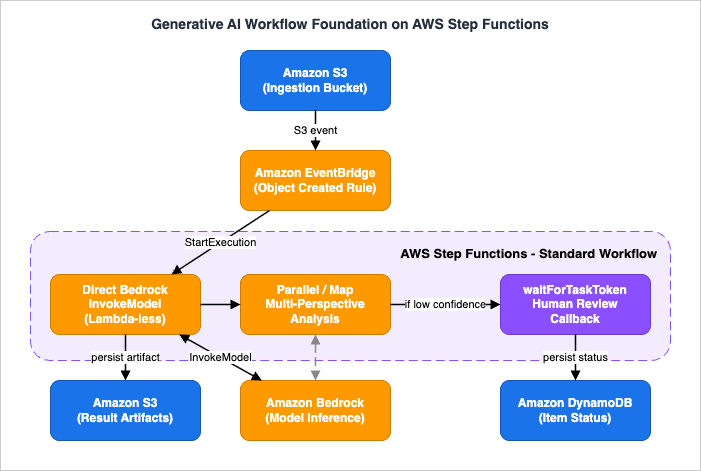
- Amazon EventBridge is the entry point. An object landing in an S3 bucket emits an event; an EventBridge rule matches it and starts a Step Functions execution. The same architecture accepts scheduled or custom application events without changing the workflow.
- AWS Step Functions (Standard workflow) is the orchestrator. Within one execution it: reads the input by reference, calls Amazon Bedrock via the optimized
InvokeModelintegration to extract structured data (no Lambda), fans out multiple analysis perspectives with aParallelstate, optionally iterates over a set of documents with aMapstate, pauses withwaitForTaskTokenwhen a result needs human review, and passes large payloads by S3 reference to stay under the state-payload limit. - Amazon Bedrock runs the model inference. Because the integration targets
InvokeModel, the state machine sends an Anthropic Messages API request body and receives the model's response as the task result. - Amazon S3 and Amazon DynamoDB are the sinks. S3 holds large artifacts (source documents, full model outputs); DynamoDB holds compact metadata and per-item status so downstream systems can query results.
2.1 End-to-End Walkthrough of One Request
Following a single document through the system shows where state lives and where it can fail:- A PDF lands in the ingestion S3 bucket. S3 emits an
Object Createdevent to EventBridge. An EventBridge rule matches the bucket and prefix and starts a Standard workflow execution, passing the bucket name and object key as input. The large document body never enters the execution input - only its S3 location does. - The first task is a direct Bedrock
InvokeModelcall that extracts structured fields (for example, invoice number, total, and due date) from the document text. Because the extracted output could be large, the task writes the raw model response to S3 via the integration'sOutputfield and the workflow keeps only the S3 reference in state. - A
Parallelstate runs several analyses at once - each branch is its ownInvokeModelcall with a different prompt (compliance check, sentiment, entity extraction). The branch outputs are aggregated into a single object. - A
Choicestate inspects a confidence signal. If confidence is below a threshold, the workflow enters awaitForTaskTokentask: it publishes the item and a task token to a notification channel and pauses. A human reviewer approves or corrects the result, and an external process callsSendTaskSuccesswith the token and the reviewed result, which resumes the execution. High-confidence items skip the pause entirely. - The final states write the compact result and status to DynamoDB and the full artifact to S3.
- If any
InvokeModelcall throttles, itsRetryfield backs off and retries; if it exhausts retries, aCatchroutes the item to a fallback branch or a dead-letter path so one failed document does not fail the whole batch.
Each numbered section below expands one part of this flow into a reusable pattern with its ASL, its parameters, and its failure behavior.
3. Direct Bedrock Integration: Lambda-less InvokeModel
The foundational pattern is calling a model without a Lambda function. Step Functions provides an optimized integration for Amazon Bedrock, exposed as thearn:aws:states:::bedrock:invokeModel resource. The state machine assembles the request body, Step Functions calls Bedrock, and the model response comes back as the task result.3.1 Which Bedrock APIs the Optimized Integration Supports
This is the first thing to get right, because it constrains the whole design. The Step Functions optimized integration for Amazon Bedrock supports exactly two APIs:InvokeModel- run inference on a text, image, or embedding model.CreateModelCustomizationJob(and its.syncvariant) - start a fine-tuning job and, with.sync, wait for it to complete.
Two consequences follow that shape every generative AI workflow you build on this integration:
- The Converse API is not part of the optimized integration. If you want the provider-agnostic
Converserequest shape, you call it through the generic AWS SDK integration (arn:aws:states:::aws-sdk:bedrockruntime:converse), which does not provide the S3 input/output extensions described in section 6. For most orchestration, the optimizedInvokeModelintegration is preferable precisely because of those extensions; reach for the SDKConverseintegration only when you specifically need the Converse message format. - Streaming responses are not supported. There is no optimized integration for
InvokeModelWithResponseStream. A Step Functions task returns the model's complete response as a single result; it does not stream tokens. This is fine for orchestration - you want the whole result before the next state runs - but it means Step Functions is the wrong layer for a token-streaming chat UI. Stream at the edge (for example, from a Lambda function URL or API Gateway) and use Step Functions for the deterministic back-office flow.
3.2 The InvokeModel Task
TheInvokeModel integration request body mirrors the Bedrock API and adds three fields specific to Step Functions: Input, Output (both covered in section 6), and the requirement that you provide Body when not using Input. The syntax is:{
"ModelId": "String",
"Accept": "String",
"ContentType": "String",
"Body": { },
"Input": { "S3Uri": "String" },
"Output": { "S3Uri": "String" }
}Body (an inline request payload) or Input (an S3 location to read the payload from), but not both. When you supply Body inline through the optimized integration, it may be up to 256 KiB; larger payloads must use Input.Here is a complete single-state extraction task, authored in JSONata (the modern query language for Step Functions - see section 3.4). It sends an Anthropic Messages API request to a representative Claude model (substitute the latest generation available in your Region) and parses the JSON the model returns:
{
  "QueryLanguage": "JSONata",
  "StartAt": "ExtractInvoiceFields",
  "States": {
    "ExtractInvoiceFields": {
      "Type": "Task",
      "Resource": "arn:aws:states:::bedrock:invokeModel",
      "Arguments": {
        "ModelId": "global.anthropic.claude-sonnet-4-5-20250929-v1:0",
        "ContentType": "application/json",
        "Accept": "application/json",
        "Body": {
          "anthropic_version": "bedrock-2023-05-31",
          "max_tokens": 1024,
          "messages": [
            {
              "role": "user",
              "content": "{% 'Return ONLY a JSON object with keys invoice_number, total, and due_date for this document text: ' & $states.input.documentText %}"
            }
          ]
        }
      },
      "Output": "{% $parse($states.result.Body.content[0].text) %}",
      "End": true
    }
  }
}ModelIdis the model or inference profile to invoke. Recent Claude models on Amazon Bedrock are accessed through cross-region inference profiles (identifiers prefixed withus.,eu.,apac.,jp.,au., orglobal.) rather than a single-Region model ID. The example uses the global inference profile for one representative Claude Sonnet model — newer generations have shipped since, so treat this strictly as a placeholder and take the exactModelIdfrom the current Bedrock model catalog for your Region; do not hard-code a model list into your workflow.Bodycarries the model-native request. For Anthropic models the shape is the Bedrock Messages API:anthropic_versionset tobedrock-2023-05-31, amax_tokens, and amessagesarray. Step Functions does not validateBody; a malformed body surfaces as a model error at runtime.- The prompt is assembled with JSONata. The
{% ... %}expression concatenates a static instruction with$states.input.documentText. Assembling prompts in the state machine is exactly the "no Lambda" benefit - there is no function to deploy just to build a string. - The result is parsed in the state machine.
$states.result.Bodyis the model response;content[0].textis the generated text;$parse(...)turns the JSON string the model produced into an object. Note it is$parse, not$eval- Step Functions implements the JSONata 2.0.6 specification, which omits$eval.
3.3 IAM: Least Privilege for the Invoke Task
The state machine's execution role needs permission to invoke the specific model. Scope the policy to the model resource rather than grantingbedrock:InvokeModel on *:{
"Version": "2012-10-17",
"Statement": [
{
"Effect": "Allow",
"Action": "bedrock:InvokeModel",
"Resource": [
"arn:aws:bedrock:us-east-1:123456789012:inference-profile/global.anthropic.claude-sonnet-4-5-20250929-v1:0",
"arn:aws:bedrock:*::foundation-model/anthropic.claude-sonnet-4-5-20250929-v1:0"
]
}
]
}AccessDenied at runtime. The example above wildcards the foundation-model Region for brevity; for a stricter production policy, enumerate the destination Regions the profile routes to and add a bedrock:InferenceProfileArn condition key so the model ARNs are only usable through that profile.3.4 A Note on Query Language
The examples in this article use JSONata, the query and transformation language that reduces a Step Functions state to two data fields,Arguments (input to the integration) and Output (the state's result), and expresses expressions inside {% ... %}. JSONata replaces the older five-field JSONPath model (InputPath, Parameters, ResultSelector, ResultPath, OutputPath) and adds first-class Variables via the Assign field. The mechanics of JSONata, Variables, the reserved $states object, and incremental migration from JSONPath are a topic in their own right; this site covers them in depth in the AWS Step Functions JSONata and Variables Practical Guide. Everything in this article works with either query language - the difference is field names and expression syntax, not capability.4. Parallel Analysis and Map Patterns
Generative AI workflows frequently need to look at the same input from several angles, or apply the same model call to many items. Step Functions expresses both natively - theParallel state for fan-out over branches, and the Map state for iteration over an array - and neither requires a Lambda function.4.1 The Parallel Analysis Pattern
Suppose that for each document you want three independent analyses: a compliance check, a sentiment read, and an entity extraction. Running them sequentially triples the latency for no reason - they do not depend on each other. AParallel state runs each as its own branch concurrently and returns an array of branch results.{
"MultiPerspectiveAnalysis": {
"Type": "Parallel",
"Branches": [
{
"StartAt": "ComplianceCheck",
"States": {
"ComplianceCheck": {
"Type": "Task",
"Resource": "arn:aws:states:::bedrock:invokeModel",
"Arguments": {
"ModelId": "global.anthropic.claude-sonnet-4-5-20250929-v1:0",
"Body": {
"anthropic_version": "bedrock-2023-05-31",
"max_tokens": 512,
"messages": [
{ "role": "user", "content": "{% 'List any compliance issues as a JSON array for this text: ' & $states.input.text %}" }
]
}
},
"Output": "{% { 'compliance': $states.result.Body.content[0].text } %}",
"End": true
}
}
},
{
"StartAt": "SentimentRead",
"States": {
"SentimentRead": {
"Type": "Task",
"Resource": "arn:aws:states:::bedrock:invokeModel",
"Arguments": {
"ModelId": "global.anthropic.claude-sonnet-4-5-20250929-v1:0",
"Body": {
"anthropic_version": "bedrock-2023-05-31",
"max_tokens": 256,
"messages": [
{ "role": "user", "content": "{% 'Classify the sentiment of this text as positive, neutral, or negative: ' & $states.input.text %}" }
]
}
},
"Output": "{% { 'sentiment': $states.result.Body.content[0].text } %}",
"End": true
}
}
}
],
"Output": "{% { 'analyses': $states.result } %}",
"Next": "AggregateResults"
}
}- Each branch receives the same input and runs independently. The state's result is an array with one element per branch, in branch order. The
Outputexpression here wraps that array under ananalyseskey for the next state. - A failure in any branch fails the whole
Parallelstate. If the compliance branch throws and is not caught inside that branch, the entireParallelstate fails and any still-running branches are cancelled. If partial results are acceptable, put aCatchinside each branch so a branch failure yields a "failed" marker instead of propagating. This is the difference between "all analyses or nothing" and "whatever succeeded" - decide deliberately. - Concurrency has real cost against model quotas. Every branch that calls Bedrock consumes model throughput at the same instant. Fanning out ten branches per document across a batch can trip account-level model throttling. Combine this pattern with the retry-and-backoff pattern in section 7, and size your parallelism against your provisioned or on-demand model quotas.
4.2 The Map Pattern for Document Sets
When the input is an array - pages of a document, a list of records, a set of files - theMap state runs the same sub-workflow for each element. Unlike Parallel (which runs different branches over the same input), Map runs the same steps over many inputs.{
"ProcessPages": {
"Type": "Map",
"Items": "{% $states.input.pages %}",
"MaxConcurrency": 5,
"ItemProcessor": {
"ProcessorConfig": { "Mode": "INLINE" },
"StartAt": "SummarizePage",
"States": {
"SummarizePage": {
"Type": "Task",
"Resource": "arn:aws:states:::bedrock:invokeModel",
"Arguments": {
"ModelId": "global.anthropic.claude-sonnet-4-5-20250929-v1:0",
"Body": {
"anthropic_version": "bedrock-2023-05-31",
"max_tokens": 512,
"messages": [
{ "role": "user", "content": "{% 'Summarize this page: ' & $states.input.pageText %}" }
]
}
},
"Output": "{% $states.result.Body.content[0].text %}",
"End": true
}
}
},
"Next": "CombineSummaries"
}
}MaxConcurrency is the critical knob for generative AI: it caps how many model calls run at once, which is your primary lever against throttling when iterating over a large set. ItemProcessor defines the per-item sub-workflow, and Items selects the array to iterate.The inline
Map shown here keeps every iteration's state within the parent execution, which is subject to the same state-payload and history limits as any other execution. For large-scale fan-out - thousands or millions of items, or items sourced directly from an S3 dataset - use Distributed Map instead, which runs iterations as child executions and is designed for massive parallelism. That is a substantial topic on its own; this site covers it in the AWS Step Functions Distributed Map Guide. Use inline Map for bounded per-document iteration; reach for Distributed Map when the item count is unbounded or the source is a large object store. A full batch generative AI pipeline that combines these building blocks end to end is covered in the Large-Scale Batch Generative AI Pipeline on AWS.5. Callback Pattern with waitForTaskToken
Some steps in a generative AI workflow cannot complete synchronously. A low-confidence extraction needs a human to approve it; a result must clear an external system before the workflow continues. The callback pattern pauses the workflow until an external actor returns a task token.
5.1 How the Task Token Works
Appending.waitForTaskToken to a supported task resource tells Step Functions to generate a task token, pass it into the task's request, and then pause the execution until that token is returned. The workflow does not consume compute while paused. Resumption happens when an external process calls one of the Step Functions APIs with the token:SendTaskSuccess- resume with a result payload (for example, the reviewer's corrected data).SendTaskFailure- resume by throwing an error the workflow canCatch.SendTaskHeartbeat- report that the task is still making progress and reset the heartbeat clock.
The token is available inside the task through the context object at
$$.Task.Token (JSONPath) or $states.context.Task.Token (JSONata). You embed it in whatever you send to the external actor - an SQS message, an SNS notification, a row in a database - so that actor can hand it back when it finishes.Here is a review-gate task that publishes an item to an SQS queue for a human reviewer and waits for the token to come back:
{
  "HumanReviewGate": {
    "Type": "Task",
    "Resource": "arn:aws:states:::sqs:sendMessage.waitForTaskToken",
    "TimeoutSeconds": 86400,
    "HeartbeatSeconds": 3600,
    "Arguments": {
      "QueueUrl": "https://sqs.us-east-1.amazonaws.com/123456789012/review-queue",
      "MessageBody": {
        "taskToken": "{% $states.context.Task.Token %}",
        "itemId": "{% $states.input.itemId %}",
        "modelResult": "{% $states.input.extraction %}"
      }
    },
    "Output": "{% $states.result %}",
    "Next": "PersistReviewedResult"
  }
}
5.2 Timeouts and Heartbeats
A waiting task will wait a long time - up to the one-year Standard-workflow service quota - which is exactly why you must bound it explicitly:TimeoutSecondsis the maximum total time the task may take, regardless of heartbeats. When it elapses the task fails withStates.Timeout, which you canCatchto escalate or expire the item. In the example above the review gate expires after one day.HeartbeatSecondsis the maximum interval allowed betweenSendTaskHeartbeatcalls. If the external process does not heartbeat within that window, the task fails withStates.Timeouteven if the overallTimeoutSecondshas not elapsed. Use it to detect a reviewer or downstream system that has silently gone away, so the item does not sit stuck until the one-day deadline.
Two operational constraints are easy to miss. First, task tokens must be sent from principals within the same AWS account as the state machine - a token cannot be returned from a different account. Second, if a
Task using the callback token times out, a new token is generated on the retry, so any actor still holding the old token can no longer resume that execution.5.3 Scope: Callback Mechanics, Not the Full HITL Design
This section covers the callback mechanism - how to pause, pass a token, and resume. It deliberately stops there. A complete human-in-the-loop review system involves reviewer UX, queue management, escalation policy, audit trails, and access control that are out of scope for an orchestration-patterns article. If you have built approval flows before, the callback token is the same primitive used in the older Step Functions approval patterns on this site (for example, Adding an Approval Flow to AWS Step Functions using AWS Systems Manager); the generative AI twist is simply that the thing being reviewed is a model output and the confidence signal that gates the pause comes from your analysis states.6. Working Around the Payload Limit
Generative AI produces large data. A model can return many kilobytes of extracted structure, a summarized document, or a base64-encoded image. Step Functions caps the data that flows between states, so passing large model outputs directly through the state machine will eventually fail. The fix is to keep large bodies in Amazon S3 and pass only references between states.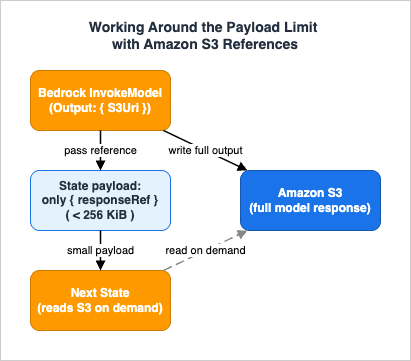
6.1 The Limits You Are Working Against
- The maximum payload passed between states is 256 KiB. An execution that passes data larger than this between states can be terminated. This is the hard limit the pattern exists to avoid.
- Variables have their own limits. A single variable may be up to 256 KiB, the combined size assigned in one
Assignfield is also 256 KiB, and the total of all stored variables cannot exceed 10 MiB per execution. Variables do not give you a way around the per-state limit for a single large value.
The official best practice is explicit: if the data passed between states might grow beyond 256 KiB, store it in Amazon S3 and pass the object's Amazon Resource Name (ARN) or URI between states instead of the data itself.
6.2 The Built-In Escape Hatch: Input and Output on InvokeModel
The Bedrock optimizedInvokeModel integration has a payload-limit escape hatch built directly into it, which the generic SDK integration and most other integrations do not. Two fields on the request - Input and Output - let the model read its request from S3 and write its response to S3, so the large bodies never touch the state payload:Input: { "S3Uri": "..." }tells Bedrock to read the request payload from the given S3 object instead of from an inlineBody. Use it when the prompt plus document exceeds 256 KiB. You supply eitherBodyorInput, never both. If you setInputwithout aContentType, the input object's content type is used.Output: { "S3Uri": "..." }tells the integration to write the model's response to the given S3 location and replace the response body in the task result with a reference to that S3 object. The next state receives a small pointer, not the full generation.
A large-document extraction task using both looks like this:
{
  "ExtractFromLargeDoc": {
    "Type": "Task",
    "Resource": "arn:aws:states:::bedrock:invokeModel",
    "Arguments": {
      "ModelId": "global.anthropic.claude-sonnet-4-5-20250929-v1:0",
      "ContentType": "application/json",
      "Input":  { "S3Uri": "{% 's3://my-genai-payloads/requests/' & $states.input.itemId & '.json' %}" },
      "Output": { "S3Uri": "{% 's3://my-genai-payloads/responses/' & $states.input.itemId & '.json' %}" }
    },
    "Output": "{% { 'itemId': $states.input.itemId, 'responseRef': $states.result } %}",
    "Next": "AnalyzeExtraction"
  }
}itemId and the S3 reference to the response. A later state that needs the content reads it from S3 (through its own Input field, or a Lambda/SDK read), keeping the state payload small the entire way through.6.3 The General S3 Reference Pattern
For integrations that lack the built-inInput/Output fields, apply the same idea manually: whatever produced the large value writes it to S3, and the state output carries only the S3 URI. Downstream states shape and select just the small reference fields with Output (JSONata) or ResultSelector/ResultPath (JSONPath), never the full body. Using JSONata's Output to project a compact object - { 'ref': $states.result.location } - is the modern form of the ResultSelector trick, keeping the state payload well under the limit while preserving what the next state needs.The design rule that falls out of this: treat the state payload as a control plane, not a data plane. Identifiers, references, and small status objects flow through the state machine; large documents and generations flow through S3. Keep that discipline and the 256 KiB limit stops being something you can hit.
7. Graceful Degradation with Retry and Catch
Model endpoints throttle under load, occasionally return transient service errors, and sometimes fail in ways a fallback can handle. Step Functions expresses recovery declaratively, asRetry and Catch fields on a state, so you do not write retry loops in application code.7.1 Retry with Backoff
ARetry field is an array of retriers, each matching a set of error names and specifying how to back off:{
"InvokeWithRetry": {
"Type": "Task",
"Resource": "arn:aws:states:::bedrock:invokeModel",
"Arguments": {
"ModelId": "global.anthropic.claude-sonnet-4-5-20250929-v1:0",
"Body": {
"anthropic_version": "bedrock-2023-05-31",
"max_tokens": 1024,
"messages": [ { "role": "user", "content": "{% $states.input.prompt %}" } ]
}
},
"Retry": [
{
"ErrorEquals": [ "States.TaskFailed" ],
"IntervalSeconds": 3,
"MaxAttempts": 4,
"BackoffRate": 2,
"MaxDelaySeconds": 30,
"JitterStrategy": "FULL"
}
],
"Output": "{% $states.result.Body.content[0].text %}",
"Next": "NextState"
}
}ErrorEqualslists the error names this retrier matches.States.TaskFailedis a wildcard that matches any error exceptStates.Timeout, which is a good default for catching model throttling and transient service errors.States.ALLmatches every error name, must appear alone in its retrier, and must be the last retrier in the array.IntervalSecondsis the wait before the first retry,BackoffRatemultiplies the wait after each attempt, andMaxAttemptscaps the number of retries.MaxDelaySecondsclamps the exponential backoff so the wait never grows past a ceiling - important for throttling, where the retry storm you are trying to avoid is made worse by unbounded backoff drifting out of your latency budget.JitterStrategy: "FULL"randomizes the wait within the computed interval. For generative AI this matters more than usual: without jitter, aMaporParallelfan-out that all throttle at once will all retry at the same instant and throttle again in lockstep. Full jitter spreads the retries and is the single most effective setting for surviving model throttling under fan-out.
7.2 Catch and Fallback
When retries are exhausted or an error is not retryable, aCatch field routes the execution to a recovery state instead of failing:{
"Retry": [ { "ErrorEquals": [ "States.TaskFailed" ], "MaxAttempts": 4, "BackoffRate": 2, "IntervalSeconds": 3, "JitterStrategy": "FULL" } ],
"Catch": [
{
"ErrorEquals": [ "States.ALL" ],
"Next": "FallbackHandler",
"Output": "{% { 'itemId': $states.input.itemId, 'error': $states.errorOutput } %}"
}
]
}Catch matches on error names the same way Retry does, routes to a Next state, and in JSONata makes the error available as $states.errorOutput (the JSONPath equivalent is capturing it under a ResultPath). This is where graceful degradation lives: a caught model failure can route to a smaller or different model, to a "needs manual handling" queue, or to a state that records the failure and lets the rest of a batch continue. The pattern that keeps one bad item from failing an entire Map is a Catch inside the item processor that turns a failure into a recorded outcome rather than a propagated error.8. Standard vs Express: Choosing the Workflow Type
Step Functions offers two workflow types, and the choice is immutable after the state machine is created - you cannot convert one to the other. For generative AI orchestration the choice usually comes down to one question: does the workflow need to pause for a callback or run longer than five minutes? If yes, it must be Standard.* You can sort the table by clicking on the column name.
| Dimension | Standard Workflows | Express Workflows |
|---|---|---|
| Maximum duration | Up to one year | Up to five minutes |
| Execution model | Exactly-once | At-least-once (asynchronous) / at-most-once (synchronous) |
Callback (waitForTaskToken) | Supported | Not supported |
.sync "run a job" integration | Supported | Not supported |
| Service integration patterns | Request Response, Run a Job, Wait for Callback | Request Response only |
| Execution history | Full history via the API for 90 days after completion | Sent to Amazon CloudWatch Logs, based on log level |
| Billing model | By number of state transitions | By number of executions, duration, and memory |
| Idempotency requirement | Exactly-once eases non-idempotent actions | At-least-once means item handlers should be idempotent |
How this maps to the generative AI patterns in this article:
- The Generative AI Workflow Foundation uses Standard, because it pauses for human review (
waitForTaskToken) and because a document pipeline with several model calls plus a possible human wait can easily exceed five minutes. Callbacks and long durations are Standard-only, so this is not a close call. - Express is the right choice for a high-volume, short, fully automated transform - for example, a synchronous "classify this text with one model call and return" endpoint that finishes in seconds and never pauses. Because Express is at-least-once for asynchronous invocation, make the model-calling steps idempotent (for example, key any writes by a deterministic item ID) so a re-run does not double-write.
The practical rule: if the workflow contains a
waitForTaskToken task or a .sync job, or might run longer than five minutes, it must be Standard. Everything else - short, automated, high-volume, idempotent - can be Express and will usually be cheaper at scale.9. Event-Driven Invocation
The Generative AI Workflow Foundation starts when a document arrives, not when someone clicks a button. Amazon EventBridge is the glue: an object landing in S3 emits an event, an EventBridge rule matches it, and the rule starts a Step Functions execution as its target.9.1 S3 to EventBridge to Step Functions
Two configuration steps make this work:- Enable EventBridge notifications on the S3 bucket. S3 does not emit events to EventBridge by default; you turn on EventBridge notifications for the bucket so that object-level events are delivered.
- Create an EventBridge rule whose event pattern matches the bucket (and optionally a key prefix and suffix) for the
Object Createddetail type, with the state machine as the target. EventBridge needs an IAM role that allows it to callstates:StartExecutionon your state machine.
An event pattern that starts the workflow only for PDFs landing under an
incoming/ prefix:{
"source": [ "aws.s3" ],
"detail-type": [ "Object Created" ],
"detail": {
"bucket": { "name": [ "my-genai-ingestion" ] },
"object": { "key": [ { "prefix": "incoming/" }, { "suffix": ".pdf" } ] }
}
}bucket.name and object.key and pass only those references into the pipeline - keeping with the control-plane discipline from section 6. The large object stays in S3; the workflow carries its location.9.2 Beyond a Single Trigger
The same pattern generalizes without touching the workflow: a scheduled EventBridge rule can start the pipeline on a cadence, and a custom application event (put onto an event bus by your own service) can start it on a business trigger. Because the trigger is decoupled from the state machine, you can add or change how executions start without editing the orchestration. Batch-scale ingestion - many objects, back-pressure, and throughput management around the trigger - is its own design; this site covers an end-to-end batch build in the Large-Scale Batch Generative AI Pipeline on AWS.10. Failure Modes and Observability
A Level 400 design is judged by how it behaves when a component fails, not only when everything works. This section walks the blast radius of the common failures in the Generative AI Workflow Foundation and the cross-cutting concerns that keep them contained.10.1 Failure Modes and Their Blast Radius
- Payload overflow. A model returns more than the state can carry and the execution is terminated. Containment: the S3 reference pattern (section 6) - use
Output: { S3Uri }onInvokeModeland pass references, so no single generation can exceed the state limit. Blast radius when contained: none; when not, the whole execution dies at the offending state. - Model throttling. Under fan-out, concurrent
InvokeModelcalls exceed model quota and throttle. Containment:Retrywith full jitter andMaxDelaySeconds(section 7), plusMaxConcurrencyonMap(section 4). Blast radius when contained: added latency; when not, cascading branch failures. - Task timeout. A callback reviewer never responds, or a model call hangs. Containment:
TimeoutSecondsandHeartbeatSecondson the task (section 5), caught asStates.Timeoutand routed to an escalation path. Blast radius when contained: one item is escalated; when not, an execution sits paused until the one-year quota. - Partial failure in fan-out. One branch or one
Mapitem fails. Containment: aCatchinside the branch or item processor that converts the failure into a recorded outcome. Blast radius when contained: one item is marked failed and the batch continues; when not, the entireParallel/Mapstate fails and cancels its siblings.
The recurring theme is that failure containment in Step Functions is a placement decision: a
Catch at the top level fails the whole execution gracefully, while a Catch inside a branch or item processor isolates the failure to one unit of work. Put the error handling where you want the blast radius to stop.10.2 Cross-Cutting Concerns
- Least-privilege IAM. Scope the execution role to the specific model ARNs (section 3.3), the specific S3 prefixes it reads and writes, and the specific DynamoDB table - not wildcards. For cross-region inference profiles, remember to grant both the profile and the underlying foundation-model ARNs.
- Data boundary. Passing large payloads by S3 reference is also a data-governance control: prompts and generations that may contain sensitive content live in an encrypted S3 bucket (server-side encryption, ideally with a customer-managed KMS key) rather than in execution state and history. Keep the sensitive body out of the state machine and you keep it out of the execution history that operators can read.
- Idempotency. Standard workflows are exactly-once for state execution, but a retried task can call the model more than once, and Express asynchronous is at-least-once. Make any externally visible side effect (a DynamoDB write, an S3 put, a notification) keyed by a deterministic item ID so a retry or re-run overwrites rather than duplicates.
- Latency budget. A model call is the slow part of each state; a
Parallelfan-out is bounded by its slowest branch; awaitForTaskTokenintroduces human-scale latency. Budget accordingly, and remember the five-minute ceiling that forces Standard the moment human review or long chains enter the picture.
10.3 Observability
Standard workflows record a full execution history you can retrieve via the API for 90 days after completion, which is the first place to diagnose a failed run - each state transition, input, output, and error is captured. Express workflows send history to Amazon CloudWatch Logs based on the configured log level, so you query logs rather than execution history. Both types emit Amazon CloudWatch metrics (such as executions failed and timed out) and support AWS X-Ray tracing to see where time goes across states. The specifics of building an observability and evaluation practice around generative AI - metrics that matter for model quality, evaluation loops, and dashboards - are a topic on their own; this site covers them in the LLMOps Observability and Evaluation Architecture on AWS. For the vocabulary of Amazon Bedrock terms used throughout this article, see the Amazon Bedrock Glossary.11. Frequently Asked Questions
Can Step Functions stream model responses token by token?No. The optimized Bedrock integration supports
InvokeModel, which returns the complete response as the task result; there is no integration for InvokeModelWithResponseStream. Stream at the client edge (a Lambda function URL or API Gateway) and use Step Functions for the deterministic back-office flow that needs the whole result before proceeding.Should I use the optimized
bedrock:invokeModel integration or the SDK Converse integration?Prefer the optimized
InvokeModel integration for orchestration, because it provides the Input/Output S3 fields that solve the payload-limit problem for free. Use the AWS SDK integration for Converse (arn:aws:states:::aws-sdk:bedrockruntime:converse) only when you specifically need the provider-agnostic Converse message format; note it does not have the S3 input/output extensions.How large a prompt or response can I pass through the workflow?
Data passed between states is capped at 256 KiB. Keep large model inputs and outputs in S3: use
Input/Output with an S3Uri on InvokeModel, or write to S3 and pass the ARN for other integrations. Treat the state payload as references and status only.How long can a workflow wait for a human reviewer?
A
waitForTaskToken task on a Standard workflow can wait up to the one-year service quota, but you should bound it with TimeoutSeconds and detect a stalled reviewer with HeartbeatSeconds. Express workflows do not support callbacks at all, so any human-in-the-loop step forces a Standard workflow.Which workflow type should a generative AI pipeline use?
Standard if it pauses for a callback, uses a
.sync job, or may run longer than five minutes - which covers most document-intelligence and review pipelines. Express for short, fully automated, high-volume transforms, where you make the item handlers idempotent because Express asynchronous execution is at-least-once.How do I keep a fan-out from throttling the model?
Cap concurrency with
MaxConcurrency on Map, and put a Retry with BackoffRate, MaxDelaySeconds, and JitterStrategy: "FULL" on each InvokeModel task. Full jitter is the key setting - it prevents a batch that throttles together from retrying in lockstep and throttling again.12. Summary
Step Functions turns a generative AI pipeline into an explicit, resilient, auditable state machine, and it does so with far less of your own code than a hand-wired orchestration would need. The six patterns in this article compose into the Generative AI Workflow Foundation:- Direct Bedrock integration removes the glue Lambda by calling
InvokeModelas a task - remembering that Converse and streaming are outside the optimized integration. - Parallel and Map fan analyses and item processing out concurrently, with concurrency capped against model quotas.
- The callback pattern pauses for human review with a task token, bounded by timeouts and heartbeats.
- The payload-limit pattern keeps large generations in S3 and passes references, using
InvokeModel's built-inInput/Outputfields as the escape hatch. - Retry and catch survive throttling and route failures to fallbacks, with full jitter as the defining setting under fan-out.
- Event-driven invocation starts the workflow from an S3 event through EventBridge, decoupled from the orchestration.
The design discipline that ties them together is simple: keep the state payload a control plane of references and status, place error handling where you want the blast radius to stop, and choose Standard the moment a callback or a long run enters the picture. Do that, and the workflow behaves predictably not only when the models cooperate but when they throttle, time out, and need a human's judgment.
13. References
- Invoke and customize Amazon Bedrock models with Step Functions
- Discover service integration patterns in Step Functions (Run a Job and Wait for Callback)
- Choosing workflow type in Step Functions (Standard vs Express)
- Handling errors in Step Functions workflows (Retry and Catch)
- Best practices for Step Functions (Amazon S3 ARNs instead of large payloads)
- Transforming data with JSONata in Step Functions
- Passing data between states with variables in Step Functions
- Parallel workflow state
- Task workflow state (timeouts and heartbeats)
- Starting a Step Functions workflow in response to Amazon S3 events
- Step Functions API Reference: SendTaskHeartbeat
- Amazon Bedrock: inference using the Anthropic Messages API
- Amazon Bedrock: supported foundation models (current model catalog)
- Amazon Bedrock: cross-region inference profiles
- AWS Step Functions JSONata and Variables Practical Guide - Modern Workflow Authoring Beyond JSONPath
- AWS Step Functions Distributed Map Guide
- Large-Scale Batch Generative AI Pipeline on AWS
- LLMOps Observability and Evaluation Architecture on AWS
- Amazon Bedrock Glossary
- Adding an Approval Flow to AWS Step Functions using AWS Systems Manager
References:
Tech Blog with curated related content
Written by Hidekazu Konishi