AWS Step Functions JSONata and Variables Practical Guide - Modern Workflow Authoring Beyond JSONPath
First Published:
Last Updated:
QueryLanguage mixing rules, how Arguments and Output replace the five JSONPath I/O fields, the Assign field and variable scope, a copy-paste pattern cookbook, an incremental JSONPath-to-JSONata migration walkthrough, TestState debugging, and the production pitfalls that bite once you commit to the new model.For years, authoring an AWS Step Functions state machine meant spending a large share of your effort on data plumbing rather than on business logic. Selecting a field here, reshaping a payload there, threading a value through five intermediate states just so the sixth could read it — the Amazon States Language (ASL) made you express all of this through a chain of JSONPath fields:
InputPath, Parameters, ResultSelector, ResultPath, and OutputPath. The logic of what the workflow does often got buried under the mechanics of how data moves.On 2024-11-22, AWS Step Functions introduced two capabilities that change this authoring model: JSONata as an alternative query and transformation language, and Variables that let a state store data for any later state to read. These are not cosmetic. They reduce the number of I/O fields you reason about, remove whole categories of intermediate "pass-through" states, and let you write transformations inline that previously required a Lambda function.
This article is a practitioner's guide to authoring workflows with JSONata and Variables. It answers three questions:
- What actually changes when you opt into JSONata and Variables — at the field level, the syntax level, and the mental-model level.
- How to migrate an existing JSONPath state machine incrementally, without a risky big-bang rewrite.
- Where the sharp edges are — the mixing rules, size limits, scope boundaries, and evaluation-order surprises that bite in production.
It deliberately does not re-teach the JSONata language in full (the official JSONata documentation is the reference for that), nor does it cover every Step Functions feature. For large-scale parallelism see my AWS Step Functions Distributed Map Practical Guide; for choosing between Step Functions and other orchestration mechanisms see my AWS Lambda Durable Functions Practical Guide. If you want to validate the ASL fragments shown here, the Step Functions ASL Validator and Visualizer tool I built may help.
All specifications below were verified against the AWS Step Functions Developer Guide and the launch announcement as of 2026-06. Step Functions evolves, so treat the official documentation as the final authority and confirm limits before you design against them.
1. Introduction — The Plumbing Problem
A Step Functions workflow is a state machine: a set of states connected by transitions, where each state receives a JSON input and produces a JSON output. The hard part has never been the states themselves — it is controlling what each state sees and what it emits.Under the original JSONPath model, every Task, Map, or Parallel state could apply up to five processing fields, in a fixed order:
InputPath— narrow the raw state input to a sub-document.Parameters— build the payload actually sent to the integrated service, mixing static values and JSONPath selections.ResultSelector— reshape the service's raw result before it is combined with the input.ResultPath— decide where in the state's data the result is injected.OutputPath— narrow the combined document to what the next state receives.
Each of these is individually reasonable. Together they form a pipeline that is genuinely hard to hold in your head, and the friction shows up in three recurring symptoms:
- Pass-through states. A value produced in step 1 is needed in step 6, but steps 2–5 do not use it. To keep it alive you must thread it through every intermediate
ResultPath/OutputPath, or addPassstates whose only job is to re-shape the envelope. The workflow graph grows states that carry no business meaning. .$everywhere. To select a value with JSONPath inside a payload template you append.$to the key name ("title.$": "$.title"). It is easy to forget, and forgetting it silently sends the literal string"$.title"instead of the value.- Lambda for trivial transforms. Formatting a date, concatenating two strings, doing a little arithmetic, or filtering an array were awkward or impossible inline, so teams reached for a Lambda function — adding a deployment artifact, an IAM role, a cold-start path, and an extra state transition for what is conceptually one line of code.
JSONata and Variables attack these symptoms directly. JSONata collapses the five I/O fields into two and gives you a real expression language for inline transforms. Variables let step 1 stash a value that step 6 reads directly, so the pass-through states disappear. The rest of this article shows exactly how, and where the trade-offs lie. Whether a data pipeline should be a state machine at all, rather than an Airflow DAG or a service-native workflow, is decided before any of this applies, and Data Pipeline Orchestration on AWS sets out the axes.
2. From JSONPath to JSONata: What Changed
2.1 Two Query Languages, One ASL
Step Functions now supports two query languages for selecting and transforming data: JSONPath (the original, still the default) and JSONata (the opt-in alternative). The language is selected by aQueryLanguage field that exists both at the top level of a state machine definition and inside each individual state.QueryLanguageaccepts"JSONPath"or"JSONata".- If the top-level field is omitted, it defaults to
"JSONPath". - If a state declares its own
QueryLanguage, that state uses the specified language. Otherwise it inherits the top-level setting.
This per-state override is the mechanism that makes incremental migration possible — you can convert one state at a time rather than rewriting the whole machine. The mixing rules, however, are asymmetric, and getting them wrong is the most common early mistake.
2.2 The Mixing Rules (Read This Carefully)
The mixing behavior depends entirely on the top-levelQueryLanguage:- Top level is
JSONPath(or omitted): individual states may be set to eitherJSONPathorJSONata. You can mix freely, and convert states one by one. This is the migration-friendly configuration. - Top level is
JSONata: every state must use JSONata. You cannot drop a single JSONPath state into a JSONata-top-level machine.
So a machine that is "mostly migrated" still keeps
JSONPath at the top level until the last state is converted; only then do you flip the top level to JSONata to lock the whole machine into the modern model. The AWS CDK encodes the same rule in its QueryLanguage enum: setting JSONATA at the top level restricts all states to JSONata, while the default JSON_PATH mode allows mixing.2.3 Five Fields Become Two
When a state uses JSONata, the five JSONPath I/O fields are disabled and most states gain two new fields instead:| JSONPath model (5 fields) | JSONata model (2 fields) |
|---|---|
InputPath | (read state input directly via $states.input) |
Parameters | Arguments |
ResultSelector | Output (or assign to a variable) |
ResultPath | Output / Variables |
OutputPath | Output |
Two rules make this clean and unambiguous:
ArgumentsandOutputonly accept JSONata. It is invalid to use them in a JSONPath state.InputPath,Parameters,ResultSelector,ResultPath, andOutputPathare only valid in JSONPath. You cannot use a path field in a JSONata state.
In other words, a single state is entirely one language or the other — there is no half-and-half state. The figure below contrasts the two models for the same logical operation.
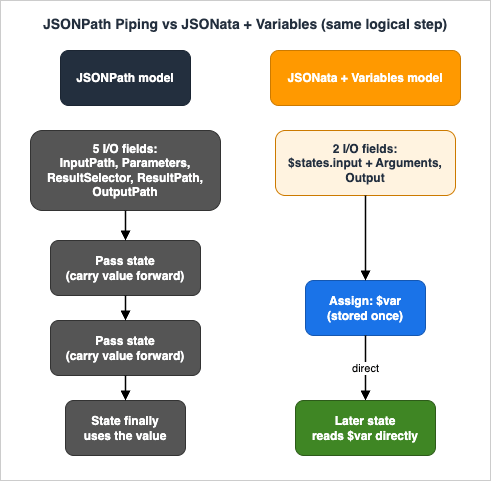
On the left, the JSONPath state carries the full burden of five I/O fields, and a value needed downstream has to be threaded through every intervening state. On the right, the JSONata state uses just
$states.input plus Arguments and Output, while a variable assigned once is read directly by a later state — the pass-through states are gone.2.4 The $states Reserved Variable
Inside a JSONata state, Step Functions exposes a single reserved variable, $states, with this shape:$states = {
"input": // Original input to the state
"result": // API or sub-workflow's result (if successful)
"errorOutput": // Error Output (only available in a Catch)
"context": // Context object
}$states.inputis the original input to the state and is usable in every field that accepts JSONata.$states.resultis the raw result of aTask,Parallel, orMapstate when it succeeds.$states.errorOutputis available only inside aCatchfield'sAssignorOutput.$states.contextis the execution Context object (start time, task token, execution name, and so on).
Attempting to reference
$states.result or $states.errorOutput where it is not available is caught at create, update, or validation time — not silently at runtime.2.5 Quick Reference: JSONPath to JSONata
When you sit down to convert a state, this table is the cheat sheet. It maps each JSONPath construct to what you write instead in a JSONata state. Keep it next to you during a migration.* You can sort the table by clicking on the column name.
| JSONPath construct | JSONata equivalent |
|---|---|
"InputPath": "$.request" | Read $states.input.request directly in expressions |
"Parameters": { ... } | "Arguments": { ... } |
"key.$": "$.value" | "key": "{% $states.input.value %}" |
"ResultSelector": { ... } | Shape directly in Output and/or Assign |
"ResultPath": "$.quote" | Assign a variable ($quote), or merge into Output |
"OutputPath": "$.payload" | "Output": "{% $states.input.payload %}" |
"ItemsPath": "$.items" (Map) | "Items": "{% $states.input.items %}" |
"TimeoutSecondsPath": "$.t" | "TimeoutSeconds": "{% $states.input.t %}" |
Choice Variable + NumericLessThanEqualsPath | Choice "Condition": "{% ... %}" |
Pass Result | Pass Output |
Intrinsics (States.UUID, States.Format, States.Hash) | $uuid(), the & operator, $hash() (see section 3.3) |
Threading a value through states via ResultPath | Assign a variable once, read $var anywhere later |
2.6 When to Reach for Each Language
JSONata is the better default for new workflows, but it is not a blanket replacement — JSONPath remains fully supported, and there is no deprecation pressure to migrate. Use this rough heuristic:- JSONPath is fine when a state does little more than pass input straight through, or selects a single sub-document with no transformation. Simple, stable machines that already work do not need to change.
- JSONata earns its keep when a state transforms data (concatenation, arithmetic, date formatting, array filtering or aggregation), when
Choicelogic is awkward to express as comparison operators, when you find yourself addingPassstates purely to reshape an envelope, or when you have written a Lambda function whose entire job is to massage JSON. - Variables earn their keep — independently of the query language — whenever a value produced early is consumed much later, forcing you to thread it through intermediate states that do not use it.
A practical consequence: many teams adopt Variables first (in their existing JSONPath machines, which is low-risk) to remove pass-through states, then convert individual states to JSONata where the transformation savings are largest. You do not have to choose all at once.
3. JSONata Essentials for ASL Authors
This section covers only the JSONata you need to be productive inside ASL. For the language proper — operators, the full function library, path semantics — consult jsonata.org.3.1 The {% %} Delimiter
Any ASL string wrapped in {% %} is evaluated as a JSONata expression. The delimiter discipline is strict:- The string must start with
{%with no leading spaces and end with%}with no trailing spaces. Improper opening or closing produces a validation error, not a silent fallthrough. - Evaluation applies to a string wherever it appears — on its own, as a value inside a JSON object, or as an element inside a JSON array.
Examples that are all valid:
"TimeoutSeconds": "{% $timeout %}"
"Arguments": { "field1": "{% $name %}" }
"Items": [1, "{% $two %}", 3]Type must be a constant string, and a Task state's Resource must be a constant string. The Map state's Items field accepts a JSON array, a JSON object, or a JSONata expression that evaluates to an array or object.3.2 No More .$ and No More Path Fields
Two JSONPath conventions disappear entirely in JSONata states:- No
.$suffix. JSONPath required you to append.$to a key whose value is a JSONPath expression ("title.$": "$.title"). In JSONata you simply wrap the value:"title": "{% $states.input.title %}". The same convention applies no matter how deeply the key is nested. - No
Pathvariants. JSONPath had paired fields such asTimeoutSecondsPathandItemsPathfor "take this value from the data." In JSONata you use the plain field with an expression:"TimeoutSeconds": "{% $timeout %}","Items": "{% $states.input.batch %}".
3.3 The Step Functions JSONata Function Library
Step Functions implements JSONata based on the 2.0.6 specification. All built-in JSONata functions and operators from 2.0.6 are supported with one exception:$eval is not available — use $parse instead. On top of the standard library, Step Functions adds a small set of functions that replace the JSONPath-only intrinsic functions:| Function | Purpose |
|---|---|
$partition(array, chunkSize) | Split a large array into a two-dimensional array of chunks (replaces States.ArrayPartition). |
$range(start, end, step) | Generate an array of numbers (replaces States.ArrayRange). |
$hash(source, algorithm) | Hash a string with MD5, SHA-1, SHA-256, SHA-384, or SHA-512 (replaces States.Hash). |
$random([seed]) | Return a number n where 0 ≤ n < 1; an optional seed makes it deterministic (replaces States.MathRandom). |
$uuid() | Return a v4 UUID (replaces States.UUID). |
$parse(jsonString) | Deserialize a JSON string (the supported replacement for $eval). |
A note from the documentation worth remembering: built-in JSONata functions that require integer parameters automatically round non-integer numbers down. Intrinsic functions themselves remain available only in JSONPath states — in JSONata you use the equivalents above or native JSONata.
3.4 JSONata Building Blocks in ASL Context
A handful of standard JSONata 2.0.6 constructs cover the vast majority of what ASL authors need. The list below is not exhaustive — the JSONata documentation is the full reference — but these are the ones you will reach for constantly.- Object construction. Build a new object literal whose values are expressions. This is what
ArgumentsandOutputusually contain. - String concatenation with
&.'Order ' & $states.input.idjoins a literal and a value — the most common one-liner that used to require a Lambda. - Arithmetic and comparison.
+ - * /and= != < <= > >=work as expected and are the backbone ofChoiceconditions. - The conditional (ternary) operator.
condition ? thenValue : elseValuelets you pick a value inline without adding aChoicestate. - Mapping, filtering, and aggregation.
$map(),$filter(),$sum(),$count(),$average(), and path predicates such asitems[price > 10]reshape arrays without a dedicated state. - String and date helpers.
$uppercase(),$substring(),$split(),$join(), and the date functions$now(),$fromMillis(), and$toMillis()cover formatting that previously meant glue code.
A compact example that combines several of these in a single
Output expression — computing an order summary object from the state input:"Summarize": {
"Type": "Pass",
"Output": {
"orderId": "{% $states.input.id %}",
"itemCount": "{% $count($states.input.items) %}",
"subtotal": "{% $sum($states.input.items.(price * quantity)) %}",
"tier": "{% $sum($states.input.items.(price * quantity)) > 100 ? 'gold' : 'standard' %}",
"placedAt": "{% $now() %}"
},
"End": true
}$states.input.items.(price * quantity) maps each item to its line total, $sum() aggregates them, and the ternary selects a tier — all inline, in one state, with no Lambda and no extra transitions.3.5 What Does Not Change
It is just as important to know what JSONata leaves alone, so you do not over-rotate during a migration:- Error handling structure.
RetryandCatchwork exactly as before. The difference is that JSONata states can raise a new error,States.QueryEvaluationError, which you handle with the sameErrorEqualsmechanism. - The state graph.
StartAt,Next,End, and the routing ofChoicesare unchanged. JSONata changes how data is shaped, not how control flows between states. - Structural fields stay constant. A state's
Typeand aTaskstate'sResourceare still constant strings — you cannot compute them with an expression. - Workflow type. JSONata and Variables are available in both Standard and Express workflows; choosing JSONata does not change which workflow type you run.
- The Context object. The same execution metadata is available — in JSONata via
$states.context, in JSONPath via the$$syntax.
3.6 Assign and Output Run in Parallel
This is the single most surprising JSONata behavior, and it deserves its own callout. In a JSONata state, the Assign step and the Output step are evaluated in parallel. The practical implication: a transformation you apply while assigning a variable is not reflected in Output. If you need the same transformed value in both places, you must write the transformation twice — once in the Assign field and once in the Output field. There is no implicit "assign then output" ordering you can lean on.4. Variables and Assign
Variables are frequently described together with JSONata, but they are a separate feature with their own rules — and, importantly, they work in both JSONPath and JSONata states. Treating "JSONata" and "Variables" as one thing is the most common conceptual error, so this section keeps them distinct.4.1 What a Variable Is
A variable lets a state store a value that any later state can read, without passing it through the intermediate states' input and output. The canonical example: step 1 calls an API and stores part of the response in a variable; step 5 reads it directly. Without variables you would thread that value through steps 2, 3, and 4 even though they do not use it. With variables, those states stay focused on their own work, and you can reorder or insert steps without disturbing the data flow.Contrast this with state output, which can only be consumed by the very next state. Variables are for data that must survive across many states; output is for the immediate hand-off.
4.2 The Assign Field
You declare and set variables with the Assign field, which takes a JSON object of variable-name to value pairs:"Assign": {
"productName": "product1",
"count": 42,
"available": true
}Assign is available:- at the top level of every state except
SucceedandFail; - inside
Choicestate rules; - inside
Catchfields (where it can also reference$states.errorOutput).
The state types that support
Assign are Pass, Task, Map, Parallel, Choice, and Wait.To reference a variable, prefix its name with
$: $productName. In a JSONata state you embed that reference in an expression: "{% $states.input.order.product %}" to assign from input, or "{% $states.result.Payload.current_price %}" to assign from a task result.A constraint that trips people up: you cannot assign to part of a variable.
"Assign": {"x": 42} is fine; "Assign": {"x.y": 42} and "Assign": {"x[2]": 42} are not. A variable is replaced wholesale or not at all.4.3 Variable Naming Rules
Variable names follow the Unicode identifier rules (Unicode Standard Annex #31): the first character must be a UnicodeID_Start character and subsequent characters must be ID_Continue characters — essentially the same rules as JavaScript identifiers. The maximum length of a variable name is 80 characters.4.4 Scope: Workflow-Local, with Map/Parallel Boundaries
Step Functions avoids race conditions by giving variables a workflow-local scope. The rules:- The top-level scope includes every state in the machine's
Statesfield — but not states insideParallelbranches orMapiterations. Parallelbranches andMapiterations have their own scope. They can read variables from outer scopes, but they cannot see each other's variables (no cross-branch, no cross-iteration visibility).- When a
ParallelorMapstate completes, its inner variables go out of scope. To pass data out, use theOutputfield. - A
Catchblock'sAssigncan write to the outer scope — i.e. the scope in which theParallel/Mapstate lives. - Shadowing is forbidden. If an outer scope assigns
myVariable, no inner scope may assign a variable of the same name. - Exception — Distributed Map. A Distributed Map state cannot currently reference variables in outer scopes at all. Its child executions are isolated; plan to pass everything they need through
ItemSelector/item data instead.
The figure below shows how the scopes nest.
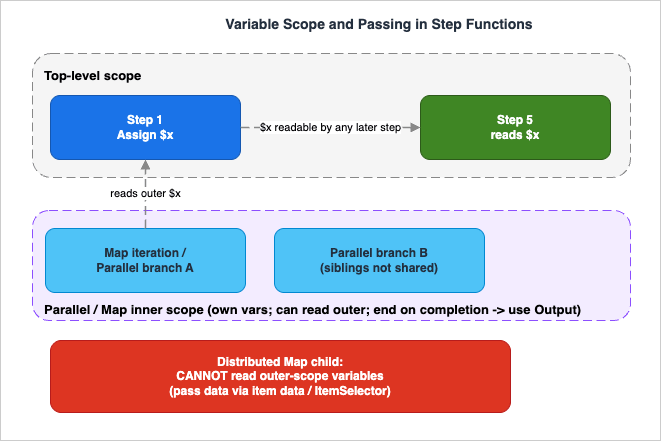
A variable assigned in the top-level scope (
$x in step 1) is readable by any later top-level state (step 5). An inner Parallel/Map scope can read $x, but its own variables stay private to that branch or iteration and vanish when the state completes. A Distributed Map child sits outside all of this and cannot read outer-scope variables at all.4.5 Evaluation Order Inside Assign
All variable references use the values as they were on state entry. Step Functions evaluates every expression in the Assign block first, using the current values, and then makes the assignments. The new values become visible starting with the next state. Consider:// Starting values: $x = 3, $a = 6
"Assign": {
"x": "{% $a %}",
"nextX": "{% $x %}"
}
// Ending values: $x = 6, $nextX = 3$a = 6, $x = 3), then both assignments happen. The order in which keys appear in the Assign block does not matter, and there is no way for one assignment to read another's freshly written value within the same block. (If $x had not been previously assigned, the example would fail, because $x would be undefined.)4.6 Variables in JSONPath States
Variables are not exclusive to JSONata. In a JSONPath state you can reference a variable in any field that accepts a JSONPath expression (the$. or $$. syntax), with one exception: ResultPath — variables cannot be used there. Inside JSONPath intrinsic functions you can pass variables as arguments, e.g. States.Format('The order number is {}', $order.number).When you assign variables in a JSONPath state, the payload-template
.$ convention applies, exactly as it does for Parameters:"Assign": {
"products.$": "$.order..product",
"orderTotal.$": "$.order.total"
}4.7 Variable Size Limits
The limits apply to both Standard and Express workflows:- The maximum size of a single variable is 256 KiB.
- The maximum combined size of all variables set in one
Assignfield is also 256 KiB (you could assign X and Y at 128 KiB each, but not both at 256 KiB in the same block). - The total size of all stored variables cannot exceed 10 MiB per execution.
These are real ceilings at scale. Variables are for control data and small payloads, not for carrying large documents through the workflow — for bulk data, keep it in Amazon S3 and pass references.
5. Pattern Cookbook
The following patterns are copy-paste ASL fragments built on the verified behavior above. Each is a JSONata state unless noted; assume the top-levelQueryLanguage is set appropriately (see section 2.2). You can validate and visualize any of these with the Step Functions ASL Validator and Visualizer.5.1 Reshape Input into an API Payload
Build theArguments payload for an integration directly from state input, mixing static and dynamic values — no Parameters, no .$:"Charge Card": {
"Type": "Task",
"Resource": "arn:aws:states:::lambda:invoke",
"Arguments": {
"FunctionName": "process-payment",
"Payload": {
"channel": "web",
"amount": "{% $states.input.order.total %}",
"currency": "{% $states.input.order.currency %}",
"greeting": "{% 'Hello ' & $states.input.customer.firstName %}"
}
},
"Output": "{% $states.result.Payload %}",
"Next": "Record Result"
}& operator concatenates strings inline — the kind of transform that previously needed a Lambda or an intrinsic function.5.2 Conditional Branching with Condition
In JSONata, a Choice rule uses a single Condition expression instead of a Variable plus a comparison operator (NumericLessThanEqualsPath and friends):"Check Price": {
"Type": "Choice",
"Default": "Pause",
"Choices": [
{
"Condition": "{% $currentPrice <= $states.input.desiredPrice %}",
"Next": "Send Notification"
}
]
}Variable and the comparison fields exist only in JSONPath; Condition exists only in JSONata. A Choice rule may also carry an Assign to set variables on the chosen branch.5.3 Custom Retry Counter with Catch and a Variable
Built-in Retry handles most transient-failure cases, but sometimes you need custom attempt logic — for example, branching to a different recovery path after N failures. A variable incremented in a Catch does this:"Init": {
"Type": "Pass",
"Assign": { "attempt": 0 },
"Next": "Call Service"
},
"Call Service": {
"Type": "Task",
"Resource": "arn:aws:states:::lambda:invoke",
"Arguments": { "FunctionName": "flaky-service" },
"Catch": [
{
"ErrorEquals": ["States.ALL"],
"Assign": {
"attempt": "{% $attempt + 1 %}",
"lastError": "{% $states.errorOutput.Error %}"
},
"Next": "Retry Or Give Up"
}
],
"Next": "Done"
},
"Retry Or Give Up": {
"Type": "Choice",
"Default": "Fail Hard",
"Choices": [
{ "Condition": "{% $attempt < 3 %}", "Next": "Call Service" }
]
}$states.errorOutput inside the Catch — it is available there and nowhere else.5.4 Use a Previous State's Output in a Map
A Map state can take its array directly from earlier data via Items, and each iteration computes inline:"ProcessItems": {
"Type": "Map",
"Items": "{% $states.input.items %}",
"ItemProcessor": {
"ProcessorConfig": { "Mode": "INLINE" },
"StartAt": "CalculateItemTotal",
"States": {
"CalculateItemTotal": {
"Type": "Pass",
"Output": {
"name": "{% $states.input.name %}",
"total": "{% $states.input.price * $states.input.quantity %}"
},
"End": true
}
}
},
"End": true
}$states.input is the single item, so price * quantity is a plain JSONata multiplication — arithmetic that used to require a Lambda.5.5 Filtering an Array Inline
JSONata path predicates filter without a dedicated state. To keep only zero-calorie products from an input array:"FilterDietProducts": {
"Type": "Pass",
"Output": {
"dietProducts": "{% $states.input.products[calories=0] %}"
},
"End": true
}[calories=0] predicate is standard JSONata. Combined with mapping and aggregation functions, a great deal of "shape the data" work moves out of Lambda and into the state itself.5.6 Flatten Parallel Output with $merge
A Parallel state returns an array — one element per branch. In JSONPath you reached for ResultSelector to merge them; in JSONata you use $merge($states.result) in the Parallel state's Output:"GetOrderAndCustomer": {
"Type": "Parallel",
"Output": "{% $merge($states.result) %}",
"Branches": [
{ "StartAt": "Get Order", "States": { "...": "..." } },
{ "StartAt": "Get Customer", "States": { "...": "..." } }
],
"Next": "Done"
}$merge() combines an array of objects into one object; when keys overlap, later array elements win, and branch results are ordered to match the Branches array.5.7 Generate IDs, Timestamps, and Hashes
Common "glue" values now have native or Step Functions-provided functions, so you rarely need a Lambda just to stamp a record:"Stamp": {
"Type": "Pass",
"Assign": {
"requestId": "{% $uuid() %}",
"createdAt": "{% $now() %}",
"etag": "{% $hash($string($states.input.payload), 'SHA-256') %}"
},
"Next": "Store"
}$uuid() and $hash() are Step Functions additions; $now() and $string() are native JSONata. For date and time formatting beyond $now(), JSONata's date/time functions cover most cases — see jsonata.org.5.8 Assemble a Human-Readable Error Message in a Catch
When a Task fails, you often want to record a readable message rather than the raw error structure. Inside a Catch, $states.errorOutput exposes the Error and Cause, which you can format with string concatenation and pass on through Output or store in a variable:"Handle Failure": {
"Type": "Pass",
"Output": {
"ok": false,
"message": "{% 'Step failed: ' & $states.errorOutput.Error & ' - ' & $states.errorOutput.Cause %}",
"failedAt": "{% $now() %}"
},
"End": true
}Catch transition, because $states.errorOutput is populated only there (see section 2.4). The same expression works in the Catch block's own Assign if you would rather carry the message in a variable.5.9 Partition a Large Array Before a Map
When you need to process a big array in fixed-size batches,$partition chunks it without a Lambda. Feed the chunked array into a Map so each iteration handles one batch:"Chunk": {
"Type": "Pass",
"Assign": {
"batches": "{% $partition($states.input.records, 25) %}"
},
"Next": "ProcessBatches"
},
"ProcessBatches": {
"Type": "Map",
"Items": "{% $batches %}",
"ItemProcessor": {
"ProcessorConfig": { "Mode": "INLINE" },
"StartAt": "HandleBatch",
"States": {
"HandleBatch": { "Type": "Pass", "End": true }
}
},
"End": true
}$states.input. Note that $partition rounds a non-integer chunk size down (section 3.3), and remember the per-variable 256 KiB ceiling (section 4.7) — for very large datasets, source the items from Amazon S3 with Distributed Map instead.6. Refactoring an Existing State Machine
The safest migration is incremental and bottom-up: keep the top-levelQueryLanguage at JSONPath, convert one state at a time, validate, and only flip the top level to JSONata once every state is converted. Here is a worked before/after for a single Task state.6.1 Before — JSONPath
"Get Quote": {
  "Type": "Task",
  "QueryLanguage": "JSONPath",
  "Resource": "arn:aws:states:::lambda:invoke",
  "InputPath": "$.request",
  "Parameters": {
    "FunctionName": "get-quote",
    "Payload": {
      "symbol.$": "$.symbol",
      "qty.$": "$.quantity"
    }
  },
  "ResultSelector": {
    "price.$": "$.Payload.price"
  },
  "ResultPath": "$.quote",
  "OutputPath": "$",
  "Next": "Decide"
}.$ keys, and the result threaded back into $.quote so a later state can read it.6.2 After — JSONata Plus a Variable
"Get Quote": {
  "Type": "Task",
  "QueryLanguage": "JSONata",
  "Resource": "arn:aws:states:::lambda:invoke",
  "Arguments": {
    "FunctionName": "get-quote",
    "Payload": {
      "symbol": "{% $states.input.request.symbol %}",
      "qty": "{% $states.input.request.quantity %}"
    }
  },
  "Assign": {
    "quotePrice": "{% $states.result.Payload.price %}"
  },
  "Output": "{% $states.input %}",
  "Next": "Decide"
}InputPath+Parameterscollapse intoArguments, reading from$states.inputwith no.$.ResultSelector+ResultPathare replaced by assigning the price to a variablequotePrice. The laterDecidestate reads$quotePricedirectly instead of digging into$.quote.price.Outputpasses the original input forward unchanged (remember from section 3.6 thatAssignandOutputare evaluated in parallel, so the variable assignment does not alterOutput).
6.3 Migration Checklist
- Flip one state to
"QueryLanguage": "JSONata"and remove its path fields. The validator will reject any leftoverParameters/ResultPath/.$in that state, which is a useful guardrail. - Translate selections from
$.footo{% $states.input.foo %}and results fromResultSelector/ResultPathtoAssignvariables and/orOutput. - Replace pass-through plumbing with variables. Any value previously threaded through
ResultPathjust to keep it alive becomes a variable assigned once and read later — often letting you delete intermediatePassstates. - Convert
Choicerules fromVariable+ comparison to a singleConditionexpression. - Test the state in isolation with the TestState API (see section 8) before moving on.
- Flip the top level to
JSONataonly after the last state is converted, to enforce that no JSONPath state can sneak back in.
6.4 Where Variables Delete Whole States
The single-state before/after above shows the field-level change. The bigger payoff appears across a multi-state machine, where variables let you delete the pass-through states entirely. Consider a workflow that fetches a customer in step 1, does unrelated work in steps 2 and 3, and needs the customer's tier in step 4. Under JSONPath, the tier has to ride along in the state data through every step:// JSONPath: the tier is threaded through every state's ResultPath/OutputPath
"GetCustomer": { "Type": "Task", "ResultPath": "$.customer", "Next": "ValidateOrder" },
"ValidateOrder": { "Type": "Task", "ResultPath": "$.validation", "Next": "ReserveStock" },
"ReserveStock": { "Type": "Task", "ResultPath": "$.reservation", "Next": "ApplyTierDiscount" },
"ApplyTierDiscount": {
"Type": "Task",
"Parameters": { "tier.$": "$.customer.tier" },
"End": true
}$.customer in its output, or the final state cannot see it. With a variable, step 1 stores the tier once and step 4 reads it directly — the intermediate states no longer carry data they do not use:// JSONata + Variables: the tier is stored once and read directly later
"GetCustomer": {
"Type": "Task",
"Assign": { "customerTier": "{% $states.result.Payload.tier %}" },
"Next": "ValidateOrder"
},
"ValidateOrder": { "Type": "Task", "Next": "ReserveStock" },
"ReserveStock": { "Type": "Task", "Next": "ApplyTierDiscount" },
"ApplyTierDiscount": {
"Type": "Task",
"Arguments": { "tier": "{% $customerTier %}" },
"End": true
}7. Interaction with Distributed Map and Service Integrations
7.1 JSONata Works Inside Map and Parallel
JSONata is fully usable inMap and Parallel states. The Items field accepts a JSONata expression evaluating to an array; ItemSelector (the JSONata replacement for the JSONPath Parameters of a Map item) shapes each item; and each child state reads its own $states.input. The Map example in section 5.4 and the Parallel $merge example in section 5.6 are both JSONata.7.2 The Distributed Map Variable Boundary
The one hard constraint to design around: a Distributed Map state cannot reference variables in outer scopes. Child executions launched by a Distributed Map are isolated from the parent's variable scope. If a child needs a value, deliver it through the item data — for example viaItemSelector, which can embed parent context into each item — rather than expecting $someOuterVariable to resolve inside the child. Inline Map iterations can read outer variables (subject to the scope rules in section 4.4); Distributed Map cannot. For everything else about Distributed Map — item sources, batching, concurrency, result aggregation, and cost — see my AWS Step Functions Distributed Map Practical Guide.7.3 Service Integrations and Other Patterns
JSONata applies uniformly across the service-integration surface: theArguments field builds the request payload for any optimized or AWS SDK integration, and Output shapes the result. The same model extends naturally to event-driven designs — if you are wiring Step Functions to events, my guides on adding an approval flow with AWS Systems Manager and Amazon EventBridge and on Amazon EventBridge Pipes event-driven patterns show where orchestration meets eventing. Note that a Task state's Resource must still be a constant string — you cannot compute the integration ARN with JSONata.7.4 JSONata with the HTTP Task and SDK Integrations
The HTTP Task — which calls a third-party HTTPS endpoint — is a good showcase for JSONata, because building an HTTP request usually means assembling a query string, headers, and a body from workflow data. With JSONata, theArguments field constructs all of these inline, and Output reshapes the response before it moves to the next state, frequently removing the small "request builder" and "response parser" Lambda functions that used to bracket an external call. Two practical notes: the endpoint and method are constant fields (you cannot compute them with an expression, just as with Resource), and when you are debugging the exact bytes sent over the wire, the TestState API's TRACE inspection level (section 8.1) returns the raw HTTP request and response — with an option to reveal secrets — which is the fastest way to confirm your JSONata produced the request you intended.8. Testing and Debugging
8.1 The TestState API
The TestState API executes a single state's definition without creating or updating a state machine — ideal for iterating on a JSONata expression or aChoice Condition in isolation. You can submit a single state definition, or a full state machine definition plus a stateName to test one state within it. TestState assumes an IAM role with the permissions the state needs (and, with mocking, the role becomes optional). Its maximum execution duration is five minutes.TestState offers three inspection levels that control how much detail you get back:
- INFO (default) — the state output on success, or the error output on failure.
- DEBUG — adds the intermediate input/output processing results (raw input, after-
InputPath, after-Parameters, and so on), up to the point of failure. - TRACE — adds the raw HTTP request/response for HTTP Task states, with an option to reveal secrets.
Every level also returns
status (e.g. SUCCEEDED, FAILED, RETRIABLE, CAUGHT_ERROR) and nextState. Because TestState evaluates the state's actual data processing, it is the fastest way to confirm that a JSONata expression produces the value you expect before wiring it into the full machine.From the AWS CLI you pass the state definition, an input, and a role; the response is the processed output. For example, to test the filtering Pass state from section 5.5:
aws stepfunctions test-state \
  --definition '{
    "Type": "Pass",
    "QueryLanguage": "JSONata",
    "Output": { "dietProducts": "{% $states.input.products[calories=0] %}" },
    "End": true
  }' \
  --input '{"products":[{"name":"A","calories":0},{"name":"B","calories":140}]}' \
  --role-arn arn:aws:iam::<account>:role/<test-role> \
--inspection-level INFOdietProducts array) without you ever creating a state machine. Switch --inspection-level to DEBUG or TRACE to see the intermediate processing steps. You can validate and visualize the surrounding ASL with the Step Functions ASL Validator and Visualizer, and if you are translating expressions from the old model, the JSONPath and JMESPath Query Tester helps you reason about the JSONPath side.8.2 Unit-Testing Enhancements (November 2025)
Starting November 2025, the TestState API gained enhancements (available through the AWS CLI and SDKs) aimed at automated unit testing:- Mock service integrations — mock AWS service calls or HTTP Task responses to test state logic without invoking the real service (and without configuring IAM).
- Test advanced states — Map, Parallel, and Activity states can now be tested with mocked responses.
- Control execution context — drive specific retry attempts, Map iteration positions, and error scenarios deterministically.
Together these let you assert which
Catch/Retry applies, verify input/output transformations, and test failure-threshold behavior in Map states as part of an automated suite rather than by hand in the console.8.3 Reading Variables in Execution History
In a real execution, assigned variables are recorded in the execution event history, so you can inspect what each state stored and confirm scope behavior (for instance, that an innerMap variable did not leak to the outer scope). When an expression fails at runtime, the error surfaces as States.QueryEvaluationError (see section 9), which you can catch and inspect.9. Common Pitfalls
Misreading the mixing rules. The most frequent mistake is setting the top-levelQueryLanguage to JSONata and then trying to keep a JSONPath state. Once the top level is JSONata, all states must be JSONata. Keep the top level at JSONPath until the migration is complete (section 2.2).Expecting
Assign to feed Output. Assign and Output evaluate in parallel. A value transformed during assignment is not available to Output; reapply the transformation in Output if you need it there (section 3.6).Hitting the size ceilings. A single variable maxes out at 256 KiB, one
Assign block at 256 KiB combined, and all variables together at 10 MiB per execution. Variables are for control data and small payloads — keep large documents in Amazon S3 and pass references (section 4.7).Assuming variables cross the Map/Parallel boundary the way you want. Inner scopes can read outer variables but not sibling variables, inner variables vanish when the state completes, and a Distributed Map cannot read outer-scope variables at all. Pass data out via
Output, and into Distributed Map children via item data (sections 4.4, 7.2).Forgetting the delimiter discipline. A leading space (
" {% ... %}") or a missing %} is a validation error, not a literal string. Conversely, a string without {% %} is taken literally — "not-evaluated": "$customerName" stays the literal text $customerName.Writing expensive or unbounded expressions. A JSONata expression that runs longer than one second fails with an expression-evaluation timeout; one that consumes too much memory fails with a memory-limit error; unbounded recursion fails with a stack-overflow error. All surface as
States.QueryEvaluationError, which Task, Map, and Parallel states can Catch and Retry. For heavy transforms, move the work to a Lambda function.Reaching for
$eval. It is the one JSONata 2.0.6 function Step Functions does not support. Use $parse to deserialize JSON strings.Drifting from your IaC. If your state machines are defined in CDK, CloudFormation, SAM, or Terraform, the query-language and variable fields must be expressed there too — hand-editing in the console and forgetting to reflect it in code is a recipe for the next deployment silently reverting your migration. The AWS CDK models the JSONata fields explicitly (
Arguments, Assign, Outputs, QueryLanguage), so prefer the typed constructs over raw string definitions where you can.Referencing
$states.result in the wrong state. $states.result is populated only for Task, Parallel, and Map states (the ones that produce a result). Referencing it in a Pass, Wait, or Choice state — or referencing $states.errorOutput outside a Catch — is caught at create/update/validation time, not at runtime, so the failure shows up when you deploy.Over-wrapping
Output. Output can be any JSON value, not just an object — "Output": true, "Output": 42, and "Output": "{% $states.result.count %}" are all valid. You do not need to wrap a single value in an object just to satisfy the field.10. Frequently Asked Questions
Can I mix JSONPath and JSONata states in one workflow?Yes — but only when the top-level
QueryLanguage is JSONPath (the default). In that mode each state may be JSONPath or JSONata. If the top level is JSONata, every state must be JSONata. A single state is always entirely one language; there is no mixed-language state.Do Variables replace
ResultPath?In effect, yes, for the common case of "keep this value around for later." Instead of injecting a result into the state document with
ResultPath and threading it forward, you assign it to a variable and read it directly later. Note that variables themselves cannot be used in ResultPath when you are still in a JSONPath state.Are Variables only for JSONata?
No. Variables work in JSONPath states too — you can reference
$myVar in any JSONPath field except ResultPath, and assign with the .$ payload-template convention. Adopting Variables without adopting JSONata is a valid, low-risk first step.Should I migrate my existing workflows?
For stable, working machines there is no obligation — JSONPath remains fully supported and the default. Migrate when the plumbing is genuinely costing you: many pass-through states, Lambda functions that exist only to reshape data, or
Choice logic that is hard to read. Migrate incrementally (section 6) and test each state with TestState.What JSONata version does Step Functions support, and are all functions available?
JSONata 2.0.6. All built-in functions and operators are supported except
$eval (use $parse), plus Step Functions adds $partition, $range, $hash, $random, $uuid, and $parse.Can JSONata compute a
Resource ARN or a state Type?No.
Type and a Task state's Resource must be constant strings. JSONata is for data fields (Arguments, Output, Assign, Items, Condition, TimeoutSeconds, and similar), not for the structural fields of the state machine.Is there an extra charge for Variables or JSONata?
They were launched at no additional cost. Because they remove state transitions and Lambda invocations, they can reduce what you pay — but pricing models for Standard and Express workflows differ and change over time, so consult the official AWS Step Functions pricing page for current details rather than any number quoted here.
How do I format a date or do math without a Lambda?
Use JSONata. Arithmetic operators (
+ - * /) work inline, and date handling is covered by native functions such as $now(), $fromMillis(), and $toMillis(). The Step Functions additions $uuid() and $hash() round out the common "glue" needs. For anything beyond these, the JSONata documentation is the reference.Can a Distributed Map child read a variable I set in the parent?
No. A Distributed Map state cannot reference outer-scope variables at all, so
$parentVariable will not resolve inside a child. Deliver the value through the item data instead — for example by embedding it with ItemSelector — so each child receives it as part of its own input. Inline Map iterations, by contrast, can read outer-scope variables.Does JSONata change how
Retry and Catch behave?No. Error handling is structurally the same. The one addition is the
States.QueryEvaluationError that a failing JSONata expression raises, which you can match in ErrorEquals like any other error and handle with Retry or Catch on Task, Map, and Parallel states.11. Summary
JSONata and Variables move Step Functions authoring away from data plumbing and toward expressing intent. JSONata collapses the five JSONPath I/O fields intoArguments and Output, removes the .$ and Path-field conventions, and gives you a real expression language — with a Step Functions-specific function library — for transforms that previously needed a Lambda. Variables let any later state read a value a prior state stored, dissolving the pass-through states that cluttered JSONPath workflows. Crucially, the two features are independent: Variables work in JSONPath states too, so you can adopt them separately and incrementally.The discipline that makes a migration safe is small but non-negotiable: understand the asymmetric mixing rules, respect the 256 KiB / 10 MiB size ceilings, design around the Map/Parallel scope boundaries (and the Distributed Map variable restriction), remember that
Assign and Output run in parallel, and test each converted state with the TestState API — whose November 2025 enhancements now make automated unit testing of states practical. Keep the top-level query language at JSONPath until the last state is converted, then flip it to lock in the modern model.For the adjacent topics this guide deliberately delegates: large-scale fan-out in the AWS Step Functions Distributed Map Practical Guide; choosing an orchestration mechanism in the AWS Lambda Durable Functions Practical Guide; human-in-the-loop approval in the Approval Flow with SSM and EventBridge guide; and event-driven wiring in Amazon EventBridge Pipes event-driven architecture patterns.
12. References
- Transforming data with JSONata in Step Functions — AWS Step Functions Developer Guide
- Passing data between states with variables — AWS Step Functions Developer Guide
- Testing state machines with TestState API — AWS Step Functions Developer Guide
- AWS Step Functions simplifies developer experience with Variables and JSONata transformations — What's New (2024-11-22)
- Simplifying developer experience with variables and JSONata in AWS Step Functions — AWS Compute Blog
- Accelerating workflow development with the TestState API in AWS Step Functions — AWS Compute Blog
- Accessing execution data from the Context object in Step Functions — Developer Guide
- enum QueryLanguage — AWS CDK API Reference
- JSONata documentation (2.0.x overview)
- AWS Step Functions pricing
Related Articles
- AWS Step Functions Distributed Map Practical Guide
Large-scale parallel processing, item sources, batching, and result aggregation. - AWS Lambda Durable Functions Practical Guide
Choosing between orchestration mechanisms. - How to Add an Approval Flow to AWS Step Functions Workflow (AWS Systems Manager Automation and Amazon EventBridge Edition)
Human-in-the-loop orchestration. - Amazon EventBridge Pipes Event-Driven Architecture Patterns
Where orchestration meets eventing. - Step Functions ASL Validator and Visualizer
Validate and visualize the ASL fragments in this article. - JSONPath and JMESPath Query Tester
Reason about JSONPath selections when migrating.
References:
Tech Blog with curated related content
Written by Hidekazu Konishi