Data Quality and Data Contracts on AWS - Where to Evaluate, What Each Failure Action Does to Your Data, and Why the Default Is to Keep Going
First Published:
Last Updated:
This is not a bug; it is a default setting. When you use AWS Glue Data Quality inside an ETL job, whether a failing rule stops the job is a setting you make separately from the rule itself. The AWS Glue Developer Guide clarifies this default: "By default, this action is not selected, and the job completes its run even if data quality rules fail."
In essence, defining data quality rules and configuring the system to stop data processing when a rule fails are two distinct settings. If you only define the rules and do not adjust the second setting, the checks run, the results are recorded, and the data keeps flowing downstream.
This article is not a grammatical introduction to DQDL, nor is it a catalog of the types of rules you can write. It addresses two key design decisions: first, where to perform the evaluation, and second, how far to allow the data to proceed when a failure occurs. Define the rules without making those two decisions and you end up in the scenario above.
Furthermore, this article explores another question: who needs to agree on these two decisions? This is where data contracts come into play. One thing to settle first: AWS has no feature named "data contract." This article treats it as a concept, and shows which AWS pieces you combine to give that concept a body.
The technical details presented in this article have been verified against the AWS Glue Developer Guide, AWS Glue API Reference, AWS SDK for Java Reference, Amazon SageMaker Unified Studio User Guide, AWS CDK documentation, the AWS Big Data Blog, and AWS solution guidance, as of August 29, 2026. The types of rules and the configuration options both keep growing. Check them again against the current documentation at the time you read this. This article does not discuss pricing.
Table of Contents
- 1. Writing Rules Does Not Stop the Data
- 2. There Are Two Places to Evaluate
- 3. How far does the data travel when a check fails?
- 4. Choose Rules by Purpose, Not by Coverage
- 5. Scores and Thresholds
- 6. Where do the results go, and what can they start?
- 7. When You Add Anomaly Detection
- 8. What You Agree To as a Data Contract
- 9. Frequently Asked Questions
- 10. Summary
- 11. References
1. Writing Rules Does Not Stop the Data
1.1 Who This Article Is Written For
This article assumes the perspective of someone already operating data pipelines and who has experienced the frustration of discovering broken data has propagated downstream. It also assumes the perspective of someone building knowledge bases and BI tools downstream from that data.The core principle is this: if data is corrupted before it is ingested, no amount of subsequent effort will produce accurate results.
This article does not cover introductory data modeling concepts. It will not discuss normalization or the design of dimensional models. Those are preliminary steps; this article focuses on an earlier stage – determining where to place checks and configuring how to respond when errors are detected.
The challenge is not knowing which rules can be written. Official documentation provides a comprehensive list of available rules. The real difficulty arises when, despite having implemented those rules, broken data still reaches downstream systems, and it is unclear which settings to adjust to effectively stop the flow of corrupted data.
1.2 What This Article Means by a Data Contract
First, the terminology. The term "data contract" means different things in different places.As of August 29, 2026, AWS does not have any products or features explicitly named "data contract." You will not find it in the console, and there are no resources with that name accessible through the API. AWS uses the term within design documents, such as guidance documents for data meshes. For example, the "Guidance for CPG Data Products on AWS" states, "Data contracts define the data, and data is exposed to the enterprise through APIs." This is a description of a design role, not a product description.
In this article, a data contract is an agreement between the producers and the consumers of a dataset, written in a form a machine can check. Specifically, this includes defining which columns are required, which columns should be unique, the expected rate of new data, and what happens when these conditions are not met. The last point – what happens when these conditions are violated – is the central focus of this article. An agreement that does not specify the consequences of a violation is more accurately described as an aspiration, rather than a contract.
Note that the previously published Multimodal Document Intelligence Pipeline on AWS - From Documents, Images, Audio, and Video to RAG with Amazon Bedrock Data Automation also uses the term "data contract." However, in that context, it refers to agreements between different stages within a single pipeline – specifically, the internal interfaces where each stage reads from and writes to S3. This article addresses agreements between producers and consumers across an organization, which is a different layer. The same term, a different meaning, and worth naming before it causes confusion.
1.3 The Division of Scope With Existing Articles
This article will not cover the following areas, as these are already covered in previously published works.The fourth row deserves particular attention. The word "quality" covers both search quality and data quality, and the two are not the same thing. The former refers to whether appropriate documents are returned in response to a query, while the latter concerns the absence of defects, duplicates, or outdated information in the source data. This article focuses solely on the latter. The two are related in an upstream-downstream fashion; if the latter is compromised, any discussion of the former becomes invalid.
1.4 Three Questions This Article Answers
The first is where to place the evaluation. AWS Glue Data Quality has two entry points, and they differ in what they look at, in how a run starts, and in which rules you can write. Chapter 2 covers this.The second is how far the data travels when a rule fails. There are three options, and the default is that it keeps going. Chapter 3 covers this, and it is the center of this article.
The third is who agrees to that arrangement, and with whom. Chapter 8 covers this.
Chapters 4 through 7 provide the necessary information to answer these three questions. They cover what capabilities different rules provide, what the scores represent, where the results go and what they can start, and how adding anomaly detection changes the process. All of this ultimately impacts the "stop or continue" decision.
2. There Are Two Places to Evaluate
2.1 Two Entry Points
The AWS Glue Developer Guide puts it plainly: "There are two entry points for AWS Glue Data Quality: the AWS Glue Data Catalog and AWS Glue ETL jobs."Both let you write rules in DQDL. They differ in what they look at, in how a run starts, in which rules you can write, and in what you can do when a rule fails. That last difference decides most of this article, and it is the ground Chapter 3 stands on.
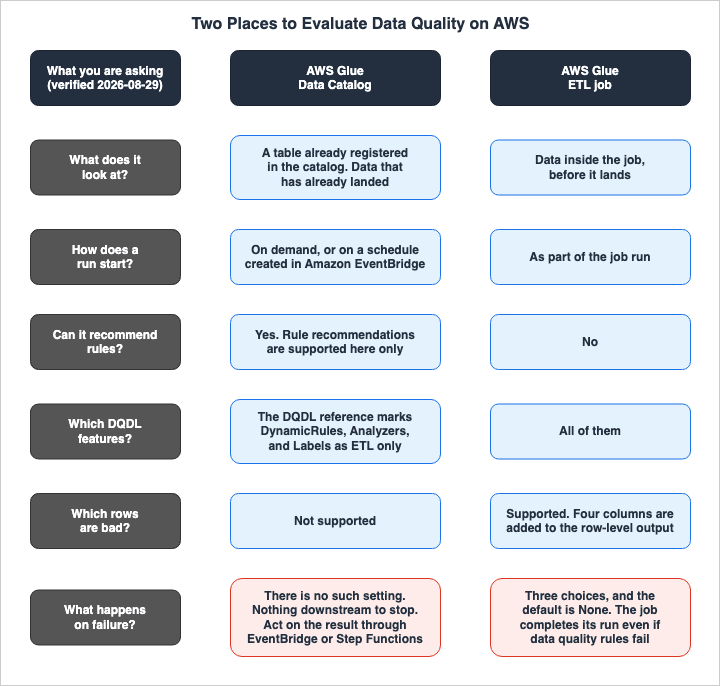
2.2 Evaluating Tables in the AWS Glue Data Catalog
The first option involves running a ruleset against tables already registered in the AWS Glue Data Catalog. You reach it from the Data quality tab on each table in the console.This entry point is designed to inspect existing data. It focuses on tables that have already landed, rather than data in the middle of a pipeline. The developer guide identifies the intended users of this entry point as those who do not write code, such as data stewards or business analysts.
There are two ways to initiate a run. You can execute it on demand, or you can schedule it. If you schedule it, the schedule is created in Amazon EventBridge. Once created, you can edit this schedule within EventBridge.
This entry point has one feature the other one does not: rule recommendations. It analyzes the data and provides a draft ruleset, serving as a starting point for those unsure of what rules to define. The feature comparison table in the developer guide indicates that this feature is only supported when using the Data Catalog.
There is also a feature called preprocessing queries. Before running data quality checks, you can use a SELECT statement to transform the data, which lets you create derived columns or filter on a condition. A key point to note is that the developer guide states, "This feature is only supported in APIs and is not supported via the console." You will not find this option in the console. Instead, you need to pass the
PreProcessingQuery parameter through the CLI or SDK. When referencing tables, you must use backticks to enclose the format databaseName.tableName. The maximum length of the query is 51,200 characters.2.3 Placing an Evaluate Data Quality Node Inside an ETL Job
The second option involves placing an "Evaluate Data Quality" transformation node within an AWS Glue ETL job. You can add this node using the visual editor in AWS Glue Studio, or call theEvaluateDataQuality function directly from your script.The purpose of this entry point is to inspect the data before it lands. The developer guide refers to this as "proactive," stating, "Proactive tasks help you identify and filter out bad data before you load a data set into your data lake." Because the inspection happens before the data lands, you can refuse to let it land. This forms the foundation for the choices presented in Chapter 3.
This node can accept multiple inputs. It is useful when you need to define rules that span multiple datasets, such as
ReferentialIntegrity, DatasetMatch, SchemaMatch, RowCountMatch, and AggregateMatch. When using multiple inputs, you must select one as the "primary" input. The primary input is the dataset you want to evaluate, while the remaining inputs are used for reference. You should assign aliases to the reference inputs and refer to them by name within the rules.You can also choose the format of the output. Configure the node to pass the original data through and it adds a child node called
rowLevelOutcomes. Selecting "Add new columns to indicate data quality errors" will add four new columns. These columns represent an array of passed rules, an array of failed rules, an array of skipped rules, and the row's own pass or fail result. If you need to identify which rows contain errors and prevent them from being ingested, this entry point is the one to use. The feature comparison table in the developer guide indicates that the Data Catalog does not currently support identifying failed records.2.4 What You Can Write Depends on the Entry Point
Even with the same DQDL, the available functionality differs depending on which entry point you use to execute it. The DQDL reference states these limits explicitly, so they are quoted verbatim below.Regarding Dynamic Rules: The beginning of the DQDL Reference page includes the note, "DynamicRules are only supported in AWS Glue ETL." Dynamic rules are written in a way that compares values from previous executions, such as
RowCount > avg(last(5)). They are used when you want to define thresholds based on historical data rather than fixed values.Regarding Analyzers: The Analyzers section of the same reference includes the note, "Analyzers are not supported in AWS Glue Data Catalog." Analyzers are a mechanism that collect statistics without performing any condition checks. They are defined within a block written as
Analyzers = [...]. They are useful when you want to initially observe the data before defining specific rules.Regarding Labels: The Labels section states, "Labels are only available in AWS Glue ETL and are not available in AWS Glue Data Catalog based Data Quality." Labels are a mechanism that allow you to attach key-value pairs to rules, allowing you to later filter and aggregate data.
The way settings are passed also lacks consistency. The same setting appears under the Data Catalog as a capitalized field inside
AdditionalRunOptions on the StartDataQualityRulesetEvaluationRun API, and under ETL as a lowercase dot-separated key inside additional_options. For example, enabling anomaly detection is written as ObservationScope in Data Catalog, but as observations.scope in ETL. Although they refer to the same functionality, the spelling differs.The collection of metrics also depends on the entry point. If you want to collect the number of rows passed or failed for each rule, you need to enable
publishAggregatedMetrics. However, the developer guide states, "This feature is currently supported in AWS Glue Interactive Sessions and in Glue ETL jobs. This is not supported in Glue Catalog Data Quality APIs."Here is another point: the meaning of the term
primary within the rules also changes. In ETL visual jobs, primary refers to the DynamicFrame passed to the transformation. When executed from the Data Catalog, it refers to the target table. In the Data Catalog you can also use the actual table name instead of primary, or even combine multiple tables. The same CustomSql rule allows for different capabilities depending on where it is executed.Bringing Sections 2.2 through 2.4 together, and looking ahead to the failure behavior that Chapter 3 covers:
| What you are asking | AWS Glue Data Catalog | AWS Glue ETL job |
|---|---|---|
| What does it look at? | A table already registered in the catalog. Data that has already landed | Data inside the job, before it lands |
| How does a run start? | On demand, or on a schedule created in Amazon EventBridge | As part of the job run |
| Can it recommend rules? | Yes. Rule recommendations are supported here only | No |
| Which DQDL features? | The DQDL reference marks DynamicRules, Analyzers, and Labels as ETL only | All of them |
| Which rows are bad? | Not supported | Supported. Four columns are added to the row-level output |
| How are settings named? | Capitalized fields on the API | Dot-separated keys in the additional options |
| What happens on failure? | Nothing directly. There is no such setting, and nothing downstream to stop | Three choices, and the default is None |
2.5 The Comparison Table and the Feature Pages Disagree
One caveat before moving on. As of August 29, 2026, the AWS Glue Developer Guide disagrees with itself. The feature comparison table on the overview page lists both dynamic rules and anomaly detection as supported in both entry points, while the DQDL reference, as mentioned in the previous section, states that dynamic rules are limited to AWS Glue ETL. The release notes from July 27, 2026, indicate that anomaly detection now supports the AWS Glue Data Catalog, and the anomaly detection page itself clearly states, "Anomaly detection is supported in both AWS Glue ETL and the AWS Glue Data Catalog." The overview table therefore appears to be the more current of the two. For dynamic rules, no evidence surfaced that settles which page is newer. When verifying which entry point a specific feature is available in, be sure to consult not only the comparison table on the overview page, but also the notes on the feature's dedicated page. The inconsistencies themselves are not this article's subject, so that is as far as it goes here.2.6 Some Tables Cannot Be Evaluated From the Data Catalog
The Data Catalog has limitations regarding the tables it can evaluate. These limitations are outlined in the "Supported source types" table in the developer guide, and vary depending on the AWS Lake Formation configuration and the table format.The limitation that bites hardest is the combination with Lake Formation's fine-grained permissions. Tables that use Lake Formation with column-level permissions or with data filters are marked Not Supported on almost every row of that table. This applies regardless of the format – whether it is Parquet, ORC, CSV, Avro, or Iceberg. The more fine-grained the access control on a table, the more likely it falls outside what the Data Catalog can evaluate.
There are also differences based on the table format. Iceberg is supported in the Lake Formation All Table Access configuration, while Apache Hudi and Delta Lake are supported only in the configuration where Lake Formation is disabled.
The type of data source also plays a role. JDBC is supported when Lake Formation is disabled, but Amazon RDS and Amazon Aurora are not. For Amazon S3 Tables and SageMaker Lakehouse, notes indicate that they can only be accessed and evaluated via the command-line interface (CLI), not through the console.
These limitations directly impact the decision of whether to evaluate from the Data Catalog or inside the ETL job. Since AWS Glue can handle all supported data sources within an ETL job, when encountering these limitations, it is often preferable to shift the evaluation to the ETL side.
3. How far does the data travel when a check fails?
3.1 The Default Is to Keep Going
This is the core of this article.When you place an Evaluate Data Quality node in AWS Glue Studio, a "Data quality actions" configuration appears. Within that, there is an option called "On ruleset failure," which allows you to choose what happens when the ruleset fails. The AWS Glue Developer Guide states, "By default, this action is not selected, and the job completes its run even if data quality rules fail."
The default setting is that it is not selected. If this option is not selected, the job will continue to run even if the rules fail. Data will continue to flow. Results are recorded, and scores are calculated, but the data processing does not stop.
Knowing that one sentence is what stands between you and the scenario at the top of this article. The person who wrote the rules believed they were installing a gate. What they installed was a check, and a check is not a gate.
3.2 What Each of the Three Options Writes and Does Not Write
There are three options regarding how to handle ruleset failures. Each option dictates what data is written to the target and what is not. Misreading them breaks the design, so the developer guide is quoted directly below.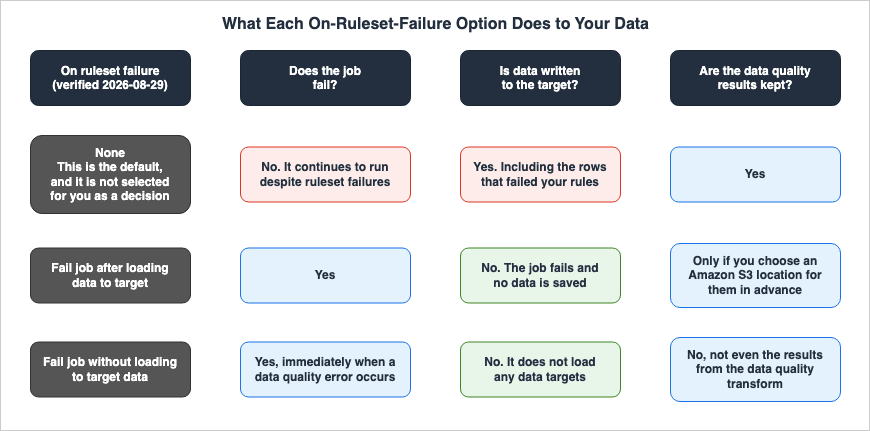
None. According to the developer guide, "If you choose None (default), the job does not fail and continues to run despite ruleset failures." This is the default setting, and as mentioned previously, the job runs to completion. The target is written, and so are the data quality results.The second option is
Fail job after loading data to target. The developer guide states, "The job fails and no data is saved. In order to save the results, choose an Amazon S3 location where the data quality results will be saved." While the option's name suggests that the job fails after data has been loaded to the target, the description states that no data is saved. This may seem contradictory, but that is what is written. The name likely refers to where the failure occurs inside the job, while the description describes the ultimate result: no data is persisted. To preserve the data quality results, you must specify a separate Amazon S3 location.The third option is
Fail job without loading to target data. The developer guide explains, "This option fails the job immediately when a data quality error occurs. It does not load any data targets, including the results from the data quality transform." It fails immediately and does not write anything to any target, including the results of the data quality transformation.The difference between the second and third options lies in the timing of the failure and whether the data quality results themselves are written. With the third option, no results are saved, so if you need to investigate what happened, you will need a separate mechanism to capture that information. The output mechanisms discussed in Chapter 6 will provide that pathway.
These three options cannot be combined into two. It looks like a simple choice between stopping and keeping going, but there are two ways to stop, and they differ in what survives.
3.3 The Data Catalog Has No Such Setting
As Chapter 2 showed, everything so far applies only to the ETL job side.Confusingly, the Data Catalog's execution screen also has a field with the same name: "Data quality actions." However, this field only contains a checkbox to determine whether to publish metrics to CloudWatch. Following the steps in the developer guide, you configure an IAM role, that checkbox, the frequency of execution, the location in Amazon S3 where the results are stored, the number of workers to allocate, and the filter on the data source side. There is no option corresponding to "On ruleset failure."
The absence of this setting likely stems from the fact that there is nothing to stop in the first place. An evaluation run against the Data Catalog is not a stage in a pipeline. It is an independent run that goes and looks at a table that has already landed. There are no subsequent processes to halt.
Therefore, if you want to stop something based on the evaluation results, you will need to create that stopping mechanism externally. The evaluation results are emitted as events to Amazon EventBridge, which can then trigger subsequent actions, or you can put the evaluation run inside an AWS Step Functions workflow and branch on the result. Chapter 6 covers both.
This difference is one reason to choose between the entry points. If you want to stop data immediately based on the inspection results, the ETL entry point is the appropriate choice. If you want to continuously monitor landed data and notify people or another system when anomalies are detected, the Data Catalog is the better entry point. You can also run both.
3.4 The Automatic Rule Does Not Stop Anything Either
There is one more place where the default is not to stop.When using AWS Glue ETL jobs with Amazon S3 as the target, data quality rules are automatically enabled. These rules check to ensure that the ingested data contains at least one column. Additionally, anomaly detection is also enabled by default, monitoring for changes in the number of columns.
What matters is what happens when that rule fails. The developer guide states, "However, if this rule fails, the job will not fail; instead, you will notice a reduction in your data quality score."
The job will not fail; only the score will decrease. In other words, a job you did not configure at all still carries one data quality rule, and that rule, too, does not stop anything by default. This is the same design stance as Section 3.1. Across AWS Glue Data Quality, the defaults observe without getting in the way.
You can configure these automatically applied rules by selecting the Amazon S3 target in the job. From there, you can choose "Edit data quality configuration" to add additional rules.
3.5 A Fourth Answer - Write to a Branch Before You Publish
The previous three options focused on the framework of whether a job succeeds or fails. There is another answer outside of that framework.Apache Iceberg tables have branches. You can write data first to a staging branch, then evaluate its quality against that branch, and only reflect the data that passes the quality checks to the main snapshot. The AWS Big Data Blog refers to this approach as "Write-Audit-Publish," outlining a process where data is written to a
stg branch, followed by running AWS Glue Data Quality in the audit phase, and then publishing only the rows that meet the defined criteria.What differentiates this approach from the three options above is that there is no need to roll back in case of failure. The second and third options involve detecting failures and stopping the write operation to the target. With the branch-based approach, data is never written to a location visible to users until all quality checks have passed. Quality checks become a condition for publication.
The conditions on the table format side are covered in the previously published Apache Iceberg V3 on AWS. While the ability to read the format and the correctness of the data are separate issues, this section represents one of the few places where those two aspects intersect. Deciding when the check runs at all, rather than what it asserts, is a question for the layer that starts the job, and Data Pipeline Orchestration on AWS covers what that layer carries over and what it makes you rebuild.
4. Choose Rules by Purpose, Not by Coverage
4.1 The Shape of a Ruleset
The DQDL ruleset is a list namedRules. It is enclosed in square brackets, with rules listed within, separated by commas.Rules = [
IsComplete "order-id",
IsUnique "order-id"
]The general structure of a rule consists of a rule type name, parameters, and an expression. The rule type name is case-sensitive. While some types, such as
IsUnique or IsComplete, directly return a boolean value, most types return a numerical value, requiring an expression to convert it to a boolean. For example, Mean "colA" between 80 and 100. One rule type is spelled two ways in the reference: the syntax definition and the examples use CustomSql, while the page title and some of the prose lists use CustomSQL. This article follows the syntax definition, except where it repeats a list the reference gives in the other spelling.It is also possible to combine rules using logical operators.
and and or are available, and each rule being connected must be enclosed in parentheses. Nesting is also supported.(RowCount > 0) or ((IsComplete "colA") and (IsUnique "colA"))There is another block called
Analyzers. This block does not evaluate conditions; it only collects statistics. It can be included within the same ruleset as the rules.Rules = [
RowCount > avg(last(3))
]
Analyzers = [
DistinctValuesCount "Name",
ColumnLength "Name"
]In addition, rules can have a
where clause for filtering, constants can be defined with names and referenced using the $ symbol for long values such as SQL statements, and labels can be attached to rules, associating key-value pairs. Constants are provided to avoid exceeding the query length limitations. For example, you can define mySql = "select count(*) from primary" and then write CustomSql $mySql between 0 and 100.Rulesets have limitations. A single ruleset can contain up to 2,000 rules, and the total size of the ruleset must not exceed 65 KB. If these limits are exceeded, it is recommended to split the ruleset.
4.2 Representative Rules, One per Thing You Want to Protect
DQDL has many rule types. This article does not list them all, for two reasons. First, the number is constantly growing. The set of types in the DQDL rule type reference was accurate at the time of this article's writing, but additional file-related types were added in 2024, and types for analyzing distributions were added in 2026. Second, a list of types does not necessarily help with making judgments. What matters is what you want to protect, and the type follows from that.Below are representative examples of types, categorized by what you want to protect. This is not an exhaustive list. If you need the complete list, the DQDL rule type reference has it.
To ensure that columns are not missing. If you require absolutely no missing values, use
IsComplete. If you allow a certain percentage of missing values, use Completeness along with an expression.Rules = [
IsComplete "order_id",
Completeness "customer_email" > 0.95
]To ensure that there are no duplicates. If you only want to check for unique values, use
IsUnique. If you want to check for uniqueness and the absence of missing values, use IsPrimaryKey. The latter can be used with multiple columns.Rules = [
IsUnique "order_id",
IsPrimaryKey "customer_id" "region_code"
]To ensure referential integrity with other tables.
ReferentialIntegrity checks the degree to which the values in a column in the primary dataset are a subset of the values in a column in the reference dataset. The reference column is specified using an alias and a period. You can specify a percentage using an expression; to require an exact match, use = 1.0.Rules = [
ReferentialIntegrity "zipcode" "reference.zipcode" >= 0.9
]To ensure that data is not outdated. If you are checking date columns, use
DataFreshness. The expression must always carry a unit, in hours or in days. A key point is that the DQDL rule type reference states, "The DataFreshness rules will fail for rows with NULL values." A row with no date fails the rule, even though it is empty rather than old. If you want to allow empty values, you will need to explicitly define this using a composite rule.Rules = [
DataFreshness "Order_Date" <= 24 hours,
(DataFreshness "Order_Date" <= 24 hours) OR (ColumnValues "Order_Date" = NULL)
]To ensure that statistical patterns are not distorted. There are types for checking row counts, averages, sums, standard deviations, and the number of distinct values. If you want to compare against historical data rather than using a fixed threshold, use the dynamic rule
last(). However, as seen in Section 2.4, the notes in the DQDL reference limit dynamic rules to AWS Glue ETL.Rules = [
RowCount > avg(last(5)),
Mean "trip_distance" between 1 and 20
]To ensure that files have arrived. There are types that check the files themselves on Amazon S3, rather than the contents of the table.
FileFreshness checks the last modified time, FileSize checks the size, and FileUniqueness and FileMatch check the checksum.Rules = [
FileFreshness "s3://amzn-s3-demo-bucket/landing/orders/" >= (now() - 24 hours)
]4.3 Analyzers Cannot Stop a Job
The difference between an analyzer and a rule is not whether or not they collect statistics; both collect statistics. The difference lies in whether they evaluate conditions.The developer guide includes a table that contrasts these two. The table gives both a Yes for generating statistics and a Yes for generating observations. Two rows separate them. An analyzer cannot evaluate and assert a condition, and a rule can. And only a rule lets you configure an action such as stopping the job on failure.
That second row is the one that matters. Starting with an analyzer because you do not yet know what to check is a sound way to begin. In that state, however, nothing stops. An analyzer observes; it does not gate. The three options in Chapter 3 only fire on a failure inside
Rules. They stay silent when an analyzer turns up an unusual value.There is a path from analyzers to rules. Anomaly detection turns the statistics into observations, and each observation comes back with recommended rules. Chapter 7 covers it.
4.4 Some Rules Cannot Tell You Which Rows Are Bad
A common requirement is the desire to isolate the bad rows. The goal is to continue the data ingestion process, but to direct rows that fail validation to a separate location for later correction.This capability has certain limitations. There are rules that return row-level results, and those that do not.
The DQDL rule type reference includes a column labeled "Returns row-level Results?" in the table describing rule types. Rules marked "No" in this column cannot determine whether a given row is problematic. While it is natural that rules like
RowCount and ColumnCount, which count the entire dataset, would fall into this category, so too do AggregateMatch, SchemaMatch, RowCountMatch, ColumnNamesMatchPattern, Sum, Entropy, and ColumnCorrelation. CustomSql, ColumnLength, and ColumnValues are conditional; they only return "Yes" when configured with row-level thresholds.On the ETL job side, these limitations are reflected in the output. Among the four columns added to each row's output, one records which rules were skipped. The developer guide lists the rules that might be included in this column, citing
AggregateMatch, ColumnCount, ColumnExists, ColumnNamesMatchPattern, CustomSql, RowCount, RowCountMatch, StandardDeviation, Mean, and ColumnCorrelation, explaining that these rules operate at the dataset level.The same section includes another important note: a row's pass/fail status is determined solely by the rules applied to that specific row. Even if the overall result is FAIL, individual rows can still pass. For example, if a row count rule fails but every other rule passes, each individual row is marked Passed. It is crucial to interpret overall results and row-level results separately.
So if the design isolates only the bad rows, the choice of rules follows from that design. You will need to first determine whether it is possible to define rules that return row-level results.
4.5 Composite Rules Are Evaluated by Column by Default
Composite rules, connected by operators likeand or or, are evaluated in one of two ways, and the default is not the one most people expect.By default, composite rules evaluate each rule against the entire dataset and then combine the results. They read the whole column first, and apply the operator afterwards. The developer guide provides an example using a dataset with only two rows. In this example, the first row has a value of 2 in the first column and a value of 1 in the second column, while the second row has a value of 0 in the first column and a value of 3 in the second column. When evaluating the rule
(ColumnValues "myCol1" > 1) OR (ColumnValues "myCol2" > 2), the result is Failed. The left-hand rule fails on the second row, and the right-hand rule fails on the first row. Since both rules fail, the combined result is also Failed.If you want the evaluation to occur on a row-by-row basis, similar to SQL, you can specify
ROW for the compositeRuleEvaluation.method setting. Applying the same rule to the same data on a row-by-row basis will result in Passed for the first row (because the left-hand side is true) and Passed for the second row (because the right-hand side is true). The results are inverted when using the same rule and the same data.Some rule types are not supported under row-based evaluation. The ones that depend on a ratio are
Completeness, DatasetMatch, ReferentialIntegrity, and Uniqueness. The ones that depend on a threshold are ColumnDataType, ColumnValues, and CustomSql, and those remain usable as long as you do not write a threshold.Pay close attention to the names used for the configuration keys. The main text in the developer guide states that you should configure
ruleEvaluation.scope, but the code example that immediately follows sets compositeRuleEvaluation.method. If you copy the key from the prose, the setting does not take effect and column-based evaluation silently continues. On the API the setting is named CompositeRuleEvaluationMethod, with valid values COLUMN and ROW, so the code example reads as the correct one.4.6 Rows Excluded by a Where Clause Are Recorded as Passed
Rules can be filtered using awhere clause. This is used when you only want to target rows that meet specific conditions.Rules = [
Completeness "shipping_address" > 0.99 where "order_status = 'SHIPPED'"
]There is a potential pitfall here. When configured to provide results at the row level, rows excluded by the
where clause are, by default, recorded as "Passed." The developer guide states, "When applying a where clause to rules that support row level results, we will label the rows that are filtered out by the where clause as Passed."In other words, if you aggregate row-level results and count the number of "passed" rows, it will include rows that were never even evaluated. If you want to differentiate these, you should specify
SKIPPED for rowLevelConfiguration.filteredRowLabel. The developer guide provides a table comparing the default behavior and the SKIPPED setting using six rows of data. Two rows that come out PASSED under the default show up as SKIPPED once you set the option.This directly impacts decisions made in Chapter 3. If you are using a pass rate to determine subsequent steps, adding a
where clause will change the meaning of the denominator.5. Scores and Thresholds
5.1 The Score Is the Percentage of Rules That Passed
The definition of a data quality score is straightforward. As stated in the developer guide glossary, "The percentage of data quality rules that pass (result in true) when you evaluate a ruleset with AWS Glue Data Quality."For example, if you define 10 rules and 8 of them pass, the score is 0.8. It is not based on the number of rows, records, or columns; it is the percentage of rules that pass.
5.2 The Score Moves With How You Write the Rules
Because the definition counts rules rather than rows, three things follow.The score changes depending on the granularity of the rules. If you write the completeness of five columns as one composite rule, the score drops by one rule's worth when any one of them is missing. If you write them as five separate rules, the same missing column costs you one fifth as much. Even though the data state is the same, the score will differ.
Rules do not have weights. From the score's perspective, a violation of primary key uniqueness is equivalent to an input rate for a non-critical field being one percentage point lower than expected. The score does not reflect differences in importance.
Therefore, there is no universally recommended threshold for the score. The developer guide does not offer one either. If you need to determine a threshold, consider how the rules are divided inside that ruleset, and how consistently the impact of a rule failure is felt. Setting a threshold while mixing rules with inconsistent impact will render that threshold meaningless.
The
where clause mentioned in Section 4.6 lands on the score too, though not where you might expect. The denominator is the number of rules, not the number of rows, so adding a where clause does not change it. What changes is the set of rows each rule is judging, and with it whether that rule passes at all.5.3 A Score Threshold Does Not Stop Anything
Misread this one and the design does not hold together.The failures in Chapter 3 are triggered by ruleset failures, not by score thresholds. There is no field to set a threshold for "ruleset failure." If even a single rule fails, it results in a ruleset failure, and the job will fail based on the selected option.
Therefore, a design such as "stop the process if the score falls below 0.9" cannot be implemented using this setting alone. If you want to implement this, there are two possible approaches.
First, you can incorporate the threshold directly into the rules. Instead of expressing the requirement using a score, rewrite it as a formula for each individual rule. For example, if the requirement is to let the data through when fewer than five percent of the values are missing, you write
Completeness "colA" > 0.95. A score is not necessary in this case.Second, you can make a decision based on the evaluation results from an external system. The events handled by Amazon EventBridge (discussed in Chapter 6) include scores, allowing you to filter based on numerical conditions. This involves creating an external mechanism to detect failures and stop subsequent processes.
The first approach is simpler if you can translate the requirements into rules. Scores are an indicator of overall health and are too coarse to use as a condition for a gate.
6. Where do the results go, and what can they start?
The evaluation results land in four places. Each has its own shape, and each starts something different.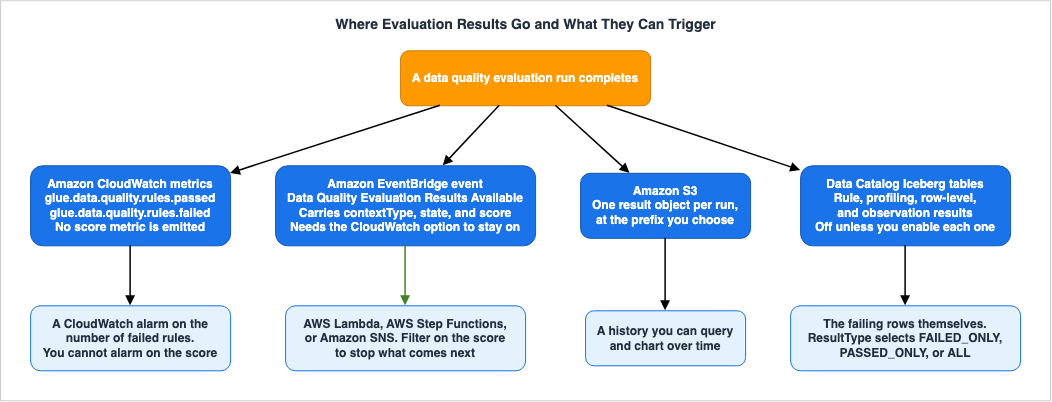
6.1 CloudWatch Carries Two Counts and Nothing Else
Each time an evaluation is run, metrics are published to Amazon CloudWatch. According to the developer guide, these consist of two metrics:glue.data.quality.rules.passed, the number of rules that passed, and glue.data.quality.rules.failed, the number of rules that failed. The namespace is Glue Data Quality, and they are emitted per table and per ruleset.That pair does not include a score. What comes out is a count. Therefore, CloudWatch alarms can only be configured to trigger based on a threshold for the number of failed rules (e.g., "trigger an alarm if the number of failed rules is N or greater"), and not based on a score (e.g., "trigger an alarm if the score falls below 0.9"). The developer guide walks through an alarm that fires when the number of failed rules reaches one or more.
A setting on the run decides whether these metrics go out at all. On the Data Catalog side, this is the "Publish metrics to Amazon CloudWatch" option in the execution modal. On the ETL side, it corresponds to the
enableDataQualityCloudWatchMetrics setting. The developer guide notes that if this setting is disabled, no metrics will be published for that particular execution.6.2 The EventBridge Event Carries Context and a Score
When a data quality evaluation completes, an event is sent to Amazon EventBridge. Thedetail-type is Data Quality Evaluation Results Available, and the source is aws.glue-dataquality.The content of the event varies depending on how it was triggered. When executed from the Data Catalog, the
detail.context.contextType is GLUE_DATA_CATALOG, and the event carries the database name, table name, catalog ID, and run ID. When the run comes from an ETL job or an AWS Glue Studio notebook, the contextType is GLUE_JOB, and the event carries the job ID and job name. In both cases, the event includes the result ID, ruleset name, status, and score.Because the event includes a score, you can use EventBridge event patterns to specify numerical conditions. The developer guide provides an example of a pattern that only captures events with a score of 0.7 or less.
{
  "source": ["aws.glue-dataquality"],
  "detail-type": ["Data Quality Evaluation Results Available"],
  "detail": {
    "score": [{
      "numeric": ["<=", 0.7]
    }]
  }
}
You can also filter by status, or by specific tables, rulesets, or job names. The fields in the event pattern are case-sensitive.
This is where the score threshold from Section 5.3 becomes possible. You target an AWS Lambda function that stops what comes next, start an AWS Step Functions workflow, or send a notification through Amazon SNS. The AWS Big Data Blog describes a configuration that uses EventBridge rules to invoke a Lambda function, which then formats data quality metrics and sends them via SNS.
It is recommended to verify the field names within the event with actual events before using them. The same page provides sample events and sample Lambda code, but the spelling of keys that refer to result IDs and the number of passes or failures is not consistent. Send one event through and look at it before writing the pattern or the code.
6.3 EventBridge Depends on the CloudWatch Checkbox
The previous two sections might read as if they describe independent exit points, but that is not the case. The developer guide states, "For Data Quality evaluation runs both in the Data Catalog and in ETL jobs, the Publish metrics to Amazon CloudWatch option, which is selected by default, must remain selected for EventBridge publishing to work."If you disable the publishing of metrics to CloudWatch, EventBridge events will also stop being generated. It is selected by default, so this rarely bites unless someone turns it off deliberately. Turn off the CloudWatch metrics and the notification path goes quiet with them.
As mentioned in Section 3.3, EventBridge is the path you use to stop something from the Data Catalog side. This pathway is unexpectedly linked to a checkbox that appears unrelated.
6.4 Amazon S3 and Data Catalog Tables
The evaluation results can be written to Amazon S3. If a storage location is specified at runtime, the results are written there on every run. This corresponds to theResultsS3Prefix parameter in the Data Catalog API. Because one object lands per run, the prefix accumulates a history, and the AWS Big Data Blog walks through defining a table over it so you can query the trend. This is the destination the second option in Section 3.2, Fail job after loading data to target, points at when its description tells you to choose an Amazon S3 location for the results.Since July 27, 2026, the results can also go straight into Apache Iceberg tables in the AWS Glue Data Catalog. Four types of results can be written: rule results (recording the pass/fail status of each rule), profiling results (recording statistics gathered by analyzers and rules), row-level results (recording the outcome of each record), and observation results (recording anomaly detection predictions). Distribution statistics, separate from the profiling results, are written to a different table, with one row per bin.
By default, no results are written. The developer guide states, "By default, AWS Glue Data Quality does not write results to Data Catalog tables. You must explicitly enable each result type that you want to write." To enable this, you configure each result type you want in the
--additional-run-options parameter of StartDataQualityRulesetEvaluationRun. If you omit the database name, table name, or S3 location, the default values will be used.For row-level results,
ResultType selects which rows get written. FAILED_ONLY writes only the rows that failed at least one rule. PASSED_ONLY writes only the rows that passed every rule. ALL writes every row. You can also specify the maximum number of rows to write using MaxRowsToWrite.This destination connects directly to the bad-row isolation design in Section 4.4. Instead of writing your own pipeline to move bad rows to a separate table, you configure it as part of the evaluation run. The tables for rule results, profiling results, and observation results are partitioned by catalog ID, database name, table name, and date.
6.5 Where the Logs Go
Evaluation execution logs are sent to CloudWatch Logs. The default log groups are/aws-glue/data-quality/error and /aws-glue/data-quality/output.If you specify a
CustomLogGroupPrefix, those two log groups become error and output under the prefix you provide. This is useful when you want to route executions to separate log groups.7. When You Add Anomaly Detection
7.1 The Question Anomaly Detection Answers
Rules are based on a fundamental assumption: that humans know what is correct and can define that as a threshold.The developer guide highlights scenarios where this assumption breaks down. Consider a data engineer at a retailer who writes a rule saying that daily sales must exceed one million dollars. A few months later daily sales pass two million dollars, and the threshold no longer means anything. Subsequently, a pipeline responsible for extracting data from some stores begins to fail without generating errors, resulting in a 25% drop in sales. Because the rule based on the outdated threshold continued to pass, no one noticed.
Anomaly detection addresses this limitation. It analyzes data in a time series, recording values that fall outside the range predicted by machine learning models. It also learns cyclical patterns, such as those related to days of the week and seasons, allowing it to handle data with different patterns on weekdays and weekends.
To enable it, set the
ObservationScope to ALL in the Data Catalog, and set observations.scope to ALL in the ETL process. The spelling discrepancy mentioned in Section 2.4 will become apparent here.Anomaly detection is available in both AWS Glue ETL and AWS Glue Data Catalog. The developer guide states, "Anomaly detection is supported in both AWS Glue ETL and the AWS Glue Data Catalog," and details regarding support in the Data Catalog are documented in the release notes dated July 27, 2026.
This might seem to contradict the note mentioned in Section 2.4, which states that "Analyzers are not supported in AWS Glue Data Catalog." One might assume that since anomaly detection relies on statistics, it cannot function without Analyzers to collect those statistics. However, these two points are not contradictory. Analyzers are not the only components that collect statistics. The developer guide states, "Both Analyzers and Rules in AWS Glue Data Quality gather data statistics, also known as data profiles." Rules also collect statistics. Therefore, while you cannot write a block like
Analyzers = [...] in the Data Catalog, rules can collect statistics and derive observations from that data. Furthermore, the same page includes a note indicating that even when both rules and Analyzers are present for the same column, statistics are only collected once.The judgment needs history. The developer guide states that anomaly detection requires a minimum of three data points. This data is stored on the AWS Glue service side and, per account, can hold up to 100,000 entries, with a maximum retention period of two years.
7.2 A Detected Anomaly Becomes Training Input
The most critical aspect when implementing anomaly detection lies here. The developer guide states, "When an anomaly is detected, it is considered normal for subsequent runs. The machine learning algorithm will consider this anomalous value as input unless it is explicitly excluded."Detected anomalies will be incorporated into the learning process unless explicitly excluded. The prediction bounds move toward that value, and the same event is less likely to register as an anomaly the next time.
This is not a design flaw, but rather the intended behavior. It is impossible to determine from the data alone whether a spike represents a failure, a seasonal pattern, or business growth. Therefore, by default, it is treated as a seasonal pattern, and a human must exclude it when it is confirmed to be a failure.
The exclusion function is available in the console. From the "Anomalies" tab of the run where the anomaly occurred, select the relevant row and choose "Exclude anomaly" under "Edit training inputs" to trigger retraining. To exclude multiple data points, you can use the "Statistics" tab to view the statistical trend and select the points you want to exclude. The same screen is where you exclude statistics from dynamic rule calculations.
There is a point about timing here. The developer guide specifies that the model inputs you supply are reflected only in the most recent run. Even if you exclude data points from a previous run, the model will not update unless you verify and update the input for the latest run.
There is one operational consequence. Anomaly detection is not something you switch on and forget. Someone has to keep looking at each anomaly, decide whether it is a failure or a normal change, and exclude the failures. If you do not assign responsibility for this task, the prediction limits will gradually expand, eventually leading to a point where nothing is detected.
7.3 Two Modes
There are two modes for calculating predictions.LINEAR is the default mode and models trends and seasonality over time. It learns from historical data to identify increasing or decreasing trends, as well as weekly or daily cycles, and then extrapolates these patterns forward. This mode is suitable when the data exhibits consistent trends and seasonality, and evaluations are performed on a regular schedule.FIXED treats all data points as equally spaced, regardless of the actual time interval between evaluations. It does not assume any time-based growth or decay, instead establishing a baseline from observed values. This mode is appropriate when the data is flat or exhibits irregular fluctuations, when the evaluation intervals are inconsistent, or when exploring the data in a notebook.The mode is specified when initiating an evaluation run. The Data Catalog calls it
ObservationMode, and ETL calls it observations.mode. If no mode is specified, it defaults to LINEAR.7.4 Anomalies Do Not Lower the Score
This is another point that is easily misunderstood. The developer guide states, "When anomalies are generated, data quality scores are not impacted."Even when anomalies are detected, the data quality scores remain unchanged. This is because, according to the definition in Section 5.1, the score is the proportion of rules that passed, and anomalies are observations, not rules themselves.
There are two implications. First, simply monitoring the score will not reveal the results of anomaly detection. Second, anomaly detection does not fire the three options described in Chapter 3. It is not a ruleset failure, so the job does not stop.
To learn about an anomaly you have to go and look at the observations, write them to the observation results table described in Section 6.4 and query it, or open the Anomalies tab in the console.
7.5 The DetectAnomalies Rule Is a Different Thing
Everything above concerns observations. There is a second way to express an anomaly, which is to write it as a rule.DetectAnomalies is a rule type that takes the name of another rule type as an argument. It detects anomalies in the metrics reported by that rule type, and the rule fails when an anomaly is found.Rules = [
DetectAnomalies "RowCount"
]When targeting rule types that take columns as input, you must also provide the column name.
Rules = [
   DetectAnomalies "ColumnLength" "id"
]
The rule types that can be targeted are limited. The DQDL rule type reference lists
RowCount, Completeness, Uniqueness, Mean, Sum, StandardDeviation, Entropy, DistinctValuesCount, UniqueValueRatio, ColumnLength, ColumnValues, ColumnCorrelation, CustomSQL, and ColumnCount.Because it is a rule, a failure lowers the score and fires the three options described in Chapter 3. Its behavior differs from the observations discussed in the previous section, so it is important to differentiate between the two. If you simply want to detect anomalies, the analyzer and
ObservationScope are sufficient. If you want the job to stop when an anomaly is detected, write DetectAnomalies as a rule and select "On ruleset failure."One exception: the metrics collected by the file-related rules are not eligible for anomaly detection. The
FileFreshness reference explicitly states, "Anomaly detection does not consider these metrics."8. What You Agree To as a Data Contract
8.1 What a Contract Maps To on AWS
As Section 1.2 stated, AWS offers no "data contract" feature. What it offers is parts. The terms of the agreement map onto those parts.The ruleset carries what you are protecting. A ruleset is an AWS Glue resource, and when saved, it receives an ARN. Rulesets can be associated with tables in the Data Catalog. This means that the statement "this is what must be upheld for this table" exists as a named entity.
The catalog schema carries the structural promises. Which columns exist, and what type each one holds, already live in the catalog. On the DQDL side, types such as
ColumnExists, ColumnDataType, SchemaMatch, and ColumnNamesMatchPattern are used to verify these aspects.Freshness rules carry the promise about how new the data is.
DataFreshness examines the dates within a column, while FileFreshness checks the last modified timestamp of files on Amazon S3. Which one you use depends on whether the promise is about the data inside being new or about the file having arrived."On ruleset failure" carries what happens when a promise breaks. This is covered in Chapter 3. And the central argument of this article is that this element is the core of the contract. An agreement that names what to protect but never says what happens when the protection breaks produces nothing at the moment it matters. By default, nothing happens.
Ownership sits outside all of these. You can tag a ruleset, and on the ETL side you can attach labels that carry a team name or a criticality. However, no AWS resource records who holds the authority to set the thresholds, or who holds the authority to open and close the gate. This will be discussed in the next section.
8.2 Who Decides, and With Whom
An agreement requires at least three perspectives.The party creating the data is responsible for stating what guarantees can be provided. They know what the upstream systems can hold to and what they cannot. Put a rule this party cannot commit to into the contract and the contract will become a dead letter soon enough.
The party using the data is responsible for stating what guarantees are necessary. Those building knowledge bases or BI systems, as mentioned in Section 1.1, fall into this category. If this party never articulates its requirements, the rules end up covering only what the producers found easy to promise, and downstream gets a row of checks that mean very little.
And a party with the authority to stop the process is also required. This is the party that makes the choice outlined in Chapter 3. If this authority remains unclear, the system will default to
None. This is not a deliberate choice; it is the result of failing to make a decision.In practice, the third perspective is often the easiest to overlook. Choosing to stop is a choice to reduce the availability of everything downstream. Broken data arriving and no data arriving are both problems downstream. Which is preferable depends on how the data is used. For daily reports, it may be better to stop the process; for real-time dashboards, it may sometimes be better to continue providing older data. This decision cannot be made solely by the technical team.
Reading the choices outlined in Chapter 3 through this lens reveals the following:
None is the judgment that "it is better to receive data even if it is broken." Fail job after loading data to target and Fail job without loading to target data are the judgment that "it is better not to receive the data at all." Every one of these is a judgment, and the default is not a judgment.8.3 Keeping the Contract as Code
When agreed-upon content only exists within a console, it is impossible to track who made changes and when. You can create a ruleset with AWS CloudFormation, and the AWS CDK carries a construct for it as well.The
aws-glue-alpha CDK construct includes a DataQualityRuleset, which accepts a DQDL string and the target table.new glue.DataQualityRuleset(this, 'MyRuleset', {
rulesetName: 'my_ruleset',
dqdl: glue.Dqdl.fromString('Rules = [ RowCount > 100, IsComplete "order_id" ]'),
targetTable: new glue.DataQualityTargetTable('my_database', 'my_table'),
});The key benefit here is that the DQDL is not simply treated as a string. The CDK documentation states, "DQDL is an authored string that Glue parses and validates at deploy time." This means syntax errors can be identified at deployment time. It avoids a situation where you only discover issues after running the rules.
By codifying these rules, changes to the agreement become subject to review. It is easy for rule adjustments, particularly loosening them, to occur subtly in practice. Decisions to lower thresholds, for example, might be made on the spot, without any record being kept. Keep the rules in code and the adjustment shows up as a diff, where someone can see it.
It is important to note that adjusting the rules themselves is not inherently bad. It is more common for thresholds to be mismatched with the actual situation. As illustrated in Section 7.1, if a business grows and thresholds become outdated, the rules will continue to pass without providing any real protection. The problem is not the act of adjusting the rules; it is that those adjustments can happen without anyone noticing.
8.4 What Is Guaranteed, Seen From Downstream
Finally, read all of this back from the downstream side.Imagine you are building a knowledge base. What can you guarantee about the set of documents you are about to ingest? That the document count sits in the expected range, that essential metadata is complete, that there are no duplicate documents, and that the last update date is not older than expected. Every one of those is a DQDL rule you can write. They can be defined before ingestion, or applied to the resulting table after ingestion.
And then the question that matters: does the ingestion stop when one of those promises breaks? If this is not clear, then those guarantees are not truly guarantees. Until someone checks the setting described in Chapter 3, all the downstream side knows is that the data is being checked.
Improving search quality is only possible with these guarantees in place. Whether you change how chunks are created, adjust the weighting in hybrid search, or incorporate re-ranking, if the original document collection contains duplicates or missing information, the effectiveness of these efforts cannot be accurately measured. Search quality itself is covered in the previously published Amazon Bedrock Knowledge Bases Retrieval Quality Engineering.
The same principle applies to BI systems. When implementing a mechanism to generate SQL from natural language, even if the generated SQL is perfectly safe, the answers come out wrong when the underlying tables are wrong. The design of the generation side is covered in the previously published Generative BI and NL2SQL Agent Architecture on AWS.
Both of those articles assume the guarantees this article has been discussing. Pursuing quality downstream while leaving the upstream processes unchecked will make it impossible to identify the root causes of any issues.
Furthermore, data quality metrics extend beyond AWS Glue. Amazon SageMaker Unified Studio has supported data profiling and anomaly detection since August 18, 2026, built on AWS Glue Data Quality. This functionality can be applied to tables within catalogs, as well as to data within visual ETL jobs. This means that those consuming the data can see how its quality changes, and that this visibility can be provided outside of the team operating the pipeline.
9. Frequently Asked Questions
Q. Will defining rules stop the data processing?No, it will not. In the AWS Glue ETL job's Evaluate Data Quality node, you specify the action to take when rules fail using the "On ruleset failure" setting. The developer guide states, "By default, this action is not selected, and the job completes its run even if data quality rules fail." Leave the default in place and the job completes and writes to the target.
Q. Does the second option under "On ruleset failure" mean the job fails after the data has been loaded to the target?
No. The option is named "Fail job after loading data to target," but the description states, "The job fails and no data is saved." No data is saved. If you want to preserve the results, you can specify a separate Amazon S3 location for storage. The third option, "Fail job without loading to target data," fails immediately and writes nothing, including the results of the data quality transformation.
Q. Can the job be stopped from the AWS Glue Data Catalog?
Not directly. The Data Catalog has no setting equivalent to "On ruleset failure." An evaluation run is not a step in a pipeline, so there is nothing downstream for it to stop. If you want to stop something based on the results, you can capture the Amazon EventBridge event and stop subsequent processes, or you can incorporate the evaluation run into an AWS Step Functions workflow.
Q. Is it possible to configure the job to stop if the data quality score falls below 0.9?
Not with that setting. "On ruleset failure" has no field for a score threshold. This setting is triggered by a ruleset failure. If you want to react to a score threshold, you can use an EventBridge event pattern and write a numerical condition for
detail.score. Alternatively, it is often easier to rewrite the requirement you were trying to express with the score as an expression within individual rules.Q. Does AWS have a feature called "data contracts"?
No, it does not. AWS uses this term to describe a design role. This article treats the concept as a mapping to five elements: rulesets, catalog schemas, freshness rules, failure behavior, and ownership.
Q. Can the bad rows be sent somewhere else?
Conditionally, yes. Some rule types do not return results on a row-by-row basis. Rule types that examine the entire dataset, such as
RowCount and ColumnCount, cannot identify which specific row is problematic. Furthermore, row-level identification is a feature on the AWS Glue ETL side, and the feature comparison table in the developer guide indicates that it is not supported on the Data Catalog side. Where the rows go is set on the evaluation run itself: turn on row-level results and set ResultType to FAILED_ONLY, as Section 6.4 describes.Q. If you only write analyzers, will anything stop when an anomaly shows up?
No, it will not. The developer guide's comparison table asks whether you can configure an action such as stopping the job on failure, and it gives analyzers a No and rules a Yes. If you want the job to stop when an anomaly is detected, you should write
DetectAnomalies as a rule and select "On ruleset failure."Q. Will the data quality score decrease when an anomaly is detected?
No, it will not. The developer guide states, "When anomalies are generated, data quality scores are not impacted." The score reflects the percentage of rules that pass, and observations are not rules. However,
DetectAnomalies is a rule, so if it fails, that will be reflected in the score.Q. Does anomaly detection keep working if you leave it alone?
Not indefinitely. It needs regular attention. Detected anomalies will become part of the input for subsequent learning unless explicitly excluded. The developer guide states, "The machine learning algorithm will consider this anomalous value as input unless it is explicitly excluded." If you leave anomalies caused by system failures unexcluded, the upper and lower bounds of the predictions will continue to expand.
Q. When using a
where clause to filter data, how are the excluded rows recorded?By default, they are recorded as
Passed. The developer guide states, "we will label the rows that are filtered out by the where clause as Passed." If you want to differentiate them, you can specify SKIPPED for rowLevelConfiguration.filteredRowLabel.Q. Are composite rules evaluated on a row-by-row basis?
By default, evaluations are not performed on a row-by-row basis. Instead, each rule is evaluated individually against the entire dataset, and the results are then combined. If you want evaluations to be performed on a row-by-row basis, similar to how SQL works, set
compositeRuleEvaluation.method to ROW. The name of this parameter on the API side is CompositeRuleEvaluationMethod, and the valid values are COLUMN and ROW. Note that rule types that depend on a ratio are not supported in this mode, and the ones that depend on a threshold are supported only when you do not write a threshold.Q. Can Data Catalog evaluations be used on tables that have column-level permissions configured in AWS Lake Formation?
Generally no. The "Supported source types" table in the developer guide lists configurations with AWS Lake Formation enabled for column-level permissions or data filters as "Not Supported" for most table formats. If you encounter this limitation, you may need to consider using an AWS Glue ETL job as the entry point.
Q. How many different types of rules can be created?
This article does not list the total number of rule types, as that number is constantly growing. Rule types that target files were added in 2024, and rule types that analyze distributions were added in 2026. The DQDL rule type reference carries the current list.
Q. Is AWS Glue Data Quality a proprietary implementation?
No. The developer guide states, "Built on top of the open-source DeeQu framework, AWS Glue Data Quality provides a managed, serverless experience." While other open-source tools exist in the same area, this article does not cover their usage or compare their strengths and weaknesses.
10. Summary
This article discussed the design decisions regarding whether to halt a pipeline based on data quality check results, and who should be involved in making those decisions.There are two primary locations for evaluation. Evaluating tables in the AWS Glue Data Catalog allows for continuous monitoring of ingested data. The "Evaluate Data Quality" node within an AWS Glue ETL job, on the other hand, assesses data before it is ingested. The two differ in the data they target, in how a run is started, in which DQDL features you can write, and in whether they can identify the bad rows. Crucially, the actions that can be taken when a failure occurs are also different.
By default, the pipeline does not stop. The default for "On ruleset failure" on the ETL side does not stop the job; even if rules fail, the job completes and writes data to the target. If you want to stop the pipeline, you have two options. Neither one lets the data land, and they differ in whether the data quality results survive. There is no such setting available for the Data Catalog, so if you want to stop the pipeline, you need to create an external mechanism using EventBridge or Step Functions.
The selection of rules depends on the desired outcome. If you want to isolate bad rows, you need to write rules that return row-level results. Analyzers that only collect statistics cannot halt the job. By default, composite rules evaluate on a column level; if you want to evaluate them as rows, you need to explicitly specify that. Rows excluded by a
where clause are, by default, considered to have passed.The score is an indicator of overall quality, not a gatekeeper. The score counts the percentage of rules that passed, so how you split the rules moves it, and it carries no weighting for importance. The three options do not fire on a score threshold. If you want to stop the pipeline based on the score, you need to send the results to EventBridge.
Anomaly detection is a detection mechanism, not a gatekeeper. Observations do not affect the score and do not halt the job. Furthermore, detected anomalies are automatically incorporated into the learning process, so it is necessary to periodically remove anomalies caused by system failures. If you want an anomaly to stop the pipeline, you write the
DetectAnomalies rule type as a rule.And, a data contract is not an AWS feature. It is a mapping to five components: a ruleset, a catalog schema, freshness rules, failure behavior, and ownership. Among these, the failure behavior is the core of the data contract. A commitment that only names what to protect does nothing at the moment the protection breaks. By default, nothing happens.
Returning to the initial scenario, the rules were written, executed, and the results were recorded. What was missing was someone deciding what should happen when a failure occurred.
11. References
- AWS Glue Data Quality - AWS Glue Developer Guide
- Getting started with AWS Glue Data Quality for the Data Catalog - AWS Glue Developer Guide
- Evaluating data quality for ETL jobs in AWS Glue Studio - AWS Glue Developer Guide
- Evaluating data quality with AWS Glue Studio - AWS Glue Developer Guide
- Data Quality Definition Language (DQDL) reference - AWS Glue Developer Guide
- DQDL rule type reference - AWS Glue Developer Guide
- CustomSQL - AWS Glue Developer Guide
- DataFreshness - AWS Glue Developer Guide
- DetectAnomalies - AWS Glue Developer Guide
- FileFreshness - AWS Glue Developer Guide
- IsPrimaryKey - AWS Glue Developer Guide
- ReferentialIntegrity - AWS Glue Developer Guide
- Anomaly detection in AWS Glue Data Quality - AWS Glue Developer Guide
- Viewing data quality scores and anomalies - AWS Glue Developer Guide
- Setting up alerts, deployments, and scheduling - AWS Glue Developer Guide
- Writing data quality results to Data Catalog tables - AWS Glue Developer Guide
- Troubleshooting AWS Glue Data Quality errors - AWS Glue Developer Guide
- StartDataQualityRulesetEvaluationRun - AWS Glue API Reference
- DataQualityEvaluationRunAdditionalRunOptions - AWS Glue API Reference
- DataQualityEvaluationRunAdditionalRunOptions - AWS SDK for Java 2.x
- Serverless Data Integration - AWS Glue FAQs
- Introducing AWS Glue Data Quality anomaly detection - AWS Big Data Blog
- Set up alerts and orchestrate data quality rules with AWS Glue Data Quality - AWS Big Data Blog
- Getting started with AWS Glue Data Quality from the AWS Glue Data Catalog - AWS Big Data Blog
- Build Write-Audit-Publish pattern with Apache Iceberg branching and AWS Glue Data Quality - AWS Big Data Blog
- Release notes for Amazon SageMaker Unified Studio - Amazon SageMaker Unified Studio User Guide
- Anomaly detection - Amazon SageMaker Unified Studio User Guide
- Data quality in Amazon SageMaker Unified Studio - Amazon SageMaker Unified Studio User Guide
- DataQualityRuleset - AWS CDK aws-glue-alpha
- Guidance for CPG Data Products on AWS
References:
Tech Blog with curated related content
Written by Hidekazu Konishi