Multimodal Document Intelligence Pipeline on AWS - From Documents, Images, Audio, and Video to RAG with Amazon Bedrock Data Automation
First Published:
Last Updated:
1. Introduction
Most retrieval-augmented generation (RAG) projects do not fail at the retrieval step. They fail one step earlier, at ingestion. A knowledge base can only retrieve what was put into it, and the hardest part of building a useful knowledge base is turning messy, unstructured enterprise content - scanned PDFs, screenshots, call recordings, training videos - into clean, structured, queryable text. The model in front of the user is rarely the bottleneck. The pipeline that feeds it is.This article is a Level 400 implementation walkthrough of one named reference architecture: a multimodal document intelligence pipeline that takes raw files from Amazon S3, runs them through Amazon Bedrock Data Automation (BDA) to produce structured output, applies a quality gate based on confidence scores and visual grounding, and loads the result into Amazon Bedrock Knowledge Bases so it becomes retrievable for RAG. The output of this pipeline is the input of an agentic RAG system; where retrieval and generation begin, this article hands off to the companion guide on Agentic RAG Architecture on Amazon Bedrock.
The scope is deliberately narrow and deep. This is not a survey of intelligent document processing (IDP) options, and it is not a re-introduction to RAG. Single-model OCR and image captioning - "send one image to one model, get a title and a caption back" - is already covered in Using Amazon Bedrock for Titling, Commenting, and OCR with Claude 3.7 Sonnet. The mechanics of a static RAG knowledge base - vector stores, embeddings, retrieval - are covered in Amazon Bedrock RAG Architecture Guide. Service-level terminology is collected in the Amazon Bedrock Glossary. What this article adds, and what those articles do not cover, is the end-to-end ingestion pipeline that converts unstructured multimodal data into RAG-ready structured data at production quality: extraction, structuring, quality gating, quarantine of low-quality results, and incremental loading into a knowledge base.
By the end, you should be able to decide, without consulting a vendor: which modality goes through which BDA output mode, how to wire BDA as a Knowledge Bases parser, where to put a confidence-based quality gate, how to quarantine documents the pipeline cannot trust, and how to diagnose the four failure modes that actually occur in production - low confidence, unsupported formats, extraction drift, and knowledge base sync failures.
A note on what this article does not contain: there are no pricing numbers here. Per-page and per-token costs change, and AWS publishes the current numbers on the official pricing pages; cost is discussed only qualitatively. There are also no real personally identifiable information (PII) values or attack payloads - PII handling is treated as a data-boundary concern and the deeper treatment of guardrails is delegated to the responsible-AI guide in this series.
2. The Reference Architecture at a Glance
The spine of this article is a single, named architecture. Every later section is a deep dive into one component of it.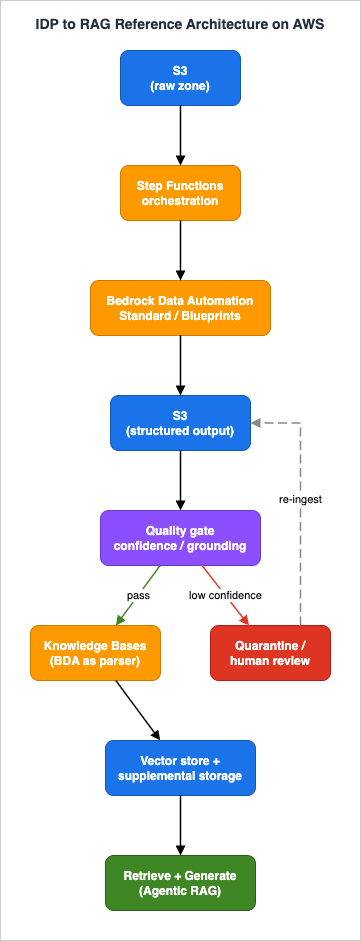
- Amazon S3 (raw zone) - landing area for unstructured source files: documents (PDF, PNG, JPG, TIFF), images, audio, and video. Object-created events drive the pipeline.
- AWS Step Functions - orchestrates the asynchronous flow: invoke BDA, wait for completion, evaluate the quality gate, branch to ingestion or quarantine. State, not glue code, holds the pipeline together.
- Amazon Bedrock Data Automation (BDA) - the core. A generative-AI capability of Amazon Bedrock that turns documents, images, audio, and video into structured output, either as standard output (default, modality-specific) or custom output driven by blueprints. Invoked through
InvokeDataAutomationAsync. - Amazon S3 (structured zone) - BDA writes its JSON output here. This is the boundary between "extraction" and "everything downstream."
- Quality gate - a decision step that reads BDA's confidence scores and visual grounding and decides whether a result is trustworthy enough to index automatically, or whether it must be quarantined for review.
- Amazon Bedrock Knowledge Bases - ingests the structured content. BDA can be wired directly as the knowledge base parser, so the same engine that structures the data also feeds retrieval. Multimodal elements (figures, charts, tables) are stored in a supplemental S3 location.
- Retrieval and generation - out of scope here; this is where the Agentic RAG architecture takes over.
- Amazon Textract - not on the main path. It is a targeted complement for specific documents that need deterministic OCR or exact form, table, query, and signature extraction (covered in Section 4 and Section 10).
The data contract between stages is simple and worth stating explicitly: every stage reads from S3 and writes to S3, and the unit of work is one source file plus its BDA output. That contract is what makes the pipeline restartable, idempotent, and observable - properties we lean on heavily in Sections 7 and 9.
3. Bedrock Data Automation: Standard Output and Blueprints
BDA has exactly two output modes, and understanding the split is the single most important design decision in the pipeline.3.1 Standard output: the default, modality-aware extraction
If you send a file to BDA with no blueprint and no project configuration, it returns standard output: a default, modality-specific structured representation. Standard output is "what you almost always want for RAG," because it is generic and does not require you to know the document's schema in advance. Critically, standard output is the representation BDA uses when it acts as a Knowledge Bases parser - so for the RAG path, standard output is the path.What standard output contains depends on the modality:
- Documents - text extracted in reading order, plus generative output such as a document summary and captions for tables, figures, and diagrams. Output can optionally be grouped by layout element (headers, footers, titles, tables, figures, diagrams), and bounding boxes can be enabled.
- Images - a summary, detected text (with bounding boxes), logo detection, IAB advertising-taxonomy classification, and explicit-content moderation.
- Video - a full video summary, chapter segmentation and per-chapter summaries, full audio transcription with speaker identification, detected text, logo detection, IAB taxonomy, and explicit-content detection.
- Audio - a summary (including chapter summarization), a full transcription, and explicit-content moderation.
Standard output is configurable through a project (see Section 3.3): you can toggle which elements are produced and, for documents, whether output is grouped by layout element and whether bounding boxes are generated.
3.2 Custom output: blueprints for schema-driven extraction
When you need specific fields - an invoice number, a total amount, a policy effective date - standard output's generic summary is not enough. Custom output solves this with blueprints. A blueprint is a list of fields you want extracted, where each field has a type, aninferenceType, and a natural-language instruction that guides extraction:{
"class": "Purchase Order",
"type": "object",
"properties": {
"po_number": {
"type": "string",
"inferenceType": "Explicit",
"instruction": "The unique identifier for the purchase order"
},
"order_total": {
"type": "number",
"inferenceType": "Explicit",
"instruction": "The total amount for the order"
},
"special_requests": {
"type": "string",
"inferenceType": "Inferred",
"instruction": "Any special requests or notes included in the order"
}
}
}inferenceType is the part most teams overlook. Explicit means the value appears verbatim in the document and BDA should extract it as-is; Inferred means the value requires reasoning over the content. Marking a field Inferred when it is actually printed on the page, or vice versa, is a common cause of extraction drift (Section 9). Custom output (blueprints) is supported for documents, images, audio, and video; because a project allows only a single video blueprint (versus up to 40 for documents), the practical path for video is usually standard output.You can create your own blueprints or start from the predefined blueprints in the BDA blueprint catalog (sample blueprints exist for common documents such as W-2 forms and driver's licenses). Blueprints are created through the control-plane API and follow a stage lifecycle:
import boto3, json

bda = boto3.client("bedrock-data-automation")

# Create a blueprint in DEVELOPMENT (a sandbox that won't affect LIVE blueprints)
resp = bda.create_blueprint(
    blueprintName="acme-purchase-order",
    type="DOCUMENT",
    blueprintStage="DEVELOPMENT",
    schema=json.dumps(blueprint_schema),
)
blueprint_arn = resp["blueprint"]["blueprintArn"]

# Promote to LIVE once accuracy meets your bar
bda.copy_blueprint_stage(
    blueprintArn=blueprint_arn,
    sourceStage="DEVELOPMENT",
    targetStage="LIVE",
)DEVELOPMENT / LIVE stage split matters for a production pipeline: you iterate on extraction instructions in DEVELOPMENT against a held-out sample set, and only LIVE blueprints are referenced by the production project. This gives you a safe path to tune a blueprint without disturbing documents already flowing through the pipeline.3.3 Projects: the configuration unit referenced at invocation time
Standard-output toggles and custom blueprints do not float free - they live inside a project. A project is a BDA resource that holds one standard-output configuration per data type (document, image, video, audio) and any custom blueprints, and a project ARN is what you pass toInvokeDataAutomationAsync to tell BDA how to process a file.Two project facts shape pipeline design:
- A single project can hold up to 40 document blueprints, plus one image blueprint, one audio blueprint, and one video blueprint. When multiple document blueprints are configured, BDA automatically matches an incoming document to the blueprint that best fits its layout.
- If a file contains multiple documents, a project can be configured to split it into individual documents by context, then match each to the appropriate blueprint. This is what lets a single PDF "packet" (say, a loan application bundling a pay stub, a W-2, and an ID) be decomposed and extracted field-by-field without you splitting the file yourself.
BDA always returns a standard-output response even when a custom blueprint also matches, so a project that uses custom output still gives you the generic representation for free - which is convenient when you want blueprint fields for a downstream system and the generic text for RAG indexing.
3.4 Invoking BDA: the asynchronous contract
BDA processing is asynchronous. You callInvokeDataAutomationAsync on the runtime client with an input S3 location, an output S3 location, and a data-automation profile ARN; you get back an invocationArn; you poll (or receive an EventBridge notification) for completion; and you read the result from the output S3 location.import boto3
runtime = boto3.client("bedrock-data-automation-runtime")
resp = runtime.invoke_data_automation_async(
inputConfiguration={"s3Uri": "s3://my-raw-zone/incoming/loan_packet_001.pdf"},
outputConfiguration={"s3Uri": "s3://my-structured-zone/bda/loan_packet_001/"},
dataAutomationProfileArn=(
"arn:aws:bedrock:us-west-2:123456789012:data-automation-profile/bda.v1:0"
),
dataAutomationConfiguration={
"dataAutomationProjectArn": (
"arn:aws:bedrock:us-west-2:123456789012:data-automation-project/abc123"
),
"stage": "LIVE",
},
notificationConfiguration={
"eventBridgeConfiguration": {"eventBridgeEnabled": True}
},
)
invocation_arn = resp["invocationArn"]inputConfiguration.s3UriandoutputConfiguration.s3Uri(both required) - input and output are S3 only. The asynchronous, S3-in/S3-out contract is exactly what makes Step Functions orchestration clean.dataAutomationProfileArn(required) - the data-automation profile that the request runs under. This is the surface that enables cross-region inference, which BDA uses to spread compute across Regions.dataAutomationConfiguration(optional) - the project ARN and stage. Omit it and BDA returns plain standard output for the modality; supply it and BDA applies your project's configuration and blueprints.blueprints(optional, up to 40) - you can also pass blueprint ARNs inline per request instead of (or in addition to) the project configuration.notificationConfiguration.eventBridgeConfiguration.eventBridgeEnabled- turn this on so completion emits an EventBridge event instead of forcing you to poll. In a Step Functions pipeline this is the difference between a busy-wait and an event-driven wait.encryptionConfigurationandclientToken- supply a customer-managed KMS key for output encryption, and a client token for idempotent retries.
The asynchronous result is written to the output S3 location, and its structure depends on the modality and the operations requested. For an image, a standard-output result looks like this (abridged):
{
  "metadata": {
    "id": "image_123",
    "semantic_modality": "IMAGE",
    "s3_bucket": "my-structured-zone",
    "s3_prefix": "bda/...",
    "image_width_pixels": 1920,
    "image_height_pixels": 1080
  },
  "image": {
    "summary": "A lively party scene with colorful decorations and supplies",
    "iab_categories": [
      { "category": "Party Supplies", "confidence": 0.9, "parent_name": "Events & Attractions" }
    ],
    "text_words": [
      {
        "id": "word_1",
        "text": "lively",
        "confidence": 0.9,
        "locations": [
          { "bounding_box": { "left": 100, "top": 200, "width": 50, "height": 20 } }
        ]
      }
    ]
  }
}confidence score, and detected text carries a bounding_box (its locations). Confidence drives the quality gate; bounding boxes are the visual grounding that lets you - or a human reviewer - trace a value back to where it appeared.3.5 Operational limits to design around
The published per-request limits constrain how you chunk work upstream. They are worth keeping in front of you because they decide whether a file can go through BDA as-is or must be split first:* You can sort the table by clicking on the column name.
| Modality | Formats | Size / length ceiling (asynchronous API) |
|---|---|---|
| Documents | PDF, TIFF, JPEG, PNG, DOCX | 3,000 pages with the splitter enabled (20 via console), 500 MB / request |
| Images | JPEG, PNG | 8k resolution, 5 MB / request |
| Video | MP4, MOV, AVI, MKV, WEBM (H.264, H.265/HEVC, VP8, VP9, AV1, MPEG-4, ProRes) | 4 hours (240 minutes), ~10 GB (10,240 MB) / request |
| Audio | AMR, FLAC, M4A, MP3, Ogg, WAV | 4 hours (240 minutes), 2 GB (2,048 MB) / request |
These are the per-file requirements for the asynchronous
InvokeDataAutomationAsync API; the synchronous API is tighter (for example, 10 pages and 50 MB per document). Concurrent-job and transactions-per-second ceilings are not fixed here - they are governed by adjustable Bedrock service quotas. Treat those quotas as the throttling envelope your Step Functions concurrency and any upstream queue must respect, and always confirm the current values against the official Bedrock service quotas before sizing a high-volume pipeline.4. Multimodal Extraction: Documents, Images, Audio, and Video
The architecture's promise is that one engine handles all four modalities. The reality is that each modality has a distinct output shape and a distinct set of design choices. This section walks the per-modality branch.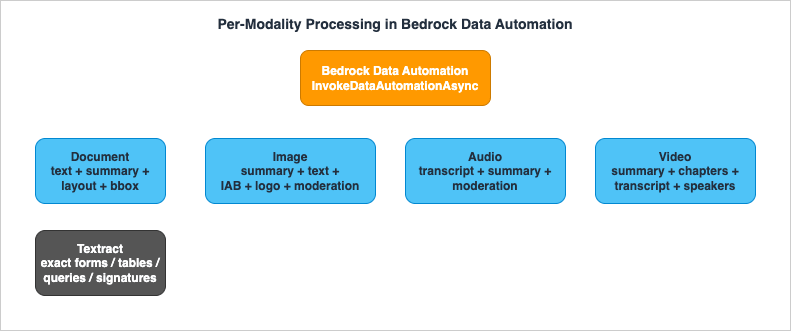
4.1 Documents
Documents are the workhorse modality for IDP, and BDA standard output gives you, per document: text in reading order, a generative summary, captions for tables and figures, optional grouping by layout element, and optional bounding boxes. For RAG, the reading-order text plus layout grouping is what makes retrieval coherent - chunks that respect titles and section boundaries retrieve better than chunks that slice through a table.Design choices for documents:
- Layout grouping - enable it when documents have meaningful structure (reports, contracts, manuals). It lets you preserve section boundaries when chunking downstream (Section 5.3).
- Bounding boxes - enable them when you want visual grounding for the quality gate or human review. They add weight to the output, so enable them where you actually consume them.
- Standard vs. blueprint - use standard output for the RAG path; add a document blueprint when a downstream system needs specific fields (and remember BDA still returns standard output alongside the blueprint result).
4.2 Images
Image standard output is summary plus detected text plus logo and IAB classification plus content moderation, with confidence and bounding boxes on detected elements (as shown in Section 3.4). For a RAG pipeline, the image summary and detected text are what get indexed; the IAB and moderation signals are useful as metadata filters (Section 8) - for example, to exclude content flagged by moderation from a customer-facing knowledge base.A subtlety worth knowing: JPG and PNG files can be treated either as images or as scanned documents depending on their content. If your "images" are actually photographs of text (a phone snapshot of a receipt), you generally want them processed as documents, and configuring a document blueprint for image files is the recommended way to steer that behavior.
4.3 Audio
Audio standard output is a transcription, a summary (including chapter-level summaries), and explicit-content moderation. The transcription is the indexable artifact: a call recording or a podcast becomes searchable text that a knowledge base can retrieve. Chapter summaries give you natural chunk boundaries - each chapter can become a retrievable unit with its summary as metadata.4.4 Video
Video standard output is the richest: a full video summary, chapter segmentation with per-chapter summaries, full audio transcription with speaker identification, detected on-screen text, logo detection, IAB taxonomy, and explicit-content detection. The full-video summary is, per AWS, optimized for content with descriptive dialogue - product overviews, training material, newscasts, documentaries - so set expectations accordingly for, say, silent surveillance footage.For RAG over video, the practical indexing units are the chapter summaries and the transcription segments, each tagged with timestamps and speakers as metadata so retrieval can point a user to the right moment, not just the right video.
4.5 Where Textract still fits
BDA is generative and multimodal; it summarizes, captions, and reasons. There is a class of document work where you do not want any of that - you want a deterministic OCR engine that returns exact text, forms as key-value pairs, tables as cells, answers to specific queries, and signature locations, each with element-level geometry and confidence. That is Amazon Textract.Textract's
AnalyzeDocument returns five categories - text, forms (key-value pairs), tables, query responses, and signatures - plus layout, with bounding-box geometry and per-element confidence, and it has dedicated analysis for invoices and receipts. Reach for Textract as a targeted complement when:- You need exact, deterministic extraction of a fixed form layout where a generative summary is the wrong abstraction.
- You need per-field geometry and confidence for forms, tables, queries, or signatures specifically.
- You are extracting structured key-value data for a transactional system, not building searchable text for retrieval.
The two are not mutually exclusive. A common pattern is to route most documents through BDA for the RAG path and fork a specific document type (a regulated form that must be transcribed exactly) to Textract, then reconcile both outputs. Section 10 returns to this choice; the deeper Textract feature set is its own topic and out of scope here.
5. From Structured Output to RAG: BDA as a Knowledge Bases Parser
This is the section that turns "extraction" into "retrieval." The clean way to connect BDA output to a knowledge base is not to write your own glue that copies BDA JSON into a vector store - it is to wire BDA as the parser of the knowledge base itself.5.1 The three parser options, and why BDA
Amazon Bedrock Knowledge Bases offers three parsing strategies during ingestion:- Default parser - text only, no charge. Parses text in .txt, .md, .html, .doc/.docx, .xls/.xlsx, and .pdf. If your documents are pure text, this is enough.
- Bedrock Data Automation parser - fully managed multimodal parsing with no prompting required. Extracts figures, charts, and tables from PDFs (plus .jpeg/.png images) and stores them as files in an S3 destination, so they can be returned at retrieval time.
- Foundation model parser - multimodal parsing through a foundation model, with a customizable parsing prompt.
For a multimodal pipeline, the default parser is insufficient (it drops figures, charts, and tables), so the choice is BDA or a foundation model. BDA is the lower-operational-effort option: it is fully managed, requires no prompt engineering, and is the same engine you are already using for standalone extraction, which keeps one extraction behavior across the whole pipeline. (The foundation model parser is the right call when you need to customize the extraction prompt - for example, domain-specific extraction instructions - and that is a deliberate trade of more control for more tuning work.)
One important consequence: if you choose BDA (or a foundation model) as the parser, that parser is used for all PDFs in the data source, even text-only ones. The default parser is not used for those files. Plan your data source boundaries accordingly.
5.2 Wiring BDA as the parser
There are two API touch points, and getting both right is what makes multimodal retrieval work.First, when you create the knowledge base, you must declare where extracted multimodal data (images, figures, charts, tables) will be stored, via a
SupplementalDataStorageLocation in the VectorKnowledgeBaseConfiguration of CreateKnowledgeBase. This S3 location is what holds the extracted figures so they can be returned in a query response or as source attribution.Second, when you create the data source, you set the parsing strategy in the
parsingConfiguration of the vectorIngestionConfiguration:{
"parsingStrategy": "BEDROCK_DATA_AUTOMATION",
"bedrockDataAutomationConfiguration": {
"parsingModality": "MULTIMODAL"
}
}parsingStrategy value BEDROCK_DATA_AUTOMATION selects BDA, and bedrockDataAutomationConfiguration.parsingModality (valid value MULTIMODAL) enables parsing of multimodal data - text and images - rather than text alone.In context, the parsing configuration sits inside the data source's
vectorIngestionConfiguration, alongside the chunking configuration discussed in Section 5.3 - the two are set together at CreateDataSource time:import boto3
agent = boto3.client("bedrock-agent")
agent.create_data_source(
knowledgeBaseId="KB1234567890",
name="multimodal-docs",
dataSourceConfiguration={
"type": "S3",
"s3Configuration": {"bucketArn": "arn:aws:s3:::my-structured-zone"},
},
vectorIngestionConfiguration={
"parsingConfiguration": {
"parsingStrategy": "BEDROCK_DATA_AUTOMATION",
"bedrockDataAutomationConfiguration": {"parsingModality": "MULTIMODAL"},
},
"chunkingConfiguration": {
"chunkingStrategy": "HIERARCHICAL",
"hierarchicalChunkingConfiguration": {
"levelConfigurations": [{"maxTokens": 1500}, {"maxTokens": 300}],
"overlapTokens": 60,
},
},
},
)- You cannot change the parsing strategy type after the data source is connected. Going from the foundation-model parser to BDA (or vice versa) requires adding a new data source. You can update parameters within a strategy, but not switch strategies in place.
- You cannot add the supplemental multimodal S3 storage location after the knowledge base is created. If you want multimodal data and a parser that supports it, you must create the knowledge base with the supplemental storage location from the start.
A note on status worth checking for your Region: BDA the service is generally available, but at the time of writing the Knowledge Bases ingestion-customization documentation labels the BDA parser specifically as "(preview)." The integration is production-capable, but confirm its current status and any Regional constraints against the official documentation for your target Region before committing to it - BDA gains features quickly, and the parser surface is one of the faster-moving pieces.
5.3 Chunking the structured output
Parsing produces clean text and extracted elements; chunking decides how that text is split into retrievable units. Knowledge Bases offers four chunking strategies, configured in thechunkingConfiguration:* You can sort the table by clicking on the column name.
| Strategy | Behavior | When to use it |
|---|---|---|
NONE | Each document is a single chunk | Pre-chunked content, or short documents you want kept whole |
FIXED_SIZE | maxTokens + overlapPercentage | Uniform content where size predictability matters |
HIERARCHICAL | Parent/child levels (levelConfigurations, overlapTokens) | Structured documents; retrieve small chunks, return larger parent context |
SEMANTIC | Splits on semantic boundaries (breakpointPercentileThreshold, bufferSize, maxTokens) | Prose where meaning, not length, should set boundaries |
If you omit chunking configuration, Knowledge Bases splits content into chunks of roughly 300 tokens while preserving sentence boundaries. The chunking strategy is also immutable after the data source is connected, so it belongs in the same up-front design pass as the parser choice. For documents that BDA grouped by layout element, hierarchical chunking tends to pay off: the layout groups give natural parent boundaries, and small child chunks retrieve precisely while the parent restores enough surrounding context for generation. The detailed mechanics of vector stores and retrieval themselves live in the Amazon Bedrock RAG Architecture Guide; here the point is only that the parser and chunker are configured together, once, and the BDA parser is what makes multimodal content retrievable at all.
5.4 Handing off to retrieval and generation
Once the knowledge base has ingested BDA-parsed content, retrieval and generation are standard:Retrieve for the chunks, RetrieveAndGenerate for an answer with citations, and - when you need query planning, retrieval grading, and self-correction - the agentic loop described in Agentic RAG Architecture on Amazon Bedrock. The model used for generation should be selected on capability and context-window needs; for current Anthropic model identifiers and characteristics, consult the official model documentation rather than hard-coding a remembered ID. The clean separation is the point: this pipeline's job ends when content is retrievable and trustworthy; the agentic RAG system's job begins there.6. Confidence, Visual Grounding, and Quality Gates
Extraction that you cannot trust is worse than no extraction, because it silently poisons retrieval. The quality gate is the part of the pipeline that converts BDA's per-element confidence and visual grounding into an automated trust decision.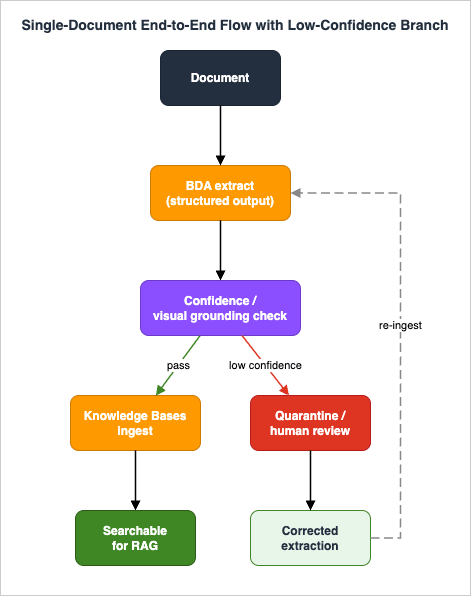
6.1 What confidence and visual grounding actually are
BDA attaches a confidence score to extractions - a percentage representing how certain BDA is that an extraction is accurate. AWS states these scores are optimized for Expected Calibration Error (ECE), which is to say they are calibrated to be meaningful as probabilities rather than arbitrary self-reported numbers. That calibration is what makes a threshold-based gate defensible.Visual grounding is the complement: BDA ties an extracted value back to its location in the source (the bounding boxes seen in Section 3.4). Grounding is what makes a confidence decision auditable - a human reviewer can see exactly where on the page a low-confidence value came from, instead of guessing.
6.2 Turning scores into a gate
A workable interpretation of confidence, used widely in IDP practice, is three bands: high (roughly 90-100%) for results you can index automatically, medium (roughly 70-89%) for results that are usually right but carry some risk, and low (below ~70%) for results that likely need human verification. These bands are practitioner guidance, not official hard thresholds - the right cutoff is data-dependent, and the correct way to set it is to measure BDA on your own representative documents and choose the threshold that matches your tolerance for error. Bake the chosen threshold into a Step Functions Choice state rather than scattering it through code, so it is one tunable knob.A minimal gate over a custom-output result, expressed as the logic the orchestration runs:
CONFIDENCE_THRESHOLD = 0.85  # tune against your own labeled sample set

def evaluate_extraction(bda_result: dict) -> str:
    """Return 'auto_index', 'review', or 'reject' for one BDA result."""
    fields = bda_result.get("fields", [])
    if not fields:
        return "reject"  # nothing extracted; do not index empty content

    lowest = min(f.get("confidence", 0.0) for f in fields)
    if lowest >= CONFIDENCE_THRESHOLD:
        return "auto_index"
    if lowest >= 0.70:
        return "review"
return "reject"6.3 Quarantine, not silent drop
Results below the gate must not be silently dropped, and they must not be silently indexed. They go to a quarantine: a separate S3 prefix (and a record in a tracking store) where they wait for human review. A human-in-the-loop step - for example Amazon Augmented AI (A2I) or a custom review UI - lets a reviewer correct the extraction, using the visual grounding to see the source location. Corrected results then re-enter the pipeline at the ingestion stage.Quarantine is what keeps the knowledge base trustworthy over time: the documents the pipeline could not confidently handle are visible, counted, and recoverable, instead of being a silent gap in retrieval that nobody notices until a user gets a wrong answer. Section 9 treats the quarantine queue as a first-class observability signal.
7. Orchestration and Scale
The pieces so far - invoke BDA, wait, gate, ingest or quarantine - are a workflow, and workflows belong in a workflow engine, not in a chain of Lambda functions calling each other.7.1 Why Step Functions
AWS Step Functions is the natural orchestrator because BDA is asynchronous and the flow has branches. A state machine expresses the whole pipeline declaratively: invoke BDA, wait for the EventBridge completion event, read the result, run the quality-gate Choice, and route to ingestion or quarantine. The state machine holds the pipeline's state - which document is where, what failed, what is waiting - so individual steps stay small and stateless.A sketch of the state machine, in words: a
Map state fans out over newly arrived files; for each file, a task invokes InvokeDataAutomationAsync; the workflow waits on the BDA completion event; a task reads the output JSON and computes the gate decision; a Choice state branches on auto_index / review / reject; the auto_index branch triggers knowledge base ingestion; the other branches write to the quarantine prefix and record the reason. Every task reads and writes S3, so a failed execution can be retried from the failed step without redoing successful extraction.The gate-and-route core, as an Amazon States Language excerpt, is the part most worth seeing concretely - the
Choice state and its two SDK-integration targets:{
"QualityGate": {
"Type": "Choice",
"Choices": [
{ "Variable": "$.gate.decision", "StringEquals": "auto_index", "Next": "StartIngestionJob" },
{ "Variable": "$.gate.decision", "StringEquals": "review", "Next": "Quarantine" }
],
"Default": "Quarantine"
},
"StartIngestionJob": {
"Type": "Task",
"Resource": "arn:aws:states:::aws-sdk:bedrockagent:startIngestionJob",
"Parameters": {
"KnowledgeBaseId": "KB1234567890",
"DataSourceId.$": "$.dataSourceId"
},
"End": true
},
"Quarantine": {
"Type": "Task",
"Resource": "arn:aws:states:::aws-sdk:s3:copyObject",
"Parameters": {
"Bucket": "my-quarantine-zone",
"CopySource.$": "$.structuredOutputKey",
"Key.$": "$.quarantineKey"
},
"End": true
}
}bedrockagent:startIngestionJob and s3:copyObject) keep the branches inside the state machine - no Lambda glue needed for the routing itself - which is what keeps the pipeline auditable from the execution history alone.7.2 Incremental processing
A production pipeline does not reprocess the corpus on every run. Two mechanisms keep work incremental:- Event-driven ingestion at the source - S3 object-created events (via EventBridge) start the pipeline for exactly the files that arrived, so new content flows through automatically and nothing is reprocessed.
- Knowledge base sync - the knowledge base ingests changed and new content on sync; you trigger an ingestion job when new structured output is ready, and the knowledge base handles incremental indexing.
Idempotency makes incremental processing safe: pass a
clientToken to InvokeDataAutomationAsync so a retried invocation does not double-process, and key the structured-zone output path on a content hash or stable object key so re-running a file overwrites rather than duplicates.7.3 Where bulk processing goes
Everything above is the steady-state, file-arrives-and-flows pipeline. A different problem - reprocessing millions of historical documents in a bounded window, the classic backfill - is a batch generative-AI workload with its own concerns (queueing, partitioning, cost-aware concurrency, restart-from-checkpoint). That problem is the subject of Large-Scale Batch Generative AI Pipeline on AWS, and this article deliberately stops at the orchestration of the per-document path so the two do not overlap. The connection point is clean: a backfill is the same per-document pipeline driven by a batch driver instead of S3 events.8. Cross-Cutting: IAM, PII, and Data Boundaries
A pipeline that moves unstructured enterprise content across S3, BDA, and a knowledge base touches sensitive data at every hop. Three cross-cutting concerns have to be woven in, not bolted on.8.1 Least-privilege IAM
The principals in this pipeline each need a narrow, specific set of permissions, and the failure mode of getting this wrong is a role that can read every bucket and invoke every model. Scope by principal:- The BDA invocation role - read on the raw-zone prefix, write on the structured-zone prefix, and permission to invoke
InvokeDataAutomationAsyncagainst the specific project ARN. It does not need knowledge base permissions. - The knowledge base service role - read on the structured zone, read/write on the supplemental multimodal storage location, and the embedding-model invoke permission. It does not need to invoke BDA directly.
- The orchestration role (Step Functions) - permission to start BDA invocations, start knowledge base ingestion jobs, and write to the quarantine prefix; nothing more.
Scope resource ARNs to the specific buckets, prefixes, and project ARN - never
*. The data-automation profile ARN and the project ARN are both specific resources you can name in policy, which lets you express "this role may run this project, not any project." The BDA invocation role, expressed minimally:{
"Version": "2012-10-17",
"Statement": [
{
"Sid": "ReadRawZone",
"Effect": "Allow",
"Action": "s3:GetObject",
"Resource": "arn:aws:s3:::my-raw-zone/incoming/*"
},
{
"Sid": "WriteStructuredZone",
"Effect": "Allow",
"Action": "s3:PutObject",
"Resource": "arn:aws:s3:::my-structured-zone/bda/*"
},
{
"Sid": "InvokeThisProjectOnly",
"Effect": "Allow",
"Action": "bedrock:InvokeDataAutomationAsync",
"Resource": [
"arn:aws:bedrock:us-west-2:123456789012:data-automation-project/abc123",
"arn:aws:bedrock:us-west-2:123456789012:data-automation-profile/bda.v1:0"
]
}
]
}8.2 PII and data boundaries
Unstructured documents are full of PII, and the pipeline's job is to keep that PII inside the boundary it belongs to. The data-boundary mechanisms here are structural:- Encryption - supply a customer-managed KMS key via
encryptionConfigurationon BDA invocation and on the knowledge base's supplemental storage, so structured output and extracted figures are encrypted with a key you control. - Tenant and sensitivity isolation - keep tenants in separate prefixes (or separate data sources / knowledge bases) so a retrieval can never cross a tenant boundary, and carry tenant and sensitivity as metadata so retrieval-time filters can enforce the boundary.
- Quarantine as a containment zone - the quarantine prefix holds documents pending human review; it should have its own, tighter access policy, because by definition it holds content the automated pipeline could not vet.
Detecting and redacting PII itself - with Amazon Comprehend or Amazon Bedrock Guardrails - and the broader responsible-AI controls are their own subject and are delegated to the responsible-AI guardrails guide in this series. The boundary-design point that belongs here is simpler: design the pipeline so that PII never has to leave the prefix, key, and tenant it arrived in, and so that metadata is rich enough for retrieval to filter on it.
8.3 Metadata design
Metadata is what makes everything above enforceable at retrieval time, and it is cheapest to attach at ingestion. For each indexed unit, carry at least: source document identifier, tenant, sensitivity class, modality, BDA confidence band, and (for audio/video) timestamp and speaker. Knowledge base retrieval can filter on this metadata, which is how you implement tenant isolation, exclude moderated content, or prefer high-confidence chunks - all without re-processing. Treat metadata as part of the data contract between the structuring stage and the knowledge base, not an afterthought.9. Observability and Failure Modes
Level 400 means knowing how the system breaks, not just how it runs. Four failure modes account for nearly all of the trouble in an IDP-to-RAG pipeline. For each: symptom, root cause, isolation, remediation.9.1 Low confidence on a class of documents
Symptom - the quarantine queue fills with one document type, or a specific field is consistently low-confidence.Root cause - usually a layout BDA was not tuned for, a blueprint instruction that is ambiguous, or genuinely poor source quality (faint scans, skewed photos).
Isolation - group quarantined results by document type and by which field scored low; the visual grounding tells you whether the value was on the page at all. If the value is clearly present but scored low, the instruction is the suspect; if the source is illegible, the input is the suspect.
Remediation - for blueprint issues, refine the field
instruction and re-test in the DEVELOPMENT stage against the quarantined samples before promoting to LIVE; for input-quality issues, fix the capture process upstream. Do not lower the confidence threshold to make the queue shrink - that trades a visible problem for an invisible one.9.2 Unsupported format or oversized file
Symptom - invocations fail at submission, or files never produce output.Root cause - the file violates a per-modality limit from Section 3.5 (wrong format, over the page/size/duration ceiling) or is corrupt.
Isolation -
InvokeDataAutomationAsync raises errors for unsupported formats at submission; check the input against the format and size table before invoking. A pre-flight validation step in the state machine catches these before they consume a BDA job slot.Remediation - convert or split oversized files upstream (a document beyond the 3,000-page splitter ceiling must be split into smaller files; a video beyond 4 hours or ~10 GB likewise), reject genuinely unsupported formats with a clear reason, and route the rejection to the quarantine queue so it is visible rather than lost.
9.3 Extraction drift
Symptom - extraction quality silently degrades over time, or a field that worked starts returning subtly wrong values, without confidence dropping enough to trip the gate.Root cause - the documents changed (a vendor reformatted its invoices; a new document variant entered the corpus) while the blueprint did not, or an
inferenceType is wrong (a value marked Inferred that should be Explicit, so BDA reasons where it should read).Isolation - sample indexed output periodically and compare against ground truth; drift shows up as rising disagreement even when confidence looks stable. Bucketing accuracy by document variant surfaces which variant drifted.
Remediation - treat blueprints as versioned assets: when a variant appears, add or refine a blueprint for it (a project holds up to 40 document blueprints and auto-matches), validate in
DEVELOPMENT, and promote. Because BDA auto-matches documents to the best-fitting blueprint, adding a variant-specific blueprint is often enough.9.4 Knowledge base sync failure
Symptom - new structured output exists in S3 but does not appear in retrieval; users get answers that omit recently added content.Root cause - an ingestion job failed or was never triggered, a parser/permission misconfiguration, or the immutability rules from Section 5.2 were violated (someone tried to change the parser or add supplemental storage after creation and the change silently did not take).
Isolation - check the ingestion job status and its failure reasons; confirm the knowledge base service role still has read on the structured zone and read/write on the supplemental storage; confirm the data source's parsing strategy is the one you expect.
Remediation - re-run the ingestion job for the affected data source; if the failure is an immutability violation, the fix is to create a new data source (for a parser change) or a new knowledge base with supplemental storage (for the multimodal-storage case), because those cannot be changed in place.
9.5 What to instrument
The signals that make these failure modes visible, and that belong on a dashboard from day one:- Quarantine rate - the fraction of documents falling below the gate, broken down by document type. A rising rate is the earliest warning of drift or input-quality regression.
- Confidence distribution - the spread of confidence scores over time; a leftward shift precedes a rising quarantine rate.
- Invocation failures - BDA submission errors by reason (format, size), surfaced from the pre-flight step and the API errors.
- Ingestion job outcomes - success/failure of knowledge base ingestion, with failure reasons, so a sync gap is caught before a user notices.
- End-to-end latency - time from file arrival to retrievable, which the S3-in/S3-out, Step Functions-orchestrated design makes straightforward to measure per document.
These flow naturally into Amazon CloudWatch from Step Functions execution history, BDA invocation results, and knowledge base ingestion jobs; EventBridge events provide the timestamps for latency. If the gate decision is emitted as a structured log line per document, the quarantine rate by document type is a single CloudWatch Logs Insights query - the kind of thing that belongs on a dashboard and behind an alarm:
fields @timestamp, doc_type, decision
| filter decision in ["auto_index", "review", "reject"]
| stats
    count(*) as total,
    sum(decision != "auto_index") as gated
    by doc_type
| sort gated descgated / total ratio for any one doc_type is the earliest, cheapest warning that a layout changed or capture quality regressed - long before a user notices a wrong answer. The deeper treatment of LLM evaluation and observability - measuring retrieval quality and answer accuracy as an ongoing loop - is its own discipline and is covered by the LLMOps and evaluation material this series points to.10. Variations: When Textract or Custom Models Fit Better
BDA is the right default for a multimodal IDP-to-RAG pipeline, but it is not the only tool, and a Level 400 design states the boundaries of its own recommendation.- Use Amazon Textract instead of BDA when the task is deterministic structured extraction from known forms - exact key-value pairs, table cells, query answers, signatures - with per-element geometry and confidence, and you do not want generative summarization. Textract is also the better fit for transactional document processing that feeds a database rather than a retrieval index. As Section 4.5 showed, the two compose: BDA for the RAG path, Textract for the specific documents that demand exact extraction.
- Use the foundation-model parser instead of the BDA parser in Knowledge Bases when you need to customize the extraction prompt - domain-specific instructions that a managed parser does not expose. You trade the BDA parser's zero-tuning convenience for prompt-level control.
- Use a custom or specialized model when your documents are so domain-specific that neither a generic managed service nor a general foundation model extracts them well, and you have the labeled data and the operational appetite to own a model. This is the high-effort end of the spectrum and rarely the right first move; exhaust BDA blueprints (which let you tune extraction with instructions, not training) before reaching for it.
The decision rule is short: BDA for multimodal-to-RAG, Textract for deterministic forms, foundation-model parser for prompt-customized parsing, custom models only when the data genuinely demands it.
11. Frequently Asked Questions
Do I need blueprints to use BDA for RAG?No. Standard output is the representation BDA uses as a Knowledge Bases parser, and standard output requires no blueprint. Blueprints (custom output) are for extracting specific named fields, typically for a downstream transactional system rather than for retrieval.
Can one project handle documents, images, audio, and video?
Yes. A project holds one standard-output configuration per data type and can hold up to 40 document blueprints, plus one image blueprint, one audio blueprint, and one video blueprint. You pass the project ARN to
InvokeDataAutomationAsync and BDA applies the configuration appropriate to the file's modality.Is BDA synchronous or asynchronous?
Asynchronous.
InvokeDataAutomationAsync returns an invocationArn; results are written to the output S3 location. Enable EventBridge notification so completion is event-driven rather than polled.What happens to figures, charts, and tables in a PDF when BDA parses for a knowledge base?
The BDA (and foundation-model) parser extracts them and stores them as files in the supplemental S3 storage location you declared at knowledge base creation, and they can be returned in a query response or as source attribution. The default text-only parser drops them, which is why it is unsuitable for multimodal content.
Can I change the parser or add multimodal storage to an existing knowledge base?
You cannot change the parsing strategy type after a data source is connected (add a new data source instead), and you cannot add the supplemental multimodal storage location after the knowledge base is created (create a new knowledge base with it from the start). Both are up-front design decisions.
How should I set the confidence threshold for the quality gate?
Measure BDA on your own representative, labeled documents and pick the threshold that matches your error tolerance. The common 90-100 / 70-89 / below-70 bands are practitioner guidance, not official hard cutoffs; gate on the weakest meaningful element, not the average, and quarantine - never silently drop - what falls below.
When should I use Textract instead of BDA?
When you need deterministic extraction of forms, tables, queries, or signatures with exact per-element geometry and confidence, rather than generative summarization for retrieval. They compose well: BDA for the RAG path, Textract for the specific documents that require exact extraction.
12. Summary
The hard part of multimodal RAG is ingestion, and this article gave one named, end-to-end architecture for it: raw files in Amazon S3, structured by Amazon Bedrock Data Automation, gated on confidence and visual grounding, and loaded into Amazon Bedrock Knowledge Bases with BDA wired in as the parser. The design choices that matter are concentrated in a few places. Choose standard output for the RAG path and reserve blueprints for named-field extraction. Wire BDA as the knowledge base parser, and make the two irreversible decisions - parser type and supplemental multimodal storage - up front. Put a confidence-based quality gate between extraction and indexing, gate on the weakest meaningful element, and quarantine rather than drop. Orchestrate with Step Functions so the asynchronous, branching flow is declarative and restartable, and keep processing incremental and idempotent. Scope IAM by principal to specific resource ARNs, keep PII inside its prefix-key-tenant boundary, and attach retrieval-time metadata at ingestion. And instrument the four failure modes - low confidence, unsupported formats, extraction drift, sync failures - so they are visible before a user gets a wrong answer.The boundaries of this pipeline are as deliberate as its contents. Where retrieval and self-correcting generation begin, it hands off to Agentic RAG Architecture on Amazon Bedrock; where bulk historical reprocessing begins, it hands off to Large-Scale Batch Generative AI Pipeline on AWS; single-model OCR stays in the Claude OCR article, and static RAG mechanics in the RAG Architecture Guide. What is new here, and what those do not cover, is the production path that turns documents, images, audio, and video into structured, trustworthy, retrievable knowledge.
13. References
- Amazon Bedrock Data Automation
- Transform unstructured data into insights using Amazon Bedrock Data Automation (User Guide)
- How Bedrock Data Automation works
- Standard output in Bedrock Data Automation
- Custom output and blueprints
- Bedrock Data Automation projects
- Using the Bedrock Data Automation API
- InvokeDataAutomationAsync API Reference
- Parsing options for your data source (Knowledge Bases)
- Customize ingestion for a data source (Knowledge Bases)
- BedrockDataAutomationConfiguration API Reference
- Get insights from multimodal content with Amazon Bedrock Data Automation, now generally available (AWS News Blog)
- Analyzing Documents with Amazon Textract
- Amazon Bedrock RAG Architecture Guide
- Using Amazon Bedrock for Titling, Commenting, and OCR with Claude 3.7 Sonnet
- Amazon Bedrock Glossary
- Agentic RAG Architecture on Amazon Bedrock
- Large-Scale Batch Generative AI Pipeline on AWS
References:
Tech Blog with curated related content
Written by Hidekazu Konishi