Running Apache Spark on AWS - Where the Billed Clock Starts, What Gets Measured, and What You Rewrite When You Move a Job Between EMR Serverless, EMR on EKS, and AWS Glue
First Published:
Last Updated:
The first instinct is often to consult feature comparison tables. However, simply reviewing these tables rarely leads to a clear decision. All three options can run Spark, read and write to S3, and access the AWS Glue Data Catalog. The vast majority of items listed in the tables appear identical.
The deciding factor is not the feature set. When you move the same Spark code to a different execution model, three things outside the code change at once. First, where the billed interval begins. Second, the unit in which you ask for compute. Third, how libraries and dependencies get into the job. None of the three is written in the code, and all three govern how the code behaves.
The challenge is that these three aspects are scattered across separate sections of the official documentation. Where the billed interval starts lives on the pricing page and in a note inside the developer guides. The unit for specifying resources lives on a configuration page in the user guide. How dependencies are delivered lives in a list of job parameters. Across three services that comes to nine places. This article aims to consolidate those nine locations into a single resource.
This article does not recommend one option over another, nor does it provide a ranking. Instead, it focuses on outlining what changes when you migrate, and what adjustments you may need to make as a result.
The technical information presented in this article was verified against the following resources as of August 29, 2026: Amazon EMR Serverless user guide, Amazon EMR on EKS developer guide, AWS Glue developer guide, the pricing pages for Amazon EMR and AWS Glue, the API references for each service, AWS whitepapers, AWS What's New, and the AWS Big Data Blog. Version numbers and configuration limits move. Check them again against the official documentation at the time you read this. This article does not cover pricing.
Table of Contents
- 1. What It Means to Run the Same Job Somewhere Else
- 2. Where the Billed Clock Starts
- 3. The Unit in Which You Specify Compute
- 4. How a Job Waits Before It Runs
- 5. How Dependencies Get Into the Job
- 6. Where the Operational Boundary Sits
- 7. What You Rewrite When You Move a Job
- 8. Failures That Show Up After the Move
- 9. Frequently Asked Questions
- 10. Summary
- 11. References
1. What It Means to Run the Same Job Somewhere Else
1.1 Who This Article Is For
This article assumes the reader already has experience writing PySpark or Scala Spark jobs and is now deciding which AWS execution model to run that job on. This article does not cover Spark fundamentals, and it does not address topics such as partition count adjustments, shuffle optimization, or broadcast joins. Those questions arise the same way on all three, and they come after the execution model has been chosen.The difficulty this article addresses is not how to write Spark code. Rather, it focuses on the difficulty in predicting, before migrating, which parts outside the script you end up rewriting when you move a Spark job from AWS Glue to EMR Serverless.
While the script itself will often function correctly, all three are Apache Spark execution models, and
spark.read and DataFrame will behave consistently across them. The issues typically arise in the configurations and settings outside the script, and these are often not apparent until the migration is actually performed.1.2 Why Only These Three
There are more than three ways to run Spark on AWS. Here is why this article narrows to these three.Amazon Athena can also run Apache Spark. It is left out of this comparison because Athena for Apache Spark is a feature of the query environment rather than a job execution platform. Athena is a place to submit SQL queries, with Spark notebooks added on. This article addresses the question of "where to submit prepared jobs," which is a different layer of functionality. The history of Athena's features is documented in existing timelines.
Amazon EMR on EC2, the classic EMR cluster, is also out of scope. EMR on EC2 is the form where you stand up a cluster and use it, and of the three concerns this article is built on, the starting point of the billed interval becomes the instance launch time. That is an EC2 question, and it does not sit on the axis this article compares along.
AWS Glue does offer support for Ray jobs, but new registrations for this feature ended on April 30, 2026. The relevant page in the AWS Glue Developer Guide states, "AWS Glue for Ray is no longer open to new customers," and suggests Amazon EKS and the KubeRay Operator as migration options. Existing users can carry on, but it is not a choice to make going forward. This applies specifically to Ray jobs; AWS Glue's Spark jobs are still supported.
1.3 What Existing Articles Already Cover
The following areas are out of scope here because published articles on this site already own them.| Article | What it owns |
|---|---|
| AWS History and Timeline regarding AWS Glue - Overview, Functions, Features, Summary of Updates, and Introduction | Owns the history of feature additions to AWS Glue. This article does not lay out Glue's version history and covers only the behavior of the current versions. |
| AWS History and Timeline regarding Amazon Athena - Overview, Functions, Features, Summary of Updates, and Introduction | Owns the history of Amazon Athena's features, including Athena for Apache Spark. This article does not treat Athena for Spark as a candidate execution model. |
| Fine-Grained Access Control for AI Data with AWS Lake Formation - LF-Tags, Column-Level Permissions, and Cross-Account Sharing | Owns the permission model, including which execution models enforce fine-grained access control in AWS Lake Formation. This article does not cover permissions. |
| Gang Scheduling and Dynamic Resource Allocation on Amazon EKS - Why One Half of the Vocabulary Is Still Alpha, and What Decides Which Device Allocation Path You Get | Owns Kubernetes scheduling and device allocation. This article does not describe the EKS scheduler and stops at the point where the Pod is placed. |
| Self-Managed LLM Inference on Amazon EKS - Serving Open-Weight Models with vLLM, Neuron/GPU, and Karpenter | Owns the design of node supply with Karpenter. This article does not cover Karpenter configuration. |
| AWS Data Lakehouse Architecture Guide - Building a Governed Lakehouse with S3, Lake Formation, Glue, Athena, and Apache Iceberg | Owns the reference architecture for a lakehouse, including when to add Redshift or EMR. This article does not cover architecture selection. |
| Zero-ETL Integrations on AWS - The Source and Target Matrix Across Amazon Redshift, AWS Glue, and Amazon OpenSearch Service | Owns the paths by which data arrives in a table. This article does not cover ingestion. |
| Apache Iceberg V3 on AWS - Which Engines Read Format Version 3, Where the Official Support Matrices Disagree, and What to Check Before You Upgrade | Owns table format versions and which engine reads which one. This article does not re-explain which Glue or EMR version supports which Iceberg format version, and hands that question over. |
| Data Quality and Data Contracts on AWS - Where to Evaluate, What Each Failure Action Does to Your Data, and Why the Default Is to Keep Going | Owns whether the rows inside a table are correct and what each failure action does to the data. This article designs a job that fails on a quality check but does not describe the checks themselves. |
| Data Pipeline Orchestration on AWS - What Carries Over, What the Runtime Makes You Rebuild, and Who Owns the Airflow Version | Owns what starts a job and on what schedule, and what an orchestrator carries over from a self-managed setup. This article covers the job and the runtime it lands on, not the thing that launches it. |
1.4 Three Questions This Article Answers
First, where does the billed interval begin? The starting point differs across the three. The answer and supporting evidence can be found in Section 2.Second, what unit is used to specify computing resources? Not only do the units differ, but so does the quantity that is actually measured. This is discussed in Section 3.
Third, what elements need to be adjusted when migrating? There are five key elements that require modification. This is detailed in Section 7.
2. Where the Billed Clock Starts
All three are described as charging for usage only. That description is accurate for all three. What changes when you move a job is that the definition of where that usage starts and where it ends is different in each of the three.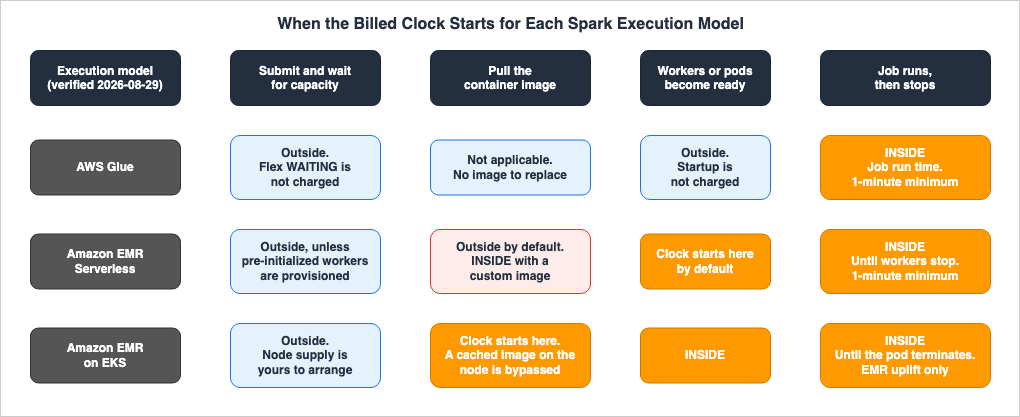
2.1 AWS Glue Leaves Startup and Shutdown Out of the Interval
The AWS Glue Developer Guide glossary states, "With AWS Glue, you only pay for the time your ETL job takes to run. There are no resources to manage, no upfront costs, and you are not charged for startup or shutdown time."The same statement appears in the console help panel. The description for the DPU usage tile reads, "With AWS Glue, you pay for the time your ETL job takes to run. You are not charged for startup or shutdown time."
Therefore, with Glue, the time it takes to provision the job's environment and the time it takes to shut it down fall outside the billed interval. The tens of seconds Spark's driver and executors take to come up fall outside the time you pay for.
The phrase "not charged for startup or shutdown time" is about billing, not about speed. The startup still happens, and it sits inside the wall-clock time between submitting the job and getting the result. Nothing in the statement about billing says whether that startup is fast or slow.
Elsewhere in the Glue documentation, a different claim is made regarding startup speed. The developer guide's release notes highlight a change in AWS Glue 2.0: "An upgraded infrastructure for running Apache Spark ETL jobs in AWS Glue with reduced startup times."
"Not charged for startup time" and "reduced startup times" are both claims in Glue's documentation, but they are separate claims on separate pages. The first does not carry the second.
The AWS Glue FAQ words it slightly differently. It states, "Billing commences as soon as the job is scheduled for execution and continues until the entire job completes. With AWS Glue, you only pay for the time for which your job runs and not for the environment provisioning or shutdown time." This consists of two sentences. The first can be read as "from the moment the job is scheduled for execution," and the second as "excluding the time spent provisioning the environment." Since the two sentences sit in the same answer, it seems AWS intends them to be consistent. For a reader who wants to know what happens to time spent in a queue, though, these two sentences do not settle it. That question is taken up in Section 4.
Regarding the minimum billing duration, AWS's whitepaper, "Cost optimization in analytics services," states that jobs running on Glue versions 0.9 and 1.0 have a minimum billing duration of 10 minutes, while versions 2.0 and later have a minimum of 1 minute. However, this distinction is no longer applicable as of August 2026. According to AWS Glue's support policy, versions 0.9, 1.0, and 2.0 all reached End of Life on April 1, 2026. Once a version reaches its End of Life, you can no longer create new jobs or initiate job execution. Currently, all available versions have a minimum billing duration of 1 minute, and billing is rounded up to the nearest second.
2.2 EMR Serverless Starts Counting When Workers Are Ready
The section on EMR Serverless in the Amazon EMR pricing page begins, "You are charged for aggregate vCPU, memory, and storage resources used from the time workers are ready to run your workload until the time they stop, rounded up to the nearest second with a 1-minute minimum."The start of the interval is the moment workers become able to run the workload, and the end is the moment they stop. Unlike Glue, there is no mention here of excluding "startup time." The time it takes to prepare the workers falls outside the interval because the interval begins the moment the workers are ready.
Later in the same section, a note clarifies this start time: "When using custom images, you are charged for aggregate vCPU, memory, and storage resources used from the time EMR Serverless starts downloading the image until the workers are stopped, rounded up to the nearest second with a 1-minute minimum."
When using custom images, the start time shifts to "the point at which EMR Serverless begins downloading the image." The size of the image goes straight into the length of the billed interval. This statement appears only as a note on the pricing page and would not be encountered by users who only read the custom image section of the user guide.
Finally, the pricing page includes another condition that affects the start time: "If you set up your application to start workers at application startup, the requested workers will start when you start your application and end when you stop the application, or when the application remains idle." If you configure your application to launch workers at startup, the billed interval shifts from a per-job span to a per-application span. This is the pre-initialized capacity discussed in Section 4.
2.3 EMR on EKS Starts Counting at the Image Download
The Amazon EMR on EKS Developer Guide includes the following note at the beginning of each page that describes how to submit jobs: "Amazon EMR calculates pricing on Amazon EKS based on vCPU and memory consumption. This calculation applies to driver and executor pods. This calculation starts from when you download your Amazon EMR application image until the Amazon EKS pod terminates and is rounded to the nearest second. Pricing applies whenever pods run using an image derived from the Amazon EMR runtime, regardless of whether the image is stored in the public Amazon EMR Amazon ECR registry or your own private registry, and regardless of how the job is orchestrated (for example, the StartJobRun API, the Spark operator, or spark-submit)."There are three key points to understand. First, the calculation always begins "from when you download the image." While with EMR Serverless, this starting point only shifted when using a custom image, it is the default starting point with EMR on EKS. Second, it doesn't matter whether the image is stored in the public Amazon ECR registry or your own private registry. Third, the method of job submission is irrelevant. This note appears verbatim on pages describing
StartJobRun, the Spark operator, spark-submit, and Apache Livy.The focus is on driver and executor Pods. Other Pods running on the EKS cluster do not enter into it. That calculation covers the EMR uplift only. You pay for the layers underneath separately. The EMR on EKS section on the pricing page states: "The Amazon EMR price is added to the Amazon EKS pricing or any other services used with EKS." If you use EC2, you manage both the EC2 instances and EBS volumes, including managed node groups. If you use AWS Fargate, "pricing is calculated based on the vCPU and memory resources used from the time you start to download your container image until the EKS pod terminates, rounded up to the nearest second. A minimum charge of one minute applies."
Three layers stack here, and it pays to keep them apart: the EMR uplift, the EKS cluster, and either EC2 or Fargate.
Regarding image downloads, the developer guide includes one condition. The page describing the process when submitting a job states that a container is created for each job, and the Pod downloads and executes it. It then adds, "If the container's image has been previously deployed to the node, then a cached image is used and the download is bypassed." Therefore, if the same image is deployed to the same node via multiple Pods, the download will be bypassed after the initial deployment. The start of the interval being the image download does not mean a download happens on every run.
2.4 The API Returns More Than One Clock
So far this section has covered the pricing page and documentation. The API is what reports the amount that was actually counted. Examining the API reveals that EMR Serverless returns more than one clock for a single job run.The
JobRun object describes totalResourceUtilization as "The aggregate vCPU, memory, and storage resources used from the time the job starts to execute, until the time the job terminates, rounded up to the nearest second." That covers the job from the moment it starts executing to the moment it ends.In contrast, the
billedResourceUtilization field is described as "The aggregate vCPU, memory, and storage that AWS has billed for the job run. The billed resources include a 1-minute minimum usage for workers, plus additional storage over 20 GB per worker. Note that billed resources do not include usage for idle pre-initialized workers." This includes a minimum of 1 minute of usage for workers, as well as any storage exceeding 20 GB per worker. The last sentence of that field description is the one to be careful with: the user guide says something that reads the opposite way about idle pre-initialized workers, and Section 4.4 puts the two side by side rather than picking one.Additionally, there is
queuedDurationMilliseconds, which represents "The total time for a job in the QUEUED state in milliseconds." There is also totalExecutionDurationSeconds. The API defines nine job run states: SUBMITTED, PENDING, SCHEDULED, RUNNING, SUCCESS, FAILED, CANCELLING, CANCELLED, and QUEUED.AWS Glue carries a similar field on its own
JobRun object, DPUSeconds. Two official pages say different things about when the field carries a value.The developer guide's Auto Scaling page states, "the new field DPUSeconds will only show up for your batch jobs on AWS Glue 4.0 or later enabled with Auto Scaling," and continues to clarify that it is not returned for streaming jobs. The phrasing indicates that Auto Scaling is a prerequisite.
In contrast, the AWS Glue API reference's description of
DPUSeconds states, "This field can be set for either job runs with execution class FLEX or when Auto Scaling is enabled, and represents the total time each executor ran during the lifecycle of a job run in seconds, multiplied by a DPU factor (1 for G.1X, 2 for G.2X, or 0.25 for G.025X workers)." It says the field carries a value for job runs with the FLEX execution class as well.To determine the precise conditions, it is most reliable to consult the API reference. In any case, for standard Glue jobs that do not utilize Auto Scaling or Flex, the actual DPU seconds consumed cannot be retrieved from the API. Only
ExecutionTime, defined as "The amount of time (in seconds) that the job run consumed resources," is available.EMR on EKS does not have an equivalent field. The
JobRun object in the API reference only includes ARN, status, release label, execution role, retry policy, tags, and start and end timestamps. No field returns resource usage. Actual consumption must be determined by comparing Kubernetes metrics and billing data.This is particularly relevant when migrating systems that collect job-level performance data. The
billedResourceUtilization available in EMR Serverless is not present in Glue, and Glue's DPUSeconds is only available when using the FLEX execution class or when Auto Scaling is enabled. Furthermore, EMR on EKS lacks a field to return resource usage information. Any system designed to collect this data will need to be rebuilt to accommodate the new environment.2.5 The Three Models Side by Side
This section consolidates the information into a single table.| What changes (2026-08-29) | AWS Glue | Amazon EMR Serverless | Amazon EMR on EKS |
|---|---|---|---|
| Start of the billed interval | Job run time. Startup and shutdown are not included | The moment workers are ready to run the workload | The moment the EMR application image download begins |
| End of the billed interval | The job completes | The workers stop | The Pod terminates |
| Effect of a custom image | Not applicable. No mechanism for replacing the image | The start moves forward to the image download | No change. The start is already the image download |
| Minimum and rounding | Rounded up to the nearest second, with a minimum of 1 minute | Rounded up to the nearest second, with a minimum of 1 minute | Rounded to the nearest second. The EMR uplift states no minimum. |
| Layers underneath | None | None | The EKS cluster, plus EC2 and EBS or Fargate |
| API field that reports usage | ExecutionTime. DPUSeconds only under Flex or Auto Scaling | totalResourceUtilization and billedResourceUtilization | No field returns resource usage |
The table is a summary of what the pages said on the date given in its first cell, and it is an entry point rather than the basis for a final decision. Only its first row carries the fact at the center of this article: the definition of the time that is billed changes depending on the service used for the same job.
This has a direct impact on design. For example, consider a design that processes a large volume of short jobs. Let's say each job takes 30 seconds, and you plan to run it thousands of times a day. On Glue and EMR Serverless the minimum is 1 minute, so a 30-second job counts as a minute. On EMR on EKS the uplift carries no stated minimum, and instead the image download falls inside the billed interval – though, as Section 2.3 notes, only for the runs that actually download it, since a Pod landing on a node that already holds the image skips the download. Whether the thousands of runs a day land on warm nodes or cold ones therefore becomes part of the question. The same "30-second job" means different things on different execution models.
Similarly, a design that significantly increases the image size also presents a similar consideration. The decision to bake in all dependencies into the image to eliminate runtime installation is a valid approach. However, with EMR on EKS and EMR Serverless using custom images, the image download falls inside the billed interval. Therefore, the implications of increasing the image size can change depending on the execution model.
3. The Unit in Which You Specify Compute
All three systems require users to specify the amount of computing resources they will use, but the units of measurement differ.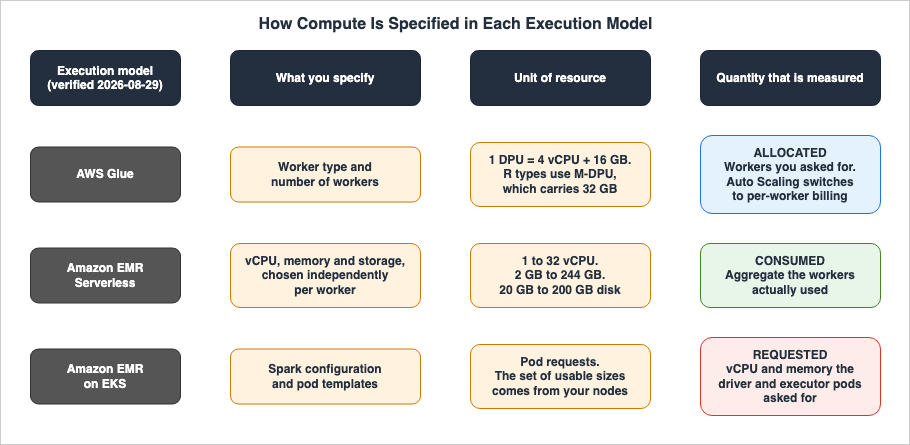
3.1 In AWS Glue, the Worker Type Fixes the DPU Count
In AWS Glue, you specify the type and number of workers. The worker type fixes the number of Data Processing Units (DPUs), and the DPU count fixes the vCPU and memory that come with it.The AWS Glue Developer Guide defines a DPU as follows: "A DPU is a relative measure of processing power that consists of 4 vCPUs of compute capacity and 16 GB of memory."
There are two main categories of worker types: the general-purpose G series and the R series, which provides more memory. The R series uses a different unit called an M-DPU. The developer guide puts it this way: "while a standard DPU provides 16 GB of memory, an M-DPU in R type workers provides 32GB of memory optimized for memory-intensive Spark applications." Even when referring to "1 DPU," the amount of memory varies significantly depending on the series.
| Worker Type | DPU | vCPU | Memory | Disk |
|---|---|---|---|---|
G.1X | 1 | 4 | 16 GB | 94 GB |
G.2X | 2 | 8 | 32 GB | 138 GB |
G.4X | 4 | 16 | 64 GB | 256 GB |
G.8X | 8 | 32 | 128 GB | 512 GB |
G.12X | 12 | 48 | 192 GB | 768 GB |
G.16X | 16 | 64 | 256 GB | 1024 GB |
R.1X | 1 M-DPU | 4 | 32 GB | 94 GB |
R.2X | 2 M-DPU | 8 | 64 GB | 138 GB |
R.4X | 4 M-DPU | 16 | 128 GB | 256 GB |
R.8X | 8 M-DPU | 32 | 256 GB | 512 GB |
This table comes from the dedicated worker types page in the AWS Glue Developer Guide. One caveat comes with it: the list of available worker types varies with the page you are reading. The glossary page lists
Standard, G.1X, G.2X, G.4X, G.8X, G.12X, G.16X, G.025X, and R.1X through R.8X. The dedicated worker type page carries neither Standard nor G.025X. The Valid Values line for WorkerType in the API reference carries seven: Standard, G.1X, G.2X, G.025X, G.4X, G.8X, and Z.2X. G.12X, G.16X, and the R series are absent from it. The Auto Scaling page specifies that G.025X is "only for Streaming jobs" and that Standard is not eligible for Auto Scaling. To confirm the options available in your specific region, it is best to check the job configuration screen in the AWS console.There are minimum and maximum limits for the number of DPUs. According to the API reference description for
MaxCapacity, for Apache Spark ETL jobs and streaming ETL jobs, "you can allocate from 2 to 100 DPUs. The default is 10 DPUs. This job type cannot have a fractional DPU allocation." For Python shell jobs, the allocation is either 0.0625 or 1, with a default of 0.0625. Note that MaxCapacity can only be specified for Glue jobs on version 1.0 or earlier; in version 2.0 and later, you specify the worker type and the number of workers.Note what is being specified here: the number of workers, not the resources actually used. By default the count is the number of workers you allocate. Auto Scaling allows you to modify this; the AWS Glue job parameter description for
--enable-auto-scaling explains it as follows: "Turns on auto scaling and per-worker billing when you set the value to true."Auto Scaling simultaneously manages two aspects: automatic adjustment of the number of workers, and charging on a per-worker basis. According to the developer guide, Auto Scaling is available from Glue 3.0 and can be enabled for all worker types except
Standard. Turning it on also changes what NumberOfWorkers counts: a ceiling rather than a number to hold.3.2 EMR Serverless Takes Three Axes Separately
EMR Serverless allows you to independently specify the vCPU, memory, and storage for your workers. Instead of choosing from a limited set of worker types, you have more granular control.According to the user guide's table, you can choose from six vCPU options: 1, 2, 4, 8, 16, and 32. The available memory ranges and increments vary depending on the vCPU option. For example, with 1 vCPU, you can choose between 2 GB and 8 GB in 1 GB increments. With 16 vCPU, you can choose between 32 GB and 120 GB in 8 GB increments. For 32 vCPU, you can only select from three discrete values: 60 GB, 120 GB, and 244 GB.
| Worker vCPU | Memory |
|---|---|
| 1 vCPU | 2 GB to 8 GB, in 1 GB increments |
| 2 vCPU | 4 GB to 16 GB, in 1 GB increments |
| 4 vCPU | 8 GB to 30 GB, in 1 GB increments |
| 8 vCPU | 16 GB to 60 GB, in 4 GB increments |
| 16 vCPU | 32 GB to 120 GB, in 8 GB increments |
| 32 vCPU | 60 GB, 120 GB, or 244 GB |
The option for 32 vCPU is a recent addition. An AWS What's New post dated July 7, 2026 states, "Amazon EMR Serverless now offers larger worker configurations of 32 vCPUs with up to 244 GB of memory, allowing you to run more compute and memory-intensive workloads." This contrasts with the previous maximum of 16 vCPU and 120 GB.
One more thing is worth flagging: the pages do not agree with each other here. The Amazon EMR pricing page still says you "can choose from 1 vCPU, 2 vCPU, 4 vCPU, 8 vCPU, to 16 vCPU per worker, memory from 2 GB to 120 GB per worker in 1 GB to 8 GB increments." While the user guide and the What's New page list 32 vCPU and 244 GB, the pricing page has not been updated. To confirm the maximum configuration options, it is more reliable to consult the user guide's
app-behavior section.Workers with 32 vCPUs carry an additional constraint. The user guide states that EMR Serverless adds Spark's memory overhead (10 percent of container memory by default, with a minimum of 384 MB) to the requested memory and rejects the job unless that total lands within 8 GB of one of the three discrete values. The example it gives is a 32 vCPU worker with
spark.executor.memory set to 100 GB: the total after the default overhead is 110 GB, which is more than 8 GB away from the supported 120 GB, so the job is rejected. Values between 102 GB and 109 GB are accepted.Storage represents a third, independent factor. Standard disks offer a capacity of 20 GB to 200 GB per worker, and the user guide states, "You only pay for additional storage beyond 20 GB that you configure per worker." For jobs with heavy shuffling, shuffle-optimized disks are available. Setting
spark.emr-serverless.executor.disk.type to shuffle_optimized in EMR 7.1.0 and later allows for up to 2 TB per worker. Furthermore, EMR 7.12 and later includes serverless storage. When spark.aws.serverlessStorage.enabled is set to true, capacity configuration is no longer required. The user guide states that it "stores intermediate data at no cost."3.3 In EMR on EKS, the Pod Requests Are the Unit
In EMR on EKS, Spark configurations directly translate to Kubernetes Pod resource requests. When you specifyspark.executor.cores and spark.executor.memory, Spark builds the Pods from those values, and the Kubernetes scheduler places them on nodes that can meet the request.There are no equivalents here for Glue's DPUs or the worker configuration tables used in EMR Serverless. The nodes in your EKS cluster decide the set of sizes you can pick from. If your node group only contains
m5.4xlarge instances, you can only deploy Pods that fit within that size.The specific configuration of each Pod is defined in the Pod template. The developer guide states that when you specify an S3 path for
spark.kubernetes.driver.podTemplateFile and spark.kubernetes.executor.podTemplateFile, Spark downloads those files and uses them to construct the driver and executor Pods. Anything Spark configuration cannot express, such as nodeSelector or tolerations, goes here.Ultimately, the quantity used for EMR on EKS billing is based on the "requested" resources. The pricing section for EMR on EKS states: "Pricing is based on requested vCPU and memory resources for the Task or Pod."
3.4 The Word "Worker" Carries Three Different Meanings
Reading the three models side by side, the wordworker is the one that trips you up.In EMR Serverless, a "worker" is a single execution unit created by specifying vCPU, memory, and storage. Both the Spark driver and executor also function as individual workers.
However, the meaning of "worker" is different in AWS Glue. The developer guide's glossary states, "A single Data Processing Unit (DPU) is also referred to as a worker." This defines a DPU as a worker. Yet the same developer guide's page on worker types gives
G.4X as "4 DPU (16 vCPUs, 64 GB memory)" and labels the column in its specification table "DPU per Node." Therefore, the glossary defines 1 DPU as 1 worker, while the worker types page indicates that a single worker consists of 4 DPUs. One developer guide uses the word worker at two different granularities.In practice, when creating jobs, the
NumberOfWorkers setting counts nodes, not DPUs. Specifying 10 workers for G.4X results in 40 DPUs. It appears that the glossary's description is a remnant from when the "Standard" worker type consisted of only 1 DPU. However, since both pages are part of the current documentation, using the term "worker" alone can lead to misunderstandings. When writing up a migration, drop down to the DPU count or the vCPU count.EMR on EKS has no concept of a worker at all. Instead, it uses Pods. While Kubernetes has the term "worker node," this refers to a node itself, not a Spark execution unit, and represents something entirely different.
3.5 Allocated, Consumed, and Requested Are Three Different Quantities
What matters more than the difference in units is the quantity each one measures.By default, AWS Glue measures based on the number of workers allocated. A job that allocated 10 workers and kept only 3 of them busy still counts as 10. When
--enable-auto-scaling is set to true, it switches to per-worker billing, measuring based on the number of workers actually active.EMR Serverless measures based on the aggregate of vCPU, memory, and storage actually consumed by the workers. AWS's FAQ explains, "your job may require 10 workers for the first 10 minutes of processing the job and 50 workers for the next 5 minutes. With fine-grained automatic scaling, you incur costs for only 10 workers for 10 minutes and 50 workers for 5 minutes."
EMR on EKS measures based on the vCPU and memory requested by the Pods. How much was actually used does not enter into it. Set
requests above what the job actually uses and the gap goes into the count all the same.This third difference has the most subtle but significant impact. When migrating from EMR Serverless to EMR on EKS, the measurement shifts from "consumed" to "requested." The Spark configuration can be migrated without changes, so the jobs will run. But unless the Pod's
requests are brought in line with actual usage, what gets counted drifts away from what the job actually consumed.4. How a Job Waits Before It Runs
On all three, a job can sit and wait between the moment it is submitted and the moment it actually starts running. The way it waits differs, and so does the treatment of the time spent waiting.4.1 AWS Glue Flex Keeps the Wait Outside the Interval
AWS Glue offers two execution classes: the defaultSTANDARD and FLEX, which utilizes spare capacity.A post on the AWS Big Data Blog introducing Flex jobs describes the lifecycle this way: "When a
start-job-run API call is issued, with the execution-class set to FLEX, AWS Glue will begin to request compute resources. If no resources are available immediately upon issuing the API call, the job will move into a WAITING state. No billing occurs at this point."Once capacity becomes available, the job moves to the
RUNNING state: "At this point, billing begins. You're charged only for the compute resources that are running at any given time, and only for the duration that they ran for." Furthermore, it states, "If capacity is reclaimed, billing for that capacity is halted as well."In essence, with Flex, the time spent waiting for capacity to become available falls outside the billed interval. On top of the "startup and shutdown are not included" rule from Section 2, the wait for capacity is left out as well.
Flex does have certain requirements. The help panel in AWS Glue Studio summarizes them in a single sentence: "Flex jobs require AWS Glue version 3.0 or later, supports only ETL type jobs, and no streaming sources." Three conditions: Glue 3.0 or later, an ETL type job, and no streaming source.
The
--timeout setting turns into a practical necessity. The help panel states, "It is unlikely, but possible, that jobs will run significantly longer due to resource reallocation. We recommend preventing that by setting a shorter timeout; for example, 120 minutes." The blog, on the other hand, notes, "A parameter of particular importance for Flex Jobs is the --timeout value." Set it too long and the job keeps waiting for capacity that will not arrive. Set it too short and the job ends in TIMEOUT.If left unspecified, the default value can lead to longer runtimes. According to the API reference documentation for
Timeout, leaving the field blank gives 2,880 minutes on Glue 4.0 and earlier and 480 minutes on Glue 5.0 and later. The maximum allowed value is 7 days, or 10,080 minutes; jobs configured with values exceeding this limit will throw an exception. With Flex you set a shorter value explicitly.Flex is set like this:
aws glue start-job-run \
  --job-name my-etl-job \
  --execution-class FLEX \
  --timeout 120
4.2 The Same WAITING State Has a Second Cause
AWS Glue's WAITING state has a second entrance besides the Flex capacity wait. That entrance is job run queuing.An AWS Big Data Blog article introducing job queuing states, "In the current job run lifecycle, the job-level and account-level limits are checked when a job starts, and the job moves to a Failed state when these limits are reached. With job queuing, your job run state goes into a Waiting state to be reattempted instead of Failed."
Four limits send a run into the queue: concurrent job runs per account, concurrent runs of a single job, total concurrent DPUs, and IP address exhaustion inside a VPC. Retries are limited to "a maximum of 15 minutes or 10 attempts, whichever comes first."
One
WAITING state name covers both the Flex capacity wait and the wait for a reattempt after a limit. The JobRunState field takes ten values – STARTING, RUNNING, STOPPING, STOPPED, SUCCEEDED, FAILED, TIMEOUT, ERROR, WAITING, EXPIRED – and only one of them is WAITING. The API reference points at where the difference lives: "For example, when a job run is in a WAITING state as a result of job run queuing, the field has the reason why the job run is in that state." The cause is in StateDetail, not in the state name.One point deserves care here. A source states "No billing occurs at this point" for the Flex wait. No source saying the same thing about the job run queuing wait turned up in what this article was able to check. The two
WAITING states are better kept apart.4.3 EMR Serverless Builds a Warm Pool with initialCapacity
What cuts the wait on EMR Serverless is pre-initialized capacity. The user guide describes it this way: "EMR Serverless provides an optional feature that keeps driver and workers pre-initialized and ready to respond in seconds. This effectively creates a warm pool of workers for an application. This feature is called pre-initialized capacity. To configure this feature, set the initialCapacity parameter of an application to the number of workers you want to pre-initialize."For the wait when the feature is not configured, the Amazon EMR FAQ gives a number: "An EMR Serverless application without pre-initialized workers takes up to 120 seconds to determine the required resources and provision them."
The
initialCapacity parameter also affects the application's state transitions. The user guide states, "An application moves to the STARTED state only if the requested pre-initialized capacity has been created and is ready to use." It continues, "The state of an application with no pre-initialized capacity can immediately change from CREATED to STARTED." The application will not transition to the STARTED state until the requested number of workers are available.An application is created like this:
aws emr-serverless create-application \
  --type SPARK \
  --name my-application \
  --release-label emr-7.13.0 \
  --initial-capacity '{
    "DRIVER": {
      "workerCount": 1,
      "workerConfiguration": {"cpu": "4vCPU", "memory": "16GB"}
    },
    "EXECUTOR": {
      "workerCount": 10,
      "workerConfiguration": {"cpu": "4vCPU", "memory": "16GB"}
    }
  }'
The application automatically stops when it becomes idle. The user guide's section on default behavior states: "An application by default is configured to auto-stop when idle for 15 minutes. When an application changes to the
STOPPED state, it releases any configured pre-initialized capacity." You can change the idle timeout, and you can turn auto-stop off entirely.There are limitations when changing the
initialCapacity value. The user guide explains, "You can only change configurations when the application is in the CREATED or STOPPED state." It further states, "Because you can't make partial modifications, specify all compute configurations when you change values." You cannot resize the warm pool of a running application, and when you do change it you respecify every compute configuration, not just the one you want to move. Tuning the configuration means stopping the application first.4.4 Two Official Statements About Pre-initialized Capacity
Two official passages cover what happens to pre-initialized capacity while an application sits idle. Both appear below in their original wording.The EMR Serverless user guide's page on pre-initialized capacity states: "You will be paying for provisioned pre-initialized workers even when the application is idle, hence we suggest enabling it for use cases that benefit from the fast start-up time and sizing it for optimal utilization of resources. EMR Serverless applications automatically shut down when idle. We suggest keeping this feature on when using pre-initialized workers to avoid unexpected charges."
The API reference says something else. The
billedResourceUtilization field carries the same sentence on both the JobRun object and the Session object: "The billed resources include a 1-minute minimum usage for workers, plus additional storage over 20 GB per worker. Note that billed resources do not include usage for idle pre-initialized workers."The first reads as: you pay for provisioned pre-initialized workers even while the application is idle. The second reads as: the usage of idle pre-initialized workers is not part of what was billed.
These two statements should not be flattened into one conclusion. One reading that fits both is that the user guide talks about an application while the API field talks about the amount attributed to one job run or one session. Idle time that belongs to no particular job run would naturally fall outside that run's
billedResourceUtilization. Neither page says that, though.In practice, go by what the documentation states outright. The user guide recommends keeping auto-stop enabled "to avoid unexpected charges." If you configure
initialCapacity, leave auto-stop on. And if something collects billedResourceUtilization as a per-job usage record, assume it will not line up with what is counted for the application as a whole.4.5 On EMR on EKS, Node Supply Is Yours to Arrange
EMR on EKS has nothing corresponding to Flex and nothing corresponding toinitialCapacity. What decides the wait is whether a node exists that can take the Pod.A Pod lands immediately if a node has room for it. If none does, the Pod sits in
Pending until a node arrives. Cluster Autoscaler or Karpenter adds the nodes, and both are EKS-side configuration rather than EMR features.Move a job that used
initialCapacity to cut its wait onto EMR on EKS, and the mechanism that cut the wait leaves EMR entirely. To get something equivalent to a warm pool you either keep nodes standing or arrange it in Karpenter. The design of node supply belongs to an existing article, and Section 1.3 links to it.5. How Dependencies Get Into the Job
A Spark script usually depends on libraries it did not write. The three execution models differ in how those libraries get in.5.1 AWS Glue Declares Dependencies as Job Parameters
AWS Glue provides job parameters that allow you to add dependencies. From the list of job parameters in the developer guide, here are those relevant to Spark jobs:| Parameter | Function |
|---|---|
--additional-python-modules | Installs comma-separated Python packages using pip3. You can specify packages in the PyPI format (package==version) or provide an S3 path to a custom distribution. |
--extra-py-files | Adds Python modules from S3 to the driver's Python path. Only individual files are supported; directories are not. |
--extra-jars | Copies files from S3 to both the driver and executor, adding them to the Java classpath. Files do not need to have a .jar extension. |
--extra-files | Copies configuration files and other files from S3 to the driver's working directory. Not available for Python shell jobs. |
--datalake-formats | Specifies the required formats (e.g., hudi, delta, iceberg), adding the corresponding JAR files to the classpath. Available in Glue 3.0 and later. |
--python-modules-installer-option | Specifies options to pass to pip3. |
Certain features have been added in different versions. According to the developer guide's release notes, Glue 5.0 introduced support for installing Python libraries using
requirements.txt, and Glue 6.0 added --python-virtual-env, which allows you to specify a customer-managed Python virtual environment.AWS Glue offers no mechanism for supplying your own execution image. No job parameter and no API field for specifying a custom container image on a Glue Spark job turned up in this article's checking. All dependencies must be declared as job parameters. While this is a limitation, it also means the job definition names every dependency the job has.
5.2 EMR Serverless Offers a Custom Image or a Python Virtual Environment
EMR Serverless offers two options.One is using a custom image. The user guide provides an example Dockerfile that starts from EMR Serverless's public base image. This base image must be selected to match the type of your application and the release label. The user guide explicitly states: "Use the correct base image that matches the type (Spark or Hive) and release label (for example,
emr-6.9.0) for your application."# Replace the tag with the release label your application uses
FROM public.ecr.aws/emr-serverless/spark/emr-<release-label>:latest
USER root
RUN pip3 install pandas pyarrow
# EMR Serverless runs the image as the hadoop user
USER hadoop:hadoopSeveral constraints apply. The user guide's "Considerations and limitations" section highlights that
CMD and ENTRYPOINT instructions are ignored, that environment variables such as JAVA_HOME and SPARK_HOME should not be modified, and that the image size cannot exceed 10 GB. The Amazon ECR repository also has to sit in the same Region where the EMR Serverless application launches.The other option is to define a Python virtual environment and provide it. The user guide explains how to archive a virtual environment, including its dependencies, and store it on S3. A Spark setting then points the job at that archive at run time, so dependencies can be swapped without rebuilding an image.
5.3 EMR on EKS Combines a Custom Image with a Pod Template
EMR on EKS also takes custom images derived from the EMR runtime. On top of that, a pod template lets you shape everything around the container.A pod template is where you write the Kubernetes settings Spark configuration cannot express. As the developer guide states, "You can use pod template files to define the configurations of driver or executor pods that Spark configurations don't support."
apiVersion: v1
kind: Pod
spec:
  nodeSelector:
    karpenter.sh/capacity-type: on-demand
  containers:
    # This name is interpreted as the Spark driver container
    - name: spark-kubernetes-driver
Pod templates should be stored in S3, and are referenced using
spark.kubernetes.driver.podTemplateFile and spark.kubernetes.executor.podTemplateFile. The developer guide notes, "Spark uses the job execution role to load the pod template, so the job execution role must have permissions to access Amazon S3 to load the pod templates."Anything only the Kubernetes vocabulary can say goes here: sidecar containers, volume mounts,
tolerations, serviceAccountName. Of the three, only EMR on EKS lets you specify anything outside the container itself.5.4 A Custom Image Moves the Billed Clock
This brings us back to Section 2.Choose a custom image on EMR Serverless and the start of the billed interval moves back from the moment the workers are ready to the moment the image download begins. The pricing page carries that in a note. In EMR on EKS the default start point is already the image download, so a larger image does not shift the start point, but the time the download takes falls inside the interval.
So the choice of how dependencies are delivered feeds back into the definition of the billed interval. Baking every dependency into the image is a sound way to remove installation from run time. On EMR Serverless it also moves the start of the billed interval earlier, and those two effects come together.
AWS Glue has no image to replace, so the feedback does not arise. What happens instead is that
--additional-python-modules installs packages on the job side. Glue states that it does not bill for startup and shutdown time, but whether package installation counts as part of that "startup" is not stated anywhere this article was able to check.6. Where the Operational Boundary Sits
6.1 The Number of Ways to Submit a Job Differs
AWS Glue hasStartJobRun, callable from the console, the AWS CLI, the SDKs, and from Glue triggers and workflows. There is one entry point. Interactive sessions are a separate resource with their own API, and Spark Connect reaches those sessions rather than submitting jobs, so neither is counted here.EMR Serverless also has
StartJobRun. There is one entry point here too, and it submits a job to an application.EMR on EKS has four. The "Running Spark jobs with Amazon EMR on EKS" section of the developer guide lists the following four options for submitting jobs:
| Submission Method | Supported EMR Releases |
|---|---|
StartJobRun API | All EMR on EKS releases |
| Spark operator (Kubernetes operator for Apache Spark) | 6.10.0 and later |
spark-submit | 6.10.0 and later |
| Apache Livy | 7.1.0 and later |
The four are four doors onto the same job. The developer guide's billing note, with its "regardless of how the job is orchestrated," is saying that it does not distinguish among them.
The key benefit here is when you already have an existing orchestration system. If you are currently using Airflow to call
StartJobRun, you can use the same approach with Glue, EMR Serverless, or EMR on EKS. However, if you want to manage Spark applications as Kubernetes manifests, EMR on EKS is the only option.6.2 Only EMR on EKS Puts You on the Kubernetes Side
The first thing created with EMR on EKS is a virtual cluster. According to the developer guide, "A virtual cluster is a Kubernetes namespace that Amazon EMR is registered with." It continues, "These registered clusters in Amazon EMR are called virtual clusters because they do not manage physical compute or storage but point to a Kubernetes namespace where your workload is scheduled."A virtual cluster does not possess physical resources; it simply references a Kubernetes namespace. The EKS cluster that hosts this namespace is one that you create and manage yourself. You are responsible for the design of node groups, Kubernetes version upgrades, CNI and storage add-ons, and scheduler configuration – all of which are under your control.
aws emr-containers create-virtual-cluster \
  --name my-virtual-cluster \
  --container-provider '{
    "id": "my-eks-cluster",
    "type": "EKS",
    "info": {"eksInfo": {"namespace": "spark-jobs"}}
  }'
AWS Glue and EMR Serverless do not have equivalents to this. When you submit a job, the environment that runs it is provisioned for you. While you may configure connections to a VPC, you do not manage any nodes.
Because the boundaries are different, a migration shifts the responsibility for operations. Moving from AWS Glue or EMR Serverless to EMR on EKS means not only changing the way Spark is executed, but also taking on the responsibility for managing a Kubernetes cluster. Conversely, moving in the opposite direction means relinquishing that responsibility.
6.3 How the Spark Version Is Chosen Differs
The three execution models decide the Spark version in different ways.In AWS Glue, choosing a Glue version automatically determines the corresponding versions of Spark, Python, and Scala. A table in the developer guide's release notes holds that mapping.
| AWS Glue Version | Spark | Python | Scala | Java |
|---|---|---|---|---|
| AWS Glue 6.0 | 4.1.1 | 3.13 | 2.13.17 | 17 |
| AWS Glue 5.1 | 3.5.6 | 3.11 | 2.12.18 | 17 |
| AWS Glue 5.0 | 3.5.4 | 3.11 | 2.12.18 | 17 |
| AWS Glue 4.0 | 3.3.0 | 3.10 | – | 8 |
| AWS Glue 3.0 | 3.1.1 | 3.7 | – | 8 |
A dash in the Scala column means the release notes do not list a Scala version for that release, not that Scala is unavailable.
A common oversight is the default behavior. If you create a job without specifying a version, it defaults to 5.1, not the latest 6.0. The developer guide states, "AWS Glue 5.1 is the default version for jobs created without specifying an AWS Glue version."
In Amazon EMR, the release label decides the version. Both EMR Serverless and EMR on EKS use release labels such as
emr-7.13.0 to specify the Spark version included in that release.A key point to note is that Amazon EMR has a separate release series specifically for Spark. This is designated as
emr-spark-8.0.0. The migration section of the release guide clarifies, "Separate release train - The release label is emr-spark-8.0.0, not emr-8.0.0. This release focuses on Spark. For Flink, HBase, Phoenix, Tez, Trino, Presto, use EMR 7.x and wait for the future emr-8.0.0 multi-engine release." A multi-engine release labeled emr-8.0.0 does not exist yet. The latest version in the EMR 7.x series is 7.13, and according to an AWS What's New post from April 2026, the default Python version for Spark is 3.11.That separate train is not restricted to one deployment option. Its release notes state, "This release is available across all Amazon EMR deployment modes," and name EC2, EKS, and Serverless. So the choice between EMR Serverless and EMR on EKS does not decide whether Spark 4 is within reach.
What the version selector does decide is larger than a number. Both routes to Spark 4 – AWS Glue 6.0 and
emr-spark-8.0.0 – carry the same set of breaking changes, and both arrive through a field that looks like a routine version bump. The emr-spark-8.0.0 migration notes say "All Spark 4.x builds use Scala 2.13. Recompile any custom JARs built against Scala 2.12," and put ANSI SQL mode on by default. The AWS Glue 6.0 migration checklist says the same things in its own words: "Recompile custom JARs against Scala 2.13.17," "Review queries for ANSI mode impact," and "Remove EMRFS-specific configurations. S3A is now the default and only S3 connector." Picking an execution model and picking a Spark version are not separate decisions, because the version is selected through the execution model's own field.Which version supports which Apache Iceberg format version is outside the scope of this article. An existing article on this site owns that mapping, and Section 1.3 links to it.
7. What You Rewrite When You Move a Job
The material above, rearranged into the items a migration actually touches.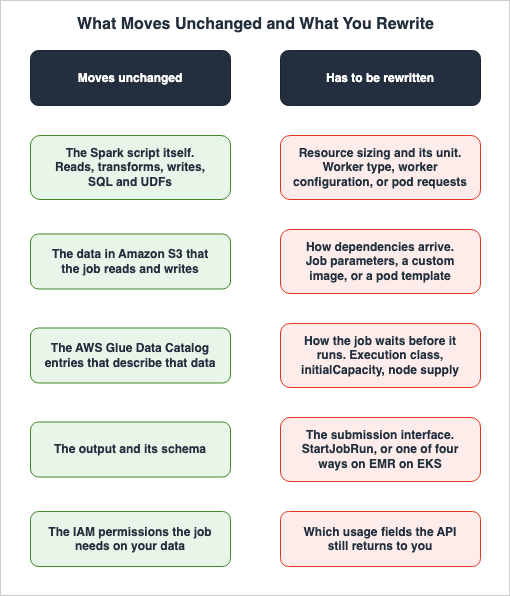
7.1 The Five Things You Rewrite
| Item | AWS Glue | Amazon EMR Serverless | Amazon EMR on EKS |
|---|---|---|---|
| Resource sizing | Worker type and count | Independently specify vCPU, memory, and storage | Spark configuration and pod template |
| Dependency delivery | Job parameters | Custom image or Python virtual environment | Custom image and pod template |
| Waiting | Execution class and --timeout | initialCapacity and auto-stop | Node provisioning settings |
| Submission interface | StartJobRun | StartJobRun | Four ways to choose from |
| Usage records | ExecutionTime. DPUSeconds is conditional | billedResourceUtilization and others | No field returns resource usage |
The Spark script itself does not appear in any of the columns in this table. Even if you move it, the script will run. What won't work are the five items surrounding the script.
7.2 Four Things to Check Before You Move
First, how long does one run take? The shorter the execution time, the larger the difference between the starting points looms in proportion. If you run a large volume of jobs that finish in tens of seconds, that difference is not a size you can ignore.Second, how are dependencies brought in? Job parameters and a custom image are not interchangeable: AWS Glue offers only the former and has no image to build, while EMR on EKS expects the latter. Moving in either direction means rewriting the delivery, and at the destination the size of the image can land inside the billed interval.
Third, how is waiting handled? Operations that lean on Flex's
WAITING state, or on a warm pool built with initialCapacity, have no direct equivalent at the destination. If the destination is EMR on EKS, you rebuild those mechanisms on the EKS side.Fourth, where do usage records come from? If something collects per-job consumption today, confirm first that the API field it reads still exists at the destination.
7.3 Not Whether You Can Move, but What Changes
When decisions about migration are based solely on "is it possible to migrate?", the answer is often "yes." All three run Apache Spark, and the script carries over as is.The decisive point is not technical feasibility. It is about which assumptions in the current design stop holding after the move. Consider designs that rely on processing a large volume of short jobs, baking dependencies into the image, erasing the wait with a warm pool, or collecting usage records per job. Each of them stands on a property of one particular execution model. Moving changes that footing.
8. Failures That Show Up After the Move
8.1 Pod requests Carry Over Without Matching Actual Usage
Moving from EMR Serverless to EMR on EKS, the Spark configuration comes along untouched. spark.executor.memory and spark.executor.cores keep the same names and the same meanings on both.What changes is what those values are used for. On EMR Serverless they set the worker configuration, and the aggregate the workers actually consume is what gets counted. On EMR on EKS they become the Pod
requests, and the requested amount is what gets counted. This is reflected in the pricing page, which states, "Pricing is based on requested vCPU and memory resources for the Task or Pod."If
spark.executor.memory carried a generous buffer on EMR Serverless, the unused part of it was never counted. On EMR on EKS the requested amount is counted whether the job uses it or not. The job finishes cleanly, so the gap does not show up in the run result.8.2 The Meaning of NumberOfWorkers Changes Under Auto Scaling
When you enable --enable-auto-scaling in AWS Glue, NumberOfWorkers stops being a number the service holds for you and becomes a ceiling. The developer guide's CLI examples include a comment stating "NumberOfWorkers": 20, // represents Maximum number of workers.Turn Auto Scaling on for a job that already exists and the same
NumberOfWorkers value means something else than it did the day before. The developer guide adds a second effect: Auto Scaling sets spark.sql.shuffle.partitions and spark.default.parallelism from the maximum DPU count. A job that pinned those values loses them. To hold them, write them back with --conf.8.3 A 32 vCPU Worker Rejects the Job
A 32 vCPU worker accepts only three memory values. The user guide states, "EMR Serverless validates the total memory request (spark configured memory plus memory overhead) and rejects jobs whose total does not fit one of the three configurations."If a job that previously ran on 16 vCPU workers, with the same
spark.executor.memory setting, is migrated to 32 vCPU workers by only increasing the vCPU count, it can be rejected because the total, once overhead is added, sits more than 8 GB away from every one of the three supported values. The job fails, so this one announces itself. What the error does not make obvious is that the rejection turns on the total after overhead, not on the memory value you configured.8.4 Pre-initialized Capacity Is Configured but Never Used
Even wheninitialCapacity is set, a job may not use those workers. The user guide notes, "Spark adds a configurable memory overhead, with a 10% default value, to the memory requested for driver and executors. For jobs to use pre-initialized workers, the initial capacity memory configuration should be greater than the memory that the job and the overhead request."If you create warm pool workers with 16 GB of memory and set the job's
spark.executor.memory to 16 GB as well, the request, including the 10% overhead, exceeds the worker's capacity. The job then acquires new workers, and the purpose of creating the warm pool is not achieved. The job finishes cleanly, so this does not show up in the run result.The mismatch runs the other way too. The user guide gives the case of a Spark executor set to 2 CPUs and 8 GB against a pre-initialized worker of 4 CPUs and 16 GB, where the executor uses half of what the worker holds. Warm pool workers and job container sizes must be aligned for the system to function as intended.
8.5 A Job That Cannot Use Flex Is Set to Flex
Flex does not apply to every job. It works only on ETL type jobs on Glue 3.0 or later, and not on jobs that read from streaming sources. Setting--execution-class FLEX on a streaming job is not simply ineffective; the API reference states that "Only jobs with AWS Glue version 3.0 and above and command type glueetl will be allowed to set ExecutionClass to FLEX."The wait falling outside the billed interval and the job finishing later are also two different things. If you use Flex for processes with strict deadlines, you may find that those deadlines are missed. According to the AWS Glue FAQ, Flex is best suited for "preproduction jobs, testing, and data loads," all of which are designed to accommodate variable start and completion times.
8.6 EKS Cluster Operations Fall Out of the Migration Plan
A common challenge when migrating to EMR on EKS is the ongoing operation of the EKS cluster itself. While creating a virtual cluster falls within EMR's responsibilities, the underlying EKS cluster remains outside of EMR's management.Kubernetes version upgrades, node group replacements, and add-on updates occur on schedules separate from Spark jobs. Migrating from AWS Glue or EMR Serverless means taking on an operational cycle that previously didn't exist.
9. Frequently Asked Questions
Q. Which of the three should I choose?This article does not pick one for you. What it offers is the material for the decision: what changes when you move between them. As a rough tendency, if you already operate an EKS cluster and want to manage it using Kubernetes terminology, EMR on EKS is a natural choice. If you would rather not run the execution environment yourself, EMR Serverless or AWS Glue fits. The key difference between AWS Glue and EMR Serverless lies in whether you want to declare dependencies through job parameters or create your own custom images.
Q. When does the difference in starting points actually matter?
The difference matters when the job runs for a short time, or when the image is large. For a job that runs for several hours, a difference of tens of seconds at the start is small in proportion. For a design that runs a large volume of jobs finishing in tens of seconds, it is large in proportion. Which way it cuts is decided by the shape of your own jobs.
Q. Does AWS Glue not charging for startup time mean that startup is fast?
No. It means that the startup time is left out of the billed interval. The startup still happens, and it sits inside the wall-clock time between submitting a job and getting the result. The developer guide release notes for AWS Glue 2.0 do mention "reduced startup times," but that is a separate claim on a separate page, and it does not follow from the one about billing.
Q. If I use pre-initialized capacity, will idle time be charged?
The official documentation provides two different statements. The EMR Serverless user guide states, "You will be paying for provisioned pre-initialized workers even when the application is idle, hence we suggest enabling it for use cases that benefit from the fast start-up time." Conversely, the API reference description for the
billedResourceUtilization field states, "billed resources do not include usage for idle pre-initialized workers." This article does not favor one over the other. The user guide explicitly recommends keeping application auto-stop enabled.Q. How does using a custom image affect the billed interval?
On EMR Serverless the starting point moves back from the moment workers are ready to run the workload to the moment the image download begins. A note on the Amazon EMR pricing page says so. On EMR on EKS the default starting point is already the image download, so a custom image does not move it. AWS Glue offers no mechanism for supplying your own execution image.
Q. How many ways are there to submit jobs to EMR on EKS?
There are four: the
StartJobRun API, the Spark operator, spark-submit, and Apache Livy. The Spark operator and spark-submit are available from Amazon EMR 6.10.0 and later, while Apache Livy is available from 7.1.0 and later. The developer guide's billing note says the calculation applies regardless of how the job is orchestrated, and names all four.Q. What does
WAITING mean in AWS Glue?There are two possible causes. One is the Flex execution class waiting for spare capacity. The other is job run queuing, waiting to be reattempted after a concurrency limit, a DPU limit, or IP address exhaustion in a VPC. Only one
JobRunState value exists, so the StateDetail field tells the two apart.Q. What happens if you do not specify a version in AWS Glue?
The job gets AWS Glue 5.1. The developer guide's release notes state, "AWS Glue 5.1 is the default version for jobs created without specifying an AWS Glue version." The latest version is 6.0, so the default and the latest are not the same thing.
Q. Can I specify Amazon EMR 8.0?
No. The release label
emr-8.0.0 does not exist. There is a separate series specifically for Spark, emr-spark-8.0.0. The EMR release guide explicitly states, "The release label is emr-spark-8.0.0, not emr-8.0.0," and recommends using EMR 7.x if you are using Flink, HBase, Phoenix, Tez, Trino, or Presto.Q. Has AWS Glue closed to new customers?
No. AWS Glue's Spark jobs are current. What closed to new customers is the AWS Glue for Ray job type, as of April 30, 2026. Amazon EKS and the KubeRay Operator are recommended as migration options.
Q. Can I check data quality inside the job and fail the job when something is wrong?
Yes, and how to design it is outside the scope of this article. It sits at a different layer from the choice of execution model, and the same design decisions come up whichever of the three you pick. Data Quality and Data Contracts on AWS - Where to Evaluate, What Each Failure Action Does to Your Data, and Why the Default Is to Keep Going covers that layer.
10. Summary
The decision to move the same Spark job to a different execution model on AWS is not settled by comparing features. All three – AWS Glue, EMR Serverless, and EMR on EKS – run Apache Spark, read and write to S3, and reach the Data Catalog. The script itself carries over unmodified.Three things came out of the checking behind this article.
The billed interval starts at a different place on each of the three. AWS Glue leaves startup and shutdown out. EMR Serverless starts when the workers are ready, and with a custom image it starts at the image download. EMR on EKS starts at the image download by default, whatever the registry and whatever the submission path. Move the same job and the definition of the time you pay for changes with it.
Each of the three measures a different quantity. AWS Glue measures the number of workers allocated, EMR Serverless aggregates the resources consumed, and EMR on EKS measures the amount requested by the Pods. Those three quantities – allocated, consumed, and requested – diverge even when the job finishes cleanly. The "requested" one in particular carries a setting made with room to spare straight through to what is counted.
How dependencies are delivered feeds back into the billed interval. Baking dependencies into the image to remove installation from run time is a sound design. On EMR Serverless it also moves the start of the billed interval earlier, and on EMR on EKS the image size goes straight into the length of that interval. How dependencies are delivered and where the billed interval starts are not independent of each other.
Five things get touched in an actual migration: resource sizing, dependency delivery, waiting, the submission interface, and usage records. The Spark script itself appears in none of the five.
EMR on EKS is the one where the boundary sits somewhere else. A virtual cluster points at a Kubernetes namespace and holds no physical resources. The underlying EKS cluster is one that you manage yourself. Moving there means changing the Spark execution model and taking on a Kubernetes cluster at the same time.
Framed as "can this be moved?", the answer is almost always yes. The question worth asking is the other one: after the move, which assumptions in the current design stop holding?
11. References
- Cost optimization in analytics services - AWS Whitepaper: Cost Modeling Data Lakes for Beginners
- AWS Glue concepts - AWS Glue Developer Guide
- AWS Glue worker types - AWS Glue Developer Guide
- Using job parameters in AWS Glue jobs - AWS Glue Developer Guide
- Using auto scaling for AWS Glue - AWS Glue Developer Guide
- AWS Glue versions - AWS Glue Developer Guide
- AWS Glue version support policy - AWS Glue Developer Guide
- Migrating AWS Glue for Spark jobs to AWS Glue version 6.0 - AWS Glue Developer Guide
- AWS Glue for Ray end of support - AWS Glue Developer Guide
- JobRun - AWS Glue API Reference
- Flexible Execution - AWS Glue Studio Console Help Panel
- DPU usage - AWS Glue Studio Console Help Panel
- Serverless Data Integration - AWS Glue FAQs
- What is Amazon EMR Serverless? - Amazon EMR Serverless User Guide
- Understanding application behavior in EMR Serverless - Amazon EMR Serverless User Guide
- Pre-initialized capacity for working with an application in EMR Serverless - Amazon EMR Serverless User Guide
- Customizing an EMR Serverless image - Amazon EMR Serverless User Guide
- Using custom images with EMR Serverless - Amazon EMR Serverless User Guide
- Using shuffle-optimized disks - Amazon EMR Serverless User Guide
- Using serverless storage for Amazon EMR Serverless - Amazon EMR Serverless User Guide
- JobRun - Amazon EMR Serverless API Reference
- Running Spark jobs with Amazon EMR on EKS - Amazon EMR on EKS Development Guide
- What happens when you submit work to an Amazon EMR on EKS virtual cluster - Amazon EMR on EKS Development Guide
- JobRun - Amazon EMR on EKS API Reference
- Running Spark jobs with the Spark operator - Amazon EMR on EKS Development Guide
- Running Spark jobs with spark-submit - Amazon EMR on EKS Development Guide
- Using Apache Livy with Amazon EMR on EKS - Amazon EMR on EKS Development Guide
- Using pod templates - Amazon EMR on EKS Development Guide
- Managing virtual clusters - Amazon EMR on EKS Development Guide
- Register the Amazon EKS cluster with Amazon EMR - Amazon EMR on EKS Development Guide
- AWS runtime for Apache Spark (emr-spark-8.0.0) - Amazon EMR Release Guide
- Amazon EMR Pricing
- Amazon EMR FAQs
- Amazon EMR Serverless now supports larger worker sizes to run more compute and memory intensive workloads - AWS What's New
- Amazon EMR 7.13 now available with Python 3.11 - AWS What's New
- Introducing AWS Glue Flex jobs: Cost savings on ETL workloads - AWS Big Data Blog
- Introducing job queuing to scale your AWS Glue workloads - AWS Big Data Blog
- Top 10 best practices for Amazon EMR Serverless - AWS Big Data Blog
- Introducing AWS Glue 5.1 for Apache Spark - AWS Big Data Blog
References:
Tech Blog with curated related content
Written by Hidekazu Konishi