AWS DevOps Agent - What It Investigates by Default, What Needs Approval, and What It Refuses Even When the Role Allows It
First Published:
Last Updated:
That question is not answered by a list of features; the answer lies in understanding its permissions, and it is not written down in any single policy. Permissions are narrowed down from the outside in. This article organizes that process into eight layers, three of which you do not own.
AWS applies two of the layers you do not own as session policies. They sit inside IAM, but not anywhere you can reach. The remaining layer exists outside of IAM. Even when the ceiling policy permits deletion, the agent itself refuses it. The standard IAM principle that, if a role permits it, the action can be performed, doesn't apply here.
This article traces those eight layers, starting from the outside and working inward, using primary sources. It examines two managed policies, three STS actions, three refusals, and one line stating that operator approval does not override them.
Regarding Scope. This article focuses on the boundaries of permissions and approvals for the AWS DevOps Agent. The definition of the term Agent Space itself is already established in a previous publication, AI-Assisted Security Testing on AWS, as the same term is used in the context of other services. Therefore, this article will only borrow existing conclusions and will not redefine the term. This article will not explain the order in which session policies and permissions boundaries are evaluated from the IAM perspective. That topic is the subject of IAM Policy Evaluation Logic Step-by-Step. Information on how to configure CloudWatch and X-Ray, and what data to collect, can be found in AWS Observability Architecture Guide. The reliability design for the side that operates an agent, meaning retries, loop detection, and timeout budgets, is covered in Agent Reliability Engineering Design Guide, and it points in the opposite direction from this article. That publication addresses the side that operates an agent, while this article is about an agent doing the operating. The subject of automation boundaries itself has its prototype in a sibling article that follows the same title pattern, What AWS Transform Automates and What Stays Human. This article will not delve into the specifics of AWS Transform. Pricing, credits, and handling based on different AWS Support plans are outside the scope of this article.
Regarding Terminology. This article uses the term Agent Space exclusively in reference to the Agent Space concept in AWS DevOps Agent. A similar concept also exists in AWS Security Agent, and previous publications address that specific instance. Operator is an AWS term referring to the individual who grants approval. Directed action is an AWS term referring to operations that modify resources, and this article will not use alternative terminology for it. Elevated role is an AWS term referring to the roles registered for performing directed actions. This article uses the term investigation role for the roles that the Agent Space assumes to investigate, encompassing both the primary account role and the secondary account role. This article uses the term layer for the mechanisms that narrow the scope of permissions, and keeps it distinct from words like step or stage.
Regarding the term Approval. In this article, approval refers solely to the act of an operator authorizing the execution of a directed action. Two other publications in this series use the same term for different concepts. AWS Agent Registry and the Agentic Resource Discovery Specification refers to the review of records prior to public release, while AWS WAF AI Traffic Monetization refers to the authorization of payments without human intervention. If you read all three publications sequentially, you will need to substitute this term accordingly.
Regarding the term Guardrail. The user guide uses this term to refer to two distinct concepts. AWS applies one of them when it assumes a role, and the user guide calls that one a permission guardrail. The other is a refusal the agent itself holds against SDK operations, which the user guide also calls a guardrail. These two concepts differ in their location and how they function. This article calls the former the permission guardrail and calls the latter a refusal.
Regarding the Verification Date. All information provided in this article regarding the state, default values, policy versions, and spelling of identifiers was verified against primary source materials as of September 14, 2026. Managed policies are subject to revision. The specific versions referenced are indicated in the text. A comprehensive list of supported actions is designed to be accessed through the console and is therefore not included in this article.
Table of Contents
- 1. Handing Over the Investigation
- 2. Two Capability Areas on Two Different Release Tracks
- 3. The Order in Which Permission Narrows
- 4. The Outer Edge Is the Association, Not the Region
- 5. The Default Is Read-Only, and It Contains Two Writes
- 6. A Ceiling You Do Not Own
- 7. Mutation Is Off by Default
- 8. The Elevated Role Is a Ceiling, Not a Grant
- 9. Every Approval Builds Its Own Cage
- 10. What Is Refused Even When It Is Permitted
- 11. Third-Party Tools Are Governed by Classification
- 12. What Is Left Behind
- 13. Where the Sources Disagree, and Which One This Article Follows
- 14. Failure Modes and Anti-Patterns
- 15. Frequently Asked Questions
- 16. Summary
- 17. References
1. Handing Over the Investigation
1.1 The two questions this article answers
When considering whether to grant an investigation agent access to your account from a permissions perspective, the questions ultimately boil down to two.First, what are you allowing in your own account in order to let the agent investigate? Are you simply creating a single role, or could the scope of access be broader than you anticipate?
Second, does anything get changed without you asking? If this remains unclear, it will be impossible to make an informed decision about associating it with a production account.
The user guide answers both structurally. Regarding the first point, the permissions used for investigation come from a managed policy written for reading, and that policy, together with a session policy AWS applies, determines the effective permissions. Regarding the second point, any actions that modify resources are disabled by default, and even if enabled, require human approval for each operation.
However, the implications derived from these two answers are more complex. The ceiling is declared three times within this system, and a different party declares it each time. First, the user defines the permissions in the role's policy. Second, AWS applies its own session policy. Third, the agent itself refuses certain operations. The third point exists outside of IAM, so it won't be visible even if you review the policies. The latter half of this article will address this issue.
1.2 Where this article stops
This article does not address Agent Space design principles, IAM policy evaluation logic, observability configurations, or the agent's own reliability design. The scope note at the top lists the articles those topics are delegated to. This article does not discuss pricing or credits either.Previously published AI-Assisted Security Testing on AWS treats Agent Space as a unit for separating permissions and audit trails. This article will not redefine that definition. It only uses the conclusion that the association sets the outer edge of the investigation scope.
There is one more thing this article keeps carefully separate. There are several places where the user guide, the official blog, and re:Post articles say different things about the same subject. This includes cases where believing one source results in policies that fail to function correctly. Section 13 sets those discrepancies side by side and states which source this article followed in each case.
1.3 How the facts were established
This article cross-references three primary sources: the security and directed actions chapters of the AWS DevOps Agent User Guide, the AWS Managed Policy Reference Guide and Service Authorization Reference, and the What's New announcements and AWS official blog posts.Statements defining limitations are the most accurate, while those describing functionality are the least precise. That ordering held in this article's own cross-checking as well. The actual JSON content of the policies was considered the definitive source, while the user guide was used as the primary source for procedures and conditions, and the What's New announcements were used to confirm availability. The official blog is a document that explains design intentions and should not be considered the definitive source for limitations. The first example in Section 13 illustrates this point.
2. Two Capability Areas on Two Different Release Tracks
AWS DevOps Agent has two capability areas. The user guide divides these into production operations and release management.Production operations includes automated incident investigation, presentation of remediation plans, recommendations for preventing recurrence, integration with Slack, ServiceNow, and PagerDuty, natural language-based SRE tasks, and creation of AWS Support cases. Release management includes release readiness reviews and autonomous release testing.
The two are not on the same release track. The user guide's feature list writes the heading for the second one this way.
Release management (preview)| Feature | Availability Status | Where It Is Available |
|---|---|---|
| Production Operations | Generally Available | All supported Regions |
| Release Management | Preview | US East (N. Virginia) (us-east-1) only |
| Sandbox | Preview | A subset of supported Regions |
The preview status was announced at re:Invent 2025 on December 2, 2025, as one of the frontier agents, and it became generally available on March 31, 2026. The announcement for general availability provides instructions for migrating from the preview status.
Therefore, it is inaccurate to state that this service is generally available as a whole.
This article follows the permission structure described in the user guide's Directed Actions and Security chapters. These chapters do not organize content by capability area. This article does not make any claims regarding permissions or approvals specific to release management during the preview period.
3. The Order in Which Permission Narrows
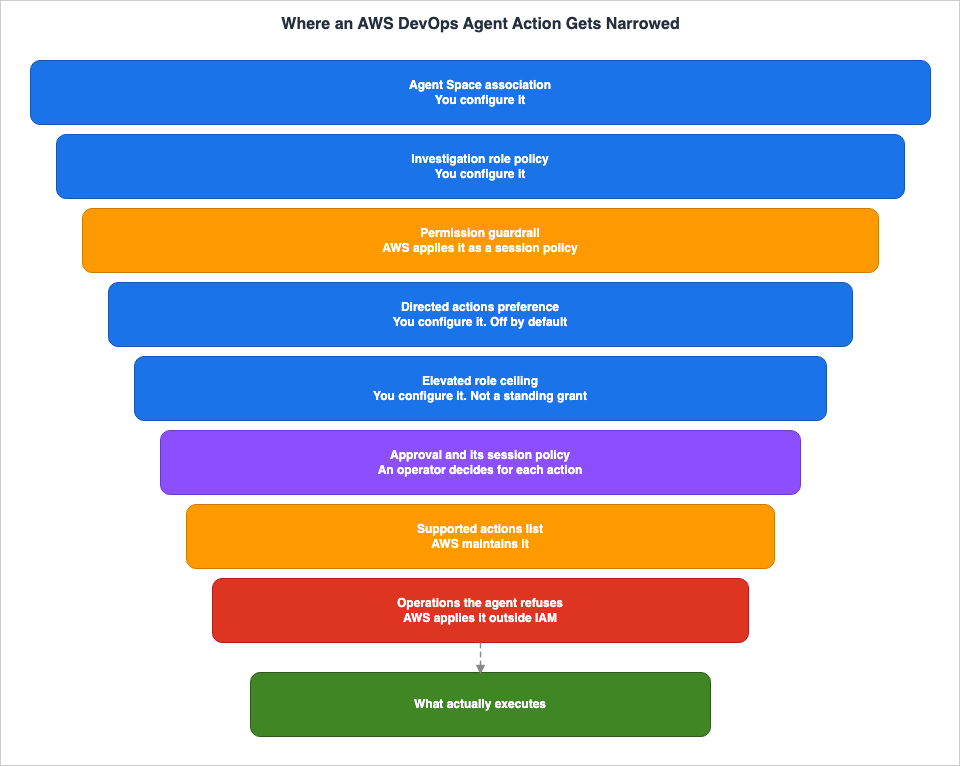
| # | Layer | Determined by | Initial State | Relevant Chapter |
|---|---|---|---|---|
| 1 | Agent Space Association | User | Only applies to associated accounts | What are DevOps Agent Spaces? |
| 2 | Investigation Role Policy | User | AIDevOpsAgentAccessPolicy is attached | Limiting Agent Access |
| 3 | Permission Guardrail | AWS | Always applied; you cannot change it | Limiting Agent Access |
| 4 | Directed Actions Enablement | User | Disabled by default | Working with directed actions |
| 5 | Elevated Role Ceiling | User | Not registered | Same as above |
| 6 | Approval and Session Policy | Operator | Required for each directed action | Same as above |
| 7 | List of Supported Actions | AWS | Always applied; you read its content in the console | Same as above |
| 8 | Agent's Own Refusals | AWS | Always applied | Operations the agent will not perform |
Layers 3, 7, and 8 are not yours to change. Of these, layers 3 and 7 participate in IAM evaluations and can, therefore, be described using IAM terminology. Layer 8 does not take part in it.
The inner layers restrict the outer layers; these are not eight independent conditions. For example, even if a wide ceiling is set in layer 5, layer 6 restricts it on a per-action basis, layer 7 drops anything outside the list, and layer 8 refuses whole classes of operation. Conversely, if an account is not associated in layer 1, it will not be subject to any of the subsequent layers, regardless of how they are configured.
These eight layers apply only to actions performed on AWS resources. Tool classification governs third-party tools such as Datadog, Grafana, and MCP servers, and IAM does not. Section 11 covers that side.
The following sections will follow this table, progressing from the outside in.
4. The Outer Edge Is the Association, Not the Region
4.1 The boundary an Agent Space carries
An Agent Space is a logical container that defines the scope of resources accessible to the AWS DevOps Agent. The user guide describes it as the boundary of what the agent can access and investigate during incident response. Each Agent Space defines which AWS accounts it can reach, which third-party tools it can connect to, and which users can operate it.Agent Spaces maintain isolation across four areas: AWS accounts, user access, investigation data, and chat history. Investigation data within one Agent Space is not visible from another.
The design guidance for this unit belongs to an earlier article, so this article does not repeat it. This article focuses on a single point: that the agent is restricted to the accounts it is associated with.
There are two types of accounts. The primary account role applies to the account that created the Agent Space, while the secondary account role applies to any additional accounts connected to it. The chapter on directed actions refers to these accounts as the monitor account and source account, respectively. Different chapters use different names for the same thing.
4.2 An association does not bound the Regions
This is the area most prone to misunderstanding. The Region you created the Agent Space in does not bound the Regions the agent investigates. The Supported Regions page of the user guide states it verbatim.When you associate an AWS account with an Agent Space, the agent discovers and maps resources across all Regions within that account.The Region of an Agent Space is chosen for data residency and for proximity to the operations team, not as the scope of investigation. Once an account is associated, all of its Regions become eligible for investigation.
If you need to restrict which Regions are investigated, the only method is to write a condition into the role policy.
{
  "Version": "2012-10-17",
  "Statement": [
    {
      "Effect": "Allow",
      "Action": ["ec2:Describe*", "lambda:Get*", "cloudwatch:Get*"],
      "Resource": "*",
      "Condition": {
        "StringEquals": {
          "aws:RequestedRegion": ["us-east-1", "us-west-2"]
        }
      }
    }
  ]
}
4.3 What the topology shows is not what the agent can reach
The agent automatically constructs a topology map of the application, visualizing resources and their relationships. This map is a tool for investigation, not a representation of permissions. As the user guide explicitly states:The application topology doesn't show everything the agent has access to—IAM policies are the only way to truly limit what AWS service APIs and resources the agent can access.Nowhere does the user guide state that a resource missing from the topology is a resource the agent cannot reach. Use the topology screen for an acceptance decision and you walk straight into that sentence.
5. The Default Is Read-Only, and It Contains Two Writes
5.1 The managed policy used for investigations
AWS DevOps Agent usesAIDevOpsAgentAccessPolicy for investigation and analysis. The AWS Managed Policy Reference Guide describes this policy as follows:Provides permissions required by the AWS DevOps Agent to conduct investigations and perform analysis on customer AWS resources.The version referenced here is v10, created on March 26, 2026, and last updated on August 12, 2026. The policy itself consists of an extensive list primarily focused on Describe, Get, and List operations, covering a wide range of areas including networking, compute, data stores, observability, and certificate management.
This article does not reproduce that complete list. AWS itself states that it updates the policy whenever new resource types are supported, meaning any list included in this article would quickly become outdated. Instead of listing the contents, this article focuses on the underlying structure.
5.2 Read-only is an approximation
This policy contains two statements. One is a lengthy list of read operations, under the SidAIOPSServiceAccess. The other is a single statement.{
"Sid": "AIOPSServiceWriteAccess",
"Effect": "Allow",
"Action": [
"cloudtrail:StartQuery",
"support:CreateCase"
],
"Resource": "*"
}The default policy for investigations includes two actions that are classified as write operations. The Sid itself is named
AIOPSServiceWriteAccess.Both of these support investigation functionality. Searching within CloudTrail Lake is considered a write operation because it initiates a query. Creating an AWS Support case allows transitioning the investigation to human assistance. Neither of these actions modifies the user's infrastructure configuration.
However, telling your own organization that it is strictly read-only is not accurate. A more precise description would be that it is limited to actions that do not change a resource. The specific boundaries are written only in the policy itself.
6. A Ceiling You Do Not Own
6.1 Effective permissions are an intersection
AWS DevOps Agent passes a session policy each time it assumes your role. The user guide refers to this as a permission guardrail and states that it represents the maximum level of permissions the agent can utilize.Effective permissions are the intersection of two layers: the managed and inline policies assigned to the user's role, and the session policy applied by AWS. Only permissions that exist in both layers take effect.
| Element | Determined by | What It Does |
|---|---|---|
| Role Policies | User | Defines what the agent is allowed to do. |
| Permission Guardrail | AWS | Defines the maximum level of permissions the agent can utilize. |
| Effective Permissions | Intersection of both | The permissions that are actually applied. |
6.2 Some permissions do nothing when you add them
The user guide explicitly states this outcome.If you add a permission to your role that is not included in the guardrail, the agent cannot use it.The guardrail permits all actions in the
ReadOnlyAccess managed policy, and includes a few additional actions. The default AIDevOpsAgentAccessPolicy is only a subset of these, leaving room for expansion inside the guardrail.| Service | Additional Actions | Purpose |
|---|---|---|
| Amazon Athena | athena:StartQueryExecution, athena:StopQueryExecution | Executing queries against the data catalog |
| AWS KMS | kms:Decrypt | Decrypting encrypted resources |
When adding Athena, the workgroup must use managed query results. This is because the agent does not have the
s3:PutObject permission.Conversely, adding permissions to the role that are not already included in the guardrail will have no effect. The user guide provides examples such as
s3:PutObject, ec2:TerminateInstances, and dynamodb:DeleteItem. A permission that is written into the role and still does not work is the intended design.6.3 Only the default policy is described as tested
The guardrail permitting a particular combination does not mean AWS has tested it. The user guide draws the line of responsibility here.The other permissions the guardrail supports have not been tested with the agent. Enabling them falls under the AWS shared responsibility model.The only scope described as tested is that of the
AIDevOpsAgentAccessPolicy. Expanding functionality, such as allowing access to S3 objects or decryption using KMS, is the responsibility of the user to evaluate for appropriateness.Note that the Limiting Agent Access page describes roles used for incident investigations and preventative evaluations. Roles used for directed actions have a different configuration, as described later. The user guide does not combine the two into a single stated rule. This article, similarly, addresses each topic in the scope defined by each chapter.
7. Mutation Is Off by Default
7.1 Operations split into two kinds
The user guide splits the operations the agent performs into two kinds. Read-only actions only read information from your connected services and AWS accounts, and they are available by default. Directed actions, on the other hand, involve creating, modifying, or otherwise altering resources, and are disabled by default, requiring multiple layers of explicit opt-in and approval for each individual action.The security model employs a layered approach. Features are disabled by default and require opt-in through independent layers: enabling it on the Agent Space, registering a role per account, and classifying each tool. Furthermore, directed actions require approval from an operator each time they are executed. Three opt-ins, and an approval counted separately on every execution.
While directed actions stay off, and for accounts with no elevated role registered, the agent keeps investigating with read-only operations alone. What it hands you then is a set of manual steps, not a change it can carry out.
7.2 The primary control is the Agent Space setting
Directed actions must be enabled on the Agent Space before any other setting takes effect. While it stays disabled, registering an elevated role and opting tools in have no effect. The user guide notes that an attempt to register elevated configuration might be rejected. The troubleshooting section identifies this as aValidationException and advises enabling the Agent Space first.The configuration for the Agent Space is located within its
preferences. This is a typed map from configuration keys to boolean values, and is set using CreateAgentSpace and UpdateAgentSpace.aws devops-agent update-agent-space \
--agent-space-id <your-agent-space-id> \
--preferences elevatedActionsEnabled=trueThere are important considerations regarding the behavior of
preferences.| Behavior | Description |
|---|---|
| Replacement | Passing preferences to UpdateAgentSpace replaces the entire collection. Any omitted key reverts to its default value. |
| Omission | If the entire preferences field is omitted, the current values will remain unchanged. |
| Default | The default value for elevatedActionsEnabled is disabled, so explicit configuration is optional. |
| Unknown Key | This will result in a ValidationException. |
| Reflection | Changes take effect immediately, equivalent to toggling in the console. |
| Verification | GetAgentSpace returns the current preferences. |
The replacement behavior can potentially lead to operational issues. If you partially specify
preferences without verifying other settings, any omitted items will revert to their default values.Note that the CLI is named
devops-agent, and the IAM service prefix is aidevops. These two have different spellings. Sections 13 and 14 return to them.8. The Elevated Role Is a Ceiling, Not a Grant
8.1 Registration is optional and per account
For each associated AWS account, you can optionally register an elevated role. You register it by entering the ARN (Amazon Resource Name) in theagentElevatedRoleArn field of the AWS configuration on the association. Both the primary and secondary accounts can register one role each.Accounts that have not registered a role will only be able to perform read operations. This allows you to differentiate between accounts that can make changes and those that cannot.
Registering one takes permission in the target account to create an IAM role and define its trust and permission policies, plus
iam:PassRole in your own account. The target should be in the format arn:aws:iam::<account-id>:role/*, and the form shown sets the condition key iam:PassedToService to aidevops.amazonaws.com. A broader iam:PassRole grant also satisfies the requirement.While AWS does not mandate a specific name for the role, it is recommended to use a descriptive naming convention, such as
DevOpsAgent-ElevatedAction-*, to facilitate auditing. This is a recommendation, not a mandatory restriction.8.2 The trust policy needs three STS actions
The elevated role must trust the AWS DevOps Agent service principal. This requires three STS actions;sts:AssumeRole alone is insufficient.{
"Version": "2012-10-17",
"Statement": [
{
"Effect": "Allow",
"Principal": {
"Service": "aidevops.amazonaws.com"
},
"Action": [
"sts:AssumeRole",
"sts:SetSourceIdentity",
"sts:TagSession"
],
"Condition": {
"StringEquals": {
"aws:SourceAccount": "111122223333"
},
"ArnLike": {
"aws:SourceArn": "arn:aws:aidevops:us-east-1:111122223333:agentspace/*"
}
}
}
]
}If
sts:SetSourceIdentity or sts:TagSession is omitted, the directed action will fail during credential issuance, even if the validation status is valid. Passing validation does not guarantee successful execution at runtime.This is where reusing the trust policy of an investigation role catches you out. The trust policy for the Agent Space role, as outlined in the CLI onboarding guide, uses the same service principal and the same two condition keys, but only includes a single
Action, namely sts:AssumeRole. While one action is sufficient for the investigation role, three are required for the elevated role. Because they appear so similar, it's easy to copy the policy and not notice that two of the required actions are missing.aws:SourceAccount and aws:SourceArn address the confused deputy problem, ensuring that the role can only be assumed on behalf of your own Agent Spaces. The Region specified in aws:SourceArn must match the Region of your Agent Space. If you operate across multiple Regions, you should either use a Region wildcard or specify the ARN for a particular Agent Space.8.3 Validation behaves differently by account type
Validation exercises the assume-role path for real, and whether it runs synchronously or asynchronously depends on the account type.| Account | Validation | State Transition |
|---|---|---|
| Primary (Monitor) | Synchronous | Saving settles the state as valid or invalid. |
| Secondary (Source) | Asynchronous | The state reads pending-confirmation first, then moves to valid or invalid. |
For secondary accounts, you can check the
agentElevatedRoleArnStatus using GetAssociation or ListAssociations. This typically completes within a few minutes. The role can be used with directed actions only after the state transitions to valid.8.4 The role permission policy defines the ceiling
This is the core of this article. The user guide states this verbatim about the permission policy on an elevated role.The role defines the ceiling of what the agent can ever do in your account. It is not a standing grant.The user guide goes on to state that the agent never operates at that ceiling.
The agent never operates at this ceiling. Every directed action requires operator approval.Setting a wide ceiling and having the agent act widely are two different things. Runtime permission narrows to the approved operation. Miss that point and you end up judging the ceiling policy dangerous from a reading alone, or judging it safe from the same reading.
8.5 Using the managed policy
AWS provides theAIDevOpsAgentActionsPolicy. The AWS Managed Policy Reference Guide describes it as follows:Provides elevated permissions required by the AWS DevOps Agent to perform operator-approved mutations or elevated actions on customer AWS resources during operational events.The version referenced here is v2, created on June 23, 2026, and last updated on August 19, 2026. The policy itself is concise.
{
  "Version" : "2012-10-17",
  "Statement" : [
    {
      "Sid" : "AIDevOpsElevatedAccess",
      "Effect" : "Allow",
      "NotAction" : [
        "account:*",
        "cognito-identity:*",
        "iam:*",
        "identitystore:*",
        "organizations:*",
        "ram:*",
        "rolesanywhere:*",
        "sso:*",
        "sts:*"
      ],
      "Resource" : "*"
    },
    {
      "Sid" : "AIDevOpsElevatedCarveBacks",
      "Effect" : "Allow",
      "Action" : [
        "account:GetAccountInformation",
        "account:GetGovCloudAccountInformation",
        "account:GetPrimaryEmail",
        "account:ListRegions",
        "iam:ListRoles",
        "organizations:DescribeEffectivePolicy",
        "organizations:DescribeOrganization",
        "sts:DecodeAuthorizationMessage"
      ],
      "Resource" : "*"
    }
  ]
}
The policy consists of two statements. The first statement uses
NotAction to permit all actions for all resources, except for nine services. These excluded services are those related to identity, credentials, and organizational management: account, cognito-identity, iam, identitystore, organizations, ram, rolesanywhere, sso, and sts. This exclusion means the role can neither manage identities nor obtain further access.The second statement carves eight read-only actions back out of the excluded services. They retrieve account information, list Regions, list roles, read the organization and its effective policy, and decode an authorization message. All of these are read-only operations that do not involve any modifications.
This ceiling includes actions related to deletion. The user guide acknowledges this and continues, stating:
It does include delete-class actions in the ceiling. The agent itself refuses delete-class operations regardless of the role's permissions.What the policy permits and what the agent will execute diverge right here. Section 10 has the reason.
8.6 Writing your own policy
If you want a tighter ceiling than the managed policy provides, write your own policy and attach it to the role. It's best to start with actions that the operator is likely to approve, and then expand the scope as needed.Directed actions that a role does not permit will fail at runtime, even if they have been approved. Approvals do not create permissions.
Regardless of which option you choose, service control policies and permissions boundaries apply to the elevated role just as they do to any other role in your account. You can constrain it with them as well.
9. Every Approval Builds Its Own Cage
9.1 Proposal, approval, and execution are separate
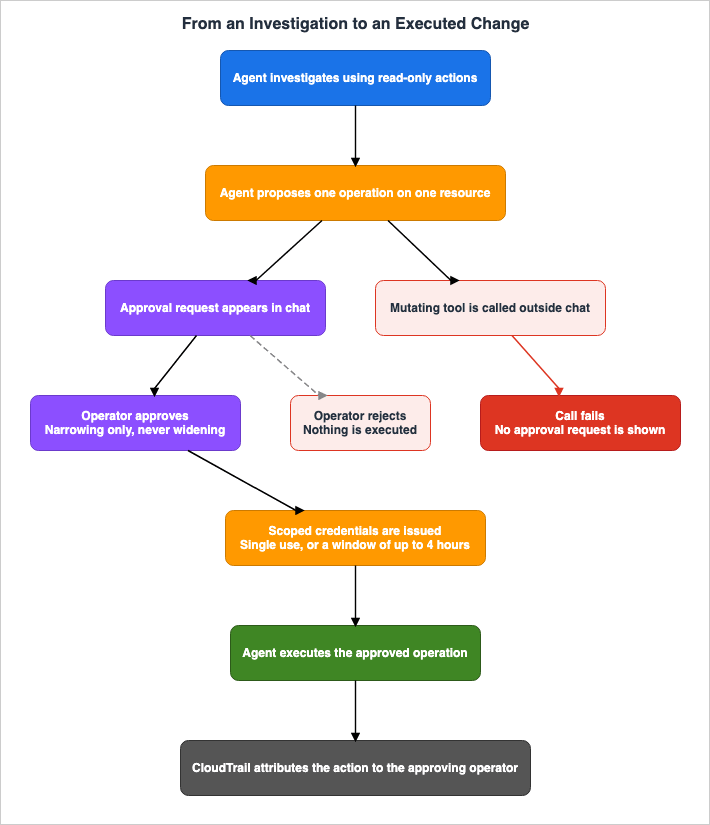
When the agent determines that the operation it was directed to perform mutates a resource, it does not execute that operation directly. Instead, the following sequence occurs:- The agent requests approval, presenting the operator with the specific tool, operation, and target resource.
- The operator reviews the request and either approves or rejects it.
- If approved, the agent performs the operation.
An approval covers only the specific tool, operation, and resource that were requested. It remains valid for a bounded time window and cannot be reused for a different operation or resource.
The user guide provides an example of restricting a security group from
0.0.0.0/0 to the internal network range. The proposal includes details such as the API operation, target, risk assessment, scope of impact, and rollback procedures. The operator can then make adjustments, such as narrowing the range from 10.0.0.0/8 to 10.1.0.0/16.9.2 Approval requests exist only in chat
This is the point that gets misread most often. An approval request appears in chat and nowhere else.AWS DevOps Agent surfaces operator approval requests only in chat. If the agent invokes a mutating tool outside chat, for example during an autonomous investigation, the call fails instead of presenting an approval request. AWS DevOps Agent never executes a mutating tool without approval.If a mutating tool is called during an autonomous investigation, no approval request is raised. The call fails. An operation in which the agent starts investigating on its own from a nighttime alert and then goes on to make the change does not stand up on this mechanism. What advances overnight is the investigation. The change does not.
9.3 What is issued after an approval
Once approved, the agent will use the credentials associated with the registered elevated role. The credentials carry a session policy that scopes them down to the approved operation and resources. The credentials have a limited validity period and cannot be reused for different actions or resources.How that session policy is composed carries one more restriction.
The agent composes the session policy only from a curated list of supported AWS IAM actions that AWS DevOps Agent maintains. An action outside that list can never be part of a session policy.An action outside that list cannot enter a session policy at all, even if the role permits it. To read the list, open the Configuration page in the console and choose View Supported Actions under Agent Actions. The console is where the list is meant to be read, so this article does not carry it. The list can be extended.
9.4 The shape of an approval in the API
Approval is not only a console concept. It has a shape in the API.| Element | Description |
|---|---|
| Request | SendMessage streams back an approval request carrying the tool, the operation, and the target resource, along with toolUseId, interruptId, and approvalId. |
| Decision | Pass APPROVED or REJECTED to UpdateApprovalAction. |
| Scope | During approval, the tool and argumentPins are finalized using finalPattern. |
| Reuse | Set singleUse to true for a single execution, or false and give ttlSeconds a window. The window runs to a maximum of 4 hours. |
| Resumption | Calling SendMessage again with the decision will resume the conversation. |
The user guide attaches a verbatim caveat to that scope.
The finalized scope can narrow the request, but it can never widen it.The approval status transitions from
PENDING to either APPROVED or REJECTED. REJECTED is terminal. When APPROVED, it changes to REDEEMED upon consumption, or can be changed to REVOKED if not yet consumed.This process is not tied to any specific client. Whether it is an AI assistant, a Slack bot, or a custom operational client, the same pattern applies: call
SendMessage, surface the approval request to an operator, record the decision with UpdateApprovalAction, and resume the conversation with SendMessage.9.5 The approver stays in the record
Directed actions appear in CloudTrail. The assumed-role session carries a source identity, and CloudTrail attributes the action to the operator who approved it. CloudTrail records both the approved parameters and the parameters it actually executed. Every directed action can be traced back to the individual who approved it.10. What Is Refused Even When It Is Permitted
10.1 A layer that approval does not override
Against the AWS SDK operations it invokes as directed actions, the agent holds refusals of its own, independent of the permissions granted. The user guide states the nature of this layer verbatim.These guardrails apply even when the elevated role's policy allows the operation. Operator approval does not override them.A role that permits the operation does not get it through. An approval does not get it through either. The extra layer outside IAM is this one.
When it refuses, the agent declines and explains why. Where it can, it describes the manual steps instead.
10.2 Three refusals
| What Is Refused | Description | Reason |
|---|---|---|
| Deleting resources | Delete-class operations, such as deleting an instance, bucket, table, function, or stack. | The operator deletes resources with their own credentials. |
| Mutating a permissions boundary | iam:PutRolePermissionsBoundary, iam:DeleteRolePermissionsBoundary, iam:PutUserPermissionsBoundary, iam:DeleteUserPermissionsBoundary. | A permissions boundary is a control your organization uses to constrain the agent, so the agent cannot change it. |
Operations that require iam:PassRole | Actions such as launching instances with instance profiles, creating functions with execution roles, and starting tasks with task roles. The agent does not support these by default. | Passing a role can indirectly expand the scope of actions performed by the service on behalf of the user. |
The reason a permissions boundary sits on the refusal list is clear: the design keeps the agent away from the instrument used to constrain the agent. The same reasoning shows up in the
NotAction of AIDevOpsAgentActionsPolicy, where iam, organizations, and sts are collectively excluded. One intent, implemented twice, in two different layers.10.3 Do not mistake the scope
This refusal applies only to actions performed on AWS resources. For third-party tools, the tool classification described in the next section does the same job. Because the same protection is implemented separately through two different mechanisms, you cannot determine safety based solely on the configuration of one of them.The user guide positions these refusals as a complement to the controls that users own. The permission policy on the elevated role, your service control policies, and any permissions boundary you attach to the elevated role all remain the user's responsibility.
11. Third-Party Tools Are Governed by Classification
11.1 Three classifications
Third-party and MCP integrations place each tool into one of three classifications. The classification determines whether the agent can invoke the tool and what approval is required.| Classification | Meaning | Behavior |
|---|---|---|
READ_ONLY | Tools that only read information | Available as a read-only action. |
MUTATIVE | Tools that can create or modify resources | Needs directed actions enabled, plus per-operation operator approval in chat. |
DESTRUCTIVE | Tools that can delete or irreversibly modify resources | The agent never invokes tools in this classification. |
The user guide states this verbatim about
DESTRUCTIVE tools.The agent never invokes tools in this classification.11.2 MCP servers you configure yourself
When associating an MCP server, you assign the classification yourself, throughtoolDetails, a per-tool list of entries in which each entry holds a name and a toolClassification.The
name must match an entry in the association's enabled tools list exactly, including case. A mismatch is rejected at registration time. Tool names run from 1 to 128 characters, and you can classify up to 500 tools per association.The trap sits in the default value.
Tools without a stored classification default to READ_ONLY.If you register or update an MCP server association using the AWS SDK, AWS CLI, or direct API calls, and you do not supply
toolDetails, AWS DevOps Agent treats every tool on that association as READ_ONLY. Consequently, the agent will execute these read-only tools without requesting approval.The console will prompt the user to classify the tools it discovers. Call it from a program and nothing prompts you. Even in one association, the need for approval can vary depending on the route that created it. If you want to require approval for tools that create or modify resources, be sure to explicitly classify those tools as
MUTATIVE.11.3 Native integrations
In native integrations, such as Datadog and Grafana, AWS fixes the classification and users cannot modify it. Users do not supply or override these classifications.Instead, users opt specific mutating tools in through
enabledElevatedTools. Only tools classified as MUTATIVE can be enabled. Tools classified as DESTRUCTIVE can never be enabled; the user guide provides grafana_delete_alert_rule as an example.Refusals do the work for AWS resources, and classification does the work for third-party tools. Deletion ends up not getting through on either route.
12. What Is Left Behind
12.1 The record of an investigation
Through an investigation the agent builds a record of its analysis. It holds the root cause findings, the metrics and logs and traces it analyzed, the code changes and deployment history it reviewed, the remediation it recommended, and a timeline of events and system behavior.The agent's reasoning process is also accessible. The
aidevops:ListJournalRecords IAM action allows access to detailed logs that show the reasoning steps the agent took, the actions it performed, and the data sources it referenced during investigations, corrective actions, evaluations, and chats. Sub-agents that operate in parallel are also represented on the timeline as independent entries, displaying their names, the number of tool calls they made, and how long they ran.12.2 The handoff to AWS Support
When escalating an investigation from the Agent Space web app to AWS Support, AWS DevOps Agent automatically passes the investigation record to AWS Support. The support engineer then has the full context without the user gathering and explaining it again.Note that this describes what remains, not what is guaranteed. This article does not make any claims regarding retention periods or methods for retrieval.
12.3 What a person picks up
The operator deletes resources with their own credentials. Changing a permissions boundary works the same way. A configuration change that involvesiam:PassRole also stays on the human side by default.These three do not disappear from your operational procedures when you adopt an agent. What automation took over is the investigating and the proposing. The irreversible operations were not taken over.
13. Where the Sources Disagree, and Which One This Article Follows
13.1 The IAM namespace
The Service Authorization Reference states this verbatim.AWS DevOps Agent Service (service prefix: aidevops) provides the following service-specific operations, resources, actions, and condition keys for use in IAM permission policies.The IAM chapter of the user guide, the re:Post troubleshooting page for access denied errors, the spelling of the service endpoints, the service principal, and the
aws:SourceArn example all use aidevops.In contrast, the AWS official blog post on best practices for production deployments uses the prefix
devopsagent: and the ARN arn:aws:devopsagent: in its example policy. In another section of the same article, it states that service control policies may block aidevops:*. The spelling is inconsistent within that single article. The same article also lists AIOpsAssistantPolicy as a recommended managed policy. The managed policy does exist, but Amazon AI Operations Assistant uses it for investigations in CloudWatch; the user guide for this service specifically references AIDevOpsAgentAccessPolicy.This article treated the Service Authorization Reference and the user guide as canonical. If the examples are copied directly, the resulting policies will be syntactically correct but will not grant any permissions.
13.2 Whether an association decides the Regions
The re:Post article states that associations define which accounts, Regions, and services an agent can query. The Supported Regions page of the user guide states that the agent discovers and maps resources across all Regions in an associated account. This article treated the user guide as canonical. The mechanism for restricting Regions is through IAM condition keys.13.3 How strong read-only is
A re:Post article states that the role used for investigations provides strictly read-only access. The policy document itself carries two write actions under the SidAIOPSServiceWriteAccess. This article treated the policy document as canonical.13.4 The list of managed policies
The AWS Managed policies for AWS DevOps Agent section of the user guide lists four policies, but does not includeAIDevOpsAgentActionsPolicy. This policy is documented in the directed actions chapter and in the AWS Managed Policy Reference Guide. A list is not necessarily exhaustive. This article treated the page for each individual policy as canonical.13.5 Where the API reference lives
As of September 14, 2026, the API reference page forUpdateApprovalAction redirects to the reference welcome page. Parameter definitions can be found in the reference documentation for each language's SDK, as well as in the corresponding chapters of the user guide. This article draws information from the user guide.13.6 Names that vary between chapters
The same account is referred to as primary in some chapters and monitor in others, and secondary in one chapter and source in another. In these cases, the different names simply refer to the same thing. The term guardrail, on the other hand, refers to two entirely different mechanisms. Read only one chapter and either pattern will mislead you.13.7 The rule running through all six
What all six have in common is that documents written to state a constraint are the most accurate. The Service Authorization Reference, the policy JSON, and the directed actions chapter are all documents that state constraints. Official blog posts and re:Post articles, on the other hand, are documents that convey capability, and their precision drops to match.14. Failure Modes and Anti-Patterns
14.1 Design failures
Describing the system internally as secure because it is read-only, and then registering an elevated role. The default and the state after you deliberately widened it end up described in the same words. If you explain it, put the fact that registration changes the state in the same sentence.Creating a single Agent Space and associating all accounts with it. The unit of permission, the unit of user access, and the unit of investigation data are all lost at once.
Assuming that the Region of the Agent Space restricts the investigation scope. It cannot. All Regions in the account become the target.
Assuming that the range displayed on the topology screen is the accessible range. The user guide explicitly says otherwise.
14.2 Implementation failures
Adding a permission that the permission guardrail does not include to the role, in the belief that it will take effect. Nothing happens.Writing only
sts:AssumeRole in the trust policy of an elevated role. Copying the trust policy of an investigation role produces exactly this shape. Validation passes, and the directed action fails during credential issuance. A validation status guarantees nothing about runtime.Pinning the Region in
aws:SourceArn to a Region other than the Agent Space's. The registration validation may pass, but the actual assume role call may still fail.Spelling the IAM action
devopsagent:. Or typing the CLI as aws aidevops. In IAM, it should be aidevops, while in the CLI, it should be devops-agent.Registering an MCP server association from the API without supplying
toolDetails. All tools are set to READ_ONLY and execute without approval.Registering an elevated role before enabling directed actions. This may result in a
ValidationException. The correct order is to configure the Agent Space first.14.3 Operational failures
Expecting an autonomous investigation to fix things by itself. Outside chat, a mutating tool fails on the call itself.Pushing
ttlSeconds to its maximum on every approval. The wider the window, the more executions one approval covers. An operation that needs one execution has no use for a four-hour window.Not watching
agentElevatedRoleArnStatus. Validation for secondary accounts is asynchronous, so a role stuck at pending-confirmation goes unnoticed.Passing a partial
preferences to UpdateAgentSpace. Whatever you left out reverts to its default.Replacing the managed policy with a custom policy, and then failing to keep pace with its revisions. When the topology supports new resource types, the scope of investigation silently loses coverage.
15. Frequently Asked Questions
Can the agent delete a resource once I let it investigate?
No. The agent refuses delete-class operations. This refusal is independent of the permissions granted. Neither a ceiling policy that permits deletion nor an operator approval overrides it. Deleting is left to the operator, using their own credentials.Does registering an elevated role let the agent do anything?
No. The role's permission policy is a ceiling, not a standing grant. Runtime permissions are narrowed to the approval given for each individual action, and an action outside the list of supported actions maintained by AWS never enters the session policy.Does the default policy really contain no writes?
There are two:cloudtrail:StartQuery and support:CreateCase, both located under the AIOPSServiceWriteAccess Sid. Neither of them changes the configuration of your infrastructure, but describing the policy as strictly read-only is not accurate.Does adding permissions to the role widen what can be investigated?
Some take effect and some do not. A permission inside the permission guardrail works. A permission outside it goes unused, however it is written into the role. The guardrail permits all actions inReadOnlyAccess, plus starting and stopping an Athena query, plus decrypting with KMS.Can the agent investigate outside the Region where the Agent Space was created?
Every Region in the associated account is in scope. The Region of an Agent Space is a choice about data residency, not a statement of the investigation scope. To restrict the Region, you need to include theaws:RequestedRegion condition in the role's policy.Can the agent fix a problem during an autonomous investigation?
No. An approval request is raised in chat and nowhere else. If a mutating tool is called outside of the chat, no approval request is raised, and the call fails. What advances overnight is the investigating and the proposing, not the changing.How many times can one approval be reused?
Either a single use, or a window of up to 4 hours. IfsingleUse is set to true, the approval is spent on a single execution; otherwise ttlSeconds gives the window. In either case, the approval can only be used for the operation and resource that were approved.Can the scope be widened at approval time?
No. The scope you finalize can narrow the request and cannot widen it. Service-side validation enforces that.Can a delete tool on a third-party integration run once approved?
No. A tool classifiedDESTRUCTIVE is never invoked. In native integrations, AWS fixes this classification, and you can neither override it nor opt the tool in.Is the approver recorded?
CloudTrail records the operator who approved the action. The directed action appears as an assumed-role session, and that session carries a source identity. The record holds both the approved parameters and the executed ones.Do the release management capabilities use the same approval mechanism?
These capabilities are in preview at the moment, and available in one Region only, US East (N. Virginia). The permission and approval structure described in this article is based on chapters that are not specific to individual capability areas. Whether release management gets treatment of its own cannot be read out of the primary sources as of this article's verification date.Should the ceiling be the managed policy or a policy of your own?
It comes down to how tight you want the ceiling. TheAIDevOpsAgentActionsPolicy offers a broad scope, allowing almost everything except for identity, credentials, and organizational management, which simplifies maintenance. A policy of your own can be tighter, at the price of updating it every time the set of approved operations grows. In either case, service control policies and permissions boundaries apply separately.16. Summary
The permissions for the AWS DevOps Agent are narrowed from the outside in. This article organizes that process into eight layers. What decides the judgment is who owns each layer.Users own four of them: the Agent Space association, the investigation role policy, enabling directed actions, and the elevated role ceiling. An operator decides one of them per operation: the approval and the session policy that comes with it. AWS holds the remaining three: the permission guardrail, the list of supported actions, and the agent's own refusals.
The ceiling is declared three times within this system: in the policy defined by the user, through the session policy AWS applies, and through the agent's own refusal. The first two are evaluated within IAM. The third does not participate in that evaluation.
Therefore, you cannot draw conclusions based solely on the role's policy. Even if the policy permits deletion, the agent will refuse to delete. During investigation sessions, any permissions added to a role that are not included in the permission guardrail will not be used. Even with approval, the agent's three refusals cannot be overridden.
The checks an adoption decision actually needs are short. Left at its defaults, nothing about your infrastructure configuration changes. The default policy includes two write operations, and neither of them changes that configuration. To allow changes, three independent opt-ins are required: enabling it on the Agent Space, registering a role per account, and, for third-party tools, classifying each tool. Furthermore, operator approval is required for each execution. Even if deletion is permitted, it will not be executed.
Availability splits along the capability areas. Production operations became generally available on March 31, 2026. Release management is currently in preview and is only available in one Region. It is inaccurate to broadly state that it is generally available.
Everything stated in this article was verified against primary sources on September 14, 2026. Managed policies are subject to revision. The versions referenced are v10 for
AIDevOpsAgentAccessPolicy and v2 for AIDevOpsAgentActionsPolicy. The list of supported actions can be extended, so you read it in the console.17. References
- About AWS DevOps Agent - AWS DevOps Agent User Guide
- What are DevOps Agent Spaces? - AWS DevOps Agent User Guide
- Supported Regions - AWS DevOps Agent User Guide
- Working with directed actions - AWS DevOps Agent User Guide
- DevOps Agent IAM permissions - AWS DevOps Agent User Guide
- Limiting Agent Access in an AWS Account - AWS DevOps Agent User Guide
- Autonomous incident response - AWS DevOps Agent User Guide
- Creating an Agent Space - AWS DevOps Agent User Guide
- AWS DevOps Agent CLI onboarding guide - AWS DevOps Agent User Guide
- AIOpsAssistantPolicy - AWS Managed Policy Reference Guide
- AIDevOpsAgentAccessPolicy - AWS Managed Policy Reference Guide
- AIDevOpsAgentActionsPolicy - AWS Managed Policy Reference Guide
- Actions, resources, and condition keys for AWS DevOps Agent Service - Service Authorization Reference
- AWS DevOps Agent is now generally available - AWS What's New
- Announcing General Availability of AWS DevOps Agent - AWS Cloud Operations Blog
- Best Practices for Deploying AWS DevOps Agent in Production - AWS DevOps and Developer Productivity Blog
- How do I troubleshoot Access Denied errors in AWS DevOps Agent? - AWS re:Post
- How do I troubleshoot AWS DevOps Agent topology that's empty or missing resources? - AWS re:Post
- Querying AWS DevOps Agent investigations from Kiro CLI for incident response - AWS re:Post
- Faster Resolution with AWS DevOps Agent in the Support Center Console - AWS re:Post
References:
Tech Blog with curated related content
Written by Hidekazu Konishi