AWS Agent Registry and the Agentic Resource Discovery Specification - Governance Before Discovery
First Published:
Last Updated:
AWS Agent Registry gives that second question a shape a machine can answer. Saying that it puts a catalog in place does not describe it, though. The defining characteristic of this service is that records that have not been approved are not accessible through the consumer-facing APIs. Draft records, rejected records, and deprecated records will not appear in the API responses. They are not filtered out; they are simply not included from the outset.
This article traces how that works. It involves two planes, four personas, nine record states, two API surfaces, and a specification drafted outside AWS.
Scope. This article covers the internal structure of the registry and how control settings influence the discovery process. The entire lifecycle of agents – ownership, delegation, access reviews, and retirement – is the subject of a previously published document, Identity Lifecycle for AI Agents, which also defines the four values for the
recordType and the character limit for the statusReason. How A2A resolves an Agent Card, and how Gateway, Identity, and Cedar divide the work, belong to Agent Interoperability Architecture on AWS. The MCP server itself, as an implementation, belongs to MCP Server Implementation Reference. A comprehensive overview of AgentCore is available in Amazon Bedrock AgentCore Master Index. This article does not compare functionality with registries from other vendors, nor does it discuss pricing. Where an organization stops an inbound HTTP request belongs to another article in this series, AWS WAF AI Traffic Monetization. How far an agent running in your own account may go belongs to AWS DevOps Agent.Terminology. This article uses the word registry for exactly one thing: a single resource created inside an AWS account. A registry record is a single piece of metadata contained within that resource. Governance Plane and Discovery Plane are names AWS introduced in its official blog, and this article keeps them as written. Control plane and data plane are the API classification, and AWS documentation uses that division throughout. The words administrator, publisher, curator, and consumer name the personas the developer guide defines.
Confirmation date. Everything this article states about availability, default values, limits, and the spelling of identifiers comes from primary sources checked on September 14, 2026. As of that date, the API references for both
agent-registry and agent-registry-control carried a published date of September 11, 2026. Regions get added, fields get added, and the specification referenced here will move to a later version. Where a number appears, the text says whether it is a default, a ceiling, or a count the source itself gives.Table of Contents
- 1. Not Being Found, and Not Existing
- 2. Two Planes
- 3. The Boundary Is in the API Names
- 4. Four Personas and the Buttons They Can Press
- 5. What a Record Describes
- 6. Why There Are Two Ways to Find Something
- 7. The Governance You Can Configure Today
- 8. What the Discovery Path Records, and What It Does Not
- 9. The Agentic Resource Discovery Specification
- 10. What Has Not Arrived Yet
- 11. Failure Modes
- 12. Frequently Asked Questions
- 13. Summary
- 14. References
1. Not Being Found, and Not Existing
1.1 The two questions this article answers
For the people handling a growing number of agents and MCP servers inside an organization, the worry collapses into two questions.First, can shadow resources be stopped without slowing development down? Reviewing everything by hand stops them, and stops adoption with them. Reviewing nothing stops nothing. The line goes somewhere between those two.
Second, when will the resources created by a team become visible to other teams? Is it the moment they are created, the moment they are registered, or the moment someone approves them? Leave that unclear and teams register things they are not sure they should publish, until nobody registers anything.
AWS Agent Registry provides a consistent answer to both of these questions: Only records in an approved state are discoverable. To address the first question regarding speed, it offers configuration options to automate the approval process. To address the second question, it structurally prevents resources in pre-approval states from being visible to consumers.
While this answer appears straightforward, the implementation is more complex. Approval does not move a record. It controls which API sees that same record. And, in reality, there are several pathways where this control doesn't function as expected. The latter half of this article will address those issues.
1.2 Where this article stops
This article will not address certain areas. The lifecycle of agents, A2A name resolution, comparisons with other registries, and the IAM policy evaluation logic are all outside the scope of this article. The articles that hold them are named in the scope note at the beginning.One area this article carefully distinguishes is the content on AWS's official blog. The blog includes descriptions of features that are not yet available, mixing them into the explanation of the Governance Plane. The blog itself acknowledges this at the end, with the following statement:
Some of the features described earlier are forward looking and are detailed in a later section.This article will not present descriptions of future-looking features in the present tense. Section 10 exists for exactly that material, and keeps it in the future tense.
1.3 How the facts were established
The AWS behavior described here comes from the following sources: the AWS Agent Registry section of the Developer Guide, two API references (agent-registry and agent-registry-control), the CloudFormation template reference, the console help panel, AWS What's New, and two posts from the AWS Machine Learning Blog. The ARD specification comes straight from the site that publishes it.Where several documents state the same thing, the sentence whose purpose is to state a constraint was taken as authoritative. There is one place where the sources conflict, and Section 8 names it.
2. Two Planes
2.1 The registry runs across two planes
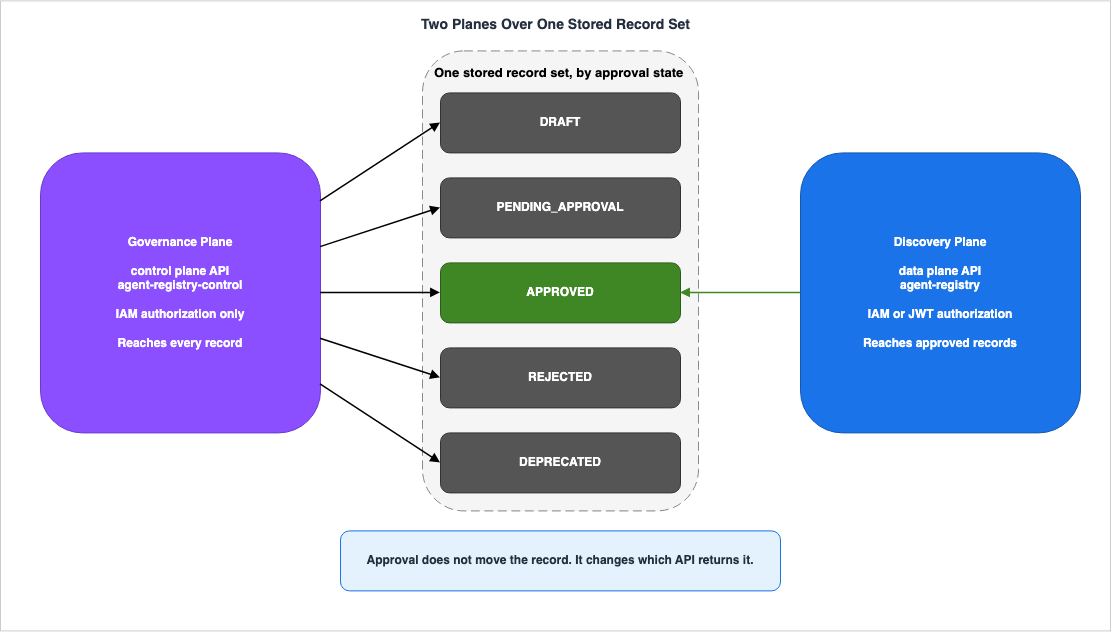
According to the official AWS blog, the registry operates across two planes internally.Internally, Registry operates across two complementary planes:The two are not different views of one set of records. What each of them looks at is different.
2.2 What the Governance Plane holds
The Governance Plane holds everything that has been registered. The blog defines it as follows:The Governance Plane is the comprehensive agents, tools, and skills that are registered.
It's designed to be the authoritative store for resources within its defined scope,
regardless of their lifecycle state.The phrase
regardless of their lifecycle state is key. Records in draft status, rejected records, and deprecated records – all remain within this plane. This plane is where administrators see the shape of the whole organization, and approval does not decide what shows up.2.3 What the Discovery Plane holds
The Discovery Plane is the side consumers touch day to day. The blog summarizes the characteristics of this side in a single word:Curated, not comprehensive – only records approved by an admin or curator appear here.
Draft, rejected, or shadow resources are not visible to consumers.It's about selection, not comprehensive coverage. Only what has cleared approval appears on this side.
This is a strong assertion, so it's important to verify its scope. The developer guide defines the consumer persona at the level of the API.
As a consumer, you only see approved records, so you can trust that everything you find
in the registry has been reviewed and meets the organization's quality standards.
The guide then lists three ways for consumers to find approved records. These are searching, browsing the catalog of approved records, and connecting to the MCP endpoint. In each case the API name carries the word
Discoverable. This will be the subject of Section 3 of this article.2.4 Why these are not two views of one table
Treating the two planes as one table filtered down to the approved rows leaves three things unexplained.First, the APIs for each plane are located at different service endpoints. Governance Plane operations live in the control plane API, Discovery Plane operations in the data plane API. They have different hostnames.
Second, the authorization methods differ. The developer guide explicitly states that authorization for the control plane always uses IAM. Only the Discovery Plane offers the option of using JWT.
Third, auditing works differently. CloudTrail logs Governance Plane operations as management events by default. Operations on the Discovery Plane, however, are data events and are not logged by default. This difference will be discussed in Section 8.
In essence, approval isn't an operation that moves records. Records always reside in one location; what approval toggles is which of the two API surfaces the records are visible through. Deprecation works the same way. A deprecated record disappears from the Discovery Plane and remains on the Governance Plane.
3. The Boundary Is in the API Names
3.1 Two API surfaces
The AWS Agent Registry API splits in two. Each API reference points at the other. The description for the control plane is as follows:Agent Registry Control is its control-plane API: use it to create and manage registries
and the records they contain, configure discovery and authorization, govern record approval
and curation workflows, and manage automatic detection of resources. Data-plane search and
MCP invocation operations are provided by the companion Agent Registry API.The description for the data plane is also paired.
The Agent Registry API is its data-plane interface for discovering, searching, and retrieving
the approved records published to a registry.
The endpoint hostnames are also different.
| System | Endpoint | CLI Namespace | SDK Client |
|---|---|---|---|
| Control Plane | agent-registry-control.{region}.api.aws | aws agent-registry-control | AgentRegistryControlClient |
| Data Plane | agent-registry.{region}.api.aws | aws agent-registry | AgentRegistryClient |
Incorrectly identifying which system is used can lead to the false conclusion that the control plane API lacks search functionality. Search is available on the data plane. Conversely, examining only the data plane might lead to the incorrect assumption that record creation is not possible. Record creation is handled by the control plane.
3.2 The word Discoverable carries the boundary
The clearest distinction between the two planes is evident in the names of the API operations for reading records.| Operation | Control Plane | Data Plane |
|---|---|---|
| List | ListRegistryRecords | ListDiscoverableRegistryRecords |
| Get (Individual) | GetRegistryRecord | None (GetDiscoverableRegistryRecord is an IAM action, not an operation) |
| Batch Get | None | BatchGetDiscoverableRegistryRecord |
| Search | None | SearchDiscoverableRegistryRecords |
Whether an API returns approved records only, or every record, follows directly from whether
Discoverable appears in its name. The IAM permission reference explicitly states this condition in the descriptions of the actions. The description for SearchDiscoverableRegistryRecords is:Grants permission to search approved registry recordsIn contrast, the description for the control plane's
ListRegistryRecords lacks this limitation.Grants permission to list registry recordsListRegistryRecords returns what is in the registry whatever state it is in.What decides whether an unapproved record is visible is not the granularity of the permission. It is which API you can call. For the same record, one API might return it, while the other API might not.
3.3 The control plane always authorizes with IAM
When creating a registry, you choose either AWS IAM or JSON Web Token (JWT) as the authorization method for consumers. The developer guide limits the scope of this choice in a single sentence.Control plane operations (creating, updating, and managing registries and records) always
use IAM authorization regardless of the registry's search authorization setting.A token from a corporate identity provider can run a search. The same token cannot create a record or approve one. Even on a registry that uses JWT, whoever approves a record is an IAM principal. This is advantageous from an auditing perspective, because every approval ties back to an AWS principal.
3.4 The namespace changed once in 2026
There is one point to be aware of when copying identifiers. This service underwent a namespace migration in 2026. You will find a time-sensitive announcement at the top of each page in the developer guide.AWS Agent Registry has launched under the new agent-registry namespace. Support for the
public preview bedrock-agentcore namespace will be discontinued on September 17, 2026.The migration guide gives two dates. The new
agent-registry namespace launched on August 6, 2026, and the old bedrock-agentcore namespace shuts down on September 17, 2026. The migration crosses neither account nor Region; only the namespace changes.This article uses the new namespace throughout. The IAM action prefixes are
agent-registry:, the service principal is agent-registry.amazonaws.com, and the ARNs are arn:aws:agent-registry:. The CloudFormation resource type is AWS::AgentRegistry::Registry, and not AWS::BedrockAgentCore::. Do not infer the namespace from a feature sitting under AgentCore.There is one exception. The migration guide states that workload identity and OAuth credential provider resources stay in the old namespace.
Workload identity and OAuth credential provider resources remain under the bedrock-agentcore
namespace.
For registries that use URL synchronization, permissions such as
bedrock-agentcore:CreateWorkloadIdentity have to be granted alongside the new ones. A blanket find-and-replace breaks this.4. Four Personas and the Buttons They Can Press
4.1 The four personas the developer guide names
The developer guide's glossary lists four personas involved with the registry. It begins with a careful disclaimer, stating that this is not a mandatory system.Personas that use the Registry can vary from organization to organization. However, we have
seen the following general personas that interact with the Registry, found commonly across
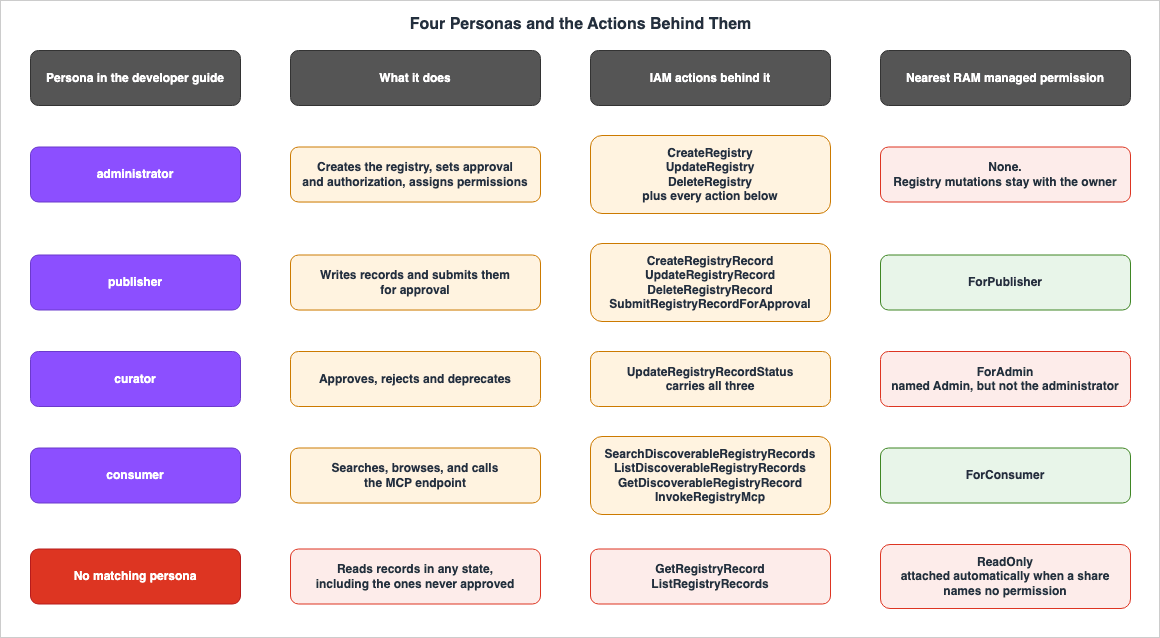
organizations.In other words, these four personas are neither IAM roles nor resources. They are merely guidelines for how to structure permissions, and do not represent the inherent structure of the service. Only the IAM actions actually exist; how the personas are drawn is left to whoever designs the permissions.
4.2 Personas mapped to operations
Matching each persona to the buttons it can press, from the developer guide and the IAM permissions reference, gives the following.| Persona | Primary Actions | Corresponding IAM Actions |
|---|---|---|
| administrator | Creating and configuring registries, determining approval processes, assigning permissions | CreateRegistry, UpdateRegistry, DeleteRegistry, plus all of the following |
| publisher | Creating and updating records, submitting for approval, resubmitting after rejection | CreateRegistryRecord, UpdateRegistryRecord, DeleteRegistryRecord, SubmitRegistryRecordForApproval |
| curator | Approving, rejecting, and deprecating | UpdateRegistryRecordStatus |
| consumer | Searching, listing and retrieving approved records, invoking the MCP endpoint | SearchDiscoverableRegistryRecords, ListDiscoverableRegistryRecords, GetDiscoverableRegistryRecord, InvokeRegistryMcp |
The curator row is the one to look at. Approving, rejecting, and deprecating are all represented by a single IAM action. Because the
UpdateRegistryRecordStatus action passes the desired state, it's not possible to use this action alone to allow approvals while prohibiting deprecations.The definition of the administrator persona also covers the curator's work. The guide states:
As the admin, you also have full access to create, update, and delete records, and can
approve, reject, or deprecate records when needed.
The four personas are not mutually exclusive. The guide says as much about the curator, noting that the administrator often holds that job too.
4.3 There are nine record states, not five
The state transition diagram on the official blog shows five states: DRAFT, PENDING_APPROVAL, APPROVED, REJECTED, and DEPRECATED. This is sufficient for explaining the approval workflow.The
UpdateRegistryRecordStatus API reference, though, lists nine entries under Valid Values for status.DRAFT | PENDING_APPROVAL | APPROVED | REJECTED | DEPRECATED | CREATING | UPDATING |
CREATE_FAILED | UPDATE_FAILEDThe last four cover the record being built or updated, and the failures of those operations. They are not approval-workflow states. They describe the record as a resource. Code that branches on a record's state has nine to handle, not five. Working from the approval workflow diagram alone leaves states unhandled.
The registry itself carries a separate enumeration of seven: CREATING, READY, UPDATING, CREATE_FAILED, UPDATE_FAILED, DELETING, and DELETE_FAILED.
4.4 RAM also has four managed permissions, and they do not line up
Sharing a registry with another AWS account goes through AWS Resource Access Manager. The share carries one of four managed permissions, and their names closely resemble the persona names.| Managed Permission | Functionality |
|---|---|
AWSRAMDefaultPermissionAgentRegistryReadOnly | Reads of the registry and of records. Covers both control plane reads and data plane discovery. Does not permit invoking the MCP endpoint. |
AWSRAMPermissionAgentRegistryForConsumer | Data plane discovery, plus invoking the MCP endpoint. |
AWSRAMPermissionAgentRegistryForPublisher | In addition to the above, allows viewing the registry configuration, and creating, updating and deleting records and submitting them for approval. |
AWSRAMPermissionAgentRegistryForAdmin | In addition to the above, allows approval, rejection, and deprecation. |
Pay close attention to the fourth name. Although it ends in Admin, it is not the administrator persona. The developer guide explicitly states that changes to the registry itself are not granted through shared access.
Control-plane registry mutations (UpdateRegistry, DeleteRegistry) always remain with the
owner—they cannot be delegated through RAM.
The RAM Admin permission covers the whole lifecycle of records and none of the registry's own configuration. It cannot switch the approval setting, change the authorization method, or delete the registry. Because the persona names and the permission names look alike, it is easy to hand a shared account what you believe is administrator access and hand it something else.
4.5 The default share exposes records that were never approved
There is one more place where the name and the effect point in opposite directions.Create a RAM resource share without naming a permission and RAM attaches
AWSRAMDefaultPermissionAgentRegistryReadOnly on its own. The developer guide lists six actions this permission grants, and two of those involve reading records – actions performed on the control plane.agent-registry:GetRegistryRecord—Read individual record details (control plane).
agent-registry:ListRegistryRecords—List all records in the registry (control plane).As Section 3 showed, the control plane listing carries no
Discoverable. An account that receives the default share can therefore enumerate draft records and rejected ones. It cannot call the MCP endpoint.In contrast,
AWSRAMPermissionAgentRegistryForConsumer only grants access to three data plane actions and calls to the MCP endpoint. It does not include read access to the control plane, and only allows viewing of approved records.The permission named for read-only access shows more than the one named for consumers. The breadth the name suggests and the range actually visible run in opposite directions. The guide itself recommends the Consumer permission for ordinary sharing.
We recommend the Consumer permission for typical sharing scenarios where the consumer
account's agents need to discover and invoke tools.
If you rely on the default sharing settings, accounts will be able to read records that are still in the approval process. If record names or descriptions contain clues about internal endpoints or configurations, this can expose information beyond the intended scope. Name the permission explicitly every time you share.
5. What a Record Describes
5.1 Registries and registry records
This service has only two resources: registries, and the registry records inside them.A registry contains a name, description, authorization settings, approval settings, and a collection of records. The default maximum number of registries per account per Region is 5, and the limit can be raised on request. The name can be up to 64 characters long, while the description can range from 1 to 4,096 characters. Tags can also be added. In CloudFormation resource definitions, the maximum number of tags is 50.
Regarding encryption, you can specify a customer-managed key at creation. Omit it and the registry uses an AWS owned key. The key cannot be changed once the registry has been created. The developer guide states this directly.
You can only set the --encryption-configuration parameter during registry creation.
You cannot change the KMS key after the registry is created.
There are prerequisites for deleting a registry. The console's deletion process displays a warning indicating that all records must be deleted first. A registry cannot be deleted if it still contains records.
A registry record is the metadata describing one resource. The existing Identity Lifecycle for AI Agents holds the
recordType values and the character limit on statusReason, so this article does not repeat them.5.2 Four record types, six descriptor keys
TherecordType field is mandatory and takes four values: AGENT, MCP, SKILL, and CUSTOM. The official blog also lists these four options.However, this count is incomplete. The actual data is carried within a container called
descriptors, which, according to the data plane API reference, has six keys.descriptors Key | Description |
|---|---|
mcpServer | Populated when the record type is MCP. |
a2aAgentCard | Populated when the record type is AGENT. |
agentSkillsDefinition | Populated when the record type is SKILL. |
custom | Populated when the record type is CUSTOM. |
agui | Populated when the record exposes an AG-UI protocol endpoint. |
http | Populated when the record exposes an HTTP endpoint. |
The last two keys do not correspond to any of the
recordType values. The API reference describes these two differently, basing the condition on whether the record publishes an endpoint rather than the record type itself. The descriptions of agui and http read as follows.The AG-UI descriptor, populated when the record exposes an AG-UI protocol
endpoint.The HTTP descriptor, populated when the record exposes an HTTP endpoint.The other four keys all use the phrasing "populated when the record type is," indicating that the condition is based on the record type.
Furthermore, the
descriptorType filter accepted by the listing API only accepts four values, according to the tool definitions for MCP endpoints. These are a2aAgentCard, mcpServer, agentSkillsDefinition, and custom. agui and http are not listed.Write the extraction path for six keys, then, and expect to filter on only four. If you only write the logic based on the assumption that there are four record types, you risk losing the data associated with the remaining two keys.
5.3 What schema validation guarantees
Regarding records for MCP servers and agents, the registry verifies that the content aligns with the protocol definitions.For MCP Server and Agent records, AWS Agent Registry validates your definitions against the
MCP and A2A protocol schemas respectively, ensuring correctness before records are published.The validation covers format and nothing else. For MCP server records, it confirms that the server definition and tool definition adhere to the structure of the protocol. However, it does not verify that the server actually exists, functions as described, or is secure. Do not use passing schema validation as a basis for determining quality. That is the curator's responsibility, and the reason for the approval workflow.
SKILL and CUSTOM records go through no schema validation. A CUSTOM descriptor can be any valid JSON.5.4 name and displayName do different jobs
Records contain two fields that correspond to a name.The
name field is mandatory and has to be unique across the registry. It is the deduplication key. If you also specify recordVersion, then the combination of name and recordVersion must be unique. This allows you to have multiple versions of the same resource using the same name.The
displayName field is optional and is intended as a human-readable name.The namespace migration moved these two around. What the old namespace called
name became displayName, and a new name was introduced as the deduplication key. When copying older code examples, be sure to verify which name is being referenced.5.5 Synchronization creates a new revision
Records can be created not only by manual entry, but also by drawing data from external MCP endpoints or A2A endpoints. By specifying a URL, the registry retrieves the server name, description, tool name, and tool description from that location to update the record.This update does not directly modify the record in place.
When Synchronization is used for an existing record, a new revision for the existing record
is created.
A new revision is created. Depending on the approval settings, this revision may be subject to review again. This is the mechanism by which changes to the underlying data are reflected in the approval status.
The credentials used for synchronization are called outbound authorization, and they are a separate setting from inbound authorization, which governs consumer access. You register an OAuth or IAM role as a credential provider, and the record references it using an ARN.
6. Why There Are Two Ways to Find Something
6.1 Semantic and keyword search run at the same time
Search is not a matter of picking one of two methods. The developer guide states that both methods run every time.Both search modalities run simultaneously on every query, with results ranked by a weighted
combination of relevance scores.Semantic search aims to understand the intent behind natural language queries. For example, a request to find a tool that can book flights might match a record named "travel-reservation-service." Keyword search, on the other hand, identifies exact string matches. It's effective when you specify a name directly, such as "weather-api-v2."
Because both run on every query, naming decides how findable something is. Semantic search interprets the intent behind the descriptions, so the clarity and comprehensibility of the record descriptions, especially for individuals outside the team that originally wrote them, significantly affects the results. The official blog also highlights this as a key factor that curators should verify.
6.2 Search and listing are separate APIs with separate limits
There are three discovery paths, each with distinct characteristics. The following details the values specified in the API reference:| Operation | API | Records Returned Per Request |
|---|---|---|
| Search | SearchDiscoverableRegistryRecords | 1 to 20 records. Default: 10 records |
| List | ListDiscoverableRegistryRecords | 1 to 100 records per page. Pagination supported |
| Batch Get | BatchGetDiscoverableRegistryRecord | Accepts a batch of identifiers. The maximum number of records is not specified in the API reference. |
The maximum length of a search query string is 256 characters. A maximum of 10 filters can be applied to the list operation.
Watch where a default value comes from. The default of 20 records per page for the list operation appears in the MCP endpoint's tool definition, not in the REST API reference, which states no default at all. Similarly, the limit of 100 records per batch retrieval is only documented in the tool definition. These are separate entry points for the same underlying operation, so avoid assuming that a value specified for one applies to the other.
Search returns at most twenty records. To walk the whole catalog mechanically, use the list API instead. The list API returns summaries and no descriptor content. Once the content is needed, hand the identifiers collected so far to batch retrieval. The developer guide clearly explains this distinction in the context of the MCP tool.
Summaries include record metadata but not descriptor content. Use
batch_get_discoverable_registry_record to fetch full descriptors after identifying the
records you need.
6.3 Every discovery path looks at exactly one registry per call
The search API requests include a field calledregistryIds, which is plural. However, the API reference currently limits the number that can be specified to a single item.Currently, you must specify exactly one registry identifier.The array members are documented as
Fixed number of 1 item.Bulk retrieval follows the same pattern. The
BatchGetDiscoverableRegistryRecord request accepts an array of entries, where each entry consists of a registry identifier and a record identifier. However, this entries array is also currently limited to a single item.The registry-scoped groups of record IDs to retrieve. Currently, you can specify exactly
one entry.The listing API operates similarly, accepting registry identifiers as URI parameters. Therefore, all three discovery paths examine only one registry per request.
This directly impacts the design decision of how many registries to create. The official blog recommends starting with the minimum number required to meet isolation requirements, and only splitting them when necessary. While the blog cites operational overhead and noise in search results as reasons, the API itself imposes a more rigid constraint. When registries are split, the scope of what can be seen in a single search is also split. For organizations that split registries by department, searching for existing resources across departments will require multiple API calls.
The default ceiling of 5 registries per account per Region tightens this further. The number you can split into is bounded, and each split adds search calls.
6.4 The registry is itself an MCP server
The registry has one MCP endpoint, with the following URL format:https://agent-registry.<region>.api.aws/registry/<registryId>/mcpThis endpoint adheres to the 2025-11-25 specification for MCP. It exposes three tools, matching the three data plane discovery APIs one for one.
| Tool Name | Corresponding API |
|---|---|
search_discoverable_registry_records | SearchDiscoverableRegistryRecords |
list_discoverable_registry_records | ListDiscoverableRegistryRecords |
batch_get_discoverable_registry_record | BatchGetDiscoverableRegistryRecord |
It exposes those three discovery tools and nothing else. The MCP endpoint carries no operation that creates a record or approves one. When an agent connects to this endpoint, it can only search for approved records.
A call needs two permissions. One is
InvokeRegistryMcp to access the endpoint itself, and the other is the permission corresponding to the specific tool being used. The developer guide states that using the search tool also requires SearchDiscoverableRegistryRecords. Being able to call the endpoint and being allowed to run a tool are two separate permissions.Authorization runs on either JWT or IAM. When using JWT, the MCP client can obtain the necessary information from the
WWW-Authenticate header or the .well-known/oauth-protected-resource path. Clients that support dynamic client registration can connect without needing to register a client ID beforehand. In that case, configure the registry with allowedAudience rather than allowedClients.6.5 Batch retrieval reports partial failure as success
Batch retrieval has one property worth knowing before writing against it. The API reference documentation mentions this at the beginning.Records that cannot be retrieved are reported individually in the errors list rather than
failing the entire request.The tool definition for MCP endpoints also describes this, pairing it with a status code and listing potential error codes.
The response returns HTTP 200 even on partial failure. Records that could not be retrieved
appear in an errors list with an errorCode (RESOURCE_NOT_FOUND, ACCESS_DENIED, or
INTERNAL_ERROR) rather than causing the whole call to fail.
When only some of the requested records come back, the HTTP status is still 200. Whatever did not come back lands in the
errors array of the response.ACCESS_DENIED can appear in that array. In batch retrieval, some records being invisible is not an anomaly. It is a response the design allows. An implementation that reads the status code alone never learns that something was withheld.7. The Governance You Can Configure Today
This section covers only those controls that can currently be configured as of September 14, 2026. Section 10 holds what belongs to the future.7.1 The approval configuration
The registry includes approval settings that determine whether submitted records are automatically approved. The CloudFormation property descriptions explicitly state the default behavior.When no auto-approval rules are configured, submitted records require manual review.The configuration takes the form of an array. Previously, this was a boolean value called
autoApproval; it has now been changed to an array of strings called autoApprovalRules.Currently, the only supported value is APPROVE_ALL, which automatically approves all
submitted records.The maximum size of the array is 10, but currently, only one value can be specified. The array exists so that finer rules can be added later. For now the choice is between approving everything and approving nothing automatically. Partial auto-approval does not exist yet.
This setting's behavior when modified is also subject to certain conditions. The API reference describes the behavior when switching from disabled to enabled.
The change applies only to records that move to PENDING_APPROVAL after the update; records
already in PENDING_APPROVAL are unaffected.
The developer guide also states that the same conditions apply when switching in the opposite direction.
Updating auto-approval config from OFF to ON only affects records submitted after the
change. Existing records already 'Pending Approval' are not affected and must still be
approved or rejected by calling UpdateRegistryRecordStatus API. Changing the config from
ON to OFF only affects records that are published to 'Pending Approval' after the change
is made.
Even when automated approval is enabled, records that are already pending review will not be processed. Changing the setting to resolve pending records will only affect records submitted after the change. Records that are currently pending will need to be processed individually using the
UpdateRegistryRecordStatus function.The same condition applies in reverse, and that matters more. When automated approval is disabled, the change only affects records that subsequently enter the pending review queue. AWS does not specify what happens to records that were already in the pending review queue at the time the setting was disabled. It is not explicitly stated that reverting the setting will immediately stop all automated approvals. If you accidentally enable automated approval, simply reverting the setting may not be sufficient. The records that reached the approved state in the meantime have to be counted again and deprecated by hand.
7.2 Two authorization methods, and what can still be changed
There are two methods for user authorization. CloudFormation accepts the valuesCUSTOM_JWT and AWS_IAM.On whether the chosen method can be changed later, the chapter on creating registries carries an explicit sentence.
The inbound authorization type (IAM or JWT) and the JWT discovery URL cannot be changed
after the registry is created. For JWT-authorized registries, you can only update the
authorizer configuration (allowed clients, audiences, scopes, custom claims).
Two things cannot be changed, and the distinction matters. These are the authorization method itself and the JWT discovery URL. While you can add permitted clients and audiences, you cannot redirect the ID provider that the registry trusts to a different one. If you are planning to migrate your identity infrastructure, this will impact your decisions before creating the registry.
The API and CloudFormation reach the same conclusion.
UpdateRegistry only accepts authorizerConfiguration under discoveryConfiguration and does not accept authorizerType. In CloudFormation, updating AuthorizerType requires a Replacement. While all three systems align, the most definitive basis for this conclusion is the earlier statement that explicitly lists what can and cannot be changed.The API reference includes a note regarding operations that modify JWT settings.
Changing the discovery authorization can break existing consumers that rely on the previous
authorization type.
A JWT registry must name at least one permitted target. These can be permitted audiences, permitted clients, permitted scopes, or custom claims. Name several and the registry verifies every one.
The choice of method has a characteristic of impacting network-level control. The PrivateLink page explicitly states that a single registry can only be authorized through one method.
A registry is authorized by either SigV4 or JWT according to its authorizerType, never both.A JWT caller also cannot be picked out individually inside an endpoint policy.
A bearer-token caller carries no IAM identity, so it matches only a statement whose
Principal is * — never a specific account, role, or user ARN.
The same page summarizes this consequence in a single sentence.
you cannot single out an individual bearer caller by principal, because bearer callers are
indistinguishable at the principal level
Choosing JWT lets people search with the credentials their corporate identity provider already issues, and costs the ability to narrow callers by principal in an interface endpoint policy. If you need to restrict access, the way to narrow them is a
Deny statement with Principal set to *, scoped by action and resource. Considering that the choice of method is a decision made during creation, this is a difficult decision to reverse later.7.3 Organization-wide auto-detection
When using AWS Organizations, the registry can automatically discover resources within member accounts and record them. Two resource types are in scope today, and the developer guide names them in parentheses.AWS Agent Registry then creates a record for each discovered resource (currently Amazon
Bedrock AgentCore Runtimes and Gateways).Auto-detected records carry a mark. Their names take the prefix
aws-autodetected-, and they carry provenance pointing back to the resource they were detected from. They sit in the same registry as the records people add by hand.There are three limitations. First, you must have trusted access enabled within AWS Organizations. Second, either a delegated administrator must be registered, or the management account must own the registry. And finally,
Only one organization-scoped registry can be active per Region.Auto-detection runs inside the Region it was enabled in. To find resources in other Regions, create a separate registry with auto-detection enabled in each Region.
What auto-detection inserts is the draft state. The official blog states this directly. Detected resources enter as draft records and follow the standard governance lifecycle. Enabling auto-detection therefore does not make what it finds discoverable. Until someone approves a record, it appears only on the Governance Plane.
7.4 Cross-account sharing and the condition keys
AWS Resource Access Manager handles registry sharing. Section 4 covered the four managed permissions.For more granular control, there are two service-specific condition keys available.
| Condition Key | Filtering Criteria |
|---|---|
agent-registry:RecordCreatorAccount | The AWS account ID of the principal that created the record. |
agent-registry:RecordSourceAccount | The AWS account ID of the source resource the record is tied to. |
The service resolves both at authorization time from the stored record, and neither can be set from the request. The recipient cannot falsify these values to access records belonging to other accounts.
7.5 Where the condition keys do not apply
These two condition keys have limitations regarding the operations they affect. The developer guide lists these limitations.SearchDiscoverableRegistryRecords, ListRegistryRecords, and ListDiscoverableRegistryRecords—these
operations return summaries for all matching records regardless of condition-key
restrictions. The keys apply to individual record-read and record-write operations, not to
search or list enumeration.They do not reach search or listing. Condition keys can only be used to read or write individual records. Search results, and the summaries the list API returns, still carry records that fail the condition.
The guide briefly addresses this limitation in a single sentence.
If you need to keep records from other accounts entirely out of a consumer's view, do not
grant the search and list actions in the shared permission.
The solution is not to refine the search results; rather, it's about not granting access. Nothing today tailors search results per consumer. A record is shown or it is not. The entitlement-based control of discovery that the official blog places in its account of the Governance Plane is written as something that will address this later. This will be discussed in Section 10.
8. What the Discovery Path Records, and What It Does Not
8.1 Management events are logged by default
CloudTrail logs control plane operations as management events. Nothing needs configuring.Management events are logged by default; you do not need to take any action to receive them.The event source is
agent-registry.amazonaws.com. Twelve operations appear there, from registry creation through UpdateRegistryRecordStatus. Approvals, rejections, and deprecations are all among those twelve. With the default settings, records of who approved what and when are retained.8.2 Data events are not logged by default
The perspective shifts.Data events are not logged by default. To receive them, you must create a trail and
explicitly enable data event logging for the AWS::AgentRegistry::Registry resource type.Four operations are covered: search, listing, batch retrieval, and invoking the MCP endpoint. All four are reads.
The security section of the official blog recommends auditing who queries the registry and how often. This audit can only be performed if you explicitly enable data event logging, as it will not occur with the default settings. With the default configuration, search activity will not be recorded in the event history. AWS itself also notes that busy registries can generate a large volume of events in short periods, and advises caution regarding the length of time you choose to keep them enabled.
8.3 Some values are logged but cannot be read
A log entry can survive and still not yield what you came for. The service masks certain fields before they reach CloudTrail.In management events, CloudTrail replaces
name, description, statusReason, and a descriptor's data with HIDDEN_DUE_TO_SECURITY_REASONS. The content of the statusReason, which is written as the reason for approval, is not visible through CloudTrail. Who approved survives. Why does not. If you need to track the reasons for approval later, you will need to store that information outside of the registry.In data events,
searchQuery and filters are similarly masked. You can see who performed the search, but you cannot see what they searched for. This limits its usefulness for tracking which tools specific individuals were looking for.8.4 Semantic search infers outside the Region
Another aspect of the discovery path involves geographical considerations. The inference behind the embedding model that powers semantic search crosses Region boundaries.For AWS Agent Registry, inference requests might be securely routed to available compute
resources across all commercial AWS Regions. Although your data remains stored only in the
primary Region, input prompts and output results might be processed in any commercial
AWS Region.Storage stays in the Region the registry was created in. What moves is the input and the output of the inference. The traffic crosses Amazon's network encrypted.
On what gets logged, the guide is explicit.
Amazon CloudWatch and AWS CloudTrail logs won't specify the AWS Region in which inference
occurs.
Which Region ran the inference cannot be read from the logs. Organizations with requirements regarding data location need to evaluate whether this characteristic aligns with their own frameworks. The developer guide also emphasizes this point.
How cross-Region inference works, and how to design around it, are covered in Amazon Bedrock Cross-Region Inference and Data Residency Design. This article adds the point that the registry's own search rides on that path. It's common for organizations to consider separately where to place the catalog and where the inference will run, and this characteristic is often overlooked in relation to the catalog placement.
8.5 One place where the primary sources disagree
There are two pages that describe EventBridge notifications differently.The page detailing core features states that a notification is sent when a record is submitted for approval. It lists only one type of notification.
In contrast, the migration guide presents a table outlining the different notification types in the new namespace, listing five types related to registry records and seven related to the registry itself. The five on the record side correspond to the transitions into draft, pending approval, approved, rejected, and deprecated.
Given that the migration guide was written later and is intended to document changes, it is reasonable to consider it the more accurate source. However, this discrepancy could cause issues for those responsible for updating the existing notification rules. The migration guide points out that one detail type on the registry side changed from a sentence into a short status name.
A rule that matched detail type Registry State transitions from Creating to Ready no longer
fires — update it to Registry Ready.
The record-side detail type for
PENDING_APPROVAL did not change, so those rules keep firing once the source is updated. One migration carries both: things that stop unless you change them, and things that keep working if you do not.9. The Agentic Resource Discovery Specification
9.1 What ARD is, and whose it is
Everything up to this point has been about the inside of a single AWS account. However, an organization's resources aren't always confined to AWS alone. They may reside in other cloud platforms, in the organization's own data centers, or within SaaS applications. Each of those environments has its own catalog, and the formats they use to describe things differ.Agentic Resource Discovery is the specification aimed at that problem. The abbreviation is ARD.
ARD is not an AWS specification. According to the specification's publishers, the core authors are three individuals affiliated with Google, Microsoft, and Hugging Face, and a working group with representatives from several other companies is also involved. The official blog states AWS's own involvement in one sentence.
AWS contributed feedback during the spec's development.AWS contributed opinions while the working group drafted the specification. It did not publish it. AWS documentation alone will not tell you which version is current, so the reference has to be the specification itself.
The version referenced in this article is as follows: Version v0.91, Status Proposal, Date August 26, 2026, License Apache License 2.0, confirmed on September 14, 2026. The Proposal status matters. This is not a settled standard.
9.2 What the specification defines
ARD defines the format of descriptions and the entry points for searching.The unit of description is called an ARD entry. Required fields include a globally unique identifier, a human-readable display name, a type represented by an IANA media type, and either a reference to the body or the body itself.
There are two methods for publication. One is to place a JSON file containing an array of entries under the domain at
/.well-known/ard.json. The other is to use a rel="ard" link relationship within an HTML document.Three entry points are defined for searching. The primary entry point is
POST /search, which returns entries sorted by relevance. POST /explore, which returns aggregated results, and GET /agents, which lists entries in a predetermined order, are optional.There are three modes for federation between registries.
auto mode queries the upstream registry and aggregates the results. referrals mode includes references to other registries along with its own results. none mode only serves its own index.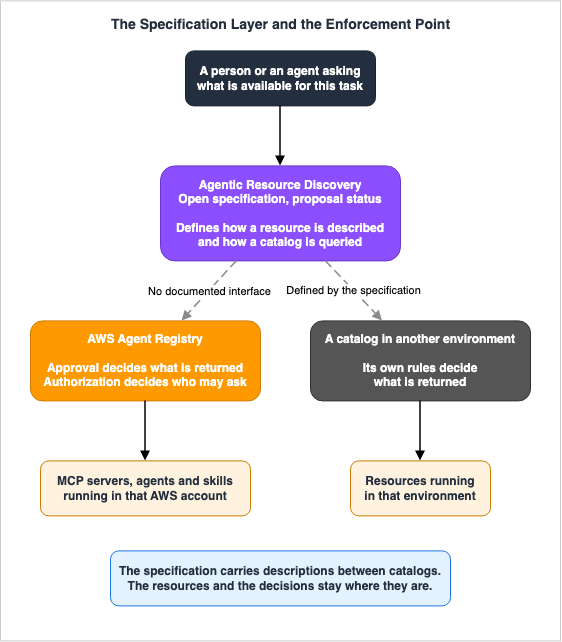
9.3 Everything AWS says about it is in the future tense
The official blog makes three statements about the relationship between ARD and AWS Agent Registry. All three are presented as potential future developments.We expect ARD to enable cross-environment discovery while keeping control local.We expect the existing access controls of AWS Agent Registry to remain at the enforcement
point, with ARD serving as the interoperability layer.We expect ARD to open cross-organizational discovery paths for Agent Registry customers.Neither the developer guide nor the API reference states that the current AWS Agent Registry has an entry point for ARD. Therefore, it is reasonable to assume that it is not currently possible to use ARD to integrate the AWS Agent Registry with other catalogs. The blog describes a direction, rather than outlining currently available features.
The shape is this. ARD is the interoperability layer, and it makes the description format and the search interface common. What each consumer actually sees, and who sees it, is settled by the registry each organization runs. AWS places its expectation here because an organization can make the interoperability layer common without letting go of the enforcement point.
9.4 Relevance is not a judgment about trust
The specification contains a single sentence directly related to the subject of this article: a definition of how to interpret the scores returned by a search.A relevance score returned by Search (§5.3.2) reflects semantic relevance only and MUST NOT
be interpreted as a trust, compliance, or safety judgment; trust evaluation is fully
decoupled.Relevance is neither a determination of trustworthiness, nor a determination of legal compliance, nor a determination of safety. The specification states this because the specification itself lacks the information necessary to make those judgments.
This is essentially saying the same thing as the design of the AWS Agent Registry, but from the opposite perspective. The registry judges trust through a separate mechanism, approval, and carries that judgment into what discovery returns. The specification rules that discovery results must not be read back as a judgment about trust. Both operate on the same underlying principle: that what appears in search results is distinct from a judgment that it is permissible to use.
The specification also lists other areas it does not handle itself. It states that it does not define or constrain the internal schema of any particular agent type, and it defines no signing or verification procedure of its own.
10. What Has Not Arrived Yet
The official blog describing the Governance Plane includes both currently available and planned features. The blog itself says the two are mixed, so this section keeps the future side in the future tense. None of it belongs in the premises of a design being built now.The blog summarizes the future direction into four key areas:
Control, Security, and Compliance. An approval decision today rests on whatever the publisher wrote. The blog states that incorporating security and vulnerability assessments, compliance evaluations, and duplication analysis into the approval workflow is planned. This area also includes version control with complete audit trails, and the application of centralized policies for agent invocations.
Enhanced Catalog and Metadata. The aim is to shrink the set of resources running unregistered. The blog states that resources running on services like Amazon EC2, Amazon EKS, and Amazon ECS will be automatically detected. Regarding resources outside of AWS, partnerships are planned to enable federation. The possibility of allowing organizations to define their own schemas to enforce a consistent structure for records is also mentioned.
Search, Discovery, and Observability. The blog acknowledges that current discovery capabilities are binary – if you have search permissions, you can see everything. As seen in Section 7, condition keys do not apply to search and listing. The blog suggests a direction that allows control over which records each user can see, using the phrasing "is intended to." This area also includes observability metrics for agents and tools, as well as dependency graphs for analyzing impact.
Accessibility Across Different Environments. The aim is to reach the registry from surfaces other than the console. This includes integration with IDEs and business systems, authenticated web applications for users without AWS accounts, and public registries for external use.
None of these four areas can currently be considered part of the design. In particular, the third area is essentially a reversal of the limitations discussed in Section 7. If it becomes necessary to provide different search results for different users, the current approach will require either segmenting the registry or restricting permissions.
11. Failure Modes
The material above, rearranged into the shapes it actually takes.Approval processes stall, and the registry is no longer utilized. Routing an approval to whoever reviews it is not provided as a built-in feature. The registry only provides EventBridge notifications and the
UpdateRegistryRecordStatus API; any mechanisms to connect these two are your responsibility. If you don't implement such a mechanism, submitted records will accumulate, awaiting approval. Switching to auto-approval does not move the backlog either. Decide up front who receives the notification and who presses approve.The configuration from a testing environment is inadvertently migrated to production. Auto-approval is the setting that puts a record into the discoverable set without a review step. The developer guide presents this as an option suitable for development environments where manual review is not necessary. The setting sits on the registry, so one registry shared across environments cannot hold two answers. The decision to separate registries across environments stems from the granularity of this setting. And reverting the setting once the mistake is noticed reaches only the records that enter the review queue after the revert. Whatever moved to the approved state in the meantime has to be found and deprecated by hand.
The record becomes disconnected from the actual resource. A record is simply metadata; it is not the resource itself. A manually created record will not automatically update if the underlying resource changes. While you can configure URL synchronization, this will create a new revision, and depending on your approval settings, it may require re-approval. Either way, someone has to operate it. If left unattended, approved records that no longer accurately reflect the actual resource will remain.
Confusing the control plane with the data plane. The control plane's listing API returns records that have not been approved. This discrepancy is most apparent with RAM's default managed permissions. Its name says read-only, and it carries control plane reads, which reach drafts and rejected records. Always explicitly define permissions when sharing.
Splitting the registry and splitting the search surface with it. All three discovery paths look at exactly one registry per call. Split by organizational unit and a search across units no longer finishes in one call, which works directly against the goal of preventing duplication. Start with the minimum number of registries required to meet isolation requirements.
Choosing the authorization method on search convenience alone. JWT lets people search with the credentials their corporate identity provider already issues, and it costs the ability to narrow callers by principal in an interface endpoint policy. Neither the method nor the JWT discovery URL can be changed after the registry exists. Decide how far the network side has to narrow callers, and whether the identity provider might move, before creating the registry.
Assuming that who searched for what can be traced. Search is a data event and is not logged by default. Even with a trail created and data events explicitly enabled, the search string itself is masked. If auditing queries is a governance requirement, establish first what survives and what does not.
Assuming that the reason for an approval can be traced through CloudTrail.
statusReason is a required field, and CloudTrail masks it. If the approval history has to be explained later, keep that record outside the registry.Designing against features that have not arrived. Per-consumer discovery, automatic de-duplication, and built-in security assessment are all written up as future directions in the official blog. Today the condition keys do not reach search. Close what you build now around what exists now.
12. Frequently Asked Questions
Are unapproved records completely invisible to consumers?
Not through the data plane APIs. Search, listing, batch retrieval, and the MCP endpoint all take only approved records as their subject. The control plane'sListRegistryRecords and GetRegistryRecord carry no such restriction. A principal holding those two permissions can see records that have not been approved. The default managed permissions for RAM include these two.Does enabling auto-approval remove review entirely?
No. With auto-approval on, a submitted record reaches the approved state without a review step. Records already waiting for review when the setting was turned on are untouched and stay in the queue. The setting also sits on the registry, so auto-approval cannot be turned on for only some records of one registry.Should there be one registry or several?
It's reasonable to start with the minimum number of registries required to meet isolation requirements. Because all three discovery paths look at exactly one registry per call, every split adds calls to any search that crosses the split. The default limit is 5 registries per account per Region. Different authorization methods, or different approval settings per environment, leave no choice but to split, because both settings sit on the registry.Can IAM and JWT be switched after the fact?
No. The developer guide states that neither the authorization method nor the JWT discovery URL can be changed once the registry has been created. On a registry that was created with JWT, the permitted clients, audiences, scopes, and custom claims can still be changed. The API reference warns that such a change can break existing consumers.What can an agent do once it connects to the registry as an MCP server?
It can search approved records, and nothing else. The endpoint exposes three tools: search, listing, and batch retrieval. Nothing there creates a record, and nothing there approves one. Calling the endpoint and running a tool also need separate permissions.Does organization-wide auto-detection stop shadow agents?
No. Auto-detection finds resources running on AgentCore Runtime and AgentCore Gateway and turns them into draft records. What it finds becomes discoverable only after someone approves it. Auto-detection is a mechanism for showing administrators that shadow agents exist, not one for stopping them from running.Can ARD search resources in another cloud alongside this one?
Currently, that is not possible. ARD is still in the proposal stage, and neither the developer guide nor the API reference mentions an ARD entry point on AWS Agent Registry. The official blog states an expectation that such a path will open, not that one exists.Does a semantic search query leave the Region the registry was created in?
Yes. Inference for the embedding model is subject to cross-Region inference, and which commercial Region handles it is not fixed. Stored data stays in the registry's own Region. Neither CloudWatch nor CloudTrail records which Region ran the inference.Where does the record of an approval live?
CloudTrail logs theUpdateRegistryRecordStatus call as a management event by default. Who changed the state, and when, survives. The statusReason value is masked, so the reason itself cannot be read from CloudTrail.13. Summary
At the center of the AWS Agent Registry's design is a structure in which records that have not been approved fall outside the APIs a consumer uses. Approval does not move a record. It switches which of the two API surfaces returns it.That structure shows up in the API names. The data plane read operations carry the word
Discoverable and return approved records only. The control plane read operations carry no such word and return records whatever their state. When designing permissions, it's important to consider this aspect of the action names.However, there are instances where this boundary can be unintentionally crossed. The default managed permissions in RAM include read access to the control plane. Condition keys do not apply to search and list operations. Furthermore, what is logged and what is not varies between the control plane and the discovery side.
The Agentic Resource Discovery specification aims to place an interoperability layer outside of this structure. The specification is currently in proposal status, and a connection to the AWS Agent Registry is not yet available. What the specification lays down as a rule, though, rests on the same premise as the registry's design. Turning up in a set of search results is a different thing from a decision that something may be used.
14. References
- AWS Agent Registry: Discover and manage agents, tools, and resources - Amazon Bedrock AgentCore Developer Guide
- Concepts and terminology - Amazon Bedrock AgentCore Developer Guide
- Key capabilities - Amazon Bedrock AgentCore Developer Guide
- Create and manage registries - Amazon Bedrock AgentCore Developer Guide
- Curating the registry - Amazon Bedrock AgentCore Developer Guide
- Discovering the registry - Amazon Bedrock AgentCore Developer Guide
- Using the Registry MCP endpoint - Amazon Bedrock AgentCore Developer Guide
- Using AWS Agent Registry with AWS Organizations - Amazon Bedrock AgentCore Developer Guide
- Sharing a registry across accounts with AWS RAM - Amazon Bedrock AgentCore Developer Guide
- Log Registry API calls with AWS CloudTrail - Amazon Bedrock AgentCore Developer Guide
- AWS CloudTrail integration - Amazon Bedrock AgentCore Developer Guide
- Cross-region inference in AWS Agent Registry - Amazon Bedrock AgentCore Developer Guide
- VPC and AWS PrivateLink with AWS Agent Registry - Amazon Bedrock AgentCore Developer Guide
- Synchronize records from external sources - Amazon Bedrock AgentCore Developer Guide
- IAM Permissions - Amazon Bedrock AgentCore Developer Guide
- Comprehensive registry migration guide - Amazon Bedrock AgentCore Developer Guide
- Quotas for Amazon Bedrock AgentCore - Amazon Bedrock AgentCore Developer Guide
- Welcome - AWS Agent Registry API Reference
- SearchDiscoverableRegistryRecords - AWS Agent Registry API Reference
- ListDiscoverableRegistryRecords - AWS Agent Registry API Reference
- BatchGetDiscoverableRegistryRecord - AWS Agent Registry API Reference
- Descriptors - AWS Agent Registry API Reference
- Welcome - AWS Agent Registry Control API Reference
- UpdateRegistry - AWS Agent Registry Control API Reference
- UpdateRegistryRecordStatus - AWS Agent Registry Control API Reference
- SubmitRegistryRecordForApproval - AWS Agent Registry Control API Reference
- AWS::AgentRegistry::Registry - AWS CloudFormation Template Reference
- AWS::AgentRegistry::Registry ApprovalConfiguration - AWS CloudFormation Template Reference
- AWS::AgentRegistry::Registry DiscoveryConfiguration - AWS CloudFormation Template Reference
- AWS Agent Registry - Amazon Bedrock AgentCore console help panel
- AWS Agent Registry and AWS Organizations - AWS Organizations User Guide
- Manage agents, tools and skills at scale with AWS Agent Registry - AWS Machine Learning Blog
- Agentic Resource Discovery (ARD): An open specification for agent discovery - AWS Machine Learning Blog
- AWS Agent Registry for centralized agent discovery and governance is now generally available - AWS What's New
- AWS Agent Registry for centralized agent discovery and governance is now available in Preview - AWS What's New
- Amazon Bedrock AgentCore FAQs
- Agentic Resource Discovery Specification
- Specification - Model Context Protocol
Related Articles
The lifecycle of the agent identity, from initial registration to eventual retirement. It holds the record type values, the length limit on the approval reason, and the observation that registration happens in three separate places. The present article takes the registry as its subject and defers all of that.
How an agent reaches another agent across a runtime boundary, and how the Agent Card is resolved. The present article stops at the catalog and does not restate that path.
The map of the AgentCore articles as a whole. The registry is one entry on that map.
What an MCP server is, and how the major implementations differ. The present article catalogs those servers rather than building them.
Discovery seen from outside the organization, where a resource is found through a public listing and paid for. The present article covers discovery inside the organization.
How cross-Region inference works and how to design around it. The present article records only that the registry's semantic search rides on that path.
References:
Tech Blog with curated related content
Written by Hidekazu Konishi