How Elastic Load Balancing Scales - Scaling Rate, Capacity, and Load Balancer Capacity Unit Reservation
First Published:
Last Updated:
The confusion has a single root, and this article starts by pulling it apart. Scaling has two independent properties: how fast capacity can grow, and how much capacity there can ever be. Almost everything written about preparing a load balancer for a spike quietly conflates them, and the word "pre-warming" conflates a third thing on top: whether the fleet behind the load balancer, and the clients in front of it, are ready for the traffic at all. A capacity reservation addresses exactly one of those three. Knowing which one, and what the other two require instead, is the whole of the decision.
Every AWS behavior stated below was verified against AWS primary sources on 2026-08-09, with the specific page linked at the point of use. This article reports no measurements of its own: no load test was run, no capacity reservation was created or modified, and no scaling event was observed. Where AWS publishes a rate or a limit, it is attributed to AWS and quoted within the range AWS actually asserts. No pricing figures appear anywhere in this article, including in the section where cost is the usual reason people care.
Table of Contents
- 1. Introduction: The Decision You Have to Make Before the Event
- 2. Scaling Rate Is Not Capacity
- 3. Unpacking the Word "Pre-Warming"
- 4. How the Two-Category Rule of Thumb Formed
- 5. Capacity Unit Reservation in Practice
- 6. Prerequisites to Check Before You Reserve
- 7. Two Scaling Systems, Not One
- 8. Where Reservation Does Not Help
- 9. Protocol Asymmetries
- 10. Measuring Before You Reserve
- 11. A Runbook for a Traffic Event
- 12. Frequently Asked Questions
- 13. Summary
- 14. References
1. Introduction: The Decision You Have to Make Before the Event
The decision this article supports is narrow and recurring: you know a traffic spike is coming, and you have to state what you are going to do about the load balancer, and why. That is a different question from which load balancer type to use, and a different question again from how to make the application behind it survive load. It sits underneath both, and it is the layer that gets answered with folklore because the mechanism is rarely spelled out in one place.Getting it wrong is expensive in two symmetric ways. Under-preparing looks like elevated 5xx responses and connection failures during the first few minutes of the event, after which everything is fine and nobody can reproduce the problem, because by then the scaling system has caught up. Over-preparing looks like a reservation sized from the wrong metric, sitting on a load balancer whose targets are unevenly distributed across zones, so the reserved capacity cannot be used in the zone that needs it, while an operator believes the problem is handled.
1.1 Scope, and what this article delegates
In scope: the separation of scaling rate from total capacity; the three distinct problems that hide behind the word "pre-warming"; how Load Balancer Capacity Unit reservation actually behaves across the three load balancer types; the prerequisites that determine whether a reservation can be used at all; the failure modes where a reservation does not help; how the protocol changes the assumptions; how to measure whether you need one; and a runbook for the event itself.Out of scope, with delegation:
- Choosing between Application, Network, and Gateway Load Balancers, and operating them day to day, including health checks, TLS, listener rules, migration from Classic, and cross-zone load balancing defaults. That is the subject of AWS Elastic Load Balancing Decision Guide, and this article assumes you have already chosen.
- Target-side readiness, specifically slow start mode and the deregistration delay state machine. Both live in the decision guide, and section 3 hands off to it deliberately rather than restating it.
- Cell-based design and shuffle sharding as general patterns. Those belong to Cell-Based Architecture and Shuffle Sharding on AWS. Section 7 uses only the specific case of splitting one workload across multiple load balancers.
- The feature history of Elastic Load Balancing. AWS History and Timeline regarding Elastic Load Balancing carries the chronology, and section 4 uses only the two dates that changed the design guidance.
- Pricing. Capacity reservation has a billing dimension, and this article names its existence exactly once, in section 11, because it is the reason a teardown step exists. No rates, comparisons, or estimates appear.
1.2 How the facts were established, and how sources are labeled
The differentiating claim of this article is that a reader can tell where each statement came from. Everything below is labeled as one of three source classes, and the class is stated in the text wherever it matters.- Official documentation. Service user guides, the Elastic Load Balancing API Reference, AWS CloudFormation and AWS CDK references, service quotas, and the Elastic Load Balancing FAQ. These are maintained and versioned, and a value taken from them is current as of the confirmation date.
- Official AWS blog posts and What's New announcements. Written and published by AWS, dated and attributable, but not maintained the way a user guide is. Rates and thresholds sourced here are quoted with the publication date attached, because AWS may improve them without editing the post.
- Public AWS conference recordings. Named, dated sessions that AWS has published. These are used only to point at where AWS discussed an underlying system in public. No numeric claim in this article comes from a conference recording, because per-node or per-cell figures presented in a talk cannot be assumed to describe the system years later.
Anything that fits none of the three is absent. In particular, this article makes no claim about the internal component names, request paths, or per-cell throughput of the systems underneath Elastic Load Balancing, because those are not documented at a level that a design decision could safely rest on.
2. Scaling Rate Is Not Capacity
Start here, before any feature, because the feature only makes sense once the two axes exist separately.2.1 Two questions that share one word
"Will the load balancer scale?" is two questions wearing one coat.- Rate. Given the capacity it has right now, how quickly can the load balancer acquire more? This is measured in capacity gained per unit of time, and it is bounded by how fast the scaling system can detect the change and provision against it.
- Total capacity. Ignoring time entirely, how much can this one load balancer ever handle? This is bounded by structural limits such as the maximum number of nodes, addresses available in the subnets, and account quotas.
The two failure modes look nothing alike. A rate problem is transient and front-loaded: the first minutes of the spike produce errors, and the incident closes itself as the scaling system catches up. A capacity problem is persistent: errors continue for as long as the load stays high, and adding time does not help.
This is not a framing invented here. AWS uses the same split explicitly. In the January 2025 Networking and Content Delivery post that introduced the feature, AWS writes that when it talks about scaling it is "really talking about two things: the rate of scaling and the overall scaling capacity," and states that capacity reservation is about the rate, pointing at a separate post for questions about overall capacity (Using Load Balancer Capacity Unit Reservation to prepare for sharp increases in traffic, official AWS blog).
Getting the diagnosis right therefore decides the remedy. A rate problem is what a reservation is for. A capacity problem is what sharding is for. Section 7 returns to the second.
2.2 What AWS publishes about the rate
AWS publishes concrete rate figures for both scaling systems in that same January 2025 post. Because these are blog figures rather than user guide values, treat them as the rate AWS described at that date and re-check before you rely on a narrow margin.| Load balancer | Published scaling rate | What the rate applies to |
|---|---|---|
| Application Load Balancer | Scales up to support doubling the workload in five minutes, and then doubling again in the next five minutes | Every dimension of traffic, including bandwidth, new connection rate, and total concurrent connections |
| Network Load Balancer | Starts at three Gbps of capacity and increases at three Gbps per minute | Every dimension of bandwidth |
Two things follow immediately.
The Application Load Balancer figure is geometric. Each five-minute step doubles what you already have, so a load balancer that is already large adds a great deal of absolute capacity per step, and a load balancer that is nearly idle adds very little. This is why a spike onto a load balancer with almost no baseline traffic is the difficult case, and a spike onto a load balancer that was already busy is usually not.
The Network Load Balancer figure is linear, and it starts from a fixed floor. The distance from three Gbps to the level you need is covered at a constant number of minutes per three Gbps, regardless of where you started.
The companion guidance turns those numbers into a trigger. AWS states that you should consider a reservation "when you anticipate traffic spikes that more than double your normal traffic volume in less than five minutes" (Automating AWS Application Load Balancer Capacity Unit Reservation, official AWS blog, 2026-04-09). That threshold is a restatement of the published Application Load Balancer rate, which is a useful sanity check that the two posts agree.
2.3 Why the asymmetry between scaling out and scaling in matters
Elastic Load Balancing does not treat growth and shrinkage the same way. AWS describes the scaling system as scaling "up and out very aggressively in response to the incoming traffic," while keeping enough capacity in reserve to withstand an Availability Zone impairment, and notes that "scaling in and down happens very conservatively" (Scaling strategies for Elastic Load Balancing, official AWS blog, 2024-05-01).That asymmetry is doing real work in your favor, and it has a practical consequence for event planning. A load balancer that carried a large peak yesterday has not necessarily returned to its floor today, so the capacity you start an event with depends on the recent history of the same load balancer. A load balancer created for the event, or one whose traffic has been flat and low for a long time, starts from the least capacity and has the furthest to travel.
It also means the rate that matters is the rate from wherever you are, not from zero. Section 10 is about measuring where you actually are.
3. Unpacking the Word "Pre-Warming"
"Pre-warming" is used to name at least three different problems that happen to occur in the same five minutes. They have different symptoms, different owners, and different remedies, and a capacity reservation addresses exactly one of them.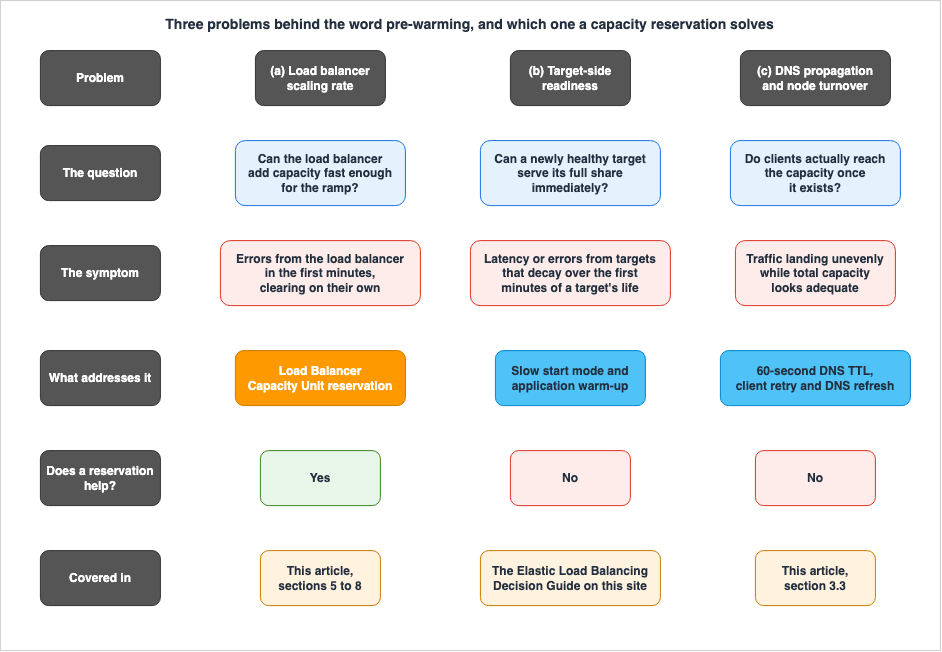
3.1 Problem (a): the load balancer's own scaling rate
The question. Can the load balancer acquire capacity fast enough to keep up with the ramp?The symptom. Errors generated by the load balancer itself rather than by targets, concentrated in the first minutes and clearing on their own. On an Application Load Balancer this shows up as
HTTPCode_ELB_5XX_Count and RejectedConnectionCount, the latter being documented as connections rejected because the load balancer reached its maximum number of connections (CloudWatch metrics for your Application Load Balancer, official documentation).The remedy. This is what Load Balancer Capacity Unit reservation is for, and it is the subject of sections 5 through 8.
3.2 Problem (b): target-side readiness
The question. Is a target that just passed its first health check actually able to serve its full share?A freshly healthy target frequently is not. Connection pools are empty, a just-in-time runtime has not compiled its hot paths, and caches are cold. By default the load balancer does not care: the target passes a health check and immediately receives its proportional share of traffic.
This problem belongs to the existing decision guide on this site, and this article does not restate it. Slow start mode, which ramps traffic to a newly healthy target linearly over a configured duration, along with its incompatibilities with the least-outstanding-requests and weighted-random algorithms, is covered in AWS Elastic Load Balancing Decision Guide. The same guide covers the deregistration delay state machine on the other end of a target's life. The configuration surface is the
slow_start.duration_seconds target group attribute (Edit target group attributes for your Application Load Balancer, official documentation).The important point for this article is negative: a capacity reservation does nothing for problem (b). Reserving capacity on the load balancer does not warm a single connection pool, and a fleet whose targets fall over when they first receive traffic will fall over exactly the same way with a reservation in place.
3.3 Problem (c): DNS propagation and node turnover
The question. Will clients actually use the capacity once it exists?Clients do not address a load balancer directly. They resolve its domain name, and Amazon's DNS servers return the addresses of the load balancer nodes. AWS documents the mechanism plainly: "As traffic to your application changes over time, Elastic Load Balancing scales your load balancer and updates the DNS entry. The DNS entry also specifies the time-to-live (TTL) of 60 seconds. This helps ensure that the IP addresses can be remapped quickly in response to changing traffic" (How Elastic Load Balancing works, official documentation).
Three consequences matter for an event.
- The DNS response is a sample, not the whole set. AWS states that when a load balancer is created it creates a DNS record that returns "a maximum of 8 random IP addresses," so that the response fits in a single UDP query response (official AWS blog, 2024-05-01). A load balancer with far more than eight active nodes is therefore never fully visible to a single resolver answer, and clients spread across the set statistically rather than exhaustively.
- New capacity arrives as new addresses. For an Application Load Balancer, scaling changes which addresses are in the record. AWS notes that Application Load Balancer addresses "can change throughout the life of your load balancer, for example, when the load balancer scales up or down based on your traffic profile" (Using load balancer target group health thresholds to improve availability, official AWS blog). A client that resolved once at process start and cached the result forever will not see the capacity you provisioned.
- A client that ignores the TTL can direct traffic at addresses that are gone. The Network Load Balancer documentation states the case directly for zonal removal: if a target group has no healthy target in a zone, the address for that subnet is removed from DNS, and "if a client doesn't honor the time-to-live (TTL) and sends requests to the IP address after it is removed from DNS, the requests fail" (What is a Network Load Balancer?, official documentation).
AWS gives the corresponding client-side guidance in one sentence: resolve the load balancer name, honor DNS TTLs, which it states are one minute for all Elastic Load Balancing load balancers, retry failed requests with exponential backoff and jitter, and refresh DNS after a connection failure (official AWS blog, 2024-05-01). Language runtimes, connection pools, and reverse proxies that cache resolutions independently of the operating system are the usual offenders here. For the DNS layer itself, Amazon Route 53 DNS Architecture Guide and Route 53 Health Check and Failover - Common Pitfalls and Designs go further than this article needs to.
Note the boundary carefully. Problem (c) is about the load balancer's own addresses and the clients in front of it. It is not about draining a target you are removing from a target group, which is the deregistration delay covered in the existing decision guide.
3.4 Why the three get confused
They get confused because they share a symptom window. All three produce errors in roughly the first few minutes of a ramp, and all three stop producing them once the ramp settles. An operator watching an error graph at the moment of the spike cannot tell them apart from the shape of the graph alone.They separate cleanly on evidence, and the separation is the point of section 10. Errors attributed to the load balancer point at (a). Errors attributed to targets, or latency that decays over the first minutes of a target's life, point at (b). Traffic that lands unevenly across nodes or zones while total capacity looks adequate points at (c).
4. How the Two-Category Rule of Thumb Formed
The most common piece of received wisdom in this area is that Network Load Balancers do not need warming and Application Load Balancers do. It is worth explaining where that came from, because it was a reasonable summary of a real difference, and because understanding why it formed is more useful than declaring it wrong.4.1 What the 2017 design optimized for
When AWS introduced the Network Load Balancer in 2017, the announcement framed it as designed "to handle tens of millions of requests per second while maintaining high throughput at ultra low latency, with no effort on your part," and gave each Network Load Balancer a single address per Availability Zone (New Network Load Balancer - Effortless Scaling to Millions of Requests per Second, official AWS blog).That combination is exactly what produced the rule of thumb. Because the address is static and the scaling happens behind it, a Network Load Balancer's scaling is invisible to clients: nothing about it changes what DNS returns, so none of problem (c) applies in the form it takes for an Application Load Balancer. AWS describes the current structure the same way, stating that a Network Load Balancer consists of a single independent elastic network interface per selected subnet, backed by multiple independent high-capacity nodes, which "allows the IPs of those ENIs to be static and scaling activity to be transparent to the client" (official AWS blog, 2025-01-28).
Observers generalized from "you cannot see it scale" to "it does not need help scaling." Those are different statements, and the second does not follow from the first.
4.2 Pre-warming used to be a support case
The other half of the rule of thumb came from the remedy that existed at the time. AWS states it plainly in retrospect: "Until the launch of the LCU Reservation feature, we offered users the capability of opening a support case to proactively scale their load balancer in preparation for an event, otherwise known as 'prewarming' a load balancer" (official AWS blog, 2025-01-28). The 2017 Network Load Balancer announcement describes the same practice contemporaneously, noting that for instantaneous failover between Regions or extremely spiky workloads, AWS had "worked with our customers to pre-provision ELBs in anticipation of a traffic surge."So "pre-warming" was, for years, the name of a support process rather than the name of a mechanism. A process you request through a support case is naturally described in terms of which product it applies to, and that is how a mechanism-level distinction hardened into a product-level rule.
4.3 What changed, and what the rule of thumb still gets right
Two dated announcements moved the ground under the rule.| Date | Announcement | Effect |
|---|---|---|
| 2024-11-20 | Load Balancer Capacity Unit reservation for Application and Network Load Balancers | The mechanism became a self-service API for both types, removing the support case as the differentiator |
| 2025-04-10 | Load Balancer Capacity Unit reservation for Gateway Load Balancers | Extended the same mechanism to the third type, though not to Gateway Load Balancer endpoints |
Both are official What's New announcements (Application and Network, Gateway).
After those two dates, the statement "Network Load Balancers cannot be pre-provisioned" is simply not true, and a design review that rejects a reservation on a Network Load Balancer for that reason is rejecting it on obsolete grounds.
What the old rule still gets right is worth keeping. Client-visible address churn genuinely is an Application Load Balancer concern and genuinely is not a Network Load Balancer concern, which is problem (c) from section 3. The published scaling rates genuinely do differ, and they differ in shape and not only in magnitude. The rule was a correct observation about problem (c) and about rate, misfiled as a rule about whether preparation is possible. Sections 5 and 7 give the version that survives.
5. Capacity Unit Reservation in Practice
Everything in this section is from official documentation unless a sentence says otherwise, and was confirmed on 2026-08-09.5.1 What a reservation is, and what it is not
A Load Balancer Capacity Unit reservation sets a static minimum capacity. The load balancer continues to scale up and down with actual traffic, but its capacity is prevented from falling below the configured minimum (Capacity reservations for your Application Load Balancer).Three corollaries are easy to miss.
- It is a floor, not a ceiling. AWS is explicit that reservation "only affects the minimum capacity that is provisioned. It does not, and cannot, prevent or block additional scaling above what you requested," and adds that if you set a capacity and still observe the load balancer scaling, that is the scaling system doing its job (official AWS blog, 2025-01-28).
- It does not replace the reactive scaling system. The two run together. The reservation changes where the system starts from, not how it behaves afterwards.
- It is a short-lived instrument. AWS states that the feature "is intended to be used in short intervals," expects it to be set "for short periods, such as a few hours, and occasionally longer periods, such as a few days," and recommends sharding as the more appropriate long-term strategy for workloads with unpredictable spikes (official AWS blog, 2025-01-28).
The official use cases are correspondingly bounded: an upcoming event with sudden unusual traffic, unpredictable spiky traffic for a short period, standing up a load balancer that must start at high capacity rather than waiting for auto scaling, and migrating between load balancers where the destination should match the scale of the source.
5.2 The three load balancer types are not equivalent
This is the part most often summarized incorrectly, because all three types have a chapter with nearly identical opening text and then diverge sharply.| Property | Application Load Balancer | Network Load Balancer | Gateway Load Balancer |
|---|---|---|---|
| Minimum reservation | 100 LCU total | 2,750 LCU per Availability Zone | 2,750 LCU per Availability Zone |
| Dimensions reserved | All scaling dimensions | Throughput only | Throughput only |
| Conversion the docs ask you to do | None; reserve in LCU | Mbps to LCU at 1 LCU to 2.2 Mbps | Mbps to LCU at 1 LCU to 2.2 Mbps |
| Typical fulfillment time | Most requests within a few minutes, up to a few hours | Most requests within an hour, up to a few hours | Most requests within an hour, up to a few hours |
| Listener restriction | None documented | Not supported with TLS listeners | Not applicable |
| Region availability | All commercial Regions and the AWS GovCloud (US) Regions | Ten Regions | Ten Regions |
| Metric used to size it | PeakLCUs | ProcessedBytes | PeakBytesPerSecond |
The Region list for Network and Gateway Load Balancers is identical in both user guides and in both announcements: US East (N. Virginia), US East (Ohio), US West (Oregon), Asia Pacific (Hong Kong), Asia Pacific (Singapore), Asia Pacific (Sydney), Asia Pacific (Tokyo), Europe (Frankfurt), Europe (Ireland), and Europe (Stockholm). The Application Load Balancer capacity reservation chapter carries no Supported Regions section, and the 2024-11-20 announcement states availability in all commercial Regions including the AWS GovCloud (US) Regions.
Two of these rows deserve emphasis because they can invalidate a plan outright. A Network Load Balancer with a TLS listener cannot use the feature at all, which is stated in the first bullet of the request procedure (Request Load balancer Capacity Unit reservation for your Network Load Balancer). And the Gateway Load Balancer announcement states that the feature "is not supported on Gateway Load Balancer Endpoint (GWLBe)," so an appliance fleet reached through endpoints is only partly covered.
The per-zone minimum for Network and Gateway Load Balancers is also a larger commitment than it first appears. Because the documented minimum is expressed per Availability Zone, a load balancer spanning three zones is committing to a multiple of that figure, not to the figure itself.
5.3 Regional reservation, zonal distribution
Capacity is reserved at the Regional level and then "evenly distributed across availability zones," and the documentation instructs you to confirm that you have enough evenly distributed targets in each zone before turning the feature on (Request Load balancer Capacity Unit reservation for your Application Load Balancer).The blog adds the behavior at the edge of that rule, and it is the single most useful sentence in the whole feature: zones without any registered targets "aren't included in the provisioning process. However, the ELB system still provisions enough capacity in the remaining AZs to match your request fully" (official AWS blog, 2025-01-28).
Read that twice. You always configure at the load balancer level, and the system decides the zonal split from where your targets are. You cannot ask for more capacity in the zone you expect to be hot, and you cannot exclude a zone by leaving it enabled but empty; you can only change where your targets are. Section 6.1 turns this into a prerequisite.
The reservation is zone-aware in one more respect. The status value
rebalancing exists specifically to indicate that "an availability zone has been added or removed and the load balancer is rebalancing capacity" (Monitor Load Balancer Capacity Unit reservation for your Application Load Balancer). Changing the zones of a load balancer during an event therefore perturbs the reservation, which is a good reason not to.5.4 Fulfillment is first come, first served
Requests "are fulfilled on a first come first serve basis, and depends on available capacity for a zone at that time." That sentence appears in all three request procedures, and it carries a meaning that the word "reservation" works against: submitting a request is not the same as holding capacity.The status values make the two-phase nature explicit.
| Status | Meaning |
|---|---|
pending | The reservation is in the process of being provisioned |
provisioned | The reserved capacity is ready and available to use |
failed | The request cannot be completed at the time |
rebalancing | An Availability Zone has been added or removed and the load balancer is rebalancing capacity |
The API surface agrees.
ModifyCapacityReservation documents an InsufficientCapacity error with HTTP status code 500, alongside CapacityUnitsLimitExceeded for exceeding the quota (ModifyCapacityReservation). The operational conclusion is that the plan must include verifying provisioned, and must include what you will do if the status is failed. A runbook that ends at "submit the request" has not finished.The fulfillment window is also the reason to request early rather than at the last convenient moment. A window described as "most requests typically within a few minutes, but can take up to a few hours" for an Application Load Balancer, and "within an hour, but can take up to a few hours" for the other two, is not a window you want overlapping with the start of the event.
5.5 The change budget: increases are free-form, decreases are not
Three constraints govern changes to an existing reservation, and all three come from the same documentation bullet.- To update an existing reservation, the previous request must be
provisionedorfailed. You cannot queue changes on top of a request that is stillpending. The API expresses this as theCapacityReservationPendingerror and, more generally,PriorRequestNotCompletewith HTTP status code 429. - You can increase reserved capacity as many times as you need. There is no documented ceiling on the number of increases.
- You can only decrease the reserved capacity two times per day. Exceeding it produces
CapacityDecreaseRequestLimitExceeded.
The asymmetry is not arbitrary, and it is easy to design around once you see it: the system is permissive about going up and deliberately restrictive about coming down. Section 8.3 works through what that means for the end of an event, which is the moment teams reliably fail to plan for.
The remaining budget is observable rather than something you have to track yourself. Both
DescribeCapacityReservation and ModifyCapacityReservation return DecreaseRequestsRemaining, documented as "the amount of daily capacity decreases remaining" (DescribeCapacityReservation).5.6 Setting it: API, CLI, CloudFormation, and CDK
The parameter name is the same everywhere, which makes this one of the easier features to wire into infrastructure as code.The API action is
ModifyCapacityReservation, taking LoadBalancerArn plus at least one of MinimumLoadBalancerCapacity or ResetCapacityReservation. It returns CapacityReservationState as an array of ZonalCapacityReservationState objects, along with DecreaseRequestsRemaining, LastModifiedTime, and the requested MinimumLoadBalancerCapacity.aws elbv2 modify-capacity-reservation \
--load-balancer-arn load-balancer-arn \
--minimum-load-balancer-capacity CapacityUnits=100
aws elbv2 describe-capacity-reservation \
--load-balancer-arn load-balancer-arnIn AWS CloudFormation the same value is a property of the load balancer resource itself rather than a separate resource.
Resources:
  myLoadBalancer:
    Type: 'AWS::ElasticLoadBalancingV2::LoadBalancer'
    Properties:
      Name: my-alb
      Type: application
      Scheme: internal
      Subnets:
        - !Ref subnet-AZ1
        - !Ref subnet-AZ2
      SecurityGroups:
        - !Ref mySecurityGroup
      MinimumLoadBalancerCapacity:
        CapacityUnits: 100
In the AWS CDK the equivalent is the
minimumCapacityUnit property on the load balancer construct (Amazon Elastic Load Balancing V2 Construct Library).That the reservation lives on the load balancer resource has a consequence worth planning for: in a declarative pipeline, raising and lowering the reservation is a change to the load balancer's own definition. If your event runbook raises the value out of band while the pipeline holds the old value in source control, the next deployment will quietly undo it. Either put the event value in the template and deploy it, or exclude the property from drift correction for the duration of the event, and write down which one you chose.
Removing the reservation uses the same action with
ResetCapacityReservation, after which the reported MinimumLoadBalancerCapacity.CapacityUnits returns to zero and the zonal states pass back through pending (Update or cancel Load Balancer Capacity Unit reservations for your Application Load Balancer).6. Prerequisites to Check Before You Reserve
A reservation is not the first thing to do. It is the thing to do after four checks, any one of which can make the reservation useless or impossible.6.1 Even target distribution across Availability Zones
This is the prerequisite the documentation itself puts first, and the one most likely to be skipped. Because capacity is reserved Regionally and distributed evenly across zones, the usable fraction of your reservation is bounded by your least-provisioned zone.AWS's recommendation is direct: provision an equal number of targets in each zone, and make sure there are no zones without registered targets (official AWS blog, 2025-01-28). Combine that with the rule from section 5.3 that empty zones are excluded from provisioning, and the failure mode becomes concrete. If one of three zones has no targets, the capacity is provisioned across the other two. That is not a loss of capacity, but it does mean the zonal shape of your provisioned capacity is now different from the zonal shape you assumed when you sized it, and different again from the shape of client traffic arriving through DNS.
Skew also interacts with health. On an Application Load Balancer, target group health thresholds can remove a zone's addresses from DNS entirely when healthy targets in that zone fall below the configured threshold, or send traffic to all targets including unhealthy ones, depending on which action you configured (Target groups for your Application Load Balancers). A zone that is thin on targets is a zone that is closer to crossing that threshold under load.
The check is simple, and it should be run against reality rather than against the Auto Scaling group configuration: count healthy targets per Availability Zone, and confirm no enabled zone is empty.
6.2 Subnet headroom
An Application Load Balancer scales by adding nodes, and every node consumes an address in the subnet. The requirement is documented precisely: each Availability Zone subnet should have a CIDR block with at least a/27 bitmask and at least eight free IP addresses per subnet, and those addresses are what allow the load balancer to scale out (Application Load Balancers).The documented consequence of getting this wrong is the reason it belongs in a pre-event checklist rather than a design review: if a subnet runs out of usable addresses while the load balancer is attempting to scale, "the Application Load Balancer will run with insufficient capacity. During this time, old nodes continue to serve traffic, but the stalled scaling attempt might cause 5xx errors or timeouts when attempting to establish a connection."
Read that against section 3.1 and the trap is obvious. Address exhaustion presents exactly like a scaling rate problem, because it is one: the rate has become zero. A reservation cannot fix it, because the reservation still has to materialize as nodes that need addresses. If your load balancer subnets are shared with anything that consumes addresses elastically, check the free count immediately before the event and not only when the subnets were designed.
The eight-address figure is a floor for normal scaling, not a target for an event. AWS gives the worked example: a fifty-node Application Load Balancer across five zones, at ten nodes per zone, "may need 10 more IPs per AZ to scale to the maximum size of 100 nodes" (official AWS blog, 2024-05-01).
6.3 The account quota starts at zero
This one stops plans cold if it is discovered on the day. The service quotas for Elastic Load Balancing list three separate reserved-capacity quotas, and all three have a default value of zero (Elastic Load Balancing endpoints and quotas).| Quota | Default | Adjustable |
|---|---|---|
| Reserved Application Load Balancer Capacity Units (LCU) per Region | 0 | Yes |
| Reserved Network Load Balancer Capacity Units (LCU) per Region | 0 | Yes |
| Reserved Gateway Load Balancer Capacity Units (LCU) per Region | 0 | Yes |
All three are adjustable, and the capacity reservation chapters confirm that the maximum reservation value "is determined by the quotas for your account." The quota is per Region and per type, so an account that raised the Application Load Balancer quota in one Region has done nothing for a Network Load Balancer in another. Raise it well before you need it, in the Region and for the type you will actually use.
6.4 Listener and Region eligibility
The last check is a two-line filter, drawn from the table in section 5.2.For a Network Load Balancer, confirm there is no TLS listener, because the feature is not supported on Network Load Balancers using TLS listeners. Note the precise scope: this is a statement about the listener protocol, so a load balancer that terminates TLS on the load balancer is excluded, while one that passes encrypted bytes through on a TCP listener and terminates on the targets is not. If your design has flexibility about where TLS terminates, that choice now carries a capacity-planning consequence it did not carry before. The trade-offs of terminating versus passing through are in AWS Elastic Load Balancing Decision Guide.
For a Network or Gateway Load Balancer, confirm the Region is in the supported list. For an Application Load Balancer, this check is a formality. And for a Gateway Load Balancer, confirm the traffic path you care about is not reached exclusively through Gateway Load Balancer endpoints, which the announcement excludes.
7. Two Scaling Systems, Not One
The behaviors in sections 5 and 6 are consequences of two different underlying scaling systems. AWS states this directly, writing that "the underlying infrastructure design and scaling for ELB products use two different scaling systems: one for ALB, and a second one for NLB," and that the two "have different rates that they can scale because they're built on different technology" (official AWS blog, 2025-01-28). What follows keeps to what AWS has published and labels the source class of each claim.7.1 The Application Load Balancer: nodes that come and go
From official AWS blog posts. An Application Load Balancer scales by first using larger capacity nodes and then by adding more nodes to work in parallel, described as scaling up before scaling out. At least one node is created in each configured Availability Zone. Each node consumes one address per subnet, and an Application Load Balancer can scale "up to a maximum of 100 active nodes created across all AZs" (2024-05-01). A second post states the same limit from the address side, describing up to one hundred active addresses or interfaces distributed across all enabled zones.From official documentation. The consequences of that structure are the ones this article has already used: the addresses in DNS are the addresses of the nodes, the record carries a sixty-second TTL, and the record is updated as scaling changes the node set.
There is one more observable that follows. Because the console's peak capacity view is computed by taking the maximum value of the
PeakLCUs metric in each hour and multiplying it by "the number of active load balancer nodes during that hour," the number of nodes is a first-class quantity in AWS's own capacity math, and the same page warns that the resulting value "may be unusually high during times of zonal imbalances or short bursts of increased node count" (Load Balancer Capacity Units (LCU), official documentation). Zonal imbalance is not only a capacity problem; it also distorts the number you are about to size a reservation from.7.2 The Network and Gateway Load Balancers: one interface per zone
From official AWS blog posts. A Network Load Balancer "consists of a single independent Hyperplane elastic network interface (ENI) per selected subnet/Availability Zone (AZ), which in the background is backed by multiple independent high-capacity nodes" (2025-01-28). A separate post states that Network Load Balancers, and Gateway Load Balancers, are "built on top of AWS Hyperplane, a distributed network function virtualization system deployed in each AZ within a Region," and that scaling "happens transparently for your NLB and independently on a per-ENI basis" (2024-05-01).The operationally important sentence in that second post is the one about independence: if you create a Network Load Balancer with three Availability Zones, it creates three interfaces, and because they are in different zones they "do not share scaling information. Therefore, all the ENIs of the same NLB will scale independently based on the traffic detected in that AZ."
From a public AWS conference recording. The same post links, as its reference for AWS Hyperplane, to the AWS re:Invent 2017 Tuesday Night Live keynote by Peter DeSantis, at a specific timestamp (AWS re:Invent 2017 Tuesday Night Live keynote). That recording is where AWS discussed the system publicly. This article takes no numeric claim from it. A figure for per-node or per-cell throughput presented in 2017 says nothing reliable about the system today, and reproducing such a figure without a current source is exactly the failure this article is trying not to commit. A more recent public session on Elastic Load Balancing, also linked by AWS from the same post, is AWS re:Invent 2023 NET318, Enhance your app's security and availability with Elastic Load Balancing.
Three published consequences follow, and each explains something from the earlier sections.
- Independent per-zone scaling explains the per-zone reservation minimum. For an Application Load Balancer the reservation minimum is a single Regional figure, whereas for a Network or Gateway Load Balancer the documented minimum is expressed per Availability Zone, matching a system where each zone scales on its own.
- Static addresses explain the absence of problem (c) in its Application Load Balancer form. Nothing about scaling changes what a client resolved, which is the property the 2017 rule of thumb was really about.
- Independent zones mean a hot zone stays hot. Traffic concentrated in one zone is served by that zone's interface, which scales on its own evidence at its own rate.
7.3 Where cell-based design and shuffle sharding fit
The general patterns of splitting a workload into independent cells, and of assigning customers to overlapping subsets of capacity to limit blast radius, are the subject of Cell-Based Architecture and Shuffle Sharding on AWS, and this article does not restate them.What is worth flagging here is a naming collision that causes real confusion. AWS's Elastic Load Balancing guidance uses the word sharding for a specific customer-driven technique of putting several load balancers behind one name, and explicitly notes that this "is a different concept than Shuffle sharding, which is at the target level" (official AWS blog, 2024-05-01). It also notes that the process "is driven by customers, and AWS does not manage sharding automatically for you." Keep the two apart in a design review, because one is something you build and the other is a property of a service you consume.
For a broader treatment of what an AWS network path does and does not guarantee, including where zonal and Regional boundaries sit, The Boundaries of the AWS Global Network is the definitional companion to this one.
7.4 Reservation or sharding
This is the decision that section 2's rate-versus-capacity split exists to support, and AWS's own guidance lines up with it: reservation is for the rate, sharding is for the overall capacity, and for workloads with unpredictable spikes AWS recommends sharding as the more appropriate long-term strategy.AWS publishes an explicit threshold table for Application Load Balancers and Classic Load Balancers, based on the number of active nodes across all zones.
| Active nodes across all zones | AWS recommendation |
|---|---|
| Equal to or less than 12 | Sharding is not needed |
| Between 12 and 50 | Sharding is not needed; continue to monitor the load balancer |
| More than 50 | Review historical traffic, determine how long until it doubles, and plan to shard at that time |
| Equal to or more than 99 | Already at the maximum number of nodes; sharding is required immediately |
For Network Load Balancers, AWS recommends planning in terms of load balancer zones rather than load balancers, so that one Network Load Balancer spanning three zones counts as three, and gives one hundred Gbps per zone as the sharding threshold, framed as a way to reduce blast radius (official AWS blog, 2024-05-01).
The mechanism for sharding is Amazon Route 53 weighted routing across multiple load balancers pointing at the same targets, and AWS attaches an important pacing rule to it: shift traffic using the weighted record slowly, "increasing the amount to the new load balancer at no more than double every 5 minutes." That is the Application Load Balancer scaling rate from section 2.2 restated as an operational limit, which is a satisfying confirmation that the rate is the real constraint in both cases. AWS also notes that sticky sessions do not span two load balancers, so a client landing on a different shard may land on a different target.
Two other options deserve a mention before you reach for either mechanism, because both reduce the problem rather than provisioning for it. Putting a content delivery network in front absorbs a large fraction of an event's request volume before it reaches the origin, which is the subject of Amazon CloudFront Origin Architecture Guide. And spreading an event across Regions changes the shape of the ramp at any single load balancer, which is covered in AWS Multi-Region Active-Active Architecture Guide.
8. Where Reservation Does Not Help
A reservation is a narrow instrument. These are the situations where teams reach for it and are disappointed, and what to do instead.8.1 Zonal imbalance
Covered as a prerequisite in section 6.1, and repeated here because it is the most common way a correctly sized reservation fails to help. Capacity is distributed evenly across zones with registered targets. If your targets are not, the zone with the fewest targets constrains what the reservation buys you, and no reservation value fixes it. Fix the target distribution first; the reservation is a multiplier on a correct layout, not a substitute for one.8.2 The request can fail
A reservation request is fulfilled first come, first served and depends on available capacity in a zone at that time. Thefailed status and the InsufficientCapacity error exist because the request can be refused.This is not a reason to avoid the feature; it is a reason to treat the request as a step with a verification and a fallback. Request early enough that a
failed status still leaves you time to respond, verify provisioned rather than assuming it, and decide in advance what the fallback is. The realistic fallbacks are the ones from section 7.4: shard across load balancers, put a cache in front, or shift the shape of the ramp.8.3 The decrease budget shapes your teardown
Increases are unlimited; decreases are capped at two per day. Teams plan the ramp up carefully and then discover the constraint on the way down.Work backwards from the budget and the shape becomes obvious.
- Two decreases per day is enough for a planned teardown and one correction. Spend the first on the intended step down and keep the second in hand.
- It is not enough for a gradual, multi-step wind-down. A plan that steps a reservation down in four stages over an afternoon cannot execute, and will fail with
CapacityDecreaseRequestLimitExceededpartway through. - Each change also has to wait for the previous one. An update requires the previous request to be
provisionedorfailed, so back-to-back changes are serialized and can be rejected withPriorRequestNotComplete.
Check
DecreaseRequestsRemaining before making a change rather than tracking it in your head, since both the describe and modify actions return it.8.4 The target fleet is the real constraint
If the load balancer has capacity and the targets do not, a reservation changes nothing except how quickly the traffic reaches an overloaded fleet.The evidence separates cleanly. Errors and connection failures attributed to targets rather than to the load balancer, such as
TargetConnectionErrorCount and target-side 5xx counts, point at the fleet. So does latency that starts high on a newly healthy target and decays over the following minutes, which is the classic signature of problem (b) from section 3.2 and is addressed by slow start and by whatever warms your caches, not by load balancer capacity.There is a scaling-rate question on this side too, and it is a different one: whether your Auto Scaling policy or service scheduler can add targets as fast as the event ramps. That is outside this article's scope, but it belongs in the same runbook.
8.5 A steady state disguised as an event
If the answer to "when does the reservation come off" is "never," the design is asking for a permanent floor. AWS acknowledges this use case, noting that reservation "can be used for use cases that need permanent minimum capacity to be available due to contractual obligations/SLA/policy requirements," while stating that the feature is intended for short intervals and that sharding is the recommended approach for unpredictable spikes (official AWS blog, 2025-01-28).Be honest about which one you are doing. A permanent reservation adopted because nobody wanted to own the teardown is a different decision from a permanent reservation adopted to meet a stated obligation, and only the second one survives review.
9. Protocol Asymmetries
The assumptions underneath everything above are protocol-dependent, and the dependency is easy to miss because the same load balancer type can carry several protocols.9.1 TCP absorbs what UDP does not
For TCP traffic, a Network Load Balancer selects a target using a flow hash based on protocol, source address, source port, destination address, destination port, and the TCP sequence number, and "each individual TCP connection is routed to a single target for the life of the connection" (What is a Network Load Balancer?, official documentation).TCP's own retransmission and connection establishment semantics give the client a defined behavior when a packet is dropped during a capacity transition: it retries, and the retry usually succeeds. That is why brief capacity shortfalls on TCP workloads often show up as latency rather than as errors, and why the client-side guidance AWS gives, to retry with exponential backoff and jitter and refresh DNS after a connection failure, is effective.
UDP has none of that. The load balancer maintains flow state for UDP based on a five-tuple hash so that packets in the same context reach the same target, and AWS states that the flow "is considered active as long as traffic is flowing and until the idle timeout is reached. Once the timeout threshold is reached, the load balancer will forget the affinity, and the incoming UDP packet will be considered a new flow and load-balanced to a new target" (Elastic Load Balancing FAQs, official documentation).
Two design consequences follow. A dropped UDP datagram is simply lost unless your application layer replaces what TCP would have done, so a capacity shortfall becomes application-visible immediately rather than as retried latency. And UDP affinity is a function of idleness, not of session semantics, so a bursty-then-quiet client can be moved to a different target between bursts, which matters if the target holds per-client state.
9.2 Flow stickiness and what happens when a target goes away
Because a flow is pinned to a target for its lifetime, adding targets during an event does not redistribute the connections that already exist. New capacity takes new flows. For a long-lived connection workload, such as WebSockets or persistent database-style protocols, the fleet you finish the ramp with is largely the fleet that carries the event, and adding targets late produces less relief than the target count suggests.The reverse case is documented in the deregistration behavior. A deregistering Network Load Balancer target enters the
draining state and stops receiving new connections, and if it stays healthy and an existing connection is not idle, the load balancer "can continue to send traffic to the target" unless connection termination is enabled (Edit target group attributes for your Network Load Balancer, official documentation). The deployment implications of that are in the existing decision guide.9.3 Client address translation and port exhaustion
There is a hard structural limit on the Network Load Balancer path that has nothing to do with capacity units, and it is documented on the metric that reports it.PortAllocationErrorCount counts ephemeral port allocation errors during client address translation, a non-zero value "indicates dropped client connections," and the accompanying note states that Network Load Balancers support "55,000 simultaneous connections or about 55,000 connections per minute to each unique target (IP address and port) when performing client address translation" (CloudWatch metrics for your Network Load Balancer, official documentation).The documented fix is to add targets to the target group, because the limit is per unique target address and port. No capacity reservation addresses this, which makes
PortAllocationErrorCount one of the highest-value alarms to have in place before a connection-heavy event.9.4 QUIC and Gateway Load Balancer flow symmetry
Two smaller asymmetries are worth knowing about because they change the hashing assumption.For QUIC traffic, the Network Load Balancer selects a target using the Server ID specified in the connection ID rather than the five-tuple, which is what allows a QUIC connection to survive a client address change (official documentation). And the deregistration delay for QUIC traffic "is always 300 seconds, and can't be adjusted," which removes a tuning knob you may be assuming you have.
For a Gateway Load Balancer, the reservation covers throughput only, matching a device whose job is to carry packets to and from appliances. Because appliance insertion depends on both directions of a flow reaching the same appliance, the capacity question and the flow-symmetry question have to be answered together, and reserving throughput does not answer the second.
10. Measuring Before You Reserve
This section is a procedure for the reader. This article publishes no measurements of its own, and the numbers you produce by following it are yours.10.1 Choose the right metric, and avoid the wrong one
The metric to use depends on the load balancer type, and there is one metric that looks right and is not.| Load balancer | Metric to size the reservation from | Notes |
|---|---|---|
| Application Load Balancer | PeakLCUs | Documented as the maximum capacity units used at a given point in time, and as "only applicable when using LCU Reservation." Use a per-minute Sum |
| Network Load Balancer | ProcessedBytes | Use Max to see the maximum per-minute throughput, then convert |
| Gateway Load Balancer | PeakBytesPerSecond | The highest average bytes per second, calculated every ten seconds during the sampling window |
The metric not to use is
ConsumedLCUs. AWS is unusually direct about this: "We recommend not using the metric 'ConsumedLCUs' for calculating capacity, as it is only intended for billing purposes and only the metrics discussed previously should be used for capacity estimation" (official AWS blog, 2025-01-28). The documentation explains why the two differ, stating that PeakLCUs "accounts for peaks in your traffic pattern that the load balancer must scale across all scaling dimensions to support your workload," while ConsumedLCUs "only aggregates the billing dimensions of your traffic."This is the single most likely way to under-size a reservation, because
ConsumedLCUs is the metric people already have on dashboards. A workload that is peaky within the aggregation window, or that is heavy on a dimension that scaling cares about, will read lower on ConsumedLCUs than the capacity the load balancer actually had to reach.ReservedLCUs is a third metric and is not a sizing input either; it reports the reserved capacity itself. The documentation gives the arithmetic that relates the reporting granularities: capacity is reserved on an hourly basis and the metric is reported per minute, so "if you have a LCU reservation of 6,000, the one-hour total for ReservedLCUs is 6,000, and the one-minute total is 100." Its use is verification, and it is what you compare against to answer whether you reserved enough.The documented comparison for an Application Load Balancer is to alarm on the per-minute
Sum of PeakLCUs against the reserved value, or the per-hour Sum of ReservedLCUs, to determine whether you have reserved enough capacity. Building those alarms well, including how to avoid an alarm that fires on every ordinary peak, is the subject of Amazon CloudWatch Alarm Design and Alert Fatigue.10.2 Converting throughput to capacity units
For Network and Gateway Load Balancers the reservation is expressed in capacity units but the observable is bytes, so a conversion is required. AWS publishes both the rate and the arithmetic: one capacity unit is 2.2 Mbps, and the conversion from the per-minuteProcessedBytes metric is to multiply by eight, divide by sixty, divide by ten to the sixth, and then divide by 2.2 (official documentation and official AWS blog).Three cautions apply to the result.
ProcessedBytesincludes protocol overhead. The Network Load Balancer metric counts bytes "including TCP/IP headers," so it is not the same as application payload volume.- The health check traffic treatment differs by metric.
PeakBytesPerSecondexcludes health check traffic, whilePeakPacketsPerSecondincludes it. If you are reasoning about both, do not assume they are computed over the same traffic. - A per-minute maximum understates a sub-minute burst. A spike that arrives and completes inside a single minute is averaged down by the aggregation. If your event has that shape, size from the shape you expect rather than from the smoothed history.
AWS's own preferred method is to load test and use the resulting metric, and the console additionally offers a historic-reference estimate that presents the peak during a previous event as the reference for the next one. Where neither is available there is a calculator in the Elastic Load Balancing console, which AWS notes "uses data based on historical workloads AWS observe and may not represent your specific workload."
Designing that load test is a subject of its own, and this article does not cover it. Which AWS policy actually governs the run, why the generator side usually reaches a ceiling before the system under test does, and what a one-minute metric hides while it happens are worked through in Load Testing on AWS.
10.3 Counting the nodes you actually have
For an Application Load Balancer or a Classic Load Balancer, AWS documents a way to see the active node count, which is the quantity behind the sharding thresholds in section 7.4. Prependingall to the load balancer's DNS name returns the full set rather than the sample of up to eight that a normal resolution returns.dig +short all.www-example-com-1234567890.us-east-1.elb.amazonaws.com | wc -lTwo caveats come with it, both from AWS. The result "may include the nodes that are unhealthy," and AWS recommends using this name "only for troubleshooting or capacity alerting, not to determine where traffic can be sent" (official AWS blog, 2024-05-01). Treat it as an instrument, not as a routing input.
This number is also the honest way to answer whether you have a rate problem or a capacity problem. A load balancer sitting near the documented maximum of one hundred active nodes has a capacity problem that a reservation cannot solve.
10.4 The signals that say you are hitting the rate
Sizing tells you what to reserve. These signals tell you whether you needed to, and they are what you watch during the event.| Signal | Metric | What it points at |
|---|---|---|
| Load balancer refusing connections | RejectedConnectionCount (Application) | The load balancer reached its maximum number of connections |
| Errors from the load balancer, not the target | HTTPCode_ELB_5XX_Count, HTTPCode_ELB_503_Count (Application) | Routing or capacity at the load balancer, distinct from target errors |
| Errors from the target | TargetConnectionErrorCount, target 5xx counts (Application) | The fleet, not the load balancer |
| Capacity actually reached | PeakLCUs against the reserved value (Application) | Whether the reservation was sized correctly |
| Ephemeral port exhaustion | PortAllocationErrorCount (Network) | Dropped client connections; add targets |
| Zonal health | ZonalHealthStatus (Network) | Zones the load balancer considers healthy, one per zone |
| Failing open at the routing layer | UnhealthyRoutingFlowCount (Network) | Flows routed by the routing failover action; not supported for TLS listeners |
| Address headroom | Free addresses per load balancer subnet | Section 6.2; a stalled scale-out looks like a rate problem |
For the wider question of assembling these into a coherent view alongside traces and logs, AWS Observability Architecture Guide covers the architecture, and OpenTelemetry-native ingestion on AWS is the subject of a companion article, OpenTelemetry-Native Observability on AWS.
11. A Runbook for a Traffic Event
The following sequence turns everything above into an order of operations. It assumes a planned event with a known date.
11.1 Two weeks out: measure and unblock
- Establish the current capacity level using the right metric for your load balancer type, per section 10.1, and record the peak from a comparable past event if one exists.
- Estimate the target level by applying the expected multiple to that peak, and check the result against the type-specific minimum from section 5.2.
- Check the reserved capacity quota for the type and Region you will use, and request an increase now, since the default is zero.
- Confirm eligibility: Region for a Network or Gateway Load Balancer, and the absence of a TLS listener for a Network Load Balancer.
- Decide whether this is a rate problem or a capacity problem using section 10.3, and if the answer is capacity, plan sharding instead and stop here.
11.2 Several days out: fix the preconditions
- Count healthy targets per Availability Zone and correct any skew. Confirm that no enabled zone is empty.
- Check free addresses in every load balancer subnet, against the documented minimum of eight per subnet and against the additional headroom implied by the node count you expect.
- Confirm that target-side readiness is handled, which is problem (b) and belongs to the decision guide, not to the reservation.
- Put the section 10.4 alarms in place, so that during the event you can distinguish a load balancer problem from a target problem without debate.
- Decide how the reservation value will be applied and whether your deployment pipeline could revert it, per section 5.6.
11.3 The day before: reserve and verify
- Submit the reservation with
ModifyCapacityReservation, allowing for a fulfillment window of a few minutes to a few hours for an Application Load Balancer, and up to a few hours for the others. - Verify the status is
provisionedwithDescribeCapacityReservation. Do not treat submission as completion. - If the status is
failed, execute the fallback decided in section 8.2 rather than resubmitting indefinitely. - Record
DecreaseRequestsRemainingso the teardown plan starts from a known budget. - Freeze changes to the load balancer's Availability Zones, since adding or removing one puts the reservation into
rebalancing.
11.4 During the event: watch the right three things
PeakLCUsagainst the reserved value, to see whether the floor was set high enough.- Load balancer errors versus target errors, to keep the diagnosis honest under pressure.
- Zonal balance, because an imbalance that appears during the event changes which part of your provisioned capacity is reachable.
If you need more capacity, increase the reservation. Increases are unconstrained in number, and this is the direction the feature is permissive in.
11.5 After the event: tear down deliberately
- Wait until traffic has genuinely subsided, remembering from section 2.3 that the reactive system scales in conservatively on its own.
- Step down in at most two moves. Use
ResetCapacityReservationto remove the floor entirely, or a single decrease to a lower steady value, and keep the second decrease of the day in reserve for a correction. - Verify the resulting state rather than assuming it, and confirm the reported minimum capacity reflects what you intended.
The reason teardown is a numbered step rather than a cleanup task is stated in the documentation, in AWS's own words: "You will continue to incur charges for any reserved or provisioned capacity until they are terminated or cancelled." That is the whole of what this article says about the billing dimension.
One last note on this runbook: none of it requires a destructive test. Measuring, checking quotas, counting targets and addresses, and building alarms are all read-only, and the only mutating steps are the reservation and its removal. Do not rehearse an event by creating and destroying reservations casually, since decreases are budgeted at two per day and a rehearsal can consume the budget you need on the day.
12. Frequently Asked Questions
Is it still true that a Network Load Balancer never needs pre-warming?
No, and it has not been true since 2024-11-20, when capacity reservation launched for both Application and Network Load Balancers. What remains true is narrower and still useful: a Network Load Balancer's addresses are static, so its scaling is invisible to clients, and none of the DNS-propagation problem applies to it in the form it takes for an Application Load Balancer.Which of the three load balancer types support capacity reservation?
All three. Application and Network Load Balancers since 2024-11-20 and Gateway Load Balancers since 2025-04-10. The support is not equivalent: Network and Gateway Load Balancers are limited to ten Regions and to throughput capacity, Network Load Balancers with TLS listeners are excluded, and Gateway Load Balancer endpoints are excluded.How much does a reservation guarantee, and how quickly?
It guarantees a floor, not a ceiling, and it does not block additional scaling above the value you set. Fulfillment is first come, first served and depends on available capacity in a zone at that time. AWS documents most Application Load Balancer requests as fulfilled within a few minutes, and most Network and Gateway Load Balancer requests within an hour, with all three potentially taking a few hours.Can I reserve more capacity in the zone I expect to be busiest?
No. You configure at the load balancer level, and the system distributes evenly across zones that have registered targets. The only lever you have over the zonal shape is where your targets are, which is why even distribution is a prerequisite rather than a nice-to-have.What happens if one Availability Zone has no targets?
That zone is excluded from provisioning, and AWS states that the system still provisions enough capacity in the remaining zones to match your request fully. The total is preserved; the shape is not the one you probably assumed when you sized it.Why should I not size a reservation from ConsumedLCUs?
Because AWS says not to.ConsumedLCUs aggregates the billing dimensions of traffic, while PeakLCUs accounts for the peaks the load balancer must scale across all scaling dimensions to support the workload. Sizing from the former is the most likely way to under-provision.How many times can I change a reservation?
Increases are unlimited in number. Decreases are limited to two per day, reported asDecreaseRequestsRemaining. Any change also requires the previous request to have reached provisioned or failed first, so changes are serialized.My load balancer is throwing 5xx during scale-out even with a reservation. What else could it be?
Check subnet addresses first. AWS documents that if an Application Load Balancer subnet runs out of usable addresses while scaling, the load balancer runs with insufficient capacity and the stalled scaling attempt can cause 5xx errors or connection timeouts. A reservation still has to materialize as nodes, and nodes still need addresses.Should I use a reservation or shard across multiple load balancers?
Reservation addresses the rate of scaling; sharding addresses total capacity and blast radius. AWS recommends sharding as the more appropriate long-term strategy for workloads with unpredictable spikes, and publishes node-count thresholds for Application and Classic Load Balancers and a per-zone throughput threshold for Network Load Balancers.Does a capacity reservation help with slow application startup?
No. That is target-side readiness, addressed by slow start mode and by whatever warms your caches and connection pools. Reserving load balancer capacity only means an unprepared fleet receives its traffic sooner.13. Summary
The useful version of "should we do something about the load balancer" is three questions, not one.- Is this a rate problem or a capacity problem? Rate problems are transient and front-loaded and are what capacity reservation is for. Capacity problems persist and are what sharding is for. AWS publishes the rates that let you tell them apart, and publishes node-count and per-zone thresholds that mark where sharding becomes necessary.
- Which of the three pre-warming problems do I actually have? The load balancer's own scaling rate, target-side readiness, or DNS propagation and node turnover. A reservation addresses only the first. The second belongs to slow start and to your application. The third belongs to DNS behavior and client discipline, and it is why the sixty-second TTL and the eight-address response matter.
- Are the preconditions met? Even targets across zones, address headroom in every load balancer subnet, a reserved-capacity quota that is no longer zero, and an eligible Region and listener configuration. Any one of these can make a correctly sized reservation useless.
The rule of thumb that Network Load Balancers do not need warming and Application Load Balancers do was a reasonable summary of a real difference in 2017, and it is not a valid basis for a decision now. The difference it was really describing was client-visible address churn and the shape of the scaling curve, both of which still exist. The capability difference it implied does not.
And the discipline that matters most in this area is source hygiene. The scaling rates, the sharding thresholds, and the guidance on when to reserve all come from dated AWS blog posts rather than from user guides, which means they can improve without anyone editing the post. The limits, minimums, Region lists, parameter names, and metric definitions come from documentation and can be re-checked at any time. Anything you cannot place in one of those two categories does not belong in a design document.
14. References
Official documentation
- How Elastic Load Balancing works - Elastic Load Balancing User Guide
- Capacity reservations for your Application Load Balancer
- Request Load balancer Capacity Unit reservation for your Application Load Balancer
- Monitor Load Balancer Capacity Unit reservation for your Application Load Balancer
- Update or cancel Load Balancer Capacity Unit reservations for your Application Load Balancer
- Capacity reservations for your Network Load Balancer
- Request Load balancer Capacity Unit reservation for your Network Load Balancer
- Monitor Load balancer Capacity Unit reservation for your Network Load Balancer
- Capacity reservations for your Gateway Load Balancer
- Request Load balancer Capacity Unit reservation for your Gateway Load Balancer
- Monitor Load balancer Capacity Unit reservation for your Gateway Load Balancer
- ModifyCapacityReservation - Elastic Load Balancing API Reference
- DescribeCapacityReservation - Elastic Load Balancing API Reference
- modify-capacity-reservation - AWS CLI Command Reference
- CloudWatch metrics for your Application Load Balancer
- CloudWatch metrics for your Network Load Balancer
- Load Balancer Capacity Units (LCU) - Elastic Load Balancing console help panel
- Application Load Balancers - subnet requirements
- What is a Network Load Balancer?
- Target groups for your Application Load Balancers
- Edit target group attributes for your Application Load Balancer
- Edit target group attributes for your Network Load Balancer
- Elastic Load Balancing endpoints and quotas - AWS General Reference
- Elastic Load Balancing FAQs
- Amazon Elastic Load Balancing V2 Construct Library - AWS CDK
Official AWS blog posts and What's New announcements
- Using Load Balancer Capacity Unit Reservation to prepare for sharp increases in traffic - AWS Networking and Content Delivery Blog
- Scaling strategies for Elastic Load Balancing - AWS Networking and Content Delivery Blog
- Automating AWS Application Load Balancer Capacity Unit Reservation - AWS Networking and Content Delivery Blog
- Using load balancer target group health thresholds to improve availability - AWS Networking and Content Delivery Blog
- New Network Load Balancer - Effortless Scaling to Millions of Requests per Second - AWS News Blog
- Load Balancer Capacity Unit Reservation for Application and Network Load Balancers - AWS What's New
- Load Balancer Capacity Unit Reservation for Gateway Load Balancers - AWS What's New
Public AWS conference recordings
- AWS re:Invent 2017 Tuesday Night Live keynote with Peter DeSantis
- AWS re:Invent 2023 NET318 - Enhance your app's security and availability with Elastic Load Balancing
Related articles on this site
- AWS Elastic Load Balancing Decision Guide - Choosing and Operating Application, Network, and Gateway Load Balancers
- Cell-Based Architecture and Shuffle Sharding on AWS - Blast Radius Reduction Patterns for Large-Scale Workloads
- AWS History and Timeline regarding Elastic Load Balancing
- The Boundaries of the AWS Global Network - Autonomous Systems, Partitions, and What a Private Path Does Not Guarantee
- Amazon Route 53 DNS Architecture Guide - Routing Policies, Resolver, Private Hosted Zones, and Hybrid DNS
- Route 53 Health Check and Failover - Common Pitfalls and Designs
- Amazon CloudWatch Alarm Design and Alert Fatigue - Composite Alarms, Anomaly Detection, Metric Math, and Metric Cardinality
- AWS Observability Architecture Guide - End-to-End Tracing, Metrics, and Logs with CloudWatch, X-Ray, Application Signals, and OpenTelemetry
- Amazon CloudFront Origin Architecture Guide - Origin Access Control, Origin Shield, Failover, and VPC Origins
- AWS Multi-Region Active-Active Architecture Guide - Global Data Replication, Routing, and Failover with Route 53, DynamoDB Global Tables, and Aurora Global Database
- AWS Networking Glossary - VPC, Transit Gateway, PrivateLink, and VPC Lattice Explained
References:
Tech Blog with curated related content
Written by Hidekazu Konishi