Amazon EBS Performance Engineering - Volume Types, io2 Block Express, Snapshot Initialization, and Multi-Attach
First Published:
Last Updated:
This guide is about finding out which ceiling you hit, and what to do about each one. It treats Amazon EBS performance as three bounded layers — the volume, the instance, and the shape of the I/O your application actually issues — and works through the tuning decisions that belong to each.
It also puts one specific problem at the center, because it is simultaneously the most common and the least known: a volume created from a snapshot is not fully performant when it is created. Every disaster recovery drill, every instance launched from a custom AMI, and every database restore runs into this, and the symptom — a volume that is slower than its provisioned specification for hours, then mysteriously fine — is almost always misdiagnosed as something else.
Scope and honesty notes. This article covers volume-type performance models, instance-side EBS bandwidth, queue depth and I/O sizing, snapshot initialization and the three ways to avoid its penalty, Multi-Attach, online volume modification, and the metrics used to tell these apart. Every numeric claim below was verified against AWS documentation on 2026-08-04, and each table states that verification date; these values change, so confirm the current numbers for your account and Region before you design against them. No AWS resources were created, modified, or measured to produce this article — nothing here is a benchmark, and where AWS publishes a performance claim it is quoted and attributed as AWS's claim rather than restated as an independent finding. Command examples follow the patterns in AWS documentation and are illustrative rather than tested deployment artifacts. This article does not discuss pricing. Volume type selection is usually framed as a cost decision; here it is framed entirely in terms of the shape of the IOPS curve, throughput, latency distribution, durability, and attachment constraints, because those are the properties that decide whether the design works at all. Operations that are irreversible or that can destroy data — modifying a volume, detaching it, deleting a snapshot, running
dd against a device — are flagged with warnings wherever they appear, and none of them were executed.Several adjacent topics are deliberately delegated to existing articles rather than repeated here:
- The history of Amazon EBS and the order in which its features appeared belongs to the AWS History and Timeline regarding Amazon EBS.
- Account-level and Region-level quotas — total provisioned storage per volume type, snapshots per Region, and how to raise them — belong to the AWS Service Quotas Practical Cheat Sheet.
- EBS encryption key design belongs to the AWS KMS Envelope Encryption and Data Key Caching Patterns guide.
- Backup policy, retention, and governance belong to the AWS Backup Data Protection and Governance guide.
- Alarm thresholds, composite alarms, and notification design are a separate subject; this article stops at which metric answers which question.
Table of Contents
- 1. Introduction
- 2. The Three Layers That Bound EBS Performance
- 3. Volume Types and Their Performance Models
- 4. io2 Block Express
- 5. Instance-Side Limits
- 6. Queue Depth and I/O Shaping
- 7. Snapshot Initialization: The Hidden Latency
- 8. Three Ways to Avoid the Penalty
- 9. Multi-Attach
- 10. Elastic Volumes and Online Changes
- 11. Monitoring and Diagnosis
- 12. Failure Modes and Anti-Patterns
- 13. Frequently Asked Questions
- 14. Summary
- 15. References
1. Introduction
The audience for this guide is the engineer who owns a database, a file server, or a batch pipeline running on EC2, and who has to answer a specific question this week: is the storage actually the bottleneck, and if so, which part of it?The guide is organized as a diagnostic path rather than a service tour. Section 2 establishes the three-layer model that the rest of the article uses, and states the order in which the layers should be ruled out. Sections 3 through 6 go through each layer in detail: the volume's own performance model, the instance's aggregate EBS bandwidth, and the shape of the I/O your application issues. Section 7 is the article's center — the initialization penalty on volumes created from snapshots — and Section 8 compares the three supported ways to avoid it. Sections 9 and 10 cover two capabilities that are routinely misused: Multi-Attach and online volume modification. Section 11 maps the diagnosis back to specific metrics, and Section 12 collects the failure modes.
Three ideas run through all of it:
- The binding constraint is rarely where you look first. A volume provisioned for 64,000 IOPS attached to an instance that can sustain 3,600 IOPS at baseline is an instance problem wearing a volume costume. The instance-side ceiling is invisible in every volume-level metric, and it is the single most frequently missed cause of "the disk is slow."
- Provisioned performance is a ceiling, not a floor. Burst credits, initialization state, and I/O size all determine how much of the provisioned number you actually get in a given minute. A volume can be simultaneously under-utilized on paper and throttled in practice.
- The most expensive surprises happen at restore time. Snapshot restore, AMI launch, and volume copy all produce a volume whose specification says one thing and whose behavior says another, for a period measured in hours. The three mitigations in Section 8 exist precisely because this is normal, expected, documented behavior — not a defect.
2. The Three Layers That Bound EBS Performance
Amazon EBS performance is the minimum of three independent ceilings. Any one of them can be the binding constraint, and the observable symptoms — rising latency, growing queue, flat throughput — are the same for all three.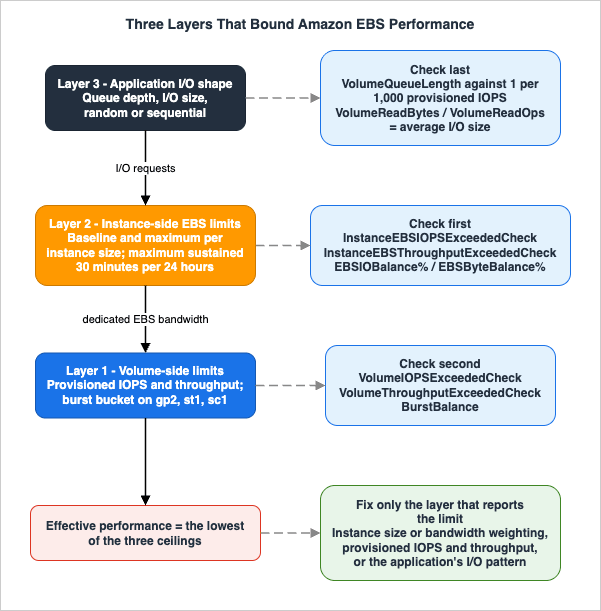
Layer 2: the instance. Every EC2 instance has a maximum aggregate EBS bandwidth and IOPS across all attached volumes. AWS states the rule directly: an instance's EBS performance is bounded by the instance type's performance limits, or the aggregated performance of its attached volumes, whichever is smaller. Many instance sizes publish a baseline and a maximum, where the maximum is available only in bursts.
Layer 3: the I/O shape. The volume's IOPS limit is denominated in I/O operations of a bounded size, and its throughput limit is denominated in bytes. Which of the two you hit first is decided by your average I/O size, and how much of the provisioned performance you can actually consume is decided by how many requests you keep in flight. AWS's guidance is quantitative: for maximum consistency, a volume must maintain an average queue depth of one for every 1,000 provisioned IOPS in a minute.
The order in which to rule them out matters. Work from the instance inward:
- Instance first.
InstanceEBSIOPSExceededCheckandInstanceEBSThroughputExceededCheckanswer the instance question with a single binary value per minute. If either is1, no amount of volume tuning will help, and every volume-level graph you look at afterwards will be misleading. - Volume second.
VolumeIOPSExceededCheckandVolumeThroughputExceededCheckdo the same job for the volume. Forgp2,st1, andsc1, also checkBurstBalance, because a depleted burst bucket silently drops the volume to a baseline that may be a small fraction of what you were getting yesterday. - I/O shape last. If neither layer reports an exceeded limit and latency is still high, the problem is the shape of the I/O: too few requests in flight to reach the provisioned IOPS, an I/O size that converts your IOPS budget into a throughput ceiling, or small random I/O on an HDD volume that was designed for large sequential access.
Reversing this order is the most common diagnostic mistake. Volume metrics are the first thing an operator opens, they are per-volume and therefore feel specific, and they will happily show a volume operating well inside its provisioned limits while the instance it is attached to is saturated.
3. Volume Types and Their Performance Models
The lineup itself — which volume type exists and what it was designed for — is covered in the Amazon EBS timeline article. What matters here is narrower and more useful for tuning: how each type's performance is derived, whether it bursts, and what condition you have to satisfy to actually reach its published maximum.3.1 Solid state drive volumes
The single most important structural difference in this table is thatgp3, io1, and io2 Block Express let you provision performance independently of capacity, while gp2 derives performance from size and fills the gap with a credit bucket.* You can sort the table by clicking on the column name.
| Volume type | Volume size | IOPS baseline and maximum | Max IOPS per GiB | Throughput baseline and maximum | Throughput scaling rule | Burst model |
|---|---|---|---|---|---|---|
gp3 | 1 GiB to 64 TiB | 3,000 baseline; up to 80,000 provisioned | 500 IOPS per GiB; maximum reached at 160 GiB | 125 MiB/s baseline; up to 2,000 MiB/s provisioned | 0.25 MiB/s per provisioned IOPS; maximum reached at 8,000 IOPS and 16 GiB | None. Sustains full provisioned performance indefinitely |
gp2 | 1 GiB to 16 TiB | 100 minimum; 3 IOPS per GiB; 16,000 maximum at 5,334 GiB | 3 IOPS per GiB | 128 MiB/s to 250 MiB/s depending on size | 250 MiB/s from 334 GiB upward | I/O credits. Volumes under 1 TiB burst to 3,000 IOPS; accrual limit 5.4 million credits |
io2 Block Express | 4 GiB to 64 TiB | 100 minimum; up to 256,000 provisioned | 1,000 IOPS per GiB; maximum reached at 256 GiB | Up to 4,000 MiB/s | 0.256 MiB/s per provisioned IOPS; maximum reached at 16,000 IOPS | None |
io1 | 4 GiB to 16 TiB | 100 minimum; up to 64,000 provisioned | 50 IOPS per GiB; maximum reached at 1,280 GiB | Up to 1,000 MiB/s | Up to 32,000 IOPS: 256 KiB max I/O size and up to 500 MiB/s. Above 32,000 IOPS: 16 KiB per provisioned IOPS | None |
Verified against the Amazon EBS User Guide on 2026-08-04.
gp3 limits on AWS Outposts differ: sizes up to 16 TiB, IOPS up to 16,000, and throughput up to 1,000 MiB/s.Three consequences follow directly from the ratio column, and each one bites in practice.
A small volume cannot be provisioned for large IOPS. The IOPS-per-GiB ratio is a hard constraint at provisioning time, not a soft target. A 20 GiB
gp3 volume cannot be given more than 10,000 IOPS, and a 100 GiB io1 volume cannot be given more than 5,000 IOPS. Reaching a volume type's headline IOPS number requires a minimum capacity: 160 GiB for gp3 at 80,000 IOPS, 256 GiB for io2 Block Express at 256,000 IOPS, 1,280 GiB for io1 at 64,000 IOPS.Maximum throughput is reached at a specific IOPS level, not at maximum IOPS. For
gp3, throughput scales at 0.25 MiB/s per provisioned IOPS and caps at 2,000 MiB/s, which is reached at 8,000 provisioned IOPS. Provisioning beyond 8,000 IOPS on gp3 buys you IOPS and nothing further in throughput. For io2 Block Express the equivalent inflection is 16,000 IOPS.gp2 burst is a budget with a refill rate, not a feature. Volumes accrue 3 I/O credits per GiB of volume size per second, up to an accrual limit of 5.4 million credits, and every volume starts with a full 5.4 million credit balance. AWS publishes the burst duration formula as the credit balance divided by burst IOPS minus baseline IOPS. A 100 GiB gp2 volume has a baseline of 300 IOPS and can sustain 3,000 IOPS for 2,000 seconds — a little over 33 minutes — and then needs 18,000 seconds, five hours, to refill an empty balance. A workload that is comfortable in staging for twenty minutes and falls over in production after an hour is very often exactly this.The durability and attachment properties differ independently of performance, and they are frequently the deciding factor:
* You can sort the table by clicking on the column name.
| Volume type | Designed durability | Annual failure rate | Multi-Attach | NVMe reservations | Boot volume |
|---|---|---|---|---|---|
gp3 | 99.8% to 99.9% | No higher than 0.2% | Not supported | Not supported | Supported |
gp2 | 99.8% to 99.9% | No higher than 0.2% | Not supported | Not supported | Supported |
io2 Block Express | 99.999% | No higher than 0.001% | Supported | Supported | Supported |
io1 | 99.8% to 99.9% | No higher than 0.2% | Supported | Not supported | Supported |
Verified against the Amazon EBS User Guide on 2026-08-04. AWS expresses these as a maximum of two volume failures per 1,000 running volumes per year for the 99.8% to 99.9% tier, and a single volume failure per 100,000 running volumes per year for
io2 Block Express.Note also that volume data is automatically replicated across multiple servers within a single Availability Zone. That replication protects against the failure of a single component; it is not a cross-Availability-Zone guarantee, and it is not a backup.
3.2 Hard disk drive volumes
st1 and sc1 define performance in terms of throughput rather than IOPS, and both use a credit bucket whose baseline and burst rates scale linearly with volume size.* You can sort the table by clicking on the column name.
| Volume type | Volume size | Baseline throughput | Burst throughput | Maximum throughput per volume | Size at which maximum burst is reached | Maximum IOPS at 1 MiB I/O | Boot volume |
|---|---|---|---|---|---|---|---|
st1 | 125 GiB to 16 TiB | 40 MiB/s per TiB | 250 MiB/s per TiB | 500 MiB/s | 2 TiB for burst; 12.5 TiB for baseline | 500 | Not supported |
sc1 | 125 GiB to 16 TiB | 12 MiB/s per TiB | 80 MiB/s per TiB | 250 MiB/s | 3.125 TiB for burst; 16 TiB reaches 192 MiB/s baseline | 250 | Not supported |
Verified against the Amazon EBS User Guide on 2026-08-04.
Two properties of HDD volumes are routinely missed. First, the baseline for a small volume is very small: a 125 GiB
st1 volume has a baseline of 5 MiB/s and a burst ceiling of 31 MiB/s. Sizing an st1 volume for capacity alone produces a volume that cannot stream. Second, AWS documents that when you create a snapshot of an st1 or sc1 volume, performance may drop as far as the volume's baseline value while the snapshot is in progress. A nightly backup window that coincides with a nightly batch window is a self-inflicted throughput collapse.Both types are designed for performance consistency of 90 percent of burst throughput 99 percent of the time, with non-compliant periods distributed approximately uniformly and targeting 99 percent of expected total throughput each hour.
3.3 I/O size accounting
IOPS are counted in units of a maximum I/O size that depends on the underlying drive technology, and Amazon EBS actively reshapes your I/O to fit. This is where a workload that looks fine on paper stops matching its metrics.* You can sort the table by clicking on the column name.
| Volume family | Maximum I/O size | I/O issued by your application | Counted as | Mechanism |
|---|---|---|---|---|
| SSD | 256 KiB | One 1,024 KiB operation | 4 IOPS | EBS splits the operation into four 256 KiB operations |
| SSD | 256 KiB | Eight sequential 32 KiB operations | 1 IOPS | EBS merges them into a single 256 KiB operation |
| SSD | 256 KiB | Eight random 32 KiB operations | 8 IOPS | Random operations are counted separately |
| HDD | 1,024 KiB | One 1,024 KiB operation | 1 IOPS | Already at the maximum I/O size; neither merged nor split |
| HDD | 1,024 KiB | Eight sequential 128 KiB operations | 1 IOPS | EBS merges them into a single 1,024 KiB operation |
| HDD | 1,024 KiB | Eight random 32 KiB operations | 8 IOPS | Random operations are counted separately |
Verified against the Amazon EBS User Guide on 2026-08-04.
The practical reading of this table is that IOPS and throughput are not independent budgets; they are two views of the same traffic, joined by I/O size. AWS gives the worked example: a
gp2 volume under 1,000 GiB with burst credits available has an IOPS limit of 3,000 and a throughput limit of 250 MiB/s. At a 256 KiB I/O size that volume reaches its throughput limit at 1,000 IOPS. At 16 KiB it can sustain the full 3,000 IOPS, because 3,000 times 16 KiB is well under 250 MiB/s.This also explains two confusing observations. If you measure a higher IOPS number inside the instance than the volume is provisioned for, the operating system is merging small operations into larger ones before passing them to Amazon EBS. If you measure lower throughput than expected on
st1 or sc1, your I/O is small or random, each operation is being counted separately toward the IOPS limit, and you are hitting that limit long before the throughput limit.4. io2 Block Express
io2 Block Express is built on a different storage server architecture from the rest of the lineup, and the difference is not only a larger set of numbers. Block Express servers communicate with Nitro-based instances using the Scalable Reliable Datagram (SRD) networking protocol, implemented in the Nitro Card dedicated to Amazon EBS I/O on the instance's host hardware. AWS states that this minimizes I/O delay and latency variation — network jitter — which is the property that makes the type interesting for databases rather than the raw IOPS ceiling.The lineup consolidated. As of April 30, 2025, all new and previously created
io2 volumes are io2 Block Express volumes. There is no longer a non-Block-Express io2 to choose between, and io2 Block Express is available in all AWS Regions, including the AWS GovCloud (US) Regions and the China Regions.The Nitro condition is the one that catches people. Nitro-based instances support volumes provisioned with up to 256,000 IOPS. Other instance types can be attached to volumes provisioned with up to 64,000 IOPS, but can achieve up to 32,000 IOPS. Provisioning 256,000 IOPS and attaching the volume to a non-Nitro instance is legal, silent, and delivers 32,000 IOPS.
The latency claims are AWS's, and are stated as design targets. Quoting the Amazon EBS User Guide:
io2 Block Express volumes are designed to deliver an average latency of under 500 microseconds for 16 KiB I/O operations, and AWS states that they "deliver better outlier latency compared to General Purpose volumes, reducing the frequency of I/Os exceeding 800 microseconds by over 10 times." Those are AWS's published figures for the service, not measurements taken for this article, and the comparison baseline is General Purpose volumes rather than any specific competing configuration. Treat them as what they are: a vendor design target that tells you the shape of the improvement — the tail, not the median — which is exactly the property that matters for a database whose p99 commit latency is the user-visible number.When the choice is actually clear. Because
gp3 now reaches 80,000 IOPS, 2,000 MiB/s, and 64 TiB, the range in which the two types overlap is much wider than it used to be. The remaining decision criteria are narrow and concrete:- You need more than 80,000 IOPS or more than 2,000 MiB/s on a single volume.
gp3cannot do it; striping across multiple volumes is the alternative, and it moves the ceiling to the instance layer. - You need the 99.999 percent durability tier. This is a three-orders-of-magnitude difference in annual failure rate against every other volume type, and it is not something you can recover by provisioning more IOPS.
- You need consistent sub-millisecond latency with a well-behaved tail, and you are on Nitro.
- You need Multi-Attach with I/O fencing.
io2is the only volume type that supports NVMe reservations (Section 9).
If none of those four apply,
gp3 is the type that AWS recommends for most workloads, and the decision is not close.5. Instance-Side Limits
This is the layer that volume metrics cannot see, and it is where the majority of misdiagnosed "slow disk" reports actually live.EBS-optimized instances provide dedicated bandwidth for Amazon EBS I/O, minimizing contention between EBS traffic and other traffic from the instance. Most current-generation instance types are EBS-optimized by default. What matters for tuning is that AWS publishes, per instance size, six numbers: baseline and maximum bandwidth in Mbps, baseline and maximum throughput in MB/s at a 128 KiB I/O size, and baseline and maximum IOPS at a 16 KiB I/O size.
5.1 Baseline, maximum, and the burst window
Some instance sizes publish a single sustained number; others publish a baseline and a higher maximum. AWS's footnote for the second group is precise and worth quoting because it sets the design constraint: those instances "can sustain the maximum performance for 30 minutes at least once every 24 hours, after which they revert to their baseline performance."That is not a rolling allowance you can plan a steady-state workload around. It is a burst window.
* You can sort the table by clicking on the column name.
| Instance size | Baseline bandwidth (Mbps) | Maximum bandwidth (Mbps) | Baseline throughput (MB/s at 128 KiB I/O) | Maximum throughput (MB/s) | Baseline IOPS (16 KiB I/O) | Maximum IOPS (16 KiB I/O) | Sustains maximum indefinitely |
|---|---|---|---|---|---|---|---|
t3.medium | 347 | 2,085 | 43.38 | 260.62 | 2,000 | 11,800 | No |
m5.large | 650 | 4,750 | 81.25 | 593.75 | 3,600 | 18,750 | No |
m5.24xlarge | 19,000 | 19,000 | 2,375.00 | 2,375.00 | 80,000 | 80,000 | Yes |
m8i.4xlarge | 5,000 | 10,000 | 625.00 | 1,250.00 | 20,000 | 40,000 | No |
m8i.8xlarge | 10,000 | 10,000 | 1,250.00 | 1,250.00 | 40,000 | 40,000 | Yes |
m8ib.96xlarge | 300,000 | 300,000 | 37,500.00 | 37,500.00 | 1,440,000 | 1,440,000 | Yes |
Verified against the Amazon EC2 User Guide list of EBS-optimized instance types on 2026-08-04. Sizes shown are a representative sample chosen to illustrate the burst boundary; the full table covers every supported instance size.
Two rows in that table make the point better than any prose can.
m8i.4xlarge and m8i.8xlarge have the same maximum: 10,000 Mbps, 1,250 MB/s, 40,000 IOPS. The difference is that the 4xlarge can only hold that for 30 minutes in a 24-hour period before dropping to half of it, and the 8xlarge holds it forever. If your workload's storage demand is sustained rather than spiky, the smaller instance's headline number is a number you will see exactly once per day.And
t3.medium — an extremely common choice for small database and file server workloads — has a baseline of 43.38 MB/s and 2,000 IOPS aggregated across every attached volume. A gp3 volume provisioned at 16,000 IOPS and 1,000 MiB/s attached to that instance will deliver 2,000 IOPS after the burst window closes, and every volume-level metric will show the volume comfortably inside its provisioned limits.5.2 Reading the limits programmatically
The per-instance numbers are available from the EC2 API, which is the reliable way to check them for a specific instance type rather than reading them off a very long table:aws ec2 describe-instance-types \
--instance-types m8i.4xlarge \
--query 'InstanceTypes[0].EbsInfo.EbsOptimizedInfo' \
--output tableThe
EbsOptimizedInfo structure returns BaselineBandwidthInMbps, BaselineThroughputInMBps, BaselineIops, MaximumBandwidthInMbps, MaximumThroughputInMBps, and MaximumIops. Note the unit mismatch that AWS flags explicitly: BandwidthInMbps is megabits per second, network-style, while ThroughputInMBps is megabytes per second. The throughput values are the ones to compare against CloudWatch data.5.3 Aggregate volume performance must match the instance
The constraint runs in both directions. AWS gives the worked example: to achieve 80,000 IOPS on anr6i.16xlarge, the instance must have attached volumes providing a combined performance of at least 80,000 IOPS — either five gp2 volumes at 16,000 IOPS each, or a single gp3 volume provisioned at 80,000 IOPS. Before the gp3 limit increase, striping was mandatory to reach that number; it no longer is, which removes a real source of operational complexity.AWS's recommendation is to choose an instance type that provides more dedicated Amazon EBS throughput than the application needs, precisely so that this layer never becomes the constraint. Note also that the maximum IOPS and maximum throughput limits are interdependent: depending on I/O size you will reach one before the other, so both have to be considered when planning.
5.4 Bandwidth weighting on newer instance families
Several current instance families — including M8a, M8g, M8i, M8i-flex, M9g, C8a, C8g, C8i, R8a, R8g, R8i, X8g, and others — support configurable bandwidth weighting, which lets you bias an instance's bandwidth toward networking performance or toward Amazon EBS performance. AWS publishes the achievable EBS performance for thedefault, vpc-1, and ebs-1 configurations per instance type. For a storage-bound workload on an instance family that supports it, this is a lever that does not require changing instance size: for c8a.4xlarge, for example, AWS publishes 5.0 Gbps baseline under default and 6.25 Gbps baseline under ebs-1.There is also a hard limit on how many volumes you can attach, which depends on instance type and size; several current Nitro families have a dedicated EBS volume limit that is not shared with other device attachments such as NVMe instance store volumes and network interfaces.
Shared file systems have the same shape. There the ceiling that no file-system-level metric reports is the per-client one, and it is covered in Amazon EFS Performance Engineering. The numbers and the mechanisms are entirely different, so the comparison ends with the shape.
6. Queue Depth and I/O Shaping
The third layer is the one you control from inside the instance, and it is the only one where the fix is usually in application or filesystem configuration rather than in an API call.6.1 The queue depth rule
Volume queue length is the number of pending I/O requests for a device. Latency is the end-to-end client time of an I/O operation: the time between sending an I/O to EBS and receiving the acknowledgement that the read or write completed.AWS's guidance is specific and quantitative: for maximum consistency, a volume must maintain an average queue depth, rounded to the nearest whole number, of one for every 1,000 provisioned IOPS in a minute. For a volume provisioned with 3,000 IOPS, that average is 3.
This number is a target from both directions, and both failure modes are real:
- Too little queue depth means you never reach your provisioned IOPS. If the workload is not delivering enough I/O requests to fully use the performance available to the volume, the volume will not deliver the IOPS or throughput you provisioned. A single-threaded restore process issuing one request at a time against a 64,000 IOPS volume is not a storage problem; it is a concurrency problem, and provisioning more IOPS will change nothing.
- Too much queue depth means latency climbs without throughput gains. Consistently driving more IOPS to a volume than it has available causes increased I/O latency. Requests queue, and the queue is added to the service time of every operation behind it.
The corollary for transaction-heavy workloads: you maintain high IOPS while keeping latency down by maintaining a low queue length and a high number of IOPS available to the volume. Throughput-intensive workloads on HDD-backed volumes work the other way — you sustain high throughput by maintaining a high queue length while performing large sequential I/O. AWS's own
st1 and sc1 scan-time table assumes an average queue depth of four or more with 1 MiB sequential I/O.6.2 Choosing an I/O size
Section 3.3 established the accounting. The design implication is that I/O size is a lever, and it points in opposite directions depending on which limit you are near:- If you are IOPS-bound, increasing the I/O size reduces the number of operations for the same amount of data — up to the 256 KiB (SSD) or 1,024 KiB (HDD) counting boundary. Beyond that boundary, larger operations are split and the benefit stops.
- If you are throughput-bound, increasing the I/O size does nothing at all, because throughput is the limit you are already hitting. The only remaining levers are provisioning more throughput or reducing the volume of data moved.
- If you are on
st1orsc1and your average I/O size is small, you are in the worst case the type has. AWS's diagnostic is concrete: divideVolumeWriteBytesbyVolumeWriteOpsto get your average I/O size, and if it is below 64 KiB, increasing the size of the I/O operations sent to the volume should improve performance.
6.3 Micro-bursting
CloudWatch metrics for EBS are published at 1-minute granularity, and a minute is a long time. If bursts of high IOPS or throughput occur for a shorter period than the interval, the volume experiences micro-bursting: the average IOPS and throughput metrics report that you are driving lower performance than the volume's provisioned limits, while the application experiences throttling.This is the specific reason the
VolumeIOPSExceededCheck and VolumeThroughputExceededCheck metrics exist. They report whether the driven IOPS or throughput for any second within the minute consistently exceeded the volume's provisioned performance, returning 1 if so and 0 otherwise. A minute in which VolumeAvgIOPS sits at half the provisioned number while VolumeIOPSExceededCheck returns 1 is a micro-bursting minute, and it is invisible in every averaged graph.For sub-minute resolution, Amazon EBS detailed performance statistics (Section 11.3) provide per-second data and latency histograms.
7. Snapshot Initialization: The Hidden Latency
This is the section that matters most, because it describes normal, documented behavior that almost everyone first encounters as an outage.7.1 What actually happens
When you create an Amazon EBS volume — either from an EBS snapshot or from another EBS volume as a volume copy — the data blocks must be written to the volume before you can access them. For volumes created from snapshots, the data blocks must be downloaded from Amazon S3 to the new volume. For volume copies, the blocks must be copied from the source volume. AWS calls this process volume initialization.Two statements from the Amazon EBS User Guide define the behavior precisely, and both matter:
- "During this time, the volume being initialized might experience increased I/O latency and decreased performance."
- "Full volume performance is achieved only once all storage blocks have been downloaded and written to the volume."
It is worth being careful about the second one, because the popular summary of this behavior — "the first read of each block is slow, so it gets faster as you go" — is only half of it. Yes, a new volume created from a snapshot experiences higher latency on first access to each block. But the volume does not deliver its full provisioned performance until initialization has completed for the whole volume. Reading the ten percent of blocks your application happens to touch first does not make the volume fully performant; it makes those ten percent of blocks locally resident.
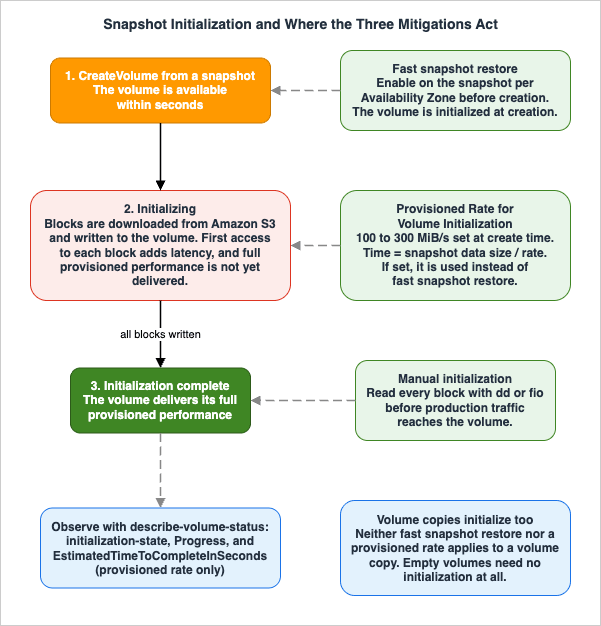
The default rate is not constant. The default volume initialization rate fluctuates throughout the initialization process, which makes completion times unpredictable. This is the reason the two rate-control mechanisms in Section 8 exist, and it is also why "it took two hours in the drill" is not a number you can plan a recovery time objective around.
Provisioned IOPS volumes will report a warning. While initializing Provisioned IOPS SSD volumes created from snapshots, AWS documents that the performance of the volume may drop below 50 percent of its expected level, which causes the volume to display a
warning state in the I/O Performance status check. This is expected and can be ignored during initialization — but an operator who does not know that will page someone.7.2 Where this shows up in production
The initialization penalty is not an edge case. It is on the critical path of the four operations you least want to be slow:- Disaster recovery. The whole point of the exercise is to bring a volume up from a snapshot and start serving. The restored volume is slow for exactly as long as it takes to hydrate, which for a large volume is measured in hours. A recovery time objective calculated from "time to create the volume" rather than "time to a fully performant volume" is wrong by that margin.
- Launching from a custom AMI. An EBS-backed AMI is snapshots. Every instance launched from it starts with a volume that is hydrating from Amazon S3, which is why the first few minutes of a newly launched instance can be much slower than the same instance an hour later — and why autoscaling into a traffic spike can produce instances that are technically healthy and practically useless.
- Database restore. Restoring a database from a snapshot and immediately running a workload against it means every page read is a first-touch read. The database will look pathologically slow, the buffer pool will look ineffective, and none of it is the database's fault.
- Volume copies. Volume Clones create a point-in-time copy of a volume within the same Availability Zone that is available in seconds — but the data blocks are still copied in the background, and during initialization the copy delivers a baseline performance equal to the lowest of three values: 3,000 IOPS and 125 MiB/s; the provisioned performance of the source volume; or the provisioned performance of the copy. The copy can exceed that baseline only if both source and copy are provisioned above 3,000 IOPS and 125 MiB/s and the source volume has unused performance capacity that the copy can borrow.
For volume copies, AWS publishes initialization duration guidelines directly: for the first 1 TiB of written data blocks, initialization takes up to 6 hours; for each subsequent 1 TiB up to 16 TiB, 1.2 hours per TiB; and for written data larger than 16 TiB, 24 hours.
7.3 Knowing when it is finished
Until relatively recently there was no supported way to ask "is this volume done initializing?" other than inferring it from performance. There is now.The
describe-volume-status command returns an InitializationStatusDetails structure alongside the usual status checks:aws ec2 describe-volume-status --volume-ids vol-1234567890abcdef0The structure contains three fields.
InitializationType is default for fast snapshot restore and default initialization, provisioned-rate for a volume created with a provisioned initialization rate, or volume-copy for a volume copy. Progress is the completion percentage from 0 to 100. EstimatedTimeToCompleteInSeconds is the estimated remaining time — and it is returned only for volumes created with an Amazon EBS Provisioned Rate for Volume Initialization, which is a concrete operational argument for using that feature even when the rate itself is not the point.The volume status detail named
initialization-state reports initializing or completed, and the same information appears in the Amazon EC2 console as an Initialization state field showing, for example, Initializing (75%). For volumes initialized with fast snapshot restore, progress moves to 100 percent and the state moves to completed immediately after creation.Two caveats: it can take up to 5 minutes for the volume initialization information to be updated, and the details are only available for volumes created from snapshots or as volume copies — not for empty volumes.
For automation, Amazon EventBridge emits an event within five minutes after initialization completes. The rule pattern is straightforward:
{
    "detail-type": ["EBS Volume Notification"],
    "source": ["aws.ec2"],
    "detail": {
        "event": ["initializeVolume"],
        "result": ["succeeded"]
    }
}
AWS notes that these events are emitted on a best-effort basis, and that if you delete the volume before initialization completes, or within 5 minutes after it completes, you might not receive the event. Gating a "restore is ready" signal on this event is the right shape; treating its absence as proof that initialization is still running is not.
8. Three Ways to Avoid the Penalty
There are exactly three supported mechanisms, they solve different problems, and one of them silently overrides another when both are configured.* You can sort the table by clicking on the column name.
| Approach | What it does | Where you configure it | Key constraints | What determines the time to full performance | Best fit |
|---|---|---|---|---|---|
| Manual initialization | Reads every block on the device so that each one is fetched before production traffic touches it | On the instance, after the volume is attached, using dd or fio | Requires the volume to be attached; consumes instance and volume performance while it runs; Provisioned IOPS volumes report a warning state during the process | Instance bandwidth, provisioned IOPS, and volume size. AWS says several minutes to several hours | Ad hoc restores where you control the cutover and cannot change how the volume was created |
| Fast snapshot restore | Creates volumes that are fully initialized at creation and immediately deliver all provisioned performance | Enabled on the snapshot, per Availability Zone, before the volume is created | Snapshots of 16 TiB or less; up to 5 snapshots enabled per Region; volume creation credits limit how many volumes get the benefit; not supported on Outposts, Local Zones, or Wavelength Zones; not inherited by snapshot copies or by new snapshots of restored volumes | Nothing. The volume is initialized at creation | A small set of frequently restored snapshots: golden AMIs, virtual desktop images, a recovery snapshot for a specific database |
| Provisioned Rate for Volume Initialization | Downloads snapshot blocks from Amazon S3 and writes them to the volume at a rate you specify, so completion time is predictable | On the volume creation request, in a block device mapping at instance launch, in a launch template, in a root volume replacement task, or via the EBS CSI driver on Amazon EKS and on Amazon ECS | Rate between 100 and 300 MiB/s; cumulative 5,000 MiB/s per Region across concurrent creation requests; request fails on capacity constraints or quota exhaustion; not available on Outposts, Local Zones, or Wavelength Zones; not supported for volume copies | Snapshot data size divided by the specified rate | Creating many volumes at once with a bounded, predictable completion time: mass instance launches, disaster recovery, large restores |
Verified against the Amazon EBS User Guide on 2026-08-04.
8.1 The interaction you must know
If you specify a volume initialization rate on a volume created from a fast-snapshot-restore-enabled snapshot, Amazon EBS uses the specified rate instead of fast snapshot restore. To use fast snapshot restore, do not specify a rate.This is a silent precedence rule with a real failure mode: an organization enables fast snapshot restore on its recovery snapshots, then later standardizes a launch template that sets a volume initialization rate for unrelated reasons, and quietly loses the instant-restore behavior it is paying for on every launch that uses that template.
8.2 Provisioned Rate for Volume Initialization in practice
The rate is set at creation:aws ec2 create-volume \
--snapshot-id snap-1234567890abcdef0 \
--availability-zone us-east-1a \
--volume-type gp3 \
--volume-initialization-rate 300The arithmetic is simple and, unusually for a performance feature, exact enough to plan against. AWS's own example: a 20 GiB volume created from a snapshot that has 10 GiB of data, with a rate of 300 MiB/s, is fully initialized in approximately 34.1 seconds. Create ten volumes from that same snapshot concurrently at that rate, and all ten are initialized in the same 34.1 seconds.
Two details govern how well this scales. The time depends on the size of the snapshot data, not the size of the volume — a 100 GiB volume holding 50 GiB of data initializes as 50 GiB of work, and the
FullSnapshotSizeInBytes field in describe-snapshots output is where you find that number. And the 5,000 MiB/s cumulative per-Region limit is a real planning constraint: it permits 50 concurrent requests at 100 MiB/s, or 25 at 200 MiB/s, or roughly 16 at 300 MiB/s. A mass recovery that exceeds it does not degrade gracefully — the request fails, and you either wait for in-flight requests to finish or request a quota increase.AWS also publishes a consistency target for the feature: an average rate within 10 percent of the specified rate, 99 percent of the time. The feature is supported with all Amazon EBS volume types and all Amazon EC2 instance types, including EC2 Mac instances.
8.3 Fast snapshot restore and the credit model
Fast snapshot restore is enabled per snapshot and per Availability Zone; each snapshot-and-Availability-Zone pair is one fast snapshot restore. The number of volumes that receive the full benefit is governed by volume creation credits, with one credit bucket per snapshot per Availability Zone. Each volume created from the snapshot consumes one credit, and you must have at least one credit to create an initialized volume. If you create a volume when the bucket holds less than one credit, the volume is created without the benefit of fast snapshot restore — silently, and with no error.AWS publishes the formulas. The fill rate is
MIN(10, (1024 ÷ snapshot_size_gib)) credits per hour, and the maximum bucket size is MAX(1, MIN(10, (1024 ÷ snapshot_size_gib))). Both are based on the size of the snapshot, which is the size of the source volume, not the size of the data in it. A 128 GiB snapshot therefore fills at 8 credits per hour with a maximum balance of 8; a 4 TiB snapshot fills at one credit every four hours with a maximum balance of 1.Three consequences that decide whether this feature fits your use case:
- The credit bucket starts empty. When you enable fast snapshot restore for a snapshot, the bucket starts with zero credits and fills at the set rate. Enabling it thirty seconds before a recovery drill accomplishes nothing.
- Large snapshots get very few credits. A single restore of a large snapshot is fine. Fanning out twenty volumes from one large snapshot is not — and the failure is silent, producing a mix of fast and slow volumes with no obvious pattern.
- Volumes above 64,000 IOPS or 1,000 MiB/s do not get the full benefit. AWS recommends initializing those volumes instead, which means the highest-performance volumes in your fleet are exactly the ones fast snapshot restore serves least well.
Note also that enabling fast snapshot restore does not propagate: a new snapshot taken from a volume that was restored from a fast-snapshot-restore-enabled snapshot is not automatically enabled, and neither is a copy of an enabled snapshot. In a pipeline that periodically re-bakes a golden image, this has to be an explicit step or the property is lost on the first re-bake.
8.4 Manual initialization
If neither of the other two options applies, reading every block works. The volume must be attached, and the command reads the raw device and discards the output:sudo fio --filename=/dev/xvdf --rw=read --bs=1M --iodepth=32 --ioengine=libaio --direct=1 --name=volume-initializeAWS documents
dd as the alternative that is installed by default, while noting that fio is considerably faster because it allows multi-threaded reads:sudo dd if=/dev/xvdf of=/dev/null bs=1MWarning. AWS's own caution is unambiguous: incorrect use of
dd can easily destroy a volume's data. In the form above, if is the device being read and of is the null device — reversing them writes zeros over the volume. Verify the device name with lsblk before running anything, run it against the volume you intend to initialize and no other, and prefer fio, which has no equivalent failure mode. The operation itself is read-only and consumes both instance and volume performance while it runs, so it competes with anything else the instance is doing.Also note what this does not do. Manual initialization is a workaround for the absence of the other two mechanisms, not a superior alternative to them: it costs you the time it takes, it burns instance bandwidth, and it has to be scripted into every restore path where it is needed. AWS's own framing of the Provisioned Rate feature is that it removes the operational burden of managing exactly these
dd and fio scripts.9. Multi-Attach
Amazon EBS Multi-Attach enables you to attach a single Provisioned IOPS SSD volume to multiple instances in the same Availability Zone, each with full read and write permission to the shared volume. It is a genuinely useful primitive for clustered applications, and it is also the most consistently misused feature in the EBS surface area.9.1 The responsibility boundary
Multi-Attach does not make a volume safe to share. It makes a volume physically reachable from more than one instance. Everything above the block device is your responsibility.AWS states the constraint plainly: standard file systems, such as XFS and EXT4, are not designed to be accessed simultaneously by multiple servers, and you should use a clustered file system to ensure data resiliency and reliability for production workloads. Mounting the same Multi-Attach volume as XFS on two instances does not fail loudly. It corrupts the filesystem, at a time determined by when the two instances' caches happen to disagree.
For
io2 volumes, AWS is equally explicit about write ordering: Multi-Attach enabled io2 volumes support I/O fencing, but "your applications must provide write ordering for the attached instances to maintain data consistency." The platform provides the fencing primitives; the application provides the ordering.9.2 Constraints
- Multi-Attach enabled volumes can be attached to up to 16 instances built on the Nitro System that are in the same Availability Zone.
- Multi-Attach is supported exclusively on Provisioned IOPS SSD (
io1andio2) volumes. - Linux instances support Multi-Attach enabled
io1andio2volumes. Windows instances support Multi-Attach enabledio2volumes only. - Multi-Attach for
io1is available in US East (N. Virginia), US West (Oregon), and Asia Pacific (Seoul) only. Multi-Attach forio2is available in all Regions that supportio2. AWS recommendsio2for better performance, consistency, and durability at a lower cost. io1volumes with Multi-Attach enabled are not supported with Nitro instance types that support the Scalable Reliable Datagram protocol only; those instance types requireio2.- Multi-Attach enabled volumes cannot be boot volumes, and can be attached to one block device mapping per instance.
- Multi-Attach cannot be enabled during instance launch using either the Amazon EC2 console or the
RunInstancesAPI. - A volume that has an issue at the Amazon EBS infrastructure layer is unavailable to all attached instances; issues at the Amazon EC2 or networking layer might affect only some of them. Multi-Attach is a shared-fate design at the storage layer.
Modification support after creation differs sharply between the two types, and this is a design-time decision because it cannot be undone later:
* You can sort the table by clicking on the column name.
| Modification | Multi-Attach enabled io2 | Multi-Attach enabled io1 |
|---|---|---|
| Modify volume type | Not supported | Not supported |
| Modify volume size | Supported | Not supported |
| Modify provisioned IOPS | Supported | Not supported |
| Enable Multi-Attach | Supported, but not while attached to an instance | Not supported |
| Disable Multi-Attach | Supported, but not while attached to an instance | Not supported |
Verified against the Amazon EBS User Guide on 2026-08-04.
9.3 NVMe reservations and fencing
Multi-Attach enabledio2 volumes support NVMe reservations, a set of industry-standard storage fencing protocols that let you create and manage reservations controlling and coordinating access from multiple instances to a shared volume. Multi-Attach enabled io1 volumes do not support I/O fencing. This alone is a sufficient reason to choose io2 for any new Multi-Attach design.Support is enabled by default for all Multi-Attach enabled
io2 volumes created after September 18, 2023. For volumes created before that date, you must detach all instances from the volume and then reattach the required instances; all attachments made after detaching all instances have NVMe reservations enabled.Warning. Detaching a volume from a running instance is disruptive to whatever is using it. This is a maintenance-window operation, not a live remediation.
The supported commands are Reservation Register, Reservation Acquire, Reservation Release, and Reservation Report, covering the standard reservation types (Write Exclusive, Exclusive Access, and their Registrants Only and All Registrants variants). Operating system requirements are specific: SUSE Linux Enterprise 12 SP3 and later, RHEL 8.3 and later, Amazon Linux 2 and later, and Windows Server 2016 and later. On Windows, supported AMIs dated 2023.09.13 and later include the required NVMe drivers; earlier AMIs need NVMe driver version 1.5.0 or later, and EC2Launch v2 must be version 2.0.1521 or later if it is used to initialize disks.
9.4 Monitoring caveat
CloudWatch metrics for a Multi-Attach enabled volume are aggregated across all attached instances, and you cannot monitor metrics for individual attachments through the volume metrics. Several per-volume metrics are additionally not supported with Multi-Attach at all, includingVolumeIOPSExceededCheck, VolumeThroughputExceededCheck, VolumeThroughputPercentage, VolumeIdleTime, VolumeTotalReadTime, and VolumeTotalWriteTime.If you need per-attachment visibility, the two available routes are the
InstanceId dimension on the newer average metrics (VolumeAvgIOPS, VolumeAvgThroughput, VolumeAvgReadLatency, VolumeAvgWriteLatency), and the detailed performance statistics described in Section 11.3, which are specific to the instance attachment and reflect only that instance's usage.10. Elastic Volumes and Online Changes
Elastic Volumes lets you increase volume size, change volume type, and adjust provisioned performance without detaching the volume or restarting the instance. The behavior during and after a modification has changed materially, and a great deal of published guidance is now wrong.10.1 The modification rate rule changed
The rule most people remember is that you must wait at least six hours between modifications of the same volume. That is no longer the rule.The current behavior, per the Amazon EBS User Guide: after you initiate a modification you must wait for it to reach the
completed state before initiating another modification for the same volume, and you can modify a volume up to four times within a rolling 24-hour period, as long as the volume is in the in-use or available state and all previous modifications are completed. Exceeding the limit returns an error indicating when the next modification is permitted:An error occurred (VolumeModificationRateExceeded) when calling the ModifyVolume operation: You've reached the maximum modification rate per volume limit. Wait until YYYY-MM-DDTHH:MM:SS.sssZ before you can issue the next modification request for this volume.AWS announced this in January 2026, and it applies in all commercial Regions, the AWS GovCloud (US) Regions, and the China Regions, automatically and without changes to existing workflows. Practically, it converts volume modification from something you schedule days ahead into something you can use to respond to a workload change on the same day — while still capping it at four changes per day, so it is not a substitute for right-sizing.
10.2 State machine and what "done" means
A modified volume passes throughmodifying, then optimizing, then completed. The states have different meanings for different kinds of change:- Size increases take effect once the modification reaches the
optimizingstate, which usually takes a few seconds. You can extend the file system at that point without waiting for the modification to complete. - Performance changes take from a few minutes to a few hours. AWS's guideline is that a 1-TiB volume can take up to six hours to be modified, and warns that time does not always scale linearly with volume size — a larger volume might take less time and a smaller volume might take more.
- While the volume is in the
optimizingstate, performance is between the source and target configuration. Transitional performance will be no less than the source volume performance; if you are downgrading IOPS, it will be no less than the target performance. In other words, a modification never makes the volume slower than both endpoints.
The two clauses that connect this section to Section 7: modification time is increased for volumes that are not fully initialized, and AWS notes it can take more than 24 hours for a new performance configuration to take effect when the volume has not been fully initialized. Restoring from a snapshot and immediately modifying the volume stacks two slow operations on top of each other, and the second one waits on the first.
Progress is observable through
describe-volumes-modifications, which reports ModificationState and Progress as a percentage, or in the console as Volume state - Modification state (Modification progress%).10.3 Limitations worth designing around
Warning: volume modifications cannot be canceled after submission, and volume size cannot be decreased. Both of these are one-way doors. Growing a volume that did not need to grow is not reversible; the documented workaround is to create a smaller volume and migrate the data with an application-level tool such asrsync or robocopy, which is a data migration, not a modification.Other constraints that shape designs:
- If you are not changing the volume type, size and performance modifications must stay within the limits of the current type; if you are changing the type, they must be within the limits of the target type.
- A root volume of type
io1,io2,gp2,gp3, orstandardcannot be modified tost1orsc1, even when detached. - Multi-Attach enabled
io2volumes cannot have their type modified; Multi-Attach enabledio1volumes cannot have type, size, or provisioned IOPS modified at all. - Elastic Volumes is supported on all current generation instances and on a specific list of previous-generation instances (C1, C3, C4, G2, I2, M1, M3, M4, R3, and R4). On unsupported instance types, the procedure is to detach a non-root volume, modify, and reattach; or to stop the instance for a root volume.
- Linux AMIs require a GUID partition table and GRUB 2 for boot volumes of 2 TiB or larger; many AMIs still use MBR, which caps boot volumes below 2 TiB. Windows initializes volumes with MBR by default and will not extend beyond 2 TiB, and the workaround is to create a new GPT volume and copy the data across.
10.4 A useful default for gp2 to gp3 migration
If you change the volume type fromgp2 to gp3 without specifying IOPS or throughput, Amazon EBS provisions either performance equivalent to the source gp2 volume or the baseline gp3 performance, whichever is higher. AWS's worked example: a 500 GiB gp2 volume with 250 MiB/s throughput and 1,500 IOPS becomes a gp3 volume with 3,000 IOPS — the gp3 baseline, which exceeds the source's 1,500 — and 250 MiB/s, matching the source. The migration is therefore safe to perform without computing the target performance by hand, which makes it a good candidate for fleet-wide automation.11. Monitoring and Diagnosis
Diagnosis is a matter of asking the three layer questions in order and knowing which metric answers each one. The metrics below have expanded substantially:VolumeIOPSExceededCheck and VolumeThroughputExceededCheck arrived in October 2024 alongside VolumeAvgReadLatency and VolumeAvgWriteLatency, and VolumeAvgIOPS, VolumeAvgThroughput, InstanceEBSIOPSExceededCheck, and InstanceEBSThroughputExceededCheck in October 2025. Much of the diagnostic difficulty described in older material no longer applies.11.1 The metric map
* You can sort the table by clicking on the column name.| Metric | Namespace | Question it answers | Layer | Constraints |
|---|---|---|---|---|
InstanceEBSIOPSExceededCheck | AWS/EC2 | Did the instance try to exceed its maximum EBS IOPS in the last minute? Returns 0 or 1 | Instance | Nitro instances that are not bare metal |
InstanceEBSThroughputExceededCheck | AWS/EC2 | Did the instance try to exceed its maximum EBS throughput in the last minute? | Instance | Nitro instances that are not bare metal |
EBSIOBalance% | AWS/EC2 | How much instance-level IOPS burst budget remains? | Instance | Nitro instances; available for some 4xlarge and smaller sizes |
EBSByteBalance% | AWS/EC2 | How much instance-level throughput burst budget remains? | Instance | Same as above |
EBSReadOps, EBSWriteOps, EBSReadBytes, EBSWriteBytes | AWS/EC2 | What is the aggregate IOPS and throughput across all attached volumes? | Instance | Nitro instances; 5-minute periods by default, 1-minute with detailed monitoring |
VolumeIOPSExceededCheck | AWS/EBS | Did the workload consistently exceed the volume's provisioned IOPS in any second of the last minute? | Volume | Nitro; not standard; not supported with Multi-Attach |
VolumeThroughputExceededCheck | AWS/EBS | Same, for provisioned throughput | Volume | Same as above |
BurstBalance | AWS/EBS | How much of the burst bucket remains, as a percentage? | Volume | gp2, st1, and sc1 only |
VolumeAvgIOPS | AWS/EBS | What average IOPS was actually driven in the minute? | Volume | Nitro; not published for volumes attached to Amazon ECS and AWS Fargate tasks |
VolumeAvgThroughput | AWS/EBS | What average throughput was actually driven in the minute? | Volume | Same as above |
VolumeAvgReadLatency, VolumeAvgWriteLatency | AWS/EBS | What was the average completion time for reads and for writes? | Volume | Nitro; supports the InstanceId dimension for Multi-Attach |
VolumeQueueLength | AWS/EBS | How many requests are pending? Compare against the 1-per-1,000-provisioned-IOPS rule | I/O shape | Available on all instance types |
VolumeReadBytes divided by VolumeReadOps | AWS/EBS | What is the average I/O size? Below 64 KiB on HDD is a red flag | I/O shape | Derived; use the matching write pair for writes |
VolumeThroughputPercentage | AWS/EBS | What fraction of provisioned IOPS is being delivered? | Volume | Provisioned IOPS SSD only; not supported with Multi-Attach |
VolumeConsumedReadWriteOps | AWS/EBS | How many normalized 256 KiB capacity units were consumed? | Volume | Provisioned IOPS SSD only |
VolumeStalledIOCheck | AWS/EBS | Is the volume impaired and unable to complete I/O? Returns 0 or 1 | Volume health | Nitro; returns 1 when I/O is paused for over 60 seconds |
Verified against the Amazon CloudWatch metrics documentation for Amazon EBS and Amazon EC2 on 2026-08-04. All Amazon EBS volume types automatically send 1-minute metrics to CloudWatch at no charge, but only while the volume is attached to an instance.
11.2 A triage sequence
Putting the layers and the metrics together produces a sequence that terminates:- Is the instance the constraint? Check
InstanceEBSIOPSExceededCheckandInstanceEBSThroughputExceededCheckfor the affected period. If either is1, the answer is yes; checkEBSIOBalance%andEBSByteBalance%to see whether the burst budget is exhausted, and compare aggregateEBSReadBytesplusEBSWriteBytesagainst the instance's published baseline. The remedy is a different instance size, a different instance family, or — on families that support it — a bandwidth weighting change. - Is the volume the constraint? Check
VolumeIOPSExceededCheckandVolumeThroughputExceededCheck. Forgp2,st1, andsc1, checkBurstBalance; a value trending to zero means the volume is about to drop to baseline, and the baseline may be far below what the workload has been receiving. The remedy is more provisioned performance, a larger volume, or a different volume type. - Is the volume still initializing? If the volume was created from a snapshot or as a volume copy, check
describe-volume-statusforinitialization-state. A Provisioned IOPS volume in awarningI/O Performance status during initialization is expected. This step belongs early in the sequence for any volume less than a day old. - Is it the I/O shape? If no limit is being exceeded and latency is still elevated, compute the average I/O size from
VolumeReadBytesdivided byVolumeReadOps, and compareVolumeQueueLengthagainst one per 1,000 provisioned IOPS. Too small a queue means the application is not driving enough concurrency; too large a queue with no exceeded-limit signal means large I/O sizes are converting the IOPS budget into a throughput ceiling. - Is it a fault rather than a limit?
VolumeStalledIOCheckreturning1is not a performance problem. In most cases AWS automatically diagnoses and recovers the volume within a few minutes; the alternatives are replacing the volume or stopping and restarting the instance.
11.3 Sub-minute resolution
Amazon EBS NVMe block devices vend real-time performance statistics for volumes attached to Nitro-based instances, collectable at up to 1-second intervals. These are the right tool when the 1-minute metrics are too coarse — which is exactly the micro-bursting case from Section 6.3.* You can sort the table by clicking on the column name.
| Statistic | Type | What it tells you |
|---|---|---|
total_read_ops, total_write_ops | Counter | Cumulative completed operations |
total_read_bytes, total_write_bytes | Counter | Cumulative bytes transferred |
total_read_time, total_write_time | Counter | Cumulative time in microseconds spent by completed operations |
ebs_volume_performance_exceeded_iops | Counter | Total microseconds that IOPS demand exceeded the volume's provisioned IOPS |
ebs_volume_performance_exceeded_tp | Counter | Total microseconds that throughput demand exceeded the volume's provisioned throughput |
ec2_instance_ebs_performance_exceeded_iops | Counter | Total microseconds that the volume exceeded the instance's maximum IOPS |
ec2_instance_ebs_performance_exceeded_tp | Counter | Total microseconds that the volume exceeded the instance's maximum throughput |
volume_queue_length | Point in time | Operations currently waiting to complete |
read_io_latency_histogram, write_io_latency_histogram | Histogram | Distribution of completed operations across latency bins in microseconds |
Verified against the Amazon EBS User Guide on 2026-08-04.
The four
*_exceeded_* counters are the most valuable entries in this table, because they separate the instance layer from the volume layer at microsecond resolution and in a single place. A workload whose ec2_instance_ebs_performance_exceeded_tp counter climbs while ebs_volume_performance_exceeded_tp stays flat has an instance problem, definitively, with no inference required.Statistics are retained only for the duration of the volume's attachment to the instance, are available for all volume types, and cost nothing. Histogram statistics represent only successfully completed operations; stalled or impaired I/O will not appear there, but will show up in
volume_queue_length.Access is from inside the instance, through one of four routes: the CloudWatch agent, which publishes them as custom metrics; the
ebsnvme script from the amazon-ec2-utils repository; the nvme-cli tool as nvme amzn stats /dev/nvme0n1; or a Prometheus-compatible /metrics endpoint exposed by EBS CSI driver version v1.37.0 and later. On Windows the equivalent is nvme_amzn.exe stats, which requires AWSNVMe driver version 1.7.0 or later. With the Amazon CloudWatch Observability EKS add-on version 4.1.0 and later, the statistics are collected automatically when EBS CSI driver metrics are enabled.11.4 Validating the diagnosis path
Monitoring that has never fired is a hypothesis. AWS Fault Injection Service provides two Amazon EBS actions that let you test the detection and recovery path deliberately:- Pause I/O temporarily stops I/O between a volume and its attached instances. It is supported on all Nitro-based instance types. AWS documents the expected signals precisely: the volume's status transitions to
impairedwithin 120 seconds,VolumeStalledIOCheckbecomes1if I/O is paused for over 60 seconds,VolumeQueueLengthbecomes non-zero, andVolumeReadOpsandVolumeWriteOpsbecome0. To test an operating system timeout configuration, the experiment duration must be at least the value ofnvme_core.io_timeout. - Latency injection (
aws:ebs:volume-io-latency) simulates elevated I/O latency, with configurable percentages of read and write operations affected and configurable latency values. Pre-configured templates cover sustained, increasing, intermittent, and decreasing latency patterns. The parameter ranges are 0.1 to 100 percent of operations, 1 ms (forio2) or 10 ms (for other types) up to 60 seconds of injected latency, and a duration from 1 second to 12 hours. During injection the volume's status transitions towarning. Latency injection is supported on all Nitro-based instance types except a documented exclusion list.
Warning. Both actions degrade a real volume attached to real instances. They are resilience experiments, and they belong in a non-production environment or inside a properly scoped and approved game day — never as an ad hoc troubleshooting step. No experiment was executed for this article.
12. Failure Modes and Anti-Patterns
Putting a snapshot-restored volume straight into production. The volume is created in seconds and is not fully performant for hours. Every first-touch block is a fetch from Amazon S3, and full performance arrives only when all blocks have been downloaded and written. Recovery runbooks that measure "time to volume creation" are measuring the wrong thing; measure time toinitialization-state: completed.Treating burst as capacity.
gp2 volumes under 1 TiB, st1 and sc1 volumes of any size, and a large fraction of instance sizes all publish a maximum that is only available while a credit budget lasts. AWS states the instance-side rule as 30 minutes at maximum performance at least once every 24 hours. A design whose steady state requires the maximum will work in testing, work for the first half hour of the incident, and then fall to baseline at the worst possible moment.Sizing the volume and ignoring the instance. A 16,000 IOPS
gp3 volume on a t3.medium delivers the instance's 2,000 IOPS baseline once the burst window closes. This is the single most common misdiagnosis in this domain, and it is now trivially detectable: InstanceEBSIOPSExceededCheck answers it with one binary value per minute.Provisioning IOPS a small volume cannot hold. The IOPS-per-GiB ratio is enforced at provisioning time. Discovering at deployment that a 20 GiB
gp3 volume will not accept 20,000 IOPS is an avoidable outage in a change window.Provisioning past the throughput inflection point. On
gp3, throughput caps at 2,000 MiB/s, reached at 8,000 provisioned IOPS. Provisioning 40,000 IOPS for a sequential-scan workload buys IOPS the workload cannot use and no additional throughput.Using Multi-Attach as a shared file system. XFS and EXT4 are not designed for simultaneous access by multiple servers. Multi-Attach without a cluster-aware file system produces corruption, not an error message. If what you want is a shared file system, a shared file system service is the answer, and Multi-Attach is not.
Choosing
io1 for a new Multi-Attach design. io1 Multi-Attach has no I/O fencing, is available in three Regions, cannot be modified in any dimension once created, and is not supported on the newest Nitro instance types. io2 has none of those limitations.Enabling fast snapshot restore and fanning out. The credit bucket starts empty, holds at most 10 credits, and refills at
MIN(10, 1024 ÷ snapshot_size_gib) per hour. Creating more volumes than you have credits produces a silent mix of initialized and uninitialized volumes — the worst possible outcome, because the fleet appears to work and a subset of it is slow.Setting a volume initialization rate on a fast-snapshot-restore-enabled snapshot. The rate wins. Fast snapshot restore is not used. Nothing warns you.
Snapshotting an
st1 or sc1 volume during a batch window. Performance may drop as far as the volume's baseline while the snapshot is in progress, and for a small HDD volume the baseline can be single-digit MiB/s.Modifying a volume that is still initializing. Modification time increases for volumes that are not fully initialized, and AWS notes it can take more than 24 hours in that case. Let initialization finish first.
Assuming the six-hour modification wait still applies. It does not. The current rule is four modifications per rolling 24-hour period, each starting once the previous one reaches
completed. Automation built around a six-hour sleep is leaving agility on the table; automation that assumes unlimited modifications will hit VolumeModificationRateExceeded.Growing a volume speculatively. Modifications cannot be canceled and volumes cannot be shrunk. The only path back is creating a smaller volume and migrating data.
Reading only averaged metrics. A minute is long enough to hide throttling entirely. If
VolumeAvgIOPS looks comfortable and the application does not, check VolumeIOPSExceededCheck and then the per-second detailed statistics.Leaving
nvme_core.io_timeout at a value the application cannot tolerate. AWS's own guidance for testing with the FIS Pause I/O action is to set the experiment duration at least as long as this timeout — which only makes sense if you know what it is set to. Most teams do not.Trusting a metric that Multi-Attach does not publish.
VolumeIOPSExceededCheck, VolumeThroughputExceededCheck, VolumeThroughputPercentage, and several time-based metrics are not supported with Multi-Attach enabled volumes. An alarm on a metric that never reports is worse than no alarm, because it looks like coverage.13. Frequently Asked Questions
Why is my volume slower than its provisioned IOPS even though CloudWatch shows it well under the limit?Three candidates, in the order you should check them. The instance's aggregate EBS limit may be the actual ceiling —
InstanceEBSIOPSExceededCheck and InstanceEBSThroughputExceededCheck answer that directly. The volume may still be initializing if it was created from a snapshot or as a volume copy — describe-volume-status reports initialization-state. Or the workload may be micro-bursting within the minute, which averaged metrics cannot show; VolumeIOPSExceededCheck and the per-second detailed statistics can.Does reading a few blocks of a restored volume make it fast?
No, and this is the most common misunderstanding of the behavior. Reading a block does mean that particular block no longer incurs first-access latency, but AWS's statement is that full volume performance is achieved only once all storage blocks have been downloaded and written to the volume. Partial reads give you partial locality, not a fully performant volume.
Should I use fast snapshot restore or a provisioned initialization rate?
They solve different problems. Fast snapshot restore is right when a small number of snapshots are restored repeatedly and you need the resulting volumes to be instantly performant — golden AMIs, virtual desktop images, a specific recovery snapshot. It is limited to 5 snapshots per Region, to snapshots of 16 TiB or less, and by volume creation credits. A provisioned initialization rate is right when you need many volumes initialized in a predictable time rather than instantly — mass launches, large restores — and it works for any snapshot with no pre-enablement. If you configure both, the rate takes precedence and fast snapshot restore is not used.
Is
gp3 or io2 Block Express the right choice now that gp3 reaches 80,000 IOPS?gp3 unless one of four things is true: you need more than 80,000 IOPS or 2,000 MiB/s on a single volume; you need the 99.999 percent durability tier; you need consistent sub-millisecond latency with a controlled tail on Nitro; or you need Multi-Attach with I/O fencing. The overlap between the two types is much larger than it was, and gp3 is what AWS recommends for most workloads.What does AWS actually claim about
io2 Block Express latency?Two published figures, both design targets rather than measurements from this article: an average latency of under 500 microseconds for 16 KiB I/O operations, and better outlier latency than General Purpose volumes, "reducing the frequency of I/Os exceeding 800 microseconds by over 10 times." The second claim is about the tail of the latency distribution, not the average, and its baseline is General Purpose volumes.
Can I safely mount a Multi-Attach volume on two instances with XFS?
No. AWS states that standard file systems such as XFS and EXT4 are not designed to be accessed simultaneously by multiple servers, and that a clustered file system should be used for production workloads. Multi-Attach makes the volume reachable; it does not coordinate access. Even with
io2 NVMe reservations providing the fencing primitives, AWS is explicit that applications must provide write ordering to maintain data consistency.How long do I have to wait between volume modifications?
You wait for the previous modification to reach
completed — not a fixed period. You can then modify again immediately, up to four modifications per volume in a rolling 24-hour window. The older six-hour cool-off is no longer the rule.What queue depth should I target?
An average of one per 1,000 provisioned IOPS in a minute, for transaction-oriented workloads on SSD-backed volumes: 3 for a 3,000 IOPS volume, 16 for a 16,000 IOPS volume. Below that, you will not reach the provisioned IOPS. Above it, latency rises without a corresponding gain. Throughput-oriented workloads on
st1 and sc1 are the exception and want a high queue depth with large sequential I/O.My volume shows a
warning state right after a restore. Is something broken?Probably not. While initializing Provisioned IOPS SSD volumes created from snapshots, performance may drop below 50 percent of the expected level, which causes a
warning in the I/O Performance status check. AWS documents this as expected during initialization. Confirm by checking initialization-state; if it reports initializing, wait. A warning on a fully initialized volume, or a VolumeStalledIOCheck of 1, is a different matter.14. Summary
Amazon EBS performance is bounded in three places, and every useful diagnosis starts by deciding which one is binding. Volume metrics are the most accessible and the least likely to contain the answer; the instance-side check should come first, because a saturated instance makes every volume graph misleading.The decisions, condensed:
- Rule out the instance first.
InstanceEBSIOPSExceededCheckandInstanceEBSThroughputExceededChecksettle it in one binary value per minute. Instance baselines are far lower than instance maxima on many sizes, and the maximum is a 30-minute window per 24 hours, not a plan. - Know which of your ceilings burst and which do not.
gp3,io1, andio2Block Express sustain their provisioned performance indefinitely.gp2,st1,sc1, and many instance sizes do not. A design that requires burst in steady state has a scheduled failure. - Respect the ratio and the inflection point. IOPS per GiB is enforced at provisioning time, and throughput stops scaling at 8,000 provisioned IOPS on
gp3and 16,000 onio2Block Express. Both facts change the volume size you should ask for. - A volume created from a snapshot is not a fully performant volume. It is a volume that will become fully performant after all its blocks have been hydrated. Plan recovery time objectives around initialization completion, and monitor
initialization-staterather than inferring it. - Pick the right mitigation for the right shape of problem. Fast snapshot restore for a few snapshots restored often; a provisioned initialization rate of 100 to 300 MiB/s for many volumes needing predictable completion; manual
ddorfioinitialization when neither applies. Setting a rate on a fast-snapshot-restore-enabled snapshot silently disables fast snapshot restore. - Multi-Attach is a reachability primitive, not a consistency one. Cluster-aware file system,
io2for NVMe reservations, and application-provided write ordering — all three, or do not use it. - Online modification is now a same-day tool. Four modifications per rolling 24 hours, each starting once the previous completes. But it is one-way: no cancellation, no shrinking.
- Match your metric to your question. Exceeded-check metrics for "am I at a limit," average latency for "how bad is it," queue length and average I/O size for "is my I/O shaped wrong," and per-second NVMe statistics when a minute is too coarse to see the problem.
The through-line is that almost every EBS performance surprise comes from a number that is true but conditional: a maximum that requires a burst budget, a provisioned IOPS figure that requires a minimum volume size, a throughput figure that requires a particular I/O size, a restored volume whose specification is accurate and whose behavior will not match it for several more hours. Knowing which condition attaches to which number is most of the job.
For the surrounding decisions this article deliberately delegates: the service's history and the order its features appeared belong to the AWS History and Timeline regarding Amazon EBS; the account-level and Region-level quotas that sit above per-volume limits belong to the AWS Service Quotas Practical Cheat Sheet; the instance families referenced throughout are cataloged in Amazon EC2 Instance Types History and Timeline; snapshot policy and retention belong to the AWS Backup Data Protection and Governance guide; the restore scenarios in Section 7 are chosen in the AWS Disaster Recovery Strategies Guide; the storage layer beneath a managed database is discussed in Amazon RDS and Aurora High Availability Guide and, for the distributed-storage alternative to a single attached volume, in Summary of Differences and Commonalities in AWS Database Services using the Quorum Model; the object-storage counterpart to this durability discussion is How Amazon S3 Achieves Strong Consistency and Durability; the instrumentation that makes Section 11 possible is designed in the AWS Observability Architecture Guide; the triage sequence in Section 11.2 slots into the broader flowcharts in Incident Triage Flowcharts; and the encryption key design for these volumes belongs to AWS KMS Envelope Encryption and Data Key Caching Patterns.
15. References
- Amazon EBS User Guide - Amazon EBS volume types
- Amazon EBS User Guide - Amazon EBS General Purpose SSD volumes
- Amazon EBS User Guide - Amazon EBS Provisioned IOPS SSD volumes
- Amazon EBS User Guide - Amazon EBS Throughput Optimized HDD and Cold HDD volumes
- Amazon EBS User Guide - Amazon EBS I/O characteristics and monitoring
- Amazon EBS User Guide - Initialize Amazon EBS volumes
- Amazon EBS User Guide - Monitor the status of Amazon EBS volume initialization
- Amazon EBS User Guide - Amazon EBS fast snapshot restore
- Amazon EBS User Guide - Amazon EBS fast snapshot restore volume creation credits
- Amazon EBS User Guide - Attach an EBS volume to multiple EC2 instances using Multi-Attach
- Amazon EBS User Guide - Use NVMe reservations with Multi-Attach enabled Amazon EBS volumes
- Amazon EBS User Guide - Modify an Amazon EBS volume using Elastic Volumes operations
- Amazon EBS User Guide - Requirements for Amazon EBS volume modifications
- Amazon EBS User Guide - Monitor the progress of Amazon EBS volume modifications
- Amazon EBS User Guide - Copy an Amazon EBS volume
- Amazon EBS User Guide - Amazon CloudWatch metrics for Amazon EBS
- Amazon EBS User Guide - Amazon EBS detailed performance statistics
- Amazon EBS User Guide - Fault testing on Amazon EBS
- Amazon EBS User Guide - Pause I/O fault injection
- Amazon EBS User Guide - Latency injection
- Amazon EC2 User Guide - Amazon EBS-optimized instance types
- Amazon EC2 User Guide - Amazon EBS volume limits for Amazon EC2 instances
- Amazon EC2 User Guide - EC2 instance bandwidth weighting configuration
- Amazon EC2 User Guide - CloudWatch metrics that are available for your instances
- Amazon EC2 Instance Types Guide - Specifications for Amazon EC2 general purpose instances
- Amazon EC2 API Reference - EbsOptimizedInfo
- AWS CLI Command Reference - ec2 create-volume
- AWS CLI Command Reference - ec2 describe-volume-status
- Amazon EBS FAQs
- AWS What's New - Amazon EBS increases the maximum size and provisioned performance of General Purpose (gp3) volumes
- AWS What's New - Amazon EBS announces Provisioned Rate for Volume Initialization
- AWS What's New - Amazon EBS now provides visibility into EBS volume initialization status
- AWS What's New - Amazon EBS now supports up to four Elastic Volumes modifications in 24 hours
- AWS What's New - Amazon EBS introduces additional performance monitoring metrics for EBS volumes
- AWS What's New - New Amazon CloudWatch metrics to monitor EC2 instances exceeding I/O performance
- AWS What's New - Amazon EBS now supports Volume Clones for instant volume copies
- AWS Compute Blog - Simulating Amazon EC2 EBS burst credits before downsizing an instance
- AWS Storage Blog - Optimize Amazon EBS volumes to get the right performance at the right time
- AWS re:Post - How do I troubleshoot Amazon EBS performance issues with my Amazon EC2 instance?
- AWS re:Post - How can I tell if my Amazon EC2 instance reaches its Amazon EBS quotas?
References:
Tech Blog with curated related content
Written by Hidekazu Konishi