AWS PrivateLink Tunnel Endpoints - Sharing a Network Segment Instead of Individual Resources, What GENEVE Requires of the Consumer, and Which Side Can Open a Connection
First Published:
Last Updated:
The individuals responsible for the side sharing the network and those responsible for the side connecting via the shared network likely want to know three things: What will the recipient receive when a CIDR range is shared? What must the recipient configure on their own compute resources? Can the sharing side initiate connections to the recipient's network?
The answers to these questions are spread across the PrivateLink User Guide, VPC Lattice User Guide, AWS RAM User Guide, AWS CLI Command Reference, and What's New. The scope of information varies across these resources. This article will outline what crosses to the consumer and what is required of the consumer, and where boundaries are enforced, when the unit of sharing expands to encompass network segments. Crucially, connections can only be initiated from the consumer's VPC where the tunnel endpoint is located. Connections cannot be initiated from the provider's VPC that is sharing the network segment to the consumer's VPC.
Related articles on this site:
- AWS PrivateLink and VPC Endpoints Complete Guide - Interface, Gateway, and Resource Endpoint
- AWS VPC Lattice Complete Guide - Service-to-Service Networking Across VPCs and Accounts
- AWS VPC Connectivity Decision Guide - VPC Peering, Transit Gateway, PrivateLink, VPC Lattice, and Cloud WAN
- AWS Elastic Load Balancing Decision Guide - Choosing and Operating Application, Network, and Gateway Load Balancers
- AWS Hybrid Connectivity Decision Guide - Direct Connect, Site-to-Site VPN, and Resilient On-Premises Integration
- IPv6-First VPC Design on AWS - IPv6-Only Subnets, DNS64 and NAT64, and Dual-Stack Migration
- Where the Logs Come From on AWS - The Network, What Each Source Actually Records, and Which Traffic Never Appears in Any of Them
- AWS VPC Network Troubleshooting Guide - Decision Trees for Security Groups, NACLs, Route Tables, and Flow Logs
Table of Contents
- 1. The Scope of This Article and the Date It Was Verified
- 2. The Unit of Sharing — From Individual Resources to a Network Segment
- 3. What the Provider Creates
- 4. What the Consumer Creates
- 5. GENEVE and the Inner Packet
- 6. Name Resolution Through a Tunnel Endpoint
- 7. Where the Boundary Is Enforced
- 8. Frequently Asked Questions about Tunnel Endpoints
- 9. Summary
- 10. References
1. The Scope of This Article and the Date It Was Verified
This section examines when and in what form tunnel endpoints were added. It then establishes the terminology used in this article and clarifies what topics will not be covered.1.1 What Was Added on September 18, 2026
The PrivateLink User Guide's Document history records the ability to access resources via PrivateLink across account and VPC boundaries in the entry dated December 1, 2024 (Access resources and service networks). The What's New post of September 18, 2026 (AWS PrivateLink announces Tunnel Endpoints to access network segments) announced tunnel endpoints and the resource configurations that represent CIDR ranges. The What's New post describes the difference from before as follows:Prior to this launch, customers who wanted to share their resources with another party such as an external vendor had to do it one at a time by creating a Resource Configuration for every resource. Now, customers can create a Resource Configuration to represent a CIDR range in their network, and share it with a vendor via AWS Resource Access Manager (RAM). The vendor can then create a tunnel endpoint and use GENEVE encapsulation to tunnel through it into the customer’s VPC to access resources located in CIDR range specified by the customer.In this paragraph, "customers" refers to those sharing the network, while "vendor" refers to those who receive the share and connect. However, the first paragraph of the same announcement states that AWS PrivateLink customers can access network segments in other VPCs or accounts using tunnel endpoints. In that context, "customers" refers to those connecting. Within a single announcement, the same term is used to refer to both sides.
This article uses the term "provider" to refer to those sharing a network segment, aligning with the terminology used for "provider" and "consumer" in the PrivateLink User Guide. Those who create tunnel endpoints to access a segment are referred to as "consumers." The provider owns the VPC that contains the resource gateway and resource configuration. The consumer owns the VPC that contains the tunnel endpoint.
Regarding the term "network segment," the PrivateLink User Guide's page "Access a network segment through a tunnel VPC endpoint" states:
You can access a network segment through a tunnel endpoint. A network segment is a set of CIDR ranges. It is shared as a resource configuration of type CIDR. A tunnel endpoint associates with exactly one CIDR-type resource configuration.The term "tunnel endpoint" also appears in the context of AWS Site-to-Site VPN. In that case, it refers to the AWS-side endpoint of the VPN tunnel, and is distinct from the PrivateLink tunnel endpoint. When this article refers to the VPN side, it writes "AWS-side endpoint of the VPN tunnel." The AWS Hybrid Connectivity Decision Guide addresses the AWS-side endpoint of the VPN tunnel.
1.2 Verification Date and Available Regions
The information presented in this article was verified using primary sources on September 29, 2026. Review the primary sources before using the available regions, the list of API values, and the rows in AWS RAM tables, because these change. The What's New post of September 18, 2026, lists the available regions. This article does not reproduce the list of regions. Confirm the list in the What's New post before using it.1.3 Topics Not Covered
This article focuses solely on tunnel endpoints and CIDR-type resource configurations. The following topics are either not covered or left to articles already published on this site or to a separate article on sharing across account boundaries:- AWS PrivateLink and VPC Endpoints Complete Guide covers interface, gateway, and resource endpoints, as well as endpoint services. Section 5 of that article discusses resource endpoints, and section 8.1 addresses cross-account sharing.
- AWS VPC Lattice Complete Guide covers VPC Lattice services and service networks. Section 7.3 of that article discusses resource configuration sharing.
- AWS VPC Connectivity Decision Guide covers the selection of connection methods, including VPC peering, Transit Gateway, and Cloud WAN.
- AWS Elastic Load Balancing Decision Guide covers GENEVE as Gateway Load Balancers use it for communication with appliances. This article briefly touches on the differences in section 5.4.
- Cross-Account Sharing by Service on AWS covers the general principles of sharing using AWS RAM (including invitations, sharing within an organization, managed permissions, and handling when leaving an organization). This article covers only sharing a CIDR-type resource configuration and accepting it, in section 3.3.
- IPv6-First VPC Design on AWS covers VPC design focused on IPv6. This article only presents the facts regarding combinations of IP address types, in section 5.3.
- This article does not include instructions for configuring GENEVE devices on operating systems for compute resources. The PrivateLink User Guide's two pages on network segments also do not provide those instructions.
2. The Unit of Sharing — From Individual Resources to a Network Segment
This section lists the different types of resource configurations and clarifies how the CIDR type differs from the others. Furthermore, it summarizes what crosses account boundaries in a single table.2.1 Resource Configuration Types
The VPC Lattice User Guide's "Resource configurations for VPC resources" page lists five types of resource configurations. The AWS CLI Command Reference (version 2.37.5), specifically for thecreate-resource-configuration command, also lists five options for the --type parameter: GROUP, CHILD, SINGLE, ARN, and CIDR.| User Guide Terminology | --type Value | Represents | Connection Method |
|---|---|---|---|
| Single resource configuration | SINGLE | An IP address or domain name. Can be shared independently. | Resource endpoint or service network. |
| Group resource configuration | GROUP | A collection of child resource configurations. | Resource endpoint or service network. |
| Child resource configuration | CHILD | A member of a group. Can only be shared as part of a group and not independently. | Through the parent group. |
| ARN resource configuration | ARN | Resources created by AWS services. The "Resource definition" section on the same page specifies that only Amazon RDS databases can be specified using an ARN. | Resource endpoint or service network. |
| CIDR resource configuration | CIDR | A list of CIDR ranges. Can be shared independently. | Tunnel endpoint only. |
Regarding the final column in the table, the same page states:
You can create a resource endpoint in your VPC to access resource configurations of types ARN, Single, and Group, and you can create a tunnel endpoint to access resource configurations of type CIDR.The reverse is also true. The AWS CLI Command Reference for
create-vpc-endpoint states, in the description of the --resource-configuration-arn parameter, that the type of resource configuration depends on the endpoint type, and that for tunnel endpoints it is the CIDR type. Tunnel endpoints only accept CIDR-type resource configurations, and CIDR-type resource configurations are only accepted by tunnel endpoints.2.2 Differences from Resource Endpoints
Resource endpoints connect to individual, shared resources (or groups of resources). Tunnel endpoints connect to network segments represented by CIDR ranges. The AWS PrivateLink User Guide, on the page "Access network segments through AWS PrivateLink," explains the reasons for using segments as follows:A CIDR range represents a network segment, so a consumer application can reach any resource within that network segment, without the provider having to enumerate each resource. This is useful when the resources are ephemeral or not known in advance.The provider does not need to create a resource configuration for each resource in the segment. Instead, the consumer becomes able to reach destinations in the segment. The first quoted sentence states that the consumer can reach any resource in the segment. However, the provider still retains the ability to filter traffic in the segment, a topic discussed in section 7.3.
Here is a comparison of the differences between resource endpoints and tunnel endpoints:
| Item | Resource Endpoint | Tunnel Endpoint |
|---|---|---|
| Type of resource configuration accepted | SINGLE, GROUP, ARN | CIDR |
| Can the same resource configuration be used in the service network? | Yes | No (the CIDR type cannot be associated with service networks) |
| Communication from the consumer application | Connects using the endpoint's DNS name | Encapsulated in GENEVE and sent to the endpoint's IP address (section 5) |
| Private DNS name | Can be used if the resource configuration has a custom domain name | Not supported (section 6.3) |
Details about resource endpoints can be found in section 5 of the AWS PrivateLink and VPC Endpoints Complete Guide.
2.3 Cross-Boundary Table — What Crosses, How It Is Taken, and What the Owner Can Still Limit
When transferring something across account boundaries, there are four key things to verify. What is being transferred? Through what mechanism is it being offered? What action does the receiving account take? And what limitations can the owner still impose afterward? This article presents a table that organizes these four points, along with supporting documentation, and calls it the Cross-Boundary Table. This same five-column table is also used in other articles on this site that deal with what crosses account boundaries.What crosses: This refers to what crosses the account boundary. Even if something is not transferred, it is included as a row if explicitly stated in AWS documentation.Offered through: This describes the mechanism used by the transferring account to offer it.How the receiving account takes it: This outlines the actions the receiving account must take.What the owner can still limit: This specifies what limitations the owner can continue to impose after the transfer.Where AWS says so: This indicates the AWS documentation that supports the information in that row.
For any cell where AWS documentation does not provide information, the cell reads
The source does not say. Before writing that, this article searched the full text of the relevant documentation, as well as the links it contains, using the words only, can't, cannot, not supported, outside, initiate, and must, along with the subject of that row. If the documentation only provides general principles and does not specifically address the subject of that row, the cell says so.| What crosses | Offered through | How the receiving account takes it | What the owner can still limit | Where AWS says so |
|---|---|---|---|---|
| The ability for compute resources on the consumer side to initiate TCP connections to destinations in the shared CIDR range. | A CIDR-type resource configuration and an AWS RAM resource share. The resource configuration is attached to a resource gateway whose DNS resolution is IN_VPC. | If an invitation arrives, the receiving account accepts the RAM resource share. It creates a tunnel endpoint, encapsulates application traffic using GENEVE, and sends it to the endpoint's IP address. | The account with which you are sharing (IAM users and roles cannot be specified). The CIDR range (maximum of 10) and port range. Security groups for the resource gateway (outbound traffic to the resource). The endpoint does not allow access to destinations outside the segment. | PrivateLink User Guide (Access network segments through AWS PrivateLink, Access a network segment through a tunnel VPC endpoint), VPC Lattice User Guide (Resource configurations for VPC resources, Resource gateways in VPC Lattice, Share your VPC Lattice entities), AWS CLI Command Reference (create-resource-configuration). |
| DNS resolution answers in the provider's VPC context. They are based on the provider's VPC DHCP option set, Route 53 private hosted zones, and custom resolvers. | The same CIDR-type resource configuration. The protocol is TCP_UDP. | The receiving account sends DNS queries with an inner packet destination of 169.254.168.253, encapsulated in GENEVE. | The AWS CLI Command Reference states that to resolve DNS with a CIDR-type resource configuration, you must include port 53 in the port range. | PrivateLink User Guide (Access network segments through AWS PrivateLink), VPC Lattice User Guide (Resource configurations for VPC resources), AWS CLI Command Reference (create-resource-configuration). |
| Connections initiated from the provider's VPC to the consumer's VPC. This does not cross. | N/A | N/A | N/A. The PrivateLink User Guide states that the VPC sharing the network segment cannot initiate connections into the VPC that has the endpoint. | PrivateLink User Guide (Access network segments through AWS PrivateLink). |
| Passing the segment on to a third account through the consumer's service network. This does not cross. | N/A. CIDR-type resource configurations cannot be associated with a service network. | N/A. The consumer only takes it directly through a tunnel endpoint. | For other types, you can configure settings to prevent resharing by disallowing association with shareable service networks. CIDR-type configurations do not allow usage through a service network. | VPC Lattice User Guide (Resource configurations for VPC resources). |
| Reachability after the provider stops sharing via RAM. | Removing the resource configuration from the RAM resource share. | The VPC Lattice User Guide states that for VPC Lattice entities in general, existing associations remain, and new associations cannot be created. | The same page states that if the entity owner or the association owner deletes an association, it is removed from both accounts. Neither statement names tunnel endpoints (section 7.4). | VPC Lattice User Guide (Share your VPC Lattice entities), VPC Lattice API Reference (DeleteResourceEndpointAssociation). |
This table does not include any cells indicating
The source does not say. In row 5, columns 3 and 4 state only the general rules regarding VPC Lattice entities. Those rules do not name tunnel endpoints. The API reference for removing associations also only addresses resource VPC endpoints. Section 7.4 discusses this row in detail.3. What the Provider Creates
The provider creates three things: a resource gateway, a CIDR-type resource configuration, and an AWS RAM resource share. According to the "Resource configurations for VPC resources" page in the VPC Lattice User Guide, if you are only using resource configurations from a different VPC in the same account, you do not need to share them using RAM. The following diagram illustrates what both the provider and consumer create, as well as the direction of connections.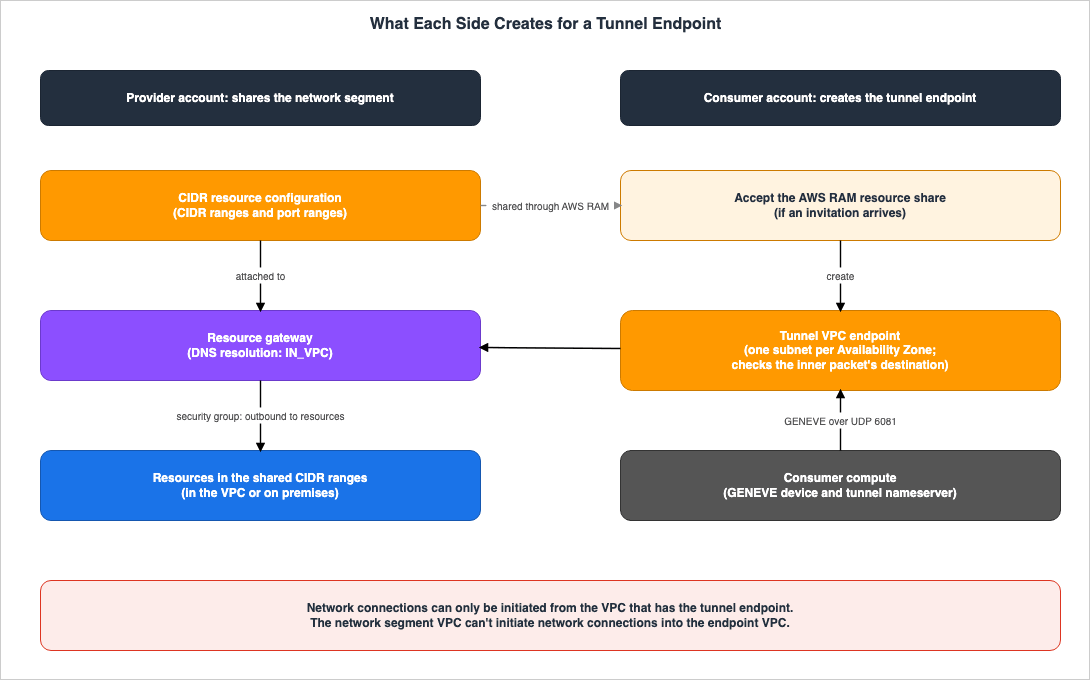
3.1 Resource Gateway
The resource gateway serves as an entry point for communication into VPCs that host resources, and spans multiple Availability Zones (AZs). The "Resource gateways in VPC Lattice" page of the VPC Lattice User Guide states the following regarding the source that resources in the segment see:The source IP address of the traffic is the IP address of the resource gateway in an Availability Zone.From resources in the segment, the visible source is the IP address of the resource gateway located in the provider's VPC.
Resource gateways can be associated with security groups. The same page describes what these rules control:
Security group rules for resource gateways control outbound traffic from the resource gateway to resources.Resource gateways have configuration settings that determine how domain names are resolved. The available values are
PUBLIC (the default) and IN_VPC. When set to IN_VPC, the resource gateway resolves names using the DNS servers configured in the DHCP option set of the VPC that the resource gateway is in. The same page further explains the relationship between this setting and resource configuration types:If DNS resolution is IN_VPC, you cannot attach resource configurations defined by ARN to the resource gateway. You cannot set DNS Resolution to IN_VPC if the resource gateway uses IPv6-only subnets. DNS Resolution must be IN_VPC to attach CIDR resource configurations to the resource gateway.The page also notes that this setting is immutable. Combining these two points, a resource gateway to which a CIDR-type resource configuration is attached must be created with the
IN_VPC setting. It is not possible to attach a CIDR-type resource configuration to resource gateways created with the PUBLIC setting. Furthermore, resource gateways configured with IN_VPC cannot be associated with an ARN-type resource configuration, meaning that you cannot attach a CIDR-type resource configuration to a resource gateway that is already sharing an RDS database through an ARN-type resource configuration.Regarding Availability Zones, the same page recommends spanning resource gateways across as many AZs as possible to ensure access to the resource from all AZs. The subnets used for the consumer-side tunnel endpoint must overlap with the AZs where the resource gateway is located (section 4.3).
3.2 CIDR-Type Resource Configurations
CIDR-type resource configurations represent shared network segments using a list of CIDR ranges. The VPC Lattice User Guide, on the page "VPC resources in Amazon VPC Lattice," states that resources and network segments can reside within a VPC or within an on-premises network. The "Resource definition" section of the "Resource configurations for VPC resources" page specifies that CIDR ranges should be reachable from the resource gateway.The AWS CLI Command Reference for
create-resource-configuration details the rules for defining these ranges.You can specify up to 10 ranges, using IPv4, IPv6, or both, and each range must include a prefix length. To represent your entire network, specify 0.0.0.0/0 (IPv4) or ::/0 (IPv6) as the only range. You can’t use reserved ranges such as 169.254.0.0/16, 100.64.0.0/10, 224.0.0.0/4, fe80::/10, or ff00::/8.Regarding protocols, the user guide and the command reference provide different descriptions. The "Resource configurations for VPC resources" page in the VPC Lattice User Guide states that the protocol for the CIDR type must be
TCP_UDP.For CIDR resource configurations, the protocol has to be TCP_UDP: only TCP is supported for application traffic, UDP is supported only for DNS queries.The AWS CLI Command Reference indicates that the default value for
--protocol is TCP, and that TCP_UDP should be specified to allow DNS resolution.The default is TCP. TCP_UDP is supported only for CIDR resource configurations; specify it for a CIDR resource configuration to allow DNS resolution, which uses UDP.Both sources agree that UDP is used for DNS. However, they differ on whether
TCP_UDP is a requirement for the CIDR type, or whether it is specified when allowing DNS resolution.Port ranges also apply to the CIDR type. The same page in the user guide describes port ranges in a way that applies regardless of the resource configuration type.
When you create a resource configuration you can define the ports it will accept requests on. Client access on other ports will not be allowed.The
--port-ranges section in the AWS CLI Command Reference includes CIDR as a supported type and adds the following sentence regarding DNS.To resolve DNS through a CIDR resource configuration, include port 53 in the port ranges.Certain configurations available for other resource types are not supported for the CIDR type. The user guide states that CIDR-type resource configurations cannot have custom domain names, and that they cannot be accessed through service networks; they must be directly connected via tunnel endpoints.
The instructions for creating the CIDR type are not all in the documentation as of September 29, 2026. The console steps on the "Create a resource configuration in VPC Lattice" pages of two user guides only list two options for "Configuration type":
Resource and Resource group. Information on creating a CIDR-type resource configuration can be found in the "Resource definition" section and in the AWS CLI Command Reference for create-resource-configuration (specifically, the --type CIDR parameter and the cidrResource in the --resource-configuration-definition). To modify the range or port range after creation, the update-resource-configuration command, also found in the AWS CLI Command Reference, accepts both --resource-configuration-definition (including cidrResource) and --port-ranges.3.3 Sharing via AWS RAM
The provider shares the CIDR-type resource configuration by adding it to an AWS RAM resource share, making it accessible to the consumer's account. The "Shareable AWS resources" page in the AWS RAM User Guide lists the following for VPC Lattice resource configurations (vpc-lattice:ResourceConfiguration) in its row: sharing with IAM users and roles is No, sharing with accounts outside the organization is Yes (any account), customer managed permissions are Yes, and sharing with service principals is No. The "Share your VPC Lattice entities" page in the VPC Lattice User Guide also states that VPC Lattice entities can be shared with any AWS account, but not with individual IAM users or roles.Whether the consumer account needs to accept an invitation depends on whom the resource configuration is shared with. According to the "Accepting and rejecting resource share invitations" page in the AWS RAM User Guide, if sharing is enabled within an organization, the consumer account can access the resource without an invitation. However, when sharing originates from an account outside the organization, or if sharing is not enabled in the organization, an invitation is sent, and access is not possible unless the invitation is accepted.
Invitations have an expiration date. The same page lists a number of resource types with a seven-day expiration period, and notes that for resource types not on that list, the following applies:
For shared resource types not on the following list, you have 12 hours to accept the invitation to join the resource share. After 12 hours, the invitation expires and the end user principal in the resource share is disassociated. The invitation can no longer be accepted by end users.As of September 29, 2026, the list of resource types with a seven-day expiration includes Amazon Aurora, Amazon EC2, AWS License Manager, AWS Outposts, Amazon Route 53, and Amazon VPC, but not VPC Lattice resource configurations. Therefore, when sharing a CIDR-type resource configuration with a vendor outside the organization, the vendor will only have a 12-hour window to accept the invitation. The "Access a network segment through a tunnel VPC endpoint" page in the PrivateLink User Guide also states as a prerequisite that to use a resource configuration shared from another account, you must review and accept the resource share that includes that configuration.
Cross-Account Sharing by Service on AWS discusses the general mechanisms for sharing resources via AWS RAM, including invitations, sharing within organizations, and managed permissions.
4. What the Consumer Creates
The consumer creates two things: a tunnel endpoint and the configuration for the compute resources that will send traffic to that endpoint, encapsulated with GENEVE. This section will begin with the prerequisites outlined in the PrivateLink User Guide and will follow the process of creating and starting to use an endpoint.4.1 Prerequisites
The "Access a network segment through a tunnel VPC endpoint" page in the PrivateLink User Guide lists the following prerequisites for creating a tunnel endpoint:* You must have a CIDR-type resource configuration that you created, or that another account created and shared with you through AWS RAM.
* If a resource configuration is shared with you from another account, you must review and accept the resource share that contains the resource configuration.
* The resource configuration must be attached to a resource gateway whose DNS resolution flag is set to IN_VPC.
* Your consumer VPC must have subnets in Availability Zones that overlap the provider resource gateway's Availability Zones.
* Your consumer compute must be able to encapsulate application traffic in GENEVE. The VNI must be set to 0. The inner packet must be a layer 3 IP packet. This should ideally be done in its own routing context or network namespace.
* Security groups on both the endpoint and the compute must allow UDP port 6081.Of the six prerequisites, the first three relate to the preparation on the provider side and RAM sharing (section 3). Section 4.3 addresses the fourth, section 5 the fifth, and section 4.4 the sixth. The final sentence regarding the fifth prerequisite states that GENEVE processing should ideally be done in its own routing context or network namespace; it does not say that this is required.
4.2 Creating Tunnel Endpoints
In the console, select "Create endpoint" from the Endpoints section of the VPC console, and then choose the tunnel endpoint type under "Type." Under "Resource configurations," select the CIDR-type resource configuration. Choose the VPC from which you will access the segment, the subnets that overlap with the resource gateway's Availability Zones (AZs), and a security group that allows UDP port 6081. The same page notes that if you do not specify a security group, the VPC's default security group will be applied.Using the AWS CLI, as shown in the example on the same page, specify
Tunnel for the --vpc-endpoint-type parameter of create-vpc-endpoint.aws ec2 create-vpc-endpoint \
--vpc-endpoint-type Tunnel \
--vpc-id vpc-1a2b3c4d \
--subnet-ids subnet-1a2b3c4d \
--ip-address-type ipv4 \
--resource-configuration-arn arn:aws:vpc-lattice:us-east-1:111122223333:resourceconfiguration/rcfg-1234567890abcdefgThe
create-vpc-endpoint page of the AWS CLI Command Reference (version 2.37.5) lists Tunnel as a valid value for the --vpc-endpoint-type parameter. It also states that for tunnel endpoints, you specify a CIDR-type resource configuration for the --resource-configuration-arn parameter. However, as of September 29, 2026, the Amazon EC2 API reference for CreateVpcEndpoint does not list Tunnel as a valid value for the VpcEndpointType parameter. Section 7.5 summarizes these discrepancies between the documentation.4.3 Subnets and Availability Zones
Tunnel endpoints allow you to specify one subnet per Availability Zone (AZ). According to the AWS PrivateLink User Guide, on the "Access network segments through AWS PrivateLink" page, a network interface is created for the endpoint in the specified subnet, and each interface is assigned an IP address from that subnet. The same page recommends configuring at least two AZs per endpoint in production environments to ensure high availability and resilience.The subnet's AZ must overlap with the AZ of the provider-side resource gateway. The same page states:
The subnets of the tunnel endpoint must be in Availability Zones that overlap with the Availability Zones of the subnets in which the resource gateway is.The
create-vpc-endpoint command in the AWS CLI Command Reference, in the description for --subnet-ids, describes the same requirement in different terms.For a Tunnel endpoint, the subnets must be in the Availability Zones of the resource gateway associated with the shared resource configuration. An endpoint network interface is created only in an Availability Zone that the resource gateway is also in.When the provider and consumer are in different accounts, the names of the AZs do not necessarily refer to the same physical location. The "Availability Zone IDs for your AWS resources" page in the AWS RAM User Guide notes that an AZ named
us-east-1a in one account may not represent the same physical location as us-east-1a in another account. To align AZ locations across accounts, it explains using AZ IDs. The two network segment pages of the PrivateLink User Guide do not mention AZ IDs. When verifying AZ overlap with the provider, it helps to cross-reference using AZ IDs.4.4 Security Groups
As the sixth prerequisite states, UDP port 6081 must be permitted in both the security group associated with the endpoint and the security group associated with the compute resources that send GENEVE-encapsulated traffic. If a security group is not specified during endpoint creation, the VPC's default security group will be applied. In that case, verify that the default security group's rules allow UDP port 6081.This permission applies to the outer packet encapsulated by GENEVE. The provider's resource configuration and the settings on the resource gateway restrict the destination and port of the inner packet (see section 7.3).
4.5 What to Do on the Compute Resources After Creation
Creating an endpoint alone does not establish connectivity from the compute resources to the segment. The "Access a network segment through a tunnel VPC endpoint" page of the PrivateLink User Guide outlines the following steps after creation:After you create a tunnel endpoint, you must describe its association to obtain the per-Availability Zone endpoint IP addresses, and then configure the GENEVE device and the tunnel nameserver on your compute.On the consumer side, you need to describe the endpoint associations to obtain the IP addresses for each Availability Zone. Subsequently, you configure GENEVE devices on the compute resources, along with the tunnel nameserver (section 6). The user guide does not specify which API or fields to use to obtain the IP addresses. The output description of the
describe-vpc-endpoint-associations command in the AWS CLI Command Reference (version 2.37.5) shows no information regarding Availability Zones or IP addresses. This article does not yet identify the specific API and fields required (pending).A tunnel endpoint also has a Regional DNS name. The "Access network segments through AWS PrivateLink" page states the following:
A tunnel endpoint has a regional DNS name. It resolves to IPs in the subnets where the tunnel endpoint is created. These IPs should be the target of your GENEVE-encapsulated traffic, not the application traffic.The IP address of the endpoint is the destination of the outer packet encapsulated with GENEVE. The destination for the application's communication is the IP address in the segment contained in the inner packet.
5. GENEVE and the Inner Packet
To utilize tunnel endpoints, the consumer's compute resources must encapsulate the application's communication within GENEVE. This section examines the requirements for both the outer and inner packets, referencing the PrivateLink User Guide. The following diagram illustrates the nesting of the outer and inner packets, and indicates where the endpoint inspects the destination.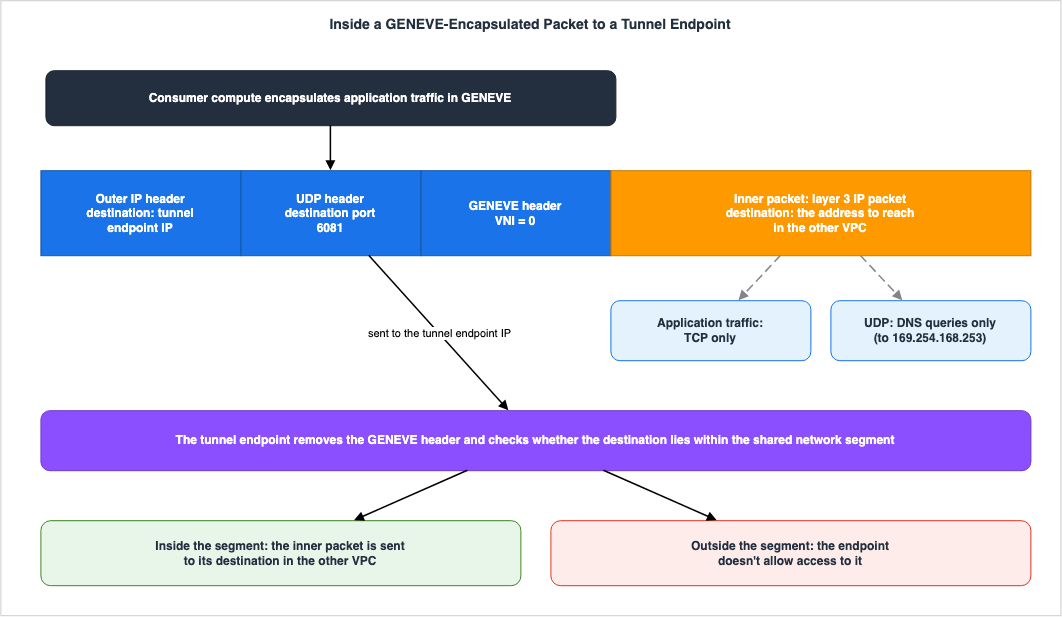
5.1 Outer Packet
GENEVE (Generic Network Virtualization Encapsulation) is an encapsulation format as defined by RFC 8926. The "Access network segments through AWS PrivateLink" page in the PrivateLink User Guide specifies the GENEVE requirements for sending traffic to tunnel endpoints as follows:Application traffic must be encapsulated in GENEVE. GENEVE traffic must use UDP and port 6081 on the tunnel endpoint. The VNI must be set to 0. The inner packet must be a layer 3 IP packet. In the inner packet, UDP is supported only for DNS queries. Regular application traffic in the inner packet must be TCP.The outer packet must be sent to UDP port 6081 on the endpoint. The destination address is the IP address of the endpoint, as described in section 4.5. The VNI (Virtual Network Identifier) in the GENEVE header must be set to
0.5.2 Inner Packet
The inner packet must be a Layer 3 IP packet. Application communication must use TCP, and inner UDP can only be used for DNS queries. Therefore, communication from applications using UDP cannot be transported through a tunnel endpoint.Regarding what happens after the endpoint unwraps the packet, the Overview section on the same page states:
The endpoint removes the GENEVE header and sends the inner packet to its destination in the other VPC. When doing so, it checks whether the destination lies within the network segment that was shared with you from the other VPC. If it lies outside, the endpoint doesn't allow access to it.If the destination address of the inner packet is outside the shared segment, the endpoint will not allow it to pass. Enforcing the segment boundary is the responsibility of the tunnel endpoint; section 7.1 discusses this.
5.3 IP Address Type Combinations
The outer packet and the inner packet can utilize different IP address types. The same page lists four possible combinations.The outer and inner packets can have differing IP types. The following combinations are supported: IPv4 over IPv4, IPv6 over IPv4, IPv4 over IPv6, and IPv6 over IPv6.The IP address type of the tunnel endpoint determines the IP address type of the outer packet, while the IP address type of the provider-side VPC determines that of the inner packet. A shared segment can include both IPv4 and IPv6 address ranges.
The tunnel endpoint IP address type can be one of three options: IPv4, IPv6, or dual-stack. IPv4 can only be selected when all subnets have IPv4 address ranges. IPv6 can only be selected when all subnets have IPv6 address ranges. Dual-stack can only be selected when all subnets have both IPv4 and IPv6 address ranges. The endpoint's IPv6 address is not accessible from the internet, and the network interface has
denyAllIgwTraffic enabled.On the provider side, the constraints outlined in section 3.1 apply. DNS resolution for the resource gateway cannot be set to
IN_VPC on subnets that only use IPv6. To attach the CIDR type, IN_VPC is required. Consequently, resource gateways to which the CIDR type is attached cannot be placed on subnets that only use IPv6.5.4 How This Differs from GENEVE on the GWLB
The Gateway Load Balancer (GWLB) also uses both GENEVE and UDP port 6081. The GWLB uses GENEVE to facilitate communication between the load balancer and appliances, as detailed in the AWS Elastic Load Balancing Decision Guide. With tunnel endpoints, the consumer's compute resource itself encapsulates the application traffic within GENEVE and sends it to the endpoint. Although using the same format and port number, the entity performing the encapsulation and its purpose differ.6. Name Resolution Through a Tunnel Endpoint
There may be instances where you want to refer to resources in the segment using the names defined in the provider VPC. In such cases, the consumer can query the DNS of the provider VPC through a tunnel endpoint. This section will describe how name resolution works in this configuration, and identify any limitations.6.1 Configuring 169.254.168.253 as the Name Server
The AWS PrivateLink User Guide, on the "Access network segments through AWS PrivateLink" page, states the following:A tunnel endpoint lets you resolve DNS in the context of the VPC that is sharing the network segment. You can resolve a domain through the tunnel endpoint against the DNS resolver of the remote VPC. To do so, you use 169.254.168.253 as the name server. You set it as the destination of the DNS query in the inner packet, and encapsulate it in GENEVE like you do for application traffic.The consumer creates DNS queries, using
169.254.168.253 as the destination address for the inner packet, and encapsulates them with GENEVE, sending them to the endpoint, just as it would for application traffic. This article reads 169.254.168.253 as the tunnel nameserver in the procedure in section 4.5. Since inner UDP can only be used for DNS queries (as detailed in section 5.2), this query represents the sole purpose for utilizing inner UDP.The configuration on the provider side also plays a role. As seen in section 3.2, the protocol for CIDR-type resource configurations, along with port 53 in the specified port range, is involved in this name resolution process.
6.2 The Provider VPC's Configuration Determines the Answers
The same page explains what configuration the answers are based on:DNS resolution looks the same as it would for a client in the remote VPC. It is based on the remote VPC's configured DHCP option set. It respects Route 53 private hosted zones or custom resolvers configured in the remote VPC.The consumer receives the same answers as clients in the provider's VPC. Names in the Route 53 private hosted zones associated with the provider's VPC can also be resolved through the tunnel endpoint. The second row of the Cross-Boundary Table counts these answers as one of the things that cross account boundaries.
Regarding the resource gateway side, the VPC Lattice User Guide, on the page "Resource gateways in VPC Lattice," states that it takes 24 hours for changes to the DHCP option set's DNS servers to propagate to
IN_VPC resource gateways. However, the two network segment pages do not specify whether name resolution through the tunnel endpoint follows this propagation behavior (pending).6.3 Private DNS Names and Custom Domain Names
Tunnel endpoints do not support the use of private DNS names. The "Access network segments through AWS PrivateLink" page includes the following sentence in both the DNS hostnames section and the Private DNS section:Private DNS names are not supported for tunnel endpoints.Regarding resource configurations, the VPC Lattice User Guide also states that custom domain names cannot be assigned to CIDR-type resource configurations. For resource endpoints, there is an option to have a private hosted zone created in the consumer's VPC for resource configurations that have custom domain names. For tunnel endpoints, names are resolved by querying the provider's VPC using the method described in section 6.1.
7. Where the Boundary Is Enforced
When resources are shared on a per-segment basis, the scope of access from the consumer's side expands compared to when resources were shared on an individual basis. This section examines, based on the documentation, where that scope is bounded, in which direction connections can be established, and what limitations the provider can continue to impose.7.1 Endpoint Destination Verification
As mentioned in section 5.2, tunnel endpoints verify whether the destination address of the inner packet, once the wrapper has been removed, falls within the shared segment. If the destination is outside the segment, the packet is not forwarded. Regardless of the destination address the consumer-side compute resources write in the inner packet, it will not reach outside the segment. The tunnel endpoint enforces this segment boundary.Regarding destinations in the segment, the AWS PrivateLink User Guide, on the AWS PrivateLink concepts page, states:
A tunnel endpoint lets you privately and securely tunnel into a network segment (a list of CIDR ranges) and access any resource located in the segment.However, this does not guarantee that the packet can reach every destination in the segment. As described in section 3.2, the CIDR ranges should be reachable from the resource gateway, and access to ports outside the specified port range is not permitted. Furthermore, the resource gateway's security groups control outbound communication from the resource gateway to the resources (as described in section 3.1).
7.2 Only the Consumer Side Can Initiate Connections
Regarding connection direction, the "Access network segments through AWS PrivateLink" page lists the following under "Considerations":Network connections can only be initiated from the VPC that has the tunnel endpoint, and not the VPC that is sharing the network segments. The network segment VPC can't initiate network connections into the endpoint VPC.Only from the consumer's VPC can a connection be initiated. Connections cannot be initiated from the provider's VPC into the consumer's VPC. The "Resource configurations for VPC resources" page of the VPC Lattice User Guide also states that resource configurations enable unidirectional connections from clients in other VPCs or accounts to the VPC hosting the resource.
For use cases requiring connections from resources in the segment to compute resources on the consumer side, this directional limitation applies directly. The AWS VPC Connectivity Decision Guide discusses the selection of connection methods when bidirectional connections are required.
7.3 Methods for Restricting Scope on the Provider Side
The following methods, as explicitly outlined in AWS documentation, allow the provider to restrict scope in the network segment:| Method | What to Restrict | Documentation |
|---|---|---|
| CIDR Range | The range of destinations accessible by the consumer. Maximum of 10 ranges. Reserved ranges cannot be used. | AWS CLI Command Reference (create-resource-configuration, update-resource-configuration) |
| Port Range | The ports accepted. Access to ports outside this range is not permitted. Include port 53 if resolving DNS. | VPC Lattice User Guide (Resource configurations for VPC resources), AWS CLI Command Reference (create-resource-configuration) |
| Protocol | Application communication is limited to TCP; UDP is only permitted for DNS queries. | VPC Lattice User Guide (Resource configurations for VPC resources) |
| Resource Gateway Security Group | Outbound communication from the resource gateway to the resource. | VPC Lattice User Guide (Resource gateways in VPC Lattice) |
| AWS RAM Resource Sharing Recipients | The accounts with which to share. IAM users and roles cannot be specified. | AWS RAM User Guide (Shareable AWS resources), VPC Lattice User Guide (Share your VPC Lattice entities) |
From the perspective of a resource in the segment, the source of incoming connections from the consumer appears to be the IP address of the resource gateway (see section 3.1). When the resource makes decisions based on the source, it will only see the IP address of this resource gateway.
The documentation consulted did not specify when existing connections would be affected by changes to ranges or port ranges (pending).
7.4 When Sharing Is Stopped
The VPC Lattice User Guide, on the page titled "Share your VPC Lattice entities," describes how VPC Lattice handles situations when the provider stops sharing resources.To stop sharing a VPC Lattice entity that you own, you must remove it from the resource share. Existing associations persist after you stop sharing your entity. New associations to a previously shared entity are not allowed. When either the entity owner or the association owner deletes an association, it is deleted from both accounts.This description applies to VPC Lattice entities in general (service networks, services, and resource configurations) and does not name tunnel endpoints. The same user guide, on the page "Manage associations for a VPC Lattice resource configuration," describes the relationship between resource VPC endpoints and resource configurations as endpoint associations. Regarding tunnel endpoints, the PrivateLink User Guide states that they are associated with resource configurations of the CIDR type. However, the API reference for the
DeleteResourceEndpointAssociation API states that the API disconnects a resource configuration from a resource VPC endpoint, but does not mention tunnel endpoints.Therefore, the documentation does not explicitly state that simply removing the resource configuration from the RAM resource share will prevent access from existing tunnel endpoints. If the general rules for VPC Lattice entities apply, existing associations remain. Whether the provider can remove the association for tunnel endpoints is not stated in any source that names tunnel endpoints (pending).
7.5 Differences Between the Documents
As of September 29, 2026, the way tunnel endpoints and CIDR-type resource configurations are described varies depending on the documentation.| Document | Content | Handling of this Article |
|---|---|---|
Amazon EC2 API Reference (CreateVpcEndpoint) | The VpcEndpointType values are Interface, Gateway, GatewayLoadBalancer, Resource, and ServiceNetwork; there is no Tunnel option. | Followed the AWS CLI Command Reference and PrivateLink User Guide, and wrote Tunnel (section 4.2). |
VPC Lattice API Reference (CreateResourceConfiguration, UpdateResourceConfiguration) | The type values are GROUP, CHILD, SINGLE, and ARN; there is no CIDR option. The descriptions for portRanges, protocol, and resourceGatewayIdentifier within CreateResourceConfiguration also lack mention of CIDR. The protocol values include TCP_UDP. | Followed the AWS CLI Command Reference and VPC Lattice User Guide, treating CIDR as a fifth type and stating that port ranges and protocols also apply to the CIDR type (sections 2.1 and 3.2). |
| AWS RAM User Guide (Shareable AWS resources) | The row for VPC Lattice resource configurations states that consumers access these resources using a resource VPC endpoint, without mentioning tunnel endpoints. | Focused solely on the shareability columns (e.g., whether it can be shared outside the organization) (section 3.3). |
| Document history for PrivateLink User Guide and VPC Lattice User Guide | There are no lines mentioning tunnel endpoints or CIDR-type resource configurations. | Dated the addition by the What's New posting date (September 18, 2026) (section 1.1). |
| "Create a resource configuration in VPC Lattice" (in both user guides) | In the console instructions, the "Configuration type" options are limited to Resource and Resource group. | Described how to create the CIDR type from the "Resource definition" section and the AWS CLI Command Reference (section 3.2). |
| "Protocol" section in VPC Lattice User Guide (Resource configurations for VPC resources) | Initially states that only TCP is currently supported, then states that the protocol for the CIDR type must be TCP_UDP. The AWS CLI Command Reference states that TCP_UDP is specified to allow DNS resolution. | Presented both descriptions side-by-side (section 3.2). |
| What's New (September 18, 2026) | In the first paragraph, "customers" refers to the connecting party; in the second paragraph, it refers to the sharing party. | Standardized the terminology as "provider" and "consumer" (section 1.1). |
When writing code or performing tests based on the list of API reference values, there is a possibility that
Tunnel and CIDR will be treated as unexpected values. When using the list of values, cross-reference it with the AWS CLI Command Reference.8. Frequently Asked Questions about Tunnel Endpoints
This section answers, within the scope of this article, common questions that arise when deciding whether to share a segment through tunnel endpoints.Q1. Can connections be initiated from the provider VPC into the consumer VPC?
No. The PrivateLink User Guide states that only the VPC that has the tunnel endpoint can initiate connections; the VPC that shares the segment cannot initiate connections into the VPC that has the endpoint. Connections originating from resources in the segment cannot be established through tunnel endpoints (section 7.2).Q2. Can a tunnel endpoint handle communication for UDP-based applications?
No. In the inner packet, UDP is only supported for DNS queries; application communication must use TCP (see section 5.2).Q3. If a network segment is shared, will traffic reach any port on any destination within that segment?
No. Access is not granted unconditionally. The endpoint does not allow access to destinations outside the shared segment, and access to ports outside the provider's defined port range is not permitted, even in the segment. Furthermore, the resource gateway's security groups also control outbound communication to the resources (see sections 7.1 and 7.3).Q4. Can private DNS names be used with tunnel endpoints?
No. The PrivateLink User Guide states that private DNS names are not supported with tunnel endpoints. Furthermore, you cannot assign custom domain names to CIDR-type resource configurations. Instead, queries are directed to169.254.168.253, which resolves the name in the context of the provider's VPC (section 6).Q5. Can the resource configuration used with resource endpoints also be used with tunnel endpoints?
No. Tunnel endpoints are associated with exactly one CIDR-type resource configuration, while resource endpoints supportSINGLE, GROUP, and ARN types (see section 2.1). To share a segment, you must create a separate CIDR-type resource configuration.Q6. When sharing a segment with external vendors, is there a deadline for accepting invitations?
Yes. VPC Lattice resource configurations are not listed in the AWS RAM User Guide's seven-day expiration list, and invitations for resource types not listed will expire after 12 hours. If sharing is enabled in the organization, accounts in that organization do not receive invitations (see section 3.3). However, this does not apply to resource shares that retain sharing after an account leaves the organization (see Cross-Account Sharing by Service on AWS).Q7. Is there an upper limit on the size of packets encapsulated with GENEVE?
The sources that name tunnel endpoints do not specify an upper limit. The AWS PrivateLink User Guide, on the "AWS PrivateLink quotas" page, states the following regarding VPC endpoints in general:A VPC endpoint supports an MTU of 8500 bytes. Packets with a size larger than 8500 bytes that arrive at the VPC endpoint are dropped. Path MTU Discovery (PMTUD) is not supported.Whether this value applies to outer packets encapsulated with GENEVE, and how to account for the GENEVE header size, is not stated on the network segment pages (pending).
9. Summary
Tunnel endpoints and CIDR-type resource configurations provide a means for providers to share network segments, represented by a CIDR range, instead of creating a resource configuration for each resource. This article outlines what is exposed to the consumer when a segment is shared, what is required from the consumer, and where boundaries are enforced, all in accordance with AWS documentation.Only the consumer's VPC can initiate connections. The PrivateLink User Guide states that the provider's VPC, sharing a segment, cannot initiate connections to the consumer's VPC where the tunnel endpoint resides. Using resources in the segment to connect to the consumer is outside the scope of this mechanism.
The tunnel endpoint enforces boundaries. The endpoint inspects the destination address in the inner packet, after the GENEVE wrapper has been unwrapped. If the destination is outside the shared segment, the traffic is not allowed. In the segment, the provider can restrict what is reachable with the CIDR ranges, the port ranges, and the security groups associated with the resource gateway.
The consumer's compute resources require GENEVE processing. The outer layer uses UDP port 6081 with VNI set to
0, while the inner layer uses Layer 3 IP packets. Application communication is limited to TCP. Inner UDP is solely for DNS queries, and names are resolved by querying 169.254.168.253 in the context of the provider's VPC. Private DNS names cannot be used.The provider's preparation also includes a choice that cannot be changed later. A resource gateway to which a CIDR-type resource configuration is attached must be created with DNS resolution set to
IN_VPC, and this setting cannot be changed later. The invitation expiry time when sharing a CIDR-type resource configuration outside the organization is 12 hours. Only general rules applicable to entities within VPC Lattice describe the behavior of existing associations when sharing is stopped.Finally, before sharing a segment, consider these four points: Is there a need for resources in the segment to initiate connections to the consumer? Are the CIDR range and port range restricted to only the destinations you want the consumer to reach? Can the consumer's compute resources handle GENEVE wrapping and allow UDP port 6081? Have you determined what actions to take when stopping usage, beyond removing the resource configuration from the RAM resource share?
10. References
- Access network segments through AWS PrivateLink - Amazon Virtual Private Cloud
- Access a network segment through a tunnel VPC endpoint - Amazon Virtual Private Cloud
- AWS PrivateLink concepts - Amazon Virtual Private Cloud
- AWS PrivateLink quotas - Amazon Virtual Private Cloud
- Document history for AWS PrivateLink - Amazon Virtual Private Cloud
- VPC resources in Amazon VPC Lattice - Amazon VPC Lattice
- Resource configurations for VPC resources - Amazon VPC Lattice
- Resource gateways in VPC Lattice - Amazon VPC Lattice
- Create a resource configuration in VPC Lattice - Amazon VPC Lattice
- Manage associations for a VPC Lattice resource configuration - Amazon VPC Lattice
- Share your VPC Lattice entities - Amazon VPC Lattice
- Document history for the Amazon VPC Lattice User Guide - Amazon VPC Lattice
- Shareable AWS resources - AWS Resource Access Manager
- Accepting and rejecting resource share invitations - AWS Resource Access Manager
- Availability Zone IDs for your AWS resources - AWS Resource Access Manager
- CreateVpcEndpoint - Amazon Elastic Compute Cloud
- CreateResourceConfiguration - Amazon VPC Lattice
- DeleteResourceEndpointAssociation - Amazon VPC Lattice
- create-vpc-endpoint - AWS CLI Command Reference
- describe-vpc-endpoint-associations - AWS CLI Command Reference
- create-resource-configuration - AWS CLI Command Reference
- update-resource-configuration - AWS CLI Command Reference
- RFC 8926 - Geneve: Generic Network Virtualization Encapsulation
- AWS PrivateLink announces Tunnel Endpoints to access network segments - What's New with AWS
References:
Tech Blog with curated related content
Written by Hidekazu Konishi