AWS Private CA Hierarchy Design - Root and Subordinate CAs, Revocation, Short-Lived Mode, and mTLS on ALB
First Published:
Last Updated:
Most teams arrive at this problem from one of two directions. Either the self-signed certificate arrangement finally collapsed — someone rotated a certificate, half the fleet never got the new one, and the other half had pinned the old one — or a compliance requirement, a partner integration, or a zero-trust program landed a requirement for mutual TLS, and it turned out that requiring client certificates means first deciding who issues them.
AWS Private CA removes the parts of that problem that are genuinely miserable: running hardware security modules, protecting root key material, keeping a revocation endpoint highly available, and proving to an auditor that you did all of it. What it does not remove is the design work. And an uncomfortable proportion of that design work is irreversible. The mode of a CA is fixed when you create it. So is its type, its subject distinguished name, and its key algorithm. The path length baked into a subordinate CA certificate is fixed when that certificate is issued. The revocation distribution point written into an end-entity certificate is fixed at issuance and cannot be changed without reissuing the certificate. Revoking a certificate cannot be undone.
This guide is organized around that fact. It puts the irreversible decisions first, before any of the mechanics, because those are the decisions that determine whether the PKI you build in week one is still the PKI you want in year three. It then works through hierarchy design, templates and issuance paths, revocation, the short-lived certificate mode and the constraints that come with it, mutual TLS on an Application Load Balancer as a concrete consumer, cross-account sharing, audit, and rotation.
Scope and honesty notes. This article covers private CA hierarchy design on AWS: CA modes, root and subordinate CA structure, path length and validity constraints, certificate templates and issuance paths, revocation design with CRLs and OCSP, the short-lived certificate mode, mutual TLS on an Application Load Balancer, cross-account CA and trust store sharing, auditing, rotation, and the failure modes that show up in production. Every factual claim below was verified against AWS's official documentation on 2026-08-04; quotas, defaults, and service support change, so confirm current values for your account and Region before you rely on them. No AWS API calls were executed to produce this article and no measurements were taken — nothing here is presented as a benchmark, and no performance claim is made. This article does not discuss pricing. Where a design choice is usually framed as a cost question — how many CAs to run, whether to use the short-lived mode — it is evaluated here on trust boundaries, blast radius of revocation, separation of operational ownership, and renewal burden, because those are the properties that determine whether the design survives. Destructive and irreversible operations — revoking a certificate, disabling a CA, deleting a CA — were not executed during research and are flagged with warnings wherever they appear. Command fragments follow the patterns in AWS's documentation and are illustrative, not tested deployment artifacts.
Several adjacent topics are deliberately delegated to existing articles rather than repeated here:
- The history of the public certificate authority ecosystem — the CA/Browser Forum, root programs, Certificate Transparency, the shrinking maximum validity schedule, and the public-CA definition of a short-lived certificate — belongs to TLS Certificate Ecosystem History and Timeline. None of those rules apply to a private CA, and conflating the two is a common source of confusion.
- The vocabulary of the underlying primitives — X.509 structure, RSA and ECDSA, hashing, signatures — belongs to the Cryptography Glossary for Engineers.
- Choosing a load balancer type belongs to the AWS Elastic Load Balancing Decision Guide. This guide assumes you already have an Application Load Balancer and are deciding how to configure mutual TLS on it.
- The post-quantum migration — what ML-DSA is, which AWS services support it, and how the industry timeline is expected to unfold — belongs to Post-Quantum Cryptography Standardization Timeline and Migration on AWS. Here it appears only as one of the irreversible key algorithm choices you make at CA creation.
- How KMS protects key material and how envelope encryption works belongs to the AWS KMS Envelope Encryption and Data Key Caching Patterns guide.
- Certificate distribution inside container orchestrators is out of scope for this article. It belongs to Certificate Distribution in Kubernetes with AWS Private CA, which follows a certificate from issuance to the process that has to reread it.
Table of Contents
- 1. Introduction
- 2. Decisions You Cannot Undo
- 3. Root and Subordinate CA Design
- 4. Certificate Templates and Issuance Paths
- 5. Revocation Design
- 6. Short-Lived Certificate Mode
- 7. mTLS on Application Load Balancer
- 8. Cross-Account and Organization Sharing
- 9. Auditing and Observability
- 10. Rotation and Migration
- 11. Failure Modes and Anti-Patterns
- 12. Frequently Asked Questions
- 13. Summary
- 14. References
1. Introduction
The audience for this guide is the engineer who has been handed a requirement — "service-to-service traffic must be mutually authenticated," "stop using self-signed certificates," "the auditor wants to see who issued what" — and has discovered that satisfying it means designing a certificate authority hierarchy. Platform engineers, security architects, and the person who ends up owning internal PKI because nobody else volunteered.The guide is organized as a decision path. Section 2 front-loads every choice that cannot be reversed, so you can make those deliberately instead of discovering them later. Sections 3 and 4 cover the structural design — where the root lives, how subordinate CAs are divided, and how certificates actually get issued. Section 5 covers revocation, which is the part most private PKI designs get wrong because it is the part that is invisible until it matters. Section 6 covers the short-lived certificate mode, which trades a revocation infrastructure for a set of structural constraints. Section 7 grounds all of it in one concrete consumer: mutual TLS on an Application Load Balancer. Sections 8 through 10 cover the surrounding operational design, and Section 11 collects the failure modes.
Three ideas run through all of it:
- A CA is a trust boundary, not a resource. The question "how many CAs should we have?" is really the question "how many independent zones of trust does this organization need, and who administers each one?" AWS's own guidance is that a CA hierarchy should reflect the structure of the organization, with separate administrative controls for different organizational units and the ability to delegate access to subordinate CAs.
- Revocation is a distribution problem, not a cryptographic one. Revoking a certificate is one API call. Getting every relying party to learn about that revocation before the certificate would have expired anyway is the entire difficulty, and the mechanism that makes it possible has to be chosen and configured before the certificate is issued.
- Every certificate you issue is a promise about the future. It promises that the issuing CA will still exist, still be trusted, still be reachable for revocation checks, and still be within its own validity period for as long as the certificate is valid. Most of the failure modes in Section 11 are broken versions of that promise.
For the dates on which the features covered in this guide became available, such as root CA hierarchies and short-lived certificate mode, and the name the service went by on each date, see AWS History and Timeline regarding AWS Private Certificate Authority - Overview, CA Modes and Connectors, Features, Summary of Updates, and Introduction to AWS Private CA.
2. Decisions You Cannot Undo
Start here. Everything in this section is fixed at creation or at issuance and cannot be edited afterward. Some of these are enforced by the API; others are enforced by physics, in the sense that the value is already inside a signed certificate sitting on somebody else's disk.2.1 Fixed when the CA is created
Four properties of a private CA cannot be updated after creation: Mode, CA type, Subject distinguished name, and Key algorithm. AWS's own console walkthrough states this plainly as an "Important" callout before you fill in the creation form. There is no update path for any of them; the remedy is to create a new CA.| Property | API parameter | Why it is expensive to get wrong |
|---|---|---|
| Mode | UsageMode (GENERAL_PURPOSE or SHORT_LIVED_CERTIFICATE) | Determines the maximum validity of every certificate this CA will ever issue, and whether ACM can issue from it at all |
| CA type | CertificateAuthorityType (ROOT or SUBORDINATE) | A root anchors trust and is distributed to trust stores; a subordinate is signed by a parent. You cannot promote or demote one |
| Subject distinguished name | Subject in CertificateAuthorityConfiguration | The subject DN appears as the issuer DN in every certificate this CA signs, and clients match on it. Renaming means a new CA and a new chain |
| Key algorithm | KeyAlgorithm | Determines which signing algorithm family is legal, and constrains what subordinate CAs beneath it may use |
The mode deserves the most attention, because it is the one whose consequences are least obvious at creation time. AWS's Security Blog states it directly: "You select the CA mode when you create a certificate authority. The CA mode cannot be changed for an existing CA." If
UsageMode is unspecified, it defaults to GENERAL_PURPOSE. Section 6 covers what choosing SHORT_LIVED_CERTIFICATE commits you to.The key algorithm choice is also narrower than it looks. AWS Private CA supports
RSA_2048, RSA_3072, RSA_4096, EC_prime256v1, EC_secp384r1, EC_secp521r1, the post-quantum ML_DSA_44, ML_DSA_65, and ML_DSA_87 specs, and SM2 in China Regions only. Two constraints follow. First, for RSA or ECDSA the signing algorithm family must match the key algorithm family of the CA's private key — you cannot sign with SHA256WITHRSA using an EC key. For ML-DSA the hash function is part of the algorithm and there is no separate choice. Second, and more consequential for hierarchy design, the API reference for CertificateAuthorityConfiguration states that when you create a subordinate CA you must use a key algorithm supported by the parent CA. A root created with an algorithm your intended subordinates cannot use is a root you will replace.Note on post-quantum algorithms. ML-DSA support for creating CAs, issuing certificates, generating CRLs, and configuring OCSP responders was announced for AWS Private CA in November 2025 and is described by AWS as a way for organizations "to begin transitioning their public key infrastructure towards post-quantum cryptography." Whether your relying parties — browsers, language runtimes, embedded TLS stacks, load balancers — can validate an ML-DSA chain is a separate question that this guide does not answer. Treat it as an option to evaluate against your actual client population, and see the post-quantum timeline article for where the broader migration stands.
2.2 Fixed when a certificate is issued
The second class of irreversible decisions is written into signed certificates. Once a certificate is signed and distributed, its contents cannot be edited; the only remedy is to issue a replacement and get every relying party to move to it.| Baked in at issuance | Where it comes from | Consequence of getting it wrong |
|---|---|---|
pathLenConstraint of a CA certificate | The certificate template you chose (SubordinateCACertificate_PathLen0/V1 through PathLen3/V1) | Determines how many further CA levels may exist below. Too low and you cannot delegate later; too high and you have handed out more authority than intended |
| Validity period | The --validity parameter, bounded by the issuing CA | A child certificate cannot outlive its parent. Attempting it fails |
| CRL distribution point (CDP) URI | The CA's revocation configuration at the moment of issuance | Changing the CRL bucket later does not update already-issued certificates, and breaks revocation for them |
| Authority information access (OCSP responder URI) | The CA's revocation configuration at the moment of issuance | Same shape as CDP |
| Whether any revocation mechanism is referenced at all | Whether CRL or OCSP was enabled on the CA before issuance | A certificate issued while revocation was disabled carries no revocation pointer and cannot be checked by a relying party that follows the certificate |
That last row is the one that catches people. AWS's Security Blog on revocation methods states the rule in its conclusion: the certificate revocation information must be included in the certificate when it is issued, so the choice to enable CRL or OCSP, or both, has to happen before the certificate is issued. The certificate templates make the same point from the other direction: CRL distribution points are included in certificates issued with a given template only if the CA is configured with CRL generation enabled.
2.3 Irreversible operations
Finally, three operations that are irreversible or nearly so. All three are covered again in context later, but they belong on the list of things to decide deliberately.- Revoking a certificate. There is no un-revoke API.
RevokeCertificatetakes a serial number and a reason and that is the end of it. Revocation information also goes into the audit report permanently. One exception matters for design: you cannot revoke a root CA self-signed certificate. A compromised root is handled by removing it from every trust store, not by revoking it. - Deleting a CA.
DeleteCertificateAuthoritymoves the CA toDELETED, and it stays restorable for a period you set between 7 and 30 days, defaulting to 30. But a CA deleted while in theCREATINGorFAILEDstate has no restoration period and cannot be restored. AWS also does not check whether the CA's issued certificates have expired before processing the delete. - Deleting a trust store association on an Application Load Balancer. Covered in Section 8 — the owner of a shared trust store can force-delete an association, and the ELB documentation is explicit that any listener using that trust store can then no longer verify client certificates and will fail TLS handshakes.
3. Root and Subordinate CA Design
3.1 How deep the hierarchy can be
AWS Private CA supports a hierarchy of certificate authorities up to five levels deep. The root CA sits at the top and can have any number of branches; each branch can carry as many as four levels of subordinate CAs. You can also create multiple hierarchies, each with its own root. The documentation states the ceiling twice, once as a capability ("AWS Private CA managed hierarchies support CA certification paths up to five levels deep") and once as a constraint in the path length discussion ("AWS Private CA limits the certification path to five levels").That ceiling is a maximum, not a target. AWS's own guidance is to aim for a path length no greater than necessary to delegate administrative and security roles, because every additional CA in the path increases validation time and increases the number of certificates the server must send to the client. It also — and this matters more than the validation cost for most designs — increases the number of CA certificates that must be renewed on a schedule and the number of ways the chain can break.
The documentation names two common structures and two less common ones.
| Structure | Shape | When AWS describes it as appropriate |
|---|---|---|
| Two levels | Root CA plus one subordinate | The simplest structure that allows separate administration, control, and security policies for the root and the issuing CA. Restrictive control on the root, more permissive access on the subordinate that does bulk issuance |
| Three levels | Root CA plus two layers of subordinate | Adds a middle layer used only to sign subordinate CAs, further separating the root from low-level operations |
| Four or more levels | Root plus three or more subordinate layers | Possible and sometimes required to allow administrative delegation, but less common than three-level hierarchies |
| One level | Root CA only | Common for development and testing where a full chain of trust is not required. In production it is atypical and violates the practice of maintaining separate security policies for the root and the issuing CAs |
Source for all four rows: AWS Private CA User Guide, "Design a CA hierarchy."
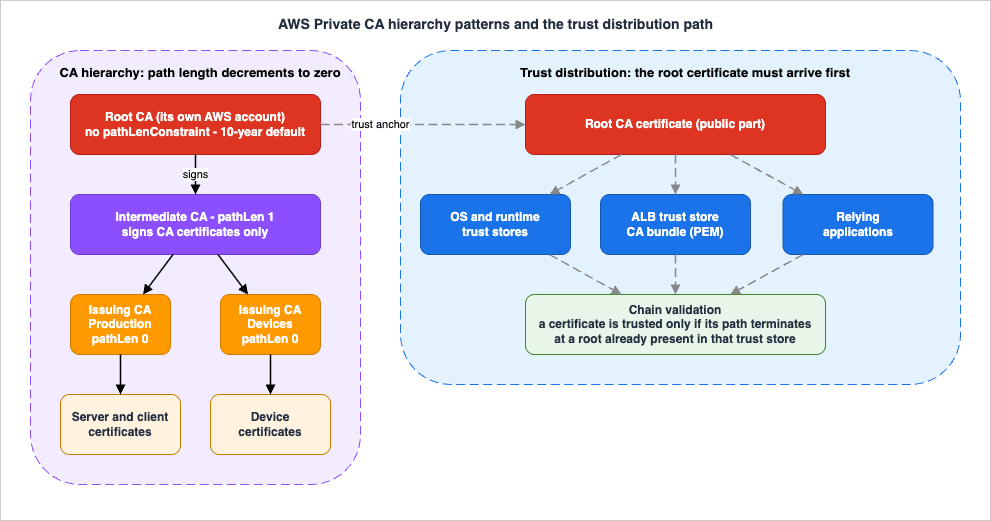
3.2 What a subordinate CA is actually for
The temptation is to think of subordinate CAs as a load-balancing device — more CAs, more issuance capacity. That is not what they buy you. A subordinate CA buys you four things, and every one of them is about containment.- A revocable trust boundary. When a CA signs a lower-level CA's certificate, it confers limited, revocable authority on that certificate. Revoking one subordinate CA invalidates everything it issued, and nothing else. That is the containment property, and it is why the answer to "should this be a separate CA?" is usually "is there a scenario in which I would want to invalidate all of these certificates at once, and none of the others?"
- Separate administrative control. Different subordinate CAs can be operated by different teams with different IAM policies, and — as Section 8 covers — can live in different AWS accounts.
- Protection of the root by disuse. AWS's best-practices guidance is that a root CA should in general only be used to issue certificates for intermediate CAs, so it can be stored out of harm's way while the intermediates do the daily work. The User Guide enumerates the entire set of legitimate reasons to use a root: when the PKI is created, when a high-level CA needs to be replaced, and when a CRL or OCSP responder needs to be configured. If your root is signing anything on a routine basis, the design is wrong.
- A bound on issuance authority. The
pathLenConstraintextension, discussed next, lets a CA certificate say "nothing below you may create further CAs."
The natural division units, in rough order of how often they are the right answer:
| Division unit | Example | What it contains |
|---|---|---|
| Environment | Production, staging, development | A compromise of the development issuing CA does not touch production trust |
| Trust domain or business unit | Internal corporate services vs manufactured devices | The manufacturer example in the User Guide uses separate roots for internal operations and for each externally shipped product line, so an entire hierarchy can move with a divestiture or reorganization |
| Certificate purpose | TLS server certificates vs client authentication certificates vs code signing | Combines with template restrictions (Section 4) so that a team authorized to issue client certificates cannot mint a server certificate for an arbitrary hostname |
| Operational owner | Platform team vs application team | Aligns the CA boundary with the on-call boundary, so the team that gets paged for an expiry is the team that controls the renewal |
Note what is not on that list: geography, for its own sake. A CA is a Regional resource, and there are legitimate reasons to place subordinate CAs in multiple Regions — the disaster-recovery pattern AWS documents is to create redundant subordinate CAs in different Regions and chain them all to the same root CA in a single Region. But that is a resilience decision, not a trust-boundary decision, and it does not by itself require a separate branch of the hierarchy.
3.3 Path length, and how it decrements
The structure of a CA hierarchy is defined and enforced by the basic constraints extension that each certificate carries. It has two fields that matter here. ThecA boolean says whether the certificate defines a CA; if false — the default — the certificate is an end-entity certificate. The pathLenConstraint integer is the maximum number of lower-level subordinate CAs that can exist in a valid chain of trust beneath it. RFC 5280 defines it as "the maximum number of non-self-issued intermediate certificates that may follow this certificate in a valid certification path."Two properties follow, and both are frequent sources of confusion.
The end-entity certificate is not counted. The User Guide is explicit that the path length value excludes the end-entity certificate, and it goes out of its way to note that informal language about the "length" or "depth" of a validation chain often does include it, which is where the confusion comes from. When you read a number, check which convention it uses.
A root CA certificate has no path length constraint at all. That is deliberate: the root needs maximum flexibility, so it does not include the extension and can therefore define a certification path of any length — up to the five-level service limit. Subordinate CAs have
pathLenConstraint values of zero or greater depending on where they sit and what they need to do.The propagation rule is what you actually design against. In a three-CA hierarchy, no path constraint is specified for the root, the first subordinate has a path length of 1 and can therefore sign child CAs, and each of those child CAs must have a
pathLenConstraint of zero — meaning they can sign end-entity certificates but cannot issue further CA certificates. AWS calls limiting the power to create new CAs "an important security control," and that is exactly what it is: a pathLen:0 issuing CA cannot be used to manufacture a new CA even by someone who has permission to call IssueCertificate against it.The API enforces this.
IssueCertificate returns an error if you attempt to create a CA with a path length greater than or equal to the path length of its issuing CA certificate. The error text is "Path length check failed for CA," and the fix is to pick a template with a lower path length — if the issuing CA has pathLen:1, use SubordinateCACertificate_PathLen0/V1 rather than PathLen1.Practical consequence for design: decide the deepest branch you will ever need before you issue the first subordinate CA certificate, then add nothing. Retrofitting an extra level means reissuing the CA certificate of every CA above the insertion point with a larger path length, which means reissuing the chain, which means redistributing it.
3.4 Validity periods, and the rule that they nest
The single most important structural rule in AWS Private CA is that validity periods nest. The User Guide states it as a constraint on the service: a certificate managed by AWS Private CA must have a validity period shorter than or equal to the validity period of the CA that issued it. In its own words, "child CAs and end-entity certificates cannot outlive their parent certificates," and attempting to useIssueCertificate to issue a CA certificate with a validity period greater than or equal to the parent's fails.The AWS defaults describe the intended shape:
| Certificate | AWS Private CA default validity | Rationale given in the documentation |
|---|---|---|
| Root CA certificate | 10 years | Changes to a root affect the entire PKI and require updating every dependent trust store, so the validity should be long to minimize operational impact |
| Subordinate CA certificate | 3 years | Should be significantly longer than the certificates it issues; a good range is two to five times the period of any child certificate |
| End-entity certificate issued through ACM | 13 months (395 days), fixed | ACM manages renewal for these |
End-entity certificate issued through IssueCertificate | Any period less than the issuing CA's | You choose, and you own renewal |
Source: AWS Private CA User Guide, "Manage the private CA lifecycle."
Work backwards. AWS's guidance is to determine the optimal lifetime for CA certificates by starting from the desired lifetime of the end-entity certificates you want to issue. If you want one-year leaves in a two-level hierarchy, a three-year issuing CA is the documented example.
There is a specific trap at the ACM boundary. Private certificates requested through the ACM console are valid for exactly 395 days. If the parent CA's remaining validity is less than 13 months, an ACM console request fails with "The signing certificate for the CA you specified in the request has expired." The workaround AWS documents is to use the
IssueCertificate API with an explicit shorter validity and then import the certificate into ACM if you need it on an integrated service. This is not a corner case: it is what every CA looks like in the last year of its life, which is exactly when you are least able to absorb a surprise.3.5 Where the root should live
AWS's stated best practice is unambiguous: create the root CA and the subordinate CA in two different AWS accounts. The mechanism is straightforward — export the CSR from the subordinate CA in one account and sign it with the root CA in a different account — and the benefit is that control of the CAs is separated by account boundary, which is the strongest isolation boundary AWS offers. The documented disadvantage is equally concrete: you cannot use the console wizard that simplifies signing a subordinate CA's certificate from your root, so the process becomes a CLI or API workflow.AWS also strongly recommends multi-factor authentication any time you access AWS Private CA, and recommends separating the CA administrator role from users who only need to issue end-entity certificates. Those two roles have genuinely different threat models: an administrator who can create CAs and change revocation configuration can restructure the trust of the entire organization, while an issuer can only mint certificates within the constraints already set.
If your organization currently issues end-entity certificates directly from a root — a real and common legacy — AWS Private CA can support that workflow, and doing so still improves on a root managed with OpenSSL on somebody's laptop. But the documentation is candid about the limitations: if the root is compromised or lost you must create a new root and distribute it to every client in your environment, and until that recovery completes you cannot issue new certificates. You also lose the ability to restrict access and limit the number of certificates issued from the root. Treat it as a migration waypoint, not a destination.
4. Certificate Templates and Issuance Paths
4.1 Templates are the authorization surface
AWS Private CA uses configuration templates to issue both CA certificates and end-entity certificates. From the console the appropriate root or subordinate template is applied automatically. From the CLI or API you supply a template ARN toIssueCertificate, and if you supply none, EndEntityCertificate/V1 is applied by default.That default is the reason for one of the most common errors in this service. If you are signing a subordinate CA's CSR and forget the
--template-arn, you get an end-entity certificate with CA:FALSE, and the resulting "CA" cannot issue anything. The re:Post guidance for that symptom is exactly this: you must specify a template, or you get a certificate the CA cannot use.Templates come in four varieties, and the difference between them is about who controls the certificate's extensions.
| Variety | What it allows | Precedence when values conflict |
|---|---|---|
| Base | No passthrough. All extension values are fixed by the template | Template only |
| CSRPassthrough | Extensions present in the CSR are copied into the issued certificate | Template wins over CSR |
| APIPassthrough | Values supplied in the ApiPassthrough parameter of IssueCertificate are copied in | Template wins over API |
| APICSRPassthrough | Both of the above | Template, then API passthrough, then CSR passthrough |
Source: AWS Private CA User Guide, "AWS Private CA template varieties."
The APIPassthrough variety exists for a specific operational shape worth knowing: the requesting machine often does not know facts about itself that the certificate should assert — which organizational unit it belongs to, for example. An administrator or an intermediate system can look that up in a directory and inject it into the request as a JSON structure, without the requester ever being trusted to assert it.
The base templates fix key usage and extended key usage to sensible values for common certificate types.
EndEntityCertificate/V1 always produces key usage of "Critical, digital signature, key encipherment" and extended key usage of "TLS web server authentication, TLS web client authentication." The blank templates are the escape hatch when you need to define your own key usage and extended key usage — for example a certificate that must be client-authentication only, or a code signing certificate with a particular extension.The path-length family is the one you use for hierarchy construction:
RootCACertificate/V1SubordinateCACertificate_PathLen0/V1throughSubordinateCACertificate_PathLen3/V1EndEntityCertificate/V1,EndEntityClientAuthCertificate/V1,EndEntityServerAuthCertificate/V1CodeSigningCertificate/V1,OCSPSigningCertificate/V1
Each of these has CSRPassthrough, APIPassthrough, and APICSRPassthrough siblings, which is why the full list runs to several dozen entries.
The design point is this: the template is the authorization surface, not just a formatting convenience. When you grant permission to
IssueCertificate, you can restrict which templates may be used by adding an acm-pca:TemplateArn condition to the policy. That single condition is what stops a team authorized to issue device certificates from issuing a subordinate CA certificate instead. Section 8 covers the cross-account form of the same control.4.2 The two issuance paths, and what changes between them
There are two fundamentally different ways to get a certificate out of a private CA, and the choice determines who owns renewal.ACM RequestCertificate | AWS Private CA IssueCertificate | |
|---|---|---|
| Who generates the private key | ACM | You |
| Validity | 13 months (395 days), fixed | Any period up to the issuing CA's |
| Renewal | ACM managed renewal, automatic | Yours to automate |
| Deployment | Bound automatically to ACM integrated services; exportable for use elsewhere | You install it |
| Visible in the ACM console | Yes | No |
| Works with a short-lived mode CA | No | Yes |
Sources: ACM User Guide "Private certificate renewal in AWS Certificate Manager" and "Choosing how to issue certificates with AWS"; AWS Private CA User Guide "Understand AWS Private CA CA modes."
The renewal asymmetry is the important one. ACM's documentation is explicit that only certificates obtained using the ACM console or the
RequestCertificate action of the ACM API are eligible for managed renewal, and that certificates issued directly from AWS Private CA using IssueCertificate are not managed by ACM. When a managed certificate is 60 days from expiration, ACM automatically attempts to renew it. Nothing does that for a certificate you minted with IssueCertificate.After renewal, deployment splits again. If the certificate is associated with an ACM integrated service — Elastic Load Balancing, CloudFront, API Gateway, and the others listed in the ACM User Guide — the new certificate replaces the old one with no further action. If it is not, for example because it was exported and installed on an on-premises server or a network appliance, you must export and install it again. AWS documents an EventBridge-plus-Lambda pattern for automating that export.
A boundary worth stating explicitly, because it is new and it is easy to misread. ACM added support for the ACME protocol in July 2026, which lets you automate issuance and renewal with standard clients such as Certbot and cert-manager. That capability is for publicly trusted certificates from Amazon Trust Services. It does not issue from your private CA. ACM's own comparison table lists the trust of ACME-issued certificates as public, their validity as 45 days, and notes they cannot be bound to AWS integrated services. If you were hoping to point Certbot at your internal CA through ACM, that is not what this feature does.
How ACM's public certificates differ between the managed, exportable, and ACME paths, in where the private key lives, who renews, where the certificate can be attached, and what gets recorded, is covered in How AWS Certificate Manager Issues Public Certificates - Managed, Exportable, and ACME: Where the Private Key Lives, Who Renews, Where It Can Be Attached, and What Gets Recorded.
4.3 Renewal automation for the paths ACM does not cover
For certificates ACM does not manage, the renewal machinery has to be yours. The documented building blocks:ACM Certificate Approaching Expirationevents. ACM sends daily expiration events for all active certificates, starting 45 days before expiration for private and imported certificates and 30 days before for public ones. The timing is configurable through thePutAccountConfigurationaction. The event payload carriesDaysToExpiry,CommonName, andValidityInDays, which is enough to route by criticality.- The
DaysToExpiryCloudWatch metric, which the ACM User Guide says ACM publishes twice per day for every certificate until expiration, and which supports a threshold alarm when you want a different lead time than the event provides. - Audit reports. For certificates issued straight from
IssueCertificate, ACM has no visibility at all, and the audit report (Section 9) is the inventory. AWS publishes a reference solution that generates the report on an EventBridge schedule, parses it in Lambda, and notifies on certificates nearing expiration.
Whichever you use, the design rule is the same one that applies to any expiry: the alert has to reach the team that can act on it, with enough lead time to complete a change. A 45-day warning that lands in an unmonitored mailbox is not a control.
5. Revocation Design
5.1 Choose the mechanism before you issue anything
Revocation is where private PKI designs most often turn out to be decorative. The reason is structural: the pointer to the revocation mechanism lives inside the certificate, so the decision has to precede issuance. AWS Private CA offers two managed options — a certificate revocation list (CRL) and an Online Certificate Status Protocol (OCSP) responder — and you may enable either, both, or neither.| CRL | OCSP | |
|---|---|---|
| How the client learns status | Downloads a signed list of revoked serial numbers from the CRL distribution point named in the certificate | Queries a responder for the status of one certificate and receives good, revoked, or unknown |
| Where the artifact lives | An S3 bucket you designate; AWS Private CA writes and refreshes it | An AWS-managed responder endpoint, optionally fronted by a custom CNAME |
| Freshness | The CRL is refreshed before a certificate's expiration date or when a certificate is revoked; typically updated approximately 30 minutes after a revocation, with retries every 15 minutes if an update fails | Checked in real time, per connection |
| Load on the client | One download, cacheable until nextUpdate | One extra round trip per connection, to an endpoint that must be highly available |
| Privacy consideration | None inherent | AWS's Security Blog notes OCSP status checks are conducted over unencrypted HTTP, so the responder learns which endpoint the client is connecting to |
| Extension carried in the certificate | CRL distribution points (CDP) | Authority information access (AIA) |
Sources: AWS Private CA User Guide "Set up a CRL for AWS Private CA" and "Customize OCSP URL for AWS Private CA";
CrlConfiguration API type; AWS Security Blog "Choosing the right certificate revocation method in AWS Private CA."AWS's own framing is that OCSP suits time-sensitive devices and clients with limited memory, since it avoids downloading a potentially large list, while CRLs avoid the per-connection round trip and the availability requirement on a responder. Enabling both is legitimate and is the option most likely to satisfy a heterogeneous client population, at the cost of operating both.
5.2 CRL types, and the ceiling that comes with each
AWS Private CA supports two CRL types, and the choice interacts directly with how many certificates a single CA can issue.- Complete — the default. A single, unpartitioned CRL file covering all unexpired revoked certificates from that CA. Each issued certificate is bound to a specific CRL through its CDP extension as defined in RFC 5280. A CA with complete CRLs enabled is limited to 1,000,000 private certificates, and to 1,000,000 revoked, unexpired certificates.
- Partitioned — distributes revocation information across smaller CRL partitions. AWS states this "dramatically increases the number of certificates your private CA can issue" and saves you from frequently rotating your CAs. With no revocation, or with partitioned CRL and/or OCSP, the per-CA certificate limit is 100,000,000.
There is a client-side prerequisite for partitioned CRLs that must not be skipped. When using them, you must validate that the CRL's associated issuing distribution point (IDP) URI matches the certificate's CDP URI, to ensure the right CRL was fetched. AWS Private CA marks the IDP extension as critical, which your client must be able to process. A relying party that does not understand a critical extension is required to reject the certificate, so "we will switch to partitioned CRLs when we get bigger" is a decision that has to be validated against every client in your estate, not just planned.
5.3 The CRL bucket is part of the certificate
This is the single most damaging reversibility trap in the service, and it deserves its own subsection.AWS Private CA writes CRLs to an S3 bucket you name. By default it copies the bucket name — or a CNAME if you supplied one — into the CRL distribution points extension of every certificate it issues. If you later update the
S3BucketName in the CRL configuration, AWS Private CA only writes CRLs to the new bucket. Certificates issued before that point still carry the old bucket name in their CDP extension, which breaks revocation for them. The documented remedies are to reissue the old certificates, or — far better — to have used a CustomCname from the beginning so the S3 bucket can be changed behind a stable name.Take the hint. Put a CNAME in front of the CRL distribution point on day one, even if you have no plan to move the bucket. The cost is a DNS record; the alternative is reissuing every certificate the CA has ever produced.
Two operational details follow from the bucket being real infrastructure. First, the S3 bucket must carry a policy that lets the AWS Private CA service principal write to it, and the correct principal name depends on the Regions involved:
acm-pca.amazonaws.com when both are in default-enabled Regions, acm-pca.Region.amazonaws.com when PCA is in a default-disabled Region and S3 is in a default-enabled one, and the combination of an enabled PCA Region with a disabled S3 Region is not supported. AWS recommends restricting the default policy with a SourceArn condition for a specific CA, or aws:SourceOrgID to constrain access to an organization. Second, the CRL is only deposited in the bucket after a certificate has been issued that refers to it — before that, the only object you will see is an acm-pca-permission-test-key file. That is expected, not a misconfiguration.5.4 Block Public Access and reaching clients outside AWS
New S3 buckets have Block Public Access enabled by default, and AWS recommends keeping it on for CRL buckets specifically to avoid exposing details of your private PKI to potential adversaries. That is straightforwardly correct and creates an equally straightforward problem: a PKI client that is not authenticated to your AWS account cannot read the CRL.AWS documents the CloudFront pattern for this. Create a distribution with the S3 bucket as origin, restrict bucket access to an origin access identity, and then set the CA's revocation configuration with
"S3ObjectAcl":"BUCKET_OWNER_FULL_CONTROL" and a CustomCname pointing at the distribution. Certificates issued afterward carry a CDP block naming the distribution rather than the bucket. Certificates issued by that CA before the change will be unable to access the CRL — the same reversibility trap as Section 5.3, in a different costume. If you keep BPA on and do not front the bucket with a CDN, the documentation is blunt: you must build another distribution mechanism yourself.There is also an addressing detail worth knowing before you commit. By default AWS Private CA writes CDP extensions using Regional, IPv4-only
amazonaws.com endpoints. To serve CRLs over IPv6 you set the CRL custom name to the S3 dualstack endpoint domain, or point your own CNAME at it. The default OCSP responder URL is likewise IPv4-only; the IPv6 path is a custom OCSP URL naming the dualstack responder FQDN of the form acm-pca-ocsp.region-name.api.aws, or a CNAME pointing at it. Both were introduced with AWS Private CA's IPv6 support in June 2025. If any part of your client population is IPv6-only, this is another thing that has to be decided before issuance, not after.5.5 Customizing the OCSP URL
If you want your certificates to name your own domain as the OCSP responder while still having AWS answer the queries, AWS documents a three-part arrangement: specify a custom OCSP URL in the CA'sRevocationConfiguration, add a CNAME record mapping that name to a proxy, and run a forwarding proxy that passes OCSP traffic to the AWS responder. AWS's own worked example uses CloudFront with ocsp.acm-pca.<region>.amazonaws.com as the origin, the Managed-CachingDisabled policy, a viewer protocol policy of HTTP and HTTPS, and all HTTP methods allowed, with Amazon Route 53 mapping the custom CNAME to the distribution.The reason to do this is branding and future flexibility rather than function — and the flexibility argument is the same one as for CRLs. A name you control can be repointed; an AWS endpoint written into a million certificates cannot.
5.6 Revocation is permanent, and revoking a CA is a decision about everything below it
Two warnings to hold onto.Revocation cannot be undone.
RevokeCertificate accepts a certificate serial number in hexadecimal and one of eight reason codes — UNSPECIFIED, KEY_COMPROMISE, CERTIFICATE_AUTHORITY_COMPROMISE, AFFILIATION_CHANGED, SUPERSEDED, CESSATION_OF_OPERATION, PRIVILEGE_WITHDRAWN, A_A_COMPROMISE — and there is no inverse operation. A revoked certificate appears in the CRL until it expires, then in one additional CRL after expiration, and it always appears in the audit report. Note also the two mechanical constraints: you cannot revoke a root CA self-signed certificate, and the caller as well as AWS Private CA must have permission to write to the CRL bucket or the call throws.Revoking a CA revokes everything under it. You revoke a CA by revoking its underlying certificate, and the User Guide states plainly that this "also effectively revokes all of the certificates issued by the CA," so you should do it only if you want to revoke all of its issued end-entity and subordinate CA certificates. That is the containment property from Section 3.2 seen from the other side: the blast radius you designed is the blast radius you get. Revocation also does not reach backward: where the CA anchors AWS IAM Roles Anywhere, sessions already issued against a revoked certificate keep running until they expire, and that lifetime is a design choice made before the incident — see AWS IAM Inbound Workload Federation - IAM Roles Anywhere, OIDC, and SPIFFE Converging on One Trust Policy Condition.
6. Short-Lived Certificate Mode
6.1 What the mode is
AWS Private CA supports two CA modes, and the mode affects the allowed validity period of the certificates the CA issues.| General-purpose (default) | Short-lived certificate | |
|---|---|---|
| Certificate validity the CA may issue | Any validity period | Maximum of seven days |
| Typical revocation posture | The CA also specifies a revocation mechanism | Certificates "expire so quickly that they can be deployed without a revocation mechanism in place" |
| Position in the hierarchy | Anywhere | Must be the last CA in the certificate hierarchy |
| Issuance through ACM | Supported | Not supported |
| Operational overhead called out by AWS | Normal CA renewal cadence | "Significant overhead because the private CA must be renewed every seven days" |
UsageMode value | GENERAL_PURPOSE (default when unspecified) | SHORT_LIVED_CERTIFICATE |
Source for every row: AWS Private CA User Guide, "Understand AWS Private CA CA modes."
The motivating idea is sound and long predates AWS: if a certificate expires within days, a compromised certificate stops being useful on its own, without any revocation infrastructure having to work. AWS's FAQ makes the argument explicitly — the security of short-lived certificates is based on their frequent reissuance to reaffirm their health, forcing the subject to frequently demonstrate compliance with the certificate policy, which is the same model used by SAML and OpenID Connect tokens. AWS's Security Blog gives the canonical example: a virtual workstation that is rebuilt each day can be issued a certificate configured to expire after 24 hours.
Note that the mode constrains the certificates the CA issues, not the CA certificate itself. AWS's Security Blog is explicit that this "doesn't mean that the root CA certificate must also be short lived" — a typical root certificate is valid for 10 years, and you can customize the validity period for CAs in either mode when you install the CA certificate. The User Guide also notes that AWS Private CA does not perform validity checks on root CA certificates.
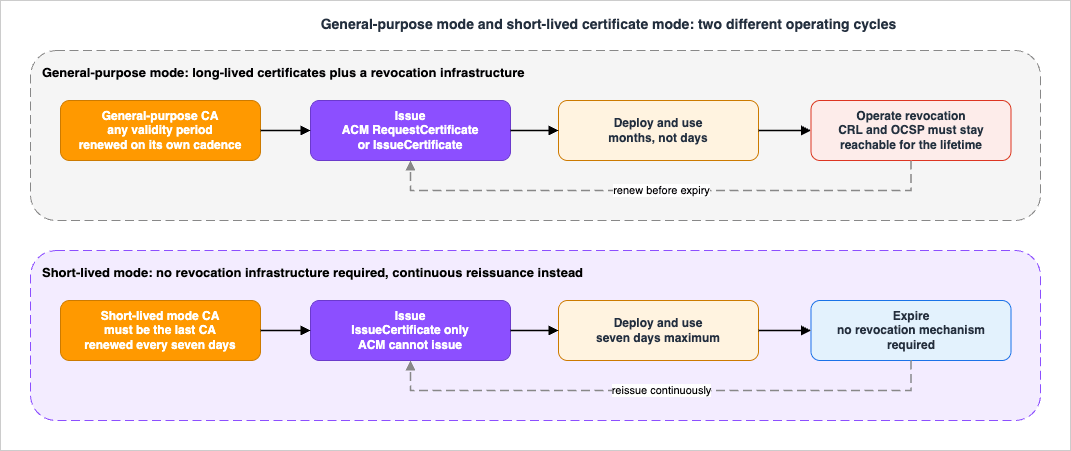
6.2 The three constraints that decide whether you can use it
The mode is not simply "the same CA, with shorter certificates." Three constraints reshape the design around it.It must be the last CA in the hierarchy. The User Guide states this as a rule, immediately followed by the reason there is significant overhead: the private CA must be renewed every seven days. The mechanism is easy to see once stated. A subordinate CA certificate is a certificate, so a short-lived-mode CA can only issue subordinate CA certificates with a validity of seven days or less — which would mean renewing that subordinate CA weekly, forever. The design consequence is that a short-lived-mode CA is a leaf CA: it terminates its branch. Any structure you want above it must be built with general-purpose CAs.
ACM cannot issue from it. The User Guide's note is unambiguous: "AWS Certificate Manager cannot issue certificates signed by a private CA with short-lived mode." The re:Post troubleshooting article confirms the error path — an attempt produces a
ValidationException with the message "Validity period exceeds CA usage mode." Everything that follows from Section 4.2 therefore does not apply: no ACM managed renewal, no automatic binding to ACM integrated services, no ACM console visibility. Issuance from a short-lived-mode CA is IssueCertificate or an AWS service integration that calls it on your behalf. Nothing else.Something has to do the reissuance. Seven days is a ceiling, and the useful configurations sit well below it. That is only viable if issuance is fully automated and tightly coupled to the lifecycle of the thing being certified. Where AWS ships that automation, the model works cleanly — the WorkSpaces integration issues a new certificate every 24 hours and the AWS blog for it states that end-user certificates issued for that flow "do not require renewal or revocation." Where you would have to build the automation yourself, you are trading a revocation infrastructure for an issuance infrastructure, and you should be explicit with yourself about which one your organization is better at operating.
6.3 Which AWS services support short-lived certificates
As of 2026-08-04, the AWS Private CA User Guide page "Understand AWS Private CA CA modes" lists the following AWS services as supporting the use of short-lived certificates:| AWS service | Documented use |
|---|---|
| Amazon AppStream (now Amazon WorkSpaces Applications) | Certificate-based authentication for domain-joined streaming sessions |
| Amazon WorkSpaces | Certificate-based authentication with a SAML 2.0 identity provider |
Inclusion criterion for this table: services named on that specific User Guide page, and nothing else. It is not a survey of every AWS service that can consume a private certificate — many can, from a general-purpose CA — and it is not a claim about services that may have added support since the confirmation date. AWS's Security Blog notes the feature "was initially developed for certificate-based authentication with Amazon WorkSpaces and Amazon AppStream 2.0," which matches. Re-check the page before you build a design on it; this is exactly the kind of list that grows.
For your own workloads outside those integrations, nothing stops you from issuing short-lived certificates from a general-purpose CA and getting the same expiry-driven security property without any of the three constraints in Section 6.2. That is the option most designs should evaluate first: the short-lived mode is a specific CA configuration, while short-lived certificates are just a validity choice available to any CA.
6.4 Short-lived mode CAs can still publish revocation information
A detail that surprises people: a short-lived mode CA can still be configured with CRLs and OCSP. AWS's FAQ explains why. For some services — Active Directory smart card authentication is the example given — the revocation check process is mandatory, so AWS Private CA publishes revocation information for integration purposes, allowing those services to complete the check even though the security model does not depend on it.So "short-lived mode means no revocation" is a statement about the security argument, not about the configuration surface. If a relying party in your estate insists on a reachable CDP or OCSP responder, you can give it one.
A note on vocabulary. The public certificate authority world also has a definition of "short-lived certificate," set by the CA/Browser Forum and tightened over time, and the two are not the same thing. The public definition, the ballot that created it, and the schedule that continues to shrink maximum validity for publicly trusted certificates are covered in TLS Certificate Ecosystem History and Timeline. Nothing the CA/Browser Forum decides constrains a private CA — but if you have engineers who work on both, expect the words to collide.
7. mTLS on Application Load Balancer
Everything above is abstract until certificates reach something that checks them. Mutual TLS on an Application Load Balancer is the most common concrete consumer of a private CA on AWS, and it is a good forcing function for the hierarchy design, because the load balancer's constraints propagate back up into the CA structure.This section assumes the Application Load Balancer is already the right choice; if that is still open, see the AWS Elastic Load Balancing Decision Guide.
Publicly trusted certificate authorities are increasingly removing the
clientAuth extended key usage from the certificates they issue. Which dates apply to which CA, and what the AWS pages for the places that send or accept client certificates say about the extended key usage of those certificates, are covered in When Public Certificates Stop Carrying clientAuth - Where AWS Sends or Accepts Client Certificates, and What Each Path Says About Extended Key Usage.7.1 The two modes, and what each one actually does
With mutual TLS, the load balancer negotiates mutual authentication between the client and the server while negotiating TLS. There are two options for validating X.509v3 client certificates.| Mutual TLS passthrough | Mutual TLS verify | |
|---|---|---|
| Who validates the client certificate | The target. The load balancer sends the entire client certificate chain without verifying it | The load balancer, performing X.509 client certificate authentication during the TLS negotiation |
| Trust store required | No | Yes — one CA certificate bundle, attached to the listener |
| What reaches the backend | X-Amzn-Mtls-Clientcert, containing the URL-encoded PEM of the entire chain | Five parsed headers: serial number, issuer, subject, validity, and leaf |
| Revocation checking at the load balancer | None | Optional, via certificate revocation lists attached to the trust store |
| Configuration | Configure the listener to accept certificates from clients | Create a trust store, upload a CA bundle and optionally revocation lists, associate the trust store with the listener |
Source: Elastic Load Balancing User Guide, "Mutual authentication with TLS in Application Load Balancer" and "Configuring mutual TLS on an Application Load Balancer."
The listener attribute is
MutualAuthentication.Mode, whose valid values are off, passthrough, and verify, defaulting to off.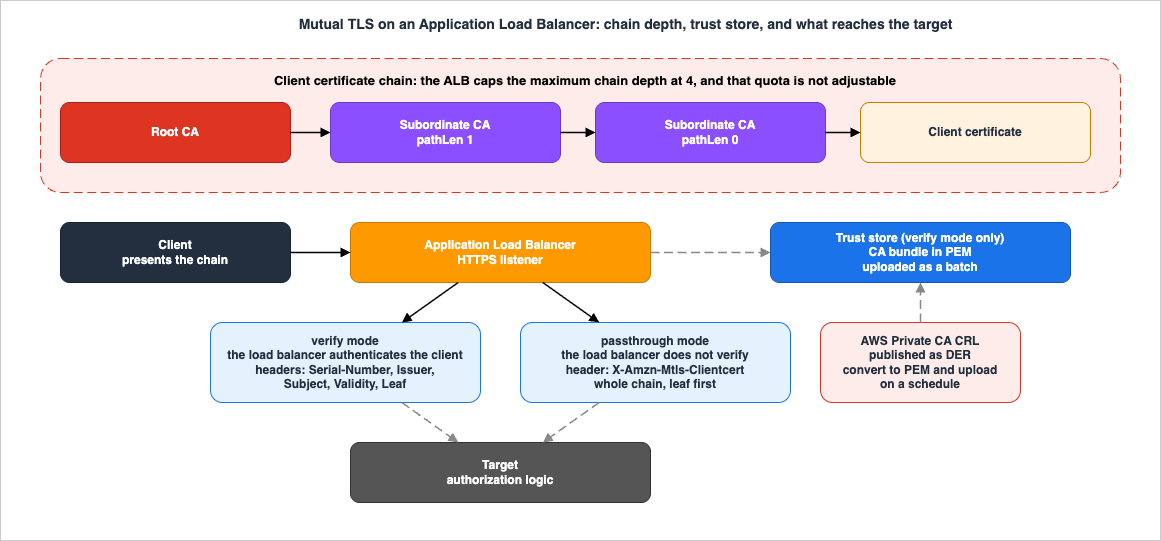
7.2 The chain depth ceiling, and why it constrains your hierarchy
The Application Load Balancer quota table lists a maximum certificate chain depth of 4, and marks it not adjustable.Put that next to Section 3.1 and a design constraint falls out. AWS Private CA supports certification paths up to five levels; an Application Load Balancer will not accept a client certificate chain deeper than four. AWS's own re:Post walkthrough for configuring mTLS with a private CA builds root CA at level 1, subordinate CA1 at level 2, subordinate CA2 at level 3, and end-entity certificates from there — and states directly that "the maximum certificate chain depth for the Application Load Balancer is four."
If mutual TLS on an Application Load Balancer is a planned consumer of your PKI, design the hierarchy for it from the start. A root plus two subordinate levels leaves you exactly at the limit with room for the leaf. A root plus three subordinate levels — perfectly legal in AWS Private CA — produces client certificates the load balancer will not accept, and you will discover that at integration time, after the hierarchy has been built and the chain distributed.
7.3 Trust store mechanics and quotas
A trust store holds one CA certificate bundle at a time. Several mechanical properties shape how you operate it.- Bundles are uploaded as a batch. The Application Load Balancer uploads each CA certificate bundle as a batch and does not support uploading individual certificates. Adding a new CA means uploading the whole bundle again, via
ModifyTrustStore. - The bundle file format is strict. PEM encoding, contents enclosed within
-----BEGIN CERTIFICATE-----and-----END CERTIFICATE-----boundaries, comments preceded by#and containing no-characters, and no blank lines. The User Guide shows a rejected example whose only sin is an OpenSSL text dump preceding the PEM block. - Certificate requirements. X.509v3; RSA 2K to 8K or ECDSA secp256r1, secp384r1, secp521r1 public keys; SHA256, 384, or 512 signature algorithms with RSA or EC, or RSASSA-PSS with MGF1.
- Session resumption is not supported while using mutual TLS passthrough or verify modes.
The quotas that shape architecture, from the Application Load Balancer quota page:
| Quota | Default | Adjustable |
|---|---|---|
| Maximum certificate chain depth | 4 | No |
| Trust stores per account | 20 | Yes |
| Listeners using mTLS in verify mode, per load balancer | 2 | No |
| CA certificates per trust store | 25 | Yes |
| CA certificate size | 16 KB | No |
| CA certificates subject size per trust store | 10,000 | Yes |
| Revocation entries per trust store | 500,000 | Yes |
| Revocation list file size | 50 MB | No |
| Revocation lists per trust store | 30 | Yes |
| TLS message size | 64 K | No |
The two non-adjustable rows are the ones to design around: chain depth, and the limit of two verify-mode listeners per load balancer.
There is also an optional behavior worth enabling deliberately. Advertise CA subject names makes the load balancer send the list of trusted CA distinguished names in its Certificate Request message during the handshake, so a client with several candidate certificates can pick one that will actually be accepted. AWS's stated purpose is to streamline authentication and reduce connection errors. The trade is that you are telling every connecting client which CAs you trust, which is information you may prefer not to publish on an internet-facing listener. The listener attributes are
AdvertiseTrustStoreCaNames (on or off) and, separately, IgnoreClientCertificateExpiry.7.4 Revocation at the load balancer is CRL-only, and it is PEM
This is the point where private CA design and load balancer design have to be reconciled, and it is easy to miss.You can associate one or more certificate revocation lists with a trust store. The
RevocationContent API type has a RevocationType field whose only valid value is CRL. Application Load Balancers support certificate revocation lists only in PEM format. Meanwhile, AWS Private CA writes each CRL as a DER encoded file. The conversion is a one-liner —openssl crl -in revoked.crl -inform DER -out revoked_crl_in_pem.crl— but it is a step that has to exist somewhere in your automation, running on a schedule that keeps up with revocations. The load balancer imports the CRL from S3 and performs checks without fetching from S3 on every connection, which is good for the request path and means the trust store's view of revocation is exactly as fresh as your last upload.
Two more constraints on the same surface. Each revocation list added to a trust store is assigned a revocation ID that increases and cannot be changed; when you delete a revocation list, its ID is deleted too and is not reused for the life of the trust store. And Application Load Balancers cannot revoke certificates that have a negative serial number within a CRL.
The practical consequence for the CA design: if mutual TLS verify mode is your enforcement point, your revocation pipeline is not "enable OCSP on the CA and move on." It is a scheduled job that pulls the CRL, converts it, and calls
add-trust-store-revocations. Budget for it during design, or accept that revocation at the load balancer will be manual.7.5 What the backend receives
In verify mode, the load balancer terminates the client authentication and hands the target a parsed summary through HTTP headers:| Header | Contents |
|---|---|
X-Amzn-Mtls-Clientcert-Serial-Number | Hexadecimal representation of the leaf certificate serial number |
X-Amzn-Mtls-Clientcert-Issuer | RFC 2253 string representation of the issuer's distinguished name |
X-Amzn-Mtls-Clientcert-Subject | RFC 2253 string representation of the subject's distinguished name |
X-Amzn-Mtls-Clientcert-Validity | ISO 8601 NotBefore and NotAfter |
X-Amzn-Mtls-Clientcert-Leaf | URL-encoded PEM of the leaf certificate |
In passthrough mode there is a single header,
X-Amzn-Mtls-Clientcert, carrying the URL-encoded PEM of the entire chain, presented leaf first and root last.This is where the CA design pays off or does not. Your application's authorization logic will almost certainly key on the subject DN or on the issuer DN — "requests bearing a certificate issued by the payments-service CA may call these routes." That means the subject DN you chose at CA creation, which Section 2.1 established is immutable, becomes a load-bearing identifier in application code. Choose names you can live with, and prefer matching on the issuer plus a structured subject field over matching on a full DN string, which is brittle.
It is also worth being precise about what that identifier proves. A private certificate binds a name to whoever holds the corresponding private key, and the strength of that binding is the strength of your key custody and your issuance controls — not a statement about what code is running. Where the requirement is the stronger one, that a specific measured workload is what you are talking to, the mechanism is attestation rather than a certificate subject; AWS Nitro Enclaves and Confidential Computing on AWS covers that side, and the two compose rather than compete.
For inspecting what a certificate actually contains — basic constraints, path length, CDP, AIA, key usage — the SSL/TLS Certificate Decoder and Chain Inspector will parse a PEM or DER certificate and show the chain, which is the fastest way to confirm that the certificate your CA produced is the certificate you designed. For the response-side headers that surround an authenticated session, see the HTTP Security Headers Complete Reference and the HTTP Security Header Analyzer Tool.
7.6 Other AWS front doors that consume private certificates
The Application Load Balancer is not the only place a private CA lands, and the surrounding architecture matters. Amazon CloudFront announced support for mutual TLS authentication for viewers in November 2025 and mutual TLS for origins in February 2026, both of which can use certificates issued by AWS Private CA or third-party private CAs imported through ACM. For east-west traffic between services rather than north-south traffic through a load balancer, AWS VPC Lattice and the broader patterns in the AWS Zero-Trust Network Architecture Guide address the same authentication problem with different mechanisms. The end-to-end request path that an mTLS-protected application usually sits inside is laid out in the Secure Web Application Reference Architecture on AWS.8. Cross-Account and Organization Sharing
8.1 Two different things get shared, and they fail differently
A multi-account private PKI involves two independent sharing decisions, and conflating them causes real confusion.- Sharing the CA lets other accounts issue certificates from your certificate authority.
- Sharing the trust store lets other accounts attach your Application Load Balancer trust store to their listeners.
They are separate resource types, shared through separate AWS Resource Access Manager resource shares, with separate permission models and separate failure modes. An organization that centralizes PKI usually ends up doing both, from possibly different owning accounts.
8.2 Sharing a private CA
When the CA administrator and the certificate issuer are in different AWS accounts, the administrator shares CA access by attaching a resource-based policy to the CA. That policy grants issuance permissions to a principal: an AWS account owner, an IAM user, an AWS Organizations ID, or an organizational unit ID. There are three ways to do it — through the RAM console, which attaches the required resource-based policy automatically; programmatically with thePutPolicy, GetPolicy, and DeletePolicy APIs; or manually with the corresponding CLI commands. Only the console path requires RAM access.Once shared, the receiving account has the same two issuance paths as any other account, with the same consequences: ACM's
RequestCertificate produces a managed certificate that renews automatically and can be installed on integrated services, while AWS Private CA's IssueCertificate produces an unmanaged certificate that will not be renewed automatically and must be exported and installed.The renewal responsibility crosses the account boundary in a way that is easy to get wrong. The User Guide states it twice, in both cross-account scenarios: the recipient account is responsible for configuring auto-renewal in ACM. Typically, the first time a shared CA is used, ACM installs a service-linked role that permits it to make unattended certificate calls on AWS Private CA. If that fails — usually because of a missing permission — certificates from the CA are not renewed automatically, and only the ACM user can resolve the problem, not the CA administrator. A centralized PKI team that assumes it can see and fix renewal failures in consuming accounts is assuming something the service does not provide.
One more mechanical detail: after RAM shares a resource through AWS Organizations, the recipient principal must accept the resource for it to take effect, though the recipient can configure AWS Organizations to accept offered shares automatically. The AWS RAM User Guide describes the organization case differently: when sharing with AWS Organizations is enabled in AWS RAM, principals in the organization gain access without exchanging invitations. Cross-Account Sharing by Service on AWS sets the two statements side by side.
Because sharing a CA works by attaching a resource-based policy, the CA becomes a resource whose external access is worth verifying independently of how you intended to configure it. That verification is what AWS IAM Access Analyzer exists for, and running it against the accounts that own CAs is a cheap way to catch a share that is broader than the design called for.
8.3 Constraining what a consuming account may do
Two generations of permission model apply, and the newer one changes the design calculus.AWS managed permissions are the original mechanism. They provide predefined sets of actions and restrict cross-account issuers to specific certificate templates. That template restriction is genuinely useful as a control: a supplier account can be scoped to
EndEntityClientAuthCertificate so it can provision device certificates but not revoke them, or to SubordinateCACertificate_PathLen0 so it can create a leaf CA but nothing deeper.Customer managed permissions, added for AWS Private CA in April 2026, let the CA owner define an arbitrary combination of actions instead. The available actions on the
acm-pca:certificate-authority resource type are five read actions — DescribeCertificateAuthority, GetCertificate, GetCertificateAuthorityCertificate, ListPermissions, ListTags — and two write actions, IssueCertificate and RevokeCertificate. You can compose a read-only permission that excludes both write actions, or a full-access permission with all seven.The trade is stated in AWS's own announcement and is easy to miss: with customer managed permissions, cross-account issuers are no longer restricted to a specific certificate template. If template restriction was the control you were relying on, moving to a customer managed permission removes it, and you have to reintroduce it with an
acm-pca:TemplateArn condition in the resource-based policy on the CA (Section 4.1). Read the flexibility as flexibility, not as a strict improvement.There are two documented limits worth knowing before you plan around this. RAM customer managed permissions do not support multiple statements and allow only single non-negating operators, and a set of condition keys — including
aws:PrincipalOrgId, aws:PrincipalAccount, and aws:SourceOrgID — cannot be used in them. Also note that AWS Private CA Connector for Active Directory and the SCEP connector do not support cross-account sharing: the private CA and the connector must be in the same AWS account, and RAM does not bridge that gap even though it supports direct AWS Private CA API operations.8.4 Sharing an Application Load Balancer trust store
Elastic Load Balancing integrates with RAM to share trust stores across accounts, organizational units, or an entire organization. Consumers associate a shared trust store with their listeners exactly as they would one of their own. The prerequisites are the usual ones: create a resource share, own the trust store in your account, and — for organization-scoped sharing — enable sharing with AWS Organizations. You cannot re-share a trust store that was shared with you.The permission split is worth reading carefully because it is asymmetric in a way that has operational consequences.
- Owners can share, unshare, list all Application Load Balancers using the shared trust store, delete associations, and receive CloudTrail logs when the shared trust store is used. Owners cannot prevent load balancers in their own account from using the trust store.
- Consumers can view the shared trust store, create or modify listeners that use it, and receive their own CloudTrail logs. Consumers cannot modify a shared trust store, and cannot create a listener using a trust store that is no longer shared.
The managed permission
AWSRAMPermissionElasticLoadBalancingTrustStore includes all available permissions; you can also author a customer managed permission. Three describe permissions — DescribeTrustStores, DescribeTrustStoreRevocations, DescribeTrustStoreAssociations — are always enabled and cannot be removed. The optional ones include CreateListener, ModifyListener, GetTrustStoreCaCertificatesBundle, and GetTrustStoreRevocationContent.The failure mode to design against. Existing associations persist after you stop sharing a trust store; only new associations are blocked. But a trust store owner can forcefully delete existing associations with
DeleteTrustStoreAssociation, and the documentation states the consequence directly: any load balancer listeners using the trust store can no longer verify client certificates and will fail TLS handshakes. That is a cross-account, cross-team outage available to a single API call in the owning account. Treat DeleteTrustStoreAssociation with the same operational ceremony as a certificate revocation, and make sure the owning account knows which consumer listeners depend on it — which is what the owner-side listing capability is for.9. Auditing and Observability
9.1 Two mechanisms, and they answer different questions
AWS Private CA provides two complementary auditing mechanisms, and the User Guide is unusually clear about the division of labor.| CloudTrail logging | Audit reports | |
|---|---|---|
| What it records | Each API call and signing operation as it occurs | A point-in-time snapshot of every certificate the CA has issued or revoked, including validity dates and revocation status |
| What it is for | Security monitoring, real-time alerting, investigating specific events | Periodic compliance reviews and certificate inventory |
| Where it lands | Your CloudTrail trail | A new or existing S3 bucket you specify, in JSON or CSV |
Source: AWS Private CA User Guide, "Use audit reports with your private CA." Both mechanisms are independent; you can use either or both.
AWS's best-practice guidance is to turn on CloudTrail logging before you create and start operating a private CA, which is one of those instructions that is trivially easy to follow on day one and impossible to retrofit. For centralizing and querying those events across accounts, see Centralized Logging and Audit Architecture on AWS.
As announced in October 2026, CloudTrail also records each completed issuance attempt in detail. On 2026-10-05 AWS announced the
IssueCertificateDetails event for AWS Private CA. The announcement says that, until then, the CloudTrail management event for IssueCertificate confirmed that the call succeeded by providing a certificate ARN, but did not capture the certificate content, information about the CA that signed it, or issuances that failed before signing. The User Guide describes the new event as a service event, generated when a certificate issuance attempt completes, whether it succeeds or fails, that records details such as the to-be-signed (TBS) certificate, the issuing CA's name, authority key identifier, and serial number, the issued certificate's serial number, subject, and validity period, the signing algorithm and template, and the issuance status with a failure reason when applicable; for a failed attempt, the fields taken from the TBS certificate are present only if the failure came after the TBS certificate was generated, and the validity period is omitted whenever issuance fails. The announcement says no configuration or opt-in is required. The two sources describe the delivery for a shared CA differently: the User Guide says it is delivered to both the CA owner's account and the requester's account, while the announcement mentions only the CA owner account for cross-account configurations.9.2 Audit reports, and their two limits
An audit report lists every time the CA's private key was used to issue a certificate — bothIssueCertificate and RevokeCertificate use the private key. The file lands under audit-report/CA_ID/ in the bucket you name, as a JSON or CSV object, and carries, per certificate, the account ID, the requesting service principal, the certificate ARN, serial, subject, notBefore, notAfter, issuedAt, revokedAt, revocation reason, and template ARN.Two limits shape how you can use it:
- You can generate a maximum of one report every 30 minutes. It is an inventory mechanism, not a monitoring mechanism.
- Audit report generation is not supported for certificate authorities that have issued more than 100 million certificates. That is the same number as the partitioned-CRL issuance ceiling from Section 5.2, and it means a CA operating at that scale needs a different inventory strategy.
Saving the report requires a bucket policy granting AWS Private CA permission to write to it, and reports can be encrypted.
The report's most valuable use is the one AWS names in the deletion procedure: before deleting an old CA, generate an audit report to confirm that every certificate it issued has expired. AWS Private CA does not check that for you.
9.3 CloudWatch metrics, including the two newer ones
AWS Private CA publishes metrics in two namespaces, and the distinction matters.| Metric | Namespace | What it means |
|---|---|---|
CRLGenerated | AWS/ACMPrivateCA | A CRL was generated |
MisconfiguredCRLBucket | AWS/ACMPrivateCA | The S3 bucket specified for the CRL is not correctly configured — check the bucket policy |
Time | AWS/ACMPrivateCA | Milliseconds between an issuance request and completion or failure; IssueCertificate only |
Success | AWS/ACMPrivateCA | A certificate was successfully issued |
Failure | AWS/ACMPrivateCA | An operation failed; IssueCertificate only |
CertificateAuthority | AWS/Usage | Total private CAs in the account and Region, in all states, for inventory and quota tracking |
CertificatesPerCA | AWS/Usage | Total certificates issued by a specific CA since its creation |
Source: AWS Private CA User Guide, "AWS Private CA CloudWatch metrics."
MisconfiguredCRLBucket is the single most valuable alarm in the list, because it is the difference between "revocation is broken" and "revocation is broken and nobody knows." Alarm on it.The two
AWS/Usage metrics were announced in March 2026 and have properties you need to know before building on them. CertificatesPerCA increments with each successful issuance and is not decremented when certificates expire or are revoked — it is a cumulative lifetime counter, which is exactly right for tracking against the per-CA issuance quota and exactly wrong for answering "how many live certificates does this CA have." It is also only published in the owner account and is not available in accounts that the CA is shared to, which means a consuming account cannot self-monitor its consumption of a shared CA's quota. The documentation adds a transitional caveat: for private CAs created before 2026-03-26, these metrics might take until 2026-04-30 to become available.The AWS documentation for certificate-based authentication suggests setting a CloudWatch alarm on
CertificatesPerCA at 70 to 80 percent of the CA's configured issuance limit, to leave time to request an increase or plan a CA rotation. That is a sensible default, and Section 10 is what you do when the alarm fires.9.4 Certificate inventory across the estate
Neither mechanism gives you a single view of "every certificate in the organization, and when it expires." Assembling that is your job, and the pieces are:- ACM-managed certificates appear in the ACM console and emit
ACM Certificate Approaching Expirationevents and theDaysToExpirymetric. ACM's EventBridge integration also emitsACM Certificate Available,ACM Certificate Renewal Action Required,ACM Certificate Expired,ACM Certificate Rotated, andACM Certificate Revoked, all withsource: aws.acm. - Certificates issued straight from
IssueCertificateare invisible to ACM entirely, and the audit report is the only inventory. - Certificates installed outside AWS — on appliances, on-premises servers, partner systems — are invisible to both, and only your own configuration management knows about them.
AWS publishes a reference solution that stitches part of this together: an EventBridge schedule triggers a Lambda function that generates an audit report, a second Lambda parses it and identifies certificates expiring within a threshold, and findings go to an SNS topic and to Security Hub. Whether you adopt that shape or another, the design requirement is the same — the certificates that will page you at 3 a.m. are the ones no system currently knows exist.
10. Rotation and Migration
10.1 Replace, or reissue
AWS documents exactly two ways to manage CA succession, and recommends one of them.Replace the old CA. Create a new CA, chain it to the same parent, and issue from the new one. Certificates from the new CA have a new chain. Once it is established, disable the old CA to stop new issuance; while disabled it still supports revocation of its old certificates and continues to serve OCSP and CRL responses if configured. When the last certificate it issued expires — confirm with an audit report — delete it. If the old CA had subordinate CAs, you must replace them too, because subordinate CAs expire at or before their parent; start at the highest CA that needs replacing and work down.
Reissue the old CA. When a CA nears expiration, reissue its certificate with a new expiration date. Reissuance leaves all the CA metadata in place and preserves the existing private and public keys. The existing certificate chain and unexpired end-entity certificates stay valid, and new issuance continues without interruption.
AWS recommends replacement, because it rotates the CA's private key, which is a best practice for CA keys — and adds a proportionality rule worth adopting: the frequency of rotation should be proportional to the frequency of key use, so CAs that issue more certificates should be rotated more often.
But replacement has two consequences that reissuance does not, and they are the reason reissuance still exists:
- The ARN changes. AWS's best-practice page warns explicitly that if you replace the CA itself, the ARN changes and hard-coded ARN references in your automation will break.
- ACM-issued certificates cannot be renewed across a replacement. The User Guide's note is direct: private certificates issued through ACM cannot be renewed if you replace the CA. If you use ACM for issuance and renewal, you must reissue the CA certificate to extend the CA's lifetime.
So the honest decision rule is: replace when you can absorb re-pointing every consumer, reissue when you cannot. And design so that you can — parameterize CA ARNs, do not hard-code them, and prefer a naming convention that anticipates succession. AWS recommends including a CA generation identifier in CA names, so that the successor to "Corporate Root CA" is "Corporate Root CA G2," which keeps the two distinguishable while both are unexpired.
10.2 The order of operations for trust distribution
Migrating between CAs is a distribution problem, and it has one correct ordering. The failure mode of getting it wrong is total: clients that do not yet trust the new root will reject every certificate issued by it.- Create the new CA hierarchy and install its certificates, but issue nothing from it yet.
- Distribute the new root certificate to every trust store — operating system stores, browser stores, language runtime stores, Application Load Balancer trust stores, appliance configurations — alongside the old root, not replacing it. Both roots are trusted simultaneously during the transition. This is the step that takes weeks and is the reason to start it before anything else changes.
- Verify distribution. Every relying party must be confirmed to trust the new root before any certificate depends on it. For the Application Load Balancer this means uploading a CA bundle that contains both the old and the new CA certificates, remembering from Section 7.3 that the bundle is replaced as a batch and that the trust store's CA certificate quota applies.
- Switch issuance to the new CA. Existing certificates from the old CA are still valid and still trusted.
- Let the old certificates age out, or reissue them from the new CA if their remaining validity is longer than you want to wait.
- Disable the old CA to stop issuance while retaining revocation capability.
- Confirm with an audit report that every certificate from the old CA has expired.
- Remove the old root from trust stores, then delete the old CA, choosing the restoration period deliberately.
The ordering rule underneath all eight steps: trust flows before certificates, and certificates expire before trust is withdrawn. Every mid-migration outage in private PKI is a violation of one of those two clauses.
Warning on step 8. Deleting a CA invalidates other CAs and certificates below it in the hierarchy. Before you can delete a CA that you created and activated, you must disable it. A CA deleted from the
PENDING_CERTIFICATE or DISABLED state can be restored within a period you set from 7 to 30 days, defaulting to 30 — but a CA deleted while in CREATING or FAILED has no restoration period and cannot be restored. AWS also recommends that if you must delete a private CA before all the certificates it issued have expired, you additionally revoke the CA certificate, so it appears in the parent CA's CRL and becomes untrusted by clients.10.3 Rotating for capacity rather than for age
There is a second reason to rotate that has nothing to do with expiry: the per-CA issuance quota. A CA with complete CRLs enabled tops out at 1,000,000 certificates; with partitioned CRLs and/or OCSP, or with no revocation, the ceiling is 100,000,000. AWS's own framing of partitioned CRLs includes that they save you from frequently rotating your CAs, which tells you what the alternative was.Because
CertificatesPerCA is a cumulative counter that never decreases, it is a direct proxy for that ceiling, and the alarm described in Section 9.3 is the trigger for a capacity rotation. The mechanics are the same as an age rotation, with one simplification: because you are not being forced by expiry, you can run the new and old CAs in parallel for as long as you like and cut over issuance gradually.11. Failure Modes and Anti-Patterns
Creating a short-lived mode CA that is not the last CA in the hierarchy. The documentation states the constraint, and the mechanism makes it inevitable: a short-lived-mode CA can only issue certificates valid for up to seven days, and a subordinate CA certificate is a certificate. Any CA you place beneath it needs weekly renewal, forever. Because the mode cannot be changed after creation, discovering this after the fact means building a new CA.Choosing short-lived mode and then discovering you need ACM. ACM cannot issue certificates signed by a short-lived-mode private CA. That removes managed renewal, automatic binding to integrated services, and ACM console visibility all at once. If any part of your plan says "and then ACM will renew it," the mode is wrong — and the mode is immutable.
Using the root CA for day-to-day issuance. AWS names the entire set of legitimate reasons to use a root: creating the PKI, replacing a high-level CA, and configuring a CRL or OCSP responder. Routine issuance from a root means you cannot restrict access, cannot limit the number of certificates issued from it, and — if the root is compromised or lost — must create a new root and distribute it to every client before you can issue anything at all.
Building the hierarchy deeper than the consumer allows. AWS Private CA supports five levels; an Application Load Balancer will not accept a client certificate chain deeper than four, and that quota is not adjustable. Validate the depth against every consumer before issuing the first subordinate CA certificate, because path length is fixed at issuance.
Getting the parent-child validity relationship backwards. A child CA or end-entity certificate cannot outlive its parent, and the API rejects the attempt. The subtler version of this failure is a CA that is technically valid but has less than 13 months left, which silently breaks ACM console issuance from that CA.
Changing the CRL S3 bucket after certificates have been issued. AWS Private CA writes CRLs only to the new bucket; every previously issued certificate still points at the old one, and revocation for those certificates is broken. Use a
CustomCname from the beginning.Enabling Block Public Access on the CRL bucket without a CDN, for clients outside AWS. BPA is the right default and AWS recommends it. But an unauthenticated PKI client cannot read the CRL from a private bucket, and the documentation says plainly that without CloudFront you must build another distribution mechanism. Certificates issued before you introduce the CNAME will not be able to reach the new location either.
Assuming the Application Load Balancer will check OCSP. The trust store's only revocation type is
CRL, in PEM format, uploaded by you. AWS Private CA emits DER. If nothing in your automation converts and uploads the CRL, revoked client certificates keep working at the load balancer until they expire.Letting the trust store bundle drift. The bundle is replaced as a batch, not appended to. A partial re-upload that omits an intermediate silently breaks every client whose chain depends on it, and there is no incremental "add this one certificate" operation to fall back on.
Force-deleting a shared trust store association.
DeleteTrustStoreAssociation in the owning account makes consumer listeners fail TLS handshakes. It is a cross-account outage triggered from outside the affected team's account.Assuming a central PKI team can fix renewal in consuming accounts. When a shared CA is used, the recipient account is responsible for configuring auto-renewal in ACM, and if the service-linked role installation fails, only the ACM user in that account can resolve it. The CA administrator cannot.
Reading
CertificatesPerCA as a live count. It is cumulative and never decremented for expiry or revocation, and it is not published in accounts the CA is shared to. It answers "how close am I to the issuance ceiling," not "how many certificates are live."Migrating certificates before migrating trust. Issuing from a new root before every relying party trusts it produces immediate, total rejection. Distribute the new root alongside the old one, verify, then switch issuance.
Revoking to solve an operational problem. Revocation is permanent, has no inverse, propagates to the CRL in approximately 30 minutes at best, and — if you revoke a CA certificate — invalidates everything beneath it. Disabling a CA stops issuance without revoking anything and is the reversible first step. And note that a compromised root cannot be revoked at all: you cannot revoke a root CA self-signed certificate, so the only remedy is removal from every trust store.
Deleting a CA on the assumption that AWS checked for you. AWS Private CA does not verify that issued certificates have expired before processing a delete request. Generate an audit report first. And remember that a CA deleted while in
CREATING or FAILED cannot be restored at all.Operating a private PKI without a written policy. AWS's first best practice is documentation: the reasoning behind the CA structure, a diagram of the CAs and their relationships, policies on validity periods and path length, succession planning, a catalog of permissions, and the administrative control structure — captured as a Certification Policy and Certification Practices Statement, for which RFC 3647 provides a framework. This reads like paperwork until the person who designed the hierarchy leaves and someone has to decide whether a given CA can safely be deleted.
12. Frequently Asked Questions
Can I change a general-purpose CA to short-lived mode, or the reverse?No. The CA mode is selected when you create the certificate authority and cannot be changed for an existing CA. The same is true of the CA type, the subject distinguished name, and the key algorithm. The only remedy is to create a new CA with the properties you want and migrate to it using the sequence in Section 10.2.
How deep can my CA hierarchy be?
AWS Private CA supports hierarchies up to five levels — a root plus as many as four levels of subordinate CAs on each branch. But the effective limit is set by your most restrictive consumer. If mutual TLS on an Application Load Balancer is in the picture, the maximum certificate chain depth is 4 and that quota is not adjustable, which in practice means a root plus two subordinate levels plus the end-entity certificate.
Do I need a separate CA per environment, or is one CA with different templates enough?
Separate CAs when you would want to invalidate one environment's certificates without touching the others, when different teams should administer issuance, or when the environments should live in different AWS accounts. Templates constrain what a certificate can say; only a separate CA gives you a separate revocable trust boundary. In practice, production and non-production almost always warrant separate CAs, because the thing you are protecting against is a development credential being trusted in production.
Should I choose CRL or OCSP?
Choose before you issue anything, because the pointer is written into the certificate. AWS's framing is that OCSP suits clients that are time-sensitive or memory-constrained, since it avoids downloading a list, while CRLs avoid a per-connection round trip to an endpoint that has to be highly available. Enabling both is legitimate. If mutual TLS verify mode on an Application Load Balancer is an enforcement point, note that the load balancer's trust store accepts CRLs only, in PEM format — so a CRL is not optional in that design regardless of what else you enable.
Why can't ACM issue a certificate from my CA?
Three common causes, all documented. The CA is in short-lived mode, which ACM cannot issue from at all. Or the CA's remaining validity is less than 13 months, which makes an ACM console request fail because ACM issues fixed 395-day certificates. Or, for a shared CA, the template restriction or the resource-based policy does not permit the template ACM is trying to use.
What actually happens when I revoke a certificate?
The serial number goes into the CA's CRL, which is typically updated approximately 30 minutes after the revocation, with further attempts every 15 minutes if an update fails. The certificate stays in the CRL until it expires, then appears in one additional CRL after expiration, and appears in the audit report permanently. Relying parties learn about it only when they fetch the CRL or query OCSP, so your real revocation latency is the sum of the CRL refresh, your own upload cadence into any downstream trust store, and the client's caching behavior. There is no un-revoke operation.
Can I recover a CA I deleted by mistake?
Sometimes. A CA deleted from the
PENDING_CERTIFICATE, EXPIRED, or DISABLED state has a restoration period you set between 7 and 30 days, defaulting to 30, and RestoreCertificateAuthority brings it back to its pre-deletion status. A CA deleted while in the CREATING or FAILED state has no restoration period and cannot be restored. After the restoration period ends, deletion is permanent.How do I know which certificates my CA has issued?
Generate an audit report. It lists every certificate the CA has issued or revoked with validity dates, revocation status, and the template used, written to an S3 bucket in JSON or CSV. You can generate one every 30 minutes, and generation is not supported for CAs that have issued more than 100 million certificates. CloudTrail answers the complementary question of who called what and when.
Does ACM's new ACME support let me automate issuance from my private CA?
No. ACM's ACME support issues publicly trusted certificates from Amazon Trust Services, with a 45-day validity, and those certificates cannot be bound to AWS integrated services. It is a good answer for public certificates on customer-managed infrastructure; it is not a path to your private CA.
What is the smallest sensible production hierarchy?
A root CA in its own AWS account, and one subordinate issuing CA with
pathLenConstraint of zero in the account that operates the workload. That gives you separate security policies for the root and the issuer, a revocable boundary, an issuing CA that cannot mint further CAs, and a root that stays offline in the operational sense — used only to create the PKI, replace a high-level CA, and configure revocation.13. Summary
A private CA on AWS is easy to create and hard to change. That asymmetry should drive the whole design.The decisions, condensed:
- Four CA properties are immutable: mode, type, subject distinguished name, and key algorithm. Decide them deliberately, because the only correction is a new CA and a migration.
- Design the hierarchy for your most restrictive consumer, not for the service limit. AWS Private CA allows five levels; an Application Load Balancer will not accept a client certificate chain deeper than four, and that quota is not adjustable.
- Path length is fixed at issuance and must strictly decrease down the chain. Decide the deepest branch you will ever need before issuing the first subordinate CA certificate.
- Validity periods nest, and children cannot outlive parents. Work backwards from the end-entity lifetime you want. Watch the 13-month ACM boundary as a CA approaches the end of its life.
- Choose the revocation mechanism before you issue anything, because the pointer to it is written into every certificate. Put a
CustomCnamein front of the CRL distribution point on day one; changing the S3 bucket afterward breaks revocation for every certificate already issued. - Short-lived mode buys you freedom from revocation and charges you three constraints: the CA must terminate its branch, ACM cannot issue from it, and something must reissue certificates continuously. As of 2026-08-04 the User Guide names Amazon AppStream (now Amazon WorkSpaces Applications) and Amazon WorkSpaces as the AWS services supporting short-lived certificates. Short-lived certificates from a general-purpose CA are available to everyone and carry none of those constraints.
- At the Application Load Balancer, revocation is CRL-only and PEM-only, while AWS Private CA emits DER. That conversion-and-upload job is part of the design, not an afterthought.
- Sharing a CA and sharing a trust store are different decisions with different failure modes. The recipient account owns ACM renewal and the CA administrator cannot fix it; the trust store owner can force-delete an association and break a consumer's TLS handshakes.
- Turn on CloudTrail before you create the first CA, alarm on
MisconfiguredCRLBucket, and readCertificatesPerCAas a lifetime counter rather than a live inventory. - Trust flows before certificates, and certificates expire before trust is withdrawn. Every mid-migration outage violates one of those clauses.
- Revocation is permanent and a root cannot be revoked at all. Disabling a CA is the reversible first step; deletion has a 7-to-30-day window only if the CA was in the right state when you deleted it.
Get the immutable properties and the revocation distribution right and the rest is ordinary operations. Get them wrong and you will spend the life of the PKI working around a decision you made in an afternoon.
14. References
- AWS Private Certificate Authority User Guide - What is AWS Private CA?
- AWS Private Certificate Authority User Guide - Terms and concepts for AWS Private CA
- AWS Private Certificate Authority User Guide - Design a CA hierarchy
- AWS Private Certificate Authority User Guide - Understand AWS Private CA CA modes
- AWS Private Certificate Authority User Guide - Manage the private CA lifecycle
- AWS Private Certificate Authority User Guide - AWS Private CA best practices
- AWS Private Certificate Authority User Guide - Create a private CA in AWS Private CA
- AWS Private Certificate Authority User Guide - Plan your AWS Private CA certificate revocation method
- AWS Private Certificate Authority User Guide - Set up a CRL for AWS Private CA
- AWS Private Certificate Authority User Guide - Customize OCSP URL for AWS Private CA
- AWS Private Certificate Authority User Guide - Use AWS Private CA certificate templates
- AWS Private Certificate Authority User Guide - AWS Private CA template varieties
- AWS Private Certificate Authority User Guide - AWS Private CA template definitions
- AWS Private Certificate Authority User Guide - Attach a policy for cross-account access
- AWS Private Certificate Authority User Guide - Customer managed permissions in RAM
- AWS Private Certificate Authority User Guide - Logging AWS Private Certificate Authority API calls using AWS CloudTrail
- AWS Private Certificate Authority User Guide - Use audit reports with your private CA
- AWS Private Certificate Authority User Guide - AWS Private CA CloudWatch metrics
- AWS Private Certificate Authority User Guide - Monitor AWS Private CA resources
- AWS Private Certificate Authority User Guide - AWS Private CA service quotas
- AWS Private Certificate Authority User Guide - Delete your private CA
- AWS Private Certificate Authority User Guide - Restore a private CA
- AWS Private Certificate Authority User Guide - Automate export of a renewed certificate
- AWS Private Certificate Authority API Reference - CertificateAuthorityConfiguration
- AWS Private Certificate Authority API Reference - IssueCertificate
- AWS Private Certificate Authority API Reference - RevokeCertificate
- AWS General Reference - AWS Private Certificate Authority endpoints and quotas
- AWS Certificate Manager User Guide - Choosing how to issue certificates with AWS
- AWS Certificate Manager User Guide - Private certificate renewal in AWS Certificate Manager
- AWS Certificate Manager User Guide - Managed automation with integrated services
- AWS Certificate Manager User Guide - ACME certificate automation
- AWS Certificate Manager User Guide - Supported CloudWatch metrics
- AWS Certificate Manager User Guide - Amazon EventBridge support for ACM
- Elastic Load Balancing User Guide - Mutual authentication with TLS in Application Load Balancer
- Elastic Load Balancing User Guide - Configuring mutual TLS on an Application Load Balancer
- Elastic Load Balancing User Guide - Share your Elastic Load Balancing trust store for Application Load Balancers
- Elastic Load Balancing User Guide - Quotas for your Application Load Balancers
- Elastic Load Balancing API Reference - MutualAuthenticationAttributes
- Elastic Load Balancing API Reference - RevocationContent
- AWS Security Blog - How to use AWS Private Certificate Authority short-lived certificate mode
- AWS Security Blog - Choosing the right certificate revocation method in AWS Private CA
- AWS Security Blog - AWS Private Certificate Authority now supports partitioned CRLs
- AWS Security Blog - How to issue use-case bound certificates with AWS Private CA
- AWS Security Blog - Automating AWS Private CA audit reports and certificate expiration alerts
- AWS Networking and Content Delivery Blog - Introducing mTLS for Application Load Balancer
- AWS What's New - AWS Private CA now provides detailed certificate issuance logs
- AWS What's New - AWS Private CA now supports customer managed permissions for cross-account sharing
- AWS What's New - AWS Private CA now publishes utilization metrics to Amazon CloudWatch
- AWS What's New - AWS Private CA now supports post-quantum digital certificates
- AWS What's New - AWS Private CA now supports issuing up to 100 million certificates per CA
- AWS What's New - AWS Private CA now supports Internet Protocol Version 6
- AWS What's New - Elastic Load Balancing Trust Store now supports cross-account sharing using AWS Resource Access Manager
- AWS What's New - AWS Application Load Balancer introduces Certificate Authority advertisement to simplify client behavior while using Mutual TLS
- AWS What's New - Amazon CloudFront announces support for mutual TLS authentication
- AWS What's New - Amazon CloudFront announces mutual TLS support for origins
- AWS Knowledge Center - How do I use AWS private CA to configure mTLS on the Application Load Balancer?
- AWS Knowledge Center - How do I resolve errors when a private CA issues a new certificate?
- AWS Knowledge Center - How do I troubleshoot ACM certificate issuance errors when I use a shared AWS Private CA?
- AWS Knowledge Center - How do I create a CRL for my AWS Private CA?
- AWS Private CA FAQs
Related Articles
- TLS Certificate Ecosystem History and Timeline - Certificate Authorities, Automation, and Shrinking Certificate Lifetimes
- SSL/TLS Certificate Decoder and Chain Inspector - X.509 PEM/DER Viewer
- Cryptography Glossary for Engineers - AES, RSA, ECDSA, HKDF, Envelope Encryption, and TLS Explained
- AWS KMS Envelope Encryption and Data Key Caching Patterns - Design Decisions for the AWS Encryption SDK and Multi-Region Keys
- AWS Elastic Load Balancing Decision Guide - Choosing and Operating Application, Network, and Gateway Load Balancers
- AWS Nitro Enclaves and Confidential Computing on AWS - Attestation, PCR Measurements, and KMS Condition Keys
- AWS IAM Access Analyzer Deep Dive - External, Internal, and Unused Access Analyzers with Custom Policy Checks in CI
- Secure Web Application Reference Architecture on AWS - Edge-to-Data Request Flow with CloudFront, WAF, ALB, Cognito, and RDS
- AWS Zero-Trust Network Architecture Guide - Segmentation, Inspection, and Identity-Aware Access with VPC, Network Firewall, VPC Lattice, and Verified Access
- AWS VPC Lattice Complete Guide - Service-to-Service Networking Across VPCs and Accounts
- Amazon Route 53 DNS Architecture Guide - Routing Policies, Resolver, Private Hosted Zones, and Hybrid DNS
- Centralized Logging and Audit Architecture on AWS - Multi-Account Log Aggregation, Detection, and Query with CloudTrail, Config, Security Hub, and OpenSearch
- Post-Quantum Cryptography Standardization Timeline and Migration on AWS - From Algorithm Selection to Service Support
- HTTP Security Headers Complete Reference - CSP, HSTS, COOP, COEP, Permissions Policy
- HTTP Security Header Analyzer Tool - CSP HSTS X-Frame-Options Audit with Grade and Recommendations
- Indie Dev Guide: From Domain Acquisition to Live Site with AWS Route 53, S3, CloudFront, and ACM
References:
Tech Blog with curated related content
Written by Hidekazu Konishi