AWS IAM Access Analyzer Deep Dive - External, Internal, and Unused Access Analyzers with Custom Policy Checks in CI
First Published:
Last Updated:
That second half does not scale on human attention. A bucket policy is easy to read and hard to reason about, because the answer depends on the interaction of a resource policy, an identity policy, a permission boundary, a service control policy, and a resource control policy, evaluated over every principal that exists. Reading them one at a time and forming an opinion is guesswork with good intentions. IAM Access Analyzer replaces the guess with automated reasoning, and it does so along three independent axes that many teams do not realize are separate products with separate lifecycles.
This guide is about operating those three axes deliberately: what each analyzer reads, what it emits, where its blind spots are, how the zone of trust changes the answer, and how to turn the same reasoning engine into a pull request gate that refuses to merge a privilege escalation.
Scope and honesty notes. This article covers IAM Access Analyzer's external, internal, and unused access analyzers, zone of trust design, findings lifecycle and archive rules, basic and custom policy checks, CI integration, policy generation from CloudTrail, and multi-account rollout. Every factual claim below was verified against AWS's official documentation on 2026-08-04; supported resource types, quotas, and API enumerations change, so confirm current values for your account and Region before you rely on them. No AWS API calls were executed to produce this article and no measurements were taken — nothing here is presented as a benchmark, and every code fragment follows AWS's published CLI reference rather than a tested deployment. This article does not discuss pricing. Which capabilities carry a charge is a genuine design input, and it belongs on AWS's pricing page rather than in a design guide that will outlive any figure quoted in it, so every recommendation below is argued from findings volume, review workload, coverage, and blast radius instead. Operations that are irreversible — deleting an analyzer, deleting an IAM role or access key, deactivating credentials — destroy findings or break workloads and are flagged with warnings wherever they appear.
Several adjacent topics are deliberately delegated to existing articles rather than repeated here:
- The mechanics of how IAM decides whether a request is allowed — explicit deny, permission boundaries, session policies, evaluation order — belong to IAM Policy Evaluation Logic Step-by-Step. This guide assumes you already know that order and focuses on the tooling that verifies its outcome.
- The catalog of policy shapes that are dangerous — wildcard actions, wildcard trust, confused deputy doors — belongs to IAM Anti-Patterns. The failure modes in Section 12 of this guide are about operating the analyzers badly, not about writing policies badly.
- Service control policy and resource control policy design belongs to AWS Organization Guardrails. Here they appear only as inputs whose evaluation status is reported on an internal access finding.
- Setting up federated access and permission sets belongs to the AWS IAM Identity Center Complete Setup Guide.
- Application-level authorization with Cedar belongs to the AWS Verified Permissions and Cedar Policy Language Complete Guide. IAM Access Analyzer never evaluates Cedar policies.
- Vocabulary — principal, permission boundary, ABAC, zone of trust — is defined in the AWS IAM Glossary.
Table of Contents
- 1. Introduction
- 2. Where Access Analyzer Sits in IAM Operations
- 3. The Three Analyzer Types
- 4. Zone of Trust Design
- 5. External Access Findings in Practice
- 6. Internal Access Findings
- 7. Unused Access Findings
- 8. Policy Validation and Custom Policy Checks
- 9. Blocking Privilege Escalation in CI
- 10. Policy Generation from CloudTrail
- 11. Multi-Account Operations
- 12. Failure Modes and Anti-Patterns
- 13. Frequently Asked Questions
- 14. Summary
- 15. References
1. Introduction
The audience for this guide is the engineer who owns permissions in a running AWS environment: security engineers, platform engineers, and cloud architects who can already write a policy and now need the operational layer around it. If your organization has more IAM roles than people who remember why each one exists, this is the layer you are missing.The guide follows the shape of the work. Sections 2 through 4 establish what the service is and the single configuration choice — the zone of trust — that silently determines what every finding means. Sections 5 through 7 take each analyzer type in turn, because they have genuinely different inputs, different resource coverage, different lifecycles, and different failure modes. Sections 8 and 9 move from monitoring to prevention: the policy checks that run on a document before it is ever deployed, and how to wire them into a pull request so that a privilege escalation is rejected instead of detected. Section 10 covers policy generation, Section 11 covers organization-wide rollout, and Section 12 collects the ways this all goes wrong.
Three ideas run through all of it:
- An analyzer is a question, not a scanner. Each analyzer type answers exactly one question, and it is easy to assume it answers a broader one. The external access analyzer does not tell you who inside your organization can read a bucket. The unused access analyzer does not tell you whether a resource is shared. Coverage gaps in practice come from assuming one analyzer covers the other's question.
- The zone of trust is a semantic setting, not a scope setting. Choosing the account or the organization does not just widen or narrow the search. For internal access analysis it changes whether service control policies and resource control policies are folded into the computed permissions at all, which means the same resource can produce different action lists depending on a setting most teams pick without thinking.
- Every suppression is a decision you will inherit. Archive rules, tag exclusions, and account exclusions are the mechanisms that make findings reviewable at all. They are also the mechanisms by which a real risk becomes permanently invisible. Section 12 is largely a list of suppressions that outlived their justification.
2. Where Access Analyzer Sits in IAM Operations
2.1 Two loops, not one
Permissions work has two loops running at different frequencies, and IAM Access Analyzer has a distinct capability for each.The authoring loop runs at the speed of a pull request. Someone changes a policy document; something should decide whether the change is acceptable before it is applied. This is where policy validation and custom policy checks live: they take a JSON document as input, return a verdict, and never touch your account's live state.
The monitoring loop runs continuously against what is actually deployed. It answers questions about the environment as it exists, not as it was proposed. This is where analyzers and findings live: you create an analyzer, it watches supported resources, and it emits findings that have a status and a lifecycle.
Confusing the two is the most common structural mistake. Teams wire findings into a Slack channel and call it a control, but findings are a lagging signal — a finding means the risky configuration is already live. Conversely, teams add a CI check and assume the environment is now safe, but a CI check only sees documents that went through CI, and consoles and drifted stacks do not.
AWS documents six capabilities under the IAM Access Analyzer name: external access analyzers, internal access analyzers, unused access analyzers, policy validation against grammar and best practices, custom policy checks against your own standards, and policy generation from CloudTrail activity. The first three belong to the monitoring loop, the next two to the authoring loop, and policy generation sits between them as a refinement tool.
2.2 What automated reasoning proves, and what it does not
IAM Access Analyzer's findings are not pattern matches and not sampled tests. AWS describes the underlying approach as provable security, built on automated reasoning: the policy is translated into a mathematical formula and a solver proves or disproves properties about it. AWS's own explanation of Zelkova, the reasoning engine behind these checks, draws the distinction sharply — a policy simulator lets you test individual requests, while the reasoning engine makes statements about all possible requests.That is a strong guarantee, and it is worth stating precisely what it covers, because the guarantee is about the policies that were analyzed, not about your security posture.
- The proof is over the policies the analyzer reads. For external access, AWS states that IAM Access Analyzer analyzes only resource-based policies, and only for resources in the Region where the analyzer is enabled. A resource type that is not in the supported list produces no finding at all — not a clean finding, no finding.
- The proof is over the state at the time of analysis. Findings are refreshed on policy change and on a periodic scan, and there are documented delays, including cases where a change does not trigger a rescan at all.
- The proof does not cover what a principal will do with the access. It is an authorization question, not a behavioral one.
- An analyzer that cannot read a resource does not silently skip it — it emits an error finding, which is a distinct thing from "no access found". Section 5 covers why treating error findings as noise is how coverage quietly disappears.
Absence of a finding, therefore, means "no external access was provable from the policies I could read, for a resource type I support, in this Region, as of the last analysis". That is a much more useful statement than most tools can make, and it is not the same as "this resource is safe".
3. The Three Analyzer Types
3.1 One service, three independent products
The most consequential thing to understand about IAM Access Analyzer is that "an analyzer" is not one object with three modes. Each type is created separately, has its own quota, its own resource coverage, its own findings, and its own archive rules. Turning on one gives you nothing from the others.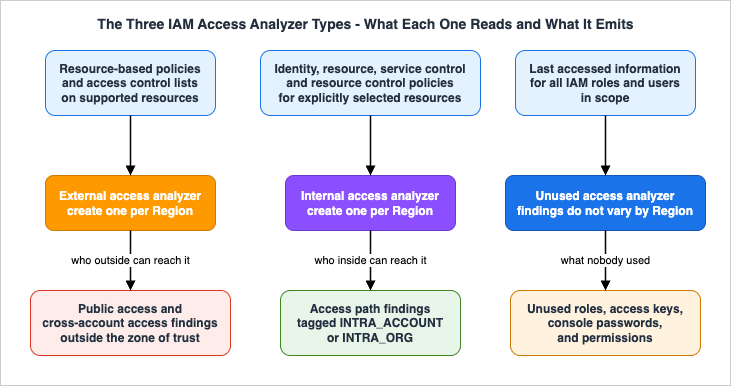
The following comparison is drawn from the IAM User Guide's Using AWS Identity and Access Management Access Analyzer, IAM Access Analyzer findings, and IAM Access Analyzer supported resource types for external and internal access pages, and from the
CreateAnalyzer API reference, all as of 2026-08-04. It is a summary of those pages, not an exhaustive specification.* You can sort the table by clicking on the column name.
| Dimension | External access | Internal access | Unused access |
|---|---|---|---|
| Question answered | Can anyone outside the zone of trust reach this resource? | Which principals inside the zone of trust can reach this resource? | Which principals and permissions has nobody used? |
| Primary input | Resource-based policies and access control lists on supported resources | Identity policies, resource policies, service control policies, and resource control policies for explicitly selected resources | Last accessed information for all IAM roles and users |
| Resource types supported | 15 types (Section 5.1) | 6 types (Section 6.2) | IAM users and roles only |
| Resource selection | All supported resources in the Region, automatically | Explicit — by account, by resource type, or by exact ARN | All IAM users and roles, minus exclusions |
| Regional behavior | Per Region; you must create one in every Region with supported resources | Per Region; create one in every Region you want monitored | Findings do not change based on Region; one analyzer is enough |
CreateAnalyzer type values | ACCOUNT, ORGANIZATION | ACCOUNT_INTERNAL_ACCESS, ORGANIZATION_INTERNAL_ACCESS | ACCOUNT_UNUSED_ACCESS, ORGANIZATION_UNUSED_ACCESS |
| Finding types emitted | Public access, cross-account access | Access paths, tagged INTRA_ACCOUNT or INTRA_ORG | Unused role, unused access key, unused password, unused permission |
| Preview before deploy | Yes — access previews for 14 resource configurations | No | No |
Two consequences of that table are worth stating explicitly, because they are the most common rollout mistakes.
An unused access analyzer must be created separately from an external access analyzer. They are different
type values on the same API call and neither implies the other. A team that enabled IAM Access Analyzer in 2020 and never revisited it has external access coverage and zero unused access coverage.External and internal are complements, not alternatives. AWS states this directly: the combination of external and internal access findings with the same zone of trust provides a comprehensive analysis of all possible access to a particular resource, both from within and outside your defined trust boundary. If you only run the external analyzer, an over-broad identity policy that lets the entire organization read a production database snapshot generates nothing at all, because nobody outside the zone of trust was granted anything.
3.2 Quotas that shape the design
Analyzer quotas are unusually load-bearing for a security service, because two of the most important ones cannot be raised. The following are from the IAM Access Analyzer quotas page as of 2026-08-04.| Quota | Default | Maximum | Design consequence |
|---|---|---|---|
| Account-level analyzers per analyzer type per account per Region | 1 | 1 | You cannot run two differently-configured account analyzers of the same type side by side. Changing a tracking period or an exclusion set is an in-place change to the only analyzer you have. |
| Organization-level external or unused access analyzers per analyzer type per account per Region | 5 | 20 | You can run several organization analyzers with different configurations — for example, unused access analyzers with different tracking periods for different reviews. |
| Organization-level internal access analyzers per organization per Region | 1 | 1 | There is exactly one organization-wide internal access analyzer per Region. Its resource selection is a single shared list that every team has to negotiate. |
| Archive rules per analyzer | 100 | 1,000 | Each rule accepts up to 20 values per criterion, so a rule set is a real budget, not an unlimited allowlist. |
| Access previews per analyzer per hour | 1,000 | 1,000 | Enough for interactive use and modest CI use; not a bulk analysis mechanism. |
| CloudTrail time range per policy generation | 90 days | 90 days | Policy generation cannot look further back than a quarter, which bounds how confidently it can capture rare workflows. |
| Concurrent policy generations | 1 | 1 | Policy generation is inherently serial; it is not a batch remediation tool. |
The organization-level internal access quota of one per Region is the one that changes an operating model. Because there is a single organization-wide internal access analyzer and its resource list is explicit, somebody has to own that list. Section 6 covers how to structure it.
4. Zone of Trust Design
4.1 The definition, and why it is more than a scope
When you create an analyzer you choose an organization or an AWS account. AWS calls that choice the zone of trust, and defines it as determining the type of access that IAM Access Analyzer considers to be trusted. Every principal in the chosen organization or account is trusted; the resources and principals inside it comprise the zone.For external access the consequence is straightforward. If you choose the organization, granting an S3 bucket in one member account to a principal in another member account produces no finding, because both are inside the zone. Grant the same permission to an account outside the organization and you get a finding. Choose a single account as the zone instead and the first case now generates a finding too, because the other member account is outside your zone.
Neither setting is more correct in the abstract. They answer different questions:
- Organization as the zone of trust answers "what leaves the company". This is the right default for a central security team. It produces far fewer findings and each one is a real question about a third party.
- Account as the zone of trust answers "what leaves this account". This is the right setting for an account that must not share with its siblings — a regulated workload, a customer-dedicated account, a production account that should never be readable from a sandbox. It produces many more findings, most of which are intended cross-account access, which is exactly what archive rules exist for.
Running both is legitimate and sometimes necessary, subject to the quota in Section 3.2: an account can have one account-level external analyzer of its own, and the organization's delegated administrator separately runs organization-level analyzers.
4.2 The setting that changes the arithmetic: SCPs and RCPs in internal access findings
For internal access analysis the zone of trust is not merely a filter. It changes what is folded into the computed permissions, and AWS documents this precisely in theInternalAccessDetails data type through two fields, serviceControlPolicyRestriction and resourceControlPolicyRestriction. Their values are defined as follows.| Value | Meaning | When it applies |
|---|---|---|
APPLIED | The policy is present in the organization and IAM Access Analyzer included it when computing effective permissions. If an SCP blocks s3:DeleteObject, that action is not listed on the finding. | Only for internal access findings with the organization as the zone of trust |
APPLICABLE | The policy is present in the organization but IAM Access Analyzer does not include it in the evaluation. If an SCP blocks s3:DeleteObject, that action is still listed on the finding. | Only for internal access findings with the account as the zone of trust |
NOT_APPLICABLE | There was no such policy in the organization. For account-scoped findings this can also mean no policy applied to that principal or resource. | Either scope |
FAILED_TO_EVALUATE_SCP / FAILED_TO_EVALUATE_RCP | There was an error evaluating the policy. | Either scope |
Read that table twice, because the practical effect is easy to miss. An account-scoped internal access analyzer reports access that your organization's guardrails already block. The action list on the finding is the permission grant, not the effective permission. If your organization relies on service control policies to deny a class of actions everywhere — a very common design — an account-scoped internal analyzer will produce findings listing exactly those denied actions, and a reviewer who does not know this will spend the afternoon chasing access that cannot actually occur.
Conversely, an organization-scoped internal access analyzer folds the guardrails in and gives you the effective answer. That is usually what you want, and it is another reason the single organization-level internal analyzer per Region is the one to invest in. Use the account-scoped variant when you specifically want to see the raw grants regardless of guardrails — for example, when auditing whether the guardrail is the only thing standing between a principal and the data.
4.3 Delegated administrator, and what happens when you change it
For organization-wide analyzers, AWS supports designating a member account as the delegated administrator for IAM Access Analyzer. Only the management account can add, remove, or change it. In practice this is the security or audit account, which is where you want findings to land anyway.The important operational fact is what happens when you change it, and it is more destructive than most people expect. AWS documents that when you switch the delegated administrator to a different account, the former delegated administrator account loses permission to all analyzers it created to analyze access across the organization. Those analyzers move to a disabled state, stop generating and updating findings, and their existing findings become inaccessible. They can be reached again only by configuring that same account as the delegated administrator once more. The same thing happens automatically if the delegated administrator account leaves the organization.
Warning: this is effectively an outage of your organization-wide access visibility, and the recovery path is to restore the old delegated administrator. If you know you will not reuse the account, AWS's guidance is to delete the analyzers first — which deletes all their findings — so that the new delegated administrator's analyzers regenerate equivalent findings cleanly rather than leaving orphaned, unreachable ones behind. Either way, plan a delegated administrator change as a maintenance activity with a communication to whoever consumes the findings, not as a settings tweak. The organization management account retains administrator permissions and can be used to reach findings in the interim.
5. External Access Findings in Practice
5.1 What is actually analyzed
For external access, AWS analyzes only resource-based policies, applied to resources in the Region where the analyzer is enabled. As of 2026-08-04, the IAM Access Analyzer supported resource types for external and internal access page lists the following 15 resource types for external access. This is a transcription of that page on that date and nothing more — AWS adds types, so re-read the page rather than trusting this list a year from now.| Resource type | What IAM Access Analyzer reads | Notes that change the design |
|---|---|---|
| Amazon S3 buckets | Bucket policy, ACL, and access points including multi-Region access points | Account-level Block Public Access settings are evaluated only once every 6 hours |
| Amazon S3 directory buckets | Directory bucket policy including conditions | Access point policies for cross-account access points are outside the analyzer account and are not analyzed |
| IAM roles | Trust policies | An IAM role is a global resource, so one external grant produces a finding in every enabled Region |
| AWS KMS keys | Key policies and grants | If the key policy denies the analyzer's service-linked role, you get an ACCESS_DENIED error finding instead of an analysis |
| AWS Lambda functions and layers | Resource-based policies on functions and layers | Policies attached to aliases and specific versions invoked by qualified ARN are not reported |
| Amazon SQS queues | Queue policies including conditions | |
| AWS Secrets Manager secrets | Resource policies including conditions | |
| Amazon SNS topics | Topic policies including conditions | AddPermission is another way external access appears |
| Amazon EBS volume snapshots | CreateVolumePermissions sharing settings, not a policy | Unencrypted snapshots can be shared publicly; encrypted ones only with accounts |
| Amazon RDS DB snapshots | Sharing permissions on manual snapshots only | Access configured on the database itself is not analyzed |
| Amazon RDS DB cluster snapshots | Sharing permissions | Encrypted cluster snapshots cannot be public; both kinds can be shared with up to 20 accounts |
| Amazon ECR repositories | Repository policies including conditions | A principal must also hold ecr:GetAuthorizationToken through an identity policy to be considered externally available |
| Amazon EFS file systems | File system policies including conditions | Mounting from another account counts as external unless that account is in your zone of trust |
| Amazon DynamoDB streams | Resource-based policies | A finding is generated if at least one cross-account action is allowed |
| Amazon DynamoDB tables | Resource-based policies | Covers tables and indexes |
The IAM role row deserves emphasis because it produces the single most confusing operational artifact in this service. Roles are global, external access analyzers are regional, and so one over-permissive trust policy generates one finding per enabled Region. A team that enables the analyzer in 17 Regions gets 17 findings for one role, all of which resolve when the trust policy is fixed, and all of which have to be archived separately if the access is intended — archive rules are per analyzer, and analyzers are per Region.
Several rows above describe sharing settings rather than policies, and each of those resource types has a switch that turns the sharing off. What Can Be Made Public on AWS - Storage and Data, the Block Public Access Family, and What Each Switch Does Not Promise inventories those switches from the other direction: not what the analyzer reports, but what each service gives you to close the opening in the first place.
5.2 The findings lifecycle
An external or internal access finding has one of four states, and the transitions are not symmetric.- Active — the access exists and has not been reviewed. This is the only state you should be paging on.
- Archived — you decided the access is intended. Archiving does not delete the finding; you can filter for archived findings and unarchive them at any time, which returns them to Active.
- Resolved — the access no longer exists, because the policy changed. IAM Access Analyzer sets this itself. Resolved findings are deleted 90 days after the last update to the finding status, so they are an audit trail with an expiry date, not a permanent record.
- Error — IAM Access Analyzer could not analyze the resource. Documented error types include
INTERNAL_ERRORandACCESS_DENIED, the latter typically when the service-linked role is denied access to the resource.
Two transition rules matter operationally.
Error findings do not become Resolved. AWS documents that when you fix the underlying problem, an error finding is removed completely rather than transitioning to Resolved. There is no closure record. If you want evidence that an error was addressed, capture it from the EventBridge stream, not from the findings list.
Changing a policy does not always mutate the existing finding. If your change leaves external access in place but for a different principal or a different permission, IAM Access Analyzer resolves the original finding and generates a new Active one. A remediation that "did not clear the finding" is often a remediation that cleared one finding and created another.
Timing is documented and worth internalizing, because it is the source of most "the analyzer is broken" tickets:
- A new or updated policy is analyzed within about 30 minutes for external access.
- For internal access, re-analysis after a change may take several minutes or hours.
- All policies are rescanned automatically every 24 hours.
- Amazon S3 account-level Block Public Access settings are evaluated only once every 6 hours, so turning on Block Public Access does not clear a public finding immediately. The Security Hub integration page documents these account-level changes as taking up to 12 hours to be reflected.
- Multi-Region access point changes are also evaluated once every 6 hours.
- A change to a resource control policy alone, without a change to the resource-based policy, does not trigger a rescan. The finding updates on the next periodic scan within 24 hours.
- A CloudTrail log delivery problem can likewise prevent a rescan from being triggered.
When you need an answer now rather than on the next scan, the documented mechanism is the Rescan link on the finding details page, or the
StartResourceScan API operation.5.3 Archive rules, and the difference between suppression and expression
Archive rules automatically archive new findings matching criteria you define, and can optionally be applied retroactively to existing findings. That single sentence hides the most important governance decision in this service, because an archive rule is the only way to say "this access is intended" and it is also the only way to make a real risk invisible forever.The mechanics, from the archive rules page as of 2026-08-04:
- A rule archives new findings that match. Existing findings are not archived unless you explicitly choose Create and archive active findings (or Save and archive active findings when editing).
- Each rule can include up to 20 values per criterion, and you can combine multiple criteria.
- IAM Access Analyzer does not validate the values you put in a filter. AWS states this plainly: if you add a rule matching an AWS account, any value is accepted, even one that is not a valid account number. A typo produces a rule that silently never matches — or worse, a rule that matches more than you meant.
- Rules are per analyzer and per Region. Deleting a rule deletes it only from the analyzer in the current Region; you must delete rules separately for every analyzer you created elsewhere.
- Rules can be supplied inline at creation time through the
archiveRulesparameter ofCreateAnalyzer, which is how you keep them in infrastructure as code rather than in console history.
The design guidance that follows from this is narrower than "use archive rules to reduce noise":
Write rules that describe an intent, not rules that describe a volume. A rule that archives all findings for a specific partner account is a statement your organization can defend and revisit. A rule that archives all findings of a resource type because there were too many of them is a decision to stop looking.
Never write an archive rule for public access without saying so. AWS documents a specific criterion for this: for external access findings you can include the criterion Public access set to false, which guarantees the rule cannot archive a finding for public access. Any archive rule that could match a public-access finding should either carry that criterion or be justified in writing.
Give every rule an owner and an expiry. Nothing in the service expires a rule. The tag on your analyzer and the rule name are the only metadata you get, so encode the reason and the review date in the rule name if you have nowhere better.
Distinguish suppression from expression. For intended cross-account sharing, the archive rule is the record that it was intended — the finding still exists, still appears in archived views, and unarchives if you change your mind. That is a defensible artifact for an auditor. Deleting the analyzer, by contrast, deletes all its findings and cannot be undone.
5.4 Previewing access before you deploy
Access previews let you evaluate a proposed resource configuration against an existing analyzer and see the findings it would produce, without applying anything. AWS exposes this throughCreateAccessPreview, GetAccessPreview, ListAccessPreviews, and ListAccessPreviewFindings, and through the Amazon S3 console for buckets.The
Configuration union in the API reference accepts 14 resource configurations as of 2026-08-04: S3 buckets, S3 directory buckets, IAM roles, KMS keys, SQS queues, Secrets Manager secrets, SNS topics, EFS file systems, ECR repositories, EBS snapshots, RDS DB snapshots, RDS DB cluster snapshots, DynamoDB tables, and DynamoDB streams.The property that makes previews useful in review is
changeType on each preview finding, which tells you how the proposal compares to reality:New— access that does not exist today and would be introduced.Unchanged— an existing finding that would remain as it is.Changed— an existing finding whose status would change. AWS's example is instructive: aChangedfinding with preview statusResolvedand existing statusActivemeans the proposed change would fix an existing problem.
That third value is what makes access previews a review aid rather than just a linter. A pull request that produces three
Changed-to-Resolved findings and zero New ones is a remediation, and you can say so mechanically.Access previews are asynchronous. IAM Access Analyzer emits an
Access Preview State Change event to EventBridge when the preview is created, completes, or fails, so a CI job can wait on the event rather than polling. The quota is 1,000 access previews per analyzer per hour.6. Internal Access Findings
6.1 A different question entirely
External access analysis starts from the resource policy and asks who outside can get in. Internal access analysis starts from the resource and asks which principals inside the zone of trust have an access path to it. AWS describes it as generating findings when there is a possible access path between an IAM role or user within your organization and your specified resources, using automated reasoning to evaluate all IAM policies.The practical difference is which policies are read. External access analysis reads resource-based policies. Internal access analysis has to consider the whole stack — identity policies as well as resource policies, and, depending on the zone of trust, service control policies and resource control policies too, as Section 4.2 described. AWS's What's New announcement for the capability describes it as using automated reasoning to evaluate identity policies, resource policies, service control policies, and resource control policies.
That is why the capability is scoped so tightly. You cannot ask this question about everything you own; you ask it about the resources that would matter if the answer were wrong.
6.2 Selection is explicit, and the selection is the design
Internal access analyzers do not sweep the account. You choose the resources, and there are three documented ways to do it:- By account and resource type — add resources from selected accounts, choosing either all supported resource types or a specific subset.
- By exact ARN — paste account owner ID and resource ARN pairs, one per line.
- By CSV upload — AWS suggests using AWS Resource Explorer to search your accounts and export a CSV, then uploading it.
The ARN path carries a constraint that will bite anyone scripting it: ARNs must be exact matches and wildcards are not supported, and for Amazon S3 only bucket ARNs are accepted — object ARNs and prefixes are rejected.
Supported resource types for internal access, as of 2026-08-04, are six:
- Amazon S3 buckets
- Amazon S3 directory buckets
- Amazon RDS DB snapshots
- Amazon RDS DB cluster snapshots
- Amazon DynamoDB streams
- Amazon DynamoDB tables
There is a trap here for anyone reading the API reference rather than the user guide. The
resourceTypes field of InternalAccessAnalysisRuleCriteria has a valid values enumeration of 17 types, inherited from the shared resource type enum, but the same page states in prose that only the six above are currently supported for internal access analyzers. A configuration that passes API validation with AWS::KMS::Key in the list is not a configuration that analyzes KMS keys. Validate against the prose, not the enum.6.3 Reading an internal access finding
An internal access finding carries anaccessType of either INTRA_ACCOUNT or INTRA_ORG, telling you whether the principal and the resource live in the same account. Alongside it you get the principal ARN, principalType of IAM_ROLE or IAM_USER, the principal's owning account, the actions the principal can perform, any conditions from the analyzed statement, and the SCP and RCP restriction status from Section 4.2.Building a review standard out of that is mostly a matter of deciding in advance which access is structural and which is a question:
- Structural, expected: the account's own administrative role, the backup role, the observability role, break-glass roles. These are the natural targets for an archive rule keyed on principal or on a role naming convention.
- Structural, needs a second look:
INTRA_ORGaccess from an account that has no business relationship with the data. This is the finding class the capability exists for — a role in a sandbox account with a broad identity policy and a resource whose policy never anticipated it. - Always a question: any principal with write or delete actions on a resource whose owner did not expect writers, and any access that appears with
serviceControlPolicyRestrictionofAPPLICABLEin an account-scoped analyzer, which means the guardrail is the only reason it is not real.
There is one scale limit to plan against: IAM Access Analyzer cannot generate internal access findings for organizations that contain more than 70,000 principals (IAM users and roles combined). If your organization is near that number, the internal access analyzer is not the control you can rely on, and reducing principal count — which the unused access analyzer directly supports — becomes a prerequisite rather than a cleanup task.
6.4 Running external and internal together
AWS is explicit that the two combined, with the same zone of trust, give comprehensive analysis of all possible access to a resource. The operational pattern that follows:- Run the external access analyzer everywhere, with the organization as the zone of trust, in every Region with supported resources. This is your perimeter.
- Run one organization-level internal access analyzer per Region, and curate its resource list to the assets where "who inside can read this" is a question you must be able to answer — the production data stores, the snapshots of them, the buckets holding regulated data.
- Review them together. The console supports selecting one external and one internal analyzer at a time and showing a combined summary, which is the intended workflow.
The resource list is the artifact that needs governance. Because there is exactly one organization-level internal analyzer per Region, its list is shared across the whole company. Maintain it in infrastructure as code, drive it from a tag convention on the resources themselves, and treat additions as a change with a reviewer rather than a console click.
7. Unused Access Findings
7.1 What it looks at
An unused access analyzer continuously monitors all IAM roles and users in the selected account or organization and emits four documented finding types:- Unused roles — roles with no access activity within the specified usage window.
- Unused IAM user access keys — keys not used to access the account in the window.
- Unused IAM user console passwords — passwords not used in the window.
- Unused permissions — service-level and action-level permissions not used by a role in the window. IAM Access Analyzer determines what a role can do from its identity-based policies, and supports service-level review for all services; action-level coverage is limited to the services and actions listed in the IAM last accessed information reference.
Unlike the other two analyzer types, findings do not change based on Region. AWS states plainly that creating an unused access analyzer in each Region where you have resources is not required, and its guidance is to enable it in the single Region where you want to review and operate findings, to avoid duplicate findings. Since IAM roles and users are global, an analyzer in each of several Regions produces several copies of the same finding, each needing its own archive decision.
One coverage exclusion is documented and easy to miss: service-linked roles are not analyzed for unused access activity. If your inventory of roles and your findings count disagree, this is usually why.
7.2 The tracking period is two constraints, not one
The tracking period is where most teams misconfigure this analyzer, because the documented behavior is stricter than the obvious reading.The obvious constraint is the one everybody knows: set 90 days and a role with no activity for 90 or more days generates a finding.
The constraint people miss is the other half. AWS's console procedure states it directly: the analyzer will only evaluate permissions for IAM entities that have existed for the entire tracking period. With a 90-day tracking period, only permissions that are at least 90 days old are analyzed at all. A role created six weeks ago and never used is not reported — it is not yet old enough to be evaluated.
That is the correct behavior, because a newly created role has not had a chance to be used. But it has two design consequences:
- A long tracking period is a long blind spot for new grants. Set 365 days and permissions granted in the last year are outside the evaluation entirely. Detecting over-granting on new roles is not this analyzer's job; that is the authoring loop in Sections 8 and 9.
- Two analyzers with different periods answer different questions. Because the organization-level quota permits several unused access analyzers per Region, a short-period analyzer (aggressive cleanup of things that were never used) and a long-period analyzer (conservative retirement of things that used to be used) are a legitimate pair, subject to the duplicate-findings consideration in Section 7.1.
Verify the accepted range in your own account before scripting it. The IAM User Guide's create procedure and the
UnusedAccessConfiguration API reference both state a range of 1 to 365 days as of 2026-08-04, while AWS console help panel pages still document a maximum of 180 days. That is an inconsistency within AWS's own published documentation, not a subtlety of behavior, and the safe response is to test the value your automation intends to use rather than to trust either page.7.3 Exclusions
Unused access analyzers support two exclusion mechanisms, both expressed through the analyzer's analysis rule.Exclude AWS accounts (organization-level analyzers only). You can name account IDs directly or pick them from the organization hierarchy. The constraints: the excluded set cannot include the organization analyzer owner account, and the list cannot exceed 2,000 account IDs.
Exclude IAM users and roles by tag. Specify key-value pairs; entities matching them generate no findings. A tag key with no value specified applies the rule to all principals carrying that tag key, which is the mechanism you want for a convention like
access-review-exempt.There is one behavior here that will silently erode your coverage in the good direction and your exclusions in the bad one. New accounts added to your organization are not excluded, even if you previously chose to exclude all current accounts in an organizational unit. The exclusion is a snapshot of account IDs, not a rule about the organizational unit. If your intent was "the sandbox OU is out of scope", that intent is not what you configured, and every new sandbox account will start producing findings. Depending on your goals that is either a welcome default or a recurring surprise; either way, re-derive the exclusion list from the organizational unit on a schedule instead of assuming it tracks.
Finally, account removal has a documented lifecycle: if a member account leaves the organization, the unused access analyzer stops generating and updating findings for it after 24 hours, and findings associated with that account are permanently removed after 90 days.
7.4 Converging on least privilege without breaking production
Unused access findings are the only findings in this service whose remediation is inherently destructive. Resolving an external access finding removes a grant nobody was supposed to have. Resolving an unused access finding removes a grant somebody had and might still need on a schedule you cannot see.IAM Access Analyzer helps with the "what should it become" half through finding recommendations:
GenerateFindingRecommendation creates a recommendation for an unused permissions finding, and GetFindingRecommendation retrieves it. AWS's walkthrough shows the output as a proposed policy in which broad grants such as s3:Get* and s3:List* are scoped down to the actions actually observed, and unused actions are dropped.A recommendation is a proposal derived from observed activity. It is not a proof that the removed actions are unnecessary, and adopting one without review has the same failure mode as adopting a generated policy without review (Section 10).
The sequence below is deliberately conservative. Every step from 4 onward is irreversible or breaks access if the analysis was wrong; none of it should be automated without a rollback plan, and none of the destructive steps were executed in preparing this article.
- Filter to what you can decide. Start with unused access keys and unused console passwords for IAM users. These are the highest-value, lowest-ambiguity findings, and they are also the ones that should be trending to zero anyway if you have moved to federated access.
- Archive what is expected. Break-glass and disaster-recovery roles are supposed to look unused. AWS's own example is an archive rule keyed to a
DisasterRecoveryRolenaming convention. Do this before you review anything else, so that the remaining list is genuinely a work queue. - Corroborate before you touch a role. The analyzer sees last-accessed information. Cross-check against CloudTrail for the same window, and against whoever owns the workload, before concluding a role is dead.
- Deactivate before you delete. For access keys, make the key inactive and wait through at least one full business cycle. This is the only reversible step in the sequence, and skipping it converts a five-minute rollback into an incident.
- Remove permissions before you remove principals. Scoping a policy down is easier to reverse than recreating a role and everything that trusted it.
- Delete last, and expect to lose the finding history. Once the principal is gone, its findings resolve and are deleted 90 days later.
Warning: deleting the analyzer is not a step in this process.
DeleteAnalyzer disables IAM Access Analyzer for the account or organization in that Region and deletes all findings that analyzer generated, with no undo. If you need to change a tracking period or an exclusion set, update the analyzer instead of recreating it.7.5 The Security Hub service-linked analyzer
There is a second, newer path to unused access findings that changes the rollout calculus, and it is easy to end up with both without noticing.AWS Security Hub can surface identity risks from unused access. When Security Hub is enabled for an organization, a service-linked IAM Access Analyzer is created in each member account with no additional configuration. The IAM Access Analyzer API exposes this as
CreateServiceLinkedAnalyzer and DeleteServiceLinkedAnalyzer, operations that AWS documents as invokable only by authorized AWS services — direct customer invocation returns AccessDeniedException — with the analyzer's lifecycle managed by the calling service.The behavior of that analyzer differs from one you create yourself in three ways that matter, per the Security Hub user guide as of 2026-08-04:
- The lookback period is 90 days and is not configurable. You cannot make it stricter or more lenient.
- Findings are re-evaluated every 24 hours, and a finding resolves automatically when a previously unused principal or permission becomes active.
- The analyzer runs in US East (N. Virginia) because IAM is global, and Security Hub replicates findings to every Region where you have enabled Security Hub. You do not need Security Hub enabled in US East (N. Virginia) for it to run.
Two design implications. First, if you already operate an unused access analyzer with a deliberately chosen tracking period, enabling Security Hub gives you a second opinion at a fixed 90 days — useful as corroboration, confusing if two dashboards disagree and nobody knows why. Decide which one is the system of record. Second, if you have no unused access coverage and you already run Security Hub, you may have coverage you have not looked at. Note also what this analyzer cannot answer: it reports on IAM roles and users, so an agent whose activity runs through a shared role leaves nothing here that distinguishes it — see Identity Lifecycle for AI Agents - Registration, Delegated Authorization, Access Review, and What Retirement Leaves Behind for what an access review over agent identities has to supply instead.
8. Policy Validation and Custom Policy Checks
8.1 Basic policy checks
Policy validation runs whenever you author a policy in the IAM console's JSON editor, and on demand throughvalidate-policy in the CLI and API. AWS describes it as validating against IAM policy grammar and AWS best practices, and IAM's own security best practices page states that IAM Access Analyzer provides more than 100 policy checks.Findings come back in four categories, which map directly to how you should treat them in automation:
| Category | What it means | Suggested CI treatment |
|---|---|---|
ERROR | The policy is wrong — invalid ARN format, invalid condition operator, unsupported element combination, JSON syntax error, policy size exceeding a quota | Hard fail. These are defects regardless of security posture |
SECURITY_WARNING | The policy allows something that is usually unintended — Allow with NotPrincipal, pass-role with a wildcard resource, an OIDC principal missing its audience condition | Hard fail by default, with a documented exception path |
WARNING (general warning) | Something that is legal but likely a mistake — a missing Version, a deprecated global condition key, a wildcard without a Like operator, a policy nearing a size quota | Report; fail selectively |
SUGGESTION | Redundancy and hygiene — empty arrays, redundant statements, redundant resources, an empty Sid | Report only |
The check reference is worth reading once end to end, because several checks encode organizational rules you would otherwise have to write yourself. Two of them target OIDC trust policies for source control providers: a security warning for a missing GitHub repository condition key, and a general warning recommending that a specific repository and branch be named. Two more, both errors, target policy variables that are too permissive in a wildcard or in a variable — mistakes that are close to impossible to spot by eye.
8.2 The three custom policy checks
Basic checks encode AWS's opinion. Custom policy checks encode yours, and they use the same automated reasoning to prove a property about a document rather than to pattern-match it. There are three, and they answer genuinely different questions.| API operation | Question it answers | Required inputs | PASS means |
|---|---|---|---|
CheckNoNewAccess | Does this updated policy grant anything the previous version did not? | existingPolicyDocument, newPolicyDocument, policyType | No new access is allowed by the updated policy |
CheckAccessNotGranted | Does this policy grant any of a specific set of actions or resources I consider critical? | policyDocument, policyType, and an access object of actions and/or resources | The policy does not allow any of the specified permissions |
CheckNoPublicAccess | Could this resource policy grant public access for this resource type? | policyDocument, resourceType | The policy does not allow public access to the specified resource type |
All three return a
result of PASS or FAIL, a human-readable message, and a reasons array of ReasonSummary objects carrying description, statementIndex, and statementId.Four constraints shape how you use them.
policyType is a two-value enum. IDENTITY_POLICY or RESOURCE_POLICY — nothing more specific. Identity policies cover managed and inline policies for roles, users, and groups; resource policies cover trust policies and bucket policies.CheckAccessNotGranted takes at most one Access object. The access array has a maximum of 1 item. Inside that single object, actions and resources are each arrays of up to 100 entries, with resource strings up to 2,048 characters and wildcards allowed only in the resource ID portion of an ARN. The semantics of the combination are specific and often misread: with only actions, the check asks whether the policy allows at least one of those actions on any resource; with only resources, whether it allows any action on at least one of those resources; with both, whether it allows at least one of the actions on at least one of the resources. If you want to check "these 300 actions", you need multiple calls, and if you want independent verdicts per action you need one call per action.CheckNoPublicAccess requires a resource type from a fixed list. As of 2026-08-04 the resourceType enum has 27 values: AWS::DynamoDB::Table, AWS::DynamoDB::Stream, AWS::EFS::FileSystem, AWS::OpenSearchService::Domain, AWS::Kinesis::Stream, AWS::Kinesis::StreamConsumer, AWS::KMS::Key, AWS::Lambda::Function, AWS::S3::Bucket, AWS::S3::AccessPoint, AWS::S3Express::DirectoryBucket, AWS::S3::Glacier, AWS::S3Outposts::Bucket, AWS::S3Outposts::AccessPoint, AWS::SecretsManager::Secret, AWS::SNS::Topic, AWS::SQS::Queue, AWS::IAM::AssumeRolePolicyDocument, AWS::S3Tables::TableBucket, AWS::ApiGateway::RestApi, AWS::CodeArtifact::Domain, AWS::Backup::BackupVault, AWS::CloudTrail::Dashboard, AWS::CloudTrail::EventDataStore, AWS::S3Tables::Table, and AWS::S3Express::AccessPoint. Unsupported types return an error, so a CI job that maps its own resource inventory onto this enum needs a fallback branch rather than an assumption.These checks read a document, not your account. None of them consult attached permission boundaries, service control policies, resource control policies, or the identity policies of the principals involved.
CheckNoPublicAccess returning FAIL on a bucket policy in an account with Block Public Access enabled is correct — the policy could grant public access, and the account setting is a separate control that the check does not see. That is a feature for a merge gate, which should reject a policy that relies on a distant safety net, but it means a FAIL is a statement about the document, not a prediction about production.8.3 Reference policies, and why Sid is not optional
CheckNoNewAccess compares two documents, and the "existing" document does not have to be the current version of the policy. AWS maintains a public IAM Access Analyzer custom policy checks samples repository on GitHub, and its API reference states that the reference policies in that repository are meant to be passed as the existingPolicyDocument parameter.That inverts the tool's purpose in a useful way. Instead of "did this pull request add permissions", you can ask "does this policy grant anything beyond our organizational baseline" by passing a hand-written reference policy that expresses the maximum you are willing to allow. The check then proves the submitted policy is within that envelope.
Both usages are worth having:
- Delta mode — existing version versus proposed version. Catches escalation in a specific change. Requires the CI job to fetch the deployed policy.
- Baseline mode — reference policy versus proposed policy. Catches drift against a standard even in a brand-new policy. Requires no account access at all, which makes it the easier check to run on untrusted pull requests.
Whichever mode you use, the
reasons array identifies the offending statement by statementIndex and, when present, by statementId. A policy whose statements have no Sid produces failure messages that identify only an array index, which is a poor experience for the developer reading the CI log and a fragile thing to reference in a code review comment. Requiring a Sid on every statement is a small convention that pays for itself the first time a check fails.9. Blocking Privilege Escalation in CI
9.1 The gate
The goal is narrow: a pull request that changes an IAM policy document should not be mergeable if it grants access beyond the organization's standard. Everything in Section 8 exists to make that decision mechanical. The gate itself runs inside a CI workflow that holds the privilege to change policy, and Hardening GitHub Actions for AWS Deployments holds how that workflow is written — in particular, which triggers let a pull request reach the job that is judging it.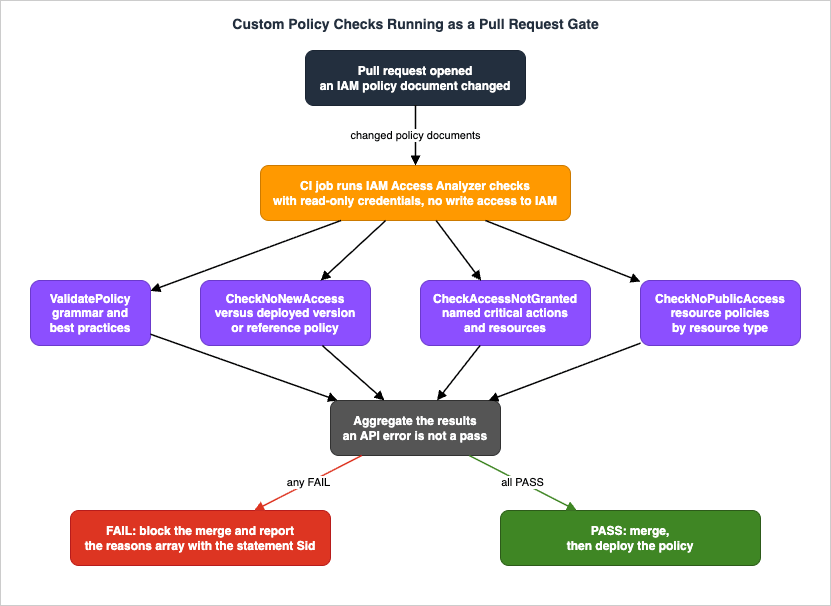
The delta check compares the deployed policy against the proposed one:
aws accessanalyzer check-no-new-access \
    --existing-policy-document file://existing-policy.json \
    --new-policy-document file://new-policy.json \
    --policy-type IDENTITY_POLICY
AWS's published example for that command uses an existing policy allowing
s3:GetObject and s3:ListBucket, and a new policy that adds s3:GetObjectAcl. The documented response is the one you want your gate to act on:{
"result": "FAIL",
"message": "The modified permissions grant new access compared to your existing policy.",
"reasons": [
{
"description": "New access in the statement with index: 0.",
"statementIndex": 0
}
]
}The critical-action check asks a different question and needs no prior version:
aws accessanalyzer check-access-not-granted \
    --policy-document file://myfile.json \
    --access actions="s3:DeleteBucket","s3:GetBucketLocation" \
    --policy-type IDENTITY_POLICY
For resource policies, the public-access check is the one that maps most directly to an organizational rule:
aws accessanalyzer check-no-public-access \
    --policy-document file://bucket-policy.json \
    --resource-type AWS::S3::Bucket
Choose the action list for
check-access-not-granted deliberately. The actions worth naming are the ones that let a principal grant itself more access or erase the evidence — the identity-mutating actions, the organization-level actions, and the ones that disable logging. Keep the list in version control next to the pipeline, review changes to it the way you would review a policy, and remember the 100-action ceiling per call.9.2 Running it safely
Give the CI job the minimum it needs, and prefer baseline mode. The check APIs evaluate documents you send them; they do not read your account. In baseline mode the job needs onlyaccess-analyzer:CheckNoNewAccess, access-analyzer:CheckAccessNotGranted, access-analyzer:CheckNoPublicAccess, and access-analyzer:ValidatePolicy. Delta mode additionally needs read access to fetch the deployed policy — iam:GetPolicyVersion and iam:GetRolePolicy and their siblings — and nothing that writes. A policy gate should never hold write permissions on IAM. A job that can both approve and apply a policy change is not a gate.Distinguish
FAIL from failure. result: FAIL is a verdict and should block the merge. An HTTP error is an operational problem and should be handled differently. The documented error shapes are specific: ThrottlingException and InternalServerException both carry a retryAfterSeconds field, so retry with that value rather than a guessed backoff. ValidationException returns a fieldList of fields that did not validate. UnprocessableEntityException means the entity could not be processed — typically a malformed document, which for a policy gate is itself a reason to block. Do not treat an API error as a pass. A gate that fails open under throttling is a gate that disappears exactly when your organization is deploying the most.Fail closed, and give the developer a route. The most common way a merge gate dies is that it becomes advisory. If a
FAIL prints a warning and the merge proceeds, the check has been deleted with extra steps. Fail the build, and pair it with a documented exception path: a labeled approval from the security team, an entry in an exceptions file that the pipeline reads and that itself requires review. Whatever the mechanism, the exception should be visible in the repository, not in a person's memory of who said yes.Make the failure message actionable. The
reasons array gives you the statement index and, if you insisted on Sid values, the statement identifier. Render that into the CI output next to the statement text. A developer who sees "statement AllowArtifactRead grants new access" fixes it in a minute; a developer who sees FAIL opens a ticket.Do not put the gate on the EventBridge path. Findings events are delivered on a best effort basis and arrive within roughly an hour, which is fine for notification and wrong for a control that must not be bypassed. The check APIs are synchronous and authoritative; use them for the gate and use events for everything downstream.
9.3 What the gate does not cover
A pull request gate covers policies that go through pull requests. It does not cover console edits, it does not cover policies embedded in third-party modules that were merged before the gate existed, and it does not cover the resource policies that AWS services create on your behalf.That gap is precisely why the monitoring loop still matters. The two controls are complementary: the gate keeps the problem from being introduced through the paved road, and the analyzers catch what arrives by every other route. A team that has only the gate will be surprised; a team that has only the analyzers will always be remediating.
10. Policy Generation from CloudTrail
10.1 How it works
Policy generation analyzes CloudTrail events for an IAM user or role over a period you choose and produces a policy template based on the activity it found. You supply a service role that grants IAM Access Analyzer access to your CloudTrail trail and to service last accessed information, you specify the trail, and you receive a template you can review, customize, and save as a customer managed policy. The CLI operations arestart-policy-generation, get-generated-policy, list-policy-generations, and cancel-policy-generation.The output comes in two flavours, and knowing which one you got determines how much work remains:
- Action-level information. For supported services, IAM Access Analyzer identifies the specific actions in your CloudTrail events and lists them in the generated policy.
- Service-level information. For everything else, it uses last accessed information to produce a template naming the services that were used, and prompts you to add the actions yourself.
A generated policy is a starting point that still needs resource ARNs filled in. The template carries placeholder resource ARNs for actions that support resource-level permissions, and AWS recommends replacing them with the specific ARNs for your use case.
10.2 The limits that decide whether it is useful
AWS's Things to know about generating policies section is unusually candid, and reading it before you rely on the feature saves a great deal of confusion.| Limit | Consequence |
|---|---|
| A CloudTrail trail must be enabled for the account | Without a trail, there is nothing to generate from |
| Data events are not analyzed for action-level activity | Amazon S3 object-level access will not appear as actions; a policy generated for a data-plane-heavy role will be badly incomplete |
iam:PassRole is not tracked by CloudTrail and is not included | The single most likely omission to break a workload that launches other AWS resources |
| Denied actions are included | Generation reviews all CloudTrail events, including calls that were denied. Adopting the output verbatim can grant permissions the principal was previously refused |
| Do not use policy generation for auditing | AWS says so explicitly; use CloudTrail for that |
| One generated policy at a time in the IAM console, retained for 7 days | Generating another replaces the previous one |
| Time range of up to 90 days | Anything quarterly or annual is invisible |
| 25 GB of CloudTrail data and 100,000 log files per generation | Busy accounts hit these before they hit the day limit |
| One concurrent generation; 50 per day in most Regions, 5 in several | Not a bulk mechanism |
| AWS Control Tower trails are not supported | Because the organization's CloudTrail data is logged in the Log Archive account and the bucket permissions cannot be reconfigured under Control Tower's service control policies |
The Control Tower row is the one that surprises the most teams, because Control Tower is exactly the environment where a central team would want this. The documented workaround is the cross-account path: policy generation supports using CloudTrail data in another account, provided you can configure the trail's S3 bucket appropriately — which is precisely what Control Tower's guardrails prevent for the trails it creates. If you need generation in a Control Tower environment, plan a separate trail you control.
10.3 Where it belongs in the loop
Policy generation pairs naturally with unused access findings: the finding tells you a role has permissions nobody used, and generation proposes what the policy would look like if it only contained what was used. AWS's own guidance for unused access remediation makes this connection.Treat the output as a proposal with three mandatory review steps: fill in the resource ARNs, add back anything that runs less often than your window, and remove anything that appears only because it was attempted and denied. Adopting a generated policy without that review is how a least-privilege exercise creates an outage on the first day of the next quarter — and, less obviously, how it can widen permissions, because denied attempts are part of the input.
11. Multi-Account Operations
11.1 A working topology
For an organization using AWS Organizations, the arrangement that follows from everything above is:- Designate a delegated administrator from the management account — normally the security or audit account. Only the management account can do this, and changing it later is disruptive (Section 4.3).
- From the delegated administrator, create one organization-level external access analyzer in every Region where you have supported resources. This is the perimeter check and it must be regional because external access analysis only sees resources in its own Region.
- Create one organization-level internal access analyzer per Region you care about, and curate its explicit resource list. Remember the quota is one per organization per Region and cannot be raised.
- Create exactly one organization-level unused access analyzer, in the single Region where you will review findings. Do not replicate it; findings are Region-independent and duplicates create duplicate review work.
- Let individual accounts add their own account-level analyzers where the account's own trust boundary is narrower than the organization's — regulated workloads, customer-dedicated accounts. Each account gets one per type.
- Keep all of it in infrastructure as code, including archive rules, which
CreateAnalyzeraccepts inline througharchiveRules. AWS notes there is no difference between using the IAM API and CloudFormation for configuring archive rules.
Creating an analyzer creates a service-linked role named
AWSServiceRoleForAccessAnalyzer in the account. For an organization-level internal access analyzer, that role is created in each account of the organization.11.2 Getting findings to the people who fix them
Two export paths exist, and they behave differently enough that most organizations end up using both.Amazon EventBridge. IAM Access Analyzer emits four documented event types under the source
aws.access-analyzer:Access Analyzer Finding— external access findingsInternal Access Finding— internal access findingsUnused Access Finding for IAM entities— unused access findingsAccess Preview State Change— preview created, completed, or failed
The operational properties matter more than the schema. Delivery is documented as best effort. Events for new findings and status changes arrive within about an hour. When a finding is deleted, the status is not changed — instead the
isDeleted attribute is set to true, so a consumer that filters on status alone will never see deletions. Findings deleted because their analyzer was deleted are reported roughly 24 hours after the analyzer was deleted. Error findings arrive on the same detail types with an error attribute.AWS Security Hub CSPM. IAM Access Analyzer sends findings in AWS Security Finding Format, normally within 30 minutes of creation, with six documented ASFF
Types values covering public access, cross-account access, unused permissions, unused IAM roles, unused user passwords, and unused user access keys.The Security Hub integration has one behavior that will mislead anyone treating it as the complete picture. For cross-account external access, IAM Access Analyzer sends a single finding for one external principal at a time. If a resource is shared with several external principals, you must resolve the Security Hub finding for the current one before the next is delivered. AWS states directly that for a full list of external principals with cross-account access outside the zone of trust, you must view the findings in IAM Access Analyzer. Security Hub is the right place to triage; it is not the right place to enumerate.
External access findings are also grouped per resource in Security Hub — the resource's finding stays active while any of its underlying findings are active, and archives when all of them are archived or resolved. Unused access findings are not grouped; they map one to one.
11.3 Who reviews what
The organizational question is which findings a central team owns and which belong to the account.- Public access findings are a central concern in every organization. They are the smallest set and the highest severity, and the dashboard separates public from cross-account for exactly this reason.
- Cross-account external access findings are usually best triaged centrally and remediated locally, because the central team knows which partner accounts are approved and the account team knows why the share exists.
- Internal access findings belong wherever the resource owner is. The central team owns the resource list; the account owns the answer.
- Unused access findings are volume work and belong to the account, with the central team owning the tracking period, the exclusions, and the trend.
Routing this with EventBridge is straightforward because the finding carries the owning account — but note the field semantics differ by finding type. On an external access finding,
accountId and region refer to the account and Region reported in the finding. On an internal access finding, accountId and principalOwnerAccount refer to the account of the principal, not necessarily the resource. A router that assumes one convention will misroute the other type.For the aggregation layer itself — where these events land, how long they are retained, how they are queried alongside CloudTrail and Config — see the Centralized Logging and Audit Architecture on AWS guide. Where the resulting compliance state is evaluated and remediated as a rule set, see the AWS Config Rules and Conformance Packs guide.
12. Failure Modes and Anti-Patterns
Assuming one analyzer covers another's question. The most common coverage gap in this service is an organization that turned on external access analysis years ago and believes it has permissions visibility. It has perimeter visibility. Nothing in an external access analyzer reports an internal principal with excessive reach, and nothing in it reports a role nobody has used since 2023.Silencing findings with archive rules instead of expressing intent. An archive rule keyed to "resource type is S3 bucket" is not a security decision, it is the end of one. Rules should name the principal, the account, or the specific resource whose access you have accepted, and they should carry the reason in the rule name because there is nowhere else to put it. And because IAM Access Analyzer does not validate filter values, a rule with a typo in an account ID looks identical in the console to one that works.
Archiving public access. Any archive rule that could match a public-access finding is a rule that can hide the highest-severity thing this service detects. AWS provides a
Public access criterion set to false for exactly this reason; use it, or write down why you did not.Choosing the zone of trust without understanding the SCP and RCP semantics. An account-scoped internal access analyzer lists actions your organization's guardrails already deny, because those policies are
APPLICABLE but not applied. Reviewers who do not know this chase phantom access. Reviewers who do know it and use the account scope deliberately are asking a genuinely different and useful question — whether the guardrail is the only control — but that has to be a choice, not an accident.Treating error findings as noise. An
ACCESS_DENIED error finding means a resource is not being analyzed at all. The most common cause is a resource policy that denies the analyzer's service-linked role — most often on a KMS key, where a key policy that names only the key administrators leaves IAM Access Analyzer unable to read key metadata. The fix is to allow kms:DescribeKey, kms:GetKeyPolicy, and kms:List* to AWSServiceRoleForAccessAnalyzer, or to add it as an exception to a broad deny. Until then, that key has no coverage and the findings list looks clean.Setting the unused access tracking period without accounting for entity age. A 365-day tracking period does not mean "thorough", it means permissions granted in the last year are not evaluated at all. Long periods are conservative about deletion and blind about recent over-granting.
Assuming account exclusions track the organizational unit. They do not. New accounts added to your organization are not excluded even if you previously excluded every account in that organizational unit. Re-derive the list, or accept that new accounts are in scope by design.
Replicating the unused access analyzer across Regions. Unused access findings do not vary by Region. Multiple analyzers produce multiple copies of the same finding, each requiring its own archive decision in its own Region, and archive rules do not cross Regions.
Deleting an analyzer to reconfigure it.
DeleteAnalyzer deletes every finding the analyzer produced and cannot be undone. Every archive decision, every remediation record, gone. Use UpdateAnalyzer for configuration changes.Changing the delegated administrator casually. The former delegated administrator's organization analyzers move to a disabled state, stop updating, and their findings become inaccessible until that same account is restored. Treat this as a planned migration.
Running the CI check in warning-only mode. A merge gate that prints a warning is documentation. If the organization is not ready to block merges, say so and set a date, rather than shipping a control that does nothing.
Failing open on API errors.
ThrottlingException and InternalServerException are not verdicts. Retry using the retryAfterSeconds value the API returns, and block if the check cannot complete. A gate that disappears under load disappears during exactly the deployments that matter.Gating on EventBridge events. Delivery is best effort with roughly an hour of latency. That is a notification pipeline, not a control plane. Use the synchronous check APIs for anything that must not be bypassed.
Adopting a generated policy without review. Policy generation includes denied actions in its input, omits
iam:PassRole entirely, sees at most 90 days, and does not analyze data events. Each of those is a way for the output to be simultaneously too narrow to work and too broad to be least privilege.Reading
CheckNoPublicAccess as an account-level verdict. It evaluates a document. A FAIL on a bucket policy in an account with Block Public Access enabled is correct and still worth blocking, because the policy is relying on a control it does not name.Deleting principals before deactivating credentials. Making an access key inactive is the only reversible step in the unused access remediation sequence. Skipping it turns a rollback into an incident.
13. Frequently Asked Questions
Do I need separate analyzers for external, internal, and unused access?Yes. They are separate
type values on CreateAnalyzer — ACCOUNT/ORGANIZATION for external, ACCOUNT_INTERNAL_ACCESS/ORGANIZATION_INTERNAL_ACCESS for internal, and ACCOUNT_UNUSED_ACCESS/ORGANIZATION_UNUSED_ACCESS for unused — and none implies the others. They also differ in regional behavior: external and internal analyzers must be created in every Region you want covered, while unused access findings do not change based on Region and one analyzer is sufficient.Is IAM Access Analyzer the same thing as Network Access Analyzer?
No, and the naming collision causes real confusion. Network Access Analyzer is a feature of Amazon VPC that identifies unintended network access by analyzing the paths a packet can take, against a Network Access Scope you define. IAM Access Analyzer analyzes permissions. Both are built on AWS's automated reasoning work, which is why they sound related, but they share no configuration, no findings, and no console.
If the external access analyzer reports nothing, is my bucket safe?
It means no external access was provable from the resource-based policies IAM Access Analyzer could read, for a resource type it supports, in that Region, as of its last analysis. That is a strong statement and it is not "safe". It says nothing about which principals inside your zone of trust can read the bucket — that is the internal access analyzer's question — and it says nothing at all if an error finding exists for the resource.
Why does the same IAM role show up as a finding in several Regions?
Because IAM roles are global resources and external access analyzers are regional. AWS documents that if a role trust policy grants access to an external entity, a finding is generated in each enabled Region. Fixing the trust policy resolves all of them; accepting the access means archiving each one separately, in each Region, because archive rules belong to a single analyzer.
I enabled Block Public Access. Why is the public finding still there?
Because account-level Block Public Access settings are evaluated only once every 6 hours, while bucket-level settings are evaluated whenever a policy changes. AWS documents up to 6 hours for the finding to resolve, and the Security Hub integration page cites up to 12 hours for account-level changes to be reflected. If you need confirmation sooner, use the Rescan link on the finding or the
StartResourceScan operation.What tracking period should I set on the unused access analyzer?
There is no universal answer, but the constraint most people miss should drive the choice: the analyzer only evaluates permissions belonging to entities that have existed for the entire tracking period. A 90-day period is a common starting point because it is long enough to cover monthly processes and short enough that recent grants come into scope within a quarter. Also verify the accepted range against your own account first — the IAM User Guide and the
UnusedAccessConfiguration API reference both state 1 to 365 days, while AWS console help panel pages still say 180.Does enabling AWS Security Hub give me unused access coverage automatically?
It gives you a form of it. When Security Hub is enabled for an organization, a service-linked IAM Access Analyzer is created in each member account with no additional configuration, evaluating principals against a 90-day lookback that is not configurable, re-evaluating every 24 hours, running in US East (N. Virginia) and replicating findings to your Security Hub Regions. If you also operate your own unused access analyzer with a different tracking period, decide explicitly which one is the system of record before the two dashboards disagree.
Can custom policy checks replace human review of IAM changes?
No, and the boundary is precise. The checks prove properties of a document: whether it grants more than a previous version or a reference policy, whether it grants a named critical action, whether it could grant public access for a resource type. They do not consider permission boundaries, service control policies, resource control policies, or the identity policies of the principals involved, and they do not know what the change is for. They are excellent at answering "is this within the envelope we agreed" and incapable of answering "should we have agreed to that envelope".
Why does
check-no-new-access fail on a change that only adds a read action?Because it is doing what it says: any access allowed by the new document that was not allowed by the old one is new access. AWS's own example fails on the addition of
s3:GetObjectAcl to a policy that already allowed s3:GetObject. That is not a false positive, it is the check's definition. If your standard is "no new privileged access" rather than "no new access at all", express it with check-access-not-granted against a list of privileged actions, or with a reference policy in check-no-new-access that describes the envelope you will accept.Can I use policy generation in an AWS Control Tower environment?
Not with the trails Control Tower creates. AWS documents this explicitly: the organization's CloudTrail data is logged in the Log Archive account, and the permissions on that S3 bucket cannot be reconfigured because of the restrictions Control Tower's service control policies place on the logging bucket. Generating policies in such an environment requires a separate trail whose bucket permissions you control.
14. Summary
IAM Access Analyzer is three monitoring products and two authoring checks sharing a name and a reasoning engine. Almost every operational problem with it comes from treating it as one thing.The decisions, condensed:
- Create all three analyzer types deliberately. External for the perimeter, internal for the assets whose readers you must be able to name, unused for the inventory. None implies the others, and external and internal are complements that AWS explicitly recommends running together with the same zone of trust.
- Get the Region model right. External and internal analyzers are per Region; unused findings are Region-independent and one analyzer is enough. Replicating the unused analyzer creates duplicate findings, and a global IAM role generates one external finding per enabled Region.
- Treat the zone of trust as a semantic choice. Organization-scoped internal access findings fold service control policies and resource control policies into the computed permissions; account-scoped ones do not, and will list actions your guardrails already deny.
- Curate the internal access resource list as a governed artifact. There is exactly one organization-level internal analyzer per Region, ARNs must be exact with no wildcards, only six resource types are supported despite a 17-value enum, and the whole capability stops working above 70,000 principals in the organization.
- Set the unused access tracking period knowing it is also an entity-age filter. It excludes anything younger than the period from evaluation entirely. Exclusions by account are snapshots, not organizational-unit rules.
- Make archive rules express intent, not volume. They are unvalidated, per-analyzer, per-Region, and permanent until someone removes them. Use the
Public accesscriterion to guarantee a rule can never hide public access. - Move the decision left with the check APIs, and fail closed.
CheckNoNewAccess,CheckAccessNotGranted, andCheckNoPublicAccessare synchronous and authoritative; EventBridge is best effort with about an hour of latency and belongs downstream, not in the gate. Retry onretryAfterSeconds, never on assumption. - Know what the checks cannot see. They evaluate a document, not your account. That is what makes them safe to run on an untrusted pull request and what makes their verdict a statement about the policy rather than about production.
- Treat every removal as irreversible until proven otherwise. Deactivate keys before deleting them, scope policies before deleting roles, and never delete an analyzer to reconfigure it —
DeleteAnalyzertakes every finding with it.
The through-line is that this service converts an unanswerable question into an answerable one, and then hands you a second problem: deciding what the answers mean. The reasoning engine is not the hard part. The archive rules, the exclusions, the tracking period, and the zone of trust are the hard part, because those are the places where your organization writes down what it considers acceptable — and where, if nobody revisits them, it quietly stops looking.
15. References
- AWS Identity and Access Management User Guide — Using AWS Identity and Access Management Access Analyzer
- AWS Identity and Access Management User Guide — IAM Access Analyzer findings
- AWS Identity and Access Management User Guide — IAM Access Analyzer supported resource types for external and internal access
- AWS Identity and Access Management User Guide — Create an IAM Access Analyzer internal access analyzer
- AWS Identity and Access Management User Guide — Create an IAM Access Analyzer unused access analyzer
- AWS Identity and Access Management User Guide — Delegated administrator for IAM Access Analyzer
- AWS Identity and Access Management User Guide — Archive rules
- AWS Identity and Access Management User Guide — Archive IAM Access Analyzer findings
- AWS Identity and Access Management User Guide — Resolve IAM Access Analyzer findings
- AWS Identity and Access Management User Guide — Review IAM Access Analyzer findings
- AWS Identity and Access Management User Guide — IAM Access Analyzer error findings
- AWS Identity and Access Management User Guide — IAM Access Analyzer quotas
- AWS Identity and Access Management User Guide — Monitoring AWS Identity and Access Management Access Analyzer with Amazon EventBridge
- AWS Identity and Access Management User Guide — Integrate IAM Access Analyzer with AWS Security Hub CSPM
- AWS Identity and Access Management User Guide — Checks for validating policies
- AWS Identity and Access Management User Guide — Validate policies with IAM Access Analyzer
- AWS Identity and Access Management User Guide — IAM policy validation check reference
- AWS Identity and Access Management User Guide — Validate policies with IAM Access Analyzer custom policy checks
- AWS Identity and Access Management User Guide — IAM Access Analyzer policy generation
- AWS Identity and Access Management User Guide — Preview access
- AWS Identity and Access Management User Guide — IAM Access Analyzer filter keys
- AWS Identity and Access Management User Guide — Security best practices in IAM
- IAM Access Analyzer API Reference — Welcome
- IAM Access Analyzer API Reference — CreateAnalyzer
- IAM Access Analyzer API Reference — UnusedAccessConfiguration
- IAM Access Analyzer API Reference — AnalysisRuleCriteria
- IAM Access Analyzer API Reference — InternalAccessAnalysisRuleCriteria
- IAM Access Analyzer API Reference — InternalAccessDetails
- IAM Access Analyzer API Reference — Configuration
- IAM Access Analyzer API Reference — CheckNoNewAccess
- IAM Access Analyzer API Reference — CheckAccessNotGranted
- IAM Access Analyzer API Reference — CheckNoPublicAccess
- IAM Access Analyzer API Reference — Access
- IAM Access Analyzer API Reference — GenerateFindingRecommendation
- AWS CLI Command Reference — accessanalyzer
- AWS CLI Command Reference — accessanalyzer check-no-new-access
- AWS CLI Command Reference — accessanalyzer check-access-not-granted
- AWS CLI Command Reference — accessanalyzer check-no-public-access
- AWS CLI Command Reference — accessanalyzer create-service-linked-analyzer
- AWS CLI Command Reference — accessanalyzer validate-policy
- AWS General Reference — IAM Access Analyzer endpoints and quotas
- AWS Security Hub User Guide — Understanding unused access findings in Security Hub
- Amazon EventBridge Reference — AWS Identity and Access Management Access Analyzer events
- Amazon VPC — What is Network Access Analyzer?
- AWS Prescriptive Guidance — Security Reference Architecture — AI and ML for security
- AWS — IAM Access Analyzer Features
- AWS What's New — IAM Access Analyzer now identifies who in your AWS organization can access your AWS resources
- AWS What's New — IAM Access Analyzer supports additional analysis findings and checks in AWS GovCloud (US) Regions
- AWS What's New — AWS Security Hub now uncovers identity risks from unused access
- AWS Security Blog — How AWS uses automated reasoning to help you achieve security at scale
- AWS Security Blog — IAM Access Analyzer simplifies inspection of unused access in your organization
- AWS Security Blog — Customize the scope of IAM Access Analyzer unused access analysis
- AWS Security Blog — Refine unused access using IAM Access Analyzer recommendations
- AWS Security Blog — How to prioritize IAM Access Analyzer findings
- GitHub — IAM Access Analyzer custom policy checks samples
Related Articles
- IAM Policy Evaluation Logic Step-by-Step — the evaluation order this guide's findings are derived from, including explicit deny, permission boundaries, and session policies.
- IAM Anti-Patterns — the catalog of policy shapes these analyzers detect, with the root causes behind each one.
- AWS IAM Glossary — principal, permission boundary, zone of trust, ABAC, and the rest of the vocabulary used above.
- AWS Organization Guardrails — designing the service control policies and resource control policies whose evaluation status appears on internal access findings.
- AWS IAM Identity Center Complete Setup Guide — the permission sets whose generated roles show up in unused access findings.
- AWS Multi-Account Operational Patterns — the organization structure that the delegated administrator model in Section 11 assumes.
- Amazon S3 Security and Access Control Guide — bucket policies, access points, and Block Public Access, the resource type with the most Access Analyzer nuances.
- AWS Config Rules and Conformance Packs — the complementary detection surface for configuration state that Access Analyzer does not evaluate.
- Centralized Logging and Audit Architecture on AWS — where the EventBridge and Security Hub findings from Section 11 should land.
- AWS Security Incident Response Playbooks — what to do when an external access finding turns out to be an incident rather than a misconfiguration.
- AWS KMS Envelope Encryption and Data Key Caching Patterns — key policy design, including the analyzer access that prevents
ACCESS_DENIEDerror findings on KMS keys. - AWS Verified Permissions and Cedar Policy Language Complete Guide — application-level authorization, which IAM Access Analyzer does not evaluate.
- AWS History and Timeline regarding AWS Identity and Access Management — the service history behind every capability described here.
- IAM Policy Least Privilege Analyzer — an offline check of a policy document before you send it to a custom policy check.
- AWS Policy Diff Tool — statement-level comparison of the two documents you pass to
check-no-new-access. - AWS Service Control Policy Builder and Simulator — offline evaluation of the guardrails whose restriction status appears on internal access findings.
- Amazon GuardDuty Extended Threat Detection Architecture — the detection side of the same environment: what to do about a principal that is already using the access this guide would have prevented.
- AWS Private CA Hierarchy Design — the certificate-based half of workload identity, alongside the IAM half analyzed here.
References:
Tech Blog with curated related content
Written by Hidekazu Konishi