Hardening GitHub Actions for AWS Deployments - Workflow Permissions, Untrusted Triggers, Action Pinning, and What the Trust Policy Cannot Catch
First Published:
Last Updated:
Inside one repository, the density of review is not uniform. People who know the area review a change to the application code. They question edge cases, track exception handling, and point out testing gaps. The YAML under
.github/workflows/ is different. It grows one line at a time, the diff is small, few people can read it, and it goes through. If that line is a uses:, it is a declaration that brings someone else's code into an environment that holds production privilege.This article is written from the side of that one line. Rather than listing measures, it works through the mechanism of each one: what it prevents, and what it does not prevent. Leave out what a measure does not prevent, and the reader closes it in their head and leaves it open in the repository.
Three conclusions, stated up front.
First, writing
permissions is not an addition. It is a replacement. The moment you define any specific scope, all unspecified scopes default to none. Without understanding this behavior, adding a single line can result in your workflow either failing to function, despite your intention to minimize permissions, or appearing to have no effect at all. Both outcomes stem from the same underlying mechanism.Second, the choice of trigger defines the trust boundary, and that boundary moved in June 2026.
actions/checkout now refuses, by default, to check out the code of a fork's pull request into a privileged context. However, this default only applies to the specific path that passes through that action. Other paths, such as those that directly retrieve code from the shell or workflows triggered by comments, remain unprotected.Third, pinning only works on a layer-by-layer basis. Pinning an action to a specific commit SHA prevents that action's repository content from changing. However, the layers beneath it can still change. GitHub itself explicitly states that action dependencies are resolved at runtime and are not deterministic. Pin an action and stop, and the layers you left unpinned remain as they were.
The same shape runs through all three. Every defense named here is a default behavior, not a property that cannot be moved. Most of them come with a setting that turns them around, and those settings mostly sit outside the workflow file. There is a ceiling on how far reading the workflow file can take you toward calling something safe.
Primary sources back every behavior, default value, version, and availability status in this article. The verification date is August 25, 2026. The additions made on October 9, 2026, listed in Section 1.4, were verified on that date.
Table of Contents
- 1. The Workflow File Is a Deployment Path That Review Does Not Cover
- 2. Where a Workflow Run Gets Its Privileges
- 3. The permissions Key Replaces the Default Rather Than Amending It
- 4. The Trigger Decides the Trust Boundary
- 5. When an Expression Reaches the Shell
- 6. What Pinning an Action Actually Freezes
- 7. Where the Approval Goes
- 8. Runners, and What Leaves the Run
- 9. Applying This to a Workflow You Already Have
- 10. Failure Modes
- 11. Frequently Asked Questions
- 12. Summary
- 13. References
1. The Workflow File Is a Deployment Path That Review Does Not Cover
1.1 Intended Audience
This article is for readers who already have a GitHub Actions workflow that deploys to AWS.First, it targets readers who have already configured role assignment using OIDC. They have defined their trust policy and included the
id-token: write permission. Their deployments are working. The only question remaining for them is how to best solidify the workflow file itself.Second, it is for readers who look at workflows across many repositories. When defining a standard format on the platform side, you have to know which measure takes effect on which layer, or the standard becomes a template that is merely long.
Third, it is for readers who manage repositories that accept pull requests from forks. Because the default behavior changed in June 2026, anyone who wrote hardening measures before that date needs to check whether those measures still mean the same thing.
This article is not for readers who want an introduction to GitHub Actions. This article treats workflow syntax, the relationship between jobs and steps, and the choice of runner as prior knowledge.
1.2 Words This Article Has to Pin Down First
Five terms in this article carry a different meaning elsewhere on this site. Without separating them first, every chapter that follows becomes ambiguous.permissions In this article, permissions refers specifically to workflow keys in GitHub Actions. It is a declaration of the scope given to the GITHUB_TOKEN, and it is not an IAM permission. Where IAM is the subject, this article says IAM permissions explicitly. These two have the same name, but are entirely different in terms of how they are declared, the entities that evaluate them, and their scope.environment There are two uses of the term environment. One refers to a specific deployment environment within GitHub, which includes protection rules and secrets. The other is a general term referring to a runtime environment. Where this article says environment, it means the former. For the execution environment, this article says runner.token There are three different types of tokens. These are the GITHUB_TOKEN, which is issued for each job; the OIDC ID token presented to AWS; and the temporary credentials AWS returns. The three differ in issuer, lifetime, and purpose. This article never uses the bare word token, and names which one it means each time.attestation While this term turns up across several articles on this site, the vast majority of its uses are not relevant to this article. AWS Nitro Enclaves and Confidential Computing on AWS discusses attestation documents that verify measurements from enclaves, while Passkeys and WebAuthn in Practice discusses attestation from authenticators verifying their own model. What appears in this article is artifact attestation, which proves where a build came from, and it appears in one section of Chapter 8.policy This word also needs separating. The deployment branch policy that a GitHub deployment environment carries and the IAM trust policy on the AWS side share a word in their names and are otherwise unrelated. This article calls the former the deployment branch rules and the latter the trust policy. How far that one word stretches across authorization engines is the subject of Policy Engines Compared.1.3 What This Article Does Not Cover
This article does not cover how workflows obtain AWS credentials. The creation of OIDC provider objects, the conditions foraud and sub keys, the shape of sub for each issuer, and the handling of thumbprints are all covered in AWS IAM Inbound Workload Federation. That article explicitly states that it will focus solely on obtaining credentials and will not address the writing of the CI workflow itself. This article takes the side that one leaves out.The signing of artifacts, its verification, and the mechanisms that ensure only verified artifacts are deployed are outside the scope of this article. Software Supply Chain Security on AWS holds them. This article touches on artifact attestation only in terms of what the workflow generates, and does not extend to the verification process.
Publishing a package from a workflow to npm or PyPI is also outside the scope of this article. With trusted publishing, the job presents an OIDC ID token to the package registry instead of to AWS; Publishing npm and PyPI Packages Without Long-Lived Tokens holds what that exchange takes away and what it leaves behind.
This article will not address the topic of running agents in a CI environment. Claude Code in CI/CD and Headless Automation holds the design of headless execution. This article focuses on the workflow files that underpin these processes, regardless of what is being executed.
AWS IAM Access Analyzer Deep Dive holds the static checking of IAM policies inside CI. This article will not cover GitHub Enterprise Server-specific operations, nor will it discuss pricing.
Where GitHub Actions itself came from is also outside this article. CI/CD Tools History and Timeline holds the lineage of the tools, including the trademark question that renamed Hudson to Jenkins in 2011 and the move of the machine that runs the build from a server the team ran to a runner that ships with the code host.
Furthermore, this article will not include working attack workflows or code designed to extract secrets. It will only describe the mechanisms involved. While explaining why untrusted code might be able to execute in a privileged context is necessary for designing defenses, providing fully functional, executable examples is not the purpose of this article.
1.4 Verification Date and Primary Sources
The majority of the claims made in this article relate to GitHub's behavior, rather than AWS's. Consequently, the sources used for verification will vary depending on the specific claim.For workflow syntax, triggers, permissions, contexts, and expression expansion, GitHub Docs is the canonical source. For changes to default values, for new features, and for availability status, the GitHub Changelog is. For the behavior and version of an official action, the releases in that action's repository are. For AWS behavior, the official AWS documentation is.
The verification date for this article is August 25, 2026. Throughout the article, whenever the text references version numbers or default values, it indicates the date on which those values were verified. This area has a history of changing default values. In fact, the default behaviors at the center of Chapters 4 and 8 of this article both changed in June 2026. The article does not deny the possibility that these values may have changed by the time the reader is reviewing this content.
On October 9, 2026, this article added changes that came after the August 25, 2026 verification date, along with an earlier notice tied to one of them, and only those additions were verified on October 9, 2026. They are the general availability of
cache-mode (September 10, 2026) and of workflow execution protections (September 17, 2026), the default rule for pull_request_target that GitHub plans to enforce on November 2, 2026, the removal of Node 20 from runners (September 23, 2026), the Rust Security Response Team's report of secrets persisting in caches (September 21, 2026), and the completed rollout of the new installation token format (October 2, 2026), together with GitHub's notice of April 24, 2026, that preceded it. Each carries its own date where it appears. Statements outside those additions were not re-verified on October 9, 2026, and keep the August 25, 2026 date.On October 17, 2026, a link to a related article on this site was added at the start of Chapter 8, and Sections 6.1, 6.3, and 11.2 gained the public preview of workflow dependency lockfiles (October 14, 2026) and the change to the documentation that followed it. Only those additions were verified on October 17, 2026.
2. Where a Workflow Run Gets Its Privileges
2.1 Three Sources, Three Different Owners
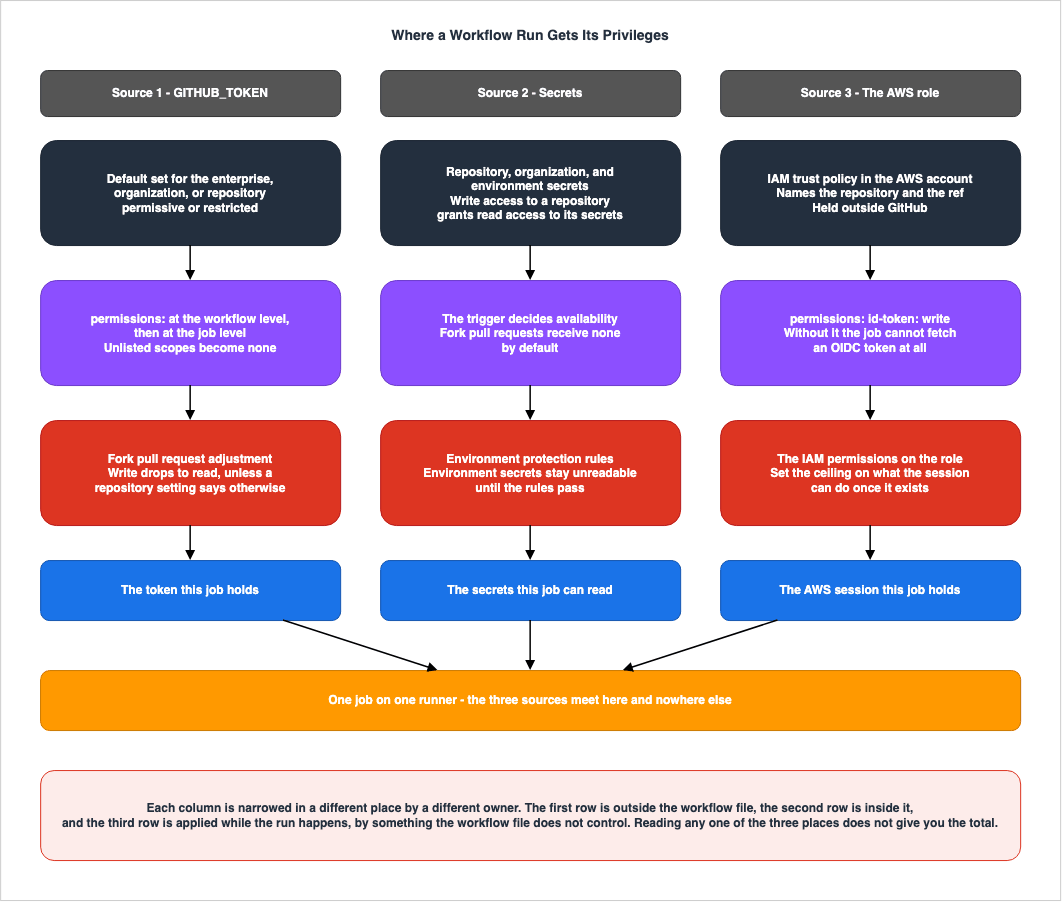
A single execution of a workflow can have authority derived from three different sources. All three are configured in a different place, and a different person is in a position to narrow each one.| Source of Authority | What it Allows | Upper Limit Determined By | Actual Value Determined By |
|---|---|---|---|
GITHUB_TOKEN | API operations for that repository | Enterprise, organization, or repository settings | The workflow file's permissions, then the adjustment for fork pull requests |
| Secrets | Reading stored values | Location of the secret and repository fork settings | Trigger that initiated the workflow and environment protection rules |
| AWS Role | Scope of IAM permissions associated with the role | AWS trust policy and role policy | Whether the workflow declares id-token: write |
What makes this area hard to see is that the two right-hand columns sit in separate places. While organization administrators can set the upper limit for
GITHUB_TOKEN, only reading the workflow file tells you how far an individual workflow actually reaches. Similarly, while individuals designing AWS roles can define conditions to restrict which repositories can assume the role, the AWS console does not show who inside those repositories can change the workflow file.⇒ Therefore, the total authority a workflow run holds does not come out of any single place you look. It is necessary to review these three locations separately and mentally combine the information.
2.2 The Token the Job Gets Without Asking
GitHub issues theGITHUB_TOKEN when a workflow run begins. Jobs possess this token, even if the workflow's author takes no action. It expires once the job is complete.The lifetime has a ceiling. On GitHub-hosted runners the maximum job execution time is 6 hours, so the token cannot live longer than that. Jobs on self-hosted runners can run longer, but the token can only be refreshed for up to 24 hours.
This token includes a safeguard to prevent infinite loops. Events triggered by this token will, as a general rule, not initiate new workflow runs. The exceptions are
workflow_dispatch and repository_dispatch, which always trigger a run. Furthermore, pull requests created using this token will initiate a run while in a pending approval state. They will not execute until someone with write permissions approves them.2.3 Secrets, and Who Decides They Are Readable
A secret lives on a repository, an organization, or a deployment environment. Where you store a secret determines which jobs can access it.First, the set of people who can read a secret is fixed the moment it is stored. The documentation puts it directly.
Any user with write access to your repository has read access to all secrets configured in
your repository.
In other words, anyone who can write to a repository can also read the secrets within that repository. The two permissions are not separated by default. As Section 7.4 shows, GitHub recognizes this as something to change.
Next, a workflow that runs for a pull request from a fork does not receive secrets.
With the exception of GITHUB_TOKEN, secrets are not passed to the runner when a workflow is
triggered from a forked repository.
And the
GITHUB_TOKEN becomes read-only.The GITHUB_TOKEN has read-only permissions in pull requests from forked repositories.Those two sentences are the reason contributions from forks can be accepted at all. Even if code written by an unknown person runs, there is nothing for it to take and nowhere for it to write. Chapter 4 will discuss how to choose triggers that invalidate these two points.
⚠ However, these two points represent the default behavior, and they are not immutable. For a fork of a private repository, the organization or the repository carries settings that change this behavior. These include options to pass the
GITHUB_TOKEN with write permissions to pull requests from forks, and an option to make all secrets available from pull requests. This setting does not exist for public repositories (as of the verification date).⇒ So reading the workflow file does not settle what a pull request from a fork can hold. You need to check the settings. And the organization administrator owns that settings page, not the person who wrote the workflow.
For public repositories, a different mechanism is in place. Pull requests from external contributors do not run automatically until they are approved. By default, first-time contributors require approval (as of the verification date). ⚠ This approval does not apply to
pull_request_target. The documentation states that pull_request_target runs in the context of the base branch, which is considered trusted, and therefore always runs, regardless of the approval settings. ⚠ That sentence is about approval, and approval is not the only gate. GitHub has announced a default rule that is planned to block pull_request_target in affected public repositories from November 2, 2026 (Section 4.6).2.4 The Role the Job Assumes in AWS
The third source is the temporary credentials from AWS. The job receives an OIDC ID token from GitHub and presents it to AWS to assume a role.This article will only discuss one aspect of this process: Unless the workflow file declares
id-token: write, the job will not be able to obtain the ID token. In other words, regardless of how permissive the AWS trust policy may be, if this line is missing from the workflow's permissions, that path will not be accessible. Conversely, add that line without knowing what happens to the other scopes in the same permissions block and you fall into Chapter 3.Information on how to design the trust policy conditions, how the format of the
sub claim varies depending on the issuer, and what loosens when a condition is written as a partial match are all in AWS IAM Inbound Workload Federation.3. The permissions Key Replaces the Default Rather Than Amending It
3.1 What the Documentation Actually Says
The entirety of this chapter hinges on this single sentence.For each of the available permissions, shown in the table below, you can assign one of the
access levels: read (if applicable), write, or none. write includes read. If you specify the
access for any of these permissions, all of those that are not specified are set to none.The final sentence is the key point: if you specify even one scope, all unspecified scopes default to
none. In other words, permissions is not a declaration of differences from the default; it is a declaration of the complete set of permissions that the job requires.There is also a way to handle everything collectively.
permissions: read-all and permissions: write-all grant that access level to all available scopes. permissions: {} disables everything.⚠ This article does not list all available scopes. This list is subject to change. Even as of the verification date it already contains scopes that did not exist before, such as
attestations and artifact-metadata. When you need a complete list, it is correct to consult the official reference documentation; a list copied into this article misleads the reader from the moment it goes out of date.3.2 The Default You Are Starting From Is Not Fixed
The scope a job actually receives is settled in four stages. The documentation sets out that order explicitly. Thepermissions written in the workflow file are only the third of them.The first stage is the default set for the enterprise, the organization, or the repository.
The permissions for the GITHUB_TOKEN are initially set to the default setting for the
enterprise, organization, or repository.
There are two choices. The permissive setting grants read and write access to every permission, and the restricted setting grants read access to
contents and packages only. If restricted is chosen at any of these levels, that is what applies to the repositories concerned.⚠ Which default applies depends on how the repository came into being. For a repository created in a personal account, the
GITHUB_TOKEN holds read access to contents and packages only. For a repository created in an organization, the setting is inherited from the organization (both as of the verification date). If the organization has chosen the more restrictive of the two, the repository cannot select the permissive option.The second and third stages are inside the workflow file. The top-level
permissions are applied first, then the job's permissions. These are the subject of Sections 3.1 and 3.3.The fourth stage is an adjustment made for pull requests from forks.
Finally, if the workflow was triggered by a pull request event other than pull_request_target
from a forked repository, and the Send write tokens to workflows from pull requests setting is
not selected, the permissions are adjusted to change any write permissions to read only.
⚠ That one sentence says two things at once. The first is that write drops to read for a pull request from a fork. The second is that
pull_request_target is exempt from the adjustment. And as Section 2.3 showed, the adjustment itself can be switched off in the settings.⇒ So you cannot assert that the default includes write access, and you cannot assert that a fork is always read-only either. Both depend on the settings. That is why the checklist in Chapter 9 puts the step of checking the settings before the step of writing
permissions.3.3 Workflow Level, Job Level, and Which One Wins
You can writepermissions at the top level of a workflow and on an individual job. When default permissions with the same name are defined at multiple levels, the more specific setting takes effect. Permissions defined within a job will override those defined in the workflow for that specific job.⚠ This is a replacement, not a combination. This behavior, combined with the details outlined in Section 3.1, is important to understand.
permissions:
  contents: read          # every job starts from here
jobs:
  deploy:
    permissions:
      id-token: write     # contents becomes none for this job unless restated
      contents: read
If you remove
contents: read from the deploy job's permissions, that job will no longer be able to read the repository. Writing a permission at the workflow level does not carry it down on its own.3.4 The Two Ways to Get This Wrong
There are two ways to get this mechanism wrong, and both come out of the same sentence.The first is the kind where you add something and break something. You add the line
id-token: write to enable OIDC. The read access for contents that had been in effect implicitly becomes none. The checkout step fails. The symptom surfaces on the checkout side, so it is hard to connect it to an addition a few lines above.The second is the kind where you narrow something and nothing takes effect. You write a careful
permissions block at the top level of the workflow. One job, for an unrelated reason, carries its own permissions. The minimization at the top level never reaches that job. Reading the workflow file from the top makes it look narrowed, while that one job runs on different values.Both come out of one point: the declaration is the whole set, not a difference from the default. That single point is what needs remembering. The symptoms do not.
4. The Trigger Decides the Trust Boundary
This chapter is central to this article. The previous two chapters discussed the permissions that a workflow can possess. This chapter asks a different question: inside a run that holds those privileges, whose code is the one that executes.4.1 What Changes Between pull_request and pull_request_target
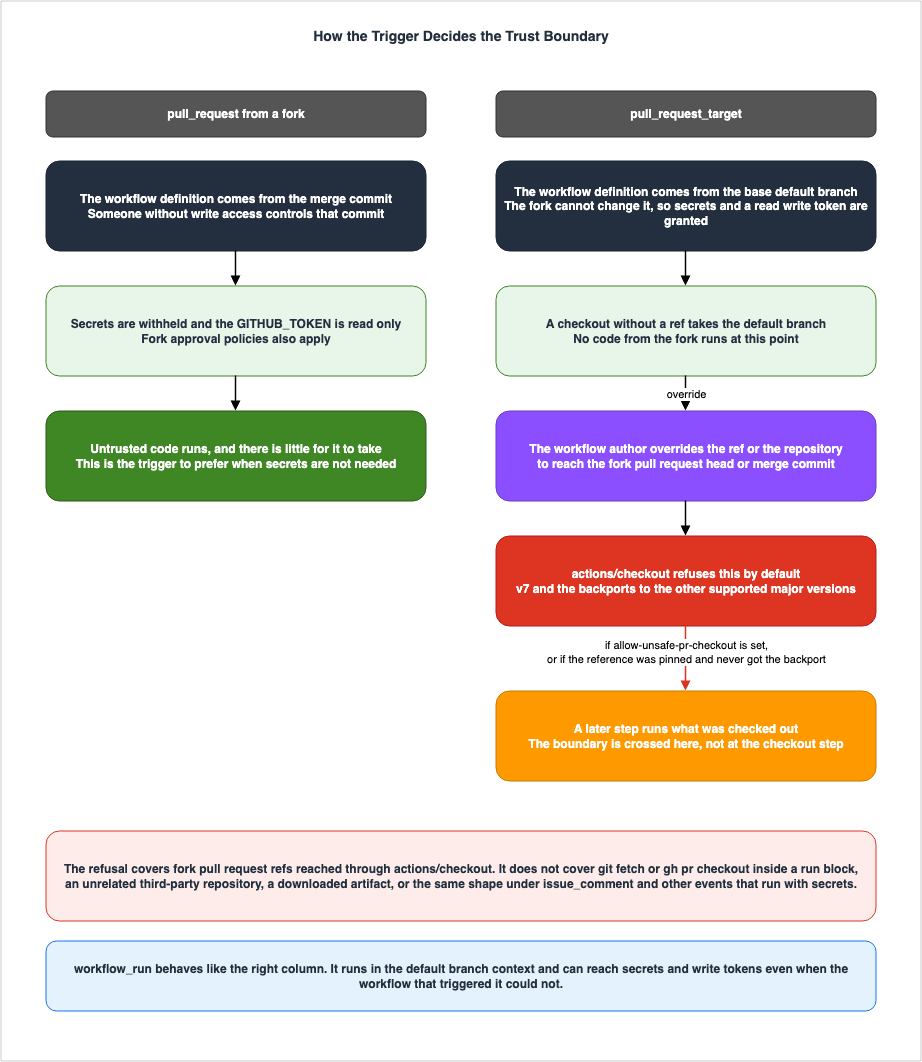
There are two triggers that respond to the same pull request event. They differ in both the code that runs and the values that can be read.The
pull_request trigger runs workflows in the context of the merge commit. When originating from a fork, as described in Section 2.3, secrets are not passed, and the GITHUB_TOKEN is read-only. It executes code that is potentially untrusted, but that code has limited capabilities.The
pull_request_target trigger is different. According to GitHub's documentation:Workflows triggered by pull_request_target run with elevated trust: the job receives the base
repository's GITHUB_TOKEN and access to repository and organization secrets.The execution context is also different. While
pull_request runs in the context of the merge commit, pull_request_target runs in the context of the base repository's default branch. So the workflow file that runs is the version that has already been through review, not the version the pull request brought with it.This design is intentional. The trigger exists so that privileged operations on a pull request from a fork, such as applying a label or leaving a comment, can be carried out safely. The workflow definition itself is beyond an attacker's reach.
The potential issues arise when the workflow takes code from the pull request and executes it. The documentation includes this warning:
Running untrusted code on the pull_request_target trigger may lead to security vulnerabilities.
These vulnerabilities include cache poisoning and granting unintended access to write
privileges or secrets.
Laying out the four combinations shows where the boundary sits.
| Trigger and Source | Workflow Definition Executed | Default Checkout Target | Secrets | GITHUB_TOKEN |
|---|---|---|---|---|
pull_request / same repository | The merge commit | The merge commit | Passed | As configured |
pull_request / fork | The merge commit | The merge commit | Not passed | Read-only |
pull_request_target | The base repository's default branch | The base repository's default branch | Passed | As configured |
workflow_run | The base repository's default branch | The base repository's default branch | Passed | As configured |
⚠ The values of secrets and tokens in the second row can be configured differently in private repositories, as seen in Section 2.3. The table shows the state when those configurations are not modified.
Note that in the third and fourth rows, what gets checked out by default falls on the safe side. The documentation states that an
actions/checkout step with no ref takes the base repository's default branch, so no code from the fork is executed by default. That is why granting privilege here is safe. The danger appears when the workflow author overrides that default.And overriding it does not complete the danger on its own. The documentation draws that distinction explicitly. The checkout step itself executes no untrusted code. What completes it is the next step, the one that runs the code now sitting in the working directory.
⚠ Running here is not limited to an explicit build step. The documentation states that in addition to commands like
npm install or npm run build, the configuration files and dependencies brought in by that code could also execute code under the attacker's control, and explicitly states that an obvious build process is not necessarily required. Unless a path is specified, actions/checkout writes the code to $GITHUB_WORKSPACE, which becomes the working directory for subsequent commands.⇒ There is one test. Can you say that the checked-out code is only ever read as data and never executed? If you cannot say it, the choice of trigger is wrong.
4.2 workflow_run Inherits the Same Problem
workflow_run fires on the completion of another workflow, and it holds permissions that the workflow which triggered it did not have.The workflow started by the workflow_run event is able to access secrets and write tokens, even
if the previous workflow was not.This is by design. It allows for a two-stage process: safely handling pull requests from forks via
pull_request, and then performing subsequent operations requiring elevated privileges based on the results. The structure is correct.However, if the second stage trusts the first stage's artifacts unconditionally, the boundary disappears. The documentation says this about artifacts.
Workflows triggered on workflow_run should treat artifacts uploaded from other workflows with
caution.
The first stage handles potentially untrusted input. Therefore, the files created by that first stage may be affected by that untrusted input. Have the second stage unpack them and run what is inside, and the separation you built stops meaning anything.
4.3 What the Checkout Action Now Refuses by Default
On June 18, 2026, the default in this area changed.actions/checkout now refuses, by default and under specific conditions, to fetch the code of a pull request that came from a fork. The behavior arrived in v7, and GitHub backported it to every supported major version except v1. Enforcement for the backported versions began on July 20, 2026 (both as of the verification date).The refusal applies under
pull_request_target, and under workflow_run where the originating event was a pull request event, when the pull request comes from a fork and any one of the following holds. The repository input resolves to the fork pull request's repository. The ref input matches the pull request's head reference or merge reference. The ref input resolves to the head or merge commit SHA of the fork pull request.There is also an input for choosing the previous behavior deliberately.
Setting allow-unsafe-pr-checkout: true as an actions/checkout input allows checking out pull
request head refs from forks. Only do this after confirming the checked-out code is never
executed.
The bluntness of that name is not an accident. It is named so that it stands out in review and in static analysis. A workflow that contains
allow-unsafe-pr-checkout: true is, by that fact alone, a diff worth raising.⚠ A somewhat unusual fact regarding version pinning emerges here. The announcement states that workflows referencing a floating major tag, such as
@v4, pick up the change automatically. It also states that workflows pinned to a specific SHA, minor version, or patch version are not affected by the backport and have to be raised through whatever upgrade process is already in place. The discussion of pinning in Chapter 6 has to meet this fact head on.⚠ Pull requests inside the same repository are not affected, and the behavior of the
pull_request event has not changed.4.4 What That Default Does Not Cover
⛔ Do not read this default as a complete answer to this class of problem. The documentation bounds its own scope.This protection only covers fork pull request refs. Checking out other untrusted code, such as
an unrelated third-party repository, fetching code with git fetch or gh pr checkout, or running
a downloaded artifact, is not covered by the actions/checkout checks.Three kinds of thing are named as uncovered. Checking out an unrelated third-party repository. Fetching code with
git fetch or gh pr checkout inside a run: block. Running a downloaded artifact. That last item covers fetching an artifact that a fork's pull_request run uploaded.The limit has a structural reason. The check reads the action's inputs and decides from those. A path that never goes through the action has nowhere for that decision to happen. The shell holds no notion that a given reference is the head of a pull request. It has strings, and the commands that receive them.
⇒ In conclusion, this default has narrowed the attack surface, but it does not eliminate it entirely. Every place in a workflow that fetches untrusted code, whether or not it goes through an action, has to be counted by hand.
4.5 Comment-Driven Triggers, and Which One Is Actually Privileged
⚠ Two triggers with similar names and opposite behavior turn up here. Separate them first.pull_request_review_comment carries the word comment in its name, but it sits on the same side as pull_request.The pull_request event (along with pull_request_review and pull_request_review_comment) is
unusual: it runs the workflow file from the merge commit of the pull request.Therefore, these events are subject to the same restrictions as
pull_request.To run untrusted workflow code safely, GitHub restricts these events to a read-only
GITHUB_TOKEN, withholds access to other secrets, and applies fork approval policies to prevent
compute abuse.In contrast,
issue_comment operates on the opposite side. The documentation lists this event's GITHUB_REF as the default branch and GITHUB_SHA as the last commit of the default branch. The activation conditions are also clearly stated.This event will only trigger a workflow run if the workflow file exists on the default branch.⇒ Workflows triggered by
issue_comment operate on the same side as pull_request_target. Because they run in the context of the default branch, the workflow definition is trusted, and for the same reason they also hold secrets. Operations like commenting /deploy on a pull request to trigger a deployment rely on this characteristic.And
issue_comment falls outside the default described in Section 4.3. The changelog announcing that change says that problems of the same kind arising under event types other than pull_request_target are not closed, and names issue_comment as its example. The documentation likewise states that any event that runs with secrets can carry the same shape of problem.The structure is the same as
pull_request_target. Anyone can write a comment. When a workflow uses the content of that comment or the code of the pull request to perform an action, the boundary disappears. The only difference is that this path lacks a default safeguard.4.6 Choose the Trigger Before You Harden the Job
The first question GitHub Docs puts is not a list of countermeasures. It is whether the trigger is needed at all.pull_request fires on the same events as pull_request_target. If no additional secret access is required, choosing pull_request removes most of the problem on its own. The documentation adds that more complex workflows can be restructured to separate the part that handles pull request code from the part that reaches secrets.The order has a reason. Changing the trigger is one line, and its reach is the widest of anything here. Hardening the inside of a job takes many lines and reaches less far. Apply the cheap one first.
⚠ For public repositories, GitHub has announced a default that makes this choice from outside the workflow file. The announcement of September 17, 2026, introduces a default rule that disables
pull_request_target for public repositories that do not already have an applicable event policy. It does not apply to private or internal repositories. It first runs in evaluate mode, in which you can see which runs would be affected before enforcement begins.On November 2, 2026, we’ll automatically enforce the default rule for affected repositories
that were using the default pull_request_target policy before general availability.⛔ As of October 9, 2026, that enforcement is a plan. The announcement says that workflows that still depend on the trigger need
pull_request_target to be allowed explicitly in an applicable event policy, and that specific workflows can be allowed by workflow file. ⇒ So in a public repository, whether pull_request_target runs at all is moving out of the workflow file and into a policy set by administrators. Section 7.4 describes that mechanism.5. When an Expression Reaches the Shell
5.1 The Substitution Happens Before the Shell Starts
What you write underrun: becomes a temporary shell script, and the runner executes it. Before that script is executed, the contents within ${{ }} are evaluated and replaced with their corresponding values.Before the shell script is run, the expressions inside ${{ }} are evaluated and then
substituted with the resulting values, which can make it vulnerable to shell command injection.This passage means that
run: is not a program that receives arguments, but rather a template. The values are not passed as parameters; instead, they become part of the script's body itself. Consequently, any quotes or symbols contained within those values are interpreted as part of the script's syntax, rather than as strings.5.2 Which Contexts Carry Someone Else's Text
So which values are dangerous? The documentation gives a basis for judgment rather than a list.Attackers can add their own malicious content to the github context, which should be treated
as potentially untrusted input. These contexts typically end with body, default_branch, email,
head_ref, label, message, name, page_name, ref, and title. For example:
github.event.issue.title, or github.event.pull_request.body.⚠ Note the wording: these contexts typically end with. That is not a closed list. The documentation goes on to say that there are other, less obvious sources, such as branch names and email addresses. So checking only for those trailing words and calling the rest safe is not sound.
There is only one guideline to follow. Treat any value that a user with the ability to open pull requests or issues could input as untrusted. Branch names, pull request titles and descriptions, comment bodies, and labels all meet this condition. You do not need write access to the repository.
5.3 What Passing Through an Environment Variable Actually Breaks
The recommended approach is to first place the value into an environment variable. The documentation explains the reason as follows: because the value is held in memory and used as a variable, it does not interact with the script generation process.- name: Check the title
env:
TITLE: ${{ github.event.pull_request.title }} # value never reaches script generation
run: |
case "$TITLE" in
octocat*) echo "the title starts with octocat" ;;
esacWhat is being cut off is the path from the value to the script generation. Substitution will no longer occur. The shell starts first, and reads the value as a variable.
⚠ However, not everything is cut off. The value placed in the environment variable is still a string controlled by the attacker. Expand it unquoted in the shell and it becomes subject to word splitting and globbing. If that value is passed to
eval, the path is restored. The environment variable provides a guarantee only that it bypasses the script generation stage.The documentation also mentions another option: writing an action that accepts the value as an argument. In this case, the value is not used in the shell script generation, so it is not vulnerable to the same attack.
6. What Pinning an Action Actually Freezes
6.1 Three Ways to Name an Action, and What Each One Freezes
There are three kinds of reference you can write afteruses:, and each one freezes something different.| Syntax | What it Points At | Who Can Move It |
|---|---|---|
owner/repo@main | The head of a branch | Everyone who can write to that branch |
owner/repo@v7 | A tag | The publisher, who can move the tag |
owner/repo@<40-character SHA> | A single commit | No one |
On the verification date (August 25, 2026), the documentation said this about pinning to a commit SHA.
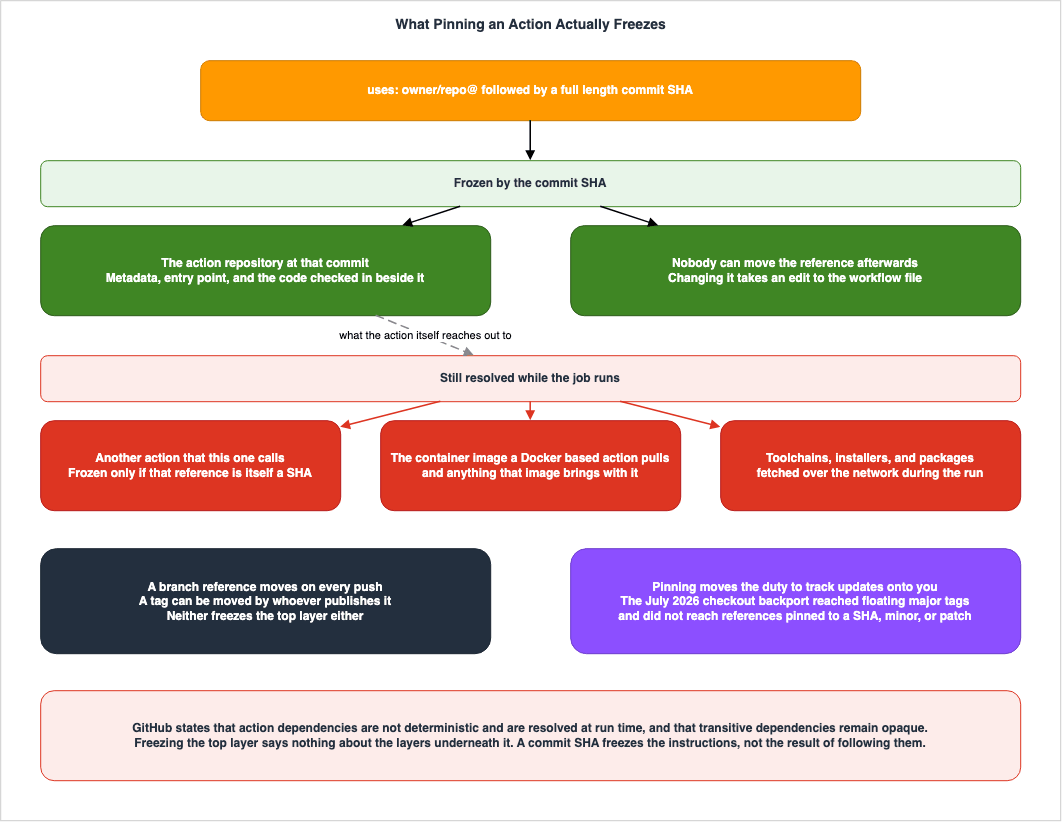
Pinning an action to a full-length commit SHA is currently the only way to use an action as an
immutable release.
It also stated what that achieves.
Pinning to a particular SHA helps mitigate the risk of a bad actor adding a backdoor to the
action's repository, as they would need to generate a SHA-1 collision for a valid Git object
payload.
⚠ This runs straight into the fact from Section 4.3. GitHub distributed the safe default in
actions/checkout by backporting it to the supported major versions. Workflows referencing a floating major tag received the fix without doing anything. Workflows pinned to a specific SHA, minor version, or patch version did not.The same mutability is the risk and the delivery channel at once. Neither reading is wrong. Pinning moves the duty of updating onto whoever pinned. If you pin, put a mechanism in place at the same time that detects updates and puts the diff in front of a reviewer. Pin without one and you stop on a vulnerable version.
6.2 What a Commit SHA Does Not Freeze
⛔ Pinning to a SHA does not make the action safe, and nothing here should be read that way. GitHub describes the current state of this area itself.Action dependencies are not deterministic and are resolved at runtime. Workflows can reference
a dependency by various mutable references including tags and branches. That means what runs in
CI isn't always fixed or auditable.And it sets out both the benefit and the limit of pinning to a commit SHA in the same paragraph.
Using immutable commit SHAs helps, but it's hard to manage at scale and transitive dependencies
remain opaque.
What gets frozen is the content of that action's repository at that commit, and nothing else. Whatever it resolves at run time sits outside the SHA. Unpacking that statement, the list covers how the references are written when the action calls another action, the image a container-based action pulls, and the toolchains and packages fetched during the run.
⚠ On composite actions, GitHub concedes the point from the other direction. Among the effects of the new dependency-locking mechanism it lists that composite actions will no longer hide nested dependencies. ⇒ Which says that as of the verification date they do hide them.
The limit follows from what the word pinning means. A commit SHA pins the instructions written there, not the result of following them. Where those instructions reach outside, that part is resolved on every run.
⇒ So think about pinning one layer at a time. Pinning the first layer is no evidence that the second is pinned. Reading that first repository tells you whether the action you use is a composite action or a container. Pin without reading it and the layer you did not read stays as it was.
6.3 The Official Position, and What Is Only on the Roadmap
As of the verification date, pinning to a commit SHA is the method the documentation calls the only one available. The word currently inside that quoted sentence is doing work. On October 17, 2026, the same page no longer contains that sentence. It states,The best measure is to lock your workflow dependencies with a lockfile. and This is the strongest protection available, and supersedes SHA pinning for repositories that adopt it. It then lists pinning to a full-length commit SHA for repositories that cannot adopt a lockfile.GitHub's roadmap, published in March 2026, outlines a mechanism for declaring dependencies within workflow YAML files. The idea is to pin both direct and transitive dependencies by commit SHA, commit the resolved result into the workflow, and surface updates as diffs in a pull request. The targets the roadmap gives are 3 to 6 months to public preview and 6 months to general availability (both measured from that article).
⛔ As of the verification date (August 25, 2026), this mechanism did not exist. On October 14, 2026, the GitHub Changelog announced,
GitHub Actions workflow dependency lockfiles are now in public preview for GitHub Enterprise Cloud, GitHub Enterprise Cloud with data residency, Team, and Free plans. As of October 17, 2026, it is a public preview, and this article does not cover it further.There is an adjacent feature that is easy to confuse with this, so keep them apart. Immutable releases, which stop release assets and tags from changing after publication, became generally available on October 28, 2025. That is about releases, not about how an action reference is resolved. The work to distribute actions themselves as immutable units sits at a later stage of the roadmap.
6.4 An Allow List Is a Different Control
A system that lists which actions are permitted is now available for all plans, as announced on February 5, 2026. Within an organization or repository settings, you can explicitly specify the actions and reusable workflows that are allowed.⚠ This setting can be overridden from a level above. The documentation states that where an organization has an overriding policy, or where the repository is managed by an enterprise that has one, the repository may not be able to manage the setting at all. ⇒ So who holds this control is not settled by looking at the repository's settings page.
This is a different axis from pinning. Pinning answers which bytes get executed. An allow list answers whose published work may be executed.
Neither substitutes for the other. A publisher on the allow list can still swap the content behind a mutable tag. An action pinned to a SHA can belong to a publisher who is not on the list. Decide the two separately.
7. Where the Approval Goes
7.1 Protection Rules Run Before the Job Does
A GitHub deployment environment can carry protection rules. GitHub evaluates those rules before the job runs.A job that references an environment must follow any protection rules for the environment
before running or accessing the environment's secrets.The documentation states the same for secrets placed on the environment.
These secrets are only available to workflow jobs that use the environment. Additionally,
workflow jobs that use this environment can only access these secrets after any configured
rules (for example, required reviewers) pass.
That order matters for a deployment to AWS. If the job does not run, the
aws-actions/configure-aws-credentials step does not run either. No ID token is exchanged, and no AWS session exists. While awaiting approval, the job has no AWS permissions whatsoever.jobs:
deploy:
environment: production # the job waits here, before any step runs
permissions:
id-token: write
contents: read⚠ Note that the unit here is the job. With build and deploy written into one job, the approval stands in front of the build. Split them and the build runs while only the deploy waits.
⚠ And what this mechanism stops is the start of the run, not the isolation of the environment it runs in. On a self-hosted runner that distinction starts to matter. Section 8.1 quotes the place where the documentation states that limit.
7.2 What Each Rule Actually Stops
Protection rules come in several types, and they prevent different things.| Rule | What it Prevents |
|---|---|
| Required reviewers | Progress with nobody looking |
| Wait timer | Progress with no delay |
| Deployment branch and tag rules | Progress from an unintended reference |
You can name up to 6 people or teams, and one of them approving is enough for the job to proceed (as of the verification date). ⚠ This is not a mechanism that requires everyone to agree. Reading 6 named reviewers as 6 approvals puts the design out of step with what the rule requires.
Two further settings sit alongside these. One stops the person who triggered a run from approving it. The other disallows administrators from bypassing the configured protection rules. ⚠ For the second, the documentation gives the step as deselecting an option rather than selecting one. So unless it is explicitly deselected, administrators can bypass.
⚠ And the terms of availability are split finely by plan. Get this wrong and the design cannot be configured as written.
If you are on a GitHub Free, GitHub Pro, or GitHub Team plan, other deployment protection
rules, such as a wait timer or required reviewers, are only available for public repositories.
⇒ To use required reviewers and wait timers in a private repository, Pro or Team plans are insufficient (as of the verification date). Environments themselves, environment secrets, and the deployment branch rules are available on Pro and Team for private repositories, but the two rules this section treats as the core of approval are not in that set. On GitHub Free, environments can be configured for public repositories only.
⚠ So a design that worked in one place will not necessarily work in another organization. Before choosing a design that relies on environment protection rules for approval, be sure to verify that those rules are available in the target repository.
7.3 The Trust Policy Sits Behind All of This
The trust policy on the AWS side stands in a different place from everything described so far. It uses conditional statements to determine which ID tokens, originating from which repositories and references, should be granted a role. AWS IAM Inbound Workload Federation holds that design.What this article writes about is what that condition does not look at. The condition looks at the name of a repository and a reference. It does not look at who can write to what those names point at. It does not look at who can change the workflow file either. From the AWS side there is no way to observe the current state of that set.
⇒ So the approval in this chapter is not a substitute for the trust policy. It is a gate placed on the side the trust policy cannot see. The two do not overlap. Having one does not remove the need for the other.
7.4 Controlling Who Can Trigger a Run at All
Every gate this chapter has described so far acts only after a workflow run has been triggered. The mechanism that narrows who can trigger a run in the first place was in public preview on the verification date and became generally available on September 17, 2026 (GitHub calls it workflow execution protections).Announced on June 18, 2026, this mechanism lets you define an allow list at the enterprise, organization, and repository levels, specifying who can trigger workflows and which events are permitted to trigger them. The former targets individual users, repository roles, and GitHub Apps, while the latter targets events such as
push, pull_request, pull_request_target, and workflow_dispatch. An evaluate mode is also available, allowing you to observe what will be blocked before enforcement.General availability added the ability to target specific workflow files (as of October 9, 2026). The general availability announcement's own example restricts
deploy.yml to a designated team while leaving CI workflows open to all contributors. ⇒ So who can trigger the workflow that assumes the AWS role can be narrowed below everyone who can write to the repository.The way this mechanism addresses the problem closely aligns with the subject of this article. The June 18, 2026 announcement explains that traditionally, workflows ran on the basis of the workflow file held in the commit that triggered them. Consequently, attackers with access to the repository could modify those files to execute arbitrary code. ⇒ Which says that the idea of defending from inside the workflow file has a ceiling. GitHub evaluates this mechanism before the run, in a different place, so it does not depend on how any individual YAML file is written.
The default settings this mechanism relies on are crucial. By default, all users with write access to a repository can trigger workflows. In other words, write access and the ability to trigger a pathway to production are not inherently separated by default.
This mirrors a previous point made in Section 2.3, which stated that users with write access can read all secrets. A single level of access - write access - bundles together the ability to modify code, handle credentials, and trigger a pathway to production. GitHub's roadmap points toward separating the handling of credentials from write access, but as of the verification date that is a plan.
⛔ The mechanism that narrows who can trigger a run moved from public preview to general availability on September 17, 2026, after the verification date, and enforcement of the default rule for
pull_request_target that came with it is planned for November 2, 2026 (Section 4.6). Check both on the day you build them into a design.8. Runners, and What Leaves the Run
This chapter covers self-hosted runners and what leaves a run. This article does not cover which runner image a GitHub-hosted runner label such asubuntu-latest resolves to, or when GitHub moves the label to a new image. That is covered in What a GitHub-Hosted Runner Label Resolves To on this site.8.1 Self-Hosted Runners and Public Repositories
The documentation rejects this combination more than once.Self-hosted runners for GitHub do not have guarantees around running in ephemeral clean
virtual machines, and can be persistently compromised by untrusted code in a workflow. As a
result, self-hosted runners should almost never be used for public repositories on GitHub,
because any user can open pull requests against the repository and compromise the environment.Another page also states the same conclusion.
We recommend that you only use self-hosted runners with private repositories. This is because
forks of your public repository can potentially run dangerous code on your self-hosted runner
machine by creating a pull request that executes the code in a workflow.
The reason lies in what is left behind between jobs. As the first sentence of that quote says, a self-hosted runner carries no guarantee of running in an ephemeral, clean virtual machine. So a compromise by malicious code does not end with that job. It can stay.
⚠ But do not read this as meaning that a private repository settles it. The documentation continues in the same section.
Similarly, be cautious when using self-hosted runners on private or internal repositories, as
anyone who can fork the repository and open a pull request (generally those with read access
to the repository) are able to compromise the self-hosted runner environment, including
gaining access to secrets and the GITHUB_TOKEN which, depending on its settings, can grant
write access to the repository.
⛔ And this is where the limit of Chapter 7 is written down.
Although workflows can control access to environment secrets by using environments and
required reviews, these workflows are not run in an isolated environment and are still
susceptible to the same risks when run on a self-hosted runner.
⇒ Environment protection rules stop a run from starting. They do not isolate the environment it runs in. On a self-hosted runner, a job that has passed approval faces the same exposure as any other if that runner has been compromised. The approval in Chapter 7 and the isolation in this section are two different problems.
⇒ There are three directions to take. Make the runner disposable per job. Put runners into groups and narrow which repositories and workflows can reach them. And keep the runner away from internal resources. The page on hardening
pull_request_target says the same thing: confirm the compute is isolated and ephemeral, and where a self-hosted runner is used, confirm it is properly restricted from internal resources and is not reused across runs.⚠ A runner defined at the organization or enterprise level needs one more consideration. The documentation states that in such cases, GitHub may assign workflows from multiple repositories to the same runner, which could result in a wider impact from a compromise.
8.2 What Log Masking Does Not Guarantee
Do not design log masking as the last line of defense. The documentation is blunt about it.Because there are multiple ways a secret value can be transformed, automatic redaction is
not guaranteed.First, you need to know where the masking happens.
Redacting of secrets is performed by your workflow runners. This means a secret will only be
redacted if it was used within a job and is accessible by the runner.
⇒ Values that leak outside of the job will not be masked. Masking is not a mechanism for tracking values; it replaces strings the runner already knows about wherever they appear in the log.
Based on this understanding, two scenarios exist where masking will not function as expected. The first involves values with a structure.
Structured data can cause secret redaction within logs to fail, because redaction largely
relies on finding an exact match for the specific secret value.
The documentation states that you should avoid embedding secrets within large blocks of data like JSON, XML, or YAML, and instead, create individual secrets for each value.
The second scenario concerns the output destination.
It's not always obvious how a command or tool you're invoking will send errors to STDOUT and
STDERR, and secrets might subsequently end up in error logs.
For values generated within a job, you must explicitly register them. If a secret is used to create another sensitive value, that generated value will not be masked unless it is also formally registered as a secret. For sensitive values that are not GitHub secrets, you can designate them for masking using the
::add-mask::VALUE workflow command.⚠ Furthermore, the documentation outlines the steps to take if a value is inadvertently logged without being masked. It says to delete that log and rotate the secret. Masking is not a mechanism that removes the need to act afterwards.
⚠ Masking in the runner and redaction rules elsewhere work differently. The runner masks a secret by its value. A logging pipeline that redacts by pattern depends on the shape of the value it is meant to catch. The
GITHUB_TOKEN is a GitHub App installation access token, and GitHub's notice of April 24, 2026, put it in the first planned stage of a new, longer format for those tokens. The announcement of October 2, 2026, says that the staged rollout is complete for newly minted installation tokens, and lists logging and secret redaction rules that only match the legacy token pattern among the things to check. It does not name the GITHUB_TOKEN. GitHub App Installation Tokens and Token Length and Format Assumptions covers that change and the places where a pipeline writes down the shape of a token.8.3 Artifacts Cross Workflow Boundaries
Artifacts are a mechanism for a job to pass files to other jobs or different workflows. At the receiving end, there is no visibility into how those files were created.The caution quoted in Section 4.2 is worth reading again here. An artifact produced by a workflow that handled untrusted input may carry the influence of that untrusted input. Take that artifact, unpack it, and run the script inside, and the separation stops meaning anything.
⇒ The receiving end of an artifact should treat it as data. The principle should be to avoid execution first, and if execution is necessary, a separate mechanism should be in place to verify the artifact's origin - which workflow and execution it came from. Software Supply Chain Security on AWS holds that method, not this article.
8.4 Caches Cross Branch Boundaries, Within Limits
Caching has rules defining which executions can restore which caches. These rules essentially define the boundaries.Workflow runs can restore caches created in either the current branch or the default branch
(usually main). If a workflow run is triggered for a pull request, it can also restore caches
created in the base branch, including base branches of forked repositories.Conversely, there are boundaries that cannot be crossed. Caches created for child branches or sibling branches cannot be restored. Furthermore, caches created through pull requests are linked to the merge reference and can only be restored from a re-execution of that pull request.
When a cache is created by a workflow run triggered on a pull request, the cache is created
for the merge ref (refs/pull/.../merge). Because of this, the cache will have a limited scope
and can only be restored by re-runs of the pull request. It cannot be restored by the base
branch or other pull requests targeting that base branch.
And on June 26, 2026, a default setting changed in this area as well. Under certain conditions, read-only cache tokens are now issued.
⚠ Two conditions must be met for this to apply. The first is that the triggering event is untrusted, meaning someone other than a repository collaborator can trigger it. The second is that the workflow's execution context and the cache's scope originate from a shared default branch's SHA.
⇒ Consequently, triggers that use scopes outside of the default branch are not eligible. The announcement specifically mentions
pull_request and release, stating that they retain read and write permissions. Other triggers that retain read and write permissions include push, schedule, workflow_dispatch, repository_dispatch, delete, registry_package, and page_build (as of the verification date).This change prevents a scenario where an untrusted trigger could pollute the default branch's cache, and then a more trusted execution would read that corrupted cache. When write access is restricted, the cache action will issue a warning, and the job will continue without saving. This does not affect restoration.
⚠ However, the announcement also outlines a workaround. If a workflow requires saving the cache, it suggests creating another workflow that is triggered by an event with read and write permissions, such as
push, and saving the cache within that workflow. Documentation related to hardening pull_request_target also states that workflows should save caches from trusted triggers. ⇒ So the write path has not disappeared. It has moved to the side that has to be built on purpose. The design question is still there.⚠ Since September 10, 2026, there is a second way back, and this one is written in the workflow file. The
cache-mode key sets cache access for a workflow or a job, and the announcement of September 10, 2026, states that it is generally available on all plans. A workflow that does not set it keeps the defaults above.An explicitly declared cache-mode also overrides the read-only cache default for low-trust
events such as pull_request_target.The announcement adds that declaring
write or write-only for these events can increase the risk of cache poisoning, and that GitHub Actions adds a warning annotation when the declared mode grants write access. ⇒ A write-capable cache-mode on a low-trust trigger is a line worth raising in review.⚠ The read-only default keeps the cache from being changed. It does not keep the cache from being read. On September 21, 2026, the Rust Security Response Team reported that Miri stored all environment variables to
target/, allowing secrets to persist in caches. Its advice applies whether or not you run Miri:Even if you do not run Miri, ensure jobs that can write to public caches do not have access to secrets.There are also rules regarding storage limits and expiration. There is a default limit on the total size of caches per repository, and entries that have not been accessed in over 7 days are deleted (as of the verification date).
8.5 Generating an Attestation Is Not Verifying One
Workflows can generate artifact attestations, providing provenance information about the outputs they create. This feature is generally available as of June 25, 2024.What the workflow side needs is a declaration of permissions and a step that generates the attestation. When proving the origin of a binary, the declaration, as documented, consists of three scopes.
permissions:
  id-token: write     # required to fetch the OIDC token
  contents: read
  attestations: write
As of the verification date, the generation step is documented as using
actions/attest@v4. For use cases involving container images or associating attestations with a list of artifacts, you need an additional scope.⚠ Do not confuse general availability with usage terms. While the feature is generally available, the available options vary depending on your plan. As of the verification date, artifact attestations are available for public repositories only on GitHub Free, GitHub Pro, and GitHub Team, and using them on a private or internal repository requires GitHub Enterprise Cloud. Generally available does not mean available to everyone on the same terms.
And, generating the attestation is only half the process. This article does not cover how the generated attestations are validated, who validates them, or how to prevent the use of invalid attestations. That design is held by Software Supply Chain Security on AWS. What this article can write goes as far as what the workflow emits.
9. Applying This to a Workflow You Already Have
This section gives the order in which to apply everything above to a workflow you already have. The order has a reason. Put the cheap change with the wide reach first, and the work that takes many lines later.| Step | Action | Items to Review | Potential Consequence of Skipping |
|---|---|---|---|
| 1 | List the triggers | Everything under on: | You put the countermeasure in the wrong place |
| 2 | Narrow the triggers that run with secrets | pull_request_target, workflow_run, issue_comment | The widest attack surface stays open |
| 3 | Check the enterprise, organization, and repository defaults | The settings page | You write permissions without being able to say what changed |
| 4 | Write permissions at the workflow level | The top level | Every job runs on the default |
| 5 | Inspect every job that carries its own permissions | Each job | A job the minimization never reached stays that way |
| 6 | Find every ${{ }} inside run: | All run: blocks | Someone else's text becomes your script |
| 7 | Take an inventory of uses: | All uses: lines | Which bytes execute stays unknown |
| 8 | Decide where the approval sits | The job that deploys | A deployment goes out with nobody looking |
| 9 | Check what leaves the run | Logs, artifacts, caches | A value you thought you had contained goes out |
| 10 | Revisit the conditions on the AWS side | Trust policy | The one part this article hands to another article stays unread |
Steps 1 and 2 come first for the reason Section 4.6 gives: changing a trigger is one line, and its reach is the widest of anything here.
Step 3 comes before step 4 for the reason Section 3.2 gives. Writing
permissions without first understanding whether the starting point is permissive or restricted makes it impossible to clearly state what changes have been made.In step 7, record three things: the resolved SHA, the version it corresponds to, and the date you checked. Record the SHA alone and you will have to work out later which version it was. Record the version alone and the pin has no meaning. And without the date you cannot tell that you missed a backport of the kind described in Section 4.3.
10. Failure Modes
10.1 Adding One Scope and Assuming the Others Are Unchanged
Addingid-token: write without understanding the statement in Section 3.1 will cause all other scopes for that job to default to none. The symptom does not appear on the line you added. It appears at the checkout step or at an API call. In the other direction, the same addition narrows something you did not intend, and a step that had been working stops without saying why.10.2 Switching to pull_request_target to Make Secrets Available
When the symptom is that secrets cannot be read in a pull request from a fork, switching to thepull_request_target trigger makes the symptom go away. It makes the trust boundary go away at the same time. Moving from the second row of the table in Section 4.1 to the third is not a fix for the symptom. It is a change of design. More often, the necessary action is to split the processing, rather than simply changing the trigger.10.3 Treating the New Checkout Default as a Complete Fix
What the June 2026 change refuses is the path throughactions/checkout and nothing else. Sections within run: that use git fetch or gh pr checkout, those that retrieve unrelated third-party repositories, or those that execute downloaded artifacts, remain unchanged.10.4 Interpolating a Context Value Directly Into a Script
When you include values like pull request titles or branch names within${{ }} directly in the run: section, those strings are treated as the body of the script. The point is that these are values someone without write access can supply, which holds regardless of the permission settings on the repository.10.5 Pinning to a Commit SHA and Stopping There
What is frozen is the content of that action's repository at that commit, and nothing more. Whatever is resolved at run time inside it is not frozen. And pinning moves the duty of tracking updates onto whoever pinned. Pin without a mechanism for tracking and you stop on a vulnerable version.10.6 Putting the Approval on the Pull Request Instead of the Deployment
Pull request reviews focus on verifying the correctness of the code. Approvals related to deployments, on the other hand, determine whether that code is ready for production. With a configuration that only includes pull request approvals, there is no opportunity for human judgment between the merge and the deployment to production. As Section 7.1 sets out, an environment's protection rules stand in front of the job.10.7 Attaching a Self-Hosted Runner to a Public Repository
As Section 8.1 sets out, this is the configuration the documentation rejects by name. The reason is that there is no guarantee of running in an ephemeral, clean virtual machine. While using disposable runners can reduce persistence, it does not replace the principle of not attaching them to public repositories.⚠ Furthermore, the assumption that moving it to a private repository resolves the issue is also incorrect. The documentation states that anyone who can fork the repository and open a pull request, generally those with read access to it, can do the same thing. Whether the repository is public or private is not the sole factor in this issue.
10.8 Assuming the Log Will Hide the Secret
Masking is not guaranteed. An exact match can fail on a structured value, and where a tool sends its errors is not obvious. Values generated during a job will not be masked unless explicitly registered.10.9 Writing the Action Version Once and Never Revisiting It
A version written once was current when it was written and will go out of date. As of the verification date,actions/checkout is at v7 and aws-actions/configure-aws-credentials is at v6. Any article or workflow that references a specific version of an action is only meaningful when considered alongside the date on which that version was used.⚠ The runner can also move under a version you never revisit. On September 23, 2026, GitHub announced that Node 20 is no longer available on GitHub Actions runners.
Runners now use Node 24 for JavaScript actions. The temporary
ACTIONS_ALLOW_USE_UNSECURE_NODE_VERSION opt-out is no longer available.
The announcement asks anyone who uses JavaScript actions to update to the latest versions of those actions that support Node 24. ⇒ A commit SHA freezes the action's code, not the runtime the runner uses to execute it (Section 6.2).
10.10 Treating the Trust Policy as the Only Boundary That Matters
The trust policy's conditions look at the name of a repository and a reference. They do not look at who can write to what those names point to. Even if the set of individuals who can modify workflow files changes, nothing happens on the AWS side. The authorization process described in Chapter 7 serves as a control point for this unseen aspect.11. Frequently Asked Questions
11.1 Is pull_request_target safe now that the checkout action refuses fork code?
No. The new default covers the path throughactions/checkout and nothing else. The documentation states that the protection does not cover fetching code with git fetch or gh pr checkout, checking out an unrelated third-party repository, or running a downloaded artifact. The privileges the trigger itself carries have not changed.11.2 Do I still need to pin actions to a commit SHA?
Yes. As of the verification date, the documentation stated that pinning to a full-length commit SHA is currently the only way to use an action as an immutable release. On October 17, 2026, the documentation instead names a workflow dependency lockfile (a public preview since October 14, 2026) as the best measure, and lists SHA pinning for repositories that cannot adopt a lockfile (Section 6.3). But pinning moves the duty of tracking updates onto you. The safe default that reached the checkout action in July 2026 arrived automatically for workflows referencing a floating major tag, and did not reach workflows pinned to a specific SHA, minor version, or patch version.11.3 If I set permissions on a job, do the workflow-level ones still apply?
No. More specific permissions will override those settings. A job that carries its ownpermissions does not inherit what you wrote at the workflow level, contents: read included. You will need to explicitly define all necessary scopes within those individual jobs.11.4 Can a pull request from a fork read my repository secrets?
When triggered by apull_request, the answer is by default, no. The documentation states that, with the exception of GITHUB_TOKEN, secrets are not passed to the runner. Furthermore, even the GITHUB_TOKEN is read-only.However, this is conditional in two ways. First, it depends on the trigger that initiated the workflow. A workflow triggered by
pull_request_target or workflow_run can reach secrets even when the pull request came from a fork. Second, for forks of private repositories, there is a setting that allows pull requests to access all secrets (as of the verification date). Therefore, simply examining the workflow file does not provide a definitive answer.11.5 Does the environment protect the AWS role, or does the trust policy?
Both of them protect something, and the two things are different. The trust policy decides which ID token, from which repository and which reference, may assume the role. The environment's protection rules decide whether the job runs at all. If the environment protection rules are not met, the job will not start, and therefore, no ID token exchange will occur. The two are not overlapping; having one does not eliminate the need for the other.11.6 Where does the OIDC configuration itself belong?
It is in AWS IAM Inbound Workload Federation. That article details the creation of the OIDC provider object, theaud and sub condition keys, and the format of the sub value for each issuer. This article only addresses the fact that the workflow file must declare id-token: write for that path to be accessible.11.7 Should this article's advice change if I use a self-hosted runner?
Yes. You have to add to it. As Section 8.1 sets out, the assumption that the job runs in an ephemeral, clean virtual machine no longer holds. So you need a configuration that disposes of the runner after each job, limits which repositories can use it, and keeps it away from internal resources.⚠ Furthermore, the approvals described in Chapter 7 do not apply to this situation. The documentation states that although a workflow can control access to environment secrets by using environments and required reviews, workflows running on a self-hosted runner remain exposed to the same risks, as they are not running in an isolated environment. Approvals are a mechanism to prevent initiation, not a means of isolation.
11.8 Can I still cache dependencies in a workflow triggered by a pull request?
Yes, both restoration and saving are possible. Sincepull_request uses a scope other than the default branch, it is not affected by the changes made on June 26, 2026. The announcement names pull_request and release and states that they keep read and write permission.As for what can be restored, a run triggered by a pull request reaches caches from the current branch, the default branch, and the base branch. Saved caches are associated with merge references, so they can only be restored from subsequent executions of that same pull request.
⚠ What becomes read-only is the untrusted trigger that runs in the default branch context, such as
pull_request_target. If you need to save caches in those cases, the documentation recommends using a separate workflow triggered by a writable event, such as push. Since September 10, 2026, a write-capable cache-mode in the workflow file can also override that default, and that day's announcement says that doing so can increase the risk of cache poisoning (Section 8.4).11.9 What is the smallest useful change to a workflow I already have?
Take an inventory of the triggers. List everything written underon: and identify which of them run with secrets. This is one line of change with the widest reach, and it takes effect before any other measure does. Chapter 9 follows that order for this reason.11.10 Does any of this transfer to a CI system other than GitHub Actions?
Yes, the structure transfers. That a run draws privilege from more than one source, that the choice of trigger sets the trust boundary, and that a line referencing an outside component carries both a pinning problem and an updating problem, hold regardless of which CI system you use. However, the default values, key names, and behavior mentioned in this article are all specific to GitHub Actions. When adapting this to other CI systems, you will need to verify the corresponding concepts using the documentation for that specific product.12. Summary
A workflow file holds the ability to write to production and is read less carefully than the application code. This article, rather than presenting a list of countermeasures, details the mechanisms behind each measure, explaining what they protect against and what they do not.There are three primary sources of permissions. These are the
GITHUB_TOKEN silently received by the job, stored secrets, and AWS roles obtained through OIDC. Because different places settle each of them, looking at any one place does not give you the total a job holds.The
permissions declaration is a statement of the full scope, not a list of differences. If you declare any permission, any unlisted scopes are treated as none. And the scope a job receives is settled in four stages. The declaration in the workflow file is the third of them, with the repository settings standing before it and the adjustment for pull requests from forks standing after it.The choice of trigger defines the trust boundary. In June 2026, the default behavior for checking out code from forks in privileged contexts changed. What that change covers is the path through the action and nothing else. The path that fetches code directly from the shell, and the triggers driven by comments, are still open. The change narrowed the attack surface. It did not close it. The boundary is not crossed by the checkout command itself, but by the subsequent line of code that executes.
Expression evaluation occurs before the shell is launched. The
run: directive does not receive parameters as a program would; it is a template, and its value becomes the body of the script. Moving the value into an environment variable cuts the path into script generation and nothing else. The value itself is still controlled by someone else.Pinning takes effect one layer at a time. A commit SHA pins the instructions written there, not the result of following them. And pinning moves the duty of tracking updates onto whoever pinned. Neglect that duty and a fix that would have arrived on its own through a floating tag never arrives.
Put the approval on the side the trust policy cannot see. Environment protection rules are in place before a job runs, so while a job is awaiting approval, it does not possess AWS permissions. The trust policy's conditions look at the name of a repository, and they do not look at who can write to what that name points to. ⚠ But what the protection rules stop is the start of the run, not the isolation of the environment it runs in. On a self-hosted runner, confusing the two leaves you unprotected.
And there are things that leave the run. Log masking is not guaranteed, and artifacts and caches each cross a boundary of their own.
For caches the default changed in June 2026 as well, and the write path did not disappear. It moved to the side that has to be built on purpose. Since September 10, 2026, a write-capable
cache-mode in the workflow file can also turn it around.Looking at the bigger picture, a similar pattern repeats itself. Withholding secrets from a pull request that comes from a fork, refusing to check out a fork's code, and stopping administrators from bypassing the protection rules - a setting can turn every one of them around. Of those three settings, only the checkout opt-out is written in the workflow file, where a review can see it. The rest sit outside it. There is a ceiling on how much you can settle about safety by reading the workflow file alone.
The verification date is August 25, 2026. Two of the default behaviors discussed in this article changed two months prior. This area is subject to change. The article does not deny the possibility that this area may have already changed by the time the reader is reviewing this information. The additions made on October 9, 2026, listed in Section 1.4, were verified on that date; the rest of the article keeps the August 25, 2026 date.
13. References
GitHub Actions- Workflow syntax for GitHub Actions
- Controlling permissions for GITHUB_TOKEN
- GITHUB_TOKEN reference
- Events that trigger workflows
- Securely using pull_request_target
- Secure use reference
- Script injections
- Managing GitHub Actions settings for a repository
- Managing environments for deployment
- Managing access to self-hosted runners using groups
- Dependency caching reference
- Using artifact attestations to establish provenance for builds
GitHub Changelog
- Safer pull_request_target defaults for GitHub Actions checkout
- Control who and what triggers GitHub Actions workflows
- Read-only Actions cache for untrusted triggers
- GitHub Actions: Early February 2026 updates
- Artifact Attestations is generally available
- Immutable releases are now generally available
- What's coming to our GitHub Actions 2026 security roadmap
- Control GitHub Actions cache access with cache-mode
- Workflow execution protections in GitHub Actions generally available
- Node 20 is no longer available in GitHub Actions
- Notice about upcoming new format for GitHub App installation tokens
- Stateless GitHub App installation tokens rolled out
Action Repositories
Rust Project
Related Articles on This Site
- AWS IAM Inbound Workload Federation - IAM Roles Anywhere, OIDC, and SPIFFE Converging on One Trust Policy Condition
- Software Supply Chain Security on AWS - Signing, Attestation, and Admission Control
- Claude Code in CI/CD and Headless Automation - Running the Agent Unattended in Pipelines
- AWS IAM Access Analyzer Deep Dive - External, Internal, and Unused Access Analyzers with Custom Policy Checks in CI
- IAM Anti-Patterns - Real-World Mistakes and Their Root Causes
- Passkeys and WebAuthn in Practice - Discoverable Credentials, Synced Versus Device-Bound Keys, and Why Account Recovery Decides the Design
- AWS Nitro Enclaves and Confidential Computing on AWS - Attestation, PCR Measurements, and KMS Condition Keys
- GitHub App Installation Tokens and Token Length and Format Assumptions - Where Validation Patterns, Storage, Proxies, and Log Redaction Hard-Code the Shape of a Token
References:
Tech Blog with curated related content
Written by Hidekazu Konishi