Publishing npm and PyPI Packages Without Long-Lived Tokens - Trusted Publishing, Staged Publishing, and What Trusted Publishing Does Not Assert
First Published:
Last Updated:
Removing long-lived tokens eliminates the need to store and rotate them, and also removes the window in which a leaked token stays usable until it is revoked. However, PyPI's Security Model notes that weaknesses in registered workflows can be equivalent to credential compromise, and encourages treating Trusted Publishers in the same way as API tokens. npm has layered staged publishing and publish-time malware scanning on top of this. Staged publishing is a system that requires a human maintainer to approve a release with 2FA before it becomes available, and became generally available on May 22, 2026. npm is targeting January 2027 to remove direct publishing with granular access tokens that have Bypass 2FA enabled.
This article lays out four things, based on npm docs, the GitHub Changelog, PyPI docs, and PEP documentation, presenting them with dates: what is eliminated and what remains when long-lived tokens are removed; what npm and PyPI each add on top; how npm's token system has evolved through various announcements; and what npm's provenance and PyPI's attestation assert, and what they do not assert. PyPI's Security Model states that Trusted Publishing does not assert the safety of the code or the trustworthiness of its authors. Similarly, the npm documentation, regarding npm provenance (including the provenance added automatically with trusted publishing), states that it does not guarantee that a package contains no malicious code.
Related articles on this site:
- Software Supply Chain Security on AWS - Signing, Attestation, and Admission Control
- Hardening GitHub Actions for AWS Deployments - Workflow Permissions, Untrusted Triggers, Action Pinning, and What the Trust Policy Cannot Catch
- Major Security Vulnerabilities History and Timeline - Disclosure, Impact, and the Response Practices They Changed
- CI/CD Tools History and Timeline - Trademarks, Acquisitions, Foundations, and Where the Build Runs
- AWS IAM Inbound Workload Federation - IAM Roles Anywhere, OIDC, and SPIFFE Converging on One Trust Policy Condition
- Passkeys and WebAuthn in Practice - Discoverable Credentials, Synced Versus Device-Bound Keys, and Why Account Recovery Decides the Design
- Agent Skills Security Vetting Guide - Static Inspection of SKILL.md and Malicious Skill Patterns
Table of Contents
- 1. The Scope of This Article and the Date It Was Verified
- 2. What Removing the Long-Lived Token Takes Away and What It Leaves Behind
- 3. The npm Trusted Publisher
- 4. How npm Tokens Changed — Announcement Dates and What Is Still Only Planned
- 5. npm Staged Publishing and Publish-Time Scanning
- 6. PyPI Trusted Publishers and Attestations
- 7. What the Publishing Records Assert and What They Do Not
- 8. Frequently Asked Questions about Trusted Publishing
- 9. Summary
- 10. References
1. The Scope of This Article and the Date It Was Verified
This section first looks at what long-lived tokens have carried until now. It then sets out the verification date and the sources read, the names this article uses for tokens, and what the article does not cover.1.1 What Long-Lived Tokens Carried
When publishing to npm or PyPI from CI environments, previously, tokens with write permissions were stored in the CI's secrets, and jobs would read and use them to publish. The "Trusted publishing for npm packages" page in the npm documentation, within the "Security best practices" section, outlines four risks associated with traditional npm tokens.They can be accidentally exposed in CI logs or configuration files
They require manual rotation and management
If compromised, they provide persistent access until revoked
They often have broader permissions than necessarySimilarly, the "Publishing to PyPI with a Trusted Publisher" page in the PyPI documentation addresses the same concerns regarding standard PyPI API tokens, noting that compromised tokens can be used until revoked.
PyPI's normal API tokens are long-lived, meaning that an attacker who compromises a package's release token can use it until its legitimate user notices and manually revokes it.In essence, long-lived tokens represented a means of carrying the authority to publish, in the form of a stored string. The responsibility for securely storing these strings, the effort required to periodically replace them, and the window of vulnerability between a potential leak and their revocation, all placed a burden on those performing the publishing.
Registry operators have also reported incidents in which such tokens were stolen or abused. On September 16, 2025, the PyPI blog reported an incident where repositories storing PyPI tokens in GitHub secrets had their workflows altered, resulting in the tokens being sent externally. PyPI invalidated the affected tokens and encouraged a transition to Trusted Publishers. On September 22, 2025, the GitHub blog announced a plan to restrict npm authentication and publishing methods as a response to token abuse and self-replicating malware. This plan appears in the row dated 2025-09-22 of Major Security Vulnerabilities History and Timeline. The specifics of these incidents are not covered in this article.
1.2 The Verification Date and the Sources Read
The information presented in this article was verified on October 9, 2026. The most recent announcements on the GitHub Changelog regarding npm's trusted publishing, staged publishing, and token changes, as of the verification date, were the two dated October 2, 2026. Because the verification date and the announcement dates are different, they will be discussed separately in the body of this article.The materials reviewed included the following. From the npm documentation, this article read specifically the pages under "Securing your code," including "Trusted publishing for npm packages," "Staged publishing for npm packages," "Generating provenance statements," "Requiring 2FA for package publishing and settings modification," and "About ECDSA registry signatures." It also read "About access tokens," "Creating and viewing access tokens," "Viewing package provenance," and the npm CLI v12.2.0 command reference, including the commands
npm stage, npm trust, npm publish, and npm token. From the GitHub Changelog, it read announcements from npm, starting from July 31, 2025, through October 2, 2026, and also three announcements from npm concerning provenance, published in 2023. It read all seven pages under "Trusted Publishers" and all five pages under "Digital Attestations" in the PyPI documentation. It also read the npm documentation page "Using private packages in a CI/CD workflow," as well as the authentication section, the section on the OIDC token exchange, and the section on the API that creates access tokens in the npm Registry API documentation. It read PEP 740 and PEP 694, as well as the GitHub Docs reference for OpenID Connect within Actions. It also read an article published on github.blog on September 22, 2025, and four articles from the PyPI blog.Each page of the npm documentation lists the date it was last updated. As of the verification date, the "Trusted publishing for npm packages" page was last edited on October 6, 2026; the "Staged publishing for npm packages" page on September 29, 2026; and the "About access tokens" page on September 10, 2026. Because npm's functionality is constantly evolving with each announcement, the information referenced from the npm documentation within this text reflects the version current as of those dates.
1.3 Terminology Used in This Article
This article distinguishes the name of the mechanism from the name of the configuration registered for it. "trusted publishing" is the name of the mechanism that exchanges the identity from the CI's OIDC for short-lived credentials and publishes with them. "trusted publisher" is the configuration registered on the package side, indicating which repositories and workflows are authorized to publish. The PyPI documentation uses capitalized "Trusted Publishing" and "Trusted Publisher," while the npm documentation uses lowercase. This article follows PyPI's capitalization when writing about PyPI and npm's lowercase when writing about npm.The terminology for tokens will be standardized as follows. npm sometimes abbreviates "granular access token" as "GAT."
| Term Used in This Article | What It Refers To | Supporting Documentation |
|---|---|---|
| Classic token | The older type of npm access token. All were revoked on December 9, 2025. | GitHub Changelog (2025-12-09) |
| Granular access token | An npm access token that allows you to specify the target package, permissions, and expiration date. | npm docs (About access tokens) |
| Bypass-2FA token | A granular access token that enables bypassing 2FA. It allows publishing without requiring 2FA prompts. | npm docs (About access tokens), GitHub Changelog (2026-07-31) |
| Stage-only token | A granular access token with "Read and write (stage only)" permissions. It allows you to stage versions but not publish them directly. | npm docs (About access tokens), GitHub Changelog (2026-09-18) |
| Session token | A token obtained through npm login that is valid for two hours. | GitHub Changelog (2025-12-09) |
| OIDC ID token | A token issued by the CI's OIDC provider and used in the exchange with the registry. | npm docs (Trusted publishing for npm packages), PyPI docs (Publishing to PyPI with a Trusted Publisher) |
| npm short-lived publishing token | A token that npm issues in exchange for an OIDC ID token. | npm docs (Trusted publishing for npm packages), npm API documentation |
| PyPI API token | A standard PyPI API token. It has a long validity period. | PyPI docs (Publishing to PyPI with a Trusted Publisher) |
| PyPI short-lived API token | A PyPI API token, valid for only 15 minutes, that PyPI issues in exchange for an OIDC ID token. | PyPI docs (Publishing to PyPI with a Trusted Publisher) |
The term "provenance" also has different meanings depending on the documentation. In this article, "npm provenance" means what npm docs calls npm provenance (provenance attestation and publish attestation). PyPI, on the other hand, uses the term "attestation" within its "Digital Attestations." The "provenance object" mentioned in PyPI documentation refers to the JSON that PyPI returns, which bundles together attestations for a single file. "SLSA Provenance" is the name of one of the attestation predicates that PyPI accepts.
1.4 Topics Not Covered
- The management of GitHub Actions workflow permissions, triggers, pinning actions, and approval locations is covered in Hardening GitHub Actions for AWS Deployments. This article covers only the point that, for the registry, a registered workflow carries the same weight as a credential.
- The exchange of OIDC from CI to AWS is covered in AWS IAM Inbound Workload Federation.
- Signing, attestation, and admission control of container images are covered in Software Supply Chain Security on AWS. This article's discussion of provenance and attestation is limited to the records of publishing to the registry.
- This article does not cover the details of incidents or attack procedures. Any incident is described in a single line, stating which assumption broke.
- This article does not address default changes on the
npm installside (such asallowScriptsin npm v12). It only states that npm v12 became generally available on July 8, 2026, and no longer executes lifecycle scripts for dependencies by default. Which package managers run install-time scripts by default, and since which version, is covered in Install-Time Scripts by Package Manager. - This article does not cover trusted publishing in other registries, such as RubyGems. The npm documentation states that npm's trusted publishing implements the OpenSSF's trusted publishers standard, placing it alongside registries such as PyPI and RubyGems. Trusted publishing on RubyGems.org, NuGet.org, crates.io, pub.dev, JSR, and Open VSX is covered in Trusted Publishing Beyond npm and PyPI.
2. What Removing the Long-Lived Token Takes Away and What It Leaves Behind
This section examines how trusted publishing replaces long-lived tokens, both in npm and PyPI. It then separates what is no longer needed from what remains, and checks what trusted publishing does not assert against the verbatim wording of the sources. Finally, it puts into one table what the receiving side can check before use and what that check does not establish.2.1 Exchange Mechanism — From OIDC ID Tokens to Short-Lived Credentials
In both registries, the process follows the same pattern. The registry is configured in advance with the CI and the workflow it accepts publishes from. The CI job obtains an ID token from its OIDC provider and sends it to the registry. The registry validates the ID token and, if it matches the configured settings, issues a short-lived credential. The job then uses that credential to publish.In npm, the npm CLI detects the OIDC environment and automatically performs this exchange. The "Trusted publishing for npm packages" page in the npm documentation states that the npm CLI uses the OIDC environment before falling back to traditional tokens. In GitHub Actions, you need to grant the workflow the
id-token: write permission. An example for GitHub Actions, as shown in the npm documentation, is:name: Publish Package
on:
push:
tags:
- 'v*'
permissions:
id-token: write # Required for OIDC
contents: read
jobs:
publish:
runs-on: ubuntu-latest
steps:
- uses: actions/checkout@v6
- uses: actions/setup-node@v6
with:
node-version: '24'
registry-url: 'https://registry.npmjs.org'
package-manager-cache: false # never use caching in release builds
- run: npm ci
- run: npm run build --if-present
- run: npm test
- run: npm publish # Or: npm stage publishIn GitLab CI/CD, the pipeline requests an ID token with the audience set to
npm:registry.npmjs.org through the id_tokens setting. In CircleCI, the ID token obtained using circleci run oidc get is placed in the environment variable NPM_ID_TOKEN. The npm documentation states that if NPM_ID_TOKEN is set, the npm CLI automatically exchanges it for a short-lived publishing token. The npm API documentation describes the tokens obtained through this exchange as having permissions limited to a specific package and a typical validity period of one hour.4. OIDC Exchange Token (oidcExchangeToken)
Short-lived tokens obtained from OIDC token exchange:
Package-scoped permissions
Limited lifetime (typically 1 hour)PyPI issues short-lived API tokens. The "Publishing to PyPI with a Trusted Publisher" page in the PyPI documentation states:
The short-lived API token behaves exactly like a normal project-scoped API token, except that it's only valid for 15 minutes from time of creationThe PyPI documentation recommends using the PyPA
pypi-publish action. You do not need to include a username, password, or API token within the workflow; you only need to grant the id-token: write permission. An example for PyPI, as shown in the PyPI documentation, is:jobs:
pypi-publish:
name: upload release to PyPI
runs-on: ubuntu-latest
# Specifying a GitHub environment is optional, but strongly encouraged
environment: pypi
permissions:
# IMPORTANT: this permission is mandatory for Trusted Publishing
id-token: write
steps:
# retrieve your distributions here
- name: Publish package distributions to PyPI
uses: pypa/gh-action-pypi-publish@release/v1The PyPI documentation strongly recommends granting
id-token: write at the job level, and advises against granting it at the workflow level. The GitHub Docs OpenID Connect reference describes what this permission allows as follows:This setting only enables fetching and setting the OIDC token; it does not grant write access to other resources.The
id-token: write permission itself does not allow writes to other resources. What allows publishing to the registry is the trusted publisher configuration registered on the registry side.2.2 What Is No Longer Needed
With trusted publishing, what is no longer needed is the long-lived write token stored in the CI environment. npm's announcement of July 31, 2025, described this as follows:No more storing, rotating, or accidentally exposing npm tokens in your CI/CD environments.The PyPI documentation explains that trusted publishing avoids long-lived token issues by ensuring that issued tokens automatically expire.
Trusted Publishing avoids this problem because the tokens minted expire automatically.The PyPI Security Model states that short-lived tokens do not need to be stored, making them less susceptible to being misplaced, leaked in logs, or stolen by malware. It also notes that even if a token is leaked, the window of time it can be used for malicious purposes is limited.
2.3 What Remains
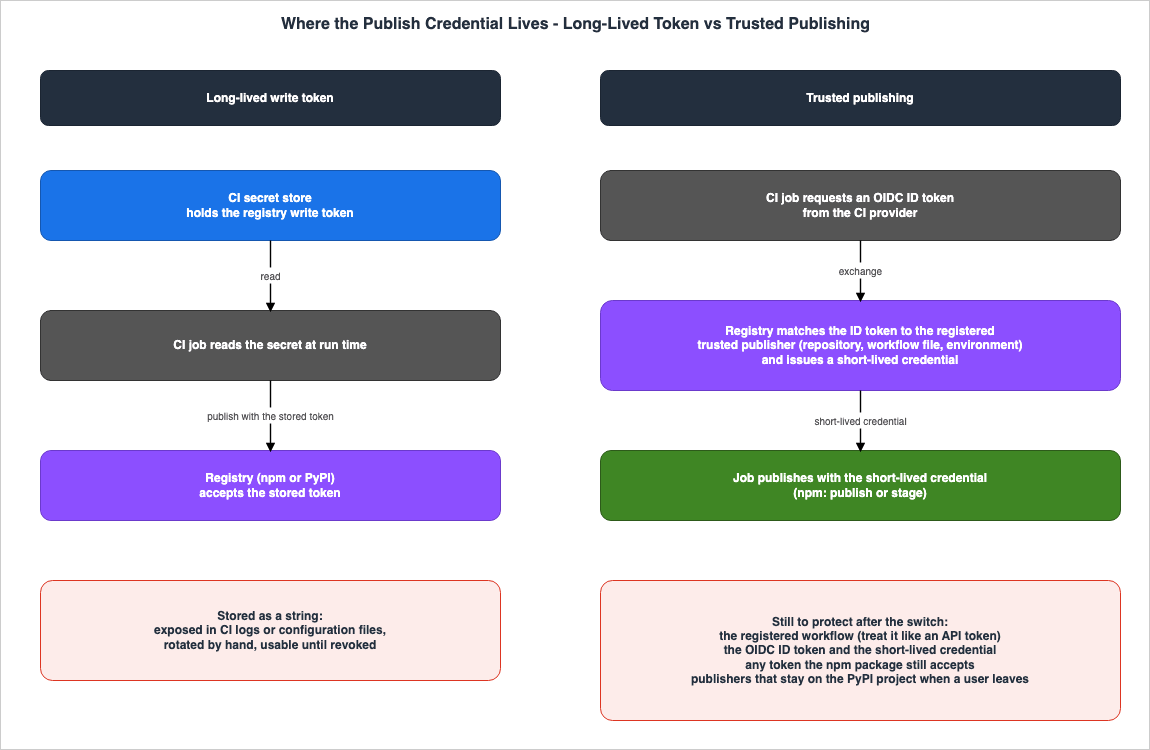
Even after removing long-lived tokens, there are still things that need to be protected. This article categorizes what remains into four areas.First, there are the registered workflows. The PyPI Security Model states that setting a Trusted Publisher means trusting a specific identity provider, such as GitHub Actions, and those who can utilize it. It then says that weaknesses in registered workflows can be equivalent to credential compromise.
In practice, this means that users of Trusted Publishing must protect and secure the CI/CD workflows that they register as Trusted Publishers, as weaknesses in those workflows can be equivalent to credential compromise.The same page summarizes this in the following sentence.
In summary: treat your Trusted Publishers as if they are API tokens. If you wouldn't let a user or piece of code access your API token, then they shouldn't be able to invoke your Trusted Publisher.npm also operates on the same principle. In its September 3, 2026 announcement, npm recommended keeping trusted publishing configurations to staging only. npm itself gives the reason as follows:
Staged publishing adds a human approval step before a version becomes available, so a compromised workflow can’t push straight to the registry.Whether a registered workflow can be rewritten, which events can trigger it, and which actions it incorporates, is determined by the workflow's design. This design is addressed in sections 3 (permissions), 4 (triggers), 6 (pinning), and 7 (approval) of Hardening GitHub Actions for AWS Deployments.
Second, there are the OIDC ID tokens and short-lived tokens themselves. The PyPI Security Model emphasizes that both short-lived API tokens and OIDC ID tokens are sensitive information that must be protected to prevent theft or leakage.
OIDC tokens themselves are also sensitive material that must be protected from getting stolen or leaked. OIDC tokens expire quickly, but an attacker who successfully intercepts one can use it to generate API tokens until it expires.In this regard, the documentation for npm and PyPI presents information differently. In its July 31, 2025 announcement, npm described the credentials used for publishing as ones that cannot be exfiltrated or reused.
Each publish is authenticated using short-lived, workflow-specific credentials that cannot be exfiltrated or reused.The "Trusted publishing for npm packages" page in the npm documentation also describes the tokens as ones that cannot be extracted or reused.
Instead, each publish uses short-lived, cryptographically-signed tokens that are specific to your workflow and cannot be extracted or reused.In its report on the September 16, 2025 incident, the PyPI blog wrote that Trusted Publisher tokens can still be exfiltrated.
While Trusted Publisher tokens can still be exfiltrated, using Trusted Publishers significantly reduces the risk of compromise.This article does not attempt to determine which of these statements is correct. It simply records that the documentation for the two registries describes the handling of short-lived tokens with different levels of emphasis.
Third, there are the traditional tokens used by npm. Even after a trusted publisher is registered, npm does not stop accepting publishes made with traditional tokens. The "Trusted publishing for npm packages" page in the npm documentation states:
When you configure a trusted publisher for your package, npm will accept publishes from the specific workflow you've authorized, in addition to traditional authentication methods like npm tokens and manual publishes.On July 31, 2025, the announcement regarding general availability stated this differently. It indicated that registering a trusted publisher would cause npm to only accept publications from workflows associated with that publisher's settings.
When you configure a trusted publisher for your package, npm will only accept publishes from the specific workflow you’ve authorized.This article follows the documentation as of the verification date. To disable publishing with tokens, you must select "Require two-factor authentication and disallow tokens" within the package's Publishing access settings (section 3.6). Furthermore, trusted publishing is not intended for installation; when adding private packages as dependencies using
npm install or npm ci, a read token is still needed (section 3.6).Fourth, on PyPI, there is the relationship between a Trusted Publisher and the person who registered it. PyPI's Security Model states, in the sections on GitHub Actions and GitLab CI/CD, that Trusted Publishers are registered to projects, not individual users. Even if a user is removed from a project, any Trusted Publisher registrations they made will remain. PyPI's Security Model recommends reviewing Trusted Publisher settings when a maintainer leaves the project.
Figure 1 illustrates where the publish credential resides, comparing long-lived tokens and trusted publishing. The lower right-hand box shows what remains even after moving to trusted publishing.
2.4 What Trusted Publishing Does Not Assert
Trusted publishing is a mechanism that replaces the publishing path with short-lived credentials. The PyPI Security Model states what Trusted Publishing does not assert, as follows:Just like normal API authentication, Trusted Publishing does not assert the safety of the code or the trustworthiness of its authors.The same page also states the following regarding modifications before and after the build process:
Trusted Publishing does not address whether the package has been modified before or after it was built. Attestations can address those risks.The attestation mentioned in the final sentence refers to PyPI's Digital Attestations (section 6.4). However, the PyPI Digital Attestations Security Model page also states that while an attestation indicates where a package originated, it does not indicate whether it is trustworthy (section 7.2). On the npm side, the "Generating provenance statements" page in the npm documentation states the following regarding npm provenance (including those automatically generated by trusted publishing):
When a package in the npm registry has established provenance, it does not guarantee the package has no malicious code.You cannot assume that a package published through trusted publishing is a safe package. The publishing record shows the path through which it was published (section 7). It is up to the reader of that record to determine whether the contents are trustworthy. This point mirrors the statements made in sections 2.1 (The Term Attestation Refers to Two Different Things) and 5.1 (Provenance Does Not Prove Reproducibility) of Software Supply Chain Security on AWS.
2.5 Origin Table — What You Receive, What Made It, What You Can Check Before Trusting It, and What the Check Does Not Establish
Before using a package version, there are four key things to verify. What are you receiving? What path was used to create and deliver it? What can you verify before using it? And what remains unknown even after verification? This article presents this information, along with supporting documentation, in a single table, which this article calls the Origin Table. This same five-column table is also used in articles on this site that deal with machine image build paths (EC2 Image Builder - Recipes, Workflows, Distribution, and Lifecycle Policies, and What the Image Resource Records About How an AMI Was Built) and the origin of benchmark numbers (LLM Evaluation Harness Settings Behind a Benchmark Score).What you receive: This refers to the item that the receiving side gets. In this article, this means the package versions and files in the registry and the records attached to them.What made it: This describes the path used to create and deliver the item. This includes workflows, credentials, and approval processes.What you can check before trusting it: This lists the records that the receiving side can check before use, along with the methods for doing so.What the check does not establish: This lists what remains unknown even after verification. Include this only when explicitly stated in the documentation.Where the source says so: This indicates the documentation that provides the basis for the information in that row.
For cells where the documentation does not provide information, write
The source does not say. Before writing this, search the full text of the document referenced by that row, as well as the link it points to, using the words not, does not, cannot, only, not supported, still, and must, and the subject of that row. If the documentation only provides general principles and does not specifically address the subject of that row, note this in the cell.| What you receive | What made it | What you can check before trusting it | What the check does not establish | Where the source says so |
|---|---|---|---|---|
| An npm package with npm provenance attached | A workflow from GitHub Actions (on GitHub-hosted runners) or GitLab CI/CD (on GitLab.com shared runners) that published it as a public package from a public repository. Trusted publishing includes it by default. When publishing with a token, use the --provenance flag (section 3.5). | The green checkmark on the package's page, along with its details (build environment, workflow execution, source commit, build file, and the public ledger). Verify using npm audit signatures (section 7.1). | The npm documentation states that even with provenance established, it does not guarantee that the package is free from malicious code. It also says that provenance may no longer be established if the repository is deleted or made private. | npm docs (Generating provenance statements, Viewing package provenance, Trusted publishing for npm packages) |
| An npm package without npm provenance | Trusted publishing from CircleCI, publishing from a private repository, or publishing with a token that doesn't include the --provenance flag. The npm documentation states that provenance is not created when publishing from CircleCI or private repositories (section 3.5). | Registry signatures (npm audit signatures). The purpose, as stated in the npm documentation, is to detect tampering on registry mirrors or proxies. | The documentation on ECDSA registry signatures specifies that the signatures are intended to detect tampering on registry mirrors or proxies, but does not explicitly mention the publishing path. | npm docs (Trusted publishing for npm packages, About ECDSA registry signatures, Generating provenance statements) |
| An npm package that has been approved through staged publishing | A version that was placed in the stage using npm stage publish and subsequently approved by a maintainer using 2FA after the publish-time scan is complete. Versions can be placed in the stage from trusted publishing (when configured to allow staging), stage-only tokens, other tokens, or a local session (sections 3.4 and 5). | npm provenance (npm stage publish has the same --provenance setting as npm publish). GitHub Changelog (2026-09-03) states that the versions tab on npmjs.com shows each maintainer a per-version history. It does not say that consumers can see it. | The npm stage documentation states that adding staged publishing does not make your account or organization more secure. Regarding the publish-time scan, GitHub Changelog (2026-07-28) states that npm blocks the malware it can detect. | npm docs (Staged publishing for npm packages), npm CLI (npm stage), GitHub Changelog (2026-07-28, 2026-09-03) |
| A PyPI file with a PyPI Publish attestation | A file uploaded by a workflow registered as a Trusted Publisher, using a short-lived PyPI API token. The PyPA pypi-publish action automatically creates an attestation by default (section 6.4). | The provenance object returned by PyPI's Integrity API. pypi-attestations verify pypi --repository checks whether the Trusted Publisher of the specified repository signed it (section 7.2). | PyPI documentation states that an attestation indicates where a package came from, but does not indicate whether it should be trusted. It also says it does not show whether the signing identity should be trusted, or whether malicious or vulnerable code was added before or during the build. | PyPI docs (Publishing to PyPI with a Trusted Publisher, Introduction to Digital Attestations, Consuming attestations, Security model and considerations, PyPI Publish Attestation (v1)) |
| A PyPI file without an attestation | A file uploaded without an attestation. The PyPI Publish Attestation (v1) documentation states that this attestation allows you to distinguish between uploads through a Trusted Publisher and uploads using other methods, such as a local API token. PyPI rejects attestations that are not signed by a Trusted Publisher at the time of upload. | The absence of an attestation or a change in the signing entity. PyPI documentation states that users can notice these differences automatically and begin to remediate. | The Security Model documentation for Digital Attestations generally states that an attestation indicates origin but not whether you should trust it, and that the user makes the trust decision. It does not name what the absence of an attestation fails to show. | PyPI docs (Producing attestations, Security model and considerations, PyPI Publish Attestation (v1)) |
| The PyPI-provided attestation itself | The identity of the Trusted Publisher who signed it, along with Sigstore's certificate and transparency logs, and the PyPI that distributes it. | Rekor's inclusion proof and the inclusion proof from Fulcio's certificate transparency log. PyPI documentation states that it does not consider an attestation verified unless it includes both of these. | PEP 740 states that it neither increases nor decreases trust in the index. It also notes that a dishonest index that can modify package contents can also modify or omit attestations. | PyPI docs (Security model and considerations for Digital Attestations), PEP 740 (Index trust) |
The table does not contain any cells indicating
The source does not say. The What the check does not establish cells in rows 2 and 5 reflect the fact that the documentation only mentions general rules and does not specifically name the subject of those rows. Regarding row 5, the PyPI documentation suggests that a change in the signed Trusted Publisher might indicate a potential malicious takeover of the project's management. Concerning the removal of the attestation, the documentation only states that users can notice the difference automatically and begin to remediate.3. The npm Trusted Publisher
This section outlines the requirements and limitations for registering trusted publishers within npm packages, referencing the npm documentation and npm CLI command reference. npm trusted publishers come with conditions on which CI systems can be registered, how many can be registered, how they are changed, which operations they allow, and how provenance is attached.3.1 Items to Register
Trusted publishers are registered within the Trusted Publisher section of the package settings on npmjs.com. The items listed on the "Trusted publishing for npm packages" page in the npm documentation are as follows, for each CI system:| CI | Required Items | Optional Items |
|---|---|---|
| GitHub Actions | Organization or user, Repository, Workflow filename | Environment name, Allowed actions |
| GitLab CI/CD | Namespace, Project name, Top-level CI file path | Environment name, Allowed actions |
| CircleCI | Organization ID, Project ID, Pipeline definition ID, VCS origin | Context IDs, Allowed actions |
For GitHub Actions, the Workflow filename should only contain the filename itself, without any path. The file extension must be
.yml or .yaml, and the file must be located within the repository's .github/workflows/ directory. The Environment name is used when the publishing job is protected with a GitHub environment. Allowed actions are discussed in section 3.4.The npm documentation states that npm does not verify the registered configuration when it is saved.
Note: npm does not verify your trusted publisher configuration when you save it. Double-check that your repository, workflow filename, and other details are correct, as errors will only appear when you attempt to publish.Since the announcement of October 2, 2026, a configuration that has not been validated by a successful publish also expires (see section 3.3).
The Troubleshooting section on the "Trusted publishing for npm packages" page lists other potential issues. All items are case-sensitive and must match exactly. When publishing from GitHub, the
repository.url in package.json must match the GitHub repository exactly. For configurations that call another workflow using workflow_call or publish manually using workflow_dispatch, the matching is performed against the name of the calling workflow, rather than the workflow containing the publishing command. In such cases, the id-token: write permission must be granted to both the calling workflow and the workflow being called.The event that starts the workflow also matters. The announcement of October 2, 2026, states:
npm also now rejects trusted publishing tokens from GitHub Actions issue_comment events, alongside the existing pull_request_target restriction. If affected, move publishing to a permitted event such as push, release, or workflow_dispatch.The "Trusted publishing for npm packages" page (edited on October 6, 2026) does not name either event. This article did not find when npm began rejecting tokens from
pull_request_target. How PyPI's Security Model treats pull_request_target is covered in section 6.3.The npm CLI includes
npm trust, a command that allows you to configure trusted publishing from the command line. The npm trust documentation for npm CLI v12.2.0 lists the following prerequisites: npm version 11.15.0 or higher; permission to write to packages; and two-factor authentication (2FA) enabled on your account. The package must also already exist in the registry. Bypass-2FA tokens cannot be used for authentication with npm trust. As announced on July 31, 2026, changes to trusted publishing configuration can no longer be made using bypass-2FA tokens; instead, interactive 2FA is now required (see section 4.4). The announcement of October 2, 2026, states that a package that does not yet exist can now be created with npm stage publish, and that trusted publishing can be configured after the package is created (see section 5.1).3.2 Supported CI Systems and Self-Hosted Runners
npm documentation limits the CI systems that support trusted publishing to only three.GitHub Actions (GitHub-hosted runners)
GitLab CI/CD Pipelines (GitLab.com shared runners)
CircleCI (CircleCI cloud)GitHub Actions and GitLab CI/CD have been supported since trusted publishing became generally available on July 31, 2025. CircleCI was added on April 6, 2026. All three are limited to runners operated by the CI provider. The npm documentation states the following regarding self-hosted runners:
Self-hosted runners are not currently supported but are planned for future releases.The same page, in the "Limitations and future improvements" section, also states that support for self-hosted runners is planned for a future release. As of the verification date, npm's trusted publishing feature is not available when using self-hosted runners. While support is planned, no specific timeframe has been provided.
The npm documentation also words the supported CI systems differently on different pages. The "Using private packages in a CI/CD workflow" page (edited on December 10, 2025) lists only GitHub Actions and GitLab CI/CD as CI systems that support trusted publishing. This is an earlier version, prior to CircleCI's addition on April 6, 2026. To confirm the current list of supported CI systems, it's best to check the "Trusted publishing for npm packages" page.
3.3 Number of Configurations and How to Change Them
The npm documentation page on "Trusted publishing for npm packages" states that a single package can have up to 10 trusted publishers registered simultaneously. This is to allow publishing the same package from different CI environments or different workflows. Once a connection is registered, its provider and required fields cannot be modified.Note: Existing trusted publisher connections cannot be changed. The provider and required fields for a connection are fixed once it's created. To change them, delete the connection and create a new one.A new connection also has to be validated. The announcement of October 2, 2026, states:
Unvalidated npm trusted publishing configurations now expire 48 hours after creation and can no longer authorize publishing. This limits the risk of trusting a repository or project name that changes ownership.According to the same announcement, the first successful publish validates a configuration and exempts it from expiry, and an expired configuration remains visible in the trusted publisher settings but does not count toward the per-package limit. The "Trusted publishing for npm packages" page (edited on October 6, 2026) gives the deadline as 2 days. It states that an expired configuration can no longer be used or edited, and that you delete it, create a new one, and complete the first publish within 2 days.
The ability for a single package to have multiple configurations came with the September 3, 2026 announcement. This announcement explains how multiple configurations are evaluated:
Each configuration is independent and additive, with its own repository, workflow, and environment criteria. You can add, list, and remove them from your package’s settings page. A publish or stage is authorized if the incoming OIDC token matches any one configuration. Configurations never restrict one another, and evaluation order is not guaranteed, so don’t build logic that depends on which configuration matches.Adding a configuration is equivalent to adding an accepted publishing pathway. Adding a configuration does not restrict the conditions of other existing configurations. npm itself writes that logic should not depend on which configuration matches.
Regarding the number of configurations, the npm CLI documentation for
npm trust stated the following as of the verification date. This page was last edited on June 2, 2026, and predates the September 3, 2026 announcement that introduced multiple configurations.Currently, the registry only supports one configuration per package. If you attempt to create a new trust relationship when one already exists, it will result in an error.The required version of
npm trust also differs between sources. An announcement from February 18, 2026, introduced bulk configuration with npm trust as a feature of npm CLI version 11.10.0 or later. The npm trust documentation page, as of the verification date, requires version 11.15.0 or later. For the number of trusted publishers, this article follows the 10 given in the documentation. The September 3, 2026 announcement states that a package can have more than one configuration, but does not specify a maximum number. Using npm CLI version 11.15.0 or later will satisfy the requirements outlined in either documentation source.3.4 Permitted Operations — Stage, Direct Publishing, and Dist-Tags
Trusted publishers can configure permitted operations. The npm documentation, specifically the "Trusted publishing for npm packages" page, describes Allowed actions, in the fields for every CI, as follows:Allowed actions (optional): npm stage publish is always allowed. Choose whether this trusted publisher can also publish directly with npm publish or manage dist-tags with npm dist-tag. These permissions are independent.npm stage publish is a command that places a version in a staging area, awaiting approval from a maintainer (section 5). npm publish directly publishes a version. As of the verification date, newly created trusted publishers are always permitted to stage versions, while direct publishing and dist-tag management are each allowed or not per configuration. However, as detailed below, older configurations are an exception.This default behavior has changed over time. The announcement on May 22, 2026, coinciding with the general availability of staged publishing, stated that trusted publishing configurations could be limited to staging only.
A trusted publishing configuration can be limited to stage-only, which means npm publish from that workflow will be rejected and only npm stage publish is accepted.On September 3, 2026, the announcement made staging the default. All configurations are, by default, permitted to stage versions, while direct publishing is enabled on a per-setting basis.
Every trusted publishing configuration can stage a package by default. Direct publishing is opt-in per configuration. We recommend keeping your configurations to staging only.The npm documentation addresses how existing configurations are handled based on their creation date.
Note: Trusted publisher configurations created before May 20, 2026 are automatically set to allow npm publish only — no behavior change occurs for current workflows. Configurations created before Sep 03, 2026 require you to explicitly select at least one allowed action — no behavior change occurs for current workflows. Configurations created after Sep 03, 2026 are automatically set to allow npm stage publish, and you can choose whether to also permit direct publishing with npm publish.Configurations created before May 20, 2026, are only permitted to perform direct publishing. If you switch these configurations to use
npm stage publish, you will need to review the permitted operations. The date mentioned in the documentation (May 20) and the announcement date for the general availability of staged publishing (May 22) differ by two days. This article lists both as dates written in their respective sources.The
npm trust command also allows you to specify permitted operations. --allow-publish permits npm publish, while --allow-stage-publish (also known as --allow-staged-publish) permits npm stage publish. When creating a configuration, you must specify at least one of these options.The actions that can be performed using a short-lived token obtained through trusted publishing are limited to publishing, staging, and, where the configuration allows them, dist-tag operations. The npm documentation states:
OIDC authentication supports npm publish, npm stage publish, and the dist-tag operations described above. Other stage subcommands (npm stage list, npm stage view, npm stage approve, npm stage reject) require interactive authentication and cannot use OIDC tokens, as these actions require proof of presence and can only be performed via the CLI or npmjs.com. Other npm commands such as install, view, or access still require traditional authentication methods.CI workflows can stage versions, but cannot approve them themselves. Approval requires a human maintainer to respond to 2FA (two-factor authentication) through the CLI or npmjs.com (section 5.1).
The dist-tag permission was added in the September 30, 2026 announcement. According to the npm documentation, selecting "Allow npm dist-tag" for a trusted publishing configuration lets the workflow in that configuration manage the package's dist-tags with
npm dist-tag. This option is disabled by default, and the announcement states that it is off by default for both new and existing configurations. The dist-tag permission is independent of direct publishing and can also be granted to a configuration that allows only staging. Permission to publish or stage does not automatically include it. The npm documentation lists 11.21.0 (or later) and 12.2.0 (or later) as the required npm CLI versions.The npm API documentation states that the tokens obtained through exchange can be used for
Package publishing and management operations, and that if the trusted publisher configuration explicitly grants manageDistTags, they can also be used for dist-tag operations. The npm documentation's "OIDC authentication supports ..." statement quoted above limits the usable commands to publishing, staging, and dist-tag operations. The npm CLI's npm stage page (edited on September 24, 2026) still states, as of the verification date, that short-lived tokens issued through trust relationships can only be used with npm stage publish and npm publish. For the usable commands, this article follows the "Trusted publishing for npm packages" page.3.5 Provenance: Automatically Generated and Cases Where It Is Not
npm's provenance is a record indicating where and how a package was built (see section 7.1). When publishing with trusted publishing, the npm CLI automatically creates and publishes provenance information. There is no need to use the--provenance flag. According to the npm documentation, provenance is automatically generated under three conditions.Publishing via trusted publishing (OIDC)
Publishing from a public repository
Publishing a public packageIn addition, provenance is generated automatically only when publishing from GitHub Actions or GitLab CI/CD. The npm documentation states the following regarding CircleCI and private repositories:
Note: Provenance generation is not currently supported for CircleCI. Packages published via CircleCI trusted publishing will not include provenance attestations.Note: Provenance generation is not supported for private repositories, even when publishing public packages.Packages published from CircleCI using trusted publishing, and those published from private repositories, will not have provenance information attached. This applies even to publicly published packages. The "Generating provenance statements" page in the npm documentation also lists GitHub Actions and GitLab CI/CD as the only CI systems that can generate provenance.
Provenance is a feature that existed prior to trusted publishing. According to the GitHub Changelog, npm's provenance was released as a public beta on April 19, 2023, and became generally available on September 26, 2023. Since the July 2023 announcement, it is not possible to publish provenance for packages originating from private repositories, even when publishing publicly. If publishing without trusted publishing, using a token, ensure that the
repository field in package.json matches the public repository from which the package originates. Then, execute npm publish --provenance from the corresponding CI system's cloud runner. The history and timeline of provenance becoming a standard feature within CI/CD tools is covered in the table covering 2023 to 2026 in CI/CD Tools History and Timeline.Automatic provenance can also be turned off. The npm documentation lists three ways to do so: the environment variable
NPM_CONFIG_PROVENANCE=false, the provenance=false setting in .npmrc, and publishConfig in package.json. However, npm strongly recommends keeping it enabled. The npm CLI's npm publish page states that when the provenance-file setting is configured, it takes precedence over automatically generated trusted publishing provenance.3.6 Authentication Outside of Trusted Publishing
Trusted publishing handles only publishing, staging, and, where the configuration allows them, dist-tag operations. For all other operations, traditional authentication methods remain in place.First, there's the action of adding private packages as dependencies. The npm documentation states that
npm install and npm ci for adding private packages still require read tokens, and recommends using read-only, granular access tokens.If your package has private dependencies and npm install or npm ci is failing with authentication errors, remember that trusted publishing is not intended for npm install. You'll still need to provide a read-only token for installing private packages as shown in the examples above.Second, there is publishing with traditional tokens itself. As seen in section 2.3, even after a trusted publisher is registered, npm will continue to accept publishing using traditional tokens. The npm documentation strongly recommends that once a trusted publisher is registered, you select "Require two-factor authentication and disallow tokens" in the package's Settings under "Publishing access."
The npm documentation page "Requiring 2FA for package publishing and settings modification" (edited August 3, 2026) lists two options for "Publishing access."
| Option | npm Documentation Description |
|---|---|
| Require two-factor authentication or a granular access token with bypass 2fa enabled | The default for new packages. Maintainers must have two-factor authentication enabled, and two-factor authentication will be required for interactive publishing. Non-interactive publishing is also possible using a bypass-2FA token. |
| Require two-factor authentication and disallow tokens | The option recommended by the npm documentation. Maintainers must respond to two-factor authentication prompts to publish. Granular access tokens cannot be used for publishing, regardless of the Bypass 2FA setting. |
The npm documentation notes that even if you select "disallow tokens," trusted publishers will continue to function.
Note: The "disallow tokens" setting only affects traditional token authentication. Your trusted publishers will continue to work normally, as they use OIDC tokens.The npm documentation recommends the following migration steps: first, configure trusted publishing and verify that you can publish, and then restrict token access and revoke the tokens that are no longer needed.
4. How npm Tokens Changed — Announcement Dates and What Is Still Only Planned
The mechanisms behind npm tokens have undergone several changes over a period of more than a year following the general availability of trusted publishing on July 31, 2025. These changes have been announced on the GitHub Changelog. Subsequent announcements may modify the conditions outlined in earlier announcements. This section will list the announcements in chronological order, differentiating between those that were planned and those that were actually implemented.4.1 Announcements by Date
The following table lists announcements related to npm tokens, trusted publishing, and staged publishing, organized by date. Only the entry for September 22, 2025, is a post on github.blog, rather than a GitHub Changelog entry.| Date | Announcement | Changes or Updates |
|---|---|---|
| 2025-07-31 | npm trusted publishing with OIDC is generally available | Trusted publishing is now generally available. Supported platforms include GitHub Actions (using GitHub-hosted runners) and GitLab CI/CD (using shared runners from gitlab.com). Requires npm CLI version 11.5.1 or later. Trusted publishing automatically publishes provenance information. |
| 2025-09-22 | Our plan for a more secure npm supply chain (github.blog) | As a plan, stated that authentication and publishing would be narrowed to three: local publishing with required 2FA, granular tokens limited to a 7-day lifetime, and trusted publishing. |
| 2025-09-29 | Strengthening npm security: Important changes to authentication and token management | Announced that newly created write-enabled granular access tokens would have a default expiration of 7 days (previously 30 days) and a maximum of 90 days (previously no maximum). Also announced the revocation of classic tokens and a stop to new TOTP 2FA setups. |
| 2025-11-05 | npm security update: Classic token creation disabled and granular token changes | Stopped the creation of new classic tokens and said existing classic tokens would keep working until November 19, 2025. New write tokens now require 2FA by default, and a Bypass 2FA option is available for CI/CD environments (disabled by default). |
| 2025-12-09 | npm classic tokens revoked, session-based auth and CLI token management now available | All classic tokens have been revoked. Using npm login now generates a 2-hour session token. New packages now require 2FA by default. |
| 2026-02-18 | npm bulk trusted publishing config and script security now generally available | You can now configure trusted publishing for multiple packages at once using npm trust (requires npm CLI version 11.10.0 or later). |
| 2026-04-06 | npm trusted publishing now supports CircleCI | CircleCI has been added as an OIDC provider. |
| 2026-05-22 | Staged publishing and new install-time controls for npm | Staged publishing is now generally available (requires npm CLI version 11.15.0 or later). A trusted publishing configuration can now be limited to stage-only. |
| 2026-06-25 | npm adds preventive account protection for high-impact accounts | For high-impact accounts, any changes to the email address or the use of 2FA recovery codes will result in a 72-hour read-only restriction on the account. |
| 2026-07-08 | npm install-time security and GAT bypass2fa deprecation | npm version 12 is now generally available. It announced the start of the deprecation of the most sensitive uses of bypass-2FA tokens. It said that removal from account management operations was expected around the beginning of August 2026, and removal from direct publishing around January 2027. |
| 2026-07-28 | npm publish-time malware scanning and dual-use metadata | Started publish-time malware scanning (section 5.3). |
| 2026-07-31 | Restricting npm bypass-2FA granular access tokens | Bypass-2FA tokens can no longer create or delete tokens, change package access, maintainers, or trusted publishing configuration, or manage organizations and teams. Stated that removing direct publishing is targeted for January 2027. |
| 2026-09-03 | Multiple trusted publishing configurations for npm | A single package can now have multiple trusted publishing configurations. Every configuration can stage by default, and direct publishing is enabled per configuration. Staged packages can be approved only after the malware scan completes, and staged history is now visible to maintainers. |
| 2026-09-09 | npm extends recovery-code security holds to all accounts | The 72-hour security hold after signing in with a recovery code is now applied to all accounts. |
| 2026-09-18 | Stage-only npm tokens for safer automation | Stage-only tokens (Read and write (stage only)) have been added. Restated, as a target, removing direct publishing with bypass-2FA tokens in January 2027. |
| 2026-09-30 | Opt-in dist-tag permissions for npm trusted publishing | Trusted publishing configurations can now be granted permission to manage dist-tags (Allow npm dist-tag), configuration by configuration. It is off by default for both new and existing configurations and is independent of direct publishing. |
| 2026-10-02 | npm staged publishing now supports creating new packages | A new package can now be created with npm stage publish, using a local session or a granular access token, including a stage-only token. The first version enters the staged queue and must be promoted by a maintainer before it can be installed. |
| 2026-10-02 | Unvalidated npm trusted publishing configurations now expire | A trusted publishing configuration that has not completed its first successful publish expires 48 hours after creation. npm also rejects trusted publishing tokens from GitHub Actions issue_comment events, alongside the existing pull_request_target restriction. |
4.2 Planned vs. Actual Implementation
Within the same set of documents, planned activities are listed alongside their actual implementation. There are instances where the planned date and the actual implementation date do not align. This article will present the planned activities as originally stated, and will record the actual implementation based on the date of the announcement regarding that implementation.Comparing the planned activities for September 22, 2025, as outlined on github.blog, with the subsequent actual implementation, reveals two discrepancies. The first concerns granular tokens, specifically lifetime. The plan initially stated that lifetime would be limited to a 7-day validity period. However, the announcement on September 29, 2025, stated that the validity period for newly created write tokens would be a default of 7 days, with a maximum of 90 days. The 90-day maximum was implemented as announced on November 5, 2025. No announcement within the scope of this article states that the 7-day default took effect. However, the npm API documentation, in its description of
expires for the API that creates access tokens, states that write tokens (including stage-only tokens) default to 7 days, with a maximum of 90 days. The second discrepancy relates to the default settings for Publishing access. The plan initially stated that the default setting would restrict tokens. However, the npm documentation (Requiring 2FA for package publishing and settings modification, last edited on August 3, 2026) indicates that the default for new packages remains the option to require either 2FA or a bypass-2FA token (see section 3.6).There are also instances where the dates shifted. The announcement on November 5, 2025, stated that existing classic tokens would remain valid until November 19, 2025. The announcement on December 9, 2025, stated that all classic tokens had been revoked. Regarding account management operations, the announcement on July 8, 2026, indicated an expected timeframe for early August 2026, while the announcement on July 31, 2026, confirmed the implementation.
Information regarding npm v12 also remains, showing both planned and actual timelines. The announcement on June 9, 2026, stated that the release of v12 was expected in July 2026. The announcement on July 8, 2026, confirmed the general availability of v12.
4.3 The January 2027 Target — How the Changelog and the Documentation Word It
The timeline for removing direct publishing with bypass-2FA tokens is outlined in three announcements, all of which use tentative language.The announcement from July 8, 2026, stated:
We expect this change to take effect around January 2027.The announcement from July 31, 2026, stated:
We are targeting January 2027 for this update.The announcement from September 18, 2026, stated:
As previously announced, npm is targeting January 2027 to remove direct publishing through bypass-2FA tokens.In contrast, the "About access tokens" page in the npm documentation (edited on September 10, 2026) states the same information in a definitive manner. Furthermore, the scope of what is being removed is broader than described in the announcements.
Bypass-2FA tokens with direct-publish access are being deprecated. The ability to publish new package versions directly with a granular access token will be removed in January 2027.The announcements specify that direct publishing is being removed for bypass-2FA tokens. The documentation, in its second sentence, states that this applies to direct publishing with granular access tokens. At the end of the same page, the documentation describes the status as of the verification date:
At the moment, bypass-2FA tokens can still be used for direct publishing. For CI/CD publishing, consider adopting trusted publishing instead.The npm API documentation, as of the verification date, also states that direct publishing is still functional with bypass-2FA tokens, but is not permitted with stage-only tokens.
As of the verification date, direct publishing is still possible with bypass-2FA tokens. npm is targeting January 2027 to remove it. All three announcements use tentative language. The announcement from July 8, 2026, uses the term "expect," while the announcements from July 31, 2026, and September 18, 2026, use the term "targeting." This article presents this information as a planned course of action. The differences in definitiveness and the scope of what is being targeted are listed as a difference between the sources. The timing may be subject to change in future announcements.
The migration path recommended in the three announcements is the same: to move automated publishing to either trusted publishing (OIDC) or staged publishing, which adds a human approval step. The announcement from September 18, 2026, presented stage-only tokens as a migration path for token-based automation that cannot move to trusted publishing right away (see section 5.2).
4.4 Account Protection
Apart from the publishing path, there have also been ongoing changes to protect the accounts themselves.Since the announcement on July 31, 2026, bypass-2FA tokens no longer allow users to perform actions related to account and package management. The "About access tokens" page in the npm documentation states that this change took effect in August 2026. That same page lists five actions that always require interactive 2FA: changing email addresses or passwords; modifying or disabling 2FA settings; creating, escalating, or managing access tokens; adding or removing package maintainers; and managing organizations and teams. The announcement of July 31, 2026, lists three items – token creation and deletion, changes to package access, maintainer, and trusted publishing configuration, and management of organizations and teams – at a different granularity from the documentation. npm's API documentation explicitly states that the list of actions that will be rejected is not exhaustive.
Restrictions have also been applied to changes involving recovery codes and email addresses. An announcement on June 25, 2026, stated that accounts experiencing changes to email addresses or the use of 2FA recovery codes would be placed in a 72-hour read-only status for high-impact accounts. Subsequently, an announcement on September 9, 2026, extended this 72-hour hold to all accounts following a sign-in using a recovery code. During this hold, actions such as publishing and creating access tokens are temporarily disabled.
Changes have also been made to 2FA methods. An announcement on September 29, 2025, said that new TOTP-based 2FA setups would be disabled starting in early October 2025, and asked that new 2FA setups use WebAuthn or passkeys. The same announcement said that existing TOTP configurations would continue to work for now and would be phased out over the coming months. The design and implementation of passkeys and WebAuthn are discussed in Passkeys and WebAuthn in Practice.
5. npm Staged Publishing and Publish-Time Scanning
Staged publishing is a system that places a human maintainer's approval as the final step in the publication process. Both trusted publishing workflows and automation using stage-only tokens can be set up so that they can only place versions in the stage. This section examines the steps from staging to approval, the paths each token type can take, the order relative to the publish-time scan, and what staged publishing does not guarantee.5.1 Three Steps — Stage, Review, Approve
The npm documentation page on "Staged publishing for npm packages" describes staged publishing as follows:Instead of publishing directly with npm publish, you can submit packages to a staging area with npm stage publish. A maintainer must then review and explicitly approve the staged package — with two-factor authentication (2FA) via the CLI or npmjs.com — before it becomes publicly available.The announcement for the general availability on May 22, 2026, states the following regarding those who can approve:
A human maintainer with a 2FA challenge is required to approve a staged package before it is released to the registry.To use staged publishing, you need the necessary permissions to publish packages and have two-factor authentication (2FA) enabled on your account. You also need npm CLI version
11.15.0 or higher, and Node version 22.14.0 or higher. The process is divided into three steps:- Stage: Run
npm stage publish. According to the npm documentation, this command will not prompt for 2FA. - Review: Use
npm stage listto view the versions currently in the stage. Usenpm stage view <stage-id>to see details, andnpm stage download <stage-id>to download the tarball and inspect its contents. You can also verify on the "Staged Packages" tab on npmjs.com. - Approve or Reject: Approve using
npm stage approve <stage-id>or by clicking "Approve" on npmjs.com. Both options will require 2FA. To reject, usenpm stage reject <stage-id>. This will completely remove the version from the stage. Rejection also requires 2FA.
When you place a package that doesn't yet exist in the registry into the stage, npm will publish a version with the name
0.0.0-stage. The npm documentation states:This placeholder version is publicly available, but the staged version and its contents are not publicly available until a maintainer approves the staged package.The announcement of October 2, 2026, states that a new package can be created this way, using a local session or a granular access token, including a stage-only token, so that packages can be created from automated workflows without a manual first publish. The first version enters the staged queue, and a maintainer must promote it before that version becomes available to install.
The npm CLI's
npm stage page also describes other behaviors. Versions in the stage share the same semver version number index as published versions, so you cannot publish a version with the same number. While a version is in the stage, you can still perform regular publishing. You can place multiple versions of a single package into the stage. The --tag cannot be changed after a version is placed in the stage; to change it, you must reject the version and re-place it.5.2 Which paths can each token type take?
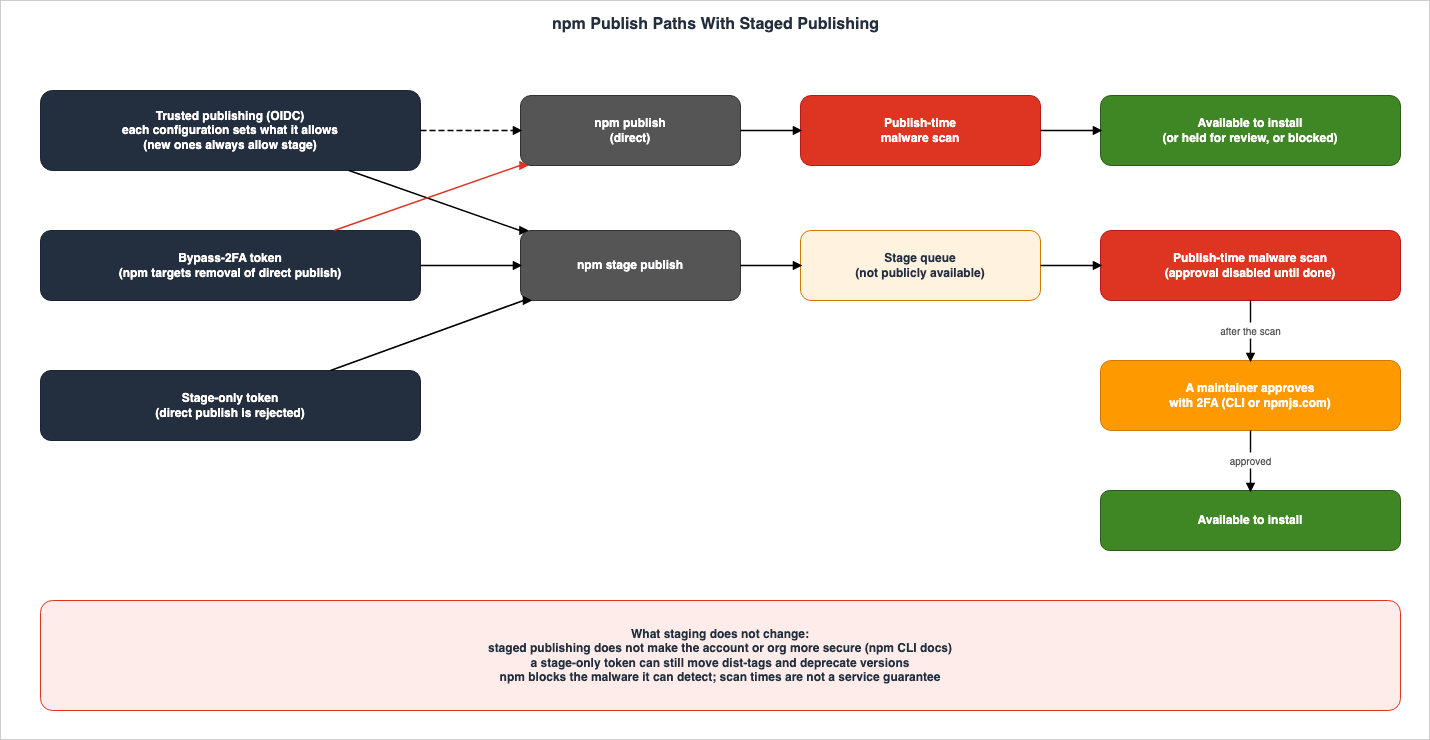
The npm CLI'snpm stage page highlights that npm stage publish does not require 2FA, regardless of the token type, as a key feature of staged publishing.The key difference with staged publishing is that npm stage publish never requires a 2FA prompt, regardless of token type.Adding a row for stage-only tokens to the table on the same page, the behavior of each token type as of the verification date is as follows. The row for stage-only tokens is based on the npm docs page "About access tokens" and an announcement dated September 18, 2026.
| Token | npm stage publish | npm publish |
|---|---|---|
| Bypass-2FA token | Can be staged | Can be published (if the package's Publishing access allows it) |
| Granular access token without Bypass 2FA enabled | Can be staged | Requires 2FA (if the package's Publishing access allows it) |
| Session token | Can be staged | Requires 2FA |
| Short-lived token for trusted publishing | Can be staged (when configuration permits) | Can be published (when configuration permits) |
| Stage-only token | Can be staged | Rejected with an E_STAGE_REQUIRED error |
The entry for bypass-2FA tokens under
npm publish reflects the status as of the verification date. npm is targeting January 2027 to remove this capability (see section 4.3).Stage-only tokens are created on npmjs.com by setting the package and scope permissions to "Read and write (stage only)." The announcement dated September 18, 2026, states that npm rejects attempts to publish directly with a stage-only token, even if Bypass 2FA is enabled.
npm rejects direct npm publish attempts with that token, even if you’ve configured it to bypass 2FA for automation.The same announcement lists the conditions for using staged publishing with stage-only tokens, including publish access to the package, 2FA enabled on the npm account, npm CLI version
11.15.0 or later, and Node.js version 22.14.0 or later.Figure 2 illustrates the paths available to three types of credentials—trusted publishing, bypass-2FA tokens, and stage-only tokens—when used with CI automation, showing whether each can be used via direct publishing or staged publishing. The dashed line from trusted publishing to direct publishing indicates a path that can be enabled on a configuration-by-configuration basis.
5.3 Publish-Time Scanning and the Order of Approval
Since the July 28, 2026 announcement, npm automatically scans newly published versions before they become available for installation. Based on the results of this scan, a version will either be published as usual, held for manual review, or blocked. The announcement specifies that the delay between publication and availability is typically around 5 minutes, but can be 15 minutes or longer during periods of high traffic, or depending on the content and size of the package.These times reflect current typical behavior and may change as scanning evolves; they aren’t a service guarantee.While waiting for the scan,
npm dist-tag continues to function. npm deprecate and npm unpublish will not work until the version is available. If a version is blocked, the publisher may receive a notification allowing them to appeal the decision.Regarding what the scan checks for, the announcement states:
npm blocks the malware we can detect and we are continuously working to improve detection coverage and reduce scan time.In staged publishing, there is a defined order for scanning and approval. The announcement on September 3, 2026, states that while a version is being scanned, the approval button is disabled, and can only be pressed after the scan is complete. Approval can only occur after the scan is finished.
The same announcement from July 28, 2026, added the
contentPolicy field in package.json and the DISCLOSURE file (at the package root) for legitimate packages containing functionality with security implications (dual-use content). Packages declaring this must be published using methods that enforce 2FA, such as trusted publishing, local sessions responding to 2FA, or staged publishing. Publishing directly, without going through the stage, with a token that bypasses 2FA is not permitted. The announcement indicates that this requirement will be gradually enforced.5.4 What Staged Publishing Does Not Guarantee
What staged publishing adds is a step in which a human responds to a two-factor authentication (2FA) challenge. The npm CLI'snpm stage page refers to this as "proof-of-presence," meaning a human is involved, intervening in the process, and authenticating via 2FA. The same page also states the following:Note: The addition of staged publishing does not make your account or org more secure. Maintainers must still use the best practices listed below.The page then lists three practices. Delete bypass-2FA tokens and move to trusted publishing, or to a token without Bypass 2FA combined with
npm stage publish. Select "Require two-factor authentication and disallow tokens" in the package's Publishing access. Configure trusted publishing to allow only npm stage publish and not npm publish.Even with stage-only tokens, the permissions for writing beyond direct publishing remain unchanged. The npm documentation page "About access tokens" states that stage-only tokens can manage version deprecation and dist-tag movement, and further clarifies:
Note: Stage-only restricts direct publishing of new versions only. It is not a general-purpose security boundary — a stage-only token retains the other write capabilities listed above, so treat it with the same care as any other token.Stage-only tokens, like other write tokens, also require protection. The announcement of September 18, 2026, also confirms that stage-only tokens retain other write permissions, including version deprecation and dist-tag movement.
The publish-time scan has limits too. npm only prevents the publication of malware that npm can detect. Furthermore, npm does not guarantee the time it takes to perform these scans (see section 5.3).
6. PyPI Trusted Publishers and Attestations
PyPI's Trusted Publishing was launched earlier than npm's. The PyPI documentation covers Trusted Publisher registration, the exchange for short-lived API tokens, the security model, and digital attestations, each on separate pages. This section will verify what the PyPI documentation states, paying attention to the differences between PyPI and npm.6.1 API Token Validity and Scope
Short-lived API tokens issued by PyPI are only valid for 15 minutes after creation (see section 2.1). The PyPI documentation, specifically the "Security model and considerations" page for Trusted Publishers, states that these tokens expire within 15 minutes of the OIDC exchange.The "Internals and Technical Details" page in the PyPI documentation describes the exchange process as follows: PyPI verifies the signature of the received OIDC ID token and compares it against all registered Trusted Publishers. If there is a match, a short-lived API token is issued. This token is valid for all projects associated with the matching Trusted Publisher.
This API token is scoped to every project with a matching Trusted Publisher, meaning that it can be used to upload to multiple projects (if so configured).Within PyPI, the relationship between projects and Trusted Publishers is many-to-many. The "Adding a Trusted Publisher to an existing PyPI project" page in the PyPI documentation indicates that a single Trusted Publisher can be registered for multiple projects, and conversely, multiple Trusted Publishers can be registered for a single project. By registering the same workflow for multiple projects, a single token obtained by that workflow can be used to upload to any of those projects.
It is also possible to create a project through a Trusted Publisher, even if the project doesn't already exist. The "Creating a PyPI project with a Trusted Publisher" page in the PyPI documentation refers to this as a "pending publisher." A pending publisher creates a project upon its first use and then becomes a standard Trusted Publisher. The PyPI documentation notes that a pending publisher does not reserve the project's name.
A "pending" publisher does not create a project or reserve a project's name until it is actually used to publish.6.2 Supported Providers and Differences Between the Sources
The PyPI documentation shows how to register a Trusted Publisher for four providers: GitHub Actions, Google Cloud, ActiveState, and GitLab CI/CD. CircleCI, which is supported by npm, is not included in this list.Regarding GitLab CI/CD, two pages in the PyPI documentation (Adding a Trusted Publisher to an existing PyPI project, Creating a PyPI project with a Trusted Publisher) state the following. The troubleshooting page also notes that using instances other than GitLab.com will result in errors when issuing tokens.
Currently, only projects hosted on https://gitlab.com are supported. Self-managed instances are not supported.On the other hand, the PyPI blog announced on November 10, 2025, that they had begun a beta program for Trusted Publishing from GitLab Self-Managed instances. In this beta, PyPI staff manually onboard the instances that organizations run.
Organizations' self-hosted instances must be manually onboarded by PyPI staff during this beta phase, while we learn more about the various configurations and setups in use.The documentation describes what is generally available, while the blog post describes a beta that requires onboarding. As of the verification date, this article treats Trusted Publishing from GitLab Self-Managed as a beta program.
Furthermore, there are other points mentioned in the PyPI documentation that indicate limitations or recommendations. The troubleshooting page states that GitHub's reusable workflows cannot be used as Trusted Publisher workflows. The same blog post from November 10, 2025, lists support for reusable workflows and GitHub Enterprise Server as potential future developments. Regarding Google Cloud, the documentation advises against using the default service accounts, which are automatically provided for all services, for publishing. For ActiveState, it states that ActiveState Platform projects must be private.
6.3 Security Model Notes Regarding GitHub Actions and GitLab CI/CD
The PyPI Security Model details the characteristics and considerations for each provider's OIDC mechanisms. Regarding GitHub Actions, it highlights three key points:- Any workflow within a repository can request an OIDC ID token for any audience, provided it has the
id-token: writepermission. - The content of an OIDC ID token is associated with the workflow. Therefore, a workflow named
foo.ymlinorg/repocannot impersonate a workflow namedbar.yml. However, if the namefoo.ymlis changed tobar.yml, it becomes indistinguishable from the originalbar.yml. - Generally, third-party events, such as pull requests from forks, cannot obtain an ID token even if they trigger a workflow. The exception is
pull_request_target, which the PyPI Security Model identifies as inherently risky.
Regarding the second point, the PyPI Security Model states:
However, if foo.yml is renamed to bar.yml, then the new bar.yml will be indistinguishable from the old bar.yml except for claims that reflect the repository's state (e.g. git ref, branch, etc.).Workflow file names are part of the Trusted Publisher's identity. If a workflow's file name is changed to match the name of a registered workflow, PyPI will, with the exception of information reflecting the repository's state, be unable to distinguish it from the registered workflow. The PyPI Security Model states that when using Trusted Publishing with GitHub Actions, users must carefully select trusted usernames and repositories, limit the scope of the publishing workflow to the smallest possible set of permissions (it recommends using a name like
release.yml), verify the workflow and any code it executes when incorporating third-party changes, and exercise caution when adding users who can commit to the repository.To further narrow the scope, the PyPI Security Model suggests the following measures. Grant permissions on a job-by-job basis. Use a dedicated publishing environment with required approvers. Protect release tags. Limit the publishing job to two steps: receiving distribution files from another build job, and publishing using
pypa/gh-action-pypi-publish. The design of these workflows is addressed in sections 3 (permissions), 4 (triggers), and 7 (approval) of Hardening GitHub Actions for AWS Deployments. The npm documentation, on its Trusted publishing for npm packages page, also recommends approval based on deployment environments, protection of tags, regular review of trusted publisher settings, and removal of unused publishing tokens.PyPI also addresses potential attacks involving account resurrection. Because GitHub usernames can be changed, if the original owner changes their name or deletes their account, another user may be able to claim the same username. The PyPI documentation, on its Internals and Technical Details page, notes that regarding GitHub Trusted Publishers, it stores
repository_owner_id, an ID that does not change, during registration and verifies it when issuing tokens.Regarding GitLab CI/CD, the PyPI Security Model describes different properties. The content of the OIDC ID token is linked to the top-level pipeline (typically
.gitlab-ci.yml). Consequently, any pipeline included by the top-level pipeline can upload using a Trusted Publisher. Anyone who can execute pipelines within a repository's CI/CD system can generate an ID token. The documentation also states that if a GitLab username or group is deleted and recreated with the same name, PyPI still recognizes ID tokens generated by the new account as valid.6.4 Digital Attestations and PEP 740
PyPI's Digital Attestations are an implementation of PEP 740. As of the verification date, PEP 740 was in the "Final" state, with a resolution date of July 17, 2024. The Digital Attestations introduction page in the PyPI documentation describes an attestation as a signature that binds each distribution file (such as an sdist or wheel) to a cryptographic digest of its contents. This allows PyPI and users to verify that a particular package has been attested by a specific identity (such as a GitHub Actions workflow).PyPI accepts attestations based on two predicates: SLSA Provenance and PyPI Publish. A single file can have up to two attestations, one for each predicate. Uploads with three or more attestations, as well as uploads with the same predicate applied multiple times, will be rejected.
Regarding the identities that can sign attestations, the introduction page lists GitHub Actions, GitLab CI/CD, and Google Cloud, followed by ActiveState (presented in the original text within square brackets:
[ActveState]). The "Producing attestations" page provides instructions for GitHub Actions, GitLab CI/CD, and Google Cloud, noting that support for other Trusted Publishers is planned. PyPI rejects attestations signed by identities that are not Trusted Publishers.The process for creating attestations varies depending on the provider. When publishing using the PyPA
pypi-publish action, attestations are generated by default. In GitLab CI/CD, you can add a job to sign using pypi-attestations and then upload using twine upload --attestations.The attestation signatures are generated using keyless signing. The publishing workflow sends its OIDC ID token and the public key of a disposable key pair to Fulcio, Sigstore's certificate authority. Fulcio then returns an X.509 signing certificate that binds the claims of the ID token to the public key. According to the PyPI documentation, specifically the "Security model and considerations" section for Digital Attestations, an attestation is only considered validated if it includes both Rekor's inclusion proof and Fulcio's certificate transparency log inclusion proof. If either one is missing, the attestation will not be considered validated.
6.5 Approval Steps on the Registry Side, and a Restriction That Applies After Publication
The seven pages on Trusted Publishers and the five pages on Digital Attestations in the PyPI documentation do not describe a registry-side step in which a person approves a release, like npm's staged publishing. The approvals that appear in these pages are all on the CI side. These include the required reviewers within GitHub environments and GitLab's protected environments. The PyPI blog also recommends using GitHub environments as a means of requiring reviews before publication, as mentioned in a report from April 2, 2026.PEP 694, which aims to standardize the PyPI upload API, is currently in draft form. PEP 694 identifies one of the current API's challenges as:
There is no support for “staging” a release prior to publishing it to the index.The staging process proposed in PEP 694 is intended to allow users to test uploads before publication.
“staging” a release, which can be used to test uploads before publicly publishing them, without the need for test.pypi.org;However, PEP 694 does not describe staging in the same way as npm's staged publishing, where a human maintainer approves the release using two-factor authentication. This article does not state that PyPI lacks any approval step; it notes only that the PyPI documentation pages read do not describe one.
There is also a restriction that applies after a release is published. The PyPI blog stated on July 22, 2026, that PyPI now rejects the upload of new files to releases that are more than 14 days old. This is to prevent malicious files from being added to older, stable releases if publishing tokens or workflows are compromised. However, the same blog post clarifies:
Users should not yet rely on this behavior as there are no defined semantics for "releases no longer accepting new files" or APIs available to confirm the state of the release.7. What the Publishing Records Assert and What They Do Not
As publishing records used with trusted publishing, npm has provenance and PyPI has Digital Attestations. Both provide records that allow those incorporating packages into their dependencies to verify them before use. This section examines what users can understand and what remains unclear when reviewing these records, within the scope of available documentation.7.1 When Users View npm Provenance
The npm documentation, specifically the "Generating provenance statements" page, states that npm provenance includes two types of attestation. Provenance attestation publicly exposes links from the build environment to the package's source code and build instructions. The publish attestation is created by the registry when an authorized user publishes a package. Packages published with provenance are signed by Sigstore's public-good servers and recorded in a public transparency ledger.The "Viewing package provenance" page in the npm documentation outlines the steps users can take to view provenance. When a user opens a package's page on the npm registry and sees a green checkmark next to the "Version" field on the right side of the README, it indicates that the package was published with provenance. Clicking the checkmark opens "View more details," revealing the following five items:
- Build Environment (the environment used to build the package)
- Build Summary (a link to the workflow run that built the package)
- Source Commit (a link to the commit that served as the basis for the build)
- Build File (a link to the workflow file used in the build)
- Public Ledger (a link to the transparency log entry that demonstrates the authorized user's publication of the package)
npm verifies the linked commits and repositories each time a user views provenance on npmjs.com. If it cannot find them, it displays an error at the top of the page and in the provenance section. The npm documentation notes that this can occur if the repository is deleted or made private. Provenance can become impossible to establish after publication, depending on the state of the linked repository.
To verify provenance locally, use the
npm audit signatures command. According to the npm documentation, this command checks the registry signatures and provenance attestations. If a signature or attestation is missing or invalid, it will return an error, which may indicate that a package has been tampered with. To use it, you need npm CLI version 9.5.0 or later, and your dependencies must be installed using npm install or npm ci. Because the format of attestations may change, npm documentation recommends keeping your npm CLI up to date.By verifying these details, you can determine where and how a version was built, and confirm that it was published by an authorized entity. The "Generating provenance statements" page in the npm documentation states:
When a package in the npm registry has established provenance, it does not guarantee the package has no malicious code. Instead, npm provenance provides a verifiable link to the package's source code and build instructions, which developers can then audit and determine whether to trust it or not.Provenance provides verifiable links to the source code and build instructions, which you can audit. It is up to the user to read the source code and build instructions linked and decide whether to trust them.
7.2 When Users View PyPI Attestations
PyPI provides file attestations through its simple index, both in HTML and via a JSON API. The "Consuming attestations" page in the PyPI documentation states that PyPI returns attestations for a single file as a single JSON object, which it refers to as a "provenance object." This provenance object groups attestations together, organized by the Trusted Publisher used to create the signature. It is distinct from npm's provenance system.To verify this locally, you can use the
pypi-attestations CLI. The command pypi-attestations verify pypi takes the URL of the file you want to verify, along with a trusted repository specified using the --repository flag. According to the PyPI documentation, this command retrieves the file and provenance object from PyPI's Integrity API, checks if the Trusted Publisher listed in the provenance object matches the value provided with the --repository flag, and then cryptographically compares the file against the attestation.Regarding what can be determined from this process, the "Security model and considerations" page in the PyPI documentation's "Digital Attestations" section summarizes it as follows:
TL;DR: An attestation will tell you where a PyPI package came from, but not whether you should trust it.The same page also explains what a valid signature indicates:
At its core, a valid signature for an identity on a package conveys a proof of access to that identity while the package was built.A valid signature does not show whether the identity should be trusted, or whether malicious or vulnerable code was added before or during the build. The page also notes that trust assessments can be time-dependent. For example, if a user decides to trust the first identity they saw for a package name, subsequent versions attested by a different identity, or lacking attestations altogether, would allow the user to detect those differences and take appropriate action.
It's important to pay attention to the scope of what attestation covers. As section 2.4 showed, the Security Model for PyPI's Trusted Publishers states that attestations can address modifications made before and after the build. On the other hand, the "Security model and considerations" page for Digital Attestations identifies two primary purposes for the most basic attestation created by default by
pypa/gh-action-pypi-publish: to protect against modifications made after the build and while the package is present on the index or mirror, and to let the verifying party observe changes to the project's Trusted Publisher. It also notes that asserting whether a package was modified before the build requires a more advanced type of attestation, which necessitates specialized build procedures and is therefore less common. Asserting modifications made before the build requires a more advanced type of attestation, one that involves specialized build procedures.The same page also states that even when using attestation, the necessary precautions remain unchanged.
In general: while more secure and misuse-resistant than a password or long-lived API token, Trusted Publishing and attestations are not a substitute for essential security practices like limiting who can trigger your publishing workflows.PEP 740 does not propose, as a policy, that attestation should be mandatory or that installers like pip should verify attestation. It also states that the level of trust placed in the index is neither increased nor decreased (row 6 of the table in section 2.5).
7.3 Comparing npm and PyPI Records
When comparing npm provenance and PyPI attestation, based on the scope of this article, the following table summarizes the key aspects:| Item | npm | PyPI |
|---|---|---|
| Record Name | npm provenance (including provenance attestation and publish attestation) | Digital Attestations (with predicates for PyPI Publish and SLSA Provenance) |
| Conditions for Automatic Generation | Generated when publishing as a public package from a public repository via GitHub Actions or GitLab CI/CD, using trusted publishing. | Generated when publishing via the PyPA pypi-publish action (by default). |
| Circumstances where records are not generated or are rejected | Publishing from CircleCI, or publishing from a private repository. | Attestations signed by an identity that is not a Trusted Publisher are rejected at the time of upload. |
| User Verification Methods | Green checkmark and details on the package page, npm audit signatures. | Integrity API provenance object, pypi-attestations verify pypi. |
| What the sources say the record does not assert | That the package has no malicious code | Whether you should trust it |
Both types of records provide a means to verify the publishing path. Whether to trust the content is a decision left to the reader. The signing of container images and the design that enforces it at admission are covered in Software Supply Chain Security on AWS. The fact that creating an attestation and verifying it are separate processes is discussed in section 8.5 (Generating an Attestation Is Not Verifying One) of Hardening GitHub Actions for AWS Deployments.
7.4 Where the Sources Differ
The sources examined in this article contain instances where the same information is presented in different ways. The table below presents each version without favoring any of them. It is possible that one of the sources may be updated in the future, bringing it into alignment with the others.| # | Where | What's different | Section |
|---|---|---|---|
| 1 | Timeline for removing direct publishing with bypass-2FA tokens | The three announcements use words of intent, while the "About access tokens" page in npm documentation states it as definite. The documentation also describes what is being removed more broadly. | 4.3 |
| 2 | Can short-lived tokens be extracted? | The npm announcement and documentation state that tokens cannot be extracted, while the PyPI blog states that Trusted Publisher tokens can be. | 2.3 |
| 3 | Number of trusted publishers for a single package | The npm documentation states a limit of 10, while the npm trust page in the npm CLI states only one. | 3.3 |
| 4 | Required version of npm trust | The announcement dated February 18, 2026, requires version 11.10.0 or later, while the npm trust page requires version 11.15.0 or later. | 3.3 |
| 5 | Date when permitted operations changed | The npm documentation uses May 20, 2026, as the cutoff date, while the announcement for the general availability of staged publishing states May 22, 2026. | 3.4 |
| 6 | Uses of tokens obtained through exchange | The npm API documentation describes publishing and management operations (and dist-tag operations if the configuration grants manageDistTags); the npm documentation lists npm publish, npm stage publish, and dist-tag operations that the configuration allows; and the npm CLI's npm stage page lists only npm stage publish and npm publish. | 3.4 |
| 7 | CI supported by npm's trusted publishing | The "Trusted publishing for npm packages" page lists three, while the "Using private packages in a CI/CD workflow" page lists two. | 3.2 |
| 8 | PyPI's GitLab Self-Managed | The PyPI documentation states it is not supported, while the PyPI blog states that it began as a beta that requires onboarding. | 6.2 |
| 9 | Scope of modifications handled by attestation | The Trusted Publishers Security Model says attestations can address modifications before and after the build, while the Digital Attestations Security model places the purpose of the default attestation on modifications after the build. | 7.2 |
| 10 | Operations no longer possible with bypass-2FA tokens | The announcement dated July 31, 2026, lists three items, the npm documentation lists five, and the npm API documentation states that the list is not exhaustive. | 4.4 |
| 11 | Planning and implementation | The plan of September 22, 2025, said it would limit granular tokens to a 7-day lifetime and disallow tokens by default. The announcement of September 29, 2025, stated a default of 7 days and a maximum of 90 days, and the announcement of November 5, 2025, stated that the 90-day maximum had taken effect. The default for publishing access remains the option to allow tokens. | 4.2 |
| 12 | When the restriction on management operations with bypass-2FA tokens began | The announcement dated July 31, 2026, announced the implementation, while the npm documentation states it began in August 2026. | 4.4 |
| 13 | Publishing after registering a trusted publisher | The announcement dated July 31, 2025, states that only publishing from the registered workflow is accepted, while the npm documentation states that publishing with traditional tokens is also accepted. | 2.3 |
8. Frequently Asked Questions about Trusted Publishing
This section answers, within this article's scope, questions that often come up when deciding whether to transition your npm or PyPI publishing to trusted publishing.Q1. After moving to trusted publishing, can the npm tokens placed in CI be deleted?
After you've confirmed that all publishing paths have been moved to trusted publishing and that publishing works, the tokens placed for publishing are no longer necessary. The npm documentation also recommends removing any unnecessary tokens after completing this migration process. However, simply registering a trusted publisher in npm will not automatically prevent token-based publishing. To disable it, you need to select "Require two-factor authentication and disallow tokens" within the publishing access settings for your packages. If you include private packages as dependencies, a read-only token is still needed (see section 3.6).Q2. Can packages published through trusted publishing be considered safe packages?
No. The PyPI Security Model states that Trusted Publishing does not assert either the safety of the code or the trustworthiness of its authors. Similarly, npm documentation indicates that even with established provenance, it does not guarantee the absence of malicious code. The publishing records show the path through which the package was published (sections 2.4 and 7).Q3. Will direct publishing with bypass-2FA tokens stop working in January 2027?
January 2027 is the date that three npm announcements give as planned. The July 8, 2026 announcement words it as an expectation, while the July 31, 2026 and September 18, 2026 announcements word it as a target. As of the verification date, it is still possible to publish directly using bypass-2FA tokens. The npm documentation page "About access tokens" definitively states that this functionality will be removed in January 2027, while all the announcements use words of intent. The timing may be subject to change in future announcements. npm recommends transitioning automated publishing to either trusted publishing or staged publishing (section 4.3).Q4. Can npm trusted publishing be used from self-hosted runners?
No. As of the verification date, npm's trusted publishing feature only supports GitHub Actions' GitHub-hosted runners, GitLab.com's shared runners, and CircleCI's cloud runners. While the npm documentation states that support for self-hosted runners is planned for a future release (section 3.2), it does not specify a timeline.Q5. When publishing with npm's trusted publishing feature through CircleCI, does provenance get attached?
No. According to the npm documentation, trusted publishing from CircleCI does not generate provenance. Similarly, provenance is not created when publishing from a private repository, even for a public package (section 3.5).Q6. Is a stage-only token a low-impact token even if it leaks?
For direct publishing, the impact is narrowed. Stage-only tokens do not allow for direct publishing, and approving a version placed in the stage requires two-factor authentication from a human maintainer. According to the npm documentation, even if a token is leaked or misused, new versions cannot be registered in the registry without the maintainer's approval. However, stage-only tokens do allow for deprecating versions and moving dist-tags. The npm documentation also states that stage-only tokens are not a general-purpose security boundary and should be protected in the same way as other tokens (see section 5.4).Q7. Does PyPI have an approval step like npm's staged publishing?
The PyPI documentation pages read (all pages on Trusted Publishers and Digital Attestations) do not describe a registry-side step in which a person approves a release. The approvals those pages describe are on the CI side, such as required reviewers for GitHub environments. PEP 694, which aims to standardize the upload API, is currently in draft form, and it states that the current API does not include a staging process for pre-publication. However, the staging process being proposed is intended for testing uploads (section 6.5).Q8. When verifying provenance and attestations as a user, what can you determine?
You can find out where a version originated and the path it took to be released. In npm, you can see the build environment, workflow execution, source commits, build files, and the public ledger. In PyPI, you can verify the identity of the Trusted Publisher whose signature is applied. However, you cannot determine whether the content itself is trustworthy. The PyPI documentation suggests that checking whether the identity of the signer has changed or if attestation has been removed, compared to previous versions, can provide clues for assessing trustworthiness (section 7).9. Summary
npm and PyPI's trusted publishing mechanisms exchange the identity provided by the CI's OIDC for short-lived credentials issued by the registry, and publish with them. This article outlines, based on npm documentation, GitHub Changelog, PyPI documentation, and PEP specifications, what becomes unnecessary when long-lived tokens are removed, what remains, what npm and PyPI each add on top, and what the publishing records do not assert.What becomes unnecessary with trusted publishing is the long-lived write token placed in the CI environment. The need to store and rotate long-lived tokens goes away, and so does the window between a leak and revocation. npm's short-lived tokens typically have a validity of one hour, while PyPI's short-lived API tokens are valid for only fifteen minutes.
What remains are the registered workflows and the associated credentials. PyPI's Security Model notes that weaknesses in registered workflows can be equivalent to credential compromise, and encourages treating Trusted Publishers in the same manner as API tokens. OIDC ID tokens and short-lived tokens also need to be protected. Even after a trusted publisher is registered, npm keeps accepting publishes made with tokens unless Publishing access disallows tokens.
npm layers human approval and publish-time scanning on top of this. Staged publishing (generally available on May 22, 2026) allows versions to be placed in the stage and only published after a human maintainer approves them with 2FA. Starting September 3, 2026, versions cannot be approved until the scanning process is complete. On September 18, 2026, stage-only tokens, which cannot publish directly, were introduced. Direct publishing using bypass-2FA tokens is currently still possible, and npm is targeting January 2027 to remove it.
The publishing records show the origin in a verifiable form. Both npm's provenance and PyPI's attestation demonstrate where and through what paths a version was published. npm documentation clarifies that provenance does not guarantee the absence of malicious code. PyPI documentation states that an attestation does not indicate whether you should trust it.
Finally, when transitioning to trusted publishing, be sure to verify four things. First, confirm who can modify the registered workflow and under what events it can be triggered. Second, revoke the tokens used for publishing and, on npm, disallow tokens in the "Publishing access" setting. Third, check whether the npm trusted publisher allows direct publishing (including configurations created before May 20, 2026). Finally, ensure that no automation still relies on direct publishing using bypass-2FA tokens.
10. References
- Trusted publishing for npm packages - npm Docs
- Staged publishing for npm packages - npm Docs
- Generating provenance statements - npm Docs
- Viewing package provenance - npm Docs
- About access tokens - npm Docs
- Requiring 2FA for package publishing and settings modification - npm Docs
- About ECDSA registry signatures - npm Docs
- Using private packages in a CI/CD workflow - npm Docs
- npm-stage - npm Docs
- npm-trust - npm Docs
- npm-publish - npm Docs
- npm Registry API
- npm provenance public beta - GitHub Changelog
- Publishing with npm provenance from private source repositories is no longer supported - GitHub Changelog
- npm provenance general availability - GitHub Changelog
- npm trusted publishing with OIDC is generally available - GitHub Changelog
- Strengthening npm security: Important changes to authentication and token management - GitHub Changelog
- npm security update: Classic token creation disabled and granular token changes - GitHub Changelog
- npm classic tokens revoked, session-based auth and CLI token management now available - GitHub Changelog
- npm bulk trusted publishing config and script security now generally available - GitHub Changelog
- npm trusted publishing now supports CircleCI - GitHub Changelog
- Staged publishing and new install-time controls for npm - GitHub Changelog
- Upcoming breaking changes for npm v12 - GitHub Changelog
- npm adds preventive account protection for high-impact accounts - GitHub Changelog
- npm install-time security and GAT bypass2fa deprecation - GitHub Changelog
- npm publish-time malware scanning and dual-use metadata - GitHub Changelog
- Restricting npm bypass-2FA granular access tokens - GitHub Changelog
- Multiple trusted publishing configurations for npm - GitHub Changelog
- npm extends recovery-code security holds to all accounts - GitHub Changelog
- Stage-only npm tokens for safer automation - GitHub Changelog
- Opt-in dist-tag permissions for npm trusted publishing - GitHub Changelog
- npm staged publishing now supports creating new packages - GitHub Changelog
- Unvalidated npm trusted publishing configurations now expire - GitHub Changelog
- Our plan for a more secure npm supply chain - The GitHub Blog
- Publishing to PyPI with a Trusted Publisher - PyPI Docs
- Adding a Trusted Publisher to an Existing PyPI Project - PyPI Docs
- Creating a PyPI Project with a Trusted Publisher - PyPI Docs
- Publishing with a Trusted Publisher - PyPI Docs
- Security Model and Considerations (Trusted Publishers) - PyPI Docs
- Troubleshooting - PyPI Docs
- Internals and Technical Details - PyPI Docs
- Introduction (Digital Attestations) - PyPI Docs
- Producing attestations - PyPI Docs
- Consuming attestations - PyPI Docs
- Security Model and Considerations (Digital Attestations) - PyPI Docs
- PyPI Publish Attestation (v1) - PyPI Docs
- Token Exfiltration Campaign via GitHub Actions Workflows - The Python Package Index Blog
- Trusted Publishing is popular, now for GitLab Self-Managed and Organizations - The Python Package Index Blog
- Incident Report: LiteLLM/Telnyx supply-chain attacks, with guidance - The Python Package Index Blog
- Releases now reject new files after 14 days - The Python Package Index Blog
- PEP 740 - Index support for digital attestations - peps.python.org
- PEP 694 - Upload 2.0 API for Python Package Indexes - peps.python.org
- OpenID Connect reference - GitHub Docs
References:
Tech Blog with curated related content
Written by Hidekazu Konishi