EC2 Image Builder - Recipes, Workflows, Distribution, and Lifecycle Policies, and What the Image Resource Records About How an AMI Was Built
First Published:
Last Updated:
Each build creates an image resource within Image Builder, recording the version of the recipe used and the execution of the workflow (although workflow execution records are only retained for a limited time). If configured, it also keeps a snapshot of the vulnerability findings from the test instance. However, the user guide's descriptions of the lifecycle rules present every action on the AMI as optional. The Deprecate rule does not prevent new launches even when you choose to deprecate the AMI. Only when the Disable rule is set to disable the AMI does the AMI become private, and the accounts it was shared with lose access. The Delete rule leaves the AMI in place unless you choose to deregister it. Furthermore, the EC2 user guide states that the launch-time check, Allowed AMIs, does not restrict the AMIs that an account owns. An AMI that Image Builder creates is an AMI owned by the account that built it, and a copy distributed to a target account is owned by that account.
This article lays out four things, drawing from the Image Builder user guide, API Reference, EC2 user guide, and AWS What's New: where decisions are made along the path that creates an AMI; what information is recorded in the image resource; what impact distribution and lifecycle rules have on recipients and instance launches; and how far those records and the launch-time check do not reach. This article is not intended as an Image Builder product introduction, a comparison with Packer, or a patch management guide.
Related articles on this site:
- AMI Allowed Instance Types and Launch Governance on Amazon EC2 - What the Image Owner Declares, What Accounts and Organizations Add, and What a Launch-Time Check Leaves Untouched
- Cross-Account Sharing by Service on AWS - AWS RAM Resource Shares, Service-Native Sharing, and What Each Route Leaves the Owner Able to Stop
- What Can Be Made Public on AWS - Storage and Data, the Block Public Access Family, and What Each Switch Does Not Promise
- AWS Security Defaults History - Block Public Access, Default Encryption, IMDSv2, and How Far Each Changed Default Reached
- Software Supply Chain Security on AWS - Signing, Attestation, and Admission Control
- AWS Systems Manager Fleet Operations at Scale - Patch Manager, State Manager, Automation Runbooks, and Session Manager
- Amazon Linux History and Timeline - Amazon Linux AMI, Amazon Linux 2, AL2023, AL2027, and the Clocks That Do Not Move Your Instances
- Publishing npm and PyPI Packages Without Long-Lived Tokens - Trusted Publishing, Staged Publishing, and What Trusted Publishing Does Not Assert
Table of Contents
- 1. The Scope of This Article and the Date It Was Verified
- 2. The Parts of the Path That Builds an AMI, and the Origin Table
- 3. The Three-Stage Workflow — Build, Test, and Distribution
- 4. Distribution — Sharing Through Launch Permissions and Copying to Target Accounts
- 5. What Stays on Record in the Image Resource
- 6. Lifecycle Policies
- 7. Where the Records and the Launch-Time Check Do Not Reach
- 8. Frequently Asked Questions about EC2 Image Builder
- 9. Summary
- 10. References
1. The Scope of This Article and the Date It Was Verified
This section confirms that this article covers the path that creates an AMI and leaves the declarations made after an AMI exists to published articles. It then sets out the verification date, the materials consulted, the terminology used, and what will not be covered.1.1 The Path That Creates an AMI and the Declarations Made After It Exists
Creating an AMI involves several steps, and after an AMI is created, various declarations are associated with it. The AMI owner can specify the instance types that can launch the AMI. The account using the AMI can define conditions for AMI discovery and usage through Allowed AMIs. Organizations can distribute these policies collectively through EC2 declarative policies. These aspects are detailed in AMI Allowed Instance Types and Launch Governance on Amazon EC2. The implications of AMI launch permissions for sharing are discussed in Cross-Account Sharing by Service on AWS, while What Can Be Made Public on AWS covers settings for publishing and restricting AMI publication.This article focuses on the path that creates an AMI: which parent image is used, which components are applied, on which instances the build takes place, how it is tested, and where it is distributed. It also addresses which AMIs to retire and when, what that path leaves on the image resource, and what those records do not show. This article focuses specifically on the path within Image Builder that creates AMIs. While the path that creates container images (using container recipes and distributing to Amazon ECR) shares some similarities, it will only be briefly mentioned where differences exist.
1.2 The Verification Date and the Sources Read
This article's information was verified on October 1, 2026. At the time of verification, the most recent What's New announcement for Image Builder was the lifecycle policy announcement dated February 27, 2026. An EC2 announcement detailing the ability to add watermarks to AMIs using Image Builder was published on June 24, 2026. The most recent AWS Service Availability Updates available at the time of verification were dated September 29, 2026, but did not include any information about Image Builder.The following materials were consulted. The Image Builder user guide was reviewed, covering 54 pages out of a total of 122, including the following chapters: Overview, Image Resources, Lifecycle, Recipes, Infrastructure Configuration, Distribution Settings, Tags, Image Workflow, Pipelines, Integration with Amazon Inspector and Amazon EventBridge, Security, and Troubleshooting. The Image Builder API Reference was reviewed, focusing on actions and data types related to images, workflows, distribution, and lifecycle. The AWS CLI Command Reference was consulted, cross-referencing the
imagebuilder subcommands. The EC2 user guide was reviewed, specifically the sections on Allowed AMIs, AMI Deprecation, AMI Watermarks, and AMI Ancestry. Additionally, two articles from the AWS re:Post Knowledge Center and nine What's New announcements related to Image Builder were reviewed.1.3 Terminology Used in This Article
The documentation for Image Builder uses different terms to refer to the same concepts. This article fixes its terms as shown in the following table.| Term Used in This Article | What It Refers To | Supporting Documentation |
|---|---|---|
| Image Resource | A resource created by Image Builder for each build. The user guide describes the ARN format as arn:aws:imagebuilder:region:account:image/name/version, and refers to these as "managed images." While "image" is sometimes used as an abbreviation, the user guide clarifies that these are distinct from AMIs. | Image Builder UG (What is Image Builder?, How lifecycle management rules work for Image Builder image resources) |
| Output AMI | An Amazon EC2 AMI created in conjunction with an image resource, including any distributed copies. | Image Builder UG (View image resource details) |
| Recipe | The image recipe. A document that specifies the parent image and the components applied to it. | Image Builder UG (What is Image Builder?) |
| Parent Image | The image that serves as the foundation for the recipe. The user guide uses both "base image" and "parent image." | Image Builder UG (What is Image Builder?, Use a base image parameter in your recipe) |
| Component | A document that outlines either the steps to customize an instance (build component) or the steps to test it (test component). | Image Builder UG (What is Image Builder?) |
| Image Workflow | Image Builder's image workflow. It's a sequence of steps executed in a single stage, defined in YAML format. This is distinct from the workflows handled by GitHub Actions, such as those used in Publishing npm and PyPI Packages Without Long-Lived Tokens. | Image Builder UG (Manage build, test, and distribution workflows for Image Builder images) |
| Distribution Settings | The distribution settings as described in the user guide. The API Reference refers to these as "distribution configuration." | Image Builder UG (Manage Image Builder distribution settings), API Reference |
| Lifecycle Policy | Image Builder's lifecycle policy. This is separate from lifecycle policies used with Amazon ECR, Amazon S3, and Amazon Data Lifecycle Manager. | Image Builder UG (Manage lifecycle policies for Image Builder images) |
| Allowed AMIs | A setting within an EC2 account that defines the conditions for AMI discovery and usage. This article also calls it the launch-time check. | EC2 UG (Control the discovery and use of AMIs in Amazon EC2 with Allowed AMIs) |
The term "deprecated" can refer to either the state of an image resource (marked as
Deprecated) or the deprecation of an EC2 AMI. This article will clarify which meaning is intended each time the term is used.1.4 Topics Not Covered
- How the Allowed AMIs criteria are put together, how watermarks are inherited, and instance types specified by the AMI owner are covered in AMI Allowed Instance Types and Launch Governance on Amazon EC2. This article only describes which Image Builder AMIs are reached by Allowed AMIs and which are not.
- The meaning of sharing through AMI launch permissions, and what is stopped when sharing is removed, are covered in Cross-Account Sharing by Service on AWS. This article only describes how distribution settings apply launch permissions and what lifecycle disabling does to the accounts an AMI was shared with.
- Public AMIs and blocking public access for AMIs are covered in section 4.2 of What Can Be Made Public on AWS and section 9.2 of AWS Security Defaults History.
- Signing container images, admission control, and continuous scanning with Amazon Inspector are covered in Software Supply Chain Security on AWS. This article covers Amazon Inspector only as far as the snapshots of findings on test instances during the build process.
- Patching running instances is covered in Chapter 4 of AWS Systems Manager Fleet Operations at Scale. This article covers how the AMIs that instances launch from are created, and does not cover the patching process.
- The versions of Amazon Linux used as parent images and their support lifecycles are covered in Amazon Linux History and Timeline.
- This article does not cover comparisons with Packer, specific procedures for macOS and Windows, or guides on how to write components.
- Pricing is not covered.
2. The Parts of the Path That Builds an AMI, and the Origin Table
This section outlines the parts Image Builder uses when it creates an AMI, in the order of what each one decides. It ends with a table of what the receiving side can check before use and what the check does not establish.2.1 Recipes — Parent Image and Components
The user guide defines a recipe as a document that specifies both the parent image and the components applied to that parent image.An Image Builder image recipe is a document that defines the base image and the components that are applied to the base image to produce the desired configuration for the output AMI image.Components are documents that describe either the steps to customize an instance before the image is built (build components) or the steps to test an instance launched from the created AMI (test components). These documents are written in either YAML or JSON format. On the instance, an application called AWS Task Orchestrator and Executor (AWSTOE) reads the document and executes the specified steps. The user guide states that Image Builder uses AWSTOE to perform all operations on the instance. In addition to creating your own components, you can also use components managed by AWS (including those for STIG hardening) or components available on AWS Marketplace.
The parent image can be specified by its AMI ID. As of April 30, 2025, it can also be specified using parameters from AWS Systems Manager Parameter Store. When specifying the parent image using tools like the AWS CLI, you must prefix the parameter name with
ssm:. The What's New announcement states that this allows you to dynamically select the latest version of the parent image. The same announcement also mentions the ability to reference parameters from within components and to write the output AMI ID to a parameter during distribution.A recipe is a versioned document that defines the parent image and the components. However, the specifications within a recipe are not limited to AMI IDs or version numbers. When the parent image is specified using an SSM parameter, as described in the What's New announcement, Image Builder dynamically selects the latest parent image. Specifying a component version using a wildcard
x will select the latest version that matches the pattern (as described in the "Semantic versioning in Image Builder" section of the user guide). In either case, the recipe documents the names of parameters or wildcard patterns.2.2 Infrastructure Configuration and Distribution Settings
The infrastructure configuration determines the EC2 settings used when Image Builder launches build and test instances. The image details page lists the following items, which appear when the infrastructure configuration sets them: instance type, instance profile, network, security group, the Amazon S3 location for application logs, a key pair for troubleshooting, and an Amazon SNS topic for event notifications. The user guide explains that when a pipeline is executed, AMI builds create temporary EC2 instances, the AMI itself, and Amazon EBS snapshots associated with the AMI. After the image is created, all temporary resources are deleted.Distribution settings define where and how the output AMI will be distributed. The user guide lists the following actions possible with AMI distribution: specifying the output AMI's name and description, granting launch permissions for other accounts, organizations, and organizational units (OUs), copying the AMI to target accounts, organizations, and OUs, copying the AMI to other Regions within your own account, and exporting VM image disks to Amazon S3. In the distribution stage, you can also configure EC2 launch templates, licensing settings, EC2 Fast Launch, and write the output AMI's ID to SSM parameters. Sharing through launch permissions and copying to target accounts differ in who owns the distributed AMI. This will be discussed in detail in Chapter 4.
2.3 Pipelines and Versions
The image pipeline connects recipes, infrastructure configurations, distribution settings, and the image workflow, allowing builds to be run manually or on a schedule. It's also possible to create an image just once using theCreateImage action, without using a pipeline.Image Builder resources have versions, identified by a four-part format:
<major>.<minor>.<patch>/<build>. The creator sets the first three parts, while the fourth part is the build number assigned by Image Builder. As of the November 21, 2025, What's New announcement, when creating a recipe, specifying x in one of the version components will cause Image Builder to automatically assign the next available number for that position. The user guide states that x can only be placed once within a single version string. Separately, when selecting parent images or components within a recipe, x can also be used as a wildcard to refer to the latest version, but this follows a different rule: every position to the right of the first x must also be x.As of the October 3, 2025, What's New announcement, pipelines running on a schedule will automatically become disabled if builds repeatedly fail. The user guide states that you can configure the number of allowed consecutive failures to a maximum of 10, and that if no setting is specified, the default value of 5 will be used. This count only includes builds that have run on the schedule; manual builds that fail will not increase the count. Also, from the same announcement, it's now possible to route pipeline logs to a dedicated Amazon CloudWatch Logs log group, allowing you to define retention periods and encryption settings.
2.4 Origin Table — What You Receive, What Made It, What You Can Check Before Trusting It, and What the Check Does Not Establish
Before using an AMI, there are four key things to verify. What are you receiving? What path was used to create and deliver it? What can you verify before using it? And what remains unknown even after verification? This site lays out these four points, along with the supporting documentation, in a single table, which it calls the Origin Table. The form of this table was set in the article on package publishing paths, Publishing npm and PyPI Packages Without Long-Lived Tokens. It is also used in the article dealing with the origin of benchmark numbers, LLM Evaluation Harness Settings Behind a Benchmark Score.What you receive: This refers to the item that the receiving side gets. In this article, this means the distributed AMI and the records attached to it.What made it: This describes the path used to create and deliver the item. This includes workflows, credentials, and approval processes.What you can check before trusting it: This lists the records that the receiving side can check before use, along with the methods for doing so.What the check does not establish: This lists what remains unknown even after verification. Include this only when explicitly stated in the documentation.Where the source says so: This indicates the documentation that provides the basis for the information in that row.
For cells where the documentation does not provide information, write
The source does not say. Before writing this, search the full text of the document referenced by that row, as well as the link it points to, using the words not, does not, cannot, only, not supported, still, and must, and the subject of that row. If the documentation only provides general principles and does not specifically address the subject of that row, note this in the cell.For AMIs, what the receiving side can check changes with how the same AMI was delivered. The table in this article therefore has one row per delivery route.
| What you receive | What made it | What you can check before trusting it | What the check does not establish | Where the source says so |
|---|---|---|---|---|
| The output AMI in the account that built it (including copies to other Regions in the same account) | The pipeline or CreateImage request, which runs a build and test workflow based on the recipe (parent image and components) and the infrastructure configuration, and then places the result based on the distribution settings or the distribution workflow. When using a custom workflow, specify the execution role that Image Builder will assume (section 3.5). | The image resource that the Ec2ImageBuilderArn tag of the output AMI points to. This resource contains information about the recipe and its version, the infrastructure configuration, the distribution settings, the status of workflow executions and steps, and snapshots of findings (if enabled) (Chapter 5). | The API Reference states that workflow execution records are retained for a limited time, and older build versions may show an empty list of executions. Regarding finding snapshots, the user guide states that these are findings that Amazon Inspector found about the test instance during the build process. | Image Builder UG (Tag Image Builder output resources, View image resource details, Manage security findings for Image Builder images), API Reference (ListWorkflowExecutions) |
| An AMI shared through launch permissions and launched from the receiving account (the owner is the account that built it) | The path in row 1 plus the launch permissions in the distribution settings (account, organization, OU). Image Builder calls EC2's ModifyImageAttribute for each Region where the AMI is distributed, applying the launch permissions (section 4.1). | Watermark (if applied in the recipe or present in the original AMI) that is visible to the receiving account. If the receiving account has Allowed AMIs enabled, the shared AMI will be evaluated against the criteria. The EC2 UG lists six parameters for the criteria: ImageProviders, ImageNames, MarketplaceProductCodes, CreationDateCondition, DeprecationTimeCondition, and ImageWatermarks (section 7.1). | A re:Post article states that when distributed using launch permissions, tags are not visible to the receiving account. The user guide describes the image details page as showing image resources that you own, and refers to AWS RAM's user guide for resources shared via AWS RAM. | Image Builder UG (Manage Image Builder distribution settings, View image resource details), API Reference (LaunchPermissionConfiguration), EC2 UG (Use AMI watermarks to track and identify AMIs), re:Post (How do I resolve tags that aren’t visible on a distributed AMI in EC2 Image Builder for Linux?) |
| A copy distributed to a target account (the owner is the target account) | The path in row 1 plus a copy for each target account. The copy uses a role created on the target account's side, EC2ImageBuilderDistributionCrossAccountRole (section 4.1). | Tags specified in the distribution settings (a re:Post article states that with the target account option, the tags are associated with the copy). Watermark (if applied in the recipe or present in the original AMI) is also inherited. | The EC2 UG states that Allowed AMIs does not restrict the AMIs an account owns. The Image Builder UG states that the target account owns its copy. Putting the two together, the target account's Allowed AMIs does not restrict this copy once it is made, but no sentence was found that says so for Image Builder distribution. The Image Builder page on Tag Image Builder output resources states that it automatically tags output AMIs to help track the AMIs you distribute, but does not specifically mention copies created in the target account. | EC2 UG (Allowed AMIs), Image Builder UG (Manage Image Builder distribution settings, Set up cross-account AMI distribution with Image Builder, Track AMI lineage with watermarks), re:Post (same as above) |
An AMI distributed using DistributeImage from an existing AMI | Whatever path created the source AMI, plus the distribution stage only. DistributeImage takes the AMI ID, SSM parameter, or Image Builder image ARN as input, and creates a new image resource to track the distribution (section 4.3). | The new image resource (view distribution progress using GetImage). | The API Reference states that this operation does not run the entire image build process, but only runs the distribution stage for images that have already been built. | API Reference (DistributeImage), Image Builder UG (Use enhanced AMI distribution capabilities) |
| An AMI deprecated by a lifecycle policy (viewed within the account that built it) | The path in row 1 plus the Deprecate rule of a lifecycle policy (set to include AMIs) (Chapter 6). | The AMI's deprecation time and the tag that Image Builder applies: DeprecatedBy: EC2 Image Builder. | The Image Builder UG states that deprecated AMIs can still be launched if you specify the AMI ID. The EC2 UG also states that users can continue launching deprecated AMIs if they know the AMI ID, and that the AMI owner will continue to see the deprecated AMI in DescribeImages. | Image Builder UG (How lifecycle management rules work for Image Builder image resources), EC2 UG (Deprecate an Amazon EC2 AMI) |
The table does not contain any cells indicating
The source does not say. The entry in the third row, What the check does not establish, is a conclusion drawn by putting the general rules of two sources side by side, and the cell states that no sentence naming Image Builder distribution was found. The same column in the fourth row states only the scope of the operation that the API Reference describes and does not go into what the new image resource records about how the source AMI was created.3. The Three-Stage Workflow — Build, Test, and Distribution
This section examines the order in which Image Builder image workflows run, what they do, and their limits. It also looks at steps that can be placed inside a workflow, such as waiting for approval and calling AWS Step Functions.3.1 Three Stages and Default Actions
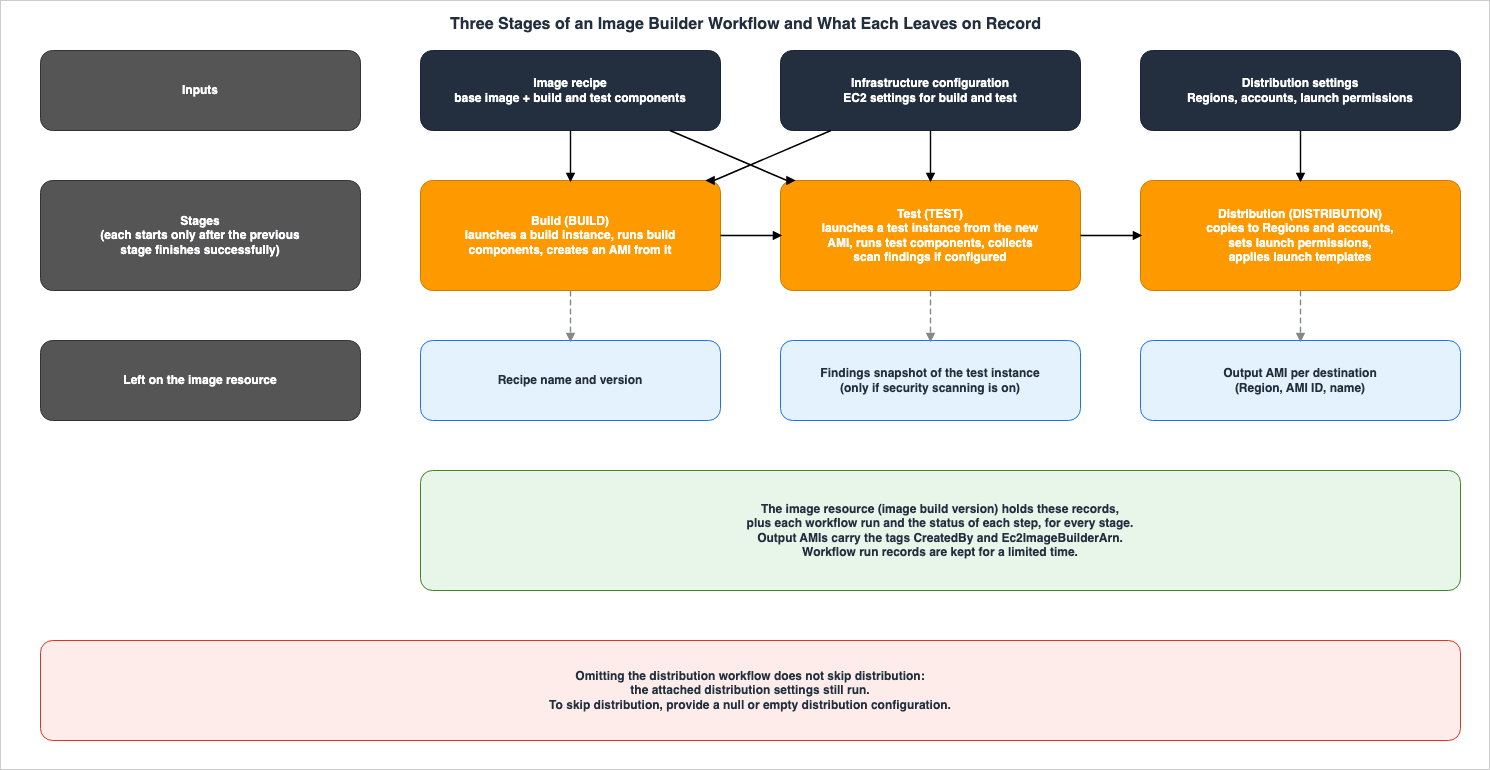
The user guide divides the process of creating an image into three stages. Each stage runs a workflow of the same type (multiple workflows can be placed in the "Test" stage – see section 3.2).| Order | Stage | Workflow Type | Default Action |
|---|---|---|---|
| 1 | Build | BUILD | Starts a build instance, runs the build components, and creates an AMI from that instance. |
| 2 | Test | TEST | Starts a test instance from the new AMI, runs the test components, and, if configured, collects findings from the image scan. |
| 3 | Distribution | DISTRIBUTION | Copies the AMI to the target Region and account, modifies the AMI's attributes, and applies post-distribution settings such as launch template and license configurations. |
The order of the stages is fixed, and the next stage only begins after the previous stage has successfully completed.
Stages run in a fixed order, and a stage starts only after the previous stage finishes successfully.Workflows run in the order that steps are defined in the YAML document. The
onFailure setting of each step determines what happens when that step fails. By default, Abort causes the step and the entire workflow to fail, and no subsequent steps are executed. If rollback is enabled (the default), Image Builder rolls back the completed steps in reverse order, starting from the failed step. However, some actions have no rollback, and in those cases, a status of NO_ROLLBACK is recorded. Selecting Continue records the failure but allows the remaining steps to run without rollback. Steps can also be configured with the retry attribute (the number of attempts, maxAttempts, can be set between 1 and 10). If a step fails even after the final attempt, the onFailure action for that step is triggered.The "Build" and "Test" stages can be skipped if you do not specify a workflow of that type. For example, you can skip the "Build" stage to test and distribute an existing AMI, or skip the "Test" stage to only build and distribute. However, the page "Create custom images with Image Builder" states that if you do not specify any build or test workflows, Image Builder creates the image with its default image workflow. Putting the two statements together, specifying no workflow at all does not skip a stage.
3.2 Number of Workflows and Step Limits
A single pipeline or a single image creation request can include up to one build workflow and one distribution workflow, and one or more test workflows. The total number of workflows must not exceed 10.An image pipeline or image request can include at most one build workflow and one distribution workflow. It can also include one or more test workflows. The total number of workflows cannot exceed ten.The user guide specifies the default limits for workflow documents and configurations as follows:
| Item | Default Limit |
|---|---|
| Steps per workflow document | 15 |
| Outputs per workflow document | 25 |
| Parameters per workflow document | 25 |
| Length of parameter values | 1,024 characters |
Size (data) when passing documents inline | 16,000 bytes |
| Number of workflows per image or pipeline | 10 |
The AWS General Reference, in the Image Builder Service Quotas table, lists the number of workflows per image (10) and the number of steps per workflow (15) as adjustable quotas. The user guide notes that the total number of workflows cannot exceed 10. The difference in these two descriptions is detailed in section 7.5.
Test workflows can be grouped and run simultaneously. The user guide states that Image Builder can run up to five test workflows concurrently. If a group has more than five test workflows, Image Builder starts the next one as each one finishes.
Workflow resources cannot be modified. To make changes, create a new version or duplicate the workflow. The user guide notes that Image Builder retains all versions, allowing you to trace which workflow created which image.
3.3 Step Actions — Stage Restrictions, Waiting for Approval, and Step Functions
Workflow steps execute actions one by one. As of the verification date, the list of step actions in the user guide contains 19 actions. Many are available in every stage, but some are limited to certain stages.| Action | Stages |
|---|---|
ExecuteComponents (Runs components on an instance) | Build and Test |
CollectImageScanFindings (Collects findings from the image scan) | Test only |
DistributeImage, ModifyImageAttributes, ApplyImageConfigurations (AMI distribution, launch permission changes, post-distribution configuration) | Distribution only |
DistributeContainerImage (Container image distribution) | Distribution only |
A single workflow distributes either an AMI or a container image, but not both. Workflows that include the
DistributeContainerImage action cannot include three actions related to AMI distribution.To wait for an external decision, use the
WaitForAction action. This action pauses the running workflow and waits for a RESUME or STOP signal from an external source via the Image Builder SendWorkflowStepAction API. When paused, it emits an event with a detail type of EC2 Image Builder Workflow Step Waiting to the default EventBridge event bus. You can configure notifications by specifying an SNS topic, and you can trigger a Lambda function asynchronously by providing its name. The default wait time is 3 days, with a maximum of 7 days. If no response is received within the time limit, the workflow fails. The reason passed to SendWorkflowStepAction is saved to that step, and subsequent steps can reference it. The following example, shown in the user guide, demonstrates a step that invokes a Lambda function and waits.- name: SendEventAndWaitWithLambda
action: WaitForAction
onFailure: Abort
inputs:
lambdaFunctionName: ExampleFunction
payload: |
{
"imageId": "{{ $.stepOutputs.CreateImageFromInstance.imageId }}",
"region": "us-west-2"
}Step Functions state machines are executed using the
ExecuteStateMachine action. Image Builder initiates the state machine using Step Functions' StartExecution and waits for it to complete. The default wait time is 6 hours, with a maximum of 24 hours.On November 17, 2025, the What's New announcement detailed the ability to call Lambda functions from image workflows and execute Step Functions state machines. The announcement provided examples such as custom compliance validation, custom notifications, and multi-stage security testing. The user guide's list of step actions does not include a dedicated action for calling Lambda functions. The only input available within the step actions page that allows specifying a Lambda function is the
lambdaFunctionName field within the WaitForAction action, and this invocation is asynchronous.3.4 Omitting the Distribution Workflow Does Not Skip Distribution
The distribution workflow is optional. However, even if you remove it, distribution will still proceed.The distribution workflow is optional. If you omit it, Image Builder does not skip distribution – it still distributes your AMI by running the distribution configuration that you attach to the pipeline or image.The distribution workflow is used when you want to replace the distribution settings attached to a pipeline with different settings, or when you want to examine the distribution process step-by-step. To prevent distribution from occurring, you must provide empty distribution settings. The user guide's wording is a null or empty distribution configuration.
To skip distribution entirely, provide a null or empty distribution configuration.In other words, not using a distribution workflow is different from preventing distribution altogether. If distribution settings are attached to the pipeline, the AMI will be distributed according to those settings, even if there is no distribution workflow. When creating container images, if you do not specify a distribution workflow, Image Builder will automatically add the AWS managed container distribution workflow.
The What's New update from November 21, 2025, provides an example of a distribution workflow that first distributes to a test Region, waits for verification using
WaitForAction, and then distributes to the production Region after approval.3.5 Managed Workflows and Execution Roles
You have the option of using managed workflows, in addition to creating your own. AWS provides and maintains these managed workflows. Standard workflows (such asbuild-image and test-image) thoroughly verify, including EC2 status checks. Express workflows (such as express-build-image and express-test-image) focus on only the necessary steps. The user guide notes that express-test-image omits the collection of security scan findings. The choice of workflow will affect the records retained in the image resource (see section 5.3).When attaching a custom workflow to a pipeline, you must also specify an execution role that Image Builder will assume to execute the workflow actions. The user guide recommends against using the service-linked role
AWSServiceRoleForImageBuilder as the execution role, and instead advises creating your own IAM role and attaching the AWS managed policy EC2ImageBuilderExecutionPolicy. One reason provided is that using your own role ensures that service control policies (SCPs) and resource control policies (RCPs) continue to apply to the actions performed on your behalf by Image Builder.It also keeps your service control policies (SCPs) and resource control policies (RCPs) in effect for operations that Image Builder performs on your behalf.4. Distribution — Sharing Through Launch Permissions and Copying to Target Accounts
This section outlines the two methods by which distribution settings allow an AMI to be delivered to other accounts, and clarifies who owns the AMI in each method, as well as what the receiving account can see. It also covers distributing existing AMIs, stopping distribution, and the limit on making an AMI public.4.1 Two Methods and Ownership
The distribution settings offer two methods for delivering AMIs to other accounts.The first is launch permission. The user guide states that it allows other accounts, organizations, and OUs to launch AMIs from the owner's account. The API Reference states that Image Builder calls the EC2
ModifyImageAttribute API for each Region it distributes to, modifying the launch permission. Even with launch permissions granted, the AMI remains owned by the account that built it.When you grant permission for other principals to launch your image, you still own the image.The user guide explains that if an AMI is distributed to other Regions and launch permission is also configured for other accounts, the launch permission will apply to the AMI in all distributed Regions. The capabilities and limitations for accounts that receive a shared AMI via launch permission are detailed in section 6.1 of Cross-Account Sharing by Service on AWS.
The second method is copying to target accounts. The user guide states that for each specified target account, organization, or OU, a copy of the output AMI is created in the destination Region, and the target account becomes the owner of that copy.
Create a copy of the output AMI for each of the specified target accounts, organizations, and OUs in the destination Region. The target accounts, organizations, and OUs own their AMI copiesThe API Reference for
targetAccountIds also states that each specified account receives one copy of the output AMI, and if no account is specified, the AMI is distributed only to the account initiating the distribution. To create a copy, the owner of the target account must create an IAM role named EC2ImageBuilderDistributionCrossAccountRole in their account and attach the AWS managed policy Ec2ImageBuilderCrossAccountDistributionAccess, adding the distributing account to the trust policy. If the AMI is encrypted with AWS KMS, appropriate key policies and role permissions are also required.| Method | Distribution Setting Item | AMI Owner (as used by the receiving account) |
|---|---|---|
| Launch Permission | launchPermission (account, organization, OU, public) | Account that built the AMI |
| Copy to Target Accounts | targetAccountIds | Target account |
The difference in ownership impacts the launch-time checks performed by the receiving account. Section 7.1 compares these two methods alongside the concept of Allowed AMIs.
4.2 How Tags and Watermarks Appear
Clues to tracing the origin of an AMI, once received, can be found in its tags and watermark. These two elements are visible in different ways.Image Builder automatically applies two tags to the output AMI:
"CreatedBy":"EC2 Image Builder" and "Ec2ImageBuilderArn", which contains the ARN of the image resource that created the AMI. Distribution settings also allow you to add additional tags to the AMI. An article in the re:Post Knowledge Center notes that when distributing with the launch permissions option, tags are not visible to the receiving account, but when distributing with the target account option, the tags specified in the distribution settings are associated with the copy.If you use the Launch Permissions option to distribute the image, then tags aren't visible in the target account. If you use the Target Account option, then tags are associated to the images in the target account.The watermark serves as a name that helps trace the AMI's lineage. In Image Builder, adding a watermark name to the recipe will cause it to be applied to the output AMI during the build process. An EC2 What's New update from June 24, 2026, states that watermarks can also be applied within the AMI build pipeline in Image Builder. The Image Builder user guide indicates that when copying or distributing an AMI to other Regions or accounts, the watermark is automatically copied as well. The EC2 user guide further explains that even when a watermarked AMI is shared with other accounts, the receiving account can still see the watermark. In essence, while tags are not visible with the launch permissions option, the watermark remains visible.
The inheritance of watermarks and the
ImageWatermarks criterion in Allowed AMIs are discussed in sections 4.4 and 5.2 of AMI Allowed Instance Types and Launch Governance on Amazon EC2.4.3 Distributing Existing AMIs and Retrying Distribution
As of the November 21, 2025, What's New release, Image Builder now allows you to distribute existing AMIs without running a pipeline build. TheDistributeImage API accepts the original AMI in one of three ways:- The AMI ID
- An SSM parameter (with the
ssm:prefix) that holds the AMI ID - The ARN of the Image Builder image
The API Reference states that
DistributeImage does not initiate a full image build; it only performs the distribution stage for images that have already been built. The imageBuildVersionArn in the response is the ARN of the new image resource that this operation creates to track the distribution. The API Reference provides an example using the ID of an AMI that you own.This operation only runs the distribution phase on an image that has already been built.Also, starting with the same announcement, the
RetryImage API action has been added, allowing you to retry distributing images that previously failed, without needing to rebuild them. The user guide recommends addressing the cause of the failure before attempting to retry.4.4 Stopping Distribution and Keeping the AMI From Being Public
To stop distribution, pass empty distribution settings as described in section 3.4. Simply removing the distribution workflow is not sufficient.Specifying
all in the userGroups setting for launch permissions will make the AMI publicly available. However, AMIs with watermarks cannot be made public. Image Builder will not accept distribution settings that allow public launch if the recipe contains a watermark or if the original AMI has a watermark applied.You cannot make watermarked AMIs public. If your recipe includes watermarks or your source AMI has watermarks, Image Builder rejects distribution configurations that set launch permissions to public.Settings to prevent AMI publication at the account or Region level (blocking public access for AMIs) are covered in section 4.2 of What Can Be Made Public on AWS.
5. What Stays on Record in the Image Resource
This section examines what a single build leaves behind in the image resource, divided into the details page, the API, the findings, and the markers on the AMI.5.1 What the Image Details Page Shows
The Image Builder console's image details page, organized with an overview and six tabs, displays the following information about that image resource:| Location | Information Displayed |
|---|---|
| Overview | The recipe name and version, creation date, image status, and if applicable, the reason for failure, along with the stage, workflow step, and component step that failed and the destination Regions that failed. |
| Output resources | For each distribution Region, the AMI ID, name, description, and the account that owns the image resource. |
| Infrastructure configuration | The name and ARN of the infrastructure configuration used for building and testing, along with the configured settings. |
| Distribution settings | The name and ARN of the distribution settings used, along with the Region, target accounts, authorized principals for launching, and launch templates, among other settings. |
| Workflow | The status for each workflow run, execution ID, start and end times, number of steps, and the status of each step, including any rollback status. |
| Security findings | Findings related to vulnerabilities (CVEs) identified by Inspector during testing of the instance. |
| Tags | Tags applied to the image resource. |
The
GetImage API's Image data type also contains the same types of information. In addition to recipe, infrastructure configuration, distribution settings, workflow configuration, execution roles, and scan state, it includes information about how the build was initiated (buildType such as USER_INITIATED, SCHEDULED, IMPORT, IMPORT_ISO), the source of the parent image (imageSource such as AMAZON_MANAGED, AWS_MARKETPLACE, IMPORTED, CUSTOM), and the lifecycle execution ID that last affected this image (lifecycleExecutionId).The user guide states that Image Builder first creates the image resource and then creates the AMI before distributing it to the target Regions.
5.2 Workflow Execution Records and Their Retention
Workflow execution can also be tracked via the API.ListWorkflowExecutions and GetWorkflowExecution return information about workflow executions, while ListWorkflowStepExecutions and GetWorkflowStepExecution return information about step executions. Image Builder also sends events to EventBridge while the workflow is running.However, the API Reference states that execution records are only retained for a limited period.
Image Builder retains workflow execution records for a limited time, so this array can be empty for older image build versions.The API Reference also indicates that the
message field in the API response, which provides the reason for a build failure of an image, originates from the image itself, rather than from an individual workflow, and that the message is therefore available even if records of the workflow execution are no longer available. No figure for the retention period was found in the documentation read (the user guide, the API Reference, and the AWS CLI Command Reference).In essence, while the workflow definition (specifying which version of the workflow was used) remains as a version, records of how that workflow actually ran (which steps succeeded, and what it waited for) may eventually be lost. If you need to verify the execution of a step later, you will need to retain either the EventBridge events or the API responses while the workflow is running, or shortly after it completes.
5.3 Inspector Findings Snapshot
When you enable Amazon Inspector on your account, Inspector automatically scans EC2 instances that Image Builder launches for building and testing. Because these instances run only for a short time, the findings they generate are usually deleted once the instance stops. To address this, Image Builder can preserve findings discovered by Inspector on test instances as snapshots.Image Builder can optionally save any findings that Amazon Inspector identified on your test instance during the build process as a snapshot.To create snapshots, you need to enable two settings: Inspector scans on your account and security scans within your pipeline. In the workflow, the
CollectImageScanFindings action is available only during the test stage. The managed workflow express-test-image bypasses findings collection. Even if you stop snapshots within the pipeline, Inspector scans on your account continue to run.The snapshots contain findings discovered about the test instance during the build process. Because snapshots represent the state at a specific point in time, they do not reflect any newly disclosed vulnerabilities that may affect the AMI after it has been created. For information on continuous scanning of container images and how it applies to existing images, see Chapter 9 of Software Supply Chain Security on AWS.
5.4 Output AMI Tags and Watermarks
Image Builder holds the records of the image resource. On the AMI side, the marker that points to it is the tagEc2ImageBuilderArn, as seen in section 4.2. This tag contains the ARN of the image resource that created the AMI. Therefore, within the account that built the AMI, it's possible to trace the AMI back to its recipe, workflow execution, and findings snapshots, among other things. However, records of workflow executions are only retained for a limited period (section 5.2).Watermarks are another marker applied to the AMI. Any watermarks added to the recipe will be applied to the output AMI and any copies of it. Additionally, any watermarks that were originally on the source AMI will be combined with those from the recipe, up to a total of five. The user guide states that watermarks are purely metadata and do not affect the performance or behavior of the instance.
6. Lifecycle Policies
This section details the three types of rules in Image Builder's lifecycle policies, clarifying what each does to the image resource and to the AMI. It also covers how targets are selected, how retention is counted, the exclusion rules, and the effect on AMIs in other accounts.6.1 Three Rule Types — The Image Resource's Status and the Effect on the AMI
The rules within a lifecycle policy are of three types: Deprecate, Disable, and Delete. Each rule initially applies to the image resource. Whether the rule applies to an AMI or a snapshot is determined on a rule-by-rule basis. The user guide clarifies this point as follows:Image Builder makes lifecycle action decisions at the image level. Associated output resources (AMIs, snapshots, containers) change only if you configured the rule to include them.| Rule | Image Resource Status | Pipelines | Action on AMI (Only when the rule includes an AMI) | Container Image |
|---|---|---|---|---|
| Deprecate | Sets the status to Deprecated | Pipelines still run for deprecated images | Sets a deprecation time on the AMI and adds the tag DeprecatedBy: EC2 Image Builder. The AMI no longer appears in general searches (for how it looks to the owner, see section 7.5, item 1), but it can still be used by specifying the AMI ID. | This rule does not apply. |
| Disable | Sets the status to Disabled | Pipelines are prevented from running for this image | Disables the AMI. A disabled AMI becomes private and cannot be used to launch new instances. Accounts, organizations, and OUs that previously had access will lose that access. | This rule does not apply. |
| Delete | Deletes the image resource | The description of the Delete rule does not mention the pipeline. | Deregisters the AMI and, if the rule also includes snapshots, deletes its associated snapshots. This can apply to AMIs distributed to other Regions and accounts. | Deletes the image resource. You can also choose to remove the container image from the ECR repository. |
Regarding the Deprecate rule, the user guide states that selecting this option for an AMI does not prevent users from launching new instances.
Image Builder pipelines still run for deprecated images. You can optionally set the deprecation time for associated AMIs without affecting your ability to launch new instances.For the Disable rule, only when you select this option for an AMI will the AMI become private, and those who previously had access will lose that access.
A disabled AMI becomes private and no longer launches new instances. Accounts, organizations, or organizational units that previously had shared access lose that access.Regarding the Delete rule, deregistering the AMI and deleting its snapshots are optional actions.
You can optionally deregister associated AMIs or delete the snapshots for those AMIs.The API Reference also says of a rule's
includeResources that Delete rules can include AMIs, snapshots, and container images, while Deprecate and Disable rules can include AMIs only. Furthermore, snapshots can only be included alongside AMIs. An article in the AWS re:Post Knowledge Center names, as a case where AMIs or snapshots remain after a policy has completed, the case where the includeResources value is false. The following output is a portion of the get-lifecycle-policy output, as shown in that article."policyDetails": [
{
"action": {
"type": "DELETE",
"includeResources": {
"amis": false,
"snapshots": false
}The article explains that if this value is
false, Image Builder will leave those resources untouched even after the policy is executed.Therefore, it's impossible to determine whether a lifecycle policy has successfully removed older AMIs based solely on the status of the image resource. You need to verify whether the policy includes settings that apply to AMIs by checking the
includeResources setting within the policy.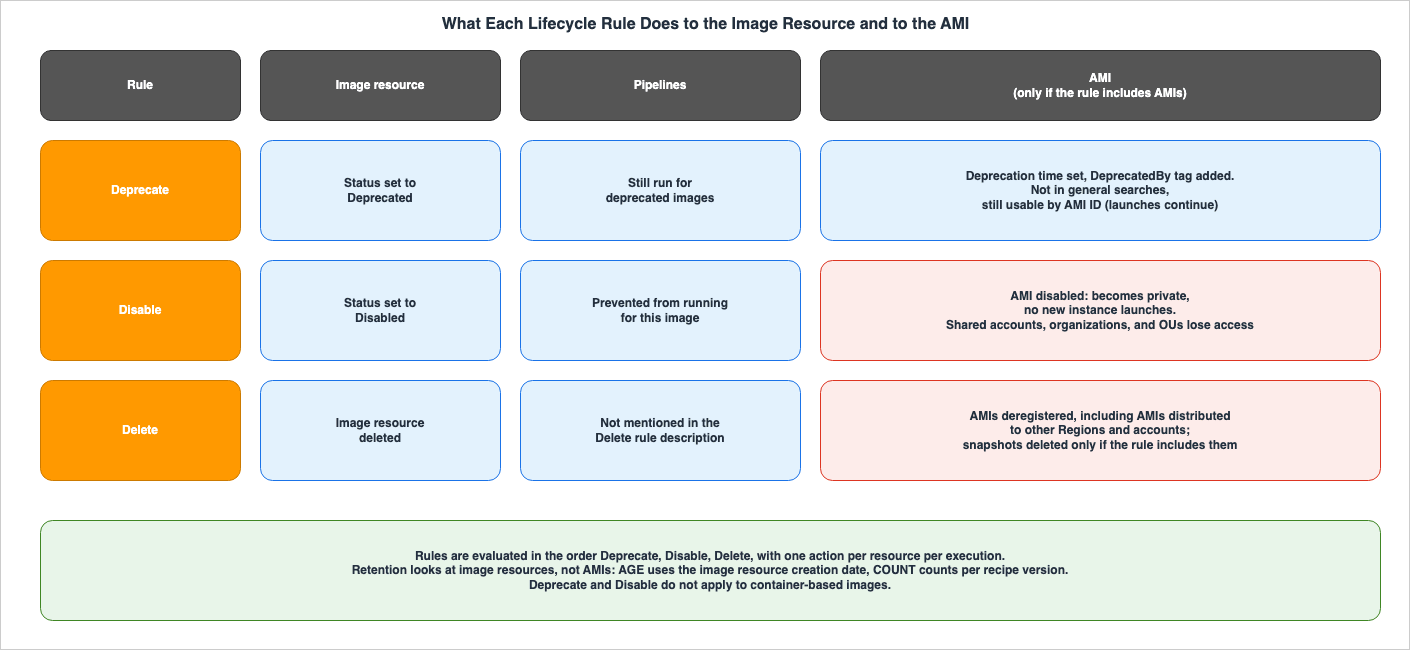
6.2 Order of Evaluation and One Action Per Execution
When a policy contains multiple rules, Image Builder evaluates resources in the following order: the Deprecate rule, the Disable rule, and then the Delete rule. During a single execution, only one action can be applied to a single resource. The Disable and Delete rules do not evaluate a resource that matched a Deprecate rule in that execution. However, if that resource matches the criteria of other rules in a subsequent execution, it will be evaluated. The user guide provides an example of a phased approach: deprecating resources after 90 days, disabling them after 120 days, and deleting them after 180 days.Deprecate rules do not evaluate images that are already deprecated, disabled, failed, or canceled. Disable rules do not evaluate images that are disabled, failed, or canceled. Delete rules evaluate images regardless of their state, within the scope of retention and exclusion rules. All rules skip images that are currently being built and evaluate them in the next execution.
6.3 Selecting Targets and Counting Retention
Policies target either recipes (and their versions) or tags associated with image resources. As of What's New on February 27, 2026, it's now possible to use wildcard patterns likemy-recipe-1.x.x for recipe versions, and these policies will now apply to recipes created afterward as well. When selecting targets based on tags, the user guide specifies that only tags associated with image resources are evaluated, and not tags on output AMIs or container images.Retention for the Delete rule is also counted on image resources. The age (
AGE) condition is counted based on the creation date of the image resource, not the creation date of the output AMI. The count (COUNT) condition is counted based on the number of image resources for each version of a recipe. The AGE condition can also include a minimum number of image resources to retain (retainAtLeast) for each recipe version, regardless of age. Failed images and canceled images are not included in the retention count and are always subject to deletion.6.4 Exclusion Rules
To exclude specific AMIs from lifecycle actions, use exclusion rules. The user guide lists five types of exclusion rules:- Exclusion by tag (of the image resource's tags)
- Exclusion of public AMIs
- Exclusion of AMIs used for launching within a specified period
- Exclusion by Region
- Exclusion by shared account
Exclusion by tag can be configured in two locations.
exclusionRules.tagMap evaluates the tags of the image resource, and if a match is found, that image and all of its outputs are excluded. exclusionRules.amis.tagMap evaluates the EC2 tags of the output AMIs. Regarding exclusions based on the last launch time, the user guide notes that EC2 reports that time with a 24-hour delay, so launches within the most recent 24 hours may not be reflected in the exclusion assessment.6.5 AMIs in Other Accounts and Regions
Delete rules can also apply to output AMIs and their snapshots that have been distributed to other Regions and accounts. To apply actions to AMIs in other accounts, the user guide instructs you to create an IAM role namedEc2ImageBuilderCrossAccountLifecycleAccess in each account to which resources are distributed. This name must be used exactly as specified.As described in section 4.1, copies distributed to the target account are owned by that account. The user guide states that Image Builder uses this role on behalf of the owner of the destination account. Therefore, lifecycle actions on those copies are applied through the role created in the target account. If only launch permissions are enabled, the user guide indicates that this role is not required, and all AMI resources remain within your own account.
6.6 Returning an Image to a Usable State
An image that is in a deprecated or disabled state can only be returned to a usable state by manually calling theStartResourceStateUpdate API. The user guide states that this transition does not occur through the automatic execution of lifecycle policies. When restored, the deprecation is removed, the AMI becomes active again, and the deprecation date and DeprecatedBy tag are removed.7. Where the Records and the Launch-Time Check Do Not Reach
This section examines where the records so far, and the launch-time check that published articles cover, do not reach Image Builder AMIs. It ends by setting out where the sources word the same point differently.7.1 The Launch-Time Check (Allowed AMIs) Does Not Restrict AMIs the Account Owns
The EC2 User Guide states that Allowed AMIs only control the discovery and use of public AMIs and AMIs shared with your account.The Allowed AMIs feature only controls the discovery and use of public AMIs or AMIs shared with your account. It does not restrict the AMIs owned by your account.Applying this rule, along with section 4.1, to AMIs created by Image Builder, results in the following:
| How the AMI is Received | Account that Owns the AMI | Allowed AMIs for the Account Launching the AMI |
|---|---|---|
| The output AMI of the building account (including copies to other Regions in the same account) | The building account | Not restricted (owned AMI) |
| Shared via launch permissions (account, organization, OU) | The building account | If enabled, evaluated as a shared AMI |
Made public via launch permissions (userGroups set to all) | The building account | If enabled, evaluated as a public AMI |
Copied to a target account (targetAccountIds) | The target account | Not restricted after copying (owned AMI) |
The "Not restricted" entries in the first and fourth rows represent a conclusion derived from comparing the rules in the EC2 User Guide and the ownership descriptions in the Image Builder User Guide. The ownership description referenced in the first row is from the "What is Image Builder?" page, which states that you own the customized images that Image Builder creates in your account. The fourth row describes the scenario where the target account owns a copy. While a specific sentence addressing Image Builder distribution was not found, the published article AMI Allowed Instance Types and Launch Governance on Amazon EC2, specifically sections 4.3 and 5.5, states that when a shared AMI is copied, the account that made the copy becomes its owner and the copy falls outside the Allowed AMIs criteria. However, the same section 4.3 states that when Allowed AMIs is enabled, copying an AMI that does not meet the criteria is also restricted. A sentence stating whether this check applies when Image Builder makes a copy in a target account was not found either.
Therefore, even if an organization enables Allowed AMIs, you cannot say that instances can then be launched only from approved AMIs built with Image Builder. Allowed AMIs checks only shared AMIs and public AMIs. AMIs created by the building account, as well as copies distributed to target accounts, can be used by the respective accounts that own them, regardless of the criteria. Section 5.5 of the published article places the design of permissions to create and copy AMIs outside its scope, and this article does not cover it either.
The Image Builder user guide contains two statements that can be read as saying that AWS Organizations lets you restrict launches to approved AMIs. The "What is Image Builder?" page states:
Using built-in integrations with AWS Organizations, Image Builder enables you to enforce policies that restrict accounts to run instances only from approved AMIs.The "How EC2 Image Builder works" page also states that you can use an AWS Organizations account to restrict member accounts to only launch approved and compliant AMIs. Neither statement specifies the mechanism by which this restriction is implemented. The link from "How EC2 Image Builder works" leads to a general page for managing AWS Organizations accounts. These statements cannot be read as grounds for Allowed AMIs applying to every AMI that Image Builder creates.
7.2 Having an Image Resource Does Not Show That a Recipe Built the AMI
As stated in section 4.3,DistributeImage creates a new image resource to track distribution, based on the ID of an existing AMI. The examples in the API Reference pass the ID of an AMI that the user owns. The API Reference states that this operation only runs the distribution stage. Therefore, simply having an Image Builder image resource in an account does not mean that the AMI was created using an Image Builder recipe and build workflow. To verify how the AMI was created, examine the image resource's configuration. Check for the presence of a recipe (does it contain components?), the build workflow configuration (does it have a build workflow?), and whether it was created from a pipeline (sourcePipelineArn). The API Reference specifies that sourcePipelineArn is only present for images created through a pipeline execution. The user guide also acknowledges that it's possible to use recipes without components or to skip the build step. Furthermore, because execution records have a retention period (see section 5.2), the absence of an execution record does not indicate that the AMI was not built.7.3 Findings Are a Point-in-Time Record, and Execution Records Have a Retention Limit
As described in section 5.3, a findings snapshot represents the findings that Amazon Inspector discovered on a test instance during the build process. There are several reasons why a snapshot might be empty. For example, the scan might not have produced any findings at the time of the build, the setting to keep snapshots might not have been turned on, or a workflow might have been used that bypasses finding collection, such as withexpress-test-image. You can verify which scenario applies by examining the pipeline configuration and workflow execution.As described in section 5.2, records of workflow executions are only retained for a limited time. If there's a possibility that you might need to investigate which steps were run or what was approved for an older AMI, you would need to keep those records yourself.
7.4 Can AMI Ancestry Trace an AMI Back to Its Source AMI?
EC2 provides AMI ancestry, allowing you to trace an AMI back to its origin (as of November 20, 2025, according to What's New). The EC2 User Guide states that you can only determine the original AMI's ID and Region for AMIs created usingCreateImage, CopyImage, and CreateRestoreImageTask. For AMIs created with CreateImage, the original AMI is the one that launched the instance. With AMIs created from snapshots using RegisterImage, the original AMI cannot be determined.Image Builder workflows also include actions with the same names:
CreateImage and RegisterImage. The User Guide explains that the CreateImage step creates an image from a running instance using the EC2 CreateImage API, while the RegisterImage step registers an AMI using the EC2 RegisterImage API.This step action creates an image from a running instance with the Amazon EC2 CreateImage API.Putting the two sources together, it follows that the ancestry of an output AMI created by the
CreateImage step shows the AMI that launched the build instance. It also follows that, for output AMIs created by the RegisterImage step, the source AMI cannot be determined. Notably, no sentence stating these conclusions for AMIs created by Image Builder was found in either the Image Builder documentation or the EC2 AMI ancestry page. You can verify which step was designed to create the AMI by examining the version of the workflow definition (as described in section 3.2; Image Builder retains all versions). Records of how the workflow actually ran are subject to retention limits, as outlined in section 5.2.7.5 Where the Sources Differ
The Image Builder documentation contains instances where the same information is presented differently across various pages. This article lists them side by side rather than reducing them to one.| # | Issue | One Document | Another Document |
|---|---|---|---|
| 1 | Do deprecated AMIs appear in describe-images? | Image Builder UG (How lifecycle management rules work): Not shown in general searches, and as an example, states that EC2's describe-images excludes deprecated AMIs from the results. | EC2 UG (Deprecate an Amazon EC2 AMI): For AMI users, you must specify the ID or indicate that deprecated AMIs should be included in the results. For AMI owners, it states that the AMI will continue to appear. |
| 2 | Is distribution to target accounts a shared resource or a copy? | Image Builder UG (View image resource details): Lists the accounts with which the output image is shared. | Image Builder UG (Manage Image Builder distribution settings): Creates a copy for each target account, and the target account owns the copy. |
| 3 | Do lifecycle actions apply to AMIs? | Image Builder UG (How lifecycle management rules work) – Description of rules: States that deprecating, disabling, and deregistering an AMI are all selectable options. Note on the same page: States that output resources only change if included in the rules. | Same page – Description of state transitions: States that transitioning to Deprecated adds a tag to the AMI, transitioning to Disabled makes the AMI private and prevents new launches, and transitioning to Deleted deregisters the AMI – without any conditions. |
| 4 | Does AMI output have a distribution workflow? | Image Builder UG (Manage build, test, and distribution workflows): Describes three stages and the DISTRIBUTION type. Another sentence in View image resource details: States that all images have a build, test, and distribution workflow. | View image resource details – Description of the Workflow tab: States that a workflow that outputs an AMI can have build, import, and test workflows. |
| 5 | Can Lambda functions be invoked? | What's New (November 17, 2025): States that Lambda functions can be invoked from image workflows. | Image Builder UG (Supported step actions): Does not have dedicated actions for Lambda; it can be invoked asynchronously using the WaitForAction input. |
| 6 | What is the threshold at which a pipeline is automatically disabled? | Image Builder UG (Configure pipeline execution settings): States that it will be disabled if the number of failures exceeds the limit. | API Reference (ImagePipeline): States that it will be disabled if the number of failures reaches the limit. The page on EventBridge integration contains both ways of describing this. |
| 7 | What is the size of the workflow document? | Image Builder UG (Manage build, test, and distribution workflows): Inline documents (data) are limited to 16,000 bytes. | AWS General Reference (Image Builder Service Quotas): The maximum size for workflow data is 64 KB. |
| 8 | Can the total number of workflows be increased? | Image Builder UG (Manage build, test, and distribution workflows) – Note: States that the total number of workflows cannot exceed 10. The table on the same page states that 10 is the default limit. | AWS General Reference (Image Builder Service Quotas): Lists the number of workflows per image (10) as a quota that can be increased. |
| 9 | For which resources are tags considered when excluding resources? | Image Builder UG (How lifecycle management rules work): States that exclusionRules.tagMap evaluates tags only on the image resource. | re:Post (How do I troubleshoot a FAILED Image Builder lifecycle policy...): States that removing the retention tag from the AMIs, snapshots, or container images lets the policy delete them. |
Difference 6 decides whether, with the default of 5, the pipeline is disabled on the fifth failure or on the sixth. This article does not decide which.
8. Frequently Asked Questions about EC2 Image Builder
This section answers, within this article's scope, questions that often come up when building the path that creates AMIs with Image Builder or when considering how to govern an organization's AMIs.Q1. If you enable Allowed AMIs within your organization, can instances only be launched using AMIs created with Image Builder?
No. The EC2 User Guide states that Allowed AMIs does not restrict the AMIs owned by an account. An AMI created with Image Builder is owned by the account that built it, and a copy distributed to a target account is owned by that account. What Allowed AMIs evaluates against its criteria is AMIs shared through launch permissions and public AMIs (section 7.1).Q2. Can instances no longer be launched from an AMI that a lifecycle policy deprecated?
No, you can still launch instances. The Deprecate rule sets the image resource's status toDeprecated and, if configured to include AMIs, applies a deprecation time to the AMI. The user guide states that while deprecated AMIs will not appear in general searches, you can still launch them if you specify the AMI ID (the EC2 user guide notes that AMI owners will continue to see deprecated AMIs, section 7.5). If you want to prevent new launches, you can choose to disable the AMI in the Disable rule (section 6.1).Q3. Why does an AMI remain after the Delete rule has completed?
The Delete rule may not be configured to include AMIs and snapshots. What a Delete rule deletes first is the image resource, and the deregistration of AMIs and the deletion of snapshots are optional settings. According to a re:Post article, ifincludeResources has amis and snapshots set to false, Image Builder will leave those resources untouched. It's also possible that they are being retained due to specific retention conditions or exclusion rules (see sections 6.1, 6.3, and 6.4).Q4. If no distribution workflow is attached, does distribution stop?
No. The user guide states that distribution is not skipped even if the distribution workflow is omitted, and that distribution will proceed according to the distribution settings applied to the pipeline or image. To halt distribution entirely, you must pass empty distribution settings (see section 3.4).Q5. If the findings snapshot shows no findings, can you say the AMI has no known vulnerabilities?
No. A snapshot represents findings that Amazon Inspector discovered on a test instance during the build process. The snapshot may be empty if scanning is not enabled, or if workflows that bypass finding collection, such as those usingexpress-test-image, are used. Furthermore, vulnerabilities that are publicly disclosed after the AMI is created will not be reflected in the snapshot taken during the build process (see sections 5.3 and 7.3).Q6. Can the building account's lifecycle policy also delete the copies distributed to target accounts?
Yes, conditionally. The Delete rule can be applied to AMIs distributed to other accounts. However, the user guide specifies that an IAM role,Ec2ImageBuilderCrossAccountLifecycleAccess, must be created in each destination account. Copies are owned by the target account (as described in section 4.1), and the user guide states that Image Builder uses this role on behalf of the owner of the destination account (as described in section 6.5).Q7. If your account has an Image Builder image resource, can you say that the AMI was built from a recipe?
No.DistributeImage creates a new image resource based on the ID of an existing AMI, and this operation runs only the distribution stage. To determine how the AMI was created, you should check the recipe and workflow settings associated with the image resource. Workflow execution records have a retention period, so the absence of such records does not indicate that the AMI was not built (see section 7.2).Q8. How long are workflow execution records kept?
The API Reference states that workflow execution records are kept only for a limited time, and that the list of executions can be empty for older build versions. No figure for the retention period was found in the documentation read. If you need to verify this information later, you should store EventBridge events or API responses during execution (see section 5.2).9. Summary
- Image Builder builds and retires AMIs with a recipe (parent image and components), an infrastructure configuration, image workflows in three stages (build, test, and distribution), distribution settings, and lifecycle policies. Each stage runs in a defined sequence, and the next stage only begins after the previous stage is successful.
- A single pipeline can include at most one build workflow and one distribution workflow, with no more than ten workflows in total by default (section 7.5). The distribution workflow is optional; it can be omitted, and distribution will proceed according to the distribution settings. To stop distribution, provide empty distribution settings.
- Waiting for approval is placed with
WaitForAction, and Step Functions is called withExecuteStateMachine. In the user guide as of the verification date, the only step action that takes a Lambda function isWaitForAction, which invokes it asynchronously. - AMIs shared through launch permissions remain owned by the account that built them. The receiving account cannot see the tags associated with the AMI, but they can see the watermark. Copies to target accounts are owned by those target accounts.
- The image resource records the recipe and its version, the infrastructure configuration, the distribution settings, workflow executions, and, if configured, snapshots of findings. The output AMI's tag
Ec2ImageBuilderArnpoints to this resource. However, workflow execution records are only retained for a limited time, and findings represent the results found on the test instance at the time of the build. - Lifecycle policy rules come in three types: Deprecate, Disable, and Delete. Each rule first applies to the image resource. AMI-specific actions only occur when a rule explicitly includes the AMI. Deprecation does not prevent new launches. Choosing to disable the AMI makes it private, and the accounts it was shared with lose access. The Delete rule only removes the AMI if the rule specifies deregistration; otherwise, the AMI remains.
- Allowed AMIs, the launch-time check, does not restrict the AMIs owned by an account. When combined with Image Builder's ownership descriptions, this means that the AMI built by the building account and any copies in target accounts can be used by the respective owning accounts, regardless of the criteria.
DistributeImagecreates a new image resource from an existing AMI. The existence of an image resource does not indicate that the AMI was built from a recipe.
10. References
- What is Image Builder? - EC2 Image Builder
- How EC2 Image Builder works - EC2 Image Builder
- Semantic versioning in Image Builder - EC2 Image Builder
- Manage recipes in Image Builder - EC2 Image Builder
- Use a base image parameter in your recipe - EC2 Image Builder
- Manage build, test, and distribution workflows for Image Builder images - EC2 Image Builder
- Configure image pipeline workflows in Image Builder - EC2 Image Builder
- Supported step actions for your workflow document - EC2 Image Builder
- Configure pipeline execution settings for image pipelines - EC2 Image Builder
- Manage Image Builder distribution settings - EC2 Image Builder
- Set up cross-account AMI distribution with Image Builder - EC2 Image Builder
- Use enhanced AMI distribution capabilities - EC2 Image Builder
- Tag Image Builder output resources - EC2 Image Builder
- Track AMI lineage with watermarks - EC2 Image Builder
- View image resource details - EC2 Image Builder
- Manage security findings for Image Builder images - EC2 Image Builder
- Amazon Inspector integration in Image Builder - EC2 Image Builder
- How lifecycle management rules work for Image Builder image resources - EC2 Image Builder
- Lifecycle management prerequisites for Image Builder images - EC2 Image Builder
- DistributeImage - EC2 Image Builder API Reference
- ListWorkflowExecutions - EC2 Image Builder API Reference
- AmiDistributionConfiguration - EC2 Image Builder API Reference
- LaunchPermissionConfiguration - EC2 Image Builder API Reference
- LifecyclePolicyDetailAction - EC2 Image Builder API Reference
- ImagePipeline - EC2 Image Builder API Reference
- Image - EC2 Image Builder API Reference
- EC2 Image Builder endpoints and quotas - AWS General Reference
- Control the discovery and use of AMIs in Amazon EC2 with Allowed AMIs - Amazon Elastic Compute Cloud
- Deprecate an Amazon EC2 AMI - Amazon Elastic Compute Cloud
- Use AMI watermarks to track and identify AMIs - Amazon Elastic Compute Cloud
- Use AMI ancestry to trace the origin of an AMI - Amazon Elastic Compute Cloud
- How do I resolve tags that aren’t visible on a distributed AMI in EC2 Image Builder for Linux? - AWS re:Post
- How do I troubleshoot a FAILED Image Builder lifecycle policy, or a policy that completed but still has images available? - AWS re:Post
- EC2 Image Builder now integrates with SSM Parameter Store - AWS What's New
- EC2 Image Builder now provides enhanced capabilities for managing image pipelines - AWS What's New
- Announcing EC2 Image Builder support for Lambda and Step functions - AWS What's New
- Amazon EC2 introduces AMI ancestry for complete AMI lineage visibility - AWS What's New
- Announcing flexible AMI distribution capabilities for EC2 Image Builder - AWS What's New
- EC2 Image Builder now supports auto-versioning and enhances Infrastructure as Code experience - AWS What's New
- EC2 Image Builder enhances lifecycle policies with wildcard support and simplified IAM - AWS What's New
- Amazon EC2 announces AMI Watermarks for improved AMI governance - AWS What's New
References:
Tech Blog with curated related content
Written by Hidekazu Konishi