LLM Evaluation Harness Settings Behind a Benchmark Score - Prompt Format, Few-Shot Examples, Answer Extraction, Agent Sandboxes, and What to Disclose Alongside the Number
First Published:
Last Updated:
An evaluation harness is a tool that presents benchmark questions to a model, scores the responses, and aggregates them into a single number. Behind that single number lie these settings: prompt formatting, chat templates and system instructions, the number and selection of few-shot examples, whether to choose by log-likelihood or to have the model generate, stop sequences, regular expressions for extracting answers, generation parameters, and methods for repetition and aggregation. For agent-based benchmarks, this is further augmented by a sandbox, limits on time, tokens, and messages, as well as scorers and the number of trials. These settings are decided in four places: the task definition, run-time settings, the model itself and its provider, and scoring and aggregation. Some default settings are linked to and change based on other settings. Some settings are recorded, while others are not.
This article lays out four things, drawing on the documentation for lm-evaluation-harness, Inspect, SWE-bench, and Harbor, as well as observations from running lm-evaluation-harness with a small model, one question at a time, to document the behavior of input assembly and extraction filters. Specifically, it will address: where each setting is determined within each harness; which default settings are linked and change in response to others; what is recorded and what is not; and what information should be disclosed alongside the numbers to allow others to verify the origin of those results. This article is not intended to compare harnesses or present a table of model scores. It will not display any scores.
Related articles on this site:
- LLM Benchmark History and Timeline - Who Built Each Yardstick, Who Declared It Saturated, and What Replaced It
- Reproducible LLM Inference - Batch Invariance, the Cost of Determinism, and Where Bitwise Identity Is Actually Required
- LLMOps Observability and Evaluation Architecture on AWS - Tracing, Metrics, and Automated Evaluation Gates with CloudWatch and OpenTelemetry
- Amazon Bedrock Model Evaluation Practical Guide - Automatic Metrics, LLM-as-a-Judge, RAG Evaluation, and CI/CD Quality Gates
- Amazon Bedrock AgentCore Evaluations Practical Guide - Built-In Evaluators and CI/CD Regression Testing for AI Agents
- Anthropic Claude Model Migration Guide - Upgrading Prompts and Workloads Across Model Generations
- LLM API Parameter Compatibility Reference - Anthropic, OpenAI, Google Gemini, and Amazon Bedrock
- Agent Sandboxing and Blast-Radius Isolation on AWS - Choosing the Unit of Each Containment Boundary and What Each One Does Not Stop
- Publishing npm and PyPI Packages Without Long-Lived Tokens - Trusted Publishing, Staged Publishing, and What Trusted Publishing Does Not Assert
- EC2 Image Builder - Recipes, Workflows, Distribution, and Lifecycle Policies, and What the Image Resource Records About How an AMI Was Built
Table of Contents
- 1. The Scope of This Article and the Date It Was Verified
- 2. Where the Settings Behind One Number Are Decided, and the Origin Table
- 3. How a Harness Scores an Item — Comparing Log-Likelihoods or Generating and Extracting
- 4. Prompt Format and Few-Shot Examples
- 5. Generation Settings, Stop Sequences, Answer Extraction, Repeats, and Aggregation
- 6. Settings That Agent Harnesses Add
- 7. Records, and What to Disclose Alongside the Number
- 8. Frequently Asked Questions about LLM Evaluation Harness Settings
- 9. Summary
- 10. References
1. The Scope of This Article and the Date It Was Verified
This section confirms that this article takes the proposition of the published timeline article as its premise and covers harness settings. It then sets out the date of verification, the materials consulted, the version numbers of each harness, the terminology used in this article, and what will not be covered.1.1 The Premise — The Third of the Four Elements That Make Up a Number
LLM Benchmark History and Timeline explains that benchmark numbers are determined as a result of at least four decisions: Task Set, Scoring Method, Harness and Presentation, and Leaderboard. According to the article, the third element, Harness and Presentation, which includes the number of examples shown, the format of the questions, and the method for extracting generated responses, is often determined by the team executing the evaluation, rather than the paper's authors.This article focuses on this third element. Upon closer examination, it becomes clear that the settings within the harness are not determined in a single location. The task author writes the task format and the extraction regular expressions, while the team executing the evaluation decides the number of few-shot examples and whether to apply a chat template. The content of the chat templates themselves is held by the model. This article will detail where each of these settings is determined, presenting the relevant excerpts from the source material for each harness.
1.2 The Verification Date, the Sources Read, and the Versions
The information presented in this article was verified on October 1, 2026. The versions of each harness at the time of verification are as follows:| Harness | Version | Verified Documentation |
|---|---|---|
| lm-evaluation-harness (hereinafter referred to as lm-eval) | v0.4.13 (GitHub release date: August 31, 2026) | README, docs/interface.md, docs/task_guide.md, docs/new_task_guide.md, docs/model_guide.md, docs/chat-template-readme.md, docs/footguns.md, docs/API_guide.md, Release notes for v0.4.13, the v0.4.13 source code, including the task YAML files |
Inspect (PyPI package name: inspect-ai) | 0.3.273 (CHANGELOG date: September 29, 2026) | Tasks, Solvers, Scorers, Scoring Policy, Scoring Workflow, Metrics, Sandboxing, Setting Limits, Options, Log Files pages, and the inspect_ai.log reference |
SWE-bench evaluation harness (PyPI package name: swebench) | 5.0.2 (PyPI release date: August 18, 2026) | README for 5.0.2 (PyPI description) and code. README on GitHub's main branch, docs/guides/evaluation.md, docs/faq.md |
| Harbor | v0.23.0 (Harbor documentation CHANGELOG date: September 12, 2026) | Core concepts, Quick start, Run a job, Task Configuration, Network policies, Verifier, Job configuration, Metrics, Registries, View job results pages, and the v0.23.0 package code (PyPI wheel) |
For lm-eval, this article read both the v0.4.13 tag and the main branch as of the verification date. While the main branch documentation had changes related to plugin functionality and the addition of a section on running GGUF models with llama.cpp, the descriptions of the configurations discussed in this article remained consistent with the v0.4.13 version. The information regarding lm-eval in this article is based on version v0.4.13.
SWE-bench's GitHub main branch README and documentation on the verification date contained changes, made after version 5.0.2 (available on PyPI), to where records are written and to the CLI commands. Unless otherwise noted, the SWE-bench descriptions in this article refer to the README and code from version 5.0.2. The differences between the main branch and version 5.0.2 are listed in section 7.6.
This article describes running lm-eval v0.4.13 locally and verifying the logs of the inputs passed to the model. The model used was
HuggingFaceTB/SmolLM2-135M-Instruct, a small instruction-tuned model with a chat template. It was used solely to observe the construction of inputs and the behavior of the extraction filters. It was run with --limit 1, processing only one question, on the CPU. lm-eval was installed from PyPI as lm_eval[hf]==0.4.13, and transformers was version 5.18.0. docs/interface.md describes --limit as For testing only., and this article does not include the scores from these runs.1.3 Terminology Used in This Article
Within this article, the same term may refer to different components depending on the harness being discussed. To ensure clarity, this article will consistently use the following terminology:| Term Used in This Article | What It Refers To | Supporting Documentation |
|---|---|---|
| Evaluation Harness | A tool that takes prompts to a model, scores the responses, and aggregates the results into numerical data. Some articles on this site use the word harness for the execution environment of a coding agent or for a managed agent loop, but those are different things. | lm-eval README, Inspect homepage |
| Task | A unit of evaluation defined in YAML within lm-eval. In Inspect, it is a Task that groups a dataset, a solver, a scorer, and so on. In Harbor, it represents a directory containing instructions, a sandbox environment, and a verifier. | lm-eval docs/task_guide.md, Inspect Tasks, Harbor Core concepts |
| Sample | A single question used for scoring. lm-eval refers to this as "doc" or "instance," Inspect calls it Sample, and SWE-bench uses the term "instance." | Documentation for each harness |
| Few-shot Example | An example with a provided answer shown before a prompt. A single example is counted as one "shot." | lm-eval docs/task_guide.md |
| Repeats | The process of running the same sample multiple times. lm-eval uses repeats, Inspect uses epochs, and Harbor uses the number of trials, n_attempts. | lm-eval docs/task_guide.md, Inspect Metrics, Harbor Job configuration |
| Scorer | A component responsible for evaluating the output. Inspect refers to this as "scorer," while Harbor uses the term "verifier." | Inspect Scorers, Harbor Verifier |
| Denominator | The number of samples included in the calculation of a metric. Whether to include samples with errors or those that could not be scored is determined by the rules of each harness. | Inspect Scoring Policy, SWE-bench docs/guides/evaluation.md, Harbor Metrics |
1.4 Topics Not Covered
- Examples showing that different harnesses give different numbers, the history of benchmarks, their creators, declarations of saturation, contamination, and the operation of leaderboards are covered in LLM Benchmark History and Timeline. This article does not repeat those examples.
- The non-deterministic nature of numerical outputs that change even with the same input (batch invariance, seed, limitations of temperature 0) is addressed in Reproducible LLM Inference. Section 12.5 of the same article presents a table outlining items that should be recorded at the inference layer (model identifier and version, inference engine and version, degree of parallelism, etc.). This article focuses solely on the configuration of the harness layer.
- The gating of evaluations placed in CI is covered in LLMOps Observability and Evaluation Architecture on AWS; Amazon Bedrock evaluation jobs and LLM-as-a-judge are discussed in Amazon Bedrock Model Evaluation Practical Guide; evaluation tools for your own agents are detailed in Amazon Bedrock AgentCore Evaluations Practical Guide; and preparing evaluations before migrating models is covered in Anthropic Claude Model Migration Guide.
- Differences in parameters across different provider APIs (temperature, limits on stop sequences, etc.) are addressed in LLM API Parameter Compatibility Reference. This article only describes where the harness determines those values.
- The design of boundaries to contain agents is covered in Agent Sandboxing and Blast-Radius Isolation on AWS. This article only describes the configuration and default values of the evaluation harness sandbox.
- This article does not address which harness is better, model scores, comparisons between numbers published by others, pricing, or methods for contaminating benchmarks or exploiting scoring loopholes.
The following three resources, as of the verification date, have announced their own cessation of updates or migration. This article does not use these as current examples.
Stanford CRFM's HELM entered maintenance mode on June 1, 2026.
HELM entered maintenance mode on June 1, 2026.However, no new features will be added to HELM, and no new evaluations will be added to the HELM leaderboards.OpenAI's
simple-evals has announced the end of updates in the README.**July 2025**: `simple-evals` will no longer be updated for new models or benchmark results.The README of the original Terminal-Bench harness repository guides new users to Harbor. This article treats Terminal-Bench 2.0 as something run with Harbor, rather than with the original harness.
New users should check out [**harbor**](https://github.com/laude-institute/harbor), our new framework that can be used to run Terminal-Bench 2.0!2. Where the Settings Behind One Number Are Decided, and the Origin Table
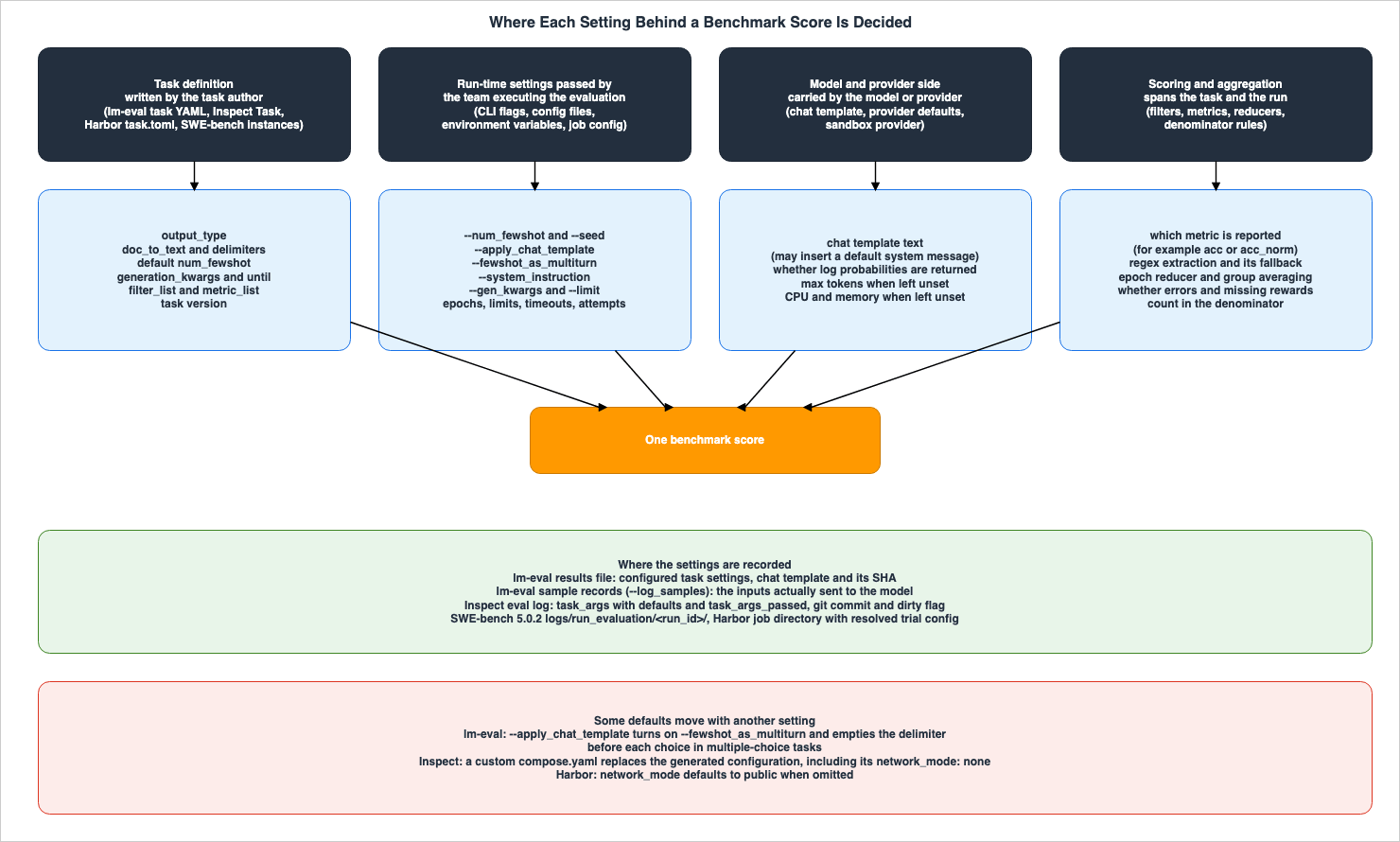
This section details where the settings that determine a single benchmark's numerical result are located, dividing them into four categories based on their location. Next, it lists, for each harness that has override layers, the order in which later settings override earlier ones. Finally, it summarizes in the Origin Table what checks can be performed on the received numbers before use, and what uncertainties remain even after those checks have been completed.2.1 Four Places Where Settings Are Decided
The settings of a harness are decided in one of four places:- Task Definition: This is defined by the task author. In lm-eval, it is within the task's YAML file. In Inspect, it is the
Taskreturned by the@taskfunction. In Harbor, it is thetask.tomlfile, the environment, and the verifier in the task's directory. In SWE-bench, it is within each instance of the dataset and the associated tests. These include prompt formatting, scoring methods, answer extraction, default number of few-shot examples, and the task version.
- Run-Time Settings: This is provided by the team executing the evaluation. In lm-eval, it is through CLI flags and configuration files. In Inspect, it is through
task_with()and environment variables, as well as theeval()function and CLI. In Harbor, it is through the job configuration. In SWE-bench, it is through CLI arguments. These include the number of few-shot examples, application of chat templates, system instructions, overrides for generation settings, filtering of samples, and the number of trials.
- Model and Provider: This is carried by the model. These include the chat template and its contents, whether to return log probabilities, default maximum token count when not specified, and the size of the compute resources that the sandbox provider decides.
- Scoring and Aggregation: This spans both the task definition and the run-time settings. These include which metrics to report, regular expressions for extraction, how repeats are combined, how to average subtasks, and whether to include samples with errors or those that could not be scored in the denominator.
2.2 Override Order — Later Settings Take Precedence
In lm-eval, Inspect, and Harbor, task definitions include default values, which are then overridden by run-time settings. The number of override layers, and which settings cannot be overridden, vary from harness to harness.In lm-eval, the task's YAML file provides default values, while CLI flags override those values. When the
--num_fewshot flag is passed, version 0.4.13 logs a warning such as Overwriting default num_fewshot of arc_easy from None to 2. However, if a task's YAML file specifies num_fewshot as 0, version 0.4.13's code will not override this value even when the --num_fewshot flag is provided, only logging a message ending in Manual configuration will be ignored. In version 0.4.13, 47 task YAML files specify this value directly (for example, IFEval), and more tasks inherit it from an included template. The --gen_kwargs flag adds values to the YAML file's generation_kwargs to override them (see section 5.1). When configuration files are passed using the --config flag, the CLI flags take precedence, as docs/interface.md states (CLI arguments override config file values.). Group settings that combine multiple tasks also allow you to specify the num_fewshot value for subtasks (docs/new_task_guide.md provides an example of running mmlu within a group with num_fewshot: 2).Inspect describes four layers of overrides.
Task options can be set or overridden at four layers, each taking precedence over the ones before it:The four layers—task definition,
task_with(), environment variables and .env files, and eval() and the CLI—operate on a principle where later layers take precedence. Regarding environment variables, the Tasks page states that CLI flags can also be specified using environment variables prefixed with INSPECT_EVAL_. It also notes that Inspect automatically reads the .env file from the current directory, and if not found, searches for it in the parent directory. Consequently, even without any command-line input, the .env file placed in the parent directory might be determining settings such as temperature. The same page's table of overrides clarifies that the scorer (scorer) and metrics (metrics) can only be specified through the task definition and task_with(), and cannot be modified via eval() or the CLI. The solver, however, can be overridden using the CLI's --solver flag. While the scorer can only be overridden using task_with() during evaluation, the page also mentions that after evaluation, you can re-score existing logs using a different scorer via inspect score (section 7.2).Harbor utilizes each task's
task.toml file to manage settings such as timeout and network configurations. Job settings add multipliers and the number of trials on top of them. For example, the job's timeout_multiplier (default value 1.0) is applied to the task's timeout if no phase-specific multiplier is specified (section 6.3). Job settings also include options to override values defined in the task. These include override_timeout_sec, which replaces the agent's timeout, and max_timeout_sec, which caps it; the verifier's override_timeout_sec, which replaces the verifier's timeout; override_cpus and override_memory_mb, which replace the CPU and memory values; and extra_allowed_hosts to add permitted hosts for communication.The SWE-bench evaluation harness receives the dataset name (either an alias like
verified, a Hugging Face ID, or a local path), the prediction file, and the run_id via the CLI. The scoring process itself (applying patches and running tests) is determined by the tests associated with each instance in the dataset (section 6.4).2.3 Origin Table — What You Receive, What Made It, What You Can Check Before Trusting It, and What the Check Does Not Establish
Before using a number, there are four key things to verify. What are you receiving? What path was used to create and deliver it? What can you verify before using it? And what remains unknown even after verification? This site lays out these four points, along with the supporting documentation, in a single table, which it calls the Origin Table. The form of this table was set in Publishing npm and PyPI Packages Without Long-Lived Tokens, which covers the path for publishing packages, and it was also used in EC2 Image Builder - Recipes, Workflows, Distribution, and Lifecycle Policies, and What the Image Resource Records About How an AMI Was Built, which covers machine images.What you receive: This refers to the item that the receiving side gets. In this article, this means the benchmark number and the records attached to it.What made it: This describes the path used to create and deliver the item. This includes workflows, credentials, and approval processes.What you can check before trusting it: This lists the records that the receiving side can check before use, along with the methods for doing so.What the check does not establish: This lists what remains unknown even after verification. Include this only when explicitly stated in the documentation.Where the source says so: This indicates the documentation that provides the basis for the information in that row.
For cells where the documentation does not provide information, write
The source does not say. Before writing this, search the full text of the document referenced by that row, as well as the link it points to, using the words not, does not, cannot, only, not supported, still, and must, and the subject of that row. If the documentation only provides general principles and does not specifically address the subject of that row, note this in the cell.With benchmark numbers, what you can check depends on whether you produced the number yourself, whether it was published, and whether a published number comes with records. Therefore, the table in this article divides rows by how the number reaches you.
| What you receive | What made it | What you can check before trusting it | What the check does not establish | Where the source says so |
|---|---|---|---|---|
Numbers obtained by running lm-eval (v0.4.13) yourself, along with the --output_path results file and the samples recorded by --log_samples. | A task's YAML file (including output_type, doc_to_text and delimiters, num_fewshot, generation_kwargs, filter_list, metric_list, and metadata's version), combined with the runtime flags (--num_fewshot, --apply_chat_template, --fewshot_as_multiturn, --system_instruction, --gen_kwargs, --seed, --limit), and the model's chat template (Chapters 4 and 5). | Check the task configuration in the results file (configs), the task version (versions), the number of few-shot examples (n-shot), the execution settings (gen_kwargs and seed in config), lm_eval_version, the full text and SHA of the applied chat template, fewshot_as_multiturn, and system_instruction. The arguments in the sample records contain the inputs passed to the model (section 7.1). | docs/chat-template-readme.md states that when a chat template is applied in log-likelihood and multiple-choice tasks, an empty string is used instead of the configured delimiter. No sentence in the v0.4.13 documentation was found stating whether the task settings in the results file record the configured value or the value actually used (this article's check is in section 7.1). | lm-eval docs/interface.md, docs/task_guide.md, docs/chat-template-readme.md, docs/model_guide.md (v0.4.13) |
| Numbers obtained by running Inspect (0.3.273) yourself, along with the eval log. | A task (dataset, solver, scorer, sandbox, limit, epoch), combined with task_with(), environment variables and .env, and then overwritten sequentially with eval() and CLI settings. Generation settings can be specified at any of the four layers (section 2.2). | Check the status in the eval log, the eval section (including the task version, the task arguments including defaults (task_args) and those passed explicitly (task_args_passed), the dataset's sample IDs and whether they were shuffled, sandbox, generation settings, limit and epoch with reducer, git commit and dirty, package versions), plan, samples, and reductions (section 7.2). | The Log Files page recommends checking the status before analyzing the logs to confirm a successful run. The same page states that you can edit the score using edit_score() after evaluation, and the original values are preserved in the history. The Scoring Workflow page states that in inspect score's overwrite mode, old scores are removed from the logs. The Sandboxing page states that network_mode: none only affects processes within the container and does not restrict network access from the evaluation process or the model provider. | Inspect Tasks, Log Files, Scoring Workflow, Sandboxing, inspect_ai.log reference |
| Numbers obtained by running SWE-bench's evaluation harness (5.0.2) or Harbor (v0.23.0) yourself, along with the execution directory. | SWE-bench applies the predicted patch to the repository of the dataset instance and runs the tests inside a Docker image (pulled from Docker Hub by default in 5.0.2). Harbor runs trials with a task (instruction, environment, verifier, task.toml's timeout and network_mode) and job settings (agent, model, number of trials, timeout multiplier and replacement, sandbox provider) (Chapter 6). | For SWE-bench 5.0.2, check the report.json, eval.sh, patch.diff, test_output.txt, and run_instance.log within the logs/run_evaluation/<run_id>/ directory, and the aggregated file <model>.<run_id>.json (written to the current directory by default). For Harbor, check the job directory and each trial's resolved settings, lock, verifier output, and trajectory (section 7.3). | SWE-bench's README states that the evaluation harness caches results using only the run_id and instance_id, and even if the predictions differ, it reuses the initial result for the same run_id. The evaluation guide states that failures likely due to environmental factors are also counted inside unresolved and errors. Harbor's Metrics page states that by default, it averages rewards with tasks that have no reward counted as 0. | SWE-bench 5.0.2 README and code, docs/guides/evaluation.md, Harbor Configuration, Metrics, Job configuration |
| Numbers that are publicly released, along with the harness records (results file, sample records, eval log, job directory). | One of the paths in rows 1 to 3, run by the party that published the number. | Read the published records with the same methods as in rows 1 to 3. lm-eval has an argument --hf_hub_log_args to send results and samples to Hugging Face Hub. Harbor allows you to upload results to Harbor Hub for sharing. | Harbor's Quick start page describes how sharing allows others to reproduce results from the job settings, and that publishing results enables full auditability, although it does not list the specific settings included in the records. The Registries page recommends pinning remote tasks to full commit SHAs for reproducible runs. The documentation this row cites has no sentence stating whether the published records include all of the run's settings. | lm-eval README (Saving & Caching Results), Harbor Quick start, Registries |
| Numbers that are publicly released, but without accompanying harness records. | A run by the party that published the number. Which harness, which version, and which settings produced it are not attached to the number. | Only the text that accompanies the number. Count which of the items in section 7.4 it covers. | lm-eval's docs/task_guide.md states that when evaluating with prompts or settings that differ from the standard implementation, sharing the YAML configuration and the code's commit hash lets other researchers reproduce the evaluation setup, and it states this as the intent. The documentation this row cites has no sentence stating what cannot be checked for a number that comes without records. | lm-eval docs/task_guide.md |
The table does not contain any cells indicating
The source does not say. In rows 1, 4, and 5, the What the check does not establish cell states the general rule from the source and then notes that no sentence naming the subject of that row was found. The record of the actual values used, mentioned in the cell for row 1, was verified by running lm-eval and will be included in section 7.1.3. How a Harness Scores an Item — Comparing Log-Likelihoods or Generating and Extracting
This section divides the ways a harness scores a single item into two. The first has the model compute how likely each answer choice is and compares them. The second method involves having the model generate text and then extracting the answer from that generated output. Which method is used is decided by the task definition, but the model side can also narrow which methods can be used.3.1 Four Values for output_type in lm-eval
The YAML configuration files for lm-eval tasks use the output_type field to determine the scoring method. docs/task_guide.md specifies that the default value is generate_until, and lists four possible values: generate_until, loglikelihood, loglikelihood_rolling, and multiple_choice.docs/model_guide.md describes three types of requests to the model. generate_until accepts an input string and generation parameters, and typically generates text until a maximum length is reached or a stop string is encountered. loglikelihood accepts an input string and a target string, and returns the log probability of the target string following the input. loglikelihood_rolling returns the log probability of the entire string, and is used for perplexity evaluation. For multiple_choice tasks, the scoring method, as described in docs/new_task_guide.md, compares the log probabilities of all the options. In this article's check, for one ARC-Easy question, the execution logs showed four requests for loglikelihood, and the sample records also showed four sets of arguments, corresponding to the number of options.For example, the YAML for the multiple-choice task ARC-Easy in v0.4.13 is as follows:
tag:
  - ai2_arc
task: arc_easy
dataset_path: allenai/ai2_arc
dataset_name: ARC-Easy
output_type: multiple_choice
training_split: train
validation_split: validation
test_split: test
doc_to_text: "Question: {{question}}\nAnswer:"
doc_to_target: "{{choices.label.index(answerKey)}}"
doc_to_choice: "{{choices.text}}"
should_decontaminate: true
doc_to_decontamination_query: "Question: {{question}}\nAnswer:"
metric_list:
  - metric: acc
    aggregation: mean
    higher_is_better: true
  - metric: acc_norm
    aggregation: mean
    higher_is_better: true
metadata:
  version: 1.0
The
metric_list includes two metrics: acc and acc_norm. docs/task_guide.md explains that acc_norm represents the accuracy normalized by length (length-normalized accuracy). A single execution of the task produces two numerical results. When documenting the results for ARC-Easy, it is necessary to also indicate which metric each value corresponds to.3.2 Two Paths for Scoring One Multiple-Choice Item
Even for the same multiple-choice question, a harness can score it through either of two paths.The first path chooses by log-likelihood. In lm-eval's
multiple_choice, as noted in docs/new_task_guide.md, the input and target strings are constructed as doc_to_text(doc) + target_delimiter + doc_to_target(doc). For each choice, the harness calculates the log probability of the input followed by that choice. The model does not generate any text. If the choice with the highest probability matches the correct answer, the question is marked as correct.The second path has the model generate a response and then extracts the answer. The
multiple_choice() solver in Inspect presents the choices (A, B, C, D) and calls generate(), prompting the model to generate an answer. The Solvers page recommends combining this solver with a choice() scorer. The Scorers page explains that choice() restores the original order of any choices the solver shuffled and then scores them. The Solvers page also states that when reading the dataset, the choices may be shuffled using shuffle_choices, and in that case, the correct answer is also updated to match the shuffled order. The cot setting within multiple_choice() controls whether to encourage chain-of-thought reasoning; the default value is False. However, the Solvers page notes that this setting is not applied when using a custom template.lm-eval also has tasks that score multiple-choice questions by having the model generate an answer. The generative GPQA tasks in v0.4.13 (
_gpqa_generative_n_shot_yaml, which gpqa_main_generative_n_shot and the others include) use doc_to_text to present the choices in the format (A) through (D), set output_type to generate_until, and extract the answer using two filters: strict-match and flexible-extract. The multi_choice_regex filter (MultiChoiceRegexFilter) that flexible-extract uses is, according to a docstring in the v0.4.13 code, for extracting answers to multiple-choice questions answered with letter symbols.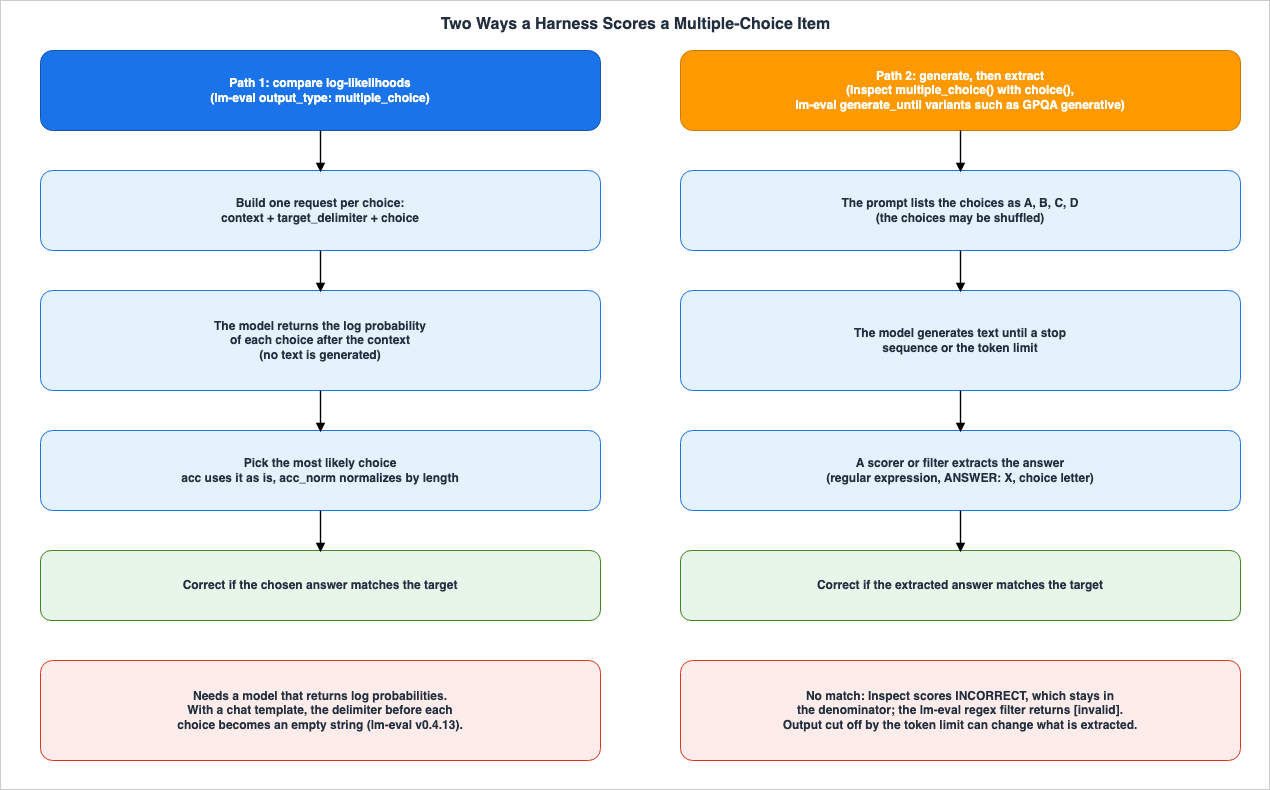
3.3 The Model Side Narrows Which Path Can Be Used
The first path can only be used when the model is able to return the log probability of the input. The lm-eval README states:Models which do not supply logits or logprobs can be used with tasks of type `generate_until` only, while local models, or APIs that supply logprobs/logits of their prompts, can be run on all task types: `generate_until`, `loglikelihood`, `loglikelihood_rolling`, and `multiple_choice`.Within the same README's compatibility table, many model types that connect to the chat API are listed with the request type
generate_until (no logprobs). In other words, even for a task that a locally run model can be scored on through the log-likelihood path, a model behind an API that does not return log probabilities has to use a different task that takes the generation path. Even when using the same benchmark name, it is necessary to specify which path was used for evaluation, alongside the numerical results.Models that output their reasoning process also have similar limitations.
docs/interface.md, regarding enabling the "thinking" mode with enable_thinking=True, states:**Note:** `enable_thinking=True` is only compatible with generative tasks. It cannot be used with loglikelihood-based tasks.4. Prompt Format and Few-Shot Examples
This section addresses the configuration that determines the format of the input provided to the model. While the format is largely dictated by the task definition, applying a chat template changes two defaults along with it. This article checked those changes in lm-eval's sample records.4.1 Formats That the Task Definition Decides
In lm-eval's task YAML files,doc_to_text represents the question, doc_to_target represents the answer, and doc_to_choice represents the options, each written as a Jinja2 template, a string, or a function. The default values specified in docs/task_guide.md are as follows:fewshot_delimiter(the separator between few-shot examples) is"\n\n".target_delimiter(the separator between the question and answer) is" "(a single space).num_fewshot(the number of few-shot examples) is 0.- No delimiter or space is inserted between the
description(the introductory text preceding the few-shot examples) and the first few-shot example.
docs/new_task_guide.md warns that, for multiple-choice tasks, doc_to_text should not end with a space and doc_to_target should not start with one. This is because the target_delimiter is responsible for inserting those separators.4.2 How Applying the Chat Template Affects Two Default Settings
Many of the instruction-tuned models are designed to accept input in a conversational format. When you use the--apply_chat_template flag with lm-eval, the harness constructs the input into a conversational format using the model's chat template. When doing so, two default settings change in conjunction.The first is the delimiter between questions and answers.
docs/chat-template-readme.md describes this change, stating that it applies to how requests are built for log-likelihood and multiple-choice tasks, and further explains:When `apply_chat_template` is set to `True`, the target delimiter is now set to an empty string instead of using the configured delimiter.In the v0.4.13 code, this replacement occurs within the
multiple_choice task branch, where the delimiter between the question being evaluated and each option becomes empty. If the task includes a gen_prefix that is a string that does not end with whitespace, the configured delimiter will remain.The second setting is how few-shot examples are arranged.
docs/interface.md describes --fewshot_as_multiturn as follows:Format few-shot examples as multi-turn conversation. Auto-enabled with `--apply_chat_template`. Set to `false` to disable.Specifically, when you use only the
--apply_chat_template flag in the v0.4.13 CLI, the few-shot examples are arranged as separate turns in a conversation between the user and the assistant. Only when you include the --fewshot_as_multiturn false flag are the few-shot examples concatenated within a single user turn. Conversely, it is not possible to enable --fewshot_as_multiturn without applying a chat template. The v0.4.13 code will produce an error if you attempt this combination.The
--system_instruction flag, described in docs/interface.md as Custom system instruction prepended to prompts., places the system instruction before the prompt. docs/model_guide.md states that if the model type does not implement the handling of chat templates, the --apply_chat_template, --fewshot_as_multiturn, and --system_instruction flags cannot be used. In v0.4.13, if the model arguments (model_args) contain the strings inst or chat but the chat template is not applied, the warning appears to be an instruct or chat variant but chat template is not applied. is logged.4.3 The Inputs the Harness Actually Assembled
This article ran the same single question from ARC-Easy using lm-eval v0.4.13 under three different configurations. The number of few-shot examples was set to 2, while all other settings remained consistent.lm-eval run --model hf --model_args pretrained=HuggingFaceTB/SmolLM2-135M-Instruct --tasks arc_easy --num_fewshot 2 --limit 1 --device cpu --log_samples --output_path ./a_plain
lm-eval run --model hf --model_args pretrained=HuggingFaceTB/SmolLM2-135M-Instruct --tasks arc_easy --num_fewshot 2 --limit 1 --device cpu --log_samples --apply_chat_template --output_path ./b_chat
lm-eval run --model hf --model_args pretrained=HuggingFaceTB/SmolLM2-135M-Instruct --tasks arc_easy --num_fewshot 2 --limit 1 --device cpu --log_samples --apply_chat_template --fewshot_as_multiturn false --output_path ./c_chat_singleIn the second run, the logs displayed
Using default fewshot_as_multiturn=True. This confirms the interaction described in section 4.2, as observed in the harness logs.The
arguments in the sample records include, for each choice, the input (arg_0) and the subsequent string of the choice option (arg_1). For the first choice, the newline characters in arg_0 are shown expanded (this article added a single blank line between arg_0 and arg_1 for readability). For runs using the chat template, the arg_0 value ends with a newline after the marker that opens the assistant turn. In the first run, which did not use the chat template, the output was as follows:arg_0:
Question: Which of these resources will most likely be depleted first?
Answer: Fossil fuels
Question: Which action is an example of good water management?
Answer: turning off the faucet when brushing teeth
Question: Which statement best explains why photosynthesis is the foundation of most food webs?
Answer:
arg_1: " Sunlight is the source of energy for nearly all ecosystems."The few-shot examples were concatenated using
"\n\n", and the choice option strings began with a single space. Both match the defaults described in section 4.1.In the second run, which only included the
--apply_chat_template flag, the output was as follows:arg_0:
<|im_start|>system
You are a helpful AI assistant named SmolLM, trained by Hugging Face<|im_end|>
<|im_start|>user
Question: Which of these resources will most likely be depleted first?
Answer:<|im_end|>
<|im_start|>assistant
Fossil fuels<|im_end|>
<|im_start|>user
Question: Which action is an example of good water management?
Answer:<|im_end|>
<|im_start|>assistant
turning off the faucet when brushing teeth<|im_end|>
<|im_start|>user
Question: Which statement best explains why photosynthesis is the foundation of most food webs?
Answer:<|im_end|>
<|im_start|>assistant
arg_1: "Sunlight is the source of energy for nearly all ecosystems."The few-shot examples were divided into user and assistant turns. The leading space was removed from the choice option strings. Both of these observations align with the information presented in section 4.2.
In the third run, which also included the
--fewshot_as_multiturn false flag, the few-shot examples were concatenated within a single user turn, using "\n\n". The answer in the few-shot examples (Answer: Fossil fuels) still contained a space, while the choice option string (arg_1) for the question being evaluated had no leading space. This shows that only the delimiter before the evaluated question's choices becomes empty, and that this is decided separately from how the few-shot examples are arranged.arg_0:
<|im_start|>system
You are a helpful AI assistant named SmolLM, trained by Hugging Face<|im_end|>
<|im_start|>user
Question: Which of these resources will most likely be depleted first?
Answer: Fossil fuels
Question: Which action is an example of good water management?
Answer: turning off the faucet when brushing teeth
Question: Which statement best explains why photosynthesis is the foundation of most food webs?
Answer:<|im_end|>
<|im_start|>assistant
arg_1: "Sunlight is the source of energy for nearly all ecosystems."4.4 A System Message Nobody Specified Can Get In
In the second and third runs, a system message appeared at the beginning of the input, even though the--system_instruction parameter was not specified. In both runs, the system_instruction field in the results file was null. Extracting the relevant keys from the results file of the second run yields the following:"system_instruction": null,
"fewshot_as_multiturn": true,
"chat_template_sha": "872be49dbb638044ad01b60388f48d469ff2980e5f0dccdc22ec907db54d0788",The model's chat template inserted this message. As indicated in
docs/model_guide.md, which states The chat template is saved in the evaluation results for reproducibility., the results file contains the full text of the chat template that was applied. This text is as follows, and it includes a branch that inserts a default system message if the initial message is not a system message.{% for message in messages %}{% if loop.first and messages[0]['role'] != 'system' %}{{ '<|im_start|>system
You are a helpful AI assistant named SmolLM, trained by Hugging Face<|im_end|>
' }}{% endif %}{{'<|im_start|>' + message['role'] + '
' + message['content'] + '<|im_end|>' + '
'}}{% endfor %}{% if add_generation_prompt %}{{ '<|im_start|>assistant
' }}{% endif %}The SHA-256 hash of this text matched the value of
chat_template_sha. The ARC-Easy task does not have a description field. In the code for version 0.4.13, when a chat template is applied, the task's description (joined with --system_instruction if one is given) becomes the system message. This template inserts its default system message only when neither of them is present. Therefore, in this run, the model's chat template, not a run-time setting, inserted the system message. The fact that the system_instruction field in the results file is null does not mean that the model did not receive a system message. To confirm this, examine the full text of the chat template in the results file, or the arguments in the sample record.This behavior is specific to the chat template used by the model in this article. Not all models with chat templates insert a default system message. When reporting evaluation results using a chat template, it is important to specify which model's chat template was used, along with either the full text or the SHA hash, so that others can verify the results.
4.5 Number of Few-Shot Examples, Selection, and Ordering
The number of few-shot examples is determined in three places:num_fewshot in the task's YAML file (the default value in docs/task_guide.md is 0; for example, the GSM8K YAML in v0.4.13 specifies 5), the group settings, and the CLI's --num_fewshot argument. However, for tasks defined with 0 in the YAML file, the CLI value is not used (see section 2.2).Regarding how the number is displayed, the documentation and the code do not agree.
docs/task_guide.md states, concerning a special key within metadata, the following:Other special metadata keys are: `num_fewshot`, to override the printed `n-shot` table column for a task.However, based on examining the code in v0.4.13, the
n-shot value in the results file and the "n-shot" column in the results table appear to be derived from the task's num_fewshot setting. There is no apparent code that reads the num_fewshot value from the metadata. (This is based solely on reading the code; no execution-based verification has been performed. See section 7.6.) In either case, if the displayed "n-shot" value is intended to represent the actual number of examples provided as input, it is necessary to verify this count within the sample's arguments.The method for selecting the examples is determined by the task's YAML file, specifically the
fewshot_split and fewshot_config settings. docs/new_task_guide.md describes the sampler within fewshot_config as "default" (random) or "first_n". By default, examples are selected randomly, and the random seed is determined by the CLI's --seed argument. docs/interface.md lists the default values for --seed as 0,1234,1234,1234 (corresponding to Python, NumPy, PyTorch, and few-shot, respectively). In this article's check, two runs with the same settings produced the same prompt_hash in the sample records.Different versions of the harness can also alter the content of the few-shot examples. The release notes for lm-eval v0.4.13 begin a list of fixes with the following:
Fixes that may shift previously reported numbers:The first of these fixes addresses an issue where the document being evaluated was inadvertently included as a few-shot example in the input. Even with the same task and settings, different harness versions can result in different inputs. The harness version is one of the settings to write alongside the number.
5. Generation Settings, Stop Sequences, Answer Extraction, Repeats, and Aggregation
This section addresses the configuration of the generation process. It covers where to stop the generation, how to extract answers from the generated text, how many times to run the process, and how to aggregate the results. The reasons why the generated output might vary even with the same input (due to numerical non-determinism) are handled by Reproducible LLM Inference.5.1 Generation Settings and Stop Sequences
In lm-eval's task YAML files,generation_kwargs defines the generation settings, while the until parameter within that section determines the stop sequences. The YAML for GSM8K in version 0.4.13 is as follows:tag:
- math_word_problems
task: gsm8k
dataset_path: openai/gsm8k
dataset_name: main
output_type: generate_until
training_split: train
fewshot_split: train
test_split: test
doc_to_text: "Question: {{question}}\nAnswer:"
doc_to_target: "{{answer}}" #" {{answer.split('### ')[-1].rstrip()}}"
metric_list:
- metric: exact_match
aggregation: mean
higher_is_better: true
ignore_case: true
ignore_punctuation: false
regexes_to_ignore:
- ","
- "\\$"
- "(?s).*#### "
- "\\.$"
generation_kwargs:
until:
- "Question:"
- "</s>"
- "<|im_end|>"
do_sample: false
temperature: 0.0
repeats: 1
num_fewshot: 5
filter_list:
- name: "strict-match"
filter:
- function: "regex"
regex_pattern: "#### (\\-?[0-9\\.\\,]+)"
- function: "take_first"
- name: "flexible-extract"
filter:
- function: "regex"
group_select: -1
regex_pattern: "(-?[$0-9.,]{2,})|(-?[0-9]+)"
- function: "take_first"
metadata:
version: 3.0docs/task_guide.md does not specify the default values when a task YAML file lacks generation_kwargs. docs/API_guide.md, which describes the base class for models accessed via the API (TemplateAPI), states that the default value for max_gen_toks is Default is 256 or set in task yaml., but it does not mention default values for temperature or stop sequences. In the v0.4.13 code, if a generate_until task does not have generation_kwargs, it uses a temperature of 0.0, do_sample set to false, and max_gen_toks set to 256, and it uses the few-shot delimiter (fewshot_delimiter) as the stop sequence. Even if generation_kwargs is present but until is missing, the few-shot delimiter is used as the stop sequence. Changing the few-shot delimiter will also change the stop sequence.When
generation_kwargs is present but neither max_gen_toks nor an alias that the model type accepts (for hf, such as max_new_tokens) is set (as is the case with the GSM8K YAML in version 0.4.13), the maximum length of the generated text is determined by the model type. In the v0.4.13 code, for the hf model type (those using Hugging Face's transformers), the system uses a value of 256 and adds the model's end-of-sequence token (EOS) to the stop sequence. Neither of these values is recorded in the sample record's arguments or the results file's configs.The
--gen_kwargs argument used at runtime overrides the values specified in the YAML's generation_kwargs. When this article runs GSM8K with --gen_kwargs max_gen_toks=32, version 0.4.13 logs the following warning:generation_kwargs: {'max_gen_toks': 32} specified through cli, these settings will update set parameters in yaml tasks. Ensure 'do_sample=True' for non-greedy decoding!In that run, the generation settings in the sample record's
arguments became the following.{"until": ["Question:", "</s>", "<|im_end|>"], "do_sample": false, "temperature": 0.0, "max_gen_toks": 32}max_gen_toks also remained in both gen_kwargs in the results file's config and generation_kwargs in the task settings. A docstring in the v0.4.13 code states that gen_kwargs is ignored for tasks whose output_type is log-likelihood.How the YAML is written also changes the stop sequences.
docs/footguns.md warns that using single quotes around '\n' will result in it being interpreted as the two characters \ and n, rather than a newline.generation_kwargs:
until: ['\n'] # Gets parsed as the literal characters '\' and 'n' i.e "\\n"In Inspect, generation settings (such as temperature and maximum token count, referred to as
GenerateConfig) can be specified for any of the four layers described in section 2.2. If a value is not specified, some of the defaults are decided by the model or provider. The Options page indicates that the default value for --max-tokens is (default is model specific) and that the default reasoning effort is Defaults vary by provider and model. The --seed option has limited provider support.5.2 Extracting Answers — Multiple Numbers from a Single Run
On the generation path, answers are extracted from the generated text and compared to the correct answer. In lm-eval, thefilter_list within the task's YAML file determines this process. docs/task_guide.md explains that multiple filter pipelines can be applied to the output of the same model.We enable users to run multiple, distinct, filter pipelines on *the same model outputs* generated in one run on a task.The GSM8K YAML file from section 5.1 has two pipelines:
strict-match and flexible-extract. strict-match extracts only the numbers following #### , while flexible-extract extracts the last number in the text. When running a single question from GSM8K, the sample records have two lines, one for each pipeline, and the keys in the results file are exact_match,strict-match and exact_match,flexible-extract. This means two numbers come out of a single run. When writing the numbers for GSM8K, you also need to state which filter the value comes from.The extraction process is also influenced by the generation settings. When running with
--gen_kwargs max_gen_toks=32, the generated text was cut off before reaching #### . The strict-match regular expression did not match, and the default value [invalid] was recorded, which is returned when the regular expression filter in v0.4.13 fails to match. flexible-extract, on the other hand, extracted a different number from the same text. When running with the default settings, both pipelines returned the same string. Simply changing the maximum length of the generated text resulted in different extraction results for the same question.Different versions of the harness can also affect the extraction results. The list of fixes in the lm-eval v0.4.13 release notes, quoted in section 4.5, also includes a fix to the filter that extracts answers to multiple-choice questions with regular expressions (
MultiChoiceRegexFilter). Previously, if a particular choice matched the beginning of a longer choice, it would incorrectly match within the longer choice, resulting in the correct answer being marked as incorrect.In Inspect, the scorer is responsible for extracting the answer. The Scorers page describes how, when using regular expressions to extract answers with the
pattern() function, or extracting answers in the format ANSWER: X with the answer() function, if a defined format is not found, it will return "INCORRECT" with the attribute reason="invalid_response_format". It also states that these count as 0.0 in the default metrics. The Scoring Policy page specifies that extraction rules appropriate for the expected answer format, as defined by the task, should be used.5.3 Repeats and Aggregation
In lm-eval, therepeats setting in a task's YAML file determines how many times a single sample is run through the model (the default value in docs/task_guide.md is 1). docs/task_guide.md provides an example of how to implement self-consistency evaluation, using 64 generations and three filter pipelines....
repeats: 64
filter_list:
- name: "score-first"
filter:
- function: "regex"
regex_pattern: "The answer is (\\-?[0-9\\.\\,]*[0-9]+)"
- function: "take_first"
- name: "maj@64"
filter:
- function: "regex"
regex_pattern: "The answer is (\\-?[0-9\\.\\,]*[0-9]+)"
- function: "majority_vote"
- function: "take_first"
- name: "maj@8"
filter:
- function: "take_first_k"
k: 8
- function: "regex"
regex_pattern: "The answer is (\\-?[0-9\\.\\,]*[0-9]+)"
- function: "majority_vote"
- function: "take_first"From the same 64 generations, three different results are produced: the score for the first generation only, the result of a majority vote across all 64 generations, and the result of a majority vote across the first 8 generations.
When grouping multiple subtasks, you can also configure how the results are aggregated.
docs/task_guide.md explains that within a group, the aggregate_metric_list setting, when weight_by_size is set to True (the default), calculates a micro average by averaging accuracy per document. When set to False, it calculates a macro average by averaging accuracy per subtask.Inspect's epochs determine how many times a single sample is processed. The Options page states that the default value for
--epochs is 1. Scores from multiple epochs are combined into a single result using a reducer. The Metrics page says the default reducer is mean and lists nine built-in reducers: mean, median, mode, majority, max, pass_at_{k}, pass_k_{k}, at_least_{k}, and collect. Here, too, a default moves with another setting.An integer epoch override changes the count and preserves the reducer defined by the task.If only a count is passed at run time, as in
--epochs 5, the count changes but the reducer defined by the task remains. To change the reducer as well, you must also use the --epochs-reducer flag. The Scoring Policy page also notes that the default mean reducer calculates metrics after replacing NOANSWER values (values indicating no answer was provided) with 0.0.When an evaluation is shown as a single number, which metric represents it is also a setting. The Metrics page states that the default is to use the first metric associated with the first score.
6. Settings That Agent Harnesses Add
This section addresses the aspects of configuration that increase in agent-based benchmarks. Instead of providing a single response, the models work within a sandbox, utilizing tools, and a scorer judges the result. Consequently, the configuration that influences the resulting numbers now includes decisions made by the team executing the evaluation: what they ran as the agent, what environment the sandbox provides, where the process is terminated, how many trials are conducted, and how failures are counted.6.1 The Agent Itself Is Also a Setting to Write Alongside the Number
The SWE-bench evaluation harness scores predictions (patches).docs/guides/evaluation.md describes the evaluation process as follows:SWE-bench evaluates models by applying their generated patches to real-world repositories and running the repository's tests to verify if the issue is resolved.Each line in the prediction (patch) files contains an
instance_id, model_name_or_path, and model_patch. The harness input does not include information about which agent or configuration was used to create the patch. The README for version 5.0.2 explains that generating predictions (patches) by running inference on existing models is a separate step from the evaluation process.In Harbor,
harbor run takes the agent with -a and the model with -m, separately. Even with the same model, which agent ran it is a setting to write alongside the number. In Inspect, as described in section 2.2, you can replace the task's solver with a different agent using the --solver option.6.2 Default Sandbox and Network Settings
The Inspect Docker sandbox creation method varies depending on the contents of the task's directory. The Sandboxing page states that if neither aDockerfile nor a compose.yaml is present, a standard image is used. If a Dockerfile is present, the image built from it is used. If compose.yaml is present, its definition is used. By default, the Dockerfile and compose.yaml files within the task's directory are automatically detected and utilized. The network defaults are linked as follows:Providing a compose.yaml is not strictly required, as Inspect will automatically generate one as needed. The generated Compose configuration sets network_mode: none, which prevents network access at container runtime.Supplying a custom Compose configuration — whether a Compose file or ComposeConfig — replaces the generated configuration rather than extending it, including its network_mode: none. Docker Compose’s default is a project-scoped network with outbound Internet access, so include network_mode: none in your own configuration unless the evaluation requires networking.When Inspect creates a Compose configuration, the network is isolated. However, if you place your own
compose.yaml file, it replaces that configuration. Unless your configuration restricts the network, for example with network_mode: none, external communication is possible. The same page also describes the scope to which these settings apply.The network_mode: none entry applies only to processes inside the container. It does not restrict network access from the evaluation process or model provider.In Harbor, network settings are defined in the task's
task.toml file. The Configuration page provides an example, showing the default values in comments when certain settings are omitted.network_mode = "allowlist" # baseline; defaults to "public" when omittedHarbor's network settings consist of three options:
public, no-network, and allowlist. In addition to the settings applied during environment startup, if the sandbox provider supports runtime switching, you can also specify settings for the agent and verifier runtimes. The Network policies page states that if the sandbox provider does not support these settings, Harbor rejects the trial at validation time rather than running it with a weaker setting. Similarly, if computational resources are omitted, the provider will determine them. The Configuration page indicates that omitting environment.cpus and environment.memory_mb allows the provider to choose the CPU and memory sizes. Furthermore, as described in section 2.2, the extra_allowed_hosts setting in the job configuration adds allowed hosts, while override_cpus and override_memory_mb replace the task's values.The automatically generated configurations in Inspect and the
task.toml file in Harbor have opposite default network settings. When reporting a number from an agent benchmark, it is necessary to document which sandbox provider was used, which network settings were applied, and which computational resources were utilized. The design of sandbox boundaries is discussed in Agent Sandboxing and Blast-Radius Isolation on AWS.The SWE-bench evaluation harness also uses Docker. The README for version 5.0.2 states that, by default, it retrieves the evaluation image from Docker Hub, and that using the
--namespace '' flag will build it locally. It also advises users on ARM machines to use this flag. Support for arm64 machines is described as experimental. However, in the 5.0.2 code, neither swebench eval nor the previous form, run_evaluation, accepts a --namespace argument; the argument that builds images locally is --task-repo in swebench eval (--namespace is an option of swebench images build).6.3 Limits — Samples Cut Off by a Limit Are Still Scored
Inspect allows you to set limits for each sample, including the number of messages (message_limit), the number of tokens (token_limit), the maximum number of model generations (the maximum number of turns), the elapsed time (time_limit), and the working time (working_limit). The Setting Limits page explains how samples that reach these limits are handled:Sample limits don’t result in errors, but rather an early exit from execution (samples that encounter limits are still scored, albeit nearly always as “incorrect”).Samples cut off by a limit are almost always treated as incorrect and remain in the denominator rather than being excluded as errors. The limit values are settings that move the number directly. The same page clarifies that
token_limit represents the maximum number of tokens used by a sample throughout its entire execution, while the maximum number of tokens that can be generated in a single generation is determined by the max_tokens setting within the generation configuration. These two similarly named settings control different aspects.In Harbor, the
agent.timeout_sec setting in the task's task.toml file determines the timeout for the agent's execution. The Configuration page states that this value defaults to null, and includes the note If not set, no timeout is enforced. The default timeout for the verifier is 600 seconds. However, the agent's override_timeout_sec setting within the job configuration can override the task's value, and max_timeout_sec determines the actual maximum timeout that will be applied. Similarly, the verifier's timeout can be overridden using the verifier.override_timeout_sec setting within the job configuration. The timeout_multiplier setting (default value: 1.0) in the job configuration is applied to the task's timeout if no phase-specific multiplier is specified. Even for the same task, the agent may be given a different amount of time if the job configuration uses a different multiplier. The retry setting in the job configuration determines whether retries are enabled, and the default max_retries value is 0. Even if retries are enabled, exceptions such as AgentTimeoutError and VerifierTimeoutError are, by default, not eligible for retry.6.4 Scorers and the Number of Trials
The SWE-bench evaluation harness, for each instance, applies patches, runs the repository tests, and writes the results toreport.json. The Harbor verifier runs the task's tests/test.sh and writes the rewards to either /logs/verifier/reward.txt or /logs/verifier/reward.json. The verifier's documentation states that it uses reward.json if both files exist.In Harbor, the number of trials is determined by the
n_attempts setting (default value of 1) within the job configuration, which specifies the number of attempts for each combination of task and agent. In Inspect, this corresponds to the epoch and reducer as described in section 5.3.6.5 How to Count Failures — Denominator per Harness
In agent-based evaluations, in addition to model errors, failures can occur due to environmental issues, timeouts, or scorer failures. Whether these are included in the denominator varies depending on the harness.| Harness | Included in Denominator | Excluded from Denominator, or Counted Separately | Supporting Documentation |
|---|---|---|---|
| Inspect | Samples with a "correct" or "incorrect" determination. Outputs that do not conform to the specified format (INCORRECT) and outputs with no answer (NOANSWER) are, by default, counted as 0.0 and included in the denominator. Samples cut off by a limit are also scored. | Samples that encountered an error while solving or scoring (recorded in sample.error and excluded from the metric), and samples for which the scorer could not reach a verdict (Score.unscored(), value is NaN). If score_on_error is enabled, samples that stop due to an error will be scored in their intermediate state and included in the denominator. By default, fail_on_error causes the entire evaluation to fail if a single error occurs. | Scoring Policy, Setting Limits, Options, inspect_ai.log reference |
| SWE-bench Evaluation Harness | The FAQ defines the resolution rate as the percentage of submitted instances that were successfully resolved. The evaluation harness outputs counts, and the code in version 5.0.2 does not calculate percentages. | The count table in the evaluation guide separates the following: all instances, submissions, completions, incomplete, resolved, unresolved, empty patches, and errors. Failures that appear to be caused by the environment, as well as failures that could be attributed to either the environment or the patch, are counted within the unresolved and error categories, ensuring that nothing is excluded from the overall count. The code in version 5.0.2 also leaves these within the unresolved and error categories. | docs/faq.md, docs/guides/evaluation.md, version 5.0.2 code |
| Harbor | The default metric is the average reward per task, and tasks with no reward are counted as 0. | By default, nothing is excluded. Placing metric.py in the dataset lets you change how tasks with no reward are handled. | Metrics |
The Scoring Policy page shows that, when continuing the evaluation with four sample cases (correct, incorrect, scoring error, and cases with no score), the accuracy reaches 1/2. The same page states that if the third sample errors while solving, and the intermediate state is marked as incorrect due to the
score_on_error setting, the accuracy would then be 1/3. With the same sample results, the number changes with the denominator rule. The resolution rate listed in the SWE-bench FAQ also uses the submitted instances, not the entire dataset, as its denominator. If predictions are only made for a subset of the instances, both the number of submitted instances and the total number of instances should be reported.7. Records, and What to Disclose Alongside the Number
This section outlines what each harness leaves behind after execution, and what those records do not indicate. It then summarizes in a table the items to disclose alongside the number, and lists the defaults that move with other settings and the places where the sources differ.7.1 lm-eval Records — Configured Values and Values Actually Used
lm-eval writes results to a file when the--output_path argument is provided, and also records samples when the --log_samples argument is used. docs/interface.md describes --log_samples as Save all model inputs/outputs for post-hoc analysis. and says that --output_path is required with it.During the execution described in this article, the top level of the results file contained 29 keys. The following information can be used to verify the settings:
configs: Task-specific settings (includingoutput_type, delimiters,num_fewshot,generation_kwargs,filter_list,metric_list,fewshot_config, andmetadata).versionsandn-shot: The task version and the number of few-shot examples.config: Execution settings (including model arguments,gen_kwargs,limit, and four seed values).chat_templateandchat_template_sha,system_instructionandsystem_instruction_sha,fewshot_as_multiturn.lm_eval_version,transformers_version,git_hash, andtask_hashes.
The sample records include, for each sample,
doc, target, arguments, resps, filtered_resps, filter, as well as doc_hash, prompt_hash, and target_hash. In the three runs of ARC-Easy described in this article, the doc_hash was the same for all three runs for the same question, while the prompt_hash was different for all three runs. This indicates that different inputs were provided for the same question, as can be seen by comparing the hashes. However, in the v0.4.13 code, the prompt_hash only reflects the input from the initial request (arg_0) and does not account for differences in the options string or generation settings. In two runs of GSM8K, even when max_gen_toks differed, the prompt_hash remained the same.However, the settings in the results file may not always reflect the actual values used. Even in the second and third runs, which applied the chat template, the
target_delimiter for ARC-Easy within the results file's configs remained " " (space). In contrast, the actual input passed to the model, as described in section 4.3, used an empty delimiter. The configs section of the results file only contains the values configured for the task; the actual values used can only be determined by examining the arguments in the sample records. The system_instruction field, as described in section 4.4, follows the same pattern. Furthermore, as detailed in section 5.1, the values that the model type adds (the hf type's max_gen_toks of 256 and the EOS it adds to the stop sequences) are not recorded in the arguments either.There are also conditions regarding the recording of code versions.
docs/task_guide.md states the intent that sharing the YAML configuration and the code's commit hash lets others reproduce the evaluation setup. However, the git_hash in the results file, in the v0.4.13 code, represents the output of git describe --always run in the current directory during execution. When running within the lm-eval repository, the commit hash reflects lm-eval's repository. However, if the PyPI package is run within a different Git repository, that repository's commit hash will be recorded. Since the execution for this article was performed outside of a Git repository, the git_hash was null, and fatal: not a git repository appeared during the run. When using the PyPI package, lm_eval_version indicates the version of the harness.Tasks also have versions.
docs/new_task_guide.md recommends increasing the version field within the metadata by one whenever incompatible changes are made to the task, and also suggests maintaining a record of those changes in the task's README file. The versions field in the results file contains this value.7.2 Inspect's Eval Log
Inspect generates an eval log for each evaluation. The Log Files page lists various fields within theEvalLog, including the status (status), evaluation specifications (eval), the solver and generation settings used (plan), aggregated results (results), input and output data along with correct answers and scoring for each sample (samples), and aggregated values across multiple epochs (reductions). According to the inspect_ai.log reference, the eval (or EvalSpec) section contains the following information:- The task name and version (
task_version), task arguments (including default values intask_argsand those explicitly passed intask_args_passed), and the solver and its arguments. - The dataset name and location, the number of samples, sample IDs, and whether the data was shuffled (
shuffled). - The sandbox type and configuration file, the model, generation settings (
model_generate_config), and model arguments. - Evaluation settings (
config), including sample filtering, epoch and reducer settings, error handling, limits, and the number of parallel processes. - The source's Git revision (including the commit and an indicator (
dirty) showing whether there were uncommitted changes in the working tree), and the package versions (packages). - The scorer and its arguments, as well as the metrics used.
The task and solver arguments are recorded separately, distinguishing between default values and those explicitly provided, allowing for later identification of which values originated from defaults.
There are certain points to verify when reviewing the logs. The Log Files page states:
Before analysing results from a log, you should always check their status to ensure they represent a successful run:The same page also describes the
edit_score() function, used to edit sample scores after the evaluation, noting that the original value and the edit history are saved in the score's history (when edits are saved using write_eval_log()). Conversely, the Scoring Workflow page states that when re-scoring with inspect score in the default append mode, the new score is saved alongside the old score, while in overwrite mode, the old score is removed from the log. When reviewing scores from a shared eval log, it is necessary to consider both the edit history and whether the scores were re-scored. Additionally, the raw requests and responses to the model's API (controlled by the log_model_api setting) are, by default, only saved for the first few calls per model and for all error cases.7.3 Records of the SWE-bench Evaluation Harness and Harbor
SWE-bench's evaluation harness 5.0.2 writes instance-specific files, includingreport.json, test_output.txt, run_instance.log, eval.sh, and patch.diff, to the logs/run_evaluation/<run_id>/<model>/<instance_id>/ directory. It also writes a summary file named <model>.<run_id>.json (where <model> is the result of replacing / in the prediction's model_name_or_path with __) to the current directory by default. eval.sh is the script used to run the tests, and patch.diff contains the applied patch. The README states the following about result caching (the sentence is the same in the 5.0.2 README and in the main README on the verification date).**Result Caching**: The evaluation harness caches results by `run_id` and `instance_id` only. If you run the same instance with the same `run_id` multiple times, even with different prediction diffs, the harness will reuse the cached results from the first run and will not re-evaluate.Even if you replace the prediction and rerun it with the same
run_id, the results remain the same as the initial run. Writing the run_id alongside the number shows which run's records it came from. However, to determine which prediction file produced those results, you need to examine the patch.diff file for each instance.Harbor stores records for each trial within the job's directory. According to the View job results page, for each trial, you can view the files created by the agent and verifier, as well as the collected artifacts. The image description (alt text) on that page describes the trial's configuration tab as the resolved trial configuration (Resolved trial configuration) and its lock tab as a replayable trial lock (Replayable trial lock). The Core concepts page describes Harbor's standard format for the agent's conversation and action history (trajectory) as ATIF.
7.4 Items to Disclose Alongside the Number
The following table lists items from the configurations described in this article that, when written alongside the number, allow others to verify the origin of those numbers. Details regarding the layers of inference (such as the model identifier and version, inference engine, and degree of parallelism) are left to the table in section 12.5 of Reproducible LLM Inference.| Item to Disclose | Why It Is Needed | Where lm-eval Records It | Where Inspect Records It | Where Agent Harnesses Record It |
|---|---|---|---|---|
| Harness name and version (if run from source, include commit) | Version changes can alter input and extraction (sections 4.5, 5.2) | lm_eval_version (git_hash is the commit of the repository in the current execution directory) | packages, revision | SWE-bench: none (record the package version yourself). Harbor: harbor.version in the job directory's lock.json (v0.23.0 code). |
| Task name and version, dataset name | Task changes can alter formatting and extraction. | versions, configs (Dataset is specified by dataset_path and dataset_name; no version field) | task_version, dataset (Name and location; no version field) | SWE-bench: the dataset name. Harbor: name@version. |
| Scoring method and names of reported metrics | Multiple numbers can result from a single run (sections 3.1, 5.2) | output_type, metric_list, filter_list | scorers, metrics | SWE-bench: the counts. Harbor: the metric. |
| Whether a chat template was used, and if so, which template | Delimiters and the arrangement of few-shot examples can change in conjunction (section 4.2) | chat_template, chat_template_sha, fewshot_as_multiturn | None (Model-side) | None |
| System instructions and task descriptions | Even when not specified, the task description or the template can insert one (section 4.4) | system_instruction, configs's description, chat_template | plan | Agent configuration |
| Number, selection, and seed for few-shot examples | Tasks whose YAML says 0 do not use the CLI value. For the printed n-shot, the documentation and the code do not agree (section 4.5) | n-shot, configs's num_fewshot and fewshot_config, config's seed | Task arguments | None |
| Generation settings and stop sequences | Extraction can change based on length limits. Values the model type adds are not recorded in configs or the sample records (sections 5.1, 5.2) | configs's generation_kwargs, config's gen_kwargs | model_generate_config, plan | Agent configuration |
| Repetitions and aggregation methods | Different numbers can result from the same generation (section 5.3) | repeats, filter_list, group's weight_by_size | epochs, epochs_reducer | Harbor's n_attempts |
| Samples used | Numbers derived from a subset are distinct from overall numbers. | config's limit, sample records | limit, sample_id, dataset's sample_ids | SWE-bench: the number submitted and the total. |
| Method for counting failures | The denominator rule can alter the numbers (section 6.5) | None | fail_on_error, score_on_error | SWE-bench: the count table. Harbor: metric.py. |
| Agent, sandbox, and limits | In agent harnesses, environment and time can influence the numbers (Chapter 6) | None | sandbox, config's limits | Harbor's -a, task.toml, job configuration's multiplier and replacement. |
| Records themselves | The configured values and the values actually used may differ (section 7.1) | Sample records | Eval log | SWE-bench: logs/run_evaluation/. Harbor: the job directory. |
Writing these down does not make the number comparable with numbers produced under other settings. Disclosure shows which settings the number came from; whether the numbers can be compared is something to decide after setting both sets of settings side by side.
7.5 Defaults That Move with Another Setting
This section lists the defaults this article checked that change along with another setting. For each one, stating only the default without the setting it moves with gives a wrong description.| Harness | Setting | What It Moves With, and How It Changes | Source |
|---|---|---|---|
| lm-eval v0.4.13 | --fewshot_as_multiturn | Becomes active automatically when --apply_chat_template is specified. Only becomes inactive when false is passed. | docs/interface.md, execution logs |
| lm-eval v0.4.13 | target_delimiter | Documentation states that when using a chat template in log-likelihood and multiple-choice tasks, it results in an empty string. In the code, for multiple-choice tasks, the delimiter between the evaluated question and each choice becomes empty (it remains if gen_prefix is a string that does not end with whitespace). The configured value is preserved in the configs section of the results file. | docs/chat-template-readme.md, lm-eval v0.4.13 code, execution records |
| lm-eval v0.4.13 | System message | When using a chat template, the task's description becomes the system message. If neither description nor --system_instruction are provided, a default system message from the template may be used. | lm-eval v0.4.13 code, execution records |
| lm-eval v0.4.13 | --num_fewshot | If the task's YAML file specifies num_fewshot as 0, the CLI value is not used. | lm-eval v0.4.13 code |
| lm-eval v0.4.13 | generation_kwargs's until | If not specified in the task, the few-shot delimiter becomes the stop sequence. For hf model types, the stop sequence includes EOS. | lm-eval v0.4.13 code |
| lm-eval v0.4.13 | Maximum generation length | If the task's generation_kwargs lacks max_gen_toks and the aliases that the model type accepts (for hf, such as max_new_tokens), the default value for the model type is used (256 for hf). | lm-eval v0.4.13 code, docs/API_guide.md |
| Inspect 0.3.273 | Epoch reducer | If only the number of epochs is passed to --epochs, the reducer defined in the task is retained. | Metrics |
| Inspect 0.3.273 | Docker network | The default configuration for automatic generation uses network_mode: none. Providing your own compose.yaml replaces that generated configuration, and unless the network is restricted, for example with network_mode: none, the default Docker Compose setting (allowing outbound communication) is used. | Sandboxing |
| Inspect 0.3.273 | multiple_choice()'s cot | Has no effect when a custom template is passed. | Solvers |
| Harbor v0.23.0 | Network for agent and verifier | If [agent] or [verifier] are not specified, the settings in [environment] are used. If [environment] is also omitted, public is used as the default. | Configuration, Network policies |
| Harbor v0.23.0 | Agent timeout | If agent.timeout_sec is omitted in the task, there is no timeout. The job's override_timeout_sec overrides the task's value, max_timeout_sec sets the upper limit, and timeout_multiplier multiplies the task's timeout value when no phase-specific multiplier is set. | Configuration, Job configuration |
7.6 Where the Sources Differ
The sources this article checked differ in the following ways. None of them can be determined to be an error in either source; both sides need to be read.| Difference | One Source | The Other Source |
|---|---|---|
| Default generation settings in lm-eval | docs/task_guide.md does not specify the values used when generation_kwargs is not provided. docs/API_guide.md describes the default value for max_gen_toks for models accessed via API, but not those for temperature or stop sequences. | The code in v0.4.13 uses a temperature of 0.0, do_sample set to false, max_gen_toks set to 256, and uses few-shot delimiters as stop sequences. |
| Display of n-shot in lm-eval | docs/task_guide.md states that the num_fewshot field in metadata can be used to override the n-shot column displayed in the results table. | Based on reviewing the code in v0.4.13, the n-shot value is derived from the num_fewshot setting in the task configuration, and there is no apparent code that reads the value from metadata (although this has not been verified through execution). |
Default value of fewshot_as_multiturn in lm-eval | docs/interface.md states that using the --apply_chat_template flag in the CLI automatically enables this feature. | In the code for v0.4.13, the default value for the simple_evaluate() function when called from Python is True, while the default value for evaluate() is False, meaning the behavior depends on how the function is called. |
| Inspect's list of limits | The Task Options list on the Tasks page lists message_limit, token_limit, time_limit, working_limit, and others, but does not mention any limits on the number of turns. | The Setting Limits page describes the turn limit (turn_limit) and the EvalConfig reference in inspect_ai.log also includes turn_limit. |
| Name of the scorer for multiple-choice questions in Inspect | The list on the Solvers page suggests combining multiple_choice() with a choices() scorer. | The main body of the same page and the Scorers page use the term choice(). |
| Location of SWE-bench records and CLI | The README and code for version 5.0.2 store instance-specific records in logs/run_evaluation/. The code writes summary data to <model>.<run_id>.json in the current directory by default, while the README says that the final evaluation results are stored in the evaluation_results directory. The CLI commands are eval, report, images, and dataset, and the evaluation images are retrieved by default from Docker Hub. | The GitHub main branch README on the day the information was verified stores summary data in logs/evaluation/<run_id>/results.json and states that images are built from the task repository. It also lists commands such as swebench infer (changes made after version 5.0.2). |
| SWE-bench evaluation command | The README (for version 5.0.2 and main) lists the CLI command swebench eval and states that the previous form, python -m swebench.harness.run_evaluation, works with the same arguments. | docs/guides/evaluation.md (main) only lists the evaluation command in the previous format (and also includes commands for sb-cli). |
| SWE-bench Multimodal | docs/faq.md states that 100 instances are used for development and that testing is performed via API. | The September 1, 2026 announcement on the main branch README states that SWE-bench Multimodal v2 has been released, allowing users to evaluate it locally with 480 tasks. |
8. Frequently Asked Questions about LLM Evaluation Harness Settings
This section answers, within the scope of this article, questions that often come up when comparing numbers you produced with published numbers, and when reporting numbers yourself.Q1. When a number you produced does not match a published number, what should you check first?
If the published number comes with harness records, compare the two sets of records side by side, examining the items listed in section 7.4 from top to bottom. These items include: harness version, task version, scoring method and metrics, filter names, presence of a chat template, number of few-shot examples, generation settings, target samples, and the rules for the denominator.If no harness records are included, count which of these items the text accompanying the number covers (row 5 of the Origin Table in section 2.3). Any items not mentioned may be potential reasons for the discrepancy.
Q2. Does using the --apply_chat_template flag in lm-eval change the way few-shot examples are presented?
Yes. In the v0.4.13 CLI, using the --apply_chat_template flag automatically enables --fewshot_as_multiturn, causing the few-shot examples to be arranged as turns between the user and the assistant. For multiple-choice tasks, the delimiter between the evaluated question and its choices also becomes an empty string. If you want to combine the few-shot examples into a single turn, pass --fewshot_as_multiturn false (see sections 4.2 and 4.3).Q3. If --system_instruction is not specified, does the model receive no system message?
Not necessarily. In version 0.4.13, if a chat template is applied, the task's description field will be passed as the system message. In this article's check (ARC-Easy, which has no description), the model's chat template inserted a default system message because the first message was not a system message. In both runs that applied the chat template, the system_instruction field in the results file was null. To verify whether a system message was passed, check either the body of the chat template in the results file or the arguments section of the sample record (see section 4.4).Q4. By examining the task settings in the results file, can you tell which delimiter reached the model?
No. In this article's check, even in the runs that applied the chat template,target_delimiter in the results file's configs stayed at the configured value " ", while the delimiter in the actual input was empty. You can verify the input passed to the model by examining the arguments within the sample records saved by --log_samples (see section 7.1).Q5. Why do multiple numbers appear in a single run?
This is because the task utilizes multiple metrics and/or has pipelines with multiple filters. ARC-Easy usesacc and acc_norm, GSM8K uses strict-match and flexible-extract, and the self-consistency example in lm-eval produces three numbers from the same 64 generations. Similarly, in Inspect, if multiple reducers are specified, numbers will appear for each reducer. When reporting a number, also state which metric, and which filter or reducer, it comes from (see sections 3.1, 5.2, and 5.3).Q6. In Inspect, are samples cut off by a limit excluded from the number?
No. The Setting Limits page states that samples reaching the limit do not result in errors; instead, they are terminated mid-process and graded, nearly always as incorrect. Samples are excluded if, for example, they encounter an error while solving or scoring, or if the scorer cannot reach a verdict (see sections 6.3 and 6.5).Q7. If you write compose.yaml within Inspect, how does the sandbox's network behave?
When you manually define compose.yaml within Inspect, the configuration Inspect generates, including its network_mode: none, is replaced with your own configuration. Docker Compose defaults to a network that allows outbound communication. If you want to disable communication, you should specify network_mode: none in your own configuration. Please note that this setting only affects the processes within the container and does not restrict communication from the evaluation process or the model provider (see section 6.2).Q8. If you list all the items from section 7.4, will it be comparable to numbers produced by others?
No. Disclosure will reveal only the configuration from which each number originates (section 7.4). Whether or not the numbers can be compared will depend on examining the configurations used to generate both sets of data. That even benchmarks with the same name produce different numbers under different settings is shown in LLM Benchmark History and Timeline.9. Summary
- The harness settings behind a benchmark number are decided in four places: task definition, run-time settings, the model and its provider, and scoring and aggregation. In lm-eval, Inspect, and Harbor, run-time settings override the task's defaults, but there are exceptions. In lm-eval, a few-shot count of 0 written in the YAML cannot be overridden from the CLI, and in Inspect, it is not possible to replace the scorer and metrics during evaluation from the CLI. In Inspect, environment variables from the
.envfile can also be used to override settings, and in Harbor, job configurations can replace the task's timeout and computational resources. - The scoring methods are divided into two paths: comparing the log-likelihood of each option, and generating and then extracting the answer. Models that do not return log probabilities can only be used with the generation path.
- When using
--apply_chat_templatein lm-eval v0.4.13,--fewshot_as_multiturnis automatically enabled. In multiple-choice tasks, the delimiter between the evaluated question and its choices becomes an empty string. In this article's check, when the task had no description, the model's chat template inserted a system message that nobody had specified. - A single run can produce multiple numbers, depending on the number of metrics, filters, and reducers used. Even a simple change, such as altering the maximum length of generated text, can change the results of extracting answers to the same question.
- In agent-based harnesses, the numbers are determined by factors such as the agent, the network and computational resources of the sandbox, limits and timeouts, the number of trials, and the denominator rules. Inspect's automatically generated configurations and Harbor's
task.tomlhave opposite network defaults. Inspect scores samples that have been cut off due to limits, the resolution rate in SWE-bench's FAQ uses the submitted instances as its denominator, and Harbor, by default, averages rewards with tasks that have no reward counted as 0. - The task configurations in lm-eval's results file retain the configured values. The actual input passed to the model can only be determined by examining the sample records, and the values the model type adds are not recorded even there. The
git_hashin the results file represents the commit of the repository in the directory where the run was executed. Inspect's eval logs separate task and solver arguments into those with default values and those explicitly specified, and it retains the history of edits made byedit_score(), but in the overwrite mode ofinspect score, older scores are not kept. SWE-bench caches results usingrun_idandinstance_id. - Disclosing the items in section 7.4 along with the numbers allows others to verify the source of those numbers. However, disclosure does not guarantee that the number can be compared with numbers produced under different settings.
10. References
- EleutherAI/lm-evaluation-harness v0.4.13 - GitHub
- lm-evaluation-harness README (v0.4.13) - GitHub
- User Guide (docs/interface.md, v0.4.13) - lm-evaluation-harness
- Task Configuration (docs/task_guide.md, v0.4.13) - lm-evaluation-harness
- New Task Guide (docs/new_task_guide.md, v0.4.13) - lm-evaluation-harness
- New Model Guide (docs/model_guide.md, v0.4.13) - lm-evaluation-harness
- Chat Template Delimiter Handling Update (docs/chat-template-readme.md, v0.4.13) - lm-evaluation-harness
- Common Pitfalls and Troubleshooting Guide (docs/footguns.md, v0.4.13) - lm-evaluation-harness
- TemplateAPI Usage Guide (docs/API_guide.md, v0.4.13) - lm-evaluation-harness
- arc_easy.yaml (v0.4.13) - lm-evaluation-harness
- gsm8k.yaml (v0.4.13) - lm-evaluation-harness
- _gpqa_generative_n_shot_yaml (v0.4.13) - lm-evaluation-harness
- Inspect
- Tasks - Inspect
- Solvers - Inspect
- Scorers - Inspect
- Scoring Policy - Inspect
- Metrics - Inspect
- Sandboxing - Inspect
- Setting Limits - Inspect
- Options - Inspect
- Log Files - Inspect
- inspect_ai.log - Inspect
- Scoring Workflow - Inspect
- Changelog - Inspect
- swebench 5.0.2 - PyPI
- SWE-bench README - GitHub
- Evaluation Guide (docs/guides/evaluation.md) - SWE-bench
- FAQ (docs/faq.md) - SWE-bench
- Harbor documentation
- Core concepts - Harbor
- Quick start - Harbor
- Run a job - Harbor
- Configuration - Harbor
- Network policies - Harbor
- Verifier - Harbor
- Job configuration - Harbor
- Metrics - Harbor
- Registries - Harbor
- View job results - Harbor
- Changelog - Harbor
- harbor 0.23.0 - PyPI
- Maintenance Mode Policy - HELM
- openai/simple-evals README - GitHub
- Terminal-Bench README (harbor-framework/terminal-bench-1) - GitHub
References:
Tech Blog with curated related content
Written by Hidekazu Konishi