Anthropic Claude Model Migration Guide - Upgrading Prompts and Workloads Across Model Generations
First Published:
Last Updated:
max_tokens now truncates, a structured-output prefill that used to work now returns a 400.This guide is the operational counterpart to Anthropic's official Migration Guide. The official guide is the authoritative reference for API-level breaking changes — which parameters were removed, which return errors, which were renamed. This article does not try to duplicate that list (it changes with every model launch). Instead it answers the three questions the parameter reference does not: (1) what actually changes between model generations, (2) how do you move a production workload across that change safely, and (3) how do you stay ahead of the deprecation and retirement schedule so a migration is never an emergency.
It is written for engineers and architects who run Claude in production through the Anthropic API, Amazon Bedrock, Google Vertex AI, or some combination, and who need a repeatable process rather than a one-time scramble.
A note on freshness. Model availability, exact model IDs, breaking-change lists, and retirement dates change frequently — faster than any blog post can track. Every factual claim here is anchored to an official page you should re-check before you act; the model IDs and platform details are current as of this writing but illustrate the shape of the problem rather than substituting for the live documentation. The durable value of this guide is the process, which outlives any single model generation. Wherever this article mentions a specific cutoff, retirement date, or model ID, treat the linked official page as the source of truth.
For the model-by-model history that precedes any migration decision, see the companion article Anthropic Claude Model Release Timeline; for the platform-by-platform catalog of what is available where, see Amazon Bedrock Model Catalog. This guide deliberately delegates "what exists" and "what changed historically" to those two, and focuses on "how to move."
1. Introduction
A model migration sits at the intersection of three forces that rarely line up:- Capability pull. A newer model is more capable at the tasks you care about, so there is product pressure to adopt it.
- Deprecation push. The model you run today will eventually be deprecated and then retired. After retirement, requests to it fail. Migration is not optional; only its timing is.
- Behavioral risk. The new model behaves differently enough that a naive swap can regress quality, cost, or latency in ways your tests may not catch unless you design for them.
The mistake most teams make is to collapse these into a single ad-hoc event: a retirement email arrives, someone changes the model string, the smoke test passes, and the change ships. The problems surface in production a week later — a subtle drop in tool-use rate, a class of prompts that now gets refused, a cost line that moved because the tokenizer changed.
This guide reframes migration as a standing capability rather than a one-off project. The core idea is a repeatable playbook — inventory, evaluate, compare in parallel, roll out in stages, and watch the deprecation calendar — that you run every time, getting cheaper and faster with each generation because the harness already exists.
The article answers, in order:
- What changes between generations (sections 2–4): why a migration is unlike a library version bump, the lifecycle that forces the timeline, and the concrete compatibility dimensions to check.
- How to move safely (sections 5–7): the migration playbook itself, the prompt re-tuning that usually accompanies it, and the platform-specific differences when you run on Bedrock or Vertex instead of (or alongside) the first-party API.
- How to stay ahead (sections 8–9): automating the boring, error-prone parts — detecting current models, auditing for deprecated IDs in CI, alerting on the deprecation calendar — and the pitfalls that recur.
Cost is a recurring theme, but this guide deliberately contains no price numbers: per-token pricing differs by model and platform and changes over time, so every cost decision should be checked against the official Pricing page. What matters for migration is the relative and structural cost behavior (a tokenizer change shifts token counts; a model switch resets your prompt cache), not the absolute rate.
2. Why Model Migration Is Different from a Version Bump
When you bump a library from1.4 to 1.5, semantic versioning gives you a contract: a minor version should not break your code. A model has no equivalent contract for behavior. Two models with adjacent version numbers share an API surface, but the thing you actually depend on — how the model interprets your prompt and what it produces — is not held constant. That is the central reason migration needs its own discipline.Consider a concrete case. A classification service sets
temperature: 0 for determinism and ends each request with a short assistant prefill to force a JSON shape. Both were sensible on the model it was written for. On a recent target model, both now return a 400 — sampling parameters and last-assistant-turn prefills were removed. Nothing about the prompt's intent changed; the runtime's contract did. That is the shape of almost every migration surprise: code that was correct against one model is invalid, or differently-behaved, against the next.Concretely, five things can move underneath you when you change the model ID:
- Prompt adherence. Newer models tend to follow instructions more literally and more faithfully. A system prompt written to overcome an older model's reluctance ("CRITICAL: you MUST use the search tool") can over-trigger on a newer one. The same words produce different behavior.
- Parameters. Parameters are added and removed across generations. Extended thinking with a fixed
budget_tokens, the sampling parameterstemperature/top_p/top_k, and last-assistant-turn prefills have all been removed on recent models and now return errors. Code that sets them silently worked for years and then returns a 400. - Token accounting. The tokenizer is not constant across all generations. A change in tokenizer means the same text produces a different token count, which shifts what fits in your context window, what fits under
max_tokens, and what a request costs. - Safety behavior. Newer models refuse more appropriately and, in some cases, introduce a dedicated
refusalstop reason and request-time safety classifiers. Code that assumes every successful HTTP 200 has readable content incontent[0]can break on a refusal. - Output shape and limits. Maximum output tokens, default reasoning visibility, and whether thinking is on by default all vary by model. An answer that used to arrive in one block may now be preceded by a long reasoning pause, or be truncated because the new default differs.
None of these are bugs; they are the cost of a more capable runtime. The implication for engineering is simple but easy to ignore: you cannot validate a migration by checking that the code still compiles and a smoke test returns 200. You have to check that the behavior you depend on survived the swap. Sections 4 and 5 turn that into a concrete checklist and process.
A useful mental model: treat each model ID as a distinct dependency with its own behavioral fingerprint, the way you would treat two different database engines that both speak SQL. The wire protocol matches; the execution does not.
3. The Model Lifecycle: Active, Legacy, Deprecated, Retired
Every migration is ultimately driven by a clock, and the clock is the model lifecycle. Anthropic documents a four-state lifecycle on the official Model deprecations page, and understanding it precisely is what lets you plan instead of react.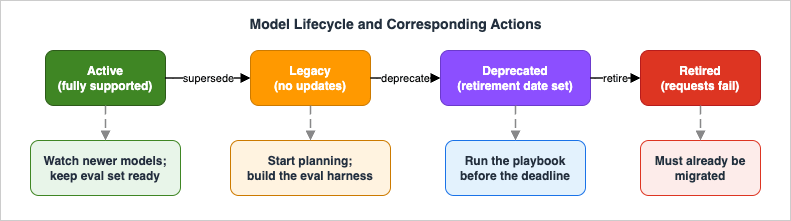
- Active. The model is fully supported and recommended. This is the steady state. Your action here is light but not zero: keep an eye on what newer models exist, because capability pull may justify moving before you are forced to.
- Legacy. The model no longer receives updates and may be deprecated in the future. Nothing breaks yet and no retirement date has been assigned, but Legacy is the signal to start planning rather than wait: get an evaluation harness ready so that if a deprecation notice follows, the remaining work is already mechanical. Treat it as Active-with-a-countdown-pending.
- Deprecated. The model is no longer offered to new customers but remains available to existing users until a retirement date that is assigned at the moment of deprecation. This is the window in which you must act. Deprecated models are also more likely to be less reliable than active ones, which is a second reason not to linger. Your action here is the whole playbook: schedule the work, build the evaluation set, run the comparison, and roll out — with the retirement date as your hard deadline.
- Retired. The model is gone. Requests to it fail. There is no graceful degradation; a retired model ID simply errors. By the time a model is retired, your migration must already be complete.
A few policy details materially affect how much runway you actually have:
- Notice period. Anthropic's stated commitment is to notify customers with active deployments and provide at least 60 days notice before retirement for publicly released models. Sixty days is the floor for planned retirements of public models, not a guarantee for every case — see the caveat below.
- The 60-day floor is scoped. The "publicly released models" wording means the commitment does not cover research-preview or invitation-only models, which can be retired on a shorter timeline. Even for public models, treat 60 days as a floor for planned retirements rather than a guarantee for every case. Do not architect on the assumption that you will always get the full notice window; the safe posture is to migrate off deprecated models proactively rather than waiting for the warning.
- You can audit your own usage. To find where you are still calling deprecated models, Anthropic provides an audit of your API usage via the Console usage settings page. This is the authoritative way to answer "am I still using anything that is going away?" for first-party API traffic — far more reliable than grepping your codebase alone, because it reflects what actually hit the API.
- Weights are preserved. Anthropic has publicly committed to preserve the weights of released models and may make past models available again in the future (see Commitments on model deprecation and preservation). This is reassuring for archival and reproducibility concerns, but it does not mean a retired model stays callable on the API — preservation and availability are different things. Plan as if retired means gone.
One scoping subtlety that trips teams up: the dates on the official Anthropic deprecations page apply to Anthropic-operated platforms — the Claude API, Claude Platform on AWS, and Microsoft Foundry. Partner-operated platforms such as Amazon Bedrock and Google Vertex AI set their own retirement schedules and notices, which can differ. If you run on Bedrock or Vertex, watch their model-lifecycle tables, not just Anthropic's. Section 7 returns to this; for now, the takeaway is that "which deprecation calendar applies to me" depends on which platform serves your traffic, and a multi-platform deployment has to watch more than one calendar.
The practical planning rule that falls out of the lifecycle: do not let a model reach deprecation before you have an evaluation harness ready to run. The expensive, slow part of any migration is building confidence that the new model is acceptable for your tasks. If that harness already exists when the deprecation notice lands, the remaining work is mechanical and fits comfortably inside a 60-day window. If it does not, 60 days is uncomfortably short.
A useful operating cadence falls out of this: review the model lineup on a fixed schedule (for instance, whenever a new generation is announced) rather than only when a retirement notice arrives. Each review answers two questions — "is anything we run now deprecated or nearing it?" and "does a newer model offer enough capability gain to justify a voluntary migration?" The first is risk-driven and non-negotiable; the second is value-driven and optional. Separating them keeps forced migrations from competing with opportunistic ones for the same attention, and ensures the forced ones are never a surprise.
4. Compatibility Dimensions to Check
Before you write any migration code, enumerate what could break. The official Migration Guide is the exhaustive, always-current list of API-level breaking changes per target model; this section is the checklist of dimensions to run that list against, plus the behavioral dimensions the parameter reference does not cover. Use it as a worksheet: for each dimension, find the relevant detail in the official guide for your specific source and target models, and decide whether your workload is affected.The single most important habit: read the official Migration Guide section for your exact target model, because breaking changes are layered. Moving from Opus 4.6 to Opus 4.8, for example, means applying the Opus 4.7 changes and then the Opus 4.8 changes. The guide is organized to be read in that layered order.
A practical way to run the worksheet: open the official guide to your target model's section, then go down the table below row by row, and for each one either write "not used" (most rows, for most workloads) or note the specific change and the file it lands in. The output is small — usually three to six real items — but writing it down is what prevents a breaking parameter from slipping through to a 400 in production. It also doubles as the change list you hand to whoever reviews the migration diff.
The dimensions, with where each tends to break:
* You can sort the table by clicking on the column name.
| Dimension | What to verify | Typical failure mode |
|---|---|---|
| Thinking parameters | Whether your code sets thinking: {type: "enabled", budget_tokens: N} | Removed on recent models; returns 400. Replace with adaptive thinking and the effort parameter. To turn off up-front thinking on Claude Sonnet 5.5, send thinking: {"type": "between_tools"} instead of "disabled" (accepted at high effort or below). |
| Sampling parameters | Whether you set temperature / top_p / top_k | Removed on recent models; returns 400. Steer via prompting instead. |
| Assistant prefill | Whether your last message is a role: "assistant" prefill | Removed on the recent family; returns 400. Replace with structured outputs (output_config.format) or a system instruction. |
| Output format parameter | Whether you use the old top-level output_format | Deprecated API-wide in favor of output_config.format. |
| Output length | Whether max_tokens and any compaction trigger leave enough headroom | Truncation mid-output; large max_tokens may require streaming to avoid client timeouts. |
| Tokenizer / token counts | Whether token-count assumptions are baked into budgets, cost models, or rate-limit logic | A tokenizer change (introduced at one recent generation) makes the same text count differently; re-baseline with count_tokens. |
| Tool-call behavior | Whether you string-match raw tool-call input, and whether tool-trigger rate matters | JSON escaping can differ; parse with a JSON parser, never substring match. Tool-use rate can shift, changing behavior. |
| Stop reasons | Whether you handle refusal and model_context_window_exceeded (and pause_turn for server-side tools) | Code that reads content[0] unconditionally breaks on a refusal; context-window exhaustion is distinct from max_tokens. |
| Reasoning visibility | Whether you surface thinking text to users or logs | Default visibility changed to omitted on recent models; rendered text is empty unless you opt into a summary. |
| Safety / data residency | Whether the target model adds request-time classifiers or data-retention requirements | The most capable model adds a refusal path and a data-retention requirement; plan a fallback and check your org's retention configuration. |
| Forced tool use | Whether you set tool_choice to any or a named tool | Returns 400 on Claude Opus 5.5, Claude Sonnet 5.5, Claude Fable 5.1, and Claude Mythos 5.1. Claude Haiku 5.5 accepts it, but the response starts with the tool call and has no thinking block. Use tool_choice: {"type": "auto"} and say in the prompt when to use the tool. |
| Thinking-block replay | Whether you store thinking blocks and send them back on another model, conversation, or account | Blocks a model cannot read are dropped. Thinking blocks from Claude Sonnet 5.5 and Claude Haiku 5.5 work only in the account that produced them or in a linked account. On recent models, sending thinking blocks back after a change to system, tools, or earlier turns can return a 400. |
| Tool versions (older jumps) | If coming from a much older model, whether tool type/name pairs are current | Legacy tool versions error on Claude 4+; update both type and name together. |
Two principles make this checklist tractable:
- Defer the detail, not the dimension. You do not need to memorize which parameter was removed in which version — that is what the official guide is for, and transcribing it here would be stale within a release. You do need to walk every dimension above for your workload, because the guide cannot know which ones you depend on.
- Most fixtures are already clean. In practice, many of these breaking parameters are absent from production call sites — few callers set
top_kon a placeholder model, and test fixtures rarely include sampling params. The scan is still mandatory, but expect mostly clean results punctuated by a few real hits (commonlybudget_tokensplumbing and assistant prefills used to force JSON).
The deliverable from this section is a short list: "for this migration, these N dimensions affect us, and here is the change for each." That list feeds directly into the playbook.
5. The Migration Playbook
This is the operational core. The playbook is five stages, run in order, with an explicit rollback gate. It applies whether you are migrating one prompt or a fleet of services; the difference is scale, not shape.
5.1 Inventory the affected workloads
You cannot migrate what you cannot see. Start by finding every place a model is named, then classify each occurrence — because not every match is a caller that should be swapped.Find the call sites:
# Per-directory count of model-ID references, so you can scope the work
rg -l 'claude-(opus|sonnet|haiku|fable|mythos)' --type-not md \
  | cut -d/ -f1 | sort | uniq -c | sort -rn
Before the broad grep, search for whatever sync markers your codebase uses — comment tags like
MODEL LAUNCH, KEEP IN SYNC, or @model-update. Teams that migrate often deliberately tag the load-bearing spots; those markers point at the changes that matter most.Then classify each occurrence. Not every file that contains a model ID is a caller:
* You can sort the table by clicking on the column name.
| Bucket | What it looks like | Action |
|---|---|---|
| Calls the API/SDK | messages.create(model=...), request payloads | Swap the ID and apply the section-4 breaking-change checklist for the target. |
| Defines or serves the model | model registries, routing configs, policy enums, generated catalogs | The old entry usually stays (the model is still served). Add the new model alongside; never blind-replace. |
| Opaque string reference | UI fallback constants, capability-gate substring checks, generic test fixtures | Usually swap, but check sub-cases: a capability gate (if 'opus-4-6' in model_id) should get the new ID added alongside, not replaced, so old-model traffic keeps the capability. |
| Suffixed / variant ID | routing identifiers with -fast, -v1:0, @date, region suffixes | Deployment identifiers, not the public model ID. Verify a new-model equivalent exists before touching; if not, leave it and flag it. |
The output of this stage is a concrete worklist: "these call sites swap, these registries get a new entry added, these strings need a parser check." This is also where the first-party Console usage audit earns its keep — it tells you what is actually hitting the API, catching call sites that static search misses (dynamic model selection, config-driven IDs).
5.2 Build the evaluation set
The evaluation set is what converts "the new model seems fine" into "the new model is acceptable for our tasks." It does not need to be large; it needs to be representative and adversarial:- Representative cases. A handful of inputs that reflect your real distribution — the common shapes your workload actually sees.
- Known failure cases. Inputs that the current model handles in a specific, important way. These are the cases most likely to regress silently.
- Edge cases. Long inputs near the context limit, inputs that exercise tool use, inputs that previously triggered refusals or near-refusals, and inputs with structured-output requirements.
For each case, capture the property you care about, not just a golden string — exact-match grading is brittle for generative output. Depending on the task, the property might be a schema the output must satisfy, a tool that should (or should not) be called, a fact that must appear, or a classification label. Where you use an LLM-as-judge to grade open-ended output, write the rubric explicitly and gradeably ("the response includes a numeric total and cites at least one source"), not vaguely ("the answer looks good") — vague rubrics produce noisy comparisons.
If your workload runs on Managed Agents, this is exactly what an Outcome with a rubric expresses, and the harness will iterate and grade against it; for plain Messages API workloads, a small offline harness that runs the eval set and applies the grader is enough.
A quick way to choose how to grade each case:
* You can sort the table by clicking on the column name.
| Output type | Grading method | Notes |
|---|---|---|
| Classification label | Exact match against the expected label | Cheapest and most reliable; use an enum-constrained output to keep it stable. |
| Structured extraction | Schema validation plus field-level checks | Validate the JSON shape, then assert the fields that matter; allow prose fields to vary. |
| Tool-use decision | Assert which tool was (or was not) called, and with which arguments | Captures behavioral regressions a text diff misses. |
| Open-ended prose | LLM-as-judge against an explicit rubric | Write gradeable criteria; consider pairwise (current versus candidate) for sensitivity. |
On sizing: a few dozen well-chosen cases usually beat hundreds of random ones. The value is in the known-failure and edge cases, not in volume — you are looking for behavioral deltas, not a statistical benchmark.
The evaluation set is the asset that makes the next migration cheap. Invest in it once and version it alongside your code; it amortizes across every future generation.
5.3 Run a parallel comparison
With the eval set in hand, run the current and candidate models side by side on it. The goal is a difference report, not a single pass/fail:- Run every eval case through both models. Diff the outputs against the captured property, not against each other token-for-token.
- Measure the operational deltas, not just correctness: token counts (re-baseline with
count_tokenson the candidate, because the tokenizer may differ), latency, tool-call rate, and refusal rate. A migration can be "correct" and still regress on cost or tool-use behavior. - Pay special attention to the known-failure cases from 5.2. These are where a more literal or more conservative model changes behavior in ways a representative sample would miss.
A minimal shape for the comparison harness:
import anthropic

client = anthropic.Anthropic()
CURRENT = "claude-opus-4-6"     # what you run today
CANDIDATE = "claude-opus-4-8"   # what you are migrating to

def run(model, case):
    resp = client.messages.create(
        model=model,
        max_tokens=4096,
        messages=case["messages"],
    )
    text = next((b.text for b in resp.content if b.type == "text"), "")
    return {
        "text": text,
        "stop_reason": resp.stop_reason,
        "output_tokens": resp.usage.output_tokens,
    }

for case in eval_set:
    a, b = run(CURRENT, case), run(CANDIDATE, case)
    grade(case, a, b)   # apply your captured property + record the deltas
Run this offline, before any production traffic touches the candidate. The artifact you want at the end is a table: per case, did the property hold on the candidate, and how did tokens / latency / tool-rate / refusal-rate move.
It is worth logging the raw outputs of both models for every case, not just the pass/fail verdict. When a case regresses, the side-by-side text is what tells you whether the cause is a prompt-tuning issue (the new model interpreted an instruction more literally), a parameter issue (a removed parameter changed behavior), or a genuine capability gap. The verdict tells you that something moved; the paired transcripts tell you why, and therefore which fix to reach for. Store them alongside the eval set so the comparison is reproducible when you revisit it for the next generation.
5.4 Roll out in stages
Never cut over all at once. Stage the rollout so that a regression the eval set missed is caught on a small slice of real traffic:- Canary. Route a small percentage of production traffic to the candidate model behind a flag. Watch the same metrics you measured offline — tool-call rate, refusal rate, token usage, latency, and any product KPI — now on real inputs.
- Feature flags, not redeploys. Put the model ID behind configuration so you can ramp the percentage up or down (and roll back) without shipping code. The model ID belonging in config rather than hardcoded is itself a durable lesson from doing this repeatedly.
- Pin a specific version during rollout. For the duration of the rollout, pin the exact model snapshot so every request in the experiment is comparable. (Section 10's FAQ covers how pinning works across the dateless-versus-dated ID change.)
- Ramp deliberately. Increase the canary percentage in steps, holding at each step long enough to see the metrics stabilize, until the candidate carries 100%.
For workloads where you can tolerate running the candidate without serving its output, a shadow stage before the canary adds safety at no user-facing risk: send a copy of real traffic to the candidate, compare its responses to the live model's offline, and only promote to a serving canary once the shadow comparison is clean. Shadow mode catches distribution shift the offline eval set missed, without ever exposing a user to the candidate.
A subtlety specific to model migrations: switching the model invalidates your prompt cache, because caches are model-scoped. The first request on the new model writes the cache fresh, so expect a transient cost/latency bump at each ramp step as the cache re-warms. This is normal; do not mistake it for a regression. (For the caching mechanics a model switch disturbs, see Anthropic Claude API Prompt Caching and Token Efficiency.)
5.5 Define the rollback gate
Decide the rollback criteria before you start ramping, and make them quantitative. The gate is a short list of thresholds that, if crossed on the canary, automatically halts the ramp and reverts to the current model:- Quality regression beyond a set threshold on the eval-derived metric.
- Refusal-rate or error-rate increase beyond a set threshold.
- Cost or latency increase beyond a set threshold (check the magnitude against the official Pricing page; the gate is about delta, not absolute rate).
The mechanics of rollback are trivial if you did 5.4 correctly: flip the flag back. The hard part is having agreed the thresholds in advance, so a borderline result triggers a decision rule rather than a debate. Keep the current model ID available and in your config until the candidate has carried full production traffic cleanly for long enough to trust — and, critically, until before the current model's retirement date, so you always have a working fallback.
5.6 A worked example
To make the stages concrete, walk one through a hypothetical but typical workload: a support-ticket service that classifies each ticket, extracts a few structured fields, and calls an internallookup_order tool when an order ID is present. It currently runs on an older model and a deprecation notice has just arrived.Inventory (5.1). A search turns up the model ID in three places: the service's request builder (a caller — swap it), a routing config that lists every model the platform team supports (a definer — add the new model alongside, leave the old one until retirement), and a unit-test fixture that asserts the classifier's output shape (an opaque reference — it does not care which model, so the string swaps cleanly). The Console usage audit confirms no other service quietly shares the same key.
Evaluation set (5.2). The team assembles 40 tickets: 25 representative of the live distribution, 10 known-tricky cases (ambiguous category, missing order ID, multilingual text), and 5 edge cases (very long tickets, tickets that previously skirted a refusal). The captured property per case is a JSON schema the extraction must satisfy plus the expected tool-call decision — not a golden string, because the prose wording is allowed to vary.
Parallel comparison (5.3). Running both models over the 40 cases, the schema holds on all of them, but two things stand out: token usage per ticket shifts (the tokenizer differs, so the team re-baselines its budget), and on three of the ten tricky cases the candidate declines to call
lookup_order when the order ID is ambiguous, where the old model guessed. That is a behavior change, not a bug — and it surfaces precisely because the tricky cases were in the set.Prompt re-tuning (6). The reduced tool-calling traces to the candidate being more conservative. A one-line addition to the tool's
description ("call this whenever the ticket contains anything that looks like an order identifier, even if you are unsure") restores the intended rate without over-firing on tickets that have no ID.Staged rollout (5.4) and gate (5.5). The model ID moves behind a flag; 5% of tickets route to the candidate. The gate says: halt if extraction-schema failures exceed a small set threshold, if the tool-call rate drops below the baseline band, or if latency regresses past a set bound. The canary holds clean for a day, the team ramps to 25%, then 50%, then 100% over a few days, watching the same dashboard. The old model ID stays in the routing config until its retirement date as a fallback.
Worth noting what did not happen: there was no big-bang cutover, no "it passed a smoke test so ship it," and no scramble against the retirement date. The deprecation notice set the outer deadline, but the work fit comfortably inside it because the harness existed first. That is the entire point of treating migration as a standing capability rather than an event.
6. Prompt Adjustments Across Generations
A migration that passes the playbook on day one can still underperform if you leave the prompts untouched. Newer models are generally more steerable and more literal, which means prompts written to compensate for an older model's quirks can misfire. This section covers the general principles; for the specific re-tuning notes per target model, the official Migration Guide's behavioral sections are the reference, and they are worth reading because the guidance is model-specific.The recurring patterns, stated generally:
- Over-prescriptive instructions over-trigger. Language written to overcome an older model's reluctance —
CRITICAL: you MUST use this tool,Default to using X,If in doubt, use Y— tends to over-fire on newer models that already follow instructions closely. If a newer model over-uses a tool or a skill, the fix is usually to soften the language, not add more guardrails. - Effort matters more, and is the primary depth control. On recent models the
effortparameter (low,medium,high, and on the newest modelsxhighandmax) carries much of the intelligence/latency/cost tradeoff thatbudget_tokensused to. Re-tune it per route during migration rather than assuming the old behavior carries over; the default may differ from what you expected. What that parameter binds, and what it leaves tomax_tokens, is worked through in Controlling How Much a Model Thinks. - Verbosity calibrates to the task. Newer models tend to scale response length to perceived task complexity rather than to a fixed verbosity. If your product depends on a particular length or terseness, state it explicitly and test, rather than assuming an existing "be concise" instruction still lands the same way.
- Tool-use and delegation can become more conservative. Some newer models reach for tools, sub-agents, or memory less often by default, preferring to reason. If your product relies on a tool being called, make the trigger condition explicit — in the system prompt and in the tool's own
description("call this when the user asks about current prices or recent events") — rather than relying on the older model's eagerness. - Narration and "asking" behavior shift. The amount of interim narration and the propensity to pause and ask before minor decisions vary by generation. If a coding or agent workload became chattier or now asks permission for trivial choices, a short system instruction re-calibrates it.
Two of these are worth making concrete. For over-triggering, the edit is usually a softening:
# Before (written to overcome an older model's reluctance)
CRITICAL: You MUST call the search tool before every answer.

# After (the newer model already follows instructions closely)
When the answer depends on information not in the conversation, call the search tool first.
For a newer model that reaches for a tool too rarely, the fix runs the other way — make the trigger condition explicit in the tool's own description rather than adding pressure in the system prompt:
# Tool description - before
"Look up an order by its ID."

# Tool description - after
"Look up an order by its ID. Call this whenever the message references an order,
invoice, or shipment - even if the identifier is partial or you are unsure."
The meta-principle: a model migration is also a prompt re-tuning opportunity, and sometimes a requirement. Budget for it. The cheapest path — swap the ID, change nothing else — is exactly the path that produces "it technically works but quality dropped." Re-tuning is usually a handful of targeted edits, not a rewrite, but it has to be done against the new model's actual behavior, which is what the eval set from 5.2 lets you observe. When you do edit a system prompt, change it deliberately and verify against the eval set; prompt edits are judgment calls, not mechanical fixes.
7. Platform Notes: Anthropic API, Amazon Bedrock, and Google Vertex AI
If you run Claude on more than one platform — or are considering it — the migration story gains a second axis. The Messages API shape is the same across the first-party API, Amazon Bedrock, and Google Vertex AI, so the breaking-change checklist from section 4 applies on all of them. What differs is model identity, availability timing, feature set, and the deprecation calendar. For the cost and billing dimension across these platforms, see Claude Code and Anthropic API Billing across Anthropic API, Amazon Bedrock, and Vertex AI; this section covers the migration-specific differences.7.1 Model ID formats differ per platform
The same model carries a different identifier on each platform. A migration that touches multiple platforms must apply the right format to each — a first-party ID will not work on Bedrock, and vice versa:* You can sort the table by clicking on the column name.
| Platform | Example ID shape | Notes |
|---|---|---|
| Anthropic API | claude-opus-4-8 | Bare first-party IDs. |
| Claude Platform on AWS | claude-opus-4-8 | Anthropic-operated; uses the same bare IDs as the API, not Bedrock-style IDs. |
| Amazon Bedrock | anthropic.claude-opus-4-8 | anthropic.-prefixed; some IDs carry version/region suffixes such as -v1:0. |
| Google Vertex AI | claude-opus-4-8 / claude-sonnet-4-5@20250929 | Dateless or @-dated, depending on the model. |
When migrating a Bedrock or Vertex file, change the version portion using the same logic as the first-party ID, then keep (or add) the platform-specific prefix/suffix. Do not generate a bare first-party ID for a Bedrock client — it will error.
7.2 Availability timing and endpoint types differ
New models do not necessarily land everywhere at once, and the routing model differs:- Claude Platform on AWS is Anthropic-operated and offers same-day API parity for new models and features.
- Amazon Bedrock and Google Vertex AI are partner-operated; a new model's availability there can lag the first-party launch, and the feature subset can differ. Plan migrations on these platforms around their availability, not the first-party announcement date.
- Endpoint types. Starting with a recent Sonnet generation, Bedrock offers global (dynamic routing for availability) and regional (guaranteed geographic routing) endpoints; Vertex adds a multi-region option. If your migration also involves a data-residency requirement, the endpoint type is part of the decision, not just the model ID.
7.3 Feature availability differs
Some capabilities are first-party-only and simply are not part of a Bedrock or Vertex migration:- Managed Agents and Anthropic server-side tools (code execution, server-hosted web search/fetch) run on the first-party API and Claude Platform on AWS, not on Bedrock, Vertex, or Microsoft Foundry. On those, agentic workloads use the Messages API with client-side tool use.
- Server-side refusal fallbacks (the
fallbacksparameter used with the most capable model) are not available on Bedrock, Vertex, or Foundry; there, the equivalent is a client-side handler. - If your migration's target model introduces a feature you depend on, confirm it exists on your platform before committing — the migration may be blocked by platform feature parity rather than by the model itself.
7.4 Each platform has its own deprecation calendar
This is the operational point that most often causes a surprise. As section 3 noted, the Anthropic deprecations page governs the first-party API only. Amazon Bedrock and Google Vertex AI publish and manage their own model lifecycle and deprecation schedules, which can differ from Anthropic's and from each other's. A multi-platform deployment must therefore watch multiple deprecation calendars, and a model that is still active on one platform may be scheduled for retirement on another. Build the deprecation-monitoring step (section 8) per platform, not once globally. Treat each platform's official lifecycle page as authoritative for traffic on that platform.7.5 The multi-platform upshot
The practical upshot for a multi-platform deployment is that "migrate to the new model" is not one task but one per platform, each with its own ID format, availability date, feature caveats, and deprecation clock. The playbook (section 5) still runs once per workload, but the inventory (5.1) and the deprecation watch (5.5 and 8.3) fan out across platforms. Teams that run on both the first-party API and a cloud platform often standardize on the more constrained feature set so that a single prompt and tool definition works everywhere — trading some first-party-only capability for a migration that moves in lockstep across platforms.8. Automating Migration Hygiene
The parts of migration that are most error-prone are also the most automatable: knowing which models currently exist, knowing where your code still references old ones, and knowing when a deprecation clock starts. Automating these turns migration from a periodic scramble into background maintenance.8.1 Detect current models and capabilities at runtime
Do not hardcode assumptions about which models exist or what they support — query the Models API.GET /v1/models (and the per-model retrieve) returns each model's max_input_tokens, max_tokens, and a capabilities object, so you can discover the live state instead of relying on a cached table that goes stale:import anthropic
client = anthropic.Anthropic()
# Iterate the paginated list directly - it auto-paginates across all models.
for m in client.models.list():
print(m.id, m.max_input_tokens, m.max_tokens)
# Inspect a specific model's capabilities before depending on a feature.
m = client.models.retrieve("claude-opus-4-8")
print(m.capabilities["effort"]["max"]["supported"])This is the programmatic source of truth for "is this model still available, and does it support the feature I rely on" — useful both at startup (fail fast if a configured model has vanished) and in tooling that selects a model by capability.
8.2 Audit for deprecated IDs in CI
Make "are we still referencing a model we should not be" a continuous check rather than a discovery you make when a retirement email arrives. Two complementary mechanisms:- A CI grep gate. Maintain a small denylist of deprecated/retired model IDs and fail the build (or open a ticket) if any appear in the codebase. This catches static call sites the moment someone re-introduces an old ID.
- The first-party Console usage audit. For traffic that actually hits the Anthropic API, the Console usage audit reflects real usage, including dynamic and config-driven model selection that a code grep cannot see. Use it to reconcile against the CI gate.
A minimal CI check, using the Models API to avoid hardcoding the "current" set:
import sys, anthropic

client = anthropic.Anthropic()
available = {m.id for m in client.models.list()}

# Model IDs your code references (extracted however you like - grep, import, config scan).
referenced = load_referenced_model_ids()

stale = [mid for mid in referenced if mid not in available]
if stale:
    print(f"Referenced model IDs not in the current model list: {stale}")
    sys.exit(1)
A reference that is absent from the live model list is either a typo or a model that has been retired — both are things you want CI to surface before production does.
8.3 Alert on the deprecation calendar
Subscribe the team to the signal, not the rumor: monitor the official deprecation page(s) for the platform(s) you run on (first-party plus Bedrock and/or Vertex as applicable), and route deprecation notices to wherever your team actually triages work. The goal is that a newly announced retirement date becomes a scheduled task with the playbook attached, well inside the notice window — not an interruption.8.4 Let tooling do the mechanical migration
The actual code edits — swapping the model ID, removing a now-invalid parameter, replacing a prefill, recalibratingeffort — are mechanical enough to automate. In Claude Code, the bundled Claude API skill exposes a migrate command that applies the model-ID swap and the necessary breaking-change edits across a codebase, confirms the scope with you before editing, detects Bedrock / Vertex / Claude Platform on AWS / Foundry clients and adjusts the ID format per platform, and produces a checklist of items to verify by hand:/claude-api migrate this project to claude-opus-4-8Tooling like this does not replace the playbook — it accelerates stage 5.1 (the mechanical edits) and leaves you to do the parts that require judgment: the evaluation set, the parallel comparison, and the staged rollout. Always review the diff and run the eval set afterward; an automated parameter swap still needs behavioral validation.
8.5 What to watch after cutover
Migration does not end when the canary reaches 100%. The behavioral dimensions the eval set sampled offline should become standing metrics, because production exercises inputs the eval set never saw. Track, at minimum: the refusal rate and the distribution of refusal categories, the tool-call rate per route, token usage per request (input and output, since a tokenizer change moves both), the rate ofmax_tokens truncations, and any product KPI the model feeds. A migration that looked clean on 40 cases can still surface a long-tail regression at scale — the standing dashboard is how you catch it within hours rather than weeks. Keep the dashboard after the migration "ends"; it is also your early-warning system for the next one.9. Common Pitfalls
The failure modes below recur across migrations regardless of which generations are involved. Each maps to a stage of the playbook that, when skipped, produces it.- Big-bang cutover. Flipping 100% of traffic at once and discovering the regression in production. Fix: the staged rollout in 5.4 — canary, then ramp.
- Migrating without an evaluation set. "It looked fine in a quick test" is not evidence; the regressions that matter are in the known-failure cases a quick test does not include. Fix: the eval set in 5.2, built before you touch production.
- Assuming token and context budgets carry over. A tokenizer change means the same prompt counts differently, silently shifting what fits and what it costs. Fix: re-baseline with
count_tokenson the candidate (5.3); givemax_tokensand compaction triggers headroom. - Confusing platform-specific IDs. Using a bare first-party ID on Bedrock, or forgetting the
@dateon Vertex. Fix: the per-platform ID table in 7.1; apply the right format per client. - Expecting an alias to float. Assuming a dateless ID is an evergreen pointer that auto-upgrades. For recent generations the dateless ID is itself a pinned snapshot, not a moving alias. Fix: understand the naming model (section 10 FAQ) and pin deliberately.
- Forgetting the prompt-cache reset. Treating the transient cost/latency bump after a model switch as a regression. Fix: expect it — caches are model-scoped and re-warm on the first request to the new model.
- Ignoring new stop reasons. Reading
content[0]unconditionally and crashing on arefusal, or conflatingmodel_context_window_exceededwithmax_tokens. Fix: handle the stop reasons in your client (section 4). - Leaving deprecated IDs in registries and tests. A model registry, a routing config, or a test fixture that still names a retired model fails at runtime even after the callers are migrated. Fix: the bucket classification in 5.1 — registries get a new entry added; coupled tests get the definer populated; nothing is silently skipped.
- Changing the model and the prompt in the same commit. If a regression appears, you cannot tell whether the model swap or the prompt edit caused it. Fix: migrate the model first, measure, then re-tune in a separate, separately-measured change.
- Trusting an LLM-as-judge without calibrating it. An unreliable grader produces a confident-but-wrong migration verdict. Fix: spot-check the judge against human labels on a slice of the eval set, and prefer schema or assertion grading wherever the output is structured.
- Skipping prompt re-tuning. Swapping the ID and changing nothing, then attributing the quality drop to the model. Fix: section 6 — budget for re-tuning and validate it against the eval set.
The through-line: almost every pitfall is a stage of the playbook that was skipped to save time, and almost every one costs more to diagnose in production than the stage would have cost up front.
10. Frequently Asked Questions
How long do I have after a model is deprecated?A retirement date is assigned at the moment of deprecation, and Anthropic's commitment is at least 60 days notice before retirement for publicly released models. Treat 60 days as a floor for planned public-model retirements, not a guarantee — some models have been retired on shorter timelines, and the policy wording leaves room for exceptions. The safe posture is to migrate off deprecated models proactively rather than spending the full window. Always confirm the specific retirement date on the official deprecations page for your platform, and remember that Bedrock and Vertex run their own calendars.
Should I pin dated model IDs or aliases?
It depends on the generation, and the naming model changed. For older generations, the alias (for example
claude-opus-4-1) is a convenience pointer that resolves to a dated snapshot (claude-opus-4-1-20250805) — pin the dated ID for reproducibility. Starting with recent generations, model IDs use a dateless format that is itself a pinned snapshot, not an evergreen pointer that auto-upgrades. So a recent dateless ID is already pinned. For production the rule is the same regardless of format: pin to an exact snapshot you have validated, and change it deliberately through the playbook — never depend on a model string silently changing behavior underneath you.Do my prompts transfer as-is?
Mechanically, usually yes — the prompt text is still valid input. Behaviorally, often not quite. Newer models are more literal and more steerable, so prompts tuned to compensate for an older model's reluctance can over-trigger, and verbosity, tool-use rate, and narration can shift. Plan to re-tune (section 6) and validate the re-tuned prompts against your evaluation set rather than assuming the old wording lands the same way.
What actually changes when I move between platforms?
The Messages API shape is the same, so the breaking-change checklist applies everywhere. What differs is the model ID format (section 7.1), availability timing and endpoint types (7.2), the feature set — Managed Agents and server-side tools are first-party and Claude-Platform-on-AWS only (7.3) — and the deprecation calendar, which each platform maintains separately (7.4).
How do I find every place I'm still using an old model?
Three complementary methods: a code search across call sites, registries, and infrastructure-as-code (with the bucket classification from 5.1 so you do not blind-replace a registry); the Models API to flag referenced IDs that are no longer in the live list (section 8.2); and, for first-party API traffic, the Console usage audit, which reflects what actually hit the API including dynamic selection that a grep misses.
Does switching models reset my prompt cache?
Yes. Prompt caches are model-scoped, so changing the model ID invalidates the existing cache; the first request on the new model writes it fresh. Expect a transient cost and latency bump at each rollout step as the cache re-warms, and do not mistake it for a behavioral regression.
Can I migrate the model and re-tune the prompt at the same time?
You can, but you lose attribution: if quality moves, you will not know whether the model or the prompt caused it. The cleaner sequence is to migrate the model first and measure against the eval set, then re-tune in a separate, separately-measured step. If you must do both at once (for example, a removed parameter forces a prompt change), keep the eval set granular enough to localize any regression to a specific case.
Is the migration the same for Managed Agents?
If you run on Managed Agents, the migration is lighter on the API-parameter side — updating the model on the agent is largely a configuration change — but the behavioral dimensions (prompt adherence, tool-use rate, refusals) still apply, so the evaluation-and-rollout discipline carries over. The "define what good looks like" step maps naturally to an Outcome with a gradeable rubric.
11. Summary
Migrating a Claude workload is not a version bump; it is moving onto a runtime that reasons, tokenizes, and refuses differently, on a clock set by the deprecation lifecycle. The way to make that safe and repeatable is a standing playbook rather than a one-off scramble:- Understand the forces — capability pull, deprecation push, behavioral risk — and treat each model ID as its own behavioral dependency (sections 2–3).
- Enumerate the compatibility dimensions for your workload against the official Migration Guide, deferring the per-parameter detail to that always-current source (section 4).
- Run the playbook — inventory and classify, build a representative-and-adversarial evaluation set, compare in parallel, roll out in stages, and gate on pre-agreed rollback thresholds (section 5).
- Re-tune the prompts to the new model's behavior, not just the API (section 6).
- Account for the platform axis — IDs, availability, features, and separate deprecation calendars on Bedrock and Vertex (section 7).
- Automate the hygiene — runtime model detection, CI audits for stale IDs, deprecation alerting, and tooling for the mechanical edits — so the next migration is mostly background maintenance (sections 8–9).
The single highest-leverage investment is the evaluation set: build it before deprecation forces your hand, version it with your code, and every future migration becomes a short, confident exercise instead of an emergency.
To go deeper on the adjacent topics this guide delegated: the generational history is in Anthropic Claude Model Release Timeline; the platform catalog in Amazon Bedrock Model Catalog; the cache and token-efficiency effects that a model switch triggers in Anthropic Claude API Prompt Caching and Token Efficiency; the cross-platform billing picture in Claude Code and Anthropic API Billing across Anthropic API, Amazon Bedrock, and Vertex AI; and a Bedrock-side starting point in Amazon Bedrock Basic Information and API Examples.
12. References
- Anthropic - Models overview
- Anthropic - Migration guide
- Anthropic - Model deprecations
- Anthropic - Commitments on model deprecation and preservation
- Anthropic - Models API (list and retrieve)
- Anthropic - Adaptive thinking
- Anthropic - Effort
- Anthropic - Token counting
- Anthropic - Pricing
- Anthropic - Claude in Amazon Bedrock
- Anthropic - Claude on Vertex AI
- Google Cloud - Vertex AI partner model deprecations
References:
Tech Blog with curated related content
Written by Hidekazu Konishi