What Can Be Made Public on AWS - Storage and Data, the Block Public Access Family, and What Each Switch Does Not Promise
First Published:
Last Updated:
Turning on Block Public Access in Amazon S3 also stops the effect of policies and ACLs that already allowed public access. Turning on the switch of the same name for Amazon EBS snapshots stops existing public sharing in one mode and leaves it running in the other, and even in the mode that stops it, the snapshot's attributes go on saying that it is publicly shared. For AMIs, any AMI that was already publicly accessible will remain publicly accessible. And Amazon ECR Public offers no option in the repository policy for turning public access off.
This article gathers the AWS resources classified under storage and data into one inventory, setting out where the switch that opens each of them to anyone sits, what it promises, and what it does not. It is not a security design guide for individual services, nor is it a guide for attack procedures. It presents only the necessary facts to verify the current state of your own account.
Related articles on this site:
- Amazon S3 Security and Access Control Guide - Bucket Policies, IAM, Access Points, Block Public Access, and Encryption
- AWS Security Defaults History - Block Public Access, Default Encryption, IMDSv2, and How Far Each Changed Default Reached
- AWS IAM Access Analyzer Deep Dive - External, Internal, and Unused Access Analyzers with Custom Policy Checks in CI
- AWS Organization Guardrails - Service Control Policies, Resource Control Policies, and Data Perimeter Design
- AWS Security Incident Response Playbooks - First-Response Runbooks for Common Scenarios
- Resource-Based Policies by Service on AWS - Where the Second Policy Lives, What It Can Say, and When It Is Required
- Where the Logs Come From on AWS - Identity and the Control Plane, What Is On by Default, and What Is Not Recorded at All
- AWS Service Lifecycle States - Maintenance, Sunset, Full Shutdown, and What Each One Takes Away
- AWS Secrets Manager and Parameter Store Decision Guide - Storing, Rotating, and Accessing Secrets and Configuration
- AWS History and Timeline regarding Amazon S3 - Focusing on the evolution of features, roles, and prices beyond mere storage
Table of Contents
- 1. What This Article Answers, and What It Does Not
- 2. The Word Public Points at More Than One Thing
- 3. The Four Columns for Reading the Inventory
- 4. The Inventory - Public Access Switches for Storage and Data
- 5. The Same Name Promises Different Things
- 6. The One With No Off Switch
- 7. Stopping It From the Organization
- 8. Reading the Current State of Your Own Account
- 9. Where the Primary Sources Disagree
- 10. Failure Modes and Anti-Patterns
- 11. Frequently Asked Questions about Public Access Switches on AWS
- 12. Summary
- 13. References
1. What This Article Answers, and What It Does Not
When readers encounter this topic, their questions typically fall into one of three categories. First, they may have received a report that public access has been blocked, and want to check whether everything really did stop. Second, they may be inheriting a system with multiple accounts and need to understand what is currently accessible to everyone. Finally, they may have assumed that Block Public Access was an S3 feature only, and discover that EBS and AMI also have switches with the same name, and want to know if they represent the same functionality.The answers to all three of these questions can be found by reading the individual service guides. The difficulty is that no page anywhere says when the same word is aimed at different things. The distinctions only become apparent when the information is viewed side-by-side.
This article proceeds in the following order. It first splits the word public into three kinds. Next it defines the four columns used to read the inventory. It then presents the inventory group by group, and draws out the four contrasts the inventory makes visible. It closes with the one thing that has no off switch, the way to stop it from the organization, and the entry points for reading the current state of your own account.
What this article does not cover is worth stating up front. It does not go into the history of how default settings changed over time. It does not address the conditional rule that decides how the default Block Public Access setting for AMIs falls out from an account's history. AWS Security Defaults History holds both of those subjects. This article focuses on what is currently possible, regardless of the default settings.
It does not walk through the four settings inside S3's Block Public Access one by one. Amazon S3 Security and Access Control Guide carries what the four settings mean, how the levels relate, and how to write the configuration reproducibly. This article treats S3 as one row of a cross-service inventory and does not go inside S3.
It does not cover the tools that detect external access either. AWS IAM Access Analyzer Deep Dive covers how to use IAM Access Analyzer, how to read its findings, and how to design archive rules. Section 8 of this article goes no further than which call to make as the entry point for an inspection.
Nor does it cover what to do once public access has been found. AWS Security Incident Response Playbooks carries the first response, from containment through investigation.
How to write the policy that names a specific principal and lets it in is out of scope as well. Resource-Based Policies by Service on AWS covers which services carry that second policy, what the
Principal element can name, and whether an explicit Deny can be written. Every switch in this article opens a resource without naming who is on the other side. The side that names them is covered there.Where any of this leaves a record is outside this article too. Where the Logs Come From on AWS holds the inventory of sources that record identity and control plane activity. The asymmetry matters here. Turning one of these switches on or off is a change to a setting, so it is a management event and is kept by default, while reading something that was made public is a data event and is not kept unless it was turned on first. Who opened it can be traced afterward. What was read while it was open cannot, unless data events were already on.
And this article describes no method for finding resources that other people have made public. Every API named here reads the state of your own account. That line is an editorial decision, and no later section crosses it.
1.1 What the Inventory Covers
The inventory in this article covers the following seven groups under storage and data.- Amazon S3: General purpose buckets, objects, and access points
- Amazon EBS: Snapshots
- Amazon EC2: AMIs (Amazon Machine Images)
- Amazon RDS and Amazon Aurora: Manual snapshots
- AWS Systems Manager: SSM documents
- AWS Secrets Manager: Secrets
- Amazon ECR Public: Public repositories
The public surfaces of compute and networking are not included. Security groups, load balancers, API endpoints, and function URLs all need separate treatment, because what public means for them differs from the three kinds set out in this article. Messaging is not included either. Of the registries, only Amazon ECR Public appears, and it appears as the one example for which no off switch is provided.
Services whose lifecycle is moving are kept out of the inventory. As of November 7, 2025, Amazon S3 Object Lambda and legacy Amazon Glacier are no longer accepting new customers. Both are storage features, but neither is something to design with now, so neither gets a row. AWS Service Lifecycle States defines the states themselves.
1.2 The Verification Date, and How Sources Are Cited
The technical information presented in this article is based on the AWS official documentation as of September 16, 2026. Quotas, the number of modes, and the time it takes for settings to take effect are all subject to change, so the text names the document each one came from. Verbatim excerpts from the documentation sit in English code blocks. The content of those blocks is the original wording, not a summary.2. The Word Public Points at More Than One Thing
Before the inventory, the word public has to be split. Without splitting it, a sentence saying that something was made public in one service reads as though it meant the same thing as the same sentence about another service.2.1 Anonymous Reads
This is the state where someone holding no AWS credentials can read the data. An example of this is when anyone can retrieve S3 objects through a web browser.S3 can represent this state through both Access Control Lists (ACLs) and bucket policies. Regarding ACLs, AWS explicitly defines the conditions that it considers "public."
Amazon S3 considers a bucket or object ACL public if it grants any permissions to
members of the predefined AllUsers or AuthenticatedUsers groups.
Conversely, bucket policies operate on an inverted logic.
When evaluating a bucket policy, Amazon S3 begins by assuming that the policy is public.
It then evaluates the policy to determine whether it qualifies as non-public.
Both quotations come from the page Blocking public access to your Amazon S3 storage in the Amazon S3 User Guide. The burden of proof sits on the side claiming that the policy is not public.
2.2 Sharing With Every AWS Account
This is the state in which any AWS account can copy or restore the resource. The other side needs AWS credentials, but you are not the one choosing who they are.Public sharing of EBS snapshots, AMIs, manual RDS and Aurora snapshots, and SSM documents all belongs here. The RDS API reference describes this state as follows:
Uses the value all to make the manual DB snapshot public, which means it can be copied
or restored by all AWS accounts.
Secrets Manager belongs on this side too, arriving not as an anonymous reader but as a wildcard in the principal.
It is crucial to differentiate between these two scenarios. The former does not require credentials. The latter does. However, AWS itself uses the term "public" to refer to both, and with S3, as mentioned earlier, it treats even granting access to
AuthenticatedUsers, meaning any AWS account, as a public sharing configuration. Therefore, the term "public" alone is insufficient to determine whether credentials are required. Sharing EBS snapshots, manual RDS DB snapshots, and AMIs with named accounts rather than with every account, and what the recipient can then do with them, is compared in Cross-Account Sharing by Service on AWS.2.3 Listing in a Public Registry
Third, the very act of being listed constitutes a public state. Amazon ECR Public repositories, when created, are automatically listed in the Amazon ECR Public Gallery, allowing anyone to retrieve images.When a public repository is created, it is publicly visible on the Amazon ECR Public
Gallery and anyone can pull images from the repository.The source is the page Public repository policies in the Amazon ECR Public User Guide. Unlike the first two kinds, this is not a setting but the resource type itself. Creating a public repository is the act of making it public, and no switch exists to undo that afterward. Section 6 goes into it.
2.4 Where the Three Kinds Change How the Inventory Reads
The three kinds explain why each row of the inventory takes the shape it does.- Within the range this article checked, only S3 and Amazon ECR Public have official documentation that treats an anonymous read as public.
- The remaining five groups describe the party being opened to as an AWS account or an AWS principal.
- Therefore, under one and the same name, the S3 switch blocks both the anonymous read and the grant to every AWS account, while the EBS and AMI switches block only the grant to every AWS account.
The subject of this article, that one name promises different things, starts here.
3. The Four Columns for Reading the Inventory
The inventory asks the same four things of every service. Drop any one of them and the contrast stops working. In the tables that follow, the first of the four is laid out as two rows, because where a switch attaches and how far it reaches are worth reading separately. Each group also carries one or two rows of its own.| Aspect | What to Include | Why It's Necessary |
|---|---|---|
| Switch location and scope | Where the setting attaches, and how far it reaches. Bucket, account, Region, or organization. | The scope covered by a report saying the switch is on differs from service to service. |
| Mode | The number and names of the states the switch can take. | Some switches have two modes, while others have one. The impact on existing configurations differs based on the mode. |
| Effect on Grants That Already Exist | What happens to the resources that were already public before the switch was turned on. | This is the column most prone to misunderstanding. |
| API for Reading Status | The API that returns the current state in your own account. | Short of reading it, there is no way to know which way your account fell. |
There is one reason the fourth column stands on its own. Reading the documentation does not tell you which way your own account fell. Some services have default settings that vary based on conditions, and if your organization's policies are in effect, your account-level settings may be read-only. Therefore, ultimately, you must use the API to check the value.
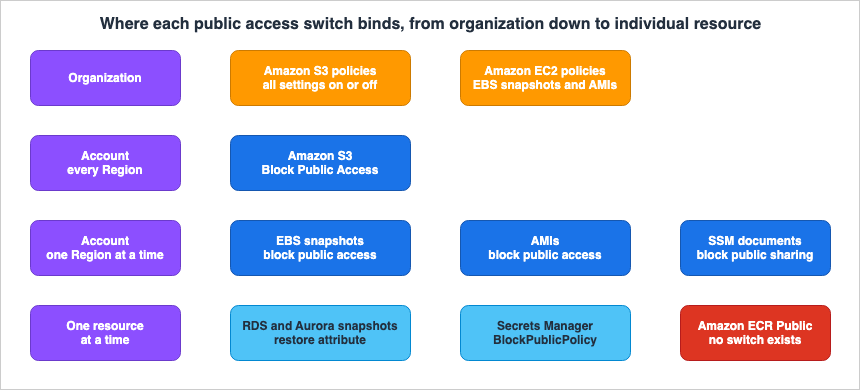
4. The Inventory - Public Access Switches for Storage and Data
The following tables are all based on official documentation as of September 16, 2026. After each table comes the prose that carries the notes specific to that group.4.1 Object Storage - Amazon S3
| Aspect | Amazon S3 |
|---|---|
| Switch Location | Block Public Access. Available at four levels: organization, account, bucket, and access point. |
| Scope | Settings applied at the account level apply across all Regions. Access point settings can only be specified during creation and cannot be modified later. |
| Mode | Four independent settings. At the organization level the four are set together, on or off. |
| Effect on Grants That Already Exist | Varies depending on the setting. The two settings that refuse new grants do not touch what already exists. The two settings that suppress the effect stop only the effect, and leave the stored grant in place. |
| API for Reading Status | For buckets, use GetPublicAccessBlock. For accounts, use s3control get-public-access-block. |
| Permissions Required for Editing | s3:PutBucketPublicAccessBlock |
| What Cannot Be Made Public | Directory buckets. |
What each of the four S3 settings does is the subject of an article already on this site, so this article takes only one thing from it: whether the setting reaches grants that already exist. The User Guide describes the settings that refuse new grants as follows:
When this setting is set to TRUE, the specified operations fail (whether made through
the REST API, AWS CLI, or AWS SDKs). However, existing policies and ACLs for buckets
and objects aren't modified.
Of the settings that suppress the effect, it says this:
Enabling this setting doesn't affect the persistence of any existing ACLs and doesn't
prevent new public ACLs from being set.
Neither kind touches the stored policy or the stored ACL. The User Guide puts that into one sentence in another place.
Block public access settings don't alter existing policies or ACLs. Therefore, removing
a block public access setting causes a bucket or object with a public policy or ACL to
again be publicly accessible.
Scope is another place where S3 differs from the other six groups in this inventory.
When you apply block public access settings to an account, the settings apply to all
AWS Regions globally. The settings might not take effect in all Regions immediately or
simultaneously, but they eventually propagate to all Regions.
Furthermore, directory buckets in S3 Express One Zone are among the few resources that AWS explicitly states cannot be made public. The other is the encrypted snapshot that Section 4.3 takes up.
Block Public Access is enabled for directory buckets only at the bucket level and can't
be modified. Unlike general purpose buckets, directory buckets can't be made public.
4.2 Block Storage and Machine Images - EBS Snapshots and AMIs
| Aspect | EBS Snapshot | AMI |
|---|---|---|
| Switch Location | Block public access for snapshots. Account level. | Block public access for AMIs. Account level. |
| Scope | Regional. Configure for each Region you want to apply it to. | Regional. Configure for each Region you want to apply it to. |
| Mode | Two modes. The User Guide refers to these as "Block all sharing" and "Block new sharing." | One mode. The User Guide does not assign a name to this mode. |
| Effect on Grants That Already Exist | Block all sharing stops the effect but does not change the stored grant. Block new sharing leaves an existing public share running. | An AMI that is already public stays public. |
| API for Reading Status | GetSnapshotBlockPublicAccessState | GetImageBlockPublicAccessState |
| Enabling at the Organization Level | This setting is at the account level and cannot be enabled at the organization level. It can be distributed through declarative policies. | Can be distributed through declarative policies. |
| Where the Grant Is Stored | The createVolumePermission attribute of the snapshot. | The launchPermission attribute of the AMI. |
The EBS User Guide defines two modes as follows:
Block all sharing - Blocks all public sharing of your snapshots. Users in the account
can't request new public sharing. Additionally, snapshots that were already publicly
shared are treated as private and are no longer publicly available.
Block new sharing - Blocks only new public sharing of your snapshots. Users in the
account can't request new public sharing. However, snapshots that were already publicly
shared, remain publicly available.
It is important to note that there are two different notations used. The User Guide uses "Block all sharing" and "Block new sharing" as names for these modes. However, the values returned by the API
GetSnapshotBlockPublicAccessState are block-all-sharing and block-new-sharing, while the unblocked state is unblocked. While these refer to the same concept, the spellings differ, so normalizing them to one form makes the text impossible to check against the source. This article uses the User Guide's wording for the names of the modes, and a code span for the values the API returns.Block all sharing is the one to watch. While it may appear to stop existing public shares, the same page details how it actually functions.
Enabling block public access for snapshots in block all sharing mode does not change
the permissions for snapshots that are already publicly shared.
The same page also records what that looks like from outside.
Therefore, the attributes for these snapshots still indicate that they are publicly
shared, even though they are not publicly available.
So the attribute keeps saying that the snapshot is publicly shared while the snapshot is not publicly available. Turn the switch off and it becomes public again, exactly as the attribute says.
The AMI, having only one mode, presents a simpler scenario, but this simplicity can also lead to misunderstandings. The EC2 User Guide states the following:
When block public access is enabled, any attempt to make an AMI public is automatically
blocked. However, if you already have public AMIs, they remain publicly available.
Furthermore, the AMI's switch activation process can take time, as clearly stated in the API reference. During this period, API calls to check the status will return the value from before the activation.
The API can take up to 10 minutes to configure this setting. During this time, if you
run GetImageBlockPublicAccessState, the response will be unblocked. When the API has
completed the configuration, the response will be block-new-sharing.
Even if you read the status immediately after activation and receive a response indicating
unblocked, it doesn't necessarily mean the operation failed. Without knowing this, an operator can end up running the call again and again.Whether an AMI can be made public is only one of the declarations that bear on it. Its owner can also declare which instance types the AMI may be launched on, and the consuming account can restrict which public and shared AMIs it allows at all; both are covered in AMI Allowed Instance Types and Launch Governance on Amazon EC2.
On the organization level, the EBS User Guide states a plain negative.
Block public access is an account-level setting. It applies to all users, including
administrator users, in the account. You can't enable block public access for snapshots
at the organization level.
This sentence sits in tension with the declarative policy passage on the same page. Section 9 takes it up.
4.3 Managed Database Snapshots - Amazon RDS and Amazon Aurora
| Aspect | RDS DB Snapshot | Aurora DB Cluster Snapshot |
|---|---|---|
| Switch Location | No switch is provided. Sharing is an attribute on the individual snapshot. | Same as the left column. |
| Scope | Each snapshot individually | Each snapshot individually |
| Mode | Public when the restore attribute holds all. Sharing with named accounts when it holds account IDs. | Same as the left column. |
| Effect on Grants That Already Exist | Not applicable. Each snapshot must be removed individually. | Not applicable. |
| API for Reading Status | DescribeDBSnapshotAttributes | DescribeDBClusterSnapshotAttributes |
| Number of Accounts That Can Share | Up to 20 accounts | Up to 20 accounts |
| What Cannot Be Made Public | Encrypted snapshots | Encrypted snapshots |
Neither Amazon RDS nor Amazon Aurora provides a switch that stops public sharing for the whole account. What AWS recommends instead points at detection. The page Security control recommendations for protecting data in AWS Prescriptive Guidance names the AWS Config rule
rds-snapshots-public-prohibited and the Security Hub CSPM control RDS snapshot should be private for the public sharing of Amazon RDS snapshots. AWS Trusted Advisor carries a check named Amazon RDS Public Snapshots, whose check ID is rSs93HQwa1.An encrypted snapshot cannot be made public. Together with the directory buckets of Section 4.1, it is one of the few things AWS states outright cannot be made public.
If the manual DB snapshot is encrypted, it can be shared, but only by specifying a list
of authorized AWS account IDs for the ValuesToAdd parameter. You can't use all as a
value for that parameter in this case.
There is one more trap in the act of stopping public sharing. Removing
all leaves the account IDs that were added by name.If you specify all, an AWS account whose account ID is explicitly added to the restore
attribute can still copy or restore the manual DB snapshot.The source is the description of
ValuesToRemove in ModifyDBSnapshotAttribute, and ModifyDBClusterSnapshotAttribute carries a sentence to the same effect. A report that public sharing has stopped does not mean that the sharing with named accounts stopped with it. Section 10 returns to this.4.4 Operational Documents and Secrets - SSM Documents and Secrets Manager
| Aspect | SSM Documents | Secrets Manager Secrets |
|---|---|---|
| Switch Location | block public sharing. Account-level service setting. | BlockPublicPolicy. An API parameter and an IAM condition key. |
| Scope | Regional. Values may differ by Region. | Per-invocation. Effective for the caller if used as a condition key. |
| Mode | Binary (enabled or disabled). Setting ID is /ssm/documents/console/public-sharing-permission. | Single boolean value. |
| Effect on Grants That Already Exist | Does not reach a document that is already shared with the public. | Not applicable. It only refuses the policy you are trying to attach. |
| API for Reading Status | GetServiceSetting | GetResourcePolicy |
| Public Sharing Operation | Specify All as the account ID in ModifyDocumentPermission. | Include a wildcard in the resource policy principal. |
| Related Limits | Maximum of 5 documents can be publicly shared. Maximum of 1000 accounts can be shared with. | Maximum policy length of 20480 characters. |
The switch for SSM documents is non-retroactive, in the same way as the AMI switch.
Turning on the block public sharing setting doesn't affect any SSM documents you're
currently sharing with the public.
The source is the page Sharing SSM documents in the AWS Systems Manager User Guide. The same page also states that this switch is account-level and values may differ by Region. AWS Security Hub CSPM includes control SSM.7 to check this setting, and the corresponding AWS Config rule is
ssm-automation-block-public-sharing.The
BlockPublicPolicy in Secrets Manager is the only example in this article where the switch is located on the caller's side. You can pass it as a parameter to PutResourcePolicy or include it as an IAM condition key (secretsmanager:BlockPublicPolicy) to define permissions for the caller. AWS Secrets Manager best practices recommend the latter approach, and states that the evaluation uses Zelkova automated reasoning.And the primary sources disagree about the default value of this parameter. Section 9 takes that up.
4.5 Public Registries - Amazon ECR Public
| Aspect | Amazon ECR Public |
|---|---|
| Switch Location | Not provided |
| Scope | Not applicable |
| Mode | Not applicable |
| Effect on Grants That Already Exist | Not applicable |
| API for Reading Status | Use ecr-public describe-repositories to list your public repositories. Use ecr-public describe-registries to retrieve registry aliases. |
| How to Revoke Public Access | Besides deleting the repository itself, there is no documented way to disable public access. |
Section 6 carries the detail.
5. The Same Name Promises Different Things
Set the rows of the inventory side by side and four contrasts stand out. This section forms the core of this article.5.1 There Are Only Two Kinds of Switch
The seven switches carry different names and sit in different places, but what they do falls into two kinds. A switch either refuses a new grant, or suppresses the effect of a grant that already exists.| Service | Refuses New Grants | Suppresses the Effect of Existing Grants |
|---|---|---|
| Amazon S3 | BlockPublicAcls and BlockPublicPolicy | IgnorePublicAcls and RestrictPublicBuckets |
| EBS Snapshots | Block new sharing and Block all sharing | Block all sharing |
| AMI | The one mode it has. The state API returns block-new-sharing. | Not available |
| RDS and Aurora Snapshots | Not available | Not available |
| SSM Documents | Block public sharing | Not available |
| Secrets Manager | BlockPublicPolicy | Not available |
| Amazon ECR Public | Not available | Not available |
Amazon S3 and EBS snapshots are the two that have both kinds, and they hold them differently. The four S3 settings put the two kinds against the two paths, ACLs and bucket policies, and all four can be on at once. EBS lets you pick only one of its two modes, and Block all sharing folds both kinds into that single mode. That is why the definition quoted earlier describes refusing new public sharing and treating existing public shares as private inside one mode. That the four S3 settings split along these two axes is something the Amazon S3 Security and Access Control Guide already states. What this article adds is that the same division runs outside S3 as well. AMIs, SSM documents, and Secrets Manager have only the side that refuses new grants.
Read the seven this way and what separates them is not how many features each has, but which side of the division each one implements.
5.2 Not One of Them Revokes a Grant
There is a more important thing they share. Even the switches that suppress the effect leave the stored grant untouched.As quoted earlier, S3 states that removing the setting makes the bucket or object publicly accessible again. EBS is the same: Block all sharing does not alter the stored grant, and changing the mode or disabling it makes the snapshot public again. None of the switches in this family revokes a grant. Every one of them covers it.
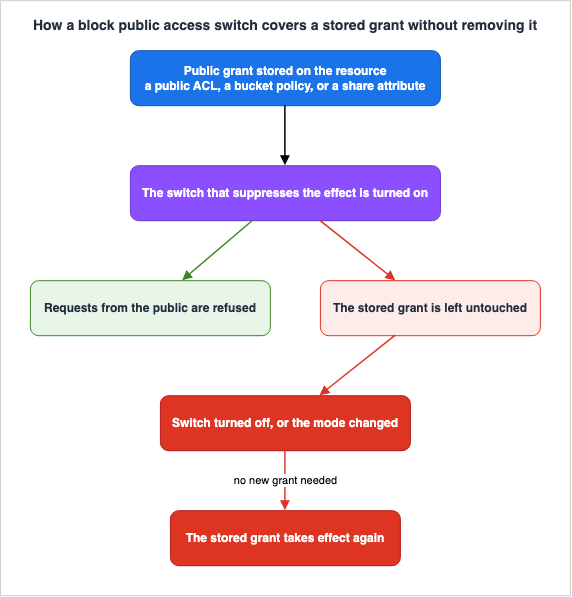
First, when the setting is taken off for a while to allow public access. Every past grant comes back the moment it is taken off, including an ACL attached years ago.
Second, when an account is handed over. Seeing that a switch is on tells you nothing about what is sleeping underneath it. The state of the switch and the state of the stored grant have to be read separately.
Third, when a switch is reported as a permanent control. A cover can be taken off. As long as someone holds the permission to take it off, the cover is part of the control and not the whole of it. Section 7 covers how to stop it being taken off, from the organization's side.
5.3 Two Services Report the Same Situation in Opposite Ways
This is the hardest of the four differences to check for. EBS and S3 report the covered state in opposite directions.EBS returns the stored grant. As quoted earlier, the attribute goes on saying publicly shared.
S3 returns the permission that is actually in force.
Calls to GetBucketAcl and GetObjectAcl always return the effective permissions in place
for the specified bucket or object.
The same User Guide provides an example of this behavior, citing the case of a bucket with a publicly permissive ACL, where
IgnorePublicAcls is enabled. In this scenario, the system returns the permissions enforced by S3, rather than the ACL actually associated with the bucket.Therefore, when the same question is asked of both services, they provide opposite answers.
| Question | EBS Snapshot Answer | S3 Bucket Answer |
|---|---|---|
| Is this resource public? | The attribute answers that it is publicly shared. | The effective permission answers that it is not public. |
| Can it be read now? | No. | No. |
| What happens if the switch is turned off? | It becomes public exactly as the attribute says. | It becomes public exactly as the stored ACL says. |
Neither service is lying. What each returns is a different thing. EBS returns the stored grant, and S3 returns the result of enforcement. Automate a check without absorbing that difference and the conclusion flips.
5.4 What Turning It On Actually Covers
The fourth contrast is scope.| Service | Scope of Switch Application |
|---|---|
| Amazon S3 | Turn it on once in the account and it reaches every Region. |
| EBS Snapshots | Applied on a per-Region basis. |
| AMI | Applied on a per-Region basis. |
| SSM Documents | Applied on a per-Region basis. Values may differ by Region. |
| RDS and Aurora Snapshots | No switch. Applied to each snapshot individually. |
| Secrets Manager | Applied per call, or based on the permissions of the caller. |
| Amazon ECR Public | No switch. |
S3 is the only one where turning it on once in the account is enough. For the three remaining groups whose switch is Regional, any Region you do not visit, including the ones you are not using, stays a Region without the switch. This directly relates to the failure modes described in Section 10.
6. The One With No Off Switch
Amazon ECR Public's public repositories do not have a mechanism to disable public access. This is not a gap in the implementation. It is stated outright.All public repositories are visible on the Amazon ECR Public Gallery. Using a repository
policy to deny access to view or pull from a public repository is not supported.The same wording appears on both the Public repository policies page and the Public repository policy examples page of the Amazon ECR Public User Guide.
There are two important points to understand.
First, this does not mean that repository policies are meaningless. The same page explains the purpose of repository policies. By default only the repository owner can push, and a repository policy widens the list of principals that may push. In other words, ECR Public's repository policies are tools for opening access, not for closing it.
Second, this applies specifically to public repositories. Repository policies for private registries are a different matter and are outside the scope of this article.
Therefore, the options available for Amazon ECR Public's public repositories are to either not create them or to delete them if they have already been created. A single row saying that no switch exists changes how the whole inventory reads. That is why this article gives Amazon ECR Public just one row. A report stating that all public switches have been enabled only makes sense in the context of a service that actually provides such a switch.
7. Stopping It From the Organization
As Section 5.2 showed, a switch inside an account can be turned off by someone inside that account. To make it impossible to turn off, the control has to come from the organization.7.1 Two Paths
AWS Organizations has a policy category called declarative policies, and two of its types matter here.| Declarative Policy Type | Applicable Settings (within the scope of this article) |
|---|---|
| Amazon S3 policies | The four S3 Block Public Access settings |
| Amazon EC2 policies | Block public access for EBS snapshots, Block public access for AMIs |
The Amazon S3 policies page of the AWS Organizations User Guide states what this policy type covers today.
Amazon S3 policies allow you to centrally manage configurations for Amazon S3 resources
at scale across the accounts in an organization. Amazon S3 policies currently support
settings for blocking public access.
The syntax is one step coarser.
"all" - Enables all four Amazon S3 Block Public Access settings at the organization level
"none" - Disables all four Amazon S3 Block Public Access settings at the organization level
An account or a bucket can take the four settings one at a time. An organization can only take all four or none. The User Guide states the limit as follows:
At the organization level, you can only enable or disable all four settings together
using an "all" or "none" approach - granular control over individual settings is not
available.
7.2 While the Organization Governs, the Account Setting Is Read-Only
The EBS User Guide puts it plainly: while a declarative policy is in force, the setting cannot be changed inside the account.The block public access setting is configured either directly in the account or by using
a declarative policy. Using a declarative policy allows you to apply the setting across
multiple Regions simultaneously, as well as across multiple accounts simultaneously.
When a declarative policy is in use, you can't modify the setting directly within an
account.S3 behaves the same way. Its User Guide states that an account governed by an organization-level policy cannot have its account-level settings changed.
You can determine whether this state is active through the API. The two EC2 API calls that retrieve account status return a field called
managedBy.account - The state is managed by the account.
declarative-policy - The state is managed by a declarative policy and can't be modified
by the account.That one field tells you something the account's own setting value cannot. Section 8 uses it in the check.
7.3 What Declarative Policies Do Not Reach
The AWS Organizations User Guide lists the types of declarative policies available. As of September 16, 2026, this list includes Amazon EC2, Backup, Tag, Chat applications, AI services opt-out, Security Hub, Amazon Inspector, Amazon Bedrock, Upgrade rollout, Amazon S3, and AWS Shield Network Security Director.Amazon RDS, AWS Systems Manager, AWS Secrets Manager, and Amazon ECR Public are not included in this list. Stopping their public sharing across an organization therefore calls for something other than a declarative policy. The design of the ceilings an organization can impose with Service Control Policies and Resource Control Policies belongs to AWS Organization Guardrails.
8. Reading the Current State of Your Own Account
The previous sections have discussed how AWS is designed. However, you won't truly understand the current state of your own account until you investigate it yourself. This section covers the entry points only. How to operate the detection services is left to the articles that already hold that subject.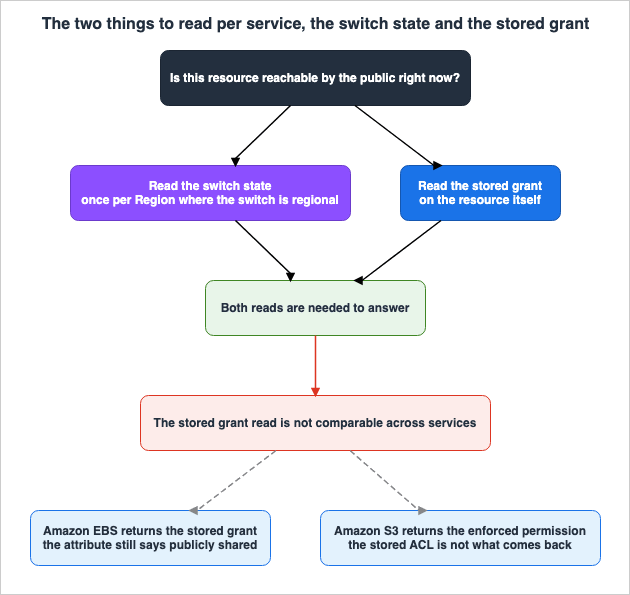
8.1 There Are Two Things to Read
Based on the conclusion in Section 5.2, there are two things to check during inspection.One is the state of the switch. The other is the grant stored beneath it. A switch being on says nothing about what lies underneath.
8.2 The Entry Point for Each Service
| Service | Switch State | Stored Grant |
|---|---|---|
| Amazon S3 | s3control get-public-access-block for the account, GetPublicAccessBlock for the bucket | Bucket policies and ACLs. However, ACLs return effective permissions. |
| EBS Snapshots | GetSnapshotBlockPublicAccessState | Query createVolumePermission for your snapshots using DescribeSnapshotAttribute. |
| AMIs | GetImageBlockPublicAccessState | Query launchPermission for your AMIs using DescribeImageAttribute. |
| RDS DB Snapshots | Not applicable | DescribeDBSnapshotAttributes. |
| Aurora DB Cluster Snapshots | Not applicable | DescribeDBClusterSnapshotAttributes. |
| SSM Documents | Pass /ssm/documents/console/public-sharing-permission to GetServiceSetting. | DescribeDocumentPermission. |
| Secrets Manager | A per-call parameter, so there is no stored state to read. | GetResourcePolicy. |
| Amazon ECR Public | Not applicable | ecr-public describe-repositories. |
For the two EC2 calls, read
managedBy as well. If the value is declarative-policy, the setting cannot be changed from inside that account.8.3 The Entry Point for Looking Across Services
Instead of calling each service one at a time, AWS provides paths that detect external access across services. This article goes no further than naming them.- IAM Access Analyzer detects external access. This includes S3 bucket configurations, EBS snapshot sharing settings, RDS DB snapshot and DB cluster snapshot sharing settings, and Secrets Manager resource policies.
- AWS Security Hub CSPM controls, such as SSM document configurations (e.g., SSM.7).
- AWS Config managed rules, such as
rds-snapshots-public-prohibitedandssm-automation-block-public-sharing. - AWS Trusted Advisor security checks, such as Amazon RDS Public Snapshots.
The design and operation of IAM Access Analyzer are the primary focus of AWS IAM Access Analyzer Deep Dive. In particular, that article provides data on the time delay between enabling Account-level Block Public Access and the subsequent disappearance of detection results. This article will not cover that topic.
AWS Config Rules and Conformance Packs carries the design of Config rules and automated remediation.
When the Trusted Advisor checks for public Amazon EBS and Amazon RDS snapshots were made available to all AWS customers, and which AWS Support plans each AWS source names for the Trusted Advisor checks, are traced in AWS History and Timeline regarding AWS Trusted Advisor.
9. Where the Primary Sources Disagree
While the inventory was being built, two places were found where the descriptions in official documents appeared contradictory. These discrepancies are not of the same nature. The first is a genuine contradiction, where two documents state directly opposing information. This article does not try to settle it. The second involves a perceived contradiction between two sentences on the same page, which can be resolved by clarifying the specific meaning of the terms used. Both are recorded here with both descriptions and the verification date.9.1 The Default for BlockPublicPolicy in Secrets Manager
The AWS Secrets Manager API reference for PutResourcePolicy states that, by default, public access policies are not denied.Specifies whether to block resource-based policies that allow broad access to the
secret, for example those that use a wildcard for the principal. By default, public
policies aren't blocked.Conversely, the AWS CloudFormation template reference for
AWS::SecretsManager::ResourcePolicy states the opposite regarding the same property.Specifies whether to block resource-based policies that allow broad access to the
secret. By default, Secrets Manager blocks policies that allow broad access, for example
those that use a wildcard for the principal.As of September 16, 2026, both documents are current. Therefore, it is not possible to determine the behavior when this value is omitted based solely on the documentation. However, explicitly specifying the value will not change the outcome, regardless of which documentation is correct. AWS Secrets Manager best practices also recommend that identity-based policies that permit
PutResourcePolicy should fix the condition key to true.9.2 What Organization Level Means for Amazon EBS
The Amazon EBS User Guide states plainly that block public access for snapshots cannot be enabled at the organization level. The same page also says that a declarative policy can apply the setting across multiple accounts at once.These two statements are not contradictory. The key is what the term organization level is pointing at in each case. In the context of S3's Block Public Access, the organization genuinely exists as a level. Within that hierarchy, the most restrictive setting among the organization, accounts, buckets, and access points takes precedence. However, EBS snapshots do not have such a hierarchy; they only have settings at the account level. Declarative policies provide a mechanism to distribute those account-level settings across multiple accounts.
Once the setting has been distributed this way, it can no longer be changed from inside the account. So in practice the effect comes close to enforcement at the organization level. Even so, the organization exists as a layer of the setting only in S3. That difference is what splits the answer to the question of whether a setting can be stopped at the organization level, with S3 on one side and the rest on the other.
10. Failure Modes and Anti-Patterns
Relying solely on attributes. Even if an EBS snapshot's attribute indicates publicly shared, if Block all sharing is enabled, it is not publicly accessible. Conversely, switching to Block new sharing while the attribute does not say publicly shared changes nothing at all. Read the attribute and the switch separately.Relying solely on ACLs. The
GetBucketAcl command for S3 returns effective permissions. Even if you read the ACL while Block Public Access is enabled and it indicates not public, that does not prove that the stored ACL is not public. To know what happens when the switch comes off, read the state of the switch alongside the ACL.Focusing on a single Region. Switches for EBS snapshots, AMIs, and SSM documents are Region-specific. You can create resources in Regions where you haven't enabled the switch. A Region where the switch is not enabled remains a Region where the switch is not enabled.
Reporting that you're stopping public access, but named sharing remains. Even if you remove
all from RDS and Aurora snapshots, explicitly added account IDs will remain. Stopping public access and stopping sharing entirely are separate operations.Reading only the account's own setting in an environment governed by an organization policy. If the
managedBy field of the EC2 state API returns declarative-policy, the organization is deciding the value in that account. An attempt to change the setting from inside the account will not go through.Temporarily disabling the switch and forgetting to re-enable it. The moment the switch comes off, every past grant comes back. If you have operational processes that involve temporarily disabling the switch, you must incorporate detection of when the switch is disabled and verification that it has been re-enabled into your procedures.
Assuming that encryption prevents public access. For RDS and Aurora snapshots, if encryption is enabled, you cannot specify "all," so this assumption holds true regarding public access. However, even with encryption, you can still share with specific accounts. And for S3 it does not hold even for public access. Whether an object is encrypted and whether it is public are independent of each other.
Counting services that don't have a switch as if they do. RDS and Aurora snapshots, Secrets Manager, and ECR Public do not have account-level switches. Stocktakes that claim all switches are enabled often fail to account for these three groups.
11. Frequently Asked Questions about Public Access Switches on AWS
Does enabling Block Public Access revoke the grant that allowed public access?
No. None of the switches in this article's scope touches the stored grant. The Amazon S3 User Guide states that removing a block public access setting makes a bucket or object with a public policy or ACL publicly accessible again. The Amazon EBS User Guide states that Block all sharing does not change the permissions of snapshots that are already publicly shared. A switch does not revoke a grant. It covers one.Is Block Public Access for Amazon S3 the same feature as block public access for EBS snapshots?
No. While the names are similar, they are different features. S3 offers four settings that can be applied at four different levels: organization, account, bucket, and access point. When applied at the account level, these settings apply across all Regions. EBS snapshots, on the other hand, have a single setting at the account level, and must be configured for each Region. Both implement the same division, but the number of levels, the scope, and the number of modes are all different.Why does a snapshot attribute still say publicly shared after Block all sharing is enabled?
The attribute is reporting the stored grant. The EBS User Guide states that this mode does not change the permissions of snapshots that are already publicly shared, and then states that the attributes go on indicating publicly shared even though the snapshots are not publicly available. The attribute reports what is stored, not what is reachable.Does the account-level switch make an already public AMI private?
No. The EC2 User Guide explicitly states that if you already have a publicly available AMI, it will remain publicly accessible. The AMI switch only prevents new AMIs from being made public; it does not have a function to revoke existing public status. Existing publicly available AMIs will need to be managed individually.Does turning it on once in an account cover every Region?
Amazon S3 is the only one where it does. Its User Guide states that settings applied to an account reach all Regions. The switches for EBS snapshots, AMIs, and SSM documents are each set one Region at a time.Can an encrypted Amazon RDS snapshot be made public?
No. The RDS API Reference explicitly states that while encrypted snapshots can be shared, theValuesToAdd parameter cannot take all. The same holds for Aurora DB cluster snapshots.Is there an account-level switch that stops public sharing of Amazon RDS snapshots?
No such setting could be found. AWS's own security control recommendations for this subject point to an AWS Config rule, a Security Hub CSPM control, and a Trusted Advisor check, and name no account-level setting. Regarding RDS and Aurora, the design focuses on detection rather than prevention.Can a public Amazon ECR Public repository be closed with a repository policy?
No. The Amazon ECR Public User Guide states that using a repository policy to deny access to view or pull from a public repository is not supported. Every public repository appears on the Amazon ECR Public Gallery.Does an organization policy make the account setting read-only?
Yes. The organization-side mechanism in this article is the declarative policy, and while one is in force, the setting cannot be changed from inside the account. The Amazon S3 User Guide says the same thing about an organization-level policy for S3. With S3, though, the only granularity available at the organization level is all four settings together, on or off.How can you tell whether an organization policy is in effect?
Read themanagedBy field returned by the two EC2 state APIs. A value of account means the account manages the state. A value of declarative-policy means a declarative policy manages it, and the account cannot change it.12. Summary
A report saying that public access has been blocked cannot be verified on its own. Until you know which service, which switch, and what scope, you cannot tell what was actually stopped.Four conclusions come out of the inventory.
The first is that there are only two kinds of switch. A switch either refuses a new grant or suppresses the effect of one that already exists. Amazon S3 and EBS snapshots have both. AMIs, SSM documents, and Secrets Manager have only the first. RDS and Aurora snapshots, along with Amazon ECR Public, have neither.
The second is that no switch revokes a grant. Even the switch that suppresses the effect leaves the stored grant exactly where it was. Take the switch off and the grant comes back into force. The state of the switch and the state of the stored grant have to be read separately.
The third is that the covered state is reported in opposite directions. EBS returns the stored grant, and S3 returns the result of enforcement. Automate a check without absorbing that difference and the conclusion flips.
The fourth is that the scope is not uniform. S3 reaches every Region from one setting in the account. EBS snapshots, AMIs, and SSM documents are set one Region at a time. Amazon RDS and Amazon Aurora, Secrets Manager, and Amazon ECR Public have no account-level switch at all.
And one group has no way to stop it at all. An Amazon ECR Public repository has no setting that ends its public state. The choices are to not create one, or to delete one that already exists.
One last thing about the order of the check. Read the state of the switch first, then read the grant stored beneath it. Either reading on its own settles neither what is public now nor what becomes public tomorrow.
13. References
- Blocking public access to your Amazon S3 storage - Amazon Simple Storage Service
- Configuring block public access settings for your account - Amazon Simple Storage Service
- Security best practices for directory buckets - Amazon Simple Storage Service
- Block Public Access settings - Amazon Simple Storage Service console help panel
- Block public access for Amazon EBS snapshots - Amazon EBS User Guide
- Configure block public access for Amazon EBS snapshots - Amazon EBS User Guide
- Understand block public access for AMIs - Amazon EC2 User Guide
- EnableImageBlockPublicAccess - Amazon EC2 API Reference
- GetImageBlockPublicAccessState - Amazon EC2 API Reference
- GetSnapshotBlockPublicAccessState - Amazon EC2 API Reference
- Sharing a DB snapshot for Amazon RDS - Amazon Relational Database Service
- ModifyDBSnapshotAttribute - Amazon Relational Database Service API Reference
- ModifyDBClusterSnapshotAttribute - Amazon Relational Database Service API Reference
- Sharing SSM documents - AWS Systems Manager User Guide
- ModifyDocumentPermission - AWS Systems Manager API Reference
- PutResourcePolicy - AWS Secrets Manager API Reference
- AWS::SecretsManager::ResourcePolicy - AWS CloudFormation Template Reference
- AWS Secrets Manager best practices - AWS Secrets Manager User Guide
- Public repository policies in Amazon ECR Public - Amazon ECR Public User Guide
- Declarative policies in AWS Organizations - AWS Organizations User Guide
- Amazon S3 policies - AWS Organizations User Guide
- Amazon S3 policy syntax and examples - AWS Organizations User Guide
- Managing organization policies with AWS Organizations - AWS Organizations User Guide
- Security control recommendations for protecting data - AWS Prescriptive Guidance
- Security Hub CSPM controls for Systems Manager - AWS Security Hub User Guide
- Security - AWS Support User Guide (AWS Trusted Advisor check reference)
- Amazon S3 Block Public Access now supports organization-level enforcement - AWS What's New
- AWS Service Availability Updates - AWS What's New
References:
Tech Blog with curated related content
Written by Hidekazu Konishi