AWS Security Incident Response Playbooks - First-Response Runbooks for Common Scenarios
First Published:
Last Updated:
This is a defensive article. It is about detecting, containing, and recovering from suspected misuse of your own AWS account. It deliberately does not explain how any attack is performed, and it does not invent incident narratives. Where a step is destructive or irreversible — deactivating a credential, revoking active sessions, isolating an instance — the operational risk is called out alongside it, because a containment action that halts production is sometimes the right call and sometimes the wrong one, and the difference depends on context you must weigh deliberately rather than reflexively.
* This article is a structured starting point, not a definitive procedure for any specific environment, and it is not legal advice. Security incidents can carry legal, regulatory, contractual, and forensic obligations that depend on your jurisdiction, your industry, and your contracts; involve your legal, compliance, and management stakeholders early, and engage qualified digital forensics and incident response (DFIR) professionals when the situation calls for evidence handling that must stand up to scrutiny. AWS service behaviors, console labels, finding type names, and CLI syntax change over time — verify every command, query, and finding type against the current official documentation for your environment before you rely on it in an incident.
* No live AWS production environment was used to write this article. All command, query, and console snippets are illustrative and are drawn from official AWS documentation; none of them represent measured or executed results.
Table of Contents:
- 1. Introduction — How to Use These Playbooks
- 2. Common Principles — The Incident Response Lifecycle on AWS
- 3. Playbook 1 — Leaked IAM Access Key or Long-Term Credential
- 4. Playbook 2 — Unintended Amazon S3 Public Exposure
- 5. Playbook 3 — Unauthorized API Activity and Suspected Cryptomining
- 6. Playbook 4 — Suspected Amazon EC2 Instance Compromise
- 7. Playbook 5 — Suspicious IAM Changes and Persistence
- 8. Playbook 6 — A Secret Committed to a Public Repository
- 9. Preparing Before an Incident
- 10. Frequently Asked Questions
- 11. Summary
- 12. References
1. Introduction — How to Use These Playbooks
The right time to read these playbooks is before you need them. Reading a runbook node by node while an account is actively being misused is slower and more error-prone than having read it once beforehand and recognizing the shape of the response when the alert fires. Read this article when your account is healthy, keep it as a reference, and adapt each playbook into your own environment-specific runbook with your account IDs, log locations, and escalation contacts filled in.Three audiences benefit most. The first is the engineer or on-call responder who has just seen an Amazon GuardDuty finding, an AWS account notification, or an anomaly and needs a defensible default order of operations. The second is the security or platform team writing an incident response plan who needs a stock set of first-response procedures to parameterize. The third is the technical lead teaching a less experienced engineer what "respond to this" actually means step by step.
How this article differs from incident triage. There is a companion article on this site, Incident Triage Flowcharts - Network, DB, and Application Layer, that walks the DNS / TCP / TLS / HTTP / application / database layers to answer "why is this system broken?" That article is about availability and correctness symptoms — the site is down, the site is slow, the data looks wrong. This article is about a different axis entirely: the suspicion that an account, credential, or resource has been misused by an unauthorized party. The two are complementary. If your triage of a "site is slow" symptom uncovers an unfamiliar process consuming CPU, you may cross over from that article into Playbook 4 here. Keep the boundary clear: triage locates a fault in the stack; a security playbook responds to a suspected compromise.
Scope. Each playbook covers first response: detection, containment, initial investigation, eradication and recovery, and prevention. It does not cover deep forensics (disk imaging, memory capture, and malware reverse engineering are summarized and deferred to specialists and to the official AWS guidance), it does not cover cost or pricing decisions, and it names only finding types, APIs, and procedures that are documented by AWS. When a managed capability such as AWS Security Incident Response or AWS Security Hub can do part of the work for you, it is noted as an option rather than assumed. Two scenario families deserve their own dedicated treatment and are intentionally out of scope for this edition: ransomware and data-destruction events (bulk encryption or deletion of data in Amazon S3, Amazon EBS, or databases via compromised credentials), for which AWS maintains dedicated first-party guidance in the AWS Blueprint for Ransomware Defense, the Ransomware Risk Management on AWS Using the NIST CSF whitepaper, and the AWS Security Blog analysis The anatomy of ransomware event targeting data residing in Amazon S3; and root user compromise, which follows a different escalation path (root sign-in cannot simply be deactivated like an IAM user's access key) and is governed by the root user best practices in the IAM User Guide. The six playbooks below should not be read as an exhaustive catalog of incident types.
2. Common Principles — The Incident Response Lifecycle on AWS
Before the scenario-specific playbooks, it helps to fix a shared vocabulary and a shared lifecycle. Every playbook in this article is a specialization of the same underlying model, and understanding that model makes each playbook easier to remember and easier to adapt.2.1 The Framework — NIST SP 800-61r3 and the Cybersecurity Framework 2.0
The reference framework for incident response is NIST's Computer Security Incident Handling guidance, published as Special Publication 800-61. It is worth being precise about which revision, because the model changed materially in 2025. In April 2025 NIST released SP 800-61 Revision 3, "Incident Response Recommendations and Considerations for Cybersecurity Risk Management: A CSF 2.0 Community Profile", and withdrew Revision 2. This was a rewrite, not a touch-up.The older and still widely quoted model comes from the now-superseded Revision 2: a four-phase lifecycle of Preparation; Detection and Analysis; Containment, Eradication, and Recovery; and Post-Incident Activity. Revision 3 replaces that discrete, linear lifecycle with a model organized around the six Functions of the NIST Cybersecurity Framework (CSF) 2.0. In the Revision 3 model, the Govern, Identify, and Protect Functions are the ongoing preparation that surrounds incident response but is not itself part of a single incident; Detect, Respond, and Recover are the core of handling an incident; and Improvement is treated as continuous — lessons feed back into every Function rather than being confined to a post-incident meeting. The intent is to treat incident response as part of continuous cybersecurity risk management instead of a set of duties bounded by the few days around an event.
Where does AWS fit? AWS provides two closely related, but distinct, official assets, and it is worth knowing which is which. The AWS Security Incident Response Guide (whitepaper) explicitly applies the concepts of the NIST Computer Security Incident Handling Guide to AWS technologies; at the time of writing it references SP 800-61 r2 and its four-phase lifecycle. (The whitepaper's HTML edition has been retired and now redirects to the AWS Security Incident Response service documentation; the PDF edition linked here remains available.) Separately, the AWS Security Incident Response service frames its process around the NIST Cybersecurity Framework, from "Preparation" through "Recovery." In practice these are compatible views of the same work; this article uses the current NIST Revision 3 / CSF 2.0 framing as the canonical frame and notes the four-phase lineage where it aids recognition, because so much existing tooling and documentation is written in those terms.
For a first responder the change is less dramatic than it sounds. The actions you take at the keyboard — notice, contain, investigate, eradicate, recover, and close the gap — are the same under either revision. What Revision 3 changes is emphasis: it insists that the Govern, Identify, and Protect work done long before an incident is inseparable from how well the incident goes, and that Improvement is continuous rather than a single meeting at the end. Both ideas show up concretely in these playbooks — in the Prevention stage that closes each one, and in the preparation section that underpins them all.
2.2 The Five-Stage Shape of Every Playbook
To keep the playbooks consistent and memorable, each one follows the same five stages. The stages are a practitioner-facing decomposition of the NIST Functions, chosen so that the order matches what you actually do at the keyboard.
The stages map onto the NIST models as follows. Use this table to translate between the practitioner steps in each playbook and whichever framework vocabulary your organization has standardized on.
* You can sort the table by clicking on the column name.
| Playbook stage | NIST SP 800-61r3 / CSF 2.0 Function | Legacy SP 800-61r2 phase |
|---|---|---|
| Detection signals | Detect | Detection and Analysis |
| Immediate containment | Respond | Containment, Eradication, and Recovery |
| Investigation | Respond (analysis) | Detection and Analysis |
| Eradication and recovery | Respond and Recover | Containment, Eradication, and Recovery |
| Prevention | Govern, Identify, and Protect (informed by Improvement) | Preparation and Post-Incident Activity |
2.3 Evidence Preservation and the Containment Trade-off
The single most common mistake in cloud incident response is destroying evidence in the rush to contain. Containment and investigation pull in opposite directions: the fastest way to stop misuse is often to delete the offending resource, but a deleted resource cannot be examined, and its logs of what it did may be harder to reconstruct. The resolution is a discipline of ordering.Prefer reversible containment before irreversible eradication. Deactivating an access key is reversible; deleting it is not, so the documented pattern is to deactivate first and delete only after investigation is complete. Isolating an Amazon EC2 instance with a restrictive security group preserves the instance for analysis; terminating it does not. Preserve before you destroy: take an Amazon EBS snapshot before you consider terminating an instance, and export or copy relevant AWS CloudTrail records before retention windows lapse. Throughout, write down what you did and when — a contemporaneous timeline of responder actions is itself evidence, and it is the record that lets you distinguish attacker activity from your own during later analysis.
Containment is a judgment call, not a reflex. Revoking every active session for a role stops an attacker who holds temporary credentials, but it also signs out every legitimate user of that role and can cause them to lose unsaved work. Deactivating a key that a production system is using will break that system. None of these facts means "don't contain" — they mean decide the blast radius consciously, and where a workload is at stake, stage the change so legitimate use is preserved (for example, by cutting traffic to a replacement credential before disabling the exposed one).
In practice, that discipline reduces to a short, ordered habit that every playbook below follows:
- Note the time and exactly what you observed, in a running log.
- Preserve before you change — snapshot volumes, and export or copy the relevant CloudTrail records before retention windows or an attacker can remove them.
- Contain reversibly — deactivate, isolate, revoke — before you do anything irreversible.
- Investigate to establish scope and the earliest unauthorized action, which becomes your incident's start time.
- Eradicate and recover only once you understand what you are removing and why.
- Keep recording your own actions as you take them, so later analysis can separate responder activity from attacker activity.
2.4 Escalation, Communication, and Roles
Decide, before an incident, who is allowed to make containment decisions, who talks to management and to customers, and how you reach AWS. Keep the AWS account's alternate security contact current so that AWS notifications about your account reach the right people. If you have a Business or Enterprise Support plan, know how to open a support case; if you are enrolled in AWS Security Incident Response, know how the service escalates cases to you and how you engage its responders. Communication is not a nicety bolted on at the end; a clear internal channel and a single incident owner are what keep six people from taking six uncoordinated containment actions on the same account.2.5 Common Investigation Tooling
The playbooks share a small set of investigative tools. They are described once here so each playbook can refer to them without repetition; each is linked from the References section.- AWS CloudTrail is the record of who did what. The console's Event history holds the last 90 days and is searchable by attributes such as user name, access key ID, event name, or resource — the fastest way to answer a narrow question.
- Amazon Athena queries CloudTrail log files stored in Amazon S3 with SQL, which is what you reach for when a question spans a longer window, multiple Regions, or many attributes at once. You create a table over the log location — the CloudTrail console can generate the
CREATE TABLEstatement for you — and query it. - AWS CloudTrail Lake runs SQL over an immutable event data store, across Regions and accounts, without managing Athena tables. Note that AWS closed CloudTrail Lake to new customers as of May 31, 2026; existing customers continue to use it.
- Amazon GuardDuty is the detection layer: it analyzes CloudTrail, VPC flow logs, and DNS to raise findings, and each finding's details name the principal, resource, and API involved.
- Amazon Detective builds a behavior graph from CloudTrail, VPC flow logs, and GuardDuty findings, and its finding groups link related findings to a probable root cause — valuable when one incident spans many findings.
- The IAM credential report lists every credential's status and last-used data across the account, refreshed at most every four hours, which helps you spot dormant credentials that suddenly became active.
- VPC flow logs record network conversations, answering what a suspect instance actually talked to.
- AWS Security Hub aggregates and prioritizes findings across accounts and Regions, and is the hub through which many third-party detections and AWS Security Incident Response reach you.
2.6 Scenario Quick Reference
The table below is an index into the six playbooks: the scenario, one or two representative GuardDuty finding types that commonly surface it, the first containment action, and the primary source you investigate with. It is a memory aid, not a substitute for the full playbook, and the finding type names should always be checked against the current GuardDuty reference.* You can sort the table by clicking on the column name.
| Scenario | Representative GuardDuty finding type(s) | First containment | Primary investigation source |
|---|---|---|---|
| Leaked IAM credential (Playbook 1) | UnauthorizedAccess:IAMUser/InstanceCredentialExfiltration.*; CredentialAccess:IAMUser/AnomalousBehavior | Deactivate key / revoke sessions | CloudTrail |
| S3 public exposure (Playbook 2) | Policy:S3/BucketAnonymousAccessGranted | Enable Block Public Access | CloudTrail management events |
| Unauthorized API / cryptomining (Playbook 3) | CryptoCurrency:EC2/BitcoinTool.B!DNS | Contain identity, then compute | CloudTrail (all Regions) |
| EC2 compromise (Playbook 4) | Backdoor:EC2 and UnauthorizedAccess:EC2 families | Isolation security group | Snapshot, CloudTrail, VPC flow logs |
| Suspicious IAM changes (Playbook 5) | Persistence:IAMUser/AnomalousBehavior | Deactivate / disable principals | CloudTrail |
| Secret in a public repo (Playbook 6) | IAM finding types, if the secret is an AWS key | Rotate / revoke at the source | Provider audit logs, CloudTrail |
3. Playbook 1 — Leaked IAM Access Key or Long-Term Credential
This is the archetypal cloud security incident: an AWS access key or other long-lived credential ends up somewhere it should not be — a public code repository, a build log, a screenshot, a pasted snippet — and may now be in unauthorized hands. It is the canonical example of the five-stage shape, so it is worked in the most detail; the later playbooks reference back to it.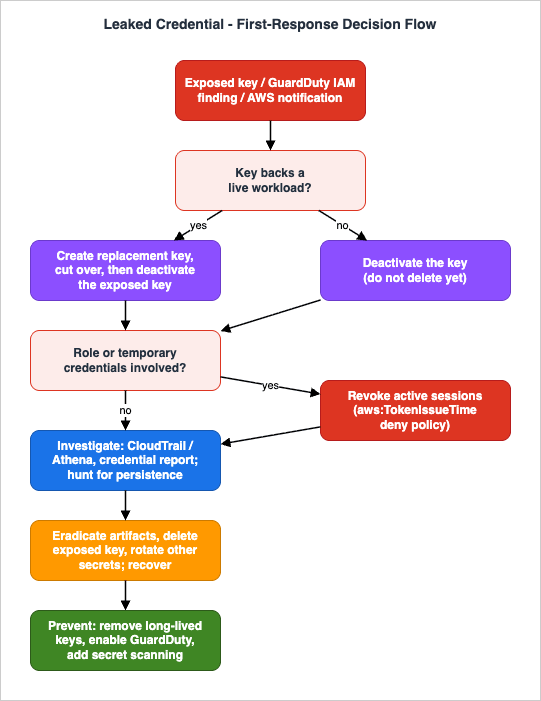
3.1 Detection signals
- An AWS notification about irregular activity, or an exposed-key alert. When AWS detects an access key that appears to be publicly exposed, it may automatically attach a quarantine policy (currently
AWSCompromisedKeyQuarantineV3) that denies a set of high-risk actions while you remediate. - Amazon GuardDuty IAM finding types, such as
UnauthorizedAccess:IAMUser/InstanceCredentialExfiltration.InsideAWSand.OutsideAWS,CredentialAccess:IAMUser/AnomalousBehavior,Exfiltration:IAMUser/AnomalousBehavior, andImpact:IAMUser/AnomalousBehavior. The full, current list is in the GuardDuty active finding types reference. - Unexpected activity that a human notices first: resources appearing in Regions you do not use, unfamiliar IAM principals, or a spike in your billing dashboard that suggests unauthorized resource usage.
- A secret discovered in a public place — a repository, a gist, a CI log. If the leaked secret is specifically a source-code repository commit, combine this playbook with Playbook 6.
3.2 Immediate containment
First, identify what kind of credential you are dealing with, because it changes the containment step. Per the GuardDuty guidance on remediating potentially compromised AWS credentials, an access key ID beginning withAKIA is a long-term credential belonging to an IAM user or the account root user, while one beginning with ASIA is a short-term credential issued by AWS Security Token Service (STS) and used by roles (and can also be issued for IAM users). Long-term keys are deactivated or deleted; temporary credentials are neutralized by revoking the session that issued them.For a long-term (AKIA) key:
Note: Deactivating a key that a production system is actively using will break that system. Where the key backs a live workload, the documented safe order is to create a replacement key, move legitimate systems onto it, and only then deactivate the exposed key — so you are not interrupting your own services during containment.
# 1) Create a replacement key first (if a workload depends on the exposed one),
#    then migrate your applications to it.
aws iam create-access-key --user-name Alice

# 2) Deactivate the exposed key. Deactivate rather than delete at this stage,
#    so the key and its usage remain available for investigation.
aws iam update-access-key --access-key-id AKIAEXAMPLE --status Inactive --user-name Alice
If the compromised IAM user also has console access, disable its console sign-in as well; a deactivated access key blocks programmatic calls but not console sign-in. If AWS attached the
AWSCompromisedKeyQuarantineV3 policy, leave it in place until remediation is complete — removing it prematurely can affect your eligibility for AWS account concessions related to the incident.For temporary (ASIA) credentials or a role: revoke the role's active sessions. The Revoke active sessions action in the IAM console attaches an inline policy to the role that denies all actions for any session issued before the moment of revocation, using an
aws:TokenIssueTime condition. Sessions issued after that moment are unaffected, so legitimate users simply re-authenticate.Note: Revoking active sessions denies access to every current session of that role, not just the attacker's. Legitimate users of the role are signed out and may lose unsaved work, and you cannot revoke the session of a service-linked role. Understanding exactly what that attached deny policy evaluates to is worthwhile; the mechanics of
Deny with conditions are covered in How the IAM Policy Evaluation Logic Works Step by Step. For federated users, the same effect is achieved with a combination of AWS Organizations service control policies (SCPs) and IAM policies keyed on identity condition keys; AWS documents this in How to revoke federated users' active AWS sessions, and SCPs as an account-wide guardrail are discussed in AWS Organization Guardrails with SCPs and RCPs.3.3 Investigation
With misuse contained, determine what the credential did. AWS CloudTrail is the primary source. The console's Event history retains the last 90 days and can be filtered by access key ID or user name. For anything beyond a quick look — longer windows, cross-Region correlation, or scripted analysis — query your CloudTrail logs with Amazon Athena, as documented in Query AWS CloudTrail logs. A representative query to list what one principal did over a time window looks like this:SELECT eventtime, eventname, awsregion, sourceipaddress, useragent
FROM cloudtrail_logs
WHERE useridentity.arn = 'arn:aws:iam::123456789012:user/Alice'
AND eventtime >= '2026-07-01T00:00:00Z'
AND eventtime <= '2026-07-24T00:00:00Z'
ORDER BY eventtime ASCIf the activity used a role, the CloudTrail record's
sessionIssuer element tells you how the session was obtained. Alongside CloudTrail, the IAM credential report (refreshed at most every four hours) shows access-key last-used, user-creation, and password-last-used data across your account, which helps you spot dormant credentials that suddenly became active. If you have Amazon Detective enabled, its behavior graph can accelerate this correlation. For a broader toolbox of log queries, see A Collection of Amazon CloudWatch Logs Insights Queries and, for the architecture that makes all of this possible, A Guide to Centralized Logging and Audit Architecture on AWS.The investigative goal is not only "what happened" but "what did the actor leave behind." Look specifically for persistence: new IAM users, roles, or access keys; modified trust policies; unfamiliar EC2 instances; changed Amazon S3 bucket policies; and altered security groups. This is the bridge to Playbook 5.
3.4 Eradication and recovery
Once investigation is complete, delete the exposed key (now that you no longer need it for analysis and workloads run on the replacement). Remove any principals, policies, keys, or resources the actor created, and roll back configuration changes to a known-good state. Rotate any other secrets that may have been exposed in the same incident. Remove the quarantine policy only after all remediation steps are done. Confirm your applications are healthy on their new credentials before you consider the incident closed.3.5 Prevention
- Eliminate long-lived access keys where you can. Prefer IAM roles and temporary credentials, and centralize human access through AWS IAM Identity Center rather than distributing static keys.
- Turn on Amazon GuardDuty so credential misuse is detected quickly next time.
- Adopt least privilege and short role session durations; the smaller the blast radius of any one credential, the smaller the incident.
- Store secrets in a managed store rather than in code or configuration — see A Guide to AWS Secrets Manager and AWS Systems Manager Parameter Store — and add commit-time secret scanning (Playbook 6).
- Keep the account's alternate security contact current so AWS notifications reach you.
4. Playbook 2 — Unintended Amazon S3 Public Exposure
An Amazon S3 bucket or object that was meant to be private becomes reachable by anyone. The data may be sensitive; the exposure may have lasted minutes or months. The response is to close the exposure quickly and correctly, then determine what, if anything, was accessed.4.1 Detection signals
- GuardDuty S3 finding types such as
Policy:S3/BucketAnonymousAccessGranted(a bucket policy or ACL granted anonymous access) andPolicy:S3/AccountBlockPublicAccessDisabled(account-level Block Public Access was turned off). See the active finding types reference for the current S3 set. - IAM Access Analyzer findings that flag a bucket as allowing public or cross-account access.
- A bucket shown as Public in the S3 console access column, or a report from outside your organization that data is reachable.
4.2 Immediate containment
The fastest correct containment is to re-enable S3 Block Public Access. Block Public Access overrides bucket policies, access point policies, and object ACLs that would otherwise grant public access, so turning it on immediately neutralizes most misconfigurations regardless of how they were introduced. It has four independent settings, which you normally enable together:aws s3api put-public-access-block \
--bucket EXAMPLE-BUCKET \
--public-access-block-configuration \
BlockPublicAcls=true,IgnorePublicAcls=true,BlockPublicPolicy=true,RestrictPublicBuckets=trueNote: Block Public Access will break any legitimate public use of the bucket — for example, a bucket intentionally serving static website content. Confirm that public access is genuinely unintended before enabling it, and where public access is required for a verified use case, prefer serving through Amazon CloudFront with the bucket itself kept private rather than exposing the bucket directly. For an existing account-wide guardrail, you can also enable Block Public Access at the account level, and the IAM Access Analyzer for S3 console offers a one-click Block all public access per bucket. If containment must be even more aggressive because active exfiltration is suspected, you can temporarily tighten the bucket policy to deny access except from your own responders while you investigate.
4.3 Investigation
Determine how the exposure occurred and what was reachable. CloudTrail management events record the API call that changed the configuration —PutBucketPolicy, PutBucketAcl, DeletePublicAccessBlock, or PutBucketPublicAccessBlock — along with the principal, time, and source IP. Query those with Athena using the pattern from Playbook 1. If S3 server access logging or CloudTrail data events for the bucket were enabled before the exposure, you can assess whether objects were actually read while the bucket was public; if they were not enabled, you generally cannot reconstruct object-level reads after the fact, which is itself a finding to record and to fix. Enumerate the exposed objects and classify their sensitivity so that notification and legal obligations can be assessed by the right stakeholders.4.4 Eradication and recovery
Fix the root-cause configuration: remove the offending public statement from the bucket policy or ACL, not just the symptom. If the change was made by an unauthorized principal, pivot to Playbook 1 or Playbook 5 to contain that principal. Where objects are confirmed sensitive and were reachable, follow your data-breach process for classification and notification — a decision for legal and compliance, not one to make unilaterally at the console.4.5 Prevention
- Enable S3 Block Public Access at the account level, and use AWS Organizations to enforce it across member accounts so a single misconfigured bucket cannot become public.
- Detect drift continuously with AWS Config managed rules such as
s3-bucket-public-read-prohibitedands3-account-level-public-access-blocks, and auto-remediate — see A Guide to AWS Config Rules, Conformance Packs, and Remediation. - Use IAM Access Analyzer to surface buckets that allow public or cross-account access before an attacker does.
The switch named in the first item is not the only one of its kind. Amazon EBS snapshots, AMIs, manual database snapshots, SSM documents, and secrets each carry a switch that opens the resource to anyone, and the same name does not mean the same behavior. What Can Be Made Public on AWS - Storage and Data, the Block Public Access Family, and What Each Switch Does Not Promise sets out where each one sits, how far it reaches, and what it does to a grant that already exists.
5. Playbook 3 — Unauthorized API Activity and Suspected Cryptomining
An unauthorized party with access to your account often monetizes it by spinning up compute — frequently for cryptomining. The tell-tale signs are resources you did not create, activity in Regions you do not use, and network traffic to mining infrastructure. This playbook covers the account-wide response; if the misuse is concentrated on a specific instance, cross into Playbook 4.5.1 Detection signals
- GuardDuty cryptocurrency finding types, including
CryptoCurrency:EC2/BitcoinTool.BandCryptoCurrency:EC2/BitcoinTool.B!DNS(an instance communicating with, or resolving domains for, cryptocurrency infrastructure), with related types for containers and AWS Lambda. The current set is in the GuardDuty EC2 finding types reference. - A billing dashboard spike, or resources — EC2 instances, Auto Scaling groups, spot fleets — appearing in unused Regions.
- GuardDuty anomalous-behavior findings for IAM principals indicating unusual API calls such as bulk resource creation.
5.2 Immediate containment
Cut off the identity first, then the resources. If the activity traces to a compromised credential or role, contain it with Playbook 1 — stopping the identity prevents the actor from simply recreating what you tear down. Then contain the resources: isolate or stop the offending compute (Playbook 4 for a single instance), and remove any attacker-created scaling constructs so instances do not respawn. Enabling an AWS Organizations SCP that denies resource creation in unused Regions is an effective, reversible way to stop lateral spread while you work.Note: Stopping or isolating compute interrupts whatever runs on it. If you cannot yet tell attacker workloads from legitimate ones, isolate (preserving the resource and its evidence) rather than terminate.
5.3 Investigation
Establish the full scope across all Regions, because cross-Region spread is common and easy to miss. Use CloudTrail (via Athena, or CloudTrail Lake for multi-Region SQL without building tables) to enumerate everyRunInstances, CreateFunction, role creation, and similar call by the implicated principal, and to find the earliest unauthorized action — your incident's start time. Tie GuardDuty findings back to the specific principals and instances involved. The aim is a complete inventory of attacker-created resources across every Region and service, not just the one that triggered the alert.5.4 Eradication and recovery
Terminate the attacker-created compute and delete the artifacts they left — functions, roles, keys, and scaling constructs — after you have preserved anything needed for analysis. Confirm no persistence remains that would let the activity resume, then restore any legitimate capacity that was affected. Record the resource inventory and timeline; they matter for both recovery and any cost-related follow-up with AWS.5.5 Prevention
- Enable GuardDuty across all Regions and accounts; its cryptomining detection draws on VPC flow logs, DNS query analysis, and CloudTrail.
- Use SCPs to deny resource creation in Regions you never use, shrinking the attack surface for this exact abuse — see the SCP and RCP guardrails guide.
- Remove long-lived credentials and apply least privilege so a single leaked identity cannot launch fleets of instances.
- Consider automated response that quarantines a resource or disables a principal on a high-severity GuardDuty finding, so containment does not wait for a human at 3 a.m.
6. Playbook 4 — Suspected Amazon EC2 Instance Compromise
A specific EC2 instance is behaving as though an unauthorized party controls it — unexpected outbound connections, unfamiliar processes, or a GuardDuty finding naming the instance. The response centers on isolating the instance without destroying the evidence it holds. The authoritative reference is the GuardDuty guide on remediating a potentially compromised Amazon EC2 instance.6.1 Detection signals
- GuardDuty findings whose resource is an instance — the cryptocurrency types from Playbook 3, and finding families such as
Backdoor:EC2andUnauthorizedAccess:EC2(see the EC2 finding types reference for exact names and severities), plus GuardDuty Runtime Monitoring and Malware Protection findings. - Operational anomalies surfaced during ordinary triage — sustained unexplained CPU, connections to unfamiliar IP addresses, or unknown processes. This is a common crossover point from the incident triage flowcharts.
6.2 Immediate containment
Isolate the instance with a dedicated isolation security group, following the documented steps: create an Isolation security group that permits inbound and outbound traffic only to the specific addresses your responders need (with no0.0.0.0/0 rule), associate it with the instance, and remove all other security group associations.# Replace the instance's security groups with an isolation-only group.
aws ec2 modify-instance-attribute \
--instance-id i-0EXAMPLEabcdef012 \
--groups sg-0ISOLATIONonly001Note: Changing security groups blocks only future traffic; existing tracked connections are not torn down. The GuardDuty guide points to enforcing network ACLs based on network indicators of compromise when you need to cut existing connections as well. Isolation also cuts off the instance's legitimate traffic, not just the attacker's - treat it with the same care as stopping the workload, and coordinate with the service owner when the instance backs a live system. Preserve evidence before you go further: take an EBS snapshot of the instance's volumes, and capture volatile data only if you have a defensible process for doing so. Do not terminate the instance yet — termination destroys the very artifacts an investigation needs.
6.3 Investigation
Identify the source of the suspicious activity. Use GuardDuty's on-demand malware scan, or partner tooling, to check the instance for malware, and use the snapshot you took to analyze the disk offline without disturbing the live (isolated) instance. Correlate the instance's activity with CloudTrail (how was it launched, and by which principal?) and with VPC flow logs (what did it talk to?). If the instance held an IAM role, treat that role's credentials as potentially exposed and apply Playbook 1 to it — instance credential exfiltration is a documented path from a compromised instance to broader account compromise.Know the boundary of first response here. Capturing a snapshot and reviewing logs is well within reach of an on-call engineer; deep disk forensics, memory analysis, and malware reverse engineering are not, and attempting them without training can destroy evidence and burn time you do not have. When the incident's severity or legal exposure calls for evidence that must withstand scrutiny, preserve what you have, keep the instance isolated, and hand off to qualified DFIR specialists or engage AWS rather than improvising.
6.4 Eradication and recovery
If you can identify and stop the unauthorized activity — closing open ports, correcting the vulnerability that allowed entry, removing malware — do so. If you cannot be confident the instance is clean, the documented recommendation is to terminate the compromised instance and replace it with a new one built from a known-good image, rather than trying to sanitize an untrusted host in place. Rotate any credentials, keys, or secrets the instance had access to.6.5 Prevention
- Follow the security and networking guidance in the EC2 best-practices documentation: minimize open ports, keep images patched, and use narrowly scoped security groups.
- Attach instance roles with least privilege and short-lived credentials so a compromised instance yields little.
- Enable GuardDuty Runtime Monitoring and Malware Protection for earlier, deeper detection on the host.
- Prefer immutable, rebuild-from-image operations so that "terminate and replace" is routine rather than disruptive.
7. Playbook 5 — Suspicious IAM Changes and Persistence
After gaining a foothold, an unauthorized party typically tries to keep it — by creating new IAM users or access keys, attaching broad policies, or altering role trust so they can assume roles later. This playbook is about finding and removing that persistence, and it is the natural follow-on to Playbooks 1, 3, and 4.7.1 Detection signals
- GuardDuty IAM findings such as
Persistence:IAMUser/AnomalousBehaviorandStealth:IAMUser/PasswordPolicyChange, and the anomalous-behavior types listed in the active finding types reference. - IAM changes you cannot account for: new users or roles, new access keys on existing users, freshly attached administrative policies, modified role trust policies, or changes to the account password policy.
- Any of these appearing during the investigation stage of another playbook — persistence is usually discovered while investigating the initial compromise.
7.2 Immediate containment
Contain each unauthorized principal. Deactivate attacker-created access keys and disable console access for attacker-created users (Playbook 1 mechanics). For altered roles, revoke active sessions and correct the trust policy so the actor can no longer assume the role. Review the permissions of each affected entity using the IAM console's Permissions and Access Advisor views before you decide what to remove, so you understand what the entity could actually do.Note: Attackers sometimes modify or impersonate legitimate-looking principals. Confirm which users, roles, and keys are genuinely unauthorized before deleting, so you do not remove a real identity that operations depends on; deactivating first (reversible) buys you that certainty.
7.3 Investigation
Build a complete list of what changed and when. CloudTrail records the creating and modifying calls —CreateUser, CreateAccessKey, AttachUserPolicy, PutUserPolicy, UpdateAssumeRolePolicy, CreateLoginProfile — with the principal and time for each. Reconcile that against your known-good inventory of identities. Pay particular attention to trust-policy edits and to newly created keys on long-standing users, which are quieter forms of persistence than a brand-new admin user. Understanding how these permissions combine to grant or deny access is exactly what the IAM policy evaluation logic governs.7.4 Eradication and recovery
Remove every unauthorized identity, key, and policy once you have confirmed and documented it. Restore modified trust policies, permission boundaries, and the account password policy to their intended state. Rotate credentials for any legitimate identity that may have been exposed. Only when the identity plane matches your known-good baseline should you consider the incident contained.7.5 Prevention
- Centralize human identities in AWS IAM Identity Center and minimize standalone IAM users and long-lived keys.
- Constrain the identity plane with SCPs — for example, restricting who may create users or modify trust policies — using the SCP and RCP guardrails.
- Alert on sensitive IAM events (new users, new keys, policy and trust changes) via CloudTrail and Amazon EventBridge so persistence is caught in minutes.
- Review effective permissions regularly with IAM Access Analyzer and Access Advisor to keep the blast radius small.
8. Playbook 6 — A Secret Committed to a Public Repository
A credential — an AWS access key, a database password, a third-party API token — is committed to a source repository, especially a public one. The crucial mindset: once a secret has been pushed to a shared or public repository, treat it as compromised, even if you delete the commit seconds later. Removing it from history reduces further exposure but does not undo the exposure that already happened.8.1 Detection signals
- A repository provider's secret-scanning or push-protection alert.
- An AWS exposed-key notification, or a GuardDuty IAM finding, if the leaked secret was an AWS credential — the entry point to Playbook 1.
- A commit-time scanner such as the AWS Labs tool git-secrets rejecting a commit, or a manual discovery during review.
8.2 Immediate containment
Revoke or rotate the secret at its source — this is the containment that matters, not editing git history. If it is an AWS key, run Playbook 1 (create a replacement, deactivate the exposed key, revoke sessions if a role is involved). If it is a database or third-party credential, rotate it at that system and invalidate the old value. Only after the secret is invalidated does it make sense to remove it from the repository and its history; a secret that is still valid remains dangerous no matter how thoroughly you scrub the commit.Note: Rotating a secret invalidates every legitimate consumer still using the old value. Coordinate the rotation so dependent applications receive the new secret, ideally by sourcing it from a managed secret store rather than from code.
8.3 Investigation
Determine the exposure window — when the secret was pushed and when it was invalidated — and whether it was used in between. For an AWS credential, that means the CloudTrail and credential-report analysis from Playbook 1. For a third-party secret, use that provider's audit logs. Scan the rest of the repository and its history for other secrets; where one credential leaked, others often did too. The--scan-history capability of git-secrets is built for exactly this sweep across past revisions.8.4 Eradication and recovery
Confirm the old secret is fully invalidated and that all legitimate consumers run on the rotated value. Remove the secret from the repository and, where warranted, from its history, understanding that history rewriting on a shared repository is disruptive and does not retroactively secure an already-exposed secret. Record the incident and feed it into prevention.8.5 Prevention
- Keep secrets out of source control entirely: store them in AWS Secrets Manager or AWS Systems Manager Parameter Store and fetch them at runtime — see the Secrets Manager and Parameter Store guide.
- Install commit-time scanning with git-secrets (
git secrets --install, thengit secrets --register-aws) and enable your repository provider's secret scanning and push protection. - Prefer short-lived, role-based credentials so that even a leaked token has a small window of validity.
9. Preparing Before an Incident
Every playbook above is faster and more effective if preparation is already in place — the Govern, Identify, and Protect Functions in the NIST model. Preparation is not the subject of an incident; it is what makes the incident survivable. The following is a first-response readiness checklist, not an exhaustive security program.9.1 Turn on the sources of truth
- AWS CloudTrail across all Regions, so the API-call record the playbooks depend on exists before you need it. Consider CloudTrail Lake for multi-Region, SQL-queryable history (existing customers only; AWS closed it to new customers as of May 31, 2026).
- Amazon GuardDuty in every Region and account, ideally with Runtime Monitoring and Malware Protection, so detection is automatic.
- AWS Config to record resource configuration over time and to detect drift such as a bucket losing Block Public Access.
- A centralized, tamper-resistant log destination so an attacker who compromises one account cannot erase the evidence — the architecture in the centralized logging and audit guide.
Two properties matter more than the exact list of services. The first is coverage: logging and detection must be on in every Region and every account, because unauthorized activity gravitates to the Regions and accounts you watch least. The second is integrity: the destination that holds your logs must be one a compromised workload cannot alter or delete, which is why a separate, access-restricted logging account is the common pattern. Both are decisions to make while the account is healthy — the evidence you did not collect before an incident is simply gone when you reach for it.
9.2 Prepare the people and the plan
- Write down who decides on containment, who communicates, and who owns each incident, so the response is coordinated rather than improvised.
- Keep the account's alternate security contact current, and know your path to AWS Support.
- Rehearse. The AWS Security Incident Response guidance recommends tabletop exercises and simulations; practicing a leaked-key or cryptomining scenario turns these playbooks from documents into muscle memory. AWS also publishes reusable, customizable playbook templates you can adapt — the AWS Customer Playbook Framework and the AWS Incident Response Playbooks sample repositories (provided as-is, not as official AWS documentation).
Rehearsal has a machine-driven counterpart. AWS now offers services that run an autonomous penetration test against your own environment before an incident happens, and the design question they raise is what you approve and where you can stop them. AI-Assisted Security Testing on AWS covers that receiving side.
9.3 Where managed help fits
You do not have to run every step by hand. AWS Security Incident Response is a service that monitors and triages findings from GuardDuty and, via AWS Security Hub, third-party tools; it filters alerts, escalates the ones that need attention, and gives you access to AWS Security Incident Response engineers who can help investigate and, with your permission, perform containment actions. It is enabled across an AWS Organization from the management or a delegated administrator account; AWS highly recommends activating GuardDuty alongside it, and Security Hub is required only if you want to bring in findings from third-party detection tools. Security Hub itself can aggregate and prioritize findings across accounts and Regions. Treat these as accelerants for the playbooks, not replacements for understanding them: knowing what each step does is what lets you supervise automation and managed response with judgment.These playbooks all begin after something has been noticed. What decides whether it gets noticed at all is a separate design job, and it starts at the log that has to be accepted before a rule can be written against it. Detection Engineering on AWS covers that side.
10. Frequently Asked Questions
Should I delete a compromised access key immediately?
No — deactivate it first. Deactivation stops the key from working and is reversible, which preserves the key and its usage for investigation; deletion is irreversible. Where a production workload uses the key, create a replacement and migrate to it before deactivating, so you contain the exposure without breaking your own service. Delete the exposed key only after the investigation is complete.How is this different from the incident triage flowcharts on this site?
The incident triage flowcharts diagnose availability and correctness problems — the site is down, slow, or returning wrong data — by walking the network, application, and database layers. These playbooks respond to suspected unauthorized use of your account. Triage tells you where a fault is; a security playbook tells you how to contain and recover from a compromise. You may move from one to the other — for example, when triage of a slow instance reveals an unfamiliar process.Do I need Amazon GuardDuty for these playbooks to work?
The containment, investigation, and recovery steps rely on AWS CloudTrail and IAM, which you should have regardless. GuardDuty is what makes the detection stage automatic and timely; without it you depend on notices, billing anomalies, and manual observation, which are slower. Enabling GuardDuty is one of the highest-value preparation steps.Which NIST incident response model should I follow?
Use the current one: NIST SP 800-61 Revision 3 (2025), which frames incident response around the Cybersecurity Framework 2.0 Functions. Revision 2's four-phase lifecycle is superseded, though you will still encounter it in older documentation and in the AWS Security Incident Response Guide whitepaper, so this article maps between the two. The practical steps are the same; only the organizing vocabulary changed.When should I involve AWS or outside professionals?
Engage AWS Support (or AWS Security Incident Response, if enrolled) as soon as you suspect account-level compromise, and respond to any AWS notification about your account. Involve legal and compliance early when data may have been exposed, and bring in qualified DFIR professionals when evidence must be handled to a forensic standard or when the incident exceeds your team's capacity. These playbooks are first response, not a substitute for that expertise.Can a managed service run these playbooks for me?
Partly. AWS Security Incident Response can monitor and triage findings, escalate the ones that matter, and — with your permission — perform some containment actions, and AWS Security Hub can aggregate findings across your accounts and Regions. They shorten detection and coordination, but they do not remove your responsibility to decide on containment trade-offs or to understand what each step does. Treat managed help as an accelerant you supervise, not an autopilot.What should I capture before I terminate a resource?
At minimum: an Amazon EBS snapshot of any volumes you may need to examine, a copy or export of the relevant CloudTrail records, the GuardDuty finding details, and a written note of the resource's identifiers and the time you acted. Termination is irreversible and destroys the artifacts an investigation depends on, so preserve first and terminate only once you are confident you no longer need the resource intact.Do these playbooks assume a multi-account AWS Organization?
No, but they are stronger in one. The steps work in a single account, yet several preventions — enforcing S3 Block Public Access organization-wide, restricting unused Regions with service control policies, and keeping logs in a separate, tamper-resistant account — depend on AWS Organizations. If you run a single account today, the playbooks still apply; treat the organization-level controls as the direction to grow toward.11. Summary
Effective incident response on AWS is not improvised under pressure; it is a small set of pre-decided sequences, rehearsed in advance and grounded in official guidance. The six playbooks here — leaked credentials, S3 public exposure, unauthorized API activity and cryptomining, EC2 compromise, IAM persistence, and secrets in repositories — all share one shape: detect, contain reversibly, investigate before you destroy, eradicate and recover, and then close the gap that let it happen. That shape is a practitioner's view of the NIST SP 800-61r3 / CSF 2.0 lifecycle, and it maps cleanly onto the AWS Security Incident Response Guide.Two disciplines run through every playbook and are worth internalizing above the specifics. First, preserve evidence before you eradicate: deactivate before deleting, isolate before terminating, snapshot before you tear down. Second, treat containment as a deliberate blast-radius decision, and stage destructive actions so that stopping an attacker does not also stop your business. Preparation — CloudTrail, GuardDuty, Config, centralized logging, current contacts, and a rehearsed plan — is what turns these documents into a fast, calm response when it counts. Pair this article with the incident triage flowcharts for operational faults and with the centralized logging and audit guide for the foundation they all rely on.
12. References
NIST SP 800-61r3 - Incident Response Recommendations and Considerations for Cybersecurity Risk Management: A CSF 2.0 Community ProfileNIST Cybersecurity Framework (CSF) 2.0
AWS Security Incident Response Guide (whitepaper, PDF)
What is AWS Security Incident Response?
AWS Security Incident Response (service)
AWS Security Incident Response - FAQs
Amazon GuardDuty - Active finding types reference
Amazon GuardDuty - EC2 finding types
Amazon GuardDuty - Remediating potentially compromised AWS credentials
Amazon GuardDuty - Remediating a potentially compromised Amazon EC2 instance
AWS IAM - Revoke IAM role temporary security credentials
AWS IAM - Disabling permissions for temporary security credentials
AWS IAM - Getting credential reports for your AWS account
AWS managed policy - AWSCompromisedKeyQuarantineV3
AWS Security Blog - How to revoke federated users' active AWS sessions
Amazon S3 - Blocking public access to your Amazon S3 storage
Amazon S3 - Reviewing bucket access using IAM Access Analyzer for S3
Amazon Athena - Query AWS CloudTrail logs
AWS CloudTrail - Working with CloudTrail Lake
Amazon Detective - What is Amazon Detective?
AWS Labs - git-secrets
AWS Samples - AWS Customer Playbook Framework
AWS Samples - AWS Incident Response Playbooks
AWS Account Management - Update the alternate contacts
Incident Triage Flowcharts - Network, DB, and Application Layer
A Guide to Centralized Logging and Audit Architecture on AWS
A Collection of Amazon CloudWatch Logs Insights Queries
AWS Organization Guardrails with SCPs and RCPs
How the IAM Policy Evaluation Logic Works Step by Step
A Guide to AWS Secrets Manager and AWS Systems Manager Parameter Store
A Guide to AWS Config Rules, Conformance Packs, and Remediation
References:
Tech Blog with curated related content
Written by Hidekazu Konishi