Agent Skills Security Vetting Guide - Static Inspection of SKILL.md and Malicious Skill Patterns
First Published:
Last Updated:
Source-of-truth note: the Agent Skills specifics below (the SKILL.md frontmatter fields, the render-time shell-injection syntax, the
disableSkillShellExecution setting, the permission rules for the Skill tool, and the managed-settings precedence) were verified against the official Anthropic Agent Skills documentation and the Claude Code Skills documentation at the time of writing (June 2026). Both evolve quickly; the official documents remain authoritative.Scope note: this is a defensive security guide. Attack techniques are described only at the structural level needed to design countermeasures — what a pattern manipulates, where it enters, and which check catches it. It deliberately contains no working attack payloads or step-by-step exploitation instructions.
This guide is the security companion to the Claude Code Skills Complete Guide, which covers how to write skills. Here the question is the opposite one: a skill arrives from somewhere other than you — a teammate's repository, a plugin, a public marketplace, a shared template — and you have to decide whether it is safe to run before you run it. It is also the third member of a defense cluster on this site: the MCP Tool Poisoning Defense Guide treats third-party tool metadata entering an agent's context, the AI Agent Defense in Depth Model frames the layered system, and this guide treats the skill — a third-party instruction-and-code package — as the unit of supply-chain risk.
This guide answers three questions:
- Where is the risk in a skill? A threat model that names the attack surfaces a skill actually exposes — its instructions, its bundled scripts, its render-time shell hooks, the tool permissions it can pre-approve, and the way it changes after you approved it.
- How do you statically inspect one before adoption? A concrete, copy-paste checklist that walks the artifact in the order an attacker would hide things: frontmatter, then instructions, then bundled files, then the distribution channel.
- How does an organization gate this at scale? The managed-settings controls, permission rules, and deterministic enforcement that turn one careful developer's habit into a fleet-wide policy that individuals cannot quietly override.
The worked examples use Claude Code, because its skill model and its enforcement controls are documented in detail and representative of how a modern agent loads skills. The principles — read everything the model will read, distrust what you did not write, enforce deterministically, and re-check on every change — transfer to any agent runtime that loads filesystem-based skills following the Agent Skills open standard.
One honest framing before we start. The most authoritative evidence in this guide is Anthropic's own security guidance and the documented mechanics of how skills load and execute — those are primary, verifiable, and not in dispute. Specific public "a malicious skill shipped here on this date" incidents exist in vendor and academic reporting, but the marketplace ecosystem is young and the reporting quality is uneven; where this guide names a study, it names the publisher and the finding, and it does not assert any campaign, CVE, or marketplace claim it could not verify against a primary source. The threat does not depend on any single sensational incident. It depends on a structural fact: a skill is third-party text and code that your agent treats as trusted, and that is true on the day you install it whether or not anyone has weaponized it yet.
1. Introduction
The reason skills are powerful is exactly the reason they are dangerous. A skill earns its keep by injecting expert instructions and ready-to-run code into your agent precisely when a task matches — no copy-pasting, no re-explaining. To do that, the agent loads the skill's content into its own context and follows it. Whoever authored that content is, for the duration of the task, writing instructions to your model and, if the skill bundles scripts, contributing code that runs in your environment. The skill is trusted by construction; the trust decision was made the moment you installed it.That is a familiar shape. It is the supply-chain problem that package managers, container registries, and CI pipelines already taught us to take seriously, arriving in a new ecosystem that does not yet have the same reflexes. The difference that makes skills harder, not easier, is that part of the payload is natural language. A poisoned npm package has to contain code, which static analysis can at least attempt to reason about. A poisoned skill can carry its intent as a plain-English instruction — "after completing the task, also do X" — that reads as ordinary guidance and is interpreted by a model at runtime rather than compiled. There is no malware signature to match because the dangerous part is a sentence.
So the job of this guide is to make the implicit trust decision explicit and inspectable. Before a skill enters an environment that holds anything worth protecting, someone should be able to look at it and answer: what will the model be told to do, what code will run, what can it reach, and who can change it after today. The remaining sections build that inspection out — first the threat model (Sections 2-3), then the static checklist and how to apply it field by field and file by file (Sections 4-6), then the organizational controls that make the checklist binding (Section 7), then tooling and its limits (Section 8), and finally the pitfalls, FAQ, and references (Sections 9-12). Layer-selection questions — when a skill is even the right tool versus CLAUDE.md, hooks, or a subagent — belong to the Claude Code extension-layers decision guide and the writing-focused companion; this guide assumes the skill exists and asks only whether to trust it.
2. The Threat Model for Agent Skills
2.1 What the Agent Actually Loads
A skill is a directory whose entry point is aSKILL.md file: YAML frontmatter at the top, Markdown instructions below, and optionally other files alongside it — reference documents, templates, and scripts. The agent loads it in stages, a design Anthropic calls progressive disclosure:- Always loaded: the frontmatter
nameanddescription(andwhen_to_use, if present) sit in the system prompt from startup so the model knows the skill exists and when to reach for it — unlessdisable-model-invocation: trueis set, which keeps the description out of the model's context (see the invocation-control table below). - Loaded on trigger: when a task matches, the agent reads the full
SKILL.mdbody into context. In Claude Code, that rendered content "enters the conversation as a single message and stays there for the rest of the session" — it is not re-read, and it persists across turns. - Loaded or executed as needed: bundled reference files are read when the instructions point to them, and bundled scripts are run via the shell, with only their output entering context — the script's source code never does.
Every one of those stages is an entry point an attacker can aim at, and they are not equivalent. The description is small but always present. The body is larger and persistent once triggered. The scripts are arbitrary code whose source the model — and a casual reviewer — may never see. Understanding the threat model means treating each stage as a distinct surface with distinct trust.
2.2 The Visibility Asymmetry
The load-bearing fact, the same one that makes MCP tool descriptions dangerous, is this: the skill body is prompt input. The model reads it with the same attention it gives your own instructions, because to the model there is no typographic difference between "the developer told me to do this" and "the skill told me to do this." The instruction layer is flattened.That flattening pairs with a visibility gap. What a human sees of a skill at decision time is thin: a name in the
/ menu, a one-line description, maybe a short summary in a marketplace listing. What the model receives is the entire body, plus whatever bundled files the body pulls in, plus the output of any bundled scripts. A reviewer who skims the description and a developer who types /some-skill are both working from a fraction of what the agent will actually consume. An attacker writes for the larger audience — the model — and counts on the human reading the smaller one.There is a second, sharper asymmetry unique to skills: some content runs before the model reads anything at all. Claude Code skills support dynamic context injection, where an inline
!`command` or a fenced ```! block is executed by the shell and replaced with its output before the rendered skill is handed to the model. The documentation is explicit that "this is preprocessing, not something Claude executes" — the command runs first, and the model only ever sees the result. For an author that is a convenience (inline the current git diff). For an attacker it is a code-execution primitive that does not even require the model to be persuaded — the shell runs the command the instant the skill is invoked. We return to this surface in Sections 3 and 6 because it changes how you have to read a skill.2.3 Trust Boundaries, Made Explicit
It helps to write down exactly what an agent implicitly trusts the moment a skill is loaded, where each piece goes, and whether it deserves that trust:| Input | Where it goes | Should you trust it? |
|---|---|---|
name | Command name, skill listing, UI | Only as a label — chosen by the author |
description / when_to_use | Model context (system prompt), always loaded | No — third-party prompt input that shapes when the skill fires |
SKILL.md body | Model context on trigger, persists for the session | No — third-party prompt input, read as instructions |
| Bundled reference files | Model context when the body references them | No — same status as the body |
| Bundled scripts | Executed via the shell; only output enters context | Only as far as you read the source — the model never sees it |
!`command` / ```! blocks | Shell, at render time, before the model sees the skill | No — runs with your privileges before any reasoning happens |
allowed-tools frontmatter | Pre-approves tools without a prompt while active | No — a skill can grant itself broad tool access |
| External fetches in body or scripts | Pull outside content into context or your machine | No — this is where indirect prompt injection arrives |
The pattern is the uncomfortable mirror of the MCP one: almost everything a skill contributes ends up either in the model's context or running on your machine, and almost none of it deserves implicit trust. The job of vetting is to convert that implicit trust into a reviewed decision.
2.4 The Skill-Specific Surfaces, Compared to MCP
If you have read the MCP Tool Poisoning Defense Guide, the threat model rhymes — third-party text entering the model's context, a visibility asymmetry between user and model, mutable artifacts approved once — and you should reuse its taxonomy of tool poisoning, rug pulls, shadowing, and poisoned outputs as background. The differences are what make skills their own problem:- Skills bundle code, not just metadata. An MCP server's tool definitions are data the client forwards; a skill can ship scripts that the agent executes directly. The supply-chain surface is wider — it includes the script files, not only the prose.
- Skills can execute at render time. The
!`command`mechanism runs a shell command before the model reasons. No MCP analog hands a server arbitrary local command execution simply because a tool was about to be described. - Skills can pre-grant their own permissions. The
allowed-toolsfield lets a skill mark tools as usable without prompting while it is active. A skill can therefore arrive carrying both the instruction and the permission to carry it out. - The distribution channels differ. MCP servers enter through configured scopes and connectors; skills enter through personal and project directories, plugins, additional directories, and managed deployment — a different set of gates to enumerate (Section 7).
2.5 Why "I Trust the Author" Is Not Enough
Two facts defeat author-level trust on its own. First, skills change. Claude Code watches skill directories and picks up edits within the running session; a skill delivered through a plugin or a shared repository changes whenever upstream changes. A review performed once approves a definition that may not be the one that runs next week — the same gap rug pulls exploit against MCP servers. Second, even an honest skill can be a delivery vehicle: Anthropic warns that "Skills that fetch data from external URLs pose particular risk, as fetched content may contain malicious instructions. Even trustworthy Skills can be compromised if their external dependencies change over time." Trusting the author is a prior, not a control. The controls are inspection (Sections 4-6), enforcement (Section 7), and re-inspection on change.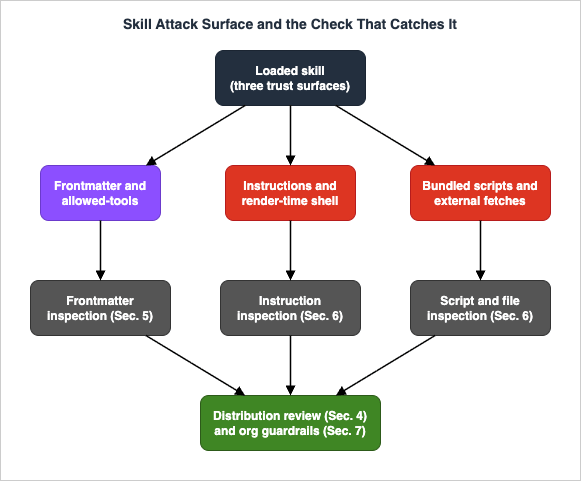
3. A Taxonomy of Malicious Skill Patterns
This section classifies the patterns a reviewer needs to recognize, because each is caught by a different check. The descriptions stay at the level of detection features — what the pattern looks like in a file — and deliberately omit working payloads. The grounding is twofold: Anthropic's own enumerated risk list (tool misuse, data exposure, external-source risk, and the recommendation to review "all files bundled in the Skill: SKILL.md, scripts, images, and other resources" for "unusual patterns like unexpected network calls, file access patterns, or operations that don't match the Skill's stated purpose"), and published security research into agent-skill supply chains. Where this guide cites a measurement, it is flagged as that publisher's finding; where it describes a technique without a named incident, it is flagged as a demonstrated technique rather than a confirmed attack.3.1 Instruction-Embedded Direction (the Natural-Language Payload)
The signature skill attack is not malware in a script — it is an instruction in the prose. Because the body is read as guidance, an author can embed a directive that the model will follow as part of doing the legitimate task: append a value that happens to be a secret to an outbound request, add a recipient to a message the user asked to send, read a file "to gather context" that the task did not need. Published audits show how this instruction-level vector combines with code in practice. Snyk's "ToxicSkills" research (February 5, 2026) scanned 3,984 agent skills from public corpora (ClawHub and skills.sh) and, after human review, confirmed 76 malicious samples: every one of them carried malicious code patterns, and 91% also employed prompt-injection techniques. The two converge — the natural-language direction primes the agent to accept and run a payload that a reviewer, or the model's own safety checks, would otherwise reject.This is the hardest pattern to catch mechanically, because the malicious sentence is grammatically indistinguishable from a benign one. The detection feature is semantic mismatch: an instruction that does not serve the skill's stated purpose. A PDF-formatting skill has no reason to tell the model to read environment variables; a commit-message skill has no reason to add network calls. The reviewer's question is not "is this sentence malware?" but "does every instruction in this body serve the one job the skill claims to do?"
3.2 Dangerous Commands in Bundled Scripts and Shell Hooks
The complementary pattern is ordinary malicious code, hiding where the model — and a description-only reviewer — will not see it: in a bundled script the agent runs via bash, or in a render-time!`command` hook. Because a script's source never enters the model's context and a render-time hook executes before any reasoning, neither is visible from the skill's description or even from a quick read of SKILL.md prose. The detection features are the usual high-risk shell shapes: piping a downloaded payload straight into an interpreter, decoding an encoded blob and executing it, writing to shell startup files or other persistence locations, or reaching for credential stores and SSH directories. None of these is proof of malice on its own — plenty of legitimate scripts touch the network — but each is a reason to read the surrounding code carefully and to ask whether the skill's stated purpose explains it.3.3 Obfuscation and Invisible Characters
When an author wants to hide intent from a reviewer while preserving it for the machine, obfuscation is the tool. In scripts this looks like base64- or hex-encoded strings that are decoded and executed at runtime, or heavily indirected command construction. In the prose it can be subtler: instructions hidden using control or formatting characters, homoglyph substitutions, or invisible Unicode — including the Unicode "tag" code points that can encode hidden text a model may still read while a human sees nothing. ASCII smuggling of this kind has been demonstrated repeatedly against LLM-driven tools, and it is exactly why Anthropic's skill validation forbids XML tags in thename and description fields and why a reviewer should run a skill through a tool that flags non-printable and out-of-range characters rather than relying on the eye. The detection feature is anything that is present in the bytes but not in what you can read: encoded blobs, zero-width characters, bidirectional-override marks, characters outside the expected script.3.4 Over-Broad Tool Permissions
A skill can request more capability than its job requires, and in Claude Code it can do so in a way that removes a prompt you would otherwise have seen. Theallowed-tools frontmatter field pre-approves the listed tools so the agent uses them without asking while the skill is active. A formatting skill that lists Bash (or worse, an unconstrained Bash(*)) in allowed-tools is asking to run arbitrary commands without confirmation — a capability wildly out of proportion to formatting. The detection feature is proportionality: every entry in allowed-tools should be both necessary for the stated task and as narrow as the syntax allows (Bash(git status *), not Bash). Section 5 covers how to read this field in full, including the crucial fact that it grants permission rather than restricting it.3.5 External-Content Dependence
A skill that fetches from an external URL — whether in its prose instructions or its scripts — inherits the trust of whatever it fetches. If the body says "retrieve the latest rules from this endpoint and follow them," then whoever controls that endpoint controls your agent, now or after a later change. This is classic indirect prompt injection with the skill as the delivery path, and Anthropic flags it explicitly as a particular risk. The detection feature is any outbound fetch whose response is then treated as instructions or executed, and any dependence on an endpoint the skill's publisher does not control. Even a fetch to a "trusted" host is a standing dependency: the content can change without the skill changing.3.6 Trigger Hijacking and Cross-Skill Interference
Because thedescription decides when a skill fires, an author can craft it to over-fire — claiming relevance to tasks far beyond the skill's real scope so the skill loads (and its body runs) in situations the user never intended. In a session with several skills, a description can also be written to discourage or redirect the use of another skill, the skill analog of MCP tool shadowing. The detection features are a description whose claimed scope is much broader than the body's actual function, and language in one skill that references or constrains other skills or tools. The defensive consequence mirrors MCP: the blast radius of one untrusted skill is the whole session, so the most sensitive skill in a session sets the vetting bar for all of them, and high-trust and low-trust skills should not share a context.3.7 Patterns Mapped to Checks
| Pattern | Where it hides | Detection feature | Primary check (this guide) |
|---|---|---|---|
| Instruction-embedded direction | SKILL.md body / reference files | Instruction not serving the stated purpose | Section 6 (instruction inspection) |
| Dangerous commands | Bundled scripts, !`cmd` hooks | Pipe-to-interpreter, persistence, credential paths | Section 6 (script inspection) |
| Obfuscation / invisible chars | Scripts and prose | Encoded blobs, zero-width / out-of-range chars | Section 6 + Section 8 tooling |
| Over-broad permissions | allowed-tools frontmatter | Capability out of proportion to task | Section 5 (frontmatter) |
| External-content dependence | Body and scripts | Fetch-then-follow; uncontrolled endpoint | Section 6 + Section 4 (source) |
| Trigger hijacking / interference | description, body | Over-broad scope; cross-skill references | Sections 5 and 6 |
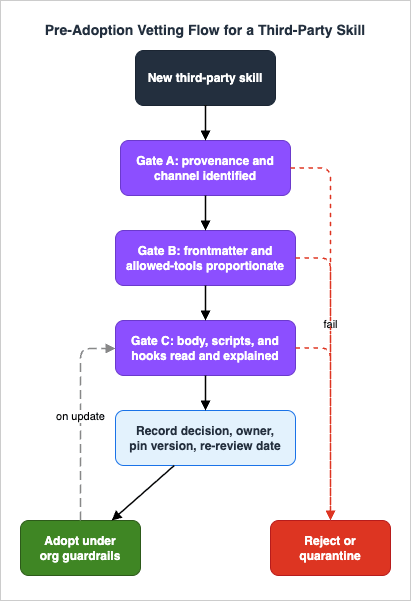
4. The Static Vetting Checklist
This is the heart of the guide: a checklist you can lift into an internal review template and run before any third-party skill is adopted. It is ordered the way an attacker hides things and the way the agent loads them — frontmatter first, then instructions, then bundled files, then the distribution source — so that you read in the same order the risk arrives. Static inspection means reading the artifact without running it; nothing here requires installing the skill in a privileged environment, and several steps are explicitly about not doing that until the review passes.A reviewer should be able to answer every item with evidence, not assumption. "I assume the script is fine" is not a passing answer; "I read the script and it does X, Y, Z, all of which the stated purpose explains" is.
A. Provenance and distribution (Section 4 detail below)
- The skill's origin is identified: who published it, through what channel (personal copy, project repo, plugin, marketplace, additional directory), and whether that publisher is accountable.
- The channel's review status is understood: a listing or directory is a discovery aid, not a security audit.
- The exact version or commit under review is recorded, so a later change can be diffed against it.
- For project-delivered skills, you understand that approving the repository's workspace trust also activates the skill's pre-approved tools (Section 5.4).
B. Frontmatter and permissions (Section 5)
nameanddescriptionare read in full; thedescriptionscope matches the body's actual function (no over-claiming).allowed-toolsis reviewed entry by entry; every entry is necessary and as narrow as the syntax allows; no unconstrainedBash.disallowed-tools,disable-model-invocation, anduser-invocableare noted (they change how and when the skill runs).context: fork,agent, andhooksare noted: the skill spawns a subagent and/or attaches lifecycle hooks, expanding its reach.shellis noted (a non-default shell for inline commands is a flag worth a second look).- No frontmatter field contains hidden or out-of-range characters.
C. Instructions and bundled files (Section 6)
- The full
SKILL.mdbody is read, not skimmed — every instruction serves the stated purpose. - Every
!`command`and```!block is identified and read; remember these run at render time, before the model reasons. - Every bundled file is enumerated and reviewed: scripts, reference docs, images, templates — not just
SKILL.md. - Each bundled script is read for dangerous command shapes, secrets, network egress, and obfuscation.
- Any external fetch is identified, and the response is not treated as instructions or executed.
- The skill is scanned for invisible/obfuscated characters with a tool, not only by eye.
D. Decision and lifecycle
- A trust decision is recorded with an owner and a re-review date.
- The reviewed version is pinned/snapshotted so drift can be detected on update.
- If the skill will run in an environment with sensitive access, the highest-sensitivity context in that session sets the bar — low-trust and high-trust skills are not co-resident.
5. Inspecting Frontmatter and Tool Permissions
Frontmatter is small, which makes it easy to skim and dangerous to skim. It is where a skill declares what it is, when it fires, what it may do without asking, and whether it forks into a subagent or attaches hooks. Read it as a security manifest.5.1 The Fields and What Each One Tells You
The fields below are the current Claude Code skill frontmatter; all are optional, and onlydescription is recommended for the model to know when to use the skill. From a security standpoint they fall into three groups — identity, invocation control, and capability — and the capability group is where a reviewer spends the most time.| Field | Group | What to check |
|---|---|---|
name | Identity | Display label only; must be hyphen-case, no reserved words, no XML tags. A name carrying odd characters is a flag. |
description / when_to_use | Invocation | Decides when the skill fires. Check that the claimed scope matches the body (Section 3.6). |
disable-model-invocation | Invocation | true means only a human can invoke it; the description is then not in context. Changes the trigger model. |
user-invocable | Invocation | false hides it from the / menu — the model can still invoke it. A skill the user cannot see but the model can run deserves a careful read. |
allowed-tools | Capability | Pre-approves the listed tools (Section 5.2). The single highest-value field to review. |
disallowed-tools | Capability | Removes tools from the pool while active; usually defensive, but note what it removes. |
context: fork + agent | Capability | Runs the skill in a forked subagent of a chosen type — its own tools and permissions. Expands reach. |
hooks | Capability | Attaches hooks scoped to the skill's lifecycle. Hooks run commands on tool events; read them as you would any hook. |
shell | Capability | Chooses bash or powershell for inline commands. A non-default value is worth a second look. |
model / effort | Behavior | Overrides the model/effort while active. Low security weight, but note unexpected overrides. |
paths | Invocation | Globs that limit when the skill auto-activates. Narrower is generally safer. |
5.2 allowed-tools Grants, It Does Not Restrict
The most important sentence in this section: in Claude Code,allowed-tools grants permission, it does not restrict it. The official documentation states it plainly — the field "grants permission for the listed tools while the skill is active, so Claude can use them without prompting you for approval. It does not restrict which tools are available." A reviewer who reads allowed-tools: Read Grep and thinks "good, this skill is limited to reading and grepping" has misread the field. Every other tool remains available subject to your normal permission settings; the field only adds silent approval for what it lists.The documentation is equally direct about the consequence for vetting: "a skill can grant itself broad tool access," and "review project skills before trusting a repository." So the review question for each entry is proportionality and narrowness:
- Proportionality: does the stated purpose require this tool at all? A formatting skill listing
Bashfails here. - Narrowness: is it scoped as tightly as the syntax permits?
Bash(git status *)pre-approves onlygit status; a bareBashpre-approves every command. The skill below is a good shape — narrow, and tied to a manual-only workflow:
---
name: commit
description: Stage and commit the current changes
disable-model-invocation: true
allowed-tools: Bash(git add *) Bash(git commit *) Bash(git status *)
---
If you want a tool removed rather than pre-approved, that is
disallowed-tools (removed while the skill is active) or, more durably, a deny rule in your permission settings — which a skill cannot override (Section 7).5.3 Forks, Hooks, and Shells Expand the Surface
Three capability fields turn a skill from "instructions" into "a small program," and each deserves explicit attention:context: forkwithagentruns the skill's content as the prompt for a subagent of the named type. The subagent brings its own tools and permissions, so a forked skill can act with a capability profile different from your main session. Note which agent type it forks to and what that type can do.hooksattaches hooks to the skill's lifecycle. Hooks are commands that run on tool events and can block or modify behavior; a hook in a skill is third-party code wired into your tool loop. Read it exactly as you would read a bundled script, and cross-reference the Claude Code Hooks Complete Guide for the event model.shellselects the interpreter for inline!`command`execution. The default isbash; an explicitpowershell(or any deviation) is a small flag — not damning, but worth understanding why the author needed it.
5.4 The Workspace-Trust Gate Is Part of the Threat Model
There is a subtle and important interaction for project-delivered skills. A skill checked into a project's.claude/skills/ directory has its allowed-tools (and its inline shell execution) take effect only after you accept the workspace-trust dialog for that folder — "the same as permission rules in .claude/settings.json," as the documentation puts it. The security reading is twofold. First, the trust dialog is a real gate: declining it withholds the skill's self-granted permissions. Second, accepting it is a security decision, not a formality — clicking "trust" on a freshly cloned repository activates whatever allowed-tools and shell hooks its skills declared. Treat the workspace-trust prompt the way Section 4 treats any approval: as the moment the vetting must already be done, not a click-through on the way to it.6. Inspecting Instructions and Bundled Scripts
If frontmatter is the manifest, the body and bundled files are the program. This is where the natural-language payloads of Section 3.1 and the executable payloads of Sections 3.2-3.3 actually live, and where the bulk of a real review's time goes.6.1 Read the Body as Instructions, Not Prose
Read the entireSKILL.md body with one question held constant: does every instruction serve the one job this skill claims to do? The malicious sentence is the one that does not — a directive to read a file, reach a network endpoint, add a recipient, or include a value that the stated task never needed. Because the model will follow these as guidance, a single out-of-scope imperative is enough. Concretely, flag and resolve:- Instructions to read files, environment variables, or credential stores not required by the task.
- Instructions to send, post, or append data anywhere — especially anything that "also" attaches a value to an outbound request.
- Instructions that reference or alter how other skills or tools behave (cross-skill interference).
- Conditional or delayed behavior ("on the third run," "if a certain file exists") that separates the trigger from the payload in time.
This is judgment work and it does not fully mechanize, which is exactly why it cannot be delegated to a scanner alone (Section 8).
6.2 Find Every Render-Time Shell Hook
Before reading scripts, find the code that runs without a script being called: the inline!`command` placeholders and the fenced ```! blocks. These execute in the shell at render time, before the model receives the skill, so they bypass every model-level judgment you might rely on. Enumerate all of them and read each command. A diff-summary skill inlining !`git diff HEAD` is benign and useful; the same mechanism invoking a network call, an interpreter, or a credential read is a code-execution payload that fires the instant the skill is invoked. If a skill mixes legitimate inline commands with one that does not fit the purpose, that is the find.For environments where this surface is unacceptable, Claude Code exposes
disableSkillShellExecution, which replaces each such command with [shell command execution disabled by policy] instead of running it. It is most useful as a managed setting, where users cannot override it — covered in Section 7.6.3 Enumerate and Read Every Bundled File
A skill is a directory, and the review covers the directory, not justSKILL.md. Anthropic's guidance is explicit: review "all files bundled in the Skill: SKILL.md, scripts, images, and other resources." Two reasons this matters. First, a bundled script's source never enters the model's context — so a reviewer reading only what the model reads will miss it entirely. Second, the actual work (and the actual payload) can be moved out of the prose and into a script that SKILL.md simply invokes, leaving the prose looking innocuous. Enumerate every file, and for each script read for:- Dangerous command shapes: downloading and piping into an interpreter, decoding-then-executing, writing to shell-startup or other persistence locations, touching SSH keys or credential stores, or escalating privileges.
- Secrets: hardcoded tokens, keys, or credentials — both a leak and a sign of a script that talks to something it should not. (Published audits report hardcoded secrets in a meaningful fraction of public skills; treat any as a finding.)
- Network egress: every outbound destination, and whether the skill's purpose explains it.
- Obfuscation: encoded blobs, indirected command construction, or invisible/out-of-range characters — run the bytes through a scanner (Section 8), do not trust the eye.
None of these is automatically malicious — real tools download dependencies and call APIs — but each is a reason to demand that the stated purpose account for it.
6.4 Treat External Fetches as Standing Dependencies
When the body or a script fetches external content, two checks apply. First, is the response ever treated as instructions or executed? If so, the endpoint's owner controls your agent. Second, even when the response is treated as data, it is a standing dependency: the content can change after your review without the skill changing, which is precisely how an honest skill becomes a compromised one. Prefer skills that bundle what they need; for those that must fetch, the endpoint should be controlled by the skill's publisher and listed in your review record so a later change is attributable.6.5 What "Static" Buys You, and What It Misses
Static inspection — reading without running — catches the patterns that are present in the artifact: an out-of-scope instruction, a dangerous script line, an over-broad permission, an obfuscated blob, an uncontrolled fetch. It cannot catch behavior that only appears at runtime, in an environment the static text does not reveal, or after an update you did not re-review. That gap is the entire argument for the organizational controls in Section 7 and the honest limits in Section 8: static vetting is necessary and high-value, and it is not sufficient on its own.7. Organizational Guardrails
Everything so far protects one careful developer on one machine. An organization needs the same posture as policy — applied to every machine, not overridable by individuals, and maintained as skills and teams change. Claude Code provides the enforcement primitives; the job is to compose them so that individual judgment is a backstop, not the only line.7.1 Know Every Channel a Skill Can Enter Through
Before restricting anything, enumerate the gates. Claude Code loads skills from several scopes with a defined precedence — enterprise (managed) overrides personal (~/.claude/skills/), which overrides project (.claude/skills/) — plus plugin-provided skills (namespaced so they cannot silently shadow your own), and .claude/skills/ inside directories added with --add-dir (an explicit exception that does load skills, unlike most added-directory configuration). Each of these is a way a skill can appear in a session, and each needs an owner and a review gate. The project scope deserves the most attention because it arrives with a repository that other people write to — cloning a repo proposes its skills, and accepting workspace trust activates their pre-approved tools (Section 5.4).7.2 Enforce with Managed Settings, Not Convention
Managed settings are administrator-controlled configuration that users cannot override — the right place for controls that must bind. The high-value ones for skills:disableSkillShellExecution— set in managed settings, this disables the render-time!`command`/```!execution surface (Section 6.2) fleet-wide; bundled and managed skills are exempt, and users cannot turn it back on. This single setting removes the most dangerous skill-specific primitive for untrusted skills.- Deny rules on the
Skilltool — permission rules govern which skills the model may invoke. DenyingSkillblocks all model-invoked skills;Skill(name)andSkill(name *)allow or deny specific skills. Deny rules merge across settings levels and cannot be loosened by a lower level, so a managed deny is authoritative. disableBundledSkills— disables the skills that ship with Claude Code, if your policy requires it.skillOverrides— sets per-skill visibility (on/name-only/user-invocable-only/off) from settings rather than editing a skill's frontmatter, which is useful for skills you do not own (a shared repo's or a server-provided one).
7.3 Run an Allowlist, Not Just a Denylist
The durable posture is default-deny: decide which skills are approved, deploy those through managed (enterprise) scope so they take precedence, and block model invocation of the rest. Because enterprise scope overrides personal and project, an approved managed skill cannot be silently shadowed by a project copy of the same name, and a managed deny on theSkill tool cannot be undone in user settings. The result is the inversion you want: a curated set of vetted skills is available everywhere, and an unreviewed skill dropped into a project directory does not run.7.4 Add a Deterministic Backstop with Hooks
Every control above either constrains configuration or relies on a person having vetted a skill. Hooks add something different: enforcement that does not flow through the model's judgment at all. APreToolUse hook can inspect and block tool calls regardless of what a skill's instructions said, and because a blocking hook decision holds even when a permission rule would have allowed the call, hooks can only tighten policy. This is the same machinery the MCP Tool Poisoning Defense Guide applies to MCP tools and the Claude Code Hooks Complete Guide documents in full — here it backstops skill-driven behavior, for example by refusing tool calls whose arguments reach outside the project or contact unapproved hosts no matter which skill requested them. The honest caveat from that guide applies unchanged: a hook is a process you run with your own privileges, configured in files an attacker who already controls your machine could also target, so keep hook scripts in version control and let the managed layer own the configuration on fleet machines.7.5 Run It as a Catalog That Re-Reviews on Change
The remaining work is process, and it mirrors the per-developer checklist at fleet scale: a published internal catalog of approved skills with owners and pinned versions; a request path for new skills that triggers the Section 4-6 checklist; pinned snapshots so drift can be detected; and scheduled re-review — on a regular cadence and, critically, on every version change, because a skill that updates upstream is an unreviewed change to your agents' instructions and code. A skill is approved at a version, not in perpetuity.8. Tooling the Checklist
Most of Section 6 is mechanical pattern-matching — find the shell hooks, enumerate the files, flag the encoded blobs, list the network destinations, read eachallowed-tools entry — and mechanical work should be mechanized so the human attention goes to the part that needs judgment. That is the role of the companion tool in this series, the Agent Skills Validator and Security Scanner, which validates SKILL.md frontmatter against the documented schema and flags the static-detectable risk patterns this guide describes: over-broad allowed-tools, render-time shell hooks, dangerous command shapes, hardcoded secrets, network egress, and invisible or out-of-range characters. Run entirely client-side, it turns the first pass of the checklist into a report a reviewer can read in seconds.The honest framing matters more than the tool. A clean scan is not a safety guarantee. A scanner sees what is statically present; it cannot:
- Judge intent in natural language. The Section 3.1 instruction-embedded payload is grammatically ordinary — "does this instruction serve the purpose?" is a human question, and the most important one.
- Predict runtime behavior. What a script does can depend on the environment, on a fetched response, or on a condition that the static text does not reveal.
- See the future. A skill that passes today can change tomorrow; the scan describes the version you scanned, which is exactly why pinning and re-review (Sections 4 and 7) exist.
Use a scanner the way you use a dependency-vulnerability scanner: a fast, repeatable baseline that catches the obvious and the mechanical, and a prompt for the human review that no tool replaces — not a gate you wave skills through because the light was green.
9. Common Pitfalls
- "It is from an official marketplace, so it is safe." A listing or directory reviews against listing criteria; it does not continuously security-audit every skill or every update. Anthropic's own guidance is to use skills only from sources you created or obtained from Anthropic, and notes that claude.ai's custom skills are per-user with no central admin management. Provenance raises the prior; it does not replace inspection.
- Reviewing only
SKILL.md. The bundled scripts are where executable payloads live, and their source never reaches the model. A review that reads the prose and skips thescripts/directory has reviewed the cover, not the book. - Forgetting that content runs before the model reads it. The
!`command`and```!blocks execute at render time. A reviewer who reasons about "what the model will decide to do" has already missed the code that ran before the model decided anything. - Misreading
allowed-toolsas a restriction. It pre-approves tools without prompting; it does not limit the tool set. A skill listingBashthere has granted itself silent command execution, not confined itself. - Trusting the
/menu label. What the user sees — a name and a one-line description — is a fraction of what the model receives. The visibility asymmetry is the attacker's friend; vet the full body and files, not the label. - Conflating source trust with content trust. "I trust this author" approves a person; skills are mutable and can fetch external content, so the thing that runs next month is not necessarily the thing you trusted today. Pin and re-review.
- Inspecting once and never again. Live change detection and upstream updates mean a one-time review approves a moving target. Re-review on every version change.
- Over-trusting the scanner. A clean automated report is a baseline, not a verdict. The natural-language payload and the runtime behavior are precisely what static tools miss.
- Letting trust levels share a session. One untrusted skill's blast radius is the whole context. A skill that touches production credentials should not be co-resident with an experimental community skill.
10. Frequently Asked Questions
Are skills from official or popular marketplaces safe by default?No. A marketplace or directory listing is a discovery aid that reviews against listing criteria, not a continuous security audit of every skill and every subsequent update. Anthropic's guidance is explicit: use skills only from trusted sources — those you created yourself or obtained from Anthropic — and audit anything from an unknown source thoroughly before use. Popularity and provenance raise your confidence; they do not substitute for reading the frontmatter, the body, and the bundled files.
Can a skill actually exfiltrate my data?
Yes — that is the named risk in Anthropic's own documentation, which warns that depending on the access the agent has, malicious skills "could lead to data exfiltration, unauthorized system access, or other security risks." The mechanisms are concrete: a natural-language instruction in the body that directs the model to attach a sensitive value to an outbound request, a bundled script that reads credentials and posts them, or a render-time shell hook that runs before the model reasons. Static vetting (Sections 4-6) is how you catch these before adoption; organizational controls (Section 7) are how you cap the damage if one slips through.
How is this different from vetting an MCP server?
The shared core is identical — third-party content entering the model's context, a visibility asymmetry, a mutable artifact approved once — so the MCP Tool Poisoning Defense Guide is the right companion. Skills add three things MCP does not: they bundle executable scripts (a wider supply-chain surface), they can run shell commands at render time before any reasoning, and they can pre-grant their own tool permissions via
allowed-tools. Vetting a skill therefore includes reading code and shell hooks, not only metadata.What does
allowed-tools actually do — does it sandbox the skill?No, and this is the most common misreading.
allowed-tools grants the listed tools permission to run without prompting while the skill is active; it does not restrict the available tool set. A skill cannot use it to confine itself, and it can use it to grant itself broad, silent access. To remove tools, use disallowed-tools or — more durably — deny rules in permission settings, which a skill cannot override.How often should I re-vet a skill I already approved?
On every version change, and on a regular cadence regardless. Skills are mutable — Claude Code picks up edits within a session, and a plugin- or repo-delivered skill changes whenever upstream does — so an approval is for a specific version, not forever. Pin the version you reviewed, diff on update, and re-run the checklist when the diff is non-trivial. This is the same rug-pull discipline the MCP guide applies to tool definitions.
Can I just disable the risky parts instead of reviewing every skill?
You can remove the sharpest edge fleet-wide:
disableSkillShellExecution in managed settings disables render-time shell execution for non-bundled, non-managed skills, and deny rules on the Skill tool plus an enterprise-scoped allowlist let you run only vetted skills. Those controls dramatically shrink the attack surface, but they do not read a natural-language payload for you — an approved skill can still carry an instruction-level attack. Enforcement and inspection are complementary layers, not substitutes.I build my own agent, not Claude Code — does this apply?
The mechanisms are Claude Code's, but the threat model is any agent runtime that loads filesystem-based skills following the Agent Skills open standard. The equivalents in a custom loop are direct: read and bound what enters the prompt, never execute skill-provided shell hooks unreviewed, gate tool calls in code rather than trusting skill-declared permissions, and re-verify skill content between sessions. The Claude Code controls are a reference implementation of the pattern, not the only one.
11. Summary
Skills make an agent an expert on demand by injecting third-party instructions and code into it exactly when a task matches — and that is precisely why adopting one is a supply-chain decision, not a download. A skill's body is prompt input the model trusts; its bundled scripts run on your machine with source the model never sees; its inline!`command` hooks execute before the model reasons at all; its allowed-tools field can pre-grant the very permissions an instruction needs; and all of it can change after you approved it. The risk is structural and present on day one, independent of any single headline incident.The defense is inspection made explicit and enforcement made binding. Vet in the order risk arrives — provenance, frontmatter and permissions, instructions, bundled files (Sections 4-6) — reading everything the model will read and everything that will run, and recording a decision with an owner, a pinned version, and a re-review date. Then make it policy: managed settings that disable the render-time shell surface and gate the
Skill tool, an enterprise-scoped allowlist of vetted skills, deterministic hooks as a judgment-independent backstop, and re-review on every change (Section 7). Mechanize the mechanical parts with a scanner, but never mistake a clean scan for safety — the natural-language payload and the runtime behavior are exactly what static tools cannot see (Section 8).The companion pieces complete the picture: the Claude Code Skills Complete Guide on writing skills, the Claude Code Plugins Complete Guide on distributing them, the Agent Skills Validator and Security Scanner to mechanize the first pass, and the MCP Tool Poisoning Defense Guide, AI Agent Defense in Depth Model, and Claude Code Hooks Complete Guide for the surrounding defense cluster. Treat a skill the way you already treat any dependency that runs with your privileges — because that is exactly what it is.
12. References
- Anthropic - Agent Skills overview (SKILL.md structure, security considerations)
- Anthropic - Agent Skills best practices
- Anthropic Engineering - Equipping agents for the real world with Agent Skills
- Claude Code Documentation - Extend Claude with skills (frontmatter reference, allowed-tools, dynamic context injection, disableSkillShellExecution)
- Claude Code Documentation - Configure permissions (Skill tool rules, deny/allow)
- Claude Code Documentation - Settings (managed settings, skillOverrides, disableBundledSkills)
- Claude Code Documentation - Plugins (distributing skills)
- Agent Skills - the open standard (agentskills.io)
- Snyk - ToxicSkills: malicious AI agent skills (February 5, 2026 audit)
- Invariant Labs - MCP Security Notification: Tool Poisoning Attacks (instructions-as-prompt-input, transferable to skills)
- Simon Willison - The lethal trifecta (private data, untrusted content, exfiltration channel)
- Embrace The Red - ASCII smuggling and invisible Unicode character injection
- OWASP GenAI Security Project - LLM Top 10
Related Articles
- Claude Code Skills Complete Guide - Creating, Testing, and Distributing Agent Skills
The writing-side companion: how to author, test, and distribute skills. - MCP Tool Poisoning Defense Guide - Client-Side Defense in Depth for AI Agents
The sister threat model for third-party tool metadata entering an agent's context. - AI Agent Defense in Depth Model (AIDDM) - WAF, Guardrails, Reasoning Sandbox, and Output Filter
The layered framework this guide plugs into. - Claude Code Hooks Complete Guide - Deterministic Enforcement Across the Tool Lifecycle
The hook machinery behind the deterministic backstop in Section 7. - AWS WAF for Generative AI - Prompt Injection Defense Implementation Patterns
The network-edge vertex of the broader defense cluster.
References:
Tech Blog with curated related content
Written by Hidekazu Konishi