MCP Tool Poisoning Defense Guide - Client-Side Defense in Depth for AI Agents
First Published:
Last Updated:
Scope note: this is a defensive security guide. Attack techniques are described at the structural level needed to design countermeasures — what an attack class manipulates, where it enters, and which control stops it. It deliberately does not include working attack payloads or step-by-step exploitation instructions.
Source-of-truth note: the MCP specification statements below were verified against the official specification at modelcontextprotocol.io (the current protocol revision is 2025-11-25; the Security Best Practices and Authorization documents cited here were introduced in the 2025-06-18 revision and carry forward to the current one), and the Claude Code configuration keys were verified against the official Claude Code documentation at the time of writing. Both evolve quickly; the official documents remain authoritative.
1. Introduction
The Model Context Protocol has become the default way to connect AI agents to external tools. That success created a new class of attack surface that most security programs have not yet caught up with: the tool metadata itself. When an MCP client connects to a server, it downloads tool names, descriptions, and input schemas, and feeds them more or less verbatim into the model's context window. Whoever writes a tool description is, in effect, writing instructions to your model — and unlike the system prompt, that text comes from a third party you may have installed with a single command.Through 2025, security researchers demonstrated tool poisoning, rug pulls, tool shadowing, and indirect prompt injection through tool outputs against real MCP clients, and real-world incidents followed: cross-tenant data exposure in a SaaS vendor's MCP integration, data-exfiltration chains through code-hosting and database MCP servers, and a critical remote code execution vulnerability in a widely downloaded MCP client proxy. By 2026, internet-wide scans were finding tens of thousands of MCP endpoints reachable without any authentication. The attacks are documented, the academic taxonomies exist, and the exposed population is measurable. What has been missing is a practitioner-oriented answer to the obvious next question: what, concretely, do I configure on the client side to defend against this?
This guide answers three questions:
- What are the attack classes? A taxonomy of tool-based attacks against MCP clients — tool description poisoning, rug pulls, tool shadowing, poisoned tool outputs, and vulnerable client software — each tied to named, verifiable sources.
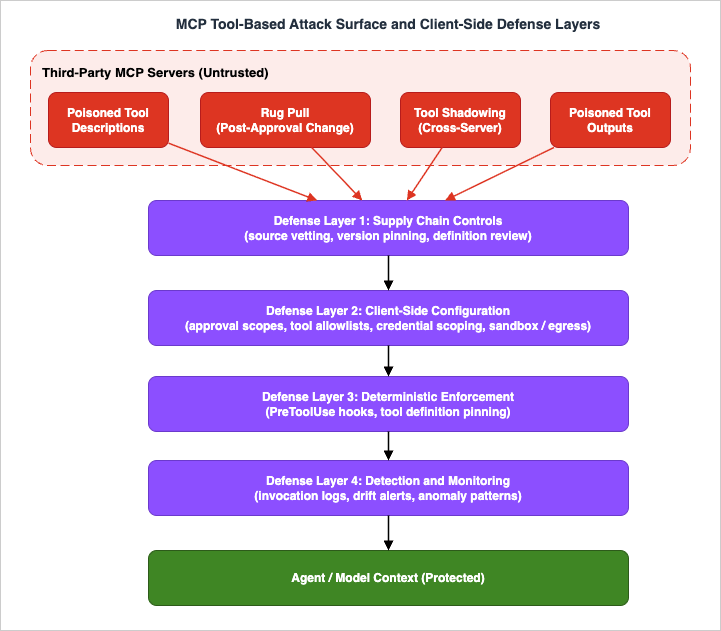
- What can the client defend? Four defense layers you control without touching the server: supply chain controls, client-side configuration, deterministic enforcement with hooks, and detection and monitoring.
- How does an organization govern it? Managed catalogs, allowlists, and re-review processes that scale the same controls across a fleet of developer machines.
The worked configuration examples use Claude Code, because its trust and approval model is well documented and representative of the controls a modern MCP client exposes. The principles — pin what you approved, allowlist what may run, enforce deterministically, log what happened — transfer to any MCP client, including custom agents you build yourself.
If you need the server-side perspective — how to build and authenticate an MCP server correctly — see my MCP Server on AWS Lambda Complete Guide. This article assumes the server is someone else's code and asks how far you can trust it.
2. The MCP Trust Model and Why It Breaks
2.1 What the Client Actually Receives
MCP standardizes how a host application (Claude Code, Claude Desktop, an IDE, or your own agent) connects to servers that expose tools, resources, and prompts. When a session starts, the client callstools/list and receives, for every tool, a name, a description, an inputSchema, and optionally annotations such as readOnlyHint and destructiveHint. The client then assembles those definitions into the model's context so the model knows what it can call and when. (For how the major vendors implement these protocol primitives on the client and server side, see my MCP Server Implementation Reference.)This is the load-bearing detail of the entire threat model: the tool description is prompt input. The model reads it with the same attention it gives your instructions. A well-written description tells the model when to call the tool; a malicious one can tell the model to do other things as well — quietly include the contents of a sensitive file in a tool argument, prefer the attacker's tool over a legitimate one, or change how it uses a different server's tools.
2.2 The Visibility Asymmetry
The reason this works is an asymmetry between what the user sees and what the model sees. A typical MCP client UI shows the user a tool name and perhaps a one-line summary at approval time. The model sees the full description — every line of it, including content the UI truncates or never renders. Invariant Labs, who named this attack class in April 2025, summarized it precisely: malicious instructions are embedded in MCP tool descriptions that are invisible to users but visible to AI models. The user approves "a calculator tool"; the model receives the calculator tool plus a page of adversarial instructions.The specification is explicit that none of this metadata is trustworthy on its own. The MCP tools specification states that clients MUST consider tool annotations to be untrusted unless they come from trusted servers, and that there SHOULD always be a human in the loop with the ability to deny tool invocations. In other words, the protocol's own security posture assumes exactly the attacks this article defends against — the spec hands the problem to the client, and the client hands it to you.
2.3 Trust Boundaries, Made Explicit
It helps to write down what an MCP client implicitly trusts the moment you add a server:| Input | Where it goes | Should you trust it? |
|---|---|---|
| Tool name | Model context, permission rules, UI | Only as a label — names are chosen by the server |
| Tool description | Model context, verbatim | No — this is third-party prompt input |
| Input schema | Model context, argument construction | No — schemas can solicit sensitive arguments |
Annotations (readOnlyHint, destructiveHint) | Model context, sometimes UI affordances | No — the spec itself marks them untrusted |
| Tool results (outputs) | Model context, verbatim | No — this is where indirect prompt injection arrives |
| Server binary or package (stdio) | Runs as a local process with your privileges | Only as far as you vetted the supply chain |
The pattern is uncomfortable but clarifying: almost everything an MCP server sends ends up in the model's context, and almost none of it deserves implicit trust.
2.4 Where This Guide Draws Its Boundary
MCP security is wider than tool metadata. The specification's Security Best Practices document also covers a set of authorization-plane and transport-plane problems — confused deputy attacks against OAuth proxy flows, token passthrough (servers MUST NOT accept tokens that were not explicitly issued for them), session hijacking (servers MUST NOT use sessions for authentication), and server-side request forgery in URL-fetching tools. Those are real, they matter, and they are primarily the server operator's responsibility to implement correctly; the client-side counterpart — issuing least-privilege, audience-bound credentials — appears in Section 5.3. This guide deliberately concentrates on the plane the client alone controls: what tool metadata and tool output are allowed to enter the model's context, and what the client does about a tool call before executing it. If you operate the server side as well, read the specification's security documents alongside the server-side hardening in the Lambda guide linked above. The revision boundary matters for one item on that list: protocol-level sessions were removed in2026-07-28, so the session-hijacking rule applies only to servers still speaking the earlier revisions. Migrating to the Stateless Model Context Protocol covers what a session-based server has to change, including the extension and UI surface the new revision adds.2.5 The Exposed Population Is Real
This would matter less if MCP servers were rare and carefully deployed. They are not. In May 2026, Censys published an internet-wide measurement that found 12,520 internet-reachable MCP services across 8,758 unique IP addresses as of April 28, 2026 — and reported that the protocol requires no authentication by default and that the servers they examined were accessible without it. Their follow-up measurement a week later counted more than 21,000. Independent research conducted in the summer of 2025 by Knostic had already found over 1,800 exposed MCP servers, with every manually verified host allowing unauthenticated tool enumeration. Whatever the exact number on the day you read this, the direction is clear: MCP servers are being deployed faster than they are being secured, and the tool definitions they serve are reachable by — and in the worst case, writable by — people who are not you.3. A Taxonomy of Tool-Based Attacks
This section classifies the attack classes a defender needs to distinguish, because each one is stopped by a different combination of controls. The terminology follows the definitions established by Invariant Labs in their April 2025 disclosure and subsequently adopted by the academic literature.3.1 Tool Description Poisoning
The baseline attack (see also the tool poisoning entry in my AI Agent Engineering Glossary): a server embeds adversarial instructions in a tool's description (or schema fields, which the model also reads). The instructions typically direct the model to perform side actions when the tool is used — for example, to read a local credential file and pass its contents through a tool argument that looks innocuous. Invariant Labs demonstrated this against a real coding agent, using a poisoned arithmetic tool whose description instructed the model to read SSH keys and configuration files and transmit them through a hidden parameter, while the model's user-facing explanation stayed bland.Two properties make this class dangerous. First, it requires no vulnerability in the client — the client is working as designed when it forwards descriptions to the model. Second, it scales: the MCPTox benchmark (arXiv:2508.14925) built poisoned test cases on 45 real-world MCP servers and 353 tools and measured attack success rates on 20 agent implementations, with the most capable models showing success rates up to 72.8 percent. Stronger models followed poisoned instructions more reliably, not less — capability does not confer immunity, because the model is doing exactly what it is trained to do: follow instructions in its context.
3.2 Rug Pulls (Post-Approval Definition Changes)
MCP tool definitions are not static artifacts; a client fetches them from the server at session time, and servers can emitnotifications/tools/list_changed to announce updates. A rug pull abuses this: the server presents a benign tool definition during review and approval, then swaps in a poisoned definition later — the next session, the next week, or only for selected victims. Your one-time review approved a definition that no longer exists.Rug pulls are the reason "we audited the server before installing it" is not a sufficient control. The defense must either pin the approved definitions and detect drift (Sections 6 and 7) or re-verify on every connection.
3.3 Tool Shadowing and Cross-Server Interference
Agents rarely connect to a single MCP server. The moment two servers share a context window, a malicious server can attack the other server's tools without ever being called itself. Its tool descriptions can redefine how the model should use a trusted tool — for example, instructing the model that whenever it sends email through a legitimate mail tool, it should add an additional recipient. Invariant Labs called this tool shadowing, and demonstrated the cross-server variant against a real WhatsApp MCP integration: a malicious "fact of the day" server, sitting alongside the legitimate messaging server in the same agent, manipulated the agent into exfiltrating message history through the legitimate server's own send capability.The defensive consequence is important: the blast radius of one untrusted server is the entire session, not just that server's tools. Vetting standards must be set by the most sensitive tool in the session, and high-trust and low-trust servers should not share an agent context.
3.4 Indirect Prompt Injection Through Tool Outputs
Even a perfectly honest MCP server can carry an attack if its data is attacker-influenced. Tool results flow into the model's context just like descriptions do, so any tool that fetches external content — issues, tickets, web pages, support requests, database rows — can deliver instructions planted by whoever wrote that content. This is classic indirect prompt injection, with MCP as the delivery vehicle.Real cases through 2025 established the pattern. In May 2025, Invariant Labs disclosed a "toxic agent flow" against the GitHub MCP server: a prompt injection planted in a public repository issue could steer an agent that also had access to private repositories into leaking private data through a pull request — not a bug in the server's code, but an architectural consequence of combining broad access tokens with attacker-writable inputs. In July 2025, a similar chain was demonstrated against a database MCP integration, where instructions embedded in a support ticket caused an agent with elevated database credentials to read a credentials table and write the contents into the attacker-visible ticket thread — the combination Simon Willison calls the lethal trifecta: private data access, exposure to untrusted content, and an exfiltration channel in one agent. And in June 2025, Asana disclosed that a logic flaw in its MCP feature had exposed customer data across tenant boundaries for several weeks — not an injection at all, but a reminder that the MCP integration itself becomes part of your data perimeter the day you connect it.
For the defender, the lesson is to treat tool outputs as untrusted input in their own right, and to assume that any agent holding the lethal trifecta will eventually be asked, by someone other than you, to use it.
3.5 Vulnerable Client Software
Finally, the MCP client stack itself is attack surface. In July 2025, JFrog disclosed CVE-2025-6514 (CVSS 9.6) inmcp-remote, a widely used proxy that lets local clients connect to remote MCP servers: a malicious server could achieve operating system command injection on the connecting machine during the OAuth discovery flow, before any tool was ever invoked. The package had hundreds of thousands of downloads; the fix landed in version 0.1.16. Connecting to an untrusted MCP server is not only a prompt-level risk — it can be a code execution risk in the connector itself, which is why version management of the client stack belongs in the same defense plan as tool vetting.3.6 Attack Classes Mapped to Entry Points and Defenses
| Attack class | Entry point | What it exploits | Primary defense layers (this guide) |
|---|---|---|---|
| Tool description poisoning | tools/list metadata | Descriptions are prompt input; user/model visibility asymmetry | Layers 1, 2, 3 |
| Rug pull | Definition refresh after approval | One-time review of a mutable artifact | Layers 3, 4 (pinning and drift detection) |
| Tool shadowing / cross-server | Any co-resident server's metadata | Shared context across trust levels | Layers 1, 2 (session segregation, allowlists) |
| Poisoned tool output | Tool results at call time | Attacker-influenced data entering context | Layers 2, 3, 4 plus AIDDM output controls |
| Vulnerable client software | The connector/client process | Implementation flaws (e.g., CVE-2025-6514) | Layer 1 (version pinning, patching) |
4. Defense Layer 1: Supply Chain Controls
Everything downstream gets easier if fewer malicious or sloppy servers enter your environment in the first place. Treat MCP servers exactly like any other third-party dependency that runs with your privileges — because for stdio servers, that is literally what they are.4.1 Verify the Source Before the Code
- Prefer first-party servers. A server published by the vendor whose API it wraps (GitHub's own server, your SaaS vendor's official endpoint) has an accountable owner and a security contact. My MCP Server Ecosystem Reference 2026 catalogs which servers are reference implementations, vendor-operated, and community-maintained — the trust tiers are not interchangeable.
- Do not equate "listed" with "audited." Directories and curated lists review listings against criteria; they do not continuously security-audit server code. Anthropic's own documentation for managed MCP configuration is explicit that it reviews connectors against listing criteria but does not security-audit or manage any MCP server. A registry entry is a discovery aid, not a control.
- Identify the maintainer. For community servers: how many maintainers, how responsive to security issues, is there a disclosure policy, and does the package name actually belong to the project you think it does? Typosquatting works as well for MCP servers as it does for any package ecosystem.
4.2 Pin Versions; Never Float "Latest" into Your Context Window
A floating version turns every upstream release into an unreviewed change to your agent's instructions. Pin everything:# Bad: whatever the registry serves today runs with your privileges today
claude mcp add weather -- npx -y weather-mcp-server
# Better: an exact, reviewed version
claude mcp add weather -- npx -y weather-mcp-server@1.4.2
For servers you deploy as containers, pin by image digest rather than tag. For remote (HTTP) servers you do not host, version pinning is impossible by construction — which is precisely why the definition pinning in Section 6 exists: if you cannot freeze the code, freeze the contract you approved.
Apply the same discipline to the client-side stack. CVE-2025-6514 was fixed in a patch release of a connector package; an environment that pinned an old version stayed vulnerable, and an environment that floated
latest had been running unreviewed code all along. Pin, then update deliberately and promptly when advisories land.4.3 Review Tool Definitions as Part of the Artifact, and Diff Them on Update
Whatever review you do before approving a server should include the tool definitions themselves — all of them, in full, not as rendered by a UI. Concretely: enumeratetools/list, read every description and schema, and keep the snapshot with your review record. On every version bump, diff the new definitions against the approved snapshot before re-approving. A legitimate update changes descriptions for legitimate reasons; the point is that you see the change, not just the model.Scanning tools have emerged for exactly this job — Invariant Labs released mcp-scan in April 2025 to scan connected servers for poisoning patterns — and they are useful as a first pass. Treat scanners the way you treat dependency-vulnerability scanners: a baseline filter, not a substitute for reading what you are about to feed your model.
4.4 A Minimal Vetting Checklist
Before a server is approved for use:- The package or endpoint provenance is verified (right project, right publisher, right URL).
- The version is pinned (package version, container digest) or, for remote servers, the tool definition snapshot is recorded.
- Every tool description and input schema has been read by a human reviewer.
- The credential the server will hold is scoped to least privilege (Section 5.3).
- The server's data sources are classified: does any tool return content that outsiders can write to? If yes, the poisoned-output controls in Sections 5-7 are mandatory, not optional.
- An owner and a re-review date are assigned (Section 8).
This checklist is enforced by a reviewer and by client configuration, because an MCP server is approved by the person who connects it. The same supply chain questions applied to artifacts a build system produces, where the enforcement point is a signature check rather than a reviewer, are covered in Software Supply Chain Security on AWS.
5. Defense Layer 2: Client-Side Configuration
The second layer is the configuration surface of the MCP client itself. The examples here use Claude Code, whose controls are representative and documented; the concepts map directly onto other clients.5.1 Know Where Server Definitions Come From — and What Approval Means
Claude Code loads MCP servers from three user-controllable scopes, with a defined precedence:| Scope | Loads in | Shared | Stored in |
|---|---|---|---|
| Local (default) | Current project only | No | ~/.claude.json |
| Project | Current project only | Yes, via version control | .mcp.json in the project root |
| User | All your projects | No | ~/.claude.json |
The project scope deserves the most attention, because it is the one other people can write to. A
.mcp.json checked into a repository means that cloning the repository proposes MCP servers to everyone who opens it:{
"mcpServers": {
"shared-server": {
"command": "/path/to/server",
"args": [],
"env": {}
}
}
}
Claude Code prompts for approval before using project-scoped servers from
.mcp.json, precisely because the file arrives with the repository rather than from you. Treat that prompt as a security decision, not a click-through: a malicious or compromised repository can ship a malicious server definition, and your approval is the only gate. If approvals have accumulated and you want to re-decide from a clean slate, claude mcp reset-project-choices resets the recorded choices for project-scoped servers.Two further notes on this surface. First, the same server name can be defined at multiple scopes; the highest-precedence definition wins in its entirety (local, then project, then user, then plugin-provided servers, then claude.ai connectors), so a poisoned local definition can silently stand in for a vetted user-scope one — include
claude mcp list output in any incident triage. Second, approval is per-definition at a point in time, which is exactly the gap rug pulls exploit; Section 6 closes it.Server definitions can also arrive through channels other than the three scopes. Plugins can bundle MCP servers that start automatically when the plugin is enabled, which moves the vetting question one level up: approving a plugin approves its servers, so plugin review must include the same tool-definition reading as direct server review. And remote servers connected as claude.ai connectors flow into Claude Code sessions as well; on Team and Enterprise plans those are managed in the claude.ai admin interface, which makes them an organizational control surface (Section 8) rather than a per-developer one. The operational rule is the same everywhere: enumerate every channel that can introduce tool definitions into a session, and make sure each one has an owner and a review gate.
5.2 Allowlist Tools, Not Just Servers
Approving a server should not mean approving everything the server may ever expose. Claude Code's permission rules operate at tool granularity for MCP:mcp__<server> matches every tool from a server, mcp__<server>__<tool> matches one tool, and mcp__<server>__prefix_* matches a name pattern within a server. Rules are evaluated deny first, then ask, then allow, and a deny at any settings level cannot be overridden by an allow elsewhere.A practical default-deny baseline for a project looks like this in
.claude/settings.json:{
"permissions": {
"deny": [
"mcp__*"
],
"ask": [
"mcp__github__create_*",
"mcp__github__update_*"
],
"allow": [
"mcp__github__get_issue",
"mcp__github__list_issues",
"mcp__github__search_code"
]
}
}
This inverts the trust model: every MCP tool is blocked unless explicitly listed, read paths are allowed, and write paths require a human decision per call. Two syntax details matter when you write these rules. Allow rules must name a literal server segment (
mcp__github__get_* works; a bare mcp__* allow is ignored with a warning) — the deliberate asymmetry is that broad globs can only take access away, never grant it. And MCP rules match tool names, not arguments; constraining what a tool is called with is hook territory (Section 6).Wildcard deny rules also have a useful side effect: a tool removed by a bare deny never enters the model's context at all, which shrinks the prompt surface a poisoned description could occupy.
5.3 Minimize What the Server Can Reach: Credentials and Scopes
Tool poisoning monetizes whatever access the session holds, so the cheapest way to cap the damage is to hold less.- Scope server credentials to least privilege. The MCP authorization specification builds on OAuth 2.1 and requires token audience binding (RFC 8707 resource indicators) precisely so that a token issued for one server cannot be replayed against another; the accompanying security best practices document flags token passthrough as an explicit anti-pattern and tells servers not to accept tokens that were not issued for them. On the client side, the practical corollary is: issue per-server, per-purpose credentials, never your personal do-everything token. The GitHub MCP case in Section 3.4 was an architecture problem exactly because one broad token spanned public (attacker-writable) and private (sensitive) repositories.
- Keep secrets out of shared configuration files. A
.mcp.jsonin version control must never contain literal API keys inenvblocks. Claude Code expands${VAR}and${VAR:-default}incommand,args,env,url, andheaders, so the file can be shared while each machine supplies its own secrets from the environment. - Separate trust levels by session. Because of cross-server shadowing (Section 3.3), a server holding production credentials should not share an agent session with an experimental community server. "One agent with everything connected" is an anti-goal; compose minimal tool sets per task.
5.4 Contain the Process and Its Network
For stdio servers, the server is a local process with your user's privileges unless you decide otherwise. Run third-party stdio servers inside containers or dedicated low-privilege users where practical, with only the filesystem paths they need. Claude Code's sandboxing feature adds OS-level filesystem and network isolation around Bash-executed processes, and its network controls (allowed and denied domain lists) are a meaningful egress backstop: an exfiltration instruction that survives every prompt-level control still has to reach an attacker-controlled host, and an egress allowlist is indifferent to how persuasive the prompt was.For locally hosted HTTP servers, the MCP transport specification's own hardening applies: servers MUST validate the
Origin header to prevent DNS rebinding attacks, SHOULD bind to localhost rather than all interfaces, and SHOULD authenticate even local connections. The Censys numbers in Section 2.5 are, in large part, what it looks like when those SHOULDs are skipped at scale.5.5 Treat Tool Output as Input, and Bound It
Tool results deserve the same suspicion as tool descriptions. Beyond the prompt-injection risk, unbounded outputs are a cost and reliability problem: Claude Code warns when a single MCP tool output exceeds 10,000 tokens, and enforces a separate maximum — 25,000 tokens by default — that is configurable via theMAX_MCP_OUTPUT_TOKENS environment variable. Set the bound deliberately. A tool that suddenly returns ten times its usual volume is also a detection signal (Section 7) — tools that fetch external content are the main carriers of poisoned output, and volume anomalies are one of the few signals you get for free.6. Defense Layer 3: Deterministic Enforcement with Hooks
Every control so far either reduces what enters the context or relies on a human at an approval prompt. The third layer adds something qualitatively different: enforcement that does not flow through the model's judgment at all. The motivation is simple — a sufficiently persuasive poisoned description might convince the model, and approval fatigue might wear down the human, but a shell script that compares a tool name against an allowlist cannot be argued with.Claude Code implements this as hooks: user-defined commands that run at fixed lifecycle points, including
PreToolUse, which fires before every tool call and can block it. I cover the full event model, communication protocol, and pitfalls in the Claude Code Hooks Complete Guide; this section applies that machinery to the MCP threat model specifically. Two precedence facts make hooks suitable as a security layer: a blocking hook decision takes effect even when an allow rule would have permitted the call, and permission deny rules are still evaluated regardless of what a hook returns — so hooks can only tighten, never loosen, the Layer 2 configuration.6.1 A PreToolUse Allowlist for MCP Tools
MCP tools reach hooks under their fully qualified names (mcp__<server>__<tool>), so a matcher of mcp__.* intercepts every MCP call. The following configuration and script deny any MCP tool not present in a reviewed allowlist file:{
"hooks": {
"PreToolUse": [
{
"matcher": "mcp__.*",
"hooks": [
{
"type": "command",
"command": "\"$CLAUDE_PROJECT_DIR\"/.claude/hooks/mcp-allowlist.sh"
}
]
}
]
}
}
#!/bin/bash
# .claude/hooks/mcp-allowlist.sh
# Deny any MCP tool call whose fully qualified name is not in the
# reviewed allowlist file (one tool name per line).
input=$(cat)
tool_name=$(printf '%s' "$input" | jq -r '.tool_name')
allowlist="$CLAUDE_PROJECT_DIR/.claude/hooks/mcp-approved-tools.txt"

if [ -f "$allowlist" ] && grep -qxF "$tool_name" "$allowlist"; then
  exit 0
fi

cat <<EOF
{
  "hookSpecificOutput": {
    "hookEventName": "PreToolUse",
    "permissionDecision": "deny",
    "permissionDecisionReason": "MCP tool '$tool_name' is not on the reviewed allowlist (.claude/hooks/mcp-approved-tools.txt)."
  }
}
EOF
exit 0
Functionally this overlaps with the permission rules in Section 5.2, and that redundancy is the point — two independently configured mechanisms have to fail together. Hooks also go further than permission rules can: because the hook receives the full
tool_input JSON on stdin, the same script structure can inspect arguments — rejecting a path argument that points outside the project, a recipient that is not on a list, or a payload above a size threshold — which is exactly the argument-level control that mcp__ permission rules cannot express.6.2 Pin Approved Tool Definitions and Detect Rug Pulls
The second hook-shaped control closes the rug-pull gap: record a cryptographic fingerprint of every tool definition at review time, and refuse to proceed when the live definitions no longer match. The following script snapshotstools/list for a stdio server using the official MCP Python SDK and compares it against pinned hashes:#!/usr/bin/env python3
"""mcp_pin_check.py - pin MCP tool definitions and detect drift.
Usage:
mcp_pin_check.py pin <name> -- <command> [args...] # record approved pins
mcp_pin_check.py check <name> -- <command> [args...] # exit 1 on drift
"""
import asyncio
import hashlib
import json
import pathlib
import sys
from mcp import ClientSession, StdioServerParameters
from mcp.client.stdio import stdio_client
PIN_DIR = pathlib.Path(".claude/mcp-pins")
async def snapshot(command: str, args: list[str]) -> dict[str, str]:
params = StdioServerParameters(command=command, args=args)
async with stdio_client(params) as (read, write):
async with ClientSession(read, write) as session:
await session.initialize()
result = await session.list_tools()
pins = {}
for tool in result.tools:
material = json.dumps(
{
"name": tool.name,
"description": tool.description or "",
"inputSchema": tool.inputSchema,
},
sort_keys=True,
)
pins[tool.name] = hashlib.sha256(material.encode()).hexdigest()
return pins
def main() -> int:
mode, name = sys.argv[1], sys.argv[2]
sep = sys.argv.index("--")
command, args = sys.argv[sep + 1], sys.argv[sep + 2 :]
pins = asyncio.run(snapshot(command, args))
pin_file = PIN_DIR / f"{name}.json"
if mode == "pin":
PIN_DIR.mkdir(parents=True, exist_ok=True)
pin_file.write_text(json.dumps(pins, indent=2, sort_keys=True))
print(f"Pinned {len(pins)} tool definitions for '{name}'.")
return 0
approved = json.loads(pin_file.read_text())
drifted = sorted(
set(approved) ^ set(pins)
| {t for t in set(approved) & set(pins) if approved[t] != pins[t]}
)
if drifted:
print(f"TOOL DEFINITION DRIFT for '{name}': {', '.join(drifted)}")
print("Re-review the server before continuing (possible rug pull).")
return 1
print(f"All {len(pins)} tool definitions for '{name}' match approved pins.")
return 0
if __name__ == "__main__":
sys.exit(main())
Run
pin once at review time and commit the pin files alongside the allowlist; run check from a SessionStart hook, a shell profile, or CI so that a changed description fails closed before the model ever sees it. The hash covers the name, description, and input schema together — the three fields a rug pull has to touch to be useful to an attacker. For remote servers, the same script works over the corresponding HTTP client transport; the operational pattern (pin at approval, verify on connect, alert on drift) is identical.6.3 Put the Same Checks in Front of Automation
The two scripts above assume an interactive developer, but the highest-leverage place to run them is wherever agents run unattended. In CI pipelines and headless agent invocations there is no human at an approval prompt, so the deterministic layer is the only judgment-independent gate: run the pin check as a pipeline step before the agent starts, fail the job on drift, and ship the allowlist hook in the repository's.claude directory so every checkout enforces the same policy. The same applies to custom agents built on the SDKs — the pattern of "verify definitions, gate calls, log outcomes" is a few dozen lines in any agent loop, and it is much easier to add on day one than after the first incident.One honest caveat: a hook is a process you run with your own privileges, configured in a file an attacker might also target. Hooks are a strong control against prompt-level attacks; they are not a defense against an attacker who can already write to your settings and scripts. Keep hook scripts in version control, review changes to them like any other security-relevant code, and let the organizational layer (Section 8) own the configuration files on managed machines.
7. Defense Layer 4: Detection and Monitoring
Prevention will eventually miss. The fourth layer ensures that when it does, you find out from your telemetry rather than from an incident report.7.1 Detect Definition Drift Continuously
The pin-check script from Section 6.2 is also your change-detection sensor: scheduled outside any session (cron, CI), it turns a silent rug pull into an alert with a diff. Log the before-and-after hashes and keep the historical snapshots — if you ever need to investigate, "what exactly did the model see last Tuesday" is answerable only if you stored it.7.2 Log Tool Invocations Centrally
You cannot investigate what you did not record. Claude Code exports OpenTelemetry metrics and events; with telemetry enabled, settingOTEL_LOG_TOOL_DETAILS=1 includes MCP server and tool names in tool events, which lets you aggregate, per server and per tool, who is calling what and how often across your fleet. For custom agents, log the same minimum: timestamp, session, fully qualified tool name, argument digest (not raw secrets), result size, and decision outcome (allowed, denied, asked).7.3 Watch for the Patterns the Attacks Produce
The taxonomy in Section 3 implies a short list of high-signal anomalies:- Off-purpose arguments — a weather tool receiving file paths, an arithmetic tool receiving long encoded strings. Poisoned descriptions exfiltrate through arguments, so argument shape is where exfiltration shows up.
- New or changed tools on a previously stable server — definition drift outside an announced release window is a rug-pull indicator by definition.
- Cross-tool sequences that match the trifecta — a read of sensitive data, followed shortly by a call to any tool that can write externally (message, ticket, PR, web request), within one session.
- Volume anomalies — tool outputs suddenly far above baseline (Section 5.5), or call rates inconsistent with the user's activity.
- Egress to unfamiliar destinations — from sandbox or network logs, especially correlated with tool-call timestamps.
7.4 Prepare the Response Playbook Before You Need It
When a server is suspected compromised, the response steps are mechanical if you prepared them: add the server to the denylist (Section 8) or remove it from the catalog; revoke the credentials that server held; reset recorded approvals (claude mcp reset-project-choices for project-scoped definitions) so nothing is silently re-trusted; preserve the pin snapshots and invocation logs for the investigation; and notify users of what was blocked and why — Claude Code intentionally makes policy-blocked servers disappear from /mcp without explanation to the end user, so the communication is on you.8. Organizational Controls
Everything above protects one machine. Organizations need the same posture as policy: applied to every machine, not overridable by individual users, and maintained as servers and teams change.8.1 Pick a Restriction Pattern Deliberately
Claude Code's managed configuration supports a spectrum of organizational postures:| Pattern | What it does | Mechanism |
|---|---|---|
| Disable MCP | No servers load anywhere | managed-mcp.json with an empty server map |
| Fixed deployment | Everyone gets the same servers; nobody adds others | managed-mcp.json with the approved servers |
| Approved catalog | Users choose from an approved list; everything else blocked | allowedMcpServers + allowManagedMcpServersOnly: true |
| Soft allowlist | Recommended list that users may extend | allowedMcpServers without the lock |
| Denylist only | Block known-bad; allow the rest | deniedMcpServers |
The deliberate part is matching the pattern to the team's risk: a platform team operating production credentials probably wants a fixed deployment; a research team may only need the denylist plus the per-machine layers from Sections 4-7.
8.2 Exclusive Control with managed-mcp.json
A deployedmanaged-mcp.json gives administrators exclusive control: Claude Code loads only the servers defined in that file, users cannot add or modify servers (the CLI fails with an explicit enterprise-policy error), and plugin-provided servers are suppressed. The file lives at a system path that only administrators can write (/Library/Application Support/ClaudeCode/managed-mcp.json on macOS, /etc/claude-code/managed-mcp.json on Linux and WSL, C:\Program Files\ClaudeCode\managed-mcp.json on Windows) and is distributed through your device-management tooling. It uses the same format as .mcp.json:{
"mcpServers": {
"github": {
"type": "http",
"url": "https://api.githubcopilot.com/mcp/"
},
"company-internal": {
"type": "stdio",
"command": "/usr/local/bin/company-mcp-server",
"args": ["--config", "/etc/company/mcp-config.json"]
}
}
}
An empty
"mcpServers": {} disables MCP entirely. One sharp edge from the documentation is worth repeating: any user on the machine can read this file, so credentials do not belong in its env blocks — use ${VAR} expansion, OAuth, or per-user header helpers so each user authenticates as themselves.8.3 Allowlists That Actually Bind: Match on URL or Command, Not Name
TheallowedMcpServers and deniedMcpServers settings filter which configured servers may load. Each entry matches by serverUrl (with * wildcards), serverCommand (exact command and arguments), or serverName. The official documentation is blunt about the trap: an allowlist that uses only serverName entries is not a security control, because the name is just the label a user assigns — anyone can call any server github. Write the allowlist against the things users cannot relabel:{
"allowManagedMcpServersOnly": true,
"allowedMcpServers": [
{ "serverUrl": "https://api.githubcopilot.com/*" },
{ "serverUrl": "https://*.internal.example.com/*" },
{ "serverCommand": ["npx", "-y", "approved-mcp-server@1.4.2"] }
],
"deniedMcpServers": [
{ "serverUrl": "https://*.untrusted.example.com/*" }
]
}
Three behaviors to design around: once any
serverUrl entry exists, every remote server must match a URL pattern (and likewise serverCommand for stdio servers), so names cannot be used to smuggle an unlisted server through; allowManagedMcpServersOnly: true makes the managed allowlist authoritative — without it, allowlists from user and project settings merge in, and a user can broaden the policy from their own settings; and denylists merge from every source no matter what, so users can always block servers for themselves but never unblock yours. Note the happy alignment with Section 4.2: a serverCommand entry is exact down to the arguments, so encoding the pinned version in the command makes the allowlist enforce your version pin for free.8.4 Run It as a Catalog, Not a One-Time Decree
The remaining work is process, and it mirrors Section 4 at fleet scale: a published internal catalog of approved servers with their pinned versions, owners, and theclaude mcp add commands users should run; a request path for new servers that triggers the vetting checklist; scheduled re-review (quarterly, and on every version change, with definition diffs as the review artifact); fleet-level monitoring of actual usage via the OpenTelemetry events from Section 7.2 to find both unauthorized servers and approved-but-unused ones to retire; and an explicit communication habit when restrictions change, because a server blocked by policy silently vanishes from the user's view, and a confused developer with a deadline is a developer looking for a workaround.9. The Defense Triangle: WAF, Agent Layers, and the MCP Client
This guide is one vertex of a triangle, and it is worth being precise about which attacks each vertex actually catches.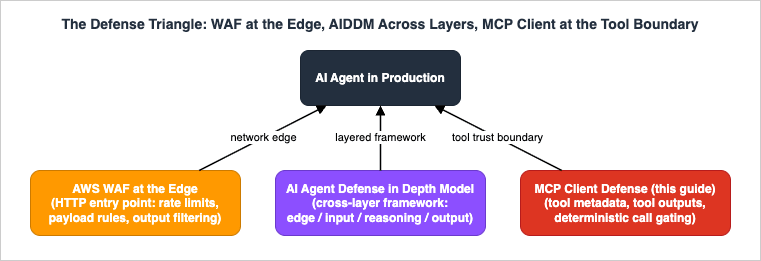
- The network edge. AWS WAF for Generative AI - Prompt Injection Defense Implementation Patterns hardens the HTTP front door of an AI application: rate limiting, input size and content-type restrictions, known-jailbreak pattern matching, and output filtering at the edge. It sees requests from your users. It cannot see tool descriptions, because they never cross that boundary — an MCP client fetches them out-of-band from servers your users never talk to.
- The layered framework. AI Agent Defense in Depth Model (AIDDM) organizes the whole system into four layers — edge, input validation, reasoning/runtime, and output/egress — with controls and KPIs per layer. Within that frame, MCP appears as one reasoning-layer line item: tool allowlists and server-enforced MCP scope tokens (AIDDM Section 5.2). The scope-token control is real and complements everything here, but it is enforced by the server; it cannot help when the malicious party is the server.
- The MCP client (this guide). The controls in Sections 4-8 live where tool metadata and tool outputs actually enter the model's context — AIDDM's Layer 2 and Layer 3, specialized for the MCP trust boundary. This is the only vertex that can pin a tool description, diff it on update, or refuse a tool call by name before the model's decision is acted on.
Mapping the Section 3 taxonomy onto the triangle makes the division of labor concrete:
| Attack class | WAF (edge) | AIDDM framework controls | MCP client (this guide) |
|---|---|---|---|
| Tool description poisoning | Not visible | Reasoning-layer allowlists (partial) | Primary: vetting, pinning, allowlists, hooks |
| Rug pull | Not visible | Not modeled per se | Primary: definition pinning and drift detection |
| Tool shadowing / cross-server | Not visible | Session-level segmentation guidance | Primary: session segregation, per-server allowlists |
| Poisoned tool output | Output filtering helps at the edge | Primary: input validation and output/egress layers | Output bounds, hooks on subsequent calls, egress control |
| Vulnerable client software | Not visible | Runtime hardening guidance | Primary: version pinning and patching |
| Volumetric abuse, denial of wallet | Primary: rate-based rules | Edge-layer KPIs | Not addressed here |
No single vertex covers the table. That is not a weakness of any one of them — it is the argument for running all three.
10. Common Pitfalls
- "It is from an official registry, so it is safe." Listing review is not a security audit, and no registry re-audits every release. Provenance raises the prior; it does not replace vetting or pinning.
- Approving once and never looking again. Tool definitions are mutable by design. An approval without a pinned snapshot and drift detection is an approval of whatever the server decides to serve next month.
- Allowlisting by server name. Names are user-assigned labels. An allowlist without
serverUrlorserverCommandentries enforces nothing. - Secrets in shared
.mcp.jsonenv blocks. A credential in a version-controlled file is published, and a credential in a world-readable managed file is shared with every local user. Use environment expansion or OAuth. - Treating annotations as security controls.
readOnlyHintanddestructiveHintare self-declared by the server, and the specification explicitly requires clients to treat them as untrusted. They are UX hints, not enforcement. - Letting trust levels share a session. Cross-server shadowing means the experimental community server and the production-credentialed server in one context window inherit each other's risk.
- Relying on the model's judgment as the only gate. The model reads the attacker's text with the same attention as yours, and benchmark results show capable models follow poisoned instructions at high rates. Judgment-based controls need at least one deterministic backstop.
- Trusting tool outputs because the server is honest. The server's honesty is irrelevant when the data it returns is attacker-writable. Classify tools by who can write to their data sources.
- No invocation logs. Without per-tool telemetry, every question in an incident — what was called, with what, when, by which session — is unanswerable.
- Forgetting the connector itself. The client stack is software with CVEs of its own. Pin it, watch advisories, and update promptly.
11. Frequently Asked Questions
Is MCP safe to use?MCP is as safe as the servers you connect and the client controls you configure. The protocol's specification places tool metadata explicitly outside the trust boundary and recommends human-in-the-loop confirmation, which means safety is an integration property, not a protocol property. With supply chain vetting, default-deny tool allowlists, definition pinning, and invocation logging, MCP is a manageable third-party dependency; with none of those, you are pasting unreviewed third-party text into your model's instructions.
How do I vet a third-party MCP server before connecting it?
Verify provenance (right project, right publisher), pin the version or container digest, read every tool description and input schema in full, scope its credential to least privilege, classify whether any tool returns attacker-writable content, and record a hash snapshot of the tool definitions you approved. Then re-run that review on every version change, diffing definitions against the snapshot. The checklist in Section 4.4 is designed to be lifted directly into an internal review template.
Can prompt injection reach my agent through tool output?
Yes, and in practice this is the most common real-world pattern. Any tool that returns content outsiders can influence — issues, tickets, emails, web pages, database rows — can carry instructions that the model reads as context. Real incident chains through 2025 combined attacker-writable inputs with broad credentials and an exfiltration path. Defend by scoping credentials so one session cannot span attacker-writable and sensitive data, bounding and monitoring outputs, and putting deterministic gates in front of side-effectful follow-up calls.
Do readOnlyHint and destructiveHint annotations protect me?
No. Annotations are self-declared by the server, and the MCP specification states that clients MUST consider tool annotations to be untrusted unless they come from trusted servers. Use them for UX (sorting which calls deserve a confirmation prompt), never as the enforcement mechanism itself. Enforcement belongs in permission rules, hooks, and sandboxing that the server cannot influence.
Does OAuth solve tool poisoning?
No — it solves a different, equally necessary problem. MCP authorization (OAuth 2.1 with audience-bound tokens) controls who can call a server and which token a server will accept; it says nothing about whether the server's tool descriptions are honest. A fully authenticated, authorized session with a malicious server is still a poisoned session. Authentication and tool-metadata defense are complementary layers, not substitutes.
Where does this fit if I build my own agent instead of using Claude Code?
The mechanisms shown here have direct equivalents in a custom agent loop: filter and allowlist tool definitions before they enter the prompt, hash and pin definitions between sessions, validate tool calls and arguments in code before executing them, bound and sanitize tool results, and emit structured logs per invocation. The Claude Code examples are a reference implementation of the pattern, not the only one.
12. Summary
MCP turned tool integration into a one-command operation, and in doing so it turned tool metadata into an attack surface. Tool descriptions are prompt input written by third parties; tool definitions are mutable after approval; co-resident servers can interfere with each other; tool outputs carry whatever the outside world wrote into them; and the client stack itself has vulnerabilities. None of this is hypothetical — the attack classes are demonstrated, benchmarked, and named, and the exposed population is measured in the tens of thousands of endpoints.The defense is layered and entirely within the client side's control: vet and pin the supply chain (Section 4), configure default-deny tool access with scoped credentials and contained processes (Section 5), enforce deterministically with hooks and definition pinning so that neither model persuasion nor approval fatigue can bypass the policy (Section 6), and instrument invocations so drift and abuse become alerts instead of incidents (Section 7). Organizations scale the same posture with managed catalogs and URL- or command-bound allowlists (Section 8). Alongside the network edge and the cross-layer framework covered by the other two vertices of the defense triangle (Section 9), these controls give the MCP trust boundary the same engineering discipline we already apply to every other third-party dependency — which is exactly what an MCP server is.
13. References
- MCP Specification - Security Best Practices
- MCP Specification - Tools (including annotation trust requirements)
- MCP Specification - Authorization (OAuth 2.1)
- MCP Specification - Transports (Origin validation, localhost binding)
- MCP Specification - Versioning (current protocol revision)
- Invariant Labs - MCP Security Notification: Tool Poisoning Attacks
- Invariant Labs - WhatsApp MCP Exploited (cross-server tool shadowing)
- Invariant Labs - GitHub MCP Exploited (toxic agent flows)
- arXiv:2504.03767 - MCP Safety Audit: LLMs with the Model Context Protocol Allow Major Security Exploits
- arXiv:2508.14925 - MCPTox: A Benchmark for Tool Poisoning Attack on Real-World MCP Servers
- arXiv:2512.08290 - SoK: Security and Safety in the Model Context Protocol Ecosystem
- BleepingComputer - Asana warns MCP AI feature exposed customer data to other orgs
- Simon Willison - Supabase MCP can leak your entire SQL database (lethal trifecta)
- JFrog - CVE-2025-6514: critical mcp-remote vulnerability
- Censys - MCP Servers on the Internet (2026 exposure measurement)
- Claude Code Documentation - Connect Claude Code to tools via MCP
- Claude Code Documentation - Configure permissions
- Claude Code Documentation - Control MCP server access for your organization
- Claude Code Documentation - Hooks reference
- Claude Code Documentation - Sandboxing
- Claude Code Documentation - Monitoring usage with OpenTelemetry
- OWASP GenAI Security Project - LLM Top 10
Related Articles
- AI Agent Defense in Depth Model (AIDDM) - WAF, Guardrails, Reasoning Sandbox, and Output Filter
The layered framework this guide plugs into: edge, input, reasoning, and output controls with per-layer KPIs. - AWS WAF for Generative AI - Prompt Injection Defense Implementation Patterns
The network-edge vertex of the defense triangle: WAF rules, rate limiting, and output filtering for AI endpoints. - Claude Code Hooks Complete Guide - Deterministic Enforcement Across the Tool Lifecycle
The full hook event model, communication protocol, and worked examples behind the deterministic layer in Section 6. - MCP Server Implementation Reference - Anthropic, OpenAI, Google, Cloudflare, and AWS
How the major vendors implement MCP primitives, transports, and authorization. - MCP Server Ecosystem Reference 2026
The supply-chain map: reference, vendor-operated, and community MCP servers by category. - MCP Server on AWS Lambda Complete Guide - Building Model Context Protocol Servers with Streamable HTTP and OAuth 2.1
The server-side counterpart: building and authenticating an MCP server correctly.
References:
Tech Blog with curated related content
Written by Hidekazu Konishi