Claude Code Extension Layer Decision Guide - Choosing Among Skills, Subagents, Hooks, and Plugins
First Published:
Last Updated:
This article is a decision guide for exactly that question. It is the hub of my Claude Code series: instead of re-explaining the mechanics of each layer (the sibling deep-dive articles do that), it concentrates on the comparison tables, the decision flowchart, the combinations that work, and the misplacements that fail in practice.
This article answers three questions:
- What is each extension layer actually good at, and when does it load?
- Given a new piece of automation or knowledge, how do you decide where it belongs? (a reusable decision flowchart)
- Which layer combinations work well together, and which misplacements cause the failure modes you will actually see (ignored instructions, skills that never trigger, bloated context)?
Scope note: This guide covers the extension layers of the interactive Claude Code product (CLI, desktop app, and IDE integrations). Building custom agents programmatically on the same engine is the domain of the Claude Agent SDK, covered in Claude Agent SDK Complete Guide - Building Custom Agents Beyond the CLI.
Terminology note: Custom slash commands have been merged into skills. A file at
.claude/commands/deploy.md and a skill at .claude/skills/deploy/SKILL.md both create /deploy and behave the same way; skills are the current, recommended form and add supporting files, invocation control, and automatic loading. Older articles and tutorials that treat "commands" as a separate extension layer describe a structure that no longer exists. This guide treats skills and former custom commands as one layer throughout.All behavior described in this article was verified against the official Claude Code documentation at the time of writing. The extension surface evolves quickly; where exact limits or defaults matter to a decision, treat the official documentation linked in the References as the source of truth.
1. The Extension Surface at a Glance
Claude Code's extension mechanisms plug into different parts of the agentic loop. The official documentation enumerates the surface as: CLAUDE.md (persistent context), skills (on-demand knowledge and invocable workflows), subagents (isolated execution contexts), hooks (event-triggered automation), MCP (external service connections), and plugins with marketplaces (packaging and distribution). Around them sit the settings files (settings.json at several scopes) that configure permissions and behavior, and two adjacent capabilities: code intelligence (LSP) plugins for symbol-level navigation, and agent teams (experimental, multiple coordinated sessions).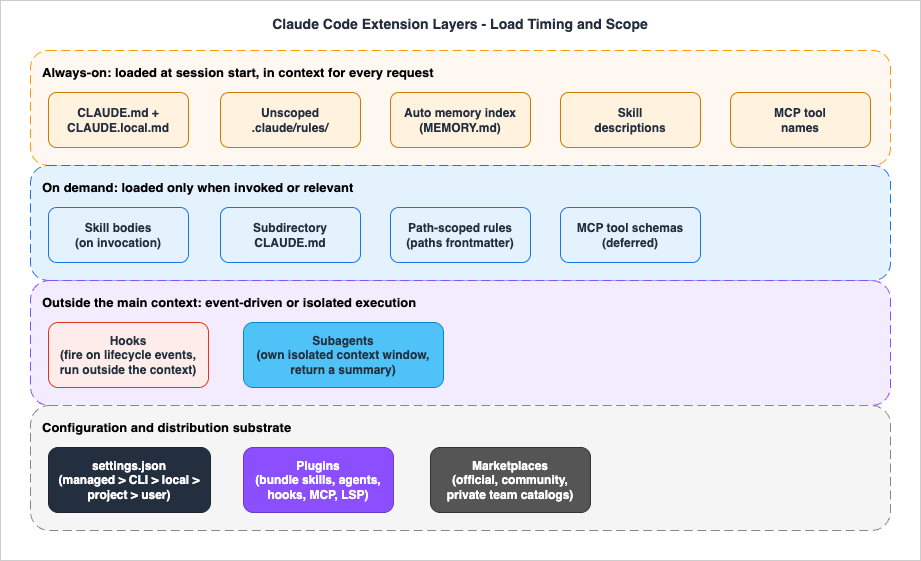
- Always-on: loaded at session start and present in every request (CLAUDE.md,
.claude/rules/without path scoping, the auto memory index, skill descriptions, MCP tool names). - On-demand: loaded only when needed (skill bodies, subdirectory CLAUDE.md files, path-scoped rules, full MCP tool schemas).
- Outside the main context: executed without consuming the conversation window (hooks, which run externally and only return output when designed to; subagents, which work in their own isolated windows and return summaries).
Plugins and marketplaces are not a runtime position at all: they are the packaging layer that bundles the others for distribution. Settings files are the configuration substrate: they are not injected into the model's context as instructions, but they decide what is enforced, allowed, and loaded.
The table below compares the layers along the axes that actually drive placement decisions.
| Layer | What it is | When it loads or fires | Scope levels | Deterministic? | Context cost | Shareable via |
|---|---|---|---|---|---|---|
| CLAUDE.md and rules | Persistent instructions you write | Session start (subdirectory files on demand) | Managed, user, project, local | No (context, not enforcement) | Full content, every request | Git (project), MDM (managed) |
| Auto memory | Notes Claude writes for itself | Session start (index); topic files on demand | Per repository, machine-local | No | Index portion, every request | Not shared |
| Skills | On-demand instructions, knowledge, workflows (SKILL.md) | Descriptions at start; body when invoked | Managed, personal, project, plugin | No | Low until invoked | Git, plugins, managed settings |
| Subagents | Isolated workers with own context, tools, prompt | When spawned | Managed, CLI flag, project, user, plugin | No | Isolated from main window | Git, plugins, managed settings |
| Hooks | Scripts, HTTP calls, prompts, or agents fired on lifecycle events | On their event, every time | Settings scopes, plugin, skill or agent frontmatter | Yes | Zero unless output returned | Git, plugins, managed settings |
| MCP servers | Connections to external tools and data | Tool names at start; schemas deferred | Local, project (.mcp.json), user | No | Low while idle (tool search) | Git (.mcp.json), plugins |
| Plugins | Bundles of skills, agents, hooks, MCP, LSP | When enabled | User, project, managed | Inherits components | Sum of components | Marketplaces |
| settings.json | Permissions, env, model, feature config | Session start; live reload for most keys | Managed, CLI, local, project, user | Yes (client-enforced) | None (configuration) | Git, MDM |
Two enforcement notes on this table are worth pinning early because they drive most of the anti-patterns later:
First, only hooks and settings are deterministic. CLAUDE.md instructions, skill content, and subagent prompts are context the model reads and tries to follow; the official documentation is explicit that they are "context, not enforced configuration." If a rule must hold every single time, it belongs in a hook or in a
permissions.deny rule, not in prose.Second, layers compose differently when defined at multiple levels. CLAUDE.md files are additive: all levels load simultaneously and concatenate. Skills and subagents override by name (a higher-priority scope wins). MCP servers override by name with local taking precedence over project, then user. Hooks merge: every registered hook fires for its event regardless of source. Settings follow a precedence chain: managed policy settings override command-line arguments, which override
.claude/settings.local.json, then the project's .claude/settings.json, then ~/.claude/settings.json, with permission rules merging across scopes. The full key-by-key reference is in Claude Code Features and Settings Reference 2026.For the operator-level walkthrough of how these layers feel in daily use, see the feature-layer chapter of the Claude Code Operator's Handbook; this guide expands its compact "picking a layer" heuristics into a full decision framework.
2. The Decision Flowchart
The flowchart below is the core of this guide. It orders the questions by constraint strength: requirements that only one layer can satisfy (determinism, external connectivity) come first, so that softer preferences never steal a workload from the only layer that can actually guarantee it.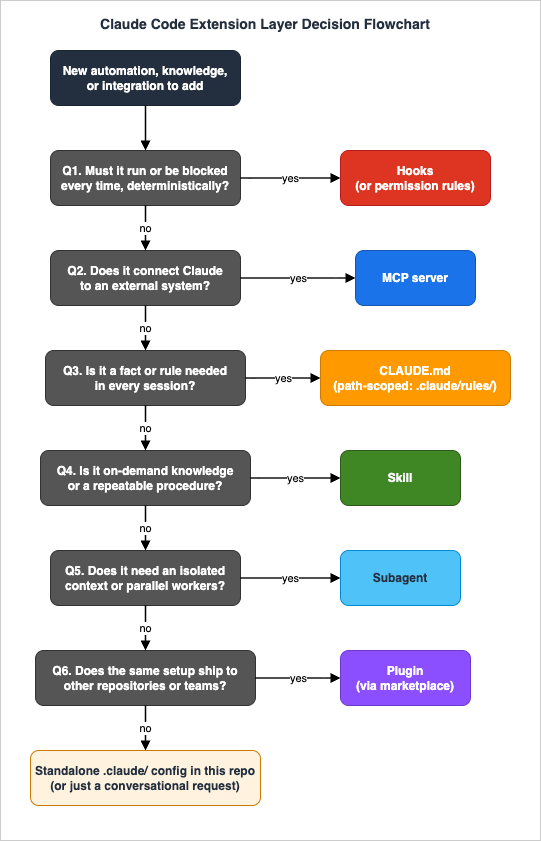
2.1 Question 1: Must it happen (or be blocked) every time, deterministically?
If the behavior is a guarantee rather than a preference, no prompt layer is sufficient. Formatting after every edit, blocking writes to.env, audit-logging every Bash command, refusing pushes to main: these go in hooks (for dynamic logic) or permission rules (for static allow/deny decisions). An instruction like "never edit .env" in CLAUDE.md is a request; a PreToolUse hook that denies the edit is enforcement. Section 6 covers the split between hooks and permission rules.2.2 Question 2: Does it connect Claude to an external system?
If Claude needs data or actions from an issue tracker, database, browser, design tool, or monitoring system, that is MCP. No amount of prompt text gives Claude a connection; conversely, an MCP server is overkill for anything a local CLI already does well through the Bash tool. Section 7 covers the boundary.2.3 Question 3: Is it a fact or rule Claude needs in every session?
Build commands, project layout, naming conventions, "always use pnpm": these belong in CLAUDE.md. If the rule only applies to part of the codebase, use a path-scoped rule in.claude/rules/ so it loads only when matching files are touched. The discipline is keeping this layer small; Section 3 covers what belongs and what should graduate elsewhere.2.4 Question 4: Is it on-demand knowledge or a repeatable procedure?
A deployment checklist, an API style guide, a release workflow, a debugging playbook: these are skills. They cost almost nothing until used, can be invoked by you (/deploy) or loaded by Claude when relevant, and can carry supporting files and scripts. Section 4 covers invocation control, including how to keep side-effect workflows out of Claude's autonomous reach.2.5 Question 5: Does the work need an isolated context or parallel workers?
If a task would flood your conversation with file contents and search results you will never reference again, or fans out across many independent items, route it through a subagent. The work happens in a separate context window and only the summary returns. Section 5 covers the trade-offs, including the tasks subagents are structurally bad at.2.6 Question 6: Does the same setup need to ship to other repositories or teams?
Once a second repository needs the same skills, agents, and hooks, package them as a plugin and distribute through a marketplace. Until then, standalone.claude/ configuration committed to the repository is simpler and gives shorter skill names. Section 7 covers the packaging decision.If none of the six questions produced a clear "yes", the request is usually either conversational (just ask Claude; not everything needs persistence) or a combination (split it into parts and run each part through the flowchart; Section 8 shows the common pairings).
2.7 The second decision: which scope?
After choosing a layer, choose where it lives. The same logic applies across layers:| The configuration is... | Put it at | Examples |
|---|---|---|
| Personal preference, all projects | User scope (~/.claude/...) | Your editor habits, personal skills |
| Team convention for one repository | Project scope (.claude/..., committed) | Project CLAUDE.md, project skills, shared hooks |
| Personal, this repository only | Local scope (.claude/settings.local.json, CLAUDE.local.md, gitignored) | Sandbox URLs, machine-specific paths |
| Organization-wide mandate | Managed scope (IT-deployed) | Compliance rules, denied tools, forced policies |
| Multiple repositories or external users | Plugin via marketplace | Shared toolchains, team standard setups |
A frequent team mistake is publishing personal preferences into project scope. If a teammate would be annoyed by your instruction, it belongs in user or local scope, not in the committed
.claude/ directory.3. CLAUDE.md and Memory: The Always-On Layer
CLAUDE.md is the only layer whose entire content is in the model's context for every request of every session. That property is both its value (Claude never forgets it) and its cost (every line taxes every request, and the official guidance warns that long files reduce adherence).3.1 What loads, from where, in what order
Claude Code assembles the always-on instruction set from several locations, concatenated in order from broadest to most specific scope:| Scope | Location | Shared with |
|---|---|---|
| Managed policy | /Library/Application Support/ClaudeCode/CLAUDE.md (macOS), /etc/claude-code/CLAUDE.md (Linux and WSL), C:\Program Files\ClaudeCode\CLAUDE.md (Windows), or the claudeMd key in managed settings | Everyone in the organization |
| User | ~/.claude/CLAUDE.md | You, all projects |
| Project | ./CLAUDE.md or ./.claude/CLAUDE.md | The team, via version control |
| Local | ./CLAUDE.local.md (gitignored) | You, this project |
At launch, Claude Code walks up the directory tree from the working directory and loads every
CLAUDE.md and CLAUDE.local.md it finds along the way, ordered root-down so the most specific file is read last. Files in subdirectories below the working directory are not loaded at launch; they load on demand when Claude reads files in those directories. @path/to/file imports expand at launch (up to four hops deep), so imports organize content but do not reduce context. Block-level HTML comments are stripped before injection, which makes them a free channel for maintainer notes.Two organizational features matter for placement decisions:
.claude/rules/: instruction files split by topic. Rules without frontmatter load at launch like CLAUDE.md; rules with apathsglob in YAML frontmatter load only when Claude works with matching files. Path-scoped rules are the correct destination for "this convention only applies tosrc/api/**"-type instructions that would otherwise bloat the root file. User-level rules live in~/.claude/rules/and load before project rules.claudeMdExcludes: a settings key that skips specific CLAUDE.md files by glob, the escape hatch for monorepos where other teams' instructions get picked up by the directory walk.
If your repository standardizes on
AGENTS.md for cross-tool agent instructions, check which of the two files Claude Code reads. Since Claude Code v2.1.277 (September 18, 2026), Claude Code reads AGENTS.md by default only when there is no CLAUDE.md, .claude/CLAUDE.md, or CLAUDE.local.md in the working directory or any directory above it; when one of those exists, it reads the CLAUDE.md files instead. Your ~/.claude/CLAUDE.md, your organization's managed CLAUDE.md, and .claude/rules/ files do not count for that check. The Project instructions setting in /config changes the default (claude-md-or-agents-md) to claude-md-and-agents-md, claude-md, or managed-only. Before v2.1.281, some sessions, such as those on Amazon Bedrock or with telemetry disabled, read CLAUDE.md files only. A one-line CLAUDE.md containing @AGENTS.md still gives every session the same source, and keeping that import never makes Claude read AGENTS.md twice. How Codex, GitHub Copilot, Gemini CLI, Antigravity, Cursor, and Kiro treat the same AGENTS.md and a root CLAUDE.md is compared in AGENTS.md Across Coding Agents.A healthy project CLAUDE.md, for scale, looks closer to a cheat sheet than a manual:
# CLAUDE.md

## Commands
- Install: `pnpm install` (never npm)
- Test: `pnpm test` - run before every commit
- Build: `pnpm build`

## Layout
- API handlers: `src/api/handlers/`
- Shared types: `packages/types/` - never duplicate type definitions

## Conventions
- 2-space indentation, no default exports
- Error responses use RFC 9457 Problem Details
- Branch from `develop`; `main` is release-only (enforced by hook)
And a path-scoped rule that keeps API-specific instructions out of every non-API session:
---
paths:
  - "src/api/**/*.ts"
---

# API Development Rules

- Validate all input with zod schemas from `src/api/schemas/`
- Return errors in the Problem Details format
- Every new endpoint needs an OpenAPI comment block
3.2 Auto memory: the notes Claude writes itself
Alongside the instructions you write, Claude Code maintains auto memory: a per-repository directory (by default under~/.claude/projects/<project>/memory/) where Claude records build commands, debugging insights, and preferences it discovers. The MEMORY.md index loads at session start up to a documented threshold (the first 200 lines or 25KB at the time of writing); topic files load on demand. It is machine-local and not shared through version control.The placement implication: auto memory is for learned facts, CLAUDE.md is for mandated facts. If you find yourself repeatedly telling Claude something it should know, put it in CLAUDE.md deliberately rather than hoping auto memory picks it up; if Claude keeps re-discovering the same build quirk on its own, auto memory is already handling it and CLAUDE.md does not need a copy. Both systems are plain markdown you can audit with
/memory.3.3 What belongs here, and the size discipline
The official guidance converges on a simple test: CLAUDE.md is for what you would otherwise re-explain every session. Add to it when Claude makes the same mistake twice, or when a new teammate would need the same context. Keep entries short, specific, and verifiable ("Runnpm test before committing", not "Test your changes").The same guidance gives a size target of roughly 200 lines per file, because longer always-on files consume more context and measurably reduce adherence. The moment an entry becomes a multi-step procedure rather than a fact, it has outgrown this layer: move it to a skill, where it loads only when needed. The moment an entry applies only to one part of the tree, move it to a path-scoped rule. Section 10 turns this into a step-by-step refactoring procedure.
One boundary deserves emphasis because it generates the most confusion: CLAUDE.md cannot enforce anything. The content is delivered as context, and compliance is probabilistic, especially for vague or conflicting instructions. The official troubleshooting guidance itself redirects must-happen instructions to hooks. When an instruction matters operationally, write it in CLAUDE.md for transparency and enforce it with a hook or permission rule; when you see "Claude ignored my instruction", reach for Question 1 of the flowchart, not for ALL CAPS.
4. Skills: On-Demand Expertise
A skill is a directory containing aSKILL.md file: YAML frontmatter that tells Claude when to use it, plus markdown instructions that load when it runs. Skills follow the Agent Skills open standard, with Claude Code extending it (invocation control, subagent execution, dynamic context injection). They occupy the sweet spot between "always in context" (CLAUDE.md) and "external to the model" (hooks): nearly free until used, then fully present.4.1 Where skills live and how they load
| Location | Path | Applies to |
|---|---|---|
| Enterprise | Managed settings directory | All users in the organization |
| Personal | ~/.claude/skills/<name>/SKILL.md | All your projects |
| Project | .claude/skills/<name>/SKILL.md | The project (committed to the repo) |
| Plugin | <plugin>/skills/<name>/SKILL.md | Wherever the plugin is enabled, namespaced as /plugin-name:skill-name |
The loading model is progressive disclosure. At session start, only each skill's name and
description enter the context (capped per entry and bounded by an overall listing budget, both tunable in settings). The full body loads when the skill is invoked, by you typing /name or by Claude matching your task against the description, and then stays in the conversation for the rest of the session. Auto-compaction re-attaches recently invoked skills within a token budget, most recent first, so rarely used skills can drop out after compaction.The frontmatter fields are the skill's control surface. The most decision-relevant ones:
| Field | What it controls |
|---|---|
description / when_to_use | The matching text Claude uses to decide relevance; the single biggest lever for "skill never triggers" or "triggers too often" |
disable-model-invocation: true | Only you can invoke it; the description is not even listed to Claude. The right setting for side-effect workflows (/deploy, /commit, /send-slack-message) |
user-invocable: false | Only Claude can invoke it; hidden from the / menu. The right setting for background knowledge that is not a meaningful user action |
allowed-tools / disallowed-tools | Pre-approve tools while the skill is active, or remove tools from the pool |
context: fork + agent | Run the skill in an isolated subagent context instead of inline (see Section 5) |
hooks | Hooks scoped to this skill's lifecycle, active only while it runs |
paths | Glob patterns so the skill auto-loads only when working with matching files |
model / effort | Override the model or effort level while the skill is active |
arguments / argument-hint | Named and positional arguments ($ARGUMENTS, $0, $name) |
The two
disable-model-invocation and user-invocable switches define a small but important matrix:| Frontmatter | You can invoke | Claude can invoke | What sits in context |
|---|---|---|---|
| (default) | Yes | Yes | Description always; body when invoked |
disable-model-invocation: true | Yes | No | Nothing until you invoke it |
user-invocable: false | No | Yes | Description always; body when invoked |
A side-effect workflow under explicit human control looks like this:
---
name: deploy
description: Deploy the application to production
disable-model-invocation: true
allowed-tools: Bash(./scripts/deploy.sh *) Bash(git tag *)
---

Deploy $ARGUMENTS to production:

1. Run the test suite and stop on any failure
2. Build the release artifact
3. Tag the release and push the tag
4. Run ./scripts/deploy.sh with the tag
5. Verify the health endpoint before reporting success
Two capabilities push skills well beyond "saved prompts". Dynamic context injection runs shell commands before the content reaches Claude: a line like
!`git diff HEAD` is replaced by the actual diff, so the skill arrives pre-grounded in live data (administrators can disable this with disableSkillShellExecution). A review skill that fetches its own inputs:---
name: pr-summary
description: Summarize the changes in the current pull request
context: fork
agent: Explore
allowed-tools: Bash(gh *)
---
## Pull request context
- Diff: !`gh pr diff`
- Changed files: !`gh pr diff --name-only`
## Your task
Summarize this pull request: intent, risk areas, and anything
reviewers should look at first.
Supporting files let a skill ship templates, examples, reference documents, and executable scripts in its directory, referenced from
SKILL.md and loaded only when needed; official guidance recommends keeping SKILL.md itself under about 500 lines and pushing detail into these files.4.2 When a skill is the right layer
- A procedure you keep pasting into chat (release checklist, migration recipe, review rubric).
- Reference material Claude needs sometimes but not always (API style guide, schema documentation, domain glossary).
- A workflow you want to trigger on demand with arguments (
/fix-issue 123). - A section of CLAUDE.md that has grown into a procedure: the official skills documentation names exactly this trigger.
4.3 Skill anti-patterns
- Always-needed conventions in a skill. Skill activation is probabilistic, driven by description matching. A rule that must hold in every session ("use 2-space indentation") will be silently absent whenever the skill does not trigger. Always-on rules belong in CLAUDE.md; guarantees belong in hooks.
- Side-effect workflows left model-invocable. A deploy skill without
disable-model-invocation: truemeans Claude can decide your code "looks ready". Restrict who invokes anything with consequences. - The kitchen-sink skill. One giant
SKILL.mdholding everything costs its full length on every invocation and gives the matcher a vague description. Split by task; move bulk to supporting files. - Expecting re-reads. Skill content enters the conversation once, at invocation; Claude Code does not re-read the file on later turns. Write standing instructions, not one-time steps, and re-invoke after heavy compaction if a large skill must persist.
The hooks-vs-skills boundary in one line, straight from the flowchart: a hook always fires on its event but cannot reason; a skill can reason but is never guaranteed to fire.
5. Subagents: Context Isolation and Parallelism
A subagent is a separate Claude instance with its own context window, system prompt, tool access, and permissions. The main conversation delegates a task, the subagent works in isolation, and only its final report returns. Claude Code ships built-in subagents, most notably Explore (fast, read-only, optimized for codebase search), Plan (read-only research for plan mode), and general-purpose (all tools), and you define custom ones as markdown files. Note that the spawning tool was renamed fromTask to Agent; existing Task(...) permission references still work as aliases.5.1 Definition and the control surface
Custom subagents are markdown files with YAML frontmatter; the body becomes the subagent's system prompt. They are discovered, in priority order, from managed settings, the--agents CLI flag, the project's .claude/agents/, the user's ~/.claude/agents/, and plugins. The frontmatter fields mirror the concerns you would expect for an isolated worker:| Field | What it controls |
|---|---|
name, description | Identity, and the text Claude uses to decide when to delegate |
tools / disallowedTools | Allowlist or denylist; inherits everything if omitted |
model | sonnet, opus, haiku, fable, a full model ID, or inherit (default) — the cost-control lever |
permissionMode | default, acceptEdits, auto, dontAsk, bypassPermissions, or plan; how the subagent handles permission prompts |
skills | Skills whose full content is preloaded into the subagent at startup |
mcpServers | MCP servers scoped to this subagent, including inline definitions invisible to the main session |
hooks | Lifecycle hooks active only while this subagent runs |
memory | Persistent cross-session memory directory (user, project, or local scope) |
isolation: worktree | Run in a temporary git worktree, isolating file changes |
background, maxTurns, effort, color | Execution ergonomics |
A complete definition is compact. This reviewer cannot write files by construction, runs on a mid-tier model, and accumulates project knowledge across sessions:
---
name: code-reviewer
description: Reviews code for quality, security, and project conventions.
  Use after non-trivial code changes.
tools: Read, Grep, Glob
model: sonnet
memory: project
---

You are a senior code reviewer for this repository. Check changed code
for correctness, security issues, and violations of project conventions.
Consult your memory for patterns you have flagged before, and record new
recurring issues there. Report findings with file and line references,
ordered by severity.
Two startup facts matter for predictability. First, a subagent receives its own system prompt plus basic environment details, not your conversation history; anything it needs must be in its definition, its preloaded skills, or the delegation message. Second, most subagents load CLAUDE.md, but the built-in Explore and Plan agents deliberately skip CLAUDE.md and git status to stay fast and cheap, so do not expect project conventions to bind those two.
5.2 When a subagent is the right layer
- Context protection: research, log analysis, large-file reading whose intermediate output you will never reference again. The subagent absorbs the noise; you get the summary.
- Parallel fan-out: independent per-item work (review N files, check N hypotheses) where workers do not need to talk to each other.
- Constraint enforcement by construction: a read-only reviewer (
tools: Read, Grep, Glob) cannot edit files no matter what its prompt says; tool scoping is structural, unlike prompt instructions. - Cost routing: pointing exploration at a faster, cheaper model while the main thread stays on a stronger one.
- Specialized personas with accumulated knowledge: a code-reviewer with
memory: projectbuilds institutional knowledge across sessions.
Skills and subagents intersect in two directions, and choosing between them is a recurring decision. A skill with
context: fork injects the skill content as the task for a subagent you pick (agent: Explore): the skill drives, the agent type provides the execution environment. A subagent with a skills field is the inverse: the agent definition drives, and skills are preloaded reference material. Use the first when the procedure is primary; the second when the worker is.5.3 Subagent anti-patterns
- Delegating work that needs a conversation. Subagents cannot ask you questions mid-task (interactive tools such as
AskUserQuestionare unavailable to them) and they run to completion on the instructions given. Tasks needing clarification or incremental approval belong in the main thread. - Delegating approval-gated edits. In setups where edits require interactive confirmation (permission
askrules), a subagent has no way to surface the prompt, and the edit fails or stalls. The robust division of labor in such environments: subagents research and propose; the main thread applies changes under your approval flow. - Spawning a subagent for a single lookup. Each spawn pays startup and summarization overhead. A
grepthe main thread can run directly does not need a worker. (Current Opus-class models actually under-delegate more often than over-delegate, but both miscalibrations are fixed the same way: explicit delegation guidance in CLAUDE.md or the agent description.) - Assuming shared memory. "Fix the bug we discussed" means nothing to a worker that never saw the discussion. Delegation messages must be self-contained.
- Expecting nested delegation. Subagents cannot spawn other subagents; orchestration logic stays in the main thread.
Orchestration patterns, fan-out design, and failure handling are covered in depth in Claude Code Subagents and Multi-Agent Orchestration Guide. For coordinating multiple sessions (rather than workers inside one session), the experimental agent teams feature is the next step up; it is out of scope here.
6. Hooks: Deterministic Enforcement
Hooks are the only extension layer where the trigger is guaranteed. A hook is a handler registered on a lifecycle event; when the event occurs, the handler runs, every time, regardless of what the model decides. This is the layer for the verbs "must", "never", and "always".6.1 The event surface and handler types
Hook events cover the full session lifecycle. The ones that anchor most real configurations:| Event | Fires |
|---|---|
PreToolUse | Before a tool call executes; can block it or rewrite the permission decision |
PostToolUse / PostToolUseFailure | After a tool call succeeds or fails |
UserPromptSubmit | When you submit a prompt, before Claude processes it |
PermissionRequest / PermissionDenied | Around the permission flow |
SessionStart / SessionEnd | Session boundaries (environment setup, cleanup, notifications) |
SubagentStart / SubagentStop | Around subagent lifecycles |
Stop | When Claude finishes responding (the place for "did it actually finish?" checks) |
PreCompact / PostCompact | Around context compaction |
Notification | When Claude Code sends a notification |
The current full catalog is longer (it includes events for instruction loading, configuration changes, file watching, worktrees, MCP elicitation, and more) and grows over time; see the official hooks reference for the complete list.
Handlers are not limited to shell commands. Five types exist:
command (a script receiving JSON on stdin), http (POST to an endpoint), mcp_tool (invoke an MCP tool), prompt (a one-shot LLM classification), and agent (a subagent-backed verification). The last two blur the determinism line deliberately: the trigger remains deterministic while the judgment is delegated to a model, which is exactly what you want for checks like "is this command safe?" that regex cannot express.Control flows back through exit codes and JSON. For command hooks: exit 0 with JSON on stdout for structured decisions (such as
permissionDecision: "deny" with a reason, or additionalContext to inject text into Claude's context), and exit 2 to block with stderr fed back to Claude. A classic operational bug: exit code 1 does not block; it is a non-blocking error. Policy hooks must use exit 2 or an explicit JSON decision.A minimal enforcement pair, registered in the project's
.claude/settings.json:{
"hooks": {
"PreToolUse": [
{
"matcher": "Bash",
"hooks": [
{ "type": "command", "command": "$CLAUDE_PROJECT_DIR/.claude/hooks/guard-main.sh" }
]
}
],
"PostToolUse": [
{
"matcher": "Edit|Write",
"hooks": [
{ "type": "command", "command": "pnpm exec prettier --write \"$(jq -r '.tool_input.file_path')\"" }
]
}
]
}
}
And the guard script, which reads the tool call as JSON on stdin and blocks pushes to
main with exit 2:#!/bin/bash
# .claude/hooks/guard-main.sh
COMMAND=$(jq -r '.tool_input.command // empty')
if echo "$COMMAND" | grep -qE 'git push.*\b(origin\s+)?main\b'; then
echo "Pushing to main is not allowed. Push a feature branch and open a PR." >&2
exit 2
fi
exit 0
Hooks register at every configuration level: settings files (user, project, local, managed), plugin
hooks/hooks.json, and, scoped to a component's lifetime, in the frontmatter of skills and subagents. All registered hooks merge and fire; one source cannot silently disable another's hooks.6.2 "Asking the AI" versus "making the harness do it"
The placement rule that pays for this entire article: classify every operational rule as a request or a guarantee.- "Prefer small commits" is a request: CLAUDE.md.
- "Run the formatter after every edit" is a guarantee:
PostToolUsehook. - "Never write to
.env, no exceptions" is a guarantee:PreToolUsehook or apermissions.denyrule. - "Summarize what you changed when you finish" is a request: CLAUDE.md.
- "Block any Bash command containing
rm -rf" is a guarantee: hook.
Within guarantees, prefer the simplest sufficient mechanism: a static permission rule (
permissions.allow / deny / ask) when the decision depends only on the tool and a pattern; a hook when it needs logic, external state, or side effects (logging, notifications, conditional rewriting). Permission rules are configuration; hooks are code you now own, with the operational burden that implies (they run with your credentials, so treat project-scope hooks in untrusted repositories with the same suspicion as any executable). How permissions, sandboxing, and hooks fit into a complete safety posture is the subject of Claude Code Harness and Environment Engineering.6.3 Hook anti-patterns
- Enforcing with prose. Writing "CRITICAL: YOU MUST run tests before committing" in CLAUDE.md and escalating the capitalization when it fails. The fix is one
PreToolUsehook ongit commit, after which the prose can relax back to an explanation of why. - Blocking with exit 1. Non-blocking by definition; use exit 2 or a JSON
deny. - Noisy hooks. A hook that prints volumes on every event feeds all of it back into the session. Keep success silent; surface only failures and decisions.
- AI judgment hard-coded as regex. A 200-line pattern list approximating "is this command dangerous?" is better expressed as a
prompt-type hook, which keeps the deterministic trigger and delegates the fuzzy classification. - Hooks doing a skill's job. If the action needs multi-step reasoning in the main conversation, it is a skill or an instruction; hooks are for fixed reactions to fixed events.
The complete protocol (input schemas, matchers, JSON output fields, security model, worked examples) is in Claude Code Hooks Complete Guide.
7. Plugins and MCP: Packaging and External Capabilities
These two layers answer different questions (distribution and connectivity) but share a section because both are about crossing a boundary: plugins cross the repository boundary, MCP crosses the system boundary.7.1 MCP: connecting external systems
MCP (Model Context Protocol) servers give Claude tools backed by external services: issue trackers, databases, browsers, design tools, monitoring. Configuration lives at three scopes with name-based override, local taking precedence over project (the committed.mcp.json) over user. Tool names surface as mcp__<server>__<tool>, which is also how you target them in permission rules and hook matchers.The historical objection to MCP, that every connected server's tool descriptions bloat the context, is largely addressed: tool names load at session start, but full schemas are deferred until needed, with tool search enabled by default. The remaining real costs are operational: servers to run or authenticate, network dependencies, and a larger action surface to govern (managed environments can pin allowed servers with
allowedMcpServers or an organization-managed MCP configuration).Placement guidance:
- Use MCP when the capability lives outside the machine or needs a protocol (query the production database, fetch the Figma design, control a browser).
- Do not wrap what Bash already does. If a well-behaved CLI exists (
gh,aws,kubectl), Claude can usually drive it directly; a CLAUDE.md note or a skill documenting your usage conventions is cheaper than a server. - Scope narrowly used servers to the subagent that needs them. An inline
mcpServersentry in a subagent definition connects the server only for that worker, keeping its tools and their context cost out of the main session entirely: an elegant pattern for heavyweight integrations like browser automation. - Pair MCP with a skill. The server provides the tools; a skill teaches Claude your schema, query patterns, and conventions for using them well. The official documentation recommends exactly this division.
7.2 Plugins: the packaging layer
A plugin is a directory (optionally with a.claude-plugin/plugin.json manifest) that bundles extension components: skills/, agents/, hooks/hooks.json, .mcp.json, plus more specialized payloads such as LSP server configurations (.lsp.json), background monitors, executables for the Bash tool's PATH (bin/), and default settings. Installed plugins namespace their skills (/my-plugin:review), which prevents collisions at the price of longer names.my-team-toolchain/
├── .claude-plugin/
│ └── plugin.json # name, description, version (only this file lives here)
├── skills/
│ ├── review/SKILL.md # becomes /my-team-toolchain:review
│ └── release/SKILL.md
├── agents/
│ └── security-reviewer.md
├── hooks/
│ └── hooks.json # same format as the hooks block in settings.json
├── .mcp.json # MCP servers connected while the plugin is enabled
└── .lsp.json # optional language-server integration
A common structural mistake, called out by the official documentation: only
plugin.json belongs inside .claude-plugin/; every component directory sits at the plugin root.The standalone-versus-plugin decision is genuinely simple:
| Situation | Choice |
|---|---|
| One repository, team-shared | .claude/ directory, committed to the repo |
| Personal, all your projects | ~/.claude/ user scope |
| Same setup needed in multiple repositories | Plugin |
| Distribution to other teams or the community | Plugin via a marketplace |
| Organization-wide mandatory rollout | Managed settings (optionally force-enabling plugins) |
Marketplaces are git repositories or URLs hosting a catalog. Anthropic maintains two public ones: an official curated marketplace available automatically in every installation, and a community marketplace (
anthropics/claude-plugins-community) accepting reviewed third-party submissions. Teams typically run a private marketplace in an internal repository and add it with /plugin marketplace add, which turns "everyone copy these files" into "everyone install @our-team" with versioned updates (explicit version bumps, or commit-SHA versioning by default for git-distributed plugins).Two plugin-specific behaviors are worth knowing before you bet on them. For security, plugin-distributed subagents ignore the
hooks, mcpServers, and permissionMode frontmatter fields; an agent needing those must be copied into .claude/agents/ instead. And plugin components are loaded as a unit: a plugin is the right granularity when the components belong together (a "frontend toolchain" with its linter hooks, review skill, and LSP config), not a dumping ground for unrelated conveniences.The iteration path the official documentation recommends matches the flowchart's Question 6: start standalone in
.claude/ for fast iteration, convert to a plugin when the second consumer appears.8. Layer Combinations That Work
Real setups are compositions. Each layer handles the concern it is structurally best at, and the seams between them are where the design quality shows. Four proven pairings:8.1 Hook enforces, skill explains
The linter must run after every edit: that is aPostToolUse hook, deterministic and unskippable. But fixing lint failures requires judgment, so a /fix-lint skill documents your conventions for resolving them (when to disable a rule, how to handle generated files). The hook guarantees detection and feeds results into context; the skill turns them into correct fixes. The same shape covers tests (hook runs them, skill encodes the debugging playbook) and commit policy (hook blocks malformed messages, skill writes good ones).8.2 Subagent researches, main thread edits
For the heavy half of a change (locating every call site, understanding a legacy module, comparing three implementation options), delegate to an Explore-type subagent and receive a compact report. The main thread then makes the edits with full conversational context and, in approval-gated environments, with the interactive permission flow that subagents lack. This pairing keeps the main window clean and keeps changes under human control: research is cheap to isolate, edits are cheap to supervise.8.3 MCP connects, skill teaches
An MCP server gives Claude tools against your database; a skill carries the data model, the canonical query patterns, and the "use the read replica for analytics" conventions. Without the skill, Claude has capability without competence; without the server, knowledge without access. This is the official documentation's own model pairing, and it generalizes to any external system: the connection is infrastructure, the usage wisdom is content.8.4 Skill-scoped hooks: guardrails that travel with the workflow
Hooks declared in a skill's frontmatter are active only while that skill runs. A/deploy skill can carry a PreToolUse hook that validates every Bash command against an allowlist during deployment only, without polluting global settings with deployment-specific rules:---
name: deploy
description: Deploy the application to production
disable-model-invocation: true
hooks:
PreToolUse:
- matcher: "Bash"
hooks:
- type: command
command: "${CLAUDE_SKILL_DIR}/scripts/allowlist-check.sh"
---
The same composition works in subagent frontmatter: a database-reader agent whose hook rejects any SQL that is not a SELECT, making the agent safe by construction rather than by prompt (subagent
Stop hooks are automatically converted to SubagentStop). When a guardrail only makes sense inside one workflow, attach it to the workflow, not to the world.And wrapping all of the above: when the composed setup proves out in one repository, a plugin packages the skill, the agent, the hooks, and the
.mcp.json into one installable, versioned unit for the next repository (Section 7.2).9. Anti-Patterns and Failure Modes
The sections above flagged anti-patterns per layer. This section inverts the view: start from the symptom you observe, find the misplacement that causes it.| Symptom | Root cause | Correct placement |
|---|---|---|
| Claude follows an instruction "most of the time" but not always | A guarantee written as prose; CLAUDE.md and skills are context, not enforcement | PreToolUse/PostToolUse hook, or a permission rule |
| Instructions seem ignored as sessions grow long | Always-on file far beyond the size guidance; adherence degrades | Trim CLAUDE.md toward the ~200-line target; procedures to skills, narrow rules to path-scoped .claude/rules/ |
| A skill never triggers automatically | Vague description, or it lost its description to the listing budget | Rewrite description with the words users actually say; check /doctor for truncation; invoke explicitly with /name |
| A skill triggers when unwanted, or Claude runs a risky workflow on its own | Side-effect skill left model-invocable | disable-model-invocation: true; deny Skill(name) in permissions for hard exclusion |
| A delegated task stalls or comes back incomplete, asking for input | Subagent given interactive work; it cannot prompt the user | Keep approval-gated and conversational work in the main thread; delegate self-contained research |
| Subagent output ignores project conventions | Explore/Plan skip CLAUDE.md; custom agents do not see your conversation | Put requirements in the delegation message, the agent definition, or preloaded skills |
| A blocking hook does not block | Handler exits 1 (non-blocking error) instead of 2, or returns no JSON decision | Exit 2 with stderr, or exit 0 with an explicit deny decision |
| Same rule drifts across CLAUDE.md, a skill, and a hook | Multiple sources of truth for one concern | One owner per rule: prose explains, hook enforces; delete duplicates |
| Plugin-installed agent silently loses its hooks or MCP servers | Security restriction on plugin agents | Copy the agent into .claude/agents/ when it needs those fields |
| Context fills with integration noise | Heavyweight MCP servers connected globally but used rarely | Scope servers to the subagent that needs them; disconnect idle servers; let tool search defer schemas |
| Teammates get your personal preferences (or your local paths break their builds) | Personal config committed at project scope | User scope or settings.local.json / CLAUDE.local.md (gitignored) |
| "It works on my machine" extension setups | Shared config living in one developer's user scope | Commit project scope config, or package a plugin once a second repo needs it |
The meta-pattern behind most rows: a mismatch between the reliability a requirement needs and the reliability the chosen layer provides. Prompt layers (CLAUDE.md, skills, subagent prompts) provide influence. Harness layers (hooks, permissions, tool scoping) provide guarantees. Choose by the cost of the rule being violated once.
10. Migrating an Overgrown CLAUDE.md
The most common concrete cleanup task is the CLAUDE.md that grew for a year and now mixes facts, procedures, warnings, and wishes across hundreds of lines. This section is a repeatable refactoring procedure.10.1 Step 1: Inventory and classify
Go through the file entry by entry and tag each one with the question it answers:| Tag | Test | Destination |
|---|---|---|
| FACT | "Claude needs this in every session" (build commands, layout, conventions) | Stays in CLAUDE.md |
| SCOPED | "Only matters under src/api/ (or for *.tsx, or in packages/frontend/)" | .claude/rules/<topic>.md with paths frontmatter |
| PROCEDURE | "Multi-step recipe used occasionally" (release, migration, onboarding) | A skill; add disable-model-invocation: true if it has side effects |
| GUARANTEE | "Must hold every time; violation is an incident" | Hook or permission rule; keep at most a one-line pointer in CLAUDE.md |
| WORKER | "Describes how a specialized task should be performed in isolation" (review rubric, audit checklist) | A subagent definition, possibly with preloaded skills |
| EXTERNAL | "Describes how to reach or use an external system" | MCP server (connection) plus a skill (usage conventions) |
| STALE | Contradicts current practice, duplicates another entry, or nobody knows why it is there | Delete; conflicting instructions actively degrade compliance |
10.2 Step 2: Move in dependency order
Extract in this order to keep every intermediate state working: delete STALE first (instant adherence win), then GUARANTEE (the highest-risk entries get real enforcement), then PROCEDURE (the biggest line-count win), then SCOPED, then WORKER and EXTERNAL. After each batch, the remaining CLAUDE.md should still stand alone.A miniature before-and-after:
# Before (one 400-line CLAUDE.md, excerpt)
- Use pnpm, never npm.
- NEVER commit directly to main. IMPORTANT!!
- Release procedure: 1) bump version 2) update changelog 3) tag
  4) push tag 5) verify CI 6) announce in #releases ... (40 lines)
- In src/api/, always validate input with zod and return Problem
  Details errors ... (25 lines)
- When reviewing PRs, check auth, input validation, N+1 queries
  ... (30 lines)
# After
CLAUDE.md (12 lines)           # FACTs + one-line pointers
.claude/rules/api.md           # paths: ["src/api/**"]  (SCOPED)
.claude/skills/release/        # /release, disable-model-invocation  (PROCEDURE)
.claude/agents/pr-reviewer.md  # review rubric as a subagent  (WORKER)
.claude/settings.json          # hook: PreToolUse blocks `git push` to main  (GUARANTEE)
The "never commit to main" line illustrates the payoff: as prose it failed occasionally and accumulated capital letters; as a hook it cannot fail, and CLAUDE.md shrinks to a calm one-liner explaining the policy exists.
10.3 Step 3: Verify the new layout
/memorylists every loaded instruction file; confirm the slimmed CLAUDE.md and unscoped rules appear./doctor(or asking "what skills are available?") confirms the new skills are listed with intact descriptions.- Touch a file matching a path-scoped rule and confirm the rule activates; trigger the hook on a throwaway branch and confirm it blocks.
- For ongoing auditability, the
InstructionsLoadedhook event can log exactly which instruction files load and when, which is the systematic answer to "is my rule even in context?".
Re-run the inventory a couple of times a year. The triggers that grew the file (corrections typed twice, review comments repeated) keep operating, and the official "build your setup over time" guidance is explicit that the same triggers should keep redistributing content outward to the appropriate layers.
11. Frequently Asked Questions
Q. Skill or subagent: which do I reach for first?A. Decide by what the work needs, not by which feature is newer. Reusable content (knowledge, a procedure) is a skill; isolated execution (context-heavy or parallel work) is a subagent. They compose: a skill can run in a forked subagent context (
context: fork), and a subagent can preload skills (skills:). If you are unsure, start with a skill; promote to a subagent when the work starts flooding your main context.Q. Hook or CLAUDE.md instruction?
A. Ask what happens if the rule is violated once. Mild annoyance: CLAUDE.md. An incident, a broken build, a leaked secret: hook (or permission rule). Prose influences; hooks enforce. The strongest setups use both: the hook enforces, and a CLAUDE.md line explains the policy so Claude works with it rather than against it.
Q. Where should team conventions live?
A. Facts and rules in a committed project CLAUDE.md (plus path-scoped
.claude/rules/); procedures as project skills in .claude/skills/; guarantees as hooks in .claude/settings.json; all reviewed like code, because configuration in a trusted repository can execute. When a second repository needs the same setup, graduate the bundle to a plugin on a team marketplace. Organization-wide mandates that individuals must not override belong in managed settings.Q. Are custom slash commands deprecated?
A. Files in
.claude/commands/ continue to work, but they are now simply another way to define skills, and skills are the recommended form (supporting files, invocation control, auto-loading). If a command and a skill share a name, the skill wins. New work should go straight to .claude/skills/.Q. Do subagents see my CLAUDE.md and my conversation?
A. Custom and general-purpose subagents load CLAUDE.md; the built-in Explore and Plan agents skip it by design. No subagent sees your conversation history: it receives its system prompt (the definition body), any preloaded skills, and the delegation message. Write delegation messages as if briefing a contractor with no prior context.
Q. How do I stop a layer from loading without deleting it?
A. Each layer has a switch:
skillOverrides in settings (or disable-model-invocation in frontmatter) for skills; claudeMdExcludes for CLAUDE.md files; permissions.deny with Agent(name) for subagents and with Skill(name) for skill invocation; /plugin to disable plugins; /mcp and the MCP allowlist settings for servers. Hooks are removed by editing the settings or component that declares them.Q. Does adding many extensions slow Claude down or degrade it?
A. Every always-on byte competes with your actual task for context, and noisy or overlapping descriptions degrade skill selection. The layers are designed to be cheap when idle (skill bodies, MCP schemas, and hook code cost nothing until used), so the practical rule is: keep the always-on layer lean, let everything else be on-demand, and audit with
/context-style inspection and /doctor when behavior drifts.Q. What does this look like beyond the CLI?
A. The same concepts (system prompts, tools, hooks, subagents, MCP) are exposed programmatically by the Claude Agent SDK for building your own agents and harnesses; see Claude Agent SDK Complete Guide. If you are new to Claude Code itself, start with Claude Code Getting Started before investing in extension architecture.
12. Summary
The extension surface of Claude Code stops being confusing the moment you sort it by two axes: when does it load (always-on, on-demand, outside the context) and how reliable is it (influence versus guarantee). From there, the flowchart is six questions asked in constraint order:- Deterministic guarantee? Hooks (or permission rules).
- External system? MCP.
- Needed every session? CLAUDE.md (path-limited:
.claude/rules/). - On-demand knowledge or procedure? Skills.
- Isolation or parallelism? Subagents.
- Multiple repositories or teams? Plugins via marketplaces.
Keep the always-on layer small and factual; push procedures into skills; give every guarantee a hook; isolate heavy work in subagents; connect external systems through MCP and teach their use with skills; and package the proven result as a plugin when the second consumer appears. Each layer then does the one thing it is structurally best at, and the failure modes in Section 9 simply stop having a place to occur.
For the layer-by-layer depth this hub deliberately delegates: hooks, subagents and orchestration, settings and feature reference, harness and environment engineering, the operator's handbook, and the Agent SDK.
13. References
- Extend Claude Code (features overview) - Claude Code Documentation
- How Claude remembers your project (CLAUDE.md and memory) - Claude Code Documentation
- Extend Claude with skills - Claude Code Documentation
- Create custom subagents - Claude Code Documentation
- Hooks reference - Claude Code Documentation
- Automate workflows with hooks - Claude Code Documentation
- Connect Claude Code to tools via MCP - Claude Code Documentation
- Create plugins - Claude Code Documentation
- Plugins reference - Claude Code Documentation
- Create and distribute a plugin marketplace - Claude Code Documentation
- Discover and install plugins - Claude Code Documentation
- Claude Code settings - Claude Code Documentation
- Manage permissions and security - Claude Code Documentation
Related Articles in This Series
- Claude Code Hooks Complete Guide - Deterministic Enforcement Across the Tool Lifecycle — the full hook event lifecycle, communication protocol, matchers, and worked enforcement examples.
- Claude Code Subagents and Multi-Agent Orchestration Guide - Delegation, Parallel Fan-Out, and Custom Agent Definitions — custom agent definitions, tool scoping, orchestration patterns, and delegation heuristics.
- Claude Agent SDK Complete Guide - Building Custom Agents Beyond the CLI — the programmatic counterpart: building your own agents on the same engine.
- Claude Code Features and Settings Reference 2026 — the yearly snapshot of every setting, hook event, slash command, and configuration key.
- Claude Code Harness and Environment Engineering: Designing the Frontline Where Local AI Agents Actually Live — permissions, sandboxing, and reference patterns for safe operation at team scale.
- Claude Code Operator's Handbook — the daily-driver reference whose feature-layer chapter this guide expands into a full decision framework.
- Claude Code Getting Started - Why Knowing About Local AI Agents Changes Everything — the on-ramp for readers new to Claude Code itself.
References:
Tech Blog with curated related content
Written by Hidekazu Konishi