Claude Code Plugins Complete Guide - Bundling Skills, Hooks, Agents, and MCP Servers for Team Distribution
First Published:
Last Updated:
.claude/commands/, drop a SKILL.md into .claude/skills/, wire a formatting hook into settings.json, and your own sessions get sharper. Then a teammate asks how you did it, and you realize there is no clean way to hand over "the way I have Claude Code set up." You can paste files into chat, write a README nobody follows, or commit a .claude/ directory and hope everyone keeps it in sync.Plugins are the answer to that handoff problem. A plugin is a self-contained directory that bundles skills, agents, hooks, MCP servers, and more into one versioned unit that other people can install, update, and trust. Marketplaces turn that unit into something discoverable. Together they move Claude Code customization from "a private dotfile" to "a shared, governed standard your whole team runs."
This guide is the implementation entry point for that distribution layer. It answers three questions end to end:
- What can you put in a plugin, and how does a plugin differ from standalone
.claude/configuration? - How do you build one and ship it through a marketplace?
- How do you operate plugins across a team or organization — rollout, governance, versioning, and updates?
This article is the last spoke in a per-layer Claude Code cluster. The other layers have their own deep dives: Claude Code Hooks Complete Guide for deterministic enforcement, Claude Code Subagents and Orchestration Guide for context isolation, and Claude Code Skills Complete Guide for on-demand expertise. If you are still deciding which layer a given problem belongs in, start with the Claude Code Extension Layers Decision Guide; this article assumes you already know you want to package and distribute what those layers produce.
Note: Claude Code's plugin and marketplace features change quickly. Every specification below was checked against the official Claude Code documentation (code.claude.com) as of 2026-06-14. Field names, commands, and settings keys evolve, so for anything version-sensitive — and for the exact minimum Claude Code version a feature requires — treat the official documentation as the source of truth and re-verify before you ship.
1. Introduction
The mental model worth internalizing first: plugins do not introduce new capabilities; they package existing ones. Everything a plugin can ship — a skill, a subagent, a hook, an MCP server connection — you can already configure standalone in a.claude/ directory. What the plugin adds is a boundary: a name, a version, a manifest, and an install path. That boundary is exactly what makes the difference between "a thing that works on my machine" and "a thing my team runs the same way."Why does that boundary matter so much? Three reasons recur in practice:
- Bundling. A useful capability is rarely one file. A "deploy" workflow might be a slash command, a pre-flight hook, an MCP server that talks to your platform, and a subagent that writes the release notes. Standalone, those four pieces live in four different places and four different config sections. As a plugin, they travel together as one installable unit.
- Distribution. Standalone config reaches exactly the people who manually copy it. A plugin in a marketplace is something a teammate installs with one command, and that the marketplace can update later.
- Alignment. When the rollout runs through repository settings or managed settings, you stop asking people to keep their
.claude/directories in sync by hand. The same standard set loads for everyone, and you can change it centrally.
This guide deliberately stays in the distribution lane. It does not re-teach how to author a good
SKILL.md, how to design a hook's exit-code protocol, or how to scope a subagent's tools — those belong to the per-layer guides linked above. It also does not re-litigate when to reach for a skill versus a hook versus a subagent; that is the job of the decision guide. What it does cover is the part those guides intentionally defer: once you have built something worth sharing, how do you turn it into a plugin, get it into people's hands, and run it safely at team scale.2. What Plugins Are
A plugin is a self-contained directory of components that extends Claude Code with custom functionality, packaged so it can be shared across projects and teams. The official documentation describes a plugin's components as skills, agents, hooks, MCP servers, LSP servers, and monitors — and in practice the directory can carry a few more component types alongside those.2.1 The components a plugin can bundle
Here is the full inventory of what a single plugin directory can contribute, with each component's home and role. None of these are plugin-only features; they are the same building blocks you would otherwise configure standalone.* You can sort the table by clicking on the column name.
| Component | Where it lives in the plugin | What it contributes |
|---|---|---|
| Skills | skills/<name>/SKILL.md | Model-invoked expertise and /name shortcuts. The primary, recommended component type for new plugins. |
| Agents (subagents) | agents/*.md | Specialized subagents Claude can delegate to, appearing in /agents. |
| Hooks | hooks/hooks.json | Event handlers that fire on lifecycle events (PreToolUse, PostToolUse, SessionStart, and many more). |
| MCP servers | .mcp.json | Model Context Protocol server connections that expose external tools and services. |
| LSP servers | .lsp.json | Language Server Protocol configs that give Claude real-time code intelligence (diagnostics, go-to-definition). |
| Monitors | monitors/monitors.json | Background watchers that stream log lines or status changes to Claude as notifications. |
| Output styles | output-styles/ | Output style definitions. |
| Themes | themes/ | Color themes that appear in /theme. |
| Commands | commands/*.md | Flat-Markdown skills — the older format. Use skills/ for new plugins. |
| Executables | bin/ | Binaries added to the Bash tool's PATH while the plugin is enabled. |
| Default settings | settings.json | Default configuration applied when the plugin is enabled (currently the agent and subagentStatusLine keys). |
For the title's headline four — skills, hooks, agents, and MCP servers — this guide goes into walkthrough-level detail. The remaining component types follow the same packaging rules; where one has a meaningful nuance, this guide flags it and links to the official reference rather than reproducing every field.
A few of these deserve a one-line orientation because they are easy to misjudge:
- Skills are model-invoked. Claude reads each skill's
descriptionand decides when the skill is relevant to the task, then loads the body on demand. That progressive-disclosure behavior is the subject of the Claude Code Skills Complete Guide; for plugin purposes, the relevant fact is that skills are the default unit and the one Claude Code's tooling is most optimized around. - Hooks run as code. A plugin that ships hooks is shipping commands that execute on the installer's machine. That is the entire reason the trust and governance sections of this guide exist, and why the Claude Code Hooks Complete Guide treats hooks as a security-sensitive surface.
- MCP servers extend the toolset. A plugin can declare MCP servers that start automatically when the plugin is enabled, so its tools appear in Claude's toolkit without the user editing their own MCP config. For the broader landscape of available servers, see the MCP Server Ecosystem Reference.
2.2 Plugins versus standalone configuration
Because plugins package the same building blocks as.claude/ config, the real decision is whether to package at all. The official guidance frames it as two ways to add the same customizations, distinguished mainly by sharing and naming.Standalone (.claude/ directory) | Plugin | |
|---|---|---|
| Skill invocation name | /hello | /plugin-name:hello (namespaced) |
| Best for | Personal workflows, project-specific tweaks, quick experiments | Sharing with teammates or community, reuse across projects, versioned releases |
| Distribution | Manual copy | Install from a marketplace, with updates |
| Versioning | None inherent | Explicit version or git commit SHA |
The decisive trade-off is namespacing. Standalone skills get short names like
/deploy; plugin skills are always prefixed with the plugin name, like /release-tools:deploy. That prefix is not a cosmetic quirk — it is what prevents two plugins that both ship a deploy skill from colliding. If you only ever work alone in one project, the short names of standalone config are a genuine convenience. The moment more than one source of customization is in play, namespacing stops being overhead and becomes the feature that keeps everything unambiguous.The practical workflow most teams converge on: iterate standalone, then package. Build a skill or hook in
.claude/ where you can edit and re-run it instantly, and once it has earned its place, convert it into a plugin so it can be shared and versioned. Claude Code supports that conversion directly — you move commands/, agents/, and skills/ directories into a plugin folder and migrate your settings.json hooks into hooks/hooks.json, because the hook format is identical in both places.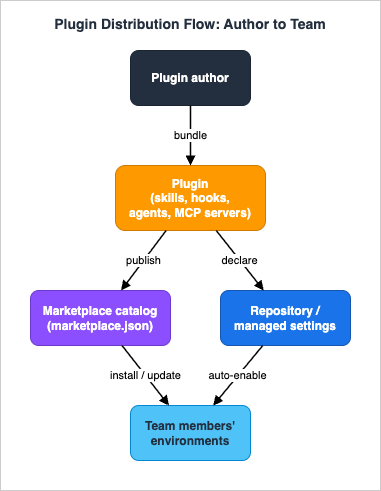
3. Plugin Anatomy
A plugin is, at heart, a directory with a known shape. Get the shape right and Claude Code discovers the components automatically; get it subtly wrong — most commonly by nesting component folders in the wrong place — and the plugin loads but its components silently go missing.3.1 The manifest: .claude-plugin/plugin.json
The manifest is a single JSON file at.claude-plugin/plugin.json. Two facts about it surprise people:- The manifest is optional. If you omit it, Claude Code auto-discovers components in their default locations and derives the plugin name from the directory name. You add a manifest when you need metadata (description, version, author) or custom component paths.
- If you include it,
nameis the only required field. Everything else is optional.
A minimal real-world manifest looks like this:
{
  "name": "release-tools",
  "description": "Release automation: changelog skill, pre-flight hook, and deploy agent",
  "version": "1.2.0",
  "author": {
    "name": "Platform Team",
    "email": "platform@example.com"
  }
}
name field does double duty: it is the unique identifier and the namespace for the plugin's components. A skill folder changelog/ inside a plugin named release-tools is invoked as /release-tools:changelog; an agent deployer appears as release-tools:deployer. The name must be kebab-case with no spaces.The fields you will reach for most often:
| Field | Purpose |
|---|---|
name | Required. Unique kebab-case identifier and component namespace. |
description | Shown in the plugin manager when browsing or installing. |
version | Optional but important. If set, users only receive updates when you bump it. If omitted on a git-hosted plugin, the commit SHA is used and every commit counts as a new version. (See section 7.) |
author | Object with name, and optional email and url. |
homepage / repository / license / keywords | Standard metadata for discovery and attribution. |
displayName | Human-readable name shown in UI surfaces; may contain spaces. Falls back to name. Requires a recent Claude Code version. |
defaultEnabled | Set to false to ship a plugin that installs disabled until the user opts in — useful for plugins that add cost or connect to an external service. Requires a recent Claude Code version. |
Beyond metadata, the manifest can carry component path fields when your layout deviates from the defaults —
skills, commands, agents, hooks, mcpServers, outputStyles, lspServers, plus experimental.themes and experimental.monitors. A subtlety worth knowing: these fields do not all behave the same way. For commands, agents, and outputStyles, a custom path replaces the default directory; for skills, a custom path adds to the default skills/ directory, which is always scanned. Hooks, MCP servers, and LSP servers each have their own merge rules. When you do not need custom paths, omit these fields entirely and let the default directories do the work.Two more manifest features are worth a mention without a deep dive, both linking out to the official reference rather than reproduced here in full:
userConfig, which declares values Claude Code prompts the user for at enable time (so users do not hand-edit settings.json), with a sensitive flag that routes secrets to secure storage; and dependencies, which lets a plugin require other plugins with optional semver constraints.Finally, Claude Code ignores unrecognized top-level fields in the manifest (reporting them as validation warnings, not errors). That is deliberate: it lets one
plugin.json double as, say, an npm package.json or a VS Code extension manifest. The flip side is that a misspelled recognized field becomes a silently-ignored unrecognized one — so run claude plugin validate (and --strict in CI) to catch typos before they ship.3.2 Directory structure
This is the single most important rule in the whole anatomy, and the one most often gotten wrong:Only
plugin.json goes inside .claude-plugin/. Every other directory — skills/, agents/, hooks/, commands/, and the rest — must be at the plugin root, not inside .claude-plugin/.Misplace the component folders inside
.claude-plugin/ and the plugin still loads, but its skills, agents, and hooks are missing. The symptom ("plugin appears but does nothing") is confusing precisely because there is no hard error.A complete plugin laid out the standard way:
release-tools/
├── .claude-plugin/
│   └── plugin.json          # manifest — the ONLY thing in this directory
├── skills/                  # skills as /SKILL.md directories
│   └── changelog/
│       └── SKILL.md
├── commands/                # flat-Markdown skills (legacy format)
│   └── status.md
├── agents/                  # subagent definitions
│   └── deployer.md
├── hooks/
│   └── hooks.json           # event handlers
├── .mcp.json                # MCP server definitions
├── .lsp.json                # LSP server configurations
├── monitors/
│   └── monitors.json        # background monitors
├── bin/                     # executables added to PATH while enabled
│   └── release-helper
├── settings.json            # default settings applied when enabled
├── scripts/                 # helper scripts invoked by hooks/servers
│   └── preflight.sh
├── README.md
└── LICENSE 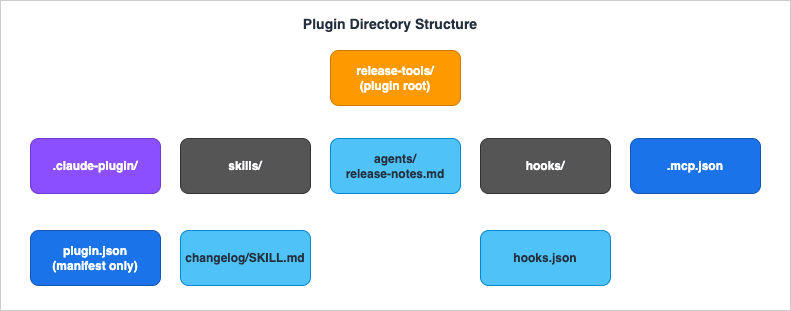
skills/ folder, an agents/ folder, a hooks/hooks.json, a .mcp.json, and so on are all discovered without being declared. One convenient shortcut: a plugin that ships exactly one skill can place its SKILL.md directly at the plugin root instead of creating a skills/ directory, and Claude Code loads it as a single skill. Use the skills/ layout once a plugin might grow past one skill.One thing that is not loaded: a
CLAUDE.md at the plugin root is not treated as project context. Plugins contribute context through skills, agents, and hooks. If you want a plugin to load instructions into Claude's context, ship them as a skill.3.3 Path variables: ${CLAUDE_PLUGIN_ROOT} and friends
Because installed plugins are copied to a cache directory rather than run in place (more on that in section 8), you can never hard-code an absolute path to a bundled script or config. Claude Code provides three variables that resolve correctly wherever the plugin ends up:${CLAUDE_PLUGIN_ROOT}— the absolute path to the plugin's installation directory. Use it for every reference to a bundled script, binary, or config file. This path changes when the plugin updates, so treat it as ephemeral and never write state there.${CLAUDE_PLUGIN_DATA}— a persistent directory for plugin state that survives updates. Use it for installed dependencies (node_modules, virtualenvs), caches, and anything that should outlive a single plugin version.${CLAUDE_PROJECT_DIR}— the project root, the same directory hooks receive in their environment.
A hook command that calls a bundled script, for example, references it through the variable:
{
  "hooks": {
    "PostToolUse": [
      {
        "matcher": "Write|Edit",
        "hooks": [
          {
            "type": "command",
            "command": "\"${CLAUDE_PLUGIN_ROOT}\"/scripts/format-code.sh"
          }
        ]
      }
    ]
  }
}
${CLAUDE_PLUGIN_ROOT} (and hard-coding a path that worked during local development) is one of the most common reasons a plugin's hook or MCP server fails after installation.4. Creating a Plugin Walkthrough
This section builds one plugin that bundles three component types — a skill, a hook, and an agent — to show how separate pieces of standalone configuration become a single installable unit. The example is arelease-tools plugin for a team that wants a consistent release workflow.4.1 Scaffold the directory
Create the plugin directory with its manifest folder, then the component directories:mkdir -p release-tools/.claude-plugin
mkdir -p release-tools/skills/changelog
mkdir -p release-tools/agents
mkdir -p release-tools/hooks
mkdir -p release-tools/scripts
release-tools/.claude-plugin/plugin.json:{
"name": "release-tools",
"description": "Consistent release workflow: changelog skill, pre-commit guard, and a release-notes agent",
"version": "0.1.0",
"author": {
"name": "Platform Team"
},
"keywords": ["release", "changelog", "ci"]
}
version starts at 0.1.0. While you iterate, you could omit it entirely and let the git commit SHA drive updates; setting it explicitly is the right move once you cut real releases. Section 7 covers that choice in full.4.2 Add the skill
Skills live inskills/<name>/SKILL.md. The folder name becomes the (namespaced) invocation name. Write release-tools/skills/changelog/SKILL.md:---
description: Draft a changelog entry from the staged git diff. Use when preparing a release or when the user asks for release notes.
---
Generate a changelog entry for the current changes:
1. Read the staged diff with `git diff --cached`.
2. Group changes into Added, Changed, Fixed, and Removed.
3. Write one concise bullet per user-visible change. Omit internal refactors.
4. Output the entry in Keep a Changelog format under a new version heading.
description is the most important line: it is what Claude reads to decide when the skill applies. Authoring descriptions that trigger correctly is its own discipline, covered in the skills guide; here the point is simply that the skill is now part of the plugin and will be invocable as /release-tools:changelog.4.3 Add the hook
Hooks in a plugin go inhooks/hooks.json, and the format is identical to the hooks object in a standalone settings.json — which is exactly why migrating an existing hook is a copy-paste. Write release-tools/hooks/hooks.json:{
"hooks": {
"PreToolUse": [
{
"matcher": "Bash",
"hooks": [
{
"type": "command",
"command": "\"${CLAUDE_PLUGIN_ROOT}\"/scripts/guard-release.sh"
}
]
}
]
}
}
${CLAUDE_PLUGIN_ROOT}. A minimal release-tools/scripts/guard-release.sh that blocks an accidental publish from a dirty tree:#!/usr/bin/env bash
# Read the hook payload from stdin and block `npm publish` when the tree is dirty.
input=$(cat)
command=$(printf '%s' "$input" | jq -r '.tool_input.command // ""')
case "$command" in
*"npm publish"*)
if [ -n "$(git status --porcelain)" ]; then
echo "Refusing to publish: working tree is dirty. Commit or stash first." >&2
exit 2
fi
;;
esac
exit 0
chmod +x release-tools/scripts/guard-release.sh
4.4 Add the agent
Subagents go inagents/ as Markdown files with YAML frontmatter. Write release-tools/agents/release-notes.md:---
name: release-notes
description: Writes a polished release announcement from a changelog. Invoke after the changelog is finalized.
model: sonnet
disallowedTools: Write, Edit
---
You are a release communications specialist. Given a finalized changelog, write a short,
user-facing release announcement: a one-line summary, three highlights in plain language,
and an upgrade note if any change is breaking. Do not invent features not present in the changelog.
name, description, model, effort, maxTurns, tools, disallowedTools, skills, memory, background, and isolation (whose only valid value is worktree). For security reasons, plugin-shipped agents may not declare hooks, mcpServers, or permissionMode. Designing the agent's tool surface and prompt is the domain of the Subagents and Orchestration Guide; the plugin simply bundles the definition so it appears in everyone's /agents.4.5 Test locally, then validate
You do not need to publish a plugin to run it. The--plugin-dir flag loads a plugin directly from disk for the session:claude --plugin-dir ./release-tools
/release-tools:changelog, confirm the agent shows up in /agents, and trigger the hook by attempting a Bash command. As you edit, run /reload-plugins to pick up changes without restarting — that reloads skills, agents, hooks, plugin MCP servers, and plugin LSP servers in place.Before you share anything, validate the manifest and component files:
claude plugin validate ./release-tools
plugin.json, skill and agent frontmatter, and hooks/hooks.json for syntax and schema errors. In CI, add --strict so unrecognized-field warnings (a misspelled key, a leftover field from another tool's manifest) fail the build instead of passing silently.With three component types bundled, validated, and tested, you have a single directory that captures a whole workflow. The next step is making it installable.
4.6 Converting existing standalone configuration
If the workflow you want to package already lives in a.claude/ directory, you do not start from scratch — you convert it. Create the plugin structure with its .claude-plugin/plugin.json, copy your existing commands/, agents/, and skills/ directories into the plugin folder, and move the hooks object out of your settings.json into hooks/hooks.json. Because the hook format is identical in both places, that last step is a literal copy-paste of the JSON. Load the result with --plugin-dir to confirm each component still works, then remove the originals from .claude/ to avoid duplicates.One ordering detail matters during the cutover: project and user
.claude/agents/ definitions override same-named plugin agents, so a plugin's agent only takes effect once the original standalone definition is gone. If you migrate an agent and it seems not to change behavior, check that you actually deleted the standalone copy. This is the same boundary that makes standalone config a good place to prototype and a plugin the right place to ship: the local copy always wins for the person who has it, which is exactly what you want while iterating and exactly what you remove when standardizing.5. Marketplaces and Installation
A plugin on disk is useful to you. To reach other people, it goes through a marketplace: a catalog that lists plugins and tells Claude Code where to fetch each one. Marketplaces provide discovery, version tracking, and updates.5.1 The marketplace file: .claude-plugin/marketplace.json
A marketplace is defined by amarketplace.json at .claude-plugin/marketplace.json in a repository. It names the marketplace, identifies the owner, and lists plugins with their sources:{
"name": "platform-tools",
"owner": {
"name": "Platform Team",
"email": "platform@example.com"
},
"plugins": [
{
"name": "release-tools",
"source": "./plugins/release-tools",
"description": "Consistent release workflow"
}
]
}
name (public-facing, kebab-case; users see it as plugin@marketplace), owner, and the plugins array. Each plugin entry needs at least a name and a source. A marketplace can bundle many plugins in one repository, each entry pointing at its own location.Two points keep teams out of trouble here. First, the
name is what users reference and what claude plugin marketplace remove expects — and adding a second marketplace with the same name replaces the first for that user, so names must be unique and stable. Second, a set of names is reserved for official Anthropic use and cannot be used by third-party marketplaces (and names that impersonate official ones are blocked); pick a name that clearly belongs to your team or project.5.2 Where plugins come from: source types
Thesource field of each plugin entry is independent of where the marketplace itself lives. The marketplace catalog can be hosted in one repository while the plugins it lists are fetched from others. Supported source types:| Source | Shape | Use when |
|---|---|---|
| Relative path | "./plugins/release-tools" | The plugin lives in the same repository as the marketplace. Only works for git-hosted marketplaces. |
github | { "source": "github", "repo": "owner/repo", "ref": "...", "sha": "..." } | The plugin is in a GitHub repo. |
url | { "source": "url", "url": "https://gitlab.com/team/plugin.git" } | Any git host (GitLab, Bitbucket, self-hosted). |
git-subdir | { "source": "git-subdir", "url": "...", "path": "tools/plugin" } | The plugin is a subdirectory of a larger monorepo; clones sparsely. |
npm | { "source": "npm", "package": "@acme/claude-plugin", "version": "..." } | The plugin is published as an npm package. |
For the git-based sources you can pin with
ref (a branch or tag) and sha (an exact 40-character commit). When both are set, the sha is the effective pin and installation succeeds even if the named branch was later deleted. Pinning by sha is how you get reproducible installs.One footgun to internalize: relative-path sources only resolve when users add your marketplace via git. If someone adds the marketplace by pointing at a raw
marketplace.json URL, only that one file is downloaded, and relative paths to plugin directories will not resolve. For URL-distributed marketplaces, use github, url, or npm sources instead.5.3 Official and community marketplaces
You are not limited to your own marketplace. Anthropic maintains two public ones:claude-plugins-official— a curated set of plugins maintained by Anthropic, registered automatically the first time you start Claude Code interactively. (A non-interactive script that runs before that first launch can add it explicitly.) Anthropic decides what goes in it; there is no open submission process.claude-community— the public community marketplace where reviewed third-party submissions land. Add it by its repository path with/plugin marketplace add anthropics/claude-plugins-community, then install from it as@claude-community.
If you build something broadly useful, you can submit it to the community marketplace through the in-app submission forms; the review pipeline runs
claude plugin validate plus automated safety screening, and approved plugins are pinned to a specific commit SHA in the public catalog. The mechanics of submission are documented officially and out of scope here; the relevant point for distribution planning is that a public, reviewed channel exists alongside your private team marketplace.5.4 Adding marketplaces and installing plugins
Within a session, the/plugin command opens the interactive plugin manager, and the /plugin marketplace and /plugin install commands handle catalogs and installs directly. For scripting and automation there is a parallel non-interactive CLI under claude plugin. The everyday operations:# Add a marketplace (GitHub shorthand, git URL, or local path all work)
claude plugin marketplace add your-org/platform-tools
# Install a plugin from it
claude plugin install release-tools@platform-tools
# List, enable, disable, update, and remove
claude plugin list
claude plugin disable release-tools@platform-tools
claude plugin enable release-tools@platform-tools
claude plugin update release-tools@platform-tools
claude plugin uninstall release-tools@platform-tools
# Refresh a marketplace to pick up new plugins and version changes
claude plugin marketplace update platform-tools
/plugin marketplace add, /plugin install, and so on. The distinction between disable and uninstall matters operationally: disabling keeps the plugin installed but inert (and is reversible instantly), while uninstalling removes it and, from the last scope, deletes its persistent data directory. For "I want to stop this for now," disable; for "I am removing this," uninstall.claude plugin details <name> is worth knowing too: it prints a plugin's component inventory and a projected token cost — both the always-on cost (the listing text added to every session) and the per-component on-invoke cost. That makes the context budget of a plugin visible before you roll it out widely, which connects directly to the "oversized plugin" pitfall in section 9.5.5 Strict mode: who owns the component definitions
Each plugin entry in a marketplace carries astrict flag that decides whether the plugin's own plugin.json or the marketplace entry is the authority for its components (skills, agents, hooks, MCP servers, output styles). It defaults to true, and most plugins never touch it.strict: true(default) — the plugin'splugin.jsonis the authority. The marketplace entry can supplement it with extra components, and the two sources merge. This is what you want when the plugin manages its own components and the marketplace is just listing it.strict: false— the marketplace entry is the entire definition. The plugin repository can provide raw files with no manifest of its own, and the entry declares which of those files become skills, agents, hooks, and so on. If astrict: falseplugin also ships aplugin.jsonthat declares components, that is a conflict and the plugin fails to load.
The practical use for
strict: false is a marketplace operator who wants to curate or restructure a plugin's components differently from how the author shipped them — or who wants to list a repository that contains SKILL.md files but no plugin manifest at all, declaring the skills directly in the marketplace entry. For plugins you both author and publish, leave strict at its default and let the manifest own the definition.6. Team and Organization Rollout
Everything so far gets a plugin onto one machine. Rolling it out to a team means deciding where the install is declared, because that determines who gets it and whether they can override it. This is where plugins stop being a personal convenience and become a managed standard. For the broader economics and people-side of an organization-wide Claude Code rollout, this section pairs with the Claude Code and Desktop Organization Rollout Guide; here the focus is the plugin mechanics specifically.6.1 Installation scopes
A plugin install is recorded in a settings file, and which file you choose is the scope. The scopes, from most personal to most controlled:| Scope | Settings file | Who it reaches |
|---|---|---|
user | ~/.claude/settings.json | Just you, across all your projects (the default). |
project | .claude/settings.json | Everyone who clones the repository and trusts it. |
local | .claude/settings.local.json | Just you, in this project (gitignored). |
managed | Managed settings | Everyone the administrator's policy covers; read-only to users. |
The CLI takes a
--scope flag for this. Installing at project scope, for instance, writes the plugin into the repository's .claude/settings.json so it travels with the repo:claude plugin install release-tools@platform-tools --scope project
6.2 Shipping plugins through the repository
The most common team rollout is "anyone who works in this repo should have these plugins." You achieve it by declaring the marketplace and the enabled plugins in the project's.claude/settings.json. Two keys do the work:{
"extraKnownMarketplaces": {
"platform-tools": {
"source": {
"source": "github",
"repo": "your-org/platform-tools"
}
}
},
"enabledPlugins": {
"release-tools@platform-tools": true
}
}
extraKnownMarketplaces makes the marketplace known to anyone working in the project, and enabledPlugins specifies which plugins are on by default. When a teammate clones the repo and trusts the folder, Claude Code prompts them to install the declared marketplace and turns on the listed plugins. Because these declarations live in version control, updating the team's standard set is a normal pull request — no out-of-band "everyone please re-copy my config" message.Note that this rollout is gated by workspace trust: project-scoped plugins, like anything in a repository's
.claude/, load only after the user accepts the trust dialog for that folder. That gate is a feature, not friction — it is what stops a cloned repository from silently running code on a developer's machine. Section 8 returns to why that matters.6.3 Organization governance with managed settings
For organizations that need control over which plugin sources are even allowed, managed settings provide enforcement that individual users and projects cannot override. The central key isstrictKnownMarketplaces:- Undefined (default): no restriction; users can add any marketplace.
- Empty array
[]: complete lockdown; users cannot add any new marketplace. - A list of allowed sources: users can only add marketplaces matching the allowlist.
The allowlist supports exact source matches and regex
hostPattern / pathPattern entries, so you can, for example, allow any marketplace hosted on an internal git server:{
"strictKnownMarketplaces": [
{
"source": "hostPattern",
"hostPattern": "^github\\.example\\.com$"
}
]
}
strictKnownMarketplaces controls what users may add but does not register anything itself; pair it with extraKnownMarketplaces in the same managed settings to both lock down sources and make the approved ones available automatically. A companion blockedMarketplaces key denies specific sources. Because these are managed settings, the restrictions are enforced before any network or filesystem operation and cannot be overridden downstream.6.4 Pre-seeding plugins for containers and CI
Interactive install does not fit containerized or CI environments, where you want Claude Code to start with plugins already present and no cloning at runtime. TheCLAUDE_CODE_PLUGIN_SEED_DIR environment variable points at a pre-populated plugins directory that mirrors the structure of ~/.claude/plugins. You build the seed once during image build — run Claude Code, add the marketplace, install the plugins, and copy the resulting directory into the image — then set the variable at runtime. Seed marketplaces are read-only (auto-updates are disabled for them), and seed entries take precedence over the user's configuration on each startup. This is the clean way to bake a standard plugin set into a build image. Private marketplaces in automated contexts additionally need a credential in the environment — GITHUB_TOKEN/GH_TOKEN, GITLAB_TOKEN/GL_TOKEN, or BITBUCKET_TOKEN — so background updates can authenticate without an interactive prompt.6.5 Onboarding a new team member
Putting the pieces together, the day-one experience for someone joining a team that has standardized on plugins is short: clone the repository, start Claude Code in it, accept the trust dialog, and accept the prompt to install the declared marketplace and plugins. From that point they have the same skills, agents, hooks, and MCP servers as everyone else, and they receive updates through the normal/plugin update flow or the marketplace's automatic refresh. The standard set is no longer tribal knowledge in a wiki — it is configuration that arrives with the code.7. Versioning and Updates
A plugin's version is more than metadata: it is the cache key Claude Code uses to decide whether an update is available. If the resolved version matches what a user already has,/plugin update and auto-update skip the plugin. Understanding how the version is resolved is therefore the difference between "my fix reached the team" and "everyone is still running last week's copy."7.1 How a version is resolved
Claude Code resolves a plugin's version from the first of these that is set:- The
versionfield in the plugin'splugin.json. - The
versionfield in the plugin's marketplace entry. - The git commit SHA of the plugin's source (for git-based sources).
unknown(for npm sources or local directories not in a git repo).
That ordering yields two clean strategies:
| Strategy | How | Update behavior | Best for |
|---|---|---|---|
| Explicit version | Set "version": "2.1.0" in plugin.json | Users update only when you bump the field | Published plugins with real release cycles |
| Commit-SHA version | Omit version everywhere | Every new commit is a new version | Internal or actively-developed plugins |
The trap lives between these two. If you set
version in plugin.json and then push new commits without bumping it, Claude Code sees the same version string and keeps the cached copy — your changes never reach users, and /plugin update cheerfully reports "already at the latest version." Either bump the field on every release (semantic versioning is the convention: MAJOR for breaking changes, MINOR for features, PATCH for fixes), or omit it so the commit SHA drives updates while you iterate. And do not set version in both plugin.json and the marketplace entry; the plugin.json value wins silently, so a stale manifest version can mask one you set in the marketplace.7.2 Default enablement and disabling
A plugin can ship disabled with"defaultEnabled": false in its manifest (or its marketplace entry, which takes precedence). Use it for plugins that add cost or scope a user should consciously opt into — one that connects to an external paid service, for example. The user's own setting always wins once written, so flipping defaultEnabled in a later release does not flip users who have already made a choice.Disabling is the reversible off-switch.
claude plugin disable <plugin> keeps the plugin installed but inert; claude plugin enable <plugin> turns it back on. This is distinct from uninstalling and is the right tool when you want to pause a plugin — for triage, or because it conflicts with something — without losing it.7.3 Re-vet on update
Updates are also the moment to remember that a plugin is code from someone else, and that an update can change that code. A plugin you vetted at version 1.0 can ship anything in 1.1. For internal plugins under your own control this is a non-issue; for third-party plugins it is the central reason the security discussion in the next section exists. Pinning a plugin source bysha is the strongest control here: it freezes the exact commit you reviewed, and updating becomes an explicit, reviewable change to the pin rather than an automatic pull. Re-vetting third-party plugins on update — and the static-inspection techniques for doing it — is the subject of the Agent Skills Security Vetting Guide.7.4 Release channels: stable and latest
When some users should track a tested release and others want the newest build, you can run two channels off the same plugin repository. Point two marketplaces at different refs or SHAs of that repo — one pinned to a stable branch or tag, one to latest — and assign each marketplace to a different user group through managed settings'extraKnownMarketplaces. A stable group and an early-access group then resolve the same plugin to different versions automatically.The one rule that makes channels work: each channel must resolve to a different version. With explicit versions, the plugin's
plugin.json must declare a different version at each pinned ref; with commit-SHA versioning, the distinct commits already distinguish the channels. If two refs happen to resolve to the same version string, Claude Code treats them as identical and skips the update — the early-access group would silently stay on the stable build. This is the same version-resolution logic from section 7.1, applied across two marketplaces instead of one.8. Security Considerations
This section is deliberately a high-level orientation, not a how-to. Vetting third-party extensions is a discipline of its own, covered in depth by the Agent Skills Security Vetting Guide and supported by tooling in the Agent Skills Validator. What follows is the threat model you need to hold in mind while distributing plugins, and the controls Claude Code provides.The core fact is simple: a plugin can ship code that runs on the installer's machine. Hooks execute shell commands. MCP and LSP servers are processes that start when the plugin is enabled.
bin/ executables enter the Bash tool's PATH. Monitors run background commands. Installing a plugin is therefore a trust decision of the same weight as running someone's install script — and one that recurs on every update, because an update can change that code.Claude Code provides several structural controls, each covered in its mechanics earlier in this guide:
- The workspace trust gate. Project-scoped plugins load only after the user trusts the folder, so cloning a repository does not by itself run its plugins' code.
- Cache isolation. Installed plugins are copied into a versioned cache (
~/.claude/plugins/cache) rather than run in place, and paths that traverse outside the plugin directory do not resolve. A plugin cannot quietly reach arbitrary files on the host through../references. - Managed-settings allowlisting.
strictKnownMarketplaceslets an organization restrict installs to approved sources before any fetch happens (section 6.3). - SHA pinning. Pinning a plugin source to an exact commit freezes the reviewed code and turns updates into explicit changes (section 7).
- Validation and safety screening.
claude plugin validatecatches manifest and frontmatter errors, and the community marketplace adds automated safety screening on submissions.
The non-negotiable operating principle: treat third-party plugins like third-party code. Read what a plugin's hooks and servers actually do before enabling it, prefer pinned sources for anything outside your control, and route organizational installs through an allowlist. And keep one caveat front of mind — a plugin passing
claude plugin validate or clearing automated screening means it is well-formed and screened, not that it is safe. Validation checks structure, not intent. For how to actually inspect a plugin's components for malicious patterns, defer to the vetting guide and the validator tool.9. Common Pitfalls
The failure modes below recur often enough to be worth naming. Most are not bugs; they are predictable consequences of how plugins package and distribute code.- The oversized plugin. Every component a plugin ships adds always-on context: skill descriptions, agent descriptions, and command names sit in every session whether or not anything fires. A plugin that bundles twenty marginally-useful skills taxes every session's context budget. Keep plugins focused, and use
claude plugin details <name>to see the projected token cost before rolling one out widely. Split a sprawling plugin into smaller, purpose-built ones. - Personal configuration leaking into a shared plugin. A plugin built by copying your
.claude/directory wholesale can carry your machine-specific paths, personal API endpoints, or experiment-grade skills you never meant to publish. Curate what goes in. The plugin is a product other people install, not a backup of your setup. - Manifest and component misplacement. Putting component folders inside
.claude-plugin/(instead of at the plugin root) makes them silently invisible — the plugin loads, the components do not. Onlyplugin.jsonbelongs in.claude-plugin/. This is the single most common structural mistake; section 3.2 is the rule to re-read. - Hard-coded paths instead of
${CLAUDE_PLUGIN_ROOT}. A hook or MCP server that references a script by an absolute path works in local--plugin-dirtesting and breaks after installation, because the installed plugin lives in the cache under a different path. Always reference bundled files through the variable. - Forgetting to bump
version. With an explicitversionset inplugin.json, pushing commits without bumping the field ships nothing — Claude Code keeps the cached copy. Either bump on every release or omitversionand let the commit SHA drive updates (section 7.1). - Unmanaged third-party updates. Auto-updating third-party plugins means running new, unreviewed code automatically. For anything outside your control, pin by
shaand treat an update as a reviewable change, not a silent pull (sections 7.3 and 8). - Non-executable hook scripts. A bundled hook script that is not
chmod +xfails to fire, usually with no obvious error. Make scripts executable and confirm the shebang line is present.
10. Frequently Asked Questions
How is a plugin different from just sharing a repository with a.claude/ directory?A committed
.claude/ directory shares configuration with whoever clones that one repository and is only available inside it. A plugin is a versioned, installable unit that works across projects, is discoverable through a marketplace, updates through /plugin update, and namespaces its components to avoid collisions. The two are not exclusive — a common pattern is to declare a team marketplace and enabled plugins in a repository's .claude/settings.json (section 6.2), which gives you the repo-scoped convenience and the plugin's versioning and reuse at once.Can a plugin include MCP servers?
Yes. A plugin declares MCP servers in a
.mcp.json at the plugin root (or inline in plugin.json), and they start automatically when the plugin is enabled, appearing as standard tools in Claude's toolkit. This is one of the main reasons to package as a plugin: it lets you distribute a tool integration without asking each user to hand-edit their own MCP configuration. For the wider catalog of MCP servers worth bundling, see the MCP Server Ecosystem Reference.How do I pin a plugin to a specific version?
Two layers. At the source level, pin the marketplace entry's
source to an exact commit with sha (for github, url, and git-subdir sources) so installation always fetches that commit. At the version level, set an explicit version in plugin.json and bump it per release so updates are intentional. SHA pinning is the stronger control for third-party plugins because it freezes the exact reviewed code; explicit versions are the cleaner model for plugins you publish with a real release cycle.Why does my plugin install but its skills, agents, or hooks do not appear?
Almost always directory placement: component folders must be at the plugin root, not inside
.claude-plugin/, which holds only plugin.json. Run claude plugin validate ./your-plugin and claude --debug to see what loaded. Two other frequent causes are a hook script that is not executable, and a custom component path in the manifest that points at the wrong place.Do I have to publish to a public marketplace to share a plugin with my team?
No. Host a marketplace in a private repository and add it at project scope, or pre-seed it into a container image. The public
claude-plugins-official and claude-community marketplaces are for broad distribution; internal teams typically run their own private marketplace and never touch the public ones.What happens to a plugin's data when I uninstall it?
By default, uninstalling from the last scope where a plugin is installed also deletes its persistent data directory (
${CLAUDE_PLUGIN_DATA}). Pass --keep-data to preserve it — useful when you are reinstalling to test a new version. Disabling, by contrast, leaves everything in place and is the reversible option when you only want to pause a plugin.11. Summary
Plugins are Claude Code's distribution layer. They do not add new capabilities — skills, hooks, subagents, and MCP servers all exist standalone — but they package those capabilities into a named, versioned, installable unit, and marketplaces make that unit discoverable and updatable. That packaging is what turns a personal setup into a team standard.The throughline of this guide: a plugin is a directory with a known shape (
plugin.json in .claude-plugin/, components at the root); a marketplace is a catalog that points at plugin sources; rollout is a matter of where you declare the install — repository settings for a team, managed settings for an organization, a seed directory for containers; and versioning, governed by the plugin.json / marketplace-entry / commit-SHA resolution order, decides whether your changes actually reach people. The recurring discipline across all of it is treating plugins — especially third-party ones — as code you run on trust, pinned and reviewed.From here, the adjacent layers fill in the details this guide deferred: the Claude Code Skills Complete Guide for authoring the skills you will bundle, the Agent Skills Security Vetting Guide for inspecting third-party plugins before you trust them, the Claude Code Hooks Complete Guide and Subagents and Orchestration Guide for the components themselves, and the Extension Layers Decision Guide for choosing among them. For the full settings surface that backs
extraKnownMarketplaces, enabledPlugins, and strictKnownMarketplaces, see the Claude Code Features and Settings Reference.12. References
- Create plugins - Claude Code Documentation
- Plugins reference - Claude Code Documentation
- Create and distribute a plugin marketplace - Claude Code Documentation
- Discover and install plugins - Claude Code Documentation
- Settings - Claude Code Documentation
- Skills - Claude Code Documentation
- Subagents - Claude Code Documentation
- Hooks - Claude Code Documentation
- MCP - Claude Code Documentation
References:
Tech Blog with curated related content
Written by Hidekazu Konishi