Cost-Optimization Guide to Rolling Out Claude Code and Claude Desktop Across Your Organization - Choosing Delivery Models and Finding Break-Even
First Published:
Last Updated:
Claude Code and Claude Desktop take just a few clicks to start using on your own. But the moment you decide to deploy them across your whole organization, a wall appears: cost. The monthly plans are pricey, and usage-based pricing can quietly drop features. This is a hands-on guide to scaling that wall — using nothing but publicly available information.
- Audience: anyone evaluating an organization-wide rollout of Claude Code and Claude Desktop (whose agentic capability is Claude Cowork).
- As of: June 2026 (pricing and features change frequently — always re-check the official pricing page before signing a contract).
This guide has a companion that covers the network side of the same rollout — Practical Guide to Deploying Claude Code and Claude Desktop Behind a Corporate Proxy. If you are entirely new to the CLI itself, the Claude Code Getting Started Guide is the place to begin.
Quick Reference Index
- 1. The Problems This Guide Solves
- 2. TL;DR — One Strong Approach
- 3. The Three Delivery Models
- 4. The "No WebSearch on Bedrock" Story
- 5. The Desktop App Is Not Subscription-Only
- 6. A Frequency-Tiered Architecture
- 7. Break-Even from Public Pricing
- 8. Before Adopting Claude Platform on AWS
- 9. Governance and Cost-Cap Controls
- 10. Conclusion — A Two-Week PoC
- 11. Frequently Asked Questions
- 12. References
1. The Problems This Guide Solves
When organizations try to roll out Claude broadly, they almost always hit the same walls:- "The monthly plans are expensive. Handing everyone a subscription blows up the budget."
- "We switched to usage-based pricing (the API)... and now WebSearch doesn't work."
- "If people use personal subscriptions for work, we lose governance and data can leak outside the organization."
- "Bedrock? Platform on AWS? Enterprise? There are too many similarly named offerings to choose from."
- "In the end, how many people should be on flat-rate and how many on usage-based to minimize cost?"
None of these are organization-specific quirks — they're universal challenges for anyone seriously adopting Claude. In one sentence, this guide's claim is: once you correctly distinguish the three delivery models and think about combining them by usage frequency, these problems become tractable.
There's no single right answer. The optimal mix shifts with your size, usage patterns, governance requirements, and existing cloud contracts. What this guide offers is one way to frame the decision among several valid ones — read it against your own situation.
2. TL;DR — One Strong Approach
One strong approach is a layered setup: "make Claude Platform on AWS (usage-based) the floor for the whole organization, then layer Anthropic's first-party subscription seats (Team / Enterprise) on top only for heavy users and those who need governance." Because it handles light-to-heavy usage within a single structure, it's an easy starting point for cost optimization.
- 🏛 Foundation = usage-based (zero fixed cost) — cover everyone, low-frequency users, and automation (CI) here
- 📈 Add flat-rate seats only for frequent users — steady → Team Standard, heavy → Team Premium (an isolated few → personal Max)
- 🔐 Go Enterprise when compliance demands it — audit logs / SCIM / HIPAA / data retention / IP restrictions, or roughly 50–200 users
- 💰 Break-even is fully determined by public pricing — a simple division: "once monthly spend exceeds the seat price, flat-rate wins"
Of course, other choices are perfectly reasonable too: "put everyone on Team from the start for operational simplicity," or "we already have a large AWS commitment, so consolidate on Enterprise via AWS Marketplace." The decision criteria are laid out below — adapt them to what your organization values most.
Terminology: a "seat" = a license for one user (one seat per person — not a concurrent-connection count; we use Anthropic's official English term "seat"). And we use "Claude Desktop" for the desktop app itself and "Cowork" for its agentic capability — "Claude Desktop" when the point is about the app (distribution, which backend it points at), and "Cowork" when it's specifically about the agent's behavior.
3. The Three Delivery Models
The single biggest source of confusion in org-wide Claude adoption is mixing up similarly named offerings. Claude (and Claude Code / Claude Desktop) can be routed three fundamentally different ways. For the deeper provider-routing and billing mechanics behind these paths, see Claude Code API Billing across Anthropic, Amazon Bedrock, and Google Vertex AI.| Delivery model | Operated by | Billing | WebSearch | Auth | Best for |
|---|---|---|---|---|---|
| ① Anthropic first-party subscription (claude.ai / claude.com) | Anthropic | Flat (per seat) | ◯ | claude.ai login | Steady–heavy users, central governance |
| ② Claude Platform on AWS | Anthropic (runs it) AWS (bills it) | Usage-based | ◯ | AWS IAM / AWS-issued API key | Org-wide floor, low-frequency, CI |
| ③ Amazon Bedrock | AWS | Usage-based | ✕ | AWS IAM | (Limited — no WebSearch) |
Three facts to internalize:
- ② "Claude Platform on AWS" is not the same as ③ "Amazon Bedrock." The former gives you Anthropic's native features as-is (WebSearch / Web Fetch / MCP connectors / Skills / Files API / Prompt Caching). The latter runs Anthropic models inside the AWS boundary and does not support native WebSearch. New features also tend to land immediately on Platform on AWS but with a delay on Bedrock.
- ② is usage-based with no minimum seat count, no minimum spend, and no term commitment. You can start with a single user — well suited as a "thin, org-wide floor." Prerequisites are just an AWS account, accepting the terms, and a one-time enablement of outbound web identity federation. It works in all commercial AWS regions.
- You keep the same Claude Code / Claude Desktop app and just switch the backend it points at. No need to swap applications.
3.1 A Common Mix-Up — "Platform on AWS" and "Claude for Enterprise" Are Different Products
Two confusingly similar products live on the same AWS Marketplace:| Claude Platform on AWS | Claude for Enterprise (on AWS Marketplace) | |
|---|---|---|
| What it is | Usage-based API (consumption) | The AWS-procured version of the Enterprise plan |
| Billing | Pure usage, no seats | Seats ($20/seat) + full usage |
| Minimum headcount | None (start with 1) | Yes (from 20 seats) |
| Role | Ideal as the org-wide "floor" | For organizations at a scale that needs governance |
When you contract for "Claude on AWS Marketplace," always confirm which of the two you mean.

4. The "No WebSearch on Bedrock" Story
A common trap: a team picks Amazon Bedrock's usage-based pricing "because it's cost-optimal," then later discovers that Claude's native WebSearch (web_search tool) doesn't work. This is true.| Platform | Native WebSearch |
|---|---|
| Claude API (official) | ◯ |
| Claude Platform on AWS | ◯ |
| Microsoft Foundry | ◯ |
| Vertex AI | △ (basic only; no dynamic filtering) |
| Amazon Bedrock | ✕ (not supported) |
There are workarounds on Bedrock ("Bedrock Agents + an external search API," "intercept via a LiteLLM proxy"), but because they aren't the native tool, they come with constraints and quirks. And it's not just WebSearch — Skills, the Files API, the Batch API, and other native features often require external integration or custom work on Bedrock (Prompt Caching, by contrast, is natively supported there).
The fix is simple: choose Claude Platform on AWS instead of Bedrock. Platform on AWS gives you the benefit of usage-based pricing (zero fixed cost) while keeping Anthropic's native features — including WebSearch.
Lesson: don't equate "usage-based" with "Bedrock." If you want usage-based billing and WebSearch (or native features), Claude Platform on AWS can be the answer. One nuance: if you must keep data inside the AWS boundary (a data-residency requirement), Bedrock has the edge — so "WebSearch vs. AWS-internal-only" is a requirements call.
5. The Desktop App Is Not Subscription-Only
The Claude Desktop agent capability (Claude Cowork) is often assumed to "require a subscription." It's true that the standard mode — logging into claude.ai — needs a subscription. But if you change the backend it points at, it runs subscription-free on usage-based billing.| Route | Subscription | WebSearch | Billing |
|---|---|---|---|
| Standard Cowork (claude.ai) | Required | ◯ | Monthly (flat/usage) |
| Cowork on Claude Platform on AWS | Not required | ◯ | AWS Marketplace usage |
| Cowork on Amazon Bedrock (3rd-party mode) | Not required | ✕ | AWS usage |
- Pointed at Platform on AWS, it runs with no subscription, usage-based billing, WebSearch enabled, and AWS auth. Claude Code (the CLI) is routed there via environment variables (enable
CLAUDE_CODE_USE_ANTHROPIC_AWSplus anANTHROPIC_AWS_WORKSPACE_IDandAWS_REGION); the desktop app is pointed at the backend through its own third-party-inference settings (distributed centrally via MDM for a fleet). Note that as of this writing those settings expose named provider values for Bedrock, Vertex AI, Foundry, a custom gateway, and the Anthropic API — Claude Platform on AWS has no dedicated entry yet, so the route may go through the gateway option (AWS's announcement confirms both Cowork and Claude Code can connect to Platform on AWS; verify the exact path in the PoC below). In both cases authentication runs through AWS credentials (or a workspace API key) rather than a claude.ai login, so the/loginand/logoutcommands don't change its authentication. - Bedrock's 3rd-party mode (pushing the inference-mode setting via MDM) also allows usage-based distribution, but as noted it loses WebSearch — so for usage-based distribution of the desktop app, Platform on AWS is recommended.
- ⚠️ Note that even when inference traffic goes to the backend, the desktop app itself (launch, auto-update, telemetry) may keep separate traffic of its own. It's worth confirming this in a real-device check (the PoC below).
In other words, drop the assumption that "the desktop app requires an expensive subscription." You can hand it to low-frequency users on usage-based billing, and put only the few who need unlimited use on a subscription.
6. A Frequency-Tiered Architecture
"Give everyone the same plan" is operationally simple but tends to be costly. As one way to think about it, here's a design that makes usage-based the foundation, then promotes only heavy users and those needing governance onto flat-rate seats.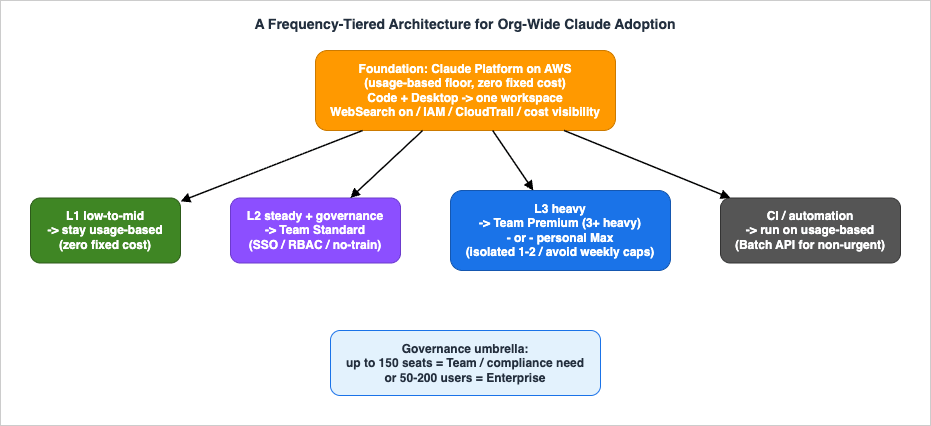
6.1 L1: Low-to-Mid Frequency → Stay on Usage-Based
Zero seat cost. As long as monthly token spend stays under the seat price ($20–25), this is dramatically cheaper than a flat seat. This is the only true zero-fixed-cost floor. Both Code and Desktop can be distributed broadly here.
💡 Automation (CI / headless runs) belongs on usage-based. From June 15, 2026 (announced 2026-05-14), non-interactive agent usage (claude -p, the Agent SDK, GitHub Actions, etc.) no longer counts against flat-rate quotas — each plan tier gets a separate monthly Agent SDK credit ($20–$200 by tier), and usage beyond that credit is billed at API rates (usage credits). Interactive use stays within the flat-rate quota, but putting automation on usage from the start is the rational choice — and Anthropic itself now steers teams running shared automation toward pay-as-you-go API billing rather than subscription credentials. And for non-interactive batch work that isn't time-sensitive, the Batch API (50% off both input and output usage) runs the same jobs cheaper still.
For how to wire Claude Code into CI/CD on usage-based billing, see Claude Code in CI/CD and Headless Automation.
6.2 L2: Steady Users + Those Needing Central Governance → Team Standard Seats
Promote anyone who fits one of these:- Needs org governance: SSO, RBAC, training-excluded by default, central billing, project sharing (none of which exist on personal Pro/Max — below Enterprise, Team is the only tier that provides them).
- A steady user whose monthly usage consistently exceeds the seat price ($20–25).
Standard still includes Code/Cowork, but with modest capacity (1.25× Pro per session, one weekly cap). Overages continue at usage credits (API rates).
6.3 L3: Heavy Users → Team Premium Seats, or Personal Max
- If you have 3+ heavy users and also need central governance, use Team Premium (6.25×/session, weekly caps apply, central management included).
- For an isolated 1–2 heavy users, personal Max can be cheaper and simpler than standing up a 5-seat-minimum Team.
This is where opinions diverge, so here's Team Premium next to personal Max:
| Aspect | Team Premium | Personal Max |
|---|---|---|
| Capacity | 6.25×/session | Max 5x → 5× (5-hour rolling) |
| Weekly cap | Yes (resets 7 days after session start) | Yes — two limits (all-models + Sonnet-only), reset 7 days after session start; Max 20x's ceiling is very high |
| Central governance (SSO/billing/audit) | Yes | None (personal billing) |
| Running all day | Can stall mid-week | Highest ceiling (esp. Max 20x), but weekly caps still apply |
→ For a lone heavy user where a 5-seat Team minimum doesn't pencil out, personal Max — especially Max 20x — offers the highest ceiling and the simplest setup. But Max is not uncapped: like all Pro/Max plans it carries weekly limits (two on Max — one across all models, one Sonnet-only). So the real deciding factors are governance and per-seat economics, not cap avoidance — if you need SSO, central billing, audit, or training exclusion, Team/Enterprise is the only choice.
⚠️ But personal Pro/Max have weak central governance (personal billing; no SSO/RBAC/spend limits/auditing). For sustained organizational use, the rule of thumb is: consolidate onto Team/Enterprise seats wherever possible, and treat Max as a stopgap for "the few for whom a 5-seat Team minimum doesn't pencil out."
📌 Operational tip: start everyone on Standard → promote anyone who consistently exceeds limits to Premium, based on usage data. Changes are instant in the admin console, and there's no penalty for starting conservatively. You don't need to sort people correctly up front — you can shift them as you measure.
6.4 Governance Umbrella: Team or Enterprise?
Don't decide on seat count alone — decide on required governance features and scale.| Item | Team | Enterprise |
|---|---|---|
| Minimum seats | 5 (max 150) | From 20 (AWS Marketplace public offer) |
| Seat price | Std $25 / Prem $125 | $20/seat + usage (same on AWS Marketplace) |
| Usage | Bundled into seat (capped) | Full usage (API rates) |
| SSO / RBAC / spend limits / training exclusion | ◯ | ◯ |
| Audit logs / SCIM / Compliance API | ✕ | ◯ |
| HIPAA / custom data retention / IP restrictions | ✕ | ◯ |
| Context window | 1M Code (current models) | 1M Code (current models) |
One decision rule: if you need any of audit logs / SCIM / HIPAA / data retention / IP restrictions, or you're at roughly 50–200 users (the scale at which manual provisioning breaks down) → Enterprise is a candidate. Below that, where SSO + spend limits + training exclusion suffice → Team is often enough. (Note: SSO and the extended context window — 1M Code on current models — are available on Team too, not just Enterprise.)
Note that Enterprise seat fees don't include a usage allowance — it's all usage-based. So cost prediction reuses the usage math below, with the seat fee sitting on top as a thin fixed cost.
7. Break-Even from Public Pricing
This is the heart of cost optimization. The line between "put this person on usage-based" and "put them on a flat seat" can be calculated entirely from public pricing. The only unknown is "how many tokens each person uses per month."Put intuitively: a flat seat is like a gym membership; usage-based is pay-per-visit. Once you use more than the membership costs, the "member" wins. The break-even is simply "does monthly use exceed the seat price?"
7.1 (a) Dollar Basis — No Assumptions, Fully Determined
A flat seat becomes cheaper than usage-based the moment monthly API-equivalent spend exceeds the seat price. That's it.| Plan | Break-even (= monthly seat price) |
|---|---|
| Pro | $20 (annual $17) |
| Team Standard | $25 (annual $20) |
| Max 5x | $100 |
| Team Premium | $125 (annual $100) |
| Max 20x | $200 |
→ Light users (spend below the seat price) are cheapest on usage-based; heavy users (above it) are cheapest on a flat seat. Since annual contracts run ~15–20% cheaper than monthly (Pro ~15%, Team tiers 20%), the tiers you decide to keep on flat-rate are worth considering on annual terms (note that Max has no annual option — monthly only).
7.2 (b) Token Conversion — Computed from Public Unit Prices
Public token pricing (as of 2026):| Model | Input (/1M) | Output (/1M) | Role |
|---|---|---|---|
| Fable | $10 | $50 | Top tier (above Opus) |
| Opus | $5 | $25 | High intelligence / default |
| Sonnet | $3 | $15 | Volume / cost-optimal |
| Haiku | $1 | $5 | Lightweight |
With prompt caching (cache reads cost ~0.1× input), the effective unit price for repetitive work drops sharply. Using a representative coding/agent blend (input:output = 10:1) to derive an effective unit price, then dividing the seat price by it, tells you "how many tokens to break even." For how the model lineage (Opus / Sonnet / Haiku) has evolved, see the Anthropic Claude Model Release Timeline.
The formula (for reference):
effective price (/1M, input+output) = ( 10 × input_price × C + 1 × output_price ) ÷ 11
   C = cache coefficient: none = 1.0 / 80% = 0.28 (= 0.2×1.0 + 0.8×0.1)
break-even tokens = seat price ÷ effective price
(The cache coefficient models cache reads only; the one-time cache-write premium — 1.25× input for the default 5-minute TTL — is ignored, so real effective prices skew slightly above these figures.)
Effective unit price (input+output combined, per 1M tokens):
| Model | No cache | 80% cache |
|---|---|---|
| Fable | $13.6 | $7.1 |
| Opus | $6.8 | $3.5 |
| Sonnet | $4.1 | $2.1 |
| Haiku | $1.4 | $0.7 |
Monthly total tokens to reach break-even (millions of tokens/month):
| Break-even | Opus (no cache / 80%) | Sonnet (no / 80%) |
|---|---|---|
| $20 (Pro) | 2.9 / 5.6 | 4.9 / 9.4 |
| $25 (Team Standard) | 3.7 / 7.1 | 6.1 / 11.7 |
| $100 (Max 5x) | 14.7 / 28.2 | 24.4 / 47.0 |
| $125 (Team Premium) | 18.3 / 35.3 | 30.6 / 58.7 |
| $200 (Max 20x) | 29.3 / 56.4 | 48.9 / 94.0 |
(To stay readable, the break-even table omits Fable: its effective unit price is almost exactly 2× Opus, so a Fable-centric user reaches each break-even at roughly half the Opus token counts.)
→ Model choice (Opus vs Sonnet) is the single biggest cost lever. Lean on Sonnet and the range where usage-based stays cheaper expands considerably for the same seat price. For example, a $25 seat breaks even at 7.1M tokens/month on Opus with 80% cache — but stays cheaper on usage-based all the way to 11.7M tokens if you're Sonnet-centric. One guardrail: the Sonnet lever trades capability for cost — lean on it for volume work, but don't reroute the heavy/agentic users who most benefit from Opus onto Sonnet purely to save, or you erode the productivity that justified the rollout.
📝 Note (token-consumption trend): Opus 4.7 and later count tokens differently from earlier models — the same text can register a higher token count (a trade-off for higher performance; the exact increase varies by workload, so treat it as a tendency rather than a fixed figure; as of 2026). The per-token unit prices ($/token) in the table above are unchanged, but because work done on the default Opus can burn more actual tokens, its effective cost tends to skew a bit upward. In practice this pushes the "Sonnet-centric is the biggest cost lever" conclusion a notch further.
7.3 (c) An Intuitive Yardstick — Converted to Active Hours
Tokens aren't intuitive, so convert to time using a representative figure: "running Code for one hour ≈ $2 (Opus) / ≈ $1 (Sonnet)" (derived from the effective unit price at ~80% cache × tokens consumed per active hour, ≈ 530K tokens/hour).| Plan (break-even) | Opus active hrs/mo (≈/workday) | Sonnet active hrs/mo (≈/workday) |
|---|---|---|
| Pro $20 | 10h (0.5h/day) | 20h (1h/day) |
| Team Standard $25 | 12.5h (0.6h/day) | 25h (1.25h/day) |
| Max 5x $100 | 50h (2.5h/day) | 100h (5h/day) |
| Max 20x $200 | 100h (5h/day) | 200h (10h/day) |
How to read it (Opus-centric): break-even is at 0.6h/day → Standard wins / 2.5h/day → Max 5x / all-day (5h) → Max 20x. One active hour roughly equals "a few edit→test round-trips / one small-to-medium fix." Note that Cowork (the agent) burns tokens much faster (a rough 5–20× per active hour), so in terms of task count you reach break-even far sooner than these hours suggest.
7.4 A Sample Estimate (Assumed Values — Replace via PoC)
All figures below are illustrative. Replace them with measured numbers from a PoC.
| Persona | Active use | Opus-equiv/mo | Sonnet-equiv/mo | Candidate |
|---|---|---|---|---|
| Light | 5h/mo | ≈ $10 | ≈ $5 | L1 usage (below seat price) |
| Steady | 40h/mo (≈2h×20 days) | ≈ $80 | ≈ $40 | Sonnet → L1 usage; Opus-centric → L2 Standard is close |
| Heavy | 120h/mo (≈6h×20 days) | ≈ $240 | ≈ $120 | L3 Max / Team Premium (flat beats usage) |
Takeaway: model mix is the biggest lever — Sonnet-centric extends the range where usage-based holds. For heavy users on Opus, flat-rate drops below usage-based, which is exactly why "promote only heavy users to flat-rate" pays off.
What "close" means: against a steady user (≈$80), a $25 Standard seat looks like a runaway win. But Standard bundles only modest capacity (1.25× Pro per session, one weekly cap), and usage at this level tends to exceed that cap — so the overage is billed at API rates (usage credits) on top of the $25 seat. The effective cost becomes "$25 seat + overage," so its edge over pure usage-based (≈$80) is slim, not a clear win.
⚠️ Caveats: "tokens per active hour," "cache rate," and "blend ratio" here are assumptions. Also, flat seats have usage caps, and overages still get billed at API rates (usage credits). "Flat-rate wins" only holds within the cap.
7.5 Beyond the Dollar Line — Four Forces That Can Flip the Call
The break-even above is the cost-optimal line, and it's a directional band rather than a fixed point: token-counting shifts between model generations, public prices change, and plans only come in discrete packages (5-seat Team floors, 20-seat Enterprise), so the line moves under you. More importantly, "cheapest per token" is not the same as "right for your organization." Four non-dollar forces decide whether the usage-floor strategy is the answer, and they shift the optimum by organization:- ① Operational overhead of the hybrid. Running some users on usage-based Platform on AWS and others on Team/Enterprise seats means two billing systems, two access models, an extra support surface, and continuous re-classification of users between tiers — plus the end-user question "which Claude am I on, and why?" Where most people sit (the "steady" band), §7.4 already showed the dollar saving is slim; the admin time to capture it can exceed it.
- ② Budget predictability. A usage floor is variable by nature, and on Platform on AWS the only cap is reactive (§9.1). Many finance and procurement functions value a predictable fixed cost over a smaller-but-variable one — a flat seat is partly a budgeting and runaway-cost insurance instrument, not just a break-even bet.
- ③ The governance–cost tension. The cheapest configuration (a thin usage floor, personal Max at the edges) is also the weakest-governed one, while the strongly-governed option (Team / Enterprise) is the one you're trying to minimize. For a regulated organization the logic inverts: put everyone on governed seats and treat the higher fixed cost as the price of control.
- ④ Adoption friction. A metered floor can make people hesitate ("should I really run this?"), which suppresses the habitual use that produces the ROI. A flat seat removes that friction. So the floor minimizes cost while a seat minimizes friction — for a tool whose value compounds with use, adoption velocity can be worth more than the token saving.
None of this overturns §7 — the dollar break-even is still your starting line. It widens the objective from "minimize token cost" to "minimize total cost of ownership (admin + predictability + governance) net of adoption value," and that optimum is organization-dependent:
| Organization profile | Likely best fit |
|---|---|
| Large, skewed usage (a few heavy + many light), cost-sensitive, mature AWS/IAM ops | Usage floor + selective seats (this guide's main approach) — near-optimal |
| Small–mid (savings band thin, overhead proportionally large) | Everyone on Team — simpler often beats cheaper |
| Regulated / data-sensitive (governance is primary) | Everyone on Enterprise — fixed cost as the price of control |
| Adoption-first (value gated by habitual use) | Flat seats — remove metering friction to drive uptake |
Read the row you're in alongside the break-even tables — the dollar lines tell you the cost; these four forces tell you whether cost is the variable to minimize.
8. Before Adopting Claude Platform on AWS
If you put Platform on AWS at the foundation, these practical caveats help you avoid surprises:- Your existing Anthropic org isn't carried over. A new org tied to the AWS account is created, and API keys are managed on the AWS console side (the regular Claude Console / Bedrock API keys won't work). OAuth is not supported.
- A workspace is bound to a single AWS region, which scopes its endpoints, IAM, CloudTrail, billing, quotas, Files, and Skills — but the region does not pin where inference runs. Inference geography is a separate setting; the default (global) carries standard pricing, while pinning inference to the US applies a ×1.1 price multiplier.
- Rate limits start at Tier 1 with no automatic tier promotion. Raising them requires contacting Anthropic. In an org rollout with many concurrent users, this can act as a throughput ceiling. Before a broad org-wide rollout, request a tier increase from your Anthropic rep that matches your expected peak to avoid 429 (rate-limit) errors right after distribution.
- Some features may not yet be available (depending on timing: Fast mode, parts of the Admin API, a Code-specific Analytics view, HIPAA support, etc.). Confirm current support before contracting.
- No native spend limit (see below) — you build cost caps with AWS-side tools.
None of these are dealbreakers; they're checkpoints for setting expectations, and most can be verified during the PoC.
9. Governance and Cost-Cap Controls
How to prevent runaway costs and data leaving the organization.9.1 Enforcing Spend Limits
| Delivery model | Native spend limit | How to enforce |
|---|---|---|
| Claude Platform on AWS (usage) | ✕ | AWS Budgets + Budget Actions + IAM deny |
| Team | ◯ (org/user level) | Configure in admin console |
| Enterprise | ◯ (org/user level) | Configure in admin console |
| Amazon Bedrock | △ | AWS Budgets / Service Quotas |
Platform on AWS has no native Anthropic spend limit, so you build it as AWS Budgets threshold alerts → Budget Actions automatically attaching an IAM deny policy to cut off access. Since billing is in arrears and this isn't a hard auto-stop (it's reactive — you throttle after a threshold is hit), for tiers that need near-hard cost caps, leaning toward Team/Enterprise seats is one clean answer. Splitting workspaces and combining with IAM also enables per-department budgets and cutoffs.
9.2 Blocking Personal-Account Usage (Preventing Data Exfiltration)
The scariest risk in an org rollout is a member pasting confidential organizational data into Claude using a personal account. Tenant Restrictions block usage by any org other than yours (i.e., personal accounts) at the network level (by injecting ananthropic-allowed-org-ids header at the proxy; requires TLS inspection). The proxy-side mechanics — domains, TLS inspection, and header injection — are covered in the corporate proxy companion guide.9.3 Governance Design Principles
- Don't make "bare personal subscriptions" the standard for organizational use. Personal Pro/Max lack SSO/RBAC/spend limits/auditing — weak governance. Consolidate onto Team/Enterprise seats.
- Think of governance in two layers: the AWS layer (IAM / CloudTrail / AWS Budgets / PrivateLink) and the Claude product layer (SSO / SCIM / conversation auditing / spend limits / training exclusion). Procuring Enterprise via AWS Marketplace lets you consolidate billing on AWS, and identity can be unified from your IdP via IAM + SSO/SCIM.
- Align data-retention, training-exclusion, and data-residency policies across both layers — the crux of regulatory compliance.
10. Conclusion — A Two-Week PoC
Org-wide Claude adoption looks daunting at first ("pricing is complex"), but once you grasp the essentials, the path comes into focus:- Distinguish the three delivery models — first-party subscription / Platform on AWS (usage, WebSearch ✓) / Bedrock (no WebSearch)
- Usage-based foundation, flat seats only for heavy users & governance needs — frequency-tiering is a strong starting point for cost optimization
- Break-even is fixed by public pricing — all that remains is measuring "actual per-user consumption"
- Lock down governance with the AWS layer + Claude product layer + Tenant Restrictions
The decisive insight: the price side is fully computable from public data, but "actual per-user consumption" is the one thing you can only measure yourself. That's why your first move is a two-week PoC. Create one Claude Platform on AWS workspace and measure/verify:
- Connectivity and WebSearch for both Claude Code and the desktop app
- Actual per-user consumption from cost-visibility tools (Cost Explorer / usage reports)
10.1 Data Needed for an Org-Wide Cost Forecast (Collect During the PoC)
Public data nails down the break-even lines; turning them into your actual cost needs this:| # | Data | Use |
|---|---|---|
| 1 | User breakdown (Code/Cowork × frequency: light/steady/heavy) | Headcount per tier |
| 2 | Per-user monthly token consumption (input/output/cache ratio) — measure in PoC | Core of usage cost |
| 3 | Model policy (Opus / Sonnet) — the biggest cost lever | Unit price |
| 4 | Assumed cache hit rate | Effective input price |
| 5 | Volume of CI/automation (headless) | Separate usage + Batch discount |
| 6 | WebSearch frequency | Search billing (≈ $10 / 1,000 searches) + result tokens |
| 7 | US inference pin? (×1.1) | Multiplier |
| 8 | Annual vs. monthly seats (~15–20% gap) | Seat cost |
| 9 | Count needing central governance (SSO etc.) | Min Team seats (5-seat floor) |
| 10 | Rollout ramp (monthly user growth) | Time-phased cost |
Once you've measured #1–#3, drop them into the break-even tables above and the optimal mix and a monthly cost range (low–high) for your organization falls right out. Even before measuring, a sensitivity analysis on the two variables (consumption × model mix) lets you decide on a range.
11. Frequently Asked Questions
Is Claude Platform on AWS the same as Amazon Bedrock?
No. They are two different products that happen to live on the same AWS Marketplace. Claude Platform on AWS is operated by Anthropic and gives you the native features as-is — including WebSearch, Web Fetch, MCP connectors, Skills, the Files API, and Prompt Caching — on usage-based billing with no minimum seats. Amazon Bedrock runs Anthropic models inside the AWS boundary and does not support native WebSearch. If you want usage-based billing and native WebSearch, choose Platform on AWS; choose Bedrock only when you must keep data inside the AWS boundary.Can I use Claude Desktop (Cowork) without a subscription?
Yes, if you change the backend it points at. The standard mode — logging into claude.ai — requires a subscription, but pointing the desktop app at Claude Platform on AWS lets it run subscription-free on usage-based billing, with WebSearch enabled and AWS authentication (so the/login and /logout commands don't change its authentication — it uses AWS credentials, not a claude.ai login). Bedrock's third-party mode also allows subscription-free distribution but loses WebSearch.When does a flat seat become cheaper than usage-based?
The moment a user's monthly API-equivalent spend exceeds the seat price. That is the entire break-even rule: $20 for Pro, $25 for Team Standard, $100 for Max 5x, $125 for Team Premium, and $200 for Max 20x. Below the seat price, usage-based is cheaper; above it, a flat seat is cheaper. The only thing you have to measure is each person's monthly token consumption.Why is a steady user's Team Standard seat only "close," not a clear win?
Because Standard bundles only modest capacity (1.25× Pro per session, one weekly cap). A steady user at roughly $80/month of usage tends to exceed that cap, and the overage is billed at API rates (usage credits) on top of the $25 seat. So the effective cost is "$25 seat + overage," which makes its edge over pure usage-based slim rather than the runaway win the headline numbers suggest.Should CI and automation run on a subscription or on usage-based billing?
On usage-based billing. From June 15, 2026 (announced 2026-05-14), non-interactive agent usage (claude -p, the Agent SDK, GitHub Actions, and similar) no longer counts against flat-rate quotas — each plan tier gets a separate monthly Agent SDK credit ($20–$200 by tier), and usage beyond it is billed at API rates (usage credits). Anthropic itself steers teams running shared automation toward pay-as-you-go API billing. For non-time-sensitive batch work, the Batch API runs the same jobs at 50% off both input and output usage.How do I cap spending on Claude Platform on AWS?
Platform on AWS has no native Anthropic spend limit, so you build cost caps with AWS-side tools: AWS Budgets threshold alerts trigger Budget Actions that automatically attach an IAM deny policy to cut off access. Because billing is in arrears and this is reactive rather than a hard auto-stop, tiers that need near-hard caps are often cleaner on Team/Enterprise seats, where spend limits are a native admin-console setting.12. References
Official / primary sourcesRelated Articles
- Practical Guide to Deploying Claude Code and Claude Desktop Behind a Corporate Proxy - Domains, MSIX, NTLM/Kerberos, and VPN Coexistence
The companion guide to this one: the network side of the same rollout — domain allowlists, MSIX distribution, NTLM/Kerberos proxies, and VPN coexistence. - Claude Code API Billing across Anthropic, Amazon Bedrock, and Google Vertex AI
The provider-routing and billing mechanics behind the three delivery models. - Claude Code in CI/CD and Headless Automation - Running the Agent Unattended in Pipelines
How to run Claude Code unattended in pipelines — the CI/automation that belongs on usage-based billing. - Claude Code Getting Started Guide
A starting point for the CLI itself, before scaling it across an organization. - Anthropic Claude Model Release Timeline
The lineage of the Opus / Sonnet / Haiku models referenced in the break-even math.
Disclaimer: The pricing, plan terms, specifications, and cost calculations in this article are general reference information compiled from publicly available sources as of June 2026, and are provided "as is" without warranty of any kind, express or implied, as to their accuracy, completeness, or currency. This article is the author's personal analysis and is not financial, procurement, legal, tax, or other professional advice, and it is not affiliated with, endorsed by, or representative of Anthropic, AWS, or any other company. Claude's plans, pricing, usage limits, quotas, and feature availability change frequently and vary by contract, region, and account; the break-even lines and sample estimates here rely on the stated assumptions and illustrative values, and your actual costs depend on your own measured usage. Always verify the latest details in the official documentation and with your Anthropic or AWS account team, and validate in a proof of concept, before purchasing, contracting, or making any rollout decision. Apply any approach at your own risk and in accordance with your organization's policies and the terms of each product. The author and hidekazu-konishi.com assume no responsibility or liability for any cost, loss, damage, or other consequence arising from the use of, or reliance on, the information in this article or from any decision made based on it. All product names and trademarks are the property of their respective owners.
References:
Tech Blog with curated related content
Written by Hidekazu Konishi