Practical Guide to Deploying Claude Code and Claude Desktop Behind a Corporate Proxy - Domains, MSIX, NTLM/Kerberos, and VPN Coexistence
First Published:
Last Updated:
The specifics below are current as of 2026; network requirements change, so confirm the details against the official enterprise network configuration documentation before you deploy.
📌 For plan selection and cost optimization (usage vs. flat-rate, break-even, choosing delivery models), see the companion article: A Cost-Optimization Guide to Rolling Out Claude Code and Claude Desktop.
1. The Problems This Guide Solves
- "I don't know which destination domains to request allowlisting for."
- "Claude Code works, but only the desktop app won't connect."
- "The installer dies with HTTP 407 (Proxy Authentication Required)."
- "Our proxy uses NTLM / Kerberos auth, which environment variables can't handle."
- "After changing proxy settings, my VPN became unstable."
- "I want to block personal-account usage at the network level."
2. The Big Picture — Code and Desktop Route Proxies Differently
The difference comes down to a handful of dimensions, summarized in the figure and table below: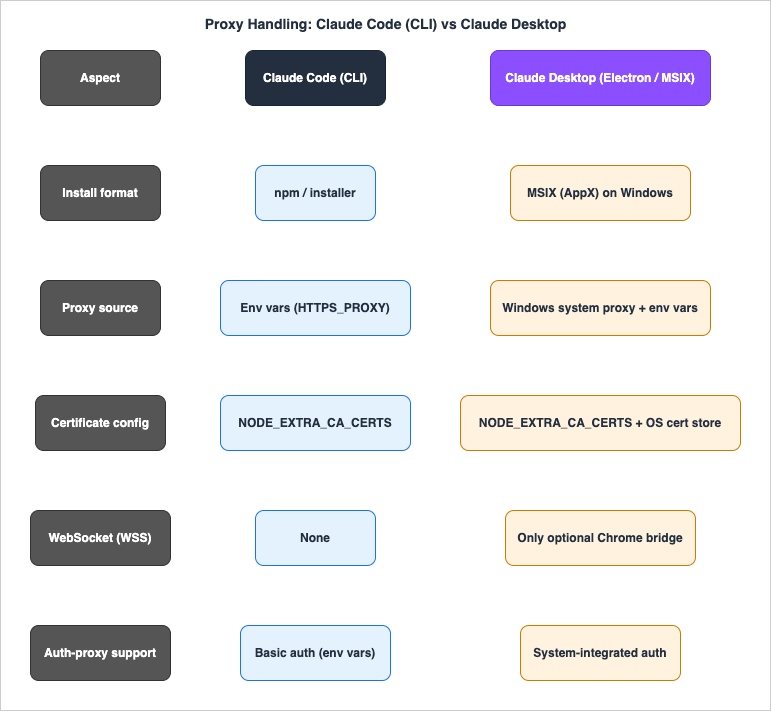
| Item | Claude Code (CLI) | Claude Desktop |
|---|---|---|
| Install format | npm / installer | MSIX (AppX) (on Windows) |
| Proxy source | Environment variables (HTTPS_PROXY etc.) | Windows system proxy + env vars |
| Certificate config | NODE_EXTRA_CA_CERTS | NODE_EXTRA_CA_CERTS + OS cert store |
| WebSocket (WSS) dependency | None for normal operation — the only WSS path is the optional Claude-in-Chrome bridge (bridge.claudeusercontent.com), not response streaming | Same — no WSS for normal operation; only the optional Claude-in-Chrome bridge applies |
| Auth-proxy support | Basic auth (env vars) | System-integrated auth |
Grasp this difference and most "Code works but Desktop doesn't" mysteries explain themselves.
3. Know Your Destination Domains
Main domains to request allowlisting for (using the Windows desktop app as the example; Code shares these):| Domain | Purpose | Required |
|---|---|---|
api.anthropic.com | API requests / WebFetch domain safety check | Required |
claude.ai | Account authentication | Required |
claude.com | General service / Tenant Restrictions target (not in the core network-config required set) | Recommended |
anthropic.com | General service / Tenant Restrictions target (not in the core network-config required set) | Recommended |
platform.claude.com | Console account auth | Required |
downloads.claude.ai | App & plugin downloads / auto-update | Required |
storage.googleapis.com | Native installer / auto-updater (app versions before 2.1.116) | Conditional |
raw.githubusercontent.com | Release notes / plugin marketplace | Recommended |
bridge.claudeusercontent.com | WebSocket bridge to the Chrome extension | Only if used |
statsig.anthropic.com | Operational telemetry (Statsig) — listed in older official allowlist guidance, no longer in the current network-config set (disable with DISABLE_TELEMETRY=1) | Optional |
*.sentry.io | Error reporting — Sentry's own ingest domain, not an Anthropic-published allowlist entry (disable with DISABLE_ERROR_REPORTING=1) | Optional |
All traffic is HTTPS/WSS, so in practice everything rides the standard port 443 (the network-config docs don't enumerate ports, but every endpoint is HTTPS). Two crucial notes:
- Response streaming runs over long-lived HTTPS (SSE), not WebSocket. Make sure the proxy does not buffer responses or apply a short idle timeout to these long connections, or streamed replies will stall or cut off mid-output. A true WebSocket (WSS) path exists only for the optional Claude-in-Chrome bridge (
bridge.claudeusercontent.com) — allow WebSocket (the HTTP CONNECT upgrade) only if you use that feature. - SOCKS proxies are not supported.
💡 To shrink the allowlist surface, suppress the optional telemetry domains instead of allowlisting them: set
DISABLE_TELEMETRY=1 (operational metrics) and DISABLE_ERROR_REPORTING=1 (Sentry error logging), or cut all non-essential outbound traffic at once with CLAUDE_CODE_DISABLE_NONESSENTIAL_TRAFFIC=1. One exception: the WebFetch domain-safety check still calls api.anthropic.com regardless of that setting — opt out of it separately with skipWebFetchPreflight: true in settings. Also note a community-reported side effect (version-dependent): DISABLE_TELEMETRY also stops Claude Code from fetching remote feature/experiment gates, so some gated or preview features may silently fall back to their defaults.💡 If you deploy Claude Code via npm or a self-managed binary, end users may not need
downloads.claude.ai or storage.googleapis.com at all — those two cover the native installer and auto-updater, which an npm / self-managed install bypasses. (The desktop app still needs downloads.claude.ai for app and plugin downloads.)4. Claude Code (CLI) — Relatively Straightforward
Claude Code reads the proxy from environment variables and runs over HTTPS only (no WebSocket dependency). In SSL-inspection environments, point it at your corporate CA.export HTTPS_PROXY=http://proxy.example.com:8080
export HTTP_PROXY=http://proxy.example.com:8080
export NO_PROXY=localhost,127.0.0.1,.local
export NODE_EXTRA_CA_CERTS=/path/to/corporate-ca.pem # SSL-inspection environments only
HTTPS_PROXY value above uses http:// because most corporate proxies expose a plaintext listener for the HTTP CONNECT tunnel (the tunneled traffic stays TLS end-to-end); this is the most common setup. If your proxy's own listener terminates TLS, set the value to https:// instead — the official docs show https:// as the recommended form.💡 By default Claude Code trusts both its bundled CA set and your OS trust store, so SSL-inspection proxies (CrowdStrike Falcon, Zscaler, etc.) often work with no extra config once the corporate root CA is in the OS store. Reach for
NODE_EXTRA_CA_CERTS when the CA isn't there or you want to point at a specific PEM; use CLAUDE_CODE_CERT_STORE (e.g. system) to control which stores are trusted.💡 If your proxy requires client-certificate (mutual TLS) authentication, Claude Code supports it through dedicated environment variables —
CLAUDE_CODE_CLIENT_CERT (client certificate PEM), CLAUDE_CODE_CLIENT_KEY (private key), and CLAUDE_CODE_CLIENT_KEY_PASSPHRASE (only when the key is encrypted).💡 If you configure it to point at Claude Platform on AWS, traffic goes to AWS endpoints and it supports AWS PrivateLink (direct VPC connectivity), making it possible to avoid allowlisting the claude.ai domains (assuming your network already permits reaching AWS). For the differences between delivery models, see the Cost-Optimization Guide.
5. Claude Desktop (Electron App) — A Bit More Work
The desktop app is Electron-based and handles proxies differently from the CLI. The practical points (Windows example):⚠️ Heads-up on Claude Cowork: Cowork runs code inside an isolated VM (a dedicated Linux VM under the platform hypervisor) that should be assumed not to inherit the host's proxy settings — Anthropic's Cowork architecture overview does not document proxy inheritance for the sandbox. The app-scoped proxy below covers the Electron app's own traffic (authentication, model/API calls), but as of 2026 there is no first-class proxy setting for the Cowork sandbox itself. If in-VM egress must traverse the proxy, validate Cowork separately and fall back to a network-level control (system proxy, an MDM-delivered secure web gateway, or a managed LLM gateway).
5.1 Installation — Direct MSIX Install Is Safest
The standard installer (Setup.exe) tends to fail withHTTP 407 (Proxy Authentication Required) in authenticated-proxy environments, so the recommended path is the official enterprise procedure of installing the MSIX package directly.# Per-user install
Add-AppxPackage -Path "C:\Temp\Claude.msix"
# Provision for all users (enterprise distribution)
Add-AppxProvisionedPackage -Online -PackagePath "C:\Temp\Claude.msix" -SkipLicense -Regions "all"
5.2 Proxy Settings at Launch — Apply to the App Alone via a Batch File
Setting proxy environment variables system-wide affects other apps (like VPN clients), so the safest approach is a launch batch file that applies the proxy to the app alone.@echo off
set HTTPS_PROXY=http://proxy.example.com:8080
set HTTP_PROXY=http://proxy.example.com:8080
set NO_PROXY=localhost,127.0.0.1,.local
set NODE_EXTRA_CA_CERTS=C:\path\to\corporate-ca.pem
rem Launch the MSIX app
start "" explorer.exe shell:AppsFolder\<PackageFamilyName>!Claude
Get-AppxPackage | Where-Object { $_.Name -like "*Claude*" }.⚠️ Two pitfalls:
- With MSIX apps, launching via
explorer.exe shell:AppsFolder\...may not reliably propagate environment variables. If so, launch the executable (Claude.exe) by its absolute path. - Unless you disable tray-resident / auto-start, the app may launch without going through the batch file, and your settings won't take effect (Settings → General → turn off auto-start).
5.3 SSL Inspection (Corporate CA)
If your proxy performs TLS inspection (MITM), you must make the corporate CA trusted:- Point the
NODE_EXTRA_CA_CERTSenv var at the PEM file - If the browser-based auth screen shows certificate errors, also register it in the OS certificate store (Trusted Root Certification Authorities)
NODE_EXTRA_CA_CERTS. Be aware, however, of open community reports (anthropics/claude-code#22559, #24916 — observed on macOS, but the cause is in how the app builds the subprocess environment) that the variable is not forwarded to the CLI subprocess behind the Code pane, so Chat connects while Code fails with certificate errors. Anthropic's enterprise Desktop documentation likewise emphasizes the OS trust store rather than this variable — so for the desktop app, treat the OS certificate store (Trusted Root Certification Authorities) as the primary mechanism and the environment variable as a supplement.TLS-inspection proxies like CrowdStrike Falcon and Zscaler often work without extra config as long as the root certificate is in the OS trust store.
6. The NTLM / Kerberos Proxy Wall
Electron apps and installers cannot handle NTLM / Kerberos authentication via environment variables (only Basic auth works that way). The workaround is to stand up a local relay proxy in front of the corporate proxy:- CNTLM Authentication Proxy (NTLM)
- Px (Python Proxy) (NTLM/Kerberos, Windows integrated auth)
set HTTPS_PROXY=http://127.0.0.1:3128
set HTTP_PROXY=http://127.0.0.1:3128
💡 Anthropic's own guidance for advanced proxy auth points to a managed LLM gateway that handles your authentication method. A local relay (CNTLM/Px) is the lighter-weight, self-contained equivalent — and usually the first thing teams reach for — but if you already operate an LLM gateway, terminating the auth there is the cleaner path.
7. Coexisting with a VPN
SSL-VPNs (Cisco AnyConnect, GlobalProtect, FortiClient, Pulse Secure, etc.) use HTTPS/443 and are therefore strongly affected by system-wide proxy changes — there are cases where the VPN connection becomes unstable.| Setting | Impact on VPN |
|---|---|
| Windows system proxy | Many VPN clients consult the system proxy during auth; routing it through an external proxy can make the corporate VPN gateway unreachable |
HTTPS_PROXY env var (system-wide) | If the VPN client reads env vars, its auth traffic gets routed through the external proxy |
That's exactly why the "apply the proxy to the app alone via a launch batch" approach is safer: the env vars apply only to the process launched from that batch, leaving the VPN client, browsers, and other apps untouched. Keep separate batches for on-site vs. off-site and switching environments is trivial.
rem launch_onsite.bat (corporate LAN / VPN connected)
set HTTPS_PROXY=http://proxy.example.com:8080
set HTTP_PROXY=http://proxy.example.com:8080
start "" explorer.exe shell:AppsFolder\<PackageFamilyName>!Claude
rem launch_offsite.bat (home / travel, VPN not connected)
rem No proxy (direct internet connection)
start "" explorer.exe shell:AppsFolder\<PackageFamilyName>!Claude
HTTPS_PROXY/HTTP_PROXY env vars, confirm the VPN recovers, then move to the batch-file approach.8. Block Personal-Account Usage (Tenant Restrictions)
The scariest risk in an org rollout is a member pasting confidential organizational data into Claude using a personal account. Tenant Restrictions block this at the network level.At the proxy, inject the following HTTP header on traffic to
claude.ai / api.anthropic.com / claude.com / anthropic.com:anthropic-allowed-org-ids: <your-org-UUID>
💡 Tenant Restrictions is a network-layer control. For defense in depth, pair it with the app-layer MDM policy
forceLoginOrgUUID (from Enterprise configuration for Claude Desktop), which pins the desktop app to a specific organization at sign-in — it takes a single UUID (also pre-selected during login) or an array of UUIDs, any of which is accepted. The two are complementary: the proxy header enforces the boundary on managed network paths, while the policy keeps it enforced on a managed device even when it is temporarily off the corporate network.9. Common Errors and Fixes
9.1 Error Quick-Reference
| Error | Likely cause | Fix |
|---|---|---|
Proxy Authentication Required (407) | No proxy credentials | Pass credentials via env vars; for NTLM/Kerberos, relay through CNTLM/Px |
ECONNREFUSED | Proxy unreachable / port blocked | Check proxy settings and internal reachability |
ETIMEDOUT | Timeout after passing the proxy | Verify allowlisting for the destination domains |
SELF_SIGNED_CERT_IN_CHAIN / UNABLE_TO_VERIFY_LEAF_SIGNATURE | Corporate CA not trusted | Point NODE_EXTRA_CA_CERTS at the corporate CA |
CERT_* | Certificate verification failure | Check the OS cert store / NODE_EXTRA_CA_CERTS |
| Streamed reply stalls / cuts off mid-output | Proxy buffers the response or idle-times-out the long-lived HTTPS (SSE) connection | Disable response buffering; raise the outbound idle timeout for api.anthropic.com (≥120s recommended) |
WebSocket connection failed | Claude-in-Chrome bridge (WSS) blocked, or its CA not trusted | Allow WebSocket (HTTP CONNECT upgrade); point NODE_EXTRA_CA_CERTS at the corporate CA — the bridge's Node ws client may not read the OS trust store |
Signature verification failed (MSIX) | MSIX signature error | Apply Windows updates / refresh trusted root certificates |
9.2 Triage Checklist
- Can you reach
https://claude.aiin a browser? (HTTPS reachability through the proxy) - Does Claude Code work? (If yes, narrow it to an Electron/MSIX-specific issue)
- Install failure: check the installer log (typically
%LOCALAPPDATA%\Temp\ClaudeSetup.log) - Runtime failure: check the app log (typically
%APPDATA%\Claude\logs\) - Batch approach: does
echo %HTTPS_PROXY%return your value in a command prompt? - Did you fully restart the Claude process? (Watch for tray-resident leftovers)
- Toggle VPN connected/disconnected to compare behavior
10. Summary
Deploying Claude through a corporate proxy isn't hard once you grasp the essentials:- Know your destination domains — port 443 only; let long-lived HTTPS streaming through without buffering/timeout; WebSocket (WSS) only for the optional Chrome bridge; SOCKS unsupported
- Code and Desktop are different beasts — Code is straightforward via env vars; Desktop needs MSIX + a launch batch
- Handle NTLM/Kerberos with a local relay proxy (CNTLM/Px)
- Avoid VPN conflicts with the batch approach (app-scoped settings)
- Block personal accounts with Tenant Restrictions (header injection)
11. Frequently Asked Questions
11.1 Claude Code connects, but Claude Desktop won't — why?
Because the two route proxies differently. Claude Code reads the proxy purely from environment variables and depends only on HTTPS (no WebSocket), while Claude Desktop is an Electron/MSIX app that also consults the Windows system proxy and the OS certificate store. Most "Code works but Desktop doesn't" cases come down to that difference — confirm Code works first, then treat the rest as an Electron/MSIX-specific issue.
11.2 Which destination domains should I have allowlisted?
The required set is
api.anthropic.com, claude.ai, platform.claude.com, and downloads.claude.ai; raw.githubusercontent.com (release notes / plugin marketplace), claude.com, and anthropic.com are recommended (the latter two are the Tenant Restrictions targets); storage.googleapis.com is conditional (native installer / auto-updater for app versions before 2.1.116); bridge.claudeusercontent.com only if you use the Chrome bridge; statsig.anthropic.com (telemetry) and *.sentry.io (error reporting) are optional. If you deploy Claude Code via npm or a self-managed binary, downloads.claude.ai and storage.googleapis.com may not be needed for the CLI. All of it is over port 443.11.3 The installer dies with HTTP 407 (Proxy Authentication Required). What now?
The standard Setup.exe tends to fail with 407 in authenticated-proxy environments. The recommended path is the official enterprise procedure of installing the MSIX package directly (
Add-AppxPackage, or Add-AppxProvisionedPackage for all-users provisioning), distributed via Intune / SCCM / Group Policy. If you can't fetch the MSIX from inside the network, download it on a non-authenticated network and carry it in, or use a copy distributed by your organization.11.4 Our proxy uses NTLM / Kerberos, which environment variables can't handle. What's the fix?
Electron apps and installers can't do NTLM / Kerberos via environment variables (only Basic auth works that way). Stand up a local relay proxy in front of the corporate proxy — CNTLM (NTLM) or Px (NTLM/Kerberos, Windows integrated auth) — and point the app at its local address (e.g.
http://127.0.0.1:3128). If you already operate a managed LLM gateway, terminating the auth there is the cleaner path.11.5 My VPN became unstable after I set a proxy. How do I recover?
SSL-VPNs use HTTPS/443 and are sensitive to system-wide proxy changes; many VPN clients consult the system proxy or
HTTPS_PROXY during auth. Temporarily remove the system proxy and the system-wide HTTPS_PROXY/HTTP_PROXY env vars, confirm the VPN recovers, then switch to the app-scoped launch-batch approach so the proxy applies only to Claude and leaves the VPN client untouched.11.6 Streamed replies stall or cut off mid-output. What causes that?
Claude's response streaming runs over a long-lived HTTPS (SSE) connection, not WebSocket. If the proxy buffers responses or applies a short idle timeout to those connections, streamed replies stall or get cut off mid-output. Disable response buffering and raise the outbound idle timeout for
api.anthropic.com (≥120s recommended).11.7 How do I block personal-account usage at the network level?
Use Tenant Restrictions: at the proxy, inject the header
anthropic-allowed-org-ids: <your-org-UUID> on traffic to claude.ai, api.anthropic.com, claude.com, and anthropic.com. The value is your organization's UUID (a comma-separated list with no spaces for multiple orgs). This blocks any org other than yours, including personal accounts, and requires TLS inspection (your corporate CA in the trust store).12. References
Official / primary sources
| Resource | URL |
|---|---|
| Enterprise network configuration | https://code.claude.com/docs/en/network-config |
| IP addresses (Anthropic API) | https://platform.claude.com/docs/en/api/ip-addresses |
| Data usage (telemetry settings) | https://code.claude.com/docs/en/data-usage |
| Deploy Claude Desktop for Windows | https://support.claude.com/en/articles/12622703-deploy-claude-desktop-for-windows |
| Enterprise configuration for Claude Desktop | https://support.claude.com/en/articles/12622667-enterprise-configuration-for-claude-desktop |
| Claude Cowork desktop architecture overview | https://support.claude.com/en/articles/14479288-claude-cowork-desktop-architecture-overview |
| Tenant Restrictions | https://support.claude.com/en/articles/13198485-enforce-network-level-access-control-with-tenant-restrictions |
| CNTLM Authentication Proxy | http://cntlm.sourceforge.net/ |
| Px (Python Proxy) | https://github.com/genotrance/px |
Related Articles on This Site
- Cost-Optimization Guide to Rolling Out Claude Code and Claude Desktop Across Your Organization - Choosing Delivery Models and Finding Break-Even
The companion guide: choosing delivery models (Anthropic direct subscription, Claude Platform on AWS, Amazon Bedrock) and finding the break-even between usage-based and flat-rate plans. - Claude Code and Anthropic API Billing and Access Routes: Anthropic, Amazon Bedrock, and Google Vertex AI
How the billing and access routes differ across providers, including Claude Platform on AWS and PrivateLink — relevant when you route Code through AWS endpoints. - Claude Code Harness and Environment Engineering
Where the environment variables and network boundaries in this guide fit into the broader harness-and-environment model for running local agents safely. - Claude Code Features and Settings Reference
A lookup reference for Claude Code settings and environment variables such asNODE_EXTRA_CA_CERTSandCLAUDE_CODE_CERT_STORE.
Disclaimer: The procedures, commands, and specifications in this article are general reference information compiled from publicly available sources as of 2026, and are provided "as is" without warranty of any kind, express or implied. Claude's specifications and network requirements — along with the behavior of Windows, MSIX, proxy, VPN, certificate, and other third-party products — change over time and differ by environment, so always verify the latest details in the official documentation and validate in a non-production environment before applying any change. Because these procedures touch proxy, certificate, VPN, and security settings, apply them at your own risk and in accordance with your organization's policies and the terms of each product. The author and hidekazu-konishi.com assume no responsibility or liability for any damage, outage, security incident, or loss arising from the use of, or reliance on, the information in this article.
References:
Tech Blog with curated related content
Written by Hidekazu Konishi