Claude Code Skills Complete Guide - Creating, Testing, and Distributing Agent Skills
First Published:
Last Updated:
Source-of-truth note: the
SKILL.md frontmatter field names, directory locations, loading behavior, and command semantics below were verified against the official Claude Code skills documentation, the Anthropic announcement of Agent Skills, and the official anthropics/claude-code skill-development skill at the time of writing. Skills are evolving quickly; the official documentation remains authoritative, and where a detail could not be confirmed it is called out rather than guessed.1. Introduction
Claude Code gives you three ways to change how the agent behaves, and they are not interchangeable. Hooks move enforcement out of the model and into the harness, so a policy holds deterministically regardless of what the model decides. Subagents move work into an isolated context, so a noisy sub-task does not pollute the main conversation. Skills are the third layer, and the one this guide is about: on-demand expertise. A skill packages a procedure, a convention, or a body of domain knowledge into a folder that Claude loads only when the current task calls for it — and ignores, at almost no token cost, the rest of the time.If you have ever pasted the same release checklist into chat for the fifth time, or watched a section of
CLAUDE.md grow from a fact ("this project uses pnpm") into a multi-step procedure ("to cut a release, run the tests, bump the version, tag, and push in this exact order"), you have already felt the gap that skills fill. CLAUDE.md is always in context, so everything you put there is paid for on every turn whether it is relevant or not. A skill inverts that: its short description sits in context so Claude knows the skill exists, but the full body loads only when Claude decides it is relevant or you invoke it by name. Long reference material costs almost nothing until you need it.This guide answers three questions, in order. First, what a skill is and when to reach for one instead of
CLAUDE.md, a hook, or a subagent. Second — and this is where most people get stuck — how to write a SKILL.md so it loads exactly when you intend, because the description field is not documentation, it is the trigger, and a vague one is the single most common reason a skill never fires. Third, how to test, distribute, and govern skills so they hold up across a team and across machines rather than living as one-off files on your laptop.This article is the deep dive on the skills layer specifically. The decision of which layer to use for a given problem — skill versus hook versus subagent versus
CLAUDE.md versus MCP — belongs to the Claude Code Extension Layers Decision Guide, which is the hub for that judgment. Here we take the skills spoke all the way down. The adjacent spokes have their own deep dives: the Claude Code Hooks Complete Guide for deterministic enforcement, and the Claude Code Subagents and Multi-Agent Orchestration Guide for context isolation. For the surrounding settings model that skills interact with, see the Claude Code Features and Settings Reference; for day-to-day operation, the Claude Code Operators Handbook.Audience: engineers and team leads who run Claude Code in real work and want to factor repeated instructions and specialized knowledge into skills that load on demand, test reliably, and travel safely across a team. Two boundaries by site policy and series scope: this guide does not quote prices — where a feature interacts with model effort or cost, it describes the mechanism and links to the official pricing — and it keeps the deep dives on plugin packaging and on third-party skill security in their own dedicated articles, linked at the relevant points below.
2. What Agent Skills Are
A skill is a folder. The required file inside it isSKILL.md, which has two parts: YAML frontmatter between --- markers that tells Claude when to use the skill, and a Markdown body that tells Claude how. That is the entire core of the format. Everything else — supporting reference files, example outputs, executable scripts — is optional and exists to keep the main file focused. Claude uses a skill when it judges the skill relevant to your request, or you invoke it directly by typing /skill-name.The mechanism that makes this cheap is progressive disclosure, and it works in three levels. At the first level, only the skill's name and short description are loaded into context, so Claude knows the skill exists and roughly what it is for — a handful of tokens per skill. At the second level, when Claude determines the skill is relevant (or you invoke it), the full
SKILL.md body is read into the conversation. At the third level, any supporting files the body references are loaded only when Claude actually needs them. A large reference document that lives beside SKILL.md therefore costs nothing until the moment it is opened.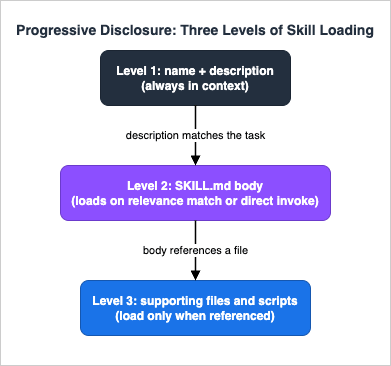
There are, then, three ways a skill's body gets into the conversation, and it helps to hold them apart. It loads when Claude judges the description relevant to your request; it loads when you invoke the skill by name; and — a case Section 6 returns to — it can be injected in full at the start of a subagent that has been told to preload it. In an ordinary session only the descriptions are resident until one of those triggers fires. That is the whole economic argument for the format: you can keep a large library of skills available, paying only the small, fixed cost of their descriptions, and pay for a skill's full content exactly when it earns its place in the context window.
That loading model is what distinguishes a skill from a slash command. A slash command was, historically, something you invoke: you type
/deploy and it runs. A skill can be model-invoked: Claude reads your prompt, decides a skill is relevant, and loads it on its own. In current Claude Code the two have converged — custom commands have been merged into skills. A file at .claude/commands/deploy.md and a skill at .claude/skills/deploy/SKILL.md both create /deploy and work the same way; existing .claude/commands/ files keep working, and skills simply add optional features on top: a directory for supporting files, frontmatter to control who can invoke them, and automatic model-driven loading. This is the kind of detail that moves faster than memory, which is why it is worth stating plainly: a slash command is now a skill with no extra features.Skills are not Claude-Code-only. They follow the Agent Skills open standard, published for cross-platform portability, and Anthropic's own framing is that you "build once, use across Claude apps, Claude Code, and API." A skill that uses only
name, description, and plain Markdown instructions is portable to any tool that implements the standard. Claude Code then layers product-specific features on top of that portable core — invocation control, running a skill in a forked subagent, and injecting live command output into the skill before Claude sees it — which are powerful but make a skill Claude-Code-specific to exactly the degree you use them. Section 8 returns to this when we discuss distribution; for now the useful mental model is: a small portable nucleus, optionally extended.When should something become a skill at all? The signal is repetition or procedure. If you keep pasting the same instructions, checklist, or multi-step workflow into chat, that is a skill. If a section of
CLAUDE.md has grown from a fact into a procedure — from "we use Vitest" into "to add a test, do these five things" — that is a skill too, and moving it out of CLAUDE.md reclaims the context budget that the procedure was spending on every single turn. We make that boundary precise in Sections 7 and 11; the rule of thumb is that always-true facts belong in CLAUDE.md, while on-demand procedures and specialized knowledge belong in skills.3. Anatomy of a Skill
Every skill is a directory whose entry point isSKILL.md. The simplest possible skill is one file:api-conventions/
└── SKILL.mdSKILL.md as a concise overview and pushes detail into sibling files that load only when referenced:my-skill/
├── SKILL.md # Main instructions (required)
├── reference.md # Detailed reference, loaded when needed
├── examples.md # Example outputs showing the expected format
└── scripts/
└── helper.py # A script Claude can execute, not loadSKILL.md itself is frontmatter plus body. A minimal reference skill — one that adds knowledge Claude applies inline to your current work — looks like this:---
name: api-conventions
description: API design patterns for this codebase
---
When writing API endpoints:
- Use RESTful naming conventions
- Return consistent error formats
- Include request validation---
name: deploy
description: Deploy the application to production
disable-model-invocation: true
---
Deploy $ARGUMENTS to production:
1. Run the test suite
2. Build the application
3. Push to the deployment target
4. Verify the deployment succeededname. A skill directory under ~/.claude/skills/ or .claude/skills/ takes its command from the directory name: .claude/skills/deploy-staging/SKILL.md becomes /deploy-staging. A file under .claude/commands/ takes its command from the file name without the extension. A plugin's skills/ subdirectory namespaces by plugin: my-plugin/skills/review/SKILL.md becomes /my-plugin:review. The one place the frontmatter name sets the command is a plugin-root SKILL.md, where there is no skill directory to take the name from. The name field otherwise sets only the display label shown in skill listings.Supporting files are how you keep a skill both powerful and cheap. Reference them from
SKILL.md so Claude knows what each one contains and when to open it:## Additional resources
- For complete API details, see [reference.md](reference.md)
- For usage examples, see [examples.md](examples.md)${CLAUDE_SKILL_DIR} substitution rather than a hardcoded path, so they resolve correctly whether the skill is installed at the personal, project, or plugin level:---
name: codebase-visualizer
description: Generate an interactive collapsible tree visualization of your codebase. Use when exploring a new repo, understanding project structure, or identifying large files.
allowed-tools: Bash(python3 *)
---
Run the visualization script from your project root, then open the result:
python3 ${CLAUDE_SKILL_DIR}/scripts/visualize.py .| Scope | Path | Applies to |
|---|---|---|
| Enterprise | Managed settings (deployed by your organization) | All users in your organization |
| Personal | ~/.claude/skills/<skill-name>/SKILL.md | All of your projects |
| Project | .claude/skills/<skill-name>/SKILL.md | This project only |
| Plugin | <plugin>/skills/<skill-name>/SKILL.md | Wherever the plugin is enabled |
When skills share the same name across levels, enterprise overrides personal, and personal overrides project. Plugin skills use the
plugin-name:skill-name namespace, so they cannot collide with the other levels. And if a skill and an old-style command share a name, the skill takes precedence.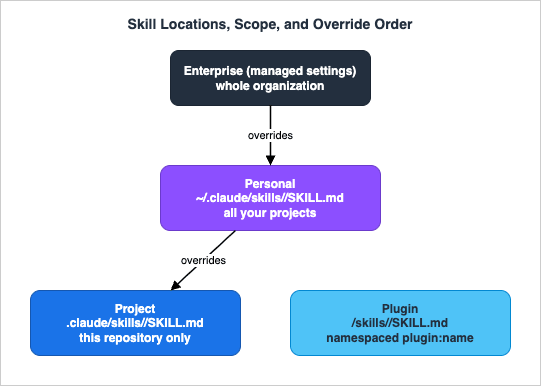
Two discovery behaviors are worth internalizing because they affect how a skill behaves on a teammate's machine. First, project skills load not only from
.claude/skills/ in your starting directory but from every parent directory up to the repository root, and Claude Code also discovers skills on demand from nested .claude/skills/ directories below your starting point — so a monorepo where each package carries its own skills works without configuration. Second, Claude Code watches skill directories for changes and picks up edits to a SKILL.md within the running session; the exception is creating a top-level skills directory that did not exist when the session started, which requires a restart so the new directory can be watched.There is one more discovery rule that trips people up because it is an exception to a general principle. The
--add-dir flag and /add-dir command grant file access, not configuration discovery — Claude Code does not load subagents, output styles, or other .claude/ configuration from an added directory. Skills are the deliberate exception: a .claude/skills/ directory inside an added directory is loaded. This applies only to --add-dir and /add-dir; the permissions.additionalDirectories setting grants file access without loading skills. The practical upshot is that you can pull a shared skills directory into a session with --add-dir without restructuring your project, but you should know that this is a skill-specific carve-out and does not extend to the rest of your .claude/ configuration.Finally, the old
.claude/commands/ layout has not gone away. Files there still work and support the same frontmatter, with the command name taken from the file name without its extension; skills are simply the recommended form now because they also support supporting files and the richer frontmatter set. You do not have to migrate existing commands, and you can mix the two — just remember that on a name collision the skill wins.4. Writing Descriptions That Trigger Correctly
The most important field in a skill is the one people treat as an afterthought. Thedescription is not metadata — it is the trigger. In a normal session, skill descriptions are loaded into context so Claude knows what is available, and on every turn Claude is effectively reading each description and asking, "does the user's request match this?" A precise description gets the skill loaded at the right moment; a vague one leaves it dormant no matter how good the body is. Almost every "my skill isn't working" problem is a description problem.All frontmatter fields are optional, and only
description is recommended. But the full field set is much larger than name and description, and several fields change how the entire skill behaves. The current Claude Code fields:| Field | Required | What it does |
|---|---|---|
name | No | Display name shown in skill listings. Defaults to the directory name. Does not change what you type to invoke the skill (except for a plugin-root SKILL.md). |
description | Recommended | What the skill does and when to use it. Claude uses this to decide when to apply the skill. If omitted, the first paragraph of the body is used. Put the key use case first — the listing text is capped (see below). |
when_to_use | No | Extra trigger phrases or example requests, appended to description in the listing. |
argument-hint | No | Hint shown during autocomplete, e.g. [issue-number] or [filename] [format]. |
arguments | No | Named positional arguments for $name substitution in the body. Space-separated string or YAML list. |
disable-model-invocation | No | true prevents Claude from auto-loading the skill; only you can invoke it with /name. Default false. |
user-invocable | No | false hides the skill from the / menu; only Claude can invoke it. Default true. |
allowed-tools | No | Tools Claude may use without asking while this skill is active. Space- or comma-separated, or a YAML list. |
disallowed-tools | No | Tools removed from Claude's pool while this skill is active. The restriction clears on your next message. |
model | No | Model to use while the skill is active, for the rest of the current turn. Accepts inherit to keep the active model. |
effort | No | Effort level while the skill is active, overriding the session level: low, medium, high, xhigh, max (availability depends on the model). |
context | No | Set to fork to run the skill in a forked subagent context. |
agent | No | Which subagent type to use when context: fork is set. |
hooks | No | Hooks scoped to this skill's lifecycle. |
paths | No | Glob patterns that limit when the skill auto-activates, so it loads only when you are working with matching files. |
shell | No | Shell for inline command injection: bash (default) or powershell. |
Two constraints on the trigger text matter in practice. The combined
description and when_to_use text is truncated at 1,536 characters in the skill listing to keep context usage down, so put the key use case first. And when you have many skills, descriptions are shortened to fit a context budget that scales with the model's context window; if the budget overflows, the descriptions of the skills you invoke least are dropped first. The practical advice that follows is: front-load the trigger, keep descriptions tight, and if you are losing keywords, run /doctor to see whether the budget is overflowing and which skills are affected.How you phrase the trigger decides everything. Anthropic's own guidance, in the official skill-development skill, is to write the description in the third person and to be specific about when to use the skill, not just what it does. Write "This skill should be used when the user asks to create a hook, add a PreToolUse hook, or validate tool use," not "Use this skill to work with hooks." Include the literal phrases a user would actually type. A description built from trigger phrases is what lets Claude match a natural request to the skill; a description that merely names a topic leaves Claude guessing.
It is worth seeing the difference side by side, because the weak version looks reasonable until you notice it gives Claude nothing to match against. A weak description names the subject:
description: Database migration helper. There is no signal in it about when a request should pull the skill in, and it is written as a label rather than a condition, so a user asking "add a column to the users table" may never trigger it. The strong version states the conditions in the third person and front-loads the phrasings a user actually says: description: Generates and reviews database migrations for this project. This skill should be used when the user asks to add or change a column, create a migration, alter a table, or change the schema. The second one costs a few more characters of the 1,536-character listing budget and earns reliable activation in return — a trade that is almost always worth making for a skill you want Claude to reach for on its own.Invocation control is the second behavioral lever. Two fields decide who can invoke a skill and how it loads into context:
| Frontmatter | You can invoke | Claude can invoke | When loaded into context |
|---|---|---|---|
| (default) | Yes | Yes | Description always in context; full skill loads when invoked |
disable-model-invocation: true | Yes | No | Description not in context; full skill loads when you invoke |
user-invocable: false | No | Yes | Description always in context; full skill loads when invoked |
Use
disable-model-invocation: true for workflows with side effects or timing you want to control — /commit, /deploy, /send-slack-message — where you do not want Claude deciding to run them because the code "looks ready." Use user-invocable: false for background knowledge that is not a meaningful command, such as a legacy-system-context skill that explains how an old system works: Claude should apply it when relevant, but /legacy-system-context is not an action a user would take. Note the side effect in the table: disable-model-invocation: true also removes the description from Claude's context entirely, which both prevents auto-loading and frees listing budget for skills you do want Claude to consider.When a skill fires at the wrong frequency, the fix is almost always in the description. If a skill never triggers, check that the description contains the keywords a user would naturally say, verify the skill shows up when you ask "What skills are available?", and try rephrasing your request to match the description more closely. If a skill triggers too often, make the description more specific, or add
disable-model-invocation: true if you only ever want to run it by hand. The paths field is a third dial: scope a skill to glob patterns so it auto-activates only when you are working with matching files, which keeps a frontend-only convention from loading while you edit the backend.5. Authoring Walkthrough
The fastest way to internalize the format is to build one. We will create a personal skill, promote the pattern to a project skill, and then layer on arguments and live context. Everything here is copy-ready.A personal skill, end to end. Personal skills live under your home directory and are available across all your projects. Create the directory and write the file:
mkdir -p ~/.claude/skills/summarize-changes~/.claude/skills/summarize-changes/SKILL.md:---
description: Summarizes uncommitted changes and flags anything risky. Use when the user asks what changed, wants a commit message, or asks to review their diff.
---
## Current changes
!`git diff HEAD`
## Instructions
Summarize the changes above in two or three bullet points, then list any risks
you notice such as missing error handling, hardcoded values, or tests that need
updating. If the diff is empty, say there are no uncommitted changes.description lists the exact phrasings ("what changed," "commit message," "review their diff") that should pull the skill in, so Claude loads it automatically when you ask "What did I change?" — or you can invoke it directly with /summarize-changes. And the !`git diff HEAD` line is dynamic context injection: Claude Code runs that command and replaces the line with its output before Claude reads the skill, so the instructions arrive with the actual diff already inlined rather than Claude having to fetch it. We will come back to that mechanism shortly.Promoting it to a project skill. When a procedure is specific to one repository — your release steps, your code-review rubric, your migration playbook — it belongs in the project, committed to version control so the whole team gets it. The only change is the location:
.claude/skills/<name>/SKILL.md inside the repo instead of ~/.claude/skills/. Here is a project release-checklist skill that you control by hand and that is allowed to run a fixed set of git commands without prompting:---
name: release
description: Cut a release for this repository
disable-model-invocation: true
allowed-tools: Bash(git tag *) Bash(git push *) Bash(npm run *)
---
Cut a release:
1. Run `npm run test` and stop if anything fails.
2. Run `npm run build`.
3. Read the version from package.json and create an annotated tag `v`.
4. Push the tag to origin.
5. Print the tag name and the one-line summary of what shipped. disable-model-invocation: true means Claude will not decide to cut a release on its own — you trigger it with /release. allowed-tools grants the listed commands without a per-use approval prompt while this skill is active; it does not widen Claude's permissions outside the skill, and for a project skill it only takes effect after you accept the workspace trust dialog for the folder. Review project skills before trusting a repository, because a skill can grant itself broad tool access — a point Section 9 develops.A reference skill that loads itself. Not every skill is a procedure. A reference skill carries conventions Claude should apply inline whenever it is relevant, with no explicit invocation. It is left model-invocable on purpose, and a tight description is what gets it loaded at the right moment:
---
name: error-handling-style
description: This project's error-handling conventions. Use when writing or reviewing code that throws, catches, logs, or returns errors.
---

When writing code that handles errors in this project:
- Never swallow an exception silently; log it with the request ID.
- Return typed error objects from service functions, not bare strings.
- Validate at system boundaries (HTTP handlers, queue consumers); trust internal calls.gh:---
name: pr-summary
description: Summarize the changes in a pull request
context: fork
agent: Explore
allowed-tools: Bash(gh *)
---
## Pull request context
- PR diff: !`gh pr diff`
- PR comments: !`gh pr view --comments`
- Changed files: !`gh pr diff --name-only`
## Your task
Summarize this pull request: what it changes, why, and anything a reviewer
should look at closely.---
name: migrate-component
description: Migrate a component from one framework to another
argument-hint: [component] [from] [to]
---
Migrate the $ARGUMENTS[0] component from $ARGUMENTS[1] to $ARGUMENTS[2].
Preserve all existing behavior and tests./migrate-component SearchBar React Vue substitutes SearchBar, React, and Vue in order. The shorthand $0, $1, $2 is equivalent, and the full $ARGUMENTS placeholder expands to everything typed after the command. If you invoke a skill with arguments but the body contains no $ARGUMENTS, Claude Code appends ARGUMENTS: <your input> to the end so Claude still sees what you typed. Other substitutions worth knowing are ${CLAUDE_SESSION_ID} for session-specific logging and ${CLAUDE_SKILL_DIR} for referencing bundled scripts regardless of the working directory.You do not have to hand-author every skill from an empty file, either. Because a skill is just a directory with a Markdown file, the lowest-friction path is often to describe the procedure to Claude and have it draft the
SKILL.md for you, then refine the description and trim the body — Anthropic ships an interactive skill-creator skill for exactly this. The run-and-verify trio takes the idea further for a specific case: /run-skill-generator gets your app running from a clean environment, captures what worked (install commands, environment variables, the launch script), and commits the recipe as a per-project skill at .claude/skills/run-<name>/, so that /run, /verify, and any other agent in the repository follow the recorded recipe instead of rediscovering it. The general lesson is that a skill is cheap enough to generate, and the work that matters is editing the trigger and pruning the body, not typing the file from scratch.A note on the bundled skills that ship with Claude Code, because they are the best worked examples you have on hand:
/code-review, /batch, /debug, /loop, /claude-api, and the run-and-verify trio /run, /verify, and /run-skill-generator are all prompt-based skills, not fixed commands. You invoke them like any other skill, and you can read how Anthropic structures a real skill by looking at how they are described. The core bundled set can be turned off with the disableBundledSkills setting if you want a minimal environment; the run-and-verify trio is a newer addition, so confirm in the settings reference whether your version disables it through the same switch or governs it separately.6. Testing and Iterating on Skills
A skill is only useful if it loads when you mean it to and stays out of the way otherwise, so testing a skill is mostly testing its trigger and its scope. There are two ways to invoke a skill, and you should check both.Test automatic invocation by asking something that matches the description in your own words. For the
summarize-changes skill from Section 5, make a small edit to any file and then ask:What did I change?/summarize-changes/skills menu shows the same set interactively and lets you change a skill's visibility without editing its frontmatter. And /doctor diagnoses why a skill is not appearing or triggering, including whether the description budget is overflowing and silently dropping keywords.The iteration loop itself is short. If a skill does not fire, add the phrases users actually type to the
description or when_to_use. If it fires too eagerly, narrow the description or constrain it with paths so it only activates for the relevant files, or set disable-model-invocation: true and drive it by hand. Because Claude Code watches skill directories, your edits to a SKILL.md take effect within the running session — you do not have to restart to test a description change — with the one exception that creating a brand-new top-level skills directory needs a restart so it can be watched.One behavior surprises people often enough to call out: a skill's content has a lifecycle within the session. When you or Claude invoke a skill, the rendered
SKILL.md enters the conversation as a single message and stays there for the rest of the session; Claude Code does not re-read the file on later turns. Write standing guidance, not one-time steps — phrase the body as instructions that apply throughout a task rather than "first do X, then forget about it." When the conversation is compacted to free context, Claude Code re-attaches the most recent invocation of each skill after the summary, keeping the first 5,000 tokens of each, within a combined budget of 25,000 tokens; older skills can be dropped entirely if you invoked many in one session. So if a skill seems to stop influencing behavior late in a long session, the content is usually still present and the model is simply choosing other approaches — strengthen the body and description, or re-invoke the skill after compaction to restore its full content. When a behavior must hold no matter what, that is a sign you want a hook, not a skill: the skill makes the behavior likely, the hook makes it certain.The lifecycle differs in one situation worth knowing when you test skills that run in subagents. In a regular session, descriptions are resident and the body loads only on invocation. A subagent configured to preload skills works the other way around: the full skill content is injected at the subagent's startup, before it does any work. That is the right behavior for a subagent whose whole job is the skill, and it is also why
context: fork exists — the skill content becomes the prompt that drives the forked agent. The thing to verify when testing is that a skill meant to run forked actually contains an actionable task; a skill that is pure reference ("use these conventions") with no instruction will run in the fork, receive the guidelines, and return with nothing to do.If you maintain skills that run shell commands through dynamic context injection, test them with that behavior both on and off. The
disableSkillShellExecution setting replaces each !`command` with a notice instead of running it, which is the safe default in managed environments; confirm your skill degrades sensibly when injection is disabled rather than producing a broken prompt.7. Skills vs the Other Extension Layers
Skills are one of several ways to shape Claude Code, and the fastest way to misuse them is to reach for a skill when another layer fits better. The full decision framework — with the trade-offs spelled out — lives in the Claude Code Extension Layers Decision Guide, and you should treat that as the authority. The short version, enough to keep you from an obvious mismatch:| Layer | Use it for | Loading / enforcement |
|---|---|---|
CLAUDE.md | Always-true facts about the project | Always in context, every turn |
| Skill | On-demand procedures and specialized knowledge | Description always in context; body loads on demand |
| Hook | Guarantees that must hold regardless of the model | Deterministic, run by the harness |
| Subagent | Work that needs an isolated context | Separate context window, summarized back |
| MCP | Access to external tools and data sources | Tools the model can call |
The two boundaries people get wrong most often are skill-versus-
CLAUDE.md and skill-versus-hook. Against CLAUDE.md: if the content is a short, always-relevant fact, it belongs in CLAUDE.md where it is always loaded; if it is a procedure or a body of reference material that is only sometimes relevant, it belongs in a skill where it loads on demand and stops taxing every turn. Against hooks: a skill is model-judgment ("Claude, when this comes up, do it this way"), while a hook is harness-enforcement ("this will happen regardless of what the model decides"). If a missed step is an annoyance, a skill is fine; if a missed step is a security or correctness failure, use a hook. Skills and subagents are not even mutually exclusive — context: fork runs a skill inside a subagent, which is the bridge between the two layers. For anything beyond this orientation, follow the link to the hub rather than re-deriving the trade-offs here.8. Packaging and Distribution
A skill on your laptop helps you. The point of the format is to share it, and there are three scopes for doing so, matched to your audience.Project skills are the simplest distribution mechanism that exists: commit
.claude/skills/ to version control. Everyone who clones the repository gets the skills, they travel with the branch, and they are reviewed in pull requests like any other code. For knowledge and procedures that belong to one codebase, this is the right answer and you do not need anything heavier.Plugins are the answer when you want to bundle skills with other Claude Code components — hooks, subagents, MCP servers — and distribute them as a unit across many repositories or an organization. A plugin has a
skills/ directory, and its skills are namespaced under the plugin name. There is a lightweight bridge in the other direction, too: adding a .claude-plugin/plugin.json to a skill folder makes it load as a plugin, so a single skill directory can bundle agents, hooks, and MCP servers. The full mechanics of authoring a plugin, defining a marketplace, and managing versions are their own subject, covered in the Claude Code Plugins Complete Guide; the relevant point here is simply that plugins are the packaging layer above skills, and Anthropic's own anthropics/skills marketplace is where the official document and example skills are published.Managed (enterprise) deployment pushes skills organization-wide through managed settings, so every user in the organization has them and — because enterprise overrides personal and project — cannot accidentally shadow them with a local skill of the same name. This is the right scope for skills that encode required policy rather than optional convenience.
Installing skills others have published follows the same scopes from the other direction. A skill from a marketplace arrives as part of a plugin you enable, which is why the plugin layer matters even if you never author one: it is the unit of installation. Anthropic's
anthropics/skills marketplace is the reference example, exposing official document skills and example skills you can read and adopt. Pulling in a third-party skill is convenient, and it is exactly the moment to apply the scrutiny of Section 9 — an installed skill runs with your privileges, so "where did this come from and what does it do at load time" is a question to answer before, not after.Two cross-cutting facts round out distribution. First, portability: because skills follow the Agent Skills open standard, a skill whose
SKILL.md uses only the portable core (name, description, plain Markdown) works across Claude apps, Claude Code, and the Claude Developer Platform; on the platform side, skills are managed through the Skills API, which enforces stricter frontmatter limits than Claude Code: description is capped at 1,024 characters and name at 64 lowercase-and-hyphen characters with no reserved words (anthropic, claude), so a skill that is valid in Claude Code can still be rejected on upload if its description is long or its name is unconventional. The more Claude-Code-specific frontmatter you use — context: fork, hooks, dynamic injection — the more the skill is tied to Claude Code, which is a deliberate trade-off, not a defect. Second, versioning: Claude Code's skill frontmatter has no built-in version field, so version your skills the way you version the rest of your code — through the repository for project skills, through the plugin's own versioning for plugin skills, and through the Skills API's versions on the platform. Pin to a known-good version when reproducibility matters.9. Security and Governance
A skill is instructions, and often code, that runs inside your Claude Code session with your privileges. That makes a third-party skill a supply-chain dependency, and it should be treated like one. Three mechanisms in a skill can act on your machine: anallowed-tools list can pre-approve tool calls so they run without prompting you; a scripts/ directory can hold executables the skill tells Claude to run; and dynamic context injection runs shell commands at load time, before Claude sees anything. None of these are dangerous in a skill you wrote. All of them are worth inspecting in a skill you did not.Claude Code's governance controls map onto those mechanisms. For project skills,
allowed-tools and shell injection take effect only after you accept the workspace trust dialog for the folder — the same gate that governs permission rules in .claude/settings.json — so reviewing a repository's skills is part of trusting the repository. The disableSkillShellExecution setting turns off dynamic injection entirely, replacing each command with a notice; it is most useful in managed settings where users cannot override it. The skillOverrides and disableBundledSkills settings control which skills are visible at all, and permission rules can deny the Skill tool wholesale (Skill) or target specific skills (Skill(deploy *)), so an organization can allow-list exactly the skills it has vetted. The least-privilege habit that follows is to scope allowed-tools as narrowly as the skill actually needs — Bash(git status *), not Bash(*) — so a skill cannot grant itself more reach than its job requires.This guide deliberately stops at the level of which controls exist and why they matter. The detailed work of statically inspecting a
SKILL.md and its bundled files, recognizing malicious skill patterns, and deciding whether a community skill is safe to install is a subject of its own, covered in the Agent Skills Security Vetting Guide, with a companion tool, the Agent Skills Validator and Security Scanner, for a first-pass static scan. One caveat carries over from those resources and is worth stating here so it is not lost: a clean static scan is not a guarantee of safety. Static inspection catches known-bad patterns; it cannot prove the absence of every problem. Vet third-party skills the way you vet any dependency — read them, prefer trusted sources, and pin versions — rather than treating a green checkmark as a verdict.10. Common Pitfalls and Anti-Patterns
Most skill problems are one of a handful of recurring shapes. Each is a symptom, a cause, and the correct form.Putting an always-needed rule in a skill. Symptom: a convention that should apply to every edit only applies sometimes. Cause: you wrote it as a model-invocable skill, so it loads only when Claude judges it relevant — and "every edit" is not a trigger Claude can reliably match. Correct form: if a rule must apply to all work, it is a fact, not a procedure; put it in
CLAUDE.md where it is always in context, or enforce it with a hook if it must hold deterministically. Reserve skills for knowledge that is only sometimes relevant.A vague description. Symptom: the skill never fires automatically. Cause: the description names a topic instead of listing when to use the skill, and it may be written in the second person ("Use this to…") rather than the third. Correct form: write the description in the third person, lead with the key use case, and include the literal phrases a user would type. "This skill should be used when the user asks to deploy, cut a release, or ship to production" beats "Deployment helper."
A bloated
SKILL.md. Symptom: the skill is large, slow to reason over, and expensive once loaded. Cause: everything is crammed into the one file, so all of it loads even when only a fraction is relevant. Correct form: keep SKILL.md a concise overview — the guidance is to stay under about 500 lines — and move detailed reference material into sibling files that load only when referenced. Remember that an invoked skill stays in context for the session, so every line is a recurring cost; state what to do, not why or how at length.Secrets in a skill. Symptom: an API key or token sits in the
SKILL.md body. Cause: it seemed like the convenient place to put the credential the skill needs. Correct form: never. The skill content enters the conversation and persists for the session; a secret in it is durably exposed. Reference credentials through the environment the script reads from, and keep them out of the skill text entirely.Over-broad
allowed-tools. Symptom: a skill can run anything without prompting. Cause: allowed-tools: Bash(*) or a similarly wide grant. Correct form: scope the grant to exactly the commands the skill runs. The point of allowed-tools is to remove friction for a known, narrow set of operations, not to disable approval for a whole tool.Using a skill where you needed a guarantee. Symptom: the "required" step is skipped under load or after a long task. Cause: a skill makes a behavior likely, because the model still chooses whether to follow it. Correct form: if the step is a correctness or security gate, move it to a hook, which the harness runs deterministically. Use the skill for the parts that benefit from model judgment and the hook for the part that must not be skipped.
11. Frequently Asked Questions
When should I use a skill instead ofCLAUDE.md?Use
CLAUDE.md for short, always-true facts about the project — the package manager, the language version, the directory layout — because everything in CLAUDE.md is loaded on every turn. Use a skill for procedures and reference material that are only sometimes relevant: a release checklist, a migration playbook, a coding-style reference. The skill's description stays in context so Claude knows it exists, but the body loads only when the task calls for it, which keeps the procedure from taxing every turn. A good test: if you would resent paying for this content on a turn where it is irrelevant, it belongs in a skill.Why isn't my skill loading?
Almost always the description. Confirm the skill is visible by asking "What skills are available?" or running
/doctor. Then check that the description lists the words you would actually say to trigger it, written in the third person — "This skill should be used when…" — rather than naming a topic. Try invoking it directly with /skill-name: if the direct call works but automatic loading does not, the body is fine and you need stronger trigger phrases. If you have many skills, the listing budget may be truncating descriptions; /doctor will tell you, and you can raise the budget — it defaults to 1% of the model's context window, adjustable via the skillListingBudgetFraction setting (e.g. 0.02 for 2%) or the SLASH_COMMAND_TOOL_CHAR_BUDGET environment variable — or trim low-priority descriptions (the 1,536-character cap itself is configurable with maxSkillDescriptionChars).Can skills run code?
Yes, in two ways. A skill can bundle scripts in any language and instruct Claude to execute them, referenced through
${CLAUDE_SKILL_DIR} so the path resolves at any install level. And a skill can use dynamic context injection — the !`command` syntax — to run a shell command at load time and inline its output before Claude reads the skill. Both are why a third-party skill deserves the same scrutiny as any dependency; see Section 9 and the dedicated vetting guide.What is the difference between a skill and a slash command now?
Functionally, a slash command is a skill with no extra features. Custom commands have been merged into skills: a file at
.claude/commands/deploy.md and a skill at .claude/skills/deploy/SKILL.md both create /deploy. Existing command files keep working; skills add optional capabilities — supporting files, frontmatter to control who invokes them, and automatic model-driven loading. If a skill and a command share a name, the skill wins.Do skills work outside Claude Code?
Yes, to the extent you stick to the portable core. Skills follow the Agent Skills open standard, and a skill that uses only
name, description, and plain Markdown works across Claude apps, Claude Code, and the Claude Developer Platform. Claude-Code-specific frontmatter — context: fork, hooks, dynamic injection, invocation control — extends the standard and ties the skill to Claude Code by exactly that much.How do I stop Claude from auto-using a skill?
Add
disable-model-invocation: true to the skill's frontmatter, which makes it user-only and also removes its description from Claude's context. To control this from settings without editing the skill, use skillOverrides; to block skills wholesale or selectively, use permission deny rules on the Skill tool (Skill for all, Skill(name *) for one).12. Summary
Skills are the on-demand expertise layer of Claude Code: a folder with aSKILL.md, whose short description sits in context so Claude knows the skill exists and whose body loads only when the task calls for it. The working knowledge fits on a card. A skill is frontmatter plus a Markdown body, optionally with supporting files and scripts that load on demand. Where the directory lives decides who can use it and what you type to invoke it — personal, project, plugin, or enterprise, with enterprise overriding personal overriding project. The description is the trigger, not documentation: write it in the third person, lead with the key use case, and list the phrases users actually say, because a vague description is the single most common reason a skill never fires. Control who invokes a skill with disable-model-invocation and user-invocable, pre-approve a narrow set of tools with allowed-tools, and reach for context: fork, paths, and dynamic injection when you need them. Test both automatic and direct invocation, watch the description budget with /doctor, and remember that an invoked skill stays in context for the session.Skills are one spoke of the Claude Code extension model. For which layer to use for a given problem, follow the Claude Code Extension Layers Decision Guide; for the adjacent layers in depth, the Claude Code Hooks Complete Guide and the Claude Code Subagents and Multi-Agent Orchestration Guide. From here, the natural next steps are the two companion pieces in this series: the Agent Skills Security Vetting Guide for safely adopting skills you did not write, and the Claude Code Plugins Complete Guide for bundling skills, hooks, agents, and MCP servers into something a team can install in one step. For day-to-day operation across all of these, the Claude Code Operators Handbook and the Claude Code Features and Settings Reference are the references to keep open.
13. References
- Claude Code Skills — the canonical reference for
SKILL.md, frontmatter fields, directory locations, and loading behavior. - Claude Code Commands — built-in commands and bundled skills, and how commands relate to skills.
- Claude Code Plugins — packaging skills, hooks, agents, and MCP servers as distributable plugins.
- Claude Code Subagents — the subagent model that
context: forkruns a skill inside. - Claude Code Settings — the settings hierarchy,
skillOverrides,disableSkillShellExecution, and related controls. - Claude Code Permissions — permission rules that govern the Skill tool and
allowed-tools. - Introducing Agent Skills — Anthropic's announcement framing skills as portable across Claude apps, Claude Code, and the API.
- Agent Skills open standard — the cross-tool standard Claude Code skills follow.
- anthropics/skills — Anthropic's marketplace of official document and example skills.
- Claude Code Extension Layers Decision Guide — choosing between skills, hooks, subagents, CLAUDE.md, and MCP (internal).
- Claude Code Hooks Complete Guide — deterministic enforcement, the layer to use when a skill is not a strong enough guarantee (internal).
- Claude Code Subagents and Multi-Agent Orchestration Guide — the context-isolation layer that
context: forkbridges to (internal). - Claude Code Operators Handbook — day-to-day operation of Claude Code (internal).
- Claude Code Features and Settings Reference — the settings and permission reference skills interact with (internal).
Related Articles in This Series
- Agent Skills Security Vetting Guide — static inspection of
SKILL.mdand malicious skill patterns. - Claude Code Plugins Complete Guide — bundling skills, hooks, agents, and MCP servers for team distribution.
References:
Tech Blog with curated related content
Written by Hidekazu Konishi