Indie Dev Guide: From Domain Acquisition to Live Site with AWS Route 53, S3, CloudFront, and ACM
First Published:
Last Updated:
I have walked this path many times, both for production sites and for small experiments. In this guide, I want to write down the complete flow that I would actually do today, in 2026, on AWS — from picking a domain name, through registering it on Amazon Route 53, all the way to a CloudFront-fronted S3 origin protected by an ACM certificate and watched by CloudWatch. I will show each step three ways where it makes sense: AWS Management Console, AWS CLI, and AWS CloudFormation. I will also point out the places where indie developers most often get stuck, because most of those places are not in the documentation — they are in the gaps between services.
This article does not include framework-specific deployment recipes (Next.js, Astro, Hugo, etc.) and it does not include cost numbers. Pricing pages on the AWS site are the source of truth for the latter, and I will link to them where appropriate. The architecture I describe here is the one I trust for a small but serious site: not the cheapest possible, not the most over-engineered, but the one I would not be embarrassed to operate.
AWS Amplify Features Focusing on Static Website Hosting covers a higher-level managed alternative if you would rather have AWS make most of these decisions for you. The current article goes the other direction and assembles the pieces yourself, which is the path most indie developers learn the most from.
1. Overview and Reference Architecture
1.1 Who This Guide Is For
This guide assumes you are an individual developer who:- has an AWS account that you can use for personal projects
- can read and run AWS CLI and CloudFormation reasonably comfortably (or is willing to copy-paste through the console for the first try)
- wants to host a static or pre-rendered site (HTML, CSS, JS, images, optionally a service worker for PWA behavior) under your own custom domain
- expects the site to be reachable globally over HTTPS, with both
example.comandwww.example.comworking
If your site is fully dynamic and renders every request on a server, this stack is still useful as the front door (CloudFront → API Gateway / ALB), but the S3 origin section will look different. I will note where a dynamic origin would change the picture.
1.2 What You Will Build
By the end of this guide you will have:- A registered domain on Amazon Route 53, with a hosted zone managed in the same account
- An S3 bucket holding the site contents, with public access blocked
- An ACM certificate in
us-east-1validated through DNS, covering both the apex andwww - A CloudFront distribution serving the bucket through Origin Access Control (OAC), with HTTPS forced and security headers attached
- Alias records on the apex and
wwwpointing to the distribution - A small monitoring layer using CloudWatch alarms and, optionally, CloudWatch RUM
This is the architecture that most "static site on AWS" tutorials describe at a high level. The interesting parts are in the seams: which AWS region holds what, how OAC replaces the older OAI pattern, why DNS validation can fail silently, and what the right caching contract looks like for a site you actually update.
1.3 Reference Architecture
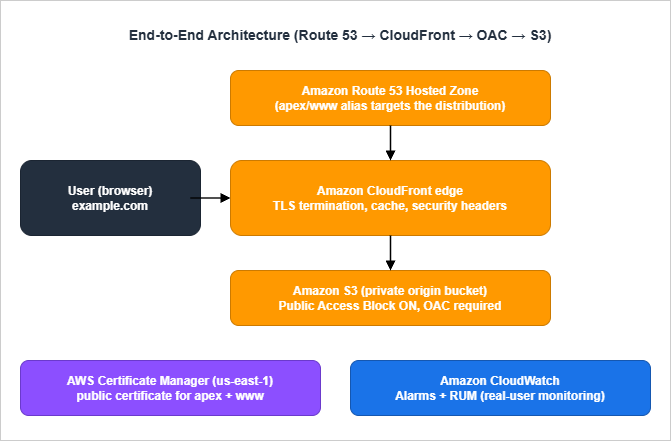
- The browser asks the recursive resolver for
example.com. The resolver eventually queries one of the four name servers Route 53 assigned to your hosted zone. - Route 53 answers with the IP addresses of the closest CloudFront edge for the alias target.
- The browser opens a TLS connection to the CloudFront edge using the ACM-issued certificate.
- CloudFront either serves the response from cache, or forwards the request to the S3 origin signed with Origin Access Control credentials.
- S3 returns the object. CloudFront stores a copy according to the cache policy and returns it to the browser.
CloudWatch sits beside this chain rather than in it. CloudFront publishes per-distribution metrics, S3 publishes per-bucket metrics, and Route 53 publishes optional health-check metrics. CloudWatch RUM, if you enable it, collects real-user navigation timings from the browser side.
Two design choices in this architecture deserve to be called out:
- The S3 bucket is private. CloudFront signs every origin request with OAC. There is no public S3 website endpoint, no public read ACL, and no public bucket policy. Your S3 bucket should not appear on
s3-website-...amazonaws.com. - The certificate lives in
us-east-1. CloudFront only accepts ACM certificates from the N. Virginia region, regardless of where you live or where your bucket is.
2. Step 1: Choosing a Domain Name
The most consequential decision in this whole flow is the one that has nothing to do with AWS. You will live with the domain you pick for years, so it is worth a little structured thinking before you click "Register".2.1 TLD Selection Considerations
The top-level domain you pick affects three things: pronounceability, perceived legitimacy, and registrar-side renewal price. AWS Route 53 supports a large catalog of TLDs, but the ones I see indie developers actually use cluster around a few categories:- Generic gTLDs —
.com,.net,.org..comis still the only TLD most non-technical users will assume by default. If your name is available as a.com, that simplifies many subsequent decisions (email, business cards, word-of-mouth). - Tech-flavoured gTLDs —
.dev,.app,.io,.tech..devand.appare HSTS-preloaded by Google, which means browsers refuse to load them over plain HTTP regardless of what you do. That is fine for our architecture (we force HTTPS anyway), but be aware of it before you assumehttp://yourname.devwill redirect. - Country-code ccTLDs —
.jp,.uk,.de,.co.uk. These are useful when your audience is local, or when the namespace is less crowded. Renewal pricing varies a lot between ccTLDs, and registration eligibility rules vary even more.
Two practical filters before you commit:
- Test whether the candidate name survives being read aloud over a phone call.
- Try to type it on a phone keyboard with one hand. If you trip on the spelling, your users will too.
2.2 Trademark and Brand Checks
Registering a domain does not give you trademark rights, and trademark holders can take a domain back through UDRP or the courts. Before you spend money:- Search the USPTO database (or your country's equivalent) for the literal name and obvious variations.
- Search the EU Intellectual Property Office's TMview if you operate in or near Europe.
- Run a plain web search for the name plus your category. If a small but visible company already uses it, that is enough to push you to plan B.
This is more important than it sounds. A cease-and-desist letter two years into your project is much more disruptive than picking a different name on day one.
2.3 Naming Patterns That Age Well
Patterns I have watched age badly:- The current AI buzzword in the name (
*-ai,*-gpt,*-llm) - A specific framework or product version (
vue3-*,python311-*) - A specific year (
2026-*)
Patterns that age better:
- Real words, possibly invented, that suggest the function rather than the implementation
- Initials that you have a personal connection to
- Short combinations of two ordinary words
I have personally chosen the last pattern multiple times and never regretted it.
2.4 WHOIS Privacy and the Public Registrant Record
Every domain you register has a WHOIS record that is, by ICANN policy, queryable. The default for personal contact information varies by registrar and TLD, and the privacy implications are larger than most indie maintainers expect on registration day. Three points are worth knowing before you click "register":Route 53 Domains enables WHOIS privacy by default for supported TLDs. The supported list covers the major generic TLDs (
.com, .net, .org, .io, .dev, .app) and a growing set of country-code TLDs, but not all of them. For TLDs that do not allow privacy at the registry level — some country-code TLDs require the registrant's real name and address in the public record — this is a real factor in TLD selection. If you are publishing under a personal brand and you are based in a jurisdiction where exposing your home address feels uncomfortable, prefer a TLD whose registry permits privacy.The administrative email in the WHOIS record is the recovery channel for the domain. If that email lapses (you change jobs, your free email account gets reclaimed, your domain registrar's notifications go to a folder you do not check), you risk losing the ability to receive expiration notices or transfer authorization codes. Use a long-lived address that is not on the domain itself — a personal Gmail, a recovery alias on a different domain you also own — and put a calendar reminder to verify it works once a year.
Trademark notification services are reading WHOIS. Within hours of a new domain registration, the registrant's email tends to receive cold pitches from brand-monitoring companies, SEO services, and the occasional phishing attempt that imitates the registrar. None of them are urgent, none of them are trustworthy on first contact, and the safest assumption is to ignore everything that arrives in the first week and take action only on the registrar's own dashboard. If the registrar suspects an issue with your registration they will notify you in the dashboard, not by email asking you to click a link.
3. Step 2: Registering the Domain on Amazon Route 53
You can register the domain anywhere — Cloudflare, Namecheap, Google Domains successors, your local ccTLD registrar — and still use Route 53 for DNS. But if your goal is "everything in one AWS account, paid through one AWS invoice, owned by my IAM principal", registering through Route 53 itself is the simplest path. It is also the only path where the registrar and the DNS provider can never get out of sync.For background on the service itself, see AWS History and Timeline regarding Amazon Route 53 - Overview, Functions, Features, Summary of Updates, and Introduction, which traces the feature evolution from the 2010 launch onward.
3.1 Console Walkthrough
In the AWS Management Console:- Open Route 53 → Registered domains → Register domains.
- Search for the candidate domain. Route 53 returns the availability and renewal price for each TLD.
- Add the domain to your cart. The default registration period is one year; I usually pick three years for a project I am serious about.
- Fill in the registrant, administrative, and technical contacts. Enable privacy protection if your TLD allows it. This redacts your address and phone number from public WHOIS without affecting the registration.
- Confirm and submit. Registration is asynchronous and usually completes within minutes for
.com,.net,.org. For ccTLDs the registry can take longer.
When the registration finishes, Route 53 automatically creates a public hosted zone for the domain and assigns four name servers. Those name servers are the authoritative source of truth for every DNS record from now on.
3.2 AWS CLI
Domain registration through the API requires an existing contact JSON file. A minimal version looks like this:{
"DomainName": "example.com",
"DurationInYears": 1,
"AutoRenew": true,
"AdminContact": {
"FirstName": "First",
"LastName": "Last",
"ContactType": "PERSON",
"AddressLine1": "1 Example Street",
"City": "Tokyo",
"CountryCode": "JP",
"ZipCode": "100-0001",
"PhoneNumber": "+81.0312345678",
"Email": "you@example.com"
},
"RegistrantContact": { "...": "(same shape as AdminContact)" },
"TechContact": { "...": "(same shape as AdminContact)" },
"PrivacyProtectAdminContact": true,
"PrivacyProtectRegistrantContact": true,
"PrivacyProtectTechContact": true
}
us-east-1:aws route53domains register-domain \
--region us-east-1 \
--cli-input-json file://register-domain.json
aws route53domains get-operation-detail \
  --region us-east-1 \
  --operation-id <operation-id>
3.3 What Route 53 Sets Up Automatically
Once registration succeeds, the following are already in place without any further action from you:- A public hosted zone whose name matches the domain
- An
NSrecord at the apex of that hosted zone, listing the four assigned name servers - An
SOArecord at the apex with default values - A registrar-side delegation pointing to those same four name servers
Note: If you ever delete and recreate the hosted zone, Route 53 issues a new set of name servers and the registrar-side delegation will not follow automatically. You have to update the delegation manually under Registered domains → Add or edit name servers. This is the single most common reason an apparently correct setup stops resolving.
4. Step 3: Provisioning the S3 Bucket for Static Hosting
For background on the S3 service, see AWS History and Timeline regarding Amazon S3 - Focusing on the evolution of features, roles, and prices beyond mere storage.4.1 Bucket Naming and Region
Two opinions I hold strongly:- Do not name the bucket after the domain when the bucket is a private CloudFront origin. With OAC there is no functional reason to match the names, and using a non-obvious name removes one piece of incidental information from anyone enumerating S3.
- Pick a region close to where you sit, not where your visitors sit. CloudFront caches at the edge, so the origin region barely affects user-perceived latency for cache hits. The region that matters is the one you read logs from and re-deploy from.
Bucket names are globally unique and DNS-compliant: lowercase, no underscores, between 3 and 63 characters.
4.2 Console Walkthrough
- Open S3 → Create bucket.
- Pick a name and a region.
- Leave Block all public access turned on. Every checkbox should stay checked.
- Enable Bucket Versioning. This makes accidental overwrites recoverable.
- Enable Default encryption with SSE-S3 (or SSE-KMS if you have a reason). SSE-S3 is the default for new buckets.
- Click Create bucket.
That is the entire S3 setup. The bucket policy will come from CloudFront's OAC step in §6.
4.3 AWS CLI
aws s3api create-bucket \
  --bucket my-private-origin-bucket \
  --region ap-northeast-1 \
  --create-bucket-configuration LocationConstraint=ap-northeast-1

aws s3api put-public-access-block \
  --bucket my-private-origin-bucket \
  --public-access-block-configuration \
    "BlockPublicAcls=true,IgnorePublicAcls=true,BlockPublicPolicy=true,RestrictPublicBuckets=true"

aws s3api put-bucket-versioning \
  --bucket my-private-origin-bucket \
  --versioning-configuration Status=Enabled

aws s3api put-bucket-encryption \
  --bucket my-private-origin-bucket \
  --server-side-encryption-configuration \
    '{"Rules":[{"ApplyServerSideEncryptionByDefault":{"SSEAlgorithm":"AES256"},"BucketKeyEnabled":true}]}'
us-east-1 reject the --create-bucket-configuration argument. Drop it for that one region.4.4 CloudFormation
AWSTemplateFormatVersion: '2010-09-09'
Description: Private S3 bucket used as a CloudFront origin via OAC.

Resources:
  OriginBucket:
    Type: AWS::S3::Bucket
    DeletionPolicy: Retain
    UpdateReplacePolicy: Retain
    Properties:
      BucketName: my-private-origin-bucket
      PublicAccessBlockConfiguration:
        BlockPublicAcls: true
        IgnorePublicAcls: true
        BlockPublicPolicy: true
        RestrictPublicBuckets: true
      VersioningConfiguration:
        Status: Enabled
      BucketEncryption:
        ServerSideEncryptionConfiguration:
          - ServerSideEncryptionByDefault:
              SSEAlgorithm: AES256
            BucketKeyEnabled: true
      OwnershipControls:
        Rules:
          - ObjectOwnership: BucketOwnerEnforced
BucketOwnerEnforced disables ACLs entirely. With ACLs gone, "public access" can only happen via the bucket policy, and Public Access Block is the master switch for that.4.5 OAC-Aware Bucket Policy
The bucket policy that allows CloudFront — and only CloudFront — to read from the bucket is best applied after the distribution exists, because it references the distribution ARN. I show the full policy in §6.5 alongside the distribution itself. Until then the bucket has no policy attached, which is the correct intermediate state.5. Step 4: Issuing the ACM Certificate (DNS Validation in us-east-1)
ACM, S3, and CloudFront are described together in AWS CloudFormation for ACM, Lambda@Edge, WAF, S3, and CloudFront if you would like to see the entire infrastructure-as-code stack in one file. The current section focuses on the certificate alone.5.1 Why us-east-1 for CloudFront
This is the rule that traps the most first-time users. CloudFront only accepts custom-domain certificates from the ACM region inus-east-1 (N. Virginia). It does not matter that your S3 bucket is in ap-northeast-1, that you live in Berlin, that you operate a multi-region application. The certificate that goes on the CloudFront distribution must be issued in us-east-1.If you also need the same certificate on a regional resource (an Application Load Balancer in Tokyo, for example), you have to issue a separate certificate in that region. ACM does not replicate certificates across regions for you.
5.2 Console Walkthrough
- Switch the console region to
us-east-1before opening ACM. This is easy to forget. - Open ACM → Request a certificate → Request a public certificate.
- Add the domain names: both
example.comandwww.example.comif you plan to servewww. You can also add*.example.comif you anticipate other subdomains. - Pick DNS validation.
- Submit the request.
ACM creates one validation record per name. For each, click Create record in Route 53 to have ACM write the
CNAME directly into your hosted zone. The certificate moves from Pending validation to Issued once the DNS records propagate, usually within a few minutes.5.3 AWS CLI
aws acm request-certificate \
  --region us-east-1 \
  --domain-name example.com \
  --subject-alternative-names www.example.com \
  --validation-method DNS \
  --idempotency-token indie-dev-cert-2026-05
aws acm describe-certificate \
  --region us-east-1 \
  --certificate-arn <cert-arn> \
  --query 'Certificate.DomainValidationOptions[].ResourceRecord'
aws route53 change-resource-record-sets.5.4 CloudFormation
CloudFormation can do all of this in one stack, but the stack must be deployed inus-east-1:AWSTemplateFormatVersion: '2010-09-09'
Description: Public ACM certificate for the apex and www, validated via Route 53.
Parameters:
HostedZoneId:
Type: AWS::Route53::HostedZone::Id
Resources:
SiteCertificate:
Type: AWS::CertificateManager::Certificate
Properties:
DomainName: example.com
SubjectAlternativeNames:
- www.example.com
ValidationMethod: DNS
DomainValidationOptions:
- DomainName: example.com
HostedZoneId: !Ref HostedZoneId
- DomainName: www.example.com
HostedZoneId: !Ref HostedZoneId
Outputs:
CertificateArn:
Value: !Ref SiteCertificate
DomainValidationOptions with HostedZoneId lets ACM create the DNS validation records in your hosted zone automatically. The stack does not finish creating until the certificate is issued, so a stuck stack here is a sign that DNS is not pointing where you think it is.5.5 The DNS Validation Pitfall
The single most common cause of a stuck ACM validation is the registrar-side delegation pointing to a different set of name servers than the hosted zone you wrote the validationCNAME into. The symptoms are:- The hosted zone shows the validation
CNAMEthat ACM generated (a name such as_xxx.example.com) dig CNAME _xxx.example.comfrom your terminal shows nothing, or a different value- ACM stays at
Pending validationindefinitely
The fix is to confirm the
NS records on the registrar side match the hosted zone's name servers. If you registered through Route 53 originally and never deleted the hosted zone, this should already be correct. If you migrated DNS in or out at some point, double-check.If an older certificate was validated by email rather than DNS, the announced dates after which ACM stops offering email validation and stops renewing email-validated certificates, and what
UpdateCertificateOptions changes and keeps when you switch such a certificate to DNS validation, are covered in Moving AWS Certificate Manager Off Email Validation - The Announced Dates, What UpdateCertificateOptions Changes and Keeps, Finding Email-Validated Certificates, and Where the Documentation Has Not Caught Up.6. Step 5: Creating the CloudFront Distribution
This is the longest section because CloudFront is the most opinionated piece of the stack. Get this right and the rest of the site mostly takes care of itself.6.1 Origin = S3 with OAC (No Public Bucket)
Origin Access Control replaced the older Origin Access Identity (OAI) pattern. Functionally both let CloudFront fetch from a private bucket, but OAC supports SigV4, KMS-encrypted objects, and all current S3 features. There is no reason to use OAI for a new distribution today.You create one OAC per distribution and reference it from the origin.
6.2 Behaviors and Compression
The default cache behavior should:- Forward only the methods you actually use. For a static site,
GET, HEAD, OPTIONSis plenty. - Use a managed cache policy. The built-in
Managed-CachingOptimizedis a good starting point because it sets a long default TTL and respectsCache-Controlfrom the origin. - Decide deliberately whether you need an origin request policy at all. S3 ignores cookies and query strings, so forwarding them only inflates the cache key and lowers the hit ratio. For a pure static origin, omitting the origin request policy is the simplest correct answer. Attach
Managed-CORS-S3Originonly if you actually serve cross-origin assets (web fonts, fetch-driven JSON) and needOrigin/Access-Control-Request-*headers forwarded to S3 so it can echo CORS response headers. - Have automatic compression turned on. CloudFront will gzip and Brotli-compress eligible responses on the fly.
6.3 Default Root Object and SPA-Friendly Error Responses
For a multi-page static site, set the default root object toindex.html. CloudFront will serve index.html for https://example.com/ instead of returning the bucket listing.For a single-page app, you also need to handle the case where the user navigates to
https://example.com/some/route and S3 returns 403 or 404 because no such object exists. Configure CloudFront's Custom error responses:403→ respond with200and serve/index.html404→ respond with200and serve/index.html
This is what gives a client-side router its illusion of working real URLs. Enable this only for SPAs. On a multi-page static site, the same configuration silently hides genuine 404s — broken internal links return 200, search engines index nonexistent pages, and the only signal you ever get that a link is broken is a confused reader. The CFN block in §6.5 carries this warning as an inline comment so the SPA-only intent is impossible to miss when copy-pasting.
6.4 HTTPS Enforcement and Security Headers
A few non-negotiables:- Viewer protocol policy: Redirect HTTP to HTTPS. This is what makes
http://example.comsend a 301 tohttps://example.com. - Minimum TLS version: TLSv1.2_2021 at the lowest. There is no real reason to support older clients on a new site in 2026.
- Response headers policy: Attach a managed or custom response headers policy that adds at least:
Strict-Transport-Security: max-age=63072000; includeSubDomainson day one (nopreloaddirective yet)X-Content-Type-Options: nosniffReferrer-Policy: strict-origin-when-cross-originPermissions-Policyset to the minimum your site needs
HSTS preloading is a three-step process, not a single header flip. Adding the
preload token to the header only signals eligibility; the browser-vendor preload list itself only changes when you submit your domain at hstspreload.org. The recommended order is: (1) launch with the header above — max-age only, no preload — and let the site run on HTTPS for at least a few weeks, including across an apex and every subdomain you intend to cover; (2) once you are confident every host under the domain serves HTTPS correctly, add ; preload to the directive and redeploy; (3) submit the domain at hstspreload.org. Removing yourself from the preload list takes months and propagates only with browser releases, so the conservative ordering matters.6.5 Console / CLI / CloudFormation
The CloudFormation version of all of the above is the version I recommend memorizing, because it is the version you can re-deploy without remembering which checkbox went where.AWSTemplateFormatVersion: '2010-09-09'
Description: CloudFront distribution fronting a private S3 origin via OAC.
Parameters:
OriginBucketName:
Type: String
CertificateArn:
Type: String
PrimaryDomain:
Type: String
Default: example.com
WwwDomain:
Type: String
Default: www.example.com
Resources:
OriginAccessControl:
Type: AWS::CloudFront::OriginAccessControl
Properties:
OriginAccessControlConfig:
Name: !Sub '${OriginBucketName}-oac'
OriginAccessControlOriginType: s3
SigningBehavior: always
SigningProtocol: sigv4
Distribution:
Type: AWS::CloudFront::Distribution
Properties:
DistributionConfig:
Enabled: true
IPV6Enabled: true
HttpVersion: http2and3
DefaultRootObject: index.html
Aliases:
- !Ref PrimaryDomain
- !Ref WwwDomain
Origins:
- Id: s3-origin
DomainName: !Sub '${OriginBucketName}.s3.${AWS::Region}.amazonaws.com'
S3OriginConfig:
OriginAccessIdentity: ''
OriginAccessControlId: !Ref OriginAccessControl
DefaultCacheBehavior:
TargetOriginId: s3-origin
ViewerProtocolPolicy: redirect-to-https
AllowedMethods: [GET, HEAD, OPTIONS]
CachedMethods: [GET, HEAD]
Compress: true
CachePolicyId: 658327ea-f89d-4fab-a63d-7e88639e58f6
# OriginRequestPolicyId is intentionally omitted for a pure static origin.
# Attach Managed-CORS-S3Origin (88a5eaf4-2fd4-4709-b370-b4c650ea3fcf)
# only if you serve cross-origin assets and need CORS headers forwarded.
ResponseHeadersPolicyId: 67f7725c-6f97-4210-82d7-5512b31e9d03
ViewerCertificate:
AcmCertificateArn: !Ref CertificateArn
MinimumProtocolVersion: TLSv1.2_2021
SslSupportMethod: sni-only
PriceClass: PriceClass_All
# CustomErrorResponses below are SPA-only. For a multi-page static site,
# delete this block so genuine 404s surface to crawlers instead of being
# rewritten to 200 + /index.html.
CustomErrorResponses:
- ErrorCode: 403
ResponseCode: 200
ResponsePagePath: /index.html
ErrorCachingMinTTL: 10
- ErrorCode: 404
ResponseCode: 200
ResponsePagePath: /index.html
ErrorCachingMinTTL: 10
OriginBucketPolicy:
Type: AWS::S3::BucketPolicy
Properties:
Bucket: !Ref OriginBucketName
PolicyDocument:
Statement:
- Sid: AllowCloudFrontServicePrincipalReadOnly
Effect: Allow
Principal:
Service: cloudfront.amazonaws.com
Action: s3:GetObject
Resource: !Sub 'arn:aws:s3:::${OriginBucketName}/*'
Condition:
StringEquals:
AWS:SourceArn: !Sub 'arn:aws:cloudfront::${AWS::AccountId}:distribution/${Distribution}'
Outputs:
DistributionDomainName:
Value: !GetAtt Distribution.DomainName
DistributionId:
Value: !Ref Distribution
658327ea-f89d-4fab-a63d-7e88639e58f6 is Managed-CachingOptimized and 67f7725c-6f97-4210-82d7-5512b31e9d03 is Managed-SecurityHeadersPolicy. The CORS-aware origin request policy 88a5eaf4-2fd4-4709-b370-b4c650ea3fcf (Managed-CORS-S3Origin) is referenced in the comment as the right opt-in choice when CORS is required, and is intentionally not attached by default. Substitute your own custom policies if the managed defaults do not fit.The bucket policy at the bottom is the OAC-aware policy I deferred from §4.5. It only grants
s3:GetObject to the CloudFront service principal, and only when the request comes from this specific distribution. There is no public access at any layer.6.6 When to Add CloudFront Functions or Lambda@Edge
The configuration above gets a static site live without any compute layer in front of it. Two situations push you toward adding edge code, and the choice between CloudFront Functions and Lambda@Edge depends on which one applies:- Lightweight URL rewrites and header manipulation: CloudFront Functions. Trailing-slash redirects, host-header normalization, and pretty-URL rewrites (
/about→/about.html) all run in single-digit milliseconds and have a generous always-free invocation tier — see the CloudFront pricing page for current limits. The trade-off is a constrained JavaScript runtime. CloudFront Functions ships two runtime versions you choose at deploy time:cloudfront-js-1.0, an ECMAScript 5.1 dialect with a few ES6 additions, and the newercloudfront-js-2.0, which is compliant with ECMAScript 5.1 and also supports some features of ECMAScript versions 6 through 12. Both runtimes share the same hard limits: no network calls (nofetch),requireonly for built-in modules such ascryptoandquerystring, no Node-style modules, a sub-millisecond execution-time limit enforced via the per-invocation compute utilization metric (a 0–100 score where 100 means the budget is exhausted), and triggering on Viewer Request and Viewer Response (plus a connection request event that is available only for mutual TLS connections). For 90% of static-site needs this is enough — in particular, a/about→/about.htmlrewrite at the Viewer Request stage replaces the entire SPA-error-page hack and behaves correctly for crawlers. - Anything that needs an outbound call or richer logic: Lambda@Edge. Auth checks against a JWT issuer, rewrites that depend on a database lookup, image-resizing on the fly. The cost is real per-invocation pricing, longer cold-start tails (functions run in regional caches, not POPs), and a deploy cycle that requires a new Lambda version on every push. Lambda@Edge is appropriate when the value of the feature outweighs the operational tax; for an indie static site it usually does not.
A specific recipe worth pinning: a CloudFront Function that adds the missing
Permissions-Policy, Cross-Origin-Embedder-Policy, and Cross-Origin-Resource-Policy headers (security controls that the managed Security Headers Policy does not cover at the time of writing) runs in microseconds and turns a SecurityHeaders.com B grade into an A. The function is twenty lines of vanilla JavaScript with no dependencies, deploys in one CLI command, and never needs to be touched again.The temptation when a feature can be done at the edge is to do everything at the edge. Resist it. Each function is a moving part with its own deploy cadence, log group, and possible interaction with the cache key. Reach for the edge layer for needs the static origin cannot meet, not for needs you could solve at build time with a different filename or a different generator setting.
7. Step 6: Apex / Subdomain Routing with Alias Records
Once the distribution exists, your domain still does not resolve to it until you add the right records to the hosted zone.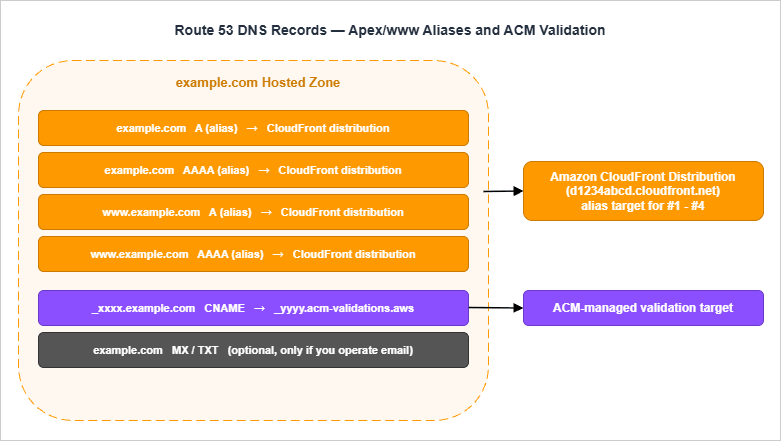
7.1 Apex Alias to CloudFront
The apex record (the one forexample.com itself) cannot be a CNAME because of how DNS works at the zone apex. Route 53 solves this with alias records, which look like an A or AAAA record from the public DNS side but resolve to the dynamic IP of an AWS-managed target on the back end.Create:
Arecord atexample.com, alias target = your CloudFront distribution domain (d1234abcd.cloudfront.net)AAAArecord atexample.com, same alias target
Both records are required. CloudFront supports IPv6 by default, and modern clients prefer it; if you only have an
A record, IPv6-only networks will not reach you cleanly.7.2 www to Apex
For www.example.com, you have two reasonable options:- Alias to the same distribution. This means
wwwand the apex are independent records pointing to the same CloudFront distribution. CloudFront serves both because you listed them asAliases. This is the simplest setup and what I usually use. - Alias to the apex. Route 53 supports aliasing one record set to another within the same hosted zone, but I find it offers no real benefit and introduces an extra hop that some DNS debugging tools render confusingly.
7.3 IPv4 + IPv6 (A and AAAA Aliases)
A complete record set for the site looks like:| Name | Type | Value / Alias Target | Notes |
|---|---|---|---|
| example.com | A (alias) | d1234abcd.cloudfront.net | Apex IPv4 alias |
| example.com | AAAA (alias) | d1234abcd.cloudfront.net | Apex IPv6 alias |
| www.example.com | A (alias) | d1234abcd.cloudfront.net | Subdomain IPv4 alias |
| www.example.com | AAAA (alias) | d1234abcd.cloudfront.net | Subdomain IPv6 alias |
| _xxx.example.com | CNAME | _yyy.acm-validations.aws | Created by ACM, leave alone |
CloudFormation expression for the four aliases:
  ApexA:
    Type: AWS::Route53::RecordSet
    Properties:
      HostedZoneId: !Ref HostedZoneId
      Name: example.com.
      Type: A
      AliasTarget:
        HostedZoneId: Z2FDTNDATAQYW2  # CloudFront's fixed hosted zone ID
        DNSName: !GetAtt Distribution.DomainName
        EvaluateTargetHealth: false

  ApexAAAA:
    Type: AWS::Route53::RecordSet
    Properties:
      HostedZoneId: !Ref HostedZoneId
      Name: example.com.
      Type: AAAA
      AliasTarget:
        HostedZoneId: Z2FDTNDATAQYW2
        DNSName: !GetAtt Distribution.DomainName
        EvaluateTargetHealth: false

  WwwA:
    Type: AWS::Route53::RecordSet
    Properties:
      HostedZoneId: !Ref HostedZoneId
      Name: www.example.com.
      Type: A
      AliasTarget:
        HostedZoneId: Z2FDTNDATAQYW2
        DNSName: !GetAtt Distribution.DomainName
        EvaluateTargetHealth: false

  WwwAAAA:
    Type: AWS::Route53::RecordSet
    Properties:
      HostedZoneId: !Ref HostedZoneId
      Name: www.example.com.
      Type: AAAA
      AliasTarget:
        HostedZoneId: Z2FDTNDATAQYW2
        DNSName: !GetAtt Distribution.DomainName
        EvaluateTargetHealth: false
Z2FDTNDATAQYW2 is the fixed hosted zone ID that Route 53 uses for every CloudFront distribution. It is a constant — the same string for every AWS account.7.4 Common Pitfalls (CNAME at Apex, Wrong Hosted Zone)
Three failure modes I have seen many times:- Trying to use a CNAME at the apex. Some DNS providers offer this as "ANAME" or "ALIAS" with similar mechanics to Route 53 alias records. Route 53 itself does not. If you are tempted to write
example.com CNAME d1234abcd.cloudfront.netdirectly, stop and use an aliasArecord instead. - Writing the records into the wrong hosted zone. If you have multiple hosted zones for the same name (this is usually a mistake left over from old experiments), Route 53 will let you create records in either, but only one of them is delegated. Delete the unused zone or be very careful which one you write into.
- Forgetting
AAAA. The site appears to work, then fails for a subset of users in a way that is hard to reproduce. Always create bothAandAAAA.
8. Step 7: Cache Strategy and Invalidation
The default CloudFront cache will hold whatever the origin says it should. The key question is what the origin (your S3 bucket) says, and how you arrange your build output so that the CDN cache is correct without any manual intervention.8.1 Cache Headers vs CloudFront Policies
CloudFront cache policies define defaults: the minimum, maximum, and default TTL when the origin does not say. The origin (S3) setsCache-Control per object, and Managed-CachingOptimized respects it.For a static site, I set
Cache-Control per object type:| Object Type | Cache-Control | Why |
|---|---|---|
HTML (*.html) | public, max-age=60, s-maxage=300, must-revalidate | Short browser cache, slightly longer edge cache |
Versioned assets (main.<hash>.js) | public, max-age=31536000, immutable | Filename changes on rebuild, so cache forever |
Unversioned images (images/*) | public, max-age=2592000 | Updated rarely, manual invalidation acceptable |
Service worker (sw.js) | no-cache | Browsers must always check for updates |
Manifest (manifest.json) | public, max-age=300 | PWA install prompts pick up changes within minutes |
The
s-maxage directive lets the edge cache an HTML document longer than the browser does. That is usually what you want: visitors get fresh HTML on first load after a deploy, but the edge serves repeated requests cheaply.8.2 Versioned Asset Filenames
The cleanest cache invalidation strategy is the one you never have to invoke. If every CSS and JS file has its content hash in its filename —app.4f3a2b1c.js instead of app.js — and your HTML always references the latest hash, then the only file that ever needs cache busting is the HTML. The HTML's short TTL handles that automatically.Most modern build tools (Vite, Parcel, esbuild, Webpack) emit hashed filenames by default. If yours does not, this is the cheapest performance and operability win you will ever buy.
8.3 Invalidation Patterns and CI/CD Hooks
When you do need to bust the cache — usually after editing a file in place rather than re-deploying through your build — CloudFront invalidations are the tool:aws cloudfront create-invalidation \
--distribution-id E1ABCD2EFGHIJK \
--paths '/index.html' '/blog/*'
- Invalidate the smallest set of paths that covers the change.
'/*'is correct but blunt. - Invalidations are eventually consistent. Allow a minute or two before declaring the cache cleared.
- A single invalidation accepts up to 3,000 paths. If you need more, batch them or use a wildcard.
In CI/CD, the invalidation goes in the same step as the S3 sync, immediately after upload. If you upload first and invalidate second, there is a brief window during which a cache miss can pull stale content if
s-maxage is short — usually fine, but worth knowing about.8.4 Stale-While-Revalidate via Cache-Control
For HTML, layeringstale-while-revalidate on top of the basic Cache-Control lets browsers and edges serve a slightly stale response while fetching a fresh one in the background. CloudFront does not honour stale-while-revalidate itself for cache calculation, but most browsers do. A pragmatic value:Cache-Control: public, max-age=60, s-maxage=300, stale-while-revalidate=86400, must-revalidate
8.5 Static Asset Versioning — Filename or Folder?
The cache strategy in §8.2 only works if the asset filenames change when their contents change. Two patterns achieve this, and the choice affects how your build pipeline and deploy step are wired:Filename hashing (preferred for built assets). The asset filename embeds a hash of its contents:
main.4c8f2a.js, style.b6e1d3.css. Webpack, Vite, esbuild, and Rollup all support this with a one-line config (output.filename: '[name].[contenthash].js' in webpack, similar in others). The HTML references the hashed filename, and the new HTML is the only file that ever has a "short cache" header — everything else is "cache forever, never invalidate." The deploy step is "upload all the new files, then upload the new HTML, then optionally invalidate /index.html only." Cache invalidation becomes a one-path operation.Folder versioning (used for human-curated content like documents and images). The asset path embeds a version number you pick:
/assets/v3/header.png. The cost is that you have to bump the version manually when the content changes; the benefit is that the URL is human-readable and stable while the version holds. This is the right pattern for a slow-changing content site or a documentation site where you want the URL of an embedded image to be predictable.The pattern to avoid is cache-busting query strings like
style.css?v=3. CloudFront's default behavior is to cache the underlying object regardless of query string, so the version bump may not invalidate at the edge unless you explicitly include the query string in the cache key — a configuration that costs more than just hashing the filename. Query-string cache busting is a Web 1.0 idiom that has aged poorly; pick filename hashing for built artifacts and folder versioning for hand-curated assets, and accept query strings only as a temporary workaround when neither is available.9. Step 8: Monitoring (CloudWatch Alarms and CloudWatch RUM)
A site that is up and a site that is healthy are two different things. The minimum monitoring layer for an indie site costs very little and answers very different questions from "is it returning HTTP 200".9.1 CloudFront Metrics That Matter
CloudFront publishes these per-distribution metrics by default, inus-east-1:Requests— total request count. Useful as a sanity baseline.BytesDownloaded/BytesUploaded— bandwidth.4xxErrorRate/5xxErrorRate— error rate as a percentage.TotalErrorRate— sum of 4xx and 5xx.
The two error-rate metrics are the ones I always alarm on. Additional metrics — origin latency percentiles, cache hit rate per behavior — are available if you opt in to CloudFront additional metrics, billed separately.
9.2 Route 53 Health Checks Are Optional
Route 53 health checks are designed for failover routing — for example, sending traffic to a backup region when the primary fails health checks. For a single-region static site fronted by CloudFront, the failover scenario rarely applies: CloudFront is itself globally distributed, and S3 has no single regional failure that a static-site health check would catch in time.I usually skip Route 53 health checks on this kind of site and rely on CloudFront's built-in resilience plus CloudWatch alarms. If you do enable them, remember they are billed per check and per endpoint.
9.3 CloudWatch RUM for Real Users
CloudFront tells you what hit the edge. CloudWatch RUM tells you what the user actually experienced — Largest Contentful Paint, Interaction to Next Paint, JavaScript errors, navigation timing — sliced by browser, country, and page.To wire it in:
- Create a CloudWatch RUM app monitor for your domain.
- Drop the auto-generated snippet into your HTML (it is a small JavaScript bundle that posts metrics).
- Watch the metrics show up under CloudWatch → RUM.
For a small site, RUM is the closest thing to "Google Analytics for performance" that does not require giving anyone else your traffic data. See Website Speed Test for a synthetic counterpart that complements RUM.
9.4 Suggested Alarms
A minimum alarm set: HighErrorRateAlarm:
Type: AWS::CloudWatch::Alarm
Properties:
AlarmName: site-cloudfront-5xx-elevated
Namespace: AWS/CloudFront
MetricName: 5xxErrorRate
Statistic: Average
Period: 300
EvaluationPeriods: 2
DatapointsToAlarm: 2
Threshold: 1.0
ComparisonOperator: GreaterThanThreshold
Dimensions:
- Name: DistributionId
Value: !Ref Distribution
- Name: Region
Value: Global
TreatMissingData: notBreaching
AlarmActions:
- !Ref AlarmTopic
TotalRequestsZeroAlarm:
Type: AWS::CloudWatch::Alarm
Properties:
AlarmName: site-cloudfront-no-requests
Namespace: AWS/CloudFront
MetricName: Requests
Statistic: Sum
Period: 3600
EvaluationPeriods: 6
DatapointsToAlarm: 6
Threshold: 1
ComparisonOperator: LessThanThreshold
Dimensions:
- Name: DistributionId
Value: !Ref Distribution
- Name: Region
Value: Global
TreatMissingData: breaching
AlarmActions:
- !Ref AlarmTopic
TreatMissingData: breaching is intentional on the second alarm.Both alarms publish to an SNS topic. Subscribe an email or your incident-management tool of choice to that topic.
9.5 External Synthetics — Why You Want Eyes Outside Your Cloud
CloudWatch alarms only fire when AWS thinks something is wrong. The two failure modes they cannot detect on their own are AWS itself is broken and the user's path to your site is broken. Both happen often enough to plan for, and the answer in both cases is a synthetic check that lives outside the AWS console.The cheapest setup is a third-party uptime monitor (UptimeRobot, BetterStack, Pingdom, Checkly) that requests
https://example.com/ from a few global vantage points every minute and pages you when the response stops being 200 OK. The free tiers of most of these services are generous enough to cover an indie site, and the value of "the alert reaches me even when AWS Health is silent" is hard to overstate. The first time AWS has a multi-hour issue with CloudFront in your region, the synthetic monitor will be the only signal you receive that does not depend on the broken thing.A more sophisticated layer is a public status page (BetterStack Status, Statuspage.io, or a hand-rolled GitHub Pages site driven by your own check results). For most indie projects this is overkill, but the moment you have customers or readers waiting for your service, having an authoritative answer to "is the site down right now" beats answering the same question on social media a dozen times. The architectural rule worth keeping in mind: the system that tells you the workload is broken must not share critical dependencies with the workload — if your status page is hosted on the same CloudFront distribution as the site it monitors, the worst outage is also the moment the status page goes silent.
Two synthetic checks are usually sufficient: a homepage probe (catches the broad outage) and a deep-link probe to a representative content page (catches subtle deploy failures that produced a working homepage but broken inner pages). Add a third probe for any specific functionality that matters more than average — a contact form submission, a sign-up form's POST endpoint, a search query that should always return results — and you have alerting that exercises the parts of the site users actually care about. The cumulative cost of all this is roughly fifteen minutes of setup and zero ongoing operational load; the cumulative benefit is the difference between learning about an outage from a customer email and learning about it from your phone before any customer notices.
10. Step 9: Cost Awareness Without Numbers
10.1 What Drives Cost on This Stack
I am not going to quote any numbers here, because they change and because the same architecture costs different amounts in different regions. What I can tell you is which dials matter for an indie site:- CloudFront data transfer out. The price varies by edge region (North America / Europe is cheaper than parts of Asia-Pacific / South America).
- CloudFront requests. HTTPS requests cost slightly more than HTTP. For a static site this is usually trivial unless your traffic is dominated by a few extremely popular small files.
- S3 storage and request count. Storage is cheap; request count is what to watch if you are uploading or invalidating frequently.
- Route 53 hosted zone. A flat monthly charge per hosted zone, plus query charges. For a personal site, query charges are negligible.
- ACM. Public certificates for use with services integrated with ACM, such as CloudFront, are free; exportable and ACME-issued public certificates are charged. Private CA is not free, but you do not need a private CA for this stack.
- CloudWatch. Logs, custom metrics, RUM events, and alarms are all individually small but worth keeping an eye on.
- Domain registration. Annual fee per domain, varies wildly by TLD.
10.2 Where to Look (Official Pricing Pages)
Bookmark these. They are the authoritative sources, and any number quoted in a blog (including in mine) ages immediately:- Amazon CloudFront Pricing
- Amazon S3 Pricing
- Amazon Route 53 Pricing
- AWS Certificate Manager Pricing
- Amazon CloudWatch Pricing
Set a small AWS Billing alarm at a threshold that means "something is wrong" rather than "I am being charged at all". For an indie site, that is often a single-digit or low-double-digit dollar amount per month.
11. Operational Checklist for Day 2
The site is live. What now? Below are the routines I keep for every site I run.11.1 Pre-Launch Checklist
Before announcing the URL anywhere:https://example.comservesindex.htmlover HTTPShttps://www.example.comserves the same content over HTTPShttp://example.com301-redirects to HTTPShttp://www.example.com301-redirects to HTTPSexample.comresolves on both IPv4 and IPv6 (dig Aanddig AAAA)- The certificate covers both names and is not about to expire
- The bucket itself is not reachable directly —
https://<bucket>.s3.<region>.amazonaws.com/returns 403 - SecurityHeaders.com or similar reports HSTS, content-type, and referrer headers as expected
- CloudWatch alarms are configured and the SNS topic has at least one subscription
11.2 Monthly Operations
- Open the AWS Cost Explorer and verify the bill is in the expected band
- Spot-check the 4xx/5xx error rate graph for unexplained spikes
- Run a Lighthouse or PageSpeed Insights pass to confirm Core Web Vitals are still healthy
- Review CloudWatch Logs (if you have S3 access logs or CloudFront standard logs enabled) for unusual user agents or paths
11.3 Yearly Operations
- Re-confirm domain auto-renewal is enabled and the registrant email is current
- Audit the IAM principals that have write access to the bucket and the distribution; remove any that should no longer have access
- Refresh long-lived secrets (deploy-user access keys, GitHub Actions OIDC roles)
- Review the Public Access Block and bucket policy for drift
- Decide whether the architecture still fits the project — for example, whether a managed option such as AWS Amplify Hosting would now serve you better, or whether you want to introduce Lambda@Edge or CloudFront Functions for a feature you have grown into
ACM certificates issued through DNS validation auto-renew as long as the validation
CNAME records remain in the hosted zone, so this is one operational task you do not have to track manually. Leave the validation records alone.11.4 Multi-Environment Setup — When the One-Site Pattern Stops Fitting
The architecture in this guide assumes a single production site. Indie projects that survive long enough almost always need a second environment — a staging URL for testing risky changes, a preview site for sharing work-in-progress with collaborators, or a "next major version" parallel deployment. The pattern that scales without becoming complicated is to clone the stack into a second AWS account and front it with a subdomain.Account separation matters more than you would expect. Running staging and production in the same AWS account means a runaway script can drop the production bucket as easily as the staging one. AWS Organizations lets you create a second account in minutes, with consolidated billing back to the original payment method. The blast-radius reduction is worth the half-hour of setup; the operational habit of switching profile between accounts before any destructive command becomes second nature within a week.
Subdomain routing is the cheapest split. Add
staging.example.com as an alias record in the same hosted zone, pointing at a separate CloudFront distribution that fronts the staging bucket in the staging account. ACM in us-east-1 issues a wildcard certificate (*.example.com) that covers both environments; the validation CNAME goes in the production hosted zone, and the certificate is shared via Resource Access Manager or simply re-issued in each account — both work, the choice is operational preference.Treat staging as production-shaped, not production-lite. The most common mistake is to run staging with public-readable buckets, weaker IAM, or Cache-Control headers that differ from production. The mistakes you catch in staging are the ones that would fire in production with the same config; staging that diverges from production is staging that lies. The rule of thumb is: every CloudFormation parameter that differs between environments is named explicitly (account ID, domain name, certificate ARN); every other property is identical. CDK's stage abstraction or SAM's
--config-env flag both make this enforceable in code.A subtle benefit of running two environments is that you accidentally rehearse disaster recovery. The staging stack is the rehearsal you would otherwise have to schedule deliberately, and the runbook for "rebuild staging from a fresh AWS account" is the same runbook for "rebuild production after losing it." Once a year, run the rebuild against staging and time it; the result is the only meaningful answer to "how fast can we recover," and it improves measurably with each rehearsal. The same template that built staging built production, the same CI pipeline deploys both, and the only legitimate difference between them is the parameter file. When that level of symmetry holds, recovery is reduced to running one CloudFormation command against a fresh account — everything else is automatable from version control.
11.5 Disaster Recovery — The Three Failure Modes Every Indie Site Hits
A solo-maintained site does not have an on-call rotation; the failure modes you should rehearse are the ones that strand you for hours because nothing was prepared. Three are common enough that running a tabletop on each saves the eventual real incident:- Lost root credentials or MFA device. If you cannot get back into the AWS account, every other piece of this stack is unreachable. Rehearsal: confirm that the root contact email is one you can still receive at, that the registered phone number is current, and that you have a recovery MFA device or printed recovery codes stored somewhere physical. AWS's account recovery process for lost MFA is real but slow (often days) and requires identity verification — a printed copy of your registration receipt and a second MFA device beats every other option. If you registered the account with a personal email, transitioning the email to a domain you control before launch is worth the ten minutes it takes.
- Accidentally deleted bucket or wiped distribution. A misclick or an over-eager
aws s3 rm --recursivecan erase the site in seconds, and S3 does not retain an undo of the bucket itself. Mitigations: enable Versioning on the bucket so deleted objects are recoverable for the lifecycle period you set, and put a CloudFormation stack or Terraform state file under version control so the distribution is reproducible from code. The recovery sequence is then "cdk deployorcfn create-stack" rather than "remember every checkbox in the console wizard." The first time you run this drill against a non-production bucket, time it; ten minutes from "deleted" to "served traffic again" is achievable, but only after you have practiced once. - Domain hijack via expired or compromised registrar account. Route 53 Domains has auto-renew on by default, but a payment-method failure (expired card, declined transaction) can flip the domain into a 30-day grace period and then into a redemption period where recovery costs hundreds of dollars. Mitigations: enable auto-renew explicitly, keep two payment methods on file, set a CloudWatch
BillingFailednotification on the AWS account, and turn on Domain Lock (registrar transfer protection). Run a yearly check that the registrant contact information is still accurate; this is the address that ICANN dispute resolution uses when a domain ownership claim arises, and a stale email here means losing arguments you should have won.
None of these are exotic; all of them have stranded indie maintainers in published incident threads. The cost of preparation is small — mostly an afternoon of tabletop and one printed page in your filing cabinet — and the cost of being unprepared is your project. Treat this as the §11 you actually print and tape to the wall, because it is the only one you will be glad you did when the bad day arrives.
12. Summary
The recipe above is the one I would hand to a junior engineer or to a friend starting their first indie project. None of the individual pieces are exotic, and all of them are documented in the AWS official documentation in much more detail than I have written here. What is harder to find anywhere is the assembled walkthrough — which dials to set, which traps to avoid, in which order — and that is what I have tried to write down here.If I had to compress this guide into five rules:
- Pick a domain name you will not regret in three years; ignore the current buzzwords.
- Keep the bucket private; let CloudFront's OAC be the only path in.
- Issue the ACM certificate in
us-east-1; CloudFront has no other option. - Use alias
AandAAAArecords on both apex andwww; neverCNAMEthe apex. - Encode the cache contract in
Cache-Controlheaders and use hashed filenames; do not rely on manual invalidation as the primary cache strategy.
For deeper background on individual services covered above, see AWS History and Timeline regarding Amazon Route 53, AWS History and Timeline regarding Amazon S3, and the IaC-focused AWS CloudFormation for ACM, Lambda@Edge, WAF, S3, and CloudFront. If you would prefer a managed service that hides much of this complexity, AWS Amplify Features Focusing on Static Website Hosting and Using AWS Amplify CLI for Static Website Hosting describe the higher-level alternative.
13. References
- Amazon Route 53 Developer Guide
- Registering and managing domains using Amazon Route 53
- Amazon S3 User Guide
- Blocking public access to your Amazon S3 storage
- Restricting access to an Amazon S3 origin (Origin Access Control)
- Using HTTPS with CloudFront
- DNS validation in AWS Certificate Manager
- CloudWatch RUM in the Amazon CloudWatch User Guide
Related Articles in This Series
- AWS History and Timeline regarding Amazon Route 53 - Overview, Functions, Features, Summary of Updates, and Introduction
Service-history view of Route 53, including the ordering of routing-policy and health-check features that show up in the registration and alias-record sections of the current article. - AWS History and Timeline regarding Amazon S3 - Focusing on the evolution of features, roles, and prices beyond mere storage
Service-history view of S3, including the introduction of public-access controls and OAC that this guide relies on. - AWS CloudFormation for ACM, Lambda@Edge, WAF, S3, and CloudFront
Single-template version of this same architecture extended with WAF and Lambda@Edge for richer behavior. - AWS Amplify Features Focusing on Static Website Hosting
Managed alternative for indie developers who would rather have AWS make most of the decisions in this guide on their behalf. - Using AWS Amplify CLI for Static Website Hosting
Same managed service from the CLI side, useful when you want a hosting workflow that mirrors a typical Git-based deploy.
References:
Tech Blog with curated related content
Written by Hidekazu Konishi