AWS Clean Rooms Analysis Rules and Differential Privacy - What a Collaborator Can Learn From Your Table, What the Output Removes Without Saying So, and Where Each Budget Runs Out
First Published:
Last Updated:
The data provider's representatives are likely to be interested in three key questions: Which analysis rules allow them to avoid sharing row-level data with the other party? What happens when the differential privacy budget is exhausted, and should they choose the monthly refresh? Once you allow a query provider, what can that provider do in other collaborations?
The answers to these questions are spread across the AWS Clean Rooms User Guide (hereafter the UG), the Clean Rooms API Reference, and the What's New section. How strongly the protection is described differs between some of these sources. This article, following the descriptions in these resources, outlines, for each control, what can be withheld from the other party and what the control does not prevent. Analysis rules restrict the results returned to the other party to the scope of the rules. However, the output does not indicate rows removed by an output constraint. The UG's best practices page states that specifying only the columns required for the analysis rule might help mitigate the risk of differencing attacks.
Related articles on this site:
- AWS Nitro Enclaves and Confidential Computing on AWS - Attestation, PCR Measurements, and KMS Condition Keys
- Fine-Grained Access Control for AI Data with AWS Lake Formation - LF-Tags, Column-Level Permissions, and Cross-Account Sharing
- The Iceberg Catalog Layer on AWS - Catalog Federation, the REST Catalog API, and Scoped Credential Vending
- Identity-Aware Data Access on AWS - Propagating Workforce Identity from IAM Identity Center to Lake Formation and S3 Access Grants
- Where the Logs Come From on AWS - Identity and the Control Plane, What Is On by Default, and What Is Not Recorded at All
- AWS History and Timeline regarding AWS Glue - Overview, Functions, Features, Summary of Updates, and Introduction
- AWS PrivateLink Tunnel Endpoints - Sharing a Network Segment Instead of Individual Resources, What GENEVE Requires of the Consumer, and Which Side Can Open a Connection
Table of Contents
- 1. The Scope of This Article and the Date It Was Verified
- 2. Where an Analysis Rule Sits and Where It Is Enforced
- 3. What Each of the Three Rule Types Puts in the Output
- 4. What the Output Removes Without Saying So
- 5. Differential Privacy — Noise and the Privacy Budget
- 6. Stopping by Count — Data Access Budgets
- 7. Who Receives What — Member Abilities and Analysis Logs
- 8. Where a Result Goes Next — Intermediate Tables
- 9. What the Controls Do Not Prevent — In the Strength the Sources Use
- 10. Frequently Asked Questions about AWS Clean Rooms Analysis Rules and Differential Privacy
- 11. Summary
- 12. References
1. The Scope of This Article and the Date It Was Verified
This section defines the terms this article uses and checks when the features it covers were added. It then lists what the article does not cover.1.1 Terms Used in This Article
The UG glossary (the "AWS Clean Rooms Glossary" page) defines "collaboration" as follows:A secure logical boundary in AWS Clean Rooms in which members can perform SQL queries on configured tables.The collaboration creator creates a collaboration. Invited accounts participate by creating a membership resource. Configured tables are resources that reference existing tables in the AWS Glue Data Catalog and can be associated with one or more collaborations. When associated, a configured table association resource is created. The history of the Glue Data Catalog is covered in AWS History and Timeline regarding AWS Glue.
The UG expresses what members can do as member abilities. This article refers to these members as follows (see section 7.1):
- Member who can query
- Member who can receive results
- Data providers. The UG uses both the terms "data owner" and "data provider." This article refers to members who contribute configured tables as data providers.
In this article, the other party means the member who can query, the member who can receive results, and other data providers. The "Considerations and limitations" page in the UG's custom rules chapter makes the following three assumptions about privacy-enhanced collaborative analysis.
Assume the query runner is trying to exfiltrate user level data
Assume other data providers are trying to exfiltrate user level data
Assume the query runner and other data providers are colluding to exfiltrate user level data
This article also reads what the other party can learn under these three assumptions.
1.2 The Date of Verification and the Date of Feature Addition
The information presented in this article was verified using primary sources on September 29, 2026. Check the primary sources before using them, as analysis rule controls, member abilities, and budget mechanisms can change. For supported Regions, recent What's New posts point to the AWS Regions table. This article does not reproduce the list of Regions.The dates for the features discussed in this article are as follows. The "What's New" column indicates the publication date of the announcement, while the "Document History" column indicates the date of the corresponding entry in the UG's Document history.
| Feature | What's New | Document History |
|---|---|---|
| Differential Privacy (Preview) | 2023-11-29 | 2023-11-29 |
| Differential Privacy (General Availability) | 2024-04-10 | No corresponding entry |
| Collaboration analysis rules and choosing the members who receive results | 2024-07-25 | 2024-07-24 |
| Multiple members can receive the results of a single Spark SQL query | 2025-04-30 | 2025-04-30 |
| Adding members to existing collaborations | 2025-09-03 | 2025-09-03 |
| Data access budget | 2025-10-02 | 2025-10-01 |
| Change requests | 2025-12-18 | 2025-12-18 |
| Intermediate tables (SQL) | 2026-06-30 | 2026-06-30 |
| Exporting analysis logs (SQL) | 2026-08-11 | 2026-08-11 |
| Minimum aggregation thresholds and comparison controls for custom rules | 2026-08-13 | 2026-08-13 |
The UG's Document history states that support for the AWS Clean Rooms SQL analytics engine ended on December 17, 2025, and that it now only supports the Spark SQL analytics engine. This article only covers the current documentation for the Spark SQL analytics engine.
1.3 Topics Not Covered
This article covers analysis rules, differential privacy, data access budgets, member abilities, intermediate tables, and analysis logs, examining them from the perspective of what crosses to the other party. The following topics are either not covered or left to articles already published on this site or to a separate article on sharing across account boundaries.- How to choose between Nitro Enclaves, which run computation in an isolated environment, and Clean Rooms is covered in AWS Nitro Enclaves and Confidential Computing on AWS.
- Column and row permissions in Lake Formation are covered in Fine-Grained Access Control for AI Data with AWS Lake Formation. On the Clean Rooms side, the UG glossary states that it currently does not support Amazon S3 bucket locations registered with Lake Formation. The UG page for preparing data tables in Amazon S3 also lists, as a prerequisite, that the S3 bucket is not registered with Lake Formation. In contrast, the page for preparing data tables in Amazon Athena lists, as a prerequisite, that the tables are cataloged in AWS Glue and registered with Lake Formation.
- Clean Rooms support for Apache Iceberg REST catalogs is mentioned in The Iceberg Catalog Layer on AWS.
- Mechanisms for restricting data access by individual user identity within an organization are covered in Identity-Aware Data Access on AWS. This article covers what crosses to parties outside the organization.
- Comparing invitations and memberships with other sharing mechanisms such as AWS RAM is covered in Cross-Account Sharing by Service on AWS.
- The logging of Clean Rooms API calls is documented on the UG page "Logging AWS Clean Rooms API calls using AWS CloudTrail." The broader topic of CloudTrail logging is addressed in Where the Logs Come From on AWS - Identity and the Control Plane. This article covers only analysis logs, in section 7.4.
- This article does not cover the mathematics of differential privacy or the theory of choosing epsilon, and stays within the UG's explanations.
- This article does not cover Clean Rooms ML, PySpark jobs, AWS Entity Resolution ID mapping tables, or Cryptographic Computing for Clean Rooms.
- Pricing is not discussed. This article only names the payment abilities (section 7.1).
- This article does not describe the steps of a differencing attack. Instead, the UG's "Considerations and limitations" page provides definitions and examples.
2. Where an Analysis Rule Sits and Where It Is Enforced
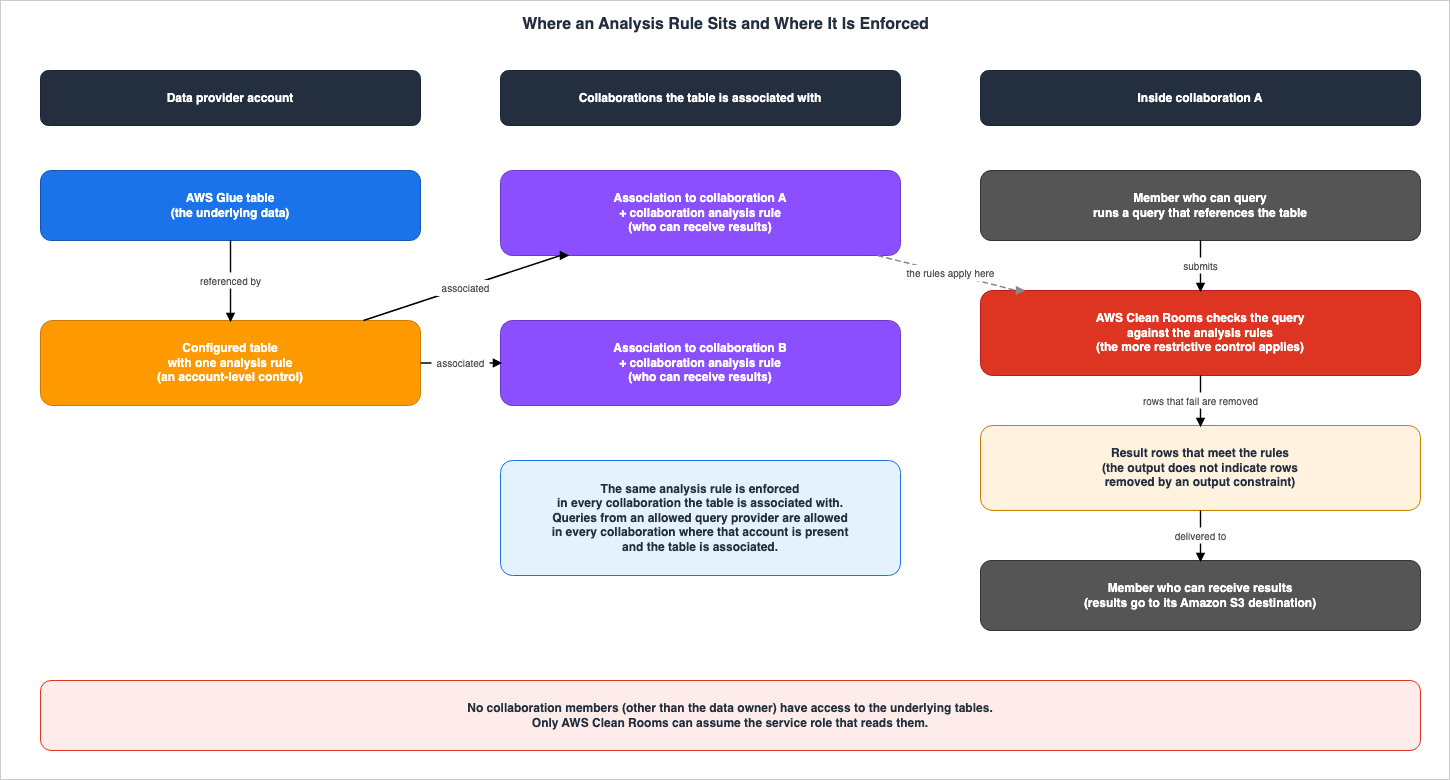
This section checks where an analysis rule is attached and where it applies. The analysis rules are not attached to collaborations themselves, but rather to configured tables. The location where these rules are applied determines how they function when a single table is used across multiple collaborations.2.1 Account-Level Controls for Configured Tables
The UG page "Analysis rules in AWS Clean Rooms" defines analysis rules as follows:An analysis rule is a privacy-enhancing control that each data owner sets up on a configured table. An analysis rule determines how the configured table can be analyzed.The same page specifies the location and scope of analysis rules as follows:
The analysis rule is an account-level control on the configured table (an account-level resource) and is enforced in any collaboration where the configured table is associated. If there is no analysis rule configured, the configured table can be associated to collaborations but it can’t be queried. Queries can only reference configured tables with the same analysis rule type.Analysis rules are attached to configured tables, which are account resources. They are not attached to collaborations themselves. Therefore, if a single configured table is associated with two collaborations, the same analysis rule will apply to both. Configured tables without an analysis rule can be associated with collaborations, but cannot be queried.
The API reference for
CreateConfiguredTableAnalysisRule states that currently, only one analysis rule can be created for a single configured table. The UG page "Best practices for data collaborations in AWS Clean Rooms" (hereinafter the best practices page) recommends creating separate configured tables for different use cases and indicates that multiple configured tables can be created from the same Glue table. Regarding changes to analysis rules, the same page states:You can add or update an analysis rule for a configured table in a collaboration. When you do, review all the collaborations where the configured table is associated and its resulting impact.When creating a configured table, you also select the columns that are accessible in the collaboration. The "Creating a configured table – Amazon S3 data source" page outlines the process for selecting either "All columns" or a "Custom list" of columns.
Figure 1 illustrates the location and scope of analysis rules.
2.2 Only the Same Rule Type Can Be Referenced, and the More Restrictive Control Applies
As mentioned in section 2.1, queries can only reference configured tables with the same analysis rule type. According to the "Analysis rules in AWS Clean Rooms" page, when using tables from multiple data providers within a single query, the following applies:AWS Clean Rooms enforces the more restrictive controls across all configured tables referenced in a query.The page provides two examples. The first is output constraints. If Collaborator A sets an output constraint of 100 on the identifier column and Collaborator B sets 150, an aggregation query that references both tables displays a row only if it has at least 150 distinct identifier values. The second example is analysis templates. Even if Collaborator A allows an analysis template in its custom rule, if Collaborator B does not allow it, the member who can query cannot run that analysis template.
In addition, there is a specific type of analysis rule associated with ID mapping tables. The UG describes this type as managed by Clean Rooms and not editable. This type will not be discussed in this article.
2.3 A Second Layer per Collaboration — Collaboration Analysis Rules
Analysis rules provide control at the account level, but certain controls are also defined on a per-collaboration basis. The page "Adding a collaboration analysis rule to a configured table" states:The collaboration analysis rule allows you to specify controls that are specific to this collaboration. These controls work together with the configured table analysis rule to determine how this table can be analyzed within this collaboration.Collaboration analysis rules determine which members can receive results in that collaboration (Results delivery), and whether the table may be used for additional analyses (Allowed additional analyses). As an example of additional analyses, the same page mentions model inputs for Clean Rooms ML. In the API reference, collaboration analysis rules are split by analysis rule type (
aggregation, list, and custom in ConfiguredTableAssociationAnalysisRulePolicyV1). For custom types (ConfiguredTableAssociationAnalysisRuleCustom), the members who can receive results are specified using the allowedResultReceivers field, which contains the AWS account IDs of those members.On April 30, 2025, the "What's New" announcement ("AWS Clean Rooms now supports multiple results receivers in a collaboration") announced that a single Spark SQL query result could now be delivered to multiple members, and described the delivery process as follows:
Results are automatically delivered to all selected collaborators who are configured in both the collaboration settings and table controls.Among the selected members, results are automatically delivered to those configured in both the collaboration settings and the table-side controls.
The "Adding a collaboration analysis rule to a configured table" page of the UG, the API reference for ConfiguredTableAssociationAnalysisRuleCustom, and the corresponding section in the CloudFormation template reference do not describe what happens when the
allowedResultReceivers field is not specified.2.4 Cross-Boundary Table — What Crosses, How It Is Taken, and What the Owner Can Still Limit
When transferring something across account boundaries, there are four key things to verify. What is being transferred? Through what mechanism is it being offered? What action does the receiving account take? And what limitations can the owner still impose afterward? This article presents a table that organizes these four points, along with supporting documentation, and calls it the Cross-Boundary Table. This same five-column table is also used in other articles on this site that deal with what crosses account boundaries. The table for transferring network segments can be found in section 2.3 of AWS PrivateLink Tunnel Endpoints.What crosses: This refers to what crosses the account boundary. Even if something is not transferred, it is included as a row if explicitly stated in AWS documentation.Offered through: This describes the mechanism used by the transferring account to offer it.How the receiving account takes it: This outlines the actions the receiving account must take.What the owner can still limit: This specifies what limitations the owner can continue to impose after the transfer.Where AWS says so: This indicates the AWS documentation that supports the information in that row.
For any cell where AWS documentation does not provide information, the cell reads
The source does not say. Before writing that, this article searched the full text of the relevant documentation, as well as the links it contains, using the words only, can't, cannot, not supported, outside, initiate, and must, along with the subject of that row. If the documentation only provides general principles and does not specifically address the subject of that row, the cell says so.In Clean Rooms, the underlying table is not transferred. Only the results permitted by the analysis rules, and associated information, are transferred.
| What crosses | Offered through | How the receiving account takes it | What the owner can still limit | Where AWS says so |
|---|---|---|---|---|
| Query results, calculated within the scope permitted by the analysis rules. | Associating a configured table that has an analysis rule with a collaboration. A collaboration analysis rule specifies which members can receive the results. | Invited accounts create a membership and join the collaboration. The member who can receive results specifies the destination and format of the results, as well as a service role for writing to the destination. | Analysis rules (applied at the account level and affecting all associated collaborations). Members allowed to receive the results. Differential privacy policy (the privacy budget cannot be reduced once queries begin). Data access budget. Disassociation (the member who can query can no longer query that table). | UG (Analysis rules in AWS Clean Rooms, Adding a collaboration analysis rule to a configured table, Creating a membership and joining a collaboration, Configuring a data access budget, Disassociating configured tables) |
| Access to the underlying table itself. This does not cross. | N/A | N/A | N/A. The UG states that only AWS Clean Rooms can assume the service role and that members other than the data owner cannot access the underlying table. | UG (Associating a configured table to a collaboration) |
| Table details and analysis rules. These are visible to other members of the collaboration. | Association of a configured table. | A member opens the table from the list of tables associated by collaborators. | When creating a configured table, the data provider selects the columns to be used (either "All columns" or a "Custom list"). The analysis rules visible to members can be previewed in the "Table view," "JSON," and "Example query" sections of the analysis rule editing screen. | UG (Viewing tables and analysis rules, Creating a configured table – Amazon S3 data source, Editing the configured table analysis rule) |
| Queries created by an allowed query provider are allowed to run in other collaborations where that account is present and the table is associated. | Custom rule's allowedAnalysisProviders (allowedAnalyses is ANY_QUERY). | If the provider's account is in a collaboration that the table is associated with, queries it creates there are automatically allowed. | Remove the provider's account from the analysis rule. Switch to a method where each analysis template is individually reviewed and allowed. | UG (Custom analysis rule in AWS Clean Rooms, Allowed analyses) |
| Storing the results of an analysis as an intermediate table within a collaboration. | Intermediate table. Created, owned, and managed by the analysis runner. | The analysis runner populates the intermediate table, applies custom rules, and uses it for subsequent analyses. | The data provider of a base table can prevent the use of the intermediate table (disallow). Disassociation will render any dependent intermediate tables unusable. The inherited controls are fixed when the table is populated; later changes to a base table's analysis rule are not reflected. | UG (Intermediate tables in AWS Clean Rooms, Configuring an analysis rule for an intermediate table, Deleting an intermediate table, Disassociating configured tables) |
| Records of analyses that reference your table (analysis logs). These are also delivered to the member who can query and the member who can receive results. | Analysis logs. The collaboration creator can enable these, and each member can choose whether to save them to their own Amazon CloudWatch Logs. | The member who can query and the member who can receive results receive logs for each configured table referenced. If the member is not the table owner, the configuredTableId is not visible. The member who can receive results also receives logs for analyses that do not use its data. | A member can turn off log storage for its own account, but the UG states that only its own logs are affected; other members' logging settings remain unchanged. The ability to export Spark logs (CAN_EXPORT_QUERY_ANALYSIS_LOG) is granted through a change request approved by all members. This ability can also be granted automatically through an auto-approval setting, bypassing the approval process (section 9.4). | UG (Analysis logging in AWS Clean Rooms, Creating a membership and joining a collaboration, Editing collaborations, Exporting query analysis logs, Change requests in AWS Clean Rooms) |
This table does not include any cells indicating
The source does not say. The fourth column on row 3 describes the process for selecting columns and a method for verifying the analysis rules that members will see. The fourth column on row 6 describes the UG's statement that turning off log storage affects only the member's own logs, and also mentions the ability to export Spark logs.3. What Each of the Three Rule Types Puts in the Output
This section outlines what each of the three types of analysis rules puts out to the other party. The API reference forCreateConfiguredTableAnalysisRule defines three possible values for the analysisRuleType parameter: AGGREGATION, LIST, and CUSTOM. The UG also describes analysis rule types as aggregation, list, and custom. This article refers to these as aggregation rules, list rules, and custom rules, respectively.3.1 Aggregation Rules — Aggregate Statistics and the Output Constraint
Aggregation rules allow queries that produce aggregate statistics using the COUNT, SUM, and AVG functions. According to the "Aggregation analysis rule" page in the UG, queries are limited to SELECT statements only, and do not support subqueries or Common Table Expressions (CTEs). Joins are restricted to INNER JOIN operations. Data providers define usage guidelines for each column. These guidelines specify which columns can be used in aggregation functions (aggregateColumns), which columns can be used in joins (joinColumns), which columns can be used for filtering and grouping (dimensionColumns), and which scalar functions are permitted (scalarFunctions). The joinRequired control can require a join with a table owned by the member who can query.Aggregation rules also include output constraints, which serve to restrict the results. The key for these constraints in the analysis rules JSON is
outputConstraints. The format is COUNT (DISTINCT column) >= X, meaning that only rows where the query returns a count of distinct values in the specified column that is greater than or equal to X are returned. The value of X must be 2 or greater. The UG states that each configured table must have at least one constraint, and describes its operation as follows:This minimum threshold is automatically enforced, even if the submitted query itself does not use the specified column. They are enforced collectively across each configured table in the query from the configured tables from each member in the collaboration.3.2 List Rules — Row-Level Lists of Overlapping Data
List rules allow queries that output a list, at the row level, of data from multiple tables that overlap. According to the UG's "List analysis rule" page, a query must join, directly or indirectly, with a table of the member who can query. Data providers define the columns that can be used for joining (joinColumns) and the columns that can be used for output and filtering (listColumns).List rules have nothing equivalent to the output constraint of aggregation rules. The same page states:
There are no query results controls like there are for the Aggregation analysis rule.When you select a list rule, for each overlapping record, the values from the columns specified in
listColumns are passed on a row-by-row basis. The UG lists data enrichment and audience building as potential uses.3.3 Custom Rules — Deciding Which Queries May Run
Custom rules determine which queries are allowed, rather than dictating how columns are used. According to the "Custom analysis rule in AWS Clean Rooms" page, while queries are limited to SELECT statements, they can utilize more SQL functionality than aggregation rules and list rules, including window functions, OUTER JOINs, CTEs, and subqueries. There are two ways to allow queries, and you choose one of them.The first is to review analysis templates one by one and allow them. The data provider examines the analysis templates containing the queries and adds their ARNs to the
allowedAnalyses field. The "Allowed analyses" page describes the scope of analysis templates as follows:Analysis templates are collaboration-specific and visible only in the collaboration where they are created. Only the member who can query in that collaboration can run analysis templates.The second is to allow the account of a query provider. By setting
allowedAnalyses to ANY_QUERY and adding the account ID to the allowedAnalysisProviders field, queries created by the allowed account are allowed to run without individual review. Regarding scope, the "Custom analysis rule in AWS Clean Rooms" page states:Any queries that have been created by the query providers are automatically allowed to run on the table in all collaborations in which the AWS account is present and the table is associated.The "Allowed analyses" page reiterates this with the following caution:
Allowing analysis providers is more permissive than reviewing templates individually. When you add a query provider, all current and future queries from that AWS account are allowed to run on your configured table. For finer control, use allowedAnalyses with specific analysis template ARNs instead.Permissions are applied at the account level in the analysis rule. Therefore, if a collaboration includes both the allowed account and the table, any query created by that account is allowed in that collaboration, encompassing not only current queries but also those created in the future. Furthermore, according to the same page, if
allowedAnalyses is left empty, the member who can query cannot run queries on the table.3.4 Controlling the Results of Custom Rules — Disallowed Output Columns, Minimum Aggregation Threshold, Comparison Controls
Custom rules offer controls to refine results, beyond simply determining which queries are permitted.Disallowed output columns define a list of columns that cannot appear in the final SELECT statement. The key for this setting is
disallowedOutputColumns. The "Disallowed output columns" page of the UG states:The control prohibits direct projection but does not fully prevent values from being indirectly inferred. You can still use disallowed columns in a projection inside a subquery or common table expression (CTE), as long as they are not referenced in the final projection.The minimum aggregation threshold was added to custom rules in What's New on August 13, 2026. The key for this setting is
aggregationThresholds. Data providers define a column representing the user (the identityColumns, string type) and the number of distinct values required per row (the minimumIdentityCount, ranging from 2 to 100,000). The type (type) is COUNT_DISTINCT. The "Minimum aggregation thresholds" page of the UG states:Minimum aggregation thresholds ensure that each row in a SQL query result has at least N distinct data subjects contributing to it.It is also possible to override thresholds for individual output columns using the
outputColumnThresholds setting. The same page states:A per-column override accepts 0, which exempts that output column from minimum aggregation, or a value between 2 and 100,000.The
allowedAggregateExpressionType setting determines whether expressions are allowed within aggregation functions. The default is COLUMNS_ONLY, which the UG recommends as a privacy-enhancing setting. The UG notes that while collaborations where the query runner is a trusted partner may allow ANY_EXPRESSION, allowing it introduces privacy risk, as query runners can isolate small groups within an aggregation function.Comparison controls were added on the same date as the minimum aggregation threshold. The key for this setting is
comparisonControls, and it defines which columns can be compared to literal values (allowedLiteralComparisonColumns) and which columns can be compared to other columns (allowedColumnComparisonColumns). The "Comparison controls" page of the UG states:Comparison controls are an allowlist. Once you set allowedLiteralComparisonColumns, only the columns you list can be compared to a literal value, and every column you do not list is blocked.Regarding situations where comparison controls are not configured, the same page states:
If you do not configure comparisonControls, AWS Clean Rooms applies no comparison restrictions — a query can compare any column to a literal value or to another column.However, if a minimum aggregation threshold is configured, the columns in
identityColumns cannot be compared to literal values. The same page states:However, AWS Clean Rooms never allows a literal comparison on a column listed in identityColumns. That restriction comes from the threshold itself, so it applies whether or not you configure comparison controls.The "Custom analysis rule in AWS Clean Rooms" page recommends configurations that combine a minimum aggregation threshold with comparison controls. This is because a threshold alone can leave columns with few distinct values, or columns that can serve as clues to identify individuals, open to comparison.
On the same page, an example shows a publisher applying the following custom rule to its table: it requires each row to represent at least 100 distinct users, while lowering the threshold for the
campaign_id column to 5. The rule allows for literal comparisons of both campaign_id and event_date, and allows the advertiser's account as a query provider.{
"aggregationThresholds": [
{
"identityColumns": [
"user_id"
],
"minimumIdentityCount": 100,
"type": "COUNT_DISTINCT",
"allowedAggregateExpressionType": "COLUMNS_ONLY",
"outputColumnThresholds": [
{
"outputColumnName": "campaign_id",
"minimumIdentityCount": 5
}
]
}
],
"comparisonControls": {
"allowedLiteralComparisonColumns": [
"campaign_id",
"event_date"
]
},
"allowedAnalyses": [
"ANY_QUERY"
],
"allowedAnalysisProviders": [
"444455556666"
]
}The minimum aggregation threshold and comparison controls cannot be used in conjunction with differential privacy. The "Considerations and limitations" page states:
Minimum aggregation thresholds and comparison controls do not currently work with differential privacy.The AnalysisRuleCustom API reference also specifies that only one minimum aggregation threshold is permitted, and that it cannot be used with differential privacy.
3.5 Comparing the Three Types
When aligning the three types, considering what is exposed to the other party and the controls used to refine the results, the following table applies. Custom rules are split into two rows by how queries are allowed.| Type | Data Exposed | Result Refinement Controls | Advance Review of Queries | Differential Privacy |
|---|---|---|---|---|
| Aggregation Rule | Aggregate statistics using COUNT, SUM, and AVG | Output constraints (COUNT (DISTINCT column) >= X, where X is 2 or greater) | Not reviewed. The rule type determines the query structure. | Not listed in the UG's type comparison table. |
| List Rule | List of overlapping rows (values from the listColumns column) | None | Not reviewed. The rule type determines the query structure. | Not listed in the UG's type comparison table. |
| Custom Rule (Allow Analysis Template) | Results of queries in the allowed analysis templates | Disallowed output columns, minimum aggregation threshold, comparison controls, differential privacy | Review the analysis template before allowing it. | Can be enabled. However, it cannot be used in conjunction with the minimum aggregation threshold or comparison controls. |
| Custom Rule (Allow Query Provider) | Results of queries from the allowed account | Same as the row above | Not reviewed. Both current and future queries are allowed. | Same as the row above |
Differential privacy can be enabled when creating custom rules (see section 5.1). The type comparison table on the "Analysis rules in AWS Clean Rooms" page also lists differential privacy only in the Custom column.
4. What the Output Removes Without Saying So
This section examines what is removed from the results and how that removal appears to the recipient of the results. There are three mechanisms for removing rows: output constraints for aggregation rules, custom rule minimum aggregation thresholds, and per-user row limits for differential privacy.4.1 Rows Removed by an Output Constraint Are Not Indicated in the Output
Regarding the example of output constraints mentioned in section 2.2 (Collaborator A with 100 and Collaborator B with 150), the "Analysis rules in AWS Clean Rooms" page states:An aggregation query that references both configured tables requires at least 150 distinct values of identifier within an output row for it to be displayed in the query output. The query output doesn't indicate that results are removed because of the output constraint.Rows that do not meet the output constraints are removed from the results. The results do not indicate that they were removed. The member who can receive results sees only the rows that meet the constraints.
The troubleshooting section of the "Aggregation analysis rule" page explains the reasons why a query might not return any results, stating:
This can happen when there are no matching results or when the matching results don’t meet one or more minimum aggregation thresholds.When the result is 0 rows, the UG lists two possible causes: either there were no matching rows, or the matching rows did not meet the threshold. The UG does not say that the results carry any information that tells the two causes apart.
4.2 Rows Suppressed by the Minimum Aggregation Threshold of Custom Rules
The minimum aggregation threshold for custom rules also suppresses rows that do not meet the threshold. The UG's "Minimum aggregation thresholds" page states:Data aggregation is a privacy-enhancing technique that helps enforce anonymization by preventing queries from returning results about individuals or small groups. When minimum aggregation thresholds are configured on your tables, AWS Clean Rooms suppresses results that do not meet the data provider's specified minimum threshold.The example on the "Custom analysis rule in AWS Clean Rooms" page shows an advertiser running a query to count daily reach, which returns three rows for 2026-01-01, 2026-01-02, and 2026-01-04. Following this result table, the UG includes the following explanation.
The date 2026-01-03 does not appear in the results because fewer than 100 distinct users saw the campaign that day, so AWS Clean Rooms suppressed that row.The reason for the absence of the row for 2026-01-03 is explained in the UG's prose. The example result table does not include any indicators or notations to show which rows were suppressed. The UG does not state explicitly whether the results indicate rows suppressed by a custom rule's threshold. The sentence quoted in section 4.1, that the output does not indicate removed results, belongs to the example of an aggregation rule's output constraint.
4.3 When Differential Privacy Samples Each User's Rows
Differential privacy includes a limit (user contribution limit, UCL) on the number of rows a single user contributes to each query. The "Configuring differential privacy policy (optional)" page describes how rows from users over this limit are handled, using the example of ad impressions.if any user has more impressions than the bound, then AWS Clean Rooms automatically takes a uniform random sample of that user's impressions as per the computed UCL value and exclude the remaining impressions of that user while executing the query.According to the same page, calculated values such as the UCL can be viewed under View calculated differential privacy parameters on the collaboration's Analysis tab.
4.4 What the Recipient Sees
Arranging the three mechanisms by whether the receiving side can see the removal gives the following table:| Mechanism | Rows Excluded from Results | Is the Exclusion Indicated in the Results? |
|---|---|---|
| Aggregation Rule Output Constraints | Rows that do not meet the constraints | Not indicated (stated explicitly in the UG). |
| Custom Rule Minimum Aggregation Threshold | Rows that do not meet the threshold | The UG does not state this explicitly. The UG's example result table has no marker. |
| Differential Privacy UCL | Rows of users whose data exceeds the upper limit and were not selected for the sample (excluded while the query runs) | The UG does not state this explicitly. The calculated UCL value can be viewed in the Analysis tab. |
When the member who can receive results sums the returned rows or interprets the absence of rows as indicating that there are no corresponding subjects, it is necessary to assume that these mechanisms may have excluded rows. Collaboration members can view the analysis rules of tables that collaborators have associated (row 3 of the Cross-Boundary Table in section 2.4). The specific constraints applied to each column can be verified there.
5. Differential Privacy — Noise and the Privacy Budget
This section explores what differential privacy, when enabled with custom rules, achieves, and what happens when the privacy budget is exhausted. Differential privacy was previewed on November 29, 2023, and general availability was announced on April 10, 2024.5.1 What It Does and How to Turn It On
The "AWS Clean Rooms Differential Privacy" page describes whom differential privacy protects the data from as follows:Differential privacy protects the collaboration data from the member who can receive results learning about a specific individual.When differential privacy is enabled, Clean Rooms adds noise to query results, making it more difficult to identify the contribution of individual users. The process for enabling it consists of two steps. First, the data provider turns on differential privacy in a custom rule and selects the column that identifies users. Then, a differential privacy policy is set for the collaboration. The "Differential privacy policy" page of the UG describes this as a one-time process in the collaboration. When enabling differential privacy for two or more tables, the same column must be configured as the user identifier column in both analysis rules.
Queries that include tables with differential privacy enabled must adhere to a format defined by the UG. According to the "Custom analysis rule with differential privacy" page of the UG, subqueries are not permitted, and CTEs should emit the user identifier column.
5.2 Privacy Budget and Noise per Query
Differential privacy policies consist of two values. The first is the privacy budget. The "Differential privacy policy" page states:Privacy budget – Quantified in terms of epsilon, the privacy budget controls the level of privacy protection. It is a common, finite resource that is applied for all of your tables protected with differential privacy in the collaboration, because the goal is to preserve the privacy of your users whose information can be present in multiple tables.The second is the noise added per query. According to the same page, this value is measured in the number of users whose contributions you want to obscure, and it determines how quickly the privacy budget is consumed. Increasing the amount of noise slows down the budget consumption, allowing for more queries to be executed, but it reduces the accuracy of the results.
Regarding the size of the budget, the same page states:
By setting a larger privacy budget, the member who can receive results can reduce their uncertainty about individuals within the data.According to the "AWS Clean Rooms Differential Privacy" page, Clean Rooms tracks the estimated number of queries that can be run with the remaining budget, much like a car's fuel gauge.
5.3 When the Budget Is Exhausted, Increased, or Decreased
Regarding what happens when the privacy budget is exhausted, the "Differential privacy policy" page states:The Privacy budget is consumed every time a query is run on your tables. When the privacy budget is fully exhausted, the collaboration member who can query can't run additional queries until it is increased or refreshed.The budget can be increased at any time during a collaboration. Regarding decreasing the budget, the same page states:
You can't decrease the Privacy budget after the member who can query has started analyzing your data.Concerning when the increased budget is used, the "Configuring differential privacy policy (optional)" page states:
If the Privacy budget is increased, AWS Clean Rooms will continue using the existing budget until it is fully consumed before utilizing the newly added privacy budget.The noise added per query can be increased or decreased at any time during a collaboration. Regarding what happens when the policy is deleted, the same page states:
Tables with differential privacy turned on can't be queried if the differential privacy policy is deleted.5.4 Before Choosing the Monthly Refresh
The differential privacy policy includes the option to create a new privacy budget each calendar month (Refresh privacy budget monthly). The "Differential privacy policy" page presents it as an option for when you plan to regularly bring new data into the collaboration, and then cautions:Choosing this option allows arbitrary amounts of information to be revealed about rows of the data when repeatedly queried across refreshes. Avoid choosing this if the same rows will be repeatedly queried between privacy budget refreshes.In the API,
autoRefresh in CreatePrivacyBudgetTemplate controls this option, with a value of either CALENDAR_MONTH or NONE. The API reference documentation for autoRefresh also contains a similar note.This selection cannot be changed later. The "Configuring differential privacy policy (optional)" page states:
You can't change the value of the Privacy budget refresh. To change your selection, you must delete the differential privacy policy and create a new one.As mentioned in section 5.3, after the policy is deleted, tables with differential privacy turned on cannot be queried. The AWS News Blog post from the preview presented the monthly refresh without any caution (section 9.4).
5.5 Combinations Where Differential Privacy Cannot Be Used
The UG describes the combinations in which differential privacy cannot be used on separate pages. Here are five such combinations identified in this article:- The member who can receive results cannot use differential privacy. It configures a custom analysis rule with differential privacy turned off for its configured tables (AWS Clean Rooms Differential Privacy).
- The member who can query cannot join tables from two or more data providers that have differential privacy enabled (as described on the same page).
- Differential privacy cannot be used together with minimum aggregation thresholds and comparison controls (Considerations and limitations, section 3.4).
- Differential privacy only supports querying tables in AWS Glue based on Amazon S3; it does not support tables in Snowflake or Amazon Athena (Limitations of AWS Clean Rooms Differential Privacy).
- Analysis logs cannot be exported for queries that use differential privacy (Exporting query analysis logs, section 7.4).
Regarding the first two points, the "AWS Clean Rooms Differential Privacy" page states:
The member who can receive results can't use differential privacy. They will configure a custom analysis rule with differential privacy turned off for their configured tables. The member who can query can't join tables from two or more data providers when both have differential privacy turned on.5.6 What the Limitations Page Says Differential Privacy Does Not Address
The "Limitations of AWS Clean Rooms Differential Privacy" page lists items that differential privacy does not address. One is an attack that exploits differences in query computation time.AWS Clean Rooms Differential Privacy doesn't address timing attacks.Another is runtime errors.
AWS Clean Rooms Differential Privacy doesn't guarantee differential privacy when a SQL query can result in overflow or invalid cast errors at run time due to the use of certain SQL constructs.The same page also lists some SQL constructs that may cause overflows, and recommends verifying these within analysis templates and regularly reviewing query logs. It further suggests monitoring error codes
CastError, OverflowError, and ConversionError using CloudWatch metric filters and alarms, and provides the following explanation of these error codes.The presence of these error codes indicates a potential side-channel attack, but might indicate an erroneous SQL query.Regarding overflow and invalid cast errors, the "AWS Clean Rooms Differential Privacy" page of the same UG uses different strength words from the limitations page (section 9.4).
6. Stopping by Count — Data Access Budgets
This section examines the data access budget (introduced in the What's New update on October 2, 2025). The data access budget tracks the number of times a table is used in analysis. It is different from the privacy budget for differential privacy, as it measures a different metric.6.1 What It Counts, and When It Runs Out
The "Configuring a data access budget" page describes when the budget decreases and what happens when it runs out.Each time a table is queried, a PySpark job is run on the table, or an ML job is run using an ML input channel derived from a table, the budget for that table is reduced by one. When the budget reaches zero, you can't run queries, PySpark jobs, or ML jobs on that table.A data access budget has two forms. A "per period" budget allows you to define a specific number of uses within a given period, daily, weekly, or monthly, and can be refreshed automatically for each period. A "lifetime" budget, on the other hand, sets a total number of uses allowed. You can use both forms simultaneously. By default, there is no limit to the number of uses. Through the console, you can specify a range from 1 to 1,000,000.
You can apply a budget both when associating a configured table to a collaboration, and after the association has already been made (Associating a configured table to a collaboration, Adding a data access budget to an existing associated table). The page "Configuring a data access budget" uses the word "collaborator" for whoever can view, add, edit, and delete a budget.
6.2 Editing Resets the Balance, and Deleting Removes the Limit
The "Editing a data access budget" page states the following:When you edit a data access budget, it resets the current budget balance.The "Deleting a data access budget" page states the following:
You can't undo this action and your data access budget will be reset to unlimited.The "What's New" announcement (AWS Clean Rooms now supports data access budgets) from October 2, 2025, also states that when the budget is exhausted, additional analyses are prevented until the budget refreshes, and that budgets can be reset or edited at any time.
6.3 Differences from the Privacy Budget
Both budget types are created using the same operations in the API. The value ofprivacyBudgetType in the CreatePrivacyBudgetTemplate operation can be either DIFFERENTIAL_PRIVACY or ACCESS_BUDGET. However, they differ in what they track and their scope of effect.| Item | Privacy Budget (Differential Privacy) | Data Access Budget |
|---|---|---|
| What it tracks | Epsilon consumed per query | Number of times a table is used by queries, PySpark jobs, and ML jobs |
| Scope of effect | Shared by all tables with differential privacy turned on in the collaboration | Applies to each individual table |
| When it is exhausted | The member who can query cannot run additional queries until the budget is increased or refreshed. | No queries, PySpark jobs, or ML jobs can be executed on that table. |
| Refresh | A monthly refresh by calendar month can be chosen. This choice cannot be changed later. | A per period budget can refresh automatically daily, weekly, or monthly. Lifetime budgets are also available. |
| Modification | Can be increased. It cannot be decreased after the member who can query has started analyzing the data. | Editing the budget resets the balance. Deleting the budget removes the limit. |
API privacyBudgetType | DIFFERENTIAL_PRIVACY | ACCESS_BUDGET |
The UG's "Considerations and limitations" page lists limitations on minimum aggregation thresholds, followed by the following statement:
To reduce the risk of bulk attacks, adopt data access budgets and differential privacy policies.7. Who Receives What — Member Abilities and Analysis Logs
This section examines who receives the results and logs in the collaboration. The information available to others is not limited to the outcomes of the analysis rules. Each member's abilities and settings determine who can receive results and view logs.7.1 Member Abilities
The "Creating a membership and joining a collaboration" page lists member abilities as follows:member who can query
member who can run queries and jobs
member who can receive results of a query or a job
member paying for query compute costs
member paying for queries and jobs
All members can contribute data.The UG glossary describes the member who can query as follows:
There is only one member who can query per collaboration, and that member is immutable.In the API reference for MemberSpecification, member abilities (
memberAbilities) take four values: CAN_QUERY, CAN_RECEIVE_RESULTS, CAN_RUN_JOB, and CAN_EXPORT_QUERY_ANALYSIS_LOG. A separate field (paymentConfiguration) handles the payment role. The ability to export analysis logs is not in the UG list above (see section 7.4).The payment abilities are the roles that pay the compute costs of queries and jobs. This article does not address amounts or billing units.
7.2 Delivery Destination for Results
The member who can receive results specifies the S3 destination and format (CSV or PARQUET), as well as the service role for writing to the destination, when joining. The UG's "Receiving query results" page states the following regarding the destination:The Results destination in Amazon S3 can't be within the same S3 bucket as any data source.The creator of the collaboration selects the Regions to which query results can be sent. The UG's "Creating a collaboration for queries" page notes the following:
When you enable cross-Region query results delivery, your results may be processed and stored outside the source Region.According to the UG's "Document history" entry dated October 3, 2025, results are delivered to Regions approved by all collaboration members. When multiple members are receiving results, both the collaboration settings and the table-side controls determine which members receive the results, as described in section 2.3.
7.3 Adding Members and Changing Abilities — Change Requests and Auto-Approval
To add members or change abilities after creating a collaboration, use a change request. According to the "Change requests in AWS Clean Rooms" page, only the collaboration creator can submit a change request. The page states the following regarding approval:All collaboration members must approve change requests for the proposed changes to take effect.The member abilities that can be changed through a change request are "Can receive results" and "Export query analysis log." ML abilities are modified through a different type of change request.
However, collaborations can have an auto-approval setting. The "Creating a collaboration for queries" page states the following:
Auto-approve new members with these abilities – If allowed, any members added with the abilities selected above will instantly join the collaboration. Members added with other abilities will still require manual approval to join.When creating a collaboration, the abilities that can be granted through auto-approval are "Contribute data" (always enabled) and "Receive results" (Creating a collaboration for queries). The "Change requests in AWS Clean Rooms" page also states that the ability to export query analysis logs can be granted through auto-approval (section 9.4). To modify the auto-approval settings after creation, another change request is required, and other members must approve it. If you select "Receive results" for the abilities granted through auto-approval and also enable "Auto-approve new members with these abilities," new members added with that ability can join without undergoing an approval process. The controls on the table side, described in section 2.3, determine whether those members can receive the results of queries that reference your table.
Only the collaboration creator can remove members. According to the "Removing members from a collaboration" page, when a member is removed, their datasets are removed from the collaboration. Members can end their membership and leave the collaboration, but according to the "Leaving a collaboration" page, once a member leaves a collaboration, they cannot rejoin.
7.4 Analysis Logs — Who Receives Them, and What Is Not Recorded
Analysis logs are records of queries and jobs executed within collaborations. According to the "Analysis logging in AWS Clean Rooms" page, when a collaboration creator enables analysis logging, each member can save relevant logs to their own CloudWatch Logs. Logs go to the member who can query, the member who can run queries and jobs, the member who can receive results, and members whose configured tables are referenced. Regarding scope, the "Creating a membership and joining a collaboration" page states:Each member can receive only logs for queries that they initiated or that contain their data. The member who can receive results also receives logs for all analyses run in a collaboration, even if their data isn't accessed in an analysis.According to the "Analysis logging in AWS Clean Rooms" page, the member who can query and the member who can receive results receive logs for each configured table referenced by the query. If a member is not the owner of the table, the
configuredTableId will not be visible.However, certain information is not recorded in the analysis logs. The same page states:
Query and job logs indicate the status of a query but don't report whether query output was delivered.AWS Clean Rooms doesn't produce a log if the query was canceled after AWS Clean Rooms validated its compliance with analysis rules and during query processing.Regarding the period right after logging is turned on, the "Creating a membership and joining a collaboration" page states:
After you turn on Analysis logging, it can take a few minutes for log storage to be set up and start receiving logs in Amazon CloudWatch Logs. During this brief period, the member who can query might run queries that don’t actually send logs.According to the "Editing collaborations" page, if logging is stopped and then re-enabled, only logs for queries executed after the logging is re-enabled are recorded. The same page states regarding stopping logging:
This change affects only your logs - other team members' logging settings remain unchanged.Logs for analyses on intermediate tables are discussed in section 8.3.
On August 11, 2026, it became possible to export redacted Spark logs, masking customer data and member metadata, to your own S3 bucket for SQL queries. According to the "Exporting query analysis logs" page, exporting logs requires the
CAN_EXPORT_QUERY_ANALYSIS_LOG ability, and you can only export logs for queries that you executed or for which you paid. Regarding what remains in the exported logs, the "Understanding redacted logs" page states:Some information is preserved deliberately, including the names of columns that a query read.According to the same page, data values, table names, S3 paths, and query statements are redacted. Regarding differential privacy, the "Exporting query analysis logs" page states:
Log export isn't supported for queries that use differential privacy.8. Where a Result Goes Next — Intermediate Tables
This section examines the intermediate tables, which were added in the What's New update on June 30, 2026. Intermediate tables provide a way to retain the results of analyses within a collaborative environment, allowing them to be used in subsequent analyses. From the perspective of the data provider, the data derived from their table is kept as another member's resource.8.1 Who Creates It and Where It Is Stored
The "Intermediate tables in AWS Clean Rooms" page describes the owner and location of these tables as follows:Intermediate tables are created by the analysis runner who owns and manages them. The data is stored in AWS managed storage and is not exported outside the collaboration.Intermediate tables are used after being populated with data and having custom rules applied. Only custom rules can be applied to intermediate tables. A populated version expires after the retention period, which is 30 days by default. The UG refers to the tables used to create intermediate tables as "base tables."
The data access budget is reduced both when an intermediate table is populated and each time the intermediate table is used, as well as for the intermediate table itself and all base tables it references. Regarding differential privacy, if differential privacy is enabled on the base tables, the base tables' privacy budgets are reduced when the table is populated, and noise is added at that time. If differential privacy is enabled on the intermediate table, the epsilon of the collaboration's single budget owner is reduced each time the intermediate table is used.
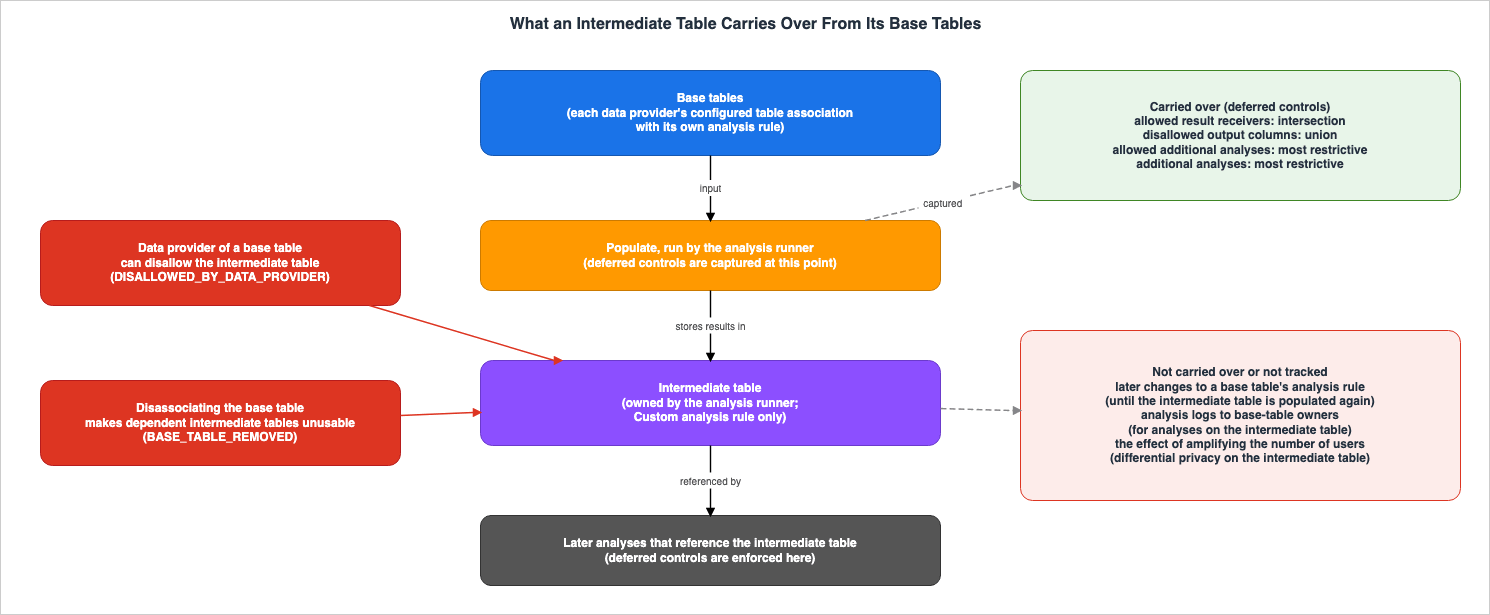
8.2 Controls Carried Over from the Base Tables
Intermediate tables inherit some of the analysis rules of their base tables. The UG refers to these inherited controls as "deferred controls," which are applied not when the intermediate table is created, but when the intermediate table is referenced in subsequent analyses. The following four controls are inherited:| Deferred Control | Inheritance Method |
|---|---|
| Members allowed to receive results | The intersection of all base tables' members allowed to receive results. |
| Disallowed output columns | The union of all base tables' disallowed output columns. |
| Allowed additional analyses | The most restrictive value among all base tables. |
| Additional analyses | The most restrictive value among all base tables. |
If all base tables belong to the intermediate table's creator, the creator is free to define the analysis rules. However, if the base tables belong to multiple data providers, the creator can only make the controls inherited from the base tables more restrictive.
Figure 2 illustrates what an intermediate table carries over and what it does not.
8.3 What Is Not Carried Over, and What Is Not Tracked
The inherited controls are fixed when the table is populated. The UG page "Configuring an analysis rule for an intermediate table" states:Inherited constraints do not get updated when a base table analysis rule changes asynchronously.According to the same page, to refresh the inherited constraints, the intermediate table is populated again. Even if a data provider tightens its analysis rule, an intermediate table populated before that does not reflect it until it is populated again.
Regarding logging, the UG page "Analysis logging in AWS Clean Rooms" states:
Members with tables used to create an intermediate table don't receive analysis logs when analyses are run on the intermediate table.Concerning differential privacy, the UG page "Intermediate tables in AWS Clean Rooms" states that it treats the data in an intermediate table as a fresh dataset and adds noise based on the number of users in the intermediate table itself, and then states:
If you amplify the number of users through a transformation when populating the intermediate table, the effect of that transformation on the original user population will not be tracked.The table of deferred controls in section 8.2 does not include the minimum aggregation threshold or comparison controls. The pages of the intermediate tables chapter do not say how these two apply to intermediate tables.
8.4 What a Data Provider Can Do to Stop It
A data provider can disallow intermediate tables built from its table. The UG page "Deleting an intermediate table" states:A data provider can disallow a specific intermediate table that references their base table. This deletes the corresponding stored data in AWS Clean Rooms from the intermediate table.The status of the intermediate table will become
DISALLOWED_BY_DATA_PROVIDER. According to the same page, this can also be applied to other intermediate tables created from that intermediate table, using the includeDescendants flag.Regarding disassociating configured tables, the UG page "Disassociating configured tables" states:
Disassociating a configured table from a collaboration causes all dependent intermediate tables (and their descendants) to become unusable with a status of BASE_TABLE_REMOVED.According to the same page, any data stored in those intermediate tables is deleted.
9. What the Controls Do Not Prevent — In the Strength the Sources Use
This section lists what the Clean Rooms controls do not prevent, in the strength words the UG itself uses. How the effect of the controls is described varies by source. This article does not round those differences into a single strength.9.1 The Premises the UG Sets
The best practices page states that Clean Rooms adheres to AWS's shared responsibility model and includes the following regarding analysis rules:AWS Clean Rooms offers analysis rules that you can configure to strengthen your ability to protect sensitive data in a collaboration. The analysis rules that you configure in AWS Clean Rooms will enforce the restrictions (query controls and query output controls) that you have configured. You are responsible for determining the restrictions and configuring analysis rules accordingly.Analysis rules enforce the limits that you define. The data providers determine which limits to set.
The same page lists ten recommended practices for analysis rules and includes the following note regarding example queries shown in the console:
In addition to the provided example query, other queries are possible based on the analysis rule and other collaboration member tables and analysis rules.As mentioned in section 1.1, the UG's "Considerations and limitations" page assumes that the query runner and other data providers are trying to exfiltrate user-level data and that they are colluding.
9.2 Listing the Strength Words by Source
The following table lists, by source, examples of the strength words that UG pages use. The "Verbatim" column contains excerpts from each source's sentences.| Source | Subject | Verbatim |
|---|---|---|
| Best practices for data collaborations in AWS Clean Rooms | Specify only the columns required for analysis rules. | might help mitigate the risk of differencing attacks |
| Best practices for data collaborations in AWS Clean Rooms | Apply aggregation constraints (the output constraints in section 3.1). | can help mitigate risk from correlating query results with data outside the collaboration |
| Best practices for data collaborations in AWS Clean Rooms | Actions taken outside of Clean Rooms. | might help further manage risks and help guard against third-party attempts to re-identify your data |
| Minimum aggregation thresholds | Minimum aggregation threshold. | ensure that each row in a SQL query result has at least N distinct data subjects |
| Considerations and limitations | Minimum aggregation threshold. | does not address other potential exfiltration risks such as differencing attacks |
| Custom analysis rule in AWS Clean Rooms (example) | Reasons for selecting a minimum aggregation threshold. | make sure no query result can reveal individuals or small groups |
| Disallowed output columns | Disallowed output columns. | does not fully prevent values from being indirectly inferred |
| AWS Clean Rooms Differential Privacy | Differential privacy. | help you prevent the re-identification of your users |
| Limitations of AWS Clean Rooms Differential Privacy | Differential privacy. | doesn't address timing attacks |
| What is AWS Clean Rooms? | Differential privacy. | protect against user-identification attempts |
For the risks that analysis rules mitigate, the terms the best practices page uses are
might help mitigate and can help mitigate. The "Minimum aggregation thresholds" page uses ensure, referring to a property that each row satisfies — that each row has at least N distinct data subjects contributing to it. This property is subject to the exception outlined in section 9.3. Regarding differencing attacks, the "Considerations and limitations" page of the same UG states the following:A per-query threshold does not address this differencing attack vector.The full text of two recommendations from the best practices page is as follows:
This might help mitigate the risk of differencing attacks or enabling other members to reverse engineer your data.Aggregation constraints can help mitigate risk from correlating query results with data outside the collaboration.9.3 Conditions Where the UG States That a Control Does Not Apply or Does Not Address a Risk
Among the conditions cited in this article, this section lists those for which the UG states that a control does not apply or does not address a risk.- The minimum aggregation threshold is not enforced on COUNT, COUNT(DISTINCT), and APPROX_COUNT_DISTINCT when applied to a single table without any grouping or joining. The UG "Considerations and limitations" page states:
The minimum aggregation threshold is not enforced on COUNT, COUNT(DISTINCT), or APPROX_COUNT_DISTINCT functions over a single table with no grouping or join.- The minimum aggregation threshold alone does not address exfiltration risks such as differencing attacks (same page).
- Disallowed output columns do not fully prevent values from being indirectly inferred (section 3.4).
- When dealing with data in CSV format, if the Glue schema column names and order do not match the CSV file, the allowed columns list might not be enforced properly. The UG page "Creating a configured table – Amazon S3 data source" states:
For AWS Glue tables where the data is in CSV format, the column names and order in the Glue schema must exactly match the CSV data. If they don't align, the allowed columns list for the configured table might not be enforced properly.- Differential privacy does not address attacks that exploit differences in computation time, and it does not guarantee differential privacy for queries that may result in overflow or invalid cast errors (section 5.6).
- Choosing the monthly refresh may reveal an arbitrary amount of information about rows when they are queried repeatedly across refreshes (section 5.4).
- Analysis logs do not report whether output was successfully delivered, and AWS Clean Rooms does not create logs for queries that are canceled during processing after validation. For a few minutes after activation, some queries may not have their logs sent (section 7.4).
- Controls inherited by intermediate tables are not updated by changes to the analysis rules of the base tables. The data provider of a base table does not receive analysis logs for analyses on the intermediate table. If a transformation used when populating an intermediate table increases the number of users, its effect on the original user population is not tracked (section 8.3).
9.4 Differences Between the Documents
Some statements disagree in the UG, and between the UG and announcements. This article does not side with either and writes each by its source.| Document A | Document B | Difference |
|---|---|---|
The UG glossary states A collaboration can have only one member who can receive results. | The same glossary, in its entry for the member who can receive results, states There can be more than one member who can receive results in a collaboration. The "What's New" announcement from April 30, 2025, also announces support for multiple results receivers. | Number of members who can receive results. |
The UG page "Creating a collaboration for queries" states You can’t add more members after you create the collaboration. | The UG pages "Adding members to a collaboration" and "Change requests in AWS Clean Rooms" describe how to add members through a change request. The "What's New" announcements from September 3 and December 18, 2025, also cover this. | Ability to add members after creation. |
| The UG page "Editing collaborations" states that after creation, only the collaboration's name and description can be edited. | The same page continues to list options for editing the analytics engine, log settings, tags, adding members, abilities, and auto-approval settings. | Scope of edits possible after creation. |
| The UG page "Exporting query analysis logs" states that to grant the log export ability, all members must approve the change request. | The UG page "Change requests in AWS Clean Rooms" states that the log export ability can be granted through auto-approval, without requiring separate approval processes. The "What's New" announcement from August 11, 2026, states that the collaboration creator grants this ability to a member when creating the collaboration or through a change request. | Approval when granting the export ability. |
The AWS News Blog post (preview) "AWS Clean Rooms Differential Privacy enhances privacy protection of your users’ data (preview)" presents the monthly refresh as flexibility without any caution, and states regarding noisy results: prevents me from identifying the individuals. | The current UG "Differential privacy policy" page places the caution quoted in section 5.4 on the monthly refresh, while the "AWS Clean Rooms Differential Privacy" page states that result variations help prevent individual identification (helps prevent). | Treatment of the monthly refresh and the strength words. |
The UG page "AWS Clean Rooms Differential Privacy" states help you prevent the re-identification of your users. The "What's New" announcement (preview) uses the same wording. | The general availability "What's New" announcement from April 10, 2024, uses help you protect the privacy of your users in the same location. | Strength of language used regarding differential privacy. |
The UG page "AWS Clean Rooms Differential Privacy" states protects against overflow or invalid cast errors that make use of scalar functions or math operator symbols in a malicious manner. | The UG page "Limitations of AWS Clean Rooms Differential Privacy" states doesn't guarantee differential privacy when a SQL query can result in overflow or invalid cast errors, and its table of SQL constructs vulnerable to overflow errors lists +, -, *, and / under Math functions. | Strength of language regarding overflow and invalid cast errors. |
The API reference for CreatePrivacyBudgetTemplate states that a collaboration can only have one privacy budget template. | The UG page "AWS Clean Rooms quotas" states that the maximum number of privacy budget templates for data access budgets is 25 per collaboration. The ACCESS_BUDGET type in the same API also has a resourceArn for each associated table. | Number of privacy budget templates. |
10. Frequently Asked Questions about AWS Clean Rooms Analysis Rules and Differential Privacy
Within the scope of this article, this section answers questions that data providers often have when deciding whether to contribute a table to Clean Rooms.Q1. Can the member who can query see the rows of the underlying table as they are?
No. The UG states that members other than the data owner cannot access the underlying table. However, what is ultimately delivered depends on the type of analysis rule. With list rules, the values in thelistColumns columns are delivered row by row for the overlapping records. With aggregation rules, aggregated statistics are delivered, and with custom rules, the results of the permitted query are delivered (section 3).Q2. When the returned results contain a small number of rows, can you determine from the results whether any rows were removed by a constraint?
Regarding output constraints for aggregation rules, the answer is no. The UG states that the output does not indicate that results were removed because of the constraint. Even when the result has zero rows, the UG only lists two possible causes: either there were no matches, or the threshold was not met. The UG does not state explicitly whether rows suppressed by a custom rule's threshold are indicated (section 4).Q3. What happens to other collaborations if you loosen an analysis rule for one collaboration?
The loosened rule applies in every collaboration the same configured table is associated with. This is because an analysis rule is an account-level control attached to the configured table. The best practices page recommends verifying the impact on all associated collaborations when modifying analysis rules, and suggests creating separate configured tables for different use cases (section 2.1).Q4. What is allowed when you allow a query provider's account?
All current and future queries that account creates are allowed to run without review. This applies in every collaboration where the account is present and the table is associated. To review queries one by one, allow analysis template ARNs instead (see section 3.3).Q5. Should you choose the monthly refresh of the privacy budget?
If the same rows will be queried repeatedly between refreshes, the UG advises avoiding this option. This is because repeated queries across refreshes could reveal an arbitrary amount of information about rows. Once selected, this option cannot be changed; to modify it, you must delete and recreate the differential privacy policy (see section 5.4).Q6. Can the minimum aggregation threshold and differential privacy be used together in the same table?
No. The UG states that minimum aggregation thresholds and comparison controls cannot currently be used together with differential privacy. The AnalysisRuleCustom API reference also states the same (section 3.4).Q7. What happens if you exhaust your data access budget?
Queries, PySpark jobs, and ML jobs can no longer be run on that table. If a per period budget has automatic refresh turned on, the budget is refreshed in the next period. The UG states that editing the budget resets the balance, and deleting the budget removes the limit (section 6).Q8. If you tighten an analysis rule later, does it also apply to existing intermediate tables?
No. The controls an intermediate table inherits from its base tables are fixed when the table is populated, and they are not updated even if the analysis rules of the base tables change. To reflect the change, the intermediate table must be populated again. A data provider can also disallow intermediate tables built from its table (see section 8).11. Summary
Clean Rooms analysis rules are account-level controls attached to configured tables, and they limit the results returned to the other party to the scope of the rules. This article laid out what a collaborator can learn from your table, pairing, for each control, what it keeps out and what it does not prevent.An analysis rule applies in every collaboration its table is associated with. Relaxing a rule for one collaboration will also relax it for other collaborations using the same table. Allowing a query provider's account means that its current and future queries are allowed in every collaboration where that account is present and the table is associated.
The rule type determines the shape of what crosses to the other party. Aggregation rules provide aggregate statistics, while list rules output lists of overlapping rows. List rules have nothing equivalent to the output constraint. Custom rules provide the results of allowed queries, which can be narrowed with disallowed output columns, minimum aggregation thresholds, comparison controls, and differential privacy. However, minimum aggregation thresholds and comparison controls cannot be used in conjunction with differential privacy.
The output does not indicate rows removed by an aggregation rule's output constraint. Whether it indicates rows suppressed by a custom rule's threshold is not stated explicitly in the UG.
Two different budgets track different metrics. The privacy budget, used for tables with differential privacy enabled, uses a common epsilon value. When it is exhausted, no further queries can be run until it is increased or refreshed. The UG places a caution on the monthly refresh, and the choice cannot be changed later. The data access budget tracks the number of times a table has been used. Editing this budget resets the balance, and deleting it removes the limit entirely.
The UG describes the effect of its controls with different strength words in different sources. The best practices page notes that specifying only the columns required in an analysis rule might help mitigate the risk of differencing attacks, and the limitations of the minimum aggregation threshold state that a threshold alone does not address differencing attacks.
Finally, here are five things to verify before contributing a table: Is it acceptable for the same analysis rule to apply in the other collaborations this table is associated with? Are the columns passed row-by-row by list rules limited to only those columns that should be shared? If you allow a query provider, is that account also involved in any other collaborations associated with the table? If you choose the monthly refresh for differential privacy, could the same rows be queried repeatedly? And, how will existing intermediate tables be handled when analysis rules are later tightened?
12. References
- What is AWS Clean Rooms? - AWS Clean Rooms
- AWS Clean Rooms Glossary - AWS Clean Rooms
- Analysis rules in AWS Clean Rooms - AWS Clean Rooms
- Aggregation analysis rule - AWS Clean Rooms
- List analysis rule - AWS Clean Rooms
- Custom analysis rule in AWS Clean Rooms - AWS Clean Rooms
- Allowed analyses - AWS Clean Rooms
- Disallowed output columns - AWS Clean Rooms
- Minimum aggregation thresholds - AWS Clean Rooms
- Comparison controls - AWS Clean Rooms
- Custom analysis rule with differential privacy - AWS Clean Rooms
- Considerations and limitations - AWS Clean Rooms
- AWS Clean Rooms Differential Privacy - AWS Clean Rooms
- Differential privacy policy - AWS Clean Rooms
- Limitations of AWS Clean Rooms Differential Privacy - AWS Clean Rooms
- Configuring differential privacy policy (optional) - AWS Clean Rooms
- Creating a configured table – Amazon S3 data source - AWS Clean Rooms
- Preparing data tables in Amazon S3 - AWS Clean Rooms
- Preparing data tables in Amazon Athena - AWS Clean Rooms
- Associating a configured table to a collaboration - AWS Clean Rooms
- Adding a collaboration analysis rule to a configured table - AWS Clean Rooms
- Configuring a data access budget - AWS Clean Rooms
- Adding a data access budget to an existing associated table - AWS Clean Rooms
- Editing a data access budget - AWS Clean Rooms
- Deleting a data access budget - AWS Clean Rooms
- Editing the configured table analysis rule - AWS Clean Rooms
- Viewing tables and analysis rules - AWS Clean Rooms
- Disassociating configured tables - AWS Clean Rooms
- Creating a membership and joining a collaboration - AWS Clean Rooms
- Creating a collaboration for queries - AWS Clean Rooms
- Editing collaborations - AWS Clean Rooms
- Change requests in AWS Clean Rooms - AWS Clean Rooms
- Adding members to a collaboration - AWS Clean Rooms
- Removing members from a collaboration - AWS Clean Rooms
- Leaving a collaboration - AWS Clean Rooms
- Receiving query results - AWS Clean Rooms
- Intermediate tables in AWS Clean Rooms - AWS Clean Rooms
- Configuring an analysis rule for an intermediate table - AWS Clean Rooms
- Deleting an intermediate table - AWS Clean Rooms
- Analysis logging in AWS Clean Rooms - AWS Clean Rooms
- Exporting query analysis logs - AWS Clean Rooms
- Understanding redacted logs - AWS Clean Rooms
- Best practices for data collaborations in AWS Clean Rooms - AWS Clean Rooms
- AWS Clean Rooms quotas - AWS Clean Rooms
- Logging AWS Clean Rooms API calls using AWS CloudTrail - AWS Clean Rooms
- Document history for the AWS Clean Rooms User Guide - AWS Clean Rooms
- CreateConfiguredTableAnalysisRule - AWS Clean Rooms
- AnalysisRuleCustom - AWS Clean Rooms
- ConfiguredTableAssociationAnalysisRulePolicyV1 - AWS Clean Rooms
- ConfiguredTableAssociationAnalysisRuleCustom - AWS Clean Rooms
- AWS::CleanRooms::ConfiguredTableAssociation ConfiguredTableAssociationAnalysisRuleCustom - AWS CloudFormation
- MemberSpecification - AWS Clean Rooms
- CreatePrivacyBudgetTemplate - AWS Clean Rooms
- AWS Clean Rooms supports minimum aggregation thresholds in custom analysis rules - What's New with AWS
- AWS Clean Rooms supports exporting privacy-enhanced analysis logs for SQL - What's New with AWS
- AWS Clean Rooms now supports intermediate tables for SQL - What's New with AWS
- AWS Clean Rooms now supports change requests for existing collaborations - What's New with AWS
- AWS Clean Rooms now supports data access budgets - What's New with AWS
- AWS Clean Rooms supports adding new data providers to existing collaborations - What's New with AWS
- AWS Clean Rooms now supports multiple results receivers in a collaboration - What's New with AWS
- AWS Clean Rooms launches new capabilities for entity resolution, ML modeling, privacy, and analysis controls - What's New with AWS
- AWS Clean Rooms Differential Privacy is now generally available - What's New with AWS
- AWS Clean Rooms Differential Privacy is now available in preview - What's New with AWS
- AWS Clean Rooms Differential Privacy enhances privacy protection of your users’ data (preview) - AWS News Blog
References:
Tech Blog with curated related content
Written by Hidekazu Konishi