Query Auditing in Aurora MySQL and RDS for MySQL - Advanced Auditing, the MariaDB Audit Plugin, and Where Each Audit Log Goes
First Published:
Last Updated:
server_audit_events that allows you to select the events to be recorded in the audit logs. In Aurora MySQL, this configuration is a parameter in the DB cluster parameter group, and the Amazon Aurora User Guide refers to this feature as Advanced Auditing. In RDS for MySQL and Amazon RDS for MariaDB, this configuration is set through the MARIADB_AUDIT_PLUGIN option within an option group, using the SERVER_AUDIT_EVENTS setting, and the Amazon RDS User Guide refers to this feature as the MariaDB Audit Plugin. While the names are the same, the available values, default settings, user filtering rules, methods for disabling the feature, and log destinations differ between the two features.This article presents both audit features, organizing the configuration options into a consistent format for each. For each setting, it details what users can configure, the available values, what happens if a value is not specified, what occurs at the boundaries of the configuration, where this information is visible, and what the sources do not state. Additionally, one section explores how Database Activity Streams in Aurora MySQL outputs a single statement as records.
This article does not cover methods for analyzing audit logs, aggregating logs across multiple accounts, or pricing. It also does not offer a recommendation on which audit feature is preferable. The information presented is based on documentation verified on October 25, 2026. The results presented in Section 9 were obtained from a small configuration created in the US East (Northern Virginia) Region, and were collected on October 24, 2026 (UTC).
Related articles on this site:
- What Watches the Queries in Aurora PostgreSQL and RDS for PostgreSQL - pgAudit, Database Activity Streams, and GuardDuty RDS Protection: What Each Sees, Where It Lands, and Who Can Read It
- Centralized Logging and Audit Architecture on AWS - Multi-Account Log Aggregation, Detection, and Query with CloudTrail, Config, Security Hub, and OpenSearch
- How Amazon Aurora serverless Decides Its Capacity - What You Set, What Aurora Decides Within Your Range, What the Maximum ACU Fixes, and Where Each Shows Up
- IAM Authentication to Databases, Caches, and Streams on AWS - Token Lifetime, What Revoking Access Does to Open Connections, and the Identity Inside the Service
- Amazon GuardDuty Extended Threat Detection Architecture - Attack Sequences, Runtime Monitoring, and Response Automation
- Calling AWS from Inside Aurora and RDS - aws_lambda, Aurora MySQL's S3 and Lambda Statements, and Which IAM Role Each Uses
- Storage Initialization on Amazon RDS - Which Operations Lazy-Load, What StorageOperationStatus Shows, and Who Warms the Volumes
Table of Contents
- 1. Scope and Assumptions
- 2. How to Read the Tables
- 3. The Two Audit Features Side by Side
- 4. The Contract Tables, Setting by Setting
- 5. What Is Recorded and What Is Not
- 6. Where the Audit Log Lives and When It Is Removed
- 7. Two Routes to CloudWatch Logs
- 8. What Database Activity Streams Records for Aurora MySQL
- 9. What This Configuration Recorded
- 10. Where GuardDuty and Performance Monitoring Begin
- 11. Failure Modes
- 12. Frequently Asked Questions About Query Auditing in Aurora MySQL and RDS for MySQL
- 13. Summary
- 14. References
1. Scope and Assumptions
This section will first define the intended audience, the scope of this article, the consulted materials, and the names involved. The conclusions are as follows:- The values for Aurora MySQL's
server_audit_eventsare six:CONNECT,QUERY,QUERY_DCL,QUERY_DDL,QUERY_DML, andTABLE, as described in the Aurora User Guide's Advanced Auditing page. The RDS for MySQL page does not includeTABLEbut includesQUERY_DML_NO_SELECT, while the RDS for MariaDB page includes both. The default value is an empty string for Aurora MySQL, andCONNECT, QUERYfor the two RDS pages. - In Aurora MySQL, simply enabling
server_audit_loggingdoes not trigger any logging. You must specify events inserver_audit_events. Furthermore, Aurora MySQL does not have a setting to exclude only SELECT statements. - If a user is listed in both the include and exclude lists, Aurora MySQL prioritizes the include list. The two RDS pages describe these settings as "mutually exclusive."
- Audit logs for Aurora MySQL are stored in local storage on each instance and, according to the Aurora MySQL logs page, are deleted after 24 hours or when 15% of storage has been consumed. One way to keep them is to export them to CloudWatch Logs (the audit page also describes how to download them). There are two export routes, and you must disable both to stop the export.
- Database Activity Streams may sometimes output a single statement from Aurora MySQL as two records: one with
"class":"MAIN"and another with"class":"AUX". Two passages were found that connect Advanced Auditing and Database Activity Streams, but no passages were found that describe the behavior when using both features simultaneously.
1.1 Who This Article Is For
The intended audience for this article consists of operations and security personnel who need to track which users are executing which queries within Aurora MySQL, RDS for MySQL, or RDS for MariaDB. Specifically, it is written for readers who assume any of the following:- The
server_audit_*settings have the same meaning in both Aurora and RDS. - Using
QUERY_DML_NO_SELECTallows you to exclude SELECT statements in Aurora MySQL. - If a user is included in both an include list and an exclude list, the exclude list takes precedence.
- Audit logs persist on the instance.
- If Database Activity Streams is enabled, Advanced Auditing is unnecessary. Alternatively, the two features cannot be used simultaneously.
The first four points are not supported by the available documentation. Regarding the fifth point, no supporting or contradicting statements were found in the documentation. The basis for each of these points will be discussed in Sections 3 through 8.
1.2 What This Article Covers and Does Not Cover
This article focuses on three key areas:- Advanced Auditing for Aurora MySQL (covering four parameters, their values, default settings, user filtering, restart procedures, what is not recorded, log format, location, retention, and two routes to CloudWatch Logs).
- The MariaDB Audit Plugin for RDS for MySQL and RDS for MariaDB (presented as a comparison, covering location, values, default settings, user filtering, how to disable it, cautionary statements, and log format).
- The format of the records produced by Aurora MySQL's Database Activity Streams.
This article does not cover:
- Configuration of Database Activity Streams, including asynchronous and synchronous modes, handling of Amazon Kinesis and AWS KMS, designs that keep DBAs from reading the records, and a table of supported and unsupported engines. This information is already covered in the previously published What Watches the Queries in Aurora PostgreSQL and RDS for PostgreSQL on this site. That article details that Aurora MySQL only supports asynchronous mode, that Database Activity Streams is not available for RDS for MySQL and RDS for MariaDB, and includes a table showing the minimum version requirements for Amazon GuardDuty RDS Protection, with rows for Aurora MySQL, RDS for MySQL, and RDS for MariaDB. Furthermore, that article excludes Aurora MySQL's auditing features. This article picks up where that previous article left off.
- pgAudit and auditing for PostgreSQL.
- The types of detections and version table for Amazon GuardDuty RDS Protection (refer to the previously published article).
- Analysis of audit logs, SIEM, and aggregation across multiple accounts (refer to Centralized Logging and Audit Architecture on AWS on this site).
- Performance monitoring.
- Auditing for RDS for Oracle and RDS for SQL Server.
- The design of MySQL's general logs and slow query logs.
- Pricing.
- Methods for avoiding auditing.
1.3 Sources Read and the Date They Were Checked
The information presented in this article was verified on October 25, 2026. The materials reviewed are as follows:| Source | Pages read |
|---|---|
| Amazon Aurora User Guide | Using Advanced Auditing with an Amazon Aurora MySQL DB cluster; Publishing Amazon Aurora MySQL logs to Amazon CloudWatch Logs; Overview of Aurora MySQL database logs; Publishing database logs to Amazon CloudWatch Logs; Associating an IAM role with an Amazon Aurora MySQL DB cluster; Creating an IAM policy to access CloudWatch Logs resources; Aurora MySQL configuration parameters; Requirements and limitations for Aurora serverless; Managing Aurora serverless DB clusters; the Database Activity Streams pages |
| Amazon RDS User Guide | MariaDB Audit Plugin support for MySQL; Options for MariaDB database engine; Overview of RDS for MySQL database logs; Log rotation and retention for MariaDB; Publishing MySQL logs to Amazon CloudWatch Logs; Publishing MariaDB logs to Amazon CloudWatch Logs; Monitoring Amazon RDS with Database Activity Streams; Supported Regions and DB engines for database activity streams in Amazon RDS |
| Amazon RDS API Reference | ModifyDBCluster; CloudwatchLogsExportConfiguration; StartActivityStream |
| Release notes | Aurora MySQL database engine updates 2021-07-06 (version 2.07.5) |
| Amazon Aurora FAQ | Availability and Durability |
| AWS Security Bulletins | 2026-006-AWS |
| AWS re:Post Knowledge Center | Turn on audit logging for an Aurora MySQL DB cluster; Turn on audit logging for RDS MySQL or MariaDB |
| Amazon GuardDuty User Guide | GuardDuty RDS Protection (to confirm the facts held by the previously published article) |
Throughout this article, "the Aurora audit page" refers to the page "Using Advanced Auditing with an Amazon Aurora MySQL DB cluster" in the Aurora User Guide. "The RDS for MySQL plugin page" refers to the "MariaDB Audit Plugin support for MySQL" page in the RDS User Guide, and "the RDS for MariaDB options page" refers to the "Options for MariaDB database engine" page in the RDS User Guide. While both RDS pages address the same MariaDB Audit Plugin, they contain some differences in wording and values. This article will not apply the content on the RDS for MySQL page to RDS for MariaDB, nor will it apply the content on the RDS for MariaDB page to RDS for MySQL.
1.4 Names
This article differentiates between different items that share the same or similar spellings, as follows:| Name in this article | What it refers to |
|---|---|
server_audit_events and the other lowercase server_audit_* names | DB cluster parameters of Aurora MySQL |
SERVER_AUDIT_EVENTS and the other uppercase SERVER_AUDIT_* names | Option settings of the MARIADB_AUDIT_PLUGIN option on RDS for MySQL and RDS for MariaDB |
| Advanced Auditing | The Aurora MySQL audit feature, as named by the Aurora User Guide |
| MariaDB Audit Plugin | The RDS audit feature, as named by the RDS User Guide; the RDS for MySQL plugin page says that it calls the audit plugin for MySQL by this name |
| Log exports | The setting of the DB cluster that publishes the audit log type to CloudWatch Logs (CloudwatchLogsExportConfiguration in the API) |
| IAM role | An AWS Identity and Access Management role, such as the role named in aws_default_logs_role; this article does not use the word role for database roles |
| Aurora serverless | The name the Aurora User Guide uses for DB instances that scale in ACUs (for example, on Requirements and limitations for Aurora serverless); a Knowledge Center article uses the wording Aurora Serverless database capacity types |
The RDS for MySQL plugin page states, "The audit plugin for MySQL is based on the MariaDB Audit Plugin. Throughout this article, we refer to it as MariaDB Audit Plugin." This article also refers to the RDS for MySQL audit plugin as the MariaDB Audit Plugin.
2. How to Read the Tables
This section defines the columns in the tables presented in Sections 3 and 4, as well as how to indicate the source of the default values.2.1 Columns
The contract table in Section 4 uses the following seven column names in addition to the first column,Setting, which describes the name of a parameter or option setting.| Column | What the cell holds |
|---|---|
You Set | What the user can write, and where (DB cluster parameter group, option group, or DB cluster setting) |
Allowed Values | The values the source lists, as of 2026-10-25 |
If You Set Nothing | What happens when the user writes nothing |
Source of the Default | Which source states the value in If You Set Nothing |
At the Boundary | What happens at an edge: an empty value, the same user in two lists, the first association of a parameter group, a file that reaches its size limit, or the removal of the option |
Where It Shows | Where the result becomes visible: an instance log file, a CloudWatch Logs log group, or a status field |
No Statement Found | What the sources in Section 1.3 do not state |
The table in Section 3 presents two audits side-by-side, with the first column labeled
Setting, and columns two through four listing Aurora MySQL, RDS for MySQL, and RDS for MariaDB.2.2 How the Source of a Default Is Written
In the "Source of the Default" column, this article writes one of the following six terms:| Label | What it means |
|---|---|
Aurora audit page | Body text of the Aurora audit page |
Aurora CloudWatch Logs page | Body text of Publishing Amazon Aurora MySQL logs to Amazon CloudWatch Logs |
RDS option settings table | The Default value column of the option settings table on the RDS for MySQL plugin page or the RDS for MariaDB options page |
RDS logs page | Body text of Overview of RDS for MySQL database logs |
API Reference | The Amazon RDS API Reference |
No statement found | No source in Section 1.3 states a value |
2.3 No Statement Found, Not Listed, and the Sources Disagree
This section describes three distinct states, using different terminology.- No Statement Found: Despite searching the relevant sources in Section 1.3, no text describing that particular matter was found. This corresponds to the "No Statement Found" column and the phrase "no statement was found" in the main text. This state does not mean that the matter does not exist or cannot be done.
- Not Listed: The list or table lacks an entry for that particular item. In the main text, this is described as "the documentation does not list." This, too, does not mean that the item is unusable.
- Sources Disagree: Two different sources provide conflicting information regarding the same matter. In the main text, this is described as "the sources disagree."
2.4 Values from the Sources and Values Recorded in This Configuration
The tables and text in Sections 3 through 8 contain only the values from the sources. In Section 9, the values recorded in this article's configuration are presented in a separate table, distinct from the sources. The values in Section 9 represent the configuration of the article and the records from that day, and are not values guaranteed by the sources.3. The Two Audit Features Side by Side
This section compares Aurora MySQL's Advanced Auditing with the MariaDB Audit Plugin for RDS for MySQL and RDS for MariaDB, focusing on where they are configured and where their logs are stored. The information is presented in two tables: one detailing configuration (as described in Section 3.1) and the other outlining log destinations (as described in Section 3.2).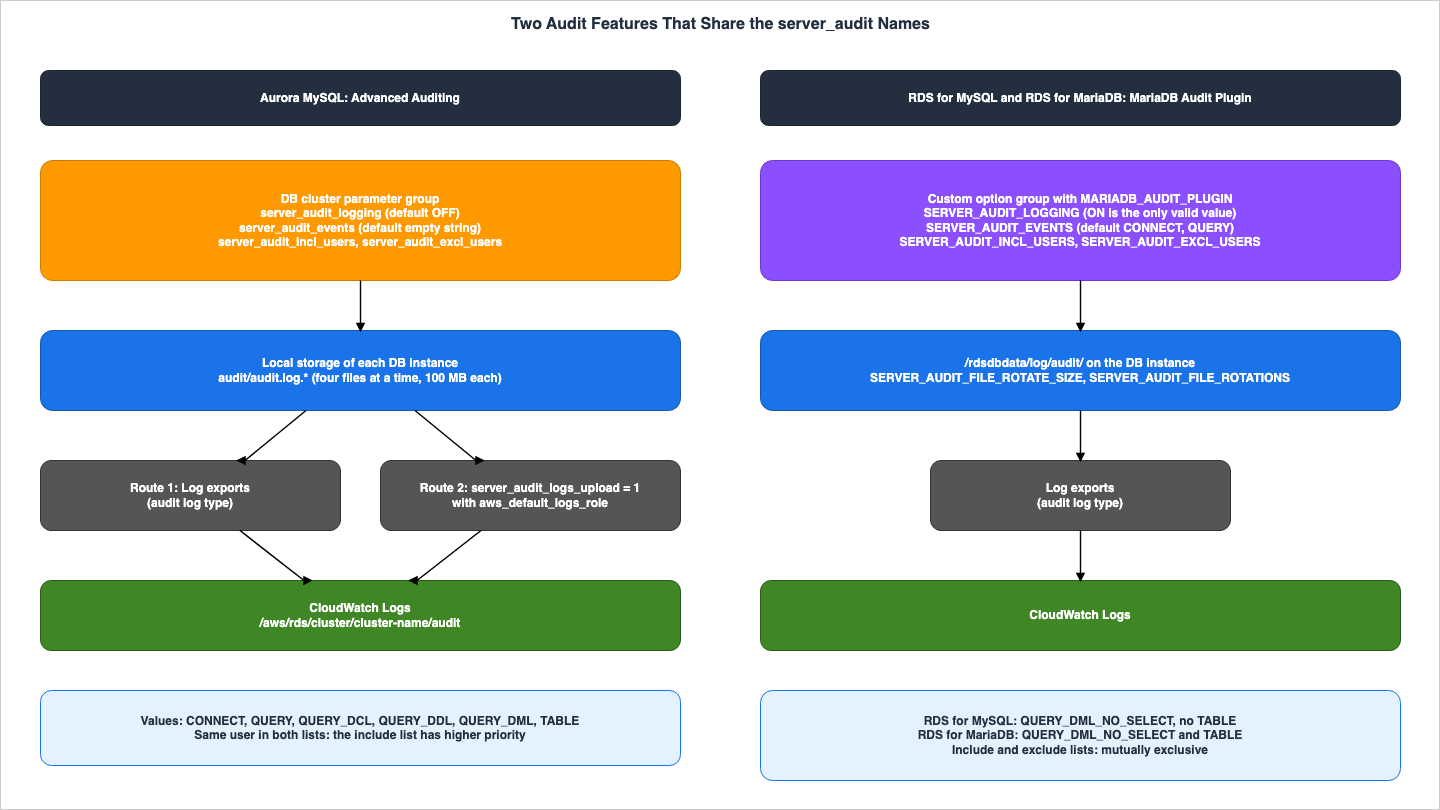
3.1 Where You Configure It, the Values, the User Lists, and How to Turn It Off
| Setting | Aurora MySQL (Advanced Auditing) | RDS for MySQL (MariaDB Audit Plugin) | RDS for MariaDB (MariaDB Audit Plugin) |
|---|---|---|---|
| Where you configure it | DB cluster parameter group | Custom option group with the MARIADB_AUDIT_PLUGIN option | Custom option group with the MARIADB_AUDIT_PLUGIN option |
| Turning it on | server_audit_logging, default OFF | Adding the option; SERVER_AUDIT_LOGGING has ON as its only valid value | Adding the option; SERVER_AUDIT_LOGGING has ON as its only valid value |
| Turning it off | Set server_audit_logging back to OFF | Remove the option; the page says the DB instance is restarted automatically | Remove the option; the page says the DB instance is restarted automatically |
| Event values | CONNECT, QUERY, QUERY_DCL, QUERY_DDL, QUERY_DML, TABLE | CONNECT, QUERY, QUERY_DDL, QUERY_DML, QUERY_DML_NO_SELECT, QUERY_DCL; TABLE is not supported | CONNECT, QUERY, TABLE, QUERY_DDL, QUERY_DML, QUERY_DML_NO_SELECT, QUERY_DCL |
| Event default | Empty string | CONNECT, QUERY | CONNECT, QUERY |
| Same user in the include and exclude lists | The include list has higher priority | The two settings are mutually exclusive | The two settings are mutually exclusive |
| Connect events and the user lists | Not affected; always logged if specified | CONNECT activity always recorded for all users (note on SERVER_AUDIT_EXCL_USERS) | CONNECT activity always recorded for all users (note on SERVER_AUDIT_EXCL_USERS) |
| Restart when you start auditing | Required when the parameter group is associated for the first time; not required for later changes | Not required, and the page also says that adding the plugin might cause an outage | Not required |
The source of each row in this table corresponds to each cell in the contract table in Section 4. This section supplements three rows that are particularly prone to misinterpretation.
First, the row regarding stopping the feature. In Aurora MySQL, setting
server_audit_logging to OFF disables Advanced Auditing. The two RDS pages state that the value for SERVER_AUDIT_LOGGING is "The only valid value is ON." and "Amazon RDS does not support deactivating logging. If you want to deactivate logging, remove the MariaDB Audit Plugin." Furthermore, they state, "When you remove the MariaDB Audit Plugin, the DB instance is restarted automatically to stop auditing."Second, the row regarding restarting. The RDS for MySQL page states, "After you add the MariaDB Audit Plugin, you don't need to restart your DB instance." The same page also includes an Important note stating, "Adding the MariaDB Audit Plugin to a DB instance might cause an outage." The RDS for MariaDB page contains the same initial sentence but lacks the corresponding Important note. This article does not extend the Important note from the RDS for MySQL page to the RDS for MariaDB page.
Third, the row regarding values. The handling of
TABLE differs between the two RDS pages. The RDS for MySQL page states, "For MySQL, TABLE is not supported." while the RDS for MariaDB page lists TABLE as one of the valid values. QUERY_DML_NO_SELECT is listed as a valid value on both RDS pages, but is not found on the Aurora audit page.3.2 Where the Log Lives, Its Format, and Where It Goes
| Setting | Aurora MySQL (Advanced Auditing) | RDS for MySQL (MariaDB Audit Plugin) | RDS for MariaDB (MariaDB Audit Plugin) |
|---|---|---|---|
| Where the log file is | The local storage of each DB instance; file names of the form audit/audit.log.other_identifying_information | /rdsdbdata/log/audit/ | /rdsdbdata/log/audit/ |
| File format | CSV in UTF-8; entries not in sequential order | CSV in UTF-8; entries not in sequential order | No format section on the page |
| Fields | 10 fields from timestamp to retcode; timestamp is a Unix time stamp with microsecond precision | 11 fields; timestamp is YYYYMMDD followed by HH:MI:SS; the 11th field is connection_type | No format section on the page |
| Rotation | Four files at a time; a file rotates at 100 MB, a limit that is not configurable | SERVER_AUDIT_FILE_ROTATE_SIZE (default 1000000 bytes) and SERVER_AUDIT_FILE_ROTATIONS (default 9) | SERVER_AUDIT_FILE_ROTATE_SIZE (default 1000000 bytes) and SERVER_AUDIT_FILE_ROTATIONS (default 9) |
| Removal | After 24 hours, or when 15% of storage has been consumed (the Aurora MySQL logs page) | No time-based statement found for the audit log on the logs page | No time-based statement found for the audit log on the logs page |
| Query text limit | No statement found | SERVER_AUDIT_QUERY_LOG_LIMIT, default 1024 | SERVER_AUDIT_QUERY_LOG_LIMIT, default 1024 |
| To CloudWatch Logs | Two routes: Log exports with audit, or server_audit_logs_upload with aws_default_logs_role | Log exports with audit; the instance must use the custom option group | Log exports with audit; the instance must use the custom option group |
The line "No format section on the page" for RDS for MariaDB indicates that there is no section describing log formats on the RDS for MariaDB page. It is not possible to determine from the sources of this article whether the 11 fields found on the RDS for MySQL page are also present for RDS for MariaDB.
The Removal row for Aurora MySQL refers to text found on the "Overview of Aurora MySQL database logs" page, not the audit page. The audit page details file size and rotation, but does not specify how long the logs are retained. This will be discussed in detail in Section 6.
4. The Contract Tables, Setting by Setting
This section lists the contracts for each setting, using the columns in Section 2.1. The information is divided by feature: Aurora MySQL and RDS MariaDB Audit Plugin. For each feature, the entries are split into two tables, "What You Write" (user-defined elements) and "What Happens" (resulting actions). The order of entries is consistent across the two tables of each feature.4.1 Aurora MySQL — What You Write
| Setting | You Set | Allowed Values | If You Set Nothing | Source of the Default |
|---|---|---|---|---|
server_audit_logging | DB cluster parameter | ON or OFF on the Aurora audit page | OFF | Aurora audit page |
server_audit_events | DB cluster parameter; a comma-delimited list in all caps with no white space | CONNECT, QUERY, QUERY_DCL, QUERY_DDL, QUERY_DML, TABLE | Empty string; no audit data appears | Aurora audit page |
server_audit_incl_users | DB cluster parameter; a comma-delimited list of user names | Names that match the User column of mysql.user; maximum length 1024 characters | Empty string; with both lists empty, all users are audited | Aurora audit page |
server_audit_excl_users | DB cluster parameter; a comma-delimited list of user names | Names that match the User column of mysql.user; maximum length 1024 characters | Empty string | Aurora audit page |
Log exports (audit) | DB cluster setting (CloudwatchLogsExportConfiguration in ModifyDBCluster) | audit among the log types | Not exported | No statement found |
server_audit_logs_upload | DB cluster parameter | 1 to publish; 0 | 0 | Aurora CloudWatch Logs page |
aws_default_logs_role | DB cluster parameter; the ARN of an IAM role that is also associated with the DB cluster | An IAM role ARN | No statement found | No statement found |
4.2 Aurora MySQL — What Happens
| Setting | At the Boundary | Where It Shows | No Statement Found |
|---|---|---|---|
server_audit_logging | ON with an empty server_audit_events logs nothing; the first association of the parameter group requires a cluster restart, later changes do not | Files named audit/audit.log.other_identifying_information in the Logs section of each DB instance | Whether readers and the writer differ; version conditions on the audit page (see the note below) |
server_audit_events | No value excludes SELECT alone; QUERY also logs the monitoring and health checks that Aurora runs automatically | The operation and object fields | Whether Aurora MySQL accepts QUERY_DML_NO_SELECT |
server_audit_incl_users | With users only in this list, only those users are audited; a user in both lists is audited | The username field | — |
server_audit_excl_users | Connect and disconnect events are not affected and are always logged if specified | The username field of CONNECT rows | — |
Log exports (audit) | The page asks that all methods of exporting audit logs be disabled, including server_audit_logs_upload, if you do not want exports | Log group /aws/rds/cluster/cluster-name/audit | — |
server_audit_logs_upload | Requires an IAM role and aws_default_logs_role | The same log group | Whether events are duplicated when both routes are on |
aws_default_logs_role | Association takes two steps: adding the role to the cluster and setting this parameter | AssociatedRoles of the DB cluster | The parameter is not in the cluster-level table of Aurora MySQL configuration parameters |
Regarding the "Log exports (audit)" row, for the "If You Set Nothing" entry, the Aurora CloudWatch Logs page does not explicitly state the default configuration, so the "Source of the Default" was set to "No statement found." That the system starts in a non-configured state is a reading of the console and CLI instructions.
For the
aws_default_logs_role row, the "No Statement Found" message refers to the absence of this parameter's entry in the cluster-level table in the Aurora MySQL configuration parameters page. The same table also lists aws_default_lambda_role and aws_default_s3_role. The parameter itself is documented in the table on the "Associating an IAM role with an Amazon Aurora MySQL DB cluster" page, and also appears on the Aurora CloudWatch Logs page.The version conditions in the
No Statement Found cell of the server_audit_logging row refer to the audit page. The Aurora MySQL release notes describe changes by version. For example, the release notes for version 2.07.5 state, "Extended maximum allowable length to 2000 for the server_audit_incl_users and server_audit_excl_users global parameters." The audit page states, "The maximum length is 1024 characters." This article does not decide which value applies to which version.4.3 RDS MariaDB Audit Plugin — What You Write
| Setting | You Set | Allowed Values | If You Set Nothing | Source of the Default |
|---|---|---|---|---|
MARIADB_AUDIT_PLUGIN | Option in a custom option group, associated with the DB instance | — | No audit log; the logs page requires a custom option group with this option | RDS logs page |
SERVER_AUDIT_LOGGING | Option setting | ON only | ON | RDS option settings table |
SERVER_AUDIT_EVENTS | Option setting | RDS for MySQL: CONNECT, QUERY, QUERY_DDL, QUERY_DML, QUERY_DML_NO_SELECT, QUERY_DCL; RDS for MariaDB: the same plus TABLE | CONNECT, QUERY | RDS option settings table |
SERVER_AUDIT_INCL_USERS | Option setting | Multiple comma-separated values | None; activity is recorded for all users | RDS option settings table |
SERVER_AUDIT_EXCL_USERS | Option setting | Multiple comma-separated values | None; activity is recorded for all users | RDS option settings table |
SERVER_AUDIT_FILE_ROTATE_SIZE | Option setting | 1–1000000000 (bytes) | 1000000 | RDS option settings table |
SERVER_AUDIT_FILE_ROTATIONS | Option setting | 0–100 | 9 | RDS option settings table |
SERVER_AUDIT_QUERY_LOG_LIMIT | Option setting | 0–2147483647 | 1024 | RDS option settings table |
The "If You Set Nothing" entry for
MARIADB_AUDIT_PLUGIN is based on the information found on the "Overview of RDS for MySQL database logs" page, specifically the statement: "To access the audit log, the DB instance must use a custom option group with the MARIADB_AUDIT_PLUGIN option." In their steps for removing the plugin, both RDS pages state, "You can specify the default (empty) option group, or a different custom option group." The same requirement for MariaDB is listed in a table on the "Publishing MariaDB logs to Amazon CloudWatch Logs" page.4.4 RDS MariaDB Audit Plugin — What Happens
| Setting | At the Boundary | Where It Shows | No Statement Found |
|---|---|---|---|
MARIADB_AUDIT_PLUGIN | Adding it needs no restart; RDS for MySQL adds that it might cause an outage; removing it restarts the DB instance automatically | Log files in /rdsdbdata/log/audit/ | — |
SERVER_AUDIT_LOGGING | Logging cannot be deactivated; remove the option instead | — | — |
SERVER_AUDIT_EVENTS | For MySQL, TABLE is not supported | The operation and object fields (RDS for MySQL page) | The log format on the RDS for MariaDB page |
SERVER_AUDIT_INCL_USERS | Mutually exclusive with SERVER_AUDIT_EXCL_USERS | The username field | What happens when both are set |
SERVER_AUDIT_EXCL_USERS | CONNECT activity is always recorded for all users; the rdsadmin user queries the database every second | The username field | — |
SERVER_AUDIT_FILE_ROTATE_SIZE | The file rotates when it reaches this size | The list of log files | A time-based removal of the audit log |
SERVER_AUDIT_FILE_ROTATIONS | 0 means the log file never rotates | The list of log files | — |
SERVER_AUDIT_QUERY_LOG_LIMIT | The limit on the length of the query string in a record | The object field | — |
The "No Statement Found" entry under the
SERVER_AUDIT_INCL_USERS row indicates that there is no statement describing what happens when values are entered for both settings. The two RDS pages only require that if you enter a value in one, you should not enter a value in the other.5. What Is Recorded and What Is Not
This section will address what data is logged for Aurora MySQL's six values, whether SELECT queries alone can be excluded, automatically executed queries, user filtering, and a resolved gap in logging.5.1 The Six Values
The Aurora audit page lists six values as follows:| Value | Text on the Aurora audit page |
|---|---|
CONNECT | Logs both successful and failed connections and also disconnections. This event includes user information. |
QUERY | Logs all queries in plain text, including queries that fail due to syntax or permission errors. |
QUERY_DCL | Similar to the QUERY event, but returns only data control language (DCL) queries (GRANT, REVOKE, and so on). |
QUERY_DDL | Similar to the QUERY event, but returns only data definition language (DDL) queries (CREATE, ALTER, and so on). |
QUERY_DML | Similar to the QUERY event, but returns only data manipulation language (DML) queries (INSERT, UPDATE, and so on, and also SELECT). |
TABLE | Logs the tables that were affected by query execution. |
Regarding how these values are specified, the same page states: "Events must be specified in all caps, and there should be no white space between the list elements, for example: CONNECT,QUERY_DDL. This parameter defaults to an empty string."
And, the description for
server_audit_logging states, "No audit data appears in the logs unless you also define one or more types of events to audit using the server_audit_events parameter." Because the default value for server_audit_events is an empty string, simply enabling server_audit_logging will not produce any audit data.5.2 Can SELECT Alone Be Excluded?
Aurora MySQL'sQUERY_DML includes SELECT queries. The Aurora audit page notes, after the list of values, the following:There's no filter in Aurora that excludes certain queries from audit logs. To exclude SELECT queries, you must exclude all DML statements.
The same note continues, addressing the situation where a user is generating these internal SELECT queries:
If a certain user is reporting these internal SELECT queries in the audit logs, then you can exclude that user by setting the server_audit_excl_users DB cluster parameter. However, if that user is also used in other activities and can't be omitted, then there is no other option for excluding SELECT queries.
In essence, the Aurora audit page outlines two options: excluding all DML statements, or excluding the user that is issuing the internal SELECT queries by using the
server_audit_excl_users parameter. The latter option will exclude all other activity of that user from the logs, except connect and disconnect events (Section 5.4).Two pages in the RDS documentation describe
QUERY_DML_NO_SELECT as "Similar to the QUERY_DML event, but doesn't log SELECT queries." This value is not listed among the values on the Aurora audit page. No documentation was found in the scope of this article that indicates whether Aurora MySQL accepts this value. This value was also not found among the allowed values for server_audit_events as returned by the API (Section 9.2).5.3 Queries That Run Automatically
The Aurora audit page states, in the tip following theQUERY description, "With this event type turned on, the audit data includes information about the continuous monitoring and health-checking information that Aurora does automatically." The same tip also notes that you can use more specific values to filter for particular types of operations.Two pages related to RDS state, in the description for
SERVER_AUDIT_EXCL_USERS, "The rdsadmin user queries the database every second to check the health of the database." They also say to add rdsadmin to the SERVER_AUDIT_EXCL_USERS list if you do not need to record these actions. The Aurora audit page, in the example for server_audit_excl_users, uses rdsadmin,user_1,user_2, but does not explain what the rdsadmin user does.5.4 The User Lists and CONNECT
The Aurora audit page describes four scenarios based on the combination ofserver_audit_incl_users and server_audit_excl_users.| Include list | Exclude list | Who is audited (Aurora audit page) |
|---|---|---|
| Empty | Empty | All users |
| Users added | Empty | Only those users |
| Empty | Users added | All users except those in the exclude list |
| The same users | The same users | Those users; the include list has higher priority |
In addition, both parameters include the following description: "Connect and disconnect events aren't affected by this variable; they are always logged if specified." If
CONNECT is specified as a value, connection and disconnection events for users listed in the exclude list will also be recorded.The two RDS pages state that "SERVER_AUDIT_INCL_USERS and SERVER_AUDIT_EXCL_USERS are mutually exclusive." The Note for
SERVER_AUDIT_EXCL_USERS states: "CONNECT activity is always recorded for all users, even if the user is specified for this option setting." While the documentation states that in Aurora MySQL, the include list takes precedence when the same users are listed in both lists, the RDS documentation advises against giving values to both lists.5.5 A Fixed Gap in Recording (Security Bulletin 2026-006-AWS)
On March 3, 2026, AWS published AWS Security Bulletin 2026-006-AWS (CVE-2026-3494). According to the bulletin, when the audit plugin'sserver_audit_events is configured with QUERY_DCL, QUERY_DDL, or QUERY_DML filtering, statements written in a certain form by authenticated users were not logged (the statement is not logged). This article does not specify the exact form of those statements.The bulletin details the affected versions and the versions that include the fix as follows:
| Engine | Impacted versions (Bulletin) | Addressed in (Bulletin) |
|---|---|---|
| Aurora MySQL | 2.12.5 and prior, 3.01.0 to 3.04.5, 3.05.1 to 3.10.2, and 3.11.0 | 2.12.6, 3.04.6, 3.10.3, and 3.11.1 |
| RDS for MySQL | 5.7.44-RDS.20251212 and prior, 8.0.11 to 8.0.44, and 8.4.3 to 8.4.7 | 5.7.44-RDS.20260212, 8.0.45, and 8.4.8 |
| RDS for MariaDB | 10.6.24 and prior, 10.11.4 to 10.11.15, 11.4.3 to 11.4.9, and 11.8.3 to 11.8.5 | 10.6.25, 10.11.16, 11.4.10, and 11.8.6 |
The bulletin states, "Workarounds: There are no known workarounds." This bulletin provides an example of a scenario where, even when
server_audit_events is configured to log only specific types of statements, certain statements of those types could still be excluded from logging. Verify your engine version against the table above to determine if you are affected.6. Where the Audit Log Lives and When It Is Removed
This section discusses where Aurora MySQL audit logs are stored, when they are deleted, which fields are included, and compares this to rotation within RDS.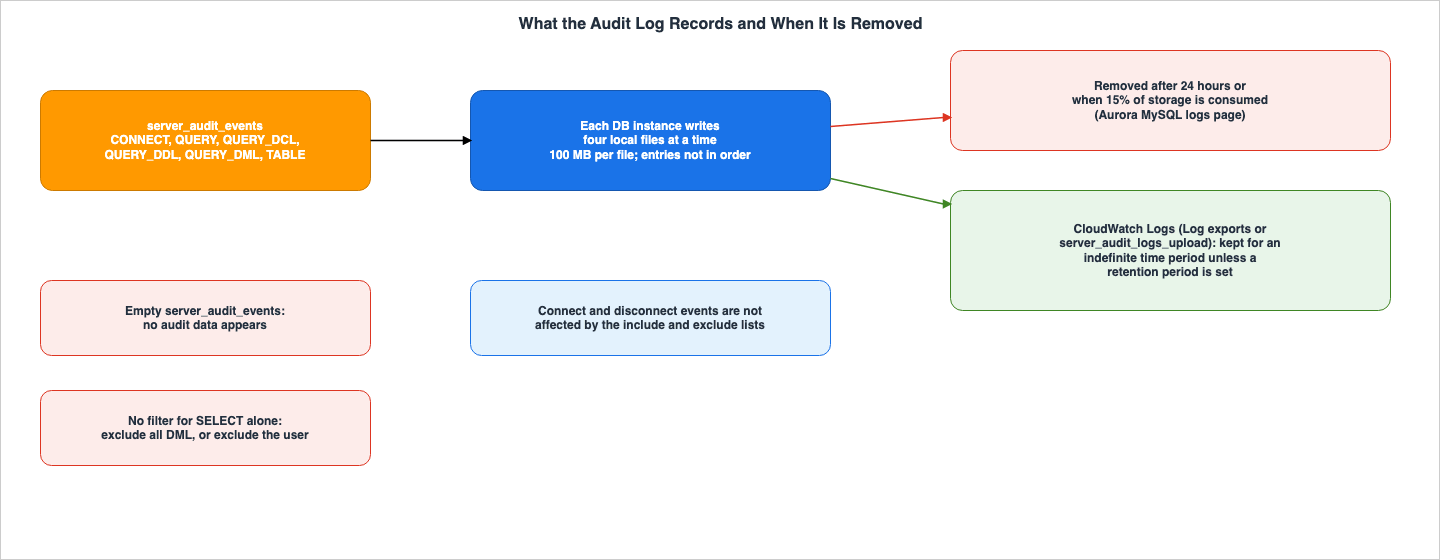
6.1 Local Storage on Each DB Instance
The Aurora audit page indicates that the storage location is as follows:The audit log is stored separately on the local storage of each Aurora MySQL DB instance. Each instance distributes writes across four log files at a time. The maximum size of a log file is 100 MB. When this non-configurable limit is reached, Aurora rotates the file and generates a new file.
The audit log is located on each DB instance, rather than on the cluster as a whole. A tip on the same page states: "Log file entries are not in sequential order. To order the entries, use the timestamp value. To see the latest events, you might have to review all log files." Within a single instance, entries are written across four files and are not in chronological order.
In the console, under the "Logs" section of the DB instance details, files are listed with names in the format
audit/audit.log.other_identifying_information. Using the CLI, you can list files with describe-db-log-files and retrieve their contents with download-db-log-file-portion.6.2 24 Hours or 15%
The Aurora audit page does not specify when files are deleted. The timing of deletion is described in the "Log rotation and retention for Aurora MySQL" section of the "Overview of Aurora MySQL database logs" page.Aurora MySQL removes the audit, general, and slow query logs after either 24 hours or when 15% of storage has been consumed.
The same section also states, "The Aurora MySQL audit logs are rotated when the file size reaches 100 MB, and removed after 24 hours." Audit logs stored locally are deleted after 24 hours, or when 15% of the storage has been used. If you need to retain logs for longer than 24 hours, you can route them to CloudWatch Logs (see Section 7).
Regarding logs sent to CloudWatch Logs, the "Publishing database logs to Amazon CloudWatch Logs" page in the Aurora User Guide states, "AWS retains log data published to CloudWatch Logs for an indefinite time period unless you specify a retention period." Therefore, separate settings control the 24-hour local retention and the retention period for CloudWatch Logs.
The "Log rotation and retention" section for logs in RDS for MySQL and RDS for MariaDB covers slow query logs, error logs, and general logs, but does not specify the retention time for audit logs. The
SERVER_AUDIT_FILE_ROTATE_SIZE and SERVER_AUDIT_FILE_ROTATIONS option settings control the file rotation for RDS audit logs (see Section 4.3).6.3 Fields
The Aurora audit page states, "Log files are represented as comma-separated variable (CSV) files in UTF-8 format." Each row contains ten fields, listed in the following order:| Field | Description on the Aurora audit page |
|---|---|
timestamp | The Unix time stamp for the logged event with microsecond precision |
serverhost | The name of the instance that the event is logged for |
username | The connected user name of the user |
host | The host that the user connected from |
connectionid | The connection ID number for the logged operation |
queryid | The query ID number; for TABLE events, multiple lines are added |
operation | CONNECT, QUERY, READ, WRITE, CREATE, ALTER, RENAME, or DROP |
database | The active database, as set by the USE command |
object | For QUERY events, the query; for TABLE events, the table name |
retcode | The return code of the logged operation |
The RDS for MySQL page adds an eleventh field,
connection_type (The security state of the connection to the server.), to the existing ten fields with the same names. Additionally, timestamp is described as "The YYYYMMDD followed by the HH:MI:SS (24-hour clock) for the logged event." The timestamp value in Aurora MySQL is a Unix timestamp with microsecond precision, while the timestamp on the RDS for MySQL page is a date and time string. Even though the field names are the same, the format of the values differs.6.4 Values That End Up in the Audit Log
Theobject field contains the query text when the event type is QUERY. The Aurora audit page describes QUERY as "Logs all queries in plain text" and notes in the log format description that "Queries are also wrapped in single quotes (')." Any values included in the query will also be stored in the audit logs in plain text.7. Two Routes to CloudWatch Logs
This section discusses two routes for sending Aurora MySQL audit logs to CloudWatch Logs.7.1 Log Exports
The first route is to selectaudit in the Log exports section for the DB cluster. In the console, you can configure this in the "Log exports" section of the "Modify" page for the DB cluster. Using the CLI, use the --cloudwatch-logs-export-configuration parameter of modify-db-cluster, and with the API, use the CloudwatchLogsExportConfiguration parameter in the ModifyDBCluster action. These options are each introduced with the phrase "You can publish Aurora MySQL logs for provisioned clusters."The destination log group will follow the format
/aws/rds/cluster/cluster-name/log_type. The Aurora CloudWatch Logs page states, "The events from all instances in your cluster are pushed to a log group using different log streams." In other words, events from all instances in the cluster are divided into separate log streams and sent to a single log group.7.2 server_audit_logs_upload and aws_default_logs_role
The second route is a parameter. The Aurora CloudWatch Logs page says the following:An alternative way to publish audit logs to CloudWatch Logs is by enabling Advanced Auditing, then creating a custom DB cluster parameter group and setting the server_audit_logs_upload parameter to 1. The default for the server_audit_logs_upload DB cluster parameter is 0.
This route requires an IAM role: "If you use this alternative method, you must have an IAM role to access CloudWatch Logs and set the aws_default_logs_role cluster-level parameter to the ARN for this role."
The process for associating an IAM role with an Amazon Aurora MySQL DB cluster is described in the "Associating an IAM role with an Amazon Aurora MySQL DB cluster" page. This page outlines the association as a two-step process: adding the role to the DB cluster's associated roles list, and specifying the role's ARN in the cluster-level parameter for the relevant service. The table on that same page describes
aws_default_logs_role as being "Used when publishing log data from your DB cluster to Amazon CloudWatch Logs with the server_audit_logs_upload parameter." In other words, aws_default_logs_role is the role used for this alternative method. Regarding the first route, the "Publishing database logs to Amazon CloudWatch Logs" page in the Aurora User Guide states, "Make sure that you have a service-linked role in AWS Identity and Access Management (IAM)." The pages for the two routes name different IAM roles.The Aurora MySQL configuration parameters page describes
server_audit_cw_upload as This parameter has been deprecated in Aurora MySQL. Use server_audit_logs_upload.7.3 To Stop Exports, Stop Every Route
The Aurora CloudWatch Logs page says the following:If you don't want to export audit logs to CloudWatch Logs, make sure that all methods of exporting audit logs are disabled. These methods are the AWS Management Console, the AWS CLI, the RDS API, and the server_audit_logs_upload parameter.
The page can be read as saying that even if you remove
audit from the Log exports settings, if server_audit_logs_upload remains set to 1, the logs will continue to be exported. When disabling log exports, be sure to verify both the Log exports settings and the parameter.7.4 The Log Group and Aurora serverless
The three steps described on the Aurora CloudWatch Logs page refer to "provisioned clusters." In contrast, the "Requirements and limitations for Aurora serverless" page listsDatabase activity streams (DAS). as a feature not supported with Aurora serverless, and also mentions Aurora PostgreSQL cluster cache management, but does not mention Advanced Auditing or CloudWatch Logs output. The Aurora User Guide page "Managing Aurora serverless DB clusters," in its section Logging for Aurora serverless, lists server_audit_events and server_audit_logging among the logs that can be enabled for Aurora MySQL and states, "For more information, see Using Advanced Auditing with an Amazon Aurora MySQL DB cluster." The section Logging with Amazon CloudWatch on the same page states, "Then you choose which of those logs to upload to CloudWatch, by using the Log exports settings in the AWS Management Console or the --enable-cloudwatch-logs-exports option in the AWS CLI." No statement on whether the server_audit_logs_upload route works with Aurora serverless was found on this page either. The Knowledge Center article "Turn on audit logging for an Aurora MySQL DB cluster" (updated March 3, 2025) states, "You can use Advanced Auditing for Aurora, Aurora with parallel query support, and Aurora Serverless database capacity types." This terminology, "Aurora Serverless database capacity types," differs from the current terminology used in the Aurora User Guide ("Aurora serverless"). The configuration described in Section 9 involved a single writer for Aurora serverless, and logging to audit files and the two separate routes for outputting to CloudWatch Logs worked there (Sections 9.3 and 9.4). This describes that particular configuration and the logging records generated on that day.8. What Database Activity Streams Records for Aurora MySQL
This section focuses solely on the format of records produced by Database Activity Streams in Aurora MySQL. The configuration, modes, handling of Kinesis and KMS, and the design for those who read the records are covered in the previously published What Watches the Queries in Aurora PostgreSQL and RDS for PostgreSQL on this site.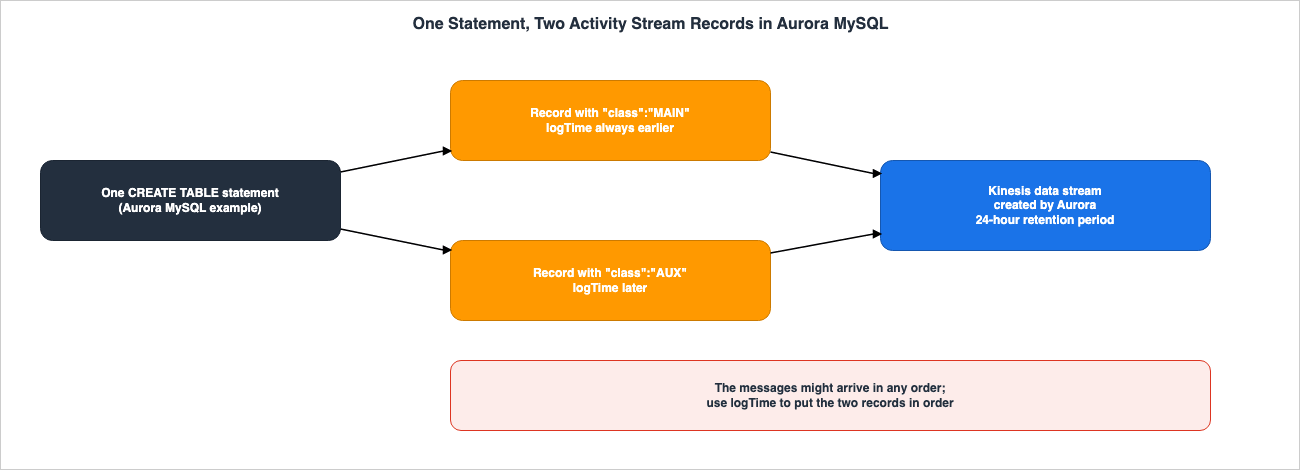
8.1 MAIN and AUX
The Aurora User Guide's page on Audit log contents and examples for database activity streams describes examples of Aurora MySQL's CREATE TABLE statements as follows:The operation is represented as two separate event records. One event has "class":"MAIN". The other event has "class":"AUX". The messages might arrive in any order. The logTime field of the MAIN event is always earlier than the logTime fields of any corresponding AUX events.
In this example, a single statement results in two records, and the order in which they arrive is not predetermined. When arranging these two records, use the
logTime field. The records in the example on the same page show serverType set to MySQL, serviceName set to Amazon Aurora MySQL, and serverVersion set to MySQL 5.7.12. This article does not read this value as the current version (the logTime values in the example are in 2020).8.2 What Is Stated Only for Aurora PostgreSQL
The "Monitoring database activity streams" page of the Aurora User Guide states, "For Aurora PostgreSQL, database activity streams also monitor the bind variables and stored procedure parameters." This statement pertains specifically to Aurora PostgreSQL; no similar statement was found regarding Aurora MySQL.The same page also states regarding the Kinesis stream, "Aurora creates the Kinesis stream automatically with a 24-hour retention period." and "If you stop the database activity stream or delete the DB cluster, Aurora deletes the Kinesis stream."
8.3 The Statements That Connect Advanced Auditing and Database Activity Streams
In the documentation, two passages connect Advanced Auditing and Database Activity Streams.The first is a tip on the Aurora audit page: "To view audit data with more types of fields and with output in JSON format, you can also use the Database Activity Streams feature."
The second is a response to the question "Can I use database activity streams with Aurora Global Database?" on the Availability and Durability page of the Amazon Aurora FAQ. The answer begins with "Yes." and continues, "If your goal is to analyze database activity, consider using Aurora advanced auditing, general logs, and slow query logs instead, to avoid impacting the performance of your database."
No passages were found describing what happens when both features are enabled simultaneously, or whether one feature modifies the settings of the other. The search covered the Aurora audit page, the Database Activity Streams documentation, and the
StartActivityStream API Reference. This article does not describe either feature as replacing the other, nor does it state that they cannot be used concurrently.The RDS for MySQL page, like the Aurora audit page, contains a similar tip that links to "Monitoring Amazon RDS with Database Activity Streams." This tip was not found on the RDS for MariaDB page. However, the "Supported Regions and DB engines for database activity streams in Amazon RDS" page of the RDS User Guide states, "Database activity streams aren't available with the following engines:" and includes both RDS for MariaDB and RDS for MySQL in that list. This article does not assume, based on the tip on the RDS for MySQL page, that Database Activity Streams are available with RDS for MySQL.
9. What This Configuration Recorded
This section presents the results obtained from a small configuration created specifically for this article. The data was recorded on October 24, 2026 (UTC). The values presented here are those obtained from this specific configuration and the data collected on that day, and are not values guaranteed by the sources. Comparisons of these values do not reflect actual performance or indicate which audit feature is superior.9.1 Configuration
| Item | Value |
|---|---|
| Region | US East (N. Virginia) |
| Engine version | 8.0.mysql_aurora.3.10.3 (outside the ranges listed by Security Bulletin 2026-006-AWS) |
| DB instances | One writer, DB instance class db.serverless, capacity range 0.5 to 2 ACUs |
| Parameter group | A custom DB cluster parameter group, attached after the cluster was created |
| Users | The master user, app_user, and probe_user, each running a few statements in every step |
| Date | 2026-10-24 (UTC) |
The MariaDB Audit Plugin for RDS for MySQL and RDS for MariaDB and Database Activity Streams were not included in this configuration. As noted in Section 7.4, documentation indicates that Database Activity Streams cannot be used with Aurora serverless. Cluster names, instance names, account values, and IP addresses have been redacted in this article.
9.2 Allowed Values Returned by the API
UsingDescribeEngineDefaultClusterParameters, default values were retrieved for the parameter group family aurora-mysql8.0. The relevant rows related to auditing are as follows:| Parameter | AllowedValues returned | ApplyType | DataType |
|---|---|---|---|
server_audit_logging | 0,1 | dynamic | boolean |
server_audit_events | CONNECT,QUERY,QUERY_DCL,QUERY_DDL,QUERY_DML,TABLE | dynamic | list |
server_audit_incl_users | — | dynamic | string |
server_audit_excl_users | — | dynamic | string |
server_audit_logs_upload | 0,1 | dynamic | boolean |
server_audit_query_log_limit | 1024-1073741824 | dynamic | integer |
aws_default_logs_role | — | dynamic | string |
The allowed values for
server_audit_events were the same as those listed on the Aurora audit page, and did not include QUERY_DML_NO_SELECT. The allowed values for server_audit_logging were 0,1, which differs from the format used on the Aurora audit page (OFF and ON). While there is no corresponding row in the table on the Aurora MySQL configuration parameters page, the API returned a row for aws_default_logs_role. The parameter server_audit_query_log_limit is not described on the Aurora audit page, but the API returned an allowed value range of 1024-1073741824.9.3 Audit Files on the Instance
In each step, the settings were adjusted, three different users executed commands, and all of the audit files were collected. The lines within each step's timeframe were then counted.| Step | Setting | What was recorded |
|---|---|---|
| s00 | Default cluster parameter group | No audit file was listed |
| s01 | Custom parameter group attached for the first time | The member status became pending-reboot, and in-sync after a reboot of the writer |
| s02 | server_audit_logging = 1, server_audit_events empty | Four files named audit/audit.log.0 to audit/audit.log.3 with a date suffix, all 0 bytes; no rows. The change settled as in-sync without a reboot |
| s03 | server_audit_events = CONNECT,QUERY,TABLE | Rows for all three users; TABLE added READ, WRITE, CREATE, and DROP rows with the database and table names; about 1,040 QUERY rows from rdsadmin in a 158-second window |
| s04 | CONNECT,QUERY; app_user in both lists | app_user: connect, queries, disconnect. Other users: connect and disconnect only. No rdsadmin queries |
| s05 | CONNECT,QUERY; include list reset, app_user in the exclude list | app_user queries were still recorded, together with queries from the other users |
| r1 | The same audit parameter values as s05, with the exclude list written again, after an extra wait of three minutes | app_user: connect and disconnect only; its queries were not recorded |
| s06 | QUERY_DML | SELECT and INSERT rows; no CREATE, DROP, or connect rows |
| s07 | QUERY_DDL,QUERY_DCL | CREATE, DROP, and GRANT rows only; no SELECT or INSERT rows |
In s04, there were no entries for
rdsadmin queries, which is consistent with the include list containing only app_user. However, even in s04, connection and disconnection events for users other than app_user were still recorded.s05 and r1 were two attempts with the same values in the audit parameters. In s05, the exclude list kept the value written in s04, and only the include list was reset. Even after the parameter status reached
in-sync, queries from app_user were still recorded in s05. In r1, after the same value was written again to the exclude list, which had been reset in between, and an additional three minutes had passed, the queries from app_user were no longer recorded, and only connection and disconnection events remained. Before and after the test in r1, the values returned by SHOW GLOBAL VARIABLES indicated that server_audit_excl_users was set to app_user and server_audit_incl_users was empty. The reason for the recording in s05 could not be determined based on this configuration. This data only suggests that it is not advisable to assume that filtering is in effect simply because the status shows in-sync.The number of audit files was 4 for s02 through s04, 8 for s05, and 24 for r1. Sets of four files, differentiated by their date stamps, were added over time, while the previous sets remained in the list. The configuration did not show a single file reaching 100 MB in size, nor did it show the 24-hour deletion process.
9.4 The Two Routes to CloudWatch Logs
server_audit_events was set to CONNECT,QUERY, and each step waited five minutes before retrieving events from the log group.| Step | Log exports (audit) | server_audit_logs_upload | What arrived in CloudWatch Logs |
|---|---|---|---|
| c01 | Enabled | 0 | All three marked statements, in log group /aws/rds/cluster/cluster-name/audit |
| c02 | Enabled | 1, with aws_default_logs_role set | All three marked statements; none arrived twice |
| c03 | Disabled | 1 | All three marked statements |
| r2 | Disabled; the API reported no enabled or pending exports, followed by a five-minute wait | 1 | All three marked statements |
| c04 | Disabled | 0 | No events; the log group remained |
The
EnabledCloudwatchLogsExports value that DescribeDBClusters returned at the start of each step did not always reflect the preceding change: at the start of step c01 it was still None after Log exports had been enabled, and at the start of step c03 it was still audit after Log exports had been disabled. Therefore, step c03 alone does not confirm that the statements arrived solely through the parameter route. In step r2, with log exports disabled, the API reported no enabled or pending exports, and a five-minute wait passed before statements arrived only through the parameter route. Both routes wrote to log streams with the same name (in the format instance-name.audit.log.N), and the routes could not be distinguished based on the stream name. In this configuration, even after disabling log exports, statements continued to arrive in CloudWatch Logs as long as server_audit_logs_upload remained 1. This aligns with the information presented in Section 7.3.9.5 Engine-Side Variables
WhenSHOW GLOBAL VARIABLES LIKE 'server_audit%' was run as the master user (r1), the following rows were returned:| Variable | Value returned |
|---|---|
server_audit_cw_upload | OFF |
server_audit_events | CONNECT,QUERY |
server_audit_excl_users | app_user |
server_audit_incl_users | (empty) |
server_audit_logging | ON |
server_audit_mode | 0 |
server_audit_query_log_limit | 65536 |
On the engine side,
server_audit_logging was displayed as ON. The parameter group value was 1, and the Aurora audit page writes it as ON. server_audit_cw_upload is a variable that remained on the engine side, despite being described as deprecated in Aurora MySQL on the configuration parameters page. The value of server_audit_query_log_limit was 65536. No explanation for server_audit_mode and server_audit_query_log_limit could be found in the sources for this article.9.6 What This Configuration Did Not Show
- Rotation when a single file reaches 100 MB, and deletion after 24 hours or when 15% of storage is used.
- Logging on a reader instance (this configuration only has one writer).
- The behavior of the MariaDB Audit Plugin with RDS for MySQL and RDS for MariaDB.
- Recording with Database Activity Streams.
- The reason why the exclude list was not working in s05.
10. Where GuardDuty and Performance Monitoring Begin
Amazon GuardDuty RDS Protection analyzes database login activity to generate findings. The GuardDuty User Guide states, "GuardDuty doesn't make RDS login activity logs available to you." The documentation indicates that users cannot directly access or review the login activity logs analyzed by GuardDuty. The engines and versions covered by GuardDuty RDS Protection, as well as the scope of data activity analysis, are detailed in the previously published What Watches the Queries in Aurora PostgreSQL and RDS for PostgreSQL on this site, as confirmed on October 14, 2026. The GuardDuty RDS Protection page was reviewed again on October 25, 2026 (the check date of this article), and no subsequent changes were found.Performance monitoring falls outside the scope of this article.
11. Failure Modes
This section outlines the failures that may arise from the contracts discussed in Sections 3 through 8, categorizing them by symptoms and causes.| Symptom | Cause in the contract | Where to look |
|---|---|---|
No audit file appears after turning on server_audit_logging | server_audit_events is still the empty default | Section 5.1 |
| The new parameter group seems to have no effect | The first association of a parameter group requires a cluster restart | Section 3.1 |
| SELECT rows keep appearing after switching to a narrower value | QUERY_DML includes SELECT; Aurora has no value that excludes SELECT alone | Section 5.2 |
| A user in the exclude list is still audited | The same user is also in the include list, which has higher priority | Section 5.4 |
| Connections of an excluded user still appear | Connect and disconnect events are not affected by the user lists | Section 5.4 |
| Old audit records are missing from the instance | The Aurora MySQL logs page removes audit logs after 24 hours or at 15% of storage | Section 6.2 |
| The newest events are not at the end of a file | Entries are not in sequential order and span four files | Section 6.1 |
| Exports to CloudWatch Logs continue after Log exports is turned off | server_audit_logs_upload is still 1 | Section 7.3 |
server_audit_logs_upload is 1 but nothing arrives | The IAM role is not associated, or aws_default_logs_role is not set | Section 7.2 |
| An RDS for MySQL instance cannot turn auditing off with a setting | SERVER_AUDIT_LOGGING accepts only ON; remove the option, which restarts the instance | Section 3.1 |
server_audit_events filtered with QUERY_DCL, QUERY_DDL, or QUERY_DML misses some statements on affected versions | Security Bulletin 2026-006-AWS; check the engine version against the fixed versions | Section 5.5 |
| An Aurora MySQL statement appears twice in the activity stream | MAIN and AUX records of one statement | Section 8.1 |
12. Frequently Asked Questions About Query Auditing in Aurora MySQL and RDS for MySQL
Q1. Do the server_audit_* settings mean the same thing in Aurora MySQL and RDS for MySQL?
No, they do not. In Aurora MySQL, server_audit_events is a DB cluster parameter with six possible values, and its default value is an empty string. In RDS for MySQL, SERVER_AUDIT_EVENTS is an option setting whose values include QUERY_DML_NO_SELECT but not TABLE, and its default value is CONNECT, QUERY. The rules for user filtering and for stopping auditing also differ (see Section 3.1).Q2. Can Aurora MySQL exclude only SELECT statements from the audit log?
The options presented on the Aurora audit page indicate two possibilities: excluding all DML (Data Manipulation Language) operations, or excluding the user that issues the internal SELECT queries. The page states, "There's no filter in Aurora that excludes certain queries from audit logs." TheQUERY_DML_NO_SELECT value is listed on the RDS pages but is not listed among the values on Aurora's audit page (see Section 5.2).Q3. What happens when the same user is in both the include list and the exclude list?
In Aurora MySQL, documentation states that the user is audited. This is becauseserver_audit_incl_users takes precedence. In RDS for MySQL and RDS for MariaDB, the documentation specifies that these two settings are mutually exclusive, meaning that if a value is written for one, it should not be written for the other. No documentation was found describing what happens when values are written for both settings (see Section 5.4).Q4. How long does the Aurora MySQL audit log stay on the instance?
Regarding local audit logs for the instance, the "Overview of Aurora MySQL database logs" page states that they are deleted after 24 hours or when 15% of the storage is used. This information is found on the logs page, not the audit page. If you need to retain logs for longer than 24 hours, you should configure them to be sent to CloudWatch Logs (see Section 6.2).Q5. What must be turned off to stop exports to CloudWatch Logs?
To stop the output to CloudWatch Logs, you need to disable both theaudit log type in Log exports and server_audit_logs_upload. The CloudWatch Logs page for Aurora indicates that if you do not want any output, you should disable all methods (see Section 7.3).Q6. If Database Activity Streams is turned on, is Advanced Auditing no longer needed?
The documentation does not explicitly state that. The two passages that connect the two features are found in the tip on the Aurora audit page and in the answer to the question about Aurora Global Database in the Aurora FAQ. However, no passages were found that describe the behavior when both features are used simultaneously. This article does not state that one feature replaces the other, nor does it state that they cannot be used concurrently (Section 8.3).Q7. Can Advanced Auditing be used with Aurora serverless?
The Aurora User Guide page "Managing Aurora serverless DB clusters" listsserver_audit_events and server_audit_logging among the logs that can be enabled on Aurora serverless and says that they can be sent to CloudWatch with the Log exports settings. The requirements page for Aurora serverless also lists two features that are not supported, and does not mention Advanced Auditing. In the configuration of this article (Aurora MySQL 3.10.3, one db.serverless writer, October 24, 2026), both audit log recording and the two routes to CloudWatch Logs were functioning (see Sections 7.4, 9.3, and 9.4).Q8. How do you turn off auditing on RDS for MySQL?
The only validSERVER_AUDIT_LOGGING value is ON. The RDS documentation states that to stop auditing, you must remove the MariaDB Audit Plugin. It also notes that removing the plugin will automatically restart the DB instance (see Section 3.1).13. Summary
- While both Aurora MySQL's Advanced Auditing and RDS's MariaDB Audit Plugin share the same name for a setting (
server_audit_*), they differ in terms of where the setting is located, its values, default values, user filtering, how to disable it, and the format of the logs. The RDS for MySQL and RDS for MariaDB documentation also differ in how they handleTABLEand the cautionary statements. - In Aurora MySQL, you must enable
server_audit_loggingand then specify the events to be logged inserver_audit_events. When associating a parameter group for the first time, a cluster restart is required. - Aurora MySQL does not offer a setting to exclude only
SELECTstatements. You can exclude all DML operations or specific users. - Aurora MySQL audit logs are stored locally on each instance and, according to the Aurora MySQL logs page, are deleted after 24 hours or when 15% of storage has been consumed. One way to keep them is to export the logs to CloudWatch Logs, and to stop exports, you must disable both routes.
- For configurations that filter
server_audit_eventswithQUERY_DCL,QUERY_DDL, orQUERY_DML, updated versions are available that address the logging gap described in Security Bulletin 2026-006-AWS. - Database Activity Streams may output a single Aurora MySQL statement as two entries (
MAINandAUX), and the two might arrive in any order. No statement was found on how it behaves when used together with Advanced Auditing. - In this article's configuration (Aurora MySQL 3.10.3,
db.serverless), most of the logging behaved as documented. However, the exclude list did not take effect on the first attempt; it took effect on a second attempt after the same values were re-applied and an extra three minutes had passed, and the reason for the first result could not be determined.
14. References
- Amazon Aurora User Guide: Using Advanced Auditing with an Amazon Aurora MySQL DB cluster
- Amazon Aurora User Guide: Publishing Amazon Aurora MySQL logs to Amazon CloudWatch Logs
- Amazon Aurora User Guide: Overview of Aurora MySQL database logs
- Amazon Aurora User Guide: Publishing database logs to Amazon CloudWatch Logs
- Amazon Aurora User Guide: Associating an IAM role with an Amazon Aurora MySQL DB cluster
- Amazon Aurora User Guide: Creating an IAM policy to access CloudWatch Logs resources
- Amazon Aurora User Guide: Aurora MySQL configuration parameters
- Amazon Aurora User Guide: Requirements and limitations for Aurora serverless
- Amazon Aurora User Guide: Managing Aurora serverless DB clusters
- Amazon Aurora User Guide: Monitoring Amazon Aurora with Database Activity Streams
- Amazon Aurora User Guide: Monitoring database activity streams
- Amazon Aurora User Guide: Audit log contents and examples for database activity streams
- Amazon RDS User Guide: MariaDB Audit Plugin support for MySQL
- Amazon RDS User Guide: Options for MariaDB database engine
- Amazon RDS User Guide: Overview of RDS for MySQL database logs
- Amazon RDS User Guide: Log rotation and retention for MariaDB
- Amazon RDS User Guide: Publishing MySQL logs to Amazon CloudWatch Logs
- Amazon RDS User Guide: Publishing MariaDB logs to Amazon CloudWatch Logs
- Amazon RDS User Guide: Monitoring Amazon RDS with Database Activity Streams
- Amazon RDS User Guide: Supported Regions and DB engines for database activity streams in Amazon RDS
- Amazon RDS API Reference: ModifyDBCluster
- Amazon RDS API Reference: CloudwatchLogsExportConfiguration
- Amazon RDS API Reference: StartActivityStream
- Release Notes for Aurora MySQL: Aurora MySQL database engine updates 2021-07-06 (version 2.07.5) (Deprecated)
- Amazon Aurora FAQ: Availability and Durability
- AWS Security Bulletins: MariaDB Server Audit Plugin Comment Handling Bypass (2026-006-AWS)
- AWS re:Post Knowledge Center: Turn on audit logging for an Aurora MySQL DB cluster
- Amazon GuardDuty User Guide: GuardDuty RDS Protection
References:
Tech Blog with curated related content
Written by Hidekazu Konishi