How Amazon Aurora serverless Decides Its Capacity - What You Set, What Aurora Decides Within Your Range, What the Maximum ACU Fixes, and Where Each Shows Up
First Published:
Last Updated:
You specify the minimum and maximum capacity range. Aurora scales each Aurora serverless writer or reader in the cluster within that capacity range.Like capacity, certain database parameters that are linked to capacity have a similar division of responsibility. The user guide states that Aurora adjusts some parameters as it scales, while others are fixed values determined by the maximum capacity setting.
The exceptions are some parameters that Aurora automatically adjusts during scaling, and some parameters that Aurora keeps at fixed values that depend on the maximum capacity setting.This article categorizes the values related to Aurora serverless capacity into three groups: values the user sets, values Aurora determines (primarily within the user-defined range), and values Aurora determines based on the user-defined maximum ACU. It then outlines what each one affects and identifies the API fields and metrics through which users can observe these values. It also describes the factors affected by the minimum capacity setting, only as far as the user guide's sentences state them. Finally, for the amount (increment) by which capacity increases in a single scaling event, it shows where the sources disagree, without reconciling them. The information presented here is based on the Aurora user guide, the Amazon RDS API reference, the AWS CLI reference, the AWS CloudFormation reference, the botocore models, What's New, and the AWS Database Blog, as verified on October 11, 2026. The only Aurora API this article called is
DescribeServerlessV2PlatformVersions, once in us-east-1 (Section 6.2). This article is not an introduction to Aurora serverless, nor does it recommend specific ACU values. Pricing is not discussed.Related articles on this site:
- AWS History and Timeline regarding Amazon Aurora - Overview, Engines, Features, Summary of Updates, and Introduction
- Amazon RDS and Aurora High Availability Guide - Multi-AZ, Read Replicas, RDS Proxy, and Global Database Failover
- AWS Database Glossary - RDS, Aurora, DynamoDB, DocumentDB, and Neptune Explained
- Querying Apache Iceberg and Parquet from Amazon Aurora PostgreSQL - What DuckDB Runs, What Your Transaction Sees, How Current a Read Is, and What Reaches the Writer
- PostgreSQL Autovacuum, Bloat, and Planner Statistics on Aurora and RDS - Why the Defaults Stop Being Enough, and What to Tune First
- Sharding Aurora PostgreSQL with Limitless Database - Table Types, Shard Keys, Single-Shard Optimization, and What You Cannot Change Later
- Where AWS Publishes Version End Dates - The AWS Health Version Catalog, DescribeServiceLifecycle, and the Calendars of RDS, Aurora, EKS, Lambda, OpenSearch Service, and ElastiCache
- What Decides How Much a CloudWatch Logs Insights Query Scans - What You Choose, What CloudWatch Logs Indexes for You, What Can Change the Result, and Where Each Shows Up
- AWS End-of-Support and EOL Reference - Lambda, EKS, RDS and Aurora, ElastiCache, and OpenSearch Service
Table of Contents
- 1. What Is Automatic About Capacity, and What This Article Covers
- 2. How to Read the Tables — Who Decides, and Where You Can See It
- 3. The Aurora serverless Capacity Unit (ACU) and the Capacity Range
- 4. Who Decides What
- 5. What the Minimum Capacity Setting Affects
- 6. Scaling Increments and Platform Versions
- 7. Auto-Pause to 0 ACUs and Resume
- 8. Where the Sources Disagree and Where No Statement Was Found
- 9. Frequently Asked Questions about Aurora serverless Capacity
- 10. Summary
- 11. References
1. What Is Automatic About Capacity, and What This Article Covers
This section will first clarify the distinction between aspects of Aurora serverless that are automatically determined and those that users define. It then addresses naming conventions, outlines the scope of this article, specifies the date of verification and the consulted materials, and establishes the terminology used throughout this article.1.1 What Is Automatic Is the Current Capacity Within the Range
Aurora serverless DB instances (writer and reader) each have a capacity that fluctuates based on current demand. The user guide states that this capacity is measured every second and operates within a range defined by the minimum and maximum values configured for the cluster. This range is set at the cluster level and applies to all Aurora serverless instances within that cluster. The user guide clarifies that the capacity and scaling refer to computational resources (CPU and memory), separate from storage capacity.Users cannot directly determine the current capacity. The "Managing Aurora serverless DB clusters" page of the user guide states:
In Aurora serverless, you can't directly set the current capacity without modifying the capacity range, as capacity dynamically adjusts based on the workload within the specified range.However, among the values that Aurora determines, some are indirectly influenced by user settings. As mentioned earlier, the user guide describes certain parameters that are linked to capacity and are kept at fixed values based on the maximum capacity setting. While the minimum capacity setting defines the lower end of this range, it also influences several factors that the user guide describes (Section 5). It's important to carefully review which values are determined by whom to avoid confusion about what changes and what remains unchanged when the range is modified.
1.2 Naming — Aurora serverless and the ServerlessV2 API
The page titles in the user guide currently refer to Aurora serverless as of October 11, 2026. Articles on Aurora serverless in the AWS Database Blog include the following banner at the beginning. Among the articles this article read, the banner appears on the April 20, 2026 article and on articles published before it.April, 2026: Aurora Serverless v2 has been renamed Aurora serverless. No action required.However, the API, CLI, CloudFormation, and console still use the "v2" designation. The API configuration is
ServerlessV2ScalingConfiguration, the platform version field is ServerlessV2PlatformVersion, and the instance class is db.serverless. The "Requirements and limitations for Aurora serverless" page in the user guide is written as follows:The --db-instance-class parameter for Aurora serverless is always db.serverless.The descriptions in the API reference and CloudFormation reference still refer to Aurora Serverless v2. On the "Managing Aurora serverless DB clusters" page in the user guide, the console displays the instance class as "Serverless v2." This article uses the name "Aurora serverless" for the product and retains the original spellings for identifiers used with the API, CLI, and CloudFormation.
Aurora Serverless v1 is a separate product. The "How Aurora serverless works" page in the user guide is written as follows:
Platform versions should not be confused with Aurora Serverless v1, which is a deprecated product with a different architecture.The entry for December 6, 2024, in the "Document history" page of the user guide states that the end-of-life for Aurora Serverless v1 is March 31, 2025. This article does not cover Aurora Serverless v1.
1.3 What This Article Covers, and What It Doesn't
This article focuses on four key areas:- Decision-Making Authority for Values: Who determines the values related to capacity within Aurora serverless?
- Factors Influenced: What aspects are affected by the configuration of minimum and maximum capacity, including scaling, buffer cache, connection limits, and readers, as well as potential pauses?
- Visibility: Where can users find these values – through which APIs, CloudWatch metrics, events, or logs?
- Disagreements and Statements Not Found: Instances where different documentation sources provide conflicting information, and areas where information is simply not found.
The following topics are covered in other articles on this site. This article will briefly mention them with a single sentence and a link.
- Dates related to Aurora features: AWS History and Timeline regarding Amazon Aurora includes entries in a timeline, including the 256 ACU maximum, auto-pause to 0 ACUs, and platform version 4. This article will only list the dates of announcements necessary to explain the functionality.
- Terminology: AWS Database Glossary defines terms related to Aurora Serverless v1 and Aurora Serverless v2.
- High Availability and Failover Design: Amazon RDS and Aurora High Availability Guide addresses readers and failover prioritization (tiers). This article will focus solely on how promotion tier affects the scaling of Aurora serverless readers and which instances pause together.
- Aurora PostgreSQL External Tables: Section 8.7 of Querying Apache Iceberg and Parquet from Amazon Aurora PostgreSQL mentions how
shared_buffersare handled in Aurora serverless, stating that details on capacity management are outside the scope. This article will cover those out-of-scope aspects. - Autovacuum Tuning: PostgreSQL Autovacuum, Bloat, and Planner Statistics on Aurora and RDS covers this topic. This article only notes that, for Aurora PostgreSQL in Aurora serverless, the defaults of some autovacuum parameters are determined by the maximum ACU value (Section 4.3).
- Engine Version End Dates: Where AWS Publishes Version End Dates details where to find the end dates for Aurora MySQL and Aurora PostgreSQL engine versions. It's important to note that platform versions are distinct from engine versions (Section 1.5).
This article will not discuss pricing, the trade-offs between Aurora serverless and provisioned instances, or performance comparisons. This article does not recommend ACU values. Recommended minimum values, as defined by AWS, will be cited with appropriate attribution (Section 5.1).
1.4 When This Article Was Checked, and the Sources It Read
This information was verified on October 11, 2026 (UTC). The materials consulted are as follows:- Aurora User Guide: Seven pages from the Aurora serverless chapter (Using Aurora serverless, How Aurora serverless works, Requirements and limitations for Aurora serverless, Creating a DB cluster that uses Aurora serverless, Managing Aurora serverless DB clusters, Performance and scaling for Aurora serverless, Scaling to Zero ACUs with automatic pause and resume for Aurora serverless), along with Supported Regions and Aurora DB engines for Aurora serverless, Amazon CloudWatch metrics for Amazon Aurora, Amazon RDS event categories and event messages for Aurora, Maintaining an Amazon Aurora DB cluster, Overview of Amazon Aurora Blue/Green Deployments, Limitations and considerations for Amazon Aurora blue/green deployments, Stopping and starting an Amazon Aurora DB cluster, and Document history.
- API and Models: Amazon RDS API reference (
ServerlessV2ScalingConfiguration,ServerlessV2ScalingConfigurationInfo,DBCluster,DBInstance,DBClusterMember,DBEngineVersion,DescribeServerlessV2PlatformVersions,ServerlessV2PlatformVersionInfo,ServerlessV2FeaturesSupport,PendingMaintenanceAction,DescribePendingMaintenanceActions,ApplyPendingMaintenanceAction,CreateDBCluster,ModifyDBCluster,CreateDBInstance). AWS CLI commandsdescribe-serverless-v2-platform-versionsandmodify-db-cluster. CloudFormation resourcesAWS::RDS::DBClusterandServerlessV2ScalingConfiguration. RDS models from botocore 1.43.111 (published on PyPI on 2026-10-09), and the botocore CHANGELOG. - Announcements and Blog Posts: Seven entries from What's New (2024-10-03, 2024-11-20, 2025-08-07, 2026-04-21, 2026-08-05, 2026-08-31, 2026-09-30), and seven articles from the AWS Database Blog focusing on Aurora serverless. Four articles from the AWS Database Blog are referenced in the text (2024-11-20, 2024-11-25, 2026-04-20, 2026-08-14).
- Search: Used AWS documentation search (aws-knowledge MCP) to confirm that descriptions were not found.
The only Aurora API this article called is
DescribeServerlessV2PlatformVersions. On October 11, 2026 (UTC), the describe-serverless-v2-platform-versions command was called once in the us-east-1 region using AWS CLI 2.37.12, without specifying any request parameters. The response is detailed in Section 6.2. The response formats for other APIs are derived from the API reference, the botocore models, and examples in the user guide. The benchmark figures from the AWS Database Blog (such as performance ratios and time to reach a certain capacity) are not used in this article. The doubled default speed and the 12 ACUs are listed in Section 6.1, with their sources and dates clearly indicated.1.5 Words with the Same Spelling, Different Meanings
This article deals with words that share the same spelling but refer to different things. This article distinguishes them as follows.- Version: The platform version of Aurora serverless (
ServerlessV2PlatformVersion, ranging from 1 to 4) is separate from the engine versions of Aurora MySQL and Aurora PostgreSQL (e.g., Aurora MySQL 3.08.0, Aurora PostgreSQL 16.3). The available capacity range is determined by both of these versions (see Section 3.4). The end dates for the engine versions are covered by Where AWS Publishes Version End Dates. - ACU (Aurora Capacity Unit): In Aurora serverless, an ACU represents a unit of capacity per DB instance. While Aurora PostgreSQL Limitless Database also uses ACUs, the maximum capacity that users can configure applies to the entire DB shard group (the total of routers and shards) (see Section 7.1 of Sharding Aurora PostgreSQL with Limitless Database). In this article, ACU refers only to the former.
- Minimum Capacity: The cluster's capacity range setting (
MinCapacity) and the minimum capacity for Aurora serverless readers in tiers 0 and 1 (representing the capacity of the writer at that time) are distinct. When referring to the latter, this article always calls it the minimum of tier 0 and 1 readers. - Scaling: In this article, "scaling" refers to the increase or decrease in the capacity of Aurora serverless instances. It does not refer to increasing the number of readers. The user guide states that Aurora Auto Scaling is not supported for Aurora serverless ("Aurora Auto Scaling isn't supported.").
- Pause: The automatic pausing (auto-pause) of Aurora serverless instances and the stopping/starting of the cluster are separate functionalities. In this article, "pause" refers only to the former.
- Reboot and Stop/Start: Rebooting a DB instance and stopping/starting the cluster are different operations. This article will refer to the former as a DB instance reboot and the latter as a cluster stop/start.
- Increment: The 0.5 ACU step in which the minimum and maximum can be set (Section 3.1) and the amount by which capacity increases in a single scaling event (Section 6) are separate. In this article, "increment" refers to the latter.
2. How to Read the Tables — Who Decides, and Where You Can See It
This section defines the columns and terms used in the table presented in this article. The column names and values will be the same as those used in Section 2 of the Where AWS Publishes Version End Dates article, and any additions specific to this article will be defined here.2.1 Common Columns
Tables that present values related to capacity share five common columns:Item: The value that is decided. For example, the minimum of the range, the current capacity, or the default value formax_connections.Decided By: This indicates who determines the value (see Section 2.2).What You Set: If the user can change, through a setting, how this value applies to their resources, this column lists the name of the setting. If the setting is not found, writeNot found.Where You Can See It: This specifies the type of location where the user can view this value, along with the specific name (see Section 2.3).Where the Source Says So: This provides the source document that supports the information in the row. A brief description of the information is provided either in the cell or in the sentence following the table.
These five columns are present in the tables from Sections 4.1 through 4.3. Other tables will have columns that are appropriate for their specific content.
2.2 Decided By Values
The Decided By column should contain one of the following five options. The first four options correspond to values found in another article on this site, while the fifth option is a value specific to this article. In this article, AWS refers to Aurora as a service provided by AWS.AWS: Determined by AWS. In this article, this indicates that the documentation specifies the value is determined by Aurora, and no setting that lets the user change the value was found in the sources this article read.You: Determined by the user.AWS, within your settings: Determined by AWS, within the user's configured settings. In this article, this refers to instances where Aurora decides the current capacity and the values tied to it, all within the minimum and maximum values configured by the user.The source does not say.: The documentation does not specify who determines the value.AWS, from your maximum ACU: AWS calculates the value based on the maximum ACU configured by the user. This value is independent of the current capacity. It separates out, fromAWS, within your settings, the values that come from the maximum ACU.
2.3 Types of Where You Can See It
The Where You Can See It column begins with one of the following types. The first six types are the same as those used in other articles on this site, while the remaining three types were added specifically for this article. This article does not use Query statistic or Not found in this column. Not found is used in the What You Set column when a setting cannot be located. Documentation only has the same name as a type used in other articles on this site, but its meaning is redefined within this article.API field: Found in fields within API responses. Include the operation name and field name.CloudWatch metric: Found in CloudWatch metrics.Query statistic: Found in query statistics.Console: Found in the AWS Management Console.Documentation only: In the sources this article read, the value is only found in the text of the materials (user guides, What's New, AWS Database Blog) and not in any API fields or metrics.Not found: In the sources this article read, the location where it can be found could not be determined.RDS event: Found in Amazon RDS events. Include the event ID.Log file: Found in log files for the DB instance. Include the file name.Database session: Found when connecting to the database and querying the engine (e.g., usingSHOWstatements).
Documentation only and Not found do not necessarily mean that an API or setting is absent. The sources and terms searched are listed in Section 8.2.2.4 Formatting Dates and Verification Dates
The dates for What's New should be written in the formatWhat's New YYYY-MM-DD, using the date from the announcement's postDateTime. Note that the year and month in the What's New URL may not always match the postDateTime (see Section 6.1). For the AWS Database Blog, the dates should be written in the format AWS Database Blog YYYY-MM-DD, reflecting the article's publication date. For user guide and API reference entries, pair the page title with the verification date, using the format (checked 2026-10-11). Engine versions should be written in the format <engine> <version>, and platform versions should be indicated with a number (e.g., "platform version 4").2.5 When the Source Does Not Say, and When Sources Disagree
Table cells contain only what the source says (or a summary of it). If the source does not address a particular point, writeThe source does not say. Before doing so, search the full text of the source, as well as the linked page and related pages from the same provider (including the seven pages for Aurora serverless, the API reference, the CLI reference, the botocore models, the metrics page, the Document history, What's New, and the AWS Database Blog), using the subject of the row, as well as the terms scale, increment, capacity, minimum, pause, and platform. If the source only provides general principles and does not specifically address the subject of the row, do not write The source does not say. Instead, include the general principles and a note that the source does not name the row's subject.When the sources disagree, list both descriptions with their respective sources, without favoring either one. Disagreements discussed in this article will be summarized in Section 8.1.
3. The Aurora serverless Capacity Unit (ACU) and the Capacity Range
This section describes how the unit of capacity (ACU) is defined, and the upper and lower limits that users can configure. It's important to note that these limits are not solely determined by user settings. They also depend on the engine version and the platform version.3.1 Definition of ACU and Configurable Values
The "How Aurora serverless works" page of the user guide defines capacity units as follows:Each ACU is a combination of approximately 2 gibibytes (GiB) of memory, corresponding CPU, and networking. You specify the database capacity range (minimum and maximum) using this unit of measure. Aurora serverless offers capacity from 0 ACUs to 256 ACUs.The minimum and maximum values that users can configure are between 0 and 256, in steps of 0.5. The "Managing Aurora serverless DB clusters" page of the user guide states that the values usable for
MinCapacity and MaxCapacity are 0, 0.5, 1, 1.5, 2, and so on, increasing in steps of 0.5, up to a maximum of 256. The minimum value of 0 is only available with engine versions that support automatic pausing (Section 7). The "Performance and scaling for Aurora serverless" page states that the maximum value must be at least the minimum value and greater than 0.5 ACU (it says to use a value of 1 or higher). The same page also notes that while it is possible to set the minimum and maximum values to the same value, this will prevent the capacity from increasing or decreasing, making it unsuitable except for testing purposes. The "Managing Aurora serverless DB clusters" page mentions setting the minimum and maximum values to the same value as a means of temporarily fixing the capacity (Section 8.1).3.2 Range Determined by the Engine Version
The "How Aurora serverless works" page lists the capacity ranges you can set and the corresponding engine versions (as of October 11, 2026), as shown in the following table.| Capacity range (ACUs) | Aurora MySQL supported versions | Aurora PostgreSQL supported versions |
|---|---|---|
| 0.5–128 | 3.02.0 and higher | 13.6 and higher, 14.3 and higher, 15.2 and higher, 16.1 and higher |
| 0.5–256 | 3.06.0 and higher | 13.13 and higher, 14.10 and higher, 15.5 and higher, 16.1 and higher |
| 0–256 | 3.08.0 and higher | 13.15 and higher, 14.12 and higher, 15.7 and higher, 16.3 and higher |
This table has no rows for Aurora MySQL 8.4 or for Aurora PostgreSQL 17 and 18. The "Supported Regions and Aurora DB engines for Aurora serverless" page also lists these versions as versions for Aurora serverless (for example, in us-east-1, Aurora PostgreSQL 18.3 and higher and 17.4 and higher). The capacity range that can be set for these versions cannot be read from this table.
3.3 Range Determined by the Platform Version
The "How Aurora serverless works" page also shows the range for each platform version in the following table (copied on the same date). The table on the page also includes a performance column.| Aurora serverless platform version | ACU range |
|---|---|
| 1 | 0–128 |
| 2 | 0–256 |
| 3 | 0–256 |
| 4 | 0-256 |
The performance column on the page indicates the following for each platform version: Platform versions 1 and 2 are labeled as "Baseline performance," platform version 3 as "Up to 30% improved performance compared to platform version 2," and platform version 4 as "Up to 30% improved performance compared to platform version 3." This information is provided by AWS, and this article does not verify these performance claims. The details of how platform versions work are described in Section 6.2.
3.4 Range Determined by the Lower Version
When dealing with ranges that differ based on the engine version and platform version, which takes precedence? The note on the "How Aurora serverless works" page states:The available scaling range for a given cluster is determined by both engine version and platform version. It is possible to have a more capable engine version running on a less capable platform version and vice-versa. The scaling range is determined by the lowest capable engine or platform version.Users can verify the upper limits for both versions individually through their respective APIs. In the botocore model, a structure called
ServerlessV2FeaturesSupport appears in both the engine version information (DBEngineVersion) and the platform version information (ServerlessV2PlatformVersionInfo). The API reference for ServerlessV2FeaturesSupport indicates that if MinCapacity is 0, that version supports automatic pausing, and that MaxCapacity can be either 256 or 128. The engine version information is available through DescribeDBEngineVersions, while the platform version information is available through DescribeServerlessV2PlatformVersions.The "Managing Aurora serverless DB clusters" page of the user guide explains that, in some cases, attempting to set a maximum capacity greater than 128 ACU results in an error, and gives two reasons: older engine versions and older platform versions.
The way maximum capacity is described varies across different documentation. The API reference for
ServerlessV2ScalingConfiguration states the following regarding MaxCapacity.The largest value that you can use is 256 for recent Aurora versions, or 128 for older versions.The CloudFormation reference for
ServerlessV2ScalingConfiguration describes MaxCapacity differently, without mentioning the value 256.The largest value that you can use is 128.This article does not consider either description to be incorrect (see Section 8.1).
4. Who Decides What
This section will present values related to capacity, categorized into three groups: those set by the user, those determined by Aurora, and those determined by Aurora based on the user-defined maximum ACU. Among the values determined by Aurora, the current capacity and related values will be decided within the range set by the user. Finally, this section will outline which values change and when, when the user modifies the defined range.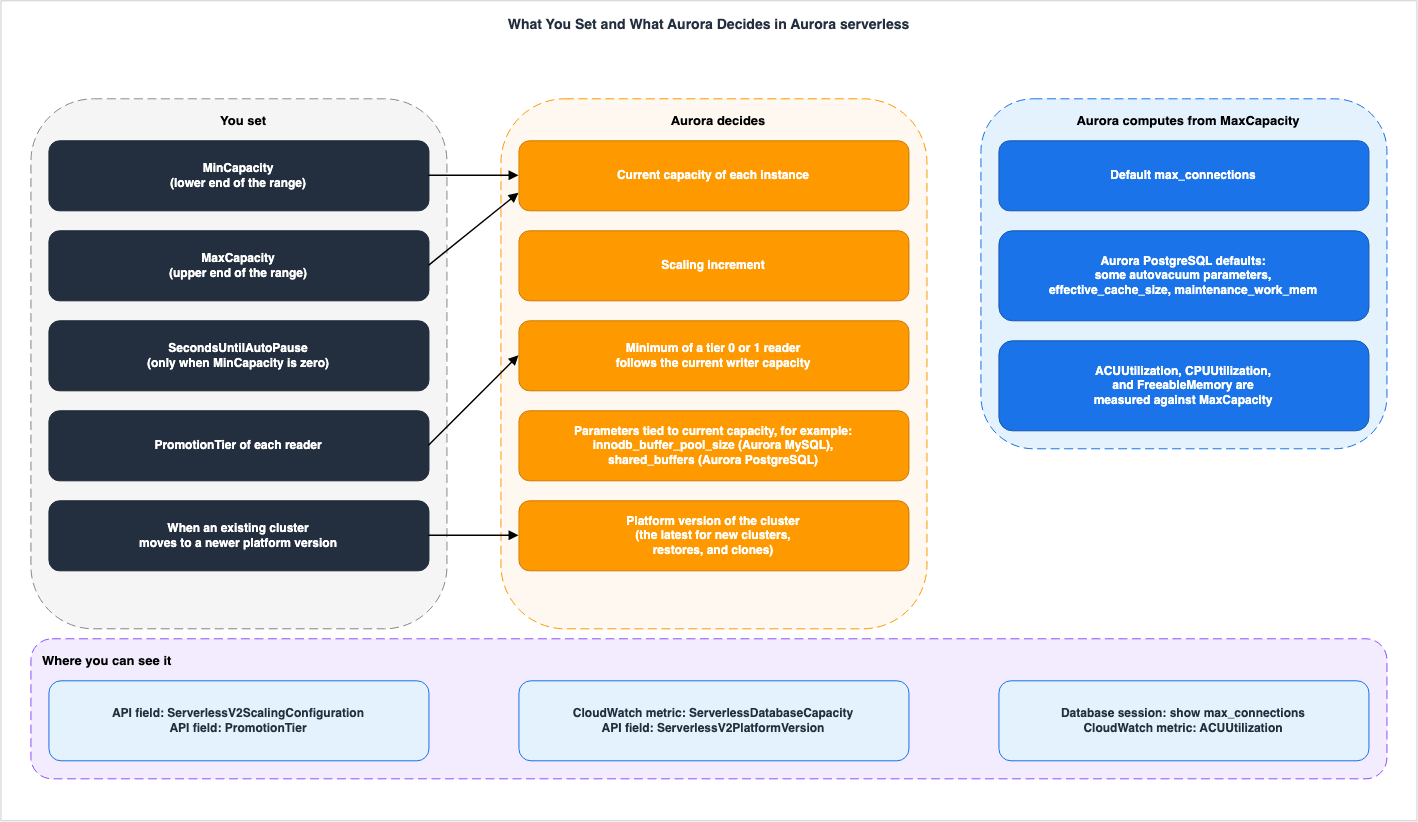
4.1 Values Set by Users
The values users can set relate to the cluster's range, the number of seconds before a pause, the promotion tier for each reader, and the timing for upgrading the platform version of existing clusters. The range and pause duration are configured in the cluster'sServerlessV2ScalingConfiguration, and these are the only three elements in the ServerlessV2ScalingConfiguration model provided by botocore.| Item | Decided By | What You Set | Where You Can See It | Where the Source Says So |
|---|---|---|---|---|
| Minimum of the range | You | ServerlessV2ScalingConfiguration's MinCapacity (per cluster) | API field: DescribeDBClusters's ServerlessV2ScalingConfiguration. Console: Cluster and instance details | Managing Aurora serverless DB clusters, API Reference (checked 2026-10-11) |
| Maximum of the range | You (Aurora may roll back a change that lowers it on Aurora PostgreSQL. See Section 4.5) | Same setting's MaxCapacity | API field: DescribeDBClusters's ServerlessV2ScalingConfiguration. Console: Cluster and instance details | Same as above |
| Seconds until auto-pause | You (only when the minimum capacity is 0 ACUs) | Same setting's SecondsUntilAutoPause | API field: DescribeDBClusters's ServerlessV2ScalingConfiguration. Included in the response only when the minimum is 0 ACUs | Scaling to Zero ACUs with automatic pause and resume for Aurora serverless, API Reference's ServerlessV2ScalingConfigurationInfo |
| Reader's promotion tier | You | Instance's PromotionTier (Failover priority in the console). The default is 1, and the valid values are 0–15 (API reference for CreateDBInstance) | API field: DescribeDBClusters's DBClusterMembers's PromotionTier. Console: Priority tier column on the Databases page | Managing Aurora serverless DB clusters, API reference for CreateDBInstance |
| Timing for upgrading an existing cluster's platform version | You (choose the timing from the three methods described in the user guide. Whether AWS determines the application date is not specified in the sources this article read) | User guide procedure: apply-pending-maintenance-action's serverless-platform-version-update (not listed in the API reference's ApplyAction values. See Section 8.1), cluster stop/start, Blue/Green deployment | API field: DescribePendingMaintenanceActions's PendingMaintenanceActionDetails's Action. RDS event: RDS-EVENT-0521 through RDS-EVENT-0525 (start, completion, and failure of the serverless platform update) | How Aurora serverless works, Managing Aurora serverless DB clusters, Maintaining an Amazon Aurora DB cluster, Amazon RDS event categories and event messages for Aurora |
The user guide states that settings are applied uniformly to all instances of Aurora serverless within a cluster, using the same minimum and maximum values. Details on when these changes take effect can be found in Section 4.5.
The
Where You Can See It column in the table lists representative locations confirmed in the sources this article read, and does not represent a comprehensive list. For example, the "Performance and scaling for Aurora serverless" page states that you can also see the configured minimum and maximum values in Performance Insights counters such as os.general.minConfiguredAcu and os.general.maxConfiguredAcu.4.2 Values Aurora Decides
Within the range set by the user, Aurora determines the capacity of each instance at that moment. The user guide's "How Aurora serverless works" page states that Aurora continuously monitors resource utilization, including CPU, memory, and network (referred to as "load" in the document), increasing capacity when needed and decreasing it when there is excess. AWS Database Blog 2026-04-20 states that with platform version 4, Aurora enhances the scaling algorithm by taking additional metrics as signals for scaling decisions. It also states that existing clusters need to upgrade to platform version 4 to get this scaling behavior. For the increment, the platform version of new clusters, restores, and clones, and the capacity right after resuming from a pause, the sources this article read show no setting that lets users change the value (see Section 8.2). The table labels these threeAWS, and labels the values decided within the user's range AWS, within your settings.| Item | Decided By | What You Set | Where You Can See It | Where the Source Says So |
|---|---|---|---|---|
| Capacity of each instance at a given time | AWS, within your settings | MinCapacity and MaxCapacity (range only) | CloudWatch metric: ServerlessDatabaseCapacity (per instance), ACUUtilization | How Aurora serverless works, Managing Aurora serverless DB clusters, Performance and scaling for Aurora serverless |
| Amount increased (increment) with each scaling event | AWS | Not found (ServerlessV2ScalingConfiguration does not include increment values) | Documentation only: User guide, What's New, AWS Database Blog (Section 6.1) | Table in Section 6.1 |
| Platform version for new clusters, restores, and clones | AWS | Not found (timing for upgrading existing clusters is described in Section 4.1) | API field: ServerlessV2PlatformVersion in DescribeDBClusters (response DBCluster), IsDefault in DescribeServerlessV2PlatformVersions. Console: Instance Configuration | How Aurora serverless works, API Reference |
Aurora MySQL parameters listed in the user guide: innodb_buffer_pool_size, innodb_purge_threads, table_definition_cache, table_open_cache, and Aurora PostgreSQL parameters: shared_buffers | AWS, within your settings (varies based on current capacity) | Not found (the user guide states that the system does not use values specified by the user) | Database session: The user guide provides examples such as select @@innodb_buffer_pool_size and show shared_buffers. Log file: For Aurora MySQL, the error log includes buffer pool scaling events even when there are no errors | Performance and scaling for Aurora serverless, Managing Aurora serverless DB clusters |
| Minimum of tier 0 and 1 readers | AWS, within your settings (based on the current writer capacity) | PromotionTier (setting the tier to 2-15 allows the reader to operate independently of the writer within the cluster's range) | CloudWatch metric: ServerlessDatabaseCapacity for each instance | How Aurora serverless works |
| Capacity immediately after resuming from a pause | AWS | Not found | CloudWatch metric: ServerlessDatabaseCapacity | Scaling to Zero ACUs with automatic pause and resume for Aurora serverless |
The "Performance and scaling for Aurora serverless" page lists parameters that correspond to the current capacity, and before four Aurora MySQL parameters, it includes the following sentence. A similar sentence also appears before the
shared_buffers parameter for Aurora PostgreSQL.For Aurora MySQL, Aurora serverless resizes some parameters dynamically during scaling. For the following parameters, Aurora serverless doesn't use any custom parameter values that you specify:Regarding promotion tiers, the "How Aurora serverless works" page states: The readers in tiers 0 and 1 are kept at least as large as the writer, so that they can take over the writer's responsibilities during failover. If the writer is a provisioned instance, the minimum of tier 0 and 1 readers will correspond to the writer's memory size in ACUs.
For readers in promotion tiers 0 and 1, the minimum capacity is defined by the current writer capacity and the maximum capacity is the maximum ACU value specified for the cluster.Readers in promotion tiers 2–15 scale independently from the writer.Regarding the platform version for new clusters, restores, and clones, the "How Aurora serverless works" page states:
Amazon Aurora automatically manages platform version assignments at the cluster level. All new clusters, database restores, and new clones launch with the latest platform version available in your AWS Region.4.3 Values Aurora Decides from the Maximum ACU
Aurora calculates default values for certain parameters based on the maximum ACU configured by the user. These values do not follow the current capacity. The "Performance and scaling for Aurora serverless" page states the following regardingmax_connections:When Aurora serverless evaluates the formula, it uses the memory size based on the maximum Aurora capacity units (ACUs) for the DB instance, not the current ACU value.The user guide explains that this is to prevent connections from being dropped when the instance scales down. The same page also indicates that the default values for five Aurora PostgreSQL parameters—
autovacuum_max_workers, autovacuum_vacuum_cost_limit, autovacuum_work_mem, effective_cache_size, and maintenance_work_mem—are also determined from the maximum ACU's memory, similar to max_connections.| Item | Decided By | What You Set | Where You Can See It | Where the Source Says So |
|---|---|---|---|---|
Default value of max_connections | AWS, from your maximum ACU (For Aurora PostgreSQL, if the minimum is 0 or 0.5, the cap is 2,000 – see Section 5.1) | MaxCapacity. You can also directly configure max_connections in a custom DB parameter group. | Database session: show max_connections, etc. API field: After changing the maximum, the DBClusterParameterGroupStatus in DBClusterMembers of DescribeDBClusters may show as pending-reboot (see Section 4.5). | Performance and scaling for Aurora serverless, Managing Aurora serverless DB clusters |
Default values of Aurora PostgreSQL parameters: autovacuum_max_workers, autovacuum_vacuum_cost_limit, autovacuum_work_mem, effective_cache_size, maintenance_work_mem | AWS, from your maximum ACU | MaxCapacity. Whether values from a custom parameter group are used: the statements on the same page disagree (see Section 8.1). | Database session: show statements | Performance and scaling for Aurora serverless |
This page contains two conflicting statements regarding the ability to use custom values for these five parameters. The first is the general rule in the section that lists parameters that vary based on the current capacity (Section 4.2). These five parameters are not included in that section's list.
For all parameters other than those listed here, Aurora serverless DB instances work the same as provisioned DB instances.The second statement is in the "Default parameter values" section on the same page. As the places to find the parameters whose custom values Aurora overrides, this section lists two sections: one that describes parameters that vary based on the current capacity, and another that describes parameters calculated from the maximum capacity (the section for these five).
For the specific parameters that Aurora serverless overrides, see Parameters that Aurora adjusts as Aurora serverless scales up and down and Parameters that Aurora computes based on Aurora serverless maximum capacity.The section for these five parameters simply states the default values, without specifying whether custom values can be used. This article takes neither side (Section 8.1). Regarding
max_connections, the same page states that it can be directly configured within a custom DB parameter group (Section 4.5).The default value for
max_connections is shown in a table on the same page, presented for each maximum ACU. The rows for Aurora PostgreSQL, ranging from 32 ACU to 256 ACU, all show a value of 5,000, and the rows for Aurora MySQL show 6,000 for 192 ACU and 256 ACU. An example on the same page states that the maximum value for Aurora PostgreSQL's max_connections is 5,000. However, there are exceptions. In Aurora PostgreSQL, setting the minimum to 0 or 0.5 reduces the upper limit for max_connections to 2,000 (Section 5).The user guide states the following regarding changing the default value for
max_connections.If you change the default value, we recommend using a variation of the formula instead of specifying a constant value.This is an AWS recommendation, and this article does not recommend a value.
4.4 Metrics Calculated Based on Maximum ACU
The "Performance and scaling for Aurora serverless" page states that three CloudWatch metrics used with Aurora serverless are calculated based on the cluster's maximum ACU. All three metrics include the maximum ACU in their calculation definitions, and their values also fluctuate based on the current capacity. Therefore, this article lists these three metrics with a column for what each is measured against, instead of the five columns from Section 2.| Metric | What It Is Measured Against | Where the Source Says So |
|---|---|---|
ACUUtilization | ServerlessDatabaseCapacity divided by the cluster's maximum ACU | Performance and scaling for Aurora serverless |
CPUUtilization (for Aurora serverless) | The currently used CPU divided by the amount of CPU available based on the cluster's maximum ACU | Same as above |
FreeableMemory (for Aurora serverless) | Unused memory available when the instance has reached its maximum capacity. It increases by approximately 2 GiB for every ACU that the current capacity is below the maximum | Same as above |
The same page describes these three metrics as follows:
It's calculated as the value of the ServerlessDatabaseCapacity metric divided by the maximum ACU value of the DB cluster.For Aurora serverless, this value is a percentage that's calculated as the amount of CPU currently being used divided by the CPU capacity that's available under the maximum ACU value of the DB cluster.This value represents the amount of unused memory that is available when the Aurora serverless DB instance is scaled to its maximum capacity. For every ACU that the current capacity is below the maximum capacity, this value increases by approximately 2 GiB.The first describes
ACUUtilization, the second CPUUtilization, and the third FreeableMemory. ServerlessDatabaseCapacity is the number of ACUs, not a ratio to the maximum. The "Performance and scaling for Aurora serverless" page notes that the meaning of this metric differs depending on whether it is viewed at the instance level or the cluster level.As an instance-level metric, it reports the number of ACUs represented by the current DB instance capacity. As a cluster-level metric, it represents the average of the ServerlessDatabaseCapacity values of all the Aurora serverless DB instances in the cluster.The "Amazon CloudWatch metrics for Amazon Aurora" page describes the same metric, in both the cluster and instance tables, as "The current capacity of an Aurora Serverless DB cluster" (Section 8.1).
4.5 What Changes and When, When You Modify the Range
When a user modifies the range, the following values change, and at the following times:| Change | When It Takes Effect | Where the Source Says So |
|---|---|---|
| Range (minimum and maximum) | Applied immediately. This does not depend on whether you choose to apply it immediately or during the next maintenance window. Each instance scales up or down if necessary to fall within the new range. | Managing Aurora serverless DB clusters |
| Parameters that are linked to the current capacity | As shown in the user guide examples, after changing the range, the values are adjusted to match the current capacity before a reboot. | Performance and scaling for Aurora serverless |
max_connections (using the default value) | After the DB instance is rebooted. Until then, the value remains based on the previous maximum. | Same as above |
max_connections (directly configured using a custom DB parameter group) | No reboot is required. | Same as above |
| Changes to reduce the maximum value (in Aurora PostgreSQL) | If Aurora detects that an instance is having trouble scaling down, it may revert the change and return to the previous setting. The user guide gives two possible causes, that the new maximum capacity is insufficient for the current workload and that custom parameter values are set too high, and states that the rollback may increase the capacity of all instances in the cluster. | Requirements and limitations for Aurora serverless |
| Instances that are paused | Resumed as a result of the range change. | Scaling to Zero ACUs with automatic pause and resume for Aurora serverless |
The "Managing Aurora serverless DB clusters" page states the following regarding the timing of range changes:
When you modify the capacity range for an Aurora serverless DB cluster, the change takes place immediately, regardless of whether you choose to apply it immediately or during the next scheduled maintenance window.Regarding
max_connections, the "Performance and scaling for Aurora serverless" page states the following:When you change the maximum capacity of an Aurora serverless DB cluster, you have to reboot the Aurora serverless DB instances to update the max_connections value. This is because max_connections is a static parameter for Aurora serverless.The "Managing Aurora serverless DB clusters" page states the following regarding static parameters calculated from the maximum value:
For static parameters that rely on this type of calculation, the value is evaluated again when you reboot the DB instance.The state that requires a reboot can be observed through the API. The "Managing Aurora serverless DB clusters" page indicates a reboot is needed when the DB instance's
ParameterApplyStatus is pending-reboot. The example on the "Performance and scaling for Aurora serverless" page illustrates a similar situation, showing the DBClusterParameterGroupStatus within DBClusterMembers for DescribeDBClusters set to pending-reboot.Regarding reverting a reduction in the maximum value for Aurora PostgreSQL, the "Requirements and limitations for Aurora serverless" page states the following. When the rollback starts, Amazon RDS sends an event.
If Aurora detects that any of your instances are having trouble scaling down, it may cancel and roll back the scaling configuration update.Aurora may return the maximum set by the user to its previous value. While the range is defined by the user's settings, in these cases, Aurora will override that setting.
5. What the Minimum Capacity Setting Affects
This section will describe, for each sentence in the user guide, how the minimum capacity (MinCapacity) setting affects various aspects, limited to what that sentence states. While the minimum capacity is the lower limit of the range, the user guide also discusses its impact on buffer cache, the speed at which capacity can increase, connection limits, replication lag on readers, and potential pauses. Each statement is presented conditionally.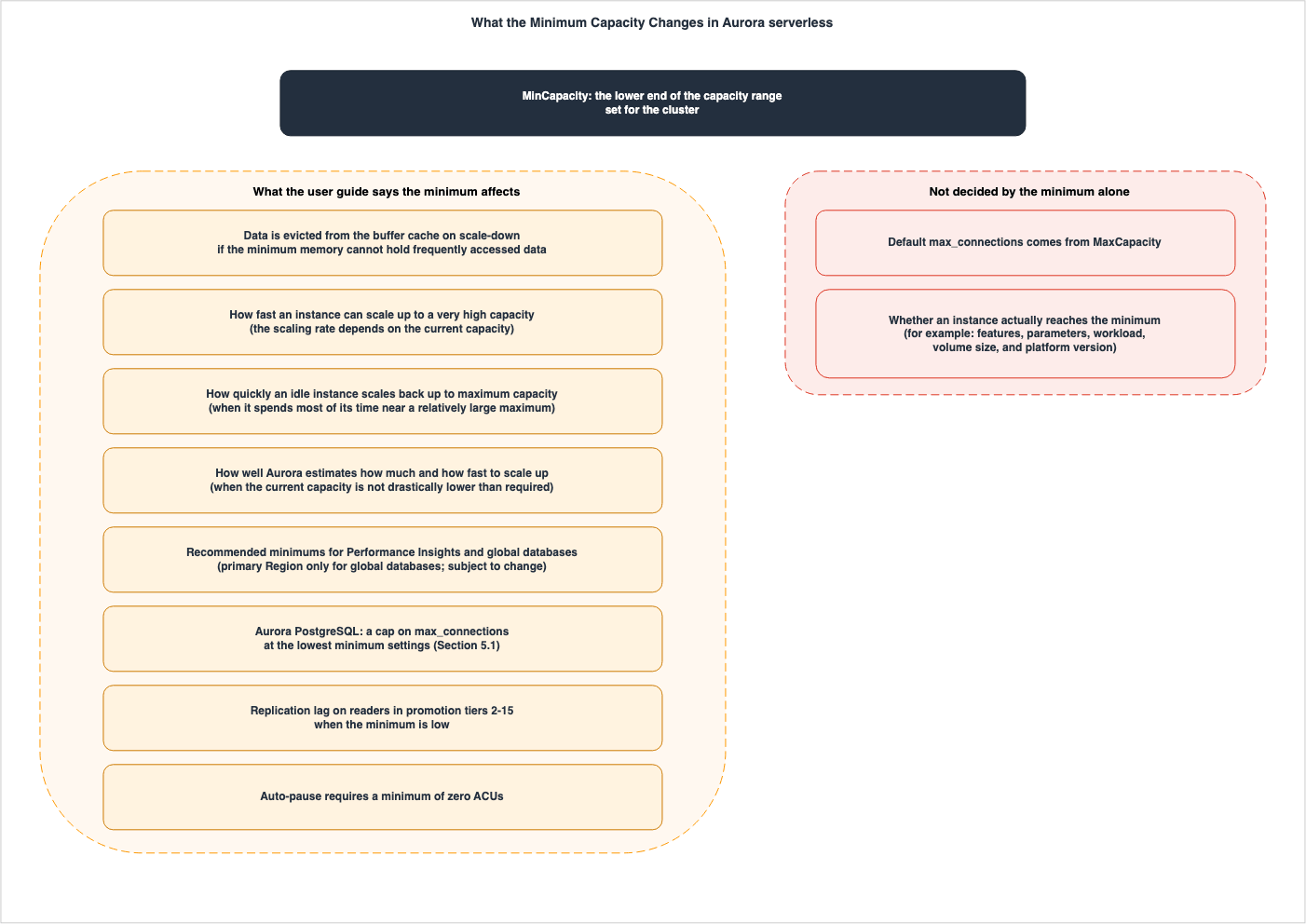
5.1 Effects the User Guide Describes
The following table lists items from the section on choosing the minimum on the "Performance and scaling for Aurora serverless" page, detailing what the minimum setting affects (the last row is from the "Scaling to Zero ACUs with automatic pause and resume for Aurora serverless" page). Note that this table is not exhaustive and does not include items related to estimating values based on typical instance class memory usage.| Effect | Scope in the User Guide | Where the Source Says So |
|---|---|---|
| Data eviction from the buffer cache | When the minimum's memory cannot hold frequently used data and the instance scales down to a smaller memory size. After it scales back up, the data is read back over time. | Performance and scaling for Aurora serverless |
| Speed of scaling to higher capacities | The speed of scaling depends on the current capacity. If you want to quickly scale to very high capacities, the user guide suggests considering a minimum that meets your speed requirements. | Same as above |
| Speed of scaling idle instances to maximum capacity | If the maximum capacity is relatively large and the instance spends most of its time operating near the maximum, this applies. | Same as above |
| Accuracy of estimates for scaling amount and speed | Aurora can most accurately estimate the scaling amount and speed when the current capacity is not significantly lower than the required capacity. If the instance spends most of its time operating at a specific capacity, the user guide suggests setting the minimum lower than that capacity, but not too much lower. | Same as above |
| Recommended minimum per feature | 2 ACUs for Performance Insights and 8 ACUs for Aurora global databases (for the primary region only). These recommendations may change. | Same as above |
Limit for Aurora PostgreSQL's max_connections | Setting the minimum to 0 or 0.5 caps it at 2,000. If you anticipate a high connection load, the user guide suggests a minimum of 1 or higher. | Same as above |
| Lag for tier 2–15 readers | If the reader does not scale along with the writer, a low minimum setting can result in excessive replication lag. If you experience performance issues with the reader, the user guide suggests increasing the cluster's minimum. | Same as above |
| Automatic pausing | Instances can only be paused when the minimum is set to 0. | Scaling to Zero ACUs with automatic pause and resume for Aurora serverless |
Regarding the buffer cache, the user guide states:
If your application works most efficiently when the DB instances have a certain amount of data in the buffer cache, consider specifying a minimum ACU setting where the memory is large enough to hold the frequently accessed data. Otherwise, some data is evicted from the buffer cache when the Aurora serverless DB instances scale down to a lower memory size. Then when the DB instances scale back up, the information is read back into the buffer cache over time.The page describing how Aurora serverless works also recommends setting the minimum to a value that lets each instance maintain its application's working set in the buffer pool, preventing the buffer pool's contents from being discarded while idle. This is an AWS recommendation, and this article does not recommend a specific value.
Regarding the recommended minimum value, the user guide states:
In particular, we recommend the following minimum capacity for use with the specified features (these recommendations are subject to change):The following two lines list 2 ACUs for Performance Insights and 8 ACUs for Aurora's global database (for the primary region only). Concerning Performance Insights, the row dated May 30, 2025, in the "Document history" of the user guide states that the end-of-life date for Performance Insights is November 30, 2025, and that after that date, it will no longer support features such as the Performance Insights console. The same row recommends upgrading DB clusters to Database Insights before that date. The recommendation of 2 ACUs is cited as a statement from the user guide as of the date of verification.
Regarding connection limits for Aurora PostgreSQL, the user guide states:
However, when you specify a minimum capacity of 0 or 0.5 ACUs on PostgreSQL-compatible DB instances, the maximum value of max_connections is capped at 2,000.Concerning readers in tiers 2 through 15, the user guide states:
In that case, setting a low minimum capacity can result in excessive replication lag. That's because the readers might not have enough capacity to apply changes from the writer when the database is busy.The item just before it in the same section also says the following about Aurora replication. That item recommends making the minimum for readers that scale independently large enough to avoid query latency during periods of high write activity.
In Aurora, replication occurs at the storage layer, so reader capacity doesn't directly affect replication.The page "Managing Aurora serverless DB clusters" states that you cannot directly set the current capacity (Section 1.1), and lists three ways in which you can indirectly influence capacity. These are: temporarily reducing the minimum capacity during periods of low load, setting the minimum and maximum values to the same value to fix the capacity, and increasing the minimum capacity in advance to maintain a higher baseline if bursts are anticipated. Regarding setting the minimum and maximum values to the same value, the page "Performance and scaling for Aurora serverless" states that this is not suitable, except in testing scenarios, highlighting a difference in how the two pages are written (Section 8.1).
5.2 Four User Guide Sentences About Speed
The relationship between the minimum configuration and the rate at which capacity increases is described in four statements in the user guide, each covering a different scope. These four statements were found in the Aurora serverless chapter. This article does not attempt to synthesize these four statements into a single rule.The first statement is from the "How Aurora serverless works" page. It states that the speed at which scaling occurs, or whether scaling occurs at all, depends on both the minimum and maximum configurations.
Whether Aurora serverless performs scaling, and how fast scaling occurs once it starts, also depends on the minimum and maximum ACU settings for the cluster.The second statement is the first item in the section on choosing the minimum on the "Performance and scaling for Aurora serverless" page. It states that the rate of increase depends on the current capacity, and names the minimum as something to consider when you need to scale up quickly to a very high capacity.
The scaling rate for an Aurora serverless DB instance depends on its current capacity. The higher the current capacity, the faster it can scale up. If you need the DB instance to quickly scale up to a very high capacity, consider setting the minimum capacity to a value where the scaling rate meets your requirement.The third statement is the last item in the same section. It states that the time it takes to scale from the minimum to the maximum capacity depends on the difference between the minimum and maximum values. It suggests considering increasing the minimum value if the maximum is relatively high and the instance spends most of its time operating near the maximum capacity.
The time it takes for an Aurora serverless DB instance to scale from its minimum capacity to its maximum capacity depends on the difference between its minimum and maximum ACU values. When the current capacity of the DB instance is large, Aurora serverless scales up in larger increments than when the DB instance starts from a small capacity. Thus, if you specify a relatively large maximum capacity and the DB instance spends most of its time near that capacity, consider increasing the minimum ACU setting. That way, an idle DB instance can scale back up to maximum capacity more quickly.The fourth statement is the fourth item in the same section. It suggests considering setting the minimum lower than that capacity, but not too much lower, if the instance spends most of its time operating at a specific capacity, and provides the following explanation.
Aurora serverless DB instances can most effectively estimate how much and how fast to scale up when the current capacity isn't drastically lower than the required capacity.In this article's reading, the second and third statements assume the user guide's explanation (Section 6.1) that a higher current capacity results in a faster rate of increase. The fourth statement discusses the difference between the current capacity and the required capacity. The first statement does not specify how it depends on the minimum and maximum configurations. In contrast, What's New 2026-08-05 states that, for platform versions 3 and 4, capacity can reach up to 12 ACUs within one second, while What's New 2026-09-30 states that it can add up to 16 ACUs within one second to the current capacity. The sources this article read do not describe how these four statements in the user guide relate to these announcements (Sections 6.1 and 8.2). This article does not state that increasing the minimum generally leads to faster scaling for Aurora serverless.
5.3 What the Minimum Does Not Decide
Some things are not decided by the minimum setting. The default value formax_connections is determined by the maximum ACU (as described in Section 4.3). Where the user guide says the minimum setting applies to the value of max_connections, it is the Aurora PostgreSQL cap of 2,000. Furthermore, setting a max_connections value higher than the default can prevent the instance from scaling down to its minimum size (as outlined in the following list).Whether or not an instance scales down to its minimum size is not solely determined by the minimum configuration itself. The "Troubleshooting Aurora serverless capacity issues" section on the "Performance and scaling for Aurora serverless" page lists the following reasons why an instance might not scale down to its minimum, even when there is no load:
- Features that increase resource usage, such as Aurora global databases, exporting logs to CloudWatch Logs, Aurora PostgreSQL's
pg_audit, enhanced monitoring, and Performance Insights. - Readers in tiers 0 and 1 being maintained at a capacity equal to or greater than the writer instance.
- Parameters related to shared memory size that have been set to values higher than the default (e.g.,
max_connections,max_locks_per_transaction). - Heavy workloads, large database volumes (Aurora utilizes CPU and memory to manage the cluster, and larger volumes require more resources), and background processes such as purging.
- Platform version limitations.
This list, provided in the user guide, is not exhaustive.
6. Scaling Increments and Platform Versions
This section outlines what the documentation states regarding the amount (increment) added with each scaling operation, and explains the system by which increment announcements are tied to specific platform versions. The format for increment announcements varies depending on the documentation and the date.6.1 Increments — How Each Source Describes Them
The "How Aurora serverless works" page in the user guide describes increments as follows:Aurora serverless scales capacity in the increments required to provide the best performance for the resources consumed. Scaling happens in increments as small as 0.5 ACUs. The larger the current capacity, the larger the scaling increment and thus the faster scaling can happen.Of the 2026 What's New posts and AWS Database Blog articles this article read, four describe the increment and speed using numbers and ratios. When listed in chronological order alongside the user guide, they are as follows:
| Source and Date | What It Says About Scaling | Platform Versions Named |
|---|---|---|
| User guide - "How Aurora serverless works" (checked 2026-10-11) | Increments can be as small as 0.5 ACU. The larger the current capacity, the larger the increment and the faster the scaling. | No specific versions named. |
| AWS Database Blog 2026-04-20 | Doubled the default scaling speed. | All platform versions ("across all serverless clusters and platform versions"). |
| What's New - 2026-08-05 | Can reach a maximum of 12 ACU within one second. | Enabled by default on platform versions 3 and 4. |
| AWS Database Blog 2026-08-14 | Adds 12 ACU to the current capacity within one second. Usable at any ACU level within the configured range. | Enabled by default on platform versions 3 and 4. |
| What's New - 2026-09-30 | Adds up to 16 ACU to the current capacity within one second. | Enabled by default on platform versions 3 and 4. |
What's New 2026-08-05 is documented as follows:
now delivers higher initial capacity during scale-up events, reaching up to 12 ACUs within a second and continuing to scale up to 256 ACUs as your workload grows.AWS Database Blog 2026-08-14 is documented as follows:
With the recently launched faster scaling, your database now automatically adds 12 Aurora Capacity Units (ACUs) to its current capacity within a second.Instant scaling is supported at any ACU level within the configured minimum and maximum capacity range.What's New 2026-09-30 is documented as follows. The URL for this announcement begins with
/2026/08/, but the postDateTime is 2026-09-30T17:50:00Z.now scales in even larger steps, adding up to 16 ACUs to its current capacity within a second and continuing to scale up to 256 ACUs as your workload grows.Both What's New 2026-08-05 and What's New 2026-09-30 describe the conditions in the following way:
This enhancement is enabled by default on all Aurora serverless clusters running on platform version 3 or 4, with no configuration changes required.AWS Database Blog 2026-04-20 is documented as follows:
Aurora serverless recently doubled its default scaling rate across all serverless clusters and platform versions, with no configuration changes required.Regarding these five documents, this article verified the following.
- The wording differs: What's New 2026-08-05 states it reaches up to 12 ACUs. AWS Database Blog 2026-08-14 states it adds 12 Aurora Capacity Units (ACUs) to its current capacity.
- The scope differs: The doubled speed applies to all platform versions, while the 12 ACU and 16 ACU improvements are enabled by default on platform versions 3 and 4.
- 12 ACUs and 16 ACUs as increments were not found in the user guide's Aurora serverless chapter: A review of seven pages in the "Aurora serverless" chapter (Section 8.2) reveals no mention of either 12 ACUs or 16 ACUs as increments, nor any reference to additions occurring within a second.
- None of these sources says that 16 ACUs replaced 12 ACUs: What's New 2026-09-30 mentions "even larger steps," but does not explicitly state that 16 ACUs replace 12 ACUs.
This article does not state that Aurora serverless scales up by 16 ACUs at a time. The value of 16 ACUs, mentioned in What's New 2026-09-30, comes from an improvement enabled by default on platform versions 3 and 4, and is described there as the upper limit of the amount that can be added within a second. A review of the sources this article read found no API fields or metrics that return increments as a standalone value. Changes in capacity can be observed through the time series data for
ServerlessDatabaseCapacity (on the "How Aurora serverless works" page). The amount and speed during reductions are described in Section 8.2.6.2 Platform Versions — Four Versions, and Where They Can Be Seen
Platform versions represent the performance, scaling capabilities, and feature enhancements of Aurora serverless. As described on the "How Aurora serverless works" page (Section 4.2), Aurora assigns platform versions on a cluster basis. As of the verification date, the user guide table lists four platform versions, from 1 to 4 (see table in Section 3.3).Platform version 3 was announced in What's New 2025-08-07, and platform version 4 was announced in What's New 2026-04-21.
Users can view platform versions in both the console and the API. The "How Aurora serverless works" page states:
You can determine what platform version your cluster is running on in the Instance Configuration section of the AWS Management Console or through the API by viewing the ServerlessV2PlatformVersion for a DBCluster.The API reference for
DBCluster describes this field as follows:The version of the Aurora Serverless V2 platform used by the DB cluster.The
DBInstance field list in the API reference does not include any fields that begin with ServerlessV2. Platform versions are cluster-level fields.Users can retrieve a list of platform versions using the
DescribeServerlessV2PlatformVersions API. The API reference indicates that the request has Engine (either aurora-mysql or aurora-postgresql), ServerlessV2PlatformVersion, DefaultOnly, and IncludeAll (to also include versions no longer in use). It also includes pagination parameters such as Marker and MaxRecords. The API reference notes that Filters are not currently supported. Each item in the response (ServerlessV2PlatformVersionInfo) includes ServerlessV2PlatformVersion, ServerlessV2PlatformVersionDescription, Engine, ServerlessV2FeaturesSupport, Status, and IsDefault. Regarding IsDefault, the API reference states:The default platform version is the version used for new DB clusters.The
Status value is inconsistent across documentation. The API reference lists enabled (in use) and disabled (not in use), and both the response examples in the API reference and the CLI reference examples indicate enabled. However, the CLI response example on the "Managing Aurora serverless DB clusters" page in the user guide shows "Status": "available", and in the same example, the structure is named ServerlessV2FeatureSupport (singular) (Section 8.1).The response to the call made on the verification date in us-east-1, without specifying any request parameters, contained four entries each for
aurora-mysql and aurora-postgresql, one for each of platform versions 1 through 4, for a total of eight entries. The values were as follows:Status: All eight entries showedenabled. Theavailablestatus found in the user guide example was not present in this response.IsDefault: For both engines,truewas only present in the entry for platform version 4.ServerlessV2FeaturesSupport:MaxCapacitywas 128 for platform version 1 and 256 for platform versions 2 through 4.MinCapacitywas 0 for all eight entries. Both match the ranges in the table in Section 3.3.
The responses from other regions, and those obtained when specifying
IncludeAll, were not verified in this article.In the botocore CHANGELOG, information regarding
DescribeServerlessV2PlatformVersions and new values for pending maintenance is documented in the entry for botocore 1.42.90 (released on PyPI on 2026-04-16).6.3 How to Upgrade the Platform Version and What Cannot Be Reverted
The user determines the timing for upgrading the platform version of an existing cluster (Section 4.1). The sources this article read did not show any descriptions of pending updates being automatically applied on a specific date (Section 8.2). The "Maintaining an Amazon Aurora DB cluster" page describes pending maintenance statuses that include "required" (cannot be indefinitely postponed) and "available" (not applied automatically). However, it does not explicitly state whether a platform version upgrade falls into either of these categories. The "How Aurora serverless works" page lists three methods for upgrading: applying pending maintenance, stopping and starting the cluster, and Blue/Green deployments.- Pending Maintenance: According to the user guide, users can verify pending platform version updates using
describe-pending-maintenance-actionsand then select a timing for the update by usingapply-pending-maintenance-actionwith--apply-action serverless-platform-version-updateand--opt-in-typeset to eitherimmediateornext-maintenance. The API reference and botocore models do not list this value in the list of values forApplyActionwithinApplyPendingMaintenanceAction, but it is listed in the list of values forActionwithinPendingMaintenanceAction(Section 8.1). The "Maintaining an Amazon Aurora DB cluster" page describes this value as follows:
Update the platform version of all the serverless DB instances in the DB cluster, using rolling upgrades.- Cluster Stop/Start: The "Managing Aurora serverless DB clusters" page, in the section describing how to increase capacity up to 256 ACUs, states that stopping and starting the cluster again brings it to the latest platform version the cluster is capable of, which "may be capable of a higher ACU maximum." A stop/start usually involves several minutes of downtime. The "Stopping and starting an Amazon Aurora DB cluster" page states that a cluster that has a cross-Region read replica, or that is part of a Blue/Green deployment, can't be stopped and started. It also states that a cluster that is part of an Aurora global database can be stopped and started only if it is the only cluster in the global database.
- Blue/Green Deployments: The "Managing Aurora serverless DB clusters" page states that Blue/Green deployments are not supported when database credentials are managed in AWS Secrets Manager or when using Aurora global databases. In contrast, the "Overview of Amazon Aurora Blue/Green Deployments" page states that Blue/Green deployments are supported for Aurora global databases (Section 8.1).
What's New 2025-08-07 (platform version 3) describes how to upgrade existing clusters, covering only cluster stop/start and Blue/Green deployments. The sources that list all three methods, including pending maintenance, are What's New 2026-04-21, What's New 2026-08-31, AWS Database Blog 2026-04-20, and the user guide as of the verification date.
Once the platform version is upgraded, it cannot be rolled back. The page on managing Aurora serverless DB clusters states:
Once you upgrade to a newer platform version, you cannot downgrade to a previous version.6.4 Platform Version 4 Regions
The "How Aurora serverless works" page states that platform versions 1, 2, and 3 are available in all regions where Aurora serverless is supported, and lists 26 regions where platform version 4 is available, by name. What's New 2026-08-31 announced that improvements to platform version 4 are now available in five additional regions. As of the verification date, these five regions are not included in the list of 26 regions provided in the user guide (Section 8.1). This article does not claim that either source is incorrect. For the list of regions, read both the user guide and What's New. The "Supported Regions and Aurora DB engines for Aurora serverless" page lists 38 regions in each of its Aurora MySQL and Aurora PostgreSQL tables. Seven of them appear neither in the user guide's list of 26 regions nor in What's New 2026-08-31: Asia Pacific (Taipei), Canada West (Calgary), China (Beijing), China (Ningxia), Israel (Tel Aviv), Middle East (Bahrain), and Middle East (UAE).7. Auto-Pause to 0 ACUs and Resume
This section describes the auto-pause functionality when the minimum ACU is set to 0, outlining what users can configure, what Aurora determines, the conditions under which auto-pause will not occur, the auto-resume process, and the locations where this behavior is visible. Auto-pause occurs on an instance-by-instance basis.7.1 Configuration — Minimum of 0 and Seconds Until Auto-Pause
Users can enable automatic pausing by setting the minimum of the range to 0 ACUs. The number of seconds before an automatic pause is triggered is configured using theSecondsUntilAutoPause setting. The page describing scaling to zero ACUs with automatic pause and resume for Aurora serverless states:The minimum interval that you can set is 300 seconds (five minutes). That's the default if you don't specify an interval. The maximum interval that you can set is 86,400 seconds (one day).The API reference for
ServerlessV2ScalingConfigurationInfo describes the SecondsUntilAutoPause field as follows: This field is removed if the minimum value is set to anything other than 0. If the minimum is later changed back to 0 without specifying a value for this field, it will revert to the default value.This property is only shown when the minimum capacity for the cluster is set to 0 ACUs.The engine versions that support automatic pausing are Aurora PostgreSQL 16.3, 15.7, 14.12, 13.15 and later, as well as Aurora MySQL 3.08.0 and later (the same as row 0–256 of the table in Section 3.2; the "Scaling to Zero ACUs with automatic pause and resume for Aurora serverless" page refers to the "Supported Regions and Aurora DB engines for Aurora serverless" page for the full list of engine versions).
7.2 Which Instances Pause Together
Aurora will begin temporarily pausing instances that have no user connections for a specified period, regardless of their current capacity. However, instances within a cluster are grouped according to their promotion tier. The page "Scaling to Zero ACUs with automatic pause and resume for Aurora serverless" states:The writer instances and all reader instances with failover priority 0 and 1 always pause and resume at the same time.The user guide states that reader instances in tiers 2 through 15 can pause and resume independently. The same page also states that the writer will not pause until all readers have paused, and that when any reader resumes, the writer will also resume. If the cluster contains provisioned instances, the Aurora serverless writer will not pause.
7.3 Conditions Under Which Instances Do Not Pause
The same page lists situations in which instances will not pause. The following table, taken from the user guide, is not exhaustive. The user guide states that combining unsupported features with pausing will not result in an error; it simply means the instance will not pause.| Condition in the User Guide | What Does Not Pause |
|---|---|
| Cluster minimum is greater than 0 | Aurora serverless instance(s) |
| A user-initiated connection is open, or patching or an upgrade is in progress | That instance |
| Aurora PostgreSQL logical replication or Aurora MySQL binlog replication is enabled | The writer and tier 0 and 1 readers |
| An RDS Proxy is associated with the cluster | Aurora serverless instance(s) |
| The cluster is the primary in an Aurora global database | The writer and tier 0 and 1 readers |
| The cluster is a secondary in an Aurora global database | Aurora serverless instance(s) |
| There is a zero-ETL integration with Amazon Redshift | The writer and tier 0 and 1 readers |
| Babelfish is enabled in Aurora PostgreSQL, and there is connection or activity on the T-SQL port | That instance |
| The cluster has provisioned instances | Aurora serverless writer and tier 0 and 1 readers |
For a cluster that is part of an Aurora global database, the "Managing Aurora serverless DB clusters" page, in its explanation of the reasons in
instance.log, states that the Aurora serverless instances in the cluster don't pause. This differs in scope from the primary row of the table (Section 8.1).Regarding RDS Proxy, the user guide explains the reason as follows:
If your Aurora cluster has an associated RDS Proxy, the proxy maintains an open connection to each DB instance in the cluster.Management connections used by Aurora for health checks are not counted as active and will not prevent the instance from pausing.
7.4 Resumption — Triggers, Timing, and Capacity Right After Resuming
Paused instances are resumed in response to connection requests and other triggers. The "Scaling to Zero ACUs with automatic pause and resume for Aurora serverless" page describes the triggers for resumption as follows:- Connection attempts. Resumption occurs even with connection attempts that use incorrect credentials.
- RDS Data API requests (the writer instance resumes).
- Changes to values in cluster parameter groups or DB parameter groups. Instances using those parameter groups will resume.
- Clone creation (the writer instance resumes), and backtrack requests.
- Changes to cluster attributes, such as changing the scaling range, upgrading the engine version, or accessing/downloading log files.
- Maintenance operations that require instance resumption.
Instances do not resume during cluster snapshot creation or deletion. Similarly, Aurora does not resume instances for scheduled processes in the engine, such as PostgreSQL's
pg_cron or MySQL's event scheduler.Regarding the time it takes to resume, the user guide states:
Because the typical time to resume might be approximately 15 seconds, we recommend that you adjust any client timeout settings to be longer than 15 seconds.If an Aurora serverless instance remains paused more than 24 hours, Aurora can put the instance into a deeper sleep that takes longer to resume. In that case, the resume time can be 30 seconds or longer, roughly equivalent to doing a reboot of the instance.AWS Database Blog 2024-11-20 describes the resumption time in a different way (Section 8.1).
Concerning maintenance-related resumption, the user guide states:
After an Aurora serverless instance wakes up for an administrative operation such as an upgrade or applying maintenance, Aurora waits at least 20 minutes before pausing that instance again.The capacity immediately after resumption may not be the same as the capacity before pausing. The user guide states:
When an Aurora serverless DB instance resumes after being automatically paused, it begins with a relatively small capacity and scales up from there.Parameter changes that were previously in a
pending-reboot state will be applied during resumption.7.5 Where You Can See Pauses
Users can observe pauses in the following locations. Even during a pause, the instance status remainsavailable.| Where You Can See It | What It Shows | Where the Source Says So |
|---|---|---|
CloudWatch metric: ServerlessDatabaseCapacity, ACUUtilization, CPUUtilization | During a pause, these three, at zero, are the only metrics sent to CloudWatch. The user guide states that you can verify if an instance is paused by checking the ACUUtilization (which will be zero during a pause). | Scaling to Zero ACUs with automatic pause and resume for Aurora serverless |
Console: Instance status | Remains Available even during the pause and while resuming. | Same as above |
RDS event: RDS-EVENT-0370 through RDS-EVENT-0374 | Indicates the start, cancellation, and completion of a pause, as well as the start and completion of a resume. | Amazon RDS event categories and event messages for Aurora |
Log file: instance.log | Reasons for not pausing (Auto-pause blockers) and reasons for resuming (user activity and background activity). | Managing Aurora serverless DB clusters |
Regarding metrics during a pause, the user guide states:
The only metrics sent to CloudWatch while an instance is paused are zero percent for CPUUtilization and ACUUtilization, and zero for ServerlessDatabaseCapacity.The
instance.log file is enabled by default on Aurora serverless instances with auto-pause enabled. Aurora writes to this log every 10 minutes while the instance is not paused, and rotates the logs daily, retaining up to 7 versions. Users can view the contents through the console, CLI, or API, although the Managing Aurora serverless DB clusters page indicates that this log cannot be uploaded to CloudWatch.Currently, you can't upload this log to CloudWatch.8. Where the Sources Disagree and Where No Statement Was Found
This section collects where the sources this article read disagree, and where no statement could be found.8.1 Where the Sources Disagree
The following table lists where the sources disagree and where their wording differs. None of these is treated as an error. The verification date is October 11, 2026.| Topic | One Source | The Other Source | Where the Source Says So |
|---|---|---|---|
| How the Increment Is Described | The user guide states that increments can be as small as 0.5 ACUs, and that the amount of the increment is dependent on the current capacity. Neither 12 ACUs nor 16 ACUs as an increment was found in the seven pages of the Aurora serverless chapter on the verification date. | What's New 2026-08-05 states a maximum of 12 ACUs, while What's New 2026-09-30 states a maximum of 16 ACUs, as improvements enabled by default on platform versions 3 and 4. | 6.1 |
| How 12 ACUs Is Described | What's New 2026-08-05 states "reaching up to 12 ACUs within a second." | AWS Database Blog 2026-08-14 states "adds 12 Aurora Capacity Units (ACUs) to its current capacity within a second." | 6.1 |
| Scope of Speed Improvements | AWS Database Blog 2026-04-20 states that the default speed is twice as fast, referring to all platform versions. | The announcements of 12 ACUs and 16 ACUs state that the improvements are enabled by default on platform versions 3 and 4. | 6.1 |
| Maximum ACU Limit | The API reference for ServerlessV2ScalingConfiguration states 256 for newer versions and 128 for older versions. | The CloudFormation reference only states 128. | 3.4 |
| Resumption Time | The user guide states a typical time of approximately 15 seconds. | AWS Database Blog 2024-11-20 states both "It can take up to 15 seconds" and "It takes less than 15 seconds to resume" in the same article. | 7.4 |
| Regions for platform version 4 | The user guide lists 26 regions. | What's New 2026-08-31 announces 5 regions not listed in the user guide. | 6.4 |
Description of ServerlessDatabaseCapacity | The Amazon CloudWatch metrics page for Amazon Aurora states "The current capacity of an Aurora Serverless DB cluster" in both the cluster and instance tables. | The "Performance and scaling for Aurora serverless" page differentiates the meaning based on whether it refers to the instance or the cluster. | 4.4 |
Values for Status in ServerlessV2PlatformVersionInfo | The API reference states enabled and disabled. The API and CLI reference examples show enabled. The response to the call made in us-east-1 on the verification date also showed enabled for all eight entries. | The CLI response example in the user guide shows available. The example structure name is ServerlessV2FeatureSupport (the API uses ServerlessV2FeaturesSupport). | 6.2 |
| Values for Applying Platform Version Updates | The user guide's steps pass serverless-platform-version-update to apply-pending-maintenance-action. | This value is not listed in the API reference or the botocore model's list of values for ApplyAction in ApplyPendingMaintenanceAction, although it is listed in the Action values for PendingMaintenanceAction. | 6.3 |
| Blue/Green Deployments and Aurora Global Databases | The "Managing Aurora serverless DB clusters" page states, "Aurora Global Database doesn't support blue/green deployments." | The "Overview of Amazon Aurora Blue/Green Deployments" page states, "Blue/Green Deployments are supported for Aurora MySQL, Aurora PostgreSQL, and Aurora Global Database." The "Limitations and considerations for Amazon Aurora blue/green deployments" page has a section on limitations for Aurora global databases. | 6.3 |
| Custom Values for 5 Aurora PostgreSQL Parameters | The "Performance and scaling for Aurora serverless" page's general rule states that, aside from parameters that vary based on the current capacity, they are the same as for provisioned instances. | The same page's "Default parameter values" section lists the section that calculates parameters based on the maximum as one of the places to find the parameters whose custom values Aurora overrides. | 4.3 |
| Setting Minimum and Maximum to the Same Value | The "Performance and scaling for Aurora serverless" page states that this is not suitable, except in testing scenarios. | The "Managing Aurora serverless DB clusters" page lists this as a means of temporarily fixing capacity. | 3.1, 5.1 |
| Pausing in the Primary Cluster of a Global Database | The "Scaling to Zero ACUs with automatic pause and resume for Aurora serverless" page states that, in the primary cluster, the writer and the tier 0 and 1 readers do not pause. | In the "Managing Aurora serverless DB clusters" page, the explanation of the reasons in instance.log states that if a cluster is part of an Aurora global database, the Aurora serverless instances in the cluster don't pause. | 7.3 |
| Product Name | The user guide's page titles use "Aurora serverless." | The API reference and CloudFormation reference descriptions use "Aurora Serverless v2." The console displays "Serverless v2" for the instance class. | 1.2 |
This article does not attempt to determine the reasons behind any of these disagreements.
8.2 Where No Statement Was Found
The following table lists the statements this article looked for and did not find. The absence of a description does not constitute proof of non-existence. The sources and terms that were searched are listed.| What Was Looked For | Where It Was Looked For | Search Terms | Result |
|---|---|---|---|
| The user guide's descriptions of 12 ACU and 16 ACU | 7 pages in the Aurora serverless chapter | 12 ACU, 16 ACU, within a second | 0 statements on this (the 3 mentions of 16 ACU appear only in examples, such as a 1-16 ACUs range, and are not descriptions of increments). |
| Amount and speed of scaling down | 7 pages in the Aurora serverless chapter, 7 from What's New, 7 from the AWS Database Blog | scale down, scales down, scaling down, decrement | Qualitative descriptions were found (e.g., on the "Using Aurora serverless" page: "it can remove 0.5, 1, 1.5, 2, or additional half-ACUs when the workload decreases" and "Aurora serverless can scale up and down faster"; AWS Database Blog 2024-11-25: "gradually scale down"). Mentions of scaling down to 0 ACUs were also found. However, no descriptions were found that quantify the maximum amount or speed of a single scaling down operation. |
| A setting that lets users change the increment | API reference for ServerlessV2ScalingConfiguration, botocore 1.43.111 RDS model, 7 pages in the Aurora serverless chapter, CLI modify-db-cluster | ServerlessV2ScalingConfiguration members, increment, step, scaling rate | Only three members are available: MinCapacity, MaxCapacity, and SecondsUntilAutoPause. The terms "increment" and "step" appear in descriptions related to the capacity being configurable "in increments of 0.5" and in explanations of increments; "step" also appears as a procedural word (for example, "the first step in the switchover process"). |
| Settings that allow users to choose the platform version for a new cluster, restore, or clone | API reference for CreateDBCluster, botocore 1.43.111 RDS model (the inputs of all operations) | ServerlessV2PlatformVersion, PlatformVersion | Only the DescribeServerlessV2PlatformVersions operation (for filtering lists) accepts a platform version as input. |
| Settings that allow users to change capacity immediately after resuming | Scaling to Zero ACUs with automatic pause and resume for Aurora serverless, ServerlessV2ScalingConfiguration | resume, capacity | Only descriptions were found stating that capacity starts at a relatively small value immediately after resuming. The available settings are the same three mentioned above. |
| Increment values for platform versions 1 and 2 | 7 from What's New, 7 from the AWS Database Blog | platform version 1, platform version 2, ACUs within a second | Announcements regarding 12 ACU and 16 ACU specifically mention platform versions 3 and 4 only. No mentions were found for platform versions 1 and 2. |
| Relationship between 16 ACU and 12 ACU | What's New 2026-09-30, AWS Database Blog | replace, previous, 12 ACUs | What's New 2026-09-30 only mentions "even larger steps" without referencing 12 ACU. |
| Records of name changes | The user guide's Document history | rename, renamed, formerly | No rows related to name changes were found. Existing rows have been updated to reflect the name "Aurora serverless" (e.g., a row from April 21, 2022, states "Amazon Aurora serverless is now generally available"). |
| Document history rows related to platform versions and increments | The user guide's Document history | platform version, ACU | No Aurora serverless rows were found after December 2024. |
| Date when pending platform version updates are automatically applied | Managing Aurora serverless DB clusters, Maintaining an Amazon Aurora DB cluster | serverless-platform-version-update, forced, auto-applied, required | The term serverless-platform-version-update appears only in sections describing application procedures (Managing) and value descriptions (Maintaining). No descriptions were found regarding the date or deadline for automatic application. The Maintaining page describes the general status of pending maintenance as "required" and "available" without naming this value. One mention of "forced" refers to an upgrade for Aurora MySQL. PendingMaintenanceAction includes general fields such as AutoAppliedAfterDate and ForcedApplyDate. |
9. Frequently Asked Questions about Aurora serverless Capacity
This article addresses questions that may arise when you're trying to adjust the minimum and maximum ACU (Aurora Capacity Units) or when you see the announcements about the increment.Q1. Does raising the minimum make scaling faster?
Not necessarily. The "How Aurora serverless works" page says that how fast scaling occurs also depends on the minimum and maximum ACU settings, but it does not say how (Section 5.2). For speed, the user guide names the minimum as a consideration in two specific scenarios: when you need to rapidly increase capacity to very high levels, and when an instance that spends most of its time near its maximum returns there after being idle. Additionally, it advises against setting the minimum too far below the capacity the instance usually runs at, citing reasons related to estimating the amount and speed of scaling. These three considerations all relate to the current capacity (see Section 5.2). The sources this article read do not specify how this guidance interacts with the 12 ACU and 16 ACU announcements for platform versions 3 and 4 (What's New 2026-08-05 and What's New 2026-09-30).Q2. Does this announcement regarding the ability to add up to 16 ACUs within one second apply to your cluster as well?
The announcement lists platform versions 3 and 4 as applicable. What's New 2026-09-30 states that this feature is enabled by default on platform versions 3 and 4. Users can verify their cluster's platform version by checking theServerlessV2PlatformVersion in DescribeDBClusters or through the Instance Configuration in the console (see Section 6.2). No description of 16 ACUs as an increment was found in the user guide's Aurora serverless chapter as of the verification date.Q3. Why doesn't max_connections change even after modifying the maximum value?
The user guide's statements point to two possible reasons. First, a DB instance reboot is required. The user guide states that for Aurora serverless, max_connections is a static parameter, and a reboot is necessary after changing the maximum value. However, if you are directly configuring max_connections through a custom DB parameter group, a reboot is not required (Section 4.5). Second, there are default limits. The user guide's table shows that for Aurora PostgreSQL, the default value is 5,000 across rows ranging from a maximum of 32 ACU to 256 ACU. For Aurora MySQL, the default value is 6,000 for both 192 ACU and 256 ACU rows. Additionally, for Aurora PostgreSQL, if the minimum value is 0 or 0.5, the cap is 2,000 (Section 5.1).Q4. Why aren't the instances pausing even though the minimum value is set to 0?
Refer to the conditions listed in the user guide, as they may provide clues. These include RDS Proxy, logical replication, global databases, zero-ETL integration, instances mixed with provisioned instances, and open user connections (Section 7.3). Tier 0 and 1 readers will pause along with the writer, but the writer will not pause until all readers have paused (Section 7.2). The reasons why the instances did not pause may be recorded in theinstance.log file as auto-pause blockers (Section 7.5).Q5. Is it possible to revert the platform version to a previous version?
No. The Managing Aurora serverless DB clusters page states that once you upgrade to a newer platform version, you cannot revert to a previous version (see Section 6.3).Q6. Are the platform version and the engine version the same?
No. The platform version refers to the cluster version for Aurora serverless, and the user guide's table lists versions 1 through 4 as of the verification date. Aurora assigns the latest platform version available in the Region to new clusters, restores, and clones, while the user chooses when to upgrade existing clusters (whether AWS applies the upgrade on a date of its own is not stated in the sources this article read). The engine version refers to the version of Aurora MySQL or Aurora PostgreSQL. The capacity range is determined by the less capable of the two (see Section 3.4).Q7. Are Aurora serverless and Aurora Serverless v2 the same thing?
Yes. According to the banner on AWS Database Blog 2026-04-20, in April 2026, Aurora Serverless v2 was renamed to Aurora serverless. While the API, CLI, and CloudFormation still use names that begin withServerlessV2, as well as the db.serverless instance class, the console displays the instance class as Serverless v2 (Section 1.2). Aurora Serverless v1 is a separate product, and the Document history entry from December 6, 2024, indicates that its end-of-life date is March 31, 2025.Q8. When was the information in this article verified?
It was verified on October 11, 2026 (UTC). Increment announcements came out twice in two months (2026-08-05 and 2026-09-30). The user guide states that the recommended minimum values may change. When reviewing this information, be sure to check the latest versions of both the user guide and What's New.10. Summary
- Within the range, the current capacity is decided automatically: Users define the minimum and maximum capacity (
MinCapacityandMaxCapacity), the duration before pausing, the readers' promotion tiers, and the timing for upgrading the existing cluster's platform version (whether AWS determines the application date is not specified in the sources this article read). Aurora determines the capacity for each instance within that range. Aurora also determines the increment and the platform version for new clusters, restores, and clones, but the sources this article read show no settings that allow users to modify these values. - Some parameters follow the current capacity, and some defaults come from the maximum ACU: Aurora adjusts
innodb_buffer_pool_sizeand others for Aurora MySQL, andshared_buffersfor Aurora PostgreSQL, based on the current capacity. The default values ofmax_connectionsand of some of Aurora PostgreSQL's autovacuum parameters, among others, are determined by the maximum ACU.max_connectionsis a static parameter, and when it uses the default value, a DB instance reboot is required after changing the maximum. - The maximum ACU also decides how metrics read:
ACUUtilization,CPUUtilization, andFreeableMemoryare calculated based on the cluster's maximum ACU. - Read what the minimum affects only as far as the user guide's sentences go: These include buffer cache behavior, the speed at which capacity increases, the speed at which idle instances return to maximum capacity, estimates for the amount and speed of increases, recommended minimum values, connection limits of 2,000 for Aurora PostgreSQL when the minimum is 0 or 0.5, replication lag on tier 2–15 readers, and auto-pause. All of these are conditional statements.
- Sources and dates describe the increment differently: The user guide states that larger current capacities result in larger increments. Regarding improvements enabled by default on platform versions 3 and 4, What's New announced on August 5, 2026, that capacity can reach a maximum of 12 ACU within 1 second, and on September 30, 2026, that up to 16 ACU can be added within 1 second. However, in the user guide's Aurora serverless chapter as of the verification date, neither 12 ACU nor 16 ACU as an increment was found.
- The platform version is visible as a cluster field: It appears as
ServerlessV2PlatformVersioninDescribeDBClustersand in the console's Instance Configuration. The user guide describes three methods for upgrading, and states that once upgraded, the version cannot be rolled back. - Auto-pause to 0 ACUs follows instance groups and conditions: The writer and the readers in tiers 0 and 1 will pause together. If RDS Proxy, logical replication, or global databases, among others, are in use, instances will not pause (which ones depends on the condition; see Section 7.3). Pauses are indicated by a metric value of 0 and in events. The reasons for not pausing and the reasons for resuming can be found in the
instance.logfile.
11. References
- Using Aurora serverless - Amazon Aurora
- How Aurora serverless works - Amazon Aurora
- Requirements and limitations for Aurora serverless - Amazon Aurora
- Creating a DB cluster that uses Aurora serverless - Amazon Aurora
- Managing Aurora serverless DB clusters - Amazon Aurora
- Performance and scaling for Aurora serverless - Amazon Aurora
- Scaling to Zero ACUs with automatic pause and resume for Aurora serverless - Amazon Aurora
- Supported Regions and Aurora DB engines for Aurora serverless - Amazon Aurora
- Amazon CloudWatch metrics for Amazon Aurora - Amazon Aurora
- Amazon RDS event categories and event messages for Aurora - Amazon Aurora
- Maintaining an Amazon Aurora DB cluster - Amazon Aurora
- Overview of Amazon Aurora Blue/Green Deployments - Amazon Aurora
- Limitations and considerations for Amazon Aurora blue/green deployments - Amazon Aurora
- Stopping and starting an Amazon Aurora DB cluster - Amazon Aurora
- Document history - Amazon Aurora
- ServerlessV2ScalingConfiguration - Amazon Relational Database Service
- ServerlessV2ScalingConfigurationInfo - Amazon Relational Database Service
- DBCluster - Amazon Relational Database Service
- DBEngineVersion - Amazon Relational Database Service
- DescribeServerlessV2PlatformVersions - Amazon Relational Database Service
- ServerlessV2PlatformVersionInfo - Amazon Relational Database Service
- ServerlessV2FeaturesSupport - Amazon Relational Database Service
- PendingMaintenanceAction - Amazon Relational Database Service
- ApplyPendingMaintenanceAction - Amazon Relational Database Service
- DescribePendingMaintenanceActions - Amazon Relational Database Service
- CreateDBCluster - Amazon Relational Database Service
- CreateDBInstance - Amazon Relational Database Service
- ModifyDBCluster - Amazon Relational Database Service
- DBInstance - Amazon Relational Database Service
- DBClusterMember - Amazon Relational Database Service
- describe-serverless-v2-platform-versions - AWS CLI Command Reference
- modify-db-cluster - AWS CLI Command Reference
- AWS::RDS::DBCluster ServerlessV2ScalingConfiguration - AWS CloudFormation
- Amazon Aurora Serverless v2 now supports up to 256 ACUs - What's New
- Amazon Aurora Serverless v2 supports scaling to zero capacity - What's New
- Amazon Aurora Serverless v2 now offers up to 30% performance improvement - What's New
- Amazon Aurora serverless: Up to 30% better performance, smarter scaling, and still scales to zero - What's New
- Amazon Aurora serverless now scales faster to support agentic AI and other bursty workloads - What's New, 2026-08-05
- Amazon Aurora serverless is now available with 30% better performance and smarter scaling in additional AWS Regions - What's New
- Amazon Aurora serverless now scales faster to support agentic AI and other bursty workloads - What's New, 2026-09-30
- Introducing scaling to 0 capacity with Amazon Aurora Serverless v2 - AWS Database Blog
- Aurora serverless: Faster performance, enhanced scaling, and still scales down to zero - AWS Database Blog
- Faster scaling for Aurora serverless to support agentic AI and other spiky workloads - AWS Database Blog
- Understanding how certain database parameters impact scaling in Amazon Aurora Serverless v2 - AWS Database Blog
- botocore - GitHub
References:
Tech Blog with curated related content
Written by Hidekazu Konishi