Where AWS Publishes Version End Dates - The AWS Health Version Catalog, DescribeServiceLifecycle, and the Calendars of RDS, Aurora, EKS, Lambda, OpenSearch Service, and ElastiCache
First Published:
Last Updated:
On October 2, 2026, AWS Health introduced the version catalog. The AWS Health user guide describes the version catalog as follows:
The version catalog adds a service-wide view of supported versions and their timelines.The same user guide states that the version catalog's API consolidates version information into a single schema. However, each service uses its own terminology to describe similar types of dates. For example, the Lambda table includes columns for
Deprecation date, Block function create, and Block function update. The RDS API differentiates between standard and extended support using the LifecycleSupportName value. The EKS API returns both endOfStandardSupportDate and endOfExtendedSupportDate. While some services offer APIs to retrieve this information, for others the sources this article read show only documentation tables. Furthermore, the lifecycleEventType and impactRisks values in the version catalog are not listed in the API reference.This article lists where AWS publishes version end dates. It details which data is included in each field of the version catalog schema, along with the date names used in each service's API and documentation and the corresponding values for the version catalog's
lifecycleEventType, as far as the user guide's example shows. The sources this article read do not specify whether the dates used in the version catalog and those used by individual services are identical. Additionally, this article outlines where users can programmatically retrieve information, where the sources this article read show no way to do so, and where the sources disagree. The information was verified against AWS user guides, API references, AWS CLI references, botocore models, and What's New, checked on October 10, 2026 (two pages on October 11, 2026; Section 1.3). The display of the version catalog in the Health Dashboard was also checked on a single account on October 10, 2026 (Section 3.7). This article does not call any APIs, including the Health API. It does not provide a list of version dates, and it does not recommend upgrade versions or support plans.Related articles on this site:
- Where AWS Publishes Which Features Exist in Which Region - Capabilities by Region, SSM Public Parameters, and the CloudFormation Registry
- How Amazon Aurora serverless Decides Its Capacity - What You Set, What Aurora Decides Within Your Range, What the Maximum ACU Fixes, and Where Each Shows Up
- What Decides How Much a CloudWatch Logs Insights Query Scans - What You Choose, What CloudWatch Logs Indexes for You, What Can Change the Result, and Where Each Shows Up
- AWS End-of-Support and EOL Reference - Lambda, EKS, RDS and Aurora, ElastiCache, and OpenSearch Service
- AWS History and Timeline regarding AWS Health - Overview, Functions, Features, Summary of Updates, and Introduction
- AWS Service Lifecycle States - Maintenance, Sunset, Full Shutdown, and What Each One Takes Away
- Surviving Forced Maintenance on AWS - Retirements, Grace Periods, and Health-Driven Operations
- AWS History and Timeline regarding AWS Support Plans - Overview, Plan Names and Tiers, Summary of Changes, and Introduction
- Rolling Back an Amazon EKS Cluster Version - What Decides Eligibility, What Rollback Readiness Insights Do Not Decide, and Where the Primary Sources Disagree
- Amazon EKS Control Plane Configuration - What You Can Set, What Blocks the Way Back, and How Far Each Setting Reaches
- AWS History and Timeline regarding Amazon RDS - Overview, Engines, Features, Summary of Updates, and Introduction
- AWS History and Timeline regarding Amazon Aurora - Overview, Engines, Features, Summary of Updates, and Introduction
- Python Version Support and EOL Timeline - Release Schedule, Support Policy, and End-of-Life Dates
- Node.js Release and EOL Timeline - LTS Schedule, Active LTS and Maintenance, and End-of-Life Dates
- .NET Release and Support Timeline - STS and LTS Releases, the Move to Two-Year STS Support, and End-of-Support Dates
Table of Contents
- 1. Where Version End Dates Live, and What This Article Covers
- 2. How to Read the Tables — Who Decides, Where You Can See It, and What Each Side Calls It
- 3. The Version Catalog's Schema — DescribeServiceLifecycle
- 4. The Values of lifecycleEventType and impactRisks Are Not Enumerated
- 5. Each Service's Own Calendar
- 6. Matching the Catalog's Names to Each Service's Names
- 7. The Version Catalog and Planned Lifecycle Events
- 8. Where the Sources Disagree and Where No Statement Was Found
- 9. Frequently Asked Questions about the AWS Health Version Catalog
- 10. Summary
- 11. References
1. Where Version End Dates Live, and What This Article Covers
This section will describe where version end dates have been located and what the version catalog added. It also first defines the scope of this article, the date of verification, the consulted materials, and the terminology used within this article.1.1 From Document Tables to Queryable APIs
In the sources this article read, the documentation of several services describes how their version end dates are set. For example, the Lambda Developer Guide states that the dates listed in the runtime table are predicted based on the Lambda Runtime deprecation policy. The EKS user guide states that each minor version of Kubernetes receives standard support for 14 months after its initial release on EKS, followed by an additional 12 months of extended support.Several services publish these dates in a table within their documentation. Some services have subsequently added APIs to provide this information. EKS announced on December 26, 2024, that it had enabled programmatic access to Kubernetes version information (including support status and dates) through a new feature. RDS announced on May 21, 2025, that it had made the start and end dates for standard and extended support of major engine versions for RDS and Aurora available through the RDS API and AWS CLI.
On October 2, 2026, AWS Health introduced a version catalog. The announcement date (
postDateTime) was 2026-10-02T18:09:00Z, and the user guide also includes an entry for October 2, 2026, in its Document history. The user guide describes the role of the version catalog API as follows:The version lifecycle API aggregates this information into a single, consistent schema. With one authenticated API call, you can query the support timeline of a specific release of an AWS service component, such as an AWS Lambda language runtime, an Amazon Relational Database Service (Amazon RDS) engine version, or an Amazon Elastic Kubernetes Service (Amazon EKS) Kubernetes version.The verb in this sentence is "aggregates." The user guide does not specify whether the data aggregated by this API is the same as the dates in each service's documentation or API (Section 6.3). This article reads this as follows: some services document how their dates are set, while AWS Health aggregates version-specific information into a single schema. Users read the dates from the version catalog, as well as from each service's own APIs and documentation.
In the sources on the verification date, the list of covered services is not closed. What's New describes the services covered at launch and future additions as follows:
At launch, the version catalog covers multiple AWS services including Amazon RDS, Amazon EKS, and AWS Lambda with more services being added over time. The version catalog is available across all AWS Commercial Regions.As of October 10, 2026, the user guide lists the services as follows. The inclusion of "and more" indicates that this is an example list, not a comprehensive overview.
the catalog tracks Amazon EKS, Amazon Aurora (Aurora) MySQL and PostgreSQL, Amazon RDS, Amazon OpenSearch Service, Amazon ElastiCache, Lambda runtimes, and more.This article covers the six services that the sentence quoted above names: RDS, Aurora, EKS, Lambda runtimes, OpenSearch Service, and ElastiCache. It does not cover services that the sentence does not name.
1.2 What This Article Covers, and What It Does Not
This article focuses on three key areas:- Where to Find Information: From which field of which API you can get version end dates. For services where no such API was found, it specifies which table in which document and which column contains that information.
- Name Correspondence: It identifies how the same type of date is referred to in the version catalog and within each individual service, as far as the examples in the sources and the check in Section 3.7 show. It also indicates where this correspondence can be found in the relevant documentation and examples.
- Disagreements and Statements Not Found: It highlights instances where different documents provide conflicting information and identifies areas where information could not be found despite searching.
The following topics are covered in other articles on this site. This article will briefly mention them with a link.
- List of Dates by Version: AWS End-of-Support and EOL Reference provides tables with dates for Lambda, EKS, RDS and Aurora, ElastiCache, and OpenSearch Service. This article does not list the actual date values, with the exception of the dates of a single example used for comparison in Sections 3.3 and 6, the examples of the display in Section 3.7, and disagreements identified in Sections 6.3 and 8.
- AWS Health Timeline and Usage Conditions by Support Plan Name: AWS History and Timeline regarding AWS Health has the addition of the version catalog as a row in its timeline. That article states that the structure of the version catalog items and their relationship to each service's calendar are outside its scope. This article covers that part.
- The End of a Service Itself: AWS Service Lifecycle States covers the Maintenance, Sunset, and Full Shutdown phases of services. This article covers the end of versions within a service.
- Operational Procedures Based on Planned Lifecycle Events: Surviving Forced Maintenance on AWS discusses operational procedures for preparing for forced maintenance with AWS Health events.
- Evolution of Support Plan Names: AWS History and Timeline regarding AWS Support Plans covers this topic.
- EOL of Upstream Languages: The dates for upstream versions of languages such as Python, Node.js, and .NET are covered in individual language timelines on this site. The
Deprecation datefor Lambda may not coincide with the upstream EOL date (see Section 5.3).
This article does not cover upgrade procedures, recommendations for which version to upgrade to, or which APIs to use. It also does not include any information regarding pricing.
1.3 The Verification Date and the Sources Read
This information was verified on October 10, 2026 (UTC), except for two pages checked on October 11, 2026 (see the list below). On October 20, 2026, only the title of the Lambda runtimes page (Section 5.3) was checked again, and a link was added in Section 3.7. The sources read are as follows:- AWS Health: User guide sections including Version catalog for AWS Health, Planned lifecycle events for AWS Health, Integrating AWS Health with other systems using the AWS Health API, What is AWS Health?, Viewing your account events in the AWS Health Dashboard, Document history, EventBridge, IAM managed policies and policy examples. API reference sections including Welcome,
DescribeServiceLifecycle,ServiceLifecycle,LifecycleEvent,ServiceLifecycleFilter. AWS CLI commanddescribe-service-lifecycle. AWS Health section in the Service Authorization Reference. AWS Premium Support FAQ. - Individual Services: API reference for RDS (including
DescribeDBMajorEngineVersions,DBMajorEngineVersion,SupportedEngineLifecycle) and the support dates section in the RDS and Aurora user guides, as well as the "Amazon RDS Extended Support with Amazon RDS" and "Amazon RDS Extended Support with Amazon Aurora" pages (only these two pages were checked on October 11, 2026). Version information for RDS for MySQL. Release calendar for Aurora MySQL and Aurora PostgreSQL. API reference for EKS (includingDescribeClusterVersions,ClusterVersionInformation,UpgradePolicyRequest) and the page on the Kubernetes version lifecycle in the EKS user guide, the upgrade policy page, and the page for enabling extended support. Runtime section in the Lambda Developer Guide. Version information in the OpenSearch Service Developer Guide and the ElastiCache user guide. - Models and Announcements: AWS Health, RDS, EKS, Lambda, OpenSearch Service, and ElastiCache models for botocore 1.43.111 (PyPI release date: 2026-10-09), along with the botocore CHANGELOG. Three What's New posts (2024-12-26, 2025-05-21, 2026-10-02).
- Search: Used AWS documentation search (aws-knowledge MCP) to confirm that a description could not be found.
This article does not call any APIs, including the Health API or those of other services. The response format is based on the API reference, the botocore models, and examples from documentation. The display of the version catalog in the Health Dashboard was checked on a single account on October 10, 2026 (UTC). The account conditions and observations are detailed in Section 3.7.
1.4 Words with the Same Spelling, Different Meanings
This article deals with words that share the same spelling but refer to different things. This article distinguishes them as follows.- version: There are major engine versions for RDS and Aurora (
MajorEngineVersion), Kubernetes versions for EKS (clusterVersion), and identifiers for Lambda runtimes (e.g.,python3.14). Theversionfield in the version catalog identifies the version for each service; the only example in the user guide ispython3.14. This article does not verify what is included in the RDS and EKS entries in the API response (the display in the dashboard'sVersioncolumn is discussed in Sections 3.7 and 6.2). The platform version for Aurora serverless, which is covered in How Amazon Aurora serverless Decides Its Capacity on this site, is separate from the engine version and is not covered in this article. - lifecycle: The
lifecycleEventsin the version catalog (a list of dates for each version) and the Planned lifecycle events from AWS Health (the types of events delivered to accounts and resources) are distinct. The overall status of a service (e.g., maintenance) is also separate. The fieldsSupportedEngineLifecyclesandEngineLifecycleSupportin RDS, while similarly named, are different fields (see Sections 5.1 and 5.5). - support: AWS Support plans and the standard and extended support periods for a version are separate. This article consistently refers to the former as "support plans." This article reads the technical support mentioned in the Lambda Developer Guide as support provided by AWS Support; it is neither a support plan name nor a version's standard support period.
- deprecation: The
Deprecation datefor Lambda refers to the date for the runtime. It is not related to whether an EKS API'sstatusfield is deprecated. It may not correspond to the end-of-life (EOL) date for the upstream language (see Section 5.3). BILLING: In the version catalog,BILLINGappears as a value in theimpactRisksfield, in the user guide's tag table (it does not appear in the example item; see Section 4.1). AWS Health also includesBILLINGas a value for the event persona (the value for the API'sEventPersona). In this article,BILLINGrefers only to the former.END_OF_SUPPORT: In the user guide's field table and example item, the same spelling appears as a value of bothlifecycleEventTypeandimpactRisks. This article will explicitly state which field's value is being referenced each time.Pending:Pendingin the dashboard'sNext milestonecolumn (rows without a date; Section 3.7) and thePENDINGstatus assigned to affected resources in Planned lifecycle events (Section 7.1) are separate.
2. How to Read the Tables — Who Decides, Where You Can See It, and What Each Side Calls It
This section defines the columns and terms used in the tables in this article. The tables that list each service's calendar show who decides each version end date, where users can find that information, and which specific documents and passages provide the basis for each entry, using the same columns.2.1 Common Columns
Tables that list each service's calendar share these five columns:Item: The value that is decided. For example, the standard support end date, the extended support end date, or the date when function creation is blocked.Decided By: Who decides the value (see Section 2.2).What You Set: The name of the setting, where users can change through a setting how the value applies to their own resources. If the setting cannot be found, writeNot found.Where You Can See It: The type of location where the user can view this value, along with the specific name (see Section 2.3).Where the Source Says So: The documentation that provides the basis for this row. A brief description of the information is provided either in the cell or in the sentence following the table.
2.2 Decided By Values
The Decided By column should contain one of the following four options:AWS: Determined by AWS. This applies when the documentation for each service specifies a date as the date determined by AWS. The rationale is documented in theWhere the Source Says Socolumn and in the text following the table.You: Determined by the user.AWS, within your settings: Determined by AWS, within the user's settings.The source does not say.: The source material does not specify who makes the determination.
This article will only use
AWS and The source does not say. in its tables; You and AWS, within your settings will not be used.2.3 Types of Where You Can See It
The Where You Can See It column begins with one of the following types. This article uses only three of these: API field, Console, and Documentation only. It does not use CloudWatch metric, Query statistic, or Not found in this column. The term Not found is also used in the What You Set column when a setting cannot be located.API field: Found in the fields of an API response. Includes the operation name and field name.CloudWatch metric: Found in CloudWatch metrics.Query statistic: Found in query statistics.Console: Found in the AWS Management Console.Documentation only: In the sources this article read, no date field was found in the service's own API, and the dates are in the service's documentation tables. Whether an entry exists in the version catalog is not indicated by this term.Not found: The location where the information can be found could not be identified.
The terms
Documentation only and Not found do not necessarily mean that an API is absent. Details on the resources and terms searched are provided in Section 8.2.2.4 Columns Unique to This Article — Name in the Service, Shown on the Dashboard, and Name in the Catalog
In place of the three columns Decided By, What You Set, and Where You Can See It, the table in Section 6.2 has three columns that describe name mappings: Name in the Service, Shown on the Dashboard, and Name in the Catalog. The tables in Sections 3, 4, 6.1, 7, and 8 each contain columns relevant to their respective content.Name in the Service: This column indicates the name used for each date within each service. This may be an API field name or a column name from a document table.Shown on the Dashboard: This column indicates the wording with which the date was displayed in theNext milestonecolumn of the version catalog list in the Health Dashboard. Only wording whose date was found to match in the check in Section 3.7 is written here. The displayed wording is not an API value. If not checked, writeNot checked.Name in the Catalog: This column indicates the value that date will take in the version catalog'slifecycleEventType. Only mappings read from a date match in an example in the sources this article read are written here. If a mapping cannot be checked, writeNot checked.
2.5 How Dates and Verification Dates Are Written
What's New dates should be written in the formatWhat's New YYYY-MM-DD, using the date from the announcement's postDateTime. For the user guide and API reference documentation, include the page title and verification date as a pair, for example, (checked 2026-10-10). When describing API operations, use the operation name, and indicate versions in the format <engine> <version>.2.6 When the Source Does Not Say, and When Sources Disagree
Write only the information from the source (or a summary of it) in the table cells. If the source does not provide information for a particular cell, writeThe source does not say. Before writing this, search the full text of the source document, as well as the linked page, and any other relevant pages from the same provider (such as API reference, CLI reference, botocore models, What's New, Document history, and user guides for each service), using the subject of the row, as well as terms like version, lifecycle, support, deprecat, block, and end of. If the source only describes general principles and does not specifically address the subject of the row, do not write The source does not say. Instead, write the general principles and the fact that there is no specific mention in the cell.When the sources disagree, list both descriptions, each with its corresponding source, without favoring either one. The disagreements among the sources this article read are collected in Section 8.1.
3. The Version Catalog's Schema — DescribeServiceLifecycle
This section describes the request and response formats for accessing the version catalog via the API, drawing from the API reference, the botocore models, and the user guide. It also outlines who can call the API, what the sources say about viewing the version catalog in the dashboard, and what was visible in the dashboard for a single account on the check date.3.1 The Request — In the API Reference, the Only Filter Is service
The API operation that returns the version catalog is AWS Health'sDescribeServiceLifecycle. The API reference describes this operation as follows:Returns lifecycle information for AWS services, including end-of-life dates, version recommendations, and lifecycle events.The request format is as follows (Request Syntax, as described in the API reference).
{
   "filter": {
      "service": "string"
   },
   "maxResults": number,
   "nextToken": "string"
}
The filtering criteria (
filter) use a type called ServiceLifecycleFilter. In both the API reference and the botocore model, this filter has only one member: service. There are no options to filter by version, date, lifecycleEventType, or region. The service field must be a string between 2 and 30 characters in length. maxResults specifies the maximum number of items to be returned in a single response, and must be an integer between 1 and 20. If there are more items to return, AWS Health includes a nextToken value in the response. When the user includes this value in their subsequent request, AWS Health will return the next set of results.In the AWS CLI, filtering is performed using
aws health describe-service-lifecycle in the format --filter service=string. Standard pagination options, such as --starting-token, --page-size, and --max-items, are also available. The botocore model for this operation includes a paginator, using nextToken as the input/output token, maxResults as the number of results, and serviceLifecycles as the key for the results.3.2 The Response — One Item per Version
TheserviceLifecycles field in the response is an array of version-specific items. Each item contains version information and a sequence of dates (lifecycleEvents). The following table lists the fields for each item and event, as described in the API reference and user guide. The Example in the User Guide column provides examples of the fields presented in the user guide's tables, as well as example values found in a single item as shown in the user guide, with proper attribution.| Field | What the Source Says It Holds | Example in the User Guide | Where the Source Says So |
|---|---|---|---|
service | The AWS service to which the version belongs. Data type: string (2-30 characters). | LAMBDA, RDS, EKS (field table) | Top-level version entry table in the user guide, ServiceLifecycle in the API reference. |
title | A human-readable name for the version. | Python 3.14 Lambda Runtime (field table and example item) | Same as above. |
version | An identifier for the version, specific to each service. The user guide refers to this as the identifier passed in queries. | python3.14 (field table and example item) | Same as above. |
recommendedVersion | According to the API reference, this is the version recommended for upgrades. | Not present in the user guide's field table or example item. | ServiceLifecycle in the API reference, botocore models. |
lifecycleEvents | A sequence of lifecycle events for the version. The user guide describes this as a chronological order. | Three events in the example item. | Top-level version entry table in the user guide. |
lifecycleEventType | The type of event. Data type: string. | END_OF_SUPPORT, BLOCK_RESOURCE_CREATE, BLOCK_RESOURCE_UPDATE (field table and example item). | Lifecycle event object table in the user guide, LifecycleEvent in the API reference. |
date | The date on which the event takes effect. The API reference specifies the data type as Timestamp. | Numerical values such as 1877472000.0 (example item). | Same as above. |
description | A human-readable description of what happens on that date. | Runtime no longer receives security patches or updates (example item). | Same as above. |
impactRisks | Indicators of what will be stopped on that date. Data type: array of strings. | END_OF_SUPPORT, AVAILABILITY (example item). The field table also lists BILLING. | Same as above. |
regions | The regions to which the event applies. An array with 1 to 10 elements, each element consisting of 2 to 25 characters. | ["all"] (field table and example item). | Same as above. |
Regarding
["all"] in regions, the user guide states:A value of ["all"] means all Regions.While
recommendedVersion is present in the API reference and the botocore models, it is not found in the user guide's field table or example item. The sources this article read do not describe how the recommended version is chosen (Section 8.2).The user guide's description of
version is "The service-specific version identifier that you pass in queries". However, as described in Section 3.1, no version-specifying parameter is found in the API reference requests. This article lists these two statements side by side in Section 8.1.3.3 The date Data Type and the Epoch Seconds in the User Guide's Example
The API reference page for LifecycleEvent describes the date data type as a Timestamp. The DescribeServiceLifecycle page, in its Response Syntax, lists date as a number. The user guide's example item also shows date as numerical values, such as 1877472000.0. The following is an example shown in the user guide as one item in the response from DescribeServiceLifecycle:{
"service": "LAMBDA",
"title": "Python 3.14 Lambda Runtime",
"version": "python3.14",
"lifecycleEvents": [
{
"lifecycleEventType": "END_OF_SUPPORT",
"date": 1877472000.0,
"description": "Runtime no longer receives security patches or updates",
"impactRisks": ["END_OF_SUPPORT"],
"regions": ["all"]
},
{
"lifecycleEventType": "BLOCK_RESOURCE_CREATE",
"date": 1880150400.0,
"description": "Cannot create new Lambda functions using this runtime",
"impactRisks": ["AVAILABILITY"],
"regions": ["all"]
},
{
"lifecycleEventType": "BLOCK_RESOURCE_UPDATE",
"date": 1882828800.0,
"description": "Cannot update existing Lambda functions using this runtime",
"impactRisks": ["AVAILABILITY"],
"regions": ["all"]
}
]
}When these numerical values are converted to UTC dates using the Unix epoch seconds system,
1877472000 corresponds to June 30, 2029, at 00:00 hours; 1880150400 corresponds to July 31, 2029, at 00:00 hours; and 1882828800 corresponds to August 31, 2029, at 00:00 hours. This conversion was performed for the purpose of this article, and the user guide does not specify the units or time zone for these numerical values. Section 6 correlates these three dates with dates shown in the Lambda table.3.4 Errors and Endpoints
The API reference lists only one error specific to this operation:InvalidPaginationToken (an incorrect nextToken, HTTP 400). The Welcome page and the Health API page in the user guide state that when called from an account without the appropriate support plan, the AWS Health API returns a SubscriptionRequiredException (see Section 3.5).According to the botocore model,
DescribeServiceLifecycle belongs to the same service as other AWS Health operations (the endpoint prefix is health). The user guide's "Integrating AWS Health with other systems using the AWS Health API" page describes how the AWS Health API has endpoints in two regions configured in an active-passive setup, and that a global endpoint is available to determine which region is active. The table detailing the default configuration on the same page indicates that us-east-1 is active, while us-east-2 is passive.3.5 Who Can Call the API — What Each Source Says
The conditions for calling the AWS Health API are written differently in different sources. This article lists statements from six of the sources it read, in each source's own spelling. It does not judge which is newer or which is correct.What's New (2026-10-02) states the following in the version catalog announcement:
It is available in the AWS Health Dashboard, and customers on Business Support Plus, Enterprise Support, or Unified Operations can use the AWS Health API to integrate lifecycle data into their operational workflows.The Integrating AWS Health with other systems using the AWS Health API page in the user guide states the following (checked 2026-10-10).
You must have an AWS Business Support+, AWS Enterprise Support, or AWS Unified Operations plan from AWS Support to use the AWS Health API. If you're in an AWS Region that doesn't offer one of these AWS Support plans, or if you haven't transitioned to one of these plans, you can use the AWS Health API with a Business, Enterprise On-Ramp, or Enterprise Support plan.The Welcome page of the API reference states the following (checked 2026-10-10).
You must have a Business, Enterprise On-Ramp, or Enterprise Support plan from AWS Support to use the AWS Health API. If you call the AWS Health API from an AWS account that doesn't have a Business, Enterprise On-Ramp, or Enterprise Support plan, you receive a SubscriptionRequiredException error.The Version catalog for AWS Health page in the user guide states the following, without mentioning the plan name (checked 2026-10-10).
Customers on AWS Support can call the DescribeServiceLifecycle API to integrate lifecycle data into their operational workflows.The IAM policy examples page in the user guide states the following (checked 2026-10-10).
The AWS Health API is available only to accounts with a AWS Business Support+, AWS Enterprise Support, or AWS Unified Operations plan.The FAQ for AWS Premium Support states a condition for the AWS Health API in four places, without specifying the plan name. Three of them are as follows (checked 2026-10-10).
You can also access AWS Health using the AWS Health API, available with AWS Premium Support.
You can also integrate AWS Health with tools via Amazon EventBridge or the AWS Health API (which requires AWS Premium Support).
AWS Health API is available to customers who are on AWS Premium Support.
The sources this article read do not explicitly state that Business Support Plus and AWS Business Support+ (from the User Guide) refer to the same plan. The evolution of plan names and the corresponding documentation terminology are addressed in AWS History and Timeline regarding AWS Support Plans. A table outlining usage conditions for each documentation source can be found in AWS History and Timeline regarding AWS Health.
The sources this article read did not provide the IAM action name required to call
DescribeServiceLifecycle. DescribeServiceLifecycle does not appear on the AWS Health page of the Service Authorization Reference, the AWS Health managed policies page, or the policy examples page (Section 8.2).3.6 Who Can View the Version Catalog in the Dashboard
The AWS Health User Guide's Version catalog for AWS Health page lists two methods for viewing the version catalog: the Health Dashboard and the AWS Health API. Regarding the dashboard, it states:Health Dashboard – View supported versions and their lifecycle timelines directly in the console.This page does not describe any conditions for viewing the version catalog in the dashboard. What's New also only states "It is available in the AWS Health Dashboard" regarding the dashboard, without specifying any conditions, unlike the API. The sources this article read contain no statement of dashboard usage conditions specific to the version catalog.
Regarding the overall AWS Health Dashboard, three of the sources this article read state that it is available to all users or accounts. The AWS Premium Support FAQ states:
You can view AWS Health events out-of-the-box using AWS Health Dashboard, which requires no setup and is available to all authenticated AWS users.The AWS Health User Guide's "What is AWS Health?" page states:
All customers can use the AWS Health Dashboard, powered by the AWS Health API.The AWS Health User Guide's IAM policy examples page states:
The AWS Health Dashboard is available for all AWS accounts.None of these statements, which refer to the overall Health Dashboard, specifically mention the version catalog. This article will not consider these three statements as defining the conditions for using the version catalog. The IAM policy examples page also states, "By default, IAM users don't have access to the AWS Health Dashboard or the AWS Health API."
Regarding regions, What's New states, "The version catalog is available across all AWS Commercial Regions" (Section 1.1).
3.7 What One Account Showed on the Check Date
On October 10, 2026 (UTC), this article checked the display of the version catalog in the Health Dashboard, using a single account. The account has a Basic support plan and is the management account within an AWS Organizations organization. The browser's time zone was set to Japan Standard Time (UTC+9). This section details only what was visible within that account on that specific day. It does not address whether the same display is observed with other accounts or support plans. As noted in Section 3.6, no descriptions of the dashboard's usage conditions specific to the version catalog were found. During this check, the Health API was not called.The page was accessed from the Version Catalog, located under "Your account health" in the navigation menu. The list displayed columns for
Service, Resource, Version, Next milestone, Next date, Impact risk, and Status. Each row represented a single version, and both Next milestone and Next date displayed a single milestone per row. A screenshot from the user guide shows a panel on the right displaying the timeline for a selected version. During this check, that panel was not opened.Filtering by
Service required searching for services using their full, formal names. For example, entering "Relational" made "Relational Database Service" selectable, but entering the abbreviation "RDS" did not produce any results. The following table lists, for the services covered in this article, the names in the filter candidates and the labels that appeared after selection. The labels appeared in uppercase forms that differ from the candidate names.| Service in This Article | Name in the Filter Candidates | Filter Label |
|---|---|---|
| RDS | Relational Database Service | Service = RDS |
| Aurora MySQL and Aurora PostgreSQL | No separate name was found. The only name containing "Aurora" is "Aurora DSQL Service." | Rows appeared in the Service = RDS list |
| EKS | Elastic Kubernetes Service | Service = EKS |
| Lambda | Lambda | Service = LAMBDA |
| OpenSearch Service | OpenSearch Service | Service = ES |
| ElastiCache | ElastiCache | Service = ELASTICACHE |
The labels
RDS, EKS, and LAMBDA match the examples provided for service in the user guide (Section 3.2). This article did not check whether the spellings displayed on the labels correspond to the values passed to the API's filter parameter for service. Aurora DSQL is outside the scope of this article, and this check did not look at whether it has items. The filtering options included service names such as "Abuse" and "re:Post Private." The list of options cannot be read as a list of the services that the version catalog covers.The first page of the unfiltered list displayed items for Amazon Bedrock models. Bedrock is not named in the user guide's sentence on covered services (Section 1.1), and this article does not cover it. What Amazon Bedrock and three other platforms return about model retirement through their own APIs is covered in this site's Detecting Model Retirement from the API.
The following table shows the items displayed on the first page of the list when filtered by the services covered in this article. RDS, OpenSearch Service, and Lambda had listings extending beyond the first page; this article looked only at the 20 rows on the first page.
| Service Filter | Shown in Version | Shown in Next milestone | Shown in Impact risk | Rows with a Date |
|---|---|---|---|---|
EKS | Versions of Kubernetes, such as 1.31 | Standard Support End, Extended Support End | The rows for Standard Support End included End of support and Billing; the rows for Extended Support End included End of support and Availability | Out of 8 rows, 7 included a date (the remaining row had both milestone and date marked as -). |
ES | Formats such as es/7.1 and os/2.9 | Standard Support End, Extended Support End, Pending (without a date) | The same combinations as with EKS | Out of 20 rows, 18 included a date. |
LAMBDA | Runtime identifiers such as python3.14 | End of Support, Pending (without a date) | End of support | Out of 20 rows, 18 included a date. |
RDS | Formats such as mysql/8.0 and aurora-postgresql/17 | Standard Support End, Extended Support End, Pending (without a date) | The same combinations as with EKS | Out of 20 rows, 19 included a date. |
ELASTICACHE | Formats such as redis/7 and valkey/8.2 | Standard Support End, Extended Support End, Pending (without a date) | The same combinations as with EKS | Out of 13 rows, 4 included a date. |
The
Resource column in the RDS list included rows for Amazon RDS for MySQL, Amazon RDS for PostgreSQL, and Amazon RDS for MariaDB, as well as rows for Amazon Aurora MySQL and Amazon Aurora PostgreSQL.The terms displayed differ in spelling from the API values used in the examples in the user guide (such as
END_OF_SUPPORT, using uppercase letters and underscores). The terms Next milestone, Standard Support End, and Extended Support End were not found on the user guide's Version catalog for AWS Health page or on the API reference pages for DescribeServiceLifecycle, ServiceLifecycle, and LifecycleEvent. No documentation was found that specifies which terms are used in the dashboard to represent specific API values. Therefore, this article will not treat the displayed terms as API values.On the first page of the Lambda and OpenSearch Service lists, the
Pending rows without a date are Lambda's nodejs26.x and python3.15, as well as OpenSearch Service's os/3.3 and os/3.5. The table in the Lambda Developer Guide lists the dates for these two runtimes as "Not scheduled," while the table in the OpenSearch Service Developer Guide lists versions of OpenSearch 3.1 and later as "Not announced." The Lambda Developer Guide also states that the Node.js 26 and Python 3.15 runtimes are in public preview. Pending rows also appeared in the lists for RDS (e.g., mariadb/10.5) and ElastiCache (e.g., redis/7.0 and valkey/8.2). This article did not compare these rows with any documentation.The
Next date column displayed dates with a time and a time zone offset. For example, the row for Lambda's python3.14 was displayed as "June 29, 2029 at 5:00:00 PM UTC-7." The time zone offset varied by date, sometimes being UTC-8 and sometimes UTC-7. The reason for the display using a time zone different from the browser's time zone was not investigated. The user guide's "Viewing your account events in the AWS Health Dashboard" page states the following about the dashboard's time zone (checked 2026-10-10):You can view the events in the AWS Health Dashboard in your local time zone or in UTC. If you change the time zone in your AWS Health Dashboard, all timestamps in the dashboard and public events update to the time zone that you specify.This page does not name the version catalog. This check did not look at that setting. This article did not check whether the version catalog's
Next date follows that setting.This article converted the display of 56 of the rows with a date (7 for EKS, 18 for OpenSearch Service, 18 for Lambda, 10 for RDS, and 3 for ElastiCache) to UTC and compared them with each service's documentation table, retrieved on October 10, 2026. The 10 RDS rows are 3 for RDS for MySQL, 1 for Aurora MySQL, and 6 for Aurora PostgreSQL. The 3 RDS for MySQL rows are
Standard Support End for 8.4 and Extended Support End for 8.0 and 5.7. The 3 ElastiCache rows are Redis OSS 4, 5, and 6. For services other than Lambda, the compared column was either the end of standard support column or the end of extended support column, depending on each row's Next milestone. For Lambda, the compared column was Deprecation date. For all 56 rows, the converted time was 00:00 UTC on the date in the table. For all 56 rows, the calendar date displayed was the day before the date in the table. For example, the display of the python3.14 row converts to 00:00 UTC on June 30, 2029. This is the same point in time as Jun 30, 2029 in the Developer Guide table and as the epoch seconds 1877472000 in the user guide's example (Section 3.3).For OpenSearch Service, the rows for extended support matched the dates in
Updated End of Extended Support, one of the two columns in the Developer Guide table. The row for Elasticsearch 5.6, which shows No change in the Updated End of Extended Support column, matched the date in Original End of Extended Support.Of the rows with a date, 10 were not compared. For the 7 RDS for PostgreSQL rows and the 2 RDS for MariaDB rows, this article did not read the tables for those versions. For the ElastiCache
redis/7 row (Standard Support End), the tables on the two ElastiCache user guide pages this article read have no Redis OSS 7 row, and a search with the aws-knowledge MCP did not find any documentation that states the end of standard support date for Redis OSS 7 (Section 8.2).This comparison is between the 56 rows displayed on that day in a single account and the tables in the documentation for each service. It does not compare the API responses from the version catalog with the API responses from each individual service. This article does not address whether the dates in the rows on the second and later pages, or in the 10 rows that were not compared, correspond to the same time as the tables in the documentation (Section 6.3).
4. The Values of lifecycleEventType and impactRisks Are Not Enumerated
This section outlines what the documentation states and what it omits regarding the values for lifecycle event types (lifecycleEventType) and impact risks (impactRisks) in the version catalog.4.1 Example Values Found in the User Guide
The values in the user guide's field table and example item are as follows. This section compares these values with those described in the API reference and the botocore model.| Field | Values in the User Guide | What the API Reference Says | In the botocore Model |
|---|---|---|---|
lifecycleEventType | END_OF_SUPPORT, BLOCK_RESOURCE_CREATE, BLOCK_RESOURCE_UPDATE | Data type is string; no "Valid Values" section. The description provides examples such as end-of-support and end-of-life. | Data type is string. No enumerated values (enum). |
impactRisks | END_OF_SUPPORT, BILLING, AVAILABILITY | Data type is an array of strings; no "Valid Values" section. | Data type is an array of strings. No enumerated values. |
The value
END_OF_SUPPORT appears in both fields. In the user guide's example item, when lifecycleEventType is END_OF_SUPPORT, the corresponding impactRisks is also END_OF_SUPPORT. The value BILLING appears in the user guide's field table and tag table, but not in the example item.4.2 The User Guide's Note and the API Reference's Description
The user guide places the following note after the table of event fields:The values shown for lifecycleEventType and impactRisks are those visible in this example. See the AWS Health API Reference for the complete list of possible values.This note indicates that the values in the table are examples and that a complete list of values can be found in the API reference. However, the API reference page for
LifecycleEvent describes the lifecycleEventType as follows:The type of lifecycle event (for example, end-of-support, end-of-life).The API reference's description is also an example, introduced with "for example". The list of values is not found on this page, nor on the
DescribeServiceLifecycle page, nor in the botocore models. Furthermore, the spelling of the examples differs between the user guide and the API reference. The user guide uses uppercase letters and underscores (e.g., END_OF_SUPPORT), while the API reference descriptions use lowercase letters and hyphens (e.g., end-of-support). The term "end-of-life" found in the API reference descriptions does not appear in the examples for lifecycleEventType in the user guide.This article does not state how many values these two fields have. It treats them as the values visible in the user guide's example.
4.3 Tag Meanings
The user guide describes the meaning of theimpactRisks tags in a table.| Tag | Meaning in the User Guide |
|---|---|
END_OF_SUPPORT | This version will no longer receive security patches or updates. |
BILLING | The explanation relates to charges. This article only states the tag's name. |
AVAILABILITY | After this date, the resource becomes unavailable. The user guide calls this the most urgent impact. |
On the check date, the dashboard also showed
End of support on the EKS rows for Standard Support End (Section 3.7). The EKS user guide, however, states that clusters in extended support continue to receive security patches for the control plane ("Amazon EKS clusters in Extended Support receive ongoing security patches for the Kubernetes control plane."). This article does not judge how the meaning in the table above applies to versions in extended support.Regarding
AVAILABILITY, the user guide states:AVAILABILITY impacts are the most urgent, because the resource becomes unavailable after that date passes.In the user guide's example item, the events for the dates when Lambda blocks function creation and function updates carry the
AVAILABILITY tag. The table description for this tag indicates that the resource will become unavailable after that date. However, the Lambda Developer Guide states that functions can continue to be invoked even after the runtime is deprecated. The same paragraph also says that functions may experience issues that can cause them to stop working properly (Section 5.3). From the sources this article read, it is not possible to determine what the term "resource" refers to in the context of Lambda.The user guide, in its description of
lifecycleEvents, gives "such as a release, an end of standard support, or an end of life" as examples of the dates that events mark. The example item does not include an event for the date of a release.5. Each Service's Own Calendar
This section details, for each service, where version dates are recorded, separate from the version catalog. The information will be summarized in a table, with one row per service and five common columns.5.1 RDS and Aurora — DescribeDBMajorEngineVersions
RDS and Aurora return the support dates for major engine versions through the RDS API'sDescribeDBMajorEngineVersions operation. This feature was announced in What's New on 2025-05-21. The response's DBMajorEngineVersions contains a list of elements, each with the following fields: Engine, MajorEngineVersion, and SupportedEngineLifecycles. Each element within SupportedEngineLifecycles has three fields (all of which are required in the botocore model):LifecycleSupportName: The type of support. The botocore model lists two options:open-source-rds-standard-support(standard support for RDS or Aurora) andopen-source-rds-extended-support(RDS Extended Support).LifecycleSupportStartDate: The date on which this type of support starts.LifecycleSupportEndDate: The date on which this type of support will end.
The
SupportedEngineLifecycle data type only returns information for open-source engines. The API reference page for SupportedEngineLifecycle states:This data type only returns information for the open source engines Amazon RDS for MariaDB, Amazon RDS for MySQL, Amazon RDS for PostgreSQL, Aurora MySQL, and Aurora PostgreSQL.For RDS for MariaDB, the
LifecycleSupportName parameter only returns open-source-rds-standard-support. The RDS user guide states that for commercial engines (Db2, SQL Server, Oracle), the describe-db-major-engine-versions command does not return these parameters. The same user guide also notes that the same dates are available in tables for each engine version. The column names within these tables vary depending on the engine. In the three tables referenced in this article, the column indicating the end of standard support is labeled RDS end of standard support date for RDS for MySQL, and Aurora end of standard support date for Aurora MySQL and Aurora PostgreSQL. The column indicating the end of extended support is labeled RDS end of Extended Support date for RDS for MySQL and Aurora MySQL, and End of RDS Extended Support date for Aurora PostgreSQL. The dates this section describes are for major versions. The RDS for MySQL versions page and the Aurora MySQL release calendar state that minor versions can reach end of standard support before major versions do.The AWS CLI command is
aws rds describe-db-major-engine-versions.5.2 EKS — DescribeClusterVersions
EKS returns the dates for Kubernetes versions through the EKS API'sDescribeClusterVersions operation. This functionality was announced in What's New on 2024-12-26. In the response, the clusterVersions array contains individual ClusterVersionInformation objects. The following fields within each object relate to dates and status:releaseDate: The date the version was released.endOfStandardSupportDate: The date standard support ends for the version.endOfExtendedSupportDate: The date extended support ends for the version.versionStatus: The current status of the version. Possible values areUNSUPPORTED,STANDARD_SUPPORT, andEXTENDED_SUPPORT.
Each object also includes a
status field, but the API reference indicates that this field is deprecated.This field is deprecated. Use versionStatus instead, as that field matches for input and output of this action.Requests can filter results based on
versionStatus, clusterVersions (version specification), clusterType, defaultOnly, and includeAll. In the AWS CLI, this corresponds to aws eks describe-cluster-versions. Amazon EKS Control Plane Configuration covers a separate set of fields of the same operation, related to the control plane configuration.The EKS user guide's page on the Kubernetes version lifecycle also contains a table with the same types of dates. The columns are
Kubernetes version, Upstream release, Amazon EKS release, End of standard support, and End of extended support. This page notes that the dates in the table are in UTC+0, and that dates provided with only month and year are approximate and will be updated when the exact date becomes available.Dates with only a month and a year are approximate and are updated with an exact date when it’s known.5.3 Lambda — Only Documentation Tables Found
In the sources this article read, no API field that returns a Lambda runtime's dates was found. In the botocore 1.43.111 Lambda model, the operations with names containing "Runtime" areGetRuntimeManagementConfig and PutRuntimeManagementConfig, but neither of these returns the runtime's date. A search of the whole model for field names containing Deprecat, EndOf, Eol, and Lifecycle also found no date fields (see Section 8.2).The dates are listed in the table on the "Lambda runtimes" page in the Lambda Developer Guide. As of October 20, 2026, the page is titled "Lambda Event Function runtimes". Both the table of supported runtimes and the table of deprecated runtimes have columns labeled
Name, Identifier, Operating system, Deprecation date, Block function create, and Block function update. The Developer Guide describes the dates in the table as follows:The table provides the currently forecasted dates for runtime deprecation, based on our Runtime deprecation policy. These dates are provided for planning purposes and are subject to change.The same page describes the stages after deprecation, stating that after the deprecation date, AWS may stop applying security updates, and functions are no longer eligible for technical support. The date when function creation is blocked is at least 30 days after the deprecation date, and the date when function updates are blocked is at least 60 days after the deprecation date. However, it notes that for some runtimes, these dates have been extended, and then states:
Lambda will not start blocking function creates or updates before the dates given in these tables.The same page also states that existing functions can still be invoked after deprecation ("While you can continue to invoke your functions indefinitely"). The same paragraph also says that AWS strongly recommends migrating to a supported runtime, and that functions using a deprecated runtime may experience issues "that can cause them to stop working properly."
Lambda's
Deprecation date is not necessarily the same date as the upstream language's EOL. The Developer Guide states that as a standard practice, Lambda deprecates a runtime when any of its major components reach the end of long-term community support and security updates are no longer available. Furthermore, it notes that even after the end of support for a particular language version, Lambda may delay the runtime's deprecation for a limited time. It also states that during this period, Lambda applies security patches only to the runtime OS and does not apply them to programming language runtimes that have passed their end of support date. The dates for the upstream languages are covered in this site's timeline for each language, such as the Python Version Support and EOL Timeline.5.4 OpenSearch Service and ElastiCache — Only Documentation Tables Found
For OpenSearch Service and ElastiCache too, no API field that returns version dates was found in the sources this article read.- OpenSearch Service: The response from
ListVersions(which returns a list of versions) only includesVersions(an array of version strings) andNextToken, and does not contain any date information. The response fromGetCompatibleVersionsalso only lists pairs of source and target versions. - ElastiCache: Each element in the response from
DescribeCacheEngineVersions(referred to asCacheEngineVersion) includesEngine,EngineVersion,CacheParameterGroupFamily,CacheEngineDescription, andCacheEngineVersionDescription, but does not include any date information.
Both services do provide this information in tables within their respective documentation. The OpenSearch Service Developer Guide includes tables listing OpenSearch versions and older Elasticsearch versions, with columns labeled
Software Version, End of Standard Support, Original End of Extended Support, and Updated End of Extended Support. For extended support, there are two columns representing the original and updated end dates. The ElastiCache user guide's extended support table includes columns for End of Standard Support and End of Extended Support and version EOL. The rows in this table correspond to Redis OSS versions v4, v5, and v6. The ElastiCache table also includes a Major Engine Version column, as well as columns for the start dates of the Y1, Y2, and Y3 Premium periods of extended support. The latter columns relate to pricing, so this article does not cover them.5.5 Services Where Your Settings Change What Happens to Your Resources on That Date
In the sources this article read, the documents in which AWS describes how version end dates are set are those for Lambda, EKS, RDS for MySQL, Aurora MySQL, and Aurora PostgreSQL; the OpenSearch Service Developer Guide gives only a general rule for extended support (see Section 5.6). However, there are also services that allow users to define, through settings, what will happen to their resources after that date. In the sources this article read, two such services were found: RDS and EKS.EngineLifecycleSupportfor RDS and Aurora: Users specify this value when creating, modifying, or restoring DB instances or DB clusters. According to the botocore model documentation, the default value isopen-source-rds-extended-support, which enrolls the DB instance or DB cluster in RDS Extended Support. The valueopen-source-rds-extended-support-disabledis also available. What happens with this value is described differently for different operations. The documentation for the creation operation states that the creation will fail if the DB major version has passed its end of standard support date (for DB instances, "creating the DB instance will fail if the DB major version is past its end of standard support date"). Conversely, the documentation for restoration operations (from snapshots, S3, or point-in-time recovery) indicates that RDS will automatically upgrade the restored resources to a newer version. There is no corresponding description for the modification operations. However, the descriptions of the modification operations refer to the RDS user guide's "Amazon RDS Extended Support with Amazon RDS" page. That page states the following (checked 2026-10-11): "If you disable the enrollment status of a DB instance or DB cluster that is already past its standard support end date, the instance or cluster automatically upgrades to the next supported major version." The Aurora user guide's "Amazon RDS Extended Support with Amazon Aurora" page contains the same sentence (checked 2026-10-11). The same two pages state that after the period in which RDS Extended Support is available, a major engine version that has not been upgraded to a supported version is automatically upgraded. The sources describe the length of that period differently (Section 8.1). The DB instance setting applies to RDS for MySQL and RDS for PostgreSQL; for Aurora DB instances, the DB cluster manages it. The DB cluster setting applies to Aurora DB clusters and Multi-AZ DB clusters. Global clusters also have this setting, but it only applies to Aurora PostgreSQL global databases.
supportTypefor EKSupgradePolicy: The possible values areSTANDARDandEXTENDED. According to the botocore model documentation, clusters configured withEXTENDEDenter extended support at the end of standard support, while clusters configured withSTANDARDwill be automatically upgraded by EKS at the end of standard support. The EKS user guide states that once a cluster has entered extended support, extended support cannot be disabled ("Once your cluster has entered extended support, you cannot disable it."). The default value is described differently across various EKS documentation. The API reference forUpgradePolicyRequeststates that the default value isEXTENDED("The default value is EXTENDED."). The user guide page "View current cluster upgrade policy" states that extended support is enabled by default for both new and existing clusters ("Extended support is enabled by default for new clusters, and existing clusters."). The user guide's page on the Kubernetes version lifecycle also states that extended support is enabled by default. However, the user guide page on enabling extended support states that clusters created through the console are configured with disabled extended support by default, while clusters created using other methods are configured with enabled extended support. This disagreement, and how it is handled when rolling back a version, is addressed in Section 3.5 of Rolling Back an Amazon EKS Cluster Version. The user guide's page on the Kubernetes version lifecycle states that on the end of extended support date, new clusters can no longer be created with that version, and that, after that date, Amazon EKS automatically updates existing control planes to the earliest supported version through a gradual deployment process.
The term
open-source-rds-extended-support appears as a value for both LifecycleSupportName within DescribeDBMajorEngineVersions and as a value for EngineLifecycleSupport. The former indicates the type and date of support for that version, while the latter reflects the configuration of your resource. The value open-source-rds-extended-support-disabled is found only in the latter case.For Lambda, OpenSearch Service, and ElastiCache, no setting of the same kind was found in the sources this article read.
5.6 One Row per Service
This section puts the material so far into one row per service, using the five common columns from Section 2. The final row will represent the version catalog itself.| Item | Decided By | What You Set | Where You Can See It | Where the Source Says So |
|---|---|---|---|---|
| Standard support start and end dates (and extended support where available, except for MariaDB) for major engine versions of RDS for MariaDB, MySQL, and PostgreSQL. | AWS (the policy statement was checked on the RDS for MySQL versions page) | EngineLifecycleSupport (For RDS for MySQL and PostgreSQL DB instances and Multi-AZ DB clusters.) | API field: DescribeDBMajorEngineVersions's SupportedEngineLifecycles. Also listed in the version table. | RDS API Reference, RDS User Guide (checked 2026-10-10), What's New 2025-05-21 |
| Standard and, where available, extended support start and end dates for major engine versions of Aurora MySQL and Aurora PostgreSQL. | AWS (both release calendars state the policy) | EngineLifecycleSupport (For DB clusters.) | API field: Same field for the same operation. | Same as above, Aurora User Guide (checked 2026-10-10) |
| Release date, standard support end date, and extended support end date for Kubernetes versions in EKS. | AWS (Standard support for 14 months from release, followed by an additional 12 months of extended support.) | upgradePolicy's supportType | API field: DescribeClusterVersions's releaseDate, endOfStandardSupportDate, endOfExtendedSupportDate, and versionStatus. Also listed in the user guide table. | EKS API Reference and User Guide (checked 2026-10-10), What's New 2024-12-26 |
| Deprecation date for Lambda runtimes, the date when function creation is blocked, and the date when function updates are blocked. | AWS (Based on the Runtime deprecation policy.) | Not found | Documentation only: Table on the Lambda runtimes page. | Lambda Developer Guide (checked 2026-10-10), botocore 1.43.111 model |
| Standard and extended support end dates for OpenSearch and legacy Elasticsearch versions in OpenSearch Service. | AWS (a general rule for extended support only: "AWS offers critical security fixes for at least 12 months after standard support ends"; who sets the standard support end date is not named) | Not found | Documentation only: Table in the Developer Guide. | OpenSearch Service Developer Guide (checked 2026-10-10), botocore 1.43.111 model |
| Standard and extended support end dates for Redis OSS versions in ElastiCache. | The source does not say. | Not found | Documentation only: Table in the user guide. | ElastiCache User Guide (checked 2026-10-10), botocore 1.43.111 model |
| Dates aggregated per version in the version catalog. | The source does not say. (The user guide states that AWS Health aggregates this information.) | Not found | API field: DescribeServiceLifecycle's lifecycleEvents's date. Console: Health Dashboard (as described in the user guide, checked on one account on 2026-10-10, Section 3.7). | AWS Health User Guide and API Reference (checked 2026-10-10), What's New 2026-10-02 |
The rationale for putting
AWS in the Decided By column is based on descriptions found in the documentation for those services. The Lambda Developer Guide specifies dates based on the Runtime deprecation policy, while the EKS user guide indicates the number of months since initial release. The RDS for MySQL versions page, along with the release calendars for Aurora MySQL and Aurora PostgreSQL, state that major versions remain eligible for standard support until at least the community's End-of-Life (EOL) date. The OpenSearch Service Developer Guide gives only a general rule for extended support (AWS offers critical security fixes for at least 12 months after standard support ends) and does not name who sets the standard support end date. The ElastiCache user guide includes a table with dates but does not specify who determines those dates. The version catalog row is similar; the user guide states that AWS Health aggregates this information, but it does not state who decides the dates.6. Matching the Catalog's Names to Each Service's Names
This section describes how the values of thelifecycleEventType in the version catalog correspond to the date names used in each service. This article can check the correspondence with the API's lifecycleEventType values by matching dates for only one example from the user guide. The correspondence with the dashboard display terms can be read from matching dates in the check in Section 3.7, covering six services.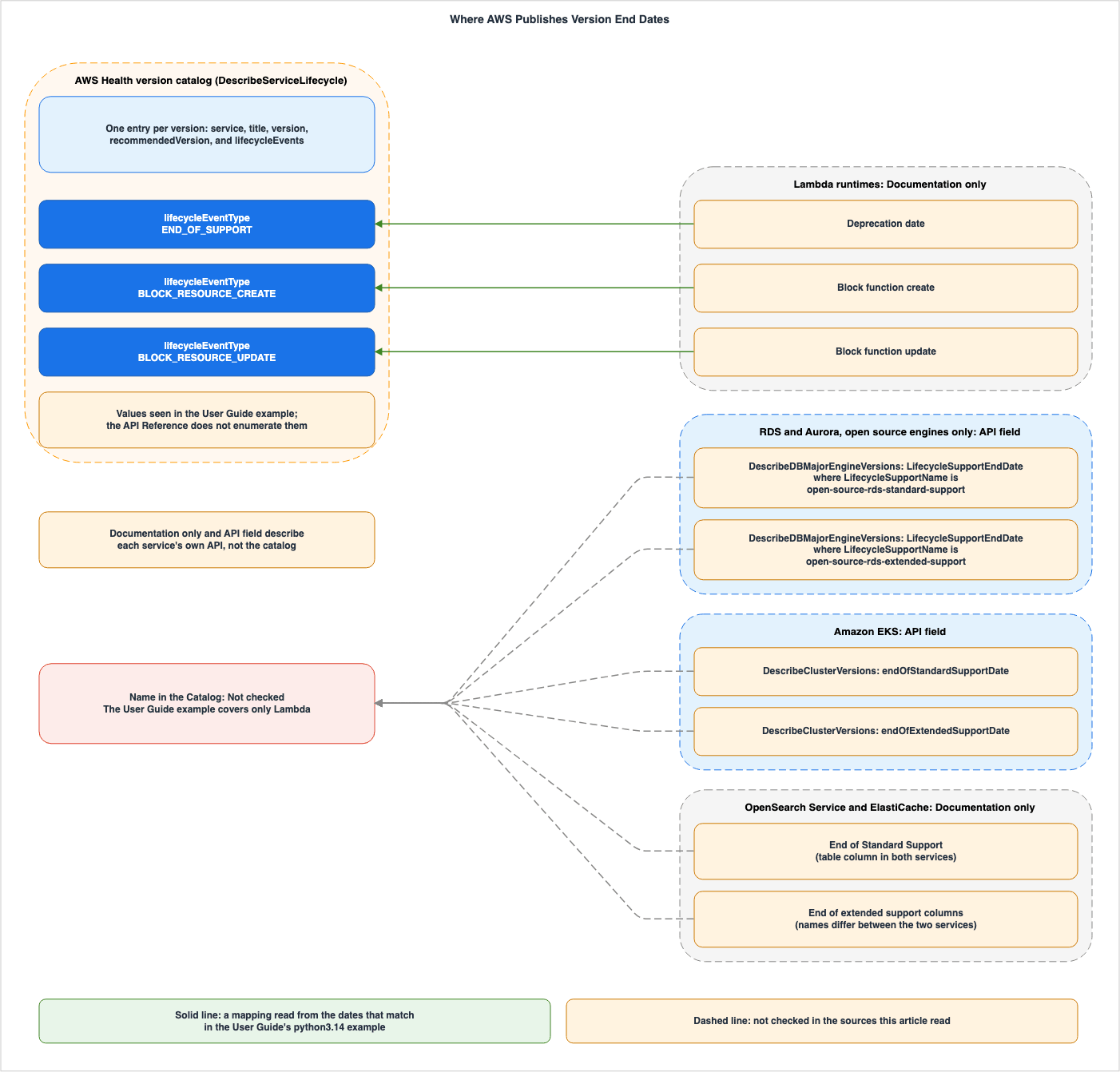
Not checked at the end of the dashed lines refers to the API's lifecycleEventType value, while the dashboard display terms are detailed in the table in Section 6.2. The Documentation only and API field labels on the right side of the figure refer to each service's own API. The figure does not include the actual date values.6.1 The One Case Where an Example Can Be Checked — Lambda's python3.14
The user guide's example item has three events for Lambda'spython3.14 (see Section 3.3). In this article's conversion, the dates are June 30, 2029, July 31, 2029, and August 31, 2029 (all times are UTC 00:00).The row for
python3.14 in the table in the Lambda Developer Guide indicates that the Deprecation date is Jun 30, 2029, the Block function create date is Jul 31, 2029, and the Block function update date is Aug 31, 2029 (checked 2026-10-10). The three dates match in order.The descriptions also overlap in what each phase means, but their strength differs: the user guide example says the runtime no longer receives patches or updates, while the Developer Guide says AWS may no longer apply them. The
description from the user guide example and the description in the table outlining the deprecation stages in the Developer Guide are presented below.| Name in the Catalog | Description in the Catalog Example | Lambda Phase | What the Lambda Developer Guide Says |
|---|---|---|---|
END_OF_SUPPORT | Runtime no longer receives security patches or updates | Deprecation | AWS may no longer apply security updates or other updates, and functions are no longer eligible for technical support. In the Lambda console, functions can no longer be created or updated with the deprecated runtime. Creating and updating can continue through the AWS CLI, AWS SAM, or CloudFormation. |
BLOCK_RESOURCE_CREATE | Cannot create new Lambda functions using this runtime | Block function create | Lambda begins to prevent the creation of new functions. |
BLOCK_RESOURCE_UPDATE | Cannot update existing Lambda functions using this runtime | Block function update | Lambda begins to prevent updates to the code and configuration of existing functions. The function configuration can still be upgraded to a supported runtime. However, rolling back to the deprecated runtime may be blocked. |
From the match of the dates and descriptions, this article reads Lambda's
Deprecation date as corresponding to the END_OF_SUPPORT event in the version catalog. This interpretation is based on a single example, and no statement in which AWS defines the correspondence between the two names was found in the sources this article read.6.2 The Name Mapping Table
The following table lists each service's names for its dates and the corresponding names in the version catalog. TheShown on the Dashboard column gives the wording displayed in Next milestone whose date was checked to match in Section 3.7. Not checked in this column means that the check did not look at, or did not compare, the display of that milestone. Not checked in the Name in the Catalog column means that no item for that service appears in the examples in the sources this article read, so the API value cannot be checked.| Item | Name in the Service | Shown on the Dashboard | Name in the Catalog | Where the Source Says So |
|---|---|---|---|---|
| Lambda Runtime Deprecation Date | Deprecation date (column in the table) | End of Support (date also matches) | END_OF_SUPPORT (matches the example date) | Lambda Developer Guide, AWS Health User Guide (example), Section 3.7 |
| Lambda Function Creation Block Date | Block function create (column in the table) | Not checked | BLOCK_RESOURCE_CREATE (matches the example date) | Lambda Developer Guide, AWS Health User Guide (example) |
| Lambda Function Update Block Date | Block function update (column in the table) | Not checked | BLOCK_RESOURCE_UPDATE (matches the example date) | Same as above |
| RDS (Open Source Engine) Standard Support End Date | LifecycleSupportEndDate (for elements where LifecycleSupportName is open-source-rds-standard-support). The column in the RDS for MySQL table is RDS end of standard support date. | Standard Support End (date also matches; the rows compared are RDS for MySQL) | Not checked | RDS API Reference and User Guide, Section 3.7 |
| RDS (Open Source Engine) Extended Support End Date | LifecycleSupportEndDate (for elements where LifecycleSupportName is open-source-rds-extended-support). The column in the RDS for MySQL table is RDS end of Extended Support date. | Extended Support End (date also matches; the rows compared are RDS for MySQL) | Not checked | Same as above |
| Aurora Standard Support End Date | LifecycleSupportEndDate (same field for the same operation). The column in the Aurora MySQL and Aurora PostgreSQL tables is Aurora end of standard support date. | Standard Support End (date also matches) | Not checked | RDS API Reference, Aurora MySQL and Aurora PostgreSQL Release Calendar, Section 3.7 |
| Aurora Extended Support End Date | LifecycleSupportEndDate (same field for the same operation). The column is RDS end of Extended Support date for Aurora MySQL and End of RDS Extended Support date for Aurora PostgreSQL. | Extended Support End (date also matches; the rows compared are Aurora PostgreSQL) | Not checked | Same as above |
| EKS Version Release Date | releaseDate. The table in the user guide has two columns, Upstream release and Amazon EKS release, and the sources this article read do not say which column corresponds to releaseDate. In the user guide's example output, the releaseDate of 1.31, converted to UTC, is 00:00 on September 26, 2024, the same date as in the Amazon EKS release column (this article does not generalize from this one example). | Not checked | Not checked | EKS API Reference and User Guide |
| EKS Standard Support End Date | endOfStandardSupportDate. The column is End of standard support. | Standard Support End (date also matches) | Not checked | EKS API Reference and User Guide, Section 3.7 |
| EKS Extended Support End Date | endOfExtendedSupportDate. The column is End of extended support. | Extended Support End (date also matches) | Not checked | Same as above |
| OpenSearch Service Standard Support End Date | End of Standard Support (column in the table) | Standard Support End (date also matches) | Not checked | OpenSearch Service Developer Guide, Section 3.7 |
| OpenSearch Service Extended Support End Date | Original End of Extended Support and Updated End of Extended Support (column in the table) | Extended Support End (date matches Updated End of Extended Support) | Not checked | Same as above |
| ElastiCache Standard Support End Date | End of Standard Support (column in the table) | Standard Support End (date also matches; the Redis OSS 7 row was not compared) | Not checked | ElastiCache User Guide, Section 3.7 |
| ElastiCache Extended Support End Date | End of Extended Support and version EOL (column in the table) | Extended Support End (date also matches) | Not checked | Same as above |
Besides the date names, the spelling of the version identifiers also differed in some cases between the dashboard on the check date and the services. In the check in Section 3.7, the
Version column for Lambda displayed the same spelling as the Identifier column in the Developer Guide table (e.g., python3.14). For EKS, the spelling reflected the Kubernetes version (e.g., 1.31). RDS used a form split by /, such as mysql/8.0, aurora-postgresql/17, and postgresql/16. Of the spellings before the /, mysql, mariadb, aurora-mysql, and aurora-postgresql are the same as values of Engine in the RDS API (the Valid Values in the botocore model). The RDS for PostgreSQL rows use postgresql, while the Engine value is postgres. For ElastiCache, the number of digits in the version after the / differed by row, such as redis/7, redis/7.0, and valkey/7.2.6. The Version column for OpenSearch Service was in the format es/7.1 or os/2.9. However, the pattern for the version strings in the botocore model for OpenSearch Service is in the form Elasticsearch_ or OpenSearch_, followed by the version number. This article does not verify whether the Version column in the dashboard corresponds to the version value in the API.6.3 What the Matching Example Does Not Show
The match in Section 6.1 does not show the following. This article does not state any of them as fact.- That the Version Catalog and Each Service's API or Documentation Table Always Return the Same Dates: The only comparison based on the API response format was between the three dates of one version in the user guide's example item and the Lambda documentation table. This article did not compare responses from the version catalog with those from the APIs of RDS or EKS. The check in Section 3.7 compared 56 rows displayed on a single account's dashboard on the check date with the documentation tables for each service, and all 56 rows were the same point in time. This match cannot be extrapolated to other versions, other dates, or API values. While the AWS Health user guide states that the version catalog aggregates information, it does not state that it returns the same values as the APIs or documentation of individual services.
- Which
lifecycleEventTypeValue the Dates of RDS, Aurora, EKS, OpenSearch Service, and ElastiCache Take in the Version Catalog: The user guide's example covers only Lambda. For instance, the sources this article read do not show whether the end date for standard support for RDS would be categorized asEND_OF_SUPPORT, or if the end date for extended support would have a different value. The check in Section 3.7 looked only at the terms displayed on the dashboard, not at API values. - Time of Day and Time Zone of the Dates: The EKS user guide indicates that the dates in its tables are in UTC+0. No mention of a time zone was found in the Lambda Developer Guide's table. The
datefield in the version catalog is a timestamp, and this article performed the conversion to UTC for the example. In the check in Section 3.7, the dashboard displayed dates with times in UTC-8 or UTC-7, and the calendar dates appeared one day earlier than the dates in the documentation tables. The time of day also differs between the API examples. In the EKS user guide's example output, thereleaseDateand the two end dates of 1.31, converted to UTC, are 00:00 on the dates in the table. The RDS API reference's example response gives the end of standard support as2026-02-28T23:59:59.999000+00:00(Section 8.1).
The dashboard screenshot in the user guide also contains an example whose dates do not match the table. The screenshot shows a timeline for Lambda's
java11 showing an End of Support date of June 29, 2027, a Block Resource Create date of July 30, 2027, and a Block Resource Update date of August 30, 2027. The corresponding row for java11 in the Lambda Developer Guide table lists dates of Jun 30, 2027, Jul 29, 2027, and Aug 31, 2027 (checked 2026-10-10). The three dates are each shifted by one day, and the direction of the shift is not consistent (one day prior, one day later, one day prior). In the check in Section 3.7, the Next date of the java11 row in the list was displayed as June 29, 2027 at 5:00:00 PM UTC-7. The calendar date, June 29, 2027, is the same as the End of Support date in the screenshot. Converted to UTC, it is 00:00 UTC on June 30, 2027, the same point in time as Jun 30, 2027 in the Developer Guide table. The screenshot does not show times. This check did not look at how Block Resource Create and Block Resource Update are displayed. This article does not attempt to determine the reason for these differences. This article does not use the dates in the screenshot or the dates in documentation examples as evidence for a version's dates. Section 6.1 uses the dates from the user guide's example solely to verify name correspondence.7. The Version Catalog and Planned Lifecycle Events
This section explains the differences between the version catalog and AWS Health's Planned lifecycle events. While both deal with information related to version end dates, their scope and delivery methods differ. Planned lifecycle events cover not only the end of versions, but also changes related to AWS-owned resources, such as the expiration of certificates from RDS certificate authorities.7.1 A Service-Wide Catalog and Account-Specific Events
The AWS Health user guide describes the version catalog alongside Planned lifecycle events as follows:AWS Health already sends account-specific and resource-specific Planned lifecycle events for AWS Health well in advance of major version end-of-support milestones. The version catalog adds a service-wide view of supported versions and their timelines. You can use this view to build upgrade schedules and governance controls, and to move to newer supported versions before you receive an account-specific planned lifecycle event.Planned lifecycle events relate to accounts and resources. According to the "Planned lifecycle events for AWS Health" page in the user guide, the event type code follows the format
AWS_{SERVICE}_PLANNED_LIFECYCLE_EVENT. AWS Health associates events with affected resources, indicating them with their ARN where applicable, and assigns a status of either PENDING or RESOLVED. The same page also notes that there are exceptions where a status may not be assigned. The user guide lists Amazon EventBridge, the Health Dashboard, and the AWS Health API as ways for users to view these events ("accessed and monitored"). The user guide's "What is AWS Health?" page states that all AWS customers can receive AWS Health events through Amazon EventBridge.The version catalog is a service-wide inventory of versions that users query. The sources this article read contain no statement that version catalog information is delivered as events through EventBridge (Section 8.2).
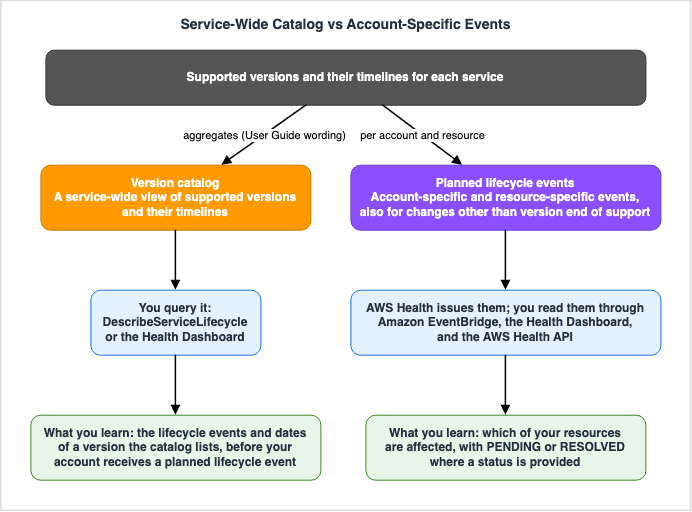
| Aspect | Version Catalog | Planned Lifecycle Events |
|---|---|---|
| Scope | Versions across a service and their timelines | Account and resource-specific changes requiring action |
| Delivery Method | Users query using DescribeServiceLifecycle or through the dashboard | AWS Health emits events, which users can view through EventBridge, the dashboard, or the AWS Health API |
| Association with User Resources | API entries are version-specific; no entry that refers to a user's own resources was found | Events are associated with affected resources, with a status of either PENDING or RESOLVED (with exceptions where a status may not be assigned) |
| Notification Timing | The user guide mentions that users can transition to a new version before receiving account-specific events. | Section 7.2 |
Surviving Forced Maintenance on AWS discusses operations using Planned lifecycle events.
7.2 Timing of Advance Notifications — What Each Source Says
The timing of advance notice is written differently in different sources. This section lists three statements without favoring any of them.The AWS Health user guide, specifically the "Planned lifecycle events for AWS Health" page, states:
Planned lifecycle events are designed to have a minimum lead time of 180 days for major versions/changes and 90 days for minor versions/changes, where possible.The Lambda Developer Guide states that Lambda notifies accounts that have functions using a runtime, at least 180 days before the runtime is deprecated, through email, the Health Dashboard, and AWS Trusted Advisor. The Developer Guide describes the notified accounts as those that have functions using the runtime in their
$LATEST version. It also states that deprecation notifications are not available for functions using container images.The EKS user guide states that if your account has clusters running a version that is nearing the end of support, EKS will notify you through the Health Dashboard approximately 12 months after the version's initial release. The timing of these notifications is described as follows:
The notice includes the end of support date. This is at least 60 days from the date of the notice.From the sources this article read, it is not possible to determine whether a Kubernetes version change falls under the "major" or "minor" categories listed on the "Planned lifecycle events" page.
7.3 No Source This Article Read Says the Version Catalog Replaces Planned Lifecycle Events
The text in the user guide (Section 7.1) describes the version catalog as a resource to be used before receiving account-specific planned lifecycle events ("before you receive an account-specific planned lifecycle event"). The sources this article read contain no statement that the version catalog replaces Planned lifecycle events, nor do they indicate any changes to how Planned lifecycle events are delivered.8. Where the Sources Disagree and Where No Statement Was Found
This section collects the places where the sources this article read say different things, and the places where no statement was found despite searching.8.1 Where the Sources Disagree
The following table lists disagreements between sources and differences in how they are written. This article does not treat either side of any row as an error. The information was verified on October 10, 2026, except where a row gives another check date.| Topic | One Source | The Other Source | Where the Source Says So |
|---|---|---|---|
| Value Listing Location | The user guide states that a complete list of values can be found in the API reference. | The API reference describes data types but does not list values. The description gives examples introduced with "for example." | User guide: Version catalog for AWS Health; API reference: LifecycleEvent (Section 4.2) |
| Value Spelling | The user guide provides an example using END_OF_SUPPORT. | The API reference description uses both "end-of-support" and "end-of-life" as examples. | Same as above |
| AWS Health API Supported Plans | "What's New" (2026-10-02) lists Business Support Plus, Enterprise Support, and Unified Operations. The user guide's Health API page lists AWS Business Support+, AWS Enterprise Support, AWS Unified Operations, as well as Business, Enterprise On-Ramp, and Enterprise Support (for example, for accounts that have not transitioned to one of the first three plans). | The API reference's "Welcome" section lists Business, Enterprise On-Ramp, and Enterprise Support. The user guide's page with IAM policy examples lists only AWS Business Support+, AWS Enterprise Support, and AWS Unified Operations. The user guide's "Version catalog for AWS Health" page refers to "Customers on AWS Support," while the AWS Premium Support FAQ simply states "AWS Premium Support." | Section 3.5 (6 documents) |
| Response Fields | The user guide's field tables and examples do not include recommendedVersion. | The API reference and botocore models both include recommendedVersion. | Section 3.2 |
Passing version in Requests | The user guide describes version as an identifier for the version being specified in the request. | The API reference and botocore models indicate that requests can be filtered by service only, and there is no member to specify a version. | Sections 3.1 and 3.2 |
Default upgradePolicy for EKS | The API reference's UpgradePolicyRequest states that the default is EXTENDED. The user guide's "View current cluster upgrade policy" page and its page on the Kubernetes version lifecycle state that the default is extended support. | The user guide's page on enabling extended support states that clusters created through the console will be configured with extended support disabled by default. | Section 5.5 |
AVAILABILITY Tag and Lambda | The user guide's tag table states that resources become unavailable after the specified date. The example item applies the tag to the dates when Lambda blocks function creation and function updates. | The Lambda Developer Guide states that functions can continue to be invoked after the runtime is deprecated. The same paragraph also says that they may experience issues that can cause them to stop working properly. | Section 4.3 |
| Terminology in Operation Descriptions | The API reference uses "end-of-life dates." | The botocore 1.43.107 CHANGELOG uses "end-of-support dates." | API reference: DescribeServiceLifecycle; botocore CHANGELOG |
java11 Dates | The user guide's screenshot shows June 29, 2027, July 30, 2027, and August 30, 2027. | The Lambda Developer Guide's table shows Jun 30, 2027, Jul 29, 2027, and Aug 31, 2027. | Section 6.3 |
| RDS for MySQL Date Examples | The RDS API reference's DescribeDBMajorEngineVersions example response uses 2026-02-28T23:59:59.999000+00:00 as the standard support end date for MySQL 8.0. The RDS user guide's page on viewing support dates uses 2027-02-28T23:59:59.999000+00:00 as the extended support end date for MySQL 5.7. | The RDS user guide's MySQL versions table lists 31 July 2026 as the RDS end of standard support date for MySQL 8.0 and 30 June 2029 as the RDS end of Extended Support date for MySQL 5.7. | RDS API reference and user guide |
| Length of RDS Extended Support | The "Amazon RDS Extended Support with Amazon RDS" page states "up to 3 years past the RDS end of standard support date." The "Amazon RDS Extended Support with Amazon Aurora" page states "up to 3 years past the community end of life date" (3 years and 4 months for Aurora MySQL version 2). | The RDS for MySQL versions page lists, for MySQL 5.7, an RDS end of standard support date of 29 February 2024 and an RDS end of Extended Support date of 30 June 2029. The Aurora MySQL release calendar lists, for Aurora MySQL version 2, a community end of life date of October 2023 and an RDS end of Extended Support date of 30 June 2029. | "Amazon RDS Extended Support with Amazon RDS" and "Amazon RDS Extended Support with Amazon Aurora" pages (checked 2026-10-11), RDS for MySQL versions page, Aurora MySQL release calendar |
| Advance Notification Period | The "Planned lifecycle events" page states a minimum lead time of 180 days for major versions or changes and 90 days for minor ones, where possible. | The EKS user guide states that notifications are provided at least 60 days in advance. The Lambda Developer Guide states that deprecation notices are provided at least 180 days in advance. | Section 7.2 |
This article does not judge the reason for any of these disagreements. For the dates for each version, see the AWS End-of-Support and EOL Reference and the documentation for each service.
8.2 Where No Statement Was Found
The following table lists statements this article searched for and did not find. Not finding a statement does not prove that it does not exist. The table lists the sources and terms searched.| What Was Looked For | Where It Was Looked For | Search Terms | Result |
|---|---|---|---|
List of values for lifecycleEventType and impactRisks | AWS Health API Reference (LifecycleEvent, ServiceLifecycle, DescribeServiceLifecycle), botocore 1.43.111 AWS Health models | Valid Values, enum | The API reference does not have a "Valid Values" section. The nine enums in the model all belong to other types. |
Name of the IAM action for DescribeServiceLifecycle | AWS Health page of the Service Authorization Reference, AWS Health managed policies page, Policy Examples page, aws-knowledge MCP search | health:DescribeServiceLifecycle, DescribeServiceLifecycle, ServiceLifecycle | 0 results |
| Dashboard usage conditions specific to the version catalog | AWS Health Version catalog user guide, What's New 2026-10-02, AWS Health user guide (What is AWS Health?), Health API, IAM Policy Examples page, AWS Premium Support FAQ | version catalog, Basic, all customers, all AWS accounts, authenticated | No mentions specifically referencing "version catalog" in the conditions. Three mentions that the Health Dashboard as a whole is available to all (Section 3.6). |
| Fields in the API that return the Lambda runtime's date | botocore 1.43.111 Lambda models, Lambda Developer Guide | Deprecat, EndOf, Eol, Lifecycle, runtime | No fields found that return dates. |
| Fields in the API that return the dates for OpenSearch Service and ElastiCache versions | botocore 1.43.111 models for both services (including ListVersions, GetCompatibleVersions, DescribeCacheEngineVersions) | EndOf, ExtendedSupport, StandardSupport | 0 results |
| Delivery in EventBridge for version catalog | AWS Health Version catalog user guide, EventBridge page | version catalog, ServiceLifecycle, EventBridge | 0 results |
| The full list of covered services | AWS Health Version catalog user guide, What's New 2026-10-02 | tracks, covers, services | Only examples provided ("and more," "with more services being added over time"). |
How to choose recommendedVersion | AWS Health API Reference, AWS CLI Reference, botocore models | recommendedVersion, recommended version | Only the description "The recommended version to upgrade to." is provided. |
| Time zone for the table of Lambda runtimes | Lambda Developer Guide, Lambda runtimes page | UTC, time zone | 0 results |
| End of standard support date for ElastiCache Redis OSS 7 | ElastiCache user guide (Extended support versions page and Engine versions page), aws-knowledge MCP search | Redis OSS 7, end of standard support, 2028 | 0 results (the dashboard showed a date in the redis/7 row; Section 3.7) |
| Correspondence between dashboard display terms and API values | AWS Health Version catalog user guide, API Reference (DescribeServiceLifecycle, ServiceLifecycle, LifecycleEvent), aws-knowledge MCP search | Next milestone, Standard Support End, Extended Support End, Next date, Pending | 0 results |
| Time zone of the version catalog display | AWS Health Version catalog user guide, Viewing your account events in the AWS Health Dashboard | UTC, time zone, version catalog | 0 results on the version catalog page. The other page describes time zone settings for the dashboard as a whole, but does not name the version catalog (Section 3.7). |
9. Frequently Asked Questions about the AWS Health Version Catalog
This article aims to answer, within its scope, questions that may arise when integrating the version catalog into inventory management or CI/CD pipelines.Q1. With a Basic support plan, is it possible to use the version catalog?
This article does not state, as a usage condition, whether it can or cannot be used. For the AWS Health API (includingDescribeServiceLifecycle), What's New, the Health API page and the IAM policy examples page in the user guide, and the Welcome page of the API reference state support plans by name as the condition. None of the plan names these four sources give is Basic. The Welcome page and the Health API page in the user guide state that if accessed from an account that does not have a supported plan, a SubscriptionRequiredException will be returned (Section 3.4). The version catalog page refers to "Customers on AWS Support," while the FAQ for AWS Premium Support simply mentions "AWS Premium Support" (Section 3.5). Regarding the dashboard, the sources this article read contain no usage conditions specific to the version catalog (Section 3.6). While there are statements about the Health Dashboard in general, they do not specifically mention the version catalog. On October 10, 2026 (UTC), this article checked that on one account (the management account within an AWS Organizations organization) with a Basic support plan, the version catalog list was displayed in the Health Dashboard (Section 3.7). This observation was limited to the display on that single account on that specific day and does not constitute a description of usage conditions. During this check, no API calls were made.Q2. Can you get the deprecation date of a Lambda runtime from an API?
In the sources this article read, no date field was found in the Lambda API (Section 5.3). However, the user guide provides an example where theDescribeServiceLifecycle response from the version catalog includes entries for Lambda runtimes. Calling the AWS Health API has support plan conditions (Section 3.5). AWS presents the dates in the Lambda Developer Guide's table as forecasted dates.Q3. How many different values are there for the lifecycleEventType?
The number cannot be determined from the sources this article read. The values visible in the user guide's examples areEND_OF_SUPPORT, BLOCK_RESOURCE_CREATE, and BLOCK_RESOURCE_UPDATE. While the user guide refers to the API reference for a complete list, the API reference does not list the possible values (Section 4.2).Q4. Do the version catalog and each service's API return the same date?
Whether they do or do not cannot be determined from the sources this article read. This article does not compare the responses from the version catalog with those from the APIs for services like RDS and EKS. Instead, it compared three dates associated with Lambda (usingpython3.14) from examples in the user guide with a table in the Lambda Developer Guide, and these dates matched. The three dates for java11 in the user guide's screenshot each differ from the table by one day (one day prior, one day later, and one day prior, as shown in Section 6.3). In the dashboard display on the check date, the 56 rows compared among the dated rows of the six services, converted to UTC, were all 00:00 UTC on the dates in each service's documentation tables. The calendar dates displayed were the day before the dates shown in the tables (Section 3.7). Again, this is a comparison of the display for a single account on that day with the documentation, and not a comparison of the API values themselves. The sources this article read do not state that the two return the same value.Q5. Does the version catalog make Planned lifecycle events unnecessary?
The sources this article read contain no statement to that effect. The version catalog is a service-wide inventory that users query. Planned lifecycle events, on the other hand, are events that notify users of impacts to their own resources, which can have a status ofPENDING or RESOLVED (although there are exceptions where a status is not assigned, as detailed in Section 7).Q6. Which value does the RDS extended support end date take in the version catalog?
The answer cannot be determined from the sources this article read. The user guide's example covers only Lambda, and it is not possible to verify whatlifecycleEventType value is associated with RDS in the version catalog (Section 6.3). On the dashboard on the check date, the Next milestone of the RDS for MySQL 8.0 and 5.7 rows was displayed as Extended Support End, and the displayed dates were the same points in time as the RDS end of Extended Support date in the RDS for MySQL table (Section 3.7). This is a term displayed on the dashboard, not an API value. For the open-source engines other than RDS for MariaDB, the end date for RDS extended support, for versions that have it, can be found by examining the LifecycleSupportEndDate value in the element where LifecycleSupportName is open-source-rds-extended-support using the DescribeDBMajorEngineVersions operation (Section 5.1).Q7. Is Lambda's deprecation date the same as the end-of-life (EOL) date for the upstream Python version?
Not necessarily. Lambda's Developer Guide states that, on occasion, the deprecation of the runtime may be delayed for a limited period even after the end of support for a particular version of the upstream language (Section 5.3). The dates for the upstream language are detailed on this site's Python Version Support and EOL Timeline.Q8. When was the information in this article verified?
The verification date was October 10, 2026 (UTC). The Health Dashboard display was also checked on a single account on the same day (Section 3.7). Only the "Amazon RDS Extended Support with Amazon RDS" and "Amazon RDS Extended Support with Amazon Aurora" pages were checked on October 11, 2026 (Section 5.5). On October 20, 2026, only the title of the Lambda runtimes page (Section 5.3) was checked again, and a link was added in Section 3.7. What's New says that more services will be added to the version catalog over time. Values forlifecycleEventType and impactRisks, IAM action names, and fields for each service's API may also change after the verification date.10. Summary
- AWS Health returns version-by-version information in one schema: The version catalog, added on October 2, 2026, returns version-specific dates within a single schema (using
DescribeServiceLifecycle). The user guide's verb is aggregates. The sources this article read do not say whether what is aggregated is the same as the dates in each service's documentation or API. - In the API reference and the botocore model, the only filter is service: The user guide describes
versionas an identifier passed in queries, a disagreement listed in Section 8.1. Items consist ofservice,title,version,recommendedVersion, andlifecycleEvents. Each lifecycle event includeslifecycleEventType,date,description,impactRisks, andregions. ThemaxResultsparameter can range from 1 to 20. - The values of
lifecycleEventTypeandimpactRisksare not enumerated: While examples are provided in the user guide, neither the API reference nor the botocore models list these values on the verification date. - Each service's calendar is returned through its own API or, in the sources this article read, found only in documentation tables: RDS and Aurora (for open-source engines only) use
DescribeDBMajorEngineVersionsand EKS usesDescribeClusterVersionsto return dates. For Lambda, OpenSearch Service, and ElastiCache, the sources this article read show no date fields in the services' own APIs; instead, dates are found in documentation tables. - Some services let you set what happens to your resources on that date: In the sources this article read, two were found:
EngineLifecycleSupportfor RDS and Aurora, andsupportTypefor EKS. - The mapping to API values can be read from only one Lambda example: The three dates associated with
python3.14in the user guide's example correspond toDeprecation date,Block function create, andBlock function updatein the Lambda table. Because the example covers only Lambda, this article could not check the API values for other services. On the dashboard on the check date, rows for RDS, Aurora, EKS, OpenSearch Service, and ElastiCache were displayed using the termsStandard Support EndandExtended Support End, and Lambda rows usingEnd of Support(Section 3.7). - On the check date, the dashboard seen in one account displayed dates with times in UTC-8 or UTC-7: In the 56 rows compared with the documentation tables, the calendar date was the day before the date in the documentation tables, and converted to UTC, every row was 00:00 UTC on the date in the table (Section 3.7).
- Planned lifecycle events differ in scope and delivery: The version catalog is a service-wide inventory that users query. Planned lifecycle events, on the other hand, are events about a user's own resources, issued by AWS Health. The sources this article read do not state that the version catalog replaces Planned lifecycle events.
- Read the usage conditions in each source's own spelling: The six sources this article read write the AWS Health API conditions in different ways. Dashboard conditions specific to the version catalog were not found in the sources this article read. On the check date, the list was displayed in one account with a Basic support plan, the management account of an organization (Section 3.7).
11. References
- Version catalog for AWS Health - AWS Health User Guide
- Planned lifecycle events for AWS Health - AWS Health User Guide
- Integrating AWS Health with other systems using the AWS Health API - AWS Health User Guide
- What is AWS Health? - AWS Health User Guide
- Viewing your account events in the AWS Health Dashboard - AWS Health User Guide
- Monitoring events in AWS Health with Amazon EventBridge - AWS Health User Guide
- AWS managed policies for AWS Health - AWS Health User Guide
- AWS Health identity-based policy examples - AWS Health User Guide
- Document history - AWS Health User Guide
- Welcome - AWS Health API Reference
- DescribeServiceLifecycle - AWS Health API Reference
- ServiceLifecycle - AWS Health API Reference
- LifecycleEvent - AWS Health API Reference
- ServiceLifecycleFilter - AWS Health API Reference
- describe-service-lifecycle - AWS CLI Command Reference
- Actions, resources, and condition keys for AWS Health APIs and Notifications - Service Authorization Reference
- AWS Health introduces the version catalog for software lifecycle management - What's New
- AWS Premium Support FAQs
- DescribeDBMajorEngineVersions - Amazon RDS API Reference
- DBMajorEngineVersion - Amazon RDS API Reference
- SupportedEngineLifecycle - Amazon RDS API Reference
- Viewing support dates for engine versions in Amazon RDS Extended Support - Amazon RDS User Guide
- Viewing support dates for engine versions in Amazon RDS Extended Support - Amazon Aurora User Guide
- Amazon RDS Extended Support with Amazon RDS - Amazon RDS User Guide
- Amazon RDS Extended Support with Amazon Aurora - Amazon Aurora User Guide
- MySQL on Amazon RDS versions - Amazon RDS User Guide
- Release calendars for Amazon Aurora MySQL - Release Notes for Aurora MySQL
- Release calendars for Aurora PostgreSQL - Release Notes for Aurora PostgreSQL
- Amazon RDS now supports easy retrieval of engine lifecycle support dates - What's New
- DescribeClusterVersions - Amazon EKS API Reference
- ClusterVersionInformation - Amazon EKS API Reference
- UpgradePolicyRequest - Amazon EKS API Reference
- Understand the Kubernetes version lifecycle on EKS - Amazon EKS User Guide
- View current cluster upgrade policy - Amazon EKS User Guide
- Add flexibility to plan Kubernetes version upgrades by enabling EKS extended support - Amazon EKS User Guide
- Amazon EKS introduces programmatic access to Kubernetes version availability - What's New
- Lambda Event Function runtimes - AWS Lambda Developer Guide
- What is Amazon OpenSearch Service? - Amazon OpenSearch Service Developer Guide
- Versions with ElastiCache Extended Support - Amazon ElastiCache User Guide
- Engine versions and upgrading in ElastiCache - Amazon ElastiCache User Guide
- botocore - GitHub
References:
Tech Blog with curated related content
Written by Hidekazu Konishi