IAM Authentication to Databases, Caches, and Streams on AWS - Token Lifetime, What Revoking Access Does to Open Connections, and the Identity Inside the Service
First Published:
Last Updated:
The documentation for RDS and Aurora says of the authentication token, "The token is only used for authentication and doesn't affect the session after it is established." The PostgreSQL logical replication page, however, says that long-running replication connections might need to be refreshed before the token expires, so the sources disagree (Section 5.4). The ElastiCache page on connecting to a public endpoint (a feature of ElastiCache Serverless for Valkey) says that revoking the
elasticache:Connect permission does not immediately disconnect open sessions, and that to disconnect a user immediately, the user should be removed from the user group. The Aurora DSQL documentation says that even after the admin role's connect permission is revoked, open connections might stay authorized for the duration of the connection. The DocumentDB documentation says that the connection does not drop even when the IAM credentials expire. On the other hand, no statement was found in the RDS and Aurora documentation about what happens to open connections when the rds-db:connect permission is revoked, and no statement was found in the MSK documentation for IAM access control, or in the Redshift documentation, about how established connections are handled.This article lines up in tables, for each service, what is received upon connection, what is verified, how long the verification remains valid, what the documentation states regarding active connections when permissions are revoked, and who you become inside the service. The tables borrow the Acceptance Table that JWT Signing Algorithms on AWS Endpoints established, and add a Revocation Table and an Identity Table. Token expiration, credential invalidation, IAM permission revocation, removal inside the service, and connection limits are written as separate events. This article is based solely on materials read on October 5, 2026, and does not reflect actual connection testing. Pricing is not discussed.
Related articles on this site:
- JWT Signing Algorithms on AWS Endpoints - What IAM, Application Load Balancer, API Gateway, AppSync, Cognito, and IAM Identity Center Accept, and What They Check Besides the Signature
- JWT and JOSE Standards History and Timeline - JWS, JWE, JWK, JWA, JWT, and How the Algorithm Registry Has Changed
- Amazon Aurora DSQL Design Decision Guide - Distributed SQL Between Amazon DynamoDB and Aurora PostgreSQL
- Amazon RDS and Aurora High Availability Guide - Multi-AZ, Read Replicas, RDS Proxy, and Global Database Failover
- Amazon MSK Broker Types and Storage Tiers - What Standard Brokers, Express Brokers, and MSK Serverless Each Take Away
- AWS Secrets Manager and Parameter Store Decision Guide - Storing, Rotating, and Accessing Secrets and Configuration
- AWS IAM Inbound Workload Federation - IAM Roles Anywhere, OIDC, and SPIFFE Converging on One Trust Policy Condition
- What Fills an AWS STS Session Token - Session Policies, Session Tags, the Single Size Limit, and How to Measure and Test It
Table of Contents
- 1. The Scope of This Article and the Date It Was Verified
- 2. How to Read the Tables
- 3. Acceptance Table, Part 1 — What Each Service Accepts at Connect
- 4. Acceptance Table, Part 2 — What Each Service Checks at Connect
- 5. Acceptance Table, Part 3 — How Long the Check Holds
- 6. Revocation Table — What Revoking the IAM Permission Does to Open Connections
- 7. Identity Table — Who You Become Inside the Service
- 8. Where the Sources Disagree, and Where No Statement Was Found
- 9. Frequently Asked Questions about IAM Authentication to Databases, Caches, and Streams on AWS
- 10. Summary
- 11. References
1. The Scope of This Article and the Date It Was Verified
This section first defines the three key questions that will be examined for each service. Subsequently, it lists the services that will be covered, those that will not, the dates the information was verified, the materials consulted, and the terminology used in this article.1.1 Three Questions for Each Service
This article will examine each service based on the following three questions:- What does the documentation state about what is received and verified at the point of connection? Is it a pre-generated authentication token, a signature per request, a temporary password, or something else? At what point is IAM authorization checked?
- What does the documentation state about how long the verification remains valid? For each event that occurs after the connection is established (token expiration, credential invalidation, IAM permission revocation, removal inside the service, and connection limits), what does it say about existing connections?
- What does the documentation state about the identity assumed within the service after the connection is established? Is it a database user, a role, a user with an IAM ARN in its name, or the IAM principal itself?
The answer to the second question varies by event. In one example, the documentation for the same service says that open connections continue when the token expires, that they are not immediately disconnected when the IAM permission is revoked, and that they end when the user is removed from a user group (the ElastiCache page on connecting to a public endpoint, and the RBAC page). This article does not extend a statement in the documentation about one event to another event.
1.2 Services Covered and Not Covered
This article covers the following services and features. All of them use IAM to accept connections to databases, caches, and streams.- IAM database authentication for Amazon RDS and Amazon Aurora. The engines covered are MariaDB, MySQL, and PostgreSQL.
- Amazon RDS Proxy. There are two methods: one that uses IAM only from the client to the proxy, and one that also uses IAM from the proxy to the database (end-to-end IAM authentication).
- IAM authentication for Amazon ElastiCache. The engines covered are Valkey and Redis OSS. Public endpoints were added as a feature for ElastiCache Serverless for Valkey, as announced on September 29, 2026. (The announcement stated: "To get started, create a Valkey 9.0 or later serverless cache with a public endpoint".) This article treats statements on the page about connecting to a public endpoint as statements within this scope.
- IAM authentication for Amazon MemoryDB.
- Authentication tokens for Amazon Aurora DSQL.
- IAM authentication for Amazon DocumentDB. The scope is instance-based clusters.
- IAM authentication for Amazon Neptune. HTTP requests and WebSocket connections are treated as separate items.
- IAM access control for Amazon MSK.
GetClusterCredentialsWithIAMandGetClusterCredentialsfor Amazon Redshift, andGetCredentialsfor Amazon Redshift Serverless. All of these are APIs that return temporary passwords.
This article does not cover Amazon DynamoDB, Amazon Keyspaces, Amazon OpenSearch Service, and Amazon Timestream. It makes no claims about these services. IAM authentication to Amazon DynamoDB, Amazon Keyspaces, and Amazon OpenSearch Service is covered in IAM Authentication to DynamoDB, Keyspaces, and OpenSearch Service.
The following are left to previously published articles. The lifetime of Aurora DSQL authentication tokens and the 60-minute connection limit are covered in Section 7.3 of Amazon Aurora DSQL Design Decision Guide. The design of RDS Proxy is addressed in Section 6 of Amazon RDS and Aurora High Availability Guide. The limits on the number and rate of MSK IAM connections are covered in Section 3.6 of Amazon MSK Broker Types and Storage Tiers. The requirement for IAM access control with MSK Serverless is detailed in Section 9.1 of the same article. The design considerations for storing passwords are covered in AWS Secrets Manager and Parameter Store Decision Guide. Enabling IAM database authentication and connection procedures, along with driver and SDK usage, are detailed in the respective service user guides. The supported RDS engine versions and regions are outlined in the RDS user guide's compatibility table (Supported Regions and DB engines for IAM database authentication in Amazon RDS).
JWT is not within the scope of this article. The documentation states that the authentication tokens discussed in this article are created using AWS Signature Version 4. JWT receivers are covered in JWT Signing Algorithms on AWS Endpoints, while the JWT standards are addressed in JWT and JOSE Standards History and Timeline. Comparisons of token sizes across different services are not covered in this article.
1.3 The Verification Date and the Sources Read
This article's content is based on materials reviewed on October 5, 2026. Since the AWS user guides and API reference pages do not display update dates, the date the materials were reviewed is considered the verification date.The materials reviewed consist of the following six categories:
- AWS user guides and developer guides for RDS, Aurora, ElastiCache, MemoryDB, Aurora DSQL, DocumentDB, Neptune, and MSK, and the Redshift Management Guide.
- AWS API reference, specifically for Redshift's
GetClusterCredentialsWithIAMandGetClusterCredentials, and for Redshift Serverless'sGetCredentials. - Service Authorization Reference, from which descriptions of connect permission actions are drawn.
- Five announcements from "What's New with AWS," with dates based on the publication date listed on each announcement page.
- One article from the AWS re:Post Knowledge Center (regarding DocumentDB's IAM authentication issue, with an embedded update date of November 30, 2025).
- The README file from the AWS GitHub repository
aws-msk-iam-auth. This describes the client library and is not considered documentation. (Referenced in Section 6.4, and also mentioned in Q5 in Section 9; the type of source is clearly indicated.)
In addition, to avoid treating outdated numbers as current limits, the article also reviewed an AWS Database Blog post from April 11, 2018, and a page from the AWS DMS migration playbook (Section 5.5).
There are instances where information could not be found in the reviewed materials. Before stating that information is missing, searches were conducted on the service's user guide pages, API reference, and troubleshooting pages, using the following terms:
existing, established, session, expire, revoke, disconnect, terminate, and re-authenticate, as well as the service's name. The absence of information does not imply that existing connections remain active or are terminated. This article simply states that information was not found when it could not be located.1.4 Distinguishing Terms with the Same Spelling, and the Names of the Five Events
This article uses several terms that share the same spelling but refer to different concepts. To avoid confusion, this article distinguishes them as follows:- Authentication Token: Refers to a string generated using AWS Signature Version 4 for signing and used as an alternative to a password when establishing a connection. Used by RDS, Aurora, RDS Proxy, ElastiCache, MemoryDB, and Aurora DSQL. It is distinct from AWS STS session tokens (covered in What Fills an AWS STS Session Token) and JWTs.
- Temporary Password: Refers to a password returned by the Redshift API, used to log in to the database. This article does not call it an authentication token.
- User: This article distinguishes IAM users from users inside a service. Users within services include database users (RDS and Aurora, Redshift), database roles (Aurora DSQL),
$externaldatabase users (DocumentDB), ElastiCache users, and MemoryDB users. Primary users in DocumentDB can only be authenticated with a password, not through IAM (Section 7.2). - Connect Permission Action:
rds-db:connect,elasticache:Connect,memorydb:Connect,dsql:DbConnect,dsql:DbConnectAdmin, andkafka-cluster:Connectare all distinct IAM actions associated with different services. When referring to them collectively, this article uses the term connect permission.
This article categorizes five types of events that can occur after a connection is established:
- Token Expiration: The end of the validity period for an authentication token or temporary password.
- Credential Invalidation: The IAM credentials used to connect (temporary credentials or an access key, whether they signed a token or a request or were presented to AWS STS) become unusable through expiration, rotation, revocation, or deletion of the credentials.
- IAM Permission Revocation: Modifying or detaching IAM policies to remove connect permissions.
- Removal Inside the Service: Removing a user inside the service from a user group or an ACL, deleting the user, or removing the user's mapping to IAM.
- Connection Limit: A time limit imposed by the service on the connection itself. Idle timeouts are not counted.
2. How to Read the Tables
This article lines up what the documentation for each service says in three kinds of tables. The Acceptance Table is borrowed from JWT Signing Algorithms on AWS Endpoints. The Revocation Table and the Identity Table are added in this article.2.1 The Acceptance Table
The columns in the Acceptance Table are as follows, comprising five in total. The names and roles of these columns are the same as those described in Section 2 of JWT Signing Algorithms on AWS Endpoints.Receiver: Specifies the service being handled in that row, along with the type of connection.What It Accepts: Describes what the documentation indicates is accepted at the time of the connection. In this article, instead of the JWTalg, it states whether the service accepts an authentication token, per-request signature, IAM credentials, or temporary password.What It Checks: Describes what the documentation indicates is verified at the time of the connection. This includes the connect permission action, the token's expiry, and the validity of the credentials that signed the token.How Long the Check Holds: Indicates how long the results of the verification remain valid. This covers the impact of token expiration and credential invalidation on open connections, as well as connection limits.Where the Source Says So: Refers to the documentation from which the information was drawn. The official title and URL of the page will be listed in the References section.
To prevent the table from becoming excessively large, this article uses
Receiver and Where the Source Says So as shared columns and splits the table in three. Table Part 1 lists What It Accepts (Section 3), Table Part 2 lists What It Checks (Section 4), and Table Part 3 lists How Long the Check Holds (Section 5). The three tables maintain consistent row ordering.Each cell in the
What It Accepts column begins with one of the following three labels from Section 2.2 of JWT Signing Algorithms on AWS Endpoints:Lists:The documentation explicitly lists what is accepted.Sources disagree:The sources say different things about the same service. Both statements are lined up, in the cell or in the section the cell points to, with the type of each source (and its date, where the source has one). No preference is given to either.The source does not say.The search, as described in Section 1.3, did not yield any relevant information.
In the
How Long the Check Holds column too, a cell where the sources disagree begins with Sources disagree:, and a cell with no statement found begins with The source does not say. When one cell covers several events, it first gives the event name (token expiration, credential invalidation, connection limit) or the re-check (per-request signatures, periodic permission checks, and authorization checks on write), and an event with no statement found is followed by The source does not say. A cell does not always name every event; Section 8.3 lists, event by event, where no statement was found.2.2 The Revocation Table and the Identity Table
The Revocation Table has the following four columns:Receiver: This is the same as in the Acceptance Table.When the IAM Permission Is Revoked: What the documentation says happens to open connections when the IAM permission is revoked.When the User Is Removed Inside the Service: What the documentation says happens to open connections when the user is removed inside the service.Where the Source Says So: This is the same as in the Acceptance Table.
Token expiration, credential invalidation, and connection limits are not included in the Revocation Table. They are written in the Acceptance Table, Part 3. This separation is to avoid mixing different types of events into a single table.
The Identity Table has the following four columns:
Receiver: This is the same as in the Acceptance Table.Who You Are Inside: Who the connection is treated as inside the service after connecting.How the Mapping Is Made: How the IAM principal is linked to the principal inside the service.Where the Source Says So: This is the same as in the Acceptance Table.
2.3 Cell Rules
This article applies the rules from Section 2.3 of JWT Signing Algorithms on AWS Endpoints to all three tables.- Each cell should contain either a direct quote from the source material or a summary of that material. Any information that can be inferred from the source material but is not a direct quote should be written in the main text, separate from the source material's wording.
- If the source material does not address a particular topic, write
The source does not say.Before writing this, perform the search as outlined in Section 1.3. - When the source material presents conflicting information, include both perspectives. Do not state that one is incorrect or that one represents the current behavior.
- Record only the time and conditions specified in the source material.
In addition to the above, this article includes the following:
- Organize information by event. If multiple events are relevant to a cell, separate them by event name (e.g., Token expiration:). Do not include source material related to one event under the heading of another event. For example, do not include source material about token expiration within a cell dedicated to IAM permission revocation.
- Preserve the strength of the documentation's wording. Four kinds of wording are kept apart: not immediately disconnected (the words of the ElastiCache public endpoint page), might stay authorized for the duration of the connection (the words of the Aurora DSQL admin role item), connections end (the documentation's words for removal from user groups and ACLs), and no statement found.
- Do not write
The source does not say.if the documentation does not describe, for that service, the mechanism itself that the column asks about. Instead, document that the source material does not describe that mechanism (e.g., the absence of user descriptions within the service).
3. Acceptance Table, Part 1 — What Each Service Accepts at Connect
This section lists, for each service, what the documentation says is accepted at connect. After the table, it quotes the documentation in this order: authentication tokens created in advance, per-request signatures and IAM credentials, and SASL and temporary passwords.3.1 Acceptance Table, Part 1
| Receiver | What It Accepts | Where the Source Says So |
|---|---|---|
| RDS and Aurora (MariaDB, MySQL, PostgreSQL) | Lists: Authentication tokens. "Authentication tokens are generated using AWS Signature Version 4." These are passed as the password when connecting. The minimum size is "generally about 1 KB but can be larger." | RDS User Guide, Aurora User Guide |
| RDS Proxy | Lists: Authentication tokens for the proxy endpoint. For end-to-end IAM authentication, IAM is also used from the proxy to the database. Sources disagree: a Tip on the Connection page (Connecting to a database through RDS Proxy) says that RDS Proxy always connects to the database using password authentication (Section 8.1). | RDS User Guide, Aurora User Guide |
| ElastiCache (Valkey, Redis OSS) | Lists: Authentication tokens passed using the AUTH or HELLO commands. "a short-lived IAM authentication token instead of a long-lived ElastiCache user password". Requires Valkey 7.2 or later, or Redis OSS 7.0 or later. | ElastiCache User Guide |
| MemoryDB | Lists: Authentication tokens passed using the AUTH or HELLO commands. Requires Valkey or Redis OSS 7.0 or later. | MemoryDB Developer Guide |
| Aurora DSQL | Lists: Authentication tokens passed as the password. The default expiration time is 15 minutes, with a maximum of 604,800 seconds (1 week). | Aurora DSQL User Guide |
| DocumentDB | Lists: IAM credentials passed using the MONGODB-AWS authentication mechanism. "client connections are authenticated by AWS STS using temporary security tokens". Sources disagree: the applicable version (Section 3.5). | DocumentDB Developer Guide, re:Post Knowledge Center, What's New |
| Neptune (HTTP) | Lists: Signatures using AWS Signature Version 4. "each request must be signed using AWS Signature Version 4." | Neptune User Guide |
| Neptune (WebSocket) | Lists: Signatures using AWS Signature Version 4 when connecting. "Neptune authenticates on connection" (applies to both HTTP and WebSocket). | Neptune User Guide |
| MSK | Lists: The SASL_OAUTHBEARER mechanism, or the AWS_MSK_IAM mechanism for Java clients. | MSK Developer Guide |
| Redshift (Provisioned) | Lists: A temporary password returned by GetClusterCredentialsWithIAM or GetClusterCredentials. GetClusterCredentialsWithIAM: "A temporary password that you provide when you connect to a database." | Redshift API Reference |
| Redshift Serverless | Lists: A temporary password returned by GetCredentials. | Redshift Serverless API Reference |
3.2 Authentication Tokens Created in Advance — RDS and Aurora, ElastiCache, MemoryDB, and Aurora DSQL
RDS, Aurora, ElastiCache, MemoryDB, and Aurora DSQL accept pre-generated authentication tokens as passwords when connecting. The RDS user guide describes authentication tokens as follows:An authentication token is a unique string of characters that Amazon RDS generates on request. Authentication tokens are generated using AWS Signature Version 4. Each token has a lifetime of 15 minutes.The Recommendations section of the same user guide addresses the size of the token.
The minimum size of this token is generally about 1 KB but can be larger. Since this token is used as the password in the connection string to the database using IAM authentication, you should ensure that your database driver (for example, ODBC) and/or any tools do not limit or otherwise truncate this token due to its size. A truncated token will cause the authentication validation done by the database and IAM to fail.A driver or tool that truncates the token has written down an assumption about its size. GitHub App Installation Tokens and Token Length and Format Assumptions covers the same kind of assumption about the length and format of a token, in validation patterns, storage, proxies, and log redaction.
ElastiCache and MemoryDB accept authentication tokens through the Valkey and Redis OSS
AUTH or HELLO command. The ElastiCache user guide states, "IAM Authentication for ElastiCache works by providing a short-lived IAM authentication token instead of a long-lived ElastiCache user password in the Valkey or Redis OSS AUTH or HELLO command." The MemoryDB developer guide contains a similar statement. The ElastiCache page on connecting to a public endpoint describes when a token signed with temporary credentials expires:If you sign the token with temporary credentials, the token expires when those credentials expire, if that is sooner than 15 minutes.Aurora DSQL also accepts authentication tokens as passwords. The default expiration time is 15 minutes, with a maximum duration of 604,800 seconds (1 week). Section 7.3 of the Amazon Aurora DSQL Design Decision Guide covers the design around token lifetime and the connection limit. What this article adds is the statement that token generation is a local operation. The Aurora DSQL user guide states:
Token generation is a local operation that signs the request using your current IAM credentials. It does not contact AWS to validate the credentials. If your credentials are expired or invalid, the token generation still succeeds, but the connection attempt fails.This statement is about Aurora DSQL. The RDS user guide describes the entity responsible for generation in two ways. The definition quoted at the start of this section says "Amazon RDS generates on request," while the page on connecting with IAM authentication mentions that the AWS CLI and SDK "can automatically sign each token you create." This article does not determine whether token generation for RDS, ElastiCache, and MemoryDB involves querying AWS.
3.3 Per-Request Signatures and IAM Credentials — Neptune and DocumentDB
Neptune accepts signatures on a per-request basis, rather than using pre-generated tokens. Neptune's user guide states, "When IAM database authentication is enabled, each request must be signed using AWS Signature Version 4." It further notes, "Neptune authenticates on connection," and that, for WebSocket connections, it also checks permissions periodically. This article lists HTTP requests and WebSocket connections in separate rows in the table.DocumentDB uses the
MONGODB-AWS authentication mechanism and receives IAM credentials. DocumentDB's developer guide states:Instead, client connections are authenticated by AWS STS using temporary security tokens.The connection string should specify
$external for authSource and MONGODB-AWS for authMechanism. The same guide describes the StsGetCallerIdentityCalls metric as the number of times the DocumentDB instance calls AWS STS's GetCallerIdentity. Furthermore, it states, "IAM authentication has a dependency on AWS Security Token Service (AWS STS). If you get an AWS STS throttling exception when using IAM authentication, lower your connection rate."3.4 SASL and Temporary Passwords — MSK and Redshift
MSK receives IAM credentials through the SASL mechanisms of Kafka clients. The MSK developer guide listsSASL_OAUTHBEARER as the mechanism for clients other than Java, while for Java clients, it lists either SASL_OAUTHBEARER or AWS_MSK_IAM.When an AWS Lambda event source mapping reads from an MSK cluster, Lambda itself acts as the Kafka client and presents the credential to the brokers. Which authentication methods the event source mapping uses for Amazon MSK and for self-managed Apache Kafka, and where each method keeps its credential, is covered in How AWS Lambda Authenticates to Apache Kafka.
Redshift receives a temporary password instead of an authentication token. Clients first call
GetClusterCredentialsWithIAM or GetClusterCredentials (or GetCredentials for Redshift Serverless) to obtain a database username and a temporary password. They then log in to the database using the obtained username and temporary password. The API reference for GetClusterCredentialsWithIAM states the DurationSeconds range as "Range: 900-3600. Default: 900." Similarly, the API reference for GetCredentials in Redshift Serverless specifies a default of 900 seconds and a range of 900 to 3600 seconds.3.5 DocumentDB Versions — Sources That Say 5.0 Only, and Sources That Include 8.0
On which versions support DocumentDB IAM authentication, the sources split into two groups: sources that say 5.0 only, and sources that include 8.0 (or say 5.0 and later).The IAM authentication page states:
IAM authentication is available only in Amazon DocumentDB instance-based cluster version 5.0.The page describing connections using the Java driver also states, "IAM authentication is currently only available in instance-based cluster version 5.0." Conversely, the AWS integrations table on the Amazon DocumentDB features and configurations page lists the following values for the
AWS Identity and Access Management authentication row:| Version | Value |
|---|---|
| v3.6 | No |
| v4.0 | No |
| v5.0 | Yes (5.0 instance-based) |
| v8.0 | Yes |
| Elastic clusters | No |
An article in the AWS re:Post Knowledge Center (updated November 30, 2025) states, "Note: Amazon DocumentDB supports IAM based authentication only on cluster version 5.0 and later, with instance-based clusters." The "What's New" announcement dated September 28, 2026, lists the requirements for connecting to DocumentDB from Amazon SageMaker Unified Studio as, "This requires Amazon DocumentDB 5.0 or later instance-based clusters with TLS enabled." The DocumentDB release notes state, for the entry dated June 25, 2024, "Authentication with AWS IAM ARNs is available in Amazon DocumentDB instance-based 5.0 clusters across all supported Regions."
This article does not say which source reflects the current behavior. It only lines up the facts: the IAM authentication page and the Java driver page say 5.0 only, the table on the features and configurations page gives
Yes for 8.0, the re:Post article says 5.0 and later, and the SageMaker Unified Studio announcement gives 5.0 or later as a connection requirement. For elastic clusters, the table on the features and configurations page says No.4. Acceptance Table, Part 2 — What Each Service Checks at Connect
This section lists, for each service, what the documentation says is checked at the time of connection. For Redshift, this includes verification within IAM when issuing a temporary password, and for MSK, it includes verification within IAM during operations. These verification points are also listed in the same table. After the table, it describes when the IAM permission is checked and when expiry is checked.4.1 Acceptance Table, Part 2
| Receiver | What It Checks | Where the Source Says So |
|---|---|---|
| RDS and Aurora (MariaDB, MySQL, PostgreSQL) | The connect permission rds-db:connect (per database user). Token expiry ("If you try to connect using an expired token, the connection request is denied."). The temporary credentials used to generate the token must be valid at the time of the connection. | RDS User Guide, Aurora User Guide, Service Authorization Reference |
| RDS Proxy | rds-db:connect permission for the proxy's resource ID (starting with prx-). For end-to-end IAM authentication, the proxy's role also requires rds-db:connect. | RDS User Guide, Aurora User Guide |
| ElastiCache (Valkey, Redis OSS) | elasticache:Connect permission for both the cache and the ElastiCache user. "ElastiCache will perform IAM authentication for connection requests of IAM-enabled ElastiCache users and will validate the connection requests with IAM." TLS must be enabled. The username and user ID must be the same. | ElastiCache User Guide, Service Authorization Reference |
| MemoryDB | memorydb:Connect permission for both the cluster and the MemoryDB user. "MemoryDB will perform IAM authentication for connection requests of IAM-enabled MemoryDB users and will validate the connection requests with IAM." | MemoryDB Developer Guide, Service Authorization Reference |
| Aurora DSQL | dsql:DbConnectAdmin for the admin role, and dsql:DbConnect for custom database roles. The credentials that signed the token must be valid (if they are invalid, "the connection attempt fails"). New sessions with expired tokens will fail. | Aurora DSQL User Guide, Service Authorization Reference |
| DocumentDB | Authentication via AWS STS. There must be a user in the $external database with an IAM ARN in its name. No statement of an IAM action that decides whether a connection is allowed was found (Section 4.2). | DocumentDB Developer Guide |
| Neptune (HTTP) | Per-request signing. Data access actions starting with neptune-db: (actions can be restricted on version 1.2.0.0 and later). | Neptune User Guide |
| Neptune (WebSocket) | Signing at connection time, and data access actions starting with neptune-db:. | Neptune User Guide |
| MSK | kafka-cluster:Connect ("Grants permission to connect and authenticate to the cluster"). IAM is used to authorize operations such as writing (Section 4.2). Apache Kafka ACLs do not apply to IAM principals. | MSK Developer Guide, Service Authorization Reference |
| Redshift (Provisioned) | IAM policies (e.g., redshift:GetClusterCredentialsWithIAM) when calling the API to issue a temporary password. At login, for GetClusterCredentialsWithIAM, the temporary password and its expiration time ("After this timestamp, a log in with the temporary password fails."). | Redshift API Reference, Service Authorization Reference |
| Redshift Serverless | IAM policies (e.g., redshift-serverless:GetCredentials) when calling GetCredentials. The API reference gives the time the temporary password expires. | Redshift Serverless API Reference, Service Authorization Reference |
4.2 When the IAM Permission Is Checked
The point at which IAM authorization is verified varies depending on the service. According to the documentation, the following applies:For RDS and Aurora, the database and IAM check the authentication token at the time of connection. The Recommendations section says of truncated tokens, "A truncated token will cause the authentication validation done by the database and IAM to fail." The connect permission is
rds-db:connect, and within the IAM policy's Resource, you should specify the ARN of the database user (e.g., arn:aws:rds-db:region:account-id:dbuser:DbiResourceId/db-user-name; the Aurora user guide uses DbClusterResourceId in place of DbiResourceId). The RDS user guide's IAM policy page (Creating and using an IAM policy for IAM database access) also notes, regarding users with administrator privileges:A user with administrator permissions can access DB instances without explicit permissions in an IAM policy.ElastiCache and MemoryDB also verify IAM authorization at the time of connection requests. The ElastiCache user guide states, "ElastiCache will perform IAM authentication for connection requests of IAM-enabled ElastiCache users and will validate the connection requests with IAM." The MemoryDB developer guide contains a similar statement.
In Aurora DSQL, token generation is performed locally, and the system does not query AWS to validate credentials (Section 3.2). Even if the credentials are expired or invalid, token generation succeeds, but the connection attempt fails. According to the documentation, verification occurs at the time of connection. The same guide's troubleshooting section also states, "Aurora DSQL rejects your connection request if your assumed role has expired."
In DocumentDB, AWS STS authenticates client connections (Section 3.3). The IAM authentication documentation referenced in this article does not include an IAM action like
rds-db:connect that decides whether a connection is allowed. The FAQ on the same page states, "Then all further authorization happens in the Amazon DocumentDB cluster." This article does not state that IAM authentication in DocumentDB does not require IAM actions; it simply notes that no such IAM action was found in the procedures on that page.For Neptune, signatures are required for each HTTP request. For WebSocket connections, authentication occurs at the connection establishment, and permissions are periodically verified (Section 5.3). The documentation does not specify whether IAM policies are evaluated for each request.
The MSK developer guide describes authorization during operations as follows:
For example, when a client tries to write to your cluster, Amazon MSK uses IAM to check whether that client is an authenticated identity and also whether it is authorized to produce to your cluster.This statement indicates that IAM authorization is performed during write operations. However, it does not say when a change to the IAM policy reaches operations on open connections (Sections 6.2 and 6.4).
In Redshift, IAM policies are evaluated when calling the API to issue a temporary password. The API reference for
GetClusterCredentialsWithIAM states, "The AWS Identity and Access Management (IAM) identity that runs this operation must have an IAM policy attached that allows access to all necessary actions and resources." The GetClusterCredentialsWithIAM API reference says that a login with the temporary password fails after its expiration time. For Redshift, the point where IAM is checked is farther from the point where the database receives the password than for the other services.4.3 Checking Expiry at Connect, and Condition Keys
The documentation says that the expiry of the authentication token is checked at the time of connection. The RDS user guide's connection section states:After you generate an authentication token, it's valid for 15 minutes before it expires. If you try to connect using an expired token, the connection request is denied.The same user guide also states that when creating an IAM database authentication token using temporary credentials, "the temporary credentials must still be valid when using the IAM database authentication token to make a connection request." ElastiCache rejects re-authentication attempts with expired tokens ("If the connection is re-authenticated with an expired token, the authentication request will be rejected."). Aurora DSQL states that attempts to open a new session with an expired token will fail. The
GetClusterCredentialsWithIAM API reference states that a login with the temporary password fails after its expiration time.The condition keys for the connect permission also vary by service. The RDS user guide lists six global condition keys that IAM database authentication does not support, including
aws:SourceIp, aws:SourceVpc, and aws:SourceVpce. The ElastiCache user guide states that it supports aws:SourceIp for replication groups, and supports aws:SourceVpc and similar conditions for serverless caching using VPC endpoints. Refer to the respective user guides for a complete list of condition keys.5. Acceptance Table, Part 3 — How Long the Check Holds
This section outlines, for each service, the period for which the results of verification remain valid, as documented in the materials. The events covered are token expiration, credential invalidation, and connection limits. It also describes the process of re-verifying connections (including per-request signatures, periodic permission checks, and authorization checks on write). IAM permission revocation and removal inside the service are covered in Section 6.5.1 Acceptance Table, Part 3
| Receiver | How Long the Check Holds | Where the Source Says So |
|---|---|---|
| RDS and Aurora (MariaDB, MySQL, PostgreSQL) | Token expiration: Sources disagree: The common page states "The token is only used for authentication and doesn't affect the session after it is established." PostgreSQL's documentation on logical replication states "You might need to refresh long-running replication connections before the token expires" (Section 5.4). Connection limit: The source does not say. | RDS User Guide, Aurora User Guide |
| RDS Proxy | Connection limit: "RDS Proxy enforces a maximum life of client connections of 24 hours. This value is not configurable." (The page is about client connections and does not single out IAM authentication.) Token expiration: The source does not say. Credential invalidation: The source does not say. | RDS User Guide, Aurora User Guide |
| ElastiCache (Valkey, Redis OSS) | Token expiration: The public endpoint page states "Token expiration does not affect established connections." The general documentation on IAM authentication includes a section stating that expired tokens will be rejected for re-authentication, and recommends that clients obtain a new token before the expiration for long-lived connections. It does not, however, state the impact on established connections (Section 5.2). Connection limit: Disconnected after 12 hours; sending AUTH or HELLO with a new token extends the connection by another 12 hours. Re-authentication is not possible within MULTI / EXEC or Lua scripts. | ElastiCache User Guide |
| MemoryDB | Connection limit: Disconnected after 12 hours; sending AUTH or HELLO with a new token extends the connection by another 12 hours. Not supported within MULTI EXEC. Token expiration: Recommends using a client compatible with the credentials provider for long-lived connections (what it does to established connections: The source does not say). | MemoryDB Developer Guide |
| Aurora DSQL | Token expiration: "After the connection is established, the connection remains valid even if the authentication token expires." Connection limit: 60 minutes. | Aurora DSQL User Guide |
| DocumentDB | Credential invalidation: "Even if IAM credentials rotate/expire, the connection will not drop or get stale." Connection limit: The source does not say. | DocumentDB Developer Guide |
| Neptune (HTTP) | Re-check: every request must be signed. Credential invalidation: revoking, deleting, or rotating the credentials associated with an IAM user does not terminate open connections (the statement does not separate HTTP and WebSocket, and does not mention the expiration of temporary credentials). | Neptune User Guide |
| Neptune (WebSocket) | Re-check: permissions are checked periodically. Credential invalidation: revoking, deleting, or rotating the credentials associated with an IAM user does not terminate open connections (the same statement as the HTTP row). Connection limit: disconnected a few minutes more than 10 days after it is established. | Neptune User Guide |
| MSK | Re-check: IAM is used to check authorization when a client writes (Section 4.2). | MSK Developer Guide |
| Redshift (Provisioned) | The source does not say. On the temporary password's expiration, the GetClusterCredentialsWithIAM API reference says only that a login after it fails. | Redshift API Reference |
| Redshift Serverless | The source does not say. The nextRefreshTime in the GetCredentials response is described as "The date and time of when the DbUser and DbPassword authorization refreshes," but it does not state what happens to established sessions. | Redshift Serverless API Reference |
5.2 Statements That Open Connections Continue — Token Expiration and Credential Invalidation
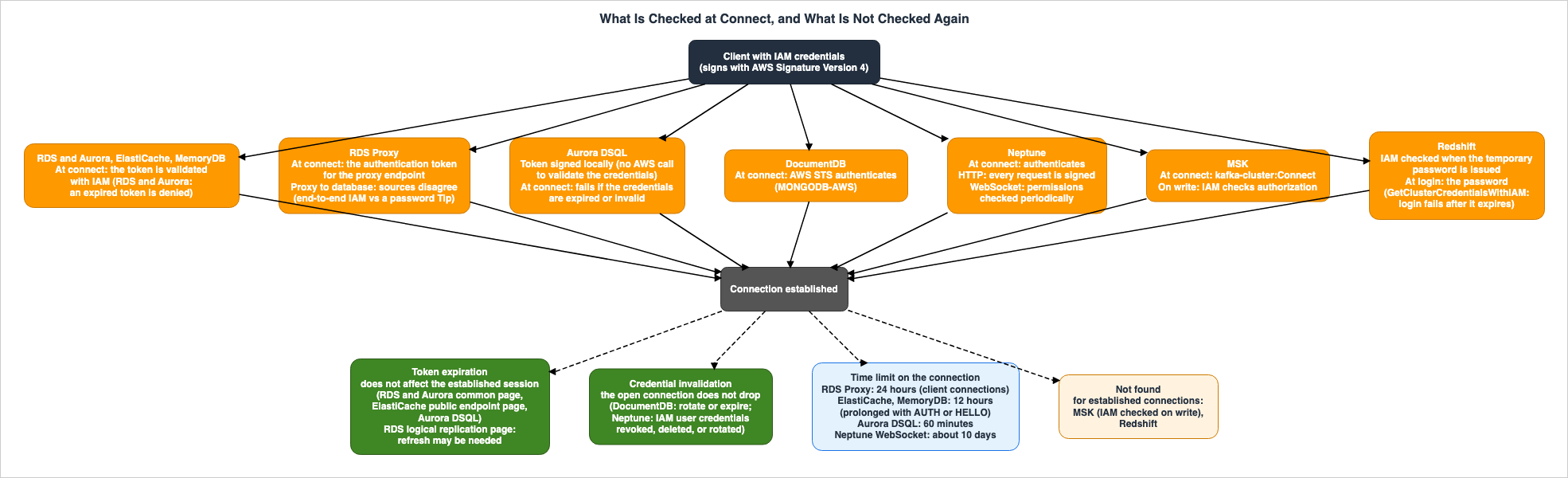
Regarding token expiration, several documents — RDS, Aurora, ElastiCache (for connections to public endpoints), and Aurora DSQL — state that it does not affect existing connections (for logical replication connections, see Section 5.4). The common page for RDS and Aurora states:The token is only used for authentication and doesn't affect the session after it is established.The ElastiCache public endpoint page states, "Token expiration does not affect established connections." This statement is not found on the general ElastiCache IAM authentication page. This article does not say whether this statement applies to connections that do not use public endpoints. The Aurora DSQL user guide states:
This token is used only for authenticating the connection. After the connection is established, the connection remains valid even if the authentication token expires.On credential invalidation, the DocumentDB and Neptune documentation say that open connections continue. However, the two cover different kinds of credentials. The DocumentDB developer guide's FAQ states:
Will my connection drop when my IAM role temporary credentials expire?

No, the temporary IAM credentials are only used for establishing connection and authentication. Then all further authorization happens in the Amazon DocumentDB cluster. Even if IAM credentials rotate/expire, the connection will not drop or get stale.
The DocumentDB text addresses the rotation and expiration of temporary credentials. The Neptune user guide, regarding credentials for IAM users, states:
Revoking, deleting, or rotating of credentials associated with the IAM user is not recommended because it does not terminate any connections that are already open.The Neptune text addresses the revocation, deletion, and rotation of credentials associated with IAM users, but does not mention the expiration of temporary credentials.
All five of these statements concern either token expiration or credential invalidation. They do not mention the revocation of IAM permissions. It is not possible to interpret the RDS and Aurora statements to mean that existing connections will continue even if the
rds-db:connect permission is revoked. Revocation will be addressed separately in Section 6.No statement about what token expiration does to established connections was found on the general ElastiCache IAM authentication page or in the MemoryDB developer guide. Both limitations sections give a recommendation for long-lived connections. ElastiCache states, "For long-lived connections, we recommend using a Valkey or Redis OSS client that supports a credentials provider interface to automatically generate fresh tokens before expiry." MemoryDB states, "For long-lived connections, we recommend using a Redis OSS client that supports a credentials provider interface." The recommendation sits next to the statement that re-authentication with an expired token is rejected (ElastiCache) and next to the 12-hour disconnection and its extension with a new token (Section 5.3). This article does not read the recommendation as meaning that token expiration ends established connections, and does not treat it as a disagreement between sources either, because neither statement says what token expiration does to established connections.
5.3 Time Limits on the Connection — 12 Hours, 24 Hours, 60 Minutes, and About 10 Days
The documentation for five services — ElastiCache, MemoryDB, RDS Proxy, Aurora DSQL, and Neptune — mentions time limits on connections.ElastiCache and MemoryDB disconnect connections authenticated via IAM after 12 hours. The ElastiCache user guide's section on limitations states:
An IAM authenticated connection to ElastiCache for Valkey or Redis OSS will automatically be disconnected after 12 hours. The connection can be prolonged for 12 hours by sending an AUTH or HELLO command with a new IAM authentication token.
IAM re-authentication (AUTH or HELLO commands) is not supported inside MULTI/EXEC or Lua script blocks. However, you can run regular data commands inside MULTI/EXEC blocks on an IAM-authenticated connection.
The MemoryDB developer guide also describes a 12-hour disconnection period, as well as options for extending the connection using
AUTH or HELLO. On MULTI EXEC, it states, "IAM authentication is not supported in MULTI EXEC commands." No statement about Lua scripts was found.The ElastiCache public endpoint page words the time after 12 hours differently.
Session expiration: Connections expire after 12 hours and reconnect automatically.This text does not specify what, if anything, automatically reconnects. The preceding item (Token expiration) on the same page states that Valkey GLIDE clients automatically refresh tokens. This article does not treat these two pages as a disagreement between sources. The 12-hour time limit is consistent across both pages. While the public endpoint page does not mention extensions, it also does not state that extensions are impossible. It also does not describe any mechanism for automatic reconnection. For how to extend the connection, this article quotes the limitations section; for the wording on public endpoints, it quotes the public endpoint page.
RDS Proxy limits client connections to 24 hours. The RDS Proxy connection considerations page says the following about application-side connection pools:
Client connection max life: RDS Proxy enforces a maximum life of client connections of 24 hours. This value is not configurable. Configure your pool with a maximum connection life less than 24 hours to avoid unexpected client connection drops.This page does not single out IAM authentication; the statement is about client connections to RDS Proxy. It does not say what happens to open connections before the 24 hours pass when the IAM permission is revoked (Section 6.4).
Aurora DSQL sets a connection time limit of 60 minutes. The quotas page states that the
Maximum connection duration is 60 minutes and cannot be changed. The authentication and authorization page also states, "After you establish a connection, your role is authorized for up to one hour for the connection."Neptune describes two aspects related to WebSocket connections. First, it mentions re-verifying permissions after a connection is established.
Neptune authenticates on connection, and for WebSockets connections it verifies the permissions periodically to ensure that the user still has access.Second, it specifies a time limit for connections. The page detailing the time limit states:
When IAM authentication is enabled, a WebSocket connection is always disconnected a few minutes more than 10 days after it was established, if it hasn't already been closed by then.The interval for re-verifying permissions is not mentioned in the documentation reviewed for this article.
No statement was found that RDS, Aurora, DocumentDB, MSK, or Redshift imposes a time limit on IAM-authenticated connections.
5.4 The RDS Logical Replication Page — The Sources Disagree
RDS for PostgreSQL and Aurora PostgreSQL offer the ability to authenticate logical replication connections using IAM (via therds.iam_auth_for_replication parameter). The "Limitations and considerations" section on these pages states the following:The IAM authentication token expires after 15 minutes by default. You might need to refresh long-running replication connections before the token expires.This statement appears on both the RDS user guide page and the Aurora user guide page. In contrast, the common page for IAM database authentication states, "The token is only used for authentication and doesn't affect the session after it is established."
The two pages differ in their descriptions of what happens when a token expires on a long-running connection. The common page states that the token does not affect the session after it is established. The logical replication page, however, indicates that the connection may need to be refreshed before the token expires. Furthermore, the wording on token expiration differs; the common page states, "Each token has a lifetime of 15 minutes," while the logical replication page includes the qualifier "by default."
This article does not say which page reflects the current behavior. The text on the logical replication page specifically addresses logical replication connections. This article does not read the information on the common page as applying directly to logical replication connections. Conversely, it does not extend the information on the logical replication page to standard connections.
5.5 The Rate of New Connections
On the rate of new IAM database authentication connections, the RDS and Aurora user guides read for this article and the What's New announcement of June 30, 2026 give no fixed number. The announcement states:The number of new IAM authentication requests your instance can handle depends on available resources and workload characteristics.The announcement covers PostgreSQL, MySQL, and MariaDB on Aurora and RDS, and says the update is available in all Regions where IAM database authentication is supported, including the AWS GovCloud (US) Regions. The troubleshooting page of the RDS user guide lists the
IamDbAuthConnectionFailureThrottling metric, which counts requests that failed because of throttling, and says, "Reduce the rate of establishing new connections with IAM authentication. Consider implementing connection pooling using RDS Proxy in order to reuse established connections in your application."However, some sources still give specific numbers. An article from the AWS Database Blog, dated April 11, 2018, and a page in the AWS DMS migration playbook (without a specific date), both offer figures. The Database Blog article states, "With IAM database authentication, you are limited to a maximum of 256 new connections per second." The migration playbook page states, "With IAM database authentication, you are limited to a maximum of 20 new connections in a single second." This article does not treat either of these figures as the current limit.
The limits for the number and rate of connections for other services are as follows, according to the documentation (verified on October 5, 2026). The Aurora DSQL quota page specifies a limit of 10,000 connections per cluster (configurable), a connection rate of 100 per second, and a burst capacity of 1,000. The MSK limits page states that for Standard brokers, the limit for TCP connections per broker with IAM access control is 3,000, with a connection creation rate of 100 per second for M5 and M7g instances, and 4 per second for t3 instances. For Express brokers, the limit is 3,000 TCP connections, with a connection creation rate of 100 per second. Details of MSK limits can be found in Section 3.6 of Amazon MSK Broker Types and Storage Tiers.
6. Revocation Table — What Revoking the IAM Permission Does to Open Connections
This section lists what the documentation says happens to open connections when the IAM permission is revoked and when the user is removed inside the service. It covers, in order, statements that concern revocation, removal inside the service that ends open connections, and where no statement was found.6.1 Revocation Table
| Receiver | When the IAM Permission Is Revoked | When the User Is Removed Inside the Service | Where the Source Says So |
|---|---|---|---|
| RDS and Aurora (MariaDB, MySQL, PostgreSQL) | The source does not say. | The source does not say. The documentation recommends deleting the database account using DROP USER after deleting users associated with the database account. | RDS User Guide, Aurora User Guide |
| RDS Proxy | The source does not say. | The source does not say. | RDS User Guide, Aurora User Guide |
| ElastiCache (Valkey, Redis OSS) | Public endpoint page: "Revoking an IAM principal's elasticache:Connect permission does not immediately disconnect active sessions." No statement found on the general IAM authentication page. | Removing the user from a user group ends open connections. "When users are removed from a user group, any existing connections they have to a cache are terminated." | ElastiCache User Guide |
| MemoryDB | The source does not say. | Removing the user from an ACL with the update-acl command ends open connections. "Any open connections belonging to a user removed from an ACL are ended by this command." | MemoryDB Developer Guide |
| Aurora DSQL (admin role) | New connections are rejected. "Any active connections that use the IAM identity might stay authorized for the duration of the connection." | The admin role cannot be modified. | Aurora DSQL User Guide |
| Aurora DSQL (custom database role) | The source does not say. | The mapping can be removed with AWS IAM REVOKE. For open connections: The source does not say. | Aurora DSQL User Guide |
| DocumentDB | No statement of an IAM action that decides whether a connection is allowed was found. | A $external user can be deleted with dropUser. For open connections: The source does not say. | DocumentDB Developer Guide |
| Neptune (HTTP) | IAM policy changes: "Changes to an IAM policy take up to 10 minutes to apply to the specified Neptune resources." It does not say what happens to open connections. | The documentation describes no user inside the service. | Neptune User Guide |
| Neptune (WebSocket) | Checks permissions periodically ("to ensure that the user still has access"). IAM policy changes take up to 10 minutes to apply. It does not say what happens when a check finds that the user no longer has permission. | The documentation describes no user inside the service. | Neptune User Guide |
| MSK | IAM is used to check authorization when a client writes (Section 4.2). IAM policy changes: "In most cases, policy changes take effect in less than a minute." It does not say what happens to open connections. | Under IAM access control, the documentation describes no user inside the service apart from the IAM principal. | MSK Developer Guide |
| Redshift and Redshift Serverless | The source does not say. IAM is checked when the temporary password is issued. | The source does not say. | Redshift API Reference, Redshift Serverless API Reference |
6.2 Statements That Concern Revocation — The ElastiCache Public Endpoint Page, the Aurora DSQL admin Role, Neptune, and MSK
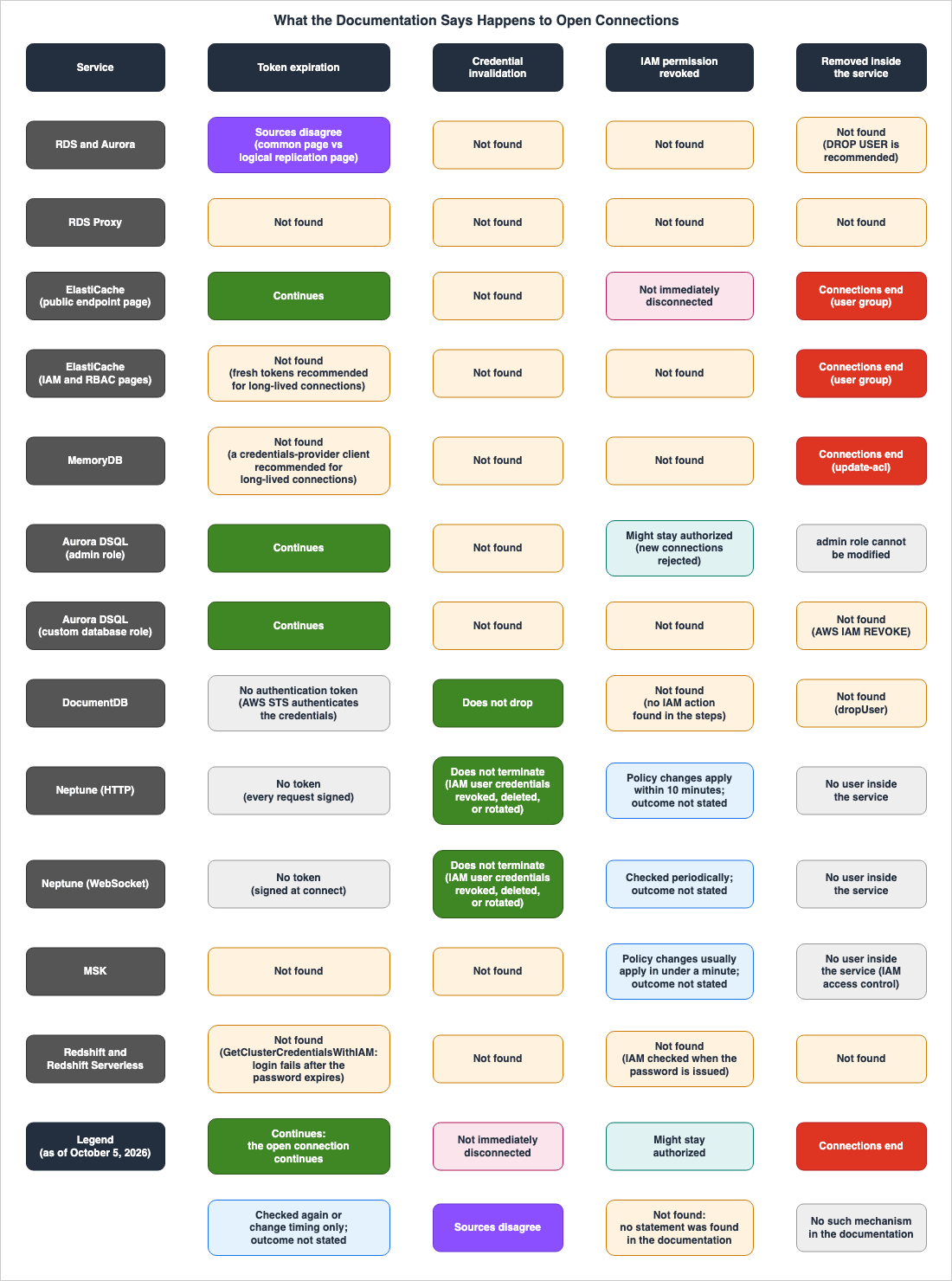
Of the documentation reviewed, the following four services contain statements related to revoking IAM permissions: ElastiCache (the public endpoint page), Aurora DSQL (admin role), Neptune, and MSK. The ElastiCache public endpoint page and the Aurora DSQL admin role item specify what happens to existing connections. The Neptune and MSK documentation describes verification and propagation time, but does not specify what happens to existing connections.The "Connect to a cache with a public endpoint" page for ElastiCache says, in its Token and session expiration section:
Revoking an IAM principal's elasticache:Connect permission does not immediately disconnect active sessions. To disconnect a user immediately, remove the user from the cache's user group.This statement says that, after revocation, open sessions are not immediately disconnected. It does not say when they are disconnected. The statement is on the page about connecting to a public endpoint, and no statement about revocation was found on the general ElastiCache IAM authentication page or the RBAC page. This article does not say whether the statement applies to connections that do not use a public endpoint. However, IAM-authenticated connections to the same service are disconnected after 12 hours, and extending them requires
AUTH or HELLO with a new authentication token (Section 5.3). The documentation does not say how a revoked permission is handled during that re-authentication. This article does not say that connections will definitely end within 12 hours of revocation.The Aurora DSQL user guide describes the revocation of the admin role's connect permission as follows:
After revoking connection authorization from the IAM identity, Aurora DSQL rejects all new connection attempts from that IAM identity. Any active connections that use the IAM identity might stay authorized for the duration of the connection. For more information on connection durations, see Quotas and limits.This statement is under the item
Revoking admin authorization to connect to clusters in the section Revoking authorization using IAM and PostgreSQL. New connections are rejected, and open connections might stay authorized for the duration of the connection; the connection time limit is 60 minutes (Section 5.3). On the other hand, the item Revoking custom role authorization to connect to clusters describes how to remove the dsql:DbConnect permission or remove the mapping with AWS IAM REVOKE, but does not say how open connections are handled. This article does not extend the statement under the admin role item to custom database roles.The Neptune user guide says that it checks permissions on WebSocket connections periodically (Section 5.3). Regarding changes to IAM policies, the section describing data access actions states:
Changes to an IAM policy take up to 10 minutes to apply to the specified Neptune resources.This note is about how changes to IAM policies apply to Neptune resources and does not mention open connections. For WebSocket connections, the documentation says that permissions are checked periodically, but does not say what happens to the connection when a check finds no permission. For HTTP requests, the documentation says that each request must be signed, but does not say that the IAM policy is evaluated for each request. It also does not say how often permissions are checked again or how that relates to the 10 minutes.
The MSK developer guide says that IAM is used to check authorization when a client writes (Section 4.2). Regarding changes to IAM policies, the page on creating authorization policies for the IAM role states:
Changes that you make to an IAM policy are reflected in the IAM APIs and the AWS CLI immediately. However, it can take noticeable time for the policy change to take effect. In most cases, policy changes take effect in less than a minute. Network conditions may sometimes increase the delay.Like the Neptune note, this note is about when a change to an IAM policy takes effect and does not mention open connections. The documentation also does not say how the authorization check when a client writes relates to this change.
6.3 Removing the User Inside the Service Ends Open Connections — ElastiCache User Groups and MemoryDB ACLs
Apart from IAM permission revocation, ElastiCache and MemoryDB have a means of ending open connections: removing the user inside the service from a user group or an ACL.The ElastiCache user guide's RBAC section states, "When users are removed from a user group, any existing connections they have to a cache are terminated." Similarly, the CLI instructions indicate, "Any open connections belonging to a user removed from a user group are ended by this command." The public endpoint page specifies, "To disconnect a user immediately, remove the user from the cache's user group," presenting this action as a means of immediate disconnection.
The MemoryDB developer guide's ACL section describes the
update-acl command, stating, "Any open connections belonging to a user removed from an ACL are ended by this command." While no statement was found in the MemoryDB documentation about what happens to open connections when IAM permissions are revoked (Section 6.4), it does state that connections end when a user is removed from an ACL.The ElastiCache RBAC page and the MemoryDB ACL page also describe operations after which connections continue. The ElastiCache RBAC page states, "When a user is modified, the user groups associated with the user are updated, along with any caches associated with the user group. All existing connections are maintained." It also states, "When you modify a password, any existing connections to caches are maintained." The MemoryDB ACL page contains similar wording. Neither page says whether a user's new settings apply to open connections.
6.4 Where No Statement Was Found
This article did not find statements in the reviewed materials about what happens to open connections for the following services and events. This means that they were not found within the scope of the search in Section 1.3.- IAM permission revocation for RDS and Aurora, and RDS Proxy. The common passage referenced in Section 5.2 concerns tokens. The passage describing what happens when
rds-db:connectpermissions are revoked is not found in the IAM database authentication sections for RDS and Aurora, nor in the RDS Proxy section. The section on database accounts recommends removing the database account when a user mapped to it is deleted ("If you remove a user that is mapped to a database account, you should also remove the database account with the DROP USER statement."). It is not documented in the AWS materials reviewed whatDROP USERdoes to existing connections. - IAM permission revocation for MemoryDB. There is a statement about removal from the ACL (Section 6.3).
- Revocation for Aurora DSQL custom database roles, and
AWS IAM REVOKE. There is a statement for the admin role (Section 6.2). - DocumentDB. The steps in the IAM authentication section do not include an IAM action that decides whether a connection is allowed (Section 4.2). No statement was found either about what happens to open connections when a user in the
$externaldatabase is deleted withdropUser. - MSK. No statement about established connections was found on the IAM access control page or the troubleshooting page. The IAM access control page says that MSK uses IAM to check authorization when a client writes (Section 4.2), but it does not say when a change to the IAM policy reaches operations on open connections. The page on creating authorization policies for the IAM role says that, in most cases, policy changes take effect in less than a minute, but it does not mention open connections (Section 6.2). The troubleshooting section describes an error related to expiring credentials ("The Failed authentication ... Session too short error occurs when your client tries to connect to a cluster using IAM credentials that are about to expire. Make sure that you check how your IAM credentials are being refreshed. Most likely, the credentials are being replaced too close to session expiry which leads to issues on the server side, and authentication failures."). While it mentions session expiry and issues on the server side, it does not state what happens to existing connections at that time. A passage in the same developer guide, on the SASL/SCRAM section, states "Removing a user does not close existing connections." However, this refers to authentication using usernames and passwords stored in Secrets Manager, not IAM access control. This article does not borrow this sentence for the IAM row. The AWS GitHub repository
aws-msk-iam-auth, specifically the README (not the documentation, but a description of the client library), states that the library authenticates "every time a new connection to a Kafka broker is opened or an existing connection is re-authenticated." The same README states that MSK requires the same principal across re-authentication cycles ("MSK expects the same principal across re-authentication cycles"). It does not specify when re-authentication occurs, nor how revoked permissions are handled during re-authentication. - Redshift and Redshift Serverless. IAM is validated during the issuance of temporary passwords (Section 4.2). It is not documented whether a previously issued temporary password remains usable after the associated permissions are revoked. The handling of established sessions is also not described. The
GetCredentialsresponse for Redshift Serverless includes anextRefreshTimeindicating when authorization will be updated (the similarly named element in the provisionedGetClusterCredentialsWithIAMis marked "Reserved for future use."). However, it does not state what happens to established sessions at that time.
That no statement was found does not mean that an open connection continues or that it ends. Where you need to be sure that an open connection ends, the means the documentation describes are removal from an ElastiCache user group and removal from a MemoryDB ACL. This article does not cover operations that directly terminate database engine sessions (such as PostgreSQL's
pg_terminate_backend).6.5 Stopping STS Sessions Is a Different Mechanism from Database Connections
Stopping the temporary credentials of an IAM role before they expire is described in Sections 7.5 and 7.6 of AWS IAM Inbound Workload Federation. Section 7.6 of that article details how to attach a policy to the role that rejects temporary STS credentials issued before a specific time, using theaws:TokenIssueTime condition.This mechanism allows you to reject requests signed with temporary credentials using IAM policies. The documentation reviewed for databases, caches, and streams does not specify whether this method affects existing connections. This article does not say either way.
7. Identity Table — Who You Become Inside the Service
This section lists who the connection is treated as inside the service after connecting. In the documentation, the mapping between the IAM principal and the principal inside the service falls into four types.7.1 Identity Table
| Receiver | Who You Are Inside | How the Mapping Is Made | Where the Source Says So |
|---|---|---|---|
| RDS and Aurora (MariaDB, MySQL) | Database user | CREATE USER 'jane_doe' IDENTIFIED WITH AWSAuthenticationPlugin AS 'RDS';. Specify the database username in the Resource section of the IAM policy. Ensure the name matches exactly, including case (the note is not limited to one engine). | RDS User Guide, Aurora User Guide |
| RDS and Aurora (PostgreSQL) | Database user | GRANT rds_iam TO db_userx;. For a user with rds_iam, IAM authentication takes precedence over password authentication. Ensure the name matches exactly, including case (the note is not limited to one engine). | RDS User Guide, Aurora User Guide |
| RDS Proxy | Database user | Standard method: a user associated with a Secrets Manager secret. For end-to-end IAM authentication, create a database user with the IAM authentication plugin. | RDS User Guide, Aurora User Guide |
| ElastiCache (Valkey, Redis OSS) | ElastiCache user | Create a user with IAM authentication enabled. The username and user ID must be the same. Include both the cache and the user in the elasticache:Connect Resource section of the IAM policy. | ElastiCache User Guide |
| MemoryDB | MemoryDB user | Add users with IAM authentication enabled to the ACL. Include both the cluster and the user in the memorydb:Connect Resource section of the IAM policy. | MemoryDB Developer Guide |
| Aurora DSQL | Admin role or custom database role | Create a role with the WITH LOGIN option and associate it with an IAM role using AWS IAM GRANT custom-db-role TO 'arn:aws:iam::account-id:role/iam-role-name';. Use sys.iam_pg_role_mappings to verify the mapping. | Aurora DSQL User Guide |
| DocumentDB | Users of the $external database | Create users using the ARN of an IAM user or role as the name, and specify mechanisms: ["MONGODB-AWS"]. Primary users cannot be authenticated using IAM ARNs. | DocumentDB Developer Guide |
| Neptune | The documentation describes no user inside the service. | In the IAM policy, allow actions that begin with neptune-db:. | Neptune User Guide |
| MSK | Under IAM access control, the documentation describes no user inside the service. | In the IAM policy, allow actions that begin with kafka-cluster:. "Apache Kafka ACLs have no effect on authorization for IAM identities." | MSK Developer Guide |
| Redshift and Redshift Serverless | Database user | GetClusterCredentialsWithIAM: "The database user is mapped 1:1 to the source AWS Identity and Access Management (IAM) identity." GetClusterCredentials returns the name given in DbUser prefixed with IAM: (when AutoCreate is False) or IAMA: (when True). | Redshift API Reference, Redshift Serverless API Reference |
7.2 Creating Database Users or Roles and Mapping Them to IAM — RDS and Aurora, Aurora DSQL, and DocumentDB
The first type involves creating users and roles within the database and associating them with IAM identities.For RDS and Aurora using MariaDB and MySQL, create users authenticated using the
AWSAuthenticationPlugin. For PostgreSQL, assign the rds_iam role to the user. In the IAM policy's Resource section, include the ARN containing the database username. The database account page states, "The user name used for IAM authentication must match the case of the user name in the database." For PostgreSQL, users with the rds_iam role must authenticate using IAM, not passwords ("IAM authentication takes precedence over password authentication, so the user must log in as an IAM user."). The Aurora user guide states, "For Aurora MySQL, you can't use password based authentication for a database user you configure with IAM authentication."In Aurora DSQL, connect as the admin role and create a custom database role using
WITH LOGIN (e.g., CREATE ROLE example WITH LOGIN;). Then, associate this role with an IAM role using AWS IAM GRANT. These mappings can be viewed in sys.iam_pg_role_mappings and removed with AWS IAM REVOKE. The admin role is created and managed by Aurora DSQL and cannot be modified.In DocumentDB, create users with names that correspond to the ARN of an IAM user or role within the
$external database.use $external;
db.createUser(
{
user: "arn:aws:iam::123456789123:role/iamrole",
mechanisms: ["MONGODB-AWS"],
roles: [ { role: "readWrite", db: "readWriteDB" } ]
}
);The DocumentDB developer guide states, "IAM authentication using IAM identity ARNs is not supported for the Amazon DocumentDB primary user." The primary user must authenticate using a password.
7.3 Using Both a Service User and an IAM Action — ElastiCache and MemoryDB
The second type involves creating service users and also listing those users in theResource of IAM actions. ElastiCache and MemoryDB fall into this category.In ElastiCache, you create users configured for IAM authentication and add them to user groups. In IAM policies, you must specify both the cache ARN and the user ARN in the
Resource for the elasticache:Connect action. The documentation states, "For IAM-enabled ElastiCache users the username and user id properties must be identical." For caches with a public endpoint, the RBAC section notes, "Caches with a public endpoint require every user in the associated user group to use IAM authentication."In MemoryDB, you create users configured for IAM authentication and add them to Access Control Lists (ACLs). In IAM policies, you must specify both the cluster ARN and the user ARN in the
Resource for the memorydb:Connect action.In this type, users within the service act as an additional key, separate from IAM permissions. As seen in Section 6.3, removing a user from a user group or ACL ends that user's open connections.
7.4 No User Inside the Service in the Documentation — Neptune and MSK (IAM Access Control)
In the third type, the documentation describes no user inside the service and describes authorization by IAM principals and IAM actions. Neptune and MSK (under IAM access control) are of this type. Neptune allows actions that begin withneptune-db: in IAM policies. A "What's New" announcement dated July 27, 2026, states that Neptune now supports tag-based access control (TBAC) and explains that resource tags and IAM principal tags can be used as conditions in IAM policies and SCPs ("Amazon Neptune Database now supports tag-based access control (TBAC) for IAM, enabling customers to use AWS resource tags and IAM principal tags as conditions in IAM policies and Service Control Policies (SCPs) to control access to Neptune data-plane operations."). This announcement, like the documentation, describes authorization based on IAM principals and their tags, rather than users within the service. For MSK, actions that begin with kafka-cluster: are permitted. The MSK developer guide mentions the ability to call the Apache Kafka ACL API, but also states, "However, Apache Kafka ACLs have no effect on authorization for IAM identities. You must use IAM policies to control access for IAM identities."7.5 Mapping Decided When the Temporary Password Is Issued — Redshift
The fourth type involves determining the user mapping within the database when issuing a temporary password. Redshift falls into this category. TheGetClusterCredentialsWithIAM API reference states, "The database user is mapped 1:1 to the source AWS Identity and Access Management (IAM) identity." The GetClusterCredentials API documentation specifies that, if AutoCreate is set to False, the returned value will include IAM: prefixed to the username provided in DbUser; if AutoCreate is True, it will include IAMA: instead. For Redshift Serverless, the GetCredentials function returns "A database user name that is authorized to log on to the database DbName using the password DbPassword."7.6 When Permission Changes Inside the Service Take Effect on Open Connections
Of the materials reviewed, only the Aurora DSQL documentation says when changes to privileges inside the service take effect. The Aurora DSQL user guide states the following regarding permissions for custom database roles:Modifications to privileges take effect on the next transaction after Aurora DSQL successfully commits the modification transaction.This passage concerns changes to permissions within the database (the same paragraph, under the item
Revoking custom role authorization to connect to clusters, refers to PostgreSQL privileges for managing them). It is not about IAM permission revocation or AWS IAM REVOKE.ElastiCache and MemoryDB state that existing connections are maintained even when a user is modified (Section 6.3). DocumentDB states, "Then all further authorization happens in the Amazon DocumentDB cluster." The RDS and Aurora database account pages indicate that accounts created with the
AWSAuthenticationPlugin can be managed using GRANT and REVOKE in the same way as other accounts. This article does not address the timing of when changes to database engine permissions take effect on existing connections, as that is a question for each database engine.8. Where the Sources Disagree, and Where No Statement Was Found
This section lists, together, the places where the sources disagree, the statements that look like disagreements but differ in subject or event, and where no statement was found.8.1 Three Places Where the Sources Disagree
| Where | One Source | The Other Source | Section |
|---|---|---|---|
| RDS and Aurora PostgreSQL: Long-running replication connections and token expiration | Common page: "The token is only used for authentication and doesn't affect the session after it is established." | Logical replication page: "You might need to refresh long-running replication connections before the token expires." | Section 5.4 |
| Authentication from RDS Proxy to the database | Conceptual page and Connection page: For end-to-end IAM authentication, the proxy authenticates to the database using IAM. | Tip on the same Connection page: "RDS Proxy always connects to the database using password authentication through Secrets Manager." | This section |
| Versions of DocumentDB supporting IAM authentication | IAM authentication page and Java driver page: Only version 5.0 ("IAM authentication is available only in Amazon DocumentDB instance-based cluster version 5.0.") | Table on the features and configurations page: v8.0 is Yes. re:Post Knowledge Center (updated November 30, 2025): "only on cluster version 5.0 and later, with instance-based clusters". What's New (September 28, 2026): For SageMaker Unified Studio connection requirements, "5.0 or later instance-based clusters". | Section 3.5 |
The disagreement on RDS Proxy is within one page. The RDS user guide, on the page describing connecting to a database through RDS Proxy, in the section on IAM authentication, states:
With end-to-end IAM authentication, you don't need to configure Secrets Manager secrets for database credentials. The IAM authentication applies to the connection between the client to the proxy and proxy to the database.The same page's Tip section states:
Remember that while clients connect to RDS Proxy using IAM authentication, RDS Proxy always connects to the database using password authentication through Secrets Manager.These two sentences also appear on the same page in the Aurora user guide. End-to-end IAM authentication was introduced in the "What's New" announcement on September 12, 2025. This article does not say which method, as of which point in time, the Tip assumes; it only lines up both sentences. The configuration for end-to-end IAM authentication with RDS Proxy is covered in Section 6.5 of the Amazon RDS and Aurora High Availability Guide.
8.2 Statements That Look Like Disagreements but Differ in Subject or Event
The following three examples may appear to present different statements when listed together, but this article does not treat them as disagreements between sources.- Section on Aurora DSQL's SQL client. The Aurora DSQL user guide includes a section on the expiration of the credentials for the SQL client, stating, "If the authentication token configured in the Connection settings is no longer valid, that new session will fail and all previously opened sessions will become invalid." The section is titled
Authentication credentials expiration for the SQL Clientsand begins with the paragraph, "Established sessions remain authenticated for a maximum of 1 hour or until an explicit disconnect or a client-side timeout takes place." The section is specific to SQL clients, and it does not specify which entity (the service or the client) is responsible for invalidating the sessions. The token page states, "After the connection is established, the connection remains valid even if the authentication token expires." That sentence is about an established connection; it does not say what happens when an attempt is made to open a new session with a token that is no longer valid, which is the case the SQL Clients section describes. - Two statements about Neptune. "for WebSockets connections it verifies the permissions periodically" is a statement about permissions. "Revoking, deleting, or rotating of credentials associated with the IAM user is not recommended because it does not terminate any connections that are already open." is a statement about credentials. These refer to different events.
- Two pages on ElastiCache's 12-hour limit. The section on limitations describes disconnection after 12 hours, as well as extensions using
AUTHorHELLO. The public endpoint page states, "Connections expire after 12 hours and reconnect automatically." The 12-hour timeframe is consistent, but the public endpoint page does not mention extensions, although it does not explicitly state that extensions are not possible (Section 5.3).
8.3 Where No Statement Was Found, and the Scope of the Search
This section lists where no statement was found, organized by event type.- Token Expiration: MemoryDB and the general IAM authentication page for ElastiCache (both give a recommendation for long-lived connections; the public endpoint page has a statement). RDS Proxy, MSK. Redshift and Redshift Serverless (the
GetClusterCredentialsWithIAMAPI reference mentions only that a login fails after the temporary password expires; theGetClusterCredentialsandGetCredentialsAPI references give only the expiration time). - Credential Invalidation: RDS and Aurora, RDS Proxy, ElastiCache, MemoryDB, Aurora DSQL, MSK, Redshift and Redshift Serverless. However, RDS and Aurora require the temporary credentials used to generate the token to be valid at the time of connection (Section 4.3). Aurora DSQL states that connection attempts will fail if the credentials that signed the token are expired or invalid (Section 3.2). The ElastiCache public endpoint page states that a token signed with temporary credentials expires when those credentials expire (Section 3.2). All of these relate to either the time of connection or the token's expiration.
- IAM Permission Revocation: RDS and Aurora, RDS Proxy, ElastiCache (the general IAM authentication page; the public endpoint page has a statement), MemoryDB, Aurora DSQL (custom database roles), Redshift and Redshift Serverless. For DocumentDB, no IAM action that decides whether a connection is allowed was found in the steps.
- Removal Inside the Service: RDS and Aurora (
DROP USER), RDS Proxy, Aurora DSQL (AWS IAM REVOKE), DocumentDB (dropUser), Redshift and Redshift Serverless. - Connection Limits (time limits on the connection): RDS and Aurora, DocumentDB, MSK, Redshift and Redshift Serverless.
The scope of the search is given in Section 1.3. This article reviewed the IAM authentication sections (and subsequent pages) of each service's user guide, as well as the API reference and troubleshooting pages, and conducted searches using the terms
existing, established, session, expire, revoke, disconnect, terminate, and re-authenticate. The documentation may be revised. Any instances mentioned in this article that could not be found were the result of searches conducted as of October 5, 2026.9. Frequently Asked Questions about IAM Authentication to Databases, Caches, and Streams on AWS
Q1. Does an open connection close when the 15-minute RDS IAM authentication token expires?
The common page for RDS and Aurora states, "The token is only used for authentication and doesn't affect the session after it is established." The token's validity is checked at the time of connection. However, the pages for RDS for PostgreSQL and Aurora PostgreSQL regarding logical replication indicate that it may be necessary to refresh the connection before the token expires for long-running replication connections. The sources disagree (Section 5.4). Token expiration and the revocation ofrds-db:connect are separate events. No statement about revocation was found in the documentation (Section 6.4).Q2. If I revoke the elasticache:Connect permission, when does the open connection end?
The ElastiCache page on connecting to a public endpoint says that revoking the permission does not immediately disconnect open sessions. It does not say when they are disconnected. For connections that do not use a public endpoint, no statement about revocation was found on the general IAM authentication page. The public endpoint page says that, to disconnect a user immediately, the user should be removed from the cache's user group. Removing a user from the user group ends that user's open connections (Sections 6.2 and 6.3). IAM-authenticated connections are disconnected after 12 hours unless they are extended with a new authentication token (Section 5.3). The documentation does not say how a revoked permission is handled during that re-authentication.Q3. What happens to open connections when I revoke the dsql:DbConnectAdmin permission in Aurora DSQL?
The Aurora DSQL documentation says that new connections are rejected and that open connections might stay authorized for the duration of the connection. The connection time limit is 60 minutes. This statement is under the admin role item; the custom database role item does not say how open connections are handled (Section 6.2).Q4. Does a DocumentDB connection drop when the IAM role's temporary credentials expire?
According to the DocumentDB developer guide's FAQ, the connection will not drop or become stale. It states, "Even if IAM credentials rotate/expire, the connection will not drop or get stale." This is a statement about credential invalidation. No statement was found about what happens to open connections when a$external user is deleted (Section 6.4).Q5. Does revoking the IAM permission in MSK stop open connections?
No statement about how established connections are handled under IAM access control was found in the MSK developer guide. The IAM access control page says that IAM is used to check authorization when a client writes, but it does not say when a change to the policy reaches open connections (Section 4.2). Another page of the same guide says that, in most cases, policy changes take effect in less than a minute, but it does not mention open connections (Section 6.2). The sentence "Removing a user does not close existing connections." on the SASL/SCRAM page of the same guide is not about IAM access control. The README of the AWS GitHub library mentions re-authentication of existing connections, but it is not documentation and does not say how a revoked permission is handled (Section 6.4).Q6. Who is the database user when I connect to Redshift with GetClusterCredentialsWithIAM?
The API reference states, "The database user is mapped 1:1 to the source AWS Identity and Access Management (IAM) identity." With GetClusterCredentials, the name given in DbUser is returned with IAM: or IAMA: in front of it, depending on the value of AutoCreate. With both APIs, the IAM policy is checked when the temporary password is issued. The GetClusterCredentialsWithIAM API reference says that a login after the temporary password expires fails (Sections 4.2 and 7.5).10. Summary
IAM authentication to AWS databases, caches, and streams is often summed up as connecting with IAM instead of a password, but what is accepted at connect differs. RDS, Aurora, ElastiCache, MemoryDB, and Aurora DSQL accept authentication tokens created in advance. Neptune accepts per-request signatures (for WebSocket, a signature at connect), DocumentDB accepts IAM credentials that AWS STS authenticates, MSK accepts the SASL mechanisms, and Redshift accepts temporary passwords. The point at which IAM is used to check also differs, for example: at connect (RDS and Aurora, ElastiCache, MemoryDB, and Aurora DSQL), per-request signatures (Neptune HTTP), and when the temporary password is issued (Redshift).The handling of connections after they are established has to be read event by event. Regarding token expiration, the documentation for RDS, Aurora, ElastiCache (for connections to public endpoints), and Aurora DSQL states that expired tokens do not impact established connections. However, the documentation for RDS and Aurora's PostgreSQL logical replication says that long-running replication connections might need to be refreshed, and the sources disagree. On credential invalidation, the documentation for DocumentDB (regarding the rotation and expiration of temporary credentials) and Neptune (regarding the revocation, deletion, and rotation of credentials for IAM users) both state that existing connections will not be terminated. Connection limits vary: ElastiCache and MemoryDB have a limit of 12 hours (extendable with new authentication tokens), RDS Proxy client connections have a limit of 24 hours, Aurora DSQL has a limit of 60 minutes, and Neptune's WebSocket connections have a limit of approximately 10 days.
On IAM permission revocation, the documentation that says what happens to open connections is the ElastiCache page on connecting to a public endpoint (not immediately disconnected) and the Aurora DSQL admin role item (might stay authorized for the duration of the connection). The Neptune documentation says that permissions on WebSocket connections are checked periodically and that policy changes take up to 10 minutes to apply. The MSK documentation says that IAM is used to check authorization when a client writes and that, in most cases, policy changes take effect in less than a minute. Neither says what happens to open connections. The means of ending open connections that the documentation describes are removal from an ElastiCache user group and removal from a MemoryDB ACL. No statement was found for RDS and Aurora, RDS Proxy, the general ElastiCache IAM authentication page, MemoryDB revocation, Aurora DSQL custom database roles, DocumentDB, or Redshift.
Who you become inside the service also falls into four types: a database user or role that you create and map to IAM (RDS and Aurora, Aurora DSQL, and DocumentDB); a service user used together with an IAM action (ElastiCache and MemoryDB); no user inside the service in the documentation (Neptune, and MSK under IAM access control); and a mapping decided when the temporary password is issued (Redshift).
If you assume that revoking a permission stops open connections on your service, apply the three questions in Section 1.1 and check which event the documentation's statement is about. Do not extend a statement about token expiration to revocation. For a service where no statement was found, design without assuming either that open connections continue or that they end. This article is based on the materials as of October 5, 2026.
11. References
- IAM database authentication for MariaDB, MySQL, and PostgreSQL - Amazon Relational Database Service
- Creating a database account using IAM authentication - Amazon Relational Database Service
- Connecting to your DB instance using IAM authentication - Amazon Relational Database Service
- Creating and using an IAM policy for IAM database access - Amazon Relational Database Service
- Troubleshooting for IAM DB authentication - Amazon Relational Database Service
- Configuring IAM authentication for logical replication connections - Amazon Relational Database Service
- Supported Regions and DB engines for IAM database authentication in Amazon RDS - Amazon Relational Database Service
- Connecting to a database through RDS Proxy - Amazon Relational Database Service
- RDS Proxy concepts and terminology - Amazon Relational Database Service
- RDS Proxy connection considerations - Amazon Relational Database Service
- IAM database authentication - Amazon Aurora
- Creating a database account using IAM authentication - Amazon Aurora
- Connecting to your DB cluster using IAM authentication - Amazon Aurora
- Creating and using an IAM policy for IAM database access - Amazon Aurora
- Configuring IAM authentication for logical replication connections - Amazon Aurora
- Connecting to a database through RDS Proxy - Amazon Aurora
- RDS Proxy concepts and terminology - Amazon Aurora
- RDS Proxy connection considerations - Amazon Aurora
- Authenticating with IAM - Amazon ElastiCache
- Connect to a cache with a public endpoint - Amazon ElastiCache
- Role-Based Access Control (RBAC) - Amazon ElastiCache
- Authenticating with IAM - Amazon MemoryDB
- Authenticating users with Access Control Lists (ACLs) - Amazon MemoryDB
- Generating an authentication token in Amazon Aurora DSQL - Amazon Aurora DSQL
- Authentication and authorization for Aurora DSQL - Amazon Aurora DSQL
- Using database roles and IAM authentication - Amazon Aurora DSQL
- Accessing Aurora DSQL with PostgreSQL-compatible clients - Amazon Aurora DSQL
- Troubleshooting issues in Aurora DSQL - Amazon Aurora DSQL
- Cluster quotas and database limits in Amazon Aurora DSQL - Amazon Aurora DSQL
- Authentication using IAM identity - Amazon DocumentDB
- Amazon DocumentDB features and configurations - Amazon DocumentDB
- Connecting to Amazon DocumentDB with a MongoDB Java driver - Amazon DocumentDB
- Release notes - Amazon DocumentDB
- Handle IAM based authentication issues with Amazon DocumentDB - AWS re:Post
- Authenticating your Amazon Neptune database with AWS Identity and Access Management - Amazon Neptune
- IAM actions for data access in Amazon Neptune - Amazon Neptune
- Amazon Neptune Limits - Amazon Neptune
- IAM access control - Amazon Managed Streaming for Apache Kafka
- Configure clients for IAM access control - Amazon Managed Streaming for Apache Kafka
- Create authorization policies for the IAM role - Amazon Managed Streaming for Apache Kafka
- Semantics of IAM authorization policy actions and resources - Amazon Managed Streaming for Apache Kafka
- Amazon MSK quota - Amazon Managed Streaming for Apache Kafka
- Troubleshoot your Amazon MSK cluster - Amazon Managed Streaming for Apache Kafka
- Working with users - Amazon Managed Streaming for Apache Kafka
- aws/aws-msk-iam-auth - GitHub
- GetClusterCredentialsWithIAM - Amazon Redshift
- GetClusterCredentials - Amazon Redshift
- GetCredentials - Amazon Redshift Serverless
- Using IAM authentication to generate database user credentials - Amazon Redshift
- Actions, resources, and condition keys for Amazon RDS IAM Authentication - Service Authorization Reference
- Actions, resources, and condition keys for Amazon ElastiCache - Service Authorization Reference
- Actions, resources, and condition keys for Amazon MemoryDB - Service Authorization Reference
- Actions, resources, and condition keys for Amazon Aurora DSQL - Service Authorization Reference
- Actions, resources, and condition keys for Apache Kafka APIs for Amazon MSK clusters - Service Authorization Reference
- Actions, resources, and condition keys for Amazon Redshift - Service Authorization Reference
- Actions, resources, and condition keys for Amazon Redshift Serverless - Service Authorization Reference
- Amazon RDS Proxy announces support for end-to-end IAM authentication - What's New with AWS
- Amazon RDS Enhances IAM Database Authentication with Connection Rate Scaling - What's New with AWS
- Amazon Neptune now supports tag-based access control for IAM - What's New with AWS
- Amazon SageMaker Unified Studio now supports two new connection capabilities: Iceberg REST Catalog connections and IAM authentication for Amazon DocumentDB - What's New with AWS
- Amazon ElastiCache Serverless for Valkey now supports public endpoints - What's New with AWS
- Use IAM authentication to connect with SQL Workbench/J to Amazon Aurora MySQL or Amazon RDS for MySQL - AWS Database Blog
- Oracle database users and MySQL users - Oracle to Aurora MySQL Migration Playbook
References:
Tech Blog with curated related content
Written by Hidekazu Konishi