What Watches the Queries in Aurora PostgreSQL and RDS for PostgreSQL - pgAudit, Database Activity Streams, and GuardDuty RDS Protection: What Each Sees, Where It Lands, and Who Can Read It
First Published:
Last Updated:
RDS Protection for data activity analyzes database query patterns on Amazon Aurora for PostgreSQL and RDS for PostgreSQL databases to detect potential data access and manipulation threats.Each of the three layers observes different aspects, delivers records to different destinations, allows different individuals to read those records, and offers different configuration options, and each has things it does not see. The GuardDuty User Guide, on the same page, states:
GuardDuty doesn't make RDS data activity logs available to you.In contrast, the Aurora User Guide describes Database Activity Streams as follows:
The full SQL text of each statement is visible in the activity stream audit log, including any sensitive data.The three layers also differ in the engines and deployments they support. Database Activity Streams is not available for RDS for PostgreSQL. The RDS User Guide states:
Database activity streams aren't available with the following engines:Following this statement, the guide lists four engines: RDS for Db2, RDS for MariaDB, RDS for MySQL, and RDS for PostgreSQL. Database Activity Streams is also not available for Aurora serverless.
This article will correlate each layer's observations, log delivery destinations, access permissions, configuration options, and what each does not see, referencing the official documentation for each. A table will illustrate the different engines, deployments, and versions supported by each layer. Where the sources disagree, and where a statement was looked for and not found, both statements are shown with the verification date. This article is neither a configuration guide nor a recommendation for which layer to use. This article did not create any AWS resources and did not enable any of the three layers.
Related articles on this site:
- Amazon GuardDuty Extended Threat Detection Architecture - Attack Sequences, Runtime Monitoring, and Response Automation
- Centralized Logging and Audit Architecture on AWS - Multi-Account Log Aggregation, Detection, and Query with CloudTrail, Config, Security Hub, and OpenSearch
- Where the Logs Come From on AWS - Identity and the Control Plane, What Is On by Default, and What Is Not Recorded at All
- Detection Engineering on AWS - What a Custom Source Must Satisfy Before a Detection Can Be Written, and What the Detection Still Does Not See
- IAM Authentication to Databases, Caches, and Streams on AWS - Token Lifetime, What Revoking Access Does to Open Connections, and the Identity Inside the Service
- AWS Database Glossary - RDS, Aurora, DynamoDB, DocumentDB, and Neptune Explained
- How Amazon Aurora serverless Decides Its Capacity - What You Set, What Aurora Decides Within Your Range, What the Maximum ACU Fixes, and Where Each Shows Up
- IAM Authentication to DynamoDB, Keyspaces, and OpenSearch Service - Where Each Call Is Signed and Checked, What DAX and Fine-Grained Access Control Change, and What Revocation Reaches
- Moving Data Between Amazon S3 and Aurora or RDS for PostgreSQL with the aws_s3 Extension - What the Import and Export Functions Accept, Whose IAM Role Reaches the Bucket, and How They Differ from Foreign Tables
Table of Contents
- 1. Introduction — Scope, Verification Date, and Versions
- 2. Vocabulary and Table Columns
- 3. The Three Layers Side by Side
- 4. pgAudit — Inside the PostgreSQL Engine, into the PostgreSQL Log
- 5. Database Activity Streams — From Aurora to a Kinesis Data Stream Encrypted with Your KMS Key
- 6. GuardDuty RDS Protection — Login Activity and Data Activity
- 7. Which Layer Covers Which Engine and Deployment
- 8. Where the Sources Disagree and Where No Statement Was Found
- 9. Frequently Asked Questions about Watching Queries in Aurora PostgreSQL and RDS for PostgreSQL
- 10. Summary
- 11. References
1. Introduction — Scope, Verification Date, and Versions
This section defines the scope of this article, including the date and version of the information verified, as well as the source materials consulted. Furthermore, it will first clarify any instances where the same term may refer to different entities.1.1 What This Article Covers and What It Does Not
This article covers the following:- A detailed examination of three layers: pgAudit, Database Activity Streams, and GuardDuty RDS Protection, including what each layer monitors, where records are delivered, who can read those records, what users can configure, and what remains invisible (Sections 3 through 6).
- Compatibility of these three layers with various database engines, configurations, and versions (Section 7).
- Where the sources disagree and where no statement was found (Section 8).
The Aurora PostgreSQL and RDS for PostgreSQL in the title of this article are the union of what the three layers cover. Not every layer applies to both engines; Aurora MySQL and other engines are summarized in the coverage table in Section 7.
This article does not cover the following:
- The overall design of GuardDuty threat detection, attack sequences, and the automation of responses to detected threats. This is covered in the previously published Amazon GuardDuty Extended Threat Detection Architecture.
- The design for collecting and searching logs from multiple accounts. This is covered in the previously published Centralized Logging and Audit Architecture on AWS.
- What AWS CloudTrail records by default. This is covered in the previously published Where the Logs Come From on AWS.
- IAM database authentication for Aurora and RDS. This is covered in the previously published IAM Authentication to Databases, Caches, and Streams on AWS. GuardDuty's login activity layer analyzes login attempts; it is not an authentication mechanism itself.
- Performance monitoring. The CloudWatch User Guide notes that Performance Insights reached its end of life on July 31, 2026, and that users were migrated to Database Insights. This article does not cover performance monitoring.
- Standard logging configurations for PostgreSQL (e.g.,
log_statement). - The auditing features for Aurora MySQL (Advanced Auditing) and the MariaDB Audit Plugin that RDS for MySQL and RDS for MariaDB use. These are covered in Query Auditing in Aurora MySQL and RDS for MySQL - Advanced Auditing, the MariaDB Audit Plugin, and Where Each Audit Log Goes.
- Detailed information regarding Database Activity Streams for RDS for Oracle and RDS for SQL Server.
- Usage amounts. This article does not discuss money.
- The techniques that the names of GuardDuty finding types point to. This article only identifies the finding type names and the analysis targets mentioned in the documentation.
1.2 Verification Date, Versions, and Sources Read
The information in this article was verified on October 14, 2026, using the following resources:- Amazon GuardDuty User Guide: Pages for GuardDuty RDS Protection, GuardDuty RDS Protection finding types, Enabling RDS Protection for a standalone account, Enabling RDS Protection in multiple-account environments, What is Amazon GuardDuty?, AWS managed policies, and Managing multiple accounts.
- Amazon GuardDuty API Reference: Pages for the
DetectorFeatureConfigurationandDetectorAdditionalConfigurationdata types. - Amazon GuardDuty FAQ and the "What's New" announcement dated October 8, 2026.
- AWS Security Hub User Guide: Page for Security Hub CSPM controls for Amazon GuardDuty.
- Amazon Aurora User Guide: Pages for Database Activity Streams, pgAudit, Aurora serverless requirements, Aurora PostgreSQL Limitless Database requirements and considerations, log files, and publishing to CloudWatch Logs. Also, the GuardDuty RDS Protection page.
- Amazon RDS User Guide: Pages for Database Activity Streams, pgAudit, log files for RDS for PostgreSQL, and GuardDuty RDS Protection.
- pgAudit README: The README file from the pgAudit project's GitHub repository, specifically for the
mainbranch and theREL_16_STABLE,REL_17_STABLE, andREL_18_STABLEbranches.
The notification regarding GuardDuty's data activity monitoring is listed under the "What's New" section dated October 8, 2026. The
postDateTime for this entry is 2026-10-08T08:00:00Z. The supported-versions table in the GuardDuty User Guide may change after this article's verification date. The table referenced in Section 6.2 was reviewed on October 14, 2026.The pgAudit project keeps a separate README branch for each major version of PostgreSQL. The text excerpted from the README appears consistently across four different branches. The versions of pgAudit included with Aurora and RDS are listed in the extension versions tables in the Aurora and RDS Release Notes. This article does not address the differences between individual versions of pgAudit.
1.3 Words with the Same Spelling That Refer to Different Things
In this article, the same word is used to refer to different things. To avoid any misunderstanding, this section distinguishes them first.- activity (the three categories distinguished in this article): (1) Database Activity Streams' database activity. This refers to records of operations in the database, sent by Aurora to a Kinesis data stream. This article calls the flow of these records the activity stream. (2) GuardDuty's login activity. This refers to attempts to log into the database. This article calls it login activity. (3) GuardDuty's data activity. This refers to patterns of database queries. This article calls it data activity.
- audit (the two categories distinguished in this article): (1) pgAudit's session audit and object audit. These are two types of records that pgAudit writes to the PostgreSQL logs. (2) Database Activity Streams' audit logs (activity stream audit log). These are encrypted JSON records in the activity stream. This article does not cover audits performed by regulators or auditors.
- logs (the five categories distinguished in this article): (1) PostgreSQL logs. These are log files written by the PostgreSQL engine, and include records from pgAudit. (2) PostgreSQL logs published to CloudWatch Logs. This is the result of users publishing (1) to Amazon CloudWatch Logs. (3) Database Activity Streams' audit logs. These are records within a Kinesis data stream. (4) GuardDuty findings. These are records created by GuardDuty when it identifies a potential threat, and are not logs. (5) Logs of login activity and data activity that GuardDuty analyzes. GuardDuty does not provide these logs to users. Throughout this article, each use of the word log says which log it is.
- roles (the two categories distinguished in this article): (1) Database roles.
rds_pgauditandrds_superuserare roles within PostgreSQL. (2) IAM roles. These are identities that have permission to call AWS APIs. Throughout this article, each use of the word role says whether it is a database role or an IAM role. - serverless: When this article refers to Aurora serverless, it refers to the deployment that is currently referred to as Aurora serverless in the Aurora User Guide. Aurora Serverless v1 is not the focus of this article.
2. Vocabulary and Table Columns
This chapter defines the columns and values used in the tables presented in this article.2.1 Common Columns
The layer tables in Section 3 have a first column labeledLayer. Layer contains one of the following: pgAudit, Database Activity Streams, or GuardDuty RDS Protection. The other columns are as follows:Checked or Seen By: What sees the query or login.Acting Identity: The identity under which the observed action is executed. In this article, this column indicates the identity to which the query is attributed.Lands In: The destination where the record is delivered.Who Can Read It: The individuals who can access the record.What You Configure: The settings configured by the user.What It Does Not See: What this layer does not monitor, or for which records are not retained.Where the Source Says So: The source documentation supporting this row. This will be indicated by page title and section name.
The tables for Sections 4 through 6 each have three columns:
Aspect, What the Source Says, and Where the Source Says So. The Aspect column describes the subject matter addressed by each row in the table. The coverage table in Section 7 puts one layer in each column, and its cells contain the coverage values described in Section 2.2.2.2 Values
The values forChecked or Seen By are as follows:The PostgreSQL engine (pgAudit): Within the PostgreSQL engine, the pgAudit extension observes the queries.Aurora (activity stream): Aurora emits database operations as an activity stream.GuardDuty: GuardDuty analyzes login activity and data activity.
The values for
Acting Identity are as follows:The database user: The record attributes the query or login to a database user.
The values for
Lands In are as follows:PostgreSQL log (CloudWatch Logs when exported): The record goes into the PostgreSQL log. If users enable publishing, it is also delivered to CloudWatch Logs.Kinesis data stream (encrypted with your KMS key): The information is delivered to the Kinesis data stream created by Aurora. The records are encrypted using an AWS KMS key selected by the user.GuardDuty findings: The information is delivered as GuardDuty findings.Not delivered to you: The information is not delivered to the user.
The values for the cells in the table covered in Section 7 are as follows:
Supported: The documentation indicates that the feature is supported for that engine or deployment.Not supported: The documentation indicates that the feature is not supported for that engine or deployment.Not applicable (PostgreSQL extension): Since pgAudit is a PostgreSQL extension, it is not applicable to engines other than PostgreSQL.General statement; serverless not named: The documentation makes general statements about engine versions but does not specifically mention Aurora serverless.Not listed among supported extensions: The documentation lists supported extensions, and pgAudit is not included in that list.The sources disagree: The documentation provides conflicting information.
2.3 When the Source Does Not Say, and When the Sources Disagree
Each table cell contains only what the source says or a concise summary of it. A cell where the source says nothing readsThe source does not say. Before writing it, this article searches the full text of the source, the pages it links to, and other pages from the same provider. Those other pages are the GuardDuty User Guide, FAQ, API reference, What's New section, the Security Hub User Guide, and the Aurora and RDS User Guides. The searches use the subject of the row, along with the terms serverless, query, statement, pgaudit, activity stream, and RDS_DATA_RISK.If the source provides only general rules and does not specifically address the subject of the row, the cell does not say
The source does not say. Instead, it gives the general rule and notes that the subject is not explicitly mentioned.When sources provide conflicting information, this article lists both descriptions, each with its source, without favoring either one. This article always uses the phrase
the sources disagree for this. All instances of conflicting information within this article are compiled in Section 8.1. Statements that were looked for and not found are listed in Section 8.3, along with where and how they were looked for. The absence of a description does not necessarily mean that the behavior does not exist.3. The Three Layers Side by Side
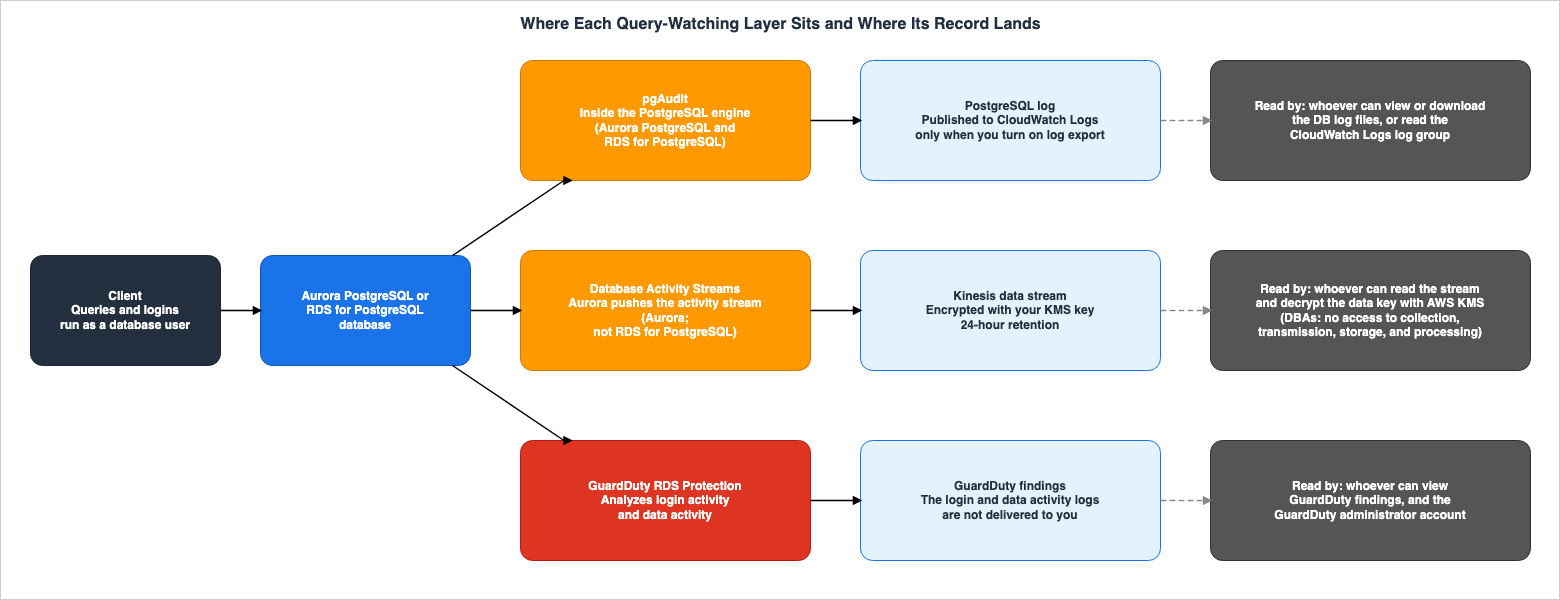
This chapter lines up the three layers, one row each, in the columns from Section 2.1. The supporting sentences are shown layer by layer in Sections 4 through 6.Figure 1 shows where each of the three layers watches queries and logins, where records are delivered, and who can access them.
| Layer | Checked or Seen By | Acting Identity | Lands In | Who Can Read It |
|---|---|---|---|---|
| pgAudit | The PostgreSQL engine (pgAudit) | The database user | PostgreSQL log (CloudWatch Logs when exported) | Individuals who can view or download log files in the RDS console, AWS CLI, or RDS API, as well as those who can access the CloudWatch Logs log group to which the logs are published. The pgAudit page does not define separate permissions for who can read pgAudit records. |
| Database Activity Streams | Aurora (activity stream) | The database user | Kinesis data stream (encrypted with your KMS key) | Individuals who can read the Kinesis data stream (as demonstrated by AWS SDK examples) and decrypt the data key with AWS KMS. The Aurora User Guide notes that DBAs do not have access to collect, transmit, store, or process the stream. |
| GuardDuty RDS Protection | GuardDuty | The database user | GuardDuty findings. Login activity and data activity logs used for analysis are Not delivered to you. | Individuals with permission to view GuardDuty findings, and the GuardDuty administrator account. |
The following table outlines what users configure for these three layers and what each layer does not see.
| Layer | What You Configure | What It Does Not See | Where the Source Says So |
|---|---|---|---|
| pgAudit | Add pgaudit to the custom parameter group's shared_preload_libraries, restart, execute CREATE EXTENSION pgaudit;, and configure pgaudit.log. For object auditing, also set up the database role rds_pgaudit and pgaudit.role. Publishing to CloudWatch Logs must be enabled separately. | Plain text passwords are masked from the logs. The pgAudit README notes that audit logs are best-effort and not transactional, that Autovacuum and Autoanalyze are not recorded, and that superusers cannot be reliably audited. | Aurora and RDS User Guide: "Using pgAudit to log database activity," "Setting up the pgAudit extension," "Auditing database objects," pgAudit README: "Caveats." |
| Database Activity Streams | Initiated at the DB cluster level. Select an AWS KMS key and choose between asynchronous and synchronous mode. Immediate activation will cause the DB cluster to restart. | Aurora masks database user passwords when it can determine them from the context. In both asynchronous and synchronous mode, RDS events will notify of potential periods where data may have been lost. | Aurora User Guide: "Monitoring Amazon Aurora with Database Activity Streams," "Starting a database activity stream," "Monitoring database activity streams." |
| GuardDuty RDS Protection | Enable the GuardDuty feature RDS_LOGIN_EVENTS. Data activity monitoring is enabled under the AdditionalConfiguration section with RDS_DATA_RISK. | Login activity and data activity logs used for analysis are not provided to users. There is a learning period of up to two weeks for newly created databases and immediately after enabling the feature. | GuardDuty User Guide: "GuardDuty RDS Protection" and "Enabling RDS Protection for a standalone account." |
Of the three layers, only pgAudit and Database Activity Streams provide users with access to the content of the records. GuardDuty provides users with findings, but not the login and data activity logs used for analysis.
4. pgAudit — Inside the PostgreSQL Engine, into the PostgreSQL Log
This chapter explains what pgAudit records, what users can configure, where the records are delivered, and what it does not record.4.1 What pgAudit Adds to the PostgreSQL Log
pgAudit is an extension for PostgreSQL. The Aurora and RDS User Guides describe pgAudit as follows:The pgAudit extension builds on the functionality of the native PostgreSQL logging infrastructure by extending the log messages with more detail.On the same page, it continues:
In other words, you use the same approach to view your audit log as you do to view any log messages.pgAudit records go into the PostgreSQL log. The pgAudit README file also states, at the beginning:
The PostgreSQL Audit Extension (pgAudit) provides detailed session and/or object audit logging via the standard PostgreSQL logging facility.pgAudit supports two types of logging: session auditing and object auditing. The pgAudit README file describes these two types as follows:
Session audit logging provides detailed logs of all statements executed by a user in the backend.Object audit logging logs statements that affect a particular relation. Only `SELECT`, `INSERT`, `UPDATE` and `DELETE` commands are supported. `TRUNCATE` is not included in object audit logging.The types of statements logged by session auditing are selected using the
pgaudit.log parameter. The following table lists the values for pgaudit.log as described in the Aurora and RDS User Guides:| Aspect | What the Source Says | Where the Source Says So |
|---|---|---|
none | Default value. Does not log database changes. | Setting up the pgAudit extension, Reference for the pgAudit extension |
all | Logs everything (read, write, function, role, ddl, misc). | Same as above |
ddl | Logs all Data Definition Language (DDL) statements, excluding those related to the ROLE class. | Same as above |
function | Logs function calls and DO blocks. | Same as above |
misc | Logs other commands such as DISCARD, FETCH, CHECKPOINT, VACUUM, and SET. | Same as above |
read | Logs SELECT and COPY statements when the source is a relation or query. | Same as above |
role | Logs statements related to roles and permissions, such as GRANT, REVOKE, CREATE ROLE, ALTER ROLE, and DROP ROLE. | Same as above |
write | Logs INSERT, UPDATE, DELETE, TRUNCATE, and COPY statements when the target is a relation. | Same as above |
The default value is
none. The user guide describes none as a value that does not log database changes.Object auditing determines which operations on which relations are logged, based on the permissions of the database role. In Aurora and RDS, that database role is fixed as
rds_pgaudit. The "Auditing database objects" section in the Aurora and RDS User Guides states:By default, the pgaudit.role parameter is unset and the only allowable value is rds_pgaudit.Users must create the database role
rds_pgaudit and configure the pgaudit.role parameter to rds_pgaudit. Subsequently, they must grant the rds_pgaudit role the necessary permissions to log the operations on the tables they wish to monitor. The user guide provides an example: after executing GRANT SELECT ON t1 TO rds_pgaudit;, the example then runs SELECT * FROM t1;, demonstrating that a log entry beginning with AUDIT: and followed by OBJECT will be written to the PostgreSQL logs. The pgAudit README specifies the conditions for logging as follows:A relation (`TABLE`, `VIEW`, etc.) will be audit logged when the audit role has permissions for the command executed or inherits the permissions from another role.4.2 What You Configure
The following table lists the items users need to configure to use pgAudit.| Aspect | What the Source Says | Where the Source Says So |
|---|---|---|
| Parameter Group | Add pgaudit to the custom parameter group's shared_preload_libraries. For Aurora, this is a custom DB cluster parameter group; for RDS, it is a custom DB parameter group. | Setting up the pgAudit extension (Aurora and RDS) |
| Restart | Restart to apply the changes to shared_preload_libraries. For Aurora, restart the DB cluster's writer instance; for RDS, restart the DB instance. | Same as above |
| Extension Creation | After loading the library, execute CREATE EXTENSION pgaudit;. This is because the pgAudit extension installs event triggers to audit DDL statements. | Same as above |
| Required Permissions | These operations require the database role rds_superuser. | Same as above |
| Logged Statement Types | Configure pgaudit.log. The default is none. | Setting up the pgAudit extension, Reference for the pgAudit extension |
| Object Auditing | Create the database role rds_pgaudit, set pgaudit.role to rds_pgaudit, and then restart. | Auditing database objects |
| Argument Logging | Enabling pgaudit.log_parameter will log the arguments passed to statements. The pgAudit README indicates the default is off. | Reference for the pgAudit extension, pgAudit README |
| Supported Versions | The Aurora User Guide states that pgAudit is supported on all available versions of Aurora PostgreSQL. The RDS User Guide makes the same claim regarding RDS for PostgreSQL. | Using pgAudit to log database activity (Aurora and RDS) |
The pgAudit configuration can also be modified in the database itself. The Aurora User Guide, on the page titled "Excluding users or databases from audit logging," provides an example of how to exclude specific users or databases from audit logging, using the command
ALTER USER myuser SET pgaudit.log TO 'NONE';. The same page adds this note:Parameter settings at the session level take precedence over the settings in the custom DB cluster parameter group for the Aurora PostgreSQL DB cluster's writer instance. If you don't want database users to bypass your audit logging configuration settings, be sure to change their permissions.The RDS User Guide, on a page with the same title, also includes a similar note regarding custom DB parameter groups for RDS for PostgreSQL DB instances. What pgAudit records can be changed not only by those who modify parameter groups but also by database users who can change settings in the database itself. AWS recommends modifying the permissions of database users if you do not want this behavior.
4.3 Where the Records Land and Who Can Read Them
pgAudit records are written to the PostgreSQL logs. The Aurora User Guide, on the "Monitoring Amazon Aurora log files" page, states that you can access the database logs using the AWS Management Console, AWS CLI, and Amazon RDS API. You can list log files using the RDS API'sDescribeDBLogFiles action and download them using DownloadDBLogFilePortion.To deliver PostgreSQL logs to CloudWatch Logs, users must enable publishing. In Aurora, you select PostgreSQL log in the DB cluster log export settings. The Aurora User Guide states that when using Aurora PostgreSQL, logs published to CloudWatch Logs are as follows:
For Aurora PostgreSQL, the PostgreSQL log (postgresql.log) is the only log that gets published to Amazon CloudWatch.The RDS User Guide states the following regarding RDS for PostgreSQL:
All currently available RDS for PostgreSQL versions support publishing log files to CloudWatch Logs.The pgAudit page does not specify a separate group of users who can read only pgAudit records. As mentioned in Section 4.1, the user guide states that audit logs can be viewed in the same way as other log messages. This article describes the individuals who can read pgAudit records as those who can view or download the database log files, and those who can access the log group in CloudWatch Logs where the records are published.
4.4 What pgAudit Does Not Log
The Aurora and RDS User Guides state that pgAudit omits certain information from its logs.The pgAudit extension redacts sensitive data such as cleartext passwords from the logs.The "Caveats" section of the pgAudit README outlines the limitations of pgAudit's logging. The following three sentences appear in the README files for four branches:
main, REL_16_STABLE, REL_17_STABLE, and REL_18_STABLE.Audit logging is best-effort and not transactional.Autovacuum and Autoanalyze are not logged.It is not possible to reliably audit superusers with pgAudit.After the first of these sentences, the README notes that there is no guarantee that a log entry will exist for every committed transaction. Conversely, it states that entries may sometimes be recorded for transactions that were subsequently rolled back. These statements are found in the README files for the pgAudit project, and not in the AWS user guide. No statement of these limitations was found on the pgAudit pages of the Aurora and RDS User Guides (Section 8.3).
5. Database Activity Streams — From Aurora to a Kinesis Data Stream Encrypted with Your KMS Key
This chapter outlines what Database Activity Streams send, where records are delivered, who can read them, what users can configure, and where it cannot be used. This chapter covers Database Activity Streams in Aurora. Database Activity Streams for RDS are specific to RDS for Oracle and RDS for SQL Server (see Section 5.6).5.1 Architecture — The DB Cluster Level, Kinesis, and AWS KMS
In Aurora, Database Activity Streams are initiated on a per-DB cluster basis. The Aurora User Guide states:In Amazon Aurora, you start a database activity stream at the cluster level. All DB instances within your cluster have database activity streams enabled.The destination for the activity stream is a Kinesis data stream created by Aurora. The following table outlines the requirements, as described in the Aurora User Guide, and how Kinesis data streams are handled:
| Aspect | What the Source Says | Where the Source Says So |
|---|---|---|
| Kinesis | Amazon Kinesis is required for Database Activity Streams. Aurora automatically creates a Kinesis data stream. | Monitoring Amazon Aurora with Database Activity Streams |
| AWS KMS | Because activity streams are always encrypted, AWS KMS is required. | Same as above |
| Kinesis Encryption | Adding additional encryption to the Kinesis data stream is not compatible with Database Activity Streams. The activity stream is already encrypted using the user's AWS KMS key. | Same as above |
| Retention Period | Aurora creates Kinesis data streams with a 24-hour retention period. Aurora scales the Kinesis data stream if necessary. | Monitoring database activity streams |
| Stopping and Deletion | When you stop the activity stream or delete the DB cluster, Aurora deletes the corresponding Kinesis data stream. | Same as above |
| Adding DB Instances | Adding DB instances to the cluster does not require you to start an activity stream on those instances. Auditing is performed automatically. | Monitoring Amazon Aurora with Database Activity Streams |
| Aurora Global Database | Activity streams are started separately for each DB cluster. Each DB cluster sends audit records to its own Kinesis data stream within its respective AWS Region. | Same as above |
The Kinesis data stream that Aurora creates has a retention period of 24 hours. Whether data is stored for a longer duration depends on what services are connected to Kinesis. The Aurora User Guide states that you can configure services like Amazon Data Firehose and AWS Lambda to consume the stream and store the data.
5.2 Asynchronous and Synchronous Modes
Database Activity Streams offers two modes of operation: asynchronous and synchronous. The Aurora User Guide describes these two modes as follows:Asynchronous mode favors database performance over the accuracy of the activity stream.The synchronous mode favors the accuracy of the activity stream over database performance.In asynchronous mode, a database session returns to its normal processing immediately after an event is created in the activity stream. If an error occurs during background processing, an RDS event is sent. This event indicates the potential start and end times during which activity stream records may have been lost.
In synchronous mode, a database session pauses its other processing until the event is persisted. If, for any reason, the event cannot be persisted, the database session returns to its normal processing, and an RDS event is sent to indicate the potential loss of records.
Synchronous mode is only available for Aurora PostgreSQL. The Aurora User Guide states:
Synchronous mode is available for Aurora PostgreSQL. You can't use synchronous mode with Aurora MySQL.RDS Database Activity Streams are always asynchronous. The RDS User Guide states:
Activity streams in Amazon RDS are always asynchronous.5.3 What Flows into the Activity Stream
The Aurora User Guide's "Monitoring database activity streams" section describes the activities recorded in the activity stream audit logs, categorizing them into three areas: SQL commands, other database information, and connection information. Regarding SQL commands, the guide states that all SQL commands are audited. Concerning other database information, it states:Activity monitored includes the full SQL statement, the row count of affected rows from DML commands, accessed objects, and the unique database name.In Aurora PostgreSQL, bind variables and arguments to stored procedures are also included.
For Aurora PostgreSQL, database activity streams also monitor the bind variables and stored procedure parameters.The contents of the audit logs are an encrypted JSON array. The following table lists the items in the Aurora PostgreSQL audit logs that are relevant to this article:
| Aspect | What the Source Says | Where the Source Says So |
|---|---|---|
class | Classification of the activity event. In Aurora PostgreSQL, the possible values are ALL, CONNECT, DDL, FUNCTION, MISC, NONE, READ, ROLE, and WRITE. | databaseActivityEventList JSON array for database activity streams |
commandText | The actual SQL statement provided by the user. In Aurora PostgreSQL, this is the original SQL statement. It will be null for connection and disconnection records. | Same as above |
paramList | An array of arguments passed to the SQL statement. | Same as above |
dbUserName | The database user used by the client for authentication. | Same as above |
databaseName | The database to which the user connected. | Same as above |
remoteHost | The client's IP address or hostname. | Same as above |
rowCount | The number of rows affected or retrieved by the SQL statement. Used only for DML statements. | Same as above |
errorMessage | The error message, if an error occurred. This is only present in version 1.1 records. | Same as above |
The Aurora User Guide notes that the structure of the audit logs may change.
The event structure is subject to change.The values for the
class field in the audit logs and the values in pgaudit.log from pgAudit share similar names. This article does not state that the two are the same classification. No statement of how the two classifications relate was found (Section 8.3).5.4 Who Can Read the Records — A Design That Keeps DBAs Out of the Stream
The Aurora User Guide states that one of the purposes of Database Activity Streams is to control administrator access in relation to internal threats. It then continues:DBAs don't have access to the collection, transmission, storage, and processing of the streams.This statement says that DBAs have no access to the collection, transmission, storage, and processing of activity streams. It does not say what DBAs can do in the database.
The ability to start, stop, and configure activity streams is granted to individuals with IAM permissions. On the Aurora User Guide's page, "IAM policy examples for database activity streams," it states:
Any user with appropriate AWS Identity and Access Management (IAM) role privileges for database activity streams can create, start, stop, and modify the activity stream settings for a DB cluster. These actions are included in the audit log of the stream. For best compliance practices, we recommend that you don't provide these privileges to DBAs.The same page uses
rds:StartActivityStream and rds:StopActivityStream as examples within IAM policies that permit or deny the ability to start and stop activity streams.To read the activity stream audit logs, you must read the Kinesis data stream and decrypt the data. The Aurora User Guide's page, "Processing a database activity stream using the AWS SDK," provides an example that decrypts the data key contained within Kinesis records using the AWS KMS
Decrypt operation, and then uses that data key to decrypt the audit logs. The decryption request includes the DB cluster's resource ID as the encryption context under the aws:rds:dbc-id key.The activity stream audit logs contain the full text of SQL statements. The Aurora User Guide states:
The full SQL text of each statement is visible in the activity stream audit log, including any sensitive data. However, database user passwords are redacted if Aurora can determine them from the context, such as in the following SQL statement.The example following this statement demonstrates an
ALTER ROLE statement. Individuals who can read the audit logs can also read sensitive data contained in the SQL statements. The AWS SDK example demonstrates the process of reading records from the Kinesis data stream to read the audit logs, as well as decrypting the data key using AWS KMS.5.5 What You Configure and When Activity Streams Stop
The following table lists what users configure to use Database Activity Streams, and the circumstances under which an activity stream will stop.| Aspect | What the Source Says | Where the Source Says So |
|---|---|---|
| AWS KMS Key | Select an AWS KMS key at the start. Aurora uses this key to encrypt the key that encrypts database activity. Choose a key other than the default key. | Starting a database activity stream |
| Mode | Choose between asynchronous and synchronous. This option applies only to Aurora PostgreSQL; Aurora MySQL only supports asynchronous mode. | Same as above |
| Start Time | If you choose Immediately, the DB cluster restarts right away. If you choose During the next maintenance window, the activity stream does not start until then. | Same as above |
| DB Instance Class | For Aurora PostgreSQL, the following classes are supported: db.r8g.*large, db.r7i.*large, db.r7g.*large, db.r6g.*large, db.r6i.*large, db.r6id.*large, db.r5.*large, db.r4.*large, and db.x2g.*. | Monitoring Amazon Aurora with Database Activity Streams |
| Major Version Upgrade | For Aurora PostgreSQL, stop the activity stream before a major version upgrade. You can restart it after the upgrade is complete. | Same as above |
| Engine Version | The supported engine versions are listed in a large table, organized by AWS region. Aurora PostgreSQL has a minimum patch version required to start an activity stream. | Supported Regions and Aurora DB engines for database activity streams, Starting a database activity stream |
The table of supported versions is a comprehensive listing, detailing versions for each combination of AWS region and major version. This article does not reproduce that table. To confirm the supported AWS region and engine version combinations, refer to the page Supported Regions and Aurora DB engines for database activity streams.
5.6 Places Where Database Activity Streams Cannot Be Used
The following table, as stated in the documentation, lists the engines and deployments for which Database Activity Streams are not supported.| Aspect | What the Source Says | Where the Source Says So |
|---|---|---|
| RDS for PostgreSQL | According to the documentation, Database Activity Streams are not supported with RDS for Db2, RDS for MariaDB, RDS for MySQL, or RDS for PostgreSQL. In RDS, Database Activity Streams can be used with Oracle and SQL Server. | Supported Regions and DB engines for database activity streams in Amazon RDS |
| Aurora serverless | Among the features of Aurora provisioned DB instances, Database Activity Streams is currently not available for Aurora serverless. | Requirements and limitations for Aurora serverless |
| Aurora serverless and Babelfish | The Aurora supported-versions page indicates that Database Activity Streams is not supported with Aurora serverless or Babelfish for Aurora PostgreSQL. | Supported Regions and Aurora DB engines for database activity streams |
| Aurora PostgreSQL Limitless Database | The list of unsupported features for Aurora PostgreSQL Limitless Database includes Database Activity Streams. | Aurora PostgreSQL Limitless Database requirements and considerations |
The requirements page for Aurora serverless states:
The following features from Aurora provisioned DB instances currently aren't available for Amazon Aurora serverless:The first item listed after this statement is Database Activity Streams (DAS).
6. GuardDuty RDS Protection — Login Activity and Data Activity
This chapter describes the two functions of GuardDuty RDS Protection, outlining what they analyze, what users can enable, what is included in the findings, and what is not handed to users.6.1 Two Features and Where to Enable Them
GuardDuty RDS Protection has two features: monitoring login activity and monitoring data activity. The GuardDuty User Guide, on the GuardDuty RDS Protection page, describes these two features as follows:RDS Protection for login activity analyzes login events for potential access threats to Amazon Aurora (Amazon Aurora MySQL-Compatible Edition and Aurora PostgreSQL-Compatible Edition), RDS for PostgreSQL, Amazon RDS for MySQL, and Amazon RDS for MariaDB databases.RDS Protection for data activity analyzes database query patterns on Amazon Aurora for PostgreSQL and RDS for PostgreSQL databases to detect potential data access and manipulation threats.In the GuardDuty API, data activity monitoring is presented as an additional setting under the feature for monitoring login activity. The "Enabling RDS Protection for a Standalone Account" page states that when using the
UpdateDetector API, you should enable the feature by specifying RDS_LOGIN_EVENTS as the feature name, and if you also want to enable data activity monitoring, you should enable it by specifying RDS_DATA_RISK as the name in the AdditionalConfiguration section. The AWS CLI example on the same page shows RDS_DATA_RISK being included in the AdditionalConfiguration for RDS_LOGIN_EVENTS.aws guardduty update-detector \
--detector-id 12abc34d567e8fa901bc2d34e56789f0 \
--region us-east-1 \
--features '[
{
"Name": "RDS_LOGIN_EVENTS",
"Status": "ENABLED",
"AdditionalConfiguration": [
{
"Name": "RDS_DATA_RISK",
"Status": "ENABLED"
}
]
}
]'The
DetectorAdditionalConfiguration data type in the GuardDuty API reference includes RDS_DATA_RISK as a valid value for the name field. The "Enabling RDS Protection in Multiple-Account Environments" page notes that the order in the console is as follows:RDS Login Activity Monitoring must be enabled before you can enable RDS Data Activity Monitoring.The following table lists where to enable GuardDuty RDS Protection and the behavior after it is enabled.
| Aspect | What the Source Says | Where the Source Says So |
|---|---|---|
| Standalone account | You can enable or disable RDS Protection for your own account, on a per-AWS Region basis. | Enabling RDS Protection for a standalone account |
| Multiple accounts | In environments with multiple accounts, only the delegated GuardDuty administrator account can enable RDS Protection and data activity monitoring for member accounts. Member accounts cannot modify this setting from their own account. | Enabling RDS Protection in multiple-account environments |
| Accounts that newly join the organization | The delegated GuardDuty administrator account can choose to automatically enable login activity monitoring and data activity monitoring for accounts newly joining the organization. | Same as above |
| Accounts that newly use GuardDuty | The GuardDuty FAQ states that for new accounts, whether enabled through the console or API, RDS Protection is enabled by default. The same FAQ also states that for new GuardDuty accounts created through AWS Organizations' automatic enablement feature, RDS Protection is not enabled unless the auto-enable option for RDS is turned on. The user guide indicates that when you first enable GuardDuty in an account within an AWS Region, login activity monitoring and data activity monitoring begin monitoring database activity. | GuardDuty FAQ, GuardDuty RDS Protection |
| Additional infrastructure | RDS Protection does not require any additional infrastructure and is designed to avoid impacting the performance of your database instances. | GuardDuty RDS Protection |
| Ingesting login activity | When you enable RDS Protection, GuardDuty automatically begins monitoring login activity directly from Aurora and RDS services. | RDS login activity in GuardDuty RDS Protection |
| When disabled | When disabled, GuardDuty immediately stops monitoring RDS activity, and will not detect potential threats or generate findings. | GuardDuty RDS Protection |
The GuardDuty User Guide also describes how to enable GuardDuty and protection plans across an entire organization using AWS Organizations' declarative policies. The user guide clarifies that this is a separate mechanism from automatic enablement settings. This article does not cover organization policies.
The row regarding the ingestion of login activity refers to a statement from the RDS login activity section of the user guide. Regarding the monitoring of data activity, the RDS data activity section of the user guide states that enabling data activity monitoring allows GuardDuty to analyze patterns of database activity. The pathways for ingesting data activity are not described in that section.
The "What's New" announcement describes data activity monitoring as an additional feature of login activity monitoring, noting that it does not require agents, additional infrastructure, or changes to database configurations. This is a statement from the announcement. The user guide's own sentence is the one in the additional infrastructure row of the table.
6.2 Supported Engines and Versions — Separate Columns for Login Activity and Data Activity
The supported-versions table in the GuardDuty User Guide has separate columns for login activity monitoring and data activity monitoring. The column names are:Login activity monitoring supported engine versionsData activity monitoring supported engine versionsThe following table lists the supported engines and versions for login activity monitoring.
| Aspect | What the Source Says | Where the Source Says So |
|---|---|---|
| Aurora MySQL | Version 2.10.2 and later, version 3.02.1 and later, and subsequent major versions | GuardDuty RDS Protection – Supported Amazon Aurora, Amazon RDS, and Aurora Limitless databases |
| Aurora PostgreSQL | Version 10.23 and later, version 11.12 and later, version 12.7 and later, version 13.3 and later, version 14.3 and later, version 15.2 and later, version 16.1 and later, and subsequent major versions | Same as above |
| RDS for PostgreSQL | Version 11.17 and later, version 12.12 and later, version 13.8 and later, version 14.5 and later, version 15, version 16, version 17, version 18, and subsequent major versions | Same as above |
| Aurora PostgreSQL Limitless Database | Version 16.4-limitless and later, and subsequent major versions | Same as above |
| RDS for MariaDB | Version 10.6.25 and later, version 10.11.16 and later, version 11.4.10 and later, version 11.8.6 and later, and subsequent major versions | Same as above |
| RDS for MySQL | Version 8.0.45 and later, version 8.4.8 and later, and subsequent major versions | Same as above |
The following table lists the supported engines and versions for data activity monitoring.
| Aspect | What the Source Says | Where the Source Says So |
|---|---|---|
| Aurora MySQL | Not supported | GuardDuty RDS Protection – Supported Amazon Aurora, Amazon RDS, and Aurora Limitless databases |
| Aurora PostgreSQL | Versions 11.19 and later, 12.14 and later, 13.10 and later, 14.7 and later, 15.2 and later, and subsequent major versions. | Same as above |
| RDS for PostgreSQL | Versions 11.20 and later, 12.15 and later, 13.11 and later, 14.8 and later, 15.3 and later, and subsequent major versions. | Same as above |
| Aurora PostgreSQL Limitless Database | Not supported | Same as above |
| RDS for MariaDB | Not supported | Same as above |
| RDS for MySQL | Not supported | Same as above |
Even within Aurora PostgreSQL, the minimum supported version differs between login activity monitoring and data activity monitoring. For example, with Aurora PostgreSQL 11, login activity monitoring requires version 11.12 or later, while data activity monitoring requires version 11.19 or later. The GuardDuty User Guide notes that for RDS for PostgreSQL read replicas, the primary DB instance must be running a supported version and replication from the primary must be successful.
6.3 Learning Period and Finding Types
Both login activity monitoring and data activity monitoring have a learning period. The GuardDuty User Guide states that for login activity, newly enabled databases or newly created database instances may not produce login anomaly findings for up to two weeks. Regarding data activity, it states:When you enable RDS Protection for data activity for the first time, or when you create a new database instance, there is a learning period of up to two weeks to establish a baseline of normal behavior.As of October 14, 2026, GuardDuty RDS Protection has 16 finding types. The resource types for these findings are either
RDSDBInstance or RDSLimitlessDB. The following table lists the 9 finding types for login activity monitoring. The Feature column lists the name of the feature described for each type.| Finding Type | Feature | What the Source Names as the Basis |
|---|---|---|
CredentialAccess:RDS/AnomalousBehavior.SuccessfulLogin | RDS login activity monitoring | Machine learning (ML) model for anomaly detection. |
CredentialAccess:RDS/AnomalousBehavior.FailedLogin | RDS login activity monitoring | ML model for anomaly detection. |
CredentialAccess:RDS/AnomalousBehavior.SuccessfulBruteForce | RDS login activity monitoring | ML model for anomaly detection. |
CredentialAccess:RDS/MaliciousIPCaller.SuccessfulLogin | RDS login activity monitoring | IP addresses associated with known malicious activity. |
CredentialAccess:RDS/MaliciousIPCaller.FailedLogin | RDS login activity monitoring | IP addresses associated with known malicious activity. |
Discovery:RDS/MaliciousIPCaller | RDS login activity monitoring | IP addresses associated with known malicious activity. |
CredentialAccess:RDS/TorIPCaller.SuccessfulLogin | RDS login activity monitoring | IP addresses of Tor exit nodes. |
CredentialAccess:RDS/TorIPCaller.FailedLogin | RDS login activity monitoring | IP addresses of Tor exit nodes. |
Discovery:RDS/TorIPCaller | RDS login activity monitoring | IP addresses of Tor exit nodes. |
The following table lists seven finding types for data activity monitoring.
| Finding Type | Feature | What the Source Names as the Basis |
|---|---|---|
Exfiltration:RDS/AnomalousBehavior | RDS DB Activity Monitoring | ML model for anomaly detection. |
Impact:RDS/AnomalousBehavior.Drop | RDS DB Activity Monitoring | ML model for anomaly detection. |
Impact:RDS/AnomalousBehavior.Delete | RDS DB Activity Monitoring | ML model for anomaly detection. |
Exfiltration:RDS/MaliciousIPCaller | RDS DB Activity Monitoring | IP addresses associated with known malicious activity. |
Exfiltration:RDS/TorIPCaller | RDS DB Activity Monitoring | IP addresses of Tor exit nodes. |
Impact:RDS/MaliciousIPCaller | RDS DB Activity Monitoring | IP addresses associated with known malicious activity. |
Impact:RDS/TorIPCaller | RDS DB Activity Monitoring | IP addresses of Tor exit nodes. |
The elements tracked by the machine learning model are described in separate sentences for each type of finding. This article does not combine them into a single description. For the three ML-based login activity types, one shared sentence gives the user who made the request, the location of the request, and details about the database connection as examples (
such as) of the elements the ML model tracks. For the three ML-based data activity types, the examples are as follows:The description for
Exfiltration:RDS/AnomalousBehavior is as follows:the user that made the request, the queries executed, the volume of data accessed, and the specific database connection details that were usedThe description for
Impact:RDS/AnomalousBehavior.Drop is as follows:the user that made the request, the statements executed, the database objects targeted, and the specific database connection details that were usedThe description for
Impact:RDS/AnomalousBehavior.Delete is as follows:the user that made the request, the statements executed, the number of rows affected, and the specific database connection details that were used6.4 What GuardDuty Provides to Users, and What It Does Not
GuardDuty provides users with findings. The GuardDuty User Guide states that findings related to data activity may, depending on the type of result, include details such as anomalies based on that data activity. Similar wording exists regarding findings for login activity.GuardDuty does not provide users with the login activity and data activity logs used for analysis. The GuardDuty User Guide includes the following statements in the login activity and data activity sections:
GuardDuty doesn't make RDS login activity logs available to you.GuardDuty doesn't make RDS data activity logs available to you.Those who can read findings are those with permission to view GuardDuty findings. The GuardDuty User Guide notes that the AWS managed policy
AmazonGuardDutyReadOnlyAccess provides read-only permissions to display GuardDuty findings. In multi-account environments, the GuardDuty administrator account can view all generated findings. The design for collecting findings across an entire organization, and the design for triggering actions based on findings using Amazon EventBridge, are covered in Sections 4 and 7 of the previously published Centralized Logging and Audit Architecture on AWS.7. Which Layer Covers Which Engine and Deployment
This chapter puts what the three layers cover, by engine and deployment, in one view.Figure 2 shows the coverage values in the four columns for Aurora PostgreSQL provisioned and Aurora serverless, Aurora MySQL, and RDS for PostgreSQL. Version numbers are not included in the figure; they are shown in the tables in Sections 5.5 and 6.2.
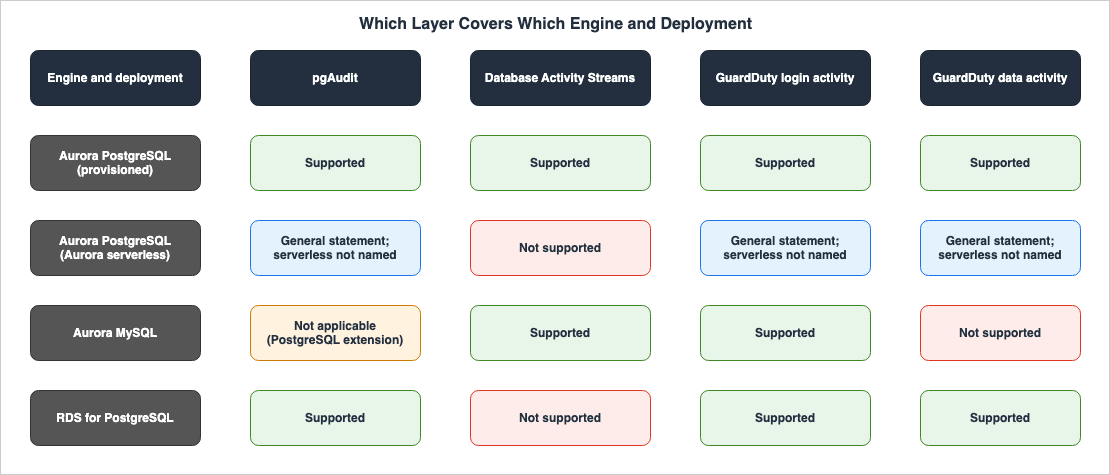
| Engine and Deployment | pgAudit | Database Activity Streams | GuardDuty Login Activity | GuardDuty Data Activity |
|---|---|---|---|---|
| Aurora PostgreSQL (provisioned) | Supported | Supported | Supported | Supported |
| Aurora PostgreSQL (Aurora serverless) | General statement; serverless not named | Not supported | General statement; serverless not named | General statement; serverless not named |
| Aurora PostgreSQL Limitless Database | Not listed among supported extensions | Not supported | Supported | The sources disagree |
| Aurora MySQL | Not applicable (PostgreSQL extension) | Supported | Supported | Not supported |
| RDS for PostgreSQL | Supported | Not supported | Supported | Supported |
| RDS for MySQL and RDS for MariaDB | Not applicable (PostgreSQL extension) | Not supported | Supported | Not supported |
The rationale for each cell is as follows.
- pgAudit Column: The Aurora and RDS User Guides state that pgAudit is supported on all available versions of Aurora PostgreSQL and RDS for PostgreSQL. However, they do not specifically mention Aurora serverless. The "Requirements and Considerations" page for Aurora PostgreSQL Limitless Database states that it does not support all PostgreSQL extensions, and provides a link to the "Extensions" section. The "Extensions" section of the linked page, "DDL limitations and other information for Aurora PostgreSQL Limitless Database," lists the PostgreSQL extensions supported by Limitless Database, and pgAudit is not included in that list. The same section also notes that most PostgreSQL extensions are currently not supported on Limitless Database.
- Database Activity Streams Column: As in the table in Section 5.6. Aurora MySQL can use only asynchronous mode (Section 5.2).
- GuardDuty Columns: As shown in the table in Section 6.2, GuardDuty's supported-versions table is organized by engine version and does not specifically mention Aurora serverless. The GuardDuty FAQ mentions "Aurora Serverless v2" once (Section 8.3). The disagreement over data activity for Limitless Database is item 3 in Section 8.1.
8. Where the Sources Disagree and Where No Statement Was Found
This chapter collects where the sources disagree and the statements that were not found, as touched on in Sections 1 through 7. This article does not claim that either source contains errors. All verification dates are October 14, 2026.8.1 Where the Sources Disagree
The following table lists where the sources disagree.| # | Topic | One Source Says | Another Source Says | Section |
|---|---|---|---|---|
| 1 | What GuardDuty RDS Protection Analyzes | The GuardDuty User Guide, on the page describing GuardDuty RDS Protection, states that it analyzes login activity and data activity. | Other sources – the GuardDuty User Guide's protection plan table, the Security Hub User Guide's GuardDuty control (GuardDuty.9), and the Aurora and RDS User Guides' pages on GuardDuty RDS Protection, as well as the GuardDuty FAQ's list of foundational data sources – mention only login activity or login events. | 6.1 |
| 2 | Engines Covered by GuardDuty RDS Protection | The introductory sentence on the GuardDuty RDS Protection page states that it covers Amazon Aurora and RDS for PostgreSQL databases. | The same page, in the sentence on login activity and the supported-versions table, also lists RDS for MySQL and RDS for MariaDB. | 6.1, 6.2 |
| 3 | Data Activity Monitoring for Aurora PostgreSQL Limitless Database | The supported-versions table lists data activity monitoring for Limitless Database as not supported. | The descriptions of the data activity finding types on the finding types page include Aurora Limitless databases in the range of database activity events that the ML model evaluates. | 6.2, 6.3 |
| 4 | Scope of the Finding Types Page | The introductory sentence on the finding types page states that GuardDuty RDS Protection detects anomalous login behavior. | The same page also lists seven finding types related to data activity monitoring. | 6.3 |
The text on the GuardDuty RDS Protection page reads as follows:
RDS Protection in Amazon GuardDuty analyzes and profiles RDS login and data activity for potential threats to your Amazon Aurora and RDS for PostgreSQL databases.The GuardDuty User Guide's protection plan table, on the page describing "What is Amazon GuardDuty?", describes RDS Protection as follows:
Analyzes and profiles your RDS login activity for potential access threats to the supported Amazon Aurora and Amazon RDS databases.The Security Hub User Guide's control GuardDuty.9 states the following:
RDS Protection in GuardDuty analyzes and profiles RDS login activity for potential access threats to your Amazon Aurora databases (Aurora MySQL-Compatible Edition and Aurora PostgreSQL-Compatible Edition).The Aurora User Guide's GuardDuty RDS Protection page states the following. The RDS User Guide also has a page with the same name, containing similar wording that substitutes "Amazon Aurora" with "Amazon RDS."
GuardDuty RDS Protection analyzes and profiles login events for potential access threats to your Amazon Aurora databases.The GuardDuty FAQ lists the underlying data sources and protection plans that GuardDuty analyzes. In this section, the target of RDS Protection is described as
Amazon Aurora login events (RDS Protection). The RDS Protection section of the same FAQ details two functions: monitoring login activity and monitoring data activity.Data activity monitoring was added on October 8, 2026. The documentation does not indicate whether materials that only mention login activity were written before the addition of data activity monitoring. This article does not state whether either description is outdated or inaccurate.
Item 3's sentence from the finding type descriptions is as follows:
The ML model evaluates all database activity events in your Supported Amazon Aurora, Amazon RDS, and Aurora Limitless databases and identifies anomalous events that are associated with techniques used by adversaries.8.2 Names of Data Activity Monitoring in the Sources
The name used to refer to data activity monitoring varies depending on the documentation. This article writes data activity monitoring. The following table lists the different names used in various documents. This article reads these as different ways of referring to the same functionality, not as inconsistencies.| Where | Name in the Source |
|---|---|
| GuardDuty User Guide (main text, What's New, FAQ) | RDS Protection for data activity |
| GuardDuty User Guide (column of the supported-versions table) | Data activity monitoring |
| GuardDuty Console (on the "Enabling RDS Protection in multiple-account environments" page) | RDS Data Activity Monitoring |
| Feature in the finding type descriptions | RDS DB Activity Monitoring |
Name in GuardDuty API's AdditionalConfiguration | RDS_DATA_RISK |
The API name for login activity monitoring is
RDS_LOGIN_EVENTS, and the Feature in the finding type descriptions is RDS login activity monitoring.8.3 Where No Statement Was Found
The following table lists statements that were looked for on October 14, 2026, and not found, along with the locations and terms searched for. The inability to find a description does not necessarily mean that the behavior it describes does not exist.| What Was Looked For | Where and How It Was Looked For | Result |
|---|---|---|
| Does GuardDuty RDS Protection cover Aurora serverless? | Searched the GuardDuty User Guide (RDS Protection sections), API reference, What's New, Security Hub User Guide, GuardDuty RDS Protection sections in the Aurora and RDS User Guides, and GuardDuty FAQs, using the terms serverless and ACU. | For data activity monitoring, no statement was found. The supported-versions table is written by engine version and does not name a deployment (Section 7). The term Aurora Serverless v2 appears once in the GuardDuty FAQ, in a sentence about the units in which GuardDuty usage is metered; this article does not quote it. |
| Does GuardDuty analyze the body of queries? | Searched the GuardDuty User Guide (RDS Protection sections) and FAQs, using the terms query, statement, and SQL. | No statement was found. The documentation states that data activity monitoring involves analyzing query patterns and that the ML model tracks elements that are stated for each finding type (Section 6.3). This article does not say either that GuardDuty sees the body of queries or that it does not. |
| What is the relationship between Database Activity Streams and pgAudit (are they prerequisites for each other, or are there any usage considerations when using them together)? | Searched the Aurora User Guide (Database Activity Streams sections) using the term pgaudit, and searched the pgAudit sections using the term activity stream. | No statement was found. |
| Whether the user sets up anything in IAM for GuardDuty to receive RDS login activity and data activity | Searched the GuardDuty User Guide (RDS Protection sections) and the pages describing permissions for service-linked roles, using the terms rds and permission. Also read the section on RDS Protection in the GuardDuty FAQ. | No statement was found in the user guide. The user guide states that RDS Protection does not require any additional infrastructure and that login activity is directly ingested from Aurora and RDS services (Section 6.1). The GuardDuty FAQ states that RDS Protection can be enabled with a single action within the GuardDuty console, and that it does not require manual agent deployment, data source activation, or permission configuration. |
| Do the Aurora and RDS User Guides address the limitations described in the pgAudit README's "Caveats" section (best-effort, transactions, Autovacuum, superuser)? | Searched the Aurora and RDS User Guides (pgAudit sections) using the terms superuser (excluding rds_superuser), transaction, autovacuum, and best-effort. | No statement was found (Section 4.4). |
| What is the relationship between GuardDuty RDS Protection and IAM database authentication? | Searched the GuardDuty User Guide (RDS Protection sections), FAQs, and the GuardDuty RDS Protection sections in the Aurora and RDS User Guides, using the terms IAM database authentication and IAM DB auth. | No statement was found (Q7 in Section 9). |
What is the relationship between the class in Database Activity Streams audit logs and the pgaudit.log class in pgAudit? | Searched the Aurora User Guide (databaseActivityEventList page) and the pgAudit sections, using the terms pgaudit and class. | No statement was found (Section 5.3). |
8.4 What Changes When the Sources Are Updated
The following statements in this article change when the sources are updated. Reread these pages when you read this article:- The supported-versions table in the GuardDuty User Guide (Section 6.2 – versions are added).
- The GuardDuty User Guide's table of protection plans, the Security Hub control GuardDuty.9, the GuardDuty RDS Protection page in the Aurora and RDS User Guides, and the GuardDuty FAQ (item 1 in Section 8.1 – currently only lists login activity).
- The page detailing the types of findings in GuardDuty RDS Protection (Section 6.3 – lists the number of types and their descriptions).
- The supported-versions table of Database Activity Streams and the list of instance classes (Section 5.5).
- The list of supported extensions for Aurora PostgreSQL Limitless Database (Section 7).
9. Frequently Asked Questions about Watching Queries in Aurora PostgreSQL and RDS for PostgreSQL
Q1. Can Database Activity Streams record queries for RDS for PostgreSQL?
According to the documentation, the answer is no. The RDS User Guide states that Database Activity Streams are not supported for RDS for PostgreSQL. In RDS, Database Activity Streams are available only for RDS for Oracle and RDS for SQL Server. For RDS for PostgreSQL, the layers the documentation names are pgAudit and GuardDuty RDS Protection (Sections 5.6 and 7).Q2. Does enabling GuardDuty RDS Protection provide query logs?
No, it does not. The GuardDuty User Guide states that GuardDuty does not provide users with logs of login activity or data activity. Users only receive findings. The layers that keep a record of the queries for you are pgAudit and Database Activity Streams (see Section 6.4).Q3. Does enabling Database Activity Streams make the query records invisible to DBAs?
The documentation does not state that. The Aurora User Guide states that DBAs have no access to the collection, transmission, storage, and processing of activity streams. AWS SDK examples demonstrate operations such as reading data from a Kinesis data stream to read audit logs and decrypting data keys using AWS KMS. AWS recommends against granting DBAs IAM permissions to create, start, stop, and modify activity streams (see Section 5.4).Q4. Can pgAudit and Database Activity Streams be used together?
The documentation does not provide a clear answer. No statement relating the two was found on the Database Activity Streams pages or the pgAudit pages of the Aurora User Guide (Section 8.3). The two layers deliver their records to different places. pgAudit records go into the PostgreSQL log, while Database Activity Streams records are sent to a Kinesis data stream.Q5. Does GuardDuty RDS Protection monitor data activity on Aurora serverless as well?
The documentation does not provide a clear answer. The table detailing GuardDuty's supported database engines lists specific versions, but does not mention Aurora serverless. No GuardDuty statement was found that says whether data activity monitoring covers Aurora serverless (Sections 7 and 8.3). Database Activity Streams are not supported on Aurora serverless (Section 5.6).Q6. Does enabling GuardDuty RDS Protection immediately provide findings for data activity monitoring?
Not always. The GuardDuty User Guide states that there can be a learning period of up to two weeks when data activity monitoring is first enabled, and also when new database instances are created. Similarly, monitoring login activity also has a learning period of up to two weeks (Section 6.3).Q7. Does GuardDuty's monitoring of login activity relate to IAM database authentication?
This is a separate layer. GuardDuty's monitoring of login activity analyzes login attempts to databases, identifying anomalies. IAM database authentication is the mechanism used to authenticate connections to databases, a topic covered in the previously published IAM Authentication to Databases, Caches, and Streams on AWS. No statement relating RDS Protection to IAM database authentication was found on the RDS Protection pages of the GuardDuty User Guide (Section 8.3).10. Summary
- The three layers watch from different places: pgAudit logs statements in the PostgreSQL engine; with Database Activity Streams, Aurora sends database activity to a Kinesis data stream; and with GuardDuty RDS Protection, GuardDuty analyzes login and data activity.
- The records land in different places: pgAudit records go into the PostgreSQL log, and when users enable publishing, they are also sent to CloudWatch Logs. Database Activity Streams records are delivered to a Kinesis data stream, encrypted with the user's AWS KMS key; the stream has a 24-hour retention period. GuardDuty only provides users with findings; it does not provide the logs used for analysis.
- Different people can read the records: pgAudit records are read in the same way as the PostgreSQL log. Audit logs from Database Activity Streams, as demonstrated in the AWS SDK examples, are read by reading from a Kinesis data stream and decrypting the data key with AWS KMS. These audit logs contain the full text of SQL queries, as well as sensitive data. The Aurora User Guide states that DBAs have no access to the collection, transmission, storage, and processing of these streams.
- You configure different things: pgAudit allows configuration of parameter groups, restarts,
CREATE EXTENSION pgaudit;, andpgaudit.log(the default isnone). Database Activity Streams are initiated by selecting AWS KMS keys and modes at the DB cluster level. For GuardDuty, you enableRDS_LOGIN_EVENTS, and data activity monitoring is enabled withRDS_DATA_RISK. - What each layer does not see differs: pgAudit masks plain-text passwords. The README notes that logging is best-effort and that superusers cannot be reliably audited. Database Activity Streams masks any passwords it can identify and, in both asynchronous and synchronous mode, uses RDS events to indicate the potential for missing records. GuardDuty has a learning period of up to two weeks.
- The coverage differs: Database Activity Streams are not supported on RDS for PostgreSQL or Aurora serverless. GuardDuty's supported-versions table lists data activity monitoring only for Aurora PostgreSQL and RDS for PostgreSQL, and login activity monitoring has a separate column of supported versions.
- The sources disagree: The GuardDuty User Guide's RDS Protection page states that GuardDuty RDS Protection analyzes both login activity and data activity, but the protection plan table, Security Hub's GuardDuty.9, the Aurora and RDS User Guides, and one place in the FAQ only mention login activity. Seven statements were not found (for one of them, only the FAQ has a statement), including whether GuardDuty's data activity monitoring covers Aurora serverless, whether GuardDuty uses the body of queries in its analysis, and how pgAudit and Database Activity Streams relate.
11. References
- GuardDuty RDS Protection - Amazon GuardDuty User Guide
- GuardDuty RDS Protection finding types - Amazon GuardDuty User Guide
- Enabling RDS Protection for a standalone account - Amazon GuardDuty User Guide
- Enabling RDS Protection in multiple-account environments - Amazon GuardDuty User Guide
- What is Amazon GuardDuty? - Amazon GuardDuty User Guide
- AWS managed policies for Amazon GuardDuty - Amazon GuardDuty User Guide
- Managing multiple accounts in Amazon GuardDuty - Amazon GuardDuty User Guide
- DetectorFeatureConfiguration - Amazon GuardDuty API Reference
- DetectorAdditionalConfiguration - Amazon GuardDuty API Reference
- Amazon GuardDuty FAQs
- Amazon GuardDuty RDS Protection now detects data exfiltration and destruction in Aurora and RDS databases - What's New (2026-10-08)
- Security Hub CSPM controls for Amazon GuardDuty - AWS Security Hub User Guide
- Monitoring Amazon Aurora with Database Activity Streams - Amazon Aurora User Guide
- Starting a database activity stream - Amazon Aurora User Guide
- Monitoring database activity streams - Amazon Aurora User Guide
- databaseActivityEventList JSON array for database activity streams - Amazon Aurora User Guide
- IAM policy examples for database activity streams - Amazon Aurora User Guide
- Processing a database activity stream using the AWS SDK - Amazon Aurora User Guide
- Supported Regions and Aurora DB engines for database activity streams - Amazon Aurora User Guide
- Requirements and limitations for Aurora serverless - Amazon Aurora User Guide
- Aurora PostgreSQL Limitless Database requirements and considerations - Amazon Aurora User Guide
- DDL limitations and other information for Aurora PostgreSQL Limitless Database - Amazon Aurora User Guide
- Using pgAudit to log database activity - Amazon Aurora User Guide
- Setting up the pgAudit extension - Amazon Aurora User Guide
- Auditing database objects - Amazon Aurora User Guide
- Excluding users or databases from audit logging - Amazon Aurora User Guide
- Reference for the pgAudit extension - Amazon Aurora User Guide
- Monitoring Amazon Aurora log files - Amazon Aurora User Guide
- Turning on the option to publish logs to Amazon CloudWatch - Amazon Aurora User Guide
- Monitoring threats with Amazon GuardDuty RDS Protection for Amazon Aurora - Amazon Aurora User Guide
- Supported Regions and DB engines for database activity streams in Amazon RDS - Amazon Relational Database Service User Guide
- Monitoring Amazon RDS with Database Activity Streams - Amazon Relational Database Service User Guide
- Using pgAudit to log database activity - Amazon Relational Database Service User Guide
- Setting up the pgAudit extension - Amazon Relational Database Service User Guide
- RDS for PostgreSQL database log files - Amazon Relational Database Service User Guide
- Monitoring threats with Amazon GuardDuty RDS Protection - Amazon Relational Database Service User Guide
- CloudWatch Database Insights - Amazon CloudWatch User Guide
- pgAudit README - pgaudit/pgaudit on GitHub
- Amazon GuardDuty Extended Threat Detection Architecture - Attack Sequences, Runtime Monitoring, and Response Automation
- Centralized Logging and Audit Architecture on AWS - Multi-Account Log Aggregation, Detection, and Query with CloudTrail, Config, Security Hub, and OpenSearch
- Where the Logs Come From on AWS - Identity and the Control Plane, What Is On by Default, and What Is Not Recorded at All
- Detection Engineering on AWS - What a Custom Source Must Satisfy Before a Detection Can Be Written, and What the Detection Still Does Not See
- IAM Authentication to Databases, Caches, and Streams on AWS - Token Lifetime, What Revoking Access Does to Open Connections, and the Identity Inside the Service
- AWS Database Glossary - RDS, Aurora, DynamoDB, DocumentDB, and Neptune Explained
- How Amazon Aurora serverless Decides Its Capacity - What You Set, What Aurora Decides Within Your Range, What the Maximum ACU Fixes, and Where Each Shows Up
- IAM Authentication to DynamoDB, Keyspaces, and OpenSearch Service - Where Each Call Is Signed and Checked, What DAX and Fine-Grained Access Control Change, and What Revocation Reaches
- Moving Data Between Amazon S3 and Aurora or RDS for PostgreSQL with the aws_s3 Extension - What the Import and Export Functions Accept, Whose IAM Role Reaches the Bucket, and How They Differ from Foreign Tables
References:
Tech Blog with curated related content
Written by Hidekazu Konishi