IAM Authentication to DynamoDB, Keyspaces, and OpenSearch Service - Where Each Call Is Signed and Checked, What DAX and Fine-Grained Access Control Change, and What Revocation Reaches
First Published:
Last Updated:
This article does not cover Amazon DynamoDB, Amazon Keyspaces, Amazon OpenSearch Service, and Amazon Timestream. It makes no claims about these services.This article focuses on three of the services excluded in that previous article: Amazon DynamoDB, Amazon Keyspaces (for Apache Cassandra), and Amazon OpenSearch Service. For DynamoDB, this article also covers DynamoDB Accelerator (DAX). For OpenSearch Service, it covers both domains and Amazon OpenSearch Serverless. The reason Amazon Timestream is not covered is explained in Section 1.4.
The previous article explored when IAM is checked and how revocation impacts existing connections for those services. This article poses the same questions for the services excluded in the earlier article. In many of these excluded services, the documentation refers to signing requests rather than connections. The DynamoDB Developer Guide states the following regarding its low-level APIs:
At this level, every HTTP(S) request must be correctly formatted and carry a valid digital signature.In contrast, Keyspaces utilizes connections established by the Cassandra driver. The Keyspaces Developer Guide's troubleshooting section states:
IAM policy changes may take up to 10 minutes to take effect for applications with existing, established connections to Amazon Keyspaces. IAM policy changes take effect immediately when applications establish a new connection.Introducing DAX between DynamoDB and the user's application alters the authorization process. The DynamoDB Developer Guide's section on DAX access control states:
DAX does not enforce user-level separation on data in DynamoDB. Instead, users inherit the permissions of the DAX cluster's IAM policy when they access that cluster.This article will, for these three services, and for DAX and OpenSearch Serverless, map specific statements from the documentation to identify who signs the calls, when the calls are verified, the layers involved in authorization decisions, and the scope to which revocation applies. Places where the sources differ only in wording, places where the sources disagree, and places where no statement was found after searching are shown with both statements and the verification date. This article is not a step-by-step guide on how to write IAM policies, nor does it recommend a specific approach. This article is based on existing documentation and does not involve creating AWS resources or executing the behaviors described within.
Related articles on this site:
- IAM Authentication to Databases, Caches, and Streams on AWS - Token Lifetime, What Revoking Access Does to Open Connections, and the Identity Inside the Service
- AWS IAM Inbound Workload Federation - IAM Roles Anywhere, OIDC, and SPIFFE Converging on One Trust Policy Condition
- What Consistent Means, Service by Service on AWS - The Same Word, a Different Contract, and What You Must Not Carry Across
- Resource-Based Policies by Service on AWS - Where the Second Policy Lives, What It Can Say, and When It Is Required
- IAM Policy Evaluation Logic Step-by-Step - Explicit Deny, RCP, SCP, Resource Policy, Identity Policy, Permission Boundary, and Session Policy
- Multi-Tenant Generative AI SaaS Architecture on AWS - Tenant Isolation, Per-Tenant Knowledge Bases, and Guardrails with ABAC
- JWT Signing Algorithms on AWS Endpoints - What IAM, Application Load Balancer, API Gateway, AppSync, Cognito, and IAM Identity Center Accept, and What They Check Besides the Signature
- What Watches the Queries in Aurora PostgreSQL and RDS for PostgreSQL - pgAudit, Database Activity Streams, and GuardDuty RDS Protection: What Each Sees, Where It Lands, and Who Can Read It
- Moving Data Between Amazon S3 and Aurora or RDS for PostgreSQL with the aws_s3 Extension - What the Import and Export Functions Accept, Whose IAM Role Reaches the Bucket, and How They Differ from Foreign Tables
Table of Contents
- 1. Introduction — Scope, Verification Date, and Versions
- 2. Vocabulary and Table Columns
- 3. The Five Receivers Side by Side
- 4. DynamoDB — A Signature on Each Request
- 5. DAX — After Your IAM Evaluation, the DAX Cluster's Service Role Calls DynamoDB
- 6. Keyspaces — Two Credential Paths and the Unit of Signing
- 7. OpenSearch Service — Domain Access Policies, Fine-Grained Access Control, and Serverless Data Access Policies
- 8. What Revocation Reaches
- 9. Where the Sources Differ in Wording, Where They Disagree, and Where No Statement Was Found
- 10. Frequently Asked Questions about IAM Authentication to DynamoDB, Keyspaces, and OpenSearch Service
- 11. Summary
- 12. References
1. Introduction — Scope, Verification Date, and Versions
This chapter defines the scope of this article, including the date and version of the information verified, and the source materials consulted. It then distinguishes instances where the same term may refer to different entities and explains why Timestream is not covered.1.1 Scope of This Article
This article covers five specific targets. This article calls something that receives and checks a call a receiver.- Calls to DynamoDB tables, indexes, and streams.
- Calls to DAX clusters, and calls from DAX clusters to DynamoDB.
- Connections from Cassandra drivers to Keyspaces.
- Calls to OpenSearch Service domains via OpenSearch APIs.
- Calls to OpenSearch Serverless collections.
Regarding these five receivers, this article addresses the following four aspects:
- The entity signing the call (e.g., AWS SDK, Cassandra driver plugin, user's HTTP client).
- The point at which the call is checked (e.g., per request, or during connection establishment).
- The authorization layer (e.g., IAM policies, DynamoDB resource-based policies, DAX cluster service roles, OpenSearch domain access policies, fine-grained access control, Serverless data access policies).
- The scope of permission revocation (e.g., new calls, established connections).
This article does not cover the following:
- IAM authentication for nine services and features, as covered in the previously published IAM Authentication to Databases, Caches, and Streams on AWS. These nine are: IAM database authentication for Amazon RDS and Amazon Aurora, Amazon RDS Proxy, Amazon ElastiCache, Amazon MemoryDB, Amazon Aurora DSQL, Amazon DocumentDB, Amazon Neptune, Amazon MSK, and Amazon Redshift.
- The mechanism for revoking role sessions, as detailed in Section 7 of the previously published AWS IAM Inbound Workload Federation. This article focuses solely on whether the revocation reaches established connections for each receiver.
- Discussion of IAM eventual consistency, as covered in Section 2.2 of the previously published What Consistent Means, Service by Service on AWS.
- Designing tenant isolation using
dynamodb:LeadingKeys. This is covered in Section 6.1 of the previously published Multi-Tenant Generative AI SaaS Architecture on AWS. This article focuses on the contract of the condition keys and what the documentation specifies when using DAX. - Cross-service considerations for resource-based policies and the order of policy evaluation, as covered in the previously published Resource-Based Policies by Service on AWS and IAM Policy Evaluation Logic Step-by-Step.
- JWT authentication for Amazon OpenSearch Service, as detailed in the previously published JWT Signing Algorithms on AWS Endpoints.
- Steps for configuring SAML authentication and Amazon Cognito authentication for OpenSearch Dashboards.
- Authorization for databases to call other AWS services using IAM roles. The IAM role through which Aurora PostgreSQL and RDS for PostgreSQL reach Amazon S3 with the
aws_s3extension is covered in the companion article Moving Data Between Amazon S3 and Aurora or RDS for PostgreSQL with the aws_s3 Extension. - Detailed information regarding authorization for DynamoDB Streams and Keyspaces CDC streams.
- Usage amounts. This article does not discuss money.
- Procedures that raise privileges or work around authorization. This article shows only the contracts that the documentation states.
1.2 Verification Date, Versions, and Sources Read
The information presented in this article was verified using the following materials on October 14, 2026.- Amazon DynamoDB Developer Guide: Pages on low-level APIs, fine-grained access control using IAM policies, resource-based policies, DynamoDB and IAM, DAX access control, DAX architecture.
- Amazon Keyspaces Developer Guide: Pages on programmatic access credentials, service-specific credentials, SigV4 plugin credentials, temporary credentials, Keyspaces and IAM, IAM troubleshooting, drivers for Java, Python, Node.js, and Go, endpoints.
- Amazon OpenSearch Service Developer Guide: Pages on access control, fine-grained access control, request signing, VPC domains, SAML authentication, Amazon Cognito authentication, security overview for OpenSearch Serverless, data access policies, IAM, clients.
- AWS Solutions Implementation Guide for Migration Assistant for Amazon OpenSearch Service: Page on Security (used only in Section 7.2).
- Service Authorization Reference: Pages on Amazon DynamoDB, Amazon DynamoDB Accelerator (DAX), Amazon Keyspaces (for Apache Cassandra), Amazon OpenSearch Service, Amazon OpenSearch Serverless.
- IAM User Guide: Pages on troubleshooting, revoking IAM role temporary security credentials.
- What's New Announcements (3): DynamoDB resource-based policies (March 20, 2024.
postDateTimeis2024-03-20T07:00:00Z), expansion of AWS Organizations Resource Control Policies (RCP) to DynamoDB (February 12, 2026.postDateTimeis2026-02-12T20:00:00Z), OpenSearch Service JWT authentication JWKS URL (April 29, 2026.postDateTimeis2026-04-29T02:30:00Z). - Source for Keyspaces SigV4 Authentication Plugin: Source code from four repositories published by AWS on GitHub: Python (
aws-sigv4-auth-cassandra-python-driver-plugin–mainbranch,cassandra_sigv4/auth.py), Java (aws-sigv4-auth-cassandra-java-driver-plugin–masterbranch,SigV4AuthProvider.java), Node.js (aws-sigv4-auth-cassandra-nodejs-driver-plugin–mainbranch,lib/sigv4-auth-provider.js), Go (aws-sigv4-auth-cassandra-gocql-driver-plugin–mainbranch,sigv4/sigv4.go). - Apache Cassandra Native Protocol Specification: File
doc/native_protocol_v4.specin thetrunkbranch of the Apache Cassandra repository (used only in Section 6.2). - Amazon Timestream Developer Guide and FAQ, AWS Prescriptive Guidance Timestream for InfluxDB Well-Architected Security Page (used only in Section 1.4).
The plugin's source code consists of publicly available code from AWS, and is not a description of the specifications outlined in the developer guide. When this article quotes the source code, it says so.
1.3 Terms with the Same Spelling Referring to Different Things
This article uses certain terms that, despite having the same spelling, refer to different entities. To avoid misreading, these distinctions are made here first.- Role (Distinguished in this article: 5 types): (1) IAM Role. An identity that calls AWS APIs. (2) DAX Cluster Service Role. An IAM role associated with the DAX cluster, used when DAX calls DynamoDB. (3) OpenSearch Backend Roles. Used to map users to OpenSearch roles for fine-grained access control; can be an IAM role ARN or any string. (4) OpenSearch Security Plugin Role. A collection of permissions within OpenSearch, such as
all_access. (5) Service-Linked Role. An IAM role owned by an AWS service.
- User (Distinguished in this article: 3 types): (1) IAM User. (2) OpenSearch Internal User. A user in the internal user database of fine-grained access control. (3) OpenSearch Master User. An administrator within fine-grained access control, which can be an IAM principal or an internal user.
- Credentials (Distinguished in this article: 4 types): (1) Long-Term Access Keys for IAM users. (2) Temporary Credentials. Issued by AWS STS and include a session token. (3) Keyspaces Service-Specific Credentials. A username and password associated with an IAM user, representing long-term credentials. (4) Username and password for OpenSearch internal users.
- Policy (Distinguished in this article: 6 types): (1) IAM Identity-Based Policy. (2) DynamoDB Resource-Based Policy. Applied to tables, indexes, and streams. (3) OpenSearch Domain Access Policy. A resource-based policy for OpenSearch Service. (4) OpenSearch IP-Based Policy. (5) OpenSearch Serverless Data Access Policy. A separate entity from IAM policies. (6) AWS Organizations resource control policy (RCP).
- Serverless: When this article uses the term "Serverless," it refers specifically to OpenSearch Serverless.
In this article, "authentication" means verifying the identity of the person initiating the action. "Authorization" means determining what that person is permitted to do.
1.4 Why This Article Does Not Cover Amazon Timestream
Timestream is the fourth service mentioned in the exclusion statement of the previously published article. This article will not cover Timestream. The reason is that the documentation for Timestream's two engines does not align with the questions this article aims to address.Regarding Amazon Timestream for LiveAnalytics, the Timestream Developer Guide states:
After careful consideration, we have made the decision to close new customer access to Amazon Timestream for LiveAnalytics, effective 6/20/25.Here,
6/20/25 refers to June 20, 2025. On the same page, it describes existing customer workloads as follows:This change will not impact customer workloads running with Amazon Timestream for LiveAnalytics.The end of accepting new customers does not represent the end of the service's availability. This article excludes Timestream for LiveAnalytics as a service that has ceased accepting new customers, and therefore it falls outside the article's scope. The different states of a service's lifecycle are covered in the previously published AWS Service Lifecycle States.
Concerning Amazon Timestream for InfluxDB, the Timestream Developer Guide describes database user authentication as follows:
Amazon Timestream for InfluxDB supports two ways to authenticate database users.On the same page, it lists two methods of authentication: password authentication and token authentication, and continues with the following statement:
In both cases InfluxDB performs all administration of user accounts and API tokens.The security section of the Well-Architected guide for Timestream for InfluxDB within AWS Prescriptive Guidance states the following regarding what IAM is used for:
Use IAM credentials to control management actions on Timestream for InfluxDB instances.This article does not state that Timestream for InfluxDB does not support IAM authentication. No such statement was found. The documentation indicates that InfluxDB manages two methods of database user authentication, and that IAM credentials are used to control management operations. Because this article focuses on receivers that sign data calls with IAM, Timestream for InfluxDB has been excluded from its scope.
2. Vocabulary and Table Columns
This chapter defines the columns and values used in the tables presented in this article. The names of the columns in this article's tables will be the same as those used in the previously published What Watches the Queries in Aurora PostgreSQL and RDS for PostgreSQL. This article adds aWhen It Is Checked column.2.1 Columns
The tables outlining the receivers, as presented in Section 3, have a first column labeledService. This column will contain one of the following: DynamoDB, DAX, Keyspaces (SigV4 plugin), Keyspaces (service-specific credentials), OpenSearch Service domain, or OpenSearch Serverless. Since Keyspaces has two distinct credential paths, and the documentation differs for each, it is represented in two separate rows. Following the first column, the tables have the following columns:When It Is Checked: The point at which the receiver checks the call. This column was added in this article.Checked or Seen By: Who checks the call.Acting Identity: The identity under which the operation being checked is executed.What You Configure: What you configure.Where the Source Says So: The documentation that provides the basis for this row. The page title identifies it.
The tables in the previously published article include a
Lands In column, which specifies the destination where records or data are received. However, this article focuses on call authentication and authorization, so it does not utilize a Lands In column.The tables presented in Sections 4 through 7 each have three columns:
Aspect, What the Source Says, and Where the Source Says So. The Aspect column describes the subject matter addressed in each row. The table in Section 8, which details revocation, includes the Service column, as well as three additional columns that define the three types of revocation. These three types are defined at the beginning of Section 8.2.2 Values
The values forWhen It Is Checked are as follows:On each request: The source states a signature on each request or an evaluation of each request.At connection time (plugin source): The plugin source published by AWS signs in its response to the server's challenge when the connection is established.The source does not say.: The source does not say when the call is checked.
The values for
Checked or Seen By are as follows:IAM: The receiver evaluates the call using IAM policies.IAM, then the DAX cluster's service role: The call to the DAX cluster is evaluated using IAM policies, and calls from the DAX cluster to DynamoDB are made using the DAX cluster's service role permissions.The domain access policy, then the OpenSearch Security plugin: After the OpenSearch domain's access policy allows the call, fine-grained access control evaluates it.IAM and the data access policy: For OpenSearch Serverless, both IAM permissions and the data access policy are required.
The values for
Acting Identity are as follows:Your IAM principal: The IAM principal that signed the call.The DAX cluster's service role: The DAX cluster's service role when the DAX cluster calls DynamoDB.The IAM user (service-specific credentials): The IAM user associated with service-specific credentials.The user mapped to OpenSearch Security roles: A user (either an IAM principal or an internal user) mapped to OpenSearch roles through fine-grained access control.
The cells of the revocation table in Section 8 contain one of the following three values or a summary of a statement in the sources.
General IAM statement; service not named: The IAM User Guide states a general rule but does not name the receiver.The source does not say.: The source does not say.Not applicable: The type of revocation does not apply to that credential path.
2.3 When the Source Does Not Say, and When the Sources Disagree
Each cell of the tables contains only a statement in the sources or a summary of it. A cell for which the source says nothing containsThe source does not say. Before writing it, this article searches the full text of the source document, as well as links from that source, and other pages from the same provider. The other pages are the developer guides for each service (specifically the IAM chapters and troubleshooting pages), the Service Authorization Reference, the plugin source code, and What's New. The search uses the subject of the row and the terms connection, expire, revoke, session, cache, LeadingKeys, and master user.If the source states only a general rule and does not name the subject of the row, this article does not write
The source does not say. It writes the general rule and the fact that the subject is not named.When the sources disagree, this article lists both statements with their sources and does not side with either. This article always uses the phrase
the sources disagree for this. Places where the sources only differ in the granularity of their wording, and cannot be called a disagreement, are listed separately in Section 9.1. Disagreements are collected in Section 9.2, and statements that were looked for and not found are collected in Section 9.3 with the places and terms searched. Not finding a statement does not mean that the behavior does not exist.3. The Five Receivers Side by Side
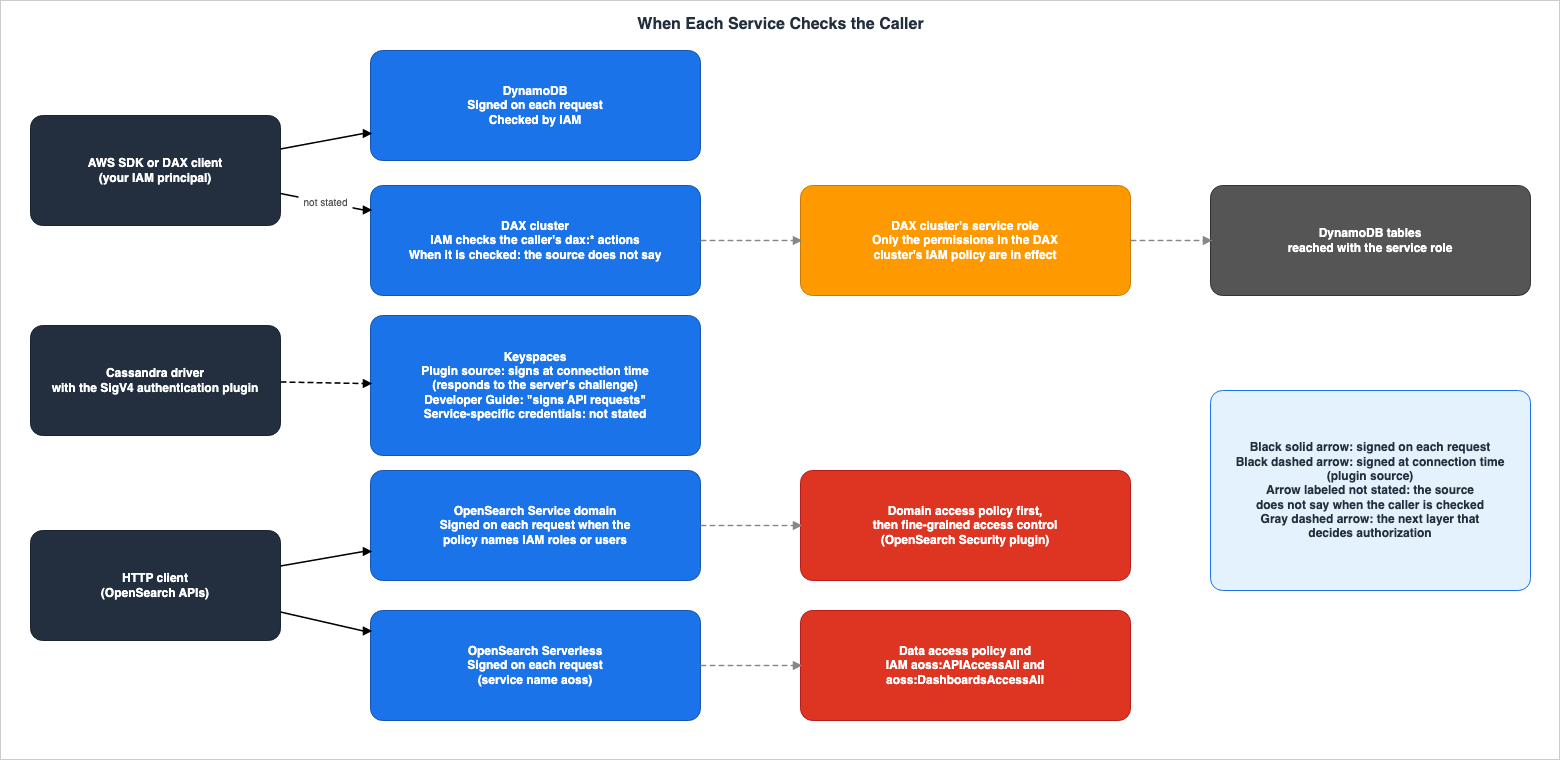
This chapter lists the five receivers one row each, in the columns described in Section 2.1. The supporting statements are shown for each receiver in Sections 4 through 7.Figure 1 illustrates the five receivers, showing when each checks calls and which layer changes authorization after the IAM evaluation.
| Service | When It Is Checked | Checked or Seen By | Acting Identity | Where the Source Says So |
|---|---|---|---|---|
| DynamoDB | On each request | IAM | Your IAM principal | DynamoDB Developer Guide, Low-Level API page |
| DAX | The source does not say. | IAM, then the DAX cluster's service role | Your IAM principal up to the DAX cluster. From the DAX cluster to DynamoDB, The DAX cluster's service role. | DynamoDB Developer Guide, DAX Access Control page |
| Keyspaces (SigV4 plugin) | At connection time (plugin source). The developer guide states that the plugin signs API requests. | IAM | Your IAM principal | Keyspaces Developer Guide, Java Driver page, source code of the four plugins |
| Keyspaces (service-specific credentials) | The source does not say. | IAM | The IAM user (service-specific credentials) | Keyspaces Developer Guide, Service-Specific Credentials page |
| OpenSearch Service domain | On each request. A signature is required if the policy explicitly names an IAM role or user. IP-based policies allow requests without a signature. | The domain access policy, then the OpenSearch Security plugin. For domains without fine-grained access control, the domain's access policy and IAM policies. | Your IAM principal. With fine-grained access control, The user mapped to OpenSearch Security roles. | OpenSearch Service Developer Guide, Request Signing page, Fine-Grained Access Control page |
| OpenSearch Serverless | On each request | IAM and the data access policy | Your IAM principal. The data access policy can also target SAML identities. | OpenSearch Service Developer Guide, Serverless Data Access Policies page, Client page |
The following table lists what you configure for the five receivers.
| Service | What You Configure | Where the Source Says So |
|---|---|---|
| DynamoDB | IAM identity-based policies. If necessary, resource-based policies for tables, indexes, and streams. Condition keys such as dynamodb:LeadingKeys, dynamodb:Attributes, and dynamodb:Select. | DynamoDB Developer Guide: Conditions page and Resource-Based Policies page. |
| DAX | IAM policies for users, including DAX actions such as dax:GetItem. Also, the service role associated with the DAX cluster and its permissions. | DynamoDB Developer Guide: DAX Access Control page. |
| Keyspaces (SigV4 plugin) | Install the SigV4 authentication plugin in the driver and pass IAM credentials. Actions such as cassandra:Select and cassandra:Modify in IAM policies. Also, TLS certificates. | Keyspaces Developer Guide: Credentials page and Driver page, Service Authorization Reference. |
| Keyspaces (service-specific credentials) | Create service-specific credentials for IAM users. Pass the username and password to the driver. | Keyspaces Developer Guide: Service-Specific Credentials page. |
| OpenSearch Service domain | Domain access policies (resource-based, identity-based, IP-based). If using fine-grained access control, the master user, role mappings, and backend roles. | OpenSearch Service Developer Guide: Access Control page and Fine-Grained Access Control page. |
| OpenSearch Serverless | Data access policies and the IAM permissions aoss:APIAccessAll and aoss:DashboardsAccessAll. | OpenSearch Service Developer Guide: Serverless Data Access Policies page. |
Of the five receivers, the sources state a signature on each request for DynamoDB, OpenSearch Service domains, and OpenSearch Serverless. For OpenSearch Service domains, a signature is required when the policy names IAM roles or users. In Keyspaces, the source code of the plugins published by AWS signs responses to server challenges. This article reads this as signing at connection time (Section 6.2). In DAX, OpenSearch domains, and OpenSearch Serverless, another layer changes authorization after or alongside the IAM evaluation.
4. DynamoDB — A Signature on Each Request
This chapter explains how DynamoDB checks requests, what the condition keys look at, and where a second policy can be placed.4.1 All Requests Must Be Signed
The DynamoDB Developer Guide, on the page detailing the low-level APIs, states:At this level, every HTTP(S) request must be correctly formatted and carry a valid digital signature.The same page, regarding the
Authorization header in the example requests, states:The Authorization header contains information required for DynamoDB to authenticate the request.DynamoDB requires signatures for each HTTP(S) request, not for the connection itself. The page also notes that the AWS SDK assembles these low-level API requests on your behalf. This article does not address how the DynamoDB SDK reuses connections.
4.2 The Contract of the Condition Keys
The DynamoDB Developer Guide's page on conditions describes thedynamodb:LeadingKeys condition key as follows:Represents the first key attribute of a table—in other words, the partition key.The same page outlines the rules for using
dynamodb:LeadingKeys as a condition:In addition, you must use the ForAllValues modifier when using LeadingKeys in a condition.Regarding the
dynamodb:Attributes condition key, the same page states:This condition is evaluated only on the attributes specified in the request (such as in a ProjectionExpression), not on attributes in the response.dynamodb:Attributes is evaluated based on attributes explicitly specified in the request and is not evaluated based on attributes included in the response. The same page recommends combining attribute conditions with conditions that require specific attributes.To prevent this potential exposure of sensitive data, implement both attribute conditions (dynamodb:Attributes) and a condition requiring specific attributes must be requested (dynamodb:Select).The design of tenant isolation using
dynamodb:LeadingKeys is discussed in Section 6.1 of the previously published Multi-Tenant Generative AI SaaS Architecture on AWS.4.3 A Second Policy — Resource-Based Policies and RCP
DynamoDB supports resource-based policies in addition to the identity-based policies offered by IAM. The DynamoDB Developer Guide states:DynamoDB supports resource-based policies for tables, indexes, and streams.The same page also outlines the benefits of resource-based policies:
A significant benefit of using resource-based policies is to simplify cross-account access control for providing cross-account access to IAM principals in different AWS accounts.This feature was announced in a What's New item on March 20, 2024. The previously published AWS History and Timeline regarding Amazon DynamoDB also includes an entry for the same date.
AWS Organizations resource control policies (RCPs) were extended to DynamoDB, as announced in a What's New item on February 12, 2026. This announcement states:
With this expansion, you can now use RCPs to manage permissions for Amazon DynamoDB.The same announcement also provides an example of how to use it. This sentence is from the announcement, not a specification statement from the user guide.
For example, you can create policies that prevent identities outside your organization from accessing DynamoDB, helping you build a data perimeter and enforce baseline security standards across your AWS environment.The order in which identity-based policies, resource-based policies, and RCP are evaluated is covered in the previously published IAM Policy Evaluation Logic Step-by-Step. Resource-based policies across services are covered in the previously published Resource-Based Policies by Service on AWS.
The following is a list of what the available documentation states about DynamoDB.
| Aspect | What the Source Says | Where the Source Says So |
|---|---|---|
| Signature | In low-level APIs, all HTTP(S) requests must have a valid digital signature. | Low-level APIs page |
| Authentication | The Authorization header contains the information that DynamoDB requires to authenticate requests. | Same as above |
dynamodb:LeadingKeys | Represents the attributes of the first key (partition key) in a table. When used in a condition, it requires the ForAllValues modifier. | Conditions page |
dynamodb:Attributes | Evaluates requests based on the attributes they specify, but does not evaluate attributes in the response. | Same as above |
| Resource-Based Policies | Can be attached to tables, indexes, and streams, simplifying access for IAM principals in other accounts. | Resource-Based Policies page, What's New (March 20, 2024) |
| RCP | DynamoDB permissions can be managed using RCP. | What's New (February 12, 2026) |
| Temporary Credentials | DynamoDB supports temporary credentials. | DynamoDB and IAM page |
5. DAX — After Your IAM Evaluation, the DAX Cluster's Service Role Calls DynamoDB
This chapter illustrates how authorization is determined across two layers when DAX is deployed, and what the DynamoDB Developer Guide warns about.5.1 Two Security Models
The DynamoDB Developer Guide's page on DAX access control begins by stating:However, DAX and DynamoDB have separate access control mechanisms.The same page describes DAX's security model in comparison to DynamoDB, stating:
By comparison, the DAX security model focuses on cluster security, and the ability of the cluster to perform DynamoDB API actions on your behalf.To access a DAX cluster, users require IAM policies that include DAX actions. The page further states:
To allow access to a DAX cluster, you must include DAX-specific actions in an IAM policy.The DAX actions are
dax:GetItem, dax:BatchGetItem, dax:Query, dax:Scan, dax:PutItem, dax:UpdateItem, dax:DeleteItem, dax:BatchWriteItem, and dax:ConditionCheckItem, and correspond to the similarly named operations in the DynamoDB API. The DAX section of the Service Authorization Reference lists dax:EnclosingOperation as a DAX condition key, explaining:Used to block Transactions APIs calls and allow the non-Transaction APIs calls and vice-versa5.2 DAX Cluster Service Role
The DAX cluster has a single IAM role. The DAX access control page describes this as follows:When you create a DAX cluster, you must associate the cluster with an IAM role. This is known as the service role for the cluster.An example on the same page describes the service role's function as follows:
The policy for DAXServiceRole would define the DynamoDB actions that DAXCluster01 could perform, on behalf of the users who interact with DAXCluster01.When reading and writing DynamoDB data through DAX, the identity of the calls that reach DynamoDB is the service role of the DAX cluster. The same page includes two statements regarding user permissions:
DAX does not enforce user-level separation on data in DynamoDB. Instead, users inherit the permissions of the DAX cluster's IAM policy when they access that cluster.Thus, when accessing DynamoDB tables through DAX, the only access controls that are in effect are the permissions in the DAX cluster's IAM policy. No other permissions are recognized.Elsewhere on the same page, it states:
The user policy, together with the DAX service role, determine the DynamoDB resources and API actions that the recipient can access through DAX.This article does not treat these sentences as a disagreement between the sources. The same page continues, following the example of a user policy, with the following text:
The policy document allows access to the DAX cluster, but it does not grant any DynamoDB permissions. (The DynamoDB permissions are conferred by the DAX service role.)Based on this sentence, this article interprets the layers as follows: the user's policy determines the
dax:* actions on the DAX cluster, while the policy of the DAX cluster's service role determines the operations on DynamoDB. The two sentences beginning Thus, when accessing and The user policy are also listed in Section 9.1.5.3 Warnings in the DynamoDB Developer Guide
The same page states the following in a warning box:If you are currently using IAM roles and policies to restrict access to DynamoDB tables data, then the use of DAX can subvert those policies.Following this sentence, the text provides an example where users who do not have direct read permissions on DynamoDB can still read the same table through DAX. Later on the same page, it states:
Also make sure that giving a user access to a DAX cluster does not subvert previously established access control policies.Regarding situations requiring isolation, the page recommends:
If you require isolation, we recommend that you create additional DAX clusters and scope the IAM policy for each cluster accordingly.No statement was found that names whether DynamoDB condition keys, such as
dynamodb:LeadingKeys, take effect on calls made through DAX (see Section 9.3). The documentation clarifies that when using DAX, only the IAM policy permissions associated with the DAX cluster are recognized; other permissions are not. This article does not state that dynamodb:LeadingKeys does not take effect with DAX.The following table summarizes what the documentation says about DAX:
| Aspect | What the Source Says | Where the Source Says So |
|---|---|---|
| Access Control Mechanism | DAX and DynamoDB have separate access control mechanisms. | DAX Access Control page |
| User Permissions | Access to the DAX cluster requires an IAM policy that includes DAX actions. | Same as above |
| Condition Keys | Only one, dax:EnclosingOperation. | DAX Service Authorization Reference page |
| Service Role | When creating a DAX cluster, an IAM role is associated. The policy for that role determines the DynamoDB operations the DAX cluster can perform on behalf of users. | DAX Access Control page |
| Effective Permissions | When using DAX, only the IAM policy permissions associated with the DAX cluster are recognized; other permissions are not. | Same as above |
| Warning | If you are using IAM roles and policies to restrict access to DynamoDB table data, using DAX can subvert those policies (the source's word is subvert). | Same as above |
| When It Is Checked | The source does not say. | DAX Access Control page, DAX Architecture page |
6. Keyspaces — Two Credential Paths and the Unit of Signing
This chapter details the two credential paths for Keyspaces, the wording of the sources about the unit of signing, and the time it takes for IAM policy changes to propagate to established connections.6.1 Two Credential Paths
The programmatic access credentials page of the Keyspaces Developer Guide outlines two paths. The first is service-specific credentials.AWS service-specific credentials are associated with a specific AWS Identity and Access Management (IAM) user and can only be used for the service they were created for.The service-specific credentials page states:
Service-specific credentials are long-term credentials associated with a specific IAM user and can only be used for the service they were created for.The second is the SigV4 authentication plugin. The credentials page states:
The Amazon Keyspaces SigV4 authentication plugin for Cassandra client drivers enables you to authenticate calls to Amazon Keyspaces using IAM access keys instead of user name and password.The temporary credentials page states:
The recommended way to access Amazon Keyspaces programmatically is by using temporary credentials to authenticate with the SigV4 plugin.Plugins are available for four languages: Java, Node.js, Python, and Go. Keyspaces only accepts connections over TLS. The Python driver page states:
Amazon Keyspaces requires the use of Transport Layer Security (TLS) to help secure connections with clients.The endpoint page specifies a port of 9142 for
cqlsh and the Cassandra driver, and uses the TLS protocol. The driver page indicates that the TLS certificate is currently transitioning from a Starfield Class 2 CA to Amazon Trust Services' Amazon Root CA 1-4. This transition may progress after the verification date of this article.Keyspaces does not support resource-based policies. The How Amazon Keyspaces works with IAM page states:
Amazon Keyspaces does not support resource-based policies.6.2 The Unit of Signing — Developer Guide Wording and Plugin Source Code
The Keyspaces Developer Guide describes plugin signing as follows, in a sentence on the Java driver page.Instead of requiring a user name and password, this plugin signs API requests using access keys.The credentials page also states that the plugin lets IAM identities authenticate in API requests.
To learn more about how the Amazon Keyspaces SigV4 plugin enables IAM users, roles, and federated identities to authenticate in Amazon Keyspaces API requests, see AWS Signature Version 4 process (SigV4).In contrast, the SigV4 plugin's credentials page describes the credentials with the word connect.
The access key aws_access_key_id is required to connect to Amazon Keyspaces programmatically.The plugin source code published by AWS indicates that signatures are created in response to challenges sent by the server. In the Python plugin,
cassandra_sigv4/auth.py, the evaluate_challenge method within SigV4Authenticator extracts a nonce from the challenge and creates a signature before returning it.def evaluate_challenge(self, challenge):
challenge = _ensure_b(challenge)
nonce = _extract_nonce(challenge)The Node.js plugin, located in
lib/sigv4-auth-provider.js, includes the following comment within its evaluateChallenge method.Called when Service responds with a challenge request.The Java plugin,
SigV4AuthProvider.java, performs the same process within its evaluateChallenge method, and fails with the following message if a challenge is not received.SigV4 requires a challenge from the endpoint. None was sentThe Go plugin,
sigv4/sigv4.go, signs within its Challenge method and includes the following comment within that method.// copy these rather than use a reference due to how gocql creates connectionsAll four plugins operate by responding to challenges from the server and creating signatures. The Apache Cassandra native protocol specification (version 4) details where this challenge-response exchange occurs in the Cassandra protocol. The specification describes the initial
STARTUP message as follows.Initialize the connection. The server will respond by either a READY message (in which case the connection is ready for queries) or an AUTHENTICATE message (in which case credentials will need to be provided using AUTH_RESPONSE).The specification also describes the
AUTH_RESPONSE message as follows.Answers a server authentication challenge.The Keyspaces Developer Guide's driver page describes Keyspaces compatibility as follows.
Amazon Keyspaces is compatible with Cassandra drivers that support Apache Cassandra version 3.11.2.Based on the plugin source code and this specification, this article writes the signing by the Keyspaces SigV4 plugin in its tables as signing at connection time. This is this article's reading of the source code and the specification. No Keyspaces statement was found that says the Keyspaces servers perform the authentication exchange as this specification describes.
Both the Python and Java plugins include
X-Amz-Expires=900 as an element of the signature. This value is an element of the signature's validity period, and the source code does not describe it as the lifetime of the connection.This article does not describe the developer guide's wording and the form of the source code as a disagreement between the sources, and does not call the developer guide wrong. It is unclear from the documentation whether the developer guide's
API requests refers to authentication requests during connection establishment, or to CQL statements after a connection has been established. Furthermore, this article does not state that plugins sign requests only once per connection. This is a behavior of the driver, and this article does not examine the driver's source code.6.3 When IAM Policy Changes Reach Established Connections
The IAM troubleshooting page in the Keyspaces Developer Guide states that changes to IAM users or roles may not take effect immediately.IAM policy changes may take up to 10 minutes to take effect for applications with existing, established connections to Amazon Keyspaces.The same section continues with:
If you have made modifications to an existing IAM user or role, and it has not taken immediate effect, either wait for 10 minutes or disconnect and reconnect to Amazon Keyspaces.IAM policy changes take effect immediately when applications establish a new connection.These 10 minutes are a statement about IAM policy changes. No statement was found about when role session revocation, the deactivation of service-specific credentials, or the expiration of temporary credentials reaches established connections (see Section 8 and Section 9.3). This article does not apply these 10 minutes to other types of revocation.
6.4 Actions and Tag Condition Keys
On the Keyspaces page of the Service Authorization Reference, the actions for reading and writing data,cassandra:Select and cassandra:Modify, are described as follows. The first describes cassandra:Select, and the second cassandra:Modify.Grants permission to SELECT data from a tableGrants permission to INSERT, UPDATE or DELETE data in a tableThe sources disagree on the names of the tag condition keys. The How Amazon Keyspaces works with IAM page states, in its section on condition keys, that all Keyspaces actions correspond to
aws:RequestTag/${TagKey}, aws:ResourceTag/${TagKey}, and aws:TagKeys. The section on tag-based authorization on the same page describes using cassandra:ResourceTag/key-name as a condition element. However, the Keyspaces page of the Service Authorization Reference lists only three condition keys: aws:RequestTag/${TagKey}, aws:ResourceTag/${TagKey}, and aws:TagKeys, and does not mention cassandra:ResourceTag. This article lists this disagreement in Section 9.2 and does not side with either.The following table lists what the documentation states regarding Keyspaces.
| Aspect | What the Source Says | Where the Source Says So |
|---|---|---|
| Service-specific credentials | These are long-term credentials associated with a specific IAM user and can only be used with the service they were created for. | Service-specific credentials page |
| SigV4 authentication plugin | This plugin authenticates calls to Keyspaces using IAM access keys instead of a username and password. | Credentials page |
| Recommendation | The page recommends authenticating using temporary credentials and the SigV4 plugin. | Temporary credentials page |
| Signing unit | The developer guide states that the plugin signs API requests. The plugin's source code indicates that it signs responses to server challenges. | Java driver page, source code for the four plugins |
| IAM policy changes | Established connections may take up to 10 minutes to reflect changes. Changes take effect immediately on new connections. | IAM troubleshooting page |
| Resource-based policies | Not supported. | How Amazon Keyspaces works with IAM page |
| TLS | TLS is required. The port is 9142. | Python driver page, endpoints page |
| Tag condition keys | the sources disagree (Section 9.2) | How Amazon Keyspaces works with IAM page, Service Authorization Reference |
7. OpenSearch Service — Domain Access Policies, Fine-Grained Access Control, and Serverless Data Access Policies
This chapter outlines three types of access policies for OpenSearch Service domains, details the order of evaluation with fine-grained access control, explains how master users are treated, and describes the data access policies for OpenSearch Serverless.7.1 Three Types of Domain Access Policies
The OpenSearch Service Developer Guide's access control page states the following:OpenSearch Service supports three types of access policiesThere are three types: resource-based policies, identity-based policies, and IP-based policies. Regarding resource-based policies, the same page continues:
You add a resource-based policy, often called the domain access policy, when you create a domain.When a policy explicitly names IAM principals, requests to the OpenSearch API require a signature. The page detailing request signatures states:
If your policies specify IAM roles or users, requests to the OpenSearch APIs also must be signed using AWS Signature Version 4.Concerning IP-based policies, the access control page explains:
The primary appeal of IP-based policies is that they allow unsigned requests to an OpenSearch Service domain, which lets you use clients like curl and OpenSearch Dashboards or access the domain through a proxy server.Regarding domains within a VPC, the same page notes:
If you enabled VPC access for your domain, you can't configure an IP-based policy.IAM actions that call OpenSearch APIs are actions such as
es:ESHttpGet, es:ESHttpPost, and other es:ESHttp* actions. The OpenSearch Service page of the Service Authorization Reference describes ESHttpGet as follows:Grants permission to send HTTP GET requests to the OpenSearch APIs7.2 Order of Fine-Grained Access Control
Fine-grained access control is access control by the OpenSearch Security plugin. The OpenSearch Service Developer Guide's page on fine-grained access control specifies the order in which domain access policies and fine-grained access control are evaluated as follows:After a resource-based access policy allows a request to reach a domain endpoint, fine-grained access control evaluates the user credentials and either authenticates the user or denies the request.The same page continues with the following:
If fine-grained access control authenticates the user, it fetches all roles mapped to that user and uses the complete set of permissions to determine how to handle the request.According to the OpenSearch Service Developer Guide, domain access policies are evaluated before fine-grained access control. The Security page of the implementation guide for the Migration Assistant for Amazon OpenSearch Service, part of AWS Solutions, describes the IAM roles used for migration as follows:
Authentication gets you to the domain; FGAC authorizes what you can do once you are in. Both must be in place.This passage focuses on the IAM roles used in the migration solution. This article does not treat this passage as a specification in the developer guide concerning general IAM principals. When using an IAM principal as a master user, as described in Section 7.3, the policies on that user or role are not relevant to authorization.
When mapping users to OpenSearch roles, backend roles can be utilized. The fine-grained access control page states:
Backend roles can be IAM roles or arbitrary strings.Regarding the use of identity-based policies within domains that have fine-grained access control enabled, the same page indicates:
If your domain uses identity-based access policies, OpenSearch Service automatically maps your users to a new role called default_role in order to help you properly migrate existing users.Concerning the relationship between signatures, usernames, and passwords, the same page explains:
You can't sign a request with a username and password and IAM credentials.The same page, as an AWS recommendation, states:
In general, if you enable fine-grained access control, we recommend using a domain access policy that doesn't require signed requests.7.3 IAM Master Users
A master user for fine-grained access control can be either an IAM principal or an internal user. The same page states the following regarding making a master user an IAM principal:OpenSearch Service doesn't take any of the IAM principal's permissions into consideration.The IAM user or role serves purely for authentication.The policies on that user or role have no bearing on the authorization of the master user.Authorization is handled through the various permissions in the OpenSearch Security plugin.When a master user is designated as an IAM principal, IAM is used solely to verify identity, while the OpenSearch Security plugin determines the permissions for what actions are allowed.
7.4 SAML, Amazon Cognito, and JWT
SAML authentication is a path for OpenSearch Dashboards. The OpenSearch Service Developer Guide's page on SAML authentication states:SAML authentication for Dashboards is only for accessing OpenSearch Dashboards through a web browser.Your SAML credentials do not let you make direct HTTP requests to the OpenSearch or Dashboards APIs.Amazon Cognito authentication is also an authentication path for OpenSearch Dashboards. This article will not cover the configuration steps for SAML and Amazon Cognito. OpenSearch Service's JWT authentication is covered in the previously published JWT Signing Algorithms on AWS Endpoints. A What's New item dated April 29, 2026, announced the configuration of the JWKS URL for JWT authentication, stating:
JWKS URL support requires OpenSearch version 3.3 or later.7.5 OpenSearch Serverless Data Access Policies
OpenSearch Serverless utilizes data access policies instead of domain access policies and fine-grained access control. The OpenSearch Service Developer Guide's page on data access policies for Serverless states:Data access policies are logically separate from AWS Identity and Access Management (IAM) policies.Access permissions granted through data access policies alone are not sufficient to access the data. The same page further states:
Being granted permissions within a data access policy is not sufficient to access data in your OpenSearch Serverless collection.An associated principal must also be granted access to the IAM permissions aoss:APIAccessAll and aoss:DashboardsAccessAll.If a principal doesn't have both of these IAM permissions, they will receive 403 errors when attempting to send requests to the collection.Regarding the scope of data access policies, the same page explains:
Principals can be IAM role ARNs or SAML identities.The Serverless IAM page differentiates between two IAM permissions as follows:
The aoss:APIAccessAll permission allows data plane access, and the aoss:DashboardsAccessAll permission allows OpenSearch Dashboards from the browser.Concerning signing requests to collections in OpenSearch Serverless, the Serverless client page states:
You must specify the service name as aoss.The OpenSearch Serverless security overview page states the following regarding request signing.
Additionally, you must sign requests using an access key ID and a secret access key that is associated with an IAM principal. Or you can use the AWS Security Token Service (AWS STS) to generate temporary security credentials to sign requests.The following table lists information provided in the OpenSearch Service documentation.
| Aspect | What the Source Says | Where the Source Says So |
|---|---|---|
| Access Policy Types | There are three types: resource-based, identity-based, and IP-based. | Access Control page |
| Signatures | If a policy explicitly names IAM roles or users, signatures are required for requests to OpenSearch APIs. | Request Signatures page |
| IP-Based Policies | These policies allow requests without signatures. They cannot be configured for VPC domains. | Access Control page |
| Order of Fine-Grained Access Control | Fine-grained access control is evaluated after resource-based access policies have allowed a request. | Fine-Grained Access Control page |
| Backend Roles | These can be either IAM roles or any string. | Same as above |
| IAM Master User | The permissions of an IAM principal are not considered, and its policies do not affect the master user's authorization. | Same as above |
| SAML | SAML is only used for accessing OpenSearch Dashboards through a browser and cannot be used for direct HTTP requests to the API. | SAML Authentication page |
| Serverless Data Access Policies | These policies are logically separate from IAM policies and, on their own, do not grant access to data. You also need the IAM permissions aoss:APIAccessAll and aoss:DashboardsAccessAll. | Serverless Data Access Policies page |
8. What Revocation Reaches
This chapter outlines whether three types of revocation reach the five receivers, based on the documentation. The three types are:- IAM policy change: Removing permissions from an IAM policy or removing the policy itself.
- Role session revocation: Attaching a policy to an IAM role that denies temporary credentials issued before a specific time, using the
aws:TokenIssueTimecondition. - Long-term credential deactivation: Deactivating or deleting access keys for IAM users, or service-specific credentials for Keyspaces.
The IAM User Guide states the following as a general rule about IAM changes:
As a service that is accessed through computers in data centers around the world, IAM uses a distributed computing model called eventual consistency.The discussion of IAM eventual consistency is covered in Section 2.2 of the previously published What Consistent Means, Service by Service on AWS.
Regarding role session revocation, the IAM User Guide states:
The aws:TokenIssueTime value is only present in the context of AWS requests that are signed with temporary security credentials, so the Deny statement in the policy does not affect requests that are signed with the long-term credentials of the IAM user.Valid users whose sessions are revoked in this way must acquire temporary credentials for a new session to continue working.On the same page, it also states:
You cannot revoke the session for a service-linked role.This article does not say whether this applies to the service role for a DAX cluster. This article has not confirmed a statement that says whether the DAX cluster's service role is a service-linked role. The How Amazon DynamoDB works with IAM page states that DAX uses the service-linked role
AWSServiceRoleForDAX to configure and maintain a DAX cluster. The DAX access control page describes the cluster's service role as a role that the user creates, specifying a trust relationship with the DAX service. Neither page states whether the cluster's service role is a service-linked role. The mechanism of role session revocation is discussed in Section 7 of the previously published AWS IAM Inbound Workload Federation.Figure 2 lists what the documentation states regarding the three types of revocation and their application to the five receivers.
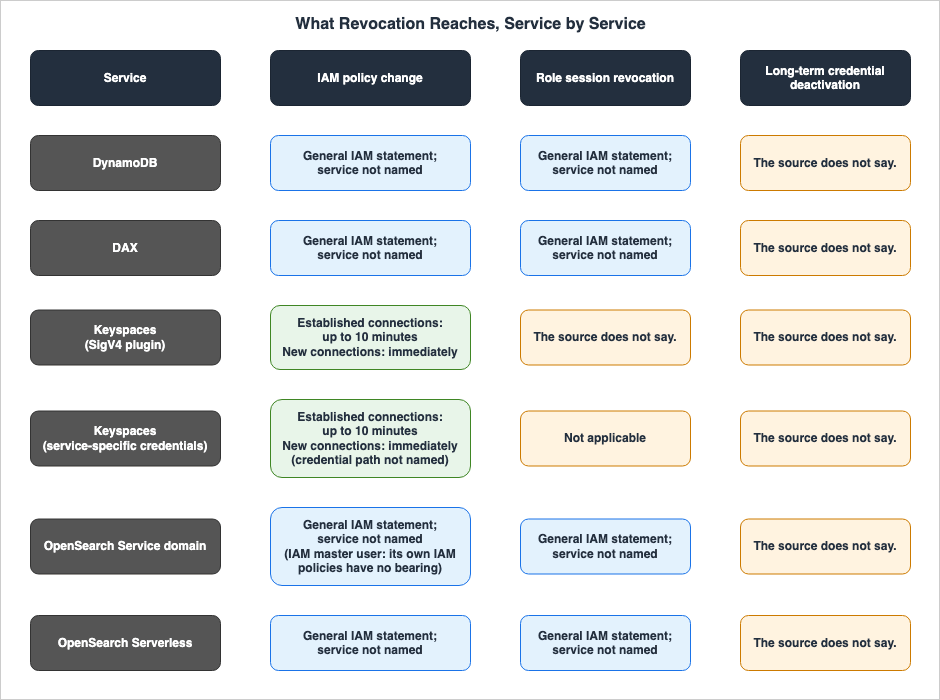
| Service | IAM Policy Change | Role Session Revocation | Long-Term Credential Deactivation |
|---|---|---|---|
| DynamoDB | General IAM statement; service not named | General IAM statement; service not named | The source does not say. |
| DAX | General IAM statement; service not named | General IAM statement; service not named | The source does not say. |
| Keyspaces (SigV4 plugin) | Established connections may take up to 10 minutes. Changes take effect immediately on new connections. | The source does not say. | The source does not say. |
| Keyspaces (service-specific credentials) | Established connections may take up to 10 minutes. Changes take effect immediately on new connections. This statement does not name the credential path. | Not applicable | The source does not say. |
| OpenSearch Service domain | General IAM statement; service not named. For an IAM master user, the policies on that IAM user or role are not relevant to authorization. | General IAM statement; service not named | The source does not say. |
| OpenSearch Serverless | General IAM statement; service not named | General IAM statement; service not named | The source does not say. |
The entries for IAM policy changes in the two rows for Keyspaces are summaries of sentences on the troubleshooting page in Section 6.3. Those sentences describe scenarios where an IAM user or role is modified, without distinguishing between the SigV4 plugin and service-specific credentials. Because service-specific credentials are not temporary credentials, the entry for role session revocation for service-specific credentials is
Not applicable.For the IAM policy change cells of DynamoDB, DAX, OpenSearch Service domains, and OpenSearch Serverless, the statement in the sources that applies is the general rule of IAM eventual consistency. No statement was found in the developer guides of these receivers that names when IAM policy changes take effect.
The role session revocation cell for Keyspaces (SigV4 plugin) does not carry the general rule on role session revocation. This rule in the IAM User Guide refers to requests signed with temporary credentials, while the plugin source signs when a connection is established (Section 6.2). The only statement in the Keyspaces sources about established connections is the 10-minute passage on IAM policy changes (Sections 6.3 and 9.3).
OpenSearch Serverless data access policies are separate from IAM policies. The data access policy page states the following about creating and updating a policy:
There might be about a minute of lag time between when you create the policy and when the permissions are enforced. If it takes more than 5 minutes, contact Support.There might be a few minutes of lag time between when you update the policy and when the new permissions are enforced.The same page states that when a data access policy is deleted, the collections associated with it lose the access defined in that policy. It does not state how long the deletion takes to take effect. The IAM Policy Change column in the table above covers only changes to IAM policies.
Concerning two IAM permissions for OpenSearch Serverless, the Serverless IAM page states:
Each permission works independently, so an explicit deny on aoss:APIAccessAll doesn't block aoss:DashboardsAccessAll access to the resources, including Dev Tools.This indicates that when making IAM policy changes for OpenSearch Serverless, these two permissions need to be handled separately.
DAX includes both item caching and query caching. The DynamoDB Developer Guide's page explaining how DAX works states:
The item cache has a Time to Live (TTL) setting, which is 5 minutes by default.No statement was found about when revocation reaches calls to items that remain in the DAX cache (Section 9.3). This article does not discuss the relationship between cache TTL and permission revocation.
9. Where the Sources Differ in Wording, Where They Disagree, and Where No Statement Was Found
This chapter lists, separately, places where the sources differ only in the granularity of their wording, places where the sources disagree, and places where no statement was found after searching.9.1 Where the Sources Differ Only in Wording
The following table lists places where the sources differ in the granularity of their wording. This article does not treat these as disagreements between the sources.| Where | Name in the Source | What It Describes |
|---|---|---|
| Keyspaces Java Driver Page | signs API requests | Plugin signatures |
| Keyspaces Credentials Page | authenticate in Amazon Keyspaces API requests | Authentication performed by the plugin |
| Keyspaces SigV4 Plugin Credentials Page | connect to Amazon Keyspaces programmatically | Scenarios requiring credentials |
| Title of the Keyspaces Temporary Credentials Page | Create temporary credentials to connect to Amazon Keyspaces | Scenarios requiring credentials |
| Source code of four plugins | evaluate_challenge, evaluateChallenge, Challenge | Signatures in response to server challenges |
| DAX Access Control Page (First Sentence) | the only access controls that are in effect are the permissions in the DAX cluster's IAM policy | Permissions that apply to access to DynamoDB tables through DAX |
| DAX Access Control Page (Second Sentence) | The user policy, together with the DAX service role, determine | DynamoDB resources and operations that users can access through DAX |
The five entries related to Keyspaces refer to the same plugin signatures, using different terms to describe the request, connection, and challenge. The two entries related to DAX, read with the DAX access control page's sentence on the service role (Section 5.2), describe the permissions of different layers.
9.2 Where the Sources Disagree
The following table lists the places where the sources disagree.| # | Topic | One Source Says | Another Source Says | Section |
|---|---|---|---|---|
| 1 | Tag Condition Key Names for Keyspaces | The section on authorization based on tags in the How Amazon Keyspaces works with IAM page states that cassandra:ResourceTag/key-name should be used. | The section on condition keys on the same page, and the Keyspaces section in the Service Authorization Reference, list aws:ResourceTag/${TagKey} and do not mention cassandra:ResourceTag. | Section 6.4 |
This article does not state which name is correct.
9.3 Where No Statement Was Found
The following table lists statements that were looked for and not found on October 14, 2026, along with the places and terms searched. Not finding a statement does not mean that the behavior does not exist.| What Was Looked For | Where and How It Was Looked For | Result |
|---|---|---|
| When role session revocation, the deactivation of service-specific credentials, and the expiration of temporary credentials reach established Keyspaces connections. | Searched the Keyspaces Developer Guide pages on credentials, temporary credentials, IAM, troubleshooting, and drivers, as well as the source code of four plugins, using the terms expire, revoke, session, connection, and reconnect. | No statement was found. The 10-minute passage refers to changes in IAM policies (Section 6.3). |
| When the caller is checked with IAM for calls to the DAX cluster. | Searched the DAX access control and DAX architecture pages using the terms sign, authenticate, connection, and request. | No statement was found. |
Whether DynamoDB condition keys, such as dynamodb:LeadingKeys, work in calls through DAX. | Searched the DAX access control page and the DAX section of the Service Authorization Reference using the terms LeadingKeys and condition. | No statement was found. DAX has one condition key, dax:EnclosingOperation; when using DAX, only the IAM permissions of the DAX cluster are effective (Section 5.3). |
| When revocation reaches calls targeting items remaining in the DAX cache. | Searched the DAX access control and DAX architecture pages using the terms cache, revoke, and permission. | No statement was found (Section 8). |
| Whether service-specific credential authentication is performed at connection time or per request. | Searched the Keyspaces Developer Guide pages on service-specific credentials and the driver pages using the terms connection and authenticate. | No statement was found. |
| For OpenSearch fine-grained access control, when role mapping changes or master user changes take effect. | Searched the OpenSearch Service Developer Guide page on fine-grained access control using the terms revok, cache, and immediately. | No statement was found. |
| Whether there are any passages in the developer guide that require both IAM and fine-grained access control. | Searched the OpenSearch Service Developer Guide pages on access control and fine-grained access control using the term both. Also searched the entire AWS documentation using the term fine-grained access control. | No statement was found in the developer guide. The developer guide discusses evaluation order and handling of IAM master users. The implementation guide for the Migration Assistant for Amazon OpenSearch Service in AWS Solutions states Both must be in place. regarding the IAM role for migration (Sections 7.2 and 7.3). |
| Whether there are any passages in the developer guides for DynamoDB (including DAX), OpenSearch Service, and OpenSearch Serverless that explicitly state when IAM policy changes take effect. | Searched the IAM pages in each developer guide and the DAX pages using the terms propagat, take effect, and eventual. | No statement was found. The statement in the sources that applies is the general rule of eventual consistency in the IAM User Guide (Section 8). The OpenSearch Service access control page includes a note stating that after adding OpenSearch API access to tag-based policies, you need to perform one tag operation to apply the changes to the domain. This note refers to adding permissions and does not state how long revocation takes to arrive. The OpenSearch Serverless data access policy page states that there might be about a minute of lag after creating a data access policy and a few minutes after updating one; data access policies are not IAM policies (Section 8). |
| When the deactivation or deletion of an IAM user's long-term access key or of service-specific credentials reaches calls to DynamoDB, DAX, OpenSearch Service domains, and OpenSearch Serverless, and established Keyspaces connections. | Searched the pages of the five receivers fetched for this article and the IAM pages on role session revocation and permission changes, using the terms deactivat, inactive, access key, delete, and long-term. | No statement was found. What the IAM pages state is that role session revocation does not affect requests signed with the long-term credentials of an IAM user (Section 8). |
| Whether there are any passages stating that Timestream for InfluxDB does not support IAM authentication. | Searched the Timestream Developer Guide pages on database authentication and connection, the IAM page, and the Prescriptive Guidance page using the term IAM. | No statement was found (Section 1.4). |
9.4 What Changes When the Sources Are Updated
The following statements in this article change when the sources are updated. These pages need to be read again at the time you read this article.- Transition of TLS certificates for Keyspaces drivers (Section 6.1)
- Source code for the Keyspaces SigV4 authentication plugin (Section 6.2 – the latest code on the branch may change).
- Tag condition keys on the How Amazon Keyspaces works with IAM page and in the Service Authorization Reference (Section 9.2).
- List of services supported by AWS Organizations RCP (Section 4.3).
- Supported versions of OpenSearch Service for JWT authentication (Section 7.4).
10. Frequently Asked Questions about IAM Authentication to DynamoDB, Keyspaces, and OpenSearch Service
This chapter presents common questions regarding the topics discussed in this article, with the rationale for each answer provided in the corresponding section (indicated in parentheses).Q1. Does DynamoDB check IAM when a connection is established?
What the sources state is a signature on each request. The DynamoDB Developer Guide, concerning the low-level API, indicates that all HTTP(S) requests must include a valid digital signature. TheAuthorization header contains the information necessary for DynamoDB to authenticate the request (Section 4.1).Q2. What happens to the restrictions in DynamoDB IAM policies when DAX is placed in front of DynamoDB?
The DynamoDB Developer Guide states that when using DAX, only the IAM permissions associated with the DAX cluster are recognized, and other permissions are not. The same page also warns that if IAM roles and policies are used to restrict access to DynamoDB tables, using DAX can subvert those policies. No statement was found that names whether thedynamodb:LeadingKeys condition key takes effect on calls routed through DAX (see Sections 5.2, 5.3, and 9.3).Q3. Does the Keyspaces SigV4 authentication plugin sign requests on a per-request basis?
The terminology varies across different sources. The Keyspaces Developer Guide states that the plugin signs API requests. However, the source code for the four plugins published by AWS indicates that signatures are generated in response to server challenges. The Apache Cassandra native protocol specification places this authentication exchange after the firstSTARTUP message of a connection. Based on the source code and the specification, this article reads this as signing at connection time. This article does not call either source wrong (see Sections 6.2 and 9.1).Q4. When you modify an IAM policy, when do those changes take effect on existing, open connections to Keyspaces?
The Keyspaces Developer Guide states that it may take up to 10 minutes for established connections to reflect policy changes, and advises waiting 10 minutes or disconnecting and reconnecting. It notes that new connections are immediately affected. No statement was found about when role session revocation reaches established connections (Sections 6.3 and 9.3).Q5. Do IAM master users' IAM policies apply to OpenSearch authorization?
No, they do not. The OpenSearch Service Developer Guide states that when using an IAM principal for the master user, the policies associated with that user or role do not affect master user authorization. IAM principals are used solely for authentication, while the permissions in the OpenSearch Security plugin determine authorization (Section 7.3).Q6. Can data be read using only data access policies with OpenSearch Serverless?
No. The OpenSearch Service Developer Guide states that data access policies alone are not sufficient to access data within collections; access also requires the IAM permissionsaoss:APIAccessAll and aoss:DashboardsAccessAll. A principal that does not have both of these IAM permissions receives 403 errors (Section 7.5).Q7. Why does this article not cover Amazon Timestream?
Timestream for LiveAnalytics stopped accepting new customers on June 20, 2025. For Timestream for InfluxDB, InfluxDB manages the two ways of authenticating database users that the source describes, and IAM credentials control management operations. This article deals with receivers that sign data calls using IAM, which is why Timestream has been excluded from the scope (Section 1.4).11. Summary
This chapter summarizes the key points of this article, presented in a point-by-point format.- When the call is checked differs: DynamoDB and OpenSearch Serverless receive signatures for each request. OpenSearch Service domains also receive signatures for each request when the policy specifies IAM roles or users. In Keyspaces, the plugin source code published by AWS signs in its response to the server's challenge, and the Apache Cassandra native protocol specification places this exchange after connection initialization. No statement was found that describes when calls to the DAX cluster are checked.
- The terminology regarding signatures in Keyspaces varies in granularity: The developer guide states that the plugin signs API requests, while the credentials page uses the word connect. The source code of the four plugins signs in its response to the challenge. This article does not state that any of these are incorrect.
- DAX alters the authorization layer: When traffic passes through DAX, calls reaching DynamoDB are made with the permissions of the DAX cluster's service role, and only the permissions defined in the DAX cluster's IAM policy are applied. The DynamoDB Developer Guide warns that using DAX can subvert IAM restrictions on DynamoDB tables.
- OpenSearch domains are evaluated in two stages: After the domain's access policy approves the request, fine-grained access control is evaluated. For an IAM master user, the policies on that IAM user or role are not relevant to authorization.
- OpenSearch Serverless requires two policies: The data access policy is logically separate from IAM policies, and by itself does not grant access to data. Access also requires the
aoss:APIAccessAllandaoss:DashboardsAccessAllpermissions in IAM. - Among the three types of revocation in the table, the sources state how long revocation takes to arrive only for Keyspaces IAM policy changes: Established connections may take up to 10 minutes, while new connections are immediately affected. The other cells contain the general rule of IAM eventual consistency, the role session revocation rule, which affects only temporary credentials, or
The source does not say.; no statement was found that names the receiver. The OpenSearch Serverless data access policy page states that there might be about a minute of lag after creating a data access policy and a few minutes after updating one; data access policies are not IAM policies. - The sources disagree in one place: One section of the How Amazon Keyspaces works with IAM page, on authorization based on tags, refers to the tag condition key as
cassandra:ResourceTag, while another section on the same page and the Service Authorization Reference refer to it asaws:ResourceTag.
12. References
- Using the DynamoDB low-level API - Amazon DynamoDB Developer Guide
- Using IAM policy conditions for fine-grained access control - Amazon DynamoDB Developer Guide
- Using resource-based policies for DynamoDB - Amazon DynamoDB Developer Guide
- How Amazon DynamoDB works with IAM - Amazon DynamoDB Developer Guide
- DAX access control - Amazon DynamoDB Developer Guide
- DAX: How it works - Amazon DynamoDB Developer Guide
- Amazon DynamoDB now supports resource-based policies - What's New (2024-03-20)
- AWS expands Resource Control Policies support to Amazon DynamoDB - What's New (2026-02-12)
- Create credentials for programmatic access to Amazon Keyspaces - Amazon Keyspaces Developer Guide
- Create service-specific credentials for programmatic access to Amazon Keyspaces - Amazon Keyspaces Developer Guide
- Credentials required by the AWS CLI, the AWS SDK, or the Amazon Keyspaces SigV4 plugin for Cassandra client drivers - Amazon Keyspaces Developer Guide
- Create temporary credentials to connect to Amazon Keyspaces using an IAM role and the SigV4 plugin - Amazon Keyspaces Developer Guide
- How Amazon Keyspaces works with IAM - Amazon Keyspaces Developer Guide
- Troubleshooting Amazon Keyspaces identity and access - Amazon Keyspaces Developer Guide
- Using a Cassandra Java client driver to access Amazon Keyspaces programmatically - Amazon Keyspaces Developer Guide
- Using a Cassandra Python client driver to access Amazon Keyspaces programmatically - Amazon Keyspaces Developer Guide
- Using a Cassandra Node.js client driver to access Amazon Keyspaces programmatically - Amazon Keyspaces Developer Guide
- Using a Cassandra Go client driver to access Amazon Keyspaces programmatically - Amazon Keyspaces Developer Guide
- Using a Cassandra client driver to access Amazon Keyspaces programmatically - Amazon Keyspaces Developer Guide
- Service endpoints for Amazon Keyspaces - Amazon Keyspaces Developer Guide
- aws-sigv4-auth-cassandra-python-driver-plugin - cassandra_sigv4/auth.py on GitHub
- aws-sigv4-auth-cassandra-java-driver-plugin - SigV4AuthProvider.java on GitHub
- aws-sigv4-auth-cassandra-nodejs-driver-plugin - lib/sigv4-auth-provider.js on GitHub
- aws-sigv4-auth-cassandra-gocql-driver-plugin - sigv4/sigv4.go on GitHub
- CQL Binary Protocol v4 - doc/native_protocol_v4.spec in the Apache Cassandra repository on GitHub
- Identity and Access Management in Amazon OpenSearch Service - Amazon OpenSearch Service Developer Guide
- Fine-grained access control in Amazon OpenSearch Service - Amazon OpenSearch Service Developer Guide
- Security - Migration Assistant for Amazon OpenSearch Service
- Making and signing OpenSearch Service requests - Amazon OpenSearch Service Developer Guide
- SAML authentication for OpenSearch Dashboards - Amazon OpenSearch Service Developer Guide
- Configuring Amazon Cognito authentication for OpenSearch Dashboards - Amazon OpenSearch Service Developer Guide
- Overview of security in Amazon OpenSearch Serverless - Amazon OpenSearch Service Developer Guide
- Data access control for Amazon OpenSearch Serverless - Amazon OpenSearch Service Developer Guide
- Identity and Access Management for Amazon OpenSearch Serverless - Amazon OpenSearch Service Developer Guide
- Ingesting data into Amazon OpenSearch Serverless collections - Amazon OpenSearch Service Developer Guide
- Amazon OpenSearch Service now supports JWKS URL configuration for JWT authentication - What's New (2026-04-29)
- Actions, resources, and condition keys for Amazon DynamoDB Accelerator (DAX) - Service Authorization Reference
- Actions, resources, and condition keys for Amazon Keyspaces (for Apache Cassandra) - Service Authorization Reference
- Actions, resources, and condition keys for Amazon OpenSearch Service - Service Authorization Reference
- Actions, resources, and condition keys for Amazon OpenSearch Serverless - Service Authorization Reference
- Troubleshoot IAM - AWS Identity and Access Management User Guide
- Revoke IAM role temporary security credentials - AWS Identity and Access Management User Guide
- Amazon Timestream for LiveAnalytics availability change - Amazon Timestream Developer Guide
- Database authentication with Amazon Timestream for InfluxDB - Amazon Timestream Developer Guide
- Security - Timestream for InfluxDB Well-Architected Framework - AWS Prescriptive Guidance
- IAM Authentication to Databases, Caches, and Streams on AWS - Token Lifetime, What Revoking Access Does to Open Connections, and the Identity Inside the Service
- AWS IAM Inbound Workload Federation - IAM Roles Anywhere, OIDC, and SPIFFE Converging on One Trust Policy Condition
- What Consistent Means, Service by Service on AWS - The Same Word, a Different Contract, and What You Must Not Carry Across
- Resource-Based Policies by Service on AWS - Where the Second Policy Lives, What It Can Say, and When It Is Required
- IAM Policy Evaluation Logic Step-by-Step - Explicit Deny, RCP, SCP, Resource Policy, Identity Policy, Permission Boundary, and Session Policy
- Multi-Tenant Generative AI SaaS Architecture on AWS - Tenant Isolation, Per-Tenant Knowledge Bases, and Guardrails with ABAC
- JWT Signing Algorithms on AWS Endpoints - What IAM, Application Load Balancer, API Gateway, AppSync, Cognito, and IAM Identity Center Accept, and What They Check Besides the Signature
- AWS Service Lifecycle States - Maintenance, Sunset, Full Shutdown, and What Each One Takes Away
- AWS History and Timeline regarding Amazon DynamoDB - Overview, Functions, Features, Summary of Updates, and Introduction
- What Watches the Queries in Aurora PostgreSQL and RDS for PostgreSQL - pgAudit, Database Activity Streams, and GuardDuty RDS Protection: What Each Sees, Where It Lands, and Who Can Read It
- Moving Data Between Amazon S3 and Aurora or RDS for PostgreSQL with the aws_s3 Extension - What the Import and Export Functions Accept, Whose IAM Role Reaches the Bucket, and How They Differ from Foreign Tables
References:
Tech Blog with curated related content
Written by Hidekazu Konishi