Active Directory Authentication for Amazon RDS and Aurora - Which Engines Use Kerberos, and Where Tickets Come From
First Published:
Last Updated:
This article presents the six engines side by side in tables. It then shows which Key Distribution Center (KDC) issues the authentication tickets, and where authentication can break: at the trust relationship, name resolution, ports, directory sharing, or the Region. Where discrepancies exist between different documentation sources, both statements are presented. This article does not cover configuration procedures, nor does it recommend which engine to choose, nor does it discuss pricing.
To state the conclusions first: while RDS for MySQL and Aurora MySQL share a similar name, their authentication methods differ. RDS for MySQL uses a method that checks the password against AD, while Aurora MySQL authenticates using Kerberos tickets. For the three engines that utilize Kerberos, and for RDS for SQL Server configured to join AWS Managed Microsoft AD for Kerberos authentication, the KDC that issues service tickets is AWS Managed Microsoft AD. Users from a self-managed AD receive referral tickets through trust relationships and then receive service tickets from AWS Managed Microsoft AD. RDS for SQL Server is unique in that it can join a self-managed AD directly without requiring AWS Managed Microsoft AD; in this case, the self-managed AD serves as the KDC, and trust relationships are not necessary. Active Directory groups can be used with RDS for SQL Server and Aurora PostgreSQL, but are not supported with RDS for PostgreSQL. The Aurora PostgreSQL pages still contain the RDS for PostgreSQL sentence saying that AD groups are not supported.
This article reviewed the materials on November 12, 2026 (Japan time). The scope of support has kept changing in 2026 as well. The table includes the dates of verification.
Related articles on this site:
- Calling AWS from Inside Aurora and RDS - aws_lambda, Aurora MySQL's S3 and Lambda Statements, and Which IAM Role Each Uses
- AWS History and Timeline regarding AWS Directory Service - Overview, Functions, Features, Summary of Updates, and Introduction
- Running Windows Server Workloads on AWS - What Carries Over, Why the License Decides the Tenancy, and Which Path Into the Domain
- IAM Authentication to Databases, Caches, and Streams on AWS - Token Lifetime, What Revoking Access Does to Open Connections, and the Identity Inside the Service
Table of Contents
- 1. Scope and Terms
- 2. Four Ways an Engine Uses Active Directory
- 3. The Engine Table
- 4. Where the Tickets Come From
- 5. DNS, Ports, Security Groups, and Shared Directories
- 6. What Differs by Engine
- 7. Status, Dates, and Where the Sources Disagree
- 8. Failure Modes
- 9. Frequently Asked Questions About Active Directory Authentication for RDS and Aurora
- 10. Summary
- 11. References
1. Scope and Terms
This chapter defines the scope, audience, materials, and terminology used in this article. The key conclusions are as follows:- This article covers six database engines: RDS for SQL Server, RDS for MySQL, RDS for PostgreSQL, RDS for MariaDB, Aurora MySQL, and Aurora PostgreSQL (Section 1.2).
- RDS for MySQL does not utilize Kerberos, while Aurora MySQL does (Section 1.4, Chapter 2).
- A self-managed AD is not limited to an on-premises AD. It also includes AD running on Amazon EC2 and in other clouds (Section 1.4).
- The terms "domain," "trust," and "group" may refer to different concepts depending on the context (Section 1.4).
- All tables reflect a status as of November 12, 2026 (Chapters 3 and 7).
- This article will not use the term "not supported" to describe features not mentioned in the source materials (Sections 1.5 and 7.3).
1.1 Intended Audience
This article is intended for the following readers:- Individuals who want to enable Active Directory (AD) user authentication for their RDS or Aurora databases.
- Those migrating on-premises SQL Server, PostgreSQL, or MySQL databases, along with their AD authentication, to AWS.
- Operations personnel who need to determine where to investigate (AD, DNS, network, or database) when authentication fails.
- Security personnel who need to verify authentication pathways and trust boundaries.
This article assumes that readers may believe the following, and checks each belief against the sources:
- AD authentication for RDS utilizes Kerberos across all database engines.
- RDS for MySQL and Aurora MySQL use the same method for AD integration.
- To use a self-managed AD, a trust relationship is required between it and AWS Managed Microsoft AD, regardless of the database engine.
- None of the PostgreSQL-based engines can grant database permissions through AD groups.
- Any configuration not described in the documentation is not a supported configuration.
1.2 Scope and Exclusions
This article covers the following:- Authentication methods for six engines, including the types of Active Directory (AD) used, trust relationships, IAM roles, creating users on the database side, AD groups, and combined use with IAM database authentication.
- The Kerberos Key Distribution Center (KDC) that issues authentication tickets, and the path those tickets take through trust relationships.
- DNS, ports, security groups, directory sharing, and regional boundaries.
- Engine-specific constraints, discrepancies between documentation, and differences in documentation versions.
This article does not cover:
- The complete procedures for setting up Active Directory and configuring AD authentication in RDS. For the database side, only the form of the statements is shown.
- Pricing. This includes pricing for different editions of AWS Managed Microsoft AD.
- RDS for Oracle, RDS for Db2, and RDS Custom. While RDS for Db2 announced support for self-managed AD on July 1, 2026, and RDS for Oracle announced support on November 5, 2026, this article will only mention those announcements in a single line.
- The detailed mechanisms of IAM database authentication. IAM Authentication to Databases, Caches, and Streams on AWS on this site covers it.
- The detailed requirements for the AWS Managed Microsoft AD Hybrid Edition. Running Windows Server Workloads on AWS on this site covers it.
- Kerberos attack techniques.
Simple AD ceased accepting new customers on July 30, 2026. RDS does not use Simple AD for AD authentication in the first place. RDS documentation says that, of the AWS Directory Service directory types, only AWS Managed Microsoft AD can be used with RDS (Section 2.1).
1.3 Date of Review and Materials Reviewed
This article was written after reviewing the following materials on November 12, 2026 (Japan Standard Time). In the body, this article uses the English names given in parentheses.Regarding the Amazon RDS User Guide, the following pages were reviewed:
- Supported Regions and DB engines for Kerberos authentication in Amazon RDS (RDS Kerberos availability page)
- Using Active Directory authentication for Amazon RDS for MySQL (MySQL AD page)
- Using Kerberos authentication with Amazon RDS for PostgreSQL, including the pages for Setting up, Managing, and Connecting (RDS PostgreSQL Kerberos pages)
- Working with Active Directory with RDS for SQL Server (SQL Server AD page)
- Working with AWS Managed Active Directory with RDS for SQL Server, including the Setting up page (SQL Server Managed AD pages)
- Working with self-managed Active Directory with an Amazon RDS for SQL Server DB instance, including the pages for Requirements, Setting up, Joining, and Managing (SQL Server self-managed AD pages)
- Document history (RDS document history)
Regarding the Amazon Aurora User Guide, the following pages were reviewed:
- Using Kerberos authentication for Aurora MySQL, including pages on setup, connection, and management (Aurora MySQL Kerberos pages).
- Using Kerberos authentication with Aurora PostgreSQL, including pages on setup (Aurora PostgreSQL Kerberos pages).
- Using AD security groups for Aurora PostgreSQL access control (AD security groups page).
- Pages detailing the requirements for Aurora Serverless v2, and a page discussing considerations for Blue/Green deployments.
- Document history (Aurora document history).
The AWS Directory Service Administration Guide was consulted, specifically the page on creating a trust relationship and the two preparation pages of the trust tutorial (Directory Service trust pages). The page on connecting to RDS for SQL Server using Windows authentication was also reviewed (SQL Server connecting page). Additionally, 13 articles from AWS What's New, the AWS Directory Service FAQ, and two articles from the AWS Database Blog were read. The dates for the "What's New" articles are listed by publication date. The dates in the document history may vary by one to three days from the publication dates listed in "What's New."
The AWS pages were reviewed using the content from HTML files obtained with curl, and content from the AWS Knowledge MCP Server. Any direct quotes in this article have been verified against these sources.
1.4 Terms, and Different Things with the Same Name
This article will consistently use the following terms to refer to specific concepts:- Method: How an engine uses Active Directory (AD). There are three methods: Kerberos, Windows Authentication, and the method that checks the password against AD.
- KDC: The entity that issues Kerberos tickets. In AD, the domain controller serves as the KDC.
- Self-managed AD: Active Directory that the user manages, and that is not AWS Managed Microsoft AD. RDS documentation refers to this as both "self-managed AD" and "on-premises AD." It is not limited to on-premises AD, and includes AD running on Amazon EC2, as well as AD on other cloud platforms.
- Date of Review: The date on which this article reviewed the referenced materials: November 12, 2026.
The materials reviewed for this article contain terms that have the same name but different meanings:
- Domain: This refers to an AD domain, a DNS domain name, and the
--domainparameter in RDS. The--domainparameter in RDS accepts the directory ID of AWS Managed Microsoft AD. The value begins withd-. When directly joining RDS for SQL Server to a self-managed AD, use--domain-fqdninstead of--domain, and provide the fully qualified domain name (FQDN) of the AD. - Trust: This refers to AD trust relationships and the trust policy of IAM roles. The former describes the relationship between domains, while the latter refers to the IAM configuration that allows RDS to assume a role. This article will refer to the former as "trust relationships" and the latter as "trust policies."
- Realm: This refers to a Kerberos realm, typically represented by the AD domain name in uppercase. For example,
CORP.EXAMPLE.COM. While the realm name is often aligned with the AD domain name, this article will not treat the two terms as interchangeable. - Windows Authentication: This is the name of a feature in RDS for SQL Server. It does not refer to clients running on Windows. In Aurora MySQL documentation, "Windows" refers to the client operating system.
- Group: This encompasses AD security groups, database roles, and VPC security groups. This article will refer to these as AD groups, database roles, and security groups, respectively.
kerberos-enabled: This is the name used to indicate the AD authentication status of a database. This name is also used in RDS for MySQL. It does not indicate that RDS for MySQL is using Kerberos (Section 6.5).
1.5 Terms for the State of the Sources
This article uses the following six terms to describe the state of the documentation. These terms, including their English spellings, are also used in the tables.- Stated: The documentation contains a statement regarding the matter.
- Stated as not supported: The documentation explicitly states that the matter is not supported or cannot be used.
- Documentation does not list: While a list or table exists, the specific item is not included. This does not necessarily indicate that the matter is unsupported or unavailable.
- No statement found: Despite searching using different keywords and categories of documentation (as described in Section 1.3), no relevant statement could be found. This does not necessarily indicate that the matter is absent or impossible.
- Sources disagree: The statements regarding the same matter in two different documents are contradictory. This article presents both statements, along with their sources, without designating either as incorrect.
- Inference: This is an inference made by this article, and is not a statement found in any of the documentation. This article says in the same sentence that it is an inference.
All dates referenced in this article are presented with the year. Pages may be rewritten after the verification date.
2. Four Ways an Engine Uses Active Directory
This chapter divides the ways engines utilize AD into four categories. They differ in which KDC issues the tickets and where the password travels.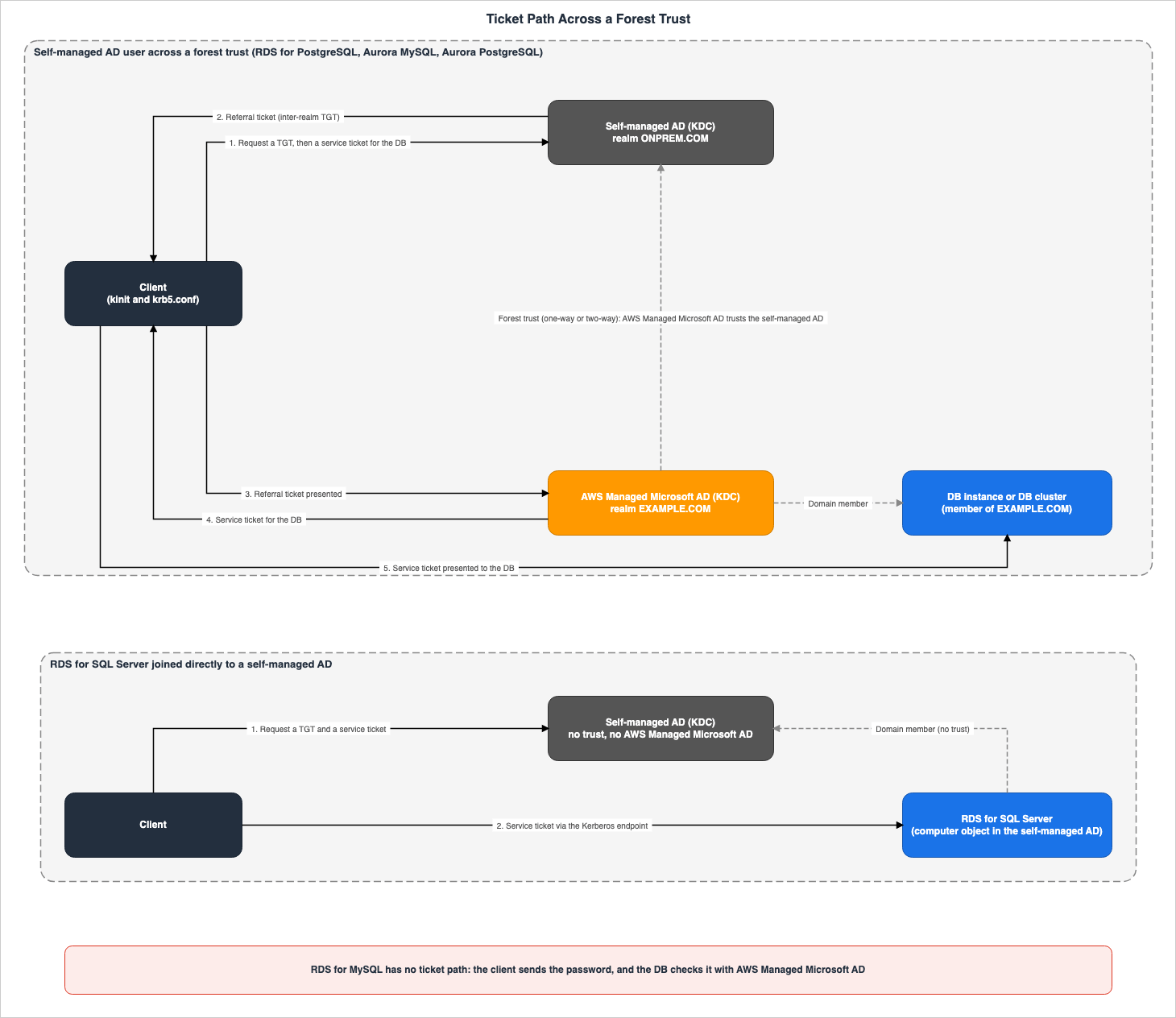
2.1 Kerberos with AWS Managed Microsoft AD
The first method is to join the database to the AWS Managed Microsoft AD domain and use Kerberos for authentication. RDS for PostgreSQL, Aurora MySQL, and Aurora PostgreSQL utilize this method. RDS for SQL Server also has configurations that involve joining it to AWS Managed Microsoft AD.The "Setting up" page for RDS for PostgreSQL states the following regarding AWS Managed Microsoft AD:
AWS Managed Microsoft AD is the only option currently supported for use with Amazon RDS.On the database side, an IAM role is required for RDS to access AWS Managed Microsoft AD. This role utilizes the managed policy
AmazonRDSDirectoryServiceAccess. When creating a database through the console, and the user has the iam:CreateRole permission, the console will automatically create the role. The role name is rds-directoryservice-kerberos-access-role for the PostgreSQL-based engines, Aurora MySQL, and RDS for MySQL, and rds-directoryservice-access-role for RDS for SQL Server. The RDS for PostgreSQL and RDS for MySQL pages indicate that the role used for Windows authentication in RDS for SQL Server cannot be used.2.2 Self-Managed AD Connected by a Trust Relationship
The second method adds a trust relationship with a self-managed AD to the first method. The database remains part of the domain within AWS Managed Microsoft AD, while users from the self-managed AD can log in to the database. The page for RDS for PostgreSQL states:The trust can be one-way, where the AWS Managed Microsoft AD directory trusts the on-premises Microsoft Active Directory. The trust can also be two-way, where both Active Directories trust each other.The pages for RDS for SQL Server, RDS for PostgreSQL, Aurora MySQL, and Aurora PostgreSQL specify the trust relationship type as "forest trust." The page for RDS for MySQL, however, states that a trust relationship is required, while also noting that authentication across a forest trust is not supported (Section 7.2).
The documentation for AWS Directory Service states that AWS Managed Microsoft AD can establish both external and forest trusts. The same page indicates that Amazon RDS works with either one-way or two-way trust relationships.
2.3 RDS for SQL Server Joined Directly to a Self-Managed AD
The third method is unique to RDS for SQL Server. It joins the database directly to the self-managed AD domain, without AWS Managed Microsoft AD. The SQL Server self-managed AD pages state:This integration enables direct user authentication through NTLM or Kerberos protocols, eliminating the need for complex intermediary domains or forest trusts.In this method, instead of using IAM roles, you store the credentials of a service account from the self-managed AD in an AWS Secrets Manager secret. The database then uses this service account to create a computer object in the self-managed AD. When creating the database, you must provide four parameters:
--domain-fqdn, --domain-ou, --domain-auth-secret-arn, and --domain-dns-ips.Kerberos support for this method was introduced on August 19, 2025 (Section 7.1). When this method was initially launched on July 10, 2023, only NTLM was supported.
2.4 RDS for MySQL Checks the Password Against AD
The fourth method is specific to RDS for MySQL. The RDS Kerberos availability page states:RDS for MySQL doesn't support Kerberos authentication. Instead, it supports password-based Active Directory authentication.On the database side, users are created using the
auth_pam plugin. Clients enter their Active Directory username and password into the MySQL client. The MySQL AD page describes the subsequent process as follows:The client sends the password to the DB instance, which verifies it against your Active Directory domain.The client does not obtain a Kerberos ticket. The password is transmitted to the database. The MySQL AD page strongly recommends using an SSL/TLS connection.
We strongly recommended that clients use SSL/TLS connections when using PAM authentication. If they don't use SSL/TLS connections, the password might be sent as clear text in some cases.2.5 Engines That Cannot Use Kerberos
The RDS Kerberos availability page lists RDS for MariaDB and RDS for MySQL as engines that do not support Kerberos authentication. RDS for MySQL uses AD with the method in Section 2.4. For RDS for MariaDB, the documentation reviewed for this article does not list the method that checks the password against AD (Documentation does not list).Kerberos authentication isn't available with the following engines:
RDS for MariaDB
RDS for MySQL3. The Engine Table
This chapter presents six engines across two tables. Table 1 outlines the methods and AD types, while Table 2 details the database-side configurations. The verification date is November 12, 2026.Table 1 lists the method, the AD used, and how users from a self-managed AD are brought in, for each engine.
| Engine | Method | AD Used | Users from a Self-Managed AD |
|---|---|---|---|
| RDS for SQL Server | Windows Authentication (NTLM or Kerberos) | AWS Managed Microsoft AD, or direct join to a self-managed AD | Forest trust (one-way or two-way), or direct join (no trust relationship required) |
| RDS for MySQL | Checks the password against AD (auth_pam). Not Kerberos. | AWS Managed Microsoft AD only | Requires a trust relationship. Authentication across a forest trust: Stated as not supported (Section 7.2). |
| RDS for PostgreSQL | Kerberos | AWS Managed Microsoft AD only | Forest trust (one-way or two-way) |
| RDS for MariaDB | Kerberos: Stated as not supported. Checking the password against AD: Documentation does not list. | — | — |
| Aurora MySQL | Kerberos (authentication_kerberos) | AWS Managed Microsoft AD only | Forest trust (one-way or two-way) |
| Aurora PostgreSQL | Kerberos | AWS Managed Microsoft AD only | Forest trust (one-way or two-way) |
Table 2 lists the IAM roles, database user creation methods, AD groups, and compatibility with IAM database authentication for each engine.
| Engine | IAM Role | User Creation on Database Side | AD Group | Use with IAM Database Authentication |
|---|---|---|---|---|
| RDS for SQL Server | AmazonRDSDirectoryServiceAccess. The console names it rds-directoryservice-access-role. For direct joining, use a Secrets Manager secret instead of the role. | CREATE LOGIN [DOMAIN\user] FROM WINDOWS | Stated | Documentation does not list |
| RDS for MySQL | AmazonRDSDirectoryServiceAccess. The console names it rds-directoryservice-kerberos-access-role. | CREATE USER ... IDENTIFIED WITH 'auth_pam' | Documentation does not list | Stated as not supported (at the database instance level). |
| RDS for PostgreSQL | AmazonRDSDirectoryServiceAccess. The console names it rds-directoryservice-kerberos-access-role. | CREATE USER "user@REALM" WITH LOGIN and GRANT rds_ad | Stated as not supported | Supported in the database; a single user can use only one of the methods. |
| RDS for MariaDB | — | — | — | — |
| Aurora MySQL | AmazonRDSDirectoryServiceAccess. The console names it rds-directoryservice-kerberos-access-role. | CREATE USER ... IDENTIFIED WITH 'authentication_kerberos' BY 'realm_name' | Documentation does not list | Supported in the database; a single user can use only one of the methods. |
| Aurora PostgreSQL | AmazonRDSDirectoryServiceAccess. The console names it rds-directoryservice-kerberos-access-role. | Same as RDS for PostgreSQL. Do not grant rds_ad to the database roles mapped to AD groups. | Stated (from versions 14.10 and 15.5, using pg_ad_mapping). Sources disagree (Section 7.2). | Supported in the database; a single user can use only one of the methods. |
The rationale for each cell in the table is as follows:
- RDS for SQL Server Active Directory (AD) Groups: The SQL Server Managed AD pages state that it is possible to create SQL Server logins from AD users and groups. The SQL Server self-managed AD pages also describe how to create logins for groups.
- RDS for SQL Server IAM Database Authentication: The title of the RDS IAM database authentication page names MariaDB, MySQL, and PostgreSQL. This article marks the SQL Server row as Documentation does not list.
- RDS for MySQL, use with IAM database authentication: The MySQL AD page states that AD authentication and IAM authentication cannot be enabled simultaneously. It specifies that you must choose one option per DB instance.
- PostgreSQL-based engines and Aurora MySQL, use with IAM database authentication: Each page indicates that a single database can utilize both Kerberos and IAM, but a single user can only log in using one of these methods. The PostgreSQL pages state that users with the
rds_adrole cannot also have therds_iamrole. This restriction also applies to nested roles. - MySQL AD Groups: Descriptions of AD groups were not found on the MySQL AD page or the Aurora MySQL Kerberos pages.
4. Where the Tickets Come From
This chapter details the origin of authentication tickets and how they reach the database, outlining the process for each method. Figure 1 shows the path of tickets that cross a trust relationship, next to the direct join of RDS for SQL Server.4.1 Users of AWS Managed Microsoft AD
When users of AWS Managed Microsoft AD log in to the database using Kerberos, the KDC (Key Distribution Center) is the domain controller for AWS Managed Microsoft AD. The Aurora MySQL Kerberos documentation states:When users authenticate with the Aurora MySQL DB cluster, authentication requests are forwarded to the AWS Managed Microsoft AD directory.The client first obtains a Ticket Granting Ticket (TGT) using a command like
kinit. Then, it receives a service ticket for the database and passes it to the database. The Aurora MySQL Kerberos documentation notes that, on Windows, authentication is typically completed during login, so there is no need for the user to manually obtain a TGT.The client uses a configuration file, such as
krb5.conf or its equivalent, to specify the realm and KDC. The Aurora MySQL Kerberos documentation and the RDS PostgreSQL Kerberos documentation provide the same example.[libdefaults]
default_realm = EXAMPLE.COM
[realms]
EXAMPLE.COM = {
kdc = example.com
admin_server = example.com
}
[domain_realm]
.example.com = EXAMPLE.COM
example.com = EXAMPLE.COM4.2 Self-Managed AD Users Across a Trust Relationship
Users of a self-managed Active Directory (AD) pass through two Key Distribution Centers (KDCs). An article on the AWS Database Blog, published on April 16, 2026, outlines the process using Aurora MySQL as an example.A Referral Ticket (Inter-Realm TGT) is issued, signed with the shared trust key.
The client presents the referral ticket to AWS Managed Microsoft AD.
AWS Managed Microsoft AD validates the referral signature using the trust key — this validates the trust only, not user credentials.
AWS Managed Microsoft AD issues a Service Ticket for Aurora, trusting the identity verified by on-premises AD.Rewriting the process described in that article using the terminology in this article, it can be broken down into the following five steps:
- The client obtains a Ticket Granting Ticket (TGT) from its self-managed AD KDC. The self-managed AD verifies the password.
- The client requests a service ticket from the self-managed AD, using the database's Service Principal Name (SPN). The self-managed AD determines that the database resides within an AWS Managed Microsoft AD domain and issues a referral ticket (an inter-realm TGT).
- The client passes the referral ticket to AWS Managed Microsoft AD.
- AWS Managed Microsoft AD validates the referral ticket with the trust relationship's key and issues a service ticket for the database. Only the trust relationship is validated at this stage, not the user's credentials.
- The client passes the service ticket to the database.
In this process, the self-managed AD holds the user's credentials, while AWS Managed Microsoft AD issues the database's service ticket. The trust relationship requires AWS Managed Microsoft AD to trust the self-managed AD. The same article describes the creation of a One-Way: Outgoing forest trust from AWS Managed Microsoft AD to the self-managed AD.
The authentication process uses a one-way forest trust relationship where AWS Managed Microsoft AD trusts the on-premises AD.The client's
krb5.conf file includes two realms. An example from the RDS PostgreSQL Kerberos documentation, pertaining to a self-managed AD, includes a line that maps the database's hostname to the realm of AWS Managed Microsoft AD.[domain_realm]
.example.com = EXAMPLE.COM
example.com = EXAMPLE.COM
.onprem.com = ONPREM.COM
onprem.com = ONPREM.COM
.rds.amazonaws.com = EXAMPLE.COM
.amazonaws.com.cn = EXAMPLE.COM
.amazon.com = EXAMPLE.COMAs an inference by this article, the line
.rds.amazonaws.com = EXAMPLE.COM informs the client that the database service resides in the realm of AWS Managed Microsoft AD. Without this line, the client may be unable to determine the realm based solely on the database's hostname. However, the documentation does not explicitly explain the role of this line.Windows clients use a different method. The RDS PostgreSQL Kerberos pages have Windows clients that use a self-managed AD replace
rds.amazonaws.com in the endpoint with the domain name of AWS Managed Microsoft AD.RDS-DB-instance.111122223333.aws-region.corp.example.com4.3 RDS for SQL Server Joined Directly
When you join RDS for SQL Server directly to a self-managed AD, the KDC is the domain controller of the self-managed AD. AWS Managed Microsoft AD will not be involved, and there will be no trust relationship established.Instead, the database has a computer object in the self-managed AD. The SQL Server self-managed AD pages have you delegate to the service account the permission to create computer objects in an Organizational Unit (OU). When using Kerberos, you also delegate the permission to write Service Principal Names (SPNs) and server-level permissions in DNS Manager.
The Kerberos service ticket is issued against the SPN. The SQL Server self-managed AD pages mention a potential issue where applications may not recognize new SPNs after a failover, and say that RDS provides a Kerberos endpoint for this (Section 6.2).
The SQL Server self-managed AD pages also describe how to verify whether connections are using NTLM or Kerberos using the following query.
SELECT net_transport, auth_scheme FROM sys.dm_exec_connections WHERE session_id = @@SPID;4.4 RDS for MySQL Does Not Use Tickets
With the RDS for MySQL method, clients do not obtain tickets. Instead, passwords are sent from the client to the database, and the database queries Active Directory (as described in Section 2.4). The Key Distribution Center (KDC) does not appear in the process, and the client'skrb5.conf file is not required.Even with RDS for MySQL, the database is joined to the domain within AWS Managed Microsoft AD. The MySQL AD page states that the database is joined to the trusting domain, and that requests are forwarded to the directory.
When users authenticate with a MySQL DB instance joined to the trusting domain, authentication requests are forwarded.As an inference by this article, whether users from a self-managed AD can authenticate with RDS for MySQL depends on whether the AWS Managed Microsoft AD that the database queries can verify those users through a trust relationship. The documentation does not specify the path for this query. Furthermore, two sentences in Section 7.2 regarding trust relationships do not definitively clarify this path.
5. DNS, Ports, Security Groups, and Shared Directories
This chapter outlines the boundaries of authentication, dividing them into five categories: DNS, ports, security groups, shared directories, and Regions. Figure 2 illustrates the location of each boundary, and also lists the Kerberos endpoints from Section 6.2.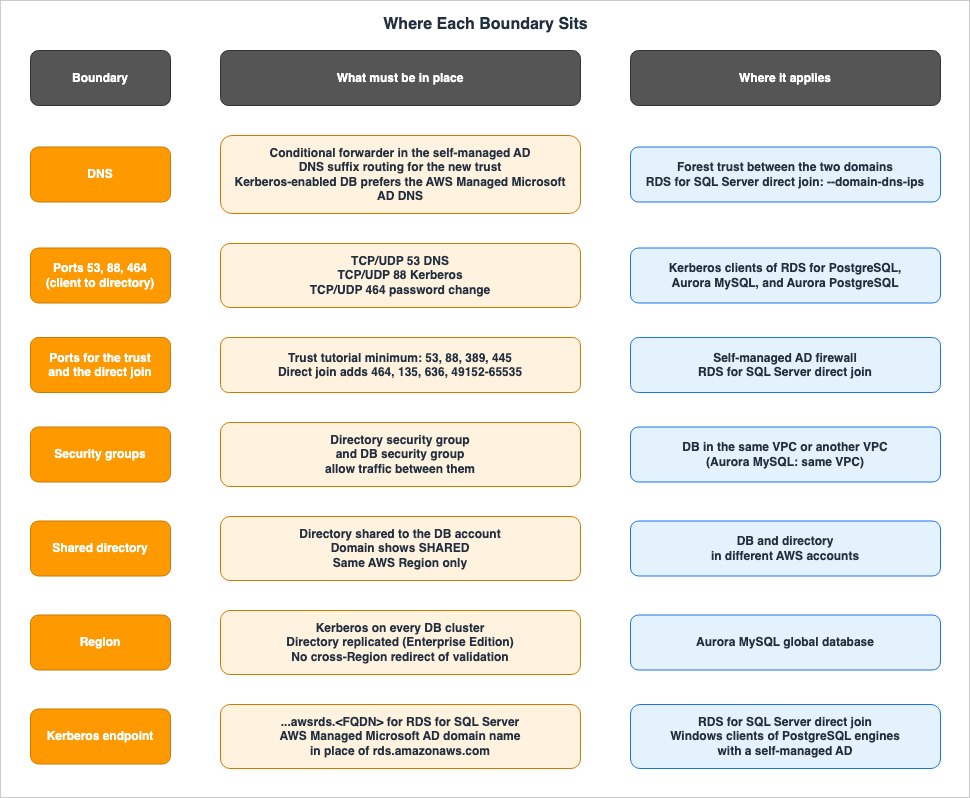
5.1 DNS
When using trust relationships, ensure that both domains can resolve the other domain's name. The Directory Service trust pages state that you should configure a DNS conditional forwarder in the self-managed AD domain. The RDS PostgreSQL Kerberos pages, the Aurora MySQL Kerberos pages, and the Aurora PostgreSQL Kerberos pages say to make sure that the self-managed AD domain name includes a DNS suffix routing that corresponds to the new trust relationship.For the direct join of RDS for SQL Server, when creating a database, pass the IP addresses of the self-managed AD DNS servers to the
--domain-dns-ips parameter. The SQL Server self-managed AD pages indicate that you do not need to modify the VPC's DHCP option sets.Enabling Kerberos changes the order of name resolution on the database. The Aurora MySQL Kerberos pages and the RDS PostgreSQL Kerberos pages state that the database uses the AWS Managed Microsoft AD DNS servers before Amazon's DNS. If the AWS Managed Microsoft AD DNS contains records for AWS service endpoints, the database may be unable to connect to those services. Section 7.4 of Calling AWS from Inside Aurora and RDS on this site covers this side effect.
The RDS PostgreSQL Kerberos pages also state that only Kerberos traffic goes to the domain's DNS servers.
Only Kerberos authentication with RDS for PostgreSQL sends traffic to the domain's DNS servers. All other DNS requests are treated as outbound network access on your DB instances running PostgreSQL.5.2 Ports
Between the client and the directory, ports 53 (DNS), 88 (Kerberos), and 464 (password changes) must be open. The RDS PostgreSQL Kerberos pages and Aurora MySQL Kerberos pages guide you to verify these three communication channels during the client configuration process. Between the client and the database, the database's port must be open.When establishing trust relationships, ports between the self-managed AD and the directory's VPC must also be opened. The tutorial in the Directory Service trust pages specifies that you open the following minimum ports on the self-managed AD firewall:
| Protocol | Port | Role |
|---|---|---|
| TCP/UDP | 53 | DNS |
| TCP/UDP | 88 | Kerberos Authentication |
| TCP/UDP | 389 | LDAP |
| TCP | 445 | SMB |
The same tutorial also instructs you to add outbound rules to the security group for the AWS Managed Microsoft AD domain controllers.
For the direct join of RDS for SQL Server, additional ports must be opened between the database and the self-managed AD. The SQL Server self-managed AD pages provide the following table:
| Protocol | Port | Role |
|---|---|---|
| TCP/UDP | 53 | DNS |
| TCP/UDP | 88 | Kerberos Authentication |
| TCP/UDP | 464 | Password Changes and Configuration |
| TCP/UDP | 389 | LDAP |
| TCP | 135 | DCE / EPMAP |
| TCP | 445 | Directory Services SMB |
| TCP | 636 | LDAPS |
| TCP | 49152 - 65535 | Ephemeral Ports for RPC |
The same page also states that when using Network ACLs, you must allow outbound traffic from the database to ports 49152 through 65535. The SQL Server self-managed AD pages recommend using LDAPS and state that if the domain controller does not have a valid certificate, the DB instance uses LDAP.
5.3 Security Groups and VPCs
The database and directory servers are configured to allow communication through each other's security groups. The RDS PostgreSQL Kerberos pages say that the database's security group must receive traffic from the directory's security group. The same pages say that the database's security group must allow both inbound and outbound traffic in the directory's VPC. The MySQL AD page says that the database's security group must allow outbound traffic in the directory's VPC.It is also possible to place the database and directory servers in separate VPCs. The RDS PostgreSQL Kerberos pages specify that the VPCs should be connected via VPC peering or AWS Transit Gateway. For the direct join of RDS for SQL Server, the database's VPC and the self-managed AD must be connected using either AWS Direct Connect, AWS VPN, VPC peering, or AWS Transit Gateway.
Aurora MySQL differs in this regard. The Aurora MySQL Kerberos pages specify that the database cluster should be placed in the same VPC as the directory (Section 6.3).
5.4 Shared Directories
When the database and the directory are in different AWS accounts, share the directory. Sharing works in the same Region. The MySQL AD page states:However, you can join RDS for MySQL DB instances to shared Managed Microsoft AD domains owned by different accounts in the same AWS Region.The Aurora MySQL Kerberos pages use a sentence of the same form that also says the same Region. The RDS PostgreSQL Kerberos pages say to wait until the Directory Service console of the database account shows the domain status as
SHARED, and then join the database with that directory ID. The sharing steps are covered in Running Windows Server Workloads on AWS on this site.5.5 Region
In Aurora's Global Database, authentication boundaries are defined by Region. The Aurora MySQL Kerberos documentation states:For Aurora global databases to use Kerberos authentication, you must configure it for every DB cluster in the global database.The same documentation indicates that to authenticate AD users in a secondary Region, you must replicate AD to that secondary Region and enable Kerberos with the same domain ID as the primary Region. Only the Enterprise Edition is supported for AWS Managed Microsoft AD replication. An article on the AWS Database Blog, published on April 16, 2026, states:
Aurora does not redirect Kerberos validation across Regions.The Directory Service trust pages describe trust relationships as a global feature of AWS Managed Microsoft AD. When using replication, trust relationships should be managed in the primary Region, and they are automatically applied to the replicated Region.
Windows clients that use a self-managed AD have endpoint restrictions. The Aurora PostgreSQL Kerberos documentation and the Aurora MySQL Kerberos documentation state:
For global databases: Windows clients can connect using instance endpoints or cluster endpoints in the primary AWS Region of the global database only. Windows clients can't connect using cluster endpoints in secondary AWS Regions.6. What Differs by Engine
This chapter will outline the differences between engines, even when using the same AD authentication system.6.1 AD Groups
Whether AD groups can be granted database permissions varies depending on the database engine.- RDS for SQL Server: You can create SQL Server logins from AD users and groups. The login name must be in the pre-Windows 2000 format
DOMAIN\name, and the UPN (User Principal Name) format can't be used. - RDS for PostgreSQL: The RDS PostgreSQL Kerberos pages state:
RDS for PostgreSQL doesn't support Kerberos authentication for Active Directory groups.- Aurora PostgreSQL: The AD security groups page states that, from versions 14.10 and 15.5, AD groups can be mapped to database roles with the
pg_ad_mappingextension. However, the Aurora PostgreSQL Kerberos pages still include the RDS for PostgreSQL sentence above (Section 7.2). - RDS for MySQL and Aurora MySQL: No information regarding AD groups was found (Documentation does not list).
When using AD groups with Aurora PostgreSQL, pay close attention to how they relate to individual database roles. The AD security groups page states:
AD users who have a corresponding DB role in the database with rds_ad role granted to them, can't login as part of the AD security group.The same page says not to grant
rds_ad to database roles that are mapped to AD groups.6.2 Kerberos Endpoints
When you join RDS for SQL Server directly to a self-managed AD and use Kerberos authentication, use the Kerberos endpoint. The SQL Server self-managed AD pages give its form as follows:rds-instance-name.account-region-hash.aws-region.awsrds.fully qualified domain name (FQDN)The SQL Server self-managed AD pages say that for NTLM authentication you connect to the RDS endpoint or, in Multi-AZ configurations, to the listener endpoint. If you connect to the Kerberos endpoint and still get an NTLM connection, the pages say to verify your network and user settings. Kerberos endpoints continue to point to the new primary SPN after a failover.
In configurations where RDS for SQL Server is joined to AWS Managed Microsoft AD, the documentation does not list a Kerberos endpoint (Documentation does not list). The SQL Server connecting page says to log in to a domain-joined computer as a domain user and connect.
For the PostgreSQL-based engines, Windows clients that use a self-managed AD connect using endpoints that utilize the AWS Managed Microsoft AD domain name (Section 4.2). The Aurora PostgreSQL Kerberos pages state that Windows clients cannot use Aurora's custom endpoints.
6.3 Database and Directory Location
The documentation for RDS for SQL Server, RDS for MySQL, and RDS for PostgreSQL states that the database can be placed in the same VPC as the directory, or in a different VPC. The Aurora MySQL Kerberos documentation states:Locate the DB cluster in the same VPC as the domain directory.Regarding Aurora MySQL Kerberos, the documentation indicates that it can utilize a shared directory hosted in a different account (Section 5.4). As an inference by this article, when using a shared directory, it may not be possible to place the database cluster in the same VPC as the directory. The documentation does not explicitly state the relationship between these two points.
6.4 Read Replicas and Restart
- RDS for MySQL: The MySQL AD page says not to use AD authentication with read replicas. After enabling AD authentication, restart the DB instance.
- Aurora MySQL: The Aurora MySQL Kerberos pages state that after enabling Kerberos, the reader DB instances must be restarted to install the
authentication_kerberosplugin. Replication to DB instances that do not support this plugin may fail. - RDS for PostgreSQL and Aurora PostgreSQL: The pages say nothing about read replicas and Multi-AZ (Documentation does not list).
- RDS for SQL Server: When using Multi-AZ with a direct join to a self-managed AD, NTLM connections go to the listener endpoint. The endpoint for Kerberos will continue to point to the new primary's SPN after failover (Section 6.2).
6.5 Status Names
The status of Active Directory (AD) authentication in the database is represented by names such askerberos-enabled, enabling-kerberos, and enable-kerberos-failed. RDS for MySQL uses the same naming convention. The MySQL AD page states:The status values use kerberos in their names for API consistency across engines, but for RDS for MySQL they describe the state of Active Directory authentication.Even though the state names include the term
kerberos, this does not mean that RDS for MySQL uses Kerberos.6.6 Client Versions and User Name Case
In Aurora MySQL, the client version can affect authentication. Aurora MySQL Kerberos pages require clients and connectors running version 8.0.26 or later on Unix systems, and version 8.0.27 or later on Windows. Older clients don't have the client-sideauthentication_kerberos_client plugin and can't authenticate. On the database side, Aurora MySQL versions 3.03 and later, as well as 8.4.7 and later, support Kerberos.When connecting to Aurora MySQL from a Windows client, by default, the database username case (uppercase or lowercase) is matched against the Active Directory (AD) username. You can configure the database cluster parameter
authentication_kerberos_caseins_cmp to true to enable case-insensitive comparisons.The Aurora MySQL Kerberos documentation notes that authentication may fail if the database instance's keytab is rotated. In such cases, you should reacquire the TGT using
kinit.6.7 Use with IAM Database Authentication
The unit at which AD authentication and IAM database authentication can be combined differs by engine (Table 2).- For RDS for MySQL, you must choose either Active Directory (AD) authentication or IAM authentication for the DB instance.
- RDS for PostgreSQL, Aurora PostgreSQL, and Aurora MySQL support using both authentication methods on a single DB. However, a single user can only log in using one method. In the PostgreSQL-based engines, you cannot assign both
rds_adandrds_iamto the same user.
Support for using both IAM and Kerberos on a single DB cluster in Aurora PostgreSQL was introduced on March 9, 2021 (Section 7.1).
6.8 Restoration and Migration
After restoring from a snapshot or performing a point-in-time recovery, the procedure for adding the database to the domain varies depending on the engine.- RDS for SQL Server and RDS for MySQL: The documentation specifies that after restoration, you must modify the database and then add it to the domain. It does not state that domain settings are inherited during the restoration process.
- RDS for PostgreSQL and Aurora PostgreSQL: The documentation lists restoring from a snapshot as one method for configuring Kerberos. It does not specify whether domain settings are inherited.
There are also limitations regarding migration. The Aurora PostgreSQL Kerberos documentation states:
Enabling Kerberos authentication isn't currently supported on Aurora PostgreSQL DB cluster during migration from RDS for PostgreSQL. You can enable Kerberos authentication only on a standalone Aurora PostgreSQL DB cluster.When migrating from RDS for MySQL to Aurora MySQL, the user's plugin will change. The Aurora MySQL Kerberos documentation instructs users to change users created with
auth_pam to use authentication_kerberos (Section 7.2).ALTER USER user_name IDENTIFIED WITH 'authentication_kerberos' BY 'realm_name';6.9 Domain Name Length and Ports
- RDS for MySQL: Domain names must be 61 characters or less. After enabling AD authentication, do not change the DB instance's port.
- Aurora MySQL: Domain names should be shorter than 62 characters. If you change the port of the DB cluster after enabling Kerberos, Kerberos authentication will stop working.
- RDS for SQL Server: The fully qualified domain name of a self-managed AD must be 47 characters or less. AWS Managed Microsoft AD directory DNS names also cannot exceed 47 characters, as SQL Server does not support names longer than that. When joining a self-managed AD directly, single-label domains are not supported.
6.10 When the IAM Role for RDS for SQL Server Is Deleted
The SQL Server Managed AD pages describe the behavior when therds-directoryservice-access-role is deleted. If this role is deleted, it will no longer be possible to modify databases that have joined the domain through the RDS console or API. RDS will attempt to recreate the role, but if it lacks the iam:CreateRole permission, the attempt will fail. The same page also notes that this error is not logged in CloudTrail.7. Status, Dates, and Where the Sources Disagree
This chapter lists the dates when support for AD authentication began, and shows where the sources disagree and what they do not list.7.1 Status and Dates
Table 3 lists announcements related to Active Directory authentication for six engines. The dates listed are the publication dates from the "What's New" section. If a "What's New" entry is unavailable, the dates are taken from the "Document history."| Date | Engine | Event | Source |
|---|---|---|---|
| March 23, 2016 | RDS for SQL Server | Windows authentication. Required the Enterprise Edition of AWS Managed Microsoft AD. | What's New |
| October 29, 2019 | RDS for PostgreSQL | Kerberos authentication. | What's New |
| January 22, 2020 | RDS for MySQL | Authentication using AWS Managed Microsoft AD. Versions 5.7.24 and later, and 8.0.13 and later. | What's New |
| February 13, 2020 | RDS for SQL Server | Joining domains owned by a different account and in a different VPC. | RDS document history |
| March 3, 2020 | Aurora PostgreSQL | Kerberos authentication. Versions 10.11 and later, and 11.6 and later. | What's New |
| May 7, 2020 | Aurora PostgreSQL | Self-managed AD (external AD). | What's New |
| March 9, 2021 | Aurora PostgreSQL | Using both IAM and Kerberos authentication within a single DB cluster. | What's New |
| March 8, 2023 | Aurora MySQL | Kerberos authentication. Versions 3.03 and later. | What's New |
| July 10, 2023 | RDS for SQL Server | Direct join to a self-managed AD. NTLM was the only authentication method. | What's New |
| December 21, 2023 | Aurora PostgreSQL | AD group mapping using pg_ad_mapping (available from versions 14.10 and 15.5). | What's New |
| August 19, 2025 | RDS for SQL Server | Kerberos authentication with a direct join to a self-managed AD. | What's New |
| August 20, 2026 | Aurora MySQL | Updates to the Kerberos page. | Aurora document history |
Table 3 provides the following additional information.
- Regarding the March 8, 2023 entry for Aurora MySQL: The title of the What's New post is Microsoft Active Directory authentication, and it does not contain the word Kerberos. The Aurora document history describes the entry for the same date as Kerberos authentication.
- Regarding the entry for Aurora PostgreSQL and Active Directory groups: No What's New post that announces this feature alone was found. The What's New post for versions 15.5, 14.10, 13.13, and 12.17 lists it as one of the new features. The supported versions are 14.10 and 15.5, as stated on the AD security groups page.
- Regarding the entry dated August 20, 2026: The Aurora document history indicates that the Aurora MySQL Kerberos page was updated. As an inference by this article, this update may be related to adding 8.4.7 and later to the versions that support Kerberos. However, the document history does not provide specific details about the update.
7.2 Where the Sources Disagree
This article identified four points where the documentation contains discrepancies. This article does not conclude that either source is incorrect.The first is the AD groups for Aurora PostgreSQL. The beginning of the Aurora PostgreSQL Kerberos pages states:
RDS for PostgreSQL doesn't support Kerberos authentication for Active Directory groups.The AD security groups page in the same Aurora User Guide states:
From Aurora PostgreSQL 14.10 and 15.5 versions, Aurora PostgreSQL access control can be managed using AWS Directory Service for Microsoft Active Directory (AD) security groups.The former text is identical to the text found on the RDS PostgreSQL Kerberos pages. The table of contents on the Aurora PostgreSQL Kerberos pages includes a link to the Active Directory security groups page.
The second is the trust relationship for RDS for MySQL. The limitations section on the MySQL AD page lists two sentences:
To use credentials from a self-managed Active Directory, you must set up a trust relationship between your self-managed Active Directory and an AWS Managed Microsoft AD directory.RDS for MySQL doesn't support Active Directory authentication across a forest trust between your on-premise or self-hosted AD and the AWS Managed Microsoft AD.The first sentence does not specify the type of trust relationship. The second sentence states that authentication across a forest trust is not supported. As an inference by this article, a configuration that satisfies both sentences could potentially be an external trust. However, the MySQL AD page does not explicitly mention external trust.
The third is whether RDS for MySQL uses Kerberos. The RDS Kerberos availability page states, as described in Section 2.4, that RDS for MySQL does not use Kerberos. The "Migration" section on the Aurora MySQL Kerberos pages states:
After you migrate from RDS for MySQL with Kerberos authentication enabled to Aurora MySQL, modify users created with the auth_pam plugin to use the authentication_kerberos plugin.The latter treats users created with
auth_pam as the starting point of the migration. As an inference by this article, the "Kerberos authentication enabled" mentioned in the latter section may refer to the state described in Section 6.5. However, the documentation does not explicitly state this.The fourth is whether PostgreSQL clients must join the AD domain. The "Setting up" pages on both the RDS PostgreSQL Kerberos pages and the Aurora PostgreSQL Kerberos pages state:
It's required that the database users who authenticate using Kerberos are doing so from client machines that are members of the Active Directory domain.An article on the AWS Database Blog, dated February 20, 2023, states:
In this post, we demonstrate how to configure a Linux client outside of active directory domain to connect using Kerberos authentication to an Amazon RDS for PostgreSQL or Amazon Aurora PostgreSQL-Compatible Edition.A subsequent article, dated April 16, 2026, also illustrates a configuration that allows connections to Aurora MySQL from Linux clients that are not part of a domain.
The following three points represent differences in the versions of the documentation, and this article does not consider them to be discrepancies. The older documentation reflects the state of affairs at that time.
- RDS for SQL Server with a self-managed AD: The What's New post of July 10, 2023, said the following. The What's New post of August 19, 2025, added Kerberos, and the current SQL Server self-managed AD pages describe both NTLM and Kerberos.
Currently, customers can only use NTLM as the authentication protocol for self-managed AD.- Kerberos for RDS for MySQL: The RDS document history has a row dated January 21, 2020, that reads "Amazon RDS for MySQL supports Kerberos authentication." A note at the end of the What's New post for the same announcement says that the post was updated on October 24, 2022, to describe the AD support accurately.
- Edition for RDS for SQL Server: The What's New post of March 23, 2016, required the Enterprise Edition of AWS Managed Microsoft AD. Currently, the RDS for SQL Server Managed AD pages instruct users to select an appropriate edition to meet their requirements.
7.3 What the Documentation Does Not List, and Where No Statement Was Found
The following items are not mentioned in the documentation reviewed for this article. This article will neither confirm nor deny compatibility with these items.- Aurora Serverless v2 and AD Authentication: The requirements page for Aurora Serverless v2 does not contain the words Kerberos or Active Directory (Documentation does not list).
- Blue/Green Deployments and AD Authentication: The RDS and Aurora considerations pages do not contain the words Kerberos or Active Directory (Documentation does not list).
- RDS for PostgreSQL and Aurora PostgreSQL, Read Replicas and Multi-AZ: Documentation does not list.
- RDS for MySQL and Aurora MySQL, AD Groups: Documentation does not list.
- Kerberos endpoint when RDS for SQL Server is joined to AWS Managed Microsoft AD: Documentation does not list.
- Whether domain settings carry over after a restore: No statement found.
- AWS Managed Microsoft AD Hybrid Edition: The RDS and Aurora pages do not mention Hybrid Edition. The AWS Directory Service FAQ lists RDS for MySQL, RDS for PostgreSQL, and RDS for SQL Server as supported for Hybrid Edition, but does not include Aurora.
- Date when RDS for MySQL changed to the method that checks the password against AD: No statement found, other than the October 24, 2022 note in the What's New post.
8. Failure Modes
This chapter lists common misunderstandings that occur in the design and operation of Active Directory authentication.- Provide Kerberos client configuration for RDS for MySQL. RDS for MySQL does not use Kerberos; instead, clients send passwords (Section 2.4).
- Skip requiring SSL/TLS for RDS for MySQL. Passwords may be transmitted in plain text (Section 2.4).
- Look at the
kerberos-enabledstatus of RDS for MySQL and assume that Kerberos is working (Section 6.5). - After migrating from RDS for MySQL to Aurora MySQL, continue using existing
auth_pamusers. The Aurora MySQL Kerberos pages say to change them toauthentication_kerberos(Section 6.8). - Create trust relationships in the reverse direction. It is necessary to have AWS Managed Microsoft AD trust the self-managed AD (Section 4.2).
- Leave out the conditional forwarder for the AWS Managed Microsoft AD domain on the self-managed AD side, and forget the DNS suffix routing as well (Section 5.1).
- Leave one of ports 53, 88, or 464 closed between the client and the directory. The documentation says to open all three (Section 5.2).
- With a direct join of RDS for SQL Server, clients attempt to authenticate using Kerberos but connect to the standard RDS endpoint instead of the Kerberos endpoint. The documentation lists the RDS endpoint as a destination for NTLM connections (Section 6.2).
- With RDS for PostgreSQL, attempt to grant database permissions to AD groups. RDS for PostgreSQL does not support AD groups (Section 6.1).
- In Aurora PostgreSQL, grant the
rds_adrole to database roles mapped to AD groups. Users whose individual database roles have therds_adrole will not be able to log in as AD groups (Section 6.1). - Assign both
rds_adandrds_iamto the same user. The PostgreSQL-based engines do not allow both (Section 6.7). - For Aurora MySQL Global Database, configure Kerberos only on the primary cluster. The Aurora MySQL Kerberos pages say to configure it for every DB cluster (Section 5.5).
- With Aurora MySQL, use older MySQL clients. A version of 8.0.26 or later is required on Unix, and 8.0.27 or later on Windows (Section 6.6).
- After enabling Kerberos, change the database port. On Aurora MySQL, Kerberos authentication stops working (Section 6.9).
- Remove the
rds-directoryservice-access-rolefor RDS for SQL Server. This will prevent database modifications, and errors will not be logged in CloudTrail (Section 6.10). - Treat a configuration that the materials do not describe as one that cannot be used (Section 7.3).
9. Frequently Asked Questions About Active Directory Authentication for RDS and Aurora
Q1. Does RDS for MySQL's Active Directory authentication use Kerberos?
No. The RDS Kerberos availability page states that RDS for MySQL uses a method that checks the password against AD, rather than Kerberos. Users are created on the database side usingauth_pam. Aurora MySQL, on the other hand, utilizes Kerberos (Section 2.4).Q2. Is AWS Managed Microsoft AD always required to use a self-managed AD?
To use a self-managed AD, AWS Managed Microsoft AD is required in all cases except for RDS for SQL Server. RDS for SQL Server can join a self-managed AD directly without AWS Managed Microsoft AD, and in this scenario, no trust relationship is necessary (Section 2.3). For the other engines that support AD authentication, you must join the database to AWS Managed Microsoft AD and establish a trust relationship with the self-managed AD (Section 2.2).Q3. When users from a self-managed AD log in with Kerberos, which KDC issues the service ticket?
AWS Managed Microsoft AD issues the service ticket. The self-managed AD verifies the user and issues a Ticket Granting Ticket (TGT) and a referral ticket. AWS Managed Microsoft AD verifies the referral ticket using the trust relationship key and then issues the service ticket for the database. With a direct join of RDS for SQL Server, the self-managed AD acts as the KDC (Sections 4.2 and 4.3).Q4. Is it possible to use AD groups in PostgreSQL?
It depends on the database engine. RDS for PostgreSQL does not support this functionality. Aurora PostgreSQL supports the use of AD groups starting with versions 14.10 and 15.5, usingpg_ad_mapping. However, the documentation for Aurora PostgreSQL Kerberos still contains the statement that RDS for PostgreSQL "doesn't support" this feature (Sections 6.1 and 7.2).Q5. Is a one-way trust relationship enough?
Yes. The RDS PostgreSQL Kerberos pages and the SQL Server Managed AD pages list both one-way and two-way trusts. The Directory Service trust pages also state that Amazon RDS works with either one-way or two-way trusts. With a one-way trust, AWS Managed Microsoft AD trusts the self-managed AD (Sections 2.2 and 4.2).Q6. In an Aurora global database, can AD users log in to the DB in a secondary Region?
The Aurora MySQL Kerberos documentation states that this is possible. However, it requires configuring Kerberos on all DB clusters and replicating AD to the secondary Region. The AWS Database Blog states that Aurora does not redirect Kerberos validation across Regions. Windows clients that use a self-managed AD will only be able to connect using the endpoint of the primary Region. The Aurora PostgreSQL and Aurora MySQL pages state this restriction for Windows clients (Section 5.5).Q7. Is it possible to use Active Directory authentication with Aurora Serverless v2 or Blue/Green deployments?
The documentation referenced in this article does not mention either option. The article itself neither confirms nor denies support for either (Section 7.3).Q8. Does joining RDS for SQL Server directly to a self-managed AD support only NTLM?
No. While it supported only NTLM when it was first introduced on July 10, 2023, Kerberos was added on August 19, 2025. To authenticate using Kerberos, you need to connect to the Kerberos endpoint (Sections 2.3, 6.2, and 7.2).10. Summary
Active Directory (AD) authentication for RDS and Aurora can be compared on the following five points:- Method: RDS for PostgreSQL, Aurora MySQL, and Aurora PostgreSQL utilize Kerberos. RDS for SQL Server uses Windows authentication, employing either NTLM or Kerberos. RDS for MySQL uses a method that checks the password against AD. The documentation states that RDS for MariaDB does not support Kerberos.
- KDC: AWS Managed Microsoft AD issues the Kerberos service tickets. Users from a self-managed AD receive referral tickets through trust relationships. For the direct join of RDS for SQL Server, the self-managed AD acts as the KDC, and trust relationships are not required.
- Boundaries: Authentication can break at the direction of the trust relationship, the DNS of both domains, ports 53, 88, and 464 between the client and the directory, security groups, directory sharing in the same Region, and the Regions of a Global Database.
- Engine Differences: Variations exist across database engines regarding AD group support, Kerberos endpoints, the unit at which IAM database authentication can be combined, supported client versions for Aurora MySQL, and the location of the database and directory.
- Documentation Discrepancies: There are inconsistencies in the documentation regarding AD group support for Aurora PostgreSQL, trust relationships for RDS for MySQL, Kerberos support for RDS for MySQL, and domain joining for PostgreSQL clients. Tables 1 through 3 reflect the state of information as of November 12, 2026.
11. References
- Supported Regions and DB engines for Kerberos authentication in Amazon RDS - Amazon RDS User Guide
- Using Active Directory authentication for Amazon RDS for MySQL - Amazon RDS User Guide
- Using Kerberos authentication with Amazon RDS for PostgreSQL - Amazon RDS User Guide
- Setting up Kerberos authentication for PostgreSQL DB instances - Amazon RDS User Guide
- Managing an RDS for PostgreSQL DB instance in an Active Directory domain - Amazon RDS User Guide
- Connecting to PostgreSQL with Kerberos authentication - Amazon RDS User Guide
- Working with Active Directory with RDS for SQL Server - Amazon RDS User Guide
- Working with AWS Managed Active Directory with RDS for SQL Server - Amazon RDS User Guide
- Setting up Windows Authentication for SQL Server DB instances - Amazon RDS User Guide
- Connecting to SQL Server with Windows authentication - Amazon RDS User Guide
- Working with self-managed Active Directory with an Amazon RDS for SQL Server DB instance - Amazon RDS User Guide
- Requirements - Amazon RDS User Guide
- Joining your DB instance to self-managed Active Directory - Amazon RDS User Guide
- Document history - Amazon RDS User Guide
- Using Kerberos authentication for Aurora MySQL - Amazon Aurora User Guide
- Setting up Kerberos authentication for Aurora MySQL DB clusters - Amazon Aurora User Guide
- Connecting to Aurora MySQL with Kerberos authentication - Amazon Aurora User Guide
- Using Kerberos authentication with Aurora PostgreSQL - Amazon Aurora User Guide
- Setting up Kerberos authentication for PostgreSQL DB clusters - Amazon Aurora User Guide
- Using AD security groups for Aurora PostgreSQL access control - Amazon Aurora User Guide
- Document history - Amazon Aurora User Guide
- Creating a trust relationship between your AWS Managed Microsoft AD and self-managed AD - AWS Directory Service Administration Guide
- Step 1: Prepare your self-managed AD Domain - AWS Directory Service Administration Guide
- Step 2: Prepare your AWS Managed Microsoft AD - AWS Directory Service Administration Guide
- AWS Directory Service FAQs
- Amazon RDS for SQL Server now supports Windows Authentication - AWS What's New
- Amazon RDS for PostgreSQL Supports User Authentication with Kerberos and Microsoft Active Directory - AWS What's New
- Amazon RDS for MySQL Supports Authentication with Microsoft Active Directory - AWS What's New
- Amazon Aurora with PostgreSQL Compatibility Supports User Authentication with Kerberos and Microsoft Active Directory - AWS What's New
- Amazon Aurora with PostgreSQL Compatibility Supports User Authentication with external Microsoft Active Directory - AWS What's New
- Amazon Aurora PostgreSQL-Compatible edition supports simultaneous authentication with both Microsoft Active Directory (AD) and AWS Identity and Access Management (IAM) - AWS What's New
- Amazon Aurora MySQL-Compatible Edition now supports Microsoft Active Directory authentication - AWS What's New
- Amazon RDS for SQL Server now supports self-managed Active Directory - AWS What's New
- Amazon Aurora supports PostgreSQL 15.5, 14.10, 13.13, 12.17 - AWS What's New
- Amazon RDS for SQL Server now supports Kerberos authentication with self-managed Active Directory - AWS What's New
- Amazon RDS for Db2 now supports self-managed Active Directory - AWS What's New
- AWS Service Availability Updates - AWS What's New
- Amazon RDS for Oracle now supports Kerberos authentication with self-managed Active Directory - AWS What's New
- Configure Kerberos authentication for Amazon RDS for PostgreSQL without joining an Active Directory domain - AWS Database Blog
- Build resilient Kerberos authentication for Aurora Global Database without joining Active Directory domain - AWS Database Blog
References:
Tech Blog with curated related content
Written by Hidekazu Konishi