AWS History and Timeline regarding AWS Directory Service - Overview, Functions, Features, Summary of Updates, and Introduction
First Published:
Last Updated:
AWS Directory Service began offering its services on October 21, 2014, with two directory types: Simple AD, based on Samba, and AD Connector, which acts as an intermediary to customers' existing Active Directory. On December 3, 2015, Microsoft AD (now AWS Managed Microsoft AD) was added, followed by the introduction of the Standard Edition on October 24, 2017. The Hybrid Edition, designed to extend customers' existing Active Directory domains to AWS, was introduced in 2025. Meanwhile, Amazon Cloud Directory has not accepted new customers since November 7, 2025, and Simple AD has not accepted new customers since July 30, 2026.
This article presents a timeline of these events over the past 12 years, using the names in use on each date. The central question this timeline aims to answer is: when AWS hosts an Active Directory environment, who holds the authority of the top-level domain administrator? And how does the answer differ depending on the directory type and the era?
Within the scope of the primary documentation, the answers vary depending on the type. In AWS Managed Microsoft AD Standard Edition and Enterprise Edition, AWS exclusively manages the Domain Administrator and Enterprise Administrator privileged users and groups, and customers have an
Admin account with delegated administrative permissions. In Hybrid Edition, customers retain their existing Active Directory management permissions, while AWS manages the underlying infrastructure of the domain controllers it hosts. However, in the same domain, AWS also maintains an administrative account used solely by Directory Service, and groups used for administrative tasks on the domain controllers. With AD Connector, the directory resides with the customer, and AD Connector relays requests using a service account that the customer created. In Simple AD, the customer holds the Administrator account, while AWS maintains a maintenance account with domain admin privileges.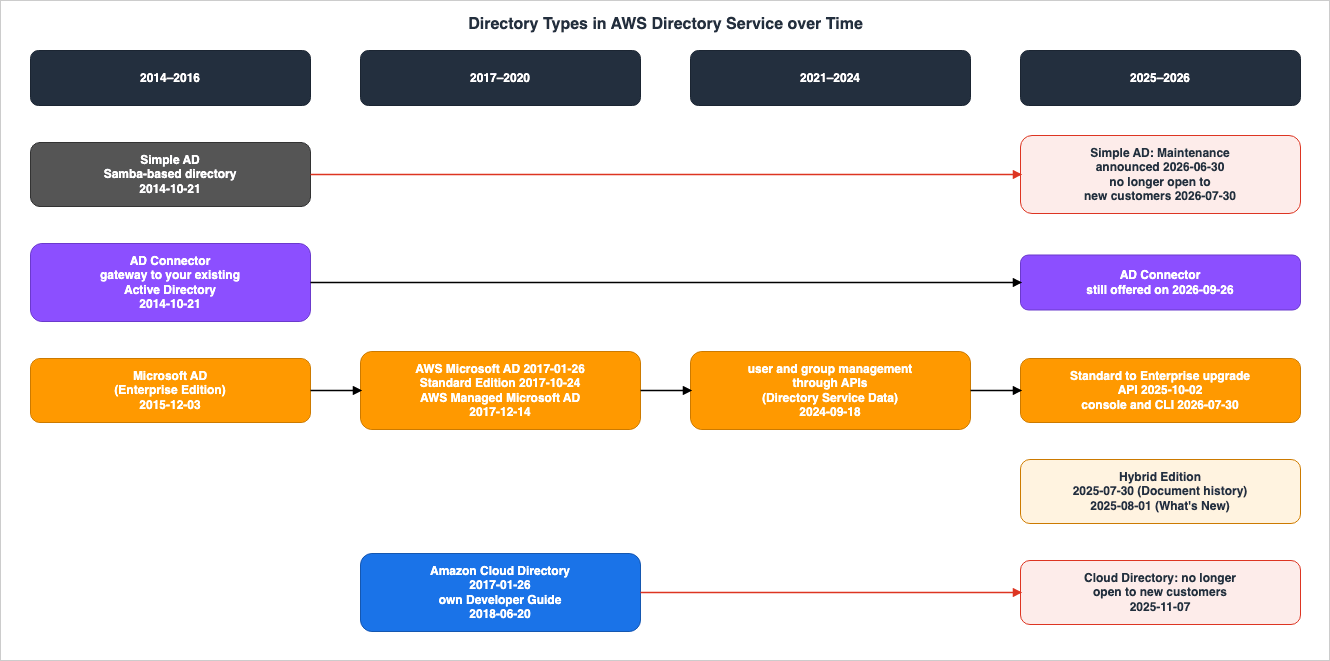
Background and Method of Creating AWS Directory Service Historical Timeline
This section first outlines the sources used for each entry in the timeline, explaining how names and dates were determined, and how the operational boundary was put into tables. All sources were accessed on September 26, 2026. For instances where information was taken from versions archived on the Internet Archive, the date of that archived version is noted.Names That Remain in Design Documents
The AWS Directory Service documentation contains the following names:Simple AD— A directory type based on Samba, launched on October 21, 2014. It has not accepted new customers since July 30, 2026.AD Connector— Launched on October 21, 2014, this is a type that acts as an intermediary to the customer's existing Active Directory.Microsoft AD— The original name forAWS Directory Service for Microsoft Active Directory (Enterprise Edition), launched on December 3, 2015. It has been calledAWS Microsoft ADsince January 26, 2017, andAWS Managed Microsoft ADsince December 14, 2017.Standard EditionandEnterprise Edition— These are editions of AWS Managed Microsoft AD. The initial version, launched in 2015, was originally called Enterprise Edition, while Standard Edition was added on October 24, 2017.Hybrid Edition— A new edition of AWS Managed Microsoft AD, added in 2025, that allows customers to extend their existing Active Directory domains to AWS.Amazon Cloud Directory— Launched on January 26, 2017, this is a directory for hierarchical data. It has not accepted new customers since November 7, 2025.
Each of these names, by themselves, doesn't indicate when they were introduced or their current status. Furthermore, who holds the top-level administrator rights of the domain differs by type. That is why this article places operational boundary tables alongside the timeline.
The Primary Sources This Article Used, and What It Made into Entries
This article utilized the following primary sources, and the following information was extracted from them:- What's New — As of September 26, 2026, there were 89 announcements tagged with
aws-directory-service. The oldest announcement dated January 15, 2015, and the most recent dated September 9, 2026. Announcements without this tag were obtained through a full-text search of What's New. The announcement regarding the service launch on October 21, 2014, and the announcement regarding Hybrid Edition on August 1, 2025, did not have this tag. - AWS News Blog — This refers to the article announcing the service launch on October 21, 2014.
- Administration Guide — This includes the Document history, pages listing each directory type, pages enumerating the items created by AWS when a directory is created, pages regarding administrator accounts, and pages detailing changes to Simple AD availability. ⚠ The Document history places the date in the last column of each row. For the two Simple AD rows, the
Simple AD availability changesrow is dated June 30, 2026, and theSimple AD is no longer open to new customers.row is dated July 30, 2026. - API Reference — The values for directory types and editions were verified using the
Valid Valuessection ofDirectoryDescription. - FAQ — The FAQ is not dated. Current FAQ information was quoted with the verification date. The FAQ from 2014 and 2017 was read from versions archived on the Internet Archive.
- Amazon Cloud Directory Developer Guide — This includes the Document history and pages detailing changes to availability.
The entries focus on the addition and termination of directory types, names, and events related to which party (AWS or the customer) is responsible for specific actions or ownership. Region additions, with the exception of entries related to initial availability and naming, have not been included. Network features such as IPv6, dual-stack, and AWS PrivateLink, as well as integrations with other services, are also not included. Pricing changes have also been omitted. These criteria produced 29 entries. In other words, please note that the items on this timeline are not all updates to AWS Directory Service features, but are representative updates that I have picked out.
Names Are Taken from the Sources of That Day
The names used in this article were taken from the body of the What's New announcements for each day. In the bodies of announcements with theaws-directory-service tag, the name changed as follows:- From 2015-12-03:
AWS Directory Service for Microsoft Active Directory (Enterprise Edition), also referred to as Microsoft AD - From 2017-01-26:
AWS Directory Service for Microsoft Active Directory (Enterprise Edition), known as AWS Microsoft AD - From 2017-12-14:
AWS Directory Service for Microsoft Active Directory, also known as AWS Managed Microsoft AD
In the bodies of the announcements for this tag prior to 2017-12-14, the term
AWS Managed Microsoft AD does not appear at all, even on the verification date. This article has not found any evidence that new names were retroactively applied to the body of the What's New announcements.⚠ Conversely, the Document history of the Administration Guide uses later names to describe entries from the past. For example, the entry dated 2015-11-17 is named:
AWS Managed Microsoft ADThe description for this entry reads:
Added content about AWS Managed Microsoft AD and combined guides into a single guide. This date precedes the What's New announcement from 2015-12-03, and this name does not appear in the body of any announcements for the tag prior to 2017-12-14. Therefore, this article has used names from the What's New announcements to label entries from 2015 to 2017.⚠ On the verification date, the What's New announcement from 2015-12-03 is inaccessible via the current URL. The URL redirects to
https://aws.amazon.com/about-aws/. This article consulted the version archived by the Internet Archive on 2015-12-07. The version archived by the Internet Archive on 2022-12-05 also contains the same content. Similarly, the announcement from 2018-10-25 regarding security event logs redirects, so this article consulted the version archived by the Internet Archive on 2019-12-08.Conflicting Dates for the Same Events
This article does not consolidate events with differing dates from various sources into a single date, nor does it attempt to determine which date is correct. The types of date discrepancies, and how to decide which date to record, are covered in Where the AWS Primary Sources Disagree About Launch Dates.For events with a What's New announcement, the date is based on the announcement's
Posted on date. For events without such an announcement, the date is taken from the date listed in the corresponding document. When different documents provide different dates for the same event, the following approach was used.- Launch: The What's New announcement and the Document history entry for
New guideare both dated October 21, 2014. The AWS News Blog article was published at 23:33 Pacific Time on October 21, 2014, which corresponds to October 22, 2014, in UTC. This article reflects the What's New date. The date for the Directory Service entry under AWS History and Timeline is also October 21, 2014.
- Hybrid Edition: The Document history is dated July 30, 2025, and What's New is dated August 1, 2025. Because these dates relate to a central event for this article, the entry has been split into two rows.
- Change from Standard Edition to Enterprise Edition: There are two announcements in What's New. The announcement dated October 2, 2025, details changes related to the
UpdateDirectorySetupAPI, while the announcement dated July 30, 2026, describes changes through the console, AWS CLI, and API. Since these are separate events, the entry has been split into two rows.
- Other: For Microsoft AD (Document history: November 17, 2015; What's New: December 3, 2015), adding domain controllers (Document history: June 30, 2017; What's New: July 6, 2017), separating Cloud Directory documentation (Cloud Directory Developer Guide: June 20, 2018; Administration Guide: June 21, 2018), directory sharing (Document history: September 25, 2018; What's New: September 26, 2018), and the announcements that Cloud Directory would close to new customers (Cloud Directory Developer Guide: October 7, 2025; Service Availability Updates: October 13, 2025), both dates are listed within a single entry.
How to Read the Operational Boundary Table
This article presents tables that, alongside a timeline, list items managed by AWS and those under the customer's control, categorized by type and era. The tables are located in the Current Overview section. Each table consists of four columns, mirroring the structure of AWS History and Timeline regarding AWS CloudHSM.- Era — The type and period. It includes the name of the era and its start date.
- What AWS operates — Contains only items that AWS itself says AWS does, manages, or holds. This also includes accounts that AWS holds in the directory.
- What you control — Includes only items that AWS itself says the customer holds, does, or is responsible for.
- Where AWS says so — Indicates the document where the information is found. For Internet Archive versions, it specifies the date the version was archived.
For cells where primary sources provide no information, the text "The source does not say." is used. Before adding this text, it is essential to thoroughly search the referenced documents using the five terms operate, manage, control, access, and responsib to ensure there is no statement contradicting the entry. No information was extrapolated from other rows or different eras. In the tables presented in this article, every cell contains a reference to a statement from a primary source. Cells that were already filled in were also searched using the same five terms, and any additional details found in the documents were incorporated into the cell. AWS History and Timeline regarding Amazon Verified Permissions and Cedar also lays out the operational boundary in the same four columns.
Topics Covered in Other Articles
This article does not cover the following topics:- Choosing a directory and how to join an EC2 instance to a domain — Covered in Sections 8 and 9 of Running Windows Server Workloads on AWS.
- The history of Active Directory itself — Covered in Microsoft Identity History and Timeline.
- How to use AD Connector and other directories as an identity source for IAM Identity Center — Covered in AWS IAM Identity Center Complete Setup Guide.
- Terminology related to the lifecycle stages of services — Terms such as Maintenance, Sunset, and Full Shutdown are covered in AWS Service Lifecycle States. Information on the Maintenance of Simple AD and Cloud Directory can also be found in AWS Retired Services History and Timeline.
This article also does not cover pricing or the costs associated with different editions.
AWS Directory Service Historical Timeline (Updates from October 21, 2014)
The tables for the following four eras represent the core timeline. Each table has the following columns. All references were accessed on September 26, 2026.- Date — For announcements listed under What's New, the date refers to the
Posted ondate. For events without a specific announcement, the date is the date in the source given in the row. - Name on That Date — The name used in the document for that date. The spelling from the document is reproduced as is.
- What Happened — A description of the event. If a name was subsequently changed, the current name is noted at the end.
- Source — The document that provides the basis for this entry. For versions archived on the Internet Archive, the archived date is listed.
Index:
- 2014–2016 - The period when the service began with Simple AD and AD Connector, and Microsoft AD was added.
- 2017–2020 - The period when Cloud Directory and Standard Edition were added, and the name became AWS Managed Microsoft AD.
- 2021–2024 - The period when customers gained the ability to change directory settings and to manage users and groups through APIs.
- 2025–2026 - The period when Hybrid Edition was added, and Cloud Directory and Simple AD stopped accepting new customers.
* You can sort the table by clicking on the column name.
2014–2016 — Simple AD, AD Connector, and Microsoft AD
During the initial three years, three directory types became available. In 2014, these were Simple AD, which provided a directory based on Samba, and AD Connector, which served as a bridge to customers' existing directories. In 2015, Microsoft AD was added, in which AWS operates Windows Server domain controllers.| Date | Name on That Date | What Happened | Source |
|---|---|---|---|
| 2014-10-21 | AWS Directory Service (types: Simple AD and AD Connector) | Launched. The announcement described it as a managed service that allows customers to either connect to their existing on-premises Microsoft Active Directory or create a standalone directory within AWS. Examples using Amazon WorkSpaces and Amazon Zocalo were provided. A News Blog article described AD Connector as a gateway technology that serves as a cloud proxy to your existing directory and Simple AD as a directory based on Samba. The same article noted that creating an AD Connector requires the customer to create an account within their existing directory that possesses the necessary permissions to handle lookups, authentication, and domain join requests. | Introducing AWS Directory Service / AWS News Blog / Document history |
| 2015-05-14 | AWS Directory Service | Simple AD and AD Connector could now be created and configured using APIs. The announcement stated that API operations could be recorded using CloudTrail, and that permissions for performing these actions can be controlled via an AWS IAM policy. | Introducing APIs and CloudTrail Support for AWS Directory Service |
| Date | Name on That Date | What Happened | Source |
|---|---|---|---|
| 2015-12-03 | AWS Directory Service for Microsoft Active Directory (Enterprise Edition) / Microsoft AD | Microsoft AD was added. The announcement explained that it connects two domain controllers running Windows Server 2012 R2 to the customer's VPC, and stated what AWS does as Host monitoring and recovery, data replication, snapshots, and software updates are automatically configured and managed for you. The Document history has a documentation row dated 2015-11-17. ⚠ On the verification date, this announcement is not accessible at the current URL. This article read the version archived by the Internet Archive. Current name: AWS Managed Microsoft AD (Enterprise Edition). | Announcing Managed Microsoft Active Directory in the AWS Cloud (Internet Archive, 2015-12-07) / Document history |
| 2016-04-07 | Microsoft AD | It has become easier to configure trust relationships between Microsoft AD and on-premises Active Directory from the Directory Service console. The announcement explained that trust relationships allow customers to create a resource domain within their Amazon VPC, and described the role of the on-premises directory as Your on-premises directory can manage and provided access and authentication to these resources. | Announcing Simplified Trust Configuration for AWS Directory Service |
| 2016-11-14 | Microsoft AD | Customers can now extend the schema for Microsoft AD. Customers can upload LDIF files through the console or SDK. The announcement notes that Applications that require elevated permissions, such as Enterprise or Domain Admins, might not be supported. | Add more application support to your Microsoft AD directory by extending the schema |
2017–2020 — Cloud Directory, Standard Edition, and the Name AWS Managed Microsoft AD
In 2017, Cloud Directory and Standard Edition were added, and the name changed from AWS Microsoft AD to AWS Managed Microsoft AD. In 2018, customers became able to grant administrative permissions to users of their existing Active Directory. The documentation for Cloud Directory was separated from the Administration Guide.| Date | Name on That Date | What Happened | Source |
|---|---|---|---|
| 2017-01-26 | Amazon Cloud Directory | Amazon Cloud Directory became generally available. The announcement described it as a directory for data with multiple dimensions of hierarchy, such as organizational charts, course catalogs, and device registries. The announcement includes the tag aws-directory-service. The Administration Guide's Document history notes an entry for this date: Added content about a new directory type. ⚠ On the verification date, the directory type values in the API Reference do not include Cloud Directory. | Amazon Cloud Directory Now Generally Available / Document history / DirectoryDescription |
| 2017-01-26 | AWS Microsoft AD | The name AWS Microsoft AD appeared in announcements tagged with aws-directory-service. Within announcements tagged with aws-directory-service, the earliest mention of this name appears in the Asia Pacific (Seoul) Region announcement of this date. The announcement states: AWS Directory Service for Microsoft Active Directory (Enterprise Edition), known as AWS Microsoft AD. | AWS Directory Service for Microsoft Active Directory (Enterprise Edition) is now available in the Asia Pacific (Seoul) Region |
| 2017-07-06 | AWS Microsoft AD | Customers can now add domain controllers. The announcement states what AWS does as AWS provides automated software updates, security patching, and failover as part of the service. The Document history includes an entry dated 2017-06-30. | Increase the Redundancy and Performance of Your AWS Directory Service for Microsoft Active Directory by Deploying Additional Domain Controllers / Document history |
| 2017-10-24 | AWS Directory Service for Microsoft Active Directory (Standard Edition) / AWS Microsoft AD (Standard Edition) | The Standard Edition was introduced. The announcement describes the Standard Edition as a managed Microsoft Active Directory optimized for small and medium-sized businesses, and notes that it can create a trust relationship with the customer's on-premises Active Directory. Current name: AWS Managed Microsoft AD (Standard Edition). | Introducing AWS Directory Service for Microsoft Active Directory (Standard Edition) |
| 2017-12-14 | AWS Managed Microsoft AD | The name AWS Managed Microsoft AD appeared in announcements tagged with aws-directory-service. Within announcements tagged with aws-directory-service, this name appears earliest in the title and body of the Asia Pacific (Mumbai) Region announcement of this date. The announcement states: AWS Directory Service for Microsoft Active Directory, also known as AWS Managed Microsoft AD. | AWS Managed Microsoft AD Regional Expansion |
| Date | Name on That Date | What Happened | Source |
|---|---|---|---|
| 2018-03-08 | AWS Managed Microsoft AD | Customers can now grant administrative permissions to users from their existing Active Directory within AWS Managed Microsoft AD. The announcement states: You can now grant administrative permissions to users from your existing Microsoft Active Directory (AD) by adding these users to the new AWS delegated AD security groups in AWS Managed Microsoft AD. The same day's entry in the Document history indicates that it included a list of AWS delegated groups that can be assigned to on-premises users. | AWS Managed Microsoft AD Administrative Enhancements / Document history |
| 2018-06-20 | Amazon Cloud Directory | Cloud Directory documentation was moved from the Administration Guide to a new Developer Guide. The Cloud Directory Developer Guide's Document history states: Transferred all existing Cloud Directory content from the Directory Service Admin Guide to this new Amazon Cloud Directory Developer Guide to more directly map to customer needs. The same move is documented in the Administration Guide's Document history, in an entry dated 2018-06-21. | Cloud Directory Document history / Document history |
| 2018-09-26 | AWS Managed Microsoft AD | It is now possible to share a single directory across multiple AWS accounts. The announcement states: enables you to share a single directory with multiple AWS accounts. The Document history has a documentation row dated 2018-09-25. On the verification date, the directory type values in the API Reference include SharedMicrosoftAD. | Easily Deploy Directory-Aware Workloads in Multiple AWS Accounts and VPCs by Sharing a Single AWS Managed Microsoft AD / DirectoryDescription / Document history |
| 2018-10-25 | AWS Managed Microsoft AD | Customers can now forward directory security event logs to Amazon CloudWatch Logs. The announcement explains the purpose as providing transparency of the security events in your directory. The Administrator account and group permissions page in the Administration Guide, on the verification date, states that this forwarding can be used to monitor administrator account activity. ⚠ On the verification date, this announcement was not accessible at the current URL. This article read the version archived by the Internet Archive. | Easily Monitor Security Events of Your AWS Managed Microsoft AD Using Amazon CloudWatch Logs (Internet Archive, 2019-12-08) / Administrator account and group permissions |
| 2020-11-19 | AWS Managed Microsoft AD | It is now possible to replicate Enterprise Edition directories across multiple AWS Regions. The announcement states that when the customer adds a Region, AWS Managed Microsoft AD will configure networking between the Regions, deploy domain controllers, and replicate directory data. The announcement also states: You do not have to install software, and AWS handles all patching and software updates. | AWS Managed Microsoft AD adds automated multi-region replication |
2021–2024 — Configuring Directories and Managing Users and Groups
During the period of 2021–2024, customers gained the ability to configure directory security settings, and were enabled to manage users and groups through both the API and the console. AWS announced that the operating system for the domain controllers would be updated to Windows Server 2019.| Date | Name on That Date | What Happened | Source |
|---|---|---|---|
| 2022-06-20 | AWS Managed Microsoft AD | Customers can now change directory settings. For example, they can enable or disable features such as RC4 encryption and TLS 1.0. The announcement states you can update your directory settings and AWS Managed Microsoft AD applies the updated settings to all domain controllers, automatically. | AWS Managed Microsoft AD enables flexible control over directory settings |
| 2022-10-14 | AWS Managed Microsoft AD | New directories now run on Windows Server 2019. Existing directories can be updated at the customer's convenience. The announcement states starting in March 2023, AWS will begin automatically updating any AWS Managed Microsoft AD directories to Windows Server 2019. | AWS Managed Microsoft AD is now available on Windows Server 2019 |
| 2024-09-18 | AWS Managed Microsoft AD / AWS Directory Service Data | Customers can now create, view, update, and delete users and groups using the AWS CLI, API, and console. A corresponding entry in the Document history refers to this as "AWS Directory Service Data." The Administration Guide on the verification date indicates that enabling AWS Directory Service Data creates accounts used exclusively by AWS services in the AWS Reserved OU. | AWS Directory Service adds user and group management using APIs and Console / Document history / What gets created with your AWS Managed Microsoft AD |
2025–2026 — Hybrid Edition, and Cloud Directory and Simple AD Closing to New Customers
In 2025, the Hybrid Edition, which allows existing Active Directory domains to be extended to AWS, became available. From 2025 to 2026, Cloud Directory and Simple AD stopped accepting new customers. Additionally, two ways were introduced to change from the Standard Edition to the Enterprise Edition.| Date | Name on That Date | What Happened | Source |
|---|---|---|---|
| 2025-07-30 | AWS Managed Microsoft AD (Hybrid Edition) | The Document history in the Administration Guide indicates that Hybrid Edition was added on this date. The entry states that Hybrid Edition allows customers to connect their self-managed Active Directory with AWS Managed Microsoft AD. A separate entry for the same date added the service-linked role AWSServiceRoleForDirectoryService, with a description stating, Policy allows AWS to monitor customer managed domain controllers. | Document history |
| 2025-08-01 | Hybrid Edition for AWS Managed Microsoft AD | The What's New section announced the availability of Hybrid Edition on this date. The announcement stated that Hybrid Edition allows existing Active Directory domains to be extended to AWS, and included the statement, The service preserves all your existing access controls and group policies without requiring permission reconfiguration. Regarding administrator credentials, it stated, You can also securely share administrator credentials for Hybrid Edition using AWS Secrets Manager, ensuring no human visible credentials. | AWS Directory Service launches Hybrid Edition for Managed Microsoft AD |
| 2025-10-02 | Managed Microsoft AD | Customers can now change from Standard Edition to Enterprise Edition using the UpdateDirectorySetup API. The announcement stated that this method eliminates the need for support tickets, and noted that snapshots are automatically created before the change, and domain controllers are updated one at a time. | AWS Directory Service enables API-driven Managed Microsoft AD edition upgrades |
| 2025-10-13 | Amazon Cloud Directory | An announcement stated that Cloud Directory would be entering Maintenance. Service Availability Updates indicated that services entering Maintenance would not accept new customers starting on 2025-11-07. The Document history in the Cloud Directory Developer Guide also stated the same information for an entry dated 2025-10-07. | AWS Service Availability Updates (2025-10-13) / Cloud Directory Document history |
| 2025-11-07 | Amazon Cloud Directory | Cloud Directory is no longer accepting new customers. The availability change page in the Developer Guide states that customers with data in Cloud Directory can continue to use Cloud Directory as normal, including creating new directories. ⚠ The same Developer Guide, on the verification date, states at the beginning of each page that end of support is scheduled for 2027-07-24 (see below). | Amazon Cloud Directory availability change |
| Date | Name on That Date | What Happened | Source |
|---|---|---|---|
| 2026-04-01 | AWS Managed Microsoft AD | Multi-Region replication is now available for Opt-In Regions. The announcement states that AWS Managed Microsoft AD handles networking between regions, placing domain controllers in separate Availability Zones within each Region, and replicating directory data. It excludes the Middle East (UAE) and Middle East (Bahrain) Regions. | AWS Managed Microsoft AD adds Multi-Region replication for Opt-In regions |
| 2026-04-20 | AWS Managed Microsoft AD | All AWS Managed Microsoft AD directories now operate at Windows functional level 2016. The announcement states, The upgrade to Windows functional level 2016 has been applied automatically to all existing AWS Managed Microsoft AD directories. It excludes the Middle East (UAE) and Middle East (Bahrain) Regions. | AWS Managed Microsoft AD is now available on Windows functional level 2016 |
| 2026-05-06 | AWS Managed Microsoft AD | Security settings for directories have been enhanced with configurations aligned to DISA STIG standards. The announcement describes the division between the customer and AWS as declaring their desired configuration and letting AWS implement and persist these configurations. | AWS Directory Service expands directory security settings with STIG-aligned controls for Managed AD |
| 2026-06-30 | AWS Directory Service – Simple AD | A Maintenance announcement was issued for Simple AD. Service Availability Updates indicate that services entering Maintenance will no longer accept new customers starting July 30, 2026. The Document history row Simple AD availability changes, dated the same day, states that Existing customers retain full functionality. | AWS Service Availability Updates (2026-06-30) / Document history |
| 2026-07-30 | Simple AD | Simple AD is no longer accepting new customers. The Document history states, Simple AD is no longer open to new customers. The Simple AD availability changes page states that for existing customers, you can continue to create new Simple AD directories. | Document history / Simple AD availability changes |
| 2026-07-30 | AWS Managed Microsoft AD | Customers can now upgrade from the Standard Edition to the Enterprise Edition using the console, AWS CLI, and API. The announcement clarifies that this change does not require migrating to a new directory or rejoining existing workloads to a domain. ⚠ The URL path for the announcement is /2026/08/, but the Posted on date is listed as 2026-07-30. | AWS Managed Microsoft AD now supports Standard to Enterprise Edition upgrade |
Current Overview, Functions, Features of AWS Directory Service
This section outlines the current state of AWS Directory Service, including its types, the operational boundary, and any old names or statements that remain as of the verification date.AWS Directory Service on the Verification Date
On the verification date, the AWS Directory Service type is defined in the API Reference'sDirectoryDescription as having four possible values: SimpleAD, ADConnector, MicrosoftAD, and SharedMicrosoftAD. The edition can take on three values: Enterprise, Standard, and Hybrid. According to the Administration Guide, each type is structured as follows:- AWS Managed Microsoft AD — This provides Microsoft Active Directory, running on Windows Server 2019, as a managed service by AWS. Both the Standard Edition and Enterprise Edition allow you to create new domains on AWS. The Administration Guide states that the Standard Edition is intended for approximately 30,000 directory objects, while the Enterprise Edition is designed for approximately 500,000. Both of these figures are estimates. The Hybrid Edition extends your existing, self-managed Active Directory to AWS.
- AD Connector — This acts as a gateway, forwarding directory requests to your on-premises Microsoft Active Directory without caching information in the cloud. It is available in two sizes: small and large.
- Simple AD — This is a standalone directory running on a Samba 4 Active Directory-compatible server. It is also available in two sizes: small and large. It does not accept new customers.
- Amazon Cloud Directory — This is covered in a separate Developer Guide, rather than the Administration Guide. It does not accept new customers.
Section 9 of Running Windows Server Workloads on AWS discusses how to choose the appropriate directory type.
The Operational Boundary — What AWS Does and What Is in the Customer's Hands, by Type and Era
This section presents the operational boundary, categorized by type and era, outlining what AWS handles and what the customer holds. The structure of the columns in the tables follows the conventions described in the Background and Method section.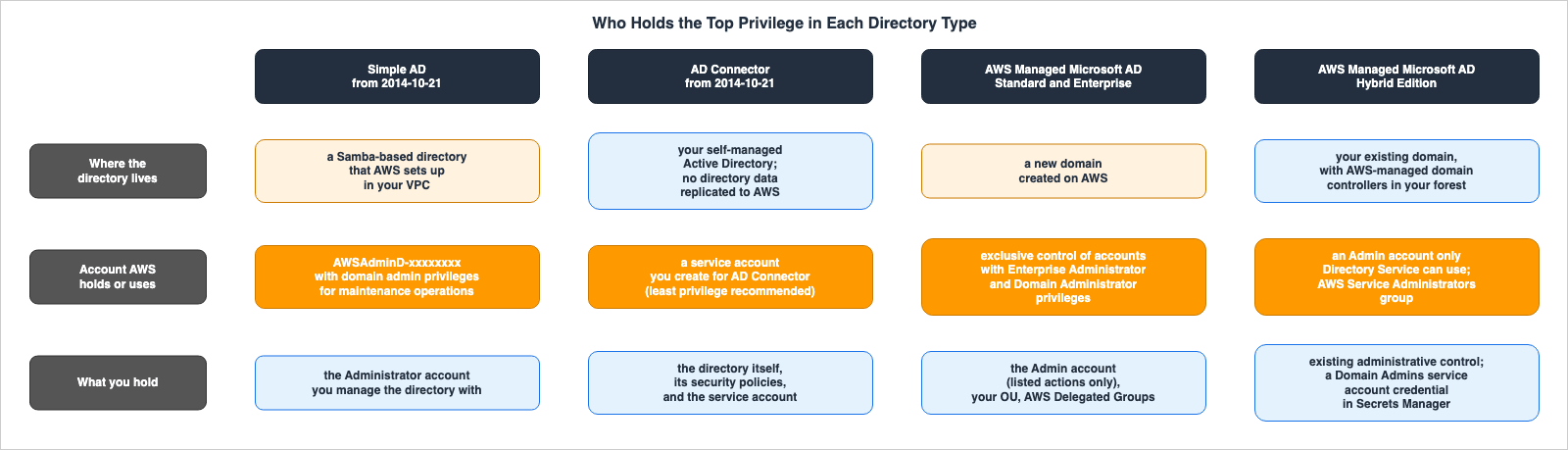
| Era | What AWS operates | What you control | Where AWS says so |
|---|---|---|---|
Simple AD (from 2014-10-21; not accepting new customers since 2026-07-30) | The Administration Guide states that Directory Service performs the following tasks on your behalf: setting up a directory based on Samba within your VPC, and creating an account named AWSAdminD-xxxxxxxx with domain admin privileges, which is used for maintenance operations such as taking directory snapshots and FSMO role transfers. Directory Service stores the credentials for this account. The same page notes that backups are taken automatically once per day, and that a failed domain controller is automatically replaced in the same Availability Zone. | You determine the password for the directory administrator account, which has the username Administrator, when it is created. The Administration Guide states that you use this account to manage the directory, and that AWS Directory Service does not store this password. The Administration Guide also lists scenarios where the AWSAdminD-xxxxxxxx account is removed from the directory, removed from the Domain Admins group, or disabled, stating that without this account, AWS Directory Service cannot perform its management functions. When the account is removed from the group or disabled, you are instructed to use Active Directory Users and Computers to restore it. | What gets created with your Simple AD / Troubleshooting Simple AD directory status messages |
AD Connector (from 2014-10-21) | AD Connector forwards directory requests to your Active Directory, without caching any information in the cloud. By default, AD Connector instances are deployed across two Availability Zones, and a failed instance is automatically replaced in the same Availability Zone. The Administration Guide states that the EC2 instances that comprise the directory operate outside of your AWS account and are managed by AWS. Creates security groups to attach to the directory's network interface, and may change these security groups without notice, based on functional and security requirements. A 2014 FAQ states that accounts you create beforehand are referred to as accounts with limited privileges, and that AD Connector uses these accounts to authenticate and connect to the domain controllers, relaying authentication, domain join, and lookup requests. | Your directory data is not synchronized or replicated to AWS; it remains within your Active Directory, which you manage. Existing security policies, such as password expiration and account lockout, continue to function as they always have. You create the service account that AD Connector uses. A 2014 FAQ and the Other Directory Types page on the verification date refer to this account as a non-administrator account. The Administration Guide on the verification date states that members of the Domain Admins group have sufficient permissions to connect, but that using a service account with the principle of least privilege is the best practice. The Administration Guide states that it is your responsibility to ensure that your directory remains compatible with Directory Service. | FAQ (Internet Archive, 2014-10-25) / Other Directory Types / AD Connector / Getting started with AD Connector / What gets created with your AD Connector / Best practices for AD Connector / Simple AD availability changes |
The following table details the Standard Edition and Enterprise Edition versions of the Microsoft AD lineage, which began in 2015.
| Era | What AWS operates | What you control | Where AWS says so |
|---|---|---|---|
Microsoft AD and AWS Microsoft AD (from 2015-12-03; Enterprise Edition) | Manages host monitoring and recovery, data replication, snapshots, and software updates. According to a 2017 FAQ, Microsoft AD does not permit customer actions that interfere with the service's management. Therefore, AWS does not provide Windows PowerShell access to the directory instance and restricts access to high-privilege directory objects, roles, and groups. Direct access to the domain controller host via Telnet, SSH, or Remote Desktop is also not permitted. | According to the 2017 FAQ, customers are assigned a single Organizational Unit (OU) and an administrator account delegated with management permissions for that OU. Customers can create user accounts, groups, and policies within that OU. Customers can extend the schema by uploading LDIF files. A 2016 announcement states that Microsoft AD may not support applications requiring high privileges, such as Enterprise Admins or Domain Admins. | Announcing Managed Microsoft Active Directory in the AWS Cloud (Internet Archive, 2015-12-07) / What's New (2016-11-14) / FAQ (Internet Archive, 2017-07-17) |
AWS Managed Microsoft AD Standard Edition and Enterprise Edition (from 2017-12-14) | Exclusively manages accounts with Enterprise Administrator and Domain Administrator privileges to perform operational management of the directory. This is documented in a version archived by the Internet Archive on 2019-08-23. The built-in Administrator password is automatically changed to a random password every 90 days. When issues cannot be resolved through automation, AWS may create accounts with limited-time Domain Administrator privileges and assign them to engineers; engineer actions are logged in the Windows event logs. AWS is responsible for the management and security of all objects in the AWS Reserved OU, as well as all objects in OUs and containers not delegated to the customer. Any changes made to the directory settings by the customer are applied to all domain controllers. With STIG settings, AWS implements and maintains the settings declared by the customer. | Holds the directory administrator account with the username Admin. The Admin account is only permitted to perform the actions listed in the Administration Guide and does not have permissions for directory-related actions outside the customer's OU. AWS owns the customer's OU, and the customer is granted Full Control over the objects within that OU. From 2018-03-08, the customer can add existing Active Directory users to AWS Delegated Groups, granting them management permissions. The FAQ consulted on the verification date states that in the Standard Edition and the Enterprise Edition, the customer does not have domain admin rights. The customer can forward security event logs to CloudWatch Logs to monitor the actions of the administrative accounts. The FAQ consulted on the verification date lists configuring password policies to meet PCI DSS requirements as an example of a customer responsibility. | Administrator account and group permissions / Admin Account (Internet Archive, 2019-08-23) / What gets created with your AWS Managed Microsoft AD / FAQ / What's New (2018-03-08) / What's New (2022-06-20) / What's New (2026-05-06) |
The final table applies to both the Hybrid Edition, added in 2025, and features common to all three editions.
| Era | What AWS operates | What you control | Where AWS says so |
|---|---|---|---|
AWS Managed Microsoft AD (Hybrid Edition) (from July 30, 2025 in the Document history; from August 1, 2025 in What's New) | Manages the underlying infrastructure of the domain controllers deployed in AWS. The Administration Guide states that the EC2 instances that comprise the directory operate outside of your AWS account and are managed by AWS. For hybrid directories, AWS periodically evaluates the directory. Directory Service uses the Admin account for the hybrid directory to manage the hybrid domain controllers, and only Directory Service can access that account. Creates groups in the AWS Reserved OU for administrative tasks on the hybrid domain controllers. Regarding one of these groups, AWS Service Administrators, the Administration Guide states that it provides unrestricted access to computers and domains, including the AWS Reserved OU. Prepares and maintains Group Policy Objects (GPOs) to be applied to the domain controllers. The customer is unable to delete, modify, or unlink these GPOs. | You retain administrative privileges for your existing Active Directory environment. Schema extensions are performed within your Active Directory and are then replicated to the AWS hybrid directory. To create a hybrid directory, you place the credentials of a service account, which is a member of your Active Directory's Domain Admins, into an AWS Secrets Manager secret. You provision two AWS Systems Manager nodes with administrator privileges for the SSM agent. | FAQ / Understanding AWS Managed Microsoft AD (Hybrid Edition) / What gets created with your hybrid directory / Hybrid directory prerequisites |
| Common to AWS Managed Microsoft AD Standard Edition, Enterprise Edition, and Hybrid Edition (on the verification date) | Provisions compute, storage, and memory resources and manages the underlying infrastructure. Prevents customer actions that could disrupt service management and restricts access to highly privileged directory objects, roles, and groups. Prohibits direct access to the domain controller hosts via Remote Desktop, PowerShell Remoting, Telnet, and SSH. Also prohibits installing monitoring agents on the domain controllers. | Select an edition and declare your requirements. If resources are insufficient, add more domain controllers. | FAQ / What gets created with your AWS Managed Microsoft AD / What gets created with your hybrid directory |
The tables show where the boundary moved and where it did not.
Firstly, with AWS Managed Microsoft AD's Standard Edition and Enterprise Edition, the level of control given to customers expanded. The FAQs from both 2017 and the verification date state that customers are assigned one Organizational Unit (OU) and an administrator account with delegated permissions to that OU. Furthermore, starting March 8, 2018, customers could add existing Active Directory users to AWS Delegated Groups. Then, on June 20, 2022, they gained the ability to modify directory settings, and on September 18, 2024, they could manage users and groups via API. On May 6, 2026, STIG (Security Technical Implementation Guide) settings were added, under which AWS implements and maintains the configuration that the customer declares.
Secondly, with Hybrid Edition, customers retained control over existing Active Directory management. The FAQ describes the difference from Standard Edition and Enterprise Edition as follows:
With Hybrid Edition, however, you maintain your existing administrative control over your existing AD environment,
while AWS still manages the underlying infrastructure of the domain controllers deployed in AWS
like how (Standard and Enterprise) editions are managed.
However, even with Hybrid Edition, AWS maintains an
Admin account used only by Directory Service and groups for administrative tasks in the customer's domain. The Administration Guide describes one of those groups, AWS Service Administrators, as follows:Hybrid directory specific complete unrestricted access to the computer/domain including the AWS Reserved OU.To create a hybrid directory, customers must provide credentials for a service account that is a member of the
Domain Admins group. Hybrid Edition does not provide customers with sole, elevated privileges. Instead, both the customer and AWS have elevated privileges in the same domain.What remained unchanged was who holds the top-level administrator privileges for Standard Edition and Enterprise Edition. Both the version of the Administration Guide archived by the Internet Archive on August 23, 2019, and the version on the verification date contain the following statement:
To perform operational management of your directory,
AWS has exclusive control of accounts with Enterprise Administrator and Domain Administrator privileges.
The version on the verification date also states, in a note on the same page,
AWS has exclusive control of the Domain Administrator and Enterprise Administrator privileged users and groups. Both the 2019 version and the version on the verification date also state AWS Domain Administrators have full administrative access to all domains hosted on AWS.This page does not separate the editions. Taking it together with the FAQ on the verification date, which states that customers of Standard Edition and Enterprise Edition do not have domain admin rights, this article placed the page's statements in the Standard Edition and Enterprise Edition row. The accounts and groups that AWS holds in Hybrid Edition are described on a separate page that lists what is created with a hybrid directory.
The boundaries for AD Connector and Simple AD diverge based on the directory's location. With AD Connector, the directory is the customer's existing Active Directory, and AD Connector uses a service account created by the customer. Both the 2014 FAQ and the Other Directory Types page on the verification date describe this account as being a non-administrator account, while the Administration Guide on the verification date calls for a service account with only the minimum privileges necessary. In Simple AD, AWS provides the directory in the VPC, and both the customer's
Administrator and AWS's maintenance account, AWSAdminD-xxxxxxxx, reside in the same directory.Old Names and Statements That Remain on the Verification Date
On the verification date of September 26, 2026, the following names and descriptions remained in the AWS documentation. All of them provide clues that can lead to identifying older naming conventions when cross-referencing with the documents at hand.| What | On the verification date | Where |
|---|---|---|
| The name for Microsoft AD on the Other Directory Types page | States AWS Directory Service for Microsoft Active Directory (Enterprise Edition), also known as Microsoft AD. This is the same name used in the What's New announcements from 2015 to 2016. | Other Directory Types |
| Regarding Simple AD on the Other Directory Types page | The page has Simple AD Q&A entries, but searching for no longer, new customer, maintenance, and availability found no statement that Simple AD does not accept new customers. | Other Directory Types |
| The Microsoft AD announcement from 2015-12-03 and the security event log announcement from 2018-10-25 | Both redirect to https://aws.amazon.com/about-aws/, preventing access to the announcement content. This was read from versions archived on the Internet Archive. | https://aws.amazon.com/about-aws/whats-new/2015/12/announcing-managed-microsoft-active-directory-in-the-aws-cloud/ / https://aws.amazon.com/about-aws/whats-new/2018/10/easily-monitor-security-events-of-your-aws-managed-microsoft-ad-using-amazon-cloudwatch-logs/ |
| The entry from 2015-11-17 in the Document history section of the Administration Guide | The name of the row is AWS Managed Microsoft AD. This name does not appear in the bodies of the tagged What's New announcements before 2017-12-14. | Document history |
| Cloud Directory end of support | Each page of the Developer Guide begins with the statement: Amazon Cloud Directory is no longer open to new customers, and will reach end of support on July 24, 2027. The availability change page archived by the Internet Archive on 2026-07-06 does not have this sentence, and the version archived on 2026-08-09 does. This article could not find a What's New announcement or a Service Availability Updates post that announces this date. The latest (top) row of the Developer Guide's Document history is dated 2025-10-07. | Amazon Cloud Directory availability change / Internet Archive, 2026-08-09 / Internet Archive, 2026-07-06 / Cloud Directory Document history |
Frequently Asked Questions about AWS Directory Service History
This section answers common questions about the history of AWS Directory Service.Can customers of AWS Managed Microsoft AD become Domain Admins?
In both the Standard Edition and Enterprise Edition, the answer is no. The Administration Guide states that AWS exclusively manages Domain Administrator and Enterprise Administrator privileged users and groups, and the FAQ on the verification date states that customers in these two editions do not have domain admin rights. Customers have anAdmin account, and the operations permitted for that account are limited to those listed in the Administration Guide. Customers can add users of their existing Active Directory to AWS Delegated Groups to grant them delegated administrative permissions. In the Hybrid Edition, customers retain their existing Active Directory administrative permissions.What changed with Hybrid Edition?
Hybrid Edition now allows you to extend your existing, self-managed Active Directory domain directly to AWS. While the Standard and Enterprise Editions create new domains within AWS, Hybrid Edition allows AWS domain controllers to become part of your existing forest. The FAQ states that customers retain administrative control over their existing Active Directory environment, while AWS manages the infrastructure supporting the domain controllers hosted within AWS. Conversely, AWS also holds anAdmin account, used exclusively by Directory Service, and groups for managing the domain controllers within your domain. Creating a hybrid directory requires credentials for a service account that is a member of the Domain Admins group. This functionality was added on July 30, 2025 (as noted in the Administration Guide's Document history) and August 1, 2025 (as noted in What's New).Can I still create Simple AD directories?
New customers cannot. On June 30, 2026, Simple AD was announced to move to Maintenance, and it has not accepted new customers since July 30, 2026. Existing Simple AD customers can continue to use the service. The page detailing the changes to Simple AD's availability states thatyou can continue to create new Simple AD directories for existing customers. The same page suggests AWS Managed Microsoft AD and AD Connector as alternative options.What happened to Amazon Cloud Directory?
General availability began on 2017-01-26, and on June 20, 2018, the documentation was moved from the Directory Service Administration Guide to a separate Developer Guide. It was announced in the Service Availability Updates on October 13, 2025, that it would move to Maintenance, and it stopped accepting new customers as of November 7, 2025. The Developer Guide, on the verification date, states on each page that support will end on July 24, 2027, although this article could not find a What's New announcement or a Service Availability Updates post announcing that date. On the verification date, Cloud Directory is not among the directory type values in the Directory Service API.Why do documents say Microsoft AD or AWS Microsoft AD?
Both terms, "Microsoft AD" and "AWS Microsoft AD," refer to previous names for the current AWS Managed Microsoft AD. According to the What's New documentation, it was called "Microsoft AD" from December 3, 2015, "AWS Microsoft AD" from January 26, 2017, and "AWS Managed Microsoft AD" from December 14, 2017. The Other Directory Types page on the verification date still uses the term "Microsoft AD." In contrast, the Document history section of the Administration Guide lists an entry dated November 17, 2015, using the later name, "AWS Managed Microsoft AD."Summary
AWS Directory Service began on October 21, 2014, with Simple AD, based on Samba, and AD Connector, which acts as an intermediary to customers' existing Active Directory. On December 3, 2015, Microsoft AD was added as an Enterprise Edition, followed by the Standard Edition on October 24, 2017. The name of this lineage has evolved through Microsoft AD, AWS Microsoft AD, and AWS Managed Microsoft AD. Hybrid Edition was added in 2025, while Amazon Cloud Directory stopped accepting new customers on November 7, 2025, and Simple AD stopped accepting new customers on July 30, 2026.⇒ Who holds the top-level administrator rights varies depending on the type. In the Standard and Enterprise Editions, AWS exclusively manages accounts with Domain Administrator and Enterprise Administrator privileges. In the Hybrid Edition, customers retain administrative control over their existing Active Directory while AWS also holds accounts and groups in the same domain for management purposes, and with AD Connector, the directory itself is on the customer's side.
⇒ While administrative control has been expanded for customers, the top-level administrators for the Standard and Enterprise Editions remain unchanged. Starting in 2018, customers gained control over delegated groups; in 2022, they gained control over directory settings; and in 2024, they gained the ability to manage users and groups via APIs. The statement that AWS exclusively manages accounts with Enterprise Administrator and Domain Administrator privileges is present in both the version archived in 2019 and the version on the verification date.
⚠ Names and dates need to be checked source by source. The Administration Guide's Document history writes the 2015 row with a later name, and the dates for Hybrid Edition vary across different materials. All information is current as of September 26, 2026.
This timeline will be updated as AWS Directory Service continues to evolve.
References:
Tech Blog with curated related content
Written by Hidekazu Konishi